Nano Banana 2.1 vs Pro vs GPT Image 2.5: 9-Prompt Test and Cost
Same 9 prompts, one draw each at 1K: Pro and GPT Image 2.5 matched the requested wording; Nano Banana 2.1 slipped on text but costs a quarter of Pro.
On this page
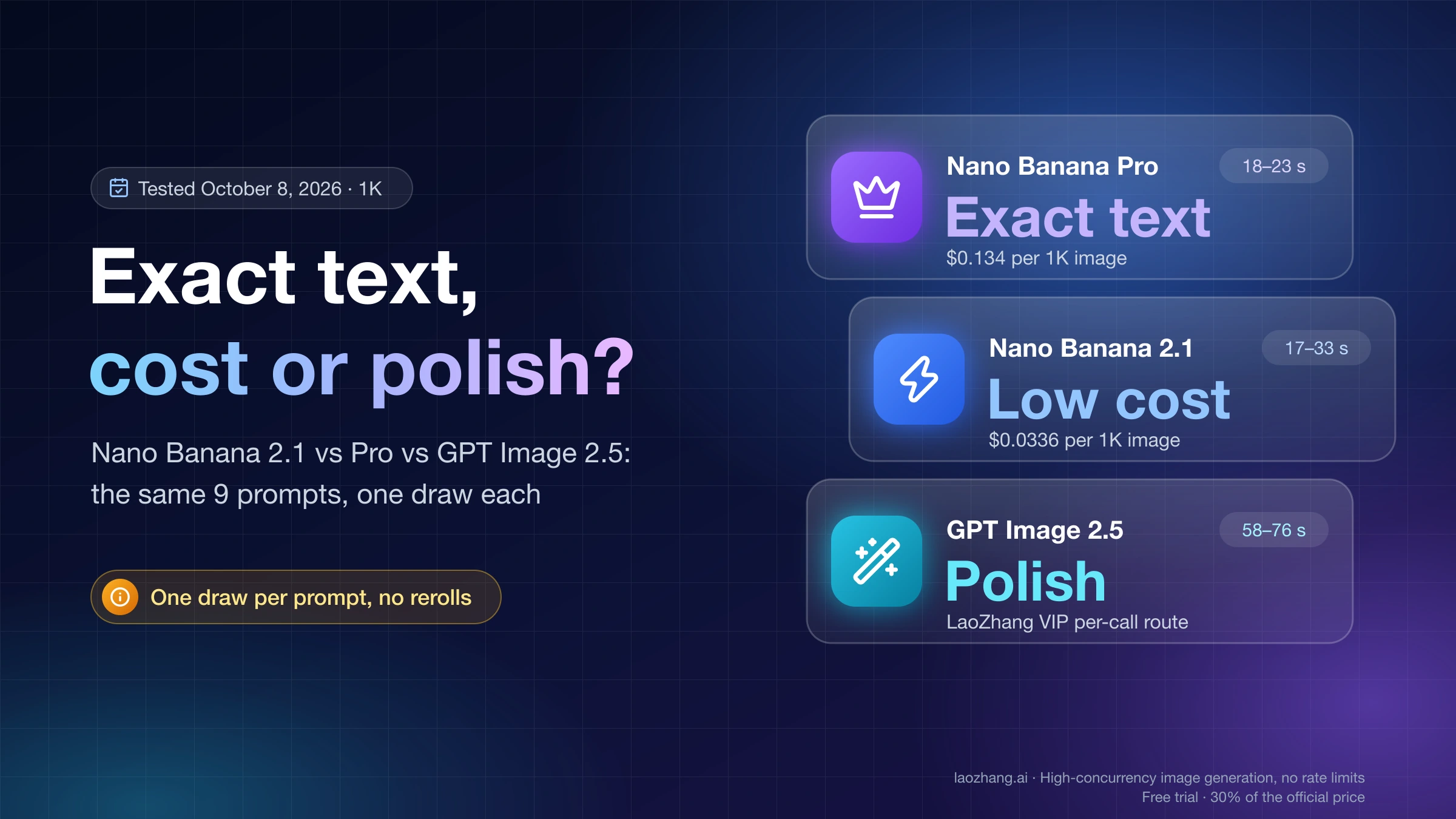
For exact wording inside an image, run Nano Banana Pro or GPT Image 2.5 first. For cheap, fast drafts, infographics, product shots and simple edits, run Nano Banana 2.1. That split comes from a same-prompt test on October 8, 2026: eight text-to-image prompts plus one shared edit, one draw per model, 1K output, no rerolls. Pro and GPT Image 2.5 reproduced the requested wording and prices on a poster, a Japanese shop sign and a Chinese menu, apart from one Chinese character that all three models drew in its Japanese form. Nano Banana 2.1 got the words right but restyled a subline, added a stray word to the sign and wrote a price as 三十八元 instead of 38元. On the infographic, the counting prompt, the product photo, the portrait and the recolor edit, all three were usable.
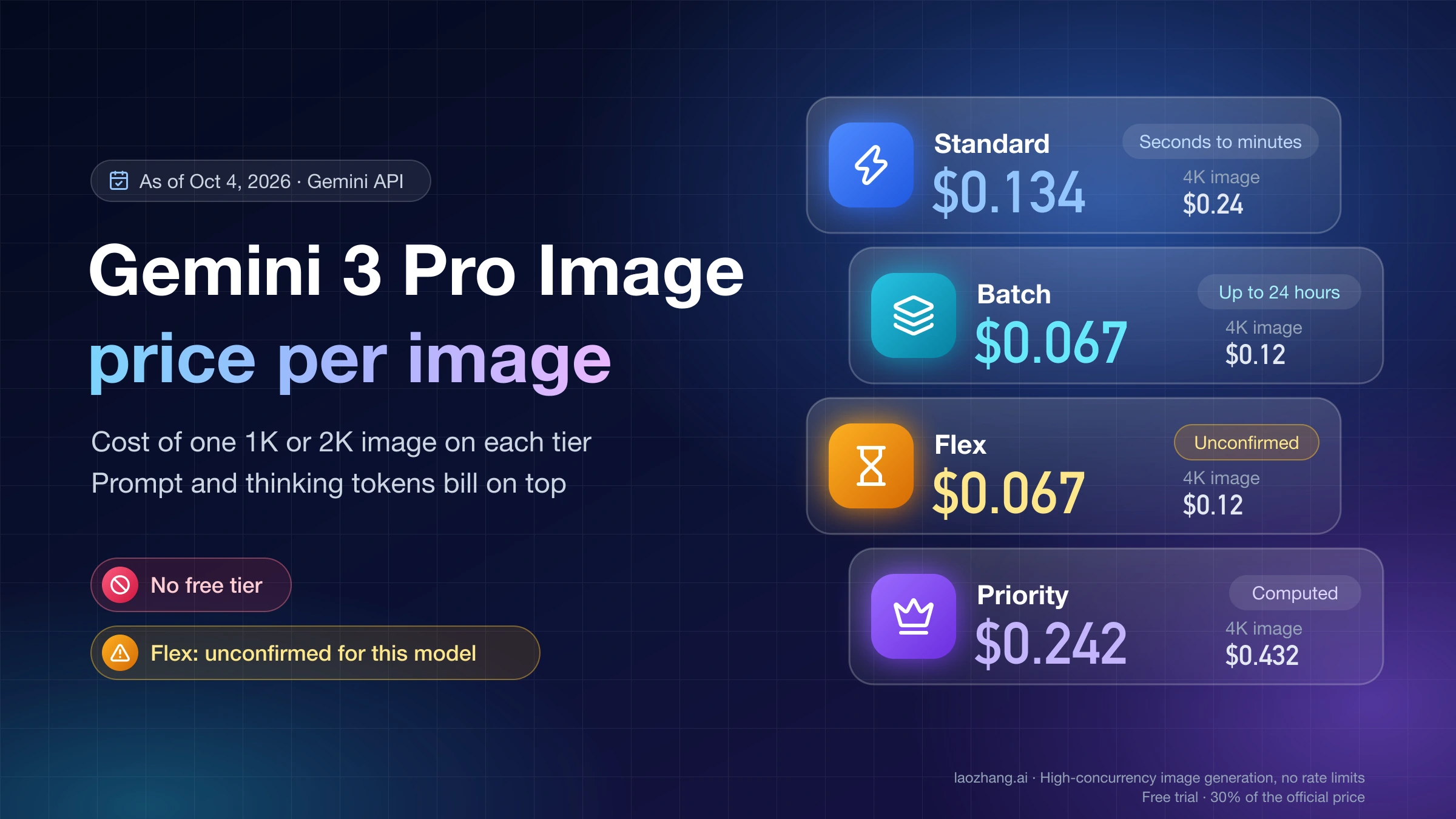
Price and wait time point the other way. At Google's list price a 1K image costs $0.0336 on Nano Banana 2.1 and $0.134 on Pro, so 2.1 is about a quarter of the price before thinking tokens. In the test, 2.1 and Pro returned images in 17–33 seconds, while GPT Image 2.5 took 58–76 seconds.
Two limits apply to everything below. Each model drew each prompt once, so the results show what a model did on one try, not how often it gets it right. And GPT Image 2.5 (the Sunburst variant) ran through LaoZhang API's VIP per-call route, gpt-image-2.5-sunburst-vip at $0.03 per call, not through OpenAI's API directly. Its output and timing may differ from an OpenAI-direct call.
Which to run first: Pro for exact text, 2.1 for cost, GPT for polish
| Job | Run first | What the test showed | Watch for |
|---|---|---|---|
| Posters, signs, menus where every character must match | Nano Banana Pro | Requested wording and prices on all three text prompts, 18–23 s per image | $0.134 per 1K image at Google's price; check CJK character forms yourself |
| Ad visuals and key art where the look matters most | GPT Image 2.5 Sunburst | Requested wording and prices, plus the strongest poster layout | About a minute per image on the VIP route; it added a tagline and extra background signs nobody asked for |
| Infographics and explainers | Nano Banana 2.1 | Five correct steps in the right order with clear labels | It invented extra fields in a weather-app mockup; Google lists blurry small text at 1K as a known limit |
| Product shots and portraits | Nano Banana 2.1 on price, GPT Image 2.5 for a styled look | All three realistic | GPT's grading is more dramatic, which may not suit a plain catalog |
| Recolor one object, keep the scene | Any of the three | All kept the composition, earbuds, stone and light | 2.1 and Pro also turned the dark inner lid white; GPT kept it dark |
| High-volume drafts | Nano Banana 2.1 | 17–33 s per image, 9 of 9 calls succeeded first try | On the Gemini API, thinking tokens are billed on top of the image |
If you need the right words in one draw and can pay more per image, Pro is the safest first choice from this test: it matched the requested wording and returned in about 20 seconds. If you plan to proofread and reroll anyway, 2.1's lower price buys you two to three attempts for the cost of one Pro image.
How the 9-prompt test was run (and what one draw can't tell you)
All 27 calls went through LaoZhang API on October 8, 2026:
- Nano Banana 2.1 (
gemini-nano-banana-2.1) and Nano Banana Pro (gemini-3-pro-image) through the Gemini-nativegenerateContentendpoint, aspect ratio 1:1, image size 1K, default thinking. - GPT Image 2.5 Sunburst through
/v1/images/generationsand/v1/images/editswith the modelgpt-image-2.5-sunburst-vip, size 1024×1024, qualityhigh.
The eight prompts covered an English poster, a five-step U.S. civics infographic, an e-commerce product photo, a Japanese ramen sign, a Chinese tea menu, a counting and left/right test, a portrait, and a weather-app mockup with exact labels. The edit asked all three models to turn the same black earbud case white (the photo 2.1 produced for the product prompt) and keep everything else unchanged.
Why the VIP route for GPT: on LaoZhang API, the official-forwarding models (gpt-image-2.5-sunburst, gpt-image-2.5-flare) require a key in the Sora2Official or GPTImage2 Sora2 Enterprise group. A key in the default group got a 503 "no available channels" error, which was not charged. The VIP per-call models work from the default group, according to LaoZhang's GPT Image 2.5 route documentation. GPT Image 2.5 Flare was not tested; for how it differs from Sunburst, see GPT Image 2.5 Sunburst vs Flare.
For the poster, the Japanese sign, the Chinese menu and the weather mockup, the results below compare the rendered text with the prompt character by character. The other results describe the images side by side.
What the test does not cover: speed or output when calling Google or OpenAI directly, 2K and 4K quality, Batch, multi-reference character consistency, search grounding, and repeatability. Nine prompts with one draw each is a spot check, not a benchmark. A model that slipped once here may get the same prompt right on the next draw, and the reverse is just as possible.
Which renders exact text best? Pro and GPT Image 2.5, with one shared miss
On the three prompts where specific wording was the point, Pro and GPT Image 2.5 reproduced the requested words and prices; Nano Banana 2.1 made a different slip on each.
| Prompt | Requested text | Nano Banana 2.1 | Nano Banana Pro | GPT Image 2.5 (VIP) |
|---|---|---|---|---|
| Concert poster | MIDNIGHT TRAIN / Live at Hall 7 - Nov 14, 2026 - Doors 19:30 | Words right, but the subline set in all caps with em dashes | Exact, hyphens kept | Exact; train-track motif, strongest layout |
| Ramen sign, Tokyo street | 本日のおすすめ ラーメン 980円, plus OPEN | Requested words present, plus a stray meaningless word (roughly エソープ) | Exact sign text and OPEN | Exact sign text, vertical OPEN, extra background signs (麺, やきとり) |
| Tea menu, brush calligraphy | 今日茶单 / 龙井 38元 / 普洱 42元 / 茉莉花茶 28元 | 38元 written out as 三十八元; title uses 単 | Prices exact; title uses 単 | Prices exact; title uses 単 |
| Weather app mockup | Lisbon 23°C Sunny; Mon–Fri with 23, 21, 19, 22, 24 | All labels and numbers right; added air quality, humidity and wind speed | All right; added feels-like, UV, high/low temperatures, hourly, air quality; the Fri card spills past the screen edge | All right, few extras |
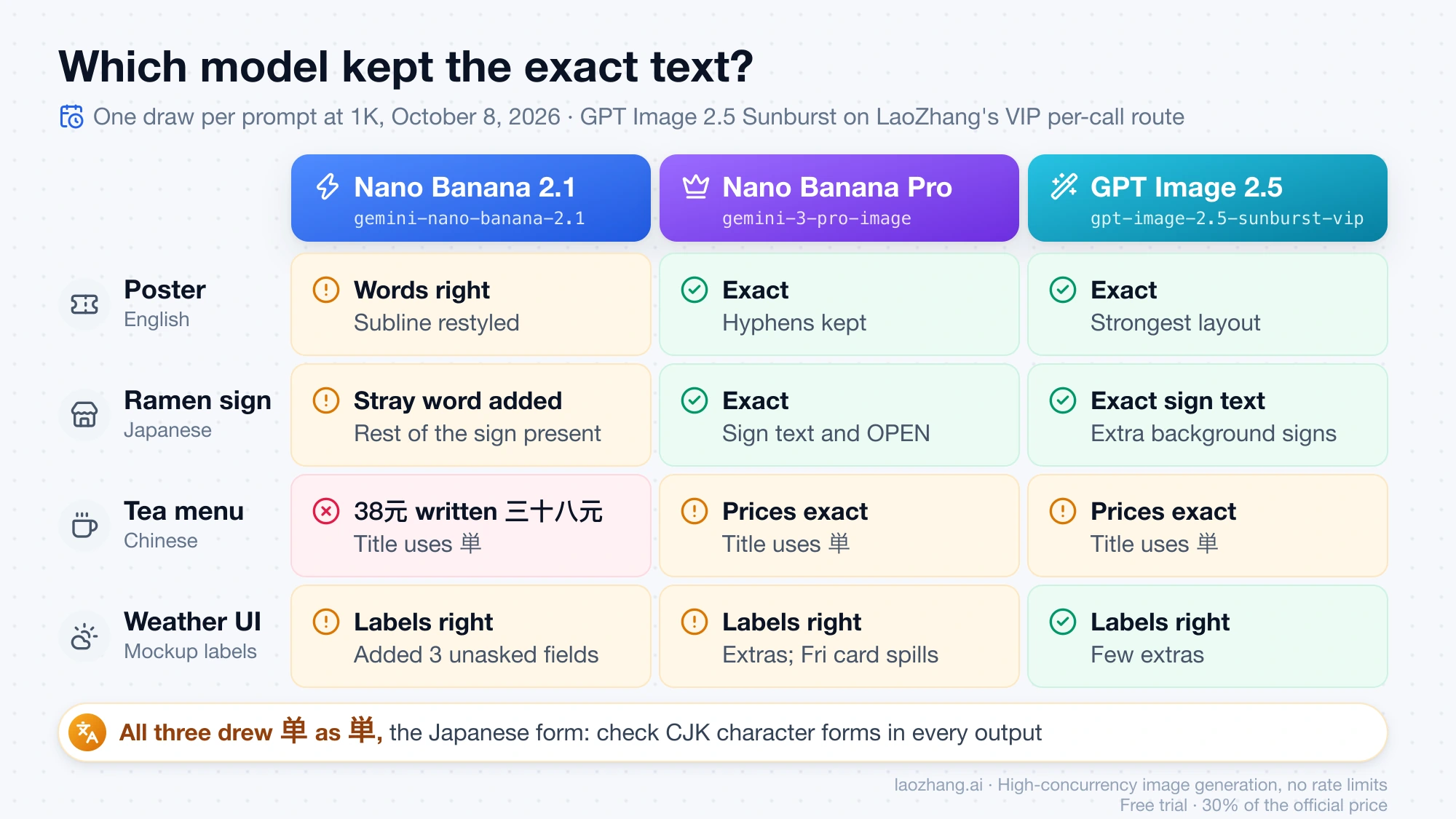
The menu exposed a shared weakness. The prompt asked for 今日茶单 in simplified Chinese, and all three models drew the last character as 単, the Japanese form of the same character. A Chinese reader will notice it at a glance. If your text is in simplified Chinese, check variant forms in every output, whichever model you use.
The weather mockup shows a different kind of error: all three got the requested labels and numbers right, but Pro and 2.1 filled the screen with fields that were never requested, in small text. In a UI mockup, invented readings such as a UV index or an air-quality value are content you would have to remove or verify. GPT Image 2.5 stayed closest to what was asked.
Google's own model card lists blurry small text at 1K as a known Nano Banana 2.1 limit, though the slips here were changes to the wording rather than blur. 2.1 also thought hardest on these prompts, reporting 1,209–1,704 thinking tokens on the poster, sign, menu and infographic, against 122–252 for Pro across all nine prompts. The extra thinking did not make its text more literal in these draws.
Nano Banana 2.1 vs Pro: a quarter of the price, looser with wording
Nano Banana 2.1 is the better default and Pro is the better choice for literal text. That is the short answer to "which is better", and it rests on three kinds of evidence that point in slightly different directions.
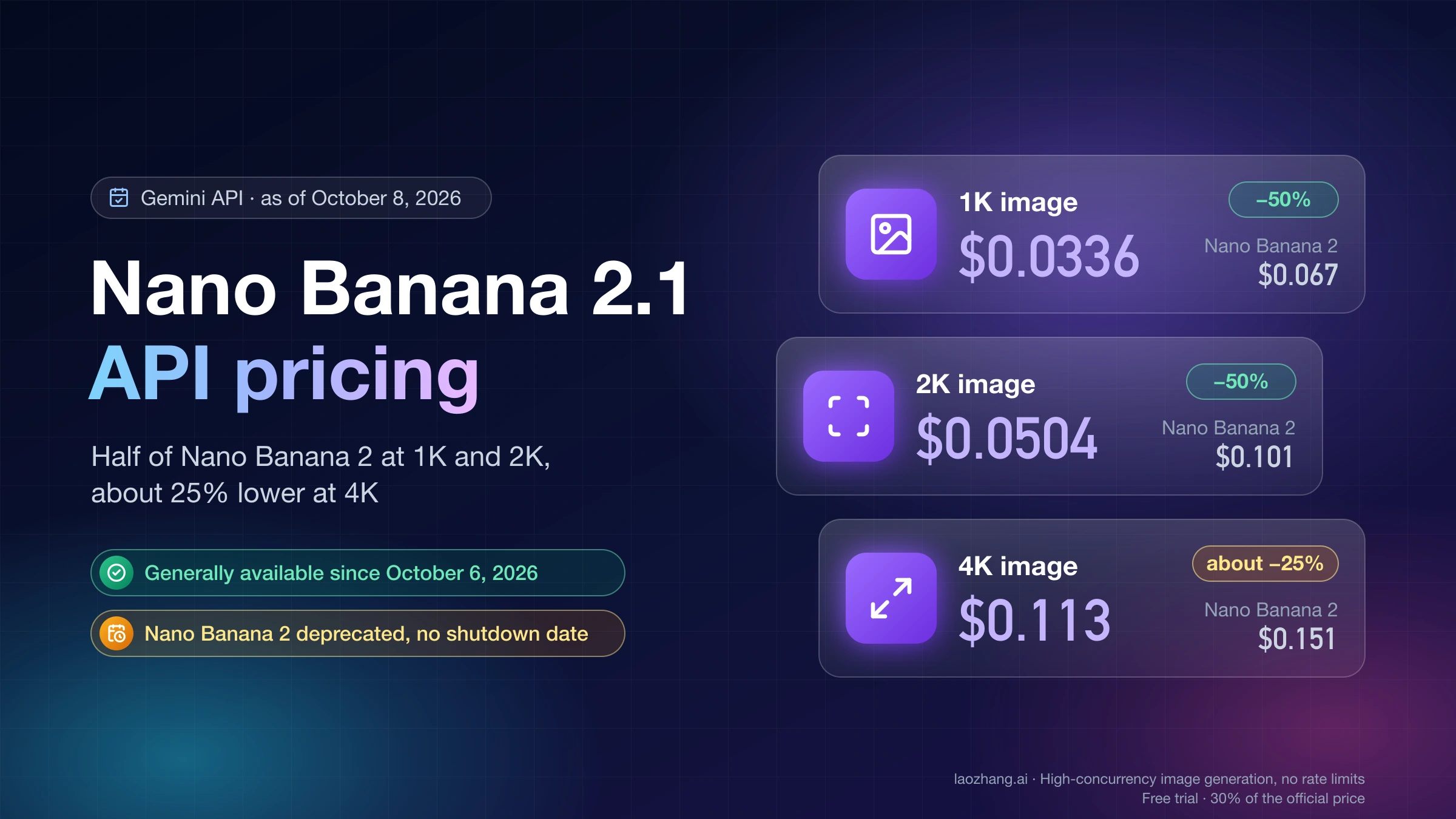
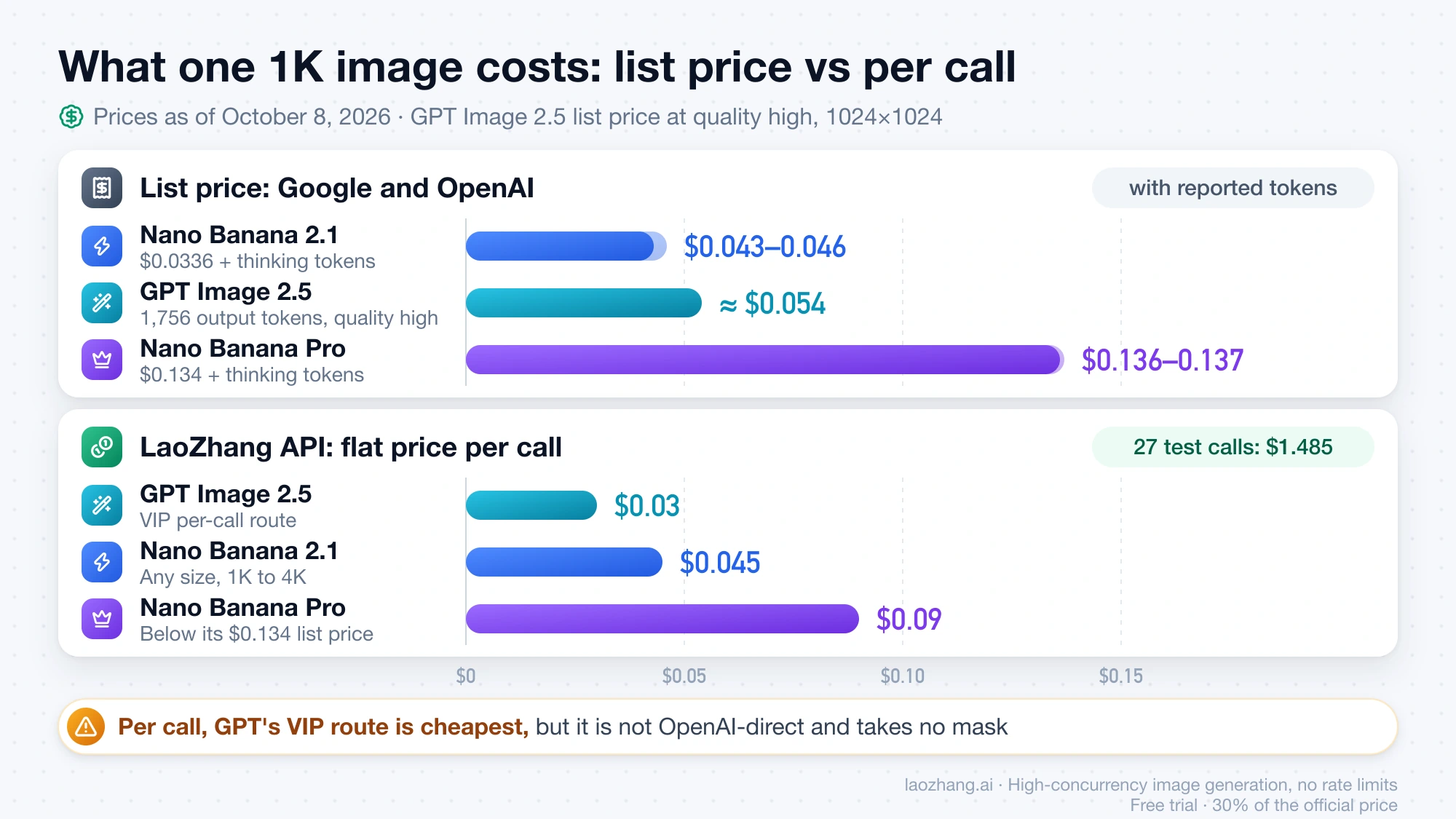
Price. At Google's list price, 2.1 costs $0.0336 per 1K image against Pro's $0.134, about a quarter. At 4K it is $0.113 against $0.24, a little under half. Batch halves both. On LaoZhang API's per-call pricing, 2.1 is $0.045 at any size and Pro is $0.09.
Google's own evaluations. Google's model card scores 2.1 (with thinking) above Pro on overall preference (1050 vs 935), infographic factuality (0.521 vs 0.265), general editing (1026 vs 939), multi-character consistency (1106 vs 1011) and mask editing (1049 vs 927). These are Google's internal tests, not an independent check.
This test. Both drew an accurate five-step "How a bill becomes law in the U.S." infographic. 2.1 followed the familiar sequence (introduced, committee, floor vote, other chamber, president), while Pro merged the House and Senate votes into one step and added a conference-committee step. Both handled counting (three red cups left, two blue right) correctly. Pro was the one that kept the exact wording on the poster, sign and menu.
Capabilities also differ, which can settle the choice before quality does:
| Nano Banana 2.1 | Nano Banana Pro | GPT Image 2.5 | |
|---|---|---|---|
| Output sizes | 1K, 2K, 4K (no 0.5K) | 1K, 2K, 4K | Custom sizes up to 3840×2160 or 2880×2880 |
| Aspect ratios | 14, including 1:8 and 8:1 | Not listed here | Custom, within 1:3 to 3:1 on LaoZhang's routes |
| Reference images | Up to 14 (10 objects, 4 characters) | 6 objects, 5 characters | Up to 16 on official forwarding (LaoZhang doc) |
| Search grounding | Google Web and Image Search | Google Search | Not listed |
Pick Pro when the job is a print-ready sign, label or menu that you cannot proofread and regenerate cheaply. Pick 2.1 for everything else, and budget for a proofread and an occasional reroll. For Pro's full cost picture, including plan prices, see How Much Is Nano Banana Pro?.
Nano Banana 2.1 vs GPT Image 2.5: literal text and layout vs speed
GPT Image 2.5 (often searched as "GPT 2.5") was the more literal and the more polished of the two in this test; Nano Banana 2.1 returned images two to three times faster.
GPT Image 2.5 reproduced the requested wording and prices on every text prompt, and its weather mockup carried the fewest invented extras. Its poster had the strongest composition of all nine outputs: a red sun over converging train tracks under the exact title and date line. Its product shot looked the most like a premium ad, and its portrait had the most dramatic color grading.
It also added things nobody asked for. The infographic gained a subtitle and the tagline "A LAW FOR A STRONGER TOMORROW" at the bottom, and the Tokyo street gained extra shop signs. Those are plausible additions, but in a deliverable with fixed copy they are something to remove.
On time, 2.1 returned in 17–33 seconds per image and GPT Image 2.5 in 58–76 seconds. The GPT timings come from the VIP route through LaoZhang's gateway, so they do not tell you how fast OpenAI's own endpoint is.
Arena's blind text-to-image votes, updated October 6, 2026, rank GPT Image 2.5 Sunburst first (1425 ± 7, preliminary) and Nano Banana 2.1 fifth (1328 ± 9, preliminary). That matches the polish gap seen here, but Arena compares single images by preference and says nothing about cost, speed or edits.
Pick GPT Image 2.5 for final creative where layout quality matters and a minute per image is fine. Pick 2.1 when you need many images quickly or want Google Search grounding. If you are moving from GPT Image 2, GPT Image 2.5 vs GPT Image 2 covers what changed.
Product photos, portraits and a recolor edit: all three usable
The non-text prompts separated the models far less than the text prompts did.
- Product photo (open matte black earbud case on pale stone, no text, no logo): all three produced clean, realistic studio shots with no stray text. GPT Image 2.5 used a larger, more premium-looking case with a soft-focus stone block behind it.
- Portrait (elderly fisherman mending a net at golden hour): all three were natural and realistic. GPT Image 2.5 pushed the warm grading and backlight further.
- Counting and position (exactly three red cups left, two blue right, nothing else): all three were correct.
For the edit, each model received the same black earbud case photo with the instruction to make the case glossy white and keep the earbuds, angle, stone surface, light and shadow unchanged. All three recolored the case and preserved the scene. The one difference was the inside of the lid, which was dark in the source: Nano Banana 2.1 and Pro turned it white along with the shell, while GPT Image 2.5 left it dark. Which result is "right" depends on whether you meant the whole case or only its outer shell, so spell that out in an edit prompt.
The VIP route does not support the mask parameter, according to LaoZhang's GPT Image 2.5 documentation. If your edit workflow depends on a mask, use the official-forwarding route or one of the Gemini models. Google scores 2.1 above Pro on mask editing but also lists partial instruction following in mask edits as a known 2.1 limit.
Which is cheapest? 2.1 at list price, GPT Image 2.5 per call
The answer depends on how you pay. At the providers' list prices, Nano Banana 2.1 is cheapest per 1K image. On LaoZhang API's per-call pricing, the GPT Image 2.5 VIP route is cheapest.
| Model | Google or OpenAI list price, as of October 8, 2026 | LaoZhang API, per call |
|---|---|---|
| Nano Banana 2.1 | $0.0336 (1K), $0.0504 (2K), $0.113 (4K) per image, plus input and $7.50 per 1M thinking/text tokens | $0.045, any size |
| Nano Banana Pro | $0.134 (1K/2K), $0.24 (4K) per image, plus input and $12 per 1M thinking/text tokens | $0.09 |
| GPT Image 2.5 Sunburst/Flare | $30 per 1M image output tokens; OpenAI's calculator estimates $0.0059 (low) to $0.2107 (max) per 1024×1024 image | VIP routes $0.03; official forwarding billed at OpenAI's token rates |
Sources: the Gemini API pricing page, the OpenAI API pricing page and LaoZhang's GPT Image 2.5 documentation. Batch halves the Gemini prices.
The per-image figure is not the whole bill on the Gemini API, because thinking tokens are charged on top. Using the token counts the test calls reported for a 1K image:
- Nano Banana 2.1, text-heavy prompt: $0.0336 + 1,209 to 1,704 thinking tokens × $7.50 per 1M ($0.0091 to $0.0128) ≈ $0.043–$0.046.
- Nano Banana Pro: $0.134 + 122 to 252 thinking tokens × $12 per 1M ($0.0015 to $0.0030) ≈ $0.136–$0.137.
- GPT Image 2.5 at quality high, 1024×1024: each call reported 1,756 image output tokens × $30 per 1M ≈ $0.053, plus about $0.001 for roughly 200 text input tokens at $5 per 1M ≈ $0.054.
So at list price, a 1K image costs roughly $0.04 on 2.1, $0.05 on GPT Image 2.5 at high quality, and $0.14 on Pro. Input-token charges for these short prompts are a fraction of a cent and are left out.
Per-call pricing changes the order. LaoZhang's flat $0.045 for 2.1 is slightly above Google's 1K cost with thinking but well below its $0.113 at 4K. Pro at $0.09 is under its $0.134 list price at every size. The GPT VIP route at $0.03 undercuts OpenAI's token rate at quality high, with the caveats above: it is not OpenAI-direct and has no mask. Running this whole test (27 successful calls) cost $1.485 at LaoZhang's list prices: 9 × ($0.045 + $0.09 + $0.03).
More detail on each price: Nano Banana 2.1 API Pricing and How Much Is Nano Banana Pro?.
Speed and failures: about 20 seconds on Gemini, about a minute on GPT VIP
Wall time per image, measured from the test machine through LaoZhang's gateway:
| Model | Time per image | First-try success |
|---|---|---|
| Nano Banana 2.1 | 17–33 s | 9 of 9 |
| Nano Banana Pro | 18–23 s | 9 of 9 |
| GPT Image 2.5 Sunburst (VIP route) | 58–76 s | 9 of 11 attempts; 2 returned 503 "Upstream model service error" and succeeded on retry |
Nano Banana 2.1's slowest call (33 seconds) was the Chinese menu, one of the prompts where it spent the most thinking tokens. Pro stayed in a tight band. If you call the GPT VIP route from code, add a retry on 503 and a timeout well above 76 seconds.
These are single samples that include gateway and network time, so treat them as a rough ranking rather than a latency guarantee.
Arena and Google's own scores: what they add to a 9-prompt test
Two larger sources sit alongside this spot check, each measured by someone else:
- Arena text-to-image (blind preference votes, updated October 6, 2026): GPT Image 2.5 Sunburst #1 at 1425 ± 7 and Flare #2 at 1398 ± 7, Nano Banana 2.1 #5 at 1328 ± 9 from 5,312 votes, Nano Banana Pro 2K #16 at 1248 ± 3. The top three scores here are marked preliminary. Arena ranks how much voters like one image over another; it does not check text accuracy, cost or edits.
- Google's model card for Nano Banana 2.1: 2.1 ahead of Pro on every reported axis, from overall preference to infographic factuality and mask editing, with known limits of blurry small text at 1K, partial instruction following in mask edits and left/right confusion. Google ran these evaluations on its own models.
Both agree with the broad picture from the nine prompts: GPT Image 2.5 leads on look, and 2.1 has overtaken Pro on general quality. Neither captures the specific failure seen here, which is 2.1 changing exact wording. That is why Pro still earns a place for text-critical work.
Which version you get in the Gemini app
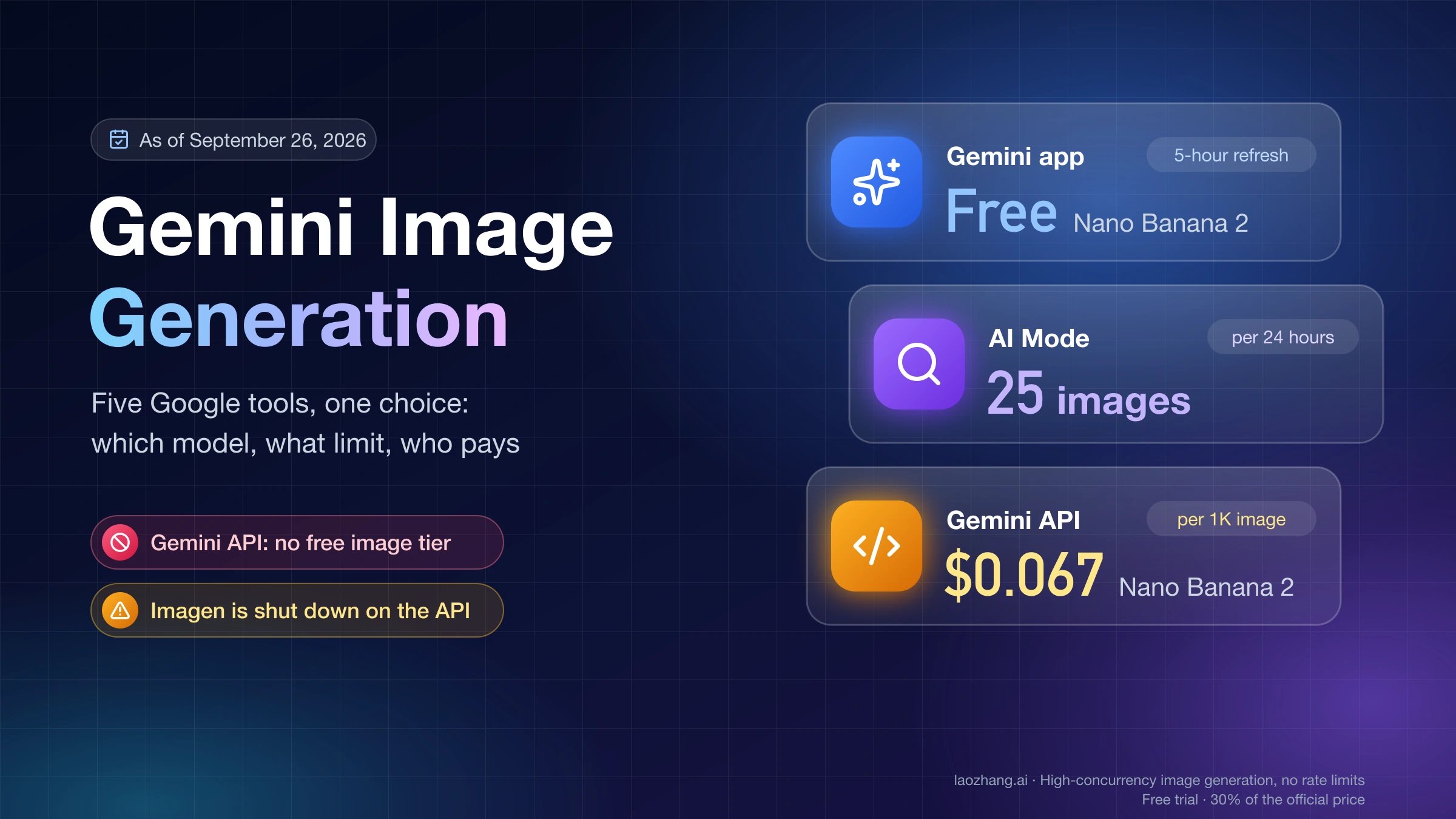
If you are not calling an API, the choice is partly made for you. In the Gemini app, Nano Banana 2.1 is available on Google AI Pro, Plus and Ultra plans; free users get Nano Banana 2. Paid users can switch a result to Pro with "Redo with Pro", which is the quickest way to retry a sign or menu whose text came out wrong.
On the API, Google has deprecated Nano Banana 2 and points migrations to 2.1, which costs half as much at 1K; as of October 8, 2026, no shutdown date has been announced. Its prices remain in Nano Banana 2 API Pricing for anyone still migrating.
FAQ: Nano Banana 2.1, Pro and GPT Image 2.5
Is Nano Banana 2.1 better than Nano Banana Pro?
For most work, yes: Google's own evaluations rate it higher, Arena's preliminary ranking puts it well above Pro 2K, and it costs about a quarter of Pro per 1K image at Google's price. Pro was more literal with exact text in a same-prompt test on October 8, 2026, so it remains the safer first pick for posters, signs and menus.
What's the best version of Nano Banana right now?
As of October 8, 2026, Nano Banana 2.1 is the model Google tells API users to migrate to from the deprecated Nano Banana 2, and the version paid Gemini app plans get. Use Nano Banana Pro when exact wording matters more than price: it kept the requested wording on all three text prompts in the same-prompt test.
Is GPT Image 2.5 better than Nano Banana 2.1 for text in images?
In a one-draw-per-prompt test at 1K, GPT Image 2.5 Sunburst rendered the requested wording and prices exactly, while Nano Banana 2.1 restyled a subline, added a stray word to a Japanese sign and spelled out a price in Chinese numerals. Neither got the simplified Chinese character 单 right. GPT Image 2.5 was also two to three times slower on the route tested.
Which is cheapest: Nano Banana 2.1, Pro or GPT Image 2.5?
At list prices, Nano Banana 2.1 (about $0.04 per 1K image including thinking tokens), then GPT Image 2.5 at quality high (about $0.054), then Pro (about $0.137). On LaoZhang API's per-call pricing the order is GPT Image 2.5 VIP at $0.03, 2.1 at $0.045 and Pro at $0.09.
Which model is best for editing a product photo?
All three recolored an earbud case and kept the rest of the scene in the test. Nano Banana 2.1 is the cheapest of the three for routine edits. If you need mask-based edits, avoid the GPT Image 2.5 VIP route, which does not accept a mask.
Sources2
External pages this guide links to, in the order they appear. Last updated Oct 8, 2026.
Sources2
External pages this guide links to, in the order they appear. Last updated Oct 8, 2026.