GPT Image 2.6 vs 2.5: Same Price at High, 4× the Cost at Low
GPT Image 2.6 (November 4, 2026) costs the same per image as 2.5 at high, xhigh and max, but 3.3–4.2× more at low and medium. Switch by quality level.
On this page
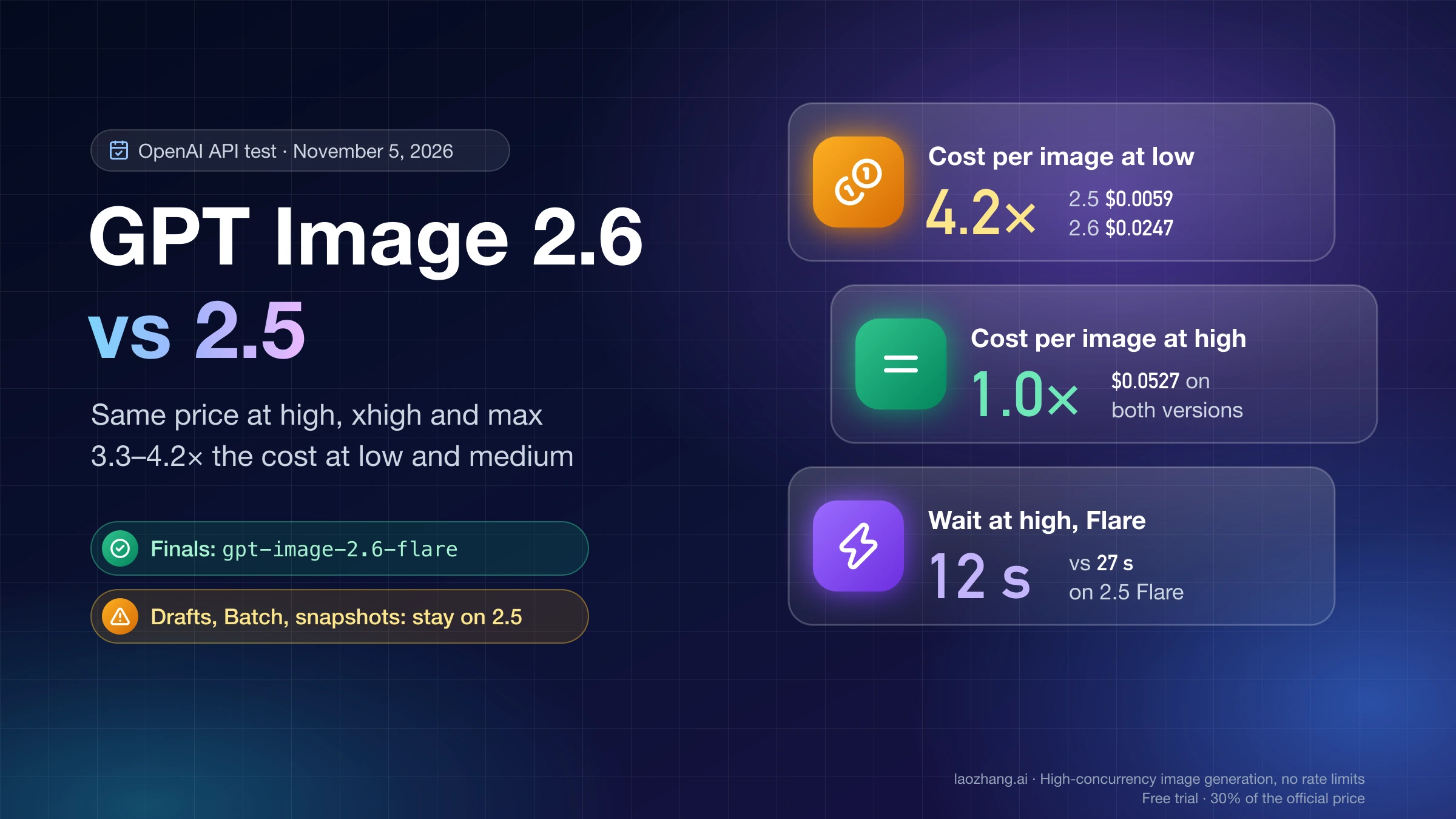
OpenAI released Images 2.6 on November 4, 2026. In the API it arrives as two models, gpt-image-2.6-flare and gpt-image-2.6-sunburst, at the same token prices as GPT Image 2.5. If you render at high, xhigh or max, or you need animated GIFs or SVG files, change your model ID to gpt-image-2.6-flare. At those quality levels a 1024×1024 image costs exactly what it did on 2.5 ($0.0527 at high), and in a same-day test Flare finished a high image in 12 seconds against 27 seconds for 2.5 Flare.
If you mostly produce low or medium drafts in volume, stay on gpt-image-2.5-flare for now. GPT Image 2.6 spends 824 output tokens on a low 1024×1024 image where 2.5 spends 196, so the same draft costs $0.0247 instead of $0.0059, 4.2 times as much, and medium costs 3.3 times as much. Two cases keep you on 2.5 at any quality: jobs that run through the Batch API, which the 2.6 model pages list as not supported, and pipelines that pin a dated snapshot, because 2.6 has none yet.
Whichever version you run, send quality explicitly, because 2.6 Flare otherwise picks a level from your prompt and can pick an expensive one. The token counts and times here come from a test the LaoZhang API documentation team ran against OpenAI's API on November 5, 2026, one run per setting.
Disclosure: laozhang.ai is our own service. Its prices are platform pricing, not an independent comparison.
GPT Image 2.6 or 2.5 for each workload
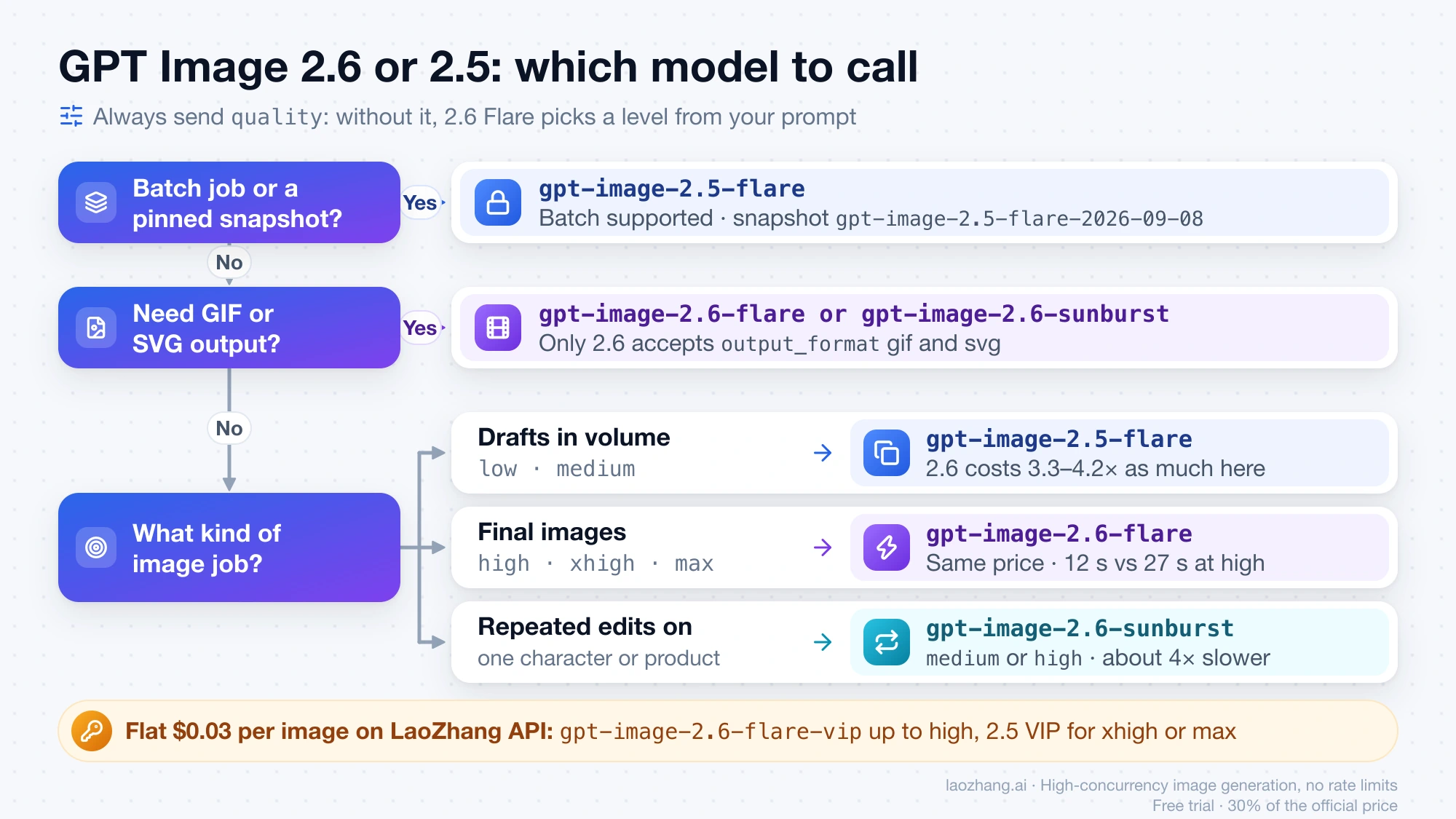
The quality level you send decides most cases, and a feature that only one version has decides the rest. If your work falls into more than one row, it's normal to run both versions side by side: they take the same request format, so sending drafts to 2.5 and finals to 2.6 is a one-field change per call.
| Your workload | Run | Why |
|---|---|---|
Drafts, thumbnails and variants in volume at low or medium | gpt-image-2.5-flare | 2.6 costs three to four times as much per image at these levels |
Final images at high, xhigh or max | gpt-image-2.6-flare | Same tokens and price as 2.5, and less than half the wait at high in the November 5 test |
| Several rounds of edits on one character or product | gpt-image-2.6-sunburst at medium or high | OpenAI's stated strength for Sunburst is consistency across edits; it is about four times slower than Flare |
| Animated GIFs, SVG icons and logos | gpt-image-2.6-flare or gpt-image-2.6-sunburst | Only 2.6 accepts output_format: "gif" and "svg" |
| Overnight or bulk jobs through the Batch API | gpt-image-2.5-flare | Its model page lists Batch as supported; the 2.6 model pages list it as not supported |
| Production pipelines that pin a version | A dated 2.5 snapshot such as gpt-image-2.5-flare-2026-09-08 | 2.6 is published as an alias only |
| A flat $0.03 per image through LaoZhang API | gpt-image-2.6-flare-vip up to high; a 2.5 VIP model for xhigh or max | The 2.6 VIP models stop at high and return PNG only |
Disclosure: laozhang.ai is our own service. Its prices are platform pricing, not an independent comparison.
If you are still choosing between the two 2.5 models, GPT Image 2.5 Sunburst vs Flare: Which to Use, by the Numbers covers that. If you are still on gpt-image-2, read GPT Image 2.5 Flare vs Sunburst vs GPT Image 2: Which to Run first, since the same token prices apply there too.
GPT Image 2.6 vs 2.5 cost per image at each quality level
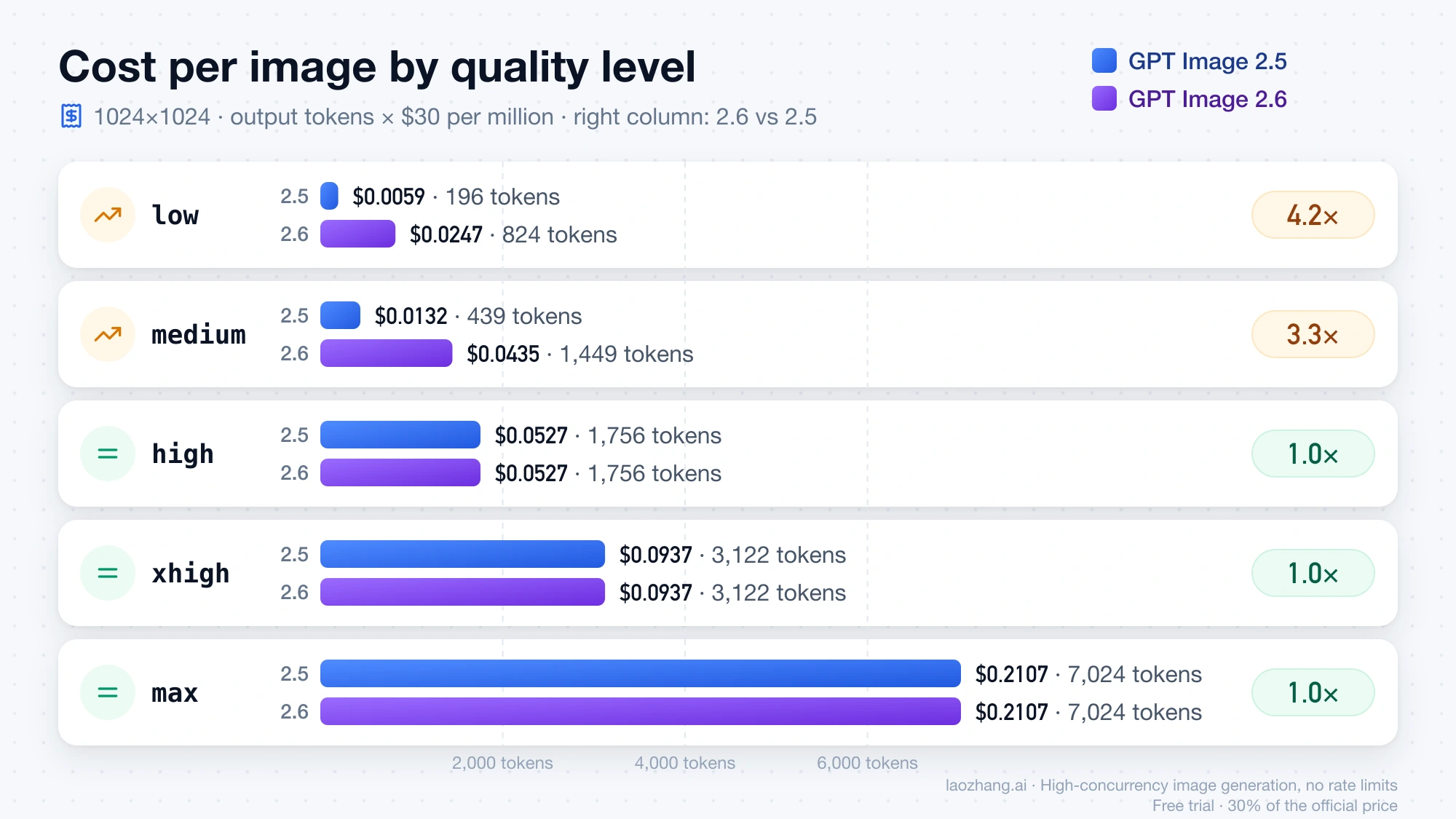
At high and above the two versions cost the same per image; at low and medium, 2.6 is the expensive one, and the gap is widest at low. Both charge $30 per million image output tokens, $8 per million image input tokens and $5 per million text input tokens on OpenAI's API pricing page as of November 5, 2026, the same rates as gpt-image-2. The whole difference is in how many output tokens each version spends on the same image.
quality | 2.5 output tokens | 2.6 output tokens | 2.5 per image | 2.6 per image | 2.6 vs 2.5 |
|---|---|---|---|---|---|
low | 196 | 824 | $0.0059 | $0.0247 | 4.2× |
medium | 439 | 1,449 | $0.0132 | $0.0435 | 3.3× |
high | 1,756 | 1,756 | $0.0527 | $0.0527 | 1.0× |
xhigh | 3,122 | 3,122 | $0.0937 | $0.0937 | 1.0× |
max | 7,024 | 7,024 | $0.2107 | $0.2107 | 1.0× |
Each per-image figure is output tokens × $30 ÷ 1,000,000 for one 1024×1024 image. The 2.6 tokens are what Flare and Sunburst each returned in the LaoZhang API docs team's November 5 runs on the same prompt (Flare's high run counted 1,758, two tokens more). The 2.5 tokens are from the cost calculator in OpenAI's image generation guide, and the team's 2.5 Flare runs matched them at low, medium and high. At volume the gap is easy to see: 1,000 images at medium come to about $43.47 on 2.6 and $13.17 on 2.5.
Disclosure: laozhang.ai is our own service. Its prices are platform pricing, not an independent comparison.
The table counts output only. The prompt is billed as text input and usually costs less than $0.001, while an edit adds its reference image as image input, about $0.008 for one 1024×1024 image. Batch changes the picture for 2.5: the GPT-Image-2.5 Flare model page lists image output at $15 per million tokens with Batch, so a high image that waits for a batch costs about $0.0263 on 2.5, half of 2.6's standard price.
Other sizes follow the same pattern. At 1536×1024, 2.6 spends 664 tokens at low ($0.020) where 2.5 spends 158, and 1,132 at medium ($0.034) against 343, which is again 4.2 and 3.3 times; at high the two land close together (1,353 on 2.6, 1,372 on 2.5) and xhigh is 2,459 on both. A native 3840×2160 image on 2.6 took 1,559 tokens at low (about $0.047) and 3,337 at high (about $0.10).
Is GPT Image 2.6 faster? Flare more than halves the wait at high
GPT Image 2.6 Flare was the fastest model in the November 5 test: 8 seconds at low and 12 seconds at high for a 1024×1024 image, against 15 and 27 seconds for 2.5 Flare on the same prompt. That fits OpenAI's Images 2.6 announcement, which says Images 2.6 "generates images 50% faster than before" and that Flare at low can finish "in as little as six seconds". The 50% figure is OpenAI's claim. The test below is a single run per cell, so treat each time as one sample that can move with OpenAI's queue.
quality | 2.5 Flare | 2.6 Flare | 2.6 Sunburst |
|---|---|---|---|
low | 15 s | 8 s | 34 s |
medium | 16 s | 11 s | 42 s |
high | 27 s | 12 s | 59 s |
xhigh | not run | 23 s | 86 s |
max | not run | 39 s | 157 s |
GPT Image 2.6 Sunburst is the slow option. It took 34 seconds at low and 157 at max, and 2.5 Sunburst wasn't timed in the same test, so there's no like-for-like figure showing whether Sunburst itself got faster. If users wait on screen for the image, Flare is the 2.6 model that delivers the speed OpenAI is advertising.
What GPT Image 2.6 adds, and what 2.5 still has
GPT Image 2.6 adds animated GIF output, SVG output and a complexity field to the Image API, and both 2.6 models support markup-guided edits. GPT Image 2.5 keeps four things that 2.6 lacks as of November 5, 2026: Batch API support, a dated snapshot, a published rate-limit table and documented use as the Responses API image tool. The comparison below is drawn from OpenAI's image generation guide and the model pages for GPT-Image-2.6 Flare, GPT-Image-2.6 Sunburst and GPT-Image-2.5 Flare.
| Feature | GPT Image 2.5 | GPT Image 2.6 |
|---|---|---|
Animated GIF (output_format: "gif") | No | Yes, on /v1/images/generations only, 2–64 frames |
SVG (output_format: "svg") | No | Yes, on /v1/images/generations only, n must be 1 |
complexity (low, medium, high) | Not documented | Yes, default high, no separate fee |
Markup-guided edits (markup overlay on /v1/images/edits) | The guide says "supported GPT Image 2.5 and 2.6 models" without naming the 2.5 ones | Yes, both models |
quality levels | low, medium, high, xhigh, max | Same five |
| Batch API | Supported | Not supported |
| Dated snapshot | gpt-image-2.5-flare-2026-09-08 | None, alias only |
| Rate limits | Published per tier for Flare: Build 250,000 TPM / 20 IPM, Launch 3,000,000 / 150, Grow 8,000,000 / 250 | "Vary by usage tier and account", no table |
| Responses API image generation tool | Documented on the model page | The guide documents 2.6 through the Image API only |
The missing Batch support matters most for cost, and the missing snapshot for stability. OpenAI describes snapshots as a way to lock in a version "so that performance and behavior remain consistent"; with 2.6 published only as gpt-image-2.6-flare and gpt-image-2.6-sunburst, an update behind the alias would reach your pipeline without any change on your side. OpenAI hasn't said whether 2.6 will get Batch or a dated snapshot, so plan around what the model pages show today.
The missing rate-limit table means you can't size 2.6 throughput from the docs. The OpenAI organization limits page in your account shows the limits that actually apply to you.
Is GPT Image 2.6 better quality than 2.5? No independent test yet
No independent test answers that yet. As of November 5, 2026, the Artificial Analysis text-to-image leaderboard has no GPT Image 2.6 entry; its top three are GPT Image 2.5 Sunburst at max (Elo 1225), GPT Image 2.5 Flare at max (1208) and GPT Image 2 at high (1188). What exists so far are OpenAI's claims and early user reports.
OpenAI's announcement says Sunburst brings "higher-quality image generation and even greater image consistency across edits when quality is set to medium or high", and that Flare "improves layout quality for posters, product imagery, and other professional visuals". Those are first-party claims made on launch day, not blind-vote results.
Early ChatGPT users are mixed. One X user called ChatGPT Images 2.6 "a pretty solid upgrade over 2.5" but noted "still some grain and noise", and the top comment on the r/singularity thread "Try out GPT image 2.6 and report back" was "It still has the watermark pattern problem". If grain is what you're fighting, the causes and fixes in GPT Image 2.5 Grainy Noise: Fixes for ChatGPT and the API are the place to start, since 2.6 hasn't been shown to remove it.
The practical gap is at low and medium. Nobody has published what the extra tokens buy at those levels, so before you move a draft pipeline to a version that costs three to four times as much there, render a sample of your own prompts on both and compare them at the size you actually ship.
GPT Image 2.6 Sunburst or Flare: same price, four times the wait
Start with gpt-image-2.6-flare and move to gpt-image-2.6-sunburst for multi-round edits where a character or product has to stay consistent. The two cost the same, since they returned identical output tokens at every quality level in the November 5 test and share OpenAI's token prices. What differs is the wait: Sunburst took between 3.7 and 4.9 times as long as Flare at the same quality level.
OpenAI's model pages describe Flare as "image generation and editing for fast iteration" and Sunburst as "for detailed visual work", and the announcement ties Sunburst's edge to edit consistency at medium or high. That makes Sunburst worth its wait when a product label, a face or a layout has to survive several rounds of changes, and Flare the default for everything else, including posters and product shots where OpenAI says Flare's layout improved.
One request detail differs between them. Sunburst without a quality value rendered at high in the test, while Flare chose a level from the prompt, which is why the next section says to send quality every time.
GPT Image 2.6 API request: what to change from 2.5
For a plain image, change the model ID and send quality explicitly. Without it, 2.6 Flare picks a level from your prompt: in the November 5 test a simple prompt got low, while the detailed night-market prompt used about 5,795 output tokens three times in a row, roughly $0.17 per 1024×1024 image and more than the 3,122 tokens of xhigh.
curl https://api.openai.com/v1/images/generations \
  -H "Authorization: Bearer $OPENAI_API_KEY" \
  -H "Content-Type: application/json" \
  -d '{
    "model": "gpt-image-2.6-flare",
    "prompt": "A rainy night market street with neon signs and reflections on wet ground, photo",
    "size": "1024x1024",
    "quality": "high"
  }'
The response is the same as on 2.5: decode data[0].b64_json and save the bytes. The new fields are optional, and each has a rule worth knowing before you add it:
complexity:low,mediumorhigh, defaulthighwhen omitted, with no separate fee; in the docs team's runs the token count for a givenqualitydidn't change with it. OpenAI recommendslowfor most edits andmediumorhighfor scenes with many elements, and warns that higher complexity "can increase latency and introduce unwanted changes".output_format: "gif"withframe_count(2–64, default 9) andframe_duration_ms(20–2000, rounded to 10, default 200);sizeis per frame. GIFs don't support streaming, partial images,output_compressionorprompt_rewriter. A 512×512 GIF atmediumwith 9 frames used 2,073 tokens, about $0.062, and returned in 11–12 seconds; 4 frames atlowused 1,172 tokens, about $0.035.output_format: "svg"withnset to 1. The API first renders a reference image billed at the image model's rate, withqualitycontrolling it, then a text "authoring model" writes the SVG at that model's own rate. The result is static vectors with no scripts, external resources or embedded rasters. For a simple icon the authoring step cost about $0.011–0.015 withgpt-6.1-terraand $0.09–0.16 withgpt-5.5; LaoZhang API defaults this step togpt-6.1-terra, andsvg.modelchanges it.
Disclosure: laozhang.ai is our own service. Its prices are platform pricing, not an independent comparison.
Here is a GIF request that fits the size limits on the first try:
curl https://api.openai.com/v1/images/generations \
  -H "Authorization: Bearer $OPENAI_API_KEY" \
  -H "Content-Type: application/json" \
  -d '{
    "model": "gpt-image-2.6-flare",
    "prompt": "An orange cat stretches on a windowsill, then yawns while light rain falls outside, flat illustration, seamless loop",
    "output_format": "gif",
    "size": "512x512",
    "frame_count": 9,
    "frame_duration_ms": 200,
    "quality": "medium"
  }'
If you call image generation through the Responses API rather than /v1/images/*, keep 2.5 there for now. The GPT-Image-2.5 Flare model page documents it as a model for the Responses API image tool, while OpenAI's guide documents 2.6 only through the Image API, and its Responses examples still name 2.5.
GPT Image 2.6 errors on OpenAI's API and how to fix them
Five problems are specific to 2.6 on OpenAI's API. The first two showed up in the LaoZhang API docs team's November 5 runs, and the rest are limits stated in OpenAI's guide and model pages that you'll hit if you treat 2.6 as a drop-in for every 2.5 job.
Disclosure: laozhang.ai is our own service. Its prices are platform pricing, not an independent comparison.
| What you see | Cause | Fix |
|---|---|---|
A GIF request fails with an error starting No supported sheet fits | All frames are rendered on one sheet, so a small size with many frames doesn't fit; 256×256 with only 2 frames failed | Use 512×512 with 4–9 frames, or lower frame_count before raising size |
| An SVG of a detailed full scene ends in HTTP 502 after 150–170 seconds | Complex illustrations are hard to vectorize; one full-scene prompt failed 4 times out of 4 | Keep SVG for icons, logos and simple graphics, which returned reliably; render scenes as PNG |
You ask /v1/images/edits for a GIF or SVG | The guide says the edits endpoint supports neither output | Generate GIF and SVG on /v1/images/generations |
| You send an SVG as the input image of an edit | SVG is not a supported raster input for edits | Convert it to PNG first |
| A Batch job with a 2.6 model is rejected | The 2.6 model pages list Batch as not supported | Run that job on gpt-image-2.5-flare, whose model page lists Batch as supported |
A 2.6 Flare image that suddenly costs about three times the high price isn't an error and won't show up in your logs as one. The likely cause is a missing quality field, which lets Flare choose the level from your prompt.
GPT Image 2.6 on LaoZhang API: which model name for which key
On LaoZhang API, the 2.6 model name you can call depends on your key's group. gpt-image-2.6-flare and gpt-image-2.6-sunburst work only with keys in the OpenAI Official or OpenAI Official Enterprise group, billed at OpenAI's token prices (the Enterprise group adds 20%), so the per-image costs match OpenAI's. Keys in the default group call gpt-image-2.6-flare-vip or gpt-image-2.6-sunburst-vip at $0.03 per image, with quality up to high and PNG output only, according to the LaoZhang API GPT Image 2.6 announcement. For xhigh, max or native 4K at the same flat price, gpt-image-2.5-flare-vip and gpt-image-2.5-sunburst-vip are unchanged.
Disclosure: laozhang.ai is our own service. Its prices are platform pricing, not an independent comparison.
A check on November 5, 2026 at 19:13 China time shows what happens if you only change the model name. A default-group pay-per-request key, the kind used for the 2.5 VIP models, was sent to gpt-image-2.6-flare at 1024×1024 and low. It got HTTP 503 "no available channels" in about a second, with no charge, and a text-group key got the same message naming its own group.
The same key on gpt-image-2.6-flare-vip, shortly after the VIP models went live that evening, first returned an HTTP 400 after 15.8 seconds. The message, in Chinese, says the request wasn't accepted upstream and asks you to check the parameters and content and retry. A second request with a different prompt at medium came back as a 1024×1024 PNG in 31.7 seconds, so if you see that message once, retry before changing anything. Asking the VIP model for a GIF failed in 1.2 seconds with an HTTP 400 that names the fix.
| Error | Cause | Fix |
|---|---|---|
503: Current group default has no available channels for model gpt-image-2.6-flare under billing mode [pay-per-request] | A default-group key calling an official-forwarding model name | Call gpt-image-2.6-flare-vip, or create a key in OpenAI Official with billing mode Usage first or Usage-based |
400: GIF and SVG output are not supported on this route; use gpt-image-2.6-flare / gpt-image-2.6-sunburst in the OpenAI Official group. | output_format set to gif or svg on a VIP model | Use an OpenAI Official key with gpt-image-2.6-flare or gpt-image-2.6-sunburst |
400 on a VIP model with quality set to xhigh or max | The 2.6 VIP models stop at high; the failed call is not charged | Send high, or use a 2.5 VIP model or an official-group key |
400 for output_format: "webp" in OpenAI Official | Some requests in that group are served by Azure OpenAI, which rejects WebP | Request png or jpeg and convert, or use OpenAI Official Enterprise |
For how 2.5's official token cost compares with paying $0.03 per call at each quality level, see GPT Image 2.5 Sunburst Pricing: Official Costs vs $0.03 per Call.
Images 2.6 in ChatGPT and Codex: nothing to switch
In ChatGPT and Codex there's no model to change. OpenAI says Images 2.6 is "available globally today in ChatGPT and Codex across all subscription tiers on desktop, mobile, and web" as of November 4, 2026, so there's nothing to select. The announcement doesn't publish per-plan image or GIF limits, or say whether Free accounts can make GIFs, so any such number you see elsewhere doesn't come from OpenAI. For how image generation works inside ChatGPT itself, see ChatGPT Images 2.5: How to Use It in ChatGPT and the API. For making GIFs in ChatGPT step by step, including how frame count affects detail, see How to Make a GIF in ChatGPT (Images 2.6): Frames, Speed, Edits.
Sources8
External pages this guide links to, in the order they appear. Last updated Nov 5, 2026.
Sources8
External pages this guide links to, in the order they appear. Last updated Nov 5, 2026.
- 1.OpenAI's API pricing pagedevelopers.openai.com/api/docs/pricing
- 2.OpenAI's image generation guidedevelopers.openai.com/api/docs/guides/image-generation
- 3.GPT-Image-2.5 Flare model pagedevelopers.openai.com/api/docs/models/gpt-image-2.5-flare
- 4.Images 2.6 announcementopenai.com/index/introducing-images-2-6
- 5.GPT-Image-2.6 Flaredevelopers.openai.com/api/docs/models/gpt-image-2.6-flare
- 6.GPT-Image-2.6 Sunburstdevelopers.openai.com/api/docs/models/gpt-image-2.6-sunburst
- 7.OpenAI organization limits pageplatform.openai.com/settings/organization/limits
- 8.Artificial Analysis text-to-image leaderboardartificialanalysis.ai/image/leaderboard/text-to-image