Nano Banana 2.1 Character Consistency: Outfits Hold, Faces Drift
In a 10-call test on November 3, 2026, Nano Banana 2.1 kept hair and jacket across scenes but dropped two-color eyes and a scar. Resend the original reference.
On this page
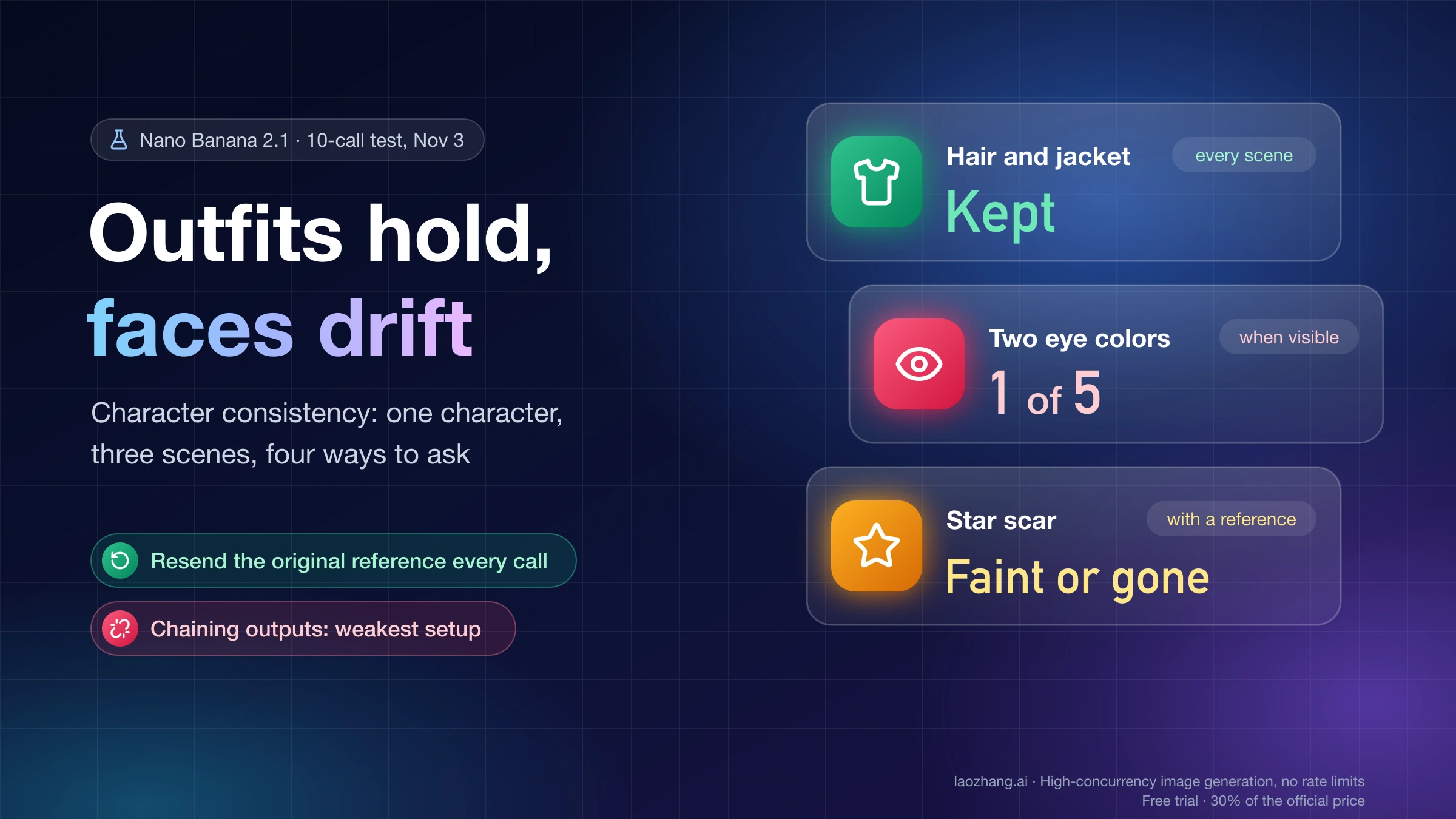
Nano Banana 2.1 (gemini-nano-banana-2.1) can bring the same character back in a new scene, but what it reliably carries over is the big, visible material: hair shape and color, the jacket, the scarf. Small facial marks are what drift. In a ten-call test through the Gemini API on November 3, 2026, a fictional woman with a silver-white asymmetric bob, a mustard rain jacket, one amber and one green eye and a star-shaped scar came back with her haircut, jacket and scarf in every scene, though the scarf darkened in several wide shots. The two eye colors survived in only one of the five images where the eyes could be judged, and whenever an image served as the reference, the scar came out faint or not at all.
So send the original reference image with every request rather than feeding the last output forward, which was the weakest setup in the test. Put the traits that make your character recognizable into hair, clothing and color, not into a scar or an eye color, and compare each new image against the reference at close range before you keep it. When the same feature fails twice from the original reference, stop re-rolling and change the setup: frame the face larger, or move that trait somewhere the model holds it.
One condition changes the picture. A character you invented in words can be rebuilt from that text alone, and in the test the full description without any image scored 4 out of 5 for "same person" from both graders, partly because the reference itself had been generated from the same words. A character that comes from a photo or a drawing has no such text, so for it the reference image is the only anchor. Neither route is exact, and Google's Nano Banana 2.1 model card lists the same weakness among its known limitations: "Character consistency is not always perfect between input images and generated output image."
The test: one character, three scenes, four ways to ask
On November 3, 2026, gemini-nano-banana-2.1 was called ten times through laozhang.ai's Gemini-native generateContent endpoint, at 1K resolution with the default thinking level. One call created the base reference from text alone, and nine calls placed the same character in three scenes using four different setups. All ten calls returned HTTP 200 with an image, every response reported modelVersion: gemini-nano-banana-2.1, and each took 15.8–28.2 seconds. Google's own example for 2.1 uses the Interactions API instead, so treat these results as one route on one day.
Disclosure: laozhang.ai is our own service. Its prices are platform pricing, not an independent comparison.
The character was defined once in words and reused verbatim. The base reference was square; the three scenes were 4:3. These are the exact texts, so you can rerun them or swap in your own character:
Character description:
a woman in her late twenties with a short asymmetric silver-white bob that is
longer on one side, one amber eye and one green eye, a small star-shaped scar on
one cheekbone, a mustard-yellow rain jacket with four round copper buttons and a
teal knitted scarf

Base reference (1:1, no image input):
Character reference photo: [character description]. She stands against a plain
light-grey studio background, head and upper body fully visible, looking at the
camera with a neutral relaxed expression, soft studio light, natural
photographic style.

Keep sentence (sent before the scene whenever an image was attached):
Use the person in the reference image as the character. Keep her face, hair, eye
colours, scar, jacket and scarf identical to the reference.

Scene 1, street: Show her walking along a rainy neon-lit city street at night,
seen from a three-quarter side angle, holding a black umbrella.
Scene 2, cafe: Close-up, head and shoulders, laughing in a warm cafe with a
blurred background.
Scene 3, trail: Full-body shot standing on a mountain trail at sunrise, seen
from three-quarter back, turning her head toward the camera.
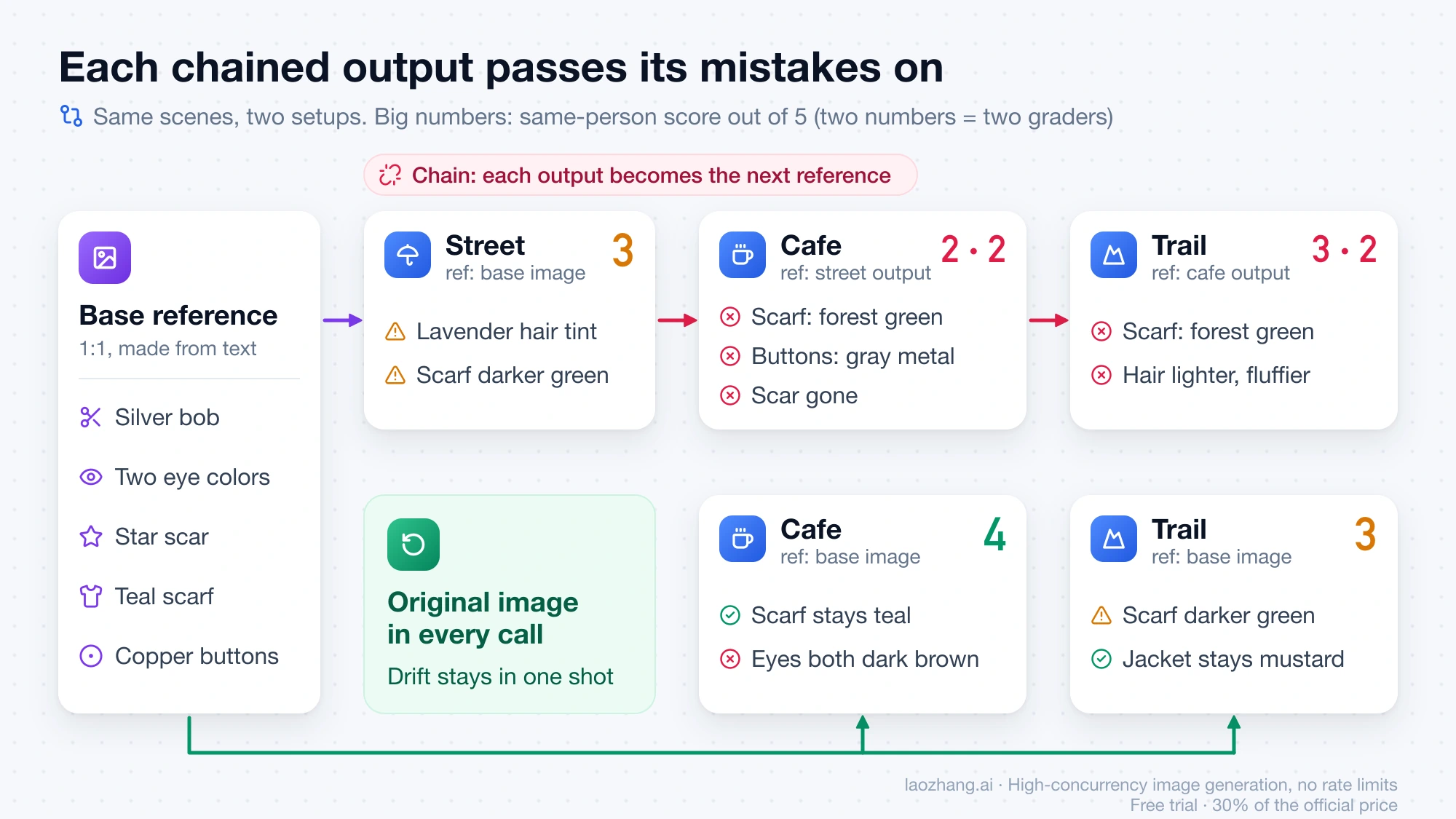
The base image came back with everything the text asked for: amber eye on the left of the frame, green on the right, a small star scar on the cheek at the right of the frame, teal scarf and copper buttons. The four setups then differed only in what went into each call. The first attached the base image to all three scenes with the keep sentence. The second was a chain: the street output became the reference for the cafe shot, and the cafe output became the reference for the trail shot. The third sent the full character description with the street and trail scenes and no image at all. The fourth, added after the first round of grading, attached the base image and followed the keep sentence with "Keep these identifying details exactly as in the reference:" and the full description, again for the street and trail scenes.
Two model graders, each working blind in a fresh session, saw the base image and the shuffled, renamed outputs without being told how any of them was made. They rated each image from 1 to 5 for "same person" (5 means unmistakably the same woman, 3 could be a relative, 1 someone else) and noted hair, eyes, scar, scarf and jacket separately. There was no face-recognition score, each setup produced one image per scene, and the fourth setup was rated by one grader only. The ten calls cost $0.45 at laozhang.ai's list price of $0.045 per call, which does not change with the number of reference images.
Reference, chain, text only or attribute list: what each kept
Sending the original reference with every call kept the character recognizable but not identical: the graders scored those three images 3, 4 and 3 for "same person" and agreed on all three. The chain scored lowest, the text-only description scored highest for a reason explained below, and adding a written attribute list to the reference did not bring back the details the reference alone had lost.
| Setup (scenes) | Hair | Two eye colors | Star scar | Teal scarf | Jacket, copper buttons | Same person (1–5) |
|---|---|---|---|---|---|---|
| Original reference each call (street, cafe, trail) | Silver-white bob in all three; lavender tint in the street shot | Lost in the cafe close-up, both dark brown; too small to judge elsewhere | Faint at best in the close-up; not checkable elsewhere | Kept in the close-up; darker and greener in street and trail | Mustard in all; copper where buttons showed | 3, 4, 3 |
| Chain: previous output as reference (cafe, trail) | Lavender tint in the cafe shot; lighter and fluffier on the trail | Same dark color in the cafe shot for one grader; not visible for the other | Gone in the cafe shot | Drifted to forest green in both | Mustard; buttons turned gray metal in the cafe shot | 2 and 2; 3 and 2 |
| Text description only, no image (street, trail) | Kept in both | Two colors kept on the street; same hazel on the trail | Present in both, on the other cheek; the text named no side | Teal in both | Mustard and copper in both; boxier cut on the trail | 4 and 4 in both |
| Reference plus written attribute list (street, trail) | Kept on the street; shorter and more even on the trail | Same hazel on the street; not visible on the trail | Missing on the street | Teal on the street; darker and greener on the trail | Copper on the street; buttons hidden on the trail | 4, 3 (one grader) |
Read the reference row with its limit in mind. The cafe close-up was the only image from that setup where the eyes were large enough to judge, and there the two colors had become one. In the street and trail shots the face was too small, or turned away, for either grader to check the eyes or the scar, which happened in four or five of the nine scene images depending on the grader. A wide shot can therefore look like a perfect match simply because nothing in it is small enough to fail.
The text-only result needs its condition stated next to it. The base reference was itself generated from this exact description, so sending the description again partly reproduces the face the model already associates with those words. That is a real shortcut for a character you made up in a prompt: keep the description, and it can stand in when a reference-based shot drifts. It is not evidence that text beats an image in general, and a character drawn from a photo or from artwork that you cannot put into words has nothing to fall back on. The scar did appear in both text-only images, but on the other cheek, since the description said only "one cheekbone."
Spelling out the details is the obvious next move after a near miss, and in the test it did not help with the small ones. Both the two eye colors and the scar were spelled out in the request, yet the street shot came back with both eyes the same hazel and no scar, while the hair, scarf and copper buttons held. On the trail the scarf darkened again. In these two images, writing a detail into the request did not make it appear.
Feed the last output forward or go back to the original reference?
Go back to the original. Using each new image as the reference for the next one was the weakest setup in the test, and its errors compounded: the scarf moved from teal to forest green, the copper buttons turned gray metal, a lavender tint appeared in the hair, and the "same person" scores fell to 2 and 2, then 3 and 2. Each output carries small mistakes, and the next call treats them as the character.
Astorie's Nano Banana 2.1 character consistency case study, updated October 19, 2026, reached the same advice on a different setup (its own canvas tool, 4K, high thinking, one selected output per step): return to the original reference when the camera distance changes, because a chained edit can carry an accidental change forward. Its author also notes that a familiar-looking figure is not the same as an identical face.
Google's Gemini API image generation guide reads differently at first glance. For 360-degree views it says to prompt for angles one at a time and to "include previously generated images in subsequent prompts to maintain consistency," and it calls multi-turn conversation the recommended way to iterate. That advice is about turning one character through angles, and it adds earlier images rather than replacing the reference with the latest one. If you build a turnaround that way, keep the original base image in every request and add only the angles you have already checked against it. Chaining edits in a multi-turn API conversation can also fail with a 400 on the second turn, which is covered in Nano Banana 2 Thought Signature Error: Fix the Second-Turn 400.
Face consistency: which details drift and how to design around them
The face was the least stable part of the character in every setup, so design the character so that the face is not the only thing that identifies it. Across all nine scene images, the two eye colors survived once out of the five times they could be seen. With a reference attached, the scar was faint or missing in every image where that cheek showed; from text alone it appeared, but on the other cheek, because "one cheekbone" left the side open. If you rely on the description, name the side.
What carried over were the traits that are large in the frame and present in every shot: the asymmetric silver-white bob, the mustard jacket and the scarf. That points to a practical rule for a mascot, a story lead or a product model. Give the character a distinctive haircut and color, one signature garment in a strong color, and possibly a prop, then treat facial marks as a bonus you check in close-ups rather than as the thing readers recognize. If the story needs heterochromia or a scar, plan the shots where it must show as close or medium shots and expect to check them individually.
Color is the second weak spot. The scarf drifted darker and greener in the night street and the mountain sunrise even with the original reference attached, while it stayed teal in the evenly lit cafe close-up. Strong scene lighting is a plausible cause, and naming "teal" again in the attribute list did not keep the trail-shot scarf teal. When a garment color is part of the identity, check it in every scene with colored or low light, and either plan a color correction afterwards or pick a hue that is hard to mistake for its neighbors.
Where the character came from changes how much the reference has to do. A character born from a prompt has two anchors, the image and the exact text that produced it, so save that text word for word. A character from a photo or a drawing has only the image, which is why the reference you start from should show the face large, front-on and evenly lit. Photo-sourced characters were not part of this test, so check those against the list further down before you rely on a long series.
How to set up references and prompts for a recurring character
The setup that held best in the test is plain: one clean base reference, attached to every call, plus a short keep sentence and a single scene description. The order below builds that setup and leaves room to add angles later without starting a chain.
- Create or choose one base reference with a plain background, head and upper body in frame, a neutral expression and even light, so the face and every garment are clearly readable. The test used a square 1K image for this.
- If the character came from a prompt, save that description exactly as written. It is your fallback for shots where the reference drifts.
- For each new scene, send the base image together with a keep sentence that names what must not change, then one scene description with the location, camera angle and expression.
- Plan close-ups or medium shots for any scene where the face has to match, and use wide shots for clothing and silhouette.
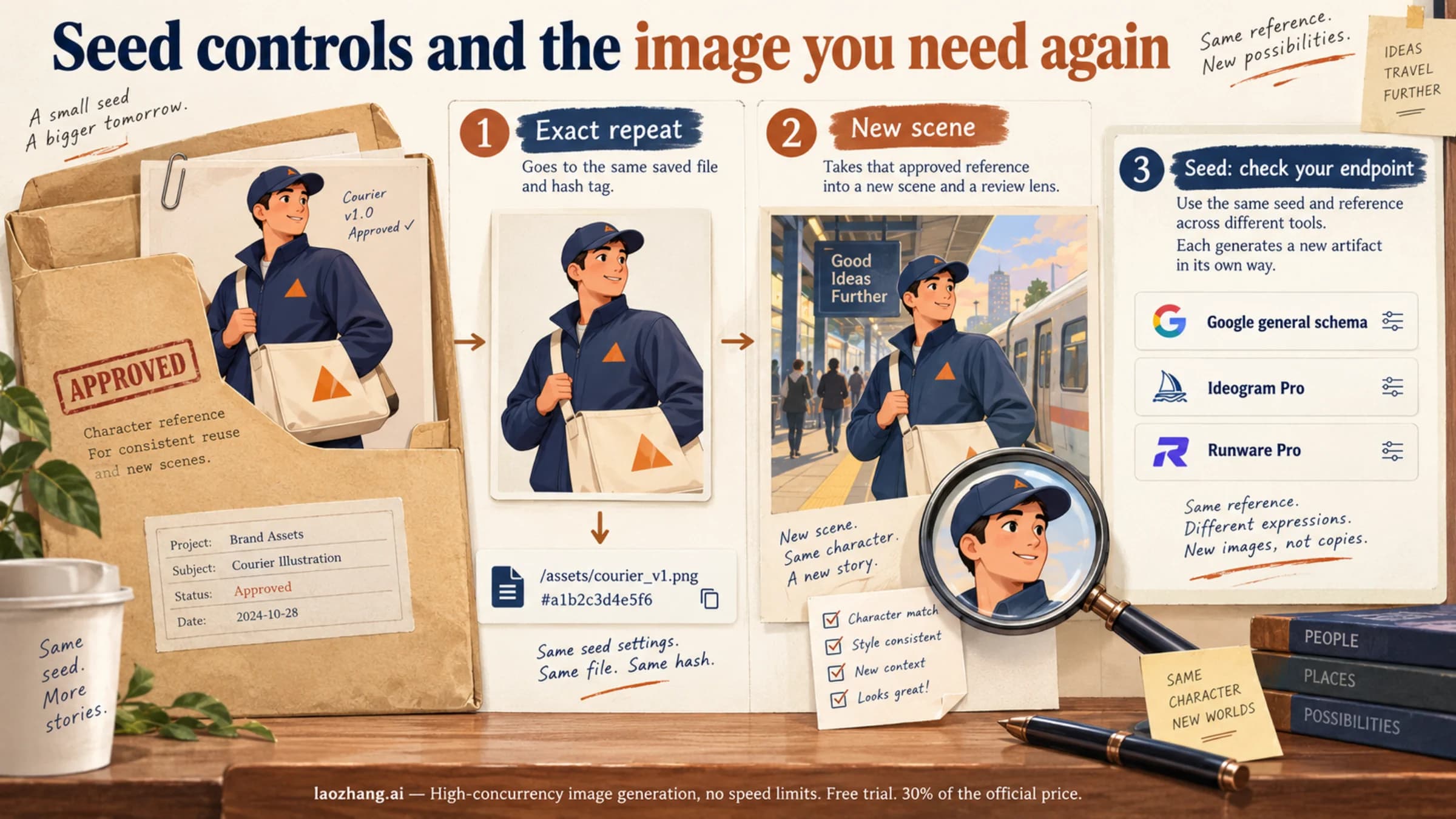
- When you approve a new angle, you can add it as a second character image next to the original. Nano Banana 2.1 accepts up to four character images per request, but keep the original in every call.
- Check each image with the list in the next section before it goes into your set.
Through the Gemini-native endpoint, the text part came first and the reference image second in every call of the test. The request body looked like this:
{
  "contents": [{
    "parts": [
      { "text": "Use the person in the reference image as the character. Keep her face, hair, eye colours, scar, jacket and scarf identical to the reference. Close-up, head and shoulders, laughing in a warm cafe with a blurred background." },
      { "inlineData": { "mimeType": "image/jpeg", "data": "<base64 of the base reference>" } }
    ]
  }],
  "generationConfig": {
    "responseModalities": ["IMAGE"],
    "imageConfig": { "imageSize": "1K", "aspectRatio": "4:3" }
  }
}
Each attached reference added about 1,080–1,090 prompt tokens in the test. What that means for your bill depends on where you call the model, which Nano Banana 2.1 API Pricing: Per-Image Price vs Cost per Call works through. If a call returns HTTP 200 without an image, Nano Banana API Returns No Image? Find the Cause in the Response shows where to look; for scene and edit templates, see How to Prompt Nano Banana: Practical Guide and 50 Tested Templates.
How many characters and reference images Nano Banana 2.1 accepts
Nano Banana 2.1 accepts up to 14 reference images in one request, split into up to 4 images of characters and up to 10 images of objects, with no separate slot for style references. Google's image generation guide words it as "character resemblance of up to 4 characters and the fidelity of up to 10 objects in a single workflow," the same limits as Nano Banana 2. Nano Banana Pro takes up to 5 character images, 6 object images and 3 style references. These are working limits per request, not a promise that every face comes back identical.
Per-image check and when to stop re-rolling
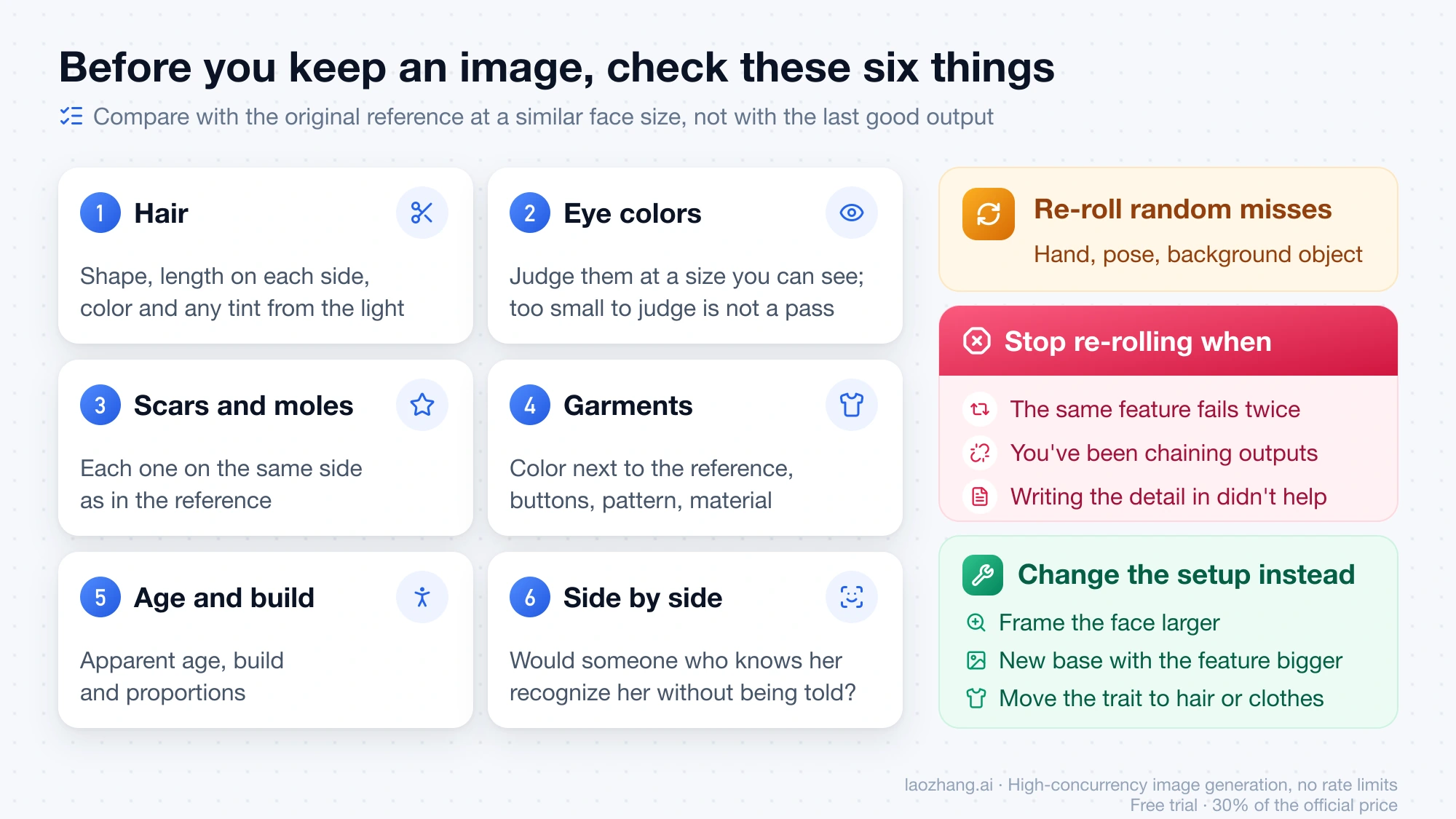
Judge every new image against the original reference, not against the previous good output, and at a similar face size, because a small face hides exactly the details that drift. Go through the same items each time:
- Hair shape, length on each side and color, including any tint the scene light added
- Eye color, or colors, seen at a size where you can actually tell; a face too small to judge is not a pass
- Scars, moles or freckles, and whether each is on the same side as in the reference
- Each garment's color next to the reference, plus buttons, patterns and material
- Apparent age, build and proportions
- A side-by-side glance: would someone who knows the character recognize her without being told
Re-roll when the miss looks random, such as a hand, a pose or a background object. Change the setup instead when the same feature fails twice from the original reference, when you notice you have been passing outputs forward, or when writing the detail into the request has not brought it back, as it did not for the eyes and scar in the test. Changing the setup means framing the face larger, making a new base reference in which that feature is bigger and clearer, or moving the trait into hair or clothing where the model holds it. How many re-rolls a fixed facial mark takes on average was not measured, so treat two failures as a working limit rather than a statistic.
Nano Banana 2.1 character consistency: other questions
Is Nano Banana 2.1 better than Nano Banana Pro for character consistency?
On Google's own scores, 2.1 is ahead. The Nano Banana 2.1 model card, with results as of October 2026, gives 2.1 with thinking an Elo of 1028 ±14 for single-character consistency against 991 ±9 for Pro, and 1106 ±14 against 1011 ±10 for multi-character consistency. These are Google's internal human-preference ratings, not an independent test. Pro still accepts one more character image. For the same prompts run on both models, see Nano Banana 2.1 vs Pro vs GPT Image 2.5: 9-Prompt Test and Cost; if you stay on Pro, Nano Banana Pro Face Consistency: The Complete 2026 Guide to Perfect AI Character Identity covers its reference setup.
Does turning on high thinking or 4K improve face consistency in Nano Banana 2.1?
That is not established. The model card's single-character scores for 2.1 with and without thinking are 1028 ±14 and 1021 ±14, a gap inside the error margin, and the test described here ran at 1K with the default thinking level, where only one of ten responses reported any thought tokens. Higher resolution gives small facial details more pixels, so it may be worth comparing on your own character, but there is no published figure for it as of November 3, 2026.