Nano Banana Pro Pricing in 2026: Complete Breakdown of Every Plan, API Cost, and Free Option

A
25 min readAI Image Generation

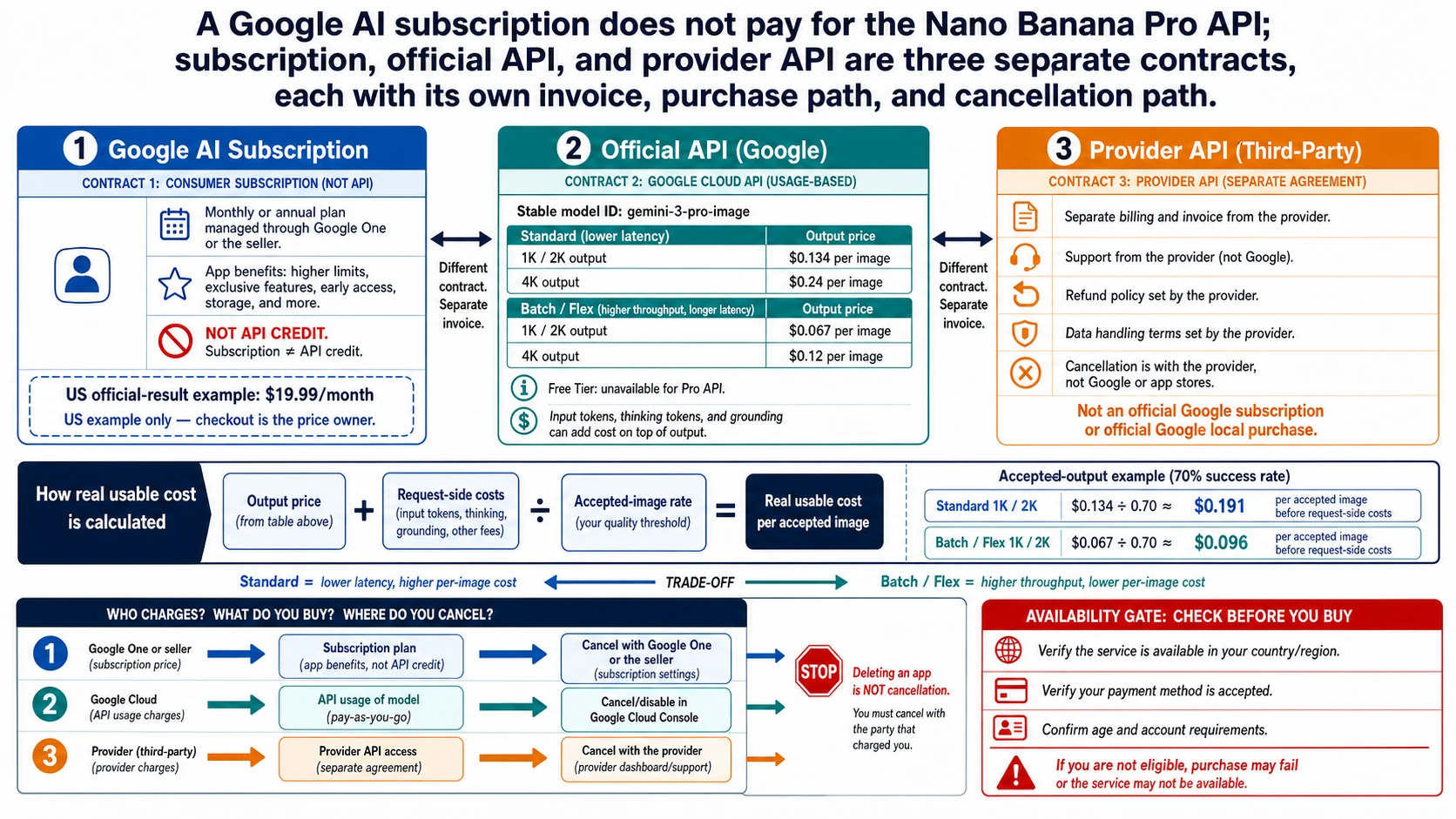
Nano Banana Pro (Gemini 3 Pro Image) pricing ranges from $0 (free tier) to $249.99/mo (AI Ultra). API costs $0.134 per 2K image and $0.24 per 4K image, with Batch API offering 50% off. Third-party APIs like laozhang.ai charge as low as $0.05 per image — a 79% savings. This guide covers all 6 access methods with verified February 2026 data.

Nano Banana Pro Pricing in 2026: Complete Breakdown of Every Plan, API Cost, and Free Option

Nano Banana Pro pricing starts at $0.134 per 2K image through Google's official API, with 4K images costing $0.24 each. If you prefer subscriptions, Google offers four tiers: a free plan with 2-3 images per day, AI Plus at $7.99/month, AI Pro at $19.99/month, and AI Ultra at $249.99/month. For those looking to minimize costs, third-party API providers offer the same Nano Banana Pro model for as low as $0.05 per image — representing up to 79% savings compared to official 4K pricing. All pricing data in this guide has been verified against official sources as of February 2026.

TL;DR

Nano Banana Pro gives you six ways to generate images, and the right choice depends entirely on how many images you need and whether you need real-time access. Here is the quick breakdown of every option available right now:

  • Free tier: 2-3 images per day at 1K resolution, no credit card needed — perfect for casual testing
  • AI Plus ($7.99/mo): ~50 images/day at 2K resolution with image editing tools — the new entry-level paid plan launched January 2026
  • AI Pro ($19.99/mo): ~100 images/day at 2K with full Gemini 3 Pro access, reasoning, and NotebookLM Plus — the most popular subscription for regular users
  • AI Ultra ($249.99/mo): ~1,000 images/day at native 4K resolution with Gemini Ultra model access and 30TB cloud storage — for power users and professionals
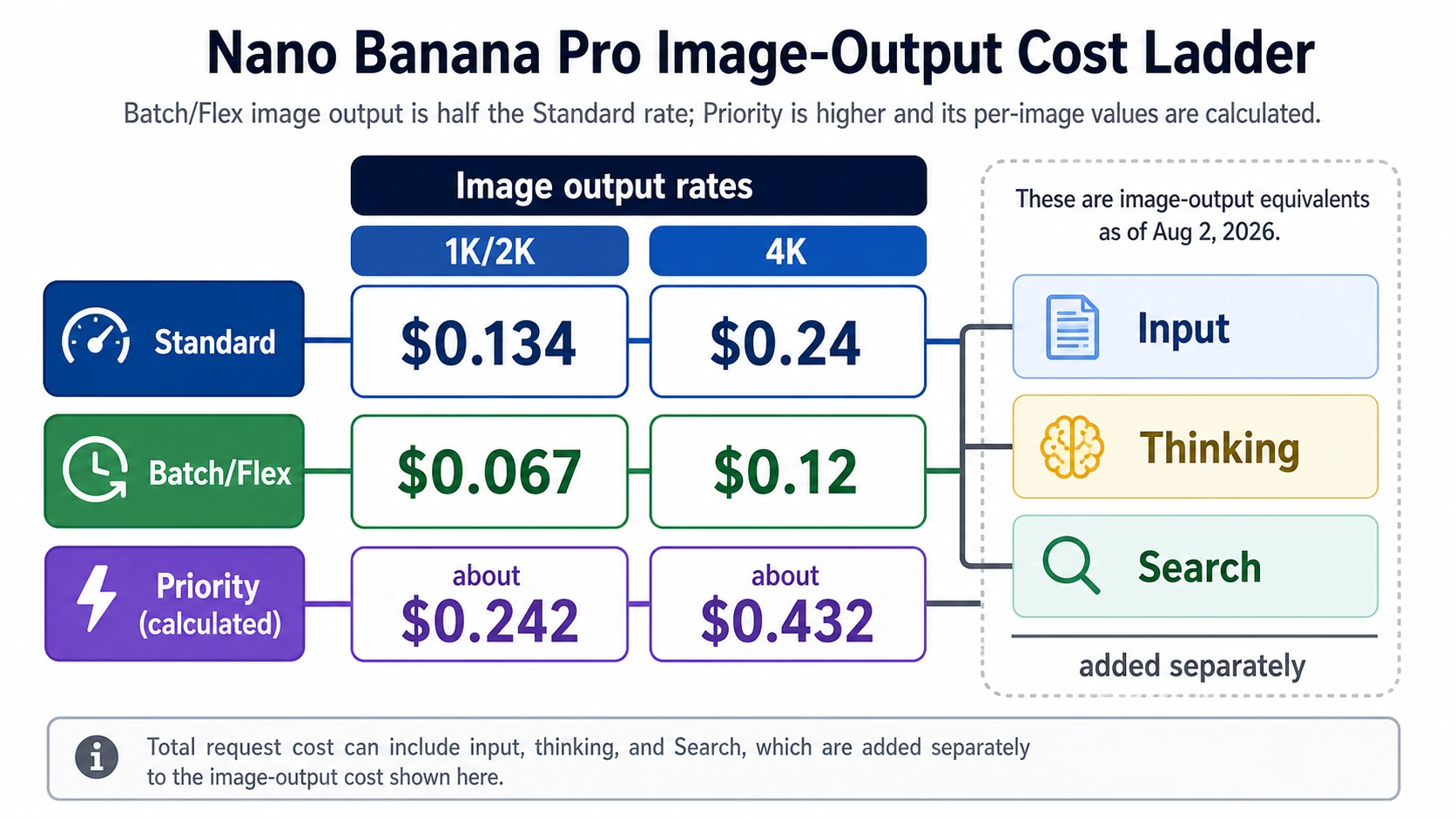
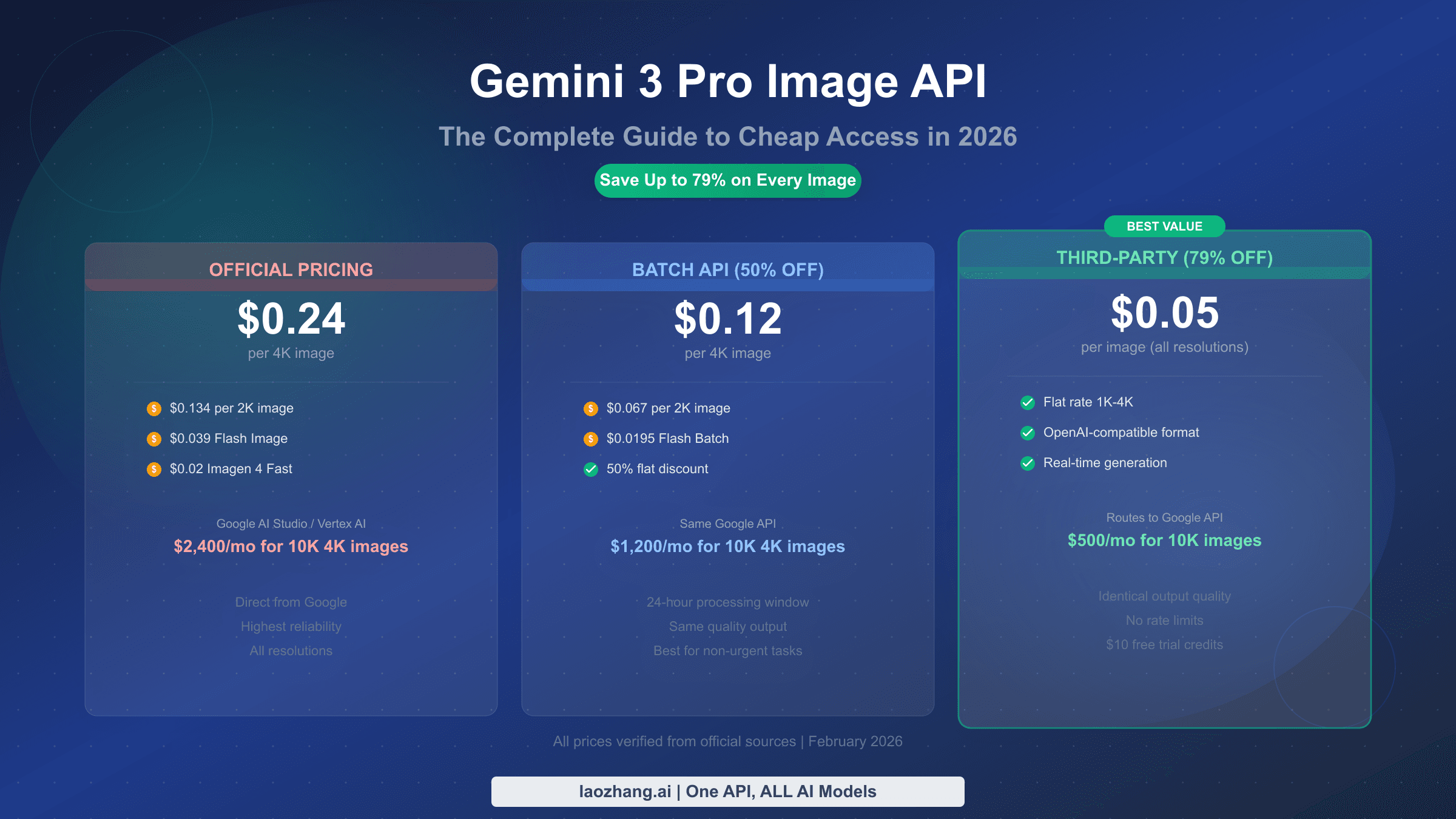
  • Official API: $0.134/2K image, $0.24/4K image, with Batch API at 50% off — pay-as-you-go for developers
  • Third-party API: From $0.05/image at any resolution via providers like laozhang.ai — 63-79% cheaper than official API with identical model quality

The biggest savings come from choosing the right access method for your volume. Casual users should stick with the free tier, professionals benefit most from AI Pro's per-image value ($0.007 at full utilization), and developers building production applications should strongly consider third-party APIs for their dramatically lower cost per image.

Nano Banana Pro Pricing Overview: What It Costs in February 2026

Understanding Nano Banana Pro pricing requires looking beyond a single number because Google has built a multi-layered pricing structure that serves everyone from casual users to enterprise-scale production pipelines. The model itself — officially called Gemini 3 Pro Image generation, marketed as Nano Banana Pro — delivers the same photorealistic output quality regardless of which access method you choose. What changes between tiers is the cost per image, the daily generation limits, the maximum output resolution, and the additional features bundled with each plan.

The most important pricing distinction is between subscription access and API access. Subscriptions bundle Nano Banana Pro into Google's broader AI plans (AI Plus, AI Pro, AI Ultra), which means you also get access to Gemini 3 Pro for text conversations, cloud storage, and other Google services. The per-image cost through subscriptions can be extremely low if you fully utilize your daily quota — as little as $0.007 per image on the AI Pro plan if you generate all 100 daily images consistently. However, if you only generate a handful of images per week, the effective per-image cost rises significantly, and you may find the pay-as-you-go API more economical.

API pricing follows a straightforward per-image model. Standard API access costs $0.134 for each 2K resolution image and $0.24 for each 4K resolution image, with these prices verified against Google's AI for Developers pricing page as of February 2026. The Batch API offers a flat 50% discount on these rates — $0.067 per 2K image and $0.12 per 4K image — but trades real-time response for a 24-hour processing window. This makes the Batch API ideal for workflows where you can queue up image generation requests and collect results later, such as e-commerce product catalogs, content marketing pipelines, or batch processing for social media assets.

A third option that many pricing guides overlook is the growing ecosystem of third-party API providers that offer access to the same Nano Banana Pro model at significantly reduced rates. These providers, which access the model through Google Cloud Platform partnerships, can offer prices as low as $0.05 per image regardless of resolution. This represents a 63% savings compared to official 2K pricing and a 79% savings compared to official 4K pricing. The output quality is identical because these providers use the exact same underlying model — they simply operate at scale and pass volume discounts to customers.

For context on how these prices compare to competitors, Midjourney's basic plan starts at $10/month for ~200 images, DALL-E 3 through OpenAI charges $0.040 per standard image ($0.080 for HD), and Stable Diffusion 3 through the Stability AI API costs $0.065 per image. Nano Banana Pro sits in the middle of this spectrum on official pricing but becomes the most affordable option when accessed through third-party providers or when subscription quotas are fully utilized.

Every Subscription Plan Compared: Free, Plus, Pro, and Ultra

Nano Banana Pro subscription tier comparison showing Free, AI Plus, AI Pro, and AI Ultra plans with features and per-image costs

Google's subscription approach to Nano Banana Pro access has evolved significantly in early 2026, with the addition of the AI Plus tier in January creating a four-tier structure that covers a much wider range of budgets. Each tier bundles Nano Banana Pro image generation with Google's broader AI ecosystem, meaning you get more than just image generation — you also receive text AI capabilities, cloud storage, and various Google service integrations. The key question for most users is not just how many images they can generate, but whether the bundled features justify the subscription cost compared to pay-as-you-go API access.

The free tier remains the easiest entry point. With no credit card required, you can generate 2-3 images per day at 1K resolution using basic prompts. There is no access to image editing tools, no 2K or 4K output, and no priority queue access during peak times. Despite these limitations, the free tier generates roughly 60-90 images per month at zero cost, which is more than enough for users who want to experiment with the technology or generate occasional images for personal use. The most significant limitation is the 1K resolution cap, which produces images that are acceptable for social media posts but insufficient for print materials or professional design work.

The AI Plus plan at $7.99/month is the newest addition to Google's subscription lineup, launched in January 2026 to bridge the gap between free access and the more expensive AI Pro tier. For this price, you get approximately 50 images per day at 2K resolution, access to image editing tools, 200GB of cloud storage, and family sharing for up to 5 members. At full utilization, that works out to roughly 1,500 images per month at a cost of approximately $0.005 per image — which is actually cheaper than any API option. The AI Plus plan is particularly appealing for families or small teams where multiple people need occasional image generation, since the family sharing feature effectively divides the $7.99 cost among five users.

The AI Pro plan at $19.99/month is Google's most popular tier and the one most commonly recommended for individual professionals and regular users. It provides approximately 100 images per day at 2K resolution, full access to image editing and reasoning capabilities, 2TB of cloud storage, NotebookLM Plus, and priority access during peak demand periods. If you consistently generate close to your daily limit, the effective per-image cost drops to about $0.007 — making it one of the most cost-effective ways to access high-quality AI image generation at scale. The AI Pro plan also includes full access to Gemini 3 Pro for text conversations, which makes it a compelling all-in-one AI subscription if you use both text and image generation regularly.

The AI Ultra plan at $249.99/month represents a significant investment and is designed for power users, creative professionals, and small businesses that need the highest generation limits and quality. This tier provides approximately 1,000 images per day at native 4K resolution — a feature exclusive to this plan — along with access to Google's Gemini Ultra model, YouTube Premium, and a massive 30TB of cloud storage. It is worth noting that many older articles still list the Ultra price as $99.99 or $124.99; the current verified price as of February 2026 is $249.99/month. At full utilization, the per-image cost is approximately $0.008, which remains competitive with API pricing while offering the convenience of native 4K output and integrated tools.

The following comparison table summarizes the key differences across all four subscription tiers:

FeatureFreeAI Plus ($7.99)AI Pro ($19.99)AI Ultra ($249.99)
Images/day2-3~50~100~1,000
Max resolution1K2K2K4K (native)
Image editingNoYesYesYes
Reasoning/chatBasicStandardFull Gemini 3 ProGemini Ultra
Cloud storage15GB200GB2TB30TB
Priority accessNoNoYesYes
Cost/image (max use)$0.00~$0.005~$0.007~$0.008
Best forTestingRegular usersProfessionalsPower users

For users deciding between tiers, if you find yourself checking the complete comparison of free vs Pro quota limits, the AI Plus plan at $7.99 is often the sweet spot between free limitations and Pro capabilities.

How to Choose the Right Nano Banana Pro Plan

Choosing between six different access methods can feel overwhelming, but the decision becomes straightforward when you focus on three factors: how many images you need per month, what resolution you require, and whether you need real-time API access or can work within a subscription's daily limits. Rather than comparing every feature of every plan, the most practical approach is to identify which user persona most closely matches your situation and follow the recommendation that corresponds to your actual usage pattern.

If you generate fewer than 90 images per month and primarily use images for social media, blog posts, or personal creative projects, the free tier is genuinely the right choice. Many users underestimate how far 2-3 images per day can stretch — that is 60-90 images monthly, generated at absolutely no cost. The 1K resolution limitation only becomes a problem if you need images for print materials, large-format displays, or professional client deliverables. If you occasionally need higher resolution output, consider upgrading to AI Plus for the month you need it rather than maintaining a permanent subscription.

If you generate 100-500 images per month and need consistent 2K quality, you are in the sweet spot for subscription plans. The decision between AI Plus ($7.99) and AI Pro ($19.99) depends on whether you need the additional features bundled with Pro: full Gemini 3 Pro text access, 2TB storage, NotebookLM Plus, and priority queue access. If you primarily use Nano Banana Pro for image generation and do not need these extras, AI Plus at $7.99 offers excellent value. If you are a professional who also relies on Google's AI text capabilities for writing, analysis, or research, AI Pro provides significantly more value per dollar when you consider the complete package.

If you generate 500-3,000 images per month and are building a workflow around image generation — whether for an agency, a content marketing operation, or a product photography pipeline — you have two viable paths. The AI Pro subscription covers up to 3,000 images monthly at $19.99, but only at 2K resolution. If you need 4K output, you will either need AI Ultra at $249.99 or API access. At this volume, third-party APIs become particularly compelling: 2,000 images at $0.05 each costs only $100/month with real-time response and any resolution, compared to $268-$480 through the official API.

If you generate more than 3,000 images per month or are building production applications that programmatically generate images, API access is the clear choice. At this scale, the question is whether you need real-time response (standard API at $0.134/image), can tolerate delayed processing (Batch API at $0.067/image), or want the maximum cost savings (third-party at $0.05/image). For a production application generating 10,000 images monthly, the annual cost difference between standard API ($16,080/year) and third-party API ($6,000/year) is over $10,000 — a difference that compounds dramatically as volume increases.

The key principle is this: subscription plans offer the lowest per-image cost at moderate volumes when you fully utilize your daily quota, while API access provides better value for developers who need programmatic integration, variable volumes, or the highest possible cost efficiency at scale.

How to Use Nano Banana Pro for Free: 5 Legitimate Methods

The question "Is Nano Banana Pro free?" consistently appears in Google's People Also Ask results, and the answer is yes — there are multiple legitimate ways to use this model without paying anything. While free access comes with limitations on resolution, daily quotas, and available features, these methods provide genuine access to the same Nano Banana Pro model that powers the paid tiers. Here are the five free access methods, ranked from most to least practical for everyday use.

Method 1: Google AI Free Tier (Best for most users). The simplest free access is through Google's free tier, which requires nothing more than a Google account. You can generate 2-3 images per day at 1K resolution using basic prompts through Google's AI Studio or the Gemini app. No credit card is required, there is no time limit on the free tier, and the images you generate are yours to use. This method works best for users who need occasional images for personal projects, social media posts, or experimentation. The main limitation is the 1K resolution cap and the restricted daily quota, but for many casual users, this is more than sufficient.

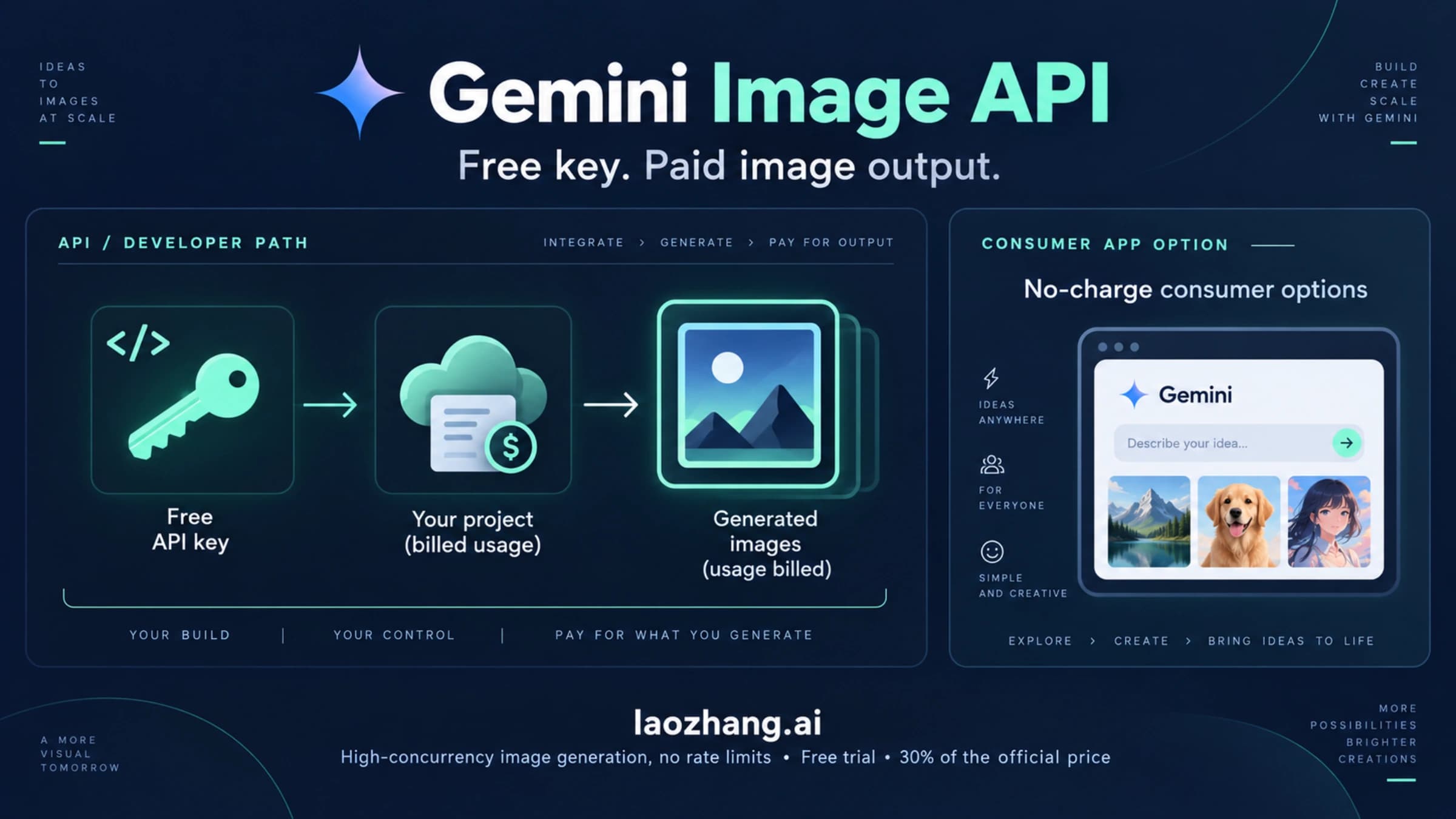
Method 2: Google AI Studio API Free Tier (Best for developers). Google provides a free tier for the Nano Banana Pro API through AI Studio that allows developers to experiment with the model programmatically. The free API tier has rate limits (typically lower priority and limited requests per minute) but does not charge per image. This is particularly valuable for developers who want to prototype applications, test prompt engineering strategies, or build proof-of-concept projects before committing to paid API access. If you are building an application and want to understand how to get your Nano Banana Pro API key, the free tier is the natural starting point.

Method 3: 30-Day Gemini Pro Trial (Best value if you have not tried it). Google offers a 30-day free trial of the AI Pro plan ($19.99/month value) for new users who have not previously subscribed. During this trial period, you get the full AI Pro experience: approximately 100 images per day at 2K resolution, complete image editing tools, and all bundled Google AI features. This trial provides the best way to evaluate whether a paid subscription is worth the investment for your specific use case. The 30-day window gives you access to roughly 3,000 images at no cost — more than enough to thoroughly test the model for professional workflows.

Method 4: Google Cloud Platform $300 Free Credits (Best for developers at scale). New Google Cloud Platform accounts receive $300 in free credits that can be applied to the Nano Banana Pro API. At $0.134 per 2K image, these credits translate to approximately 2,239 free images — a substantial amount for prototyping, testing, or initial production runs. The GCP credits expire after 90 days, so you need to use them within that window, but they provide genuine production-quality API access at no cost. This method is especially valuable for developers building applications who want to validate their cost projections with real API usage data before committing to ongoing spending.

Method 5: Educational and Research Access. Google provides expanded free access to AI tools, including Nano Banana Pro, for verified educational institutions and research organizations through the Google for Education and Google Cloud for Research programs. The specific quotas and terms vary by institution, but this can provide significantly higher generation limits than the standard free tier. If you are affiliated with a university or research organization, check whether your institution has an existing agreement with Google Cloud that includes AI model access.

Each of these free methods serves a different purpose, and they can be combined strategically. A developer, for example, might use the AI Studio free tier for initial prototyping, then activate the GCP $300 credits for production testing, and finally transition to a paid API plan or third-party provider once the application goes live. The total free access window — combining the free tier (indefinite), the Pro trial (30 days), and GCP credits (90 days) — can stretch across several months of active development before any payment is required.

API Pricing for Developers: Standard, Batch, and Third-Party Options

API pricing comparison chart showing Standard, Batch, and Third-Party options with monthly cost examples

For developers building applications that programmatically generate images, understanding the nuances of API pricing is essential for accurate cost planning and choosing the right integration approach. Nano Banana Pro is available through three distinct API access methods, each with different pricing structures, response characteristics, and trade-offs. The right choice depends on your application's latency requirements, volume expectations, and budget constraints.

Standard API: Real-Time Access at Full Price

The standard Nano Banana Pro API through Google AI for Developers or Vertex AI charges $0.134 per 2K resolution image and $0.24 per 4K resolution image, with these prices verified against official documentation as of February 2026. Response times typically range from 5 to 15 seconds per image, making this the appropriate choice for applications that need real-time or near-real-time image generation — such as user-facing tools where someone is waiting for their generated image. The API uses a straightforward pay-as-you-go model with no minimum commitment, and you only pay for successfully generated images. For detailed benchmarks on response times and throughput, the API pricing and speed benchmarks article provides comprehensive test data.

Batch API: Half the Cost, Delayed Response

Google's Batch API offers a flat 50% discount on all Nano Banana Pro image generation: $0.067 per 2K image and $0.12 per 4K image. The trade-off is that batch requests are processed within a 24-hour window rather than in real time. You submit a batch of image generation requests, and Google processes them during off-peak periods, returning all results within 24 hours. This makes the Batch API ideal for workflows where images do not need to be generated immediately: catalog production, social media content calendars, dataset creation for machine learning, or any pipeline where you can separate the "request" step from the "use" step by at least a day.

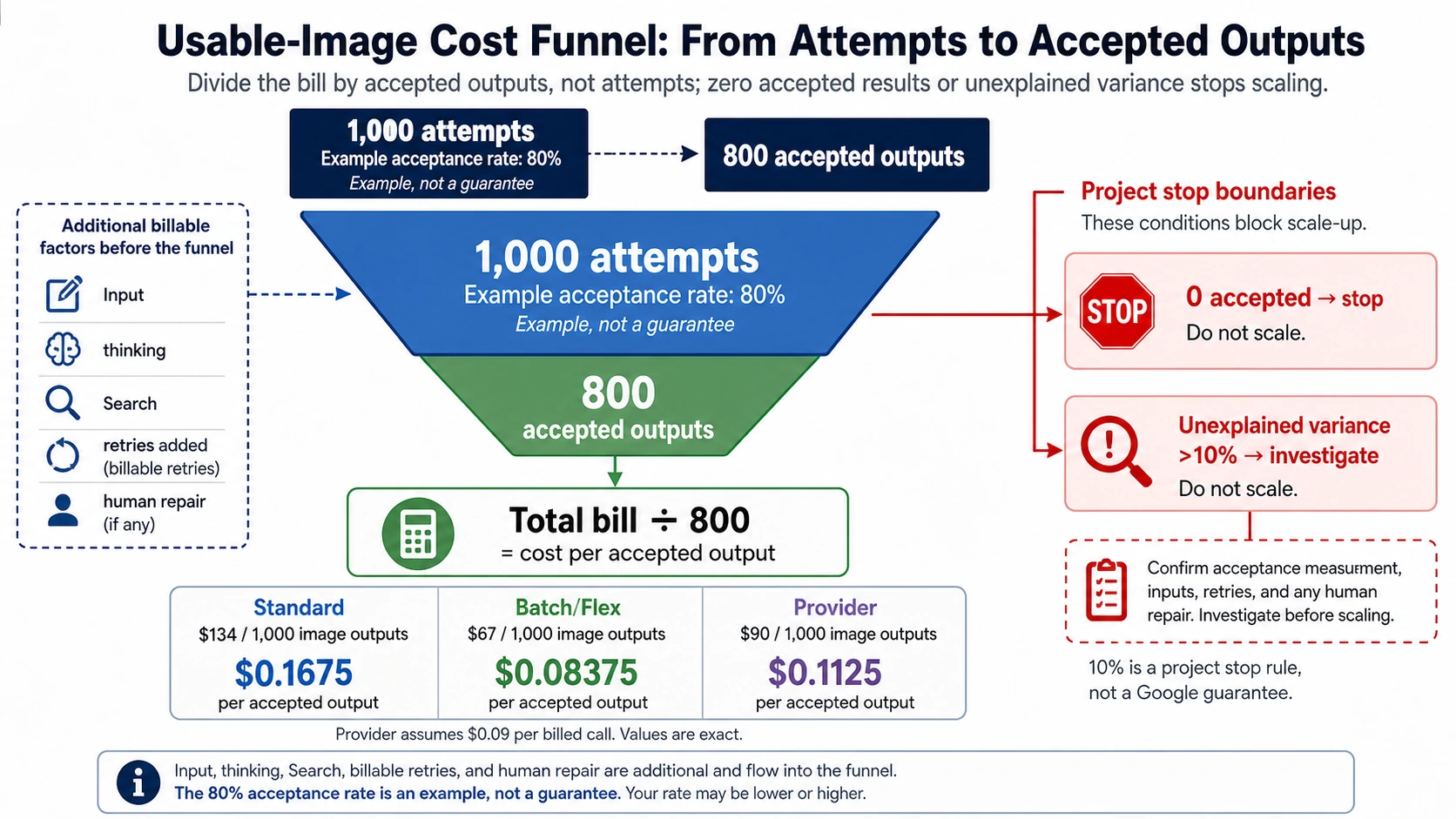
The Batch API becomes particularly cost-effective at scale. For an operation generating 5,000 images per month at 2K resolution, the standard API would cost $670/month while the Batch API reduces that to $335/month — a savings of $4,020 per year. For operations generating a mix of 2K and 4K images, the savings scale proportionally. The output quality is identical to the standard API; the only difference is the processing timeline.

Third-Party APIs: Maximum Savings with Same Quality

The most cost-effective way to access Nano Banana Pro via API is through third-party providers that offer the same model at significantly reduced rates. These providers operate their own infrastructure connected to the Nano Banana Pro model through Google Cloud Platform partnerships, allowing them to pass volume-based savings to individual customers. The leading provider in this space is laozhang.ai, which offers Nano Banana Pro at a flat rate of $0.05 per image regardless of resolution — representing a 63% savings compared to official 2K pricing and a 79% savings compared to official 4K pricing (API documentation).

Third-party API access maintains the same model quality because the underlying image generation model is identical. What differs is the infrastructure layer: instead of connecting directly to Google's API endpoint, you connect to the third-party provider's endpoint, which routes your request to the same Nano Banana Pro model. Response times are typically comparable to Google's standard API (5-15 seconds), and most providers offer OpenAI-compatible API endpoints, making integration straightforward for applications that already use standard API conventions.

The cost difference becomes dramatic at production volumes. Consider the annual cost comparison for different image volumes:

Monthly VolumeStandard API (2K)Batch API (2K)Third-Party ($0.05)Annual Savings (vs Standard)
100 images$13.40$6.70$5.00$100.80
500 images$67.00$33.50$25.00$504.00
2,000 images$268.00$134.00$100.00$2,016.00
10,000 images$1,340.00$670.00$500.00$10,080.00

For applications generating 4K images, the savings are even more pronounced since third-party providers typically charge the same flat rate regardless of resolution, while official 4K pricing is 79% higher. If your application generates 4K images at any meaningful volume, third-party APIs transform the economics from potentially prohibitive to highly accessible. You can explore the complete resolution and quality analysis in the complete 4K resolution guide.

Real-World Cost Scenarios: What You'll Actually Pay Each Month

Real-world monthly cost scenarios for four user personas: hobbyist, freelancer, agency, and enterprise

Abstract pricing tables only tell part of the story. What most users actually need to know is how much they will spend each month based on their specific usage patterns. The following four scenarios represent common user types we have identified, with calculated monthly costs across every available access method. These calculations use the verified February 2026 pricing from the data verification table above, and each scenario accounts for realistic usage patterns rather than theoretical maximums.

Scenario 1: The Hobbyist (50 images/month, 1K-2K resolution). Sarah creates images for her personal blog, Instagram posts, and occasional design projects. She generates about 50 images per month, rarely needs 4K resolution, and does not require real-time API access. Her optimal choice is the free tier, which provides 60-90 images per month at zero cost. If she occasionally needs 2K resolution for a specific project, she can upgrade to AI Plus ($7.99/month) for that month and downgrade afterward. Her annual cost ranges from $0 to $96, depending on how many months she needs the 2K upgrade. The standard API would cost her $6.70/month ($80.40/year), which is comparable to AI Plus but without the editing tools and cloud storage. For the hobbyist persona, the free tier supplemented by occasional AI Plus upgrades represents the most cost-effective approach.

Scenario 2: The Freelance Designer (300 images/month, 2K resolution). Marcus runs a freelance design business where he uses AI-generated images as starting points for client projects, concept art, and mockups. He generates approximately 300 images per month and needs consistent 2K quality for professional deliverables. His options diverge significantly in cost: the standard API would run $40.20/month ($482.40/year), AI Pro at $19.99/month covers his volume easily with room to spare, and a third-party API at $0.05/image costs just $15.00/month ($180/year). For Marcus, the decision comes down to whether he values the bundled Google AI features enough to pay $5 more per month for AI Pro. If his primary need is image generation and he already uses other tools for text AI, the third-party API saves him over $300 per year compared to the standard API.

Scenario 3: The Creative Agency (2,000 images/month, 2K-4K mix). PixelForge Studio handles multiple client campaigns simultaneously, generating approximately 2,000 images per month with a mix of 2K images for web use and 4K images for print and large-format displays. Assuming a 70/30 split between 2K and 4K images, their standard API cost would be approximately $374/month ($4,488/year). The Batch API reduces this to $187/month if they can tolerate 24-hour processing delays. But the most dramatic savings come from third-party API access at $100/month flat ($1,200/year) — saving $3,288 annually compared to the standard API. Even the AI Ultra subscription at $249.99/month, which offers the most generous daily quota, costs $150 more per month than the third-party API and still caps daily generation at approximately 1,000 images.

Scenario 4: The Enterprise Production Pipeline (10,000 images/month, 4K). An e-commerce platform generating product images at scale needs 10,000 4K images per month for catalog listings. At the official 4K API rate of $0.24/image, their monthly cost would be $2,400 ($28,800/year). The Batch API brings this down to $1,200/month ($14,400/year) if the 24-hour processing window fits their workflow. Third-party API access at $0.05/image costs $500/month ($6,000/year) — an annual savings of $22,800 compared to the standard API. At this scale, the cost difference is not marginal; it fundamentally changes the business case for AI-generated imagery. The enterprise scenario also illustrates why resolution-agnostic flat pricing from third-party providers becomes increasingly valuable as 4K usage increases, since the official 4K premium (79% higher than 2K) compounds dramatically at volume.

These four scenarios share a consistent pattern: for volumes above approximately 200 images per month, third-party API access delivers the best economics without sacrificing output quality. Below that threshold, the free tier and AI Plus subscription offer excellent value for their respective use cases. The AI Pro and AI Ultra subscriptions provide the best value when their bundled features (text AI, cloud storage, priority access) are actively used alongside image generation.

Nano Banana Pro vs Midjourney vs DALL-E 3: Which Offers the Best Value?

Pricing does not exist in a vacuum. Many users evaluating Nano Banana Pro are comparing it against established alternatives like Midjourney and DALL-E 3 (via OpenAI's API or ChatGPT Plus). Each platform has distinct strengths in terms of output style, pricing structure, and integration options, making a pure price comparison insufficient without considering what you get for your money.

Midjourney operates on a subscription-only model with four tiers: Basic ($10/month, ~200 images), Standard ($30/month, ~900 images), Pro ($60/month, ~1,800 images), and Mega ($120/month, ~3,600 images). There is no pay-as-you-go API option (Midjourney's API is invite-only), no free tier for image generation, and no third-party access. At the Basic tier, the per-image cost is approximately $0.05 — comparable to third-party Nano Banana Pro access — but at the Standard and Pro tiers, the per-image cost rises to $0.033 and $0.033 respectively if you fully utilize the quota. Midjourney's strength lies in its distinctive artistic style and community-driven prompt ecosystem, but its closed platform and lack of API access limit its utility for developers and automated workflows.

DALL-E 3, available through OpenAI's API and ChatGPT Plus, follows a different pricing model. Through the API, standard quality 1024x1024 images cost $0.040 each, while HD quality images at 1024x1792 cost $0.080. Through ChatGPT Plus ($20/month), DALL-E 3 is bundled with GPT-4o text access, providing solid value for users who need both text and image AI. However, DALL-E 3's API lacks a batch discount option, its maximum resolution is lower than Nano Banana Pro's 4K capability, and there is no comparable third-party ecosystem offering reduced pricing. For a deeper technical and style comparison, our Nano Banana Pro vs Flux 2 comparison explores how the latest models stack up in output quality tests.

The following table provides a feature-weighted comparison across all three platforms:

FeatureNano Banana ProMidjourneyDALL-E 3
Cheapest access$0.05/image (third-party)$0.05/image (Basic plan)$0.04/image (API)
Free tierYes (2-3/day)NoNo (ChatGPT free has limits)
Max resolution4K (Ultra/API)~2K1792x1024
Batch discount50% offNoNo
Third-party APIsYes ($0.05/image)NoLimited
API accessFull REST APIInvite-onlyFull REST API
Image editingYes (subscription)YesYes
Best forProduction/API, cost optimizationArtistic style, communityGPT-4o integration

The value proposition of Nano Banana Pro becomes strongest in three scenarios: when you need 4K resolution output (exclusively available through Nano Banana Pro at this quality level among the three), when you are building automated pipelines that require reliable API access with flexible pricing options, and when cost optimization is a priority since the combination of Batch API and third-party access provides more pricing levers than any competitor. Midjourney wins on distinctive artistic style and community, while DALL-E 3 wins on seamless integration with the GPT-4o ecosystem.

Frequently Asked Questions About Nano Banana Pro Pricing

Is Nano Banana Pro really free to use?

Yes, but with limitations. The free tier provides 2-3 images per day at 1K resolution, which translates to roughly 60-90 images per month at no cost. No credit card is required, and there is no time limit on the free tier. Additionally, Google offers a 30-day free trial of the AI Pro plan ($19.99/month value) for new users, and new Google Cloud Platform accounts receive $300 in free credits that can be used for API access. Combined, these free methods can provide several months of substantive access before any payment is needed.

What is the actual cost per image across different plans?

The per-image cost varies dramatically by access method and utilization rate. Through the API, it is $0.134 per 2K image and $0.24 per 4K image (standard), $0.067/$0.12 (Batch), or $0.05 (third-party). Through subscriptions, the effective per-image cost at full utilization ranges from $0.00 (free tier) to $0.008 (AI Ultra). The important nuance is that subscription per-image costs only reach these low levels if you consistently use your full daily quota. If you only generate 10 images on a day when your plan allows 100, the effective per-image cost for that day is 10x higher.

What is the cheapest way to use Nano Banana Pro for production?

For production applications that generate more than 200 images per month, third-party API providers offer the best value. laozhang.ai charges $0.05 per image regardless of resolution, saving 63% compared to official 2K pricing and 79% compared to official 4K pricing. The output quality is identical because the same underlying model is used — the cost difference comes from infrastructure optimization and volume economics. You can test the image generation capability directly at images.laozhang.ai before committing.

Does Nano Banana Pro pricing include text prompts?

When using Nano Banana Pro through a subscription (Free, AI Plus, AI Pro, AI Ultra), the text prompt processing is included in your subscription cost. When using the API, the image generation cost ($0.134/2K or $0.24/4K) covers the complete generation including prompt processing. However, if you use Gemini 3 Pro for extended text conversations before generating an image, the text input tokens ($2.00/M tokens) and output tokens ($12.00/M tokens) are billed separately from the image generation cost.

Is the AI Ultra plan worth $249.99/month?

The AI Ultra plan is worth its cost only if you actively use its distinguishing features: native 4K resolution output, the Gemini Ultra model for text, and the extremely high daily generation limit (~1,000 images/day). If your primary need is image generation at 2K resolution, the AI Pro plan at $19.99 delivers nearly identical per-image value ($0.007 vs $0.008 at full utilization) at one-twelfth the monthly cost. AI Ultra makes financial sense for professionals who need 4K output consistently and who also benefit from the 30TB storage, YouTube Premium, and Gemini Ultra text capabilities. For 4K image generation alone, the third-party API at $0.05/image is more cost-effective unless you generate fewer than approximately 5,000 4K images per month, at which point the Ultra subscription's daily quota may not be fully utilized.

Can I switch between plans without penalty?

Google allows you to upgrade or downgrade your subscription plan at any time. Upgrades take effect immediately with prorated billing, while downgrades take effect at the end of your current billing cycle. There is no cancellation penalty, and unused API credits from GCP do not carry over past their 90-day expiration window. This flexibility means you can start with the free tier, upgrade to AI Plus or AI Pro when you need more capacity, and downgrade during slower months — optimizing your costs to match actual usage throughout the year.

Share:

laozhang.ai

One API, All AI Models

AI Image

Gemini 3 Pro Image

$0.05/img
80% OFF
AI Video

Sora 2 · Veo 3.1

$0.15/video
Async API
AI Chat

GPT · Claude · Gemini

200+ models
Official Price
Served 100K+ developers
|@laozhang_cn|Get $0.1