Krea 3 vs Nano Banana Pro: What a $0.06 Edit Really Costs
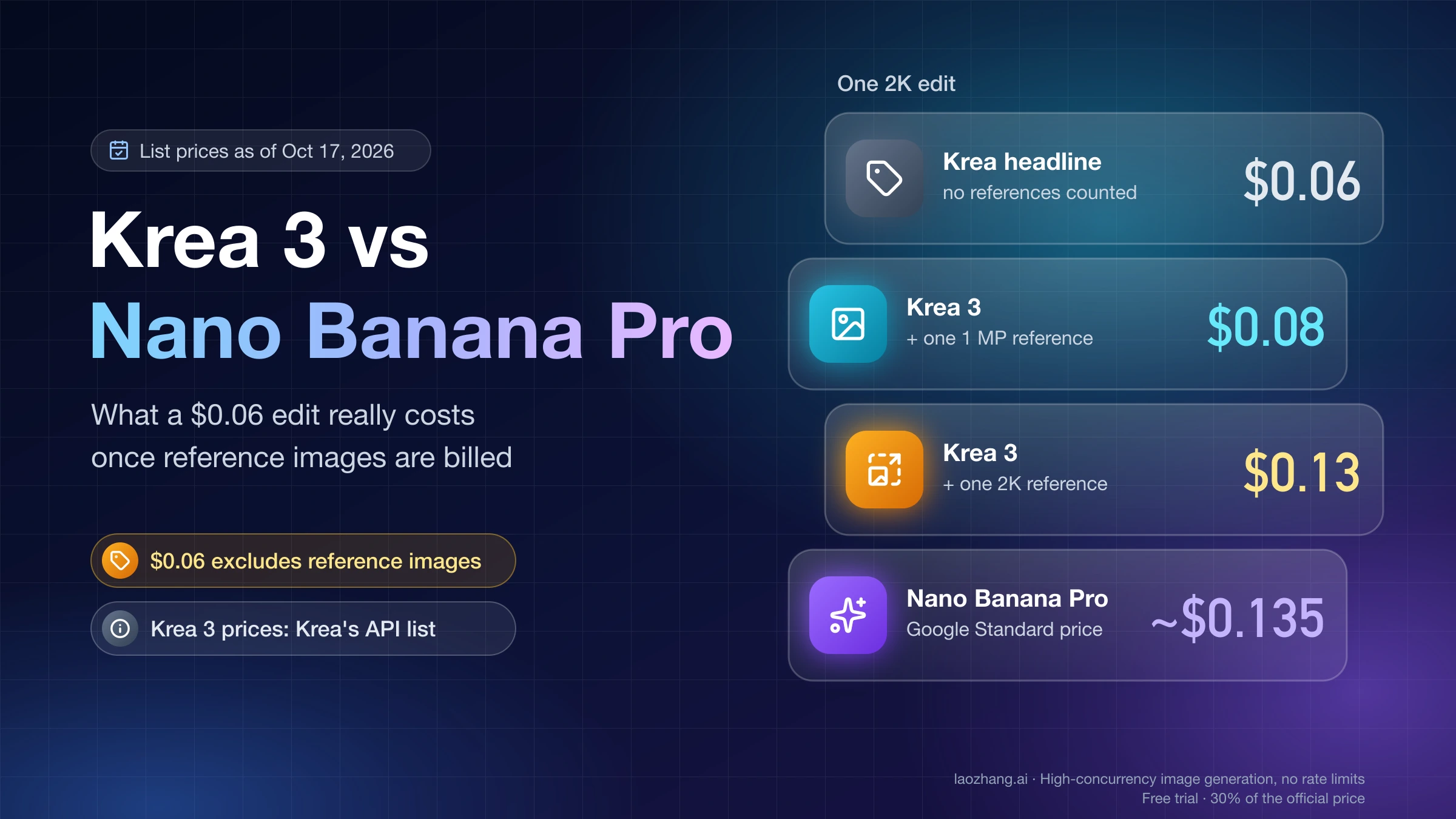
Krea's $0.06 excludes reference images. A 2K edit with a 1 MP reference is $0.08 on Krea 3 vs about $0.135 on Nano Banana Pro; a 2K reference erases most of it.
On this page
Move local edits, product scene swaps and fast rounds of variants to Krea 3, as long as you can send your reference images at about 1 megapixel. Keep 4K output, jobs with more than a handful of references, Search-grounded images and anything that can wait for Google's Batch price on Nano Banana Pro.
The reason is in the fine print of Krea's headline. Krea says Krea 3 edits "in under 8 seconds, end to end, at native 2K" and "costs $0.06 per image at 2K". That price excludes reference images, and an edit always has at least one. Krea's API price list adds $0.02 for each 1K reference and $0.07 for each 2K reference. A 2K edit with one 1 MP reference therefore costs $0.08 on Krea 3 against about $0.135 on Nano Banana Pro at Google's standard price, roughly 40% less, not the 56% that Krea's $0.06 against $0.135 implies. With one full-size 2K reference, Krea 3 costs $0.13 and the saving almost disappears. Google's Batch price, about $0.068 for the same edit, beats both if the job can wait.
Speed has the same gap between headline and conditions. The 8 seconds is Krea's figure from its own platform. The only outside test published so far timed Krea 3 at 20–36 seconds per edit, still faster than Nano Banana Pro in that run, but closer to 1.3× than 4×.
Krea 3 has not been tested for this comparison: every Krea 3 speed, price and quality figure below is Krea's own unless it is credited to Replicate or to the named outside tester; Nano Banana Pro prices are Google's list prices. Krea 3 is a beta that launched on October 15, 2026, so prices and limits here are as of October 17, 2026.
Which edits to move to Krea 3 and which to keep on Nano Banana Pro
Krea 3 wins when an edit changes one part of an image and you need many attempts. Nano Banana Pro wins when you need something Krea 3 does not offer yet: 4K, many references, grounding in Google Search, or a half-price batch queue.
| Job | Run first | Why |
|---|---|---|
| Put a product in a new scene, keep the label and logo | Krea 3 | Krea calls it "best at product scene changes, object removal and photo cleanup"; $0.08 per 2K edit with one 1 MP reference |
| Remove an object, recolor one item, fix a detail, change sign text | Krea 3 with regional_edit | Krea's API docs say the rest of the image stays "pixel-exact" in this mode |
| Ten or more chained edits on the same photo | Krea 3 | In one outside test, Krea 3 changed 3.8% of pixels per edit vs 12.6% for Nano Banana Pro |
| Cheap drafts before you pick a direction | Krea 3 at 1K | $0.05 with one 1 MP reference; Nano Banana Pro charges $0.134 at 1K and 2K alike |
| Final delivery at 4K | Nano Banana Pro | Krea 3 outputs 1K or 2K only |
| Five to 14 references, separate character and style references | Nano Banana Pro | Krea 3 takes up to 8 references, shrinks them to 1536 px once you send five or more, and does not accept style references yet |
| Infographics, menus and posters that need current facts | Nano Banana Pro | Grounding with Google Search is supported; Google positions the model for accurate text and factual visualizations |
| Large jobs that can run overnight | Nano Banana Pro on Batch | $0.067 per 1K or 2K image |
| Realistic people re-rendered in a new scene | Test both | The same outside test found Krea 3's people looked "like statues" while Nano Banana Pro's looked human |
If you are only unhappy with Nano Banana Pro's price and wait time, switching vendors is not the only fix. Google's own Nano Banana 2.1 is a quarter of the price and ranks above Pro on an independent editing leaderboard, covered in the section on staying with Google below.
What Krea 3's $0.06 per edit leaves out: reference images
Krea's launch comparison table footnotes its prices as "list prices per image, without image references". The Krea 3 API overview prices the parts separately:
Krea 3 (Krea API)   = $0.03 (1K output) or $0.06 (2K output)
                      + $0.02 × each 1K reference
                      + $0.07 × each 2K reference
                      + $0.02 if thinking_mode is "high"

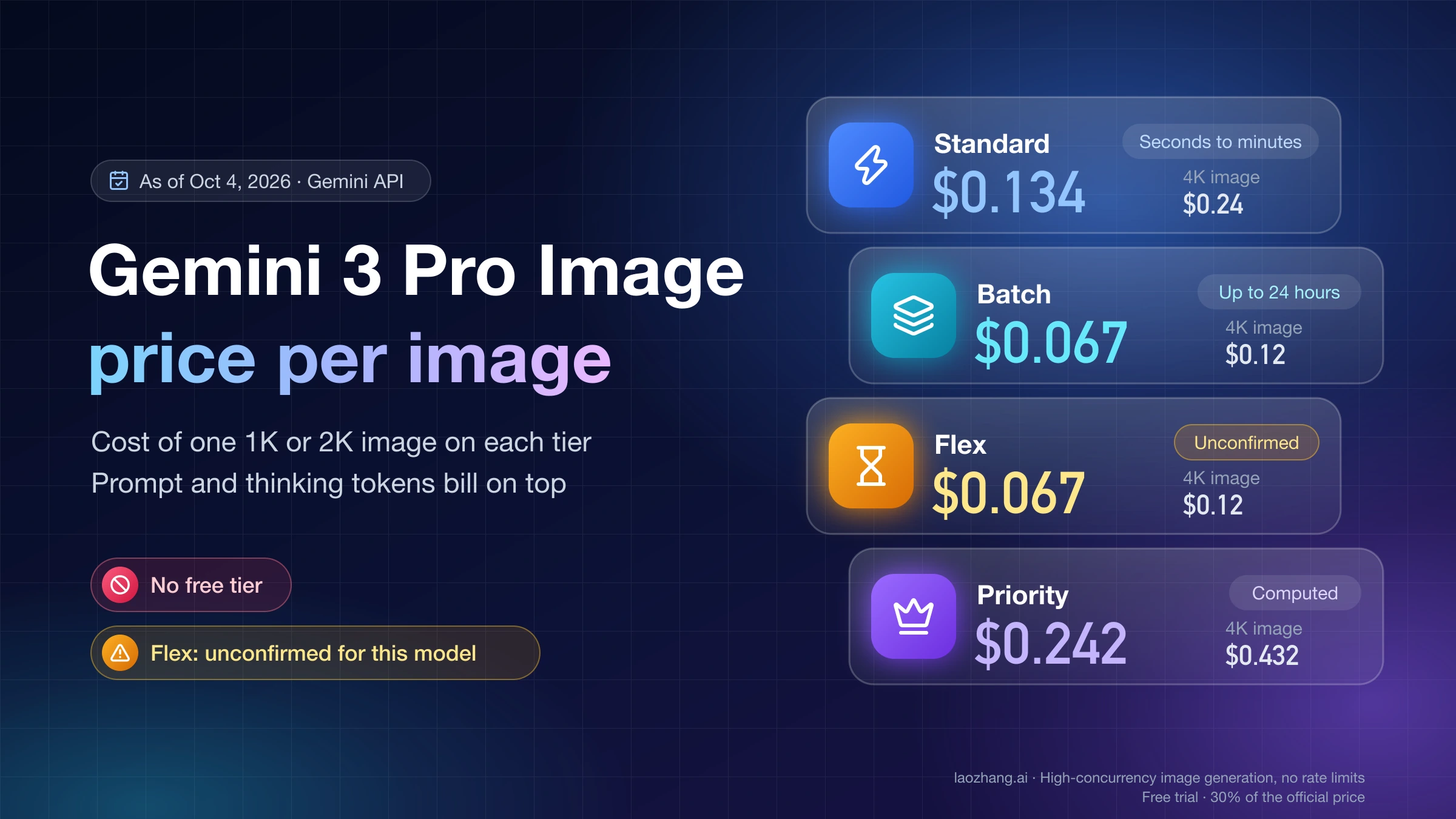
Nano Banana Pro     = $0.134 (1K or 2K output) or $0.24 (4K)
(Gemini API, Standard) + $0.0011 × each input image
                      + thinking tokens at $12 per 1M

Nano Banana Pro     = $0.067 (1K or 2K) or $0.12 (4K)
(Gemini API, Batch)    + $0.0006 × each input image
The Nano Banana Pro figures come from Google's Gemini API pricing page. Krea's docs do not define what makes a reference "1K" or "2K". They do say Krea 3 "uses each reference at its uploaded resolution", so the tier most likely follows the size of the file you upload. The table below assumes a 1 MP upload is billed as 1K and a 4 MP upload as 2K.
One 2K edit, fast thinking mode, list prices as of October 17, 2026:
| References in the edit | Krea 3, Krea API | Krea 3, Replicate | Nano Banana Pro, Standard | Nano Banana Pro, Batch |
|---|---|---|---|---|
| One 1 MP reference | $0.08 | $0.08 | ~$0.135 | ~$0.068 |
| One 4 MP reference | $0.13 | $0.14 | ~$0.135 | ~$0.068 |
| Four 1 MP references | $0.14 | $0.14 | ~$0.138 | ~$0.069 |
| Four 4 MP references | $0.34 | $0.38 | ~$0.138 | ~$0.069 |
| 1K output, one 1 MP reference | $0.05 | $0.05 | ~$0.135 | ~$0.068 |
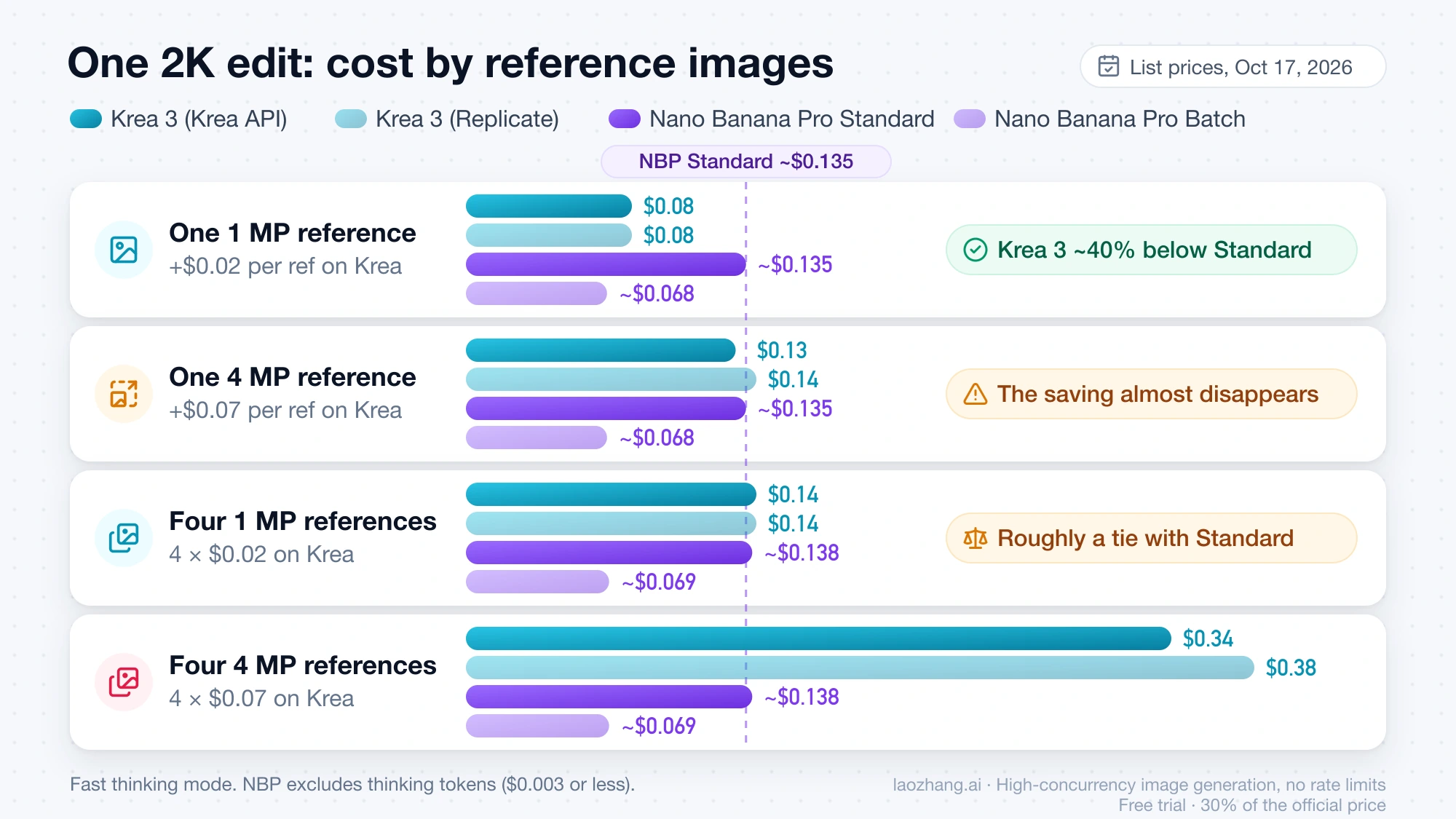
Nano Banana Pro prices exclude thinking tokens, which the Gemini API always generates for this model. In the Nano Banana 2.1 vs Pro vs GPT Image 2.5 9-prompt test, Pro used 122–252 thinking tokens per image, which is $0.003 or less. Krea's high thinking mode adds $0.02 on both Krea routes.
Three rules fall out of the arithmetic:
- With references around 1 MP, Krea 3 is cheaper up to three references ($0.12 vs about $0.137) and roughly ties at four ($0.14 vs about $0.138).
- A second full-size reference flips it. Two 2K references cost $0.20 on Krea 3 against about $0.136 on Nano Banana Pro.
- Batch undercuts Krea 3 at every row if you can wait for asynchronous results.
The lever you control is reference size. Krea's docs say "around 1 MP is enough for most edits" and tell you not to upscale references before sending. The same docs also say to send the highest-resolution version "when fine details matter (small text, logos, fabric, faces in a wide shot)". Product edits where the label must stay sharp are exactly that case, so price label work at the 2K reference rate.
At volume the gap moves the same way. Krea's launch chart shows 100,000 edits a month at $6,000 on Krea 3 vs $13,500 on Nano Banana Pro, again "without image references". With one reference per edit, the Krea 3 bill is $8,000 with 1 MP references or $13,000 with 2K references. Nano Banana Pro comes to about $13,510 on Standard and about $6,760 on Batch.
Replicate's Krea 3 listing bills references by size instead of by tier: output costs $0.03 at 1K and $0.06 at 2K in fast mode ($0.05 and $0.08 in high mode), and "input images cost $0.02 per megapixel". The Replicate column above uses those rates. Krea's billing docs add one detail that helps budgeting on Krea's own API: failed and cancelled jobs are not billed.
Is Krea 3 really 4× faster? What Krea's 8 seconds measures
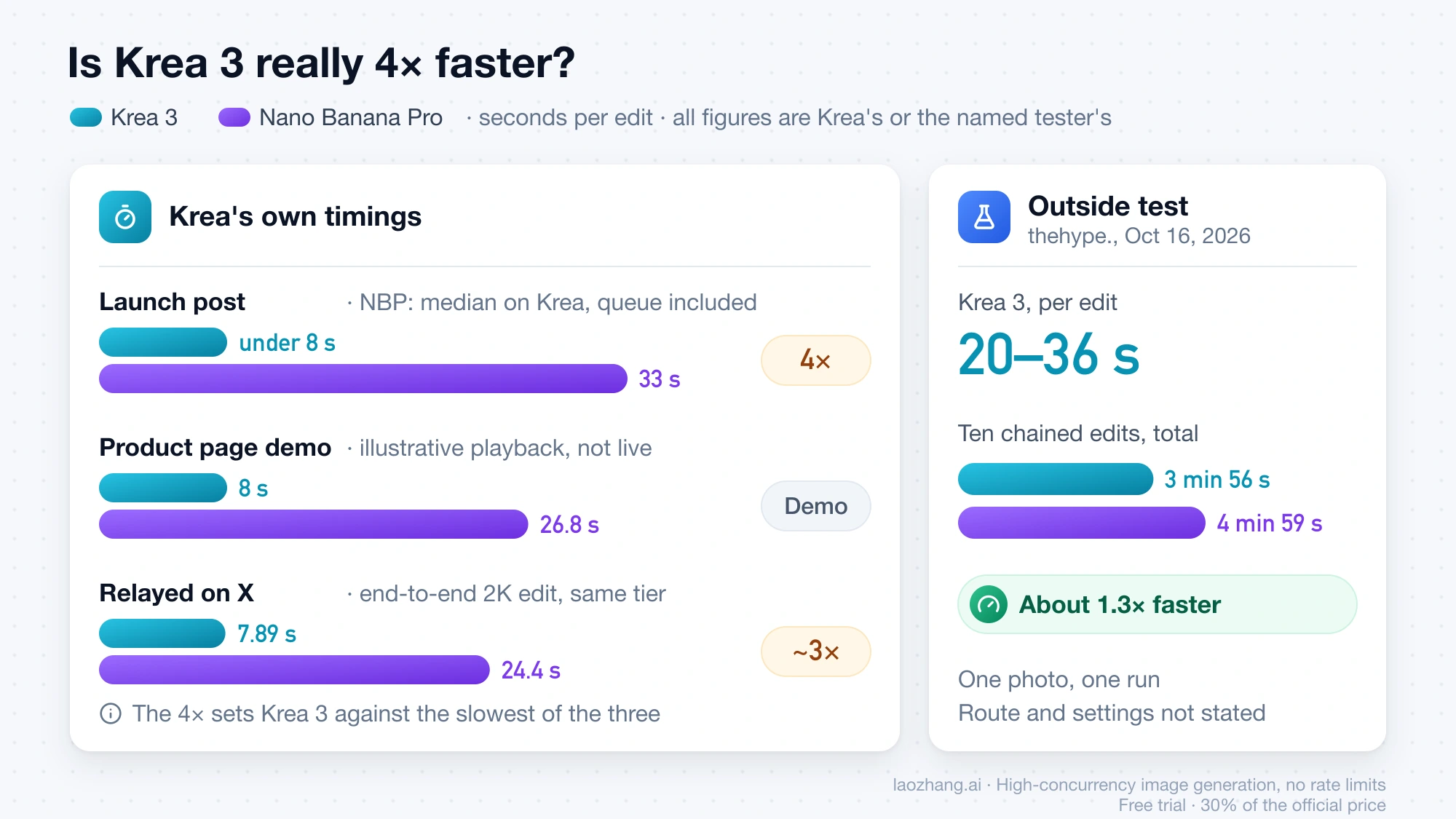
Krea 3 is probably faster than Nano Banana Pro, but the 4× figure sets Krea's own under-8-second number against the slowest of three Nano Banana Pro timings Krea has published.
Krea's own numbers for Nano Banana Pro differ from page to page:
| Krea source | Krea 3 | Nano Banana Pro | How it was measured |
|---|---|---|---|
| Krea 3 launch post | Under 8 s | 33 s | Nano Banana Pro: median time from request to finished image for edit jobs on Krea, September 24 to October 1, 2026, queue included |
| Krea 3 product page demo | 8 s | 26.8 s | "Pre-generated outputs, not a live benchmark"; Krea 3 uses "an illustrative playback time of 8s per edit" |
| Krea benchmark relayed on X | 7.89 s | 24.4 s | "End-to-end 2k edit, same quality tier"; attributed to Krea in a post by @fluid_ai_ |
Divide 33 by 8 and you get Krea's 4×. Using Krea's other figure for Nano Banana Pro, 24.4 s against 7.89 s, the ratio is about 3×. Krea's own notes qualify the headline too: "Our fastest setup finishes an edit in about 4 to 5 seconds", high thinking is slower, and Replicate's listing says regional edits run slower than regular edits. Replicate also describes its model as the "Berry version of Krea 3, which is tuned for image quality", with a faster "Jam" version still to come, so speed on that route may not match Krea's own figures.
The one outside measurement comes from thehype.'s 10-edit test on X, posted October 16, 2026: one photo, ten chained edits, route and settings not stated. Krea 3 took 20–36 seconds per edit and 3 minutes 56 seconds for all ten; Nano Banana Pro took 4 minutes 59 seconds. That makes Krea 3 about 1.3× faster in that run.
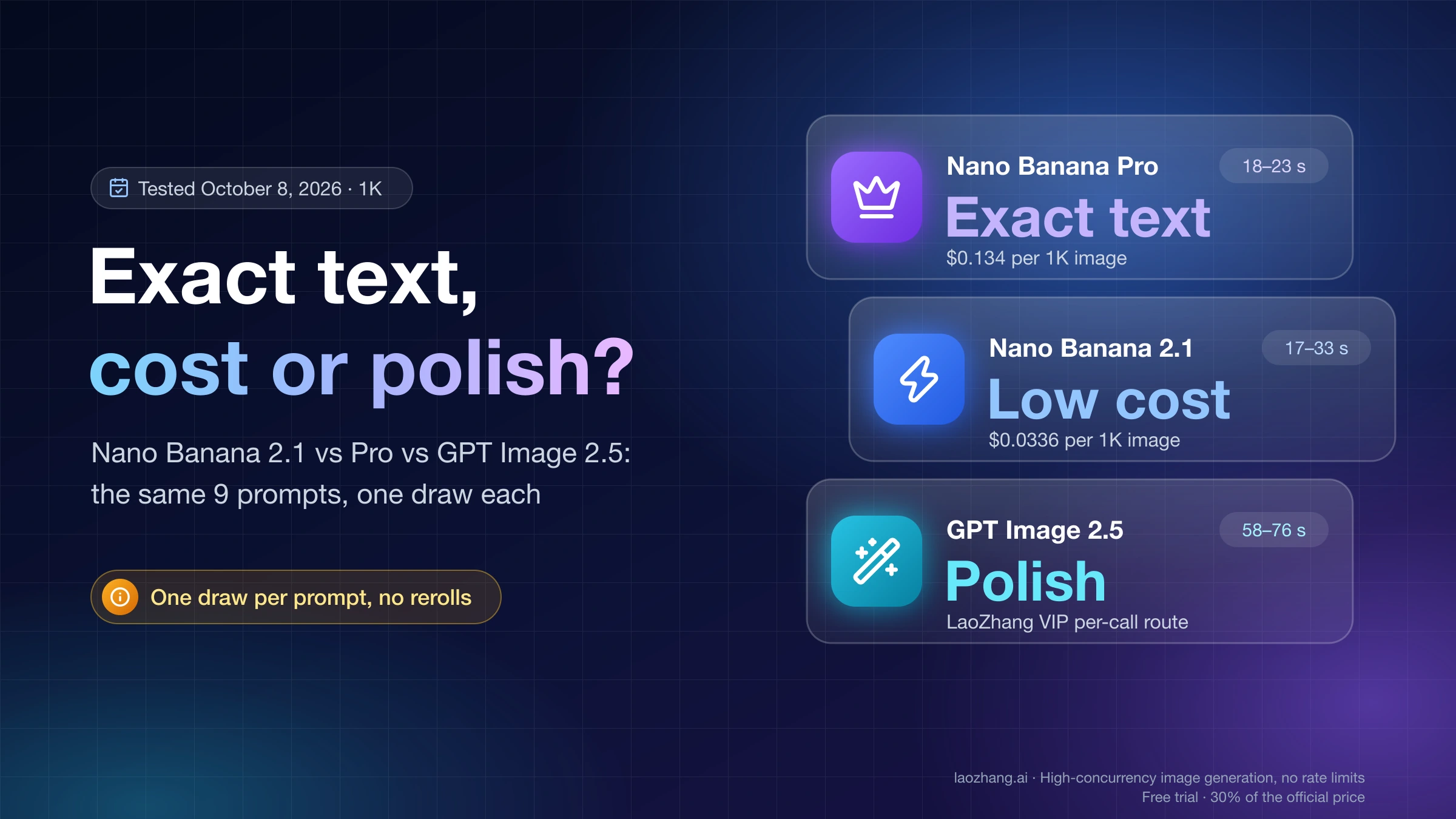
For a rough check on the Nano Banana Pro side, the 9-prompt test linked above timed Pro at 18–23 seconds per image at 1K through the LaoZhang API gateway. That is a different resolution and route from Krea's queue, so treat it only as a sign that 24–33 seconds is the right order of magnitude. Your own number depends on your route, image size and queue, so time the full request-to-file loop, including the job polling Krea's API uses.
Disclosure: laozhang.ai is our own service. Its prices are platform pricing, not an independent comparison.
Does Krea 3 match Nano Banana Pro quality? One outside test so far
There is no independent ranking for Krea 3 yet. The quality claim, "matches Nano Banana Pro or GPT Image 2.5 quality", comes from Krea's launch post on X.
On the Artificial Analysis image editing leaderboard, a crowd-vote arena, Krea 3 had no entry as of October 17, 2026. For reference, Nano Banana Pro scored 1107 (rank range 13–15), Nano Banana 2.1 scored 1152 and GPT Image 2.5 Sunburst led at 1199. Arena scores measure which output voters prefer, not whether an edit kept the product intact.
thehype.'s ten chained edits are the only side-by-side evidence so far, and they point to a trade-off rather than a winner:
- Krea 3 changed far less. It altered 3.8% of pixels per edit on average against 12.6% for Nano Banana Pro, and 30.7% of the image after ten edits against 74.2%.
- Nano Banana Pro drifted. By the tenth edit it had turned the fog purple and the moss into a mosaic.
- Krea 3's people looked stiff. The tester wrote that Nano Banana Pro's figures looked human while Krea 3's looked "like statues".
- Cost matched the reference math. Ten edits cost about $1.30 on Krea 3 and $1.38 on Nano Banana Pro; the tester noted that Krea's price list comes to about $0.13 for a 2K input photo.
So Krea 3's advantage is restraint. If your instruction is "change only the mug", fewer changed pixels is the goal. If you want a relit, restyled or re-staged scene with people in it, that restraint can work against you.
Two other signals deserve caution. Glitchwire reports that Krea 3 Ultra scored 4.81 out of 5 on CPI-Bench, second behind GPT Image 2.5, but Ultra is a separate app mode on Krea's Max plan and above, not the model behind the API. Early users on X also describe Krea 3's text-to-image output as still "experimental", so treat it as an editor first.
Krea 3 vs Nano Banana Pro specs: 2K vs 4K, 8 vs 14 references
The hard limits decide some jobs before price does. As of October 17, 2026:
| Krea 3 (beta) | Nano Banana Pro (gemini-3-pro-image) | |
|---|---|---|
| Output size | 1K or 2K in 10 aspect ratios from 21:9 to 9:16; custom width and height are rounded to a 1K or 2K canvas | 1K, 2K or 4K |
| Reference images | Up to 8 in the API docs and on the product page; Krea's launch FAQ says 6 | Up to 14: up to 6 object images, 5 character images and 3 style references |
| Large references | Over 4 MP resized to 4 MP; with five or more, each resized to 1536 px on the longest side | Each input image billed at $0.0011 regardless of size |
| Local edit mode | regional_edit: Krea's docs say the rest stays "pixel-exact"; Replicate labels it experimental, with "lower quality and slower generation" | No region parameter; Google's docs describe "semantic masking" in the prompt |
| Thinking | fast (default) or high, +$0.02 | Always on; cannot be disabled in the API |
| Style references and LoRAs | Not supported yet; the API returns "coming soon" | Up to 3 style references |
| Grounding with Google Search | Not offered | Supported; 5,000 free requests a month across Gemini 3 and newer models, then $14 per 1,000 |
| Batch pricing | Not offered | Supported at half the Standard price |
| Data handling | Zero Data Retention on enterprise workspaces; self-hosting on enterprise plans | Paid-tier data not used to improve Google's products; SynthID watermark on every image |
Two of these limits came from Krea's own documents disagreeing with each other. The launch post says "up to 6 reference images per edit" while the API docs and Replicate allow 8. The launch post also mentions adding style references, but Krea's October 16 changelog says requests with style references or LoRAs on Krea 3 now get a "coming soon" response. Go by the API behavior until the full release.
Krea 3 is also not open source or open weights. Self-hosting is an enterprise license that Krea negotiates with you.
How to get Krea 3 today: Krea app, Replicate or Krea's API
As of October 17, 2026, the quickest way to try Krea 3 is the Krea web app; the quickest way to call it from code is Replicate. Krea's own API is still gated.
Krea app. Krea 3 is now the default image model on krea.ai and uses compute units like other models, according to Krea's changelog. The Krea pricing page estimates:
| Plan | Price | Krea 3 images | Nano Banana Pro 1K images |
|---|---|---|---|
| Free | $0 | ~5 a day | No estimate listed |
| Pro | $35 a month, or $21 a month billed yearly | ~1,111 a month | ~257 a month |
These counts are Krea's estimates. The Pro card on the same page says "257 Nano Banana 2 generations", which conflicts with the per-model table, so go by the table. If you use the whole Pro allowance on the yearly price, each Krea 3 image works out to about $0.019 ($21 ÷ 1,111) and each Nano Banana Pro image to about $0.082 ($21 ÷ 257). On the $35 monthly price the same counts give about $0.032 and $0.136, so Nano Banana Pro inside Krea's app costs roughly what Google charges through its API. Krea 3 Ultra is limited to Max and above. A limited offer adds 14 days of unlimited Krea 3 with a qualifying Pro or Max annual purchase.
Replicate. The krea/krea-3 listing is public and priced as shown in the cost section. It takes up to 8 input images, 1K or 2K output, and text-to-image when you pass no images.
Krea's own API. The endpoint is POST /generate/image/krea/krea-3, an asynchronous job that you poll or receive by webhook. The docs say it "is in early access. Only workspaces in the Krea 3 beta can call it", and access goes through sales@krea.ai. API spending comes from a prepaid USD balance, separate from app compute units, with top-ups from $5 to $10,000; an empty balance returns HTTP 402.
Other partners. Krea lists fal, Hedra, Together AI, Nous Research and OpenRouter as launch partners. On October 17, 2026, OpenRouter's public model list had no Krea entry, Together AI's Krea 3 model URL returned a 404 error, and fal's model page showed no price. Check the partner's catalog before you plan around it.
Two details matter if you build on Krea's API now. The old thinking_mode values instant and medium stop working on October 23, 2026; send fast and high. And the Krea API page also sells Nano Banana Pro at $0.15 per image and about 30 seconds, so a team already on Krea can compare both models through one integration, at a markup over Google's $0.134.
Staying on Nano Banana Pro: Batch, Nano Banana 2.1 or a flat per-call price
If the comparison leaves your work on Nano Banana Pro, three options cut its cost without changing vendors.
Batch. On the Gemini API, Batch halves the image price to $0.067 at 1K or 2K and $0.12 at 4K. For catalog runs that do not need an answer within seconds, this is the lowest list price in this comparison.
Nano Banana 2.1. On the Artificial Analysis editing leaderboard, Nano Banana 2.1 scores 1152 against Pro's 1107, at $33.6 per 1,000 images vs $134.0. Pro still reproduced requested wording more reliably in the 9-prompt test, and only Pro accepts style references. Nano Banana 2 Lite vs 2 vs 2.1 vs Pro: Which Model to Use Now explains when the cheaper Google models are enough.
LaoZhang API. The LaoZhang API's Nano Banana Pro documentation lists gemini-3-pro-image at $0.09 per call at 1K, 2K and 4K, for both generation and editing, with Search grounding at $0.014 per search on top. It does not offer Krea 3. LaoZhang is a third-party API gateway, not a Google service.
Disclosure: laozhang.ai is our own service. Its prices are platform pricing, not an independent comparison.
For request code against Google's endpoint, see the Gemini Image API Guide: Python Code, 3 Current Models, Pricing. For product-photo prompts and safety-filter errors on Nano Banana Pro, see Nano Banana Pro for Ecommerce Product Photography.
How to A/B test Krea 3 against Nano Banana Pro on your own images
With one outside test and no leaderboard entry, a small test on your own images is worth more than any headline. Twenty edits on each model cost a few dollars at the prices above.
- Pick 10 to 20 real jobs from last month's work, split between local edits (remove, recolor, replace one item) and whole-scene changes (new setting, new light).
- Fix the inputs. Use the same reference files for both models. Run Krea 3 once with references at about 1 MP and once at full size if labels or faces matter, because the price changes with the size.
- Match the output. Compare at 2K on both. Use
regional_editon Krea 3 only for the local edits, as its docs advise. - Time the full loop. Measure from sending the request to having the file saved, including Krea's job polling, and keep every attempt, not the best one.
- Run each job two or three times. Krea's seeds do not guarantee repeat results, and a single draw hides failure rates.
- Chain at least one edit five or more times on its own output to see whether colors and textures drift.
- Count cost per accepted image, not per call: total spend divided by the edits your team would actually ship.
The quickest no-code start is Krea's Free plan, at about five Krea 3 images a day. Nano Banana Pro has no free API tier, so run its side on a paid Gemini API key or a Gemini plan; Is Nano Banana Pro Free? Gemini Plans, Flow Limits and the API lists what each plan includes. For an API test today, use Replicate for Krea 3 and the Gemini API for Nano Banana Pro. Krea's product page also offers to run one of your workloads next to your current model and share outputs, acceptance rate and cost; remember that the vendor runs it.
Krea 3 vs Nano Banana Pro FAQ
Is Krea 3 free to use?
Partly. Krea's Free plan gives about five Krea 3 images a day in the web app, according to Krea's pricing page as of October 17, 2026. API use is paid: $0.03 at 1K or $0.06 at 2K plus reference charges on Krea's API, and similar per-image rates on Replicate.
Is Krea 3 open source?
No. Krea 3 is available through Krea's app, its gated API and partner platforms. Self-hosting on your own GPUs is offered only on Krea's enterprise plans under a license.
How many reference images can Krea 3 use?
Up to 8 per edit in Krea's API docs and on Replicate, although Krea's launch FAQ says 6. With five or more references, each is shrunk to 1536 px on its longest side, so send four or fewer when fine detail matters. Nano Banana Pro takes up to 14.
Is there something better than Nano Banana Pro for image editing?
It depends on the edit. For changing one part of an image cheaply and quickly, Krea 3 is the new candidate, with the cost and evidence limits above. On the Artificial Analysis editing leaderboard, 13 models score higher than Pro as of October 17, 2026, led by GPT Image 2.5 Sunburst and including Google's own cheaper Nano Banana 2.1 and Nano Banana 2. For one-to-one comparisons, see Nano Banana Pro vs GPT Image 2.5: Which to Run First for Each Job, FLUX.2 Pro vs Nano Banana Pro: Editing, API Costs, and Which to Choose and Nano Banana Pro vs Seedream 5.0 Pro: Which to Run First.
Is Krea 3 Ultra the same model as Krea 3 in the API?
No. Krea 3 Ultra is a mode in the Krea app on Max plans and above. The API documents only Krea 3 with fast and high thinking modes, so benchmark scores quoted for Ultra do not describe what you get from the API.
Sources10
External pages this guide links to, in the order they appear. Last updated Oct 17, 2026.
Sources10
External pages this guide links to, in the order they appear. Last updated Oct 17, 2026.
- 1.Krea 3 API overviewkrea.ai/docs/developers/krea-3/overview
- 2.Google's Gemini API pricing pageai.google.dev/gemini-api/docs/pricing
- 3.Replicate's Krea 3 listingreplicate.com/krea/krea-3
- 4.Krea 3 launch postkrea.ai/blog/introducing-krea-3
- 5.Krea 3 product pagekrea.ai/krea-3
- 6.thehype.'s 10-edit test on Xx.com/thehypedotnews/status/2111190258280738957
- 7.Artificial Analysis image editing leaderboardartificialanalysis.ai/image/leaderboard/editing
- 8.Krea's changelogkrea.ai/docs/changelog
- 9.Krea pricing pagekrea.ai/pricing
- 10.Krea API pagekrea.ai/features/api