GPT Image 2.5 Flare vs Sunburst vs GPT Image 2: Which to Run
Test Flare first if GPT Image 2 already passes, Sunburst if not, and keep GPT Image 2 for Batch. Token rates match; the same quality label buys less on 2.5.
On this page
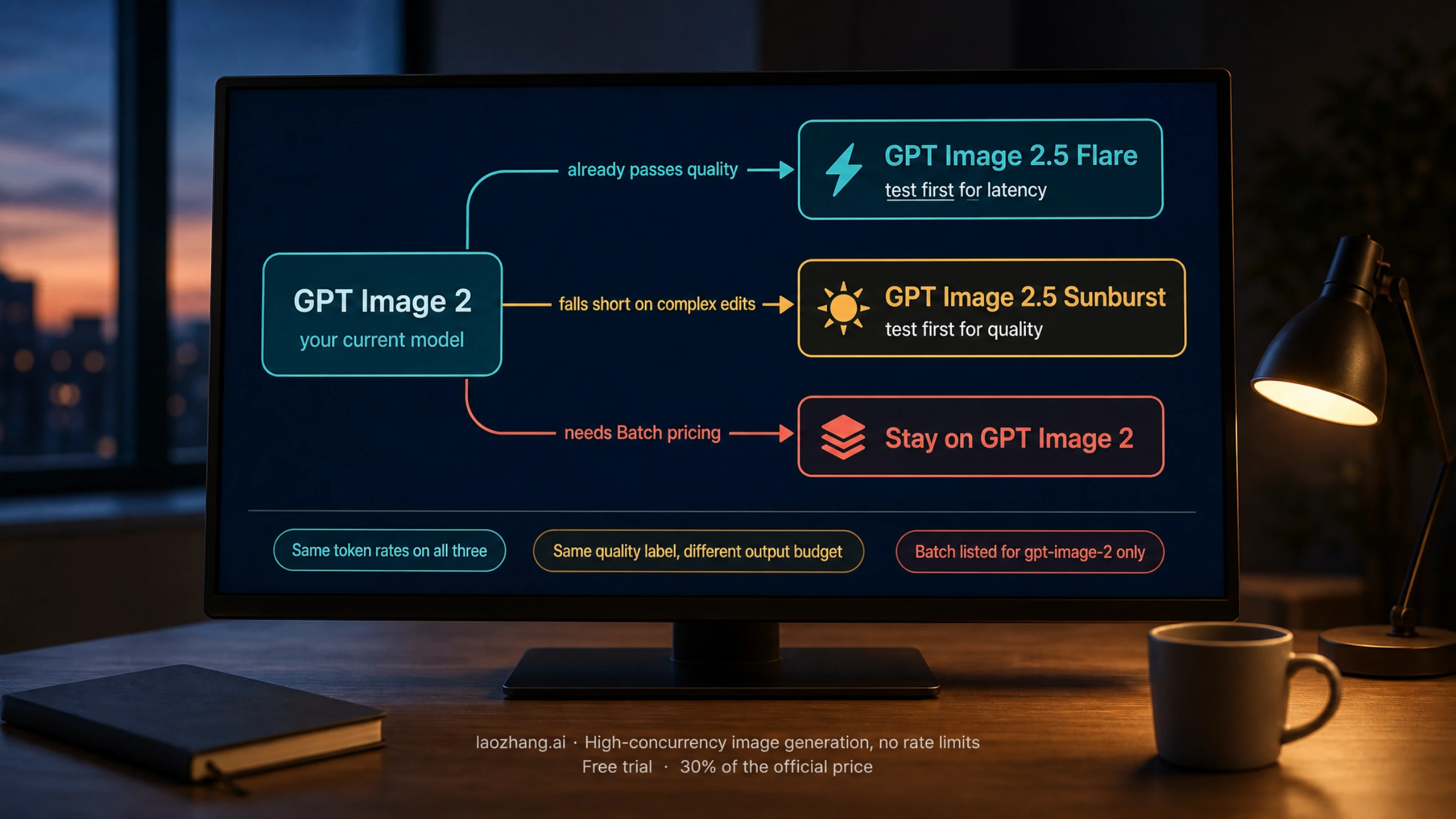
If your GPT Image 2 pipeline already returns images you accept, test gpt-image-2.5-flare first and look for a latency gain at the same output budget. If GPT Image 2 falls short on complex edits, test gpt-image-2.5-sunburst first, then re-run the same inputs on Flare. Stay on gpt-image-2 while you depend on Batch pricing, or when neither 2.5 model shows a measurable gain on your own prompts. That is the order OpenAI's prompting guide recommends for migrating from GPT Image 2, and it matches what the pricing page, the official token calculator, and the public leaderboards showed on September 22, 2026.
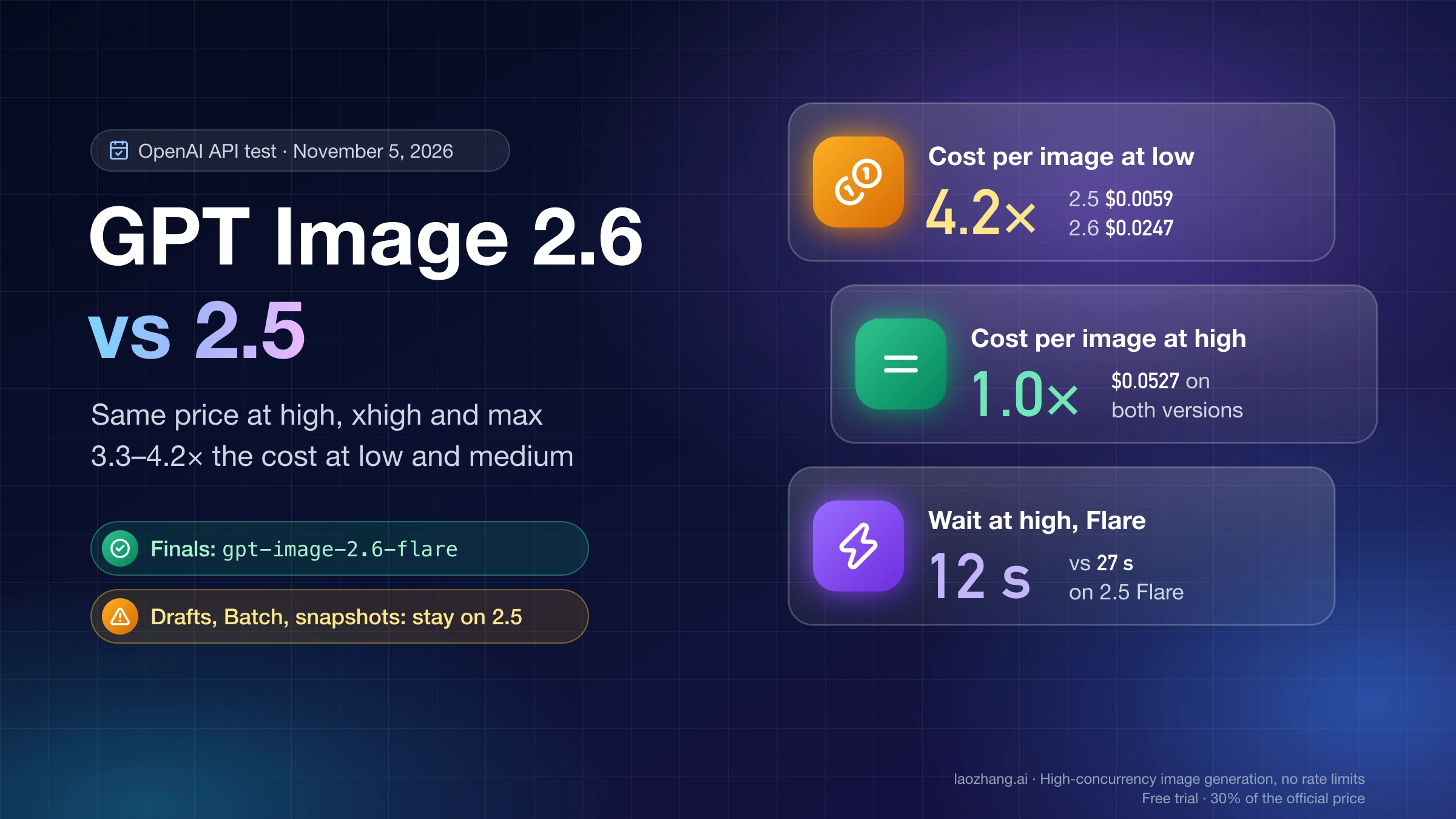
Two facts shape everything below. First, all three models bill identical Standard token rates, so a 2.5 model is not more expensive per token; the "2.5 costs double" line on several comparison pages comes from reading GPT Image 2's Batch rates as if they were Standard. Second, the same quality label buys a different output budget on each generation: quality: "medium" is 1,756 output tokens at 1024x1024 on GPT Image 2 but 439 on either 2.5 model. Swap only the model string and you cut your render budget to a quarter without touching a single visible setting.
What actually changed between GPT Image 2 and the 2.5 models
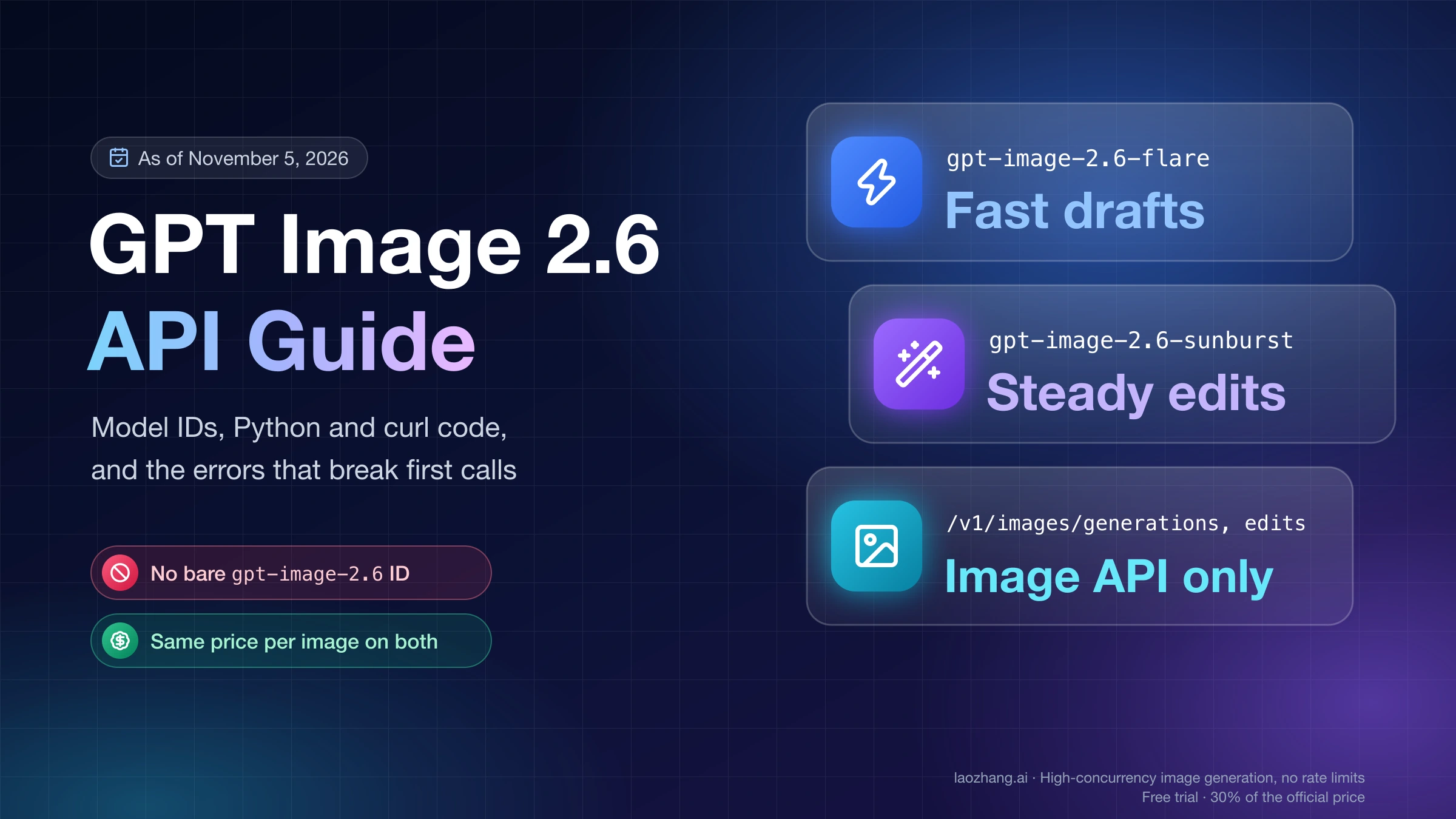
OpenAI released the two GPT Image 2.5 models on September 8, 2026 as separate API IDs. There is no unsuffixed gpt-image-2.5 model; you pick Flare or Sunburst. Everything in this table is from the three model pages and the image generation guide as of September 22, 2026. gpt-image-2 model page · Flare · Sunburst
gpt-image-2 | gpt-image-2.5-flare | gpt-image-2.5-sunburst | |
|---|---|---|---|
| Pinned snapshot | gpt-image-2-2026-04-21 | gpt-image-2.5-flare-2026-09-08 | gpt-image-2.5-sunburst-2026-09-08 |
| OpenAI's model-page labels | Performance "Higher", Speed "Medium" | Performance "Higher", Speed "Very fast" | Performance "Highest", Speed "Medium" |
| One-line positioning | Baseline; recommended replacement for GPT Image 1 and 1.5 | "our fastest model for high-quality, everyday image generation" | "Our most capable model for image generation and editing" |
quality values | low, medium, high, auto | adds xhigh and max | adds xhigh and max |
Images API (/v1/images/generations, /v1/images/edits) | yes | yes | yes |
Responses API image_generation tool | yes | yes | yes |
Batch (/v1/batch) | supported, half-rate pricing tab | not listed today | not listed today |
| Transparent background | "available in preview" | supported | supported |
Size rules are identical across all three: both edges multiples of 16, aspect ratio no wider than 3:1, 655,360 to 8,294,400 total pixels, no edge above 3,840 pixels, and anything above 2560x1440 is experimental. Your existing size values carry over unchanged.
Two points in that table matter more than the labels. The 2.5 models extend the quality ladder upward with xhigh and max, and the Batch tab of the pricing page lists only gpt-image-2. Both are covered in the next section because they decide the bill.
On quality, OpenAI publishes two descriptions of Flare that do not say the same thing. The prompting guide calls Flare "the small model, optimized for speed, with image quality comparable to GPT Image 2" and Sunburst "the base model, optimized for quality, with higher image quality than GPT Image 2", adding that both "offer improvements in precise editing and subject preservation". The launch post says Flare delivers "higher-quality images than GPT-Image-2 at 50% lower latency" and calls Sunburst "an extra level of precision for detailed creative work with longer generation times". Both are OpenAI's words; neither is a measurement of your workload. The practical reading is that Flare is the candidate whose quality should be at least comparable while latency drops, and Sunburst is the candidate for work where GPT Image 2 is not good enough. A "two to four times faster" figure circulates on a few third-party pages; it appears in neither the launch post nor the model pages, so treat it as unsourced. Prompting guide · Launch post
Same token rates, different budget behind each quality label
On the Standard pricing tab, the three models share every rate: text input $5.00 per million tokens, cached text $1.25, image input $8.00, cached image $2.00, image output $30.00. Text output is not billed. Both 2.5 model pages state it directly: "Token rates match GPT Image 2." OpenAI pricing
Where does the "GPT Image 2 is half the price" claim come from? The same pricing page has a Batch tab, and for image models it lists only gpt-image-2: image input $4.00, cached $1.00, image output $15.00, text input $2.50, cached $0.625. Those are exactly the figures that WaveSpeed and Elser print as GPT Image 2's normal rates before concluding that 2.5 costs double; WaveSpeed even notes that its table "conflicts with the model documentation". It conflicts because it is the Batch tab. If you run synchronous Images API calls, the per-token price is the same on all three. If you run /v1/batch jobs on gpt-image-2, you get half rates, and no 2.5 model is listed for Batch today.
Token rates are not per-image prices, though. Each request spends a number of output tokens that depends on the model, the quality setting, and the size, and this is where the generations diverge. The official calculator in the image generation guide, as of September 22, 2026, gives these output-token estimates and their cost at $30 per million. They exclude text and image input tokens and streamed partial images (100 output tokens each). Calculator section
quality at 1024x1024 | GPT Image 2 output tokens (est. output cost) | GPT Image 2.5 Flare or Sunburst |
|---|---|---|
low | 196 ($0.00588) | 196 ($0.00588) |
medium | 1,756 ($0.05268) | 439 ($0.01317) |
high | 7,024 ($0.21072) | 1,756 ($0.05268) |
xhigh | not offered | 3,122 ($0.09366) |
max | not offered | 7,024 ($0.21072) |
quality at 2048x1152 | GPT Image 2 | GPT Image 2.5 Flare or Sunburst |
|---|---|---|
low | 157 ($0.00471) | 157 ($0.00471) |
medium | 1,413 ($0.04239) | 367 ($0.01101) |
high | 5,650 ($0.16950) | 1,413 ($0.04239) |
xhigh | not offered | 2,511 ($0.07533) |
max | not offered | 5,650 ($0.16950) |
The calculator offers Sunburst and Flare as one combined option, so these budgets are shared by both 2.5 models. Read across the rows and the pattern is clear: 2.5 high is the same budget as GPT Image 2 medium, 2.5 max is the same budget as GPT Image 2 high, low is unchanged, and 2.5 medium and xhigh are new steps in between. OpenAI says as much in the guide: "The models can use different token counts for the same quality setting and share the same price per image output token", and "The same quality label does not imply the same image quality or response time across models."
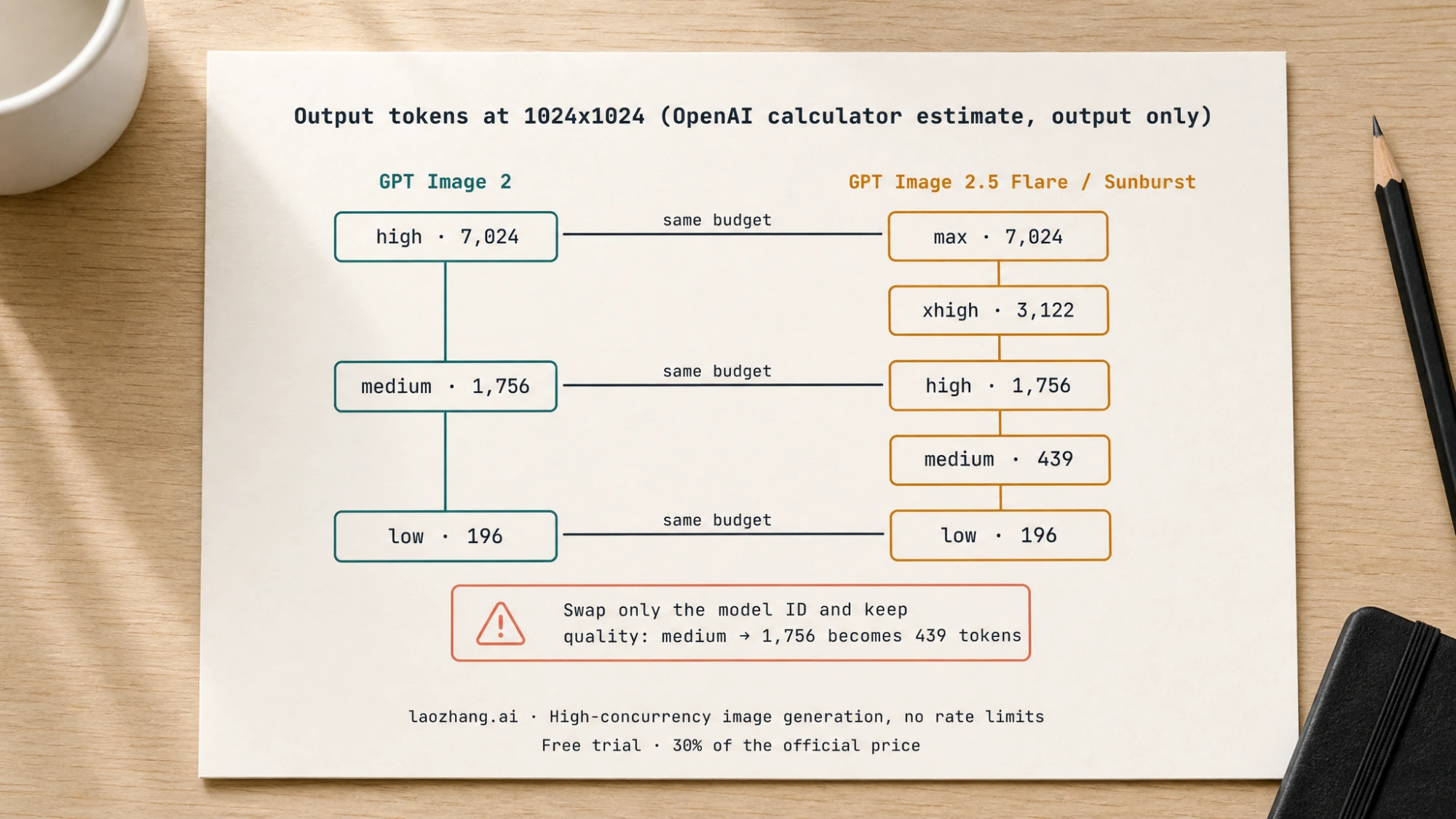
The migration consequence is concrete. A team that keeps quality: "medium" while changing the model ID sees the output cost per 1024x1024 image fall from about $0.053 to about $0.013 and, if they compare results, sees simpler compositions. The cheaper bill is real, but it is not a 2.5 discount; it is a smaller render. To compare fairly, compare at a matched budget: GPT Image 2 medium against 2.5 high, or GPT Image 2 high against 2.5 max. The one third-party test that published usage counts (Tosea, covered below) reported exactly the 2048x1152 numbers in the second table from real API responses, which is a useful sign that the calculator tracks billing.
Which model to test first
OpenAI's prompting guide gives a decision rule for teams migrating from GPT Image 2, and it is the soundest starting point because it depends on how GPT Image 2 performs for you today rather than on a leaderboard. Choose a model
Your GPT Image 2 workflow is validated and passes. Test Flare first. The goal is stated narrowly: "check whether you can retain acceptable quality while reducing latency". Keep the prompt, reference images, dimensions, and output format unchanged, and set the quality explicitly to the matched step (medium on GPT Image 2 becomes high on Flare). If acceptance stays level and both typical and slow responses get faster, you have a reason to move. If acceptance drops, try xhigh before rewriting prompts; if it still drops, there is no reason to leave.
GPT Image 2 does not meet your quality bar on a complex use case. Test Sunburst first and "establish that it delivers the quality you need". Only after Sunburst passes do you run Flare on the same prompts and inputs, and you switch to Flare only "if it also meets those requirements and improves latency". Otherwise keep Sunburst. The common failure here is testing Flare and Sunburst side by side on a workload that GPT Image 2 was already losing; you learn which 2.5 model looks nicer, not whether either one clears your bar.
Reasons to stay on GPT Image 2 for now. Three are legitimate. You run asynchronous jobs through Batch, where gpt-image-2 is the only image model listed and Standard-rate 2.5 calls cannot match the per-token price. Your tuned pipeline shows no measurable gain in acceptance or latency on your own prompts, which the guide anticipates: "a speed improvement on one workload doesn't establish a fixed improvement on another." Or you simply need the rollback target to exist, which it does. The deprecations page has no entry for gpt-image-2 or for either 2.5 model. GPT Image 2 is in fact the recommended replacement for the models that are leaving: gpt-image-1 shuts down on October 23, 2026, and gpt-image-1.5, gpt-image-1-mini, and chatgpt-image-latest are removed on December 1, 2026. If you are still on any of those, GPT Image 2 is the migration you cannot skip; 2.5 is the one you can schedule. Deprecations
Note that "not deprecated" describes today's page. The prompting guide phrases rollback as keeping the previous model "while it remains supported", which is the right way to plan.
What independent votes and one third-party test show
Nothing on this page comes from a benchmark run by this site. What exists publicly is human-preference voting and one published API test with conditions.
Arena's leaderboards (page dated September 7, 2026, as shown on September 22) rank the 2.5 models above GPT Image 2 in both text-to-image and image editing, with the 2.5 entries flagged "Preliminary" on far fewer votes. Arena text-to-image · Arena image edit
| Arena board | GPT Image 2.5 Sunburst | GPT Image 2.5 Flare | GPT Image 2 (medium) |
|---|---|---|---|
| Text-to-image | 1421 ±13 (3,149 votes, Preliminary) | 1399 ±13 (2,856 votes, Preliminary) | 1381 ±4 (78,731 votes) |
| Image edit | 1520 ±9 (6,704 votes, Preliminary) | 1491 ±9 (5,676 votes, Preliminary) | 1461 ±3 (235,928 votes) |
Arena's GPT Image 2 entry is the medium variant; the 2.5 entries do not state a quality setting, so this ranking is not budget-matched the way the next one is.
Artificial Analysis shows the same order on its text-to-image Elo, and its entries are a fairer pairing than the labels suggest: it compares Sunburst max (1197 ±9, 13,401 comparisons) and Flare max (1190 ±9, 12,778) against GPT Image 2 high (1171 ±9, 15,176), which is the equal 7,024-token budget from the calculator. Its own price column reads $210.7 per 1,000 images for both 2.5 models and $211.0 for GPT Image 2 at those settings, another confirmation that matched budget means matched cost. Artificial Analysis leaderboard
The only published test with matched-budget latency numbers is Tosea's, published September 9, 2026: 41 single-shot images/edits calls through the official API, dense business slides built from an outline prompt plus one to three brand template references, at 2048x1152 and 3840x2160, no retries, five-page averages, cost taken from each response's usage. Under those conditions: Tosea's guide (Japanese)
- Matched 1,413-token renders (GPT Image 2
mediumvs 2.5high): GPT Image 2 37.3 s, Sunburst 27.7 s, Flare 19.7 s, about $0.059 per page on all three. - Matched 5,650-token renders (GPT Image 2
highvs 2.5max): 82.9 s, 59.8 s, 33.7 s. - 4K (3840x2160): GPT Image 2
highused 13,342 tokens in 92.4 s for about $0.42; 2.5highused 3,336 tokens in 27.8 to 33.8 s for about $0.12. - Pixels changed after one, two, and three successive edits: GPT Image 2 5.6%, 8.1% and 11.4%; Sunburst 4.1%, 6.8% and 9.9%; Flare 3.8%, 6.7% and 9.2%. All nine edits succeeded on all three models, and text and numbers were correct on all fifteen matrix slides for all three.
autoon the 2.5 models landed on the 1,413-token step four times out of five and once on 628.
That is one visual domain, two sizes, no portraits, no personal-photo preservation, no transparency, no masked inpainting, and no p95. It supports the direction of OpenAI's latency claim and the "improvements in subject preservation" wording for slides; it does not give you a ratio to plug into your own budget.
Migrating without a silent change in budget, cost, or behavior
The guide's migration checklist is short, and each step closes a specific hole. Below is that checklist in the order you would actually run it, with the budget mapping applied.
1. Pin snapshots on both sides. Run the baseline as gpt-image-2-2026-04-21 and the candidate as gpt-image-2.5-flare-2026-09-08 or gpt-image-2.5-sunburst-2026-09-08. Aliases can move; a comparison between two moving targets tells you nothing on a re-run.
2. Save a baseline that includes the hard cases. OpenAI lists them: difficult edits, exact text, faces, product geometry, transparent assets. Record the model, request settings, and results, and include enough requests that one odd result cannot swing the verdict.
3. Remap quality explicitly, and do not use auto for the comparison. medium becomes high; high becomes max; low stays low. Leave prompt, references, dimensions, and output format untouched for the first pass. Here is the minimal swap in the Images API:
from openai import OpenAI

client = OpenAI()

prompt = "Studio product photo of a matte black ceramic mug on a light oak table"

common = dict(
    prompt=prompt,
    size="1024x1024",
    output_format="png",
)

# Baseline: what runs today. medium = 1,756 output tokens at this size
# (OpenAI calculator estimate, output only).
baseline = client.images.generate(
    model="gpt-image-2-2026-04-21",
    quality="medium",
    **common,
)

# Candidate: the same 1,756-token budget sits at `high` on the 2.5 ladder.
candidate = client.images.generate(
    model="gpt-image-2.5-flare-2026-09-08",
    quality="high",
    **common,
)

for label, result in (("gpt-image-2", baseline), ("flare", candidate)):
    usage = result.usage
    print(label, usage.input_tokens, usage.output_tokens)
The usage block is the number to keep, not the calculator. Input tokens differ between edit requests with references and plain generations, GPT Image 2 always processes image inputs at high fidelity (input_fidelity cannot be set on it), and streamed partial images add output tokens. If you call the models through the Responses API instead, the image_generation tool takes the same model IDs (tools: [{ type: "image_generation", model: "gpt-image-2.5-sunburst" }]), and the mainline model's tokens are billed on top.
4. Judge the complete result, then measure cost per accepted image. Compare instruction following, identity and product preservation, text accuracy, unwanted changes, and transparency, and for editing workflows run the full sequence of edits rather than single steps. Then compute one number per model: all billed attempts (input, output, partials, retries) divided by images you actually accepted. The guide's own instruction is blunt: "Confirm current pricing rather than assuming the faster model costs less."
A hypothetical illustrates why acceptance, not the rate card, decides the winner. Take 100 requests at 1024x1024 and only the output side. On GPT Image 2 high (7,024 tokens, $0.21072 each) the run costs $21.07; if 90 images are accepted, that is $0.234 per accepted image. On 2.5 xhigh (3,122 tokens, $0.09366 each) the run costs $9.37; if only 85 are accepted, it is $0.110 per accepted image, and the smaller budget still wins. Swap the acceptance counts to 90 and 60 and the picture changes to $0.234 versus $0.156, closer than the token ladder suggests. The acceptance counts here are invented; the per-image token costs are the calculator's. Your own counts are the only ones that matter.
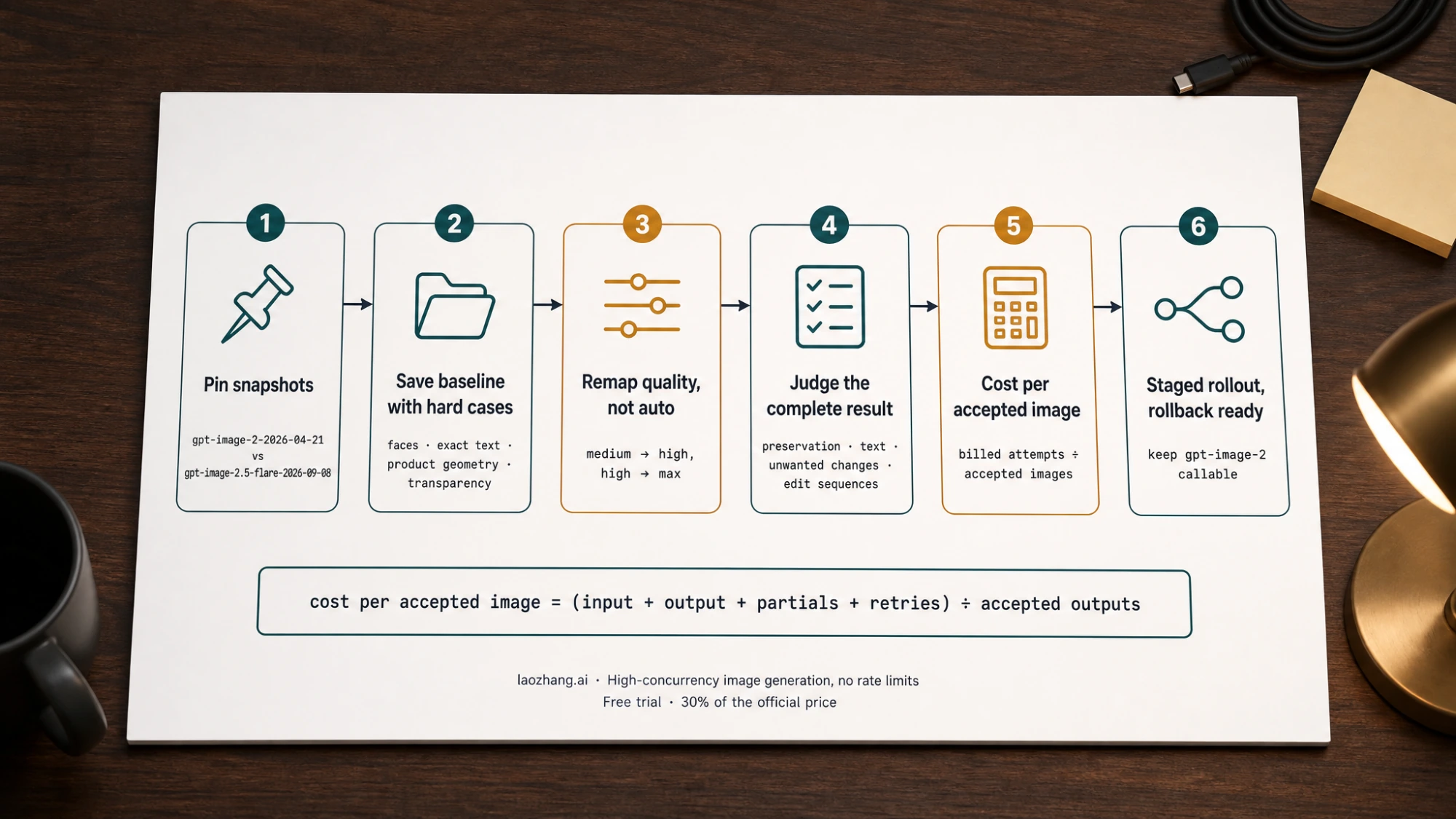
5. Tune one setting at a time. If the candidate falls short, step quality up before rewriting the prompt; if it passes, step down to see whether a lower setting still passes with less latency. Use xhigh or max only where they fix an unmet requirement inside your latency budget. Measure typical and slow responses, failures, and retries while you do it.
6. Roll out by workflow and keep the rollback live. Move a small share of traffic, watch the same measures, expand gradually, and keep gpt-image-2 callable until the new model has passed in production. For regions that must stay pixel-identical across repeated edits, the guide's advice applies to all three models: composite the approved edit into the original rather than relying on prompting alone.
If you need to model a full month rather than a comparison run, our per-image budgeting guide for the 2.5 ladder goes further: GPT Image 2.5 API pricing. For teams staying on GPT Image 2 and its Batch rates, GPT Image 2 API pricing covers that side.
Flare or Sunburst once you leave GPT Image 2
If the decision rule above lands you on 2.5, the remaining question is narrower than the three-way one. Flare is OpenAI's stated default for most applications and the only one of the three labeled "Very fast"; Sunburst is the one labeled "Highest" performance and is meant for edits that must change one thing while preserving several others, at the cost of longer generation. Both share the same rates and the same quality ladder, so the decision comes down to whether Sunburst's extra precision is necessary on your hard cases after Flare has been tried on them. That within-2.5 choice, with its editing criteria and cost-per-accepted-image method, is covered in GPT Image 2.5 Flare vs Sunburst. If your question is the ChatGPT app rather than the API, ChatGPT Images 2.5 covers what changed there.
FAQ
Is GPT Image 2 being deprecated now that 2.5 is out?
No. On September 22, 2026 the OpenAI deprecations page lists no shutdown for gpt-image-2 or either 2.5 model. GPT Image 2 is the recommended replacement for gpt-image-1 (shutdown October 23, 2026) and for gpt-image-1.5, gpt-image-1-mini, and chatgpt-image-latest (removed December 1, 2026). Plan rollback on the assumption that it stays available "while it remains supported", which is OpenAI's phrasing, not a date.
Does GPT Image 2.5 cost more than GPT Image 2?
Not per token. Standard rates are identical for all three models: $8.00 per million image input tokens, $30.00 per million image output tokens, $5.00 per million text input tokens. Per image, the answer depends on the quality setting you choose, because 2.5 high uses the same 1,756 tokens at 1024x1024 that GPT Image 2 medium uses, and 2.5 max matches GPT Image 2 high at 7,024. Pages that say 2.5 costs double are reading GPT Image 2's Batch rates.
Can I use the Batch API with Flare or Sunburst?
Not as of September 22, 2026. The Batch pricing tab for image models lists only gpt-image-2, and both 2.5 model pages show /v1/batch as unsupported. That may change; treat it as "not listed today" rather than a permanent difference.
Why did my bill drop and my images get simpler after I only changed the model ID?
Because quality: "medium" means 1,756 output tokens on GPT Image 2 and 439 on GPT Image 2.5 at 1024x1024 (367 versus 1,413 at 2048x1152). You kept the label and lost three-quarters of the render budget. Set quality: "high" on the 2.5 model to get the budget you had, or max if you were on GPT Image 2 high.
Which of the three is fastest? OpenAI claims Flare delivers images "at 50% lower latency" than GPT Image 2 and describes Sunburst as having "longer generation times". The one published matched-budget measurement, Tosea's 41-call slide test at 2048x1152, reported Flare 47% faster and Sunburst 26% faster than GPT Image 2 at 1,413 output tokens. Your workload will produce different numbers; measure typical and slow responses on your own prompts before committing.
Is gpt-image-2.5 a valid model ID?
No. The API exposes gpt-image-2.5-flare and gpt-image-2.5-sunburst (plus their dated snapshots). Tosea reported that the bare gpt-image-2.5 string returns a "does not exist" error, which matches the model list.
Which GPT model is best for image creation? On blind preference votes, Sunburst leads Flare, which leads GPT Image 2, on both Arena boards and on Artificial Analysis, with the 2.5 entries still marked preliminary on Arena. For an API integration, "best" is the model that clears your acceptance bar at the lowest cost per accepted image inside your latency budget, which is why OpenAI points existing GPT Image 2 users to Flare first and sends only unmet-quality workloads to Sunburst.
Official documentation
Request parameters, pricing, and billing rules are documented in the LaoZhang API developer docs: GPT Image 2.5 API docs and GPT Image 2 API docs.
Disclosure: laozhang.ai is our own service. Its prices are platform pricing, not an independent comparison.
Sources12
External pages this guide links to, in the order they appear. Last updated Sep 22, 2026.
Sources12
External pages this guide links to, in the order they appear. Last updated Sep 22, 2026.
- 1.gpt-image-2 model pagedevelopers.openai.com/api/docs/models/gpt-image-2
- 2.Flaredevelopers.openai.com/api/docs/models/gpt-image-2.5-flare
- 3.Sunburstdevelopers.openai.com/api/docs/models/gpt-image-2.5-sunburst
- 4.Prompting guidedevelopers.openai.com/api/docs/guides/image-prompting
- 5.Launch postopenai.com/index/introducing-chatgpt-images-2-5
- 6.OpenAI pricingdevelopers.openai.com/api/docs/pricing
- 7.Calculator sectiondevelopers.openai.com/api/docs/guides/image-generation
- 8.Deprecationsdevelopers.openai.com/api/docs/deprecations
- 9.Arena text-to-imagearena.ai/leaderboard/text-to-image
- 10.Arena image editarena.ai/leaderboard/image-edit
- 11.Artificial Analysis leaderboardartificialanalysis.ai/image/leaderboard/text-to-image
- 12.Tosea's guide (Japanese)tosea.ai/ja/blog/gpt-image-2-5-complete-guide