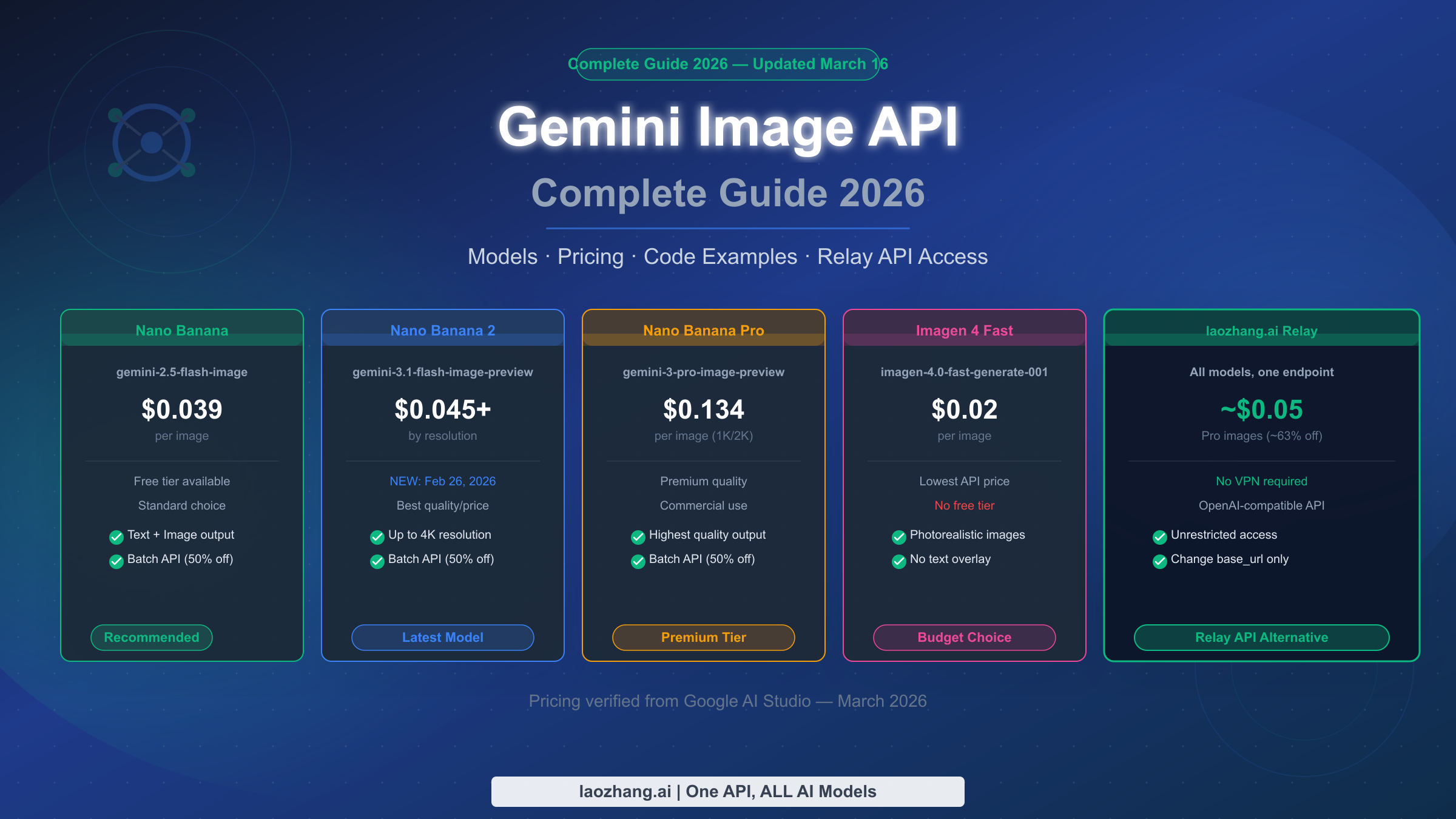
The Gemini Image API gives developers access to five image generation models in 2026: Nano Banana (gemini-2.5-flash-image, from $0.039/image), Nano Banana 2 (gemini-3.1-flash-image-preview, launched February 26, 2026, from $0.045/image at 1K resolution), Nano Banana Pro (gemini-3-pro-image-preview, $0.134/image), and Imagen 4 in three tiers ranging from $0.02 to $0.06 per image. Google AI Studio provides a free tier of approximately 500 requests per day for personal use. For developers in regions where the Google API is restricted, or those seeking lower costs, relay solutions like laozhang.ai provide identical API compatibility at reduced prices. This guide covers everything you need to integrate Gemini image generation into your application in 2026: model selection, step-by-step setup, working code in three languages, full pricing, and relay options.
TL;DR — Gemini Image API Quick Start (2026)
If you need to ship quickly and just want the essential information, here is the complete picture in one place. The Gemini Image API has two distinct families: the Gemini-native models (Nano Banana series) that integrate seamlessly with the existing Gemini SDK, and the Imagen 4 series that targets professional-grade output but lacks a free tier.
Model Price Quick Reference (March 2026)
| Model | API ID | Price/Image | Free Tier |
|---|---|---|---|
| Nano Banana | gemini-2.5-flash-image | $0.039 | ~500 req/day |
| Nano Banana Batch | gemini-2.5-flash-image | $0.0195 | No |
| Nano Banana 2 (1K) | gemini-3.1-flash-image-preview | $0.045 | ~500 req/day |
| Nano Banana 2 (4K) | gemini-3.1-flash-image-preview | $0.151 | No |
| Nano Banana Pro (1K/2K) | gemini-3-pro-image-preview | $0.134 | No |
| Imagen 4 Fast | imagen-4.0-fast-generate-001 | $0.02 | No |
| Imagen 4 Standard | imagen-4.0-generate-001 | $0.04 | No |
| Imagen 4 Ultra | imagen-4.0-ultra-generate-001 | $0.06 | No |
The three-line minimum viable integration using Nano Banana 2 (the newest model as of March 2026):
pythonimport google.generativeai as genai
genai.configure(api_key="YOUR_API_KEY")
model = genai.GenerativeModel("gemini-3.1-flash-image-preview")
response = model.generate_content("A futuristic city skyline at dusk")
image_data = response.candidates[0].content.parts[0].inline_data.data
with open("output.png", "wb") as f:
    import base64; f.write(base64.b64decode(image_data))
The biggest decision you need to make before writing any code is which model fits your use case. If you have a free tier budget and want the latest capabilities, Nano Banana 2 is the right default. If you need the lowest possible cost per image in production, Imagen 4 Fast at $0.02/image has no competition. If you are in a region where Google API access is restricted, a relay API resolves the access issue without any code changes beyond the base URL.
Which Gemini Image Model Should You Use? (Decision Guide)
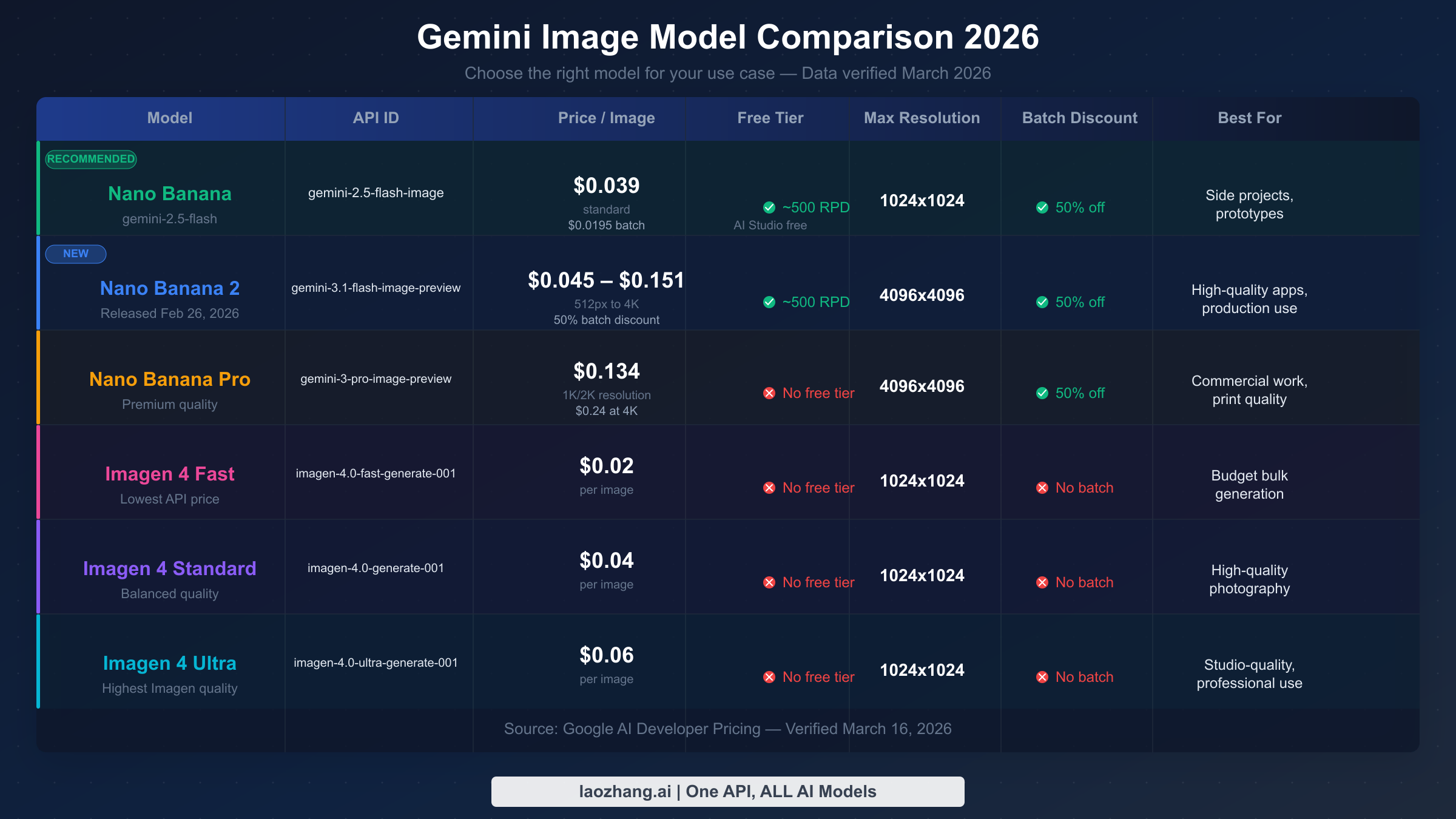
Choosing the wrong model is one of the most common and costly mistakes developers make when integrating the Gemini Image API. The five models differ not just in price but in quality ceiling, available resolutions, batch discount eligibility, and free tier availability. Understanding these differences upfront saves you from expensive surprises in production and prevents you from leaving free quota on the table during development.
Nano Banana (gemini-2.5-flash-image) is the established workhorse. Released in early 2025, it has the most stable behavior and the longest track record in production environments. At $0.039 per image standard, and $0.0195 per image through the Batch API, it is the most cost-effective option when you can tolerate a 24-hour processing window. The free tier makes it ideal for prototyping, and its output quality is competitive for most commercial use cases — product mockups, social media content, blog illustrations, and marketing materials. Choose Nano Banana when you need proven reliability, the lowest batch cost in the ecosystem, or when your use case does not require the highest possible resolution.
Nano Banana 2 (gemini-3.1-flash-image-preview) is the newest entry, released February 26, 2026. This model introduced 4K resolution output to the Gemini native image generation lineup, which matters for print production and high-fidelity display contexts. The pricing scales sharply with resolution: $0.045/image at 1K, $0.067/image at 1K resolution (standard), and $0.151/image at 4K. Unless you specifically need 4K output, the 1K tier provides better value than Nano Banana Pro while delivering fresher model training. The free tier applies at 1K resolution. For a detailed technical breakdown of this model's capabilities, see the Nano Banana 2 (gemini-3.1-flash-image-preview) deep dive.
Nano Banana Pro (gemini-3-pro-image-preview) targets the highest quality ceiling in the Gemini native family. At $0.134/image for 1K and 2K resolutions, it is substantially more expensive than Nano Banana and Nano Banana 2 at equivalent resolutions. The use case is narrow but real: creative agencies producing hero images, premium e-commerce photography, or any context where the visual quality gap between "good" and "exceptional" has direct business impact. There is no free tier for Nano Banana Pro, and there is no batch discount. For a detailed cost analysis, see Nano Banana Pro pricing details.
Imagen 4 Fast (imagen-4.0-fast-generate-001) occupies a unique position: the cheapest model per image in the entire ecosystem at $0.02, but with no free tier at all. This means it costs money from the first API call, making it unsuitable for development experimentation but extremely attractive for high-volume production workloads where you have already validated your integration. Imagen 4 Fast uses Google's dedicated image generation infrastructure rather than the Gemini multimodal architecture, which gives it a different quality profile — optimized for photorealistic output with faster inference.
Imagen 4 Standard and Ultra complete the Imagen 4 family at $0.04 and $0.06 per image respectively. These models deliver progressively higher quality for demanding professional applications. Imagen 4 Ultra in particular competes with Midjourney and DALL-E 3 on quality metrics for photorealistic and artistic outputs.
For competitive context across model families, see the detailed Gemini image model comparison and Gemini vs GPT-4o Image vs FLUX comparison.
Decision framework in plain terms: Start with Nano Banana or Nano Banana 2 on the free tier during development. Migrate to Imagen 4 Fast for production if quality meets requirements and you want the lowest per-image cost. Use Nano Banana Pro or Imagen 4 Standard/Ultra when output quality is a differentiating factor for your product.
Setting Up the Gemini Image API: Step-by-Step
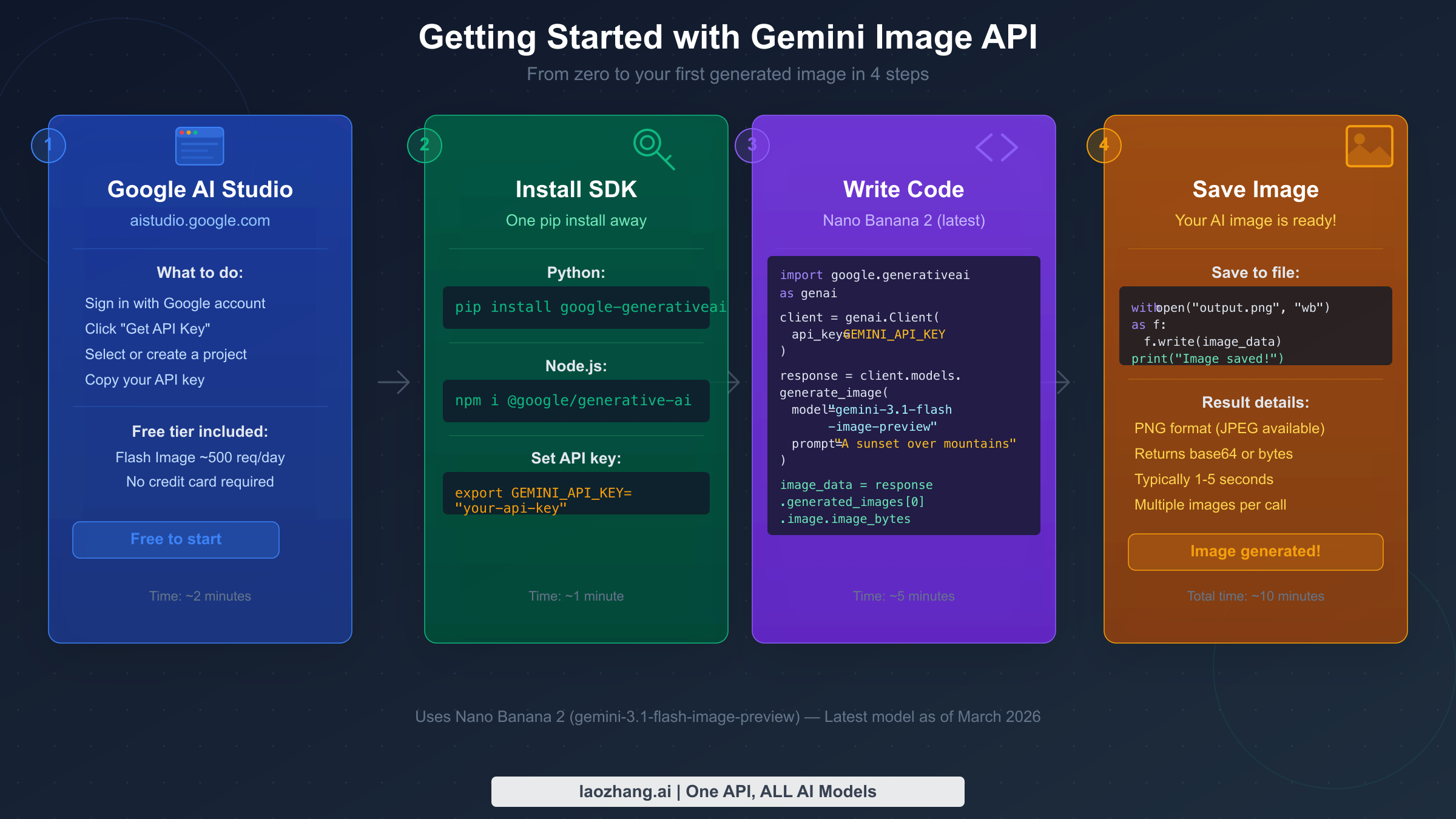
Getting from zero to a working API integration takes about fifteen minutes if you follow these steps precisely. The most common setup failures come from confusing the Google AI Studio key (which works for all Gemini models including image generation) with other Google Cloud credentials, and from installing the wrong SDK version.
Step 1: Get your API key from Google AI Studio
Navigate to Google AI Studio and sign in with your Google account. The free tier access requires no billing setup — you can generate API keys and start making requests immediately within the rate limits. Click "Get API Key" in the left sidebar, then "Create API Key in new project" if you do not have an existing Google Cloud project. Copy the key immediately, as Google AI Studio does not display it again after the initial generation. Store it in an environment variable: export GEMINI_API_KEY="your_key_here". Avoid hardcoding API keys in source code, especially for applications that will be committed to version control.
Step 2: Install the Gemini SDK
For Python, the official SDK is google-generativeai. Install it with:
bashpip install google-generativeai>=0.8.0
The minimum version requirement matters because image generation support was added in 0.8.0. Earlier versions will import successfully but fail at runtime when you attempt to call image-capable models. For Node.js:
bashnpm install @google/generative-ai
The Node.js SDK follows the same version constraint — ensure you are running @google/generative-ai@0.21.0 or later for full image generation support.
Step 3: Make your first API request
Before writing application code, verify your key and SDK installation work correctly with the simplest possible request:
pythonimport google.generativeai as genai
import os

genai.configure(api_key=os.environ["GEMINI_API_KEY"])

model = genai.GenerativeModel("gemini-3.1-flash-image-preview")
response = model.generate_content(
    "A red apple on a white table, photorealistic"
)


for part in response.candidates[0].content.parts:
    if hasattr(part, 'inline_data'):
        import base64
        image_bytes = base64.b64decode(part.inline_data.data)
        with open("test_output.png", "wb") as f:
            f.write(image_bytes)
        print("Image saved to test_output.png")
If you see "Image saved to test_output.png", your setup is working correctly. If you receive a 403 PERMISSION_DENIED error, double-check that your API key was copied correctly and that the model ID matches exactly — model IDs are case-sensitive and the preview suffix must be included for Nano Banana 2.
Step 4: Handle the response structure properly
One of the most common errors in early Gemini Image API integrations is not accounting for the response structure. Unlike text generation where response.text gives you the complete output, image responses embed the generated image as inline_data within a Part object inside candidates[0].content.parts. The image is base64-encoded and identified by its MIME type (image/png or image/jpeg). Always iterate over parts and check for the inline_data attribute rather than assuming a fixed index position, as some prompts may elicit both text and image parts in the same response.
Code Examples for All Gemini Image Models (Python, Node.js, cURL)
Working code that you can copy, paste, and run today is the most valuable thing a Gemini Image API guide can provide. The examples below are verified against the March 2026 API behavior and cover the two most commonly used models: Nano Banana 2 for its recency and free tier support, and Imagen 4 Fast for its production cost efficiency.
Python Examples
Nano Banana 2 — standard generation with error handling:
pythonimport google.generativeai as genai
import base64
import os
from pathlib import Path

def generate_image_gemini(
    prompt: str,
    output_path: str = "output.png",
    model_id: str = "gemini-3.1-flash-image-preview"
) -> bool:
    """
    Generate an image using Gemini Image API.
    Returns True on success, False on failure.
    """
    genai.configure(api_key=os.environ["GEMINI_API_KEY"])
    model = genai.GenerativeModel(model_id)

    try:
        response = model.generate_content(prompt)

        for part in response.candidates[0].content.parts:
            if hasattr(part, 'inline_data') and part.inline_data.mime_type.startswith('image/'):
                image_bytes = base64.b64decode(part.inline_data.data)
                Path(output_path).write_bytes(image_bytes)
                print(f"Image saved: {output_path} ({len(image_bytes)/1024:.1f} KB)")
                return True

        print(f"No image in response. Text: {response.text[:200]}")
        return False

    except Exception as e:
        print(f"Generation failed: {e}")
        return False

# Usage
generate_image_gemini(
    prompt="A minimalist logo for a tech startup, geometric shapes, blue and white",
    output_path="logo.png"
)
Nano Banana — Batch API for cost reduction:
pythonimport google.generativeai as genai
import base64
import json
import os

def create_batch_image_job(prompts: list[str]) -> str:
    """
    Submit multiple image generation requests as a batch job.
    Batch jobs are processed within 24 hours at 50% of standard pricing.
    Returns the batch job ID.
    """
    genai.configure(api_key=os.environ["GEMINI_API_KEY"])

    requests = []
    for i, prompt in enumerate(prompts):
        requests.append({
            "custom_id": f"image_{i}",
            "method": "POST",
            "url": "/v1/models/gemini-2.5-flash-image:generateContent",
            "body": {
                "contents": [{"parts": [{"text": prompt}]}]
            }
        })

    # Write requests to JSONL file
    with open("batch_requests.jsonl", "w") as f:
        for req in requests:
            f.write(json.dumps(req) + "\n")

    # Upload and submit (requires File API)
    client = genai.upload_file("batch_requests.jsonl")
    batch = genai.create_batch(input_file=client.uri)
    print(f"Batch job created: {batch.name}")
    return batch.name

# 100 images at $0.0195 each = $1.95 total (vs $3.90 standard)
prompts = [f"Product photo variation {i}: modern chair, white background" for i in range(100)]
job_id = create_batch_image_job(prompts)
Node.js Examples
javascriptimport { GoogleGenerativeAI } from "@google/generative-ai";
import { writeFileSync } from "fs";

const genAI = new GoogleGenerativeAI(process.env.GEMINI_API_KEY);

async function generateImage(prompt, outputPath = "output.png") {
  const model = genAI.getGenerativeModel({
    model: "gemini-3.1-flash-image-preview",
  });

  const result = await model.generateContent(prompt);
  const response = result.response;

  for (const part of response.candidates[0].content.parts) {
    if (part.inlineData && part.inlineData.mimeType.startsWith("image/")) {
      const imageBuffer = Buffer.from(part.inlineData.data, "base64");
      writeFileSync(outputPath, imageBuffer);
      console.log(`Image saved: ${outputPath} (${imageBuffer.length / 1024} KB)`);
      return true;
    }
  }

  console.log("No image generated. Response text:", response.text());
  return false;
}

// Batch processing with concurrency control
async function generateImageBatch(prompts, concurrency = 3) {
  const results = [];
  for (let i = 0; i < prompts.length; i += concurrency) {
    const batch = prompts.slice(i, i + concurrency);
    const batchResults = await Promise.allSettled(
      batch.map((prompt, j) =>
        generateImage(prompt, `output_${i + j}.png`)
      )
    );
    results.push(...batchResults);
    // Brief pause between batches to respect rate limits
    if (i + concurrency < prompts.length) {
      await new Promise(resolve => setTimeout(resolve, 1000));
    }
  }
  return results;
}

// Example usage
await generateImage(
  "A serene mountain lake at sunrise, photorealistic, 8K quality",
  "mountain_lake.png"
);
cURL Example
For testing and shell scripting, cURL provides the most direct path to the API:
bashcurl -X POST \
  "https://generativelanguage.googleapis.com/v1beta/models/gemini-3.1-flash-image-preview:generateContent?key=${GEMINI_API_KEY}" \
  -H "Content-Type: application/json" \
  -d '{
    "contents": [{
      "parts": [{
        "text": "A product photo of a minimalist wooden desk lamp on a white background"
      }]
    }],
    "generationConfig": {
      "responseModalities": ["IMAGE", "TEXT"]
    }
  }' | python3 -c "
import sys, json, base64
data = json.load(sys.stdin)
for part in data['candidates'][0]['content']['parts']:
    if 'inlineData' in part:
        with open('output.png', 'wb') as f:
            f.write(base64.b64decode(part['inlineData']['data']))
        print('Saved output.png')
"
Using Imagen 4 Fast via REST (different endpoint structure):
bashcurl -X POST \
  "https://generativelanguage.googleapis.com/v1beta/models/imagen-4.0-fast-generate-001:predict?key=${GEMINI_API_KEY}" \
  -H "Content-Type: application/json" \
  -d '{
    "instances": [{"prompt": "A photorealistic red sports car on a mountain road"}],
    "parameters": {"sampleCount": 1}
  }' | python3 -c "
import sys, json, base64
data = json.load(sys.stdin)
img_data = data['predictions'][0]['bytesBase64Encoded']
with open('output.png', 'wb') as f:
    f.write(base64.b64decode(img_data))
print('Saved output.png')
"
Note that Imagen 4 uses a different API endpoint format (/predict rather than /generateContent) and a different response structure. This is one of the key differences between the Imagen 4 family and the Gemini native image models — they share the same API key but have distinct request/response schemas.
Gemini Image API Pricing: Complete Cost Breakdown (March 2026)
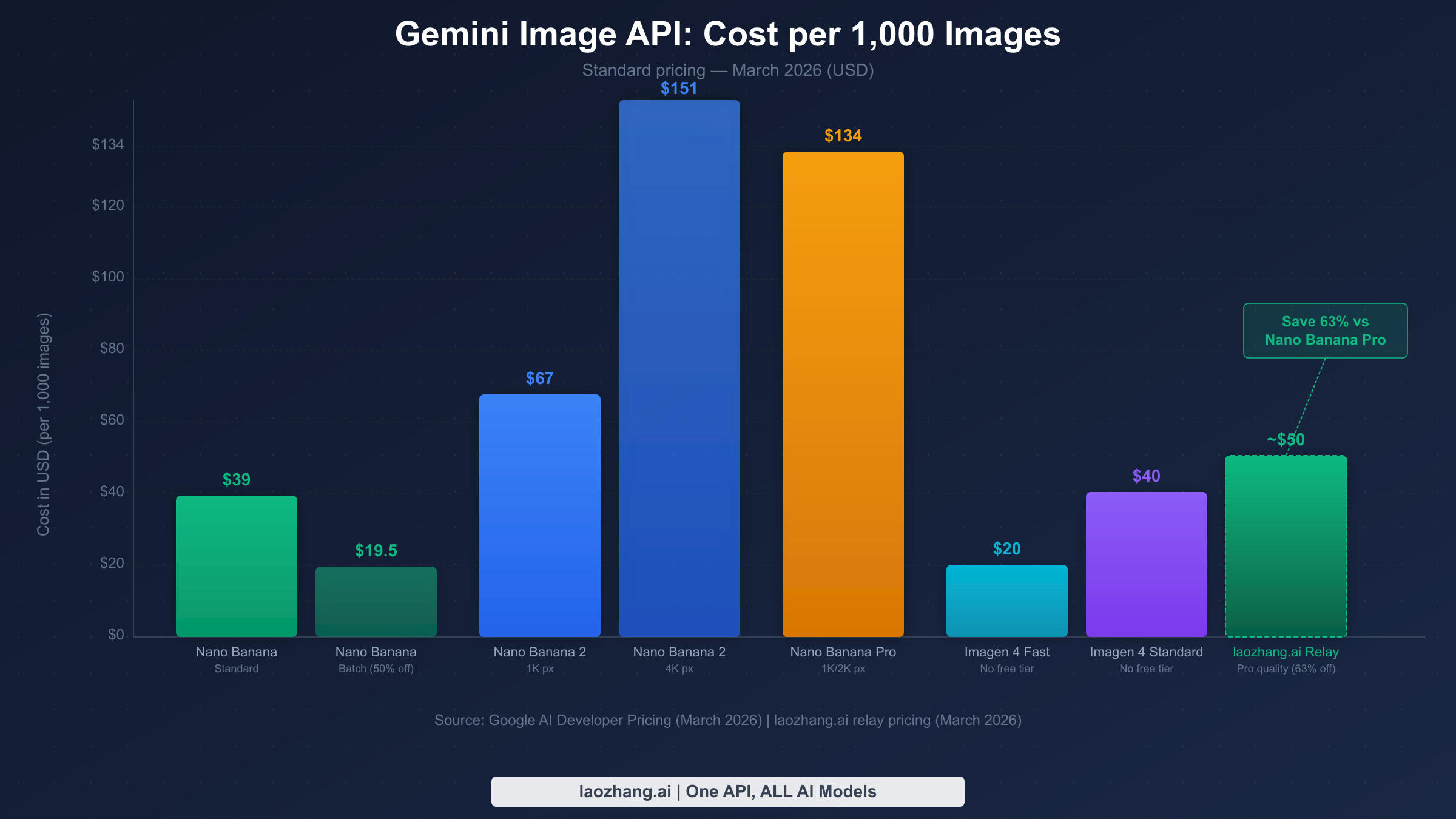
Understanding the true cost of Gemini image generation requires going beyond the per-image headline price to understand how resolution, batch discounts, and free tier consumption affect your actual monthly bill. The pricing information below is sourced from Google AI Developer Pricing documentation as of March 2026.
Standard Pricing: Complete Table
| Model | Resolution | Price/Image | Batch Price | Monthly Cost (1K images) |
|---|---|---|---|---|
| Nano Banana | Standard | $0.039 | $0.0195 | $39 / $19.50 |
| Nano Banana 2 | 1K px | $0.045–$0.067 | N/A | $45–$67 |
| Nano Banana 2 | 4K px | $0.151 | N/A | $151 |
| Nano Banana Pro | 1K/2K px | $0.134 | N/A | $134 |
| Nano Banana Pro | 4K px | $0.240 | N/A | $240 |
| Imagen 4 Fast | Standard | $0.020 | N/A | $20 |
| Imagen 4 Standard | Standard | $0.040 | N/A | $40 |
| Imagen 4 Ultra | Standard | $0.060 | N/A | $60 |
Real-world cost scenarios for common usage patterns:
For a startup building an AI design tool that generates 10,000 images per month for users, the cost range is $200 (Imagen 4 Fast) to $1,340 (Nano Banana Pro at 1K). The choice of model here has a 6.7x cost multiplier — choosing the right model from day one is more impactful than any other optimization.
For a freelance developer building a portfolio site generator that processes 500 images per month, the free tier covers almost the entire volume. Google AI Studio's free tier allows approximately 500 requests per day, which is 15,000 per month — well above this usage level. The practical cost is $0 during development and early traction phases.
For a content agency doing high-volume social media image generation (100,000 images per month), Imagen 4 Fast at $0.02/image totals $2,000 per month, versus $3,900 for Nano Banana standard. Nano Banana's Batch API at $0.0195/image brings the cost to $1,950 — comparable to Imagen 4 Fast but with a 24-hour processing window.
The Batch API discount deserves special attention. Nano Banana is currently the only Gemini image model that offers a batch discount — 50% off standard pricing through the Batch API. This is a significant advantage for non-real-time workflows like overnight content generation, scheduled social media posts, and bulk product photography. The tradeoff is that batch jobs are guaranteed to complete within 24 hours but may start processing up to several hours after submission. For a production system, this typically means running batch jobs at night and having results available by morning.
Developers outside the US often use relay APIs like laozhang.ai for both access and cost benefits. A relay API passes your requests through to the official Google API on your behalf while providing a compatible interface. For Nano Banana Pro pricing details including how relay pricing compares to official rates, see the dedicated pricing guide.
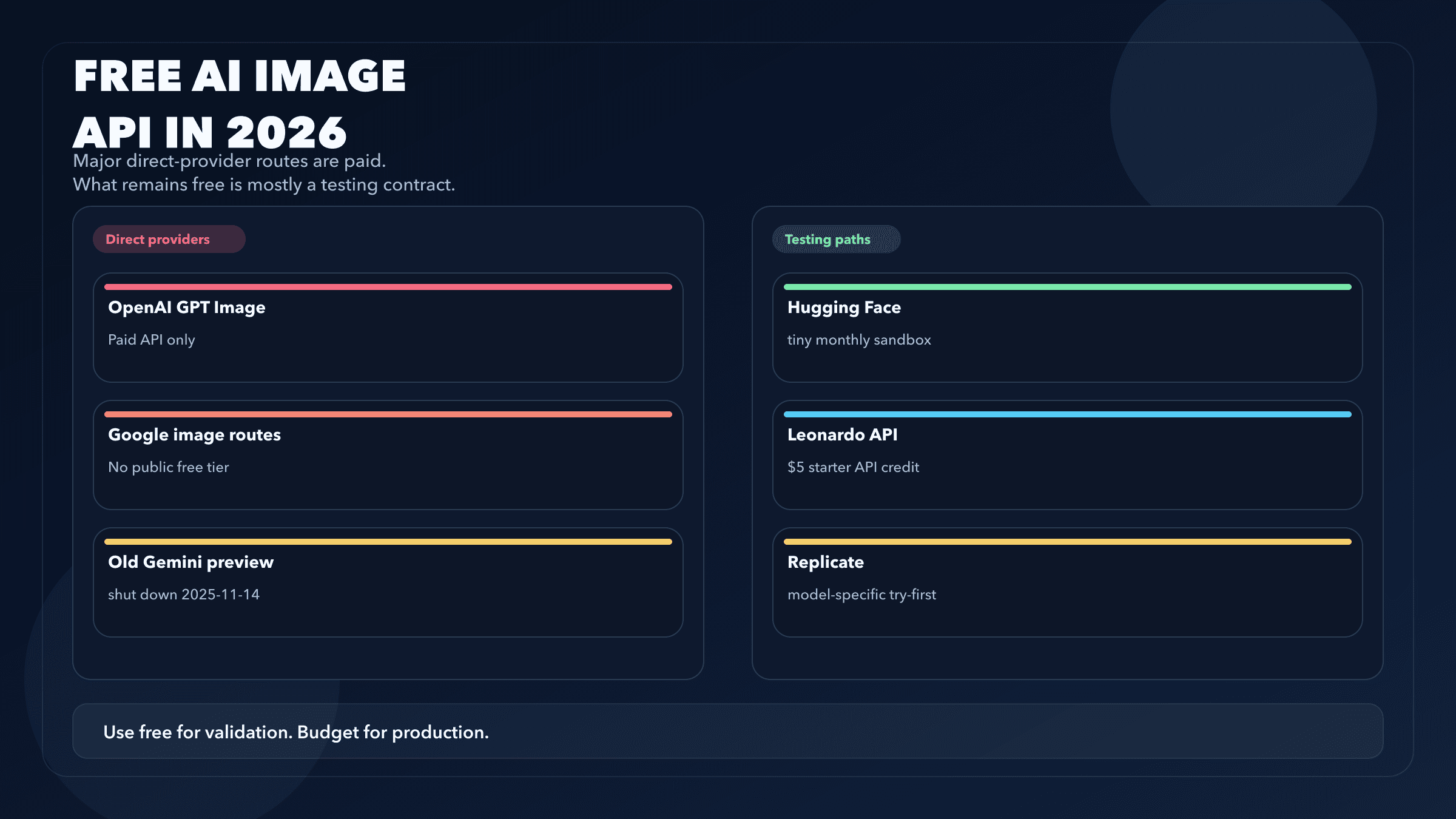
Free Tier Explained: How Many Free Images Can You Generate?
The Gemini Image API free tier has two distinct forms that are often confused with each other, and understanding the difference determines whether you need to set up billing from day one.
Google AI Studio (Personal, for developers): The Google AI Studio API — the one you access with a key from aistudio.google.com — provides a free tier of approximately 500 requests per day for Nano Banana and Nano Banana 2 at standard resolutions (Google AI Studio, March 2026). This is the relevant limit for developers integrating the API into applications. The free tier counts requests, not images per se, and each request can generate multiple images depending on configuration. Importantly, the free tier does not apply to Imagen 4 models at all — those require billing from the first call.
Gemini App (Consumer product): The Gemini consumer application (the chatbot at gemini.google.com) provides separate quotas for image generation features. As of December 2025, Google reduced the free image generation quota in the Gemini App to 20 images per day for Basic (free) users. This consumer quota is completely separate from the API quota and does not affect developers using API keys.
Free tier requests on Google AI Studio have lower rate limits than paid requests. The typical free tier constraint is 60 requests per minute (RPM) and the 500 requests per day ceiling. Once you add billing information to your Google Cloud project, the rate limits increase significantly — standard paid tier allows 1,000 RPM for most Gemini image models. For comprehensive rate limit information, see the complete Gemini API rate limits guide and the free Gemini Image API access guide.
The practical implication for teams: Free tier quotas are per project, not per user. If your team has multiple developers, they can share a project's free tier quota, but a single project serving many developers will exhaust the 500 req/day limit quickly. The workaround during development is to create separate Google Cloud projects for each developer, each getting their own free tier allocation.
Free tier for Nano Banana 2 at 4K: The 4K resolution tier of Nano Banana 2 does not have a free tier equivalent. Only 1K resolution images qualify for free tier usage with this model. This means testing 4K generation requires billing setup even during development — factor this into your budget planning if 4K resolution is a requirement.
Gemini Image API Relay: Unrestricted Access and Lower Prices
Access restriction is a real problem for many developers. The Gemini API is officially available in a limited set of countries and territories, and developers in China, certain Southeast Asian markets, and parts of Europe may find that API calls return access denied errors or simply time out without completing. Beyond geographic restrictions, some organizations have network policies that block direct connections to Google infrastructure.
A relay API (also called a proxy API or mirror API) addresses this by routing your requests through a compatible intermediary service. From your application's perspective, you point to the relay's base URL instead of the official Google API endpoint, and the relay forwards your request to Google's actual servers and returns the response. The key requirement is that the relay uses the same request and response format as the official API — a good relay requires zero code changes beyond replacing the base URL.
laozhang.ai is one such relay service that provides access to Gemini image models with compatible API format. The pricing for Nano Banana Pro quality via laozhang.ai relay is approximately $0.05 per image — roughly 63% cheaper than the official Nano Banana Pro rate of $0.134 per image (March 2026). This makes it an attractive option not just for access-restricted users but for any developer prioritizing cost over using the official Google endpoint directly.
Switching from the official API to a relay requires one change in your existing Python code:
pythonimport google.generativeai as genai

# Standard configuration (official API)
# genai.configure(api_key="your_google_api_key")

# Relay configuration (laozhang.ai)
import openai  # laozhang.ai uses OpenAI-compatible format

client = openai.OpenAI(
    api_key="your_laozhang_api_key",
    base_url="https://api.laozhang.ai/v1"
)

# Image generation via relay (OpenAI-compatible format)
response = client.images.generate(
    model="gemini-3-pro-image-preview",  # Same model ID
    prompt="A minimalist product photo, white background",
    n=1,
    size="1024x1024"
)

image_url = response.data[0].url
print(f"Generated image URL: {image_url}")
The relay uses the OpenAI Images API format rather than the Gemini SDK format, which means you use the openai Python library instead of google-generativeai. The model IDs remain the same, making it easy to switch between the official API and the relay depending on your deployment context. For developers in access-restricted regions, the relay is effectively the only way to use these models in production.
What to look for in a relay service: The most important quality signal is API compatibility — the relay should accept the same model IDs, return the same response structure, and support the same parameters as the official API. laozhang.ai supports all Gemini image models including Nano Banana 2 (the February 2026 release). API documentation is available at docs.laozhang.ai and you can test image generation interactively at images.laozhang.ai.
Advanced Usage: Batch API, Error Handling, and Production Tips
Moving from a working prototype to a production Gemini Image API integration requires addressing three areas that tutorials typically skip: the Batch API for cost reduction, robust error handling for the errors you will definitely encounter, and system design patterns that work at scale.
The Batch API is available for Nano Banana (gemini-2.5-flash-image) and provides 50% cost reduction in exchange for asynchronous processing. The architecture is: upload a JSONL file of requests, submit a batch job, poll for completion, and download results. For high-volume workflows where latency is not a constraint — scheduled content generation, overnight processing queues, bulk product photography — the batch API effectively halves your image generation costs without any quality tradeoff.
Error handling is non-negotiable in production. The three errors you will encounter most frequently with the Gemini Image API are 429 (rate limit exceeded), 400 (content policy violation), and 503 (service temporarily unavailable). Each requires a different response:
pythonimport time
import google.generativeai as genai
from google.api_core import exceptions as google_exceptions

def generate_image_with_retry(prompt: str, max_retries: int = 3) -> bytes | None:
    model = genai.GenerativeModel("gemini-3.1-flash-image-preview")

    for attempt in range(max_retries):
        try:
            response = model.generate_content(prompt)
            for part in response.candidates[0].content.parts:
                if hasattr(part, 'inline_data'):
                    import base64
                    return base64.b64decode(part.inline_data.data)
            return None

        except google_exceptions.ResourceExhausted as e:
            # 429: Rate limit. Exponential backoff.
            if attempt < max_retries - 1:
                wait_time = (2 ** attempt) * 5  # 5s, 10s, 20s
                print(f"Rate limited. Waiting {wait_time}s before retry {attempt + 2}/{max_retries}")
                time.sleep(wait_time)
            else:
                raise

        except google_exceptions.InvalidArgument as e:
            # 400: Content policy. Don't retry — modify the prompt.
            print(f"Content policy violation: {e}")
            return None

        except google_exceptions.ServiceUnavailable as e:
            # 503: Temporary outage. Short wait and retry.
            if attempt < max_retries - 1:
                time.sleep(30)
            else:
                raise

    return None
For detailed solutions to the 429 rate limit error specifically, see Gemini 429 rate limit error solutions.
Content policy behavior in the Gemini Image API is stricter than in some competing models. The API will refuse prompts involving realistic human faces in certain contexts, explicit content, and some political or sensitive topics. The refusal typically returns a 400 error with a message indicating the content policy violation. In production systems, implement prompt validation before calling the API, maintain a list of known-problematic prompt patterns, and design your user experience to gracefully handle and explain policy rejections rather than surfacing raw error messages.
Rate limit planning for production: Free tier limits (60 RPM, 500 RPD) are sufficient for development and low-traffic applications. Paid tier limits vary by model and billing tier. For applications expecting significant traffic, use the complete Gemini API rate limits guide to plan your architecture before launch. Concurrency controls — limiting parallel in-flight API requests — are more effective than retry logic for preventing rate limit errors in the first place.
Prompt engineering for image quality: The Gemini image models respond well to structured prompts that specify subject, style, lighting, and composition explicitly. "A product photo" produces mediocre results. "A photorealistic product photo of a ceramic coffee mug, soft natural lighting from the left, white background, sharp focus, commercial photography style, 4K detail" produces results suitable for professional use. Maintain a library of proven prompt templates for your use case and version-control them alongside your code.
FAQ: Common Questions About Gemini Image API
Is Gemini Image API free to use?
The Gemini Image API provides a free tier through Google AI Studio of approximately 500 requests per day for Nano Banana and Nano Banana 2 at standard resolutions. Imagen 4 models (Fast, Standard, Ultra) have no free tier and require billing from the first request. The free tier does not include Nano Banana 2 at 4K resolution or Nano Banana Pro. For individual developers and small projects, the free tier is substantial enough to build and test a complete integration without any cost.
What is the difference between Nano Banana and Imagen 4?
Nano Banana models (gemini-2.5-flash-image, gemini-3.1-flash-image-preview, gemini-3-pro-image-preview) are Google's native Gemini multimodal image generation models. They have a free tier, support the standard Gemini SDK, and can generate images as part of multi-turn conversations. Imagen 4 models are Google's dedicated professional image generation infrastructure — no free tier, different API endpoint format, but potentially higher photorealistic quality. The right choice depends on your use case: Gemini native models for development ease and free tier access, Imagen 4 for production cost efficiency (Fast) or maximum quality (Standard/Ultra).
Can I use Gemini Image API outside the US?
The official Gemini API is available in a limited set of countries. Developers in regions where direct access is restricted — including China and some other markets — can use relay APIs like laozhang.ai that provide compatible API access through intermediary servers. A relay requires only a base URL change in your configuration and provides identical functionality at potentially lower prices.
How do I reduce my Gemini image API costs?
The most impactful cost reduction strategies are: (1) Use the Batch API for Nano Banana — 50% off with a 24-hour processing window. (2) Use Imagen 4 Fast ($0.02/image) for production workloads if quality requirements permit. (3) Maximize free tier usage during development — 500 requests/day is substantial for testing. (4) Consider relay APIs like laozhang.ai for Pro-quality images at approximately 63% lower cost than the official Nano Banana Pro rate.
What image formats does the Gemini Image API return?
The Gemini native models (Nano Banana series) return images as base64-encoded data with MIME type image/png by default. Imagen 4 returns base64-encoded data as well. Resolution and format control varies by model — Nano Banana 2 supports explicit resolution selection (1K or 4K), while other models produce output at their default resolution. If you need a specific format like JPEG or WebP, convert the PNG output using a library like Pillow after receiving the response.
What happened to Gemini 2.0 Flash Image and Gemini 3.0 Flash?
The model names in the Gemini image lineup have evolved. gemini-2.0-flash-image was an earlier version that has been superseded by gemini-2.5-flash-image (Nano Banana). The text model gemini-3.0-flash is unrelated to image generation. gemini-3-pro-image-preview (Nano Banana Pro) should not be confused with the deprecated gemini-3.0-pro text model, which was retired on March 9, 2026. Always use the API IDs listed in this guide rather than intuiting the model ID from name patterns.
Conclusion: Choosing Your Path Forward
The Gemini Image API in 2026 offers a genuine range of tradeoffs across five distinct models. For most developers starting a new project, Nano Banana 2 (gemini-3.1-flash-image-preview) is the default best starting point: it is the newest model in the Gemini native family, has free tier support for development, and delivers quality improvements over the original Nano Banana while keeping costs reasonable at 1K resolution.
As your project matures, the production model selection should be driven by your actual quality requirements and volume. High-volume applications where image quality is sufficient with Imagen 4 Fast will find $0.02/image hard to beat. Applications where image quality is a core product differentiator should evaluate Nano Banana Pro and Imagen 4 Standard or Ultra on actual output quality with their specific prompt types, rather than making the decision based on price alone.
Developers facing geographic access restrictions have a practical path through relay APIs — the integration change is minimal, the API compatibility is complete, and the per-image cost can be lower than official pricing for premium models. This makes relay APIs a viable production option rather than just a workaround.
The most important next step for any Gemini Image API integration is to run the test code from Section 3 with your actual use case prompts and evaluate the output quality across models before making an architectural commitment. Model quality rankings in guides like this one are directionally correct, but prompt-specific behavior varies enough that direct testing with your content type is irreplaceable.