Gemini API Rate Limits 2026: Free vs Paid Tiers and How to Raise
Gemini API rate limits (RPM, TPM, RPD) apply per project, not per key, and your live numbers are in AI Studio. Tier 2 and Tier 3 unlock at $100 and $1,000 paid.
On this page
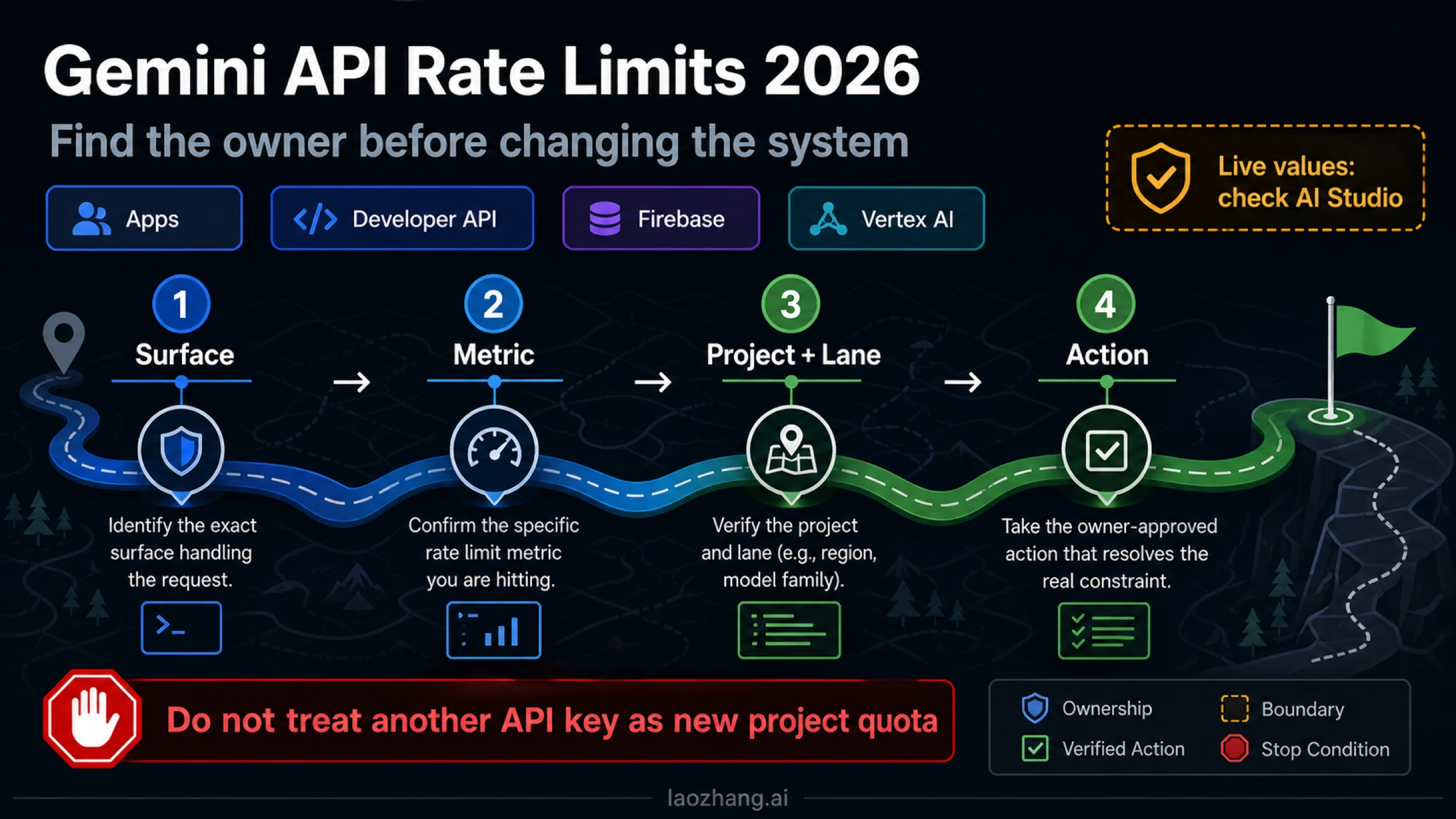
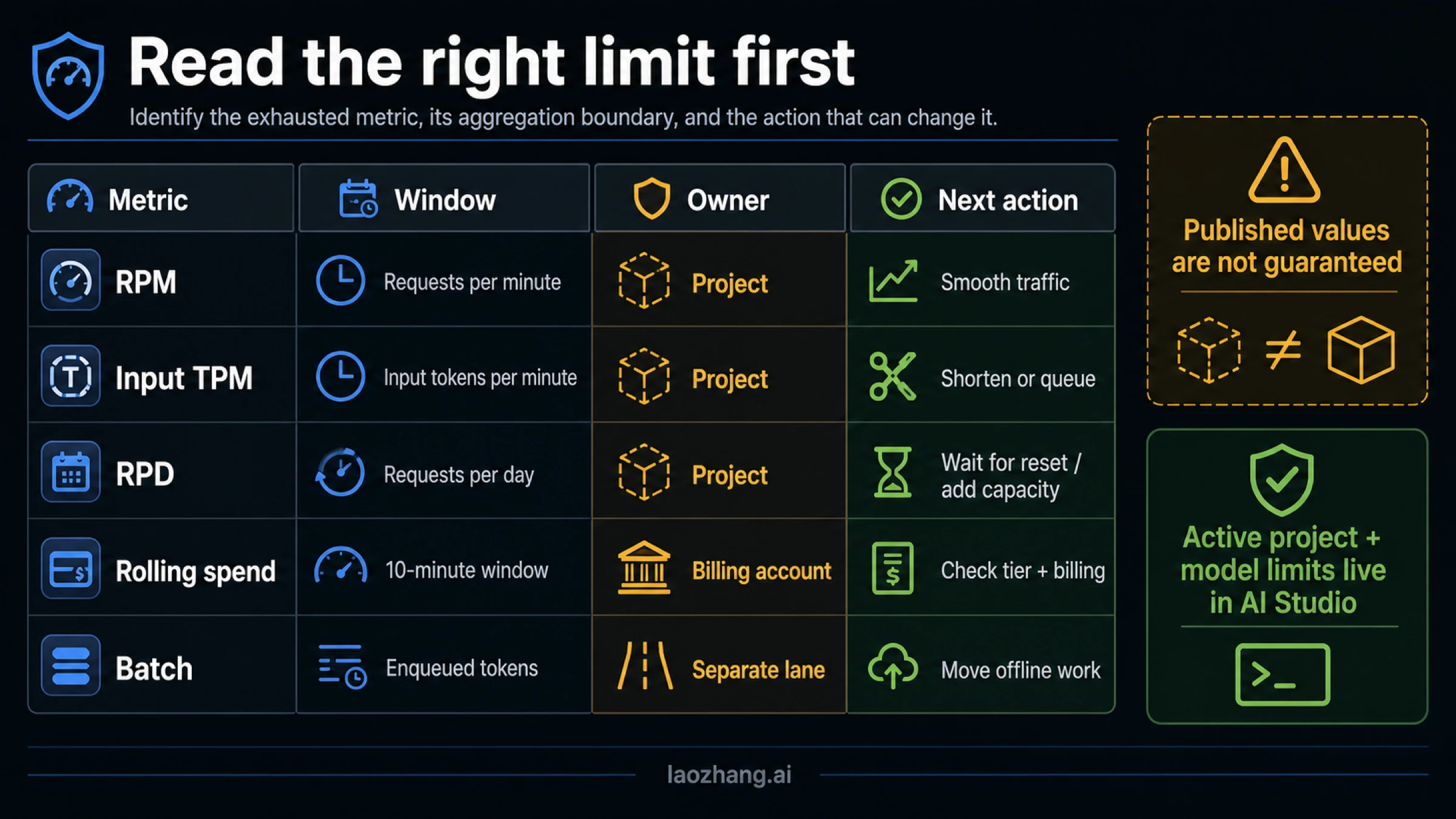
Gemini API rate limits are counted in requests per minute (RPM), input tokens per minute (TPM) and requests per day (RPD). Image models such as Nano Banana add images per minute (IPM), and some models have a tokens-per-day (TPD) limit. Every limit applies to the Google Cloud project, not to the API key, and the daily counter resets at midnight Pacific time. Google's documentation doesn't print per-model numbers. Your live limits for each model are on the AI Studio rate-limit page, and Google adds that "specified rate limits are not guaranteed and actual capacity may vary" (rate limits).
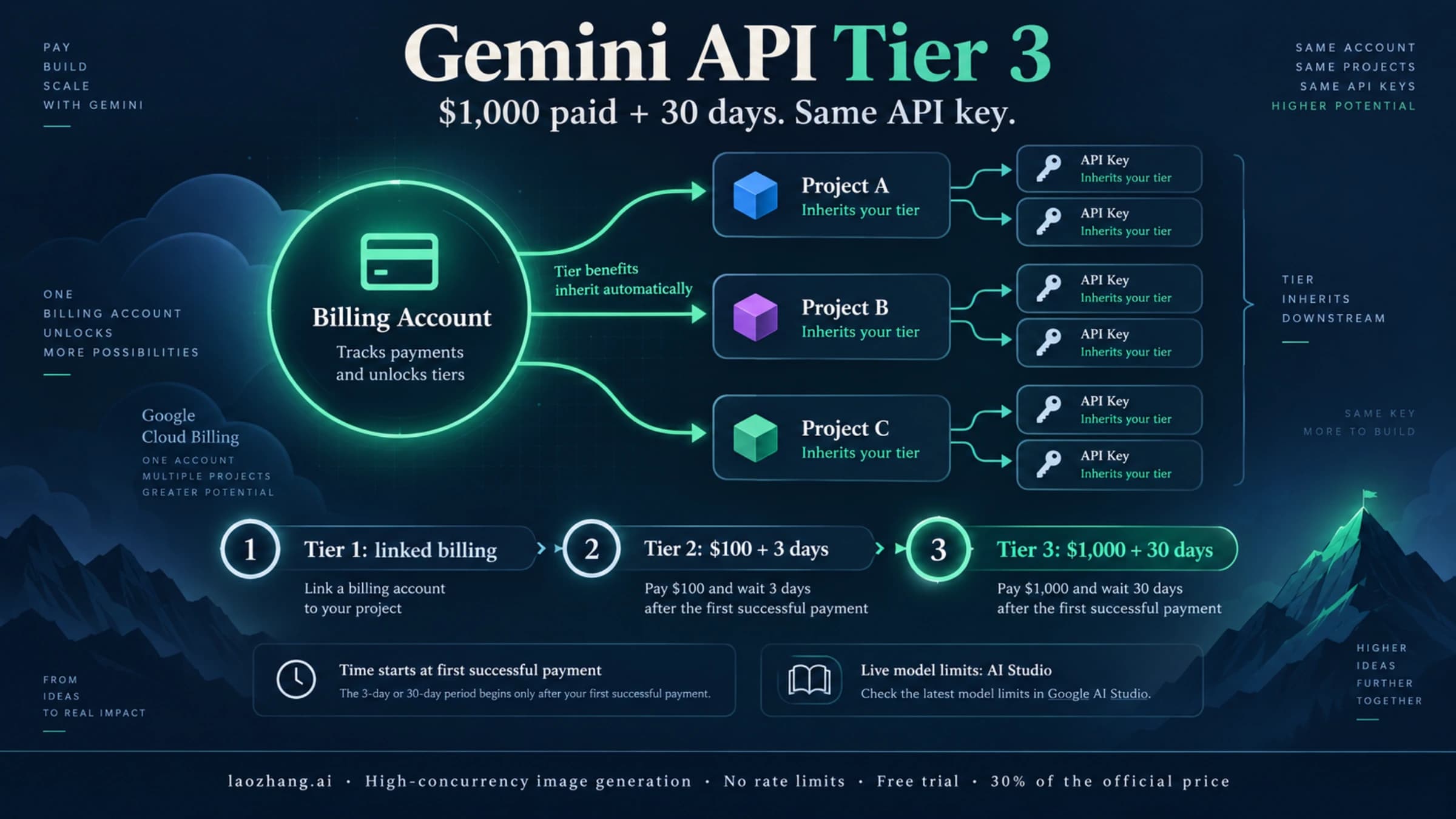
What raises those numbers is your usage tier. Linking a billing account moves a project to Tier 1. Tier 2 follows after $100 paid plus 3 days, and Tier 3 after $1,000 paid plus 30 days, both counted from the first successful payment. Paid tiers also come with two spend limits that return errors of their own: a rolling 10-minute cap ($10, $50 or $200) and a monthly cap per billing account ($250, $2,000, or $20,000 and up). The figures here are as of October 5, 2026.
What Gemini API rate limits measure: RPM, TPM, RPD and IPM
Each request is checked against every limit that applies to the model, and going over any one of them returns a 429. Google's example: with an RPM limit of 20, the 21st request inside a minute fails even if your token use is far below TPM.
| Limit | What it counts | Window | Typical way to hit it |
|---|---|---|---|
| RPM | Requests | Per minute | Many short calls fired at once, or workers waking up together |
| TPM | Input tokens | Per minute | Long prompts, big chat histories, large documents or retrieval payloads |
| RPD | Requests | Per day, resets at midnight Pacific | Steady volume over a whole day |
| IPM | Generated images | Per minute | Image models (Nano Banana) only; works like TPM for images |
| TPD | Tokens | Per day | Only on some models |
Midnight Pacific is 07:00 UTC during daylight saving time and 08:00 UTC the rest of the year. Preview and experimental models get tighter limits than stable ones, so a model ending in -preview can run out long before its stable sibling would.
Two details trip people up. First, requests that fail with a 400 or 500 error are not billed, but they still count against your quota (billing FAQ). A loop that keeps resending a malformed request burns RPM and RPD for nothing. Second, a spend-based limit can return 429 while RPM and TPM look healthy, which is covered in the tier section below.
Per key or per project: why a second API key adds nothing
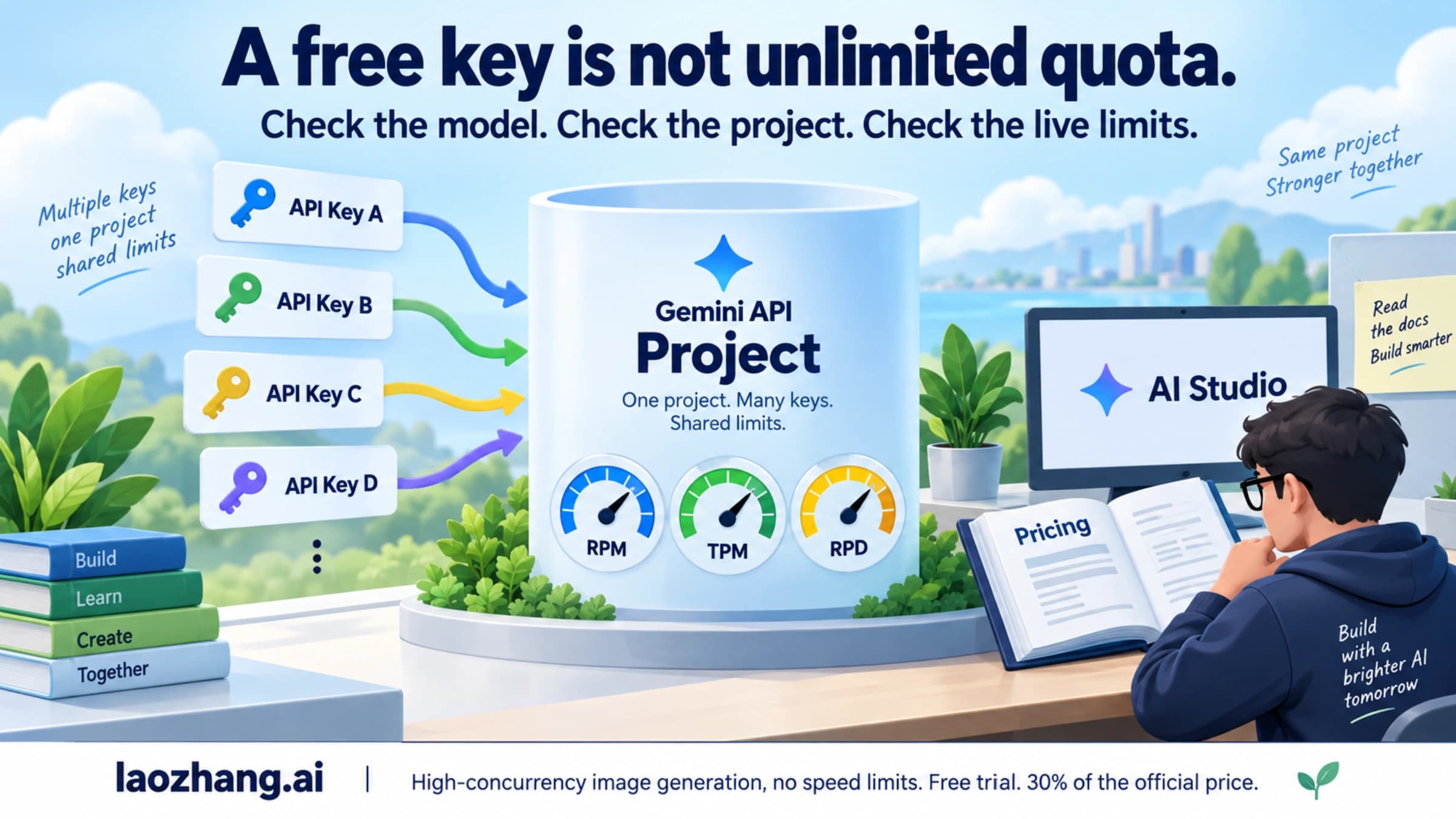
Google's wording is direct: "Rate limits are applied per project, not per API key." All keys in one project draw from the same RPM, TPM and RPD. That includes your staging server, a cron job, a notebook a teammate left running, and anything else using a key from that project.
The billing page adds a second layer. The usage tier, the spend caps and the prepaid balance belong to the billing account, and every project linked to it inherits its tier. API keys "have no independent billing settings": a key inherits its project's tier and billing status, and its spend counts toward both the project's spend cap and the billing account's total.
In practice:
- More keys in the same project change nothing about your limits.
- Projects on the same billing account get the same tier, but each project has its own RPM, TPM and RPD counters.
- Moving a project to another billing account switches it to that account's tier. Unlinking billing puts it back on the Free tier.
Separate projects are meant for separate products, teams or environments. Projects on one billing account still share its tier and its monthly spend cap.
Where to see your live Gemini API limits in AI Studio
Two pages in AI Studio answer most questions:
- Rate limits shows the RPM, TPM, RPD (and IPM for image models) that apply to the selected project, model by model, along with recent usage. This is the only place the current numbers are published.
- Projects shows each project's Billing Tier column, plus billing statuses such as "Set up billing", "Set up Prepay" or "No credits".
Select the project that owns the failing key before you read either page. A common mistake is reading Tier 1 limits on one project while the app sends traffic with a key from a Free-tier project.
Google's documentation prints no per-tier RPM figures, so a fixed "Tier 1 = X RPM" number found elsewhere is not an official limit. Check AI Studio instead.
Gemini API usage tiers: Free, Tier 1, Tier 2 at $100, Tier 3 at $1,000
As of October 5, 2026, Google's rate limits and billing pages list four tiers:
| Tier | How a project qualifies | Spend limit per rolling 10 minutes | Monthly cap per billing account |
|---|---|---|---|
| Free | Active project or free trial | N/A | N/A |
| Tier 1 | Set up and link an active billing account | $10 | $250 |
| Tier 2 | $100 paid, plus 3 days since the first successful payment | $50 | $2,000 |
| Tier 3 | $1,000 paid, plus 30 days since the first successful payment | $200 | $20,000 to $100,000+ |
A few rules sit behind that table:
- Spend counts across Google Cloud. Tier 2 and Tier 3 are based on total cumulative spend on Google Cloud services for the billing account linked to the project, not only Gemini API spend.
- Upgrades are automatic. Free to Tier 1 usually takes effect instantly once billing is set up. Later upgrades take effect within about 10 minutes of meeting the criteria. Google notes that "in rare cases an upgrade request may be denied" after review.
- The $300 Welcome credit doesn't pay for the Gemini API. Since March 2026, the Google Cloud Free Trial credit can't be used for Gemini API or AI Studio charges. Credits granted before that change can be spent until they expire.
- New accounts start on Prepay. Setting up billing in AI Studio means choosing or creating a Cloud Billing account and buying at least $5 of credit. Some accounts get Postpay or a choice between the two.
- There is no "Tier 3 key". The tier belongs to the billing account, so the same key gets higher limits once the account moves up.
For billing setup, Prepay versus Postpay and the "No credits" status, see Gemini API billing tiers. For the path from a new key to Tier 3, see how to get a Gemini API key and reach Tier 3.
Spend limits that block requests: 10-minute cap, monthly cap, Prepay balance
Paid projects can be stopped by three money-related limits. They look alike in logs, but each one clears differently.
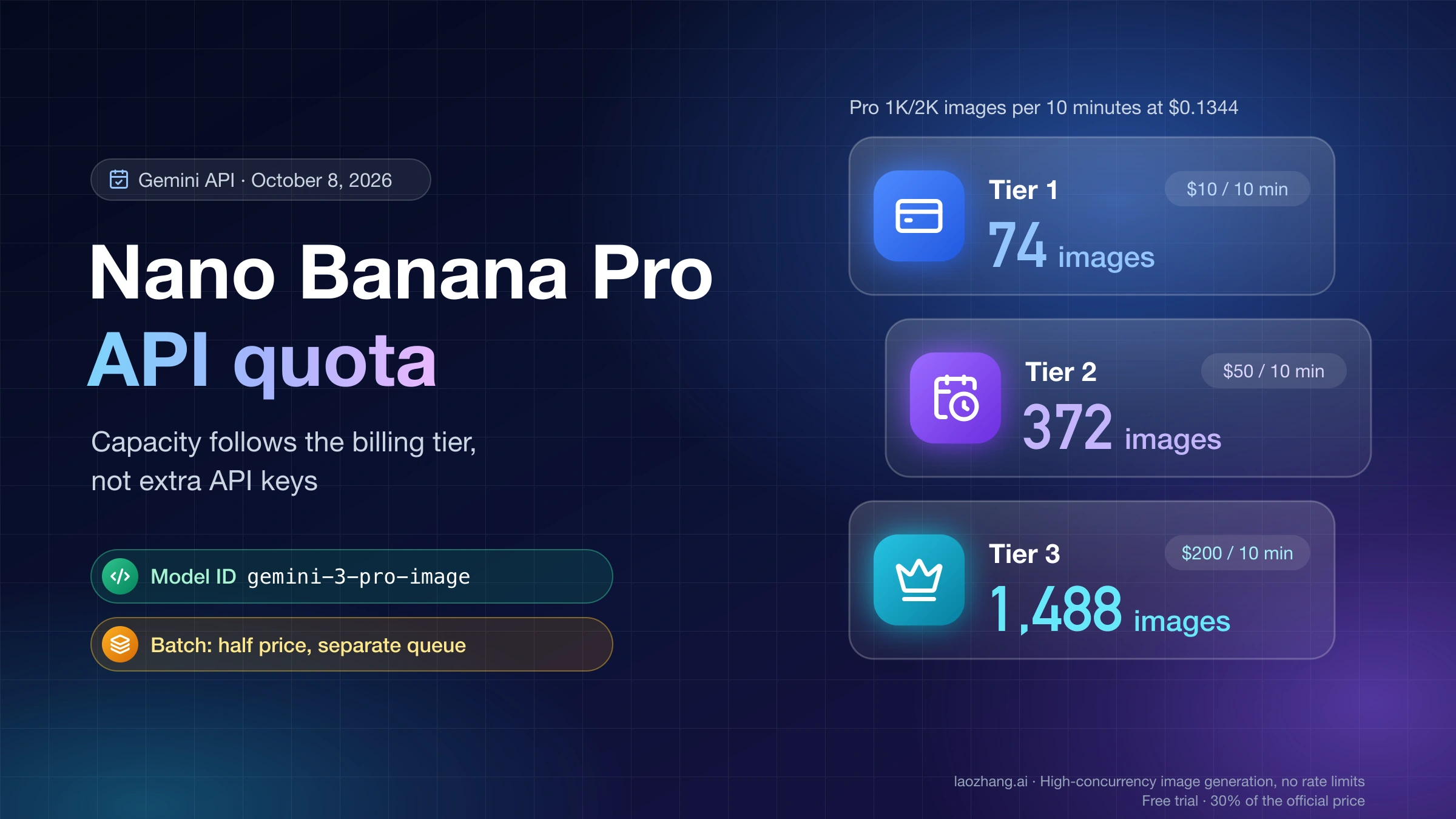
Rolling 10-minute spend limit. Spend in the last 10 minutes is compared with $10 (Tier 1), $50 (Tier 2) or $200 (Tier 3). Going over returns 429 RESOURCE_EXHAUSTED. Google says whether this limit applies depends on billing history and account standing, so not every account sees it. It clears within 10 minutes. Expensive requests are what trip it. At Tier 1, $10 covers about 74 Nano Banana Pro images at 1K or 2K ($10 ÷ $0.134 per image, rounded down), so an image job can hit this cap while RPM looks almost idle. Image-specific cases are covered in the Gemini image 429 guide, and per-image prices in Gemini 3 Pro Image API pricing.
Monthly cap per billing account. Spend from all linked projects with the Gemini API enabled is added up. When the total reaches the tier's cap, service pauses for every one of those projects until the 1st of the next month. Developers on Google's forum have quoted this message for it: "Your billing account has exceeded its monthly spending cap. Please go to AI Studio at https://ai.studio/billing to manage your billing." You can ask Google to raise the cap (see the increase section below). You can also set lower, per-project monthly caps on the AI Studio Spend page under Monthly spend cap > Edit spend cap. Project caps are experimental, can overrun by roughly 10 minutes of usage, and aren't available for invoiced accounts.
Prepay balance at $0. When the Prepay credit balance hits $0, all API keys in all projects linked to that billing account stop at the same time. Requests fail with HTTP 402 Payment Required until you add credits. Billing data lags by about 10 minutes, so long batch jobs can push the balance negative. Auto-reload in the billing settings prevents the stop.
Which limit did you hit? Reading 429 and 402 errors
The error body tells you most of what you need. The Interactions API returns named error codes. generateContent returns the HTTP status with RESOURCE_EXHAUSTED and, usually, the quota metric in the error details (API errors).
| What you see | Most likely limit | When it clears | What to do |
|---|---|---|---|
429 rate_limit_exceeded or too_many_requests; bursts fail, calls a few seconds later succeed | RPM, TPM or IPM | Within about a minute | Exponential backoff with jitter; cap concurrency |
429 quota_exceeded ("You have exceeded your daily quota"); every retry fails | RPD | Midnight Pacific | Stop retrying; wait for the reset or request an increase |
| 429 during a run of expensive calls while RPM is low | 10-minute spend limit | Within 10 minutes | Slow down, use cheaper sizes or models, move bulk work to Batch |
| Error mentioning the monthly spending cap; all projects on the billing account stop | Monthly billing-account cap | The 1st of next month | Request a cap increase; check AI Studio Spend |
402 payment_required | Prepay balance at $0 | When credits are added | Add credits or turn on auto-reload; don't retry |
free_tier_requests with limit: 0 on an image model | Free-tier project calling a model with no free quota | Not by waiting | Link billing, or use the key from your paid project |
The last row comes from developer reports rather than Google's error page. If you see it on a project you already pay for, follow the free_tier_requests limit 0 fix. For 400, 403 and 5xx errors, see the Gemini API error troubleshooting guide.
Retrying 429s: backoff, and turning on retries in google-genai
Google's troubleshooting guide says to retry only transient errors (429, 408 and 5xx) and never 400, 402 or 403. Use exponential backoff (1 s, 2 s, 4 s, 8 s), add random jitter, and set a maximum number of attempts.
The same page says the Python SDK retries transient errors up to four times by default. A test with google-genai 2.28.0 on October 5, 2026 found otherwise for client.models.generate_content: a default client sent a single request to a server answering 429 and raised APIError at once. With HttpRetryOptions set, it sent five requests with exponential delays starting near 1 second. The newer client.interactions.create call did retry by default (four requests in total). The JavaScript, Go and Java SDKs were not part of that test.
To get retries on generate_content, set them on the client:
from google import genai
from google.genai import types

client = genai.Client(
    http_options=types.HttpOptions(
        retry_options=types.HttpRetryOptions(
            attempts=5,  # total attempts, including the first request
            http_status_codes=[408, 429, 500, 502, 503, 504],
        )
    )
)

response = client.models.generate_content(
    model="gemini-3.8-flash",
    contents="Summarize this support ticket in one sentence.",
)
print(response.text)
The client reads the key from GEMINI_API_KEY or GOOGLE_API_KEY. Built-in retries can't tell a per-minute 429 from a daily or spend 429, so a quota_exceeded error still costs you every attempt before it fails. For long-running jobs, catch the final error, read the code, and pause the queue until midnight Pacific instead of retrying. Put a concurrency limit in front of the client as well: ten workers that back off and wake up together just make the next burst.
How to increase your Gemini API rate limits
There are five legitimate ways to get more out of the same project, roughly from cheapest to slowest:
- Use what you have more evenly. Queue requests instead of firing them together, cap concurrency per model, cache repeated work, and trim long prompts to save TPM.
- Move work that can wait to the Batch API. Batch has its own limits, separate from interactive calls, and costs half the standard price (details below).
- Pick the model for the job. Stable models get looser limits than preview models, and lighter models use less of the 10-minute spend limit per request.
- Move up a tier. Link billing for Tier 1, then reach $100 paid plus 3 days for Tier 2 and $1,000 plus 30 days for Tier 3. Upgrades happen on their own within about 10 minutes of qualifying. Confirm the new tier in the Projects page's Billing Tier column.
- Ask Google for more. On the rate limits page, the "Request paid tier rate limit increase" link opens the Gemini API Quota and Billing Cap Increase Request form. It covers higher rate limits and higher monthly caps for paid projects. Google says: "We offer no guarantees about increasing your rate limit, but we'll do our best to review your request."
If the Billing Tier column doesn't move after you qualify, threads on Google's AI Developers Forum describe two cases. In April 2026, a developer with nearly $2,000 in spend stayed on Tier 1 and hit its $250 monthly cap. Another developer in the same thread said submitting the increase form above fixed the same problem more than once. In August 2026, some accounts dropped from Tier 3 to Tier 1 without notice and saw 429s in production. Google staff opened a separate report form and said the submitted cases were fixed. These are developer reports, not documented behavior, but the increase form is the documented route if your tier looks wrong.
Nano Banana Pro workloads have their own quota questions; see how to increase Nano Banana Pro API quota.
If Google's quota can't cover your volume in time, a paid third-party gateway is a separate option. laozhang.ai sells access to Gemini models (it supports generateContent through the Google Gen AI SDK) from a prepaid balance. It does not raise your Google project's limits. It runs under its own pricing and terms, so test data handling, latency and costs before sending production traffic.
Disclosure: laozhang.ai is our own service. Its prices are platform pricing, not an independent comparison.
Batch API and Priority inference limits
Batch API. Batch requests have their own limits, separate from interactive calls: 100 concurrent batch requests, a 2 GB input file limit, 20 GB of file storage, and a cap on enqueued tokens per model across all your active batch jobs. Google's target turnaround is 24 hours, and creating a batch job is not idempotent, so store the job name and never resubmit blindly after a timeout. As listed on Google's rate limits page on October 5, 2026, the enqueued-token cap for Gemini 3 Pro Image (Nano Banana Pro) was 2,000,000 tokens at Tier 1, 270,000,000 at Tier 2 and 1,000,000,000 at Tier 3. The page still labels those rows with "Preview" names that were retired on June 25, 2026. For the cost side, see Nano Banana Pro Batch API cost.
Priority inference. Priority requests have their own limits, by default 0.3x the standard limit for each model and tier. They still count toward your interactive limits, so moving traffic to Priority doesn't add room on top of what you already have.
Gemini API free tier limits: what's still free
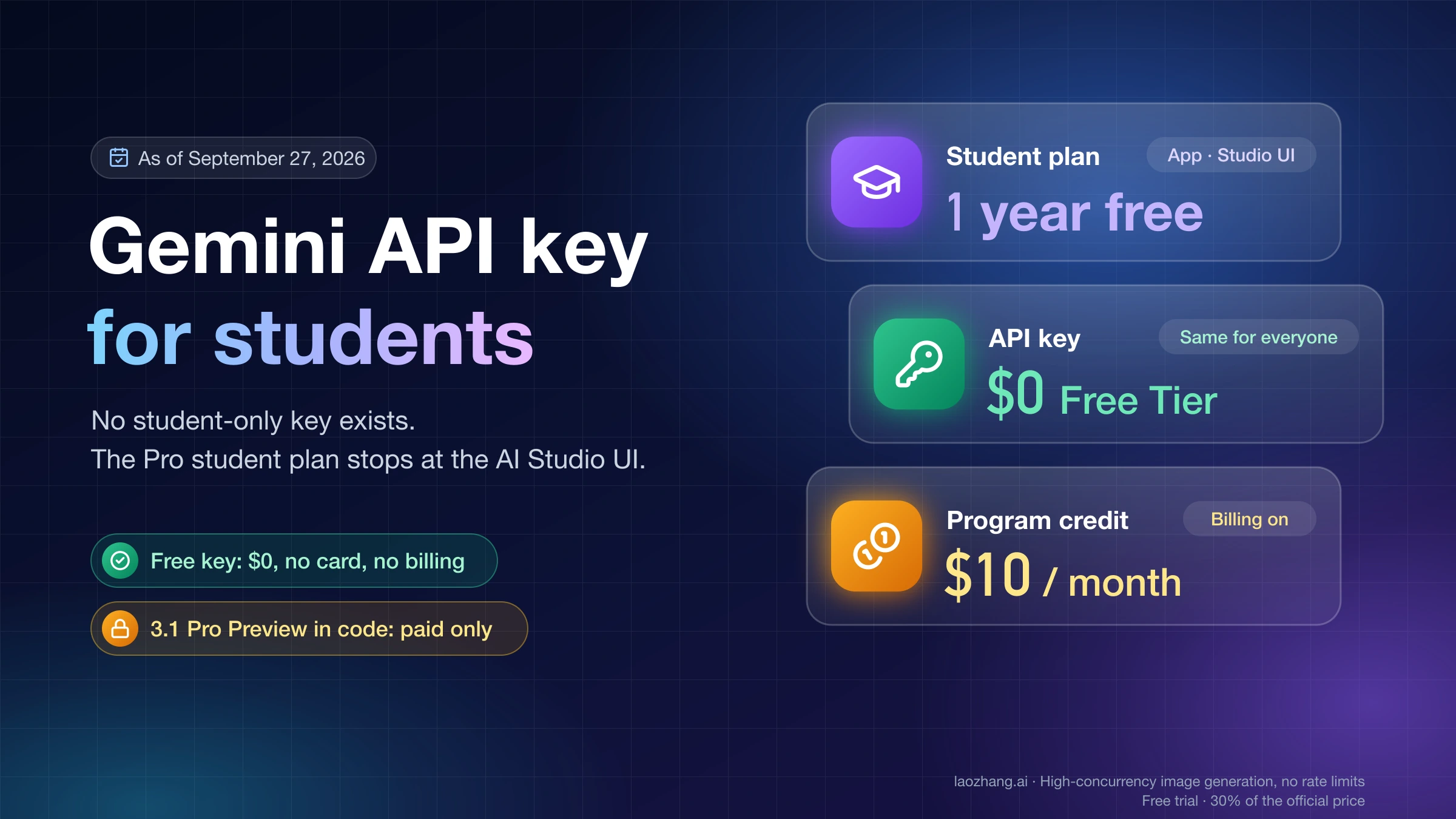
The Free tier covers projects without billing. Which models it includes, and their limits, are shown per model in AI Studio. Image output has no free tier on any current image model. That's why a Free-tier project calling Nano Banana fails on its first image request rather than after a few. For the current list of free models and how free limits work, see the Gemini API free tier guide. For creating and restricting keys, see the Google AI Studio API key guide.
Gemini app subscriptions have their own usage limits and don't change your API quota.
Firebase AI Logic and Vertex AI use different quotas
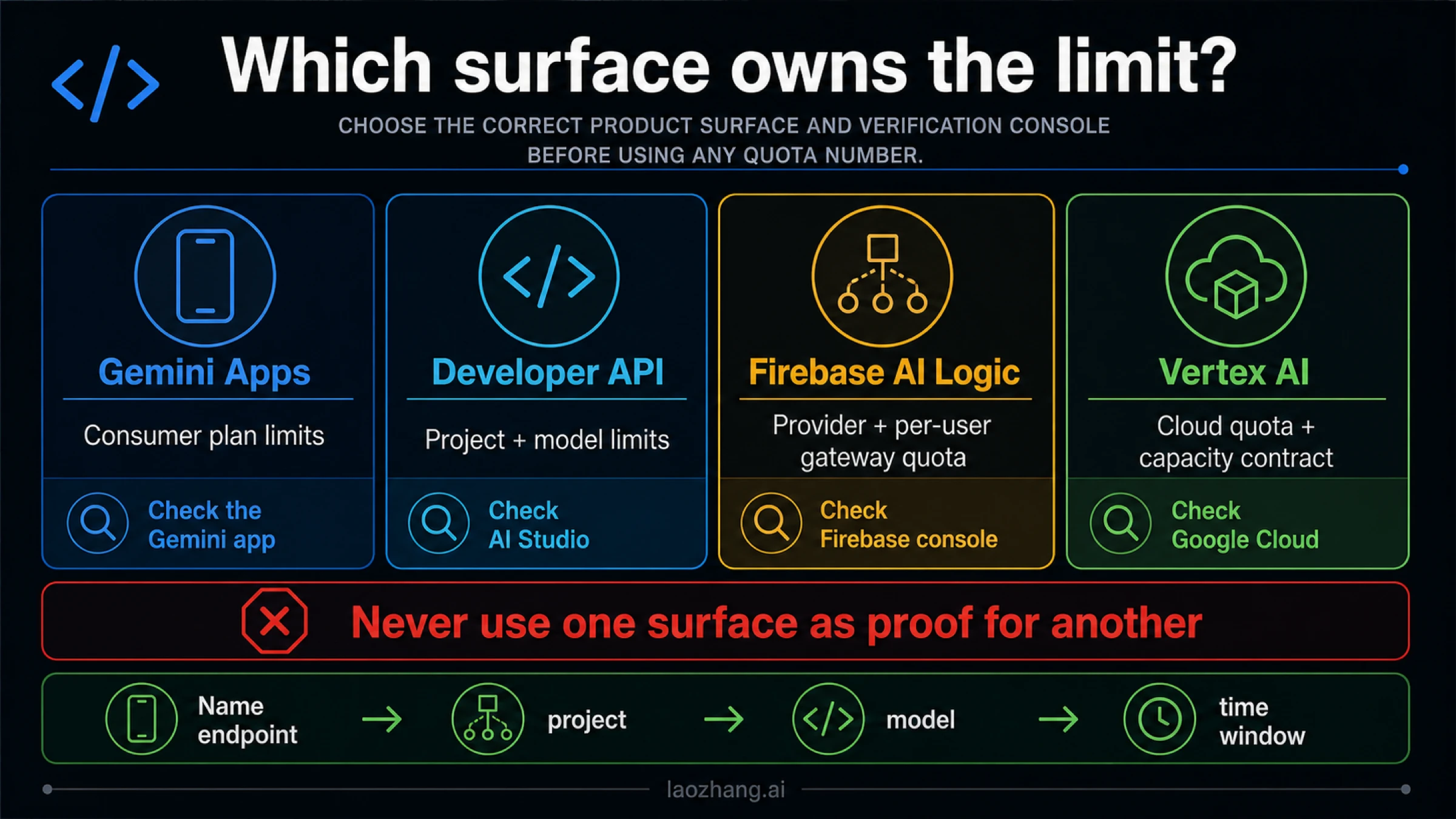
Firebase AI Logic. Apps calling Gemini through Firebase AI Logic face two layers (Firebase quotas). The Gemini API provider's limits still apply and take precedence. On top of that, the Firebase AI Logic API acts as a per-user limit, set to 100 RPM by default. Changing that limit needs a role with the right permission, such as Owner or Editor. Raising the per-user limit can't create provider capacity, and many users each under 100 RPM can still exhaust the project's Gemini API limits.
Vertex AI. Calls to Gemini on Vertex AI use Google Cloud quotas and capacity, not AI Studio tiers. Google's Vertex AI 429 page separates pay-as-you-go from Provisioned Throughput. It recommends the global endpoint, truncated exponential backoff, and avoiding sudden jumps in traffic. For choosing between the two APIs, see Gemini API vs Vertex AI API.
FAQ
What are the Gemini API free tier limits for 2026?
They differ by model and are shown only in AI Studio's rate-limit page for your project. Google stopped printing a fixed free-tier table. Limits are per project, reset daily at midnight Pacific, and image models have no free quota at all.
How can I increase my Gemini API rate limit?
Link a billing account to reach Tier 1. Tier 2 and Tier 3 follow automatically after $100 paid plus 3 days and $1,000 paid plus 30 days. Beyond that, paid projects can submit Google's quota and billing cap increase form, with no guaranteed result. Smoothing traffic and moving offline work to Batch often helps sooner.
How do you get around the Gemini API rate limit?
Not by adding keys, since every key shares its project's limits. What actually works is queueing and backoff, the Batch API for work that can wait, a higher tier, an increase request, or a paid gateway that has its own limits.
When do Gemini API limits reset?
RPD resets at midnight Pacific time (07:00 or 08:00 UTC, depending on daylight saving time). Per-minute limits clear within a minute, the spend limit looks at the last 10 minutes, and the monthly billing-account cap resets on the 1st.
Why do I get 429 errors when I'm under my RPM limit?
Another limit is the cause: input tokens per minute on long prompts, the daily quota, the 10-minute spend limit on expensive requests, or traffic from other keys in the same project. Failed 400 and 500 requests count too.
Why is the Gemini API slow?
Rate limits produce errors, not slow answers. Gemini 3.x models think by default, which adds latency and output tokens. Persistent 503 errors mean the service is overloaded, which no quota change fixes.
Sources10
External pages this guide links to, in the order they appear. Last updated Oct 5, 2026.
Sources10
External pages this guide links to, in the order they appear. Last updated Oct 5, 2026.
- 1.AI Studio rate-limit pageaistudio.google.com/rate-limit
- 2.rate limitsai.google.dev/gemini-api/docs/rate-limits
- 3.billing FAQai.google.dev/gemini-api/docs/billing
- 4.Projectsaistudio.google.com/projects
- 5.ai.studioai.studio/billing
- 6.API errorsai.google.dev/gemini-api/docs/api-errors
- 7.troubleshooting guideai.google.dev/gemini-api/docs/troubleshooting
- 8.Gemini API Quota and Billing Cap Increase Requestforms.gle/ETzX94k8jf7iSotH9
- 9.Firebase quotasfirebase.google.com/docs/ai-logic/quotas
- 10.Vertex AI 429 pagedocs.cloud.google.com/gemini-enterprise-agent-platform/models/deploy/error-code-429