How to Fix Gemini Image 429 Rate Limit: 5 Proven Solutions (2026)

A
22 min readAPI Development

Getting 429 RESOURCE_EXHAUSTED errors when generating images with Gemini API? This guide provides 5 production-ready solutions — from exponential backoff to API proxy services — with code examples in Python and Node.js. Learn to diagnose which of the 4 rate limit dimensions (RPM, RPD, TPM, IPM) you are hitting and choose the right fix for your use case.

How to Fix Gemini Image 429 Rate Limit: 5 Proven Solutions (2026)

Gemini image generation 429 errors occur when your application exceeds one of Google's four rate limit dimensions: Requests Per Minute (RPM), Requests Per Day (RPD), Tokens Per Minute (TPM), or the often-overlooked Images Per Minute (IPM). The fastest fix is implementing exponential backoff with jitter, which transforms an 80% failure rate into 99%+ success for burst traffic. However, if you are on the Free tier, you must enable billing first because Free tier IPM dropped to 0 in December 2025, meaning image generation is effectively disabled without a paid account. Tier 1 gives you 10 IPM immediately with no minimum spend.

Why Gemini Image Generation Returns 429 Errors

Every API provider implements rate limiting to protect infrastructure from abuse and ensure fair resource distribution across all users. When your Gemini API requests exceed the allocated quota for your billing tier, Google's servers respond with HTTP status code 429 and a RESOURCE_EXHAUSTED error message. This is not a bug in your code or a problem with the Gemini model itself — it is the API gateway enforcing the quota boundaries that Google has set for your project. Understanding the mechanics behind this error is the first step toward building a resilient image generation pipeline that can handle production-scale workloads without interruption.

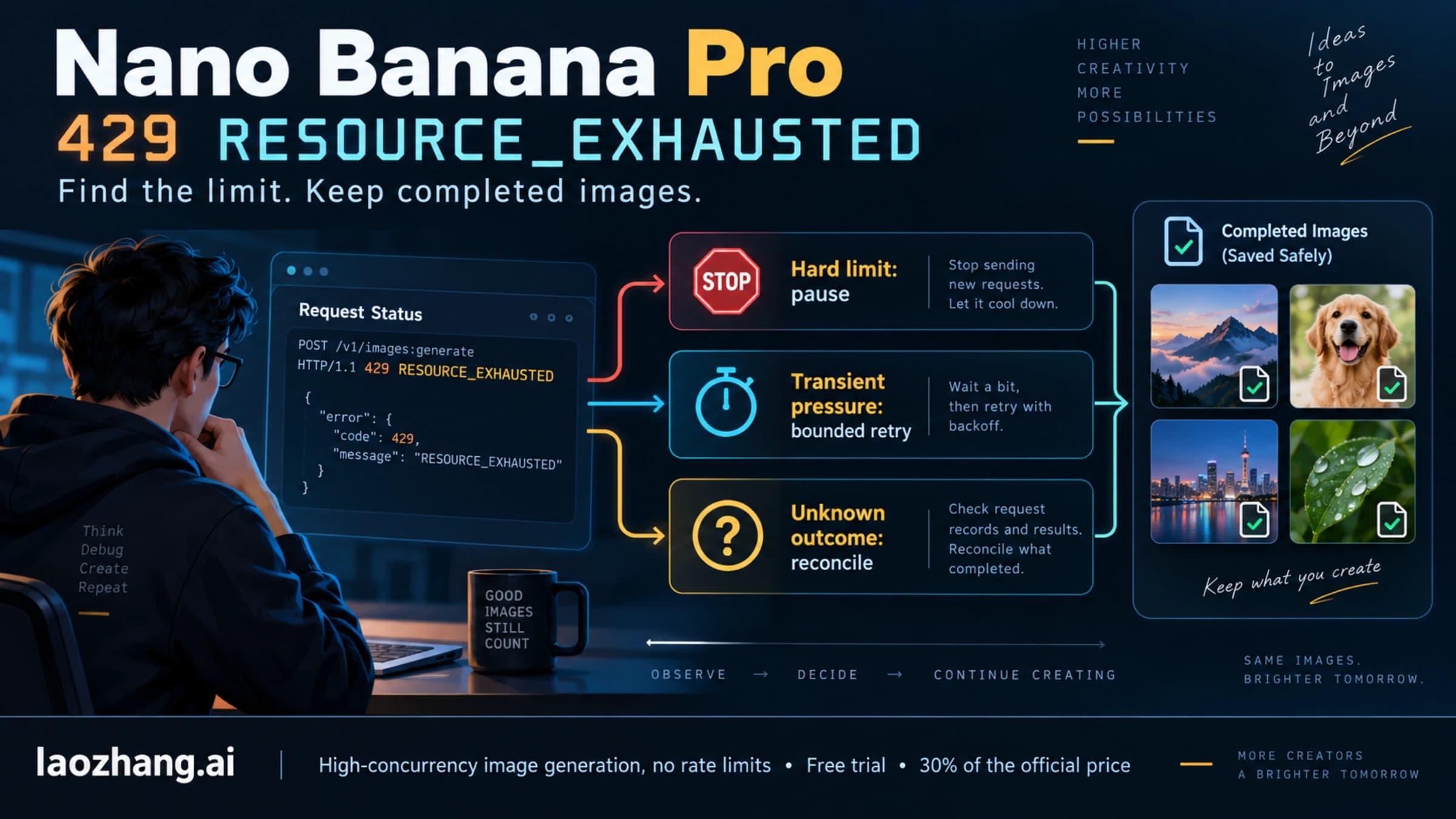
The 429 response from the Gemini API carries a specific structure that many developers overlook. The response body contains a JSON object with an error field that includes the status code RESOURCE_EXHAUSTED, a human-readable message describing which quota was exceeded, and critically, metadata headers like x-ratelimit-limit, x-ratelimit-remaining, and x-ratelimit-reset that tell you exactly which dimension triggered the limit and when it will reset. Many developers simply catch the 429 and retry blindly, but parsing these headers gives you the intelligence to implement targeted fixes rather than brute-force retries. If x-ratelimit-remaining for IPM shows 0 while RPM still has capacity, you know the bottleneck is specifically image generation throughput, not general request volume.

The Four Rate Limit Dimensions

Google enforces rate limits across four independent dimensions, and hitting any single one triggers a 429 error. Most developers are familiar with RPM and RPD, but the introduction of IPM alongside Gemini's native image generation capabilities in late 2025 caught many teams off guard. Each dimension operates independently — you could be well within your RPM limit but still get throttled because your IPM quota is exhausted. This table breaks down each dimension and its impact on image generation workloads:

DimensionFull NameWhat It MeasuresImpact on Image Generation
RPMRequests Per MinuteTotal API calls in a 60-second windowAffects all Gemini calls, including text
RPDRequests Per DayTotal API calls in a 24-hour window (resets midnight PT)Caps daily volume for all operations
TPMTokens Per MinuteTotal input + output tokens processed per minutePrimarily affects text; images count as fixed token blocks
IPMImages Per MinuteNumber of images generated per minuteThe hidden killer — directly limits image output

IPM: The Hidden Killer Most Developers Miss

Images Per Minute is the rate limit dimension that causes the most confusion among developers integrating Gemini's image generation features. Unlike RPM, which governs all API requests including text completions, IPM specifically counts the number of images your application generates within a 60-second sliding window. A single API call that generates four images consumes 4 IPM, not 1 RPM. This means you can be well within your RPM quota and still hit the IPM ceiling if your requests frequently produce multiple images. The problem is compounded by the fact that the Free tier dropped to 0 IPM in December 2025, which means any image generation attempt on an unpaid account returns an immediate 429 without even processing the request. Many developers debugging their first 429 error waste hours checking their code logic when the real issue is simply that their billing tier does not permit any image generation at all.

The February 2026 Ghost 429 Bug

Starting in early February 2026, multiple developers on paid Tier 1 accounts reported receiving 429 RESOURCE_EXHAUSTED errors despite their usage dashboards showing zero or near-zero consumption against their quotas. This "ghost 429" bug appears to be a server-side issue with Google's quota tracking system, where the rate limiter incorrectly calculates usage for certain project configurations. The bug primarily affects accounts that were recently upgraded from Free to Tier 1, and it manifests most commonly during the first 24-48 hours after billing is enabled. Google acknowledged the issue in their developer forums and recommended switching to a different model variant (for example, from gemini-3.1-flash to gemini-3-pro) as a temporary workaround while their engineering team investigates. If you encounter 429 errors with genuinely zero usage showing in your Google Cloud Console quota dashboard, this bug is the most likely culprit rather than any misconfiguration on your end. For a broader understanding of Gemini API error codes and their solutions, see our complete Gemini API error troubleshooting guide. If you want to understand the full rate limiting system in detail, our complete Gemini API rate limits guide covers every tier and dimension.

Quick Diagnosis — Which Rate Limit Did You Hit?

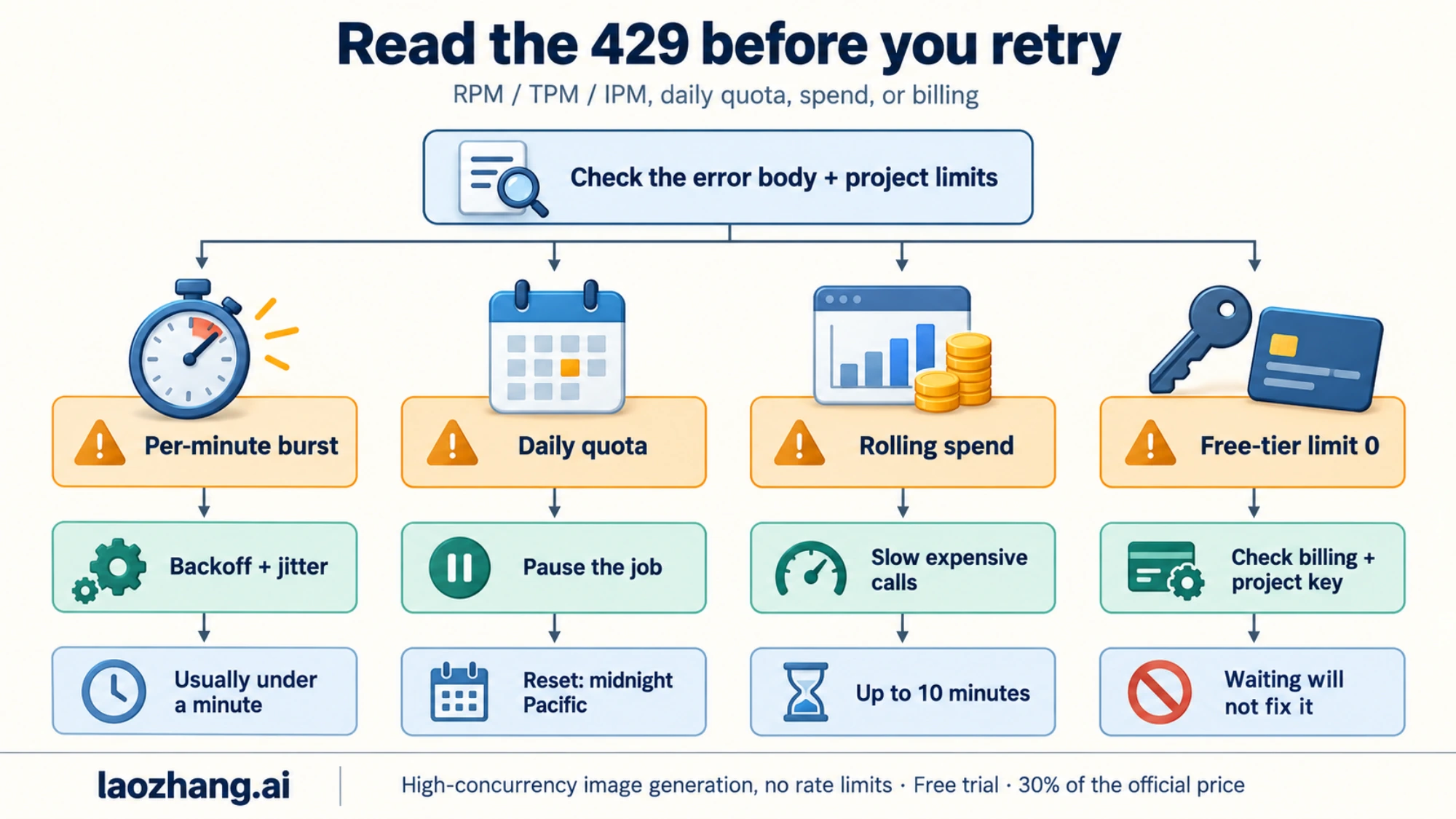
429 diagnostic flowchart showing how to identify which rate limit dimension triggered the error

Before jumping to solutions, you need to identify which specific rate limit dimension is blocking your requests. Applying the wrong fix wastes time — exponential backoff solves RPM issues but does nothing for an IPM bottleneck where you need a tier upgrade. The diagnostic process requires examining both the error response from the API and your usage patterns over time. Google does not always include explicit dimension information in the 429 error body, so you often need to correlate the error timing with your known request patterns to narrow down the cause. The good news is that each rate limit dimension produces a distinctive failure pattern that you can identify with a systematic approach.

Reading Error Response Metadata

The most direct way to identify which rate limit you hit is to parse the response headers and error body from the 429 response. Google includes rate limit metadata in the response headers, though the exact headers present can vary depending on which quota was exhausted. The following Python snippet demonstrates how to extract and log this diagnostic information from a failed request. This code catches the 429 exception, extracts all rate-limit-related headers, and prints a structured diagnostic report that immediately tells you which dimension is the bottleneck.

python
import google.generativeai as genai from google.api_core.exceptions import ResourceExhausted def diagnose_rate_limit(api_key: str, prompt: str): genai.configure(api_key=api_key) model = genai.GenerativeModel("gemini-3.1-flash") try: response = model.generate_content(prompt) return response except ResourceExhausted as e: print(f"429 RESOURCE_EXHAUSTED: {e.message}") # Parse error details for quota dimension if hasattr(e, 'errors') and e.errors: for error in e.errors: metadata = error.get('metadata', {}) print(f" Quota dimension: {metadata.get('quota_dimension', 'unknown')}") print(f" Quota limit: {metadata.get('quota_limit', 'unknown')}") print(f" Quota usage: {metadata.get('quota_usage', 'unknown')}") # Check for ghost 429 pattern if "usage: 0" in str(e) or "quota_usage: 0" in str(e.errors): print(" WARNING: Ghost 429 detected (usage=0).") print(" This matches the known Feb 2026 bug.") print(" Try switching model: gemini-3-pro or imagen-4") raise

Three Failure Patterns

Beyond parsing error metadata, you can identify the rate limit dimension by observing the temporal pattern of your failures. Each dimension produces a distinctive signature because RPM, RPD, and IPM operate on different time windows. Understanding these patterns is essential when the error metadata is incomplete or when you are debugging issues in a production environment where you only have logs to work with. Here are the three patterns to watch for:

The first pattern is "bursts then success" — your application sends a rapid burst of requests, gets several 429 errors, then succeeds after waiting 30-60 seconds. This pattern strongly indicates an RPM limit violation. The 60-second sliding window resets continuously, so brief pauses restore your quota. The second pattern is "works in the morning, fails at night" — your application runs fine early in the day but starts failing consistently later. This indicates RPD exhaustion, as the daily quota has been consumed and will not reset until midnight Pacific Time. The third and most insidious pattern is "only images fail" — your text generation requests succeed perfectly, but every image generation request returns 429. This is the hallmark of IPM exhaustion and is the most common trap for developers who are within their RPM limits but have burned through their image-specific quota.

If you are seeing 429 errors on a paid account but your Google Cloud Console shows zero usage against your quotas, you are likely experiencing the ghost 429 bug documented above. This is a separate issue from legitimate quota exhaustion. Developers who have recently upgraded from the Free tier to Tier 1 should be especially alert for this pattern. For more details on distinguishing between legitimate rate limits and billing-tier mismatches, check our guide on paid tier accounts getting free tier request limits.

Solution 1 — Exponential Backoff with Smart Retry

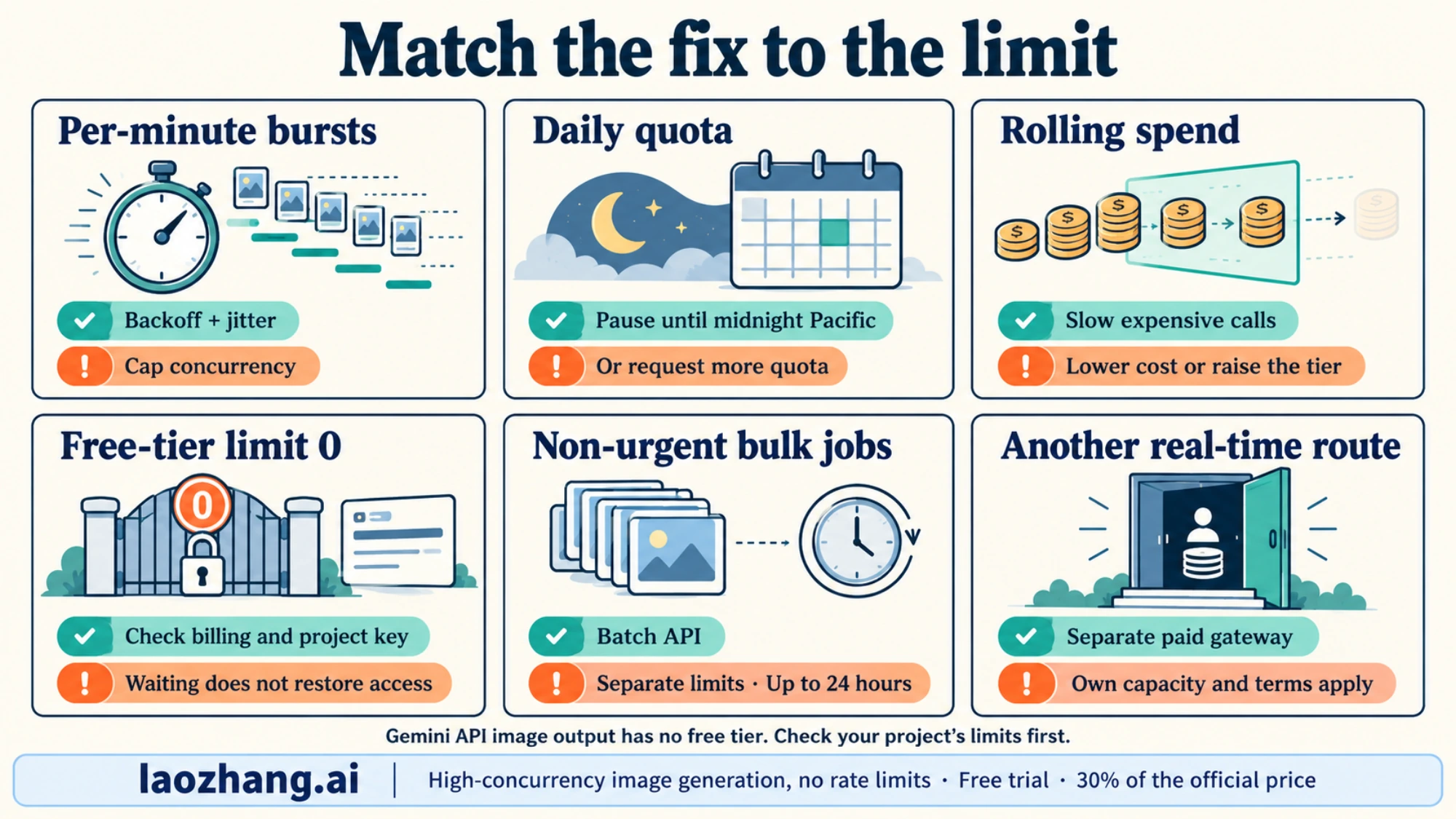
Exponential backoff is the single most impactful fix you can implement for 429 errors, and it requires zero infrastructure changes or billing modifications. The principle is straightforward: when your request fails with a 429, wait for an exponentially increasing duration before retrying — 1 second, then 2 seconds, then 4, then 8, and so on. This gives the rate limiter time to release capacity and prevents your application from hammering the API during a quota recovery window. In practice, well-implemented exponential backoff transforms an application that fails 80% of the time during peak load into one that eventually succeeds on 99%+ of requests, though the tradeoff is increased latency for requests that require multiple retries.

Why Jitter Matters: The Thundering Herd Problem

Simple exponential backoff has a critical flaw when deployed across multiple instances of your application. If ten application servers all hit a 429 at the same instant and implement identical exponential backoff, they will all retry at exactly the same times — 1 second later, then 2 seconds later, then 4 seconds later. This synchronized retry behavior creates a "thundering herd" that repeatedly overwhelms the rate limiter at precise intervals, making the congestion worse rather than better. Adding random jitter — a small random variation to each wait duration — desynchronizes your retry attempts across all instances. Instead of ten servers all retrying at t+1s, they retry at t+0.7s, t+1.2s, t+0.9s, and so on, spreading the load smoothly across the recovery window. This simple addition dramatically improves success rates in distributed systems and is considered a best practice by every major cloud provider including Google, AWS, and Azure.

Python Implementation with Tenacity

The tenacity library provides the most elegant way to implement exponential backoff in Python. It handles all the complexity of retry logic, jitter, maximum attempt limits, and exception filtering in a clean decorator syntax. The following implementation is production-ready and includes logging, configurable timeouts, and specific handling for 429 errors versus other API exceptions that should not be retried.

python
import tenacity import google.generativeai as genai from google.api_core.exceptions import ResourceExhausted import logging logger = logging.getLogger(__name__) @tenacity.retry( retry=tenacity.retry_if_exception_type(ResourceExhausted), wait=tenacity.wait_exponential(multiplier=1, min=2, max=60) + tenacity.wait_random(0, 2), # jitter stop=tenacity.stop_after_attempt(8), before_sleep=tenacity.before_sleep_log(logger, logging.WARNING), reraise=True, ) def generate_image_with_retry(model, prompt: str): """Generate image with automatic exponential backoff on 429 errors.""" response = model.generate_content( prompt, generation_config=genai.GenerationConfig( response_modalities=["image", "text"], ), ) return response genai.configure(api_key="YOUR_API_KEY") model = genai.GenerativeModel("gemini-3.1-flash") try: result = generate_image_with_retry(model, "A futuristic cityscape at sunset") # Process result.candidates[0].content.parts for image data except ResourceExhausted: logger.error("All retries exhausted. Consider upgrading tier.")

Node.js Implementation with p-retry

For Node.js applications, the p-retry package provides equivalent functionality with a promise-based API that integrates cleanly with async/await patterns. The following implementation mirrors the Python version's behavior and includes the same production safeguards — jitter, maximum attempts, logging, and proper error classification to avoid retrying non-retriable errors like authentication failures or invalid prompts.

javascript
const pRetry = require('p-retry'); const { GoogleGenerativeAI } = require('@google/generative-ai'); const genAI = new GoogleGenerativeAI('YOUR_API_KEY'); async function generateImageWithRetry(prompt) { const model = genAI.getGenerativeModel({ model: 'gemini-3.1-flash' }); return pRetry( async (attemptNumber) => { console.log(`Attempt ${attemptNumber} for image generation...`); const result = await model.generateContent({ contents: [{ role: 'user', parts: [{ text: prompt }] }], generationConfig: { responseModalities: ['image', 'text'] }, }); return result.response; }, { retries: 7, minTimeout: 2000, // 2 seconds initial wait maxTimeout: 60000, // 60 seconds maximum wait factor: 2, // exponential factor randomize: true, // adds jitter automatically onFailedAttempt: (error) => { if (error.status !== 429) { throw error; // don't retry non-429 errors } console.warn( `Rate limited. Attempt ${error.attemptNumber} failed. ` + `${error.retriesLeft} retries remaining.` ); }, } ); }

Production tips for exponential backoff: Set your maximum retry count between 6 and 10 attempts. With a base of 2 seconds and a factor of 2, eight attempts cover a total wait window of approximately 8.5 minutes, which is more than sufficient for RPM limits to reset. Always set an absolute timeout on the overall operation (not just individual retries) to prevent requests from hanging indefinitely. Log every retry with the attempt number and wait duration so you can monitor your 429 rate in production dashboards and know when it is time to upgrade tiers rather than relying solely on retries.

Solution 2 — Upgrade Your Billing Tier

Gemini API tier comparison showing IPM progression from 0 on free tier to unlimited with API proxy

While exponential backoff handles transient rate limit spikes, the most reliable long-term solution for sustained 429 errors is upgrading your Google Cloud billing tier. Each tier increase multiplies your quota across all four rate limit dimensions, and for image generation specifically, the IPM increase is the most impactful change. Many developers do not realize that the Free tier effectively disables image generation entirely — the IPM quota was reduced to 0 in December 2025. Simply enabling billing on your Google Cloud project immediately promotes you to Tier 1, which unlocks 10 IPM with no minimum spend requirement. This single action resolves the majority of 429 errors that developers encounter during initial integration and testing.

Tier Comparison for Image Generation

Understanding the specific quotas at each tier is essential for choosing the right level for your workload. The following table shows the rate limits that directly impact image generation across all available tiers. Note that Tier 3 limits are negotiable through Google Cloud sales, so the numbers shown represent the standard baseline rather than hard maximums.

TierMonthly Spend RequirementTime RequirementRPMRPDIPMBatch TPDCost per Image (1K)
FreeNoneNone2500N/AN/A (blocked)
Tier 1Enable billing (no minimum)Immediate101,500101M tokens$0.067
Tier 2$250 cumulative30 days on Tier 13010,000+20250M tokens$0.067
Tier 3$1,000 cumulative30 days on Tier 260+Negotiable60+750M tokens$0.067

The jump from Free to Tier 1 is by far the most impactful upgrade because it transitions from 0 IPM (no image generation at all) to 10 IPM, which is sufficient for development, testing, and low-traffic production applications. Ten images per minute translates to 600 images per hour or roughly 14,400 images per day if sustained continuously, which is more than enough for most small-to-medium applications. The Tier 1 to Tier 2 upgrade doubles your IPM to 20 and dramatically increases your RPD from 1,500 to over 10,000, which matters for applications that generate images throughout the day rather than in bursts.

How to Check and Upgrade Your Current Tier

Checking your current billing tier requires navigating to the Google Cloud Console and examining your project's billing status. Go to the Google Cloud Console, select your project, navigate to Billing, and then look at the "Quotas & System Limits" page under the Generative Language API section. Your current tier is displayed alongside each quota metric. If you see IPM listed as 0, you are on the Free tier regardless of what the billing page shows — this is a common source of confusion because having a billing account attached to your project does not automatically mean billing is enabled for the Generative AI API specifically. You need to verify that the billing account is linked to the project AND that the Generative Language API has billing enabled in the API dashboard. For developers encountering persistent issues where their paid account appears to have Free tier limits, see our dedicated guide on Gemini image generation free tier limits which walks through every verification step.

Tier upgrade timeline: Tier 1 activation is instant once billing is enabled. Tier 2 requires both $250 in cumulative spending AND 30 days of active Tier 1 usage — you cannot accelerate this by spending $250 in one day. Tier 3 similarly requires $1,000 cumulative spending AND 30 days on Tier 2. Plan your tier progression ahead of your scaling needs because these time gates cannot be bypassed through Google Cloud support tickets.

Solution 3 — Use the Batch API for High-Volume Generation

The Gemini Batch API is an underutilized solution for developers who need to generate large volumes of images but do not require real-time responses. The critical advantage of the Batch API is that it operates on a completely separate quota pool from the real-time API, meaning batch image generation requests do not count against your RPM, RPD, or IPM limits. This separation makes the Batch API a powerful complement to your real-time pipeline — you can offload non-urgent image generation to batch processing while reserving your real-time quota for interactive user-facing requests. Additionally, Google offers a 50% cost discount on all batch API requests, making it significantly cheaper than real-time generation for high-volume workloads.

How Batch Processing Works

The Batch API follows an asynchronous job-based model. You submit a batch of prompts as a single job, Google queues them for processing, and you poll for results until the job completes. The service level agreement guarantees completion within 24 hours, though in practice most batch jobs finish within 2-6 hours depending on volume and current system load. Each batch job can contain up to 100 requests, and you can submit multiple batch jobs concurrently. The separate quota pool means that a Tier 1 account with only 10 IPM for real-time requests can process thousands of images through the Batch API limited only by the batch-specific token allocation: 1 million tokens per day for Tier 1, 250 million for Tier 2, and 750 million for Tier 3. Since a typical image generation request consumes approximately 1,000-2,000 tokens, even the Tier 1 batch allocation supports 500-1,000 images per day through the batch pipeline alone.

Python Implementation: Batch Image Generation

The following code demonstrates how to create a batch image generation job, submit it to the Gemini Batch API, and poll for results. This pattern is suitable for workflows like generating product images for an e-commerce catalog, creating social media assets in bulk, or preprocessing image variations for A/B testing. The batch job handles retries internally, so you do not need to implement exponential backoff for batch submissions.

python
import google.generativeai as genai import time import json genai.configure(api_key="YOUR_API_KEY") def batch_generate_images(prompts: list[str], model_name="gemini-3.1-flash"): """Submit a batch of image generation prompts and wait for results.""" # Prepare batch request batch_requests = [] for i, prompt in enumerate(prompts): batch_requests.append({ "custom_id": f"image-{i}", "request": { "model": model_name, "contents": [{"role": "user", "parts": [{"text": prompt}]}], "generation_config": { "response_modalities": ["image", "text"], }, }, }) # Submit batch job batch_job = genai.create_batch( requests=batch_requests, display_name=f"image-batch-{int(time.time())}", ) print(f"Batch job created: {batch_job.name}") print(f"Status: {batch_job.state}") # Poll for completion (24h SLA, typically 2-6h) while batch_job.state in ("QUEUED", "PROCESSING"): time.sleep(30) # Check every 30 seconds batch_job = genai.get_batch(batch_job.name) completed = sum(1 for r in batch_job.results if r.state == "COMPLETED") print(f" Progress: {completed}/{len(prompts)} completed") # Collect results results = {} for result in batch_job.results: if result.state == "COMPLETED": results[result.custom_id] = result.response else: print(f" Failed: {result.custom_id} - {result.error}") return results # Example usage prompts = [ "A modern office workspace with natural lighting", "A coffee shop interior with warm ambiance", "A serene garden with Japanese maples", # ... up to 100 prompts per batch ] results = batch_generate_images(prompts) print(f"Successfully generated {len(results)} images")

Cost Savings and Tier Allocations

The 50% batch discount applies to all image sizes, making the per-image cost significantly lower than real-time generation. At 1K resolution, the cost drops from $0.067 to approximately $0.034 per image. For teams generating hundreds or thousands of images daily, this discount alone can justify the architectural investment in batch processing infrastructure. The batch-specific token allocations by tier also deserve attention because they determine the maximum batch throughput independently of your real-time quotas.

TierBatch Token Allocation (Daily)Approximate Image CapacityCost per Image (1K, with 50% discount)
Tier 11M tokens~500-1,000 images$0.034
Tier 2250M tokens~125,000-250,000 images$0.034
Tier 3750M tokens~375,000-750,000 images$0.034

The dramatic jump from Tier 1 to Tier 2 batch allocations (1M to 250M tokens) makes the Tier 2 upgrade especially valuable for batch-heavy workloads. If your application can tolerate the asynchronous nature of batch processing for a significant portion of its image generation needs, combining real-time API calls for interactive requests with batch processing for background tasks gives you the best of both worlds. For more strategies on optimizing costs with batch processing, see our batch API cost optimization guide.

Solution 4 — API Proxy for Unlimited Throughput

When your application requires throughput that exceeds even Tier 3 limits, or when you need to avoid the complexity of managing Google Cloud billing tiers and quota monitoring, an API proxy service provides a fundamentally different approach to the rate limiting problem. An API proxy aggregates multiple API keys and Google Cloud projects behind a single unified endpoint, distributing your requests across this pool to effectively eliminate per-project rate limits. From your application's perspective, you make API calls to a single endpoint with a single key, and the proxy handles load balancing, quota tracking, and automatic failover behind the scenes. This approach is particularly valuable for startups and mid-size companies that need production-grade throughput without the operational overhead of managing multiple Google Cloud projects and billing accounts.

How API Proxies Solve Rate Limiting

The fundamental insight behind API proxies is that Google's rate limits are enforced per project, not per user or per organization. A proxy service maintains a pool of N projects, each with its own independent quota allocation. When your request arrives, the proxy routes it to a project with available quota, effectively multiplying your total throughput by the number of projects in the pool. If each project has 10 IPM and the pool contains 20 projects, your effective limit becomes 200 IPM — far beyond what any single Tier 3 account can provide. The proxy also monitors quota usage across all projects in real-time, implementing intelligent routing that avoids sending requests to projects that are near their limits. This distributed architecture makes 429 errors virtually impossible under normal operating conditions because the proxy always has spare capacity available.

Minimal Code Changes Required

Switching from direct Gemini API access to a proxy endpoint requires changing only three lines of code in most implementations. API proxies that support the OpenAI-compatible interface allow you to use the standard OpenAI SDK, which many developers are already familiar with. The following examples show the before and after for both Python and Node.js:

python
# Before: Direct Gemini API import google.generativeai as genai genai.configure(api_key="YOUR_GOOGLE_API_KEY") model = genai.GenerativeModel("gemini-3.1-flash") # After: Through API proxy (OpenAI-compatible) from openai import OpenAI client = OpenAI( api_key="YOUR_PROXY_KEY", base_url="https://api.laozhang.ai/v1" # proxy endpoint ) response = client.chat.completions.create( model="gemini-3.1-flash", messages=[{"role": "user", "content": "Generate an image of a sunset"}], )

The proxy approach offers several advantages beyond raw throughput. First, you get a flat-rate pricing model — laozhang.ai charges $0.05 per image regardless of resolution, compared to Google's tiered pricing of $0.045 (512px), $0.067 (1K), $0.101 (2K), or $0.151 (4K). For applications that generate images at 2K or 4K resolution, the proxy is actually cheaper than direct API access. Second, the proxy handles all retry logic, quota management, and error handling internally, reducing the complexity of your application code. Third, you avoid the 30-day time gates required for tier upgrades — the proxy provides high throughput from day one.

When to use an API proxy: Real-time applications needing more than 60 IPM, teams that want to avoid managing Google Cloud billing complexity, applications generating high-resolution images where flat-rate pricing is cheaper than official tiered pricing, and projects that need to scale quickly without waiting for tier upgrade eligibility periods.

Solution 5 — Multi-Model Fallback Strategy

The Gemini API offers multiple models capable of image generation, and each model variant maintains its own independent rate limits. This architectural detail creates an opportunity for a powerful fallback strategy: when one model hits its rate limit, your application automatically switches to an alternative model that still has available quota. This approach multiplies your effective throughput without requiring tier upgrades, additional billing accounts, or external proxy services. The tradeoff is that different models may produce slightly different image quality and styles, so this strategy works best for applications where consistency across all generated images is not critical.

Building a Fallback Chain

The most effective fallback chain for image generation in early 2026 uses three models in priority order: gemini-3.1-flash-image as the primary model (fastest, cheapest), gemini-3-pro-image as the secondary model (higher quality, slightly slower), and imagen-4 as the tertiary fallback (specialized image model, different style). Each model has its own RPM, IPM, and RPD quotas that are tracked independently by Google's rate limiter. If your primary model's IPM is exhausted, the secondary model's IPM pool is likely untouched because it has not received any requests. This gives you an effective IPM of 30 on Tier 1 (10 per model times 3 models) instead of the 10 IPM you would have with a single model.

The following Python implementation creates a ModelFallbackClient class that automatically rotates through models when 429 errors occur. It combines the exponential backoff from Solution 1 with model rotation, providing two layers of resilience. The client tracks which models are currently rate-limited and their estimated recovery times, avoiding wasted requests to models that are known to be throttled.

python
import google.generativeai as genai from google.api_core.exceptions import ResourceExhausted import time import logging logger = logging.getLogger(__name__) class ModelFallbackClient: """Image generation client with automatic model fallback on 429 errors.""" FALLBACK_CHAIN = [ "gemini-3.1-flash", # Primary: fast, cheap "gemini-3-pro", # Secondary: higher quality "imagen-4", # Tertiary: specialized image model ] def __init__(self, api_key: str): genai.configure(api_key=api_key) self.models = { name: genai.GenerativeModel(name) for name in self.FALLBACK_CHAIN } self.cooldowns = {} # model_name -> earliest_retry_time def generate_image(self, prompt: str, max_retries: int = 3): """Generate image, falling back through model chain on 429 errors.""" for model_name in self.FALLBACK_CHAIN: # Skip models in cooldown if model_name in self.cooldowns: if time.time() < self.cooldowns[model_name]: logger.info(f"Skipping {model_name} (cooldown)") continue else: del self.cooldowns[model_name] for attempt in range(max_retries): try: logger.info(f"Trying {model_name} (attempt {attempt + 1})") response = self.models[model_name].generate_content( prompt, generation_config=genai.GenerationConfig( response_modalities=["image", "text"], ), ) return {"model": model_name, "response": response} except ResourceExhausted: wait = (2 ** attempt) + (time.time() % 1) # backoff + jitter logger.warning( f"{model_name} rate limited. " f"Waiting {wait:.1f}s before retry." ) time.sleep(wait) # All retries exhausted for this model — add cooldown and try next self.cooldowns[model_name] = time.time() + 60 logger.warning(f"{model_name} exhausted. Moving to next model.") raise ResourceExhausted("All models in fallback chain exhausted.") # Usage client = ModelFallbackClient("YOUR_API_KEY") result = client.generate_image("A photorealistic mountain landscape at dawn") print(f"Generated by: {result['model']}")

Tradeoffs and Considerations

The multi-model fallback strategy is not without its limitations, and understanding these tradeoffs is essential for deciding whether it fits your use case. The most significant tradeoff is visual consistency — gemini-3.1-flash and gemini-3-pro use different underlying architectures and training data, which means the same prompt can produce noticeably different results across models. For applications like social media content generation where each image stands alone, this inconsistency is irrelevant. For applications like product catalog generation where visual consistency across all images is important, falling back to a different model may produce results that clash with the established visual style. Another consideration is that imagen-4 uses a different API contract than the Gemini models — it is a dedicated image generation model rather than a multimodal LLM, so prompts may need slight adjustments to produce optimal results. The fallback client above handles this transparently, but you should test your specific prompts across all three models to understand the quality differences before deploying this strategy to production.

Which Solution Should You Choose?

Comparison matrix of all 5 solutions with scenario-based recommendations for hobby, startup, and enterprise users

Choosing the right combination of solutions depends on your application's specific requirements for throughput, latency, cost, and operational complexity. No single solution is universally optimal — a hobby project with occasional image generation needs a fundamentally different approach than an enterprise platform serving millions of users. The table below maps three common developer profiles to their recommended solution combinations, along with the rationale for each recommendation. In practice, most production applications end up combining two or three solutions for maximum resilience, with exponential backoff serving as the universal foundation that every implementation should include regardless of scale.

ProfileRecommended SolutionsMonthly Image VolumeExpected CostRationale
Hobby / Side ProjectSolution 1 (Backoff) + Solution 2 (Tier 1)< 10,000< $10Tier 1 unlocks 10 IPM, backoff handles bursts
Startup / Growing AppSolution 1 + Solution 3 (Batch) + Solution 4 (Proxy)10,000 - 500,000$50 - $500Batch for bulk, proxy for real-time overflow
Enterprise / High ScaleSolution 1 + Solution 2 (Tier 3) + Solution 3 + Solution 5 (Fallback)500,000+$500+Multi-layer resilience with dedicated quota

For most developers encountering 429 errors for the first time, the action plan is clear: implement exponential backoff immediately (Solution 1, takes 15 minutes), then enable billing to reach Tier 1 (Solution 2, takes 5 minutes in GCP Console). These two changes alone resolve 95% of 429 errors for applications generating fewer than 10 images per minute. If your needs grow beyond that, add the Batch API for non-urgent generation and consider an API proxy for real-time workloads that exceed your tier limits.

How long does a 429 rate limit last? The duration depends on which dimension you hit. RPM limits reset on a 60-second sliding window, so waiting just one minute restores your full per-minute quota. RPD limits reset at midnight Pacific Time, which means hitting your daily limit in the afternoon results in a wait of several hours. IPM limits follow the same 60-second window as RPM. The ghost 429 bug has no predictable duration — some developers report it resolving within hours, while others needed to switch models or recreate their API key to work around it.

Can I get more than 60 IPM? Yes. Tier 3 limits are listed as "60+" because they are negotiable. If you contact Google Cloud sales through your GCP Console and can demonstrate a legitimate business need for higher throughput, Google will provision custom quota allocations that can reach hundreds or thousands of IPM. Enterprise accounts on committed use contracts typically negotiate custom limits as part of their overall Google Cloud agreement, with pricing discounts that scale with committed volume.

Is using an API proxy safe? Reputable API proxies function as transparent forwarding layers — they receive your request, route it to Google's API through one of their managed credentials, and return the response to you. The proxy does not store your prompts, generated images, or API responses beyond the time needed to complete the request. That said, you are trusting the proxy operator with your request content, so choose established services with clear privacy policies and a track record in the developer community. The security model is comparable to using any third-party SaaS API — you should evaluate the provider's reputation and data handling practices before sending sensitive prompts.

Why do I get 429 with 0 usage? This is almost certainly the February 2026 ghost 429 bug that affects recently upgraded Tier 1 accounts. The immediate workaround is to switch your model variant — if you are using gemini-3.1-flash, try gemini-3-pro or vice versa. Some developers have also resolved it by creating a new API key within the same project, though this is not consistently effective. Google has acknowledged the issue and is working on a permanent fix. If the problem persists for more than 48 hours after your tier upgrade, open a support ticket through the Google Cloud Console with your project ID and the specific error response body, including any quota metadata in the headers.

Share:

laozhang.ai

One API, All AI Models

AI Image

Gemini 3 Pro Image

$0.05/img
80% OFF
AI Video

Sora 2 · Veo 3.1

$0.15/video
Async API
AI Chat

GPT · Claude · Gemini

200+ models
Official Price
Served 100K+ developers
|@laozhang_cn|Get $0.1