Google is overhauling how it bills Gemini API usage, and the changes take effect starting April 1, 2026. Every billing account now has an enforced monthly spend cap tied to its usage tier, new users must use prepaid billing, and the entire tier qualification system has been restructured with lower thresholds. These changes arrive seven months after a billing system bug left some developers facing charges exceeding $70,000 for services they never used (Google AI Blog, March 16, 2026).
TL;DR
- April 1, 2026: Enforced spend caps hit every paid billing account — Tier 1 gets $250/month, Tier 2 gets $2,000/month, and Tier 3 ranges from $20,000 to $100,000+ per month.
- March 23, 2026: New users are defaulted to prepaid billing. Minimum credit purchase is $10, maximum balance is $5,000, and credits expire after 12 months.
- Tier qualifications lowered: Tier 2 now requires only $100 in cumulative spend plus 3 days elapsed. Tier 3 requires $1,000 plus 30 days.
- 10-minute enforcement gap: When you hit a cap, requests may still process for up to 10 minutes before pausing — you are responsible for those overages.
- Action required: Log into Google AI Studio today to check your tier, set project spend caps, and configure budget alerts.
What's Changing: The Complete Timeline
Understanding the full scope of these changes requires looking at four key dates that reshape how Google bills Gemini API usage. Each date introduces a distinct change, and missing any of them could result in unexpected service disruptions or charges.
March 16, 2026 marked the first visible shift when Google launched optional project-level spend caps in AI Studio. This feature allows developers to set a monthly dollar limit for each individual project, providing granular cost control for the first time. Before this date, there was no native mechanism in AI Studio to prevent a single project from consuming an entire billing account's budget. The announcement came via the official Google blog alongside a new daily cost breakdown graph and enhanced usage dashboards that track error metrics and generation statistics by model (Google AI Blog, March 16, 2026).
March 23, 2026 brought a more significant change that many developers overlooked. Starting on this date, new users signing up for Google AI Studio are required to use prepaid billing, meaning they must purchase credits in advance before making any paid API calls. This shifts the billing model from the traditional pay-as-you-go approach to a credit-based system where your balance depletes in near real-time. Existing users were automatically assigned either prepaid or postpaid plans based on their account history and tier status (ai.google.dev/docs/billing, March 2026).
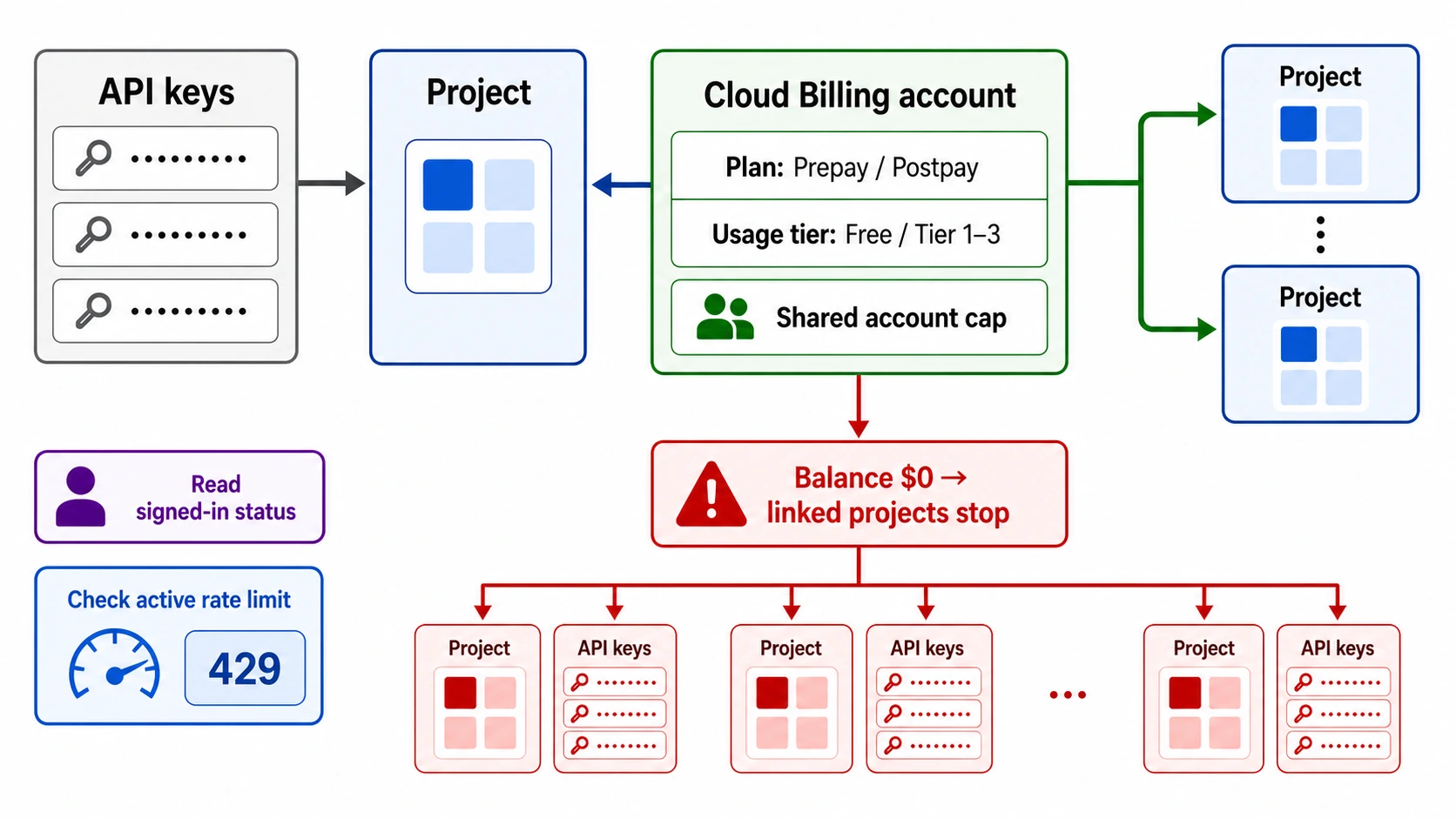
April 1, 2026 is the most impactful date. This is when Google begins enforcing maximum monthly spend limits at the billing account level for every usage tier. Unlike the optional project-level caps, these tier caps are mandatory and cannot be disabled. If your aggregate spending across all projects tied to a billing account reaches the cap for your tier, all Gemini API requests linked to that account will be paused until the next billing cycle begins (ai.google.dev/docs/billing, March 2026).
June 1, 2026 marks the final deprecation of Gemini 2.0 Flash and Gemini 2.0 Flash-Lite models. Developers still using these models must migrate to newer alternatives like Gemini 2.5 Flash or Gemini 3.1 Flash-Lite to avoid service disruption. This deprecation is separate from the billing changes but coincides with the same policy overhaul window, meaning developers need to handle both billing reconfiguration and model migration within the same two-month period. If you are currently using Gemini 2.0 Flash for production workloads, plan your migration now — switching models may also change your token consumption patterns, which directly affects how quickly you approach your new tier spend cap (ai.google.dev/docs/pricing, March 2026).
It is worth emphasizing that these four dates represent a cascading series of changes rather than a single event. Developers who only focus on the April 1 enforcement date may miss the prepaid billing requirement that took effect eight days earlier, or the project spend cap feature that has been available since mid-March. The most prepared developers are those who have already configured project-level caps and tested their billing alerts during the two-week window between March 16 and April 1.
The New Tier System Explained

The restructured tier system introduces mandatory monthly spend caps for every paid tier while simultaneously lowering the barriers to reach higher tiers. This dual change means you get access to higher rate limits more quickly, but your maximum monthly expenditure is now bounded by your tier level.
The Free tier remains unchanged in its core offering — you get access to certain models with standard rate limits, requiring only an active Google Cloud project or free trial status. No payment method is needed, and there is no spend cap because there is no spending. The free tier continues to serve as a development and testing environment, though its rate limits are substantially lower than any paid tier (ai.google.dev/docs/rate-limits, March 2026).
Tier 1 activates the moment you link a billing account to your project. The monthly spend cap for Tier 1 is $250, which represents the maximum amount Google will allow you to spend across all projects under that billing account in a single calendar month. For context, at Gemini 2.5 Flash pricing ($0.30 per million input tokens, $2.50 per million output tokens), $250 would cover approximately 833 million input tokens or 100 million output tokens per month — more than sufficient for most individual developers and early-stage projects (ai.google.dev/docs/billing, March 2026).
Tier 2 requires a cumulative spend of at least $100 plus 3 days elapsed since your first successful payment. The spend cap jumps to $2,000 per month, an eightfold increase from Tier 1. This tier is designed for growing applications and startups that have demonstrated consistent, legitimate API usage. The rate limits also increase substantially — you can expect significantly higher RPM (requests per minute) and TPM (tokens per minute) allocations than Tier 1. If you need a detailed walkthrough of the rate limit differences between tiers, our understanding Gemini API rate limits guide covers every model and tier combination (ai.google.dev/docs/billing, March 2026).
Tier 3 is the highest standard tier, requiring $1,000 in cumulative spend plus 30 days since your first payment. The spend cap ranges from $20,000 to $100,000+ per month, with the exact amount depending on your usage history and account standing. At this level, you also gain the option to switch from prepaid to postpaid billing, which eliminates the credit balance requirement and shifts to traditional monthly invoicing. For developers building production applications that need enterprise-grade throughput, our complete guide to upgrading to Tier 3 walks through the entire qualification and optimization process (ai.google.dev/docs/billing, March 2026).
Tier upgrades happen automatically. Once your cumulative spend and account age meet the requirements for the next tier, the upgrade typically reflects within 10 minutes. You do not need to submit a request or take any manual action for standard tier progression.
To put the spend caps in concrete terms, consider what $250 (Tier 1 cap) actually buys across different Gemini models. At Gemini 2.5 Flash pricing ($0.30 input, $2.50 output per million tokens), you could process roughly 100 million output tokens — equivalent to approximately 75,000 pages of generated text. At Gemini 2.5 Pro pricing ($1.25 input, $10.00 output per million tokens), the same $250 covers about 25 million output tokens. For image generation using Gemini 2.5 Flash Image at $0.039 per image, $250 buys approximately 6,400 images. These calculations demonstrate that for most individual developers, the Tier 1 cap provides generous headroom for all but the most intensive workloads. For a complete Gemini API pricing breakdown including batch discounts and context-window surcharges, check our dedicated pricing guide.
Why Google Made These Changes
The new billing controls did not emerge from a product roadmap review or a competitive response. They are a direct consequence of one of the most damaging billing incidents in Google's AI platform history.
In August 2025, a pricing configuration error in the Gemini 2.5 Flash billing system caused the API to incorrectly classify internal multimodal "thinking" tokens as high-cost "image output" tokens. The result was catastrophic for affected developers. One developer reported charges exceeding $70,000. Another documented over $1,000 in image generation fees while only using the API for text translation. A third saw $300 in daily charges that continued accumulating even after deleting their API keys (ppc.land, March 2026).
The bug was first reported on August 23, 2025, through Reddit and Google Developer forums. Google acknowledged the issue two days later, with Logan Kilpatrick confirming erroneous charges and pledging refunds. However, the resolution process proved deeply problematic. Refunds were issued as credits applied to Google Cloud accounts rather than direct refunds to payment methods. Some developers waited weeks or months for resolution, and billing dashboards showed inconsistent data across consecutive days. Perhaps most concerning, Google disabled the payment profiles of developers who filed bank disputes, requiring government ID and payment card verification to restore access (ppc.land, March 2026).
The broader developer community response was swift and vocal. Multiple threads on Reddit's r/GoogleCloud and the Google AI Developer Forum documented similar experiences, with some developers reporting that they lost trust in the platform entirely and migrated to competing APIs. The incident also highlighted a fundamental asymmetry in the developer-platform relationship: when Google's systems malfunction, the developer bears the immediate financial burden, and the resolution process — credits rather than refunds, weeks-long timelines, payment profile lockouts for disputes — compounds the damage rather than alleviating it.
The incident exposed a fundamental gap in Google's billing infrastructure: there was no mechanism to prevent runaway charges. Unlike OpenAI, which had offered spending limits for years, and Anthropic, which provided usage-based billing controls, Google AI Studio operated without any native spend protection. The March 2026 billing overhaul directly addresses this gap by introducing both optional project-level caps and mandatory tier-level caps, ensuring that no single billing error can create five-figure charges for an individual developer.
How These Changes Affect You

The practical impact of these billing changes varies enormously depending on your usage profile. A hobby developer spending $30 per month will barely notice the new caps, while an enterprise team burning through $12,000 monthly may need to restructure their entire API architecture. Understanding where you fall on this spectrum determines which actions you need to take.
The Hobby Developer ($10-50/month) operates well within the Tier 1 spend cap of $250. If you are using the Gemini API for personal projects, experimentation, or light production workloads, these changes are largely positive for you. The new spend caps act as a safety net, preventing billing errors from creating unexpected charges. Your primary action item is simple: log into AI Studio, verify your tier status, and optionally set a project spend cap at a comfortable level — perhaps $50 or $100 — as an additional layer of protection. If you are still on the free tier and considering whether to upgrade, our detailed breakdown of Gemini's free tier limits can help you evaluate whether the paid tier's higher rate limits justify the cost for your use case.
The Growing Startup ($200-1,000/month) faces more nuanced decisions. If your monthly spend is approaching the $250 Tier 1 cap, you need to ensure you qualify for Tier 2 before April 1. This means verifying that your cumulative spend exceeds $100 and that at least 3 days have passed since your first payment. The $2,000 Tier 2 cap provides comfortable headroom for most startups, but you should still set project-level caps to prevent any single application from consuming the entire budget. For startups running multiple projects under one billing account, the recommended approach is to allocate specific caps per project: perhaps $200 for your production API, $50 for staging, and $20 for development environments.
The Enterprise Team ($2,000-20,000+/month) needs to take the most deliberate action. If your monthly spend regularly exceeds $2,000, you must be in Tier 2 or Tier 3 before the caps take effect. For teams approaching or exceeding $20,000 per month, Tier 3 is essential, and you should evaluate whether the postpaid billing option (available at Tier 3) better suits your financial workflows than the prepaid credit system. Enterprise teams should also consider requesting a cap override if their needs exceed the standard Tier 3 limits. Google provides an override request form through AI Studio for accounts that can demonstrate legitimate high-volume usage.
There is also a fourth profile worth considering: the Gemini CLI user. If you use Gemini CLI for coding assistance, your billing depends on whether you authenticate with OAuth (free tier: 60 RPM, 1,000 RPD) or an API key (free tier: 10 RPM, 250 RPD). CLI users who switch to a paid API key for higher throughput need to be aware that CLI usage counts toward their billing account's spend just like any other API call. A heavy coding session with Gemini CLI making dozens of requests per task could consume meaningful token volume, and those costs aggregate with any other API usage on the same billing account.
One critical consideration across all profiles: the 10-minute enforcement delay means that when you hit a cap, requests submitted during that window may still incur charges. For a high-throughput enterprise application making thousands of requests per minute, this could mean several hundred dollars in overages. Building programmatic monitoring that tracks your spending in real-time and throttles requests before hitting the cap is the safest approach for production workloads.
Prepaid vs Postpaid Billing: Which Should You Choose?
The introduction of prepaid billing as the default for new users represents a fundamental shift in how developers interact with the Gemini API billing system. Understanding the trade-offs between prepaid and postpaid is now essential for making informed cost management decisions.
Prepaid billing works like purchasing phone credits. You buy a block of credits in advance (minimum $10, maximum balance $5,000), and your API usage deducts from that balance in near real-time. When your balance reaches zero, all API requests stop immediately — there is no grace period and no possibility of accidental overspending beyond your balance. Google also offers an auto-reload feature that automatically tops up your balance when it drops below a threshold you define. The catch is that unused credits expire after 12 months and are non-refundable, meaning you lose any credits you do not consume within a year (ai.google.dev/docs/billing, March 2026).
Postpaid billing is the traditional model where you use the API and receive a monthly invoice. This option is only available to Tier 3 accounts and requires a manual switch from prepaid. Postpaid eliminates the credit balance requirement and the expiration concern, but it also removes the hard spending boundary that prepaid provides. You still have the tier-level spend cap as a backstop, but within that cap, your monthly bill can fluctuate freely based on actual usage.
The right choice depends on your predictability and scale. For developers with predictable, moderate usage (under $1,000/month), prepaid with auto-reload provides the strongest cost protection. You know exactly how much you have loaded, the auto-reload ensures uninterrupted service, and the 12-month expiration window is generous enough that credits do not go to waste with regular usage. For enterprise teams with variable, high-volume usage that exceeds $5,000 per month, postpaid billing at Tier 3 avoids the administrative overhead of constantly managing credit balances and eliminates the risk of service interruptions during usage spikes that temporarily exceed your prepaid balance.
There is one scenario where prepaid billing becomes a genuine disadvantage: if you need to maintain a large credit reserve for burst usage but your baseline is low. Because the maximum prepaid balance is $5,000 and credits expire after 12 months, a developer who loads $5,000 but typically spends only $200 per month would lose $2,600 in unused credits at the end of the year. In this case, maintaining a smaller prepaid balance with auto-reload set to a lower threshold is more cost-efficient.
To summarize the decision in practical terms: if you spend less than $1,000 per month and your usage is relatively predictable, choose prepaid with auto-reload set at 20-30% of your monthly average. If you spend more than $2,000 per month with significant variability, work toward Tier 3 qualification and switch to postpaid. If you are between these two ranges, prepaid remains the safer choice because it provides a hard spending boundary that postpaid does not offer — and the peace of mind after the August 2025 incident is worth the minor administrative overhead of managing credit balances.
Setting Up Spend Caps and Protecting Your Budget

Google AI Studio now provides four distinct layers of budget protection, and using them in combination creates a robust defense against unexpected charges. Understanding how these layers interact is essential for maintaining cost control across your projects.
Layer 1: Project Spend Caps are the most granular control available. To configure them, navigate to Google AI Studio (aistudio.google.com), select your target project from the dropdown menu, click "Spend" in the sidebar, and under "Monthly spend cap," click "Edit spend cap" to enter your desired dollar limit. Once saved, this limit remains active until you modify or disable it. When a project reaches its cap, API requests from that project are blocked until the next billing cycle or until you raise the cap. Recommended starting values depend on your environment: $10 for personal experimentation, $50 for prototypes, $200 for small production workloads, and $500 for growing applications (gemilab.net, March 2026).
Layer 2: Tier Spend Caps operate at the billing account level and are enforced by Google starting April 1. Unlike project caps, you cannot modify these — they are determined by your usage tier ($250 for Tier 1, $2,000 for Tier 2, $20,000+ for Tier 3). If your total spending across all projects reaches this cap, all API requests under that billing account pause until the next month. The key distinction from project caps is that tier caps aggregate spending across every project linked to your billing account, providing an account-wide safety net.
Layer 3: Prepaid Balance functions as a real-time spending limit for prepaid accounts. Because the API deducts credits in near real-time, your balance acts as a dynamic cap that shrinks with each request. When it reaches zero, service stops. This provides the tightest possible cost control but requires active balance management. The auto-reload feature mitigates the risk of unexpected service interruptions by automatically purchasing new credits when your balance drops below a configurable threshold.
Layer 4: Cloud Budget Alerts complement the above mechanisms by providing proactive notifications before you reach any cap. You can configure email alerts at specific spending thresholds (for example, 50%, 80%, and 95% of your project cap) to get early warning about approaching limits. Setting up these alerts is strongly recommended as they provide the lead time needed to make informed decisions — whether that is adjusting your cap, optimizing your API calls, or preparing for a brief service pause.
Here is a concrete example of how these layers work together. Suppose you are a Tier 2 developer ($2,000 account cap) running three projects: a production API ($800/month cap), a staging environment ($200/month cap), and a development sandbox ($50/month cap). Your prepaid balance is $600 with auto-reload at $100. You have budget alerts at 80% for each project. In this configuration, your production API will trigger an alert at $640 spent, and service will pause at $800 — well before it can threaten the other projects' budgets. Even if all three projects simultaneously hit their caps, the total ($1,050) stays well within the $2,000 tier cap. And if something goes catastrophically wrong and bypasses both project caps during the 10-minute delay, your prepaid balance of $600 acts as the absolute ceiling on your exposure. This layered approach means that no single failure mode can produce an outsized billing impact.
The critical caveat across all these layers is the approximately 10-minute enforcement delay for both project caps and tier caps. During this window after hitting a cap, requests may continue processing and incurring charges. For production applications with high request volumes, implementing client-side spending tracking that monitors costs programmatically and throttles requests before reaching caps provides the most reliable protection against overages.
How Gemini Compares to OpenAI and Anthropic
Google's billing changes bring the Gemini API closer to the cost management standards that competing platforms established years ago. Understanding how Gemini's new billing structure compares to OpenAI and Anthropic helps you evaluate whether Google's approach meets your cost management needs — or whether you should consider multi-platform strategies.
OpenAI introduced spending limits early in its API lifecycle and currently offers both hard limits (API stops when reached) and soft limits (notification triggered, API continues). Users can configure monthly budget caps at the organization level with immediate enforcement. The key advantage of OpenAI's system is its simplicity: one cap, immediate enforcement, no tier complexity. The disadvantage is less granularity — you cannot set per-project limits natively within the OpenAI dashboard.
Anthropic takes a similar approach with organization-level spend limits and a credit-based billing system. Monthly limits can be configured through the dashboard, and Anthropic offers auto-recharge functionality similar to Google's auto-reload. Anthropic's billing is straightforward because there is no tier system — rate limits are determined by your usage plan rather than cumulative spend history.
Google Gemini now offers the most complex but also the most granular billing controls of the three. The combination of project-level caps, tier-level caps, prepaid/postpaid options, and budget alerts provides more configuration flexibility than either competitor. However, this complexity comes at a cost: more configuration required, a 10-minute enforcement delay (neither OpenAI nor Anthropic have documented similar delays), and the tier qualification system adds an additional dimension of planning that the other two platforms do not require.
The billing complexity gap between these three platforms is worth quantifying. Setting up full cost protection on OpenAI requires configuring one spending limit. On Anthropic, it requires one spending limit plus a credit threshold. On Google Gemini after April 1, it requires configuring project-level caps (per project), understanding your tier cap (per billing account), managing your prepaid balance (per account), and setting up Cloud Budget Alerts (per project or account). This is not necessarily a negative — the granularity provides more control — but it does mean that Google's billing system demands more active management than either competitor.
For developers working across multiple AI platforms, aggregation services like laozhang.ai simplify cost management by providing a unified billing interface across Gemini, OpenAI, Claude, and other models. Rather than managing separate billing configurations, spend caps, and credit balances across three or more platforms, a single API gateway consolidates everything into one billing relationship with consistent pricing and simplified cost tracking. This approach is particularly valuable for teams that use different models for different tasks — for example, Gemini Flash for high-volume text processing, Claude for complex reasoning, and GPT-4o for multimodal tasks — because it eliminates the need to manage three separate billing systems with three different cap structures.
Your Pre-April 1 Checklist
The changes taking effect on April 1 require specific preparation depending on your current tier and usage level. Work through this checklist to ensure your projects continue running without interruption.
For all developers:
- Log into Google AI Studio and note your current usage tier
- Review your monthly spending for the past 3 months in the new Daily Cost Breakdown graph
- Set project-level spend caps for every active project (even generous ones like 2x your average spend)
- Configure Cloud Budget Alerts at 50%, 80%, and 95% of your project caps
- Verify that you are not using Gemini 2.0 Flash or 2.0 Flash-Lite (deprecated, shutdown June 1)
For Tier 1 users ($250 cap):
- Confirm your average monthly spend stays well below $250
- If approaching the limit, start working toward Tier 2 qualification ($100 cumulative + 3 days)
For Tier 2 users ($2,000 cap):
- Distribute project spend caps across your projects to stay within $2,000 total
- If regularly exceeding $1,500, begin working toward Tier 3 ($1,000 cumulative + 30 days)
For Tier 3 users ($20,000+ cap):
- Evaluate whether prepaid or postpaid billing better suits your usage pattern
- If your needs exceed the standard cap, submit an override request through AI Studio
- Consider implementing programmatic spend tracking to manage the 10-minute delay risk
For free tier users:
- No billing changes affect you directly
- If considering upgrading, the lower tier qualifications make the paid tiers more accessible than before
Frequently Asked Questions
What happens if I hit my tier spend cap?
All Gemini API requests tied to your billing account are paused until the next billing cycle starts. This applies across all projects under that account — not just the project that pushed you over the limit. The pause takes approximately 10 minutes to activate after you reach the cap, and during that window, additional requests may still process and incur charges. Your service resumes automatically on the first day of the following month, or you can raise your cap by qualifying for a higher tier.
Do I need to switch to prepaid billing?
If you are an existing user, you were automatically assigned either prepaid or postpaid based on your account history and tier. New users signing up after March 23, 2026 are required to start on prepaid billing. Postpaid billing is only available to Tier 3 accounts and requires a manual switch. For most developers spending under $2,000/month, prepaid with auto-reload provides the best balance of cost protection and convenience.
Can I request a higher spend cap than my tier allows?
Yes. Google provides an override request form through AI Studio for accounts that can demonstrate legitimate high-volume usage needs that exceed their current tier cap. The form is accessible from the billing settings page. However, override approvals are not guaranteed, and Google evaluates requests based on your account history and stated usage plans.
Will the free tier be affected by these changes?
No. The free tier remains unchanged — no payment method is required, and there are no spend caps because there is no spending. Rate limits for free tier models continue to apply as before. The new billing changes exclusively affect accounts with linked billing accounts that are making paid API calls.
How does the 10-minute enforcement delay work?
When your spending reaches a cap (either project-level or tier-level), Google's billing system needs approximately 10 minutes to detect the threshold breach and begin blocking new requests. During this window, any API requests that are submitted and processed will still incur charges even though you have technically exceeded your cap. Google explicitly states that you are responsible for these overages. For high-volume applications, building client-side spending monitors that track costs in near real-time and pause requests before hitting the cap is the safest mitigation strategy.
What are the recommended starting spend caps for different project types?
Based on common usage patterns and the guidance available through AI Studio, reasonable starting caps depend on your project stage and purpose. For personal experimentation and learning, $10 to $25 per month provides a comfortable buffer. For prototype development and testing, $50 to $100 per month covers typical API exploration without risking significant charges. For small production workloads serving a limited user base, $200 to $500 per month accommodates moderate growth while keeping costs predictable. For scaling applications with active users, setting the cap at approximately twice your average monthly spend gives you headroom for traffic spikes while maintaining a meaningful safety boundary. Remember that these project-level caps operate independently of your tier cap — you can set a $100 project cap even if your tier allows $2,000, and the more restrictive limit applies first.
Will existing billing accounts be automatically migrated to the new system?
Yes. Existing accounts with billing history were automatically assigned to appropriate tiers based on their cumulative spending and account age. Google also assigned existing accounts to either prepaid or postpaid billing plans based on their tier status and payment history. If you were already an active paid user before March 23, 2026, your billing plan was selected for you — but you can view and modify your settings through the billing section of Google AI Studio. The tier spend caps that take effect on April 1 will apply to all accounts regardless of when they were created, so even long-standing accounts need to verify that their usage patterns fit within their assigned tier's cap.