Nano Banana Pro Batch API Cost: Cheapest at 1K/2K, Not at 4K
Google's Batch tier bills Nano Banana Pro at $0.067 per 1K/2K image and $0.12 per 4K image as of October 4, 2026. At 4K, a flat $0.09 per call is cheaper.
On this page
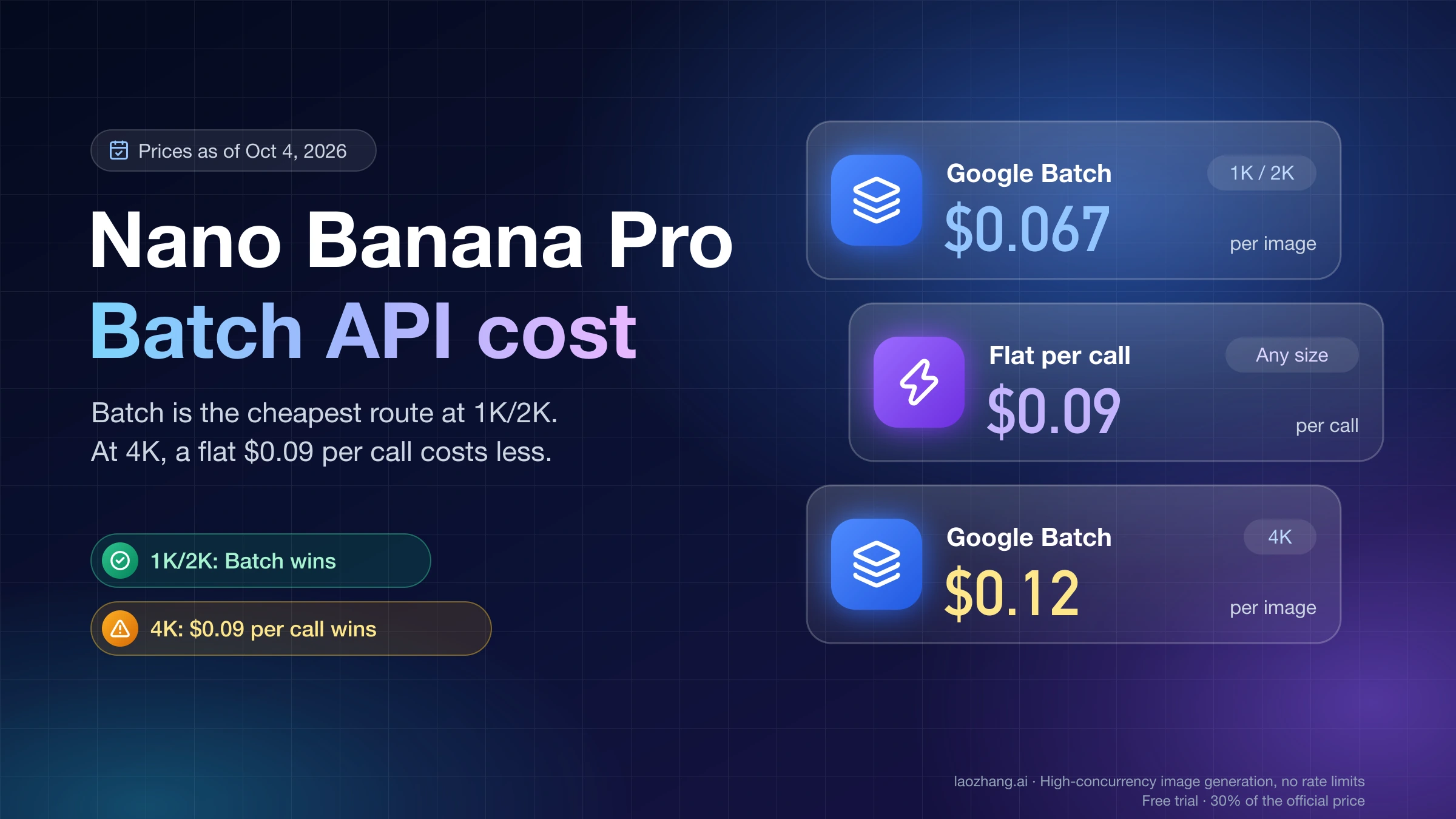
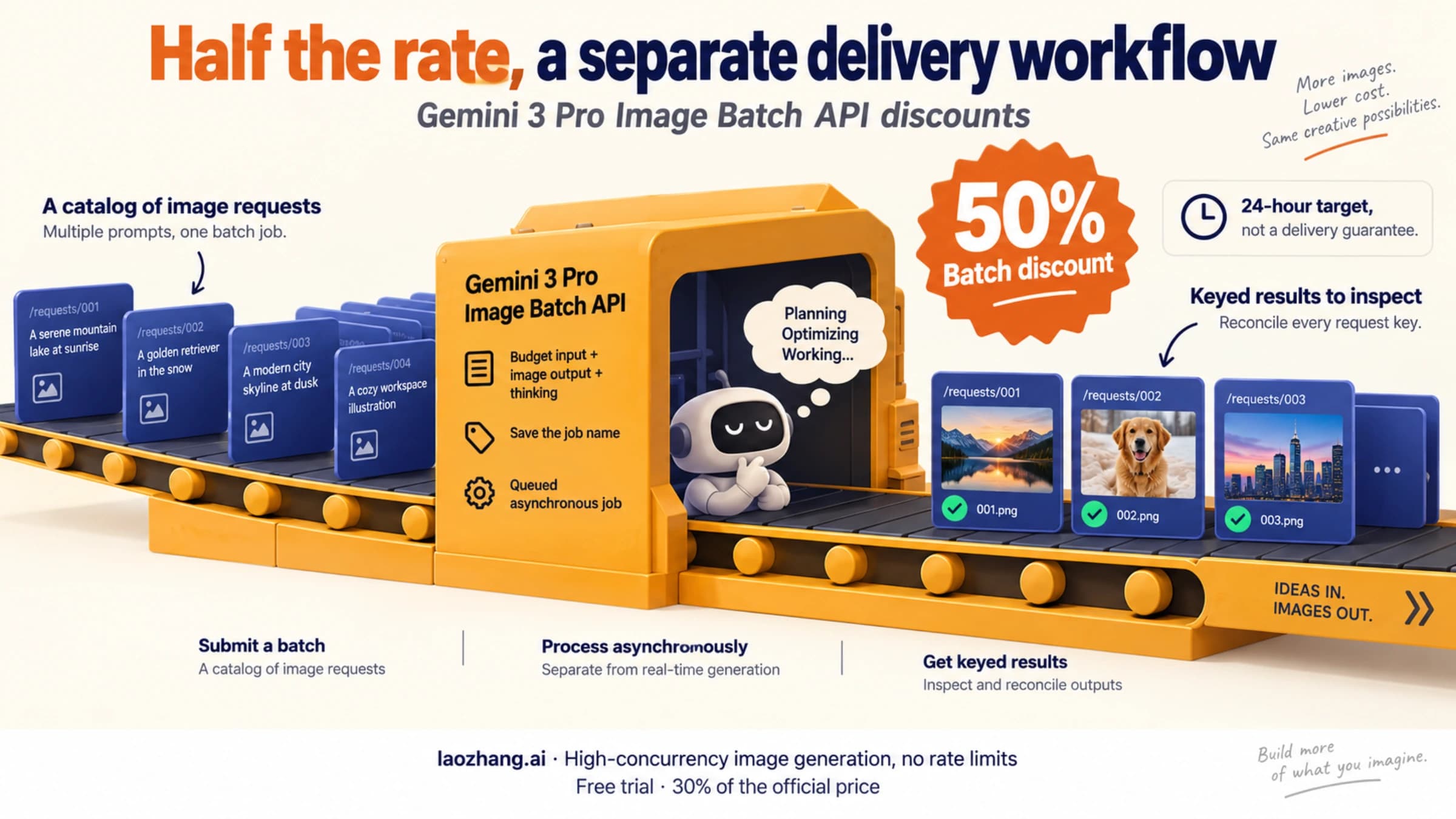
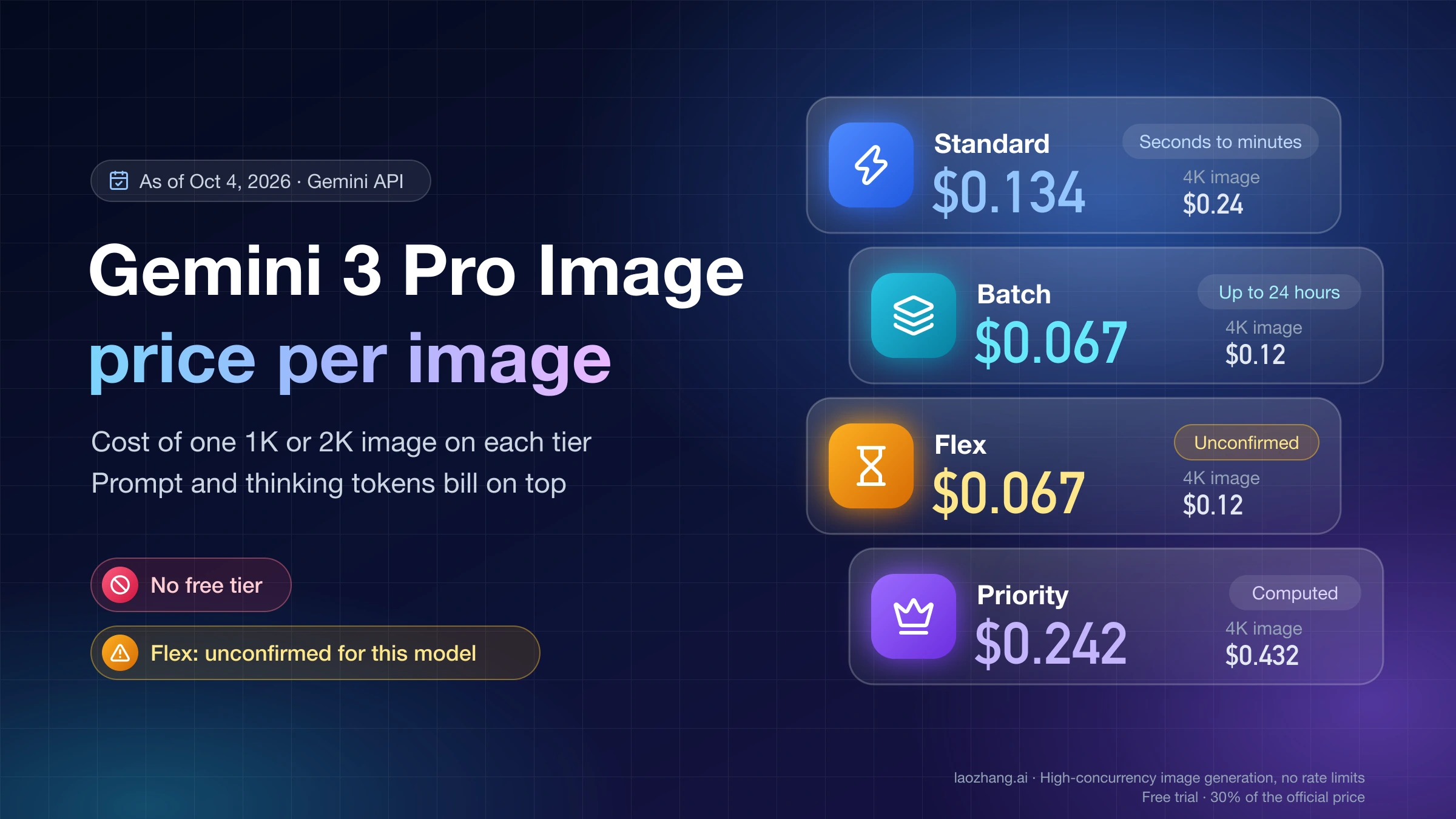
As of October 4, 2026, Google's Batch tier bills Nano Banana Pro (gemini-3-pro-image) at $0.067 per 1K or 2K image and $0.12 per 4K image. That is half the Standard price of $0.134 and $0.24. Batch is the cheapest Google route at every size, but not the cheapest route overall at 4K: a flat $0.09 per-call price undercuts $0.12 before a single prompt or thinking token is counted. At 1K and 2K, Batch stays below $0.09 until a request's prompt, reference-image and thinking tokens add more than $0.023.
Everything below is arithmetic you can redo with your own token counts, plus the costs Batch adds outside the price sheet: up to 24 hours of waiting, jobs that expire at 48 hours with no results, and failed lines whose billing Google does not document.
Nano Banana Pro cost per image on each route
The table shows the image output price only. Prompt, reference-image and thinking tokens come on top and are covered in the next section.
| Route | How results arrive | 1K or 2K image | 4K image | Basis |
|---|---|---|---|---|
| Google Standard | Synchronous, seconds to minutes | $0.134 | $0.24 | Google pricing page |
| Google Batch | Asynchronous job, target within 24 hours | $0.067 | $0.12 | Google pricing page |
| Google Flex (Preview) | Synchronous, 1–15 minute target, best-effort | $0.067 | $0.12 | Priced, but missing from Flex's supported-model list |
| Google Priority | Synchronous, low latency | about $0.242 | about $0.432 | Calculated from $216 per 1M image tokens |
| LaoZhang API, per call | Synchronous | $0.09 | $0.09 | Provider's public price as of September 24, 2026 |
Disclosure: laozhang.ai is our own service. Its prices are platform pricing, not an independent comparison.
Google prices image output by tokens. A 1K or 2K image counts as 1,120 output tokens and a 4K image as 2,000. Standard charges $120 per 1M image tokens and Batch charges $60, which gives the per-image figures above; Google publishes them rounded, so 1,120 × $120 / 1M = $0.1344 appears as $0.134. Priority has no published per-image figure, so its row is the same multiplication at $216 per 1M: 1,120 × $216 / 1M = $0.242 and 2,000 × $216 / 1M = $0.432.
A few facts from Google's Gemini API pricing page (updated October 1, 2026) that change the plan:
gemini-3-pro-imagehas no free tier. Every image generated through the API is billed.- Nano Banana Pro outputs 1K, 2K or 4K. There is no 0.5K size for this model, and 1K and 2K cost the same on Google, so asking for 2K adds nothing to a Google bill.
- Vertex AI on Google Cloud (global endpoint) lists the same per-token rates for Gemini 3 Pro Image, including $60 per 1M image tokens on Flex/Batch.
For subscriptions and the full price ladder, see How Much Is Nano Banana Pro? API, Plan, and Usable-Image Cost. For Google's official per-image price by tier on its own, see the Gemini 3 Pro Image price sheet by tier.
Your real per-image bill: image price plus prompt, reference and thinking tokens
A Google call costs more than its image price. Thinking is always on for Gemini 3 image models and thinking tokens are billed at the text output rate, so the per-call formula has four terms:
cost per call = image price
              + prompt tokens × input rate
              + reference images × price per input image
+ (thinking + text output tokens) × text output rate| Rate (USD) | Standard | Batch and Flex |
|---|---|---|
| Image output, 1K or 2K | $0.134 per image | $0.067 per image |
| Image output, 4K | $0.24 per image | $0.12 per image |
| Text input | $2.00 per 1M tokens | $1.00 per 1M tokens |
| Input (reference) image | $0.0011 per image | $0.0006 per image |
| Thinking and text output | $12.00 per 1M tokens | $6.00 per 1M tokens |
Worked examples, assuming a 200-token prompt, no reference image and 1,000 thinking tokens:
| Route and size | Image | Prompt | Thinking | Cost per call |
|---|---|---|---|---|
| Batch, 2K | $0.067 | 200 × $1 / 1M = $0.0002 | 1,000 × $6 / 1M = $0.006 | $0.0732 |
| Batch, 4K | $0.12 | $0.0002 | $0.006 | $0.1262 |
| Standard, 2K | $0.134 | 200 × $2 / 1M = $0.0004 | 1,000 × $12 / 1M = $0.012 | $0.1464 |
| Standard, 4K | $0.24 | $0.0004 | $0.012 | $0.2524 |
Reference images add a fixed amount per image. A product job that sends three reference photos per request adds 3 × $0.0006 = $0.0018 on Batch, so Batch 2K becomes $0.0750. On Standard it adds 3 × $0.0011 = $0.0033, so Standard 2K becomes $0.1497.
The 1,000 thinking tokens are an assumption, not a Google figure. Replace them with your own numbers before you budget. Every generateContent response carries usageMetadata with promptTokenCount, thoughtsTokenCount and candidatesTokenCount, and candidatesTokensDetails splits the output by modality. A successful Batch result line is a full GenerateContentResponse, so the same fields appear there. Run 20 or 30 representative prompts and average the counts.
Batch or a $0.09 per-call route: where the break-even falls
A flat per-call price charges the same amount whatever the size or thinking length, so the comparison with Batch depends almost entirely on output size.
4K: the $0.09 flat price wins before any tokens
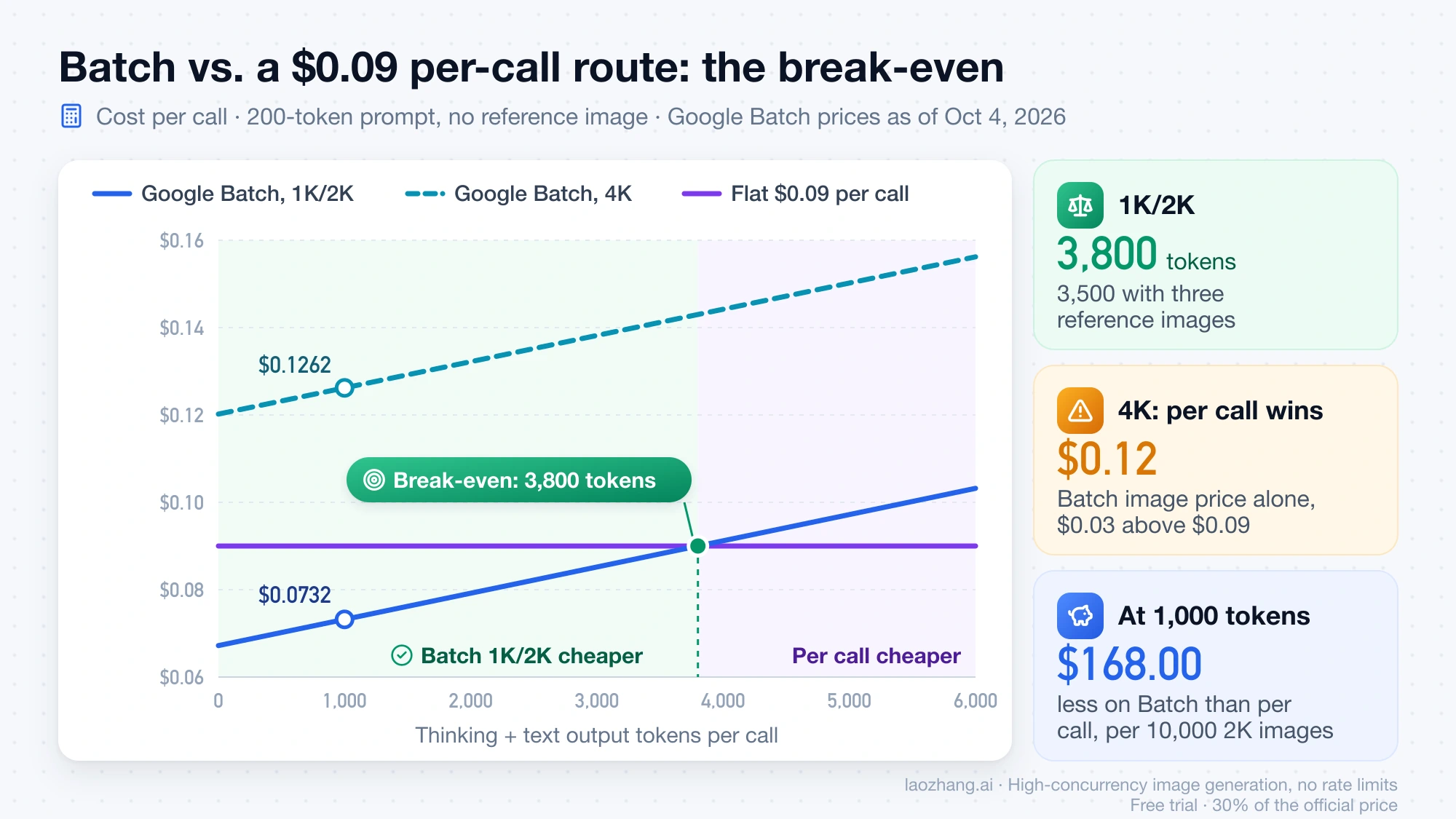
Batch's 4K image price alone is $0.12, which is already $0.03 above $0.09. With the default token assumptions the gap is $0.1262 − $0.09 = $0.0362 per image. Across 10,000 4K images that is $1,262.00 on Batch against $900.00 per call. No token count reverses this, because tokens only add to the Batch side.
1K and 2K: Batch wins below about 3,800 extra tokens
Batch's $0.067 image price leaves $0.023 of headroom under $0.09. Extra tokens use it up, and the break-even is:
break-even tokens = (0.09 − 0.067 − prompt cost − reference-image cost) / ($6 / 1M)- With a 200-token prompt and no reference image: (0.09 − 0.067 − 0.0002) / 0.000006 = 3,800 thinking and text output tokens.
- With three reference images as well: (0.09 − 0.067 − 0.0002 − 0.0018) / 0.000006 = 3,500 tokens.
Below that, Batch is cheaper. At the default 1,000 thinking tokens it costs $0.0732 against $0.09, which is $168.00 less per 10,000 images ($900.00 − $732.00).
Google Standard never beats a $0.09 flat price for Nano Banana Pro: its image price alone is $0.134 at 1K/2K and $0.24 at 4K.
Billing rules that change the comparison
A per-call price is only comparable if its billing rules fit your job. The LaoZhang API figures come from its Nano Banana model and pricing page, which states its public pricing as of September 24, 2026; check the page again before a large job.
Disclosure: laozhang.ai is our own service. Its prices are platform pricing, not an independent comparison.
gemini-3-pro-imagecosts $0.09 per call at 1K, 2K or 4K, and the price does not change with thinking length.- An HTTP 200 response with no image is still charged as one call. A request your client times out on may still finish on the server and be charged, so check the call logs before you retry.
- Requests rejected with 429 or 503 before generation are usually not charged.
- Image size and aspect ratio can only be set on the Gemini-native
generateContentroute. The OpenAI-compatible route returns a 1:1 image at 1K, so the 4K saving only exists on the native route. - There is no batch or discount tier: every call is synchronous at the same price.
For a side-by-side of Google and this gateway on delivery as well as price, see Nano Banana API: Google vs. LaoZhang Cost and Image Delivery.
Blended cost of a split job: the average must sit between its routes
Most real jobs use more than one route. The blended price per image is a weighted average:
blended cost per image = Σ (share of images on route i × cost per image on route i)
where the shares add up to 1
A weighted average always lands between the cheapest and the most expensive route in the mix. That gives you a one-line check for any blended figure you are quoted: if it is lower than the cheapest route used, or higher than the most expensive, a price or a share is wrong. Any mix of $0.12 Batch 4K images and a $0.09 per-call route, for example, must cost between $0.09 and $0.12 per image.
Two worked blends:
- 70% of 2K images on Batch and 30% per call, image output only: 0.7 × $0.067 + 0.3 × $0.09 = $0.0469 + $0.027 = $0.0739. That sits between $0.067 and $0.09.
- The same split with the default tokens: 0.7 × $0.0732 + 0.3 × $0.09 = $0.05124 + $0.027 = $0.0782. That sits between $0.0732 and $0.09.
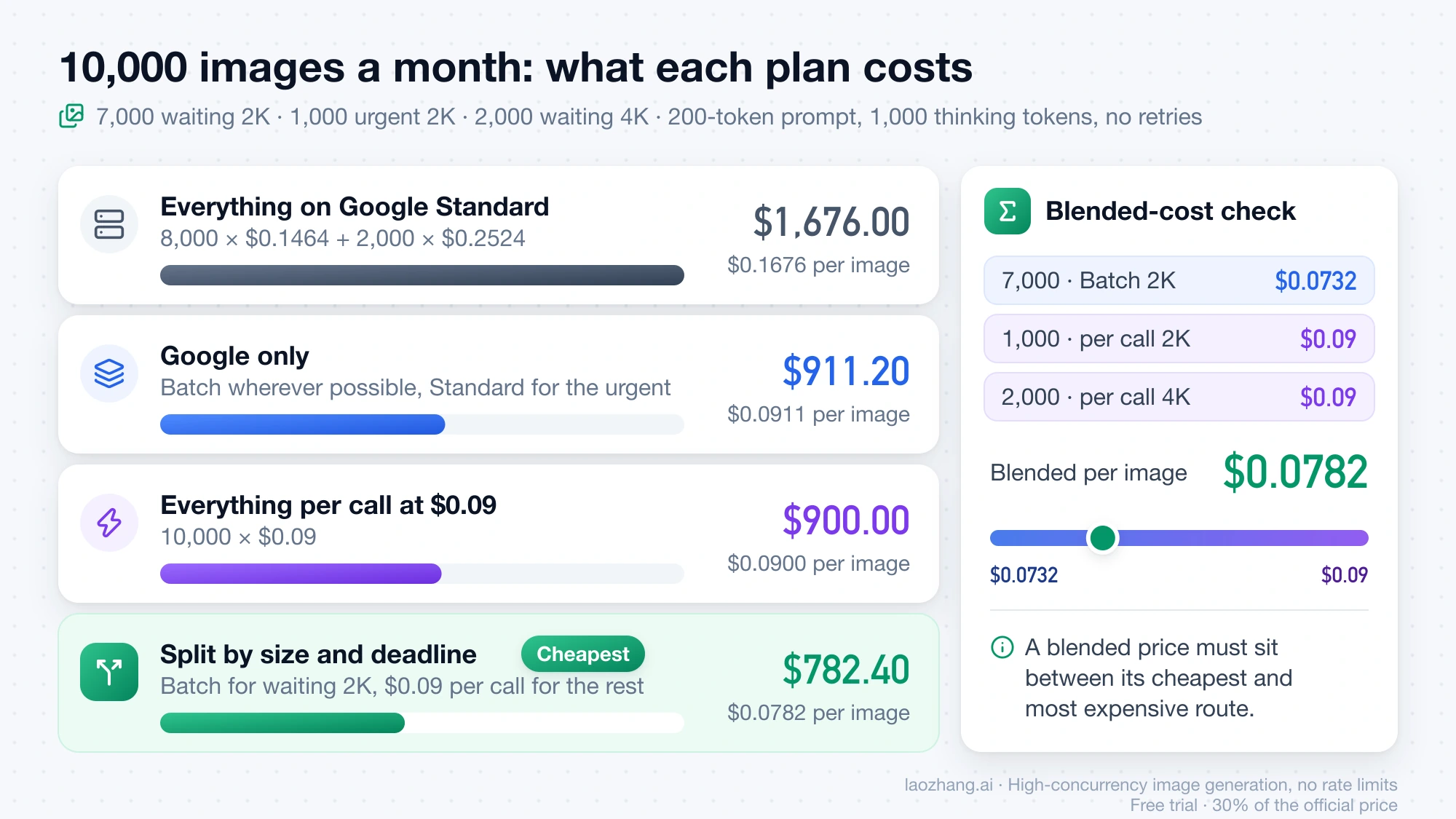
Here is a month of 10,000 images: 7,000 catalogue images at 2K that can wait a day, 1,000 images at 2K needed during a working session, and 2,000 hero images at 4K that can wait. All rows use the default token assumptions (200 prompt tokens, 1,000 thinking tokens, no reference image) and exclude retries.
| Plan | Calculation | Monthly total | Per image |
|---|---|---|---|
| Everything on Google Standard | 8,000 × $0.1464 + 2,000 × $0.2524 | $1,676.00 | $0.1676 |
| Google only: Batch wherever possible, Standard for the 1,000 urgent | 7,000 × $0.0732 + 1,000 × $0.1464 + 2,000 × $0.1262 | $911.20 | $0.0911 |
| Everything per call at $0.09 | 10,000 × $0.09 | $900.00 | $0.0900 |
| Split: Batch for waiting 2K, per call for urgent 2K and all 4K | 7,000 × $0.0732 + 1,000 × $0.09 + 2,000 × $0.09 | $782.40 | $0.0782 |
The split is cheapest because each image goes to the route that wins at its size and deadline: Batch takes the 2K images that can wait, and the flat price takes the 4K images and the urgent ones. Its $0.0782 per image sits between its cheapest input ($0.0732) and its most expensive ($0.09), as it must.
Which Nano Banana Pro images can wait for Batch: the 24-hour and 48-hour limits
Google's Batch API guide gives a target turnaround of 24 hours and says most jobs finish much sooner. That target is not a deadline guarantee. A job still pending or running after 48 hours moves to JOB_STATE_EXPIRED and has no results to retrieve, so the worst case is two days lost followed by a synchronous rerun at full price.
A practical split follows from those two numbers:
- Images a user is waiting for, or that you need within the same working session, go to a synchronous route: Standard, the flat per-call route, or Flex if it works for you (next sections).
- Prompt tuning and approval rounds also stay synchronous, since each round depends on the last. Once a prompt template is fixed, the bulk run moves to Batch.
- Work due in one to two days can go to Batch if you keep a synchronous fallback budget for an expired job. Work due in more than two days fits Batch with room for one rerun.
- For very large runs, Google suggests splitting into several smaller jobs if you need intermediate results sooner. For Nano Banana, Google also describes Batch as giving higher rate limits in exchange for the longer turnaround, which matters when tens of thousands of images would otherwise hit synchronous limits.
Google recommends a JSONL input file for image jobs; inline requests are limited to batches under 20MB, while an input file can be up to 2GB.
Batch operational costs: expiry, failed lines and 6-week retention
These items do not appear on the price sheet but decide whether the 50% saving survives a real run.
- Per-line failures. A finished job's output file has one line per request, and each line is either a
GenerateContentResponseor a status object describing that request's error. CheckbatchStatsforfailedRequestCountafter the job completes, then parse every line. A line can also succeed without containing an image; Nano Banana API Returns No Image? Find the Cause in the Response covers how to read those. - Billing of failed lines. Google's Batch documentation does not say whether failed lines inside a succeeded job are billed, or how a canceled job that already processed some requests is billed. Cancelation only "stops processing new requests". Before a large run, submit a small job, add up the
usageMetadataon its result lines, and compare that with the billing report for the same project and day. - Duplicate jobs. Creating a batch job is not idempotent. Sending the same create request twice produces two jobs and two bills. Store the returned job name before you retry a create call that seemed to fail.
- Expired jobs. After 48 hours in a pending or running state a job expires with no results. Plan the rerun cost into any deadline.
- 6-week retention. Results are stored for 6 weeks and then permanently deleted. Download and store the images as soon as a job succeeds; regenerating them later is a second bill.
- Polling. Instead of polling the job, you can register a webhook for the
batch.succeededandbatch.failedevents. - Model ID. Use
gemini-3-pro-image. The oldergemini-3-pro-image-previewwas shut down on June 25, 2026, but the code samples in Google's Batch guide still show the preview ID.
A request line in the JSONL file has a user-defined key and a full request. The shape below follows Google's Batch guide, with the image size and aspect ratio added. It is an example shape, not a tested job, so submit a ten-line test file before the full run:
{"key": "sku-00001", "request": {"contents": [{"parts": [{"text": "Studio photo of a ceramic mug on white, soft daylight"}]}], "generation_config": {"responseModalities": ["TEXT", "IMAGE"], "imageConfig": {"imageSize": "2K", "aspectRatio": "4:5"}}}}The model is set when you create the job, not on each line:
from google import genai
from google.genai import types

client = genai.Client()  # reads $GEMINI_API_KEY
uploaded = client.files.upload(
    file="catalog-2k.jsonl",
    config=types.UploadFileConfig(display_name="catalog-2k", mime_type="jsonl"),
)
job = client.batches.create(model="gemini-3-pro-image", src=uploaded.name)
print(job.name)  # save this before doing anything else
Each output line carries the same key, so you can match results, failures and token usage back to your SKUs. For the request format itself, see Nano Banana Pro API: Official Docs, Working JSON, YAML Config, and PDF Rules.
Flex for Nano Banana Pro: Batch prices, synchronous, but not listed as supported
Google's pricing page shows a Flex tab for gemini-3-pro-image with the same figures as Batch: $0.067 per 1K/2K image and $0.12 per 4K image. The Flex inference guide, however, lists only Gemini text models as supported and does not include Gemini 3 Pro Image. The two pages disagree, so treat Flex for this model as untested until one request proves otherwise.
To test it, send a single generateContent request with "serviceTier": "flex" in the request body, read usageMetadata.serviceTier in the response to see which tier actually served it, and check the billing report before routing volume to it.
If it does work, Flex sits between Standard and Batch:
- It is synchronous, but the latency target is 1–15 minutes, not seconds. Google recommends client timeouts of 10 minutes or more.
- Capacity is best-effort. When Flex is full you get a 503; rate limits and resource exhaustion return a 429. Google does not fall back to Standard on your behalf, so retries with backoff are your job. Nano Banana API Not Working? Fix 429, 503, No Image, and Request Denied covers both codes.
- Flex traffic counts against your normal rate limits. Unlike Batch, it gets no extended limits.
That makes Flex a candidate for images needed within the hour but not within seconds, such as a dashboard that fills in while a user works on something else.
Retries and model choice: cost per usable image and Nano Banana 2
Unusable results raise the cost of every image you keep. If a share r of billed attempts has to be regenerated:
cost per usable image = cost per attempt / (1 − r)With r = 0.2, Batch 2K at $0.0732 becomes $0.0732 / 0.8 = $0.0915 per usable image, and a $0.09 per-call image becomes $0.09 / 0.8 = $0.1125. The rate r is your own measured rejection and retry rate, not a Google number. Because it divides every billed route by the same amount, it does not move the break-even unless two routes bill failures differently. The per-call route charges for a 200 response without an image; Google does not document whether failed Batch lines are billed, which is why the small test job above matters.
Switching model is a separate lever with a quality trade-off. Nano Banana 2 (gemini-3.1-flash-image) costs $0.034 per 1K image, $0.050 per 2K image and $0.076 per 4K image on Batch, against $0.067, $0.101 and $0.151 on Standard. It also offers a 0.5K size at $0.022 on Batch, which Nano Banana Pro does not have. Thumbnails, dataset filler or early drafts may tolerate the Flash model; test it on your own prompts before moving a share of the job.
A Python calculator for your Nano Banana Pro job
This script reproduces every figure above. It has no dependencies and makes no API calls. Rates are hard-coded from Google's prices as of October 4, 2026 and a $0.09 flat per-call price, so edit RATES when either changes. Treat its output as an estimate, not a bill.
"""Estimate a Nano Banana Pro (gemini-3-pro-image) job bill per route.

Rates are Google's published prices as of 2026-10-04 (USD) plus one flat
per-call gateway price; edit RATES when prices change.
"""

RATES = {
    # image output price per image, by size; text/thinking output and input per 1M tokens
    "standard": {"image": {"1K": 0.134, "2K": 0.134, "4K": 0.24},
                 "text_out_per_m": 12.00, "input_per_m": 2.00, "ref_image": 0.0011},
    "batch":    {"image": {"1K": 0.067, "2K": 0.067, "4K": 0.12},
                 "text_out_per_m": 6.00, "input_per_m": 1.00, "ref_image": 0.0006},
    # flat per-call route: one price per call, whatever the size or thinking
    "per_call": {"flat": 0.09},
}


def cost_per_call(route, size, prompt_tokens=200, thinking_tokens=1000, ref_images=0):
    r = RATES[route]
    if "flat" in r:
        return r["flat"]
    return (r["image"][size]
            + prompt_tokens * r["input_per_m"] / 1_000_000
            + ref_images * r["ref_image"]
            + thinking_tokens * r["text_out_per_m"] / 1_000_000)


def cost_per_usable_image(call_cost, reject_rate):
    """Every attempt is billed; a share reject_rate of results is unusable."""
    if not 0 <= reject_rate < 1:
        raise ValueError("reject_rate must be in [0, 1)")
    return call_cost / (1 - reject_rate)


def blended(shares_and_costs):
    """shares_and_costs: list of (share, cost); shares must add up to 1."""
    total_share = sum(s for s, _ in shares_and_costs)
    if abs(total_share - 1) > 1e-9:
        raise ValueError("shares must add up to 1")
    return sum(s * c for s, c in shares_and_costs)


if __name__ == "__main__":
    images, size = 10_000, "2K"
    for route in ("standard", "batch", "per_call"):
        c = cost_per_call(route, size)
        print(f"{route:9s} {size}: ${c:.4f} per call, ${c * images:,.2f} for {images:,} images")
    mix = blended([(0.7, cost_per_call("batch", size)), (0.3, cost_per_call("per_call", size))])
    print(f"70% batch + 30% per-call: ${mix:.4f} per image")
Saved as batch_cost.py and run with Python 3, it prints:
standard  2K: $0.1464 per call, $1,464.00 for 10,000 images
batch     2K: $0.0732 per call, $732.00 for 10,000 images
per_call  2K: $0.0900 per call, $900.00 for 10,000 images
70% batch + 30% per-call: $0.0782 per image
To price the split plan from the monthly table, express each group as a share of the job:
from batch_cost import cost_per_call, blended

plan = [
    (0.7, cost_per_call("batch", "2K")),     # 7,000 catalogue images that can wait
    (0.1, cost_per_call("per_call", "2K")),  # 1,000 urgent images
    (0.2, cost_per_call("per_call", "4K")),  # 2,000 hero images at 4K
]
print(f"${blended(plan):.4f} per image, ${blended(plan) * 10_000:,.2f} for 10,000 images")
# $0.0782 per image, $782.40 for 10,000 images
Set prompt_tokens, thinking_tokens and ref_images from the usageMetadata of your own test calls, and use cost_per_usable_image with your measured rejection rate. blended refuses shares that do not add up to 1, which catches the most common error in a hand-built mix.
Nano Banana Pro Batch API cost: FAQ
How much does the Nano Banana Pro API cost per image?
As of October 4, 2026, Google charges $0.134 per 1K or 2K image and $0.24 per 4K image on the Standard tier, and half that on Batch: $0.067 and $0.12. Prompt, reference-image and thinking tokens come on top; with a 200-token prompt and 1,000 thinking tokens, a Batch 2K call costs $0.0732.
Is there a free API key for Nano Banana Pro?
No. Google's pricing page lists no free tier for gemini-3-pro-image, so every image generated through the API is billed. Consumer app plans are a separate product; How Much Is Nano Banana Pro? API, Plan, and Usable-Image Cost compares them with API pricing.
How long does a Nano Banana Pro Batch job take?
Google's target is 24 hours, and most jobs finish much sooner. A job still pending or running after 48 hours expires with no results, so anything due within a day belongs on a synchronous route.
Does Vertex AI charge the same for Gemini 3 Pro Image Batch?
Yes, on the global endpoint. Vertex AI lists $1.00 per 1M input tokens, $6.00 per 1M text output tokens and $60.00 per 1M image output tokens for Flex/Batch, the same as the Gemini Developer API. Rates for other regions were not part of this comparison.
Sources3
External pages this guide links to, in the order they appear. Last updated Oct 4, 2026.
Sources3
External pages this guide links to, in the order they appear. Last updated Oct 4, 2026.