Gemini API Key Permission Denied: Fix 403 by Error Source (2026)
A no-retry, evidence-first workflow for AI Studio key creation, Gemini API 403 calls, keys that stopped working in 2026, and account or project escalation.
On this page
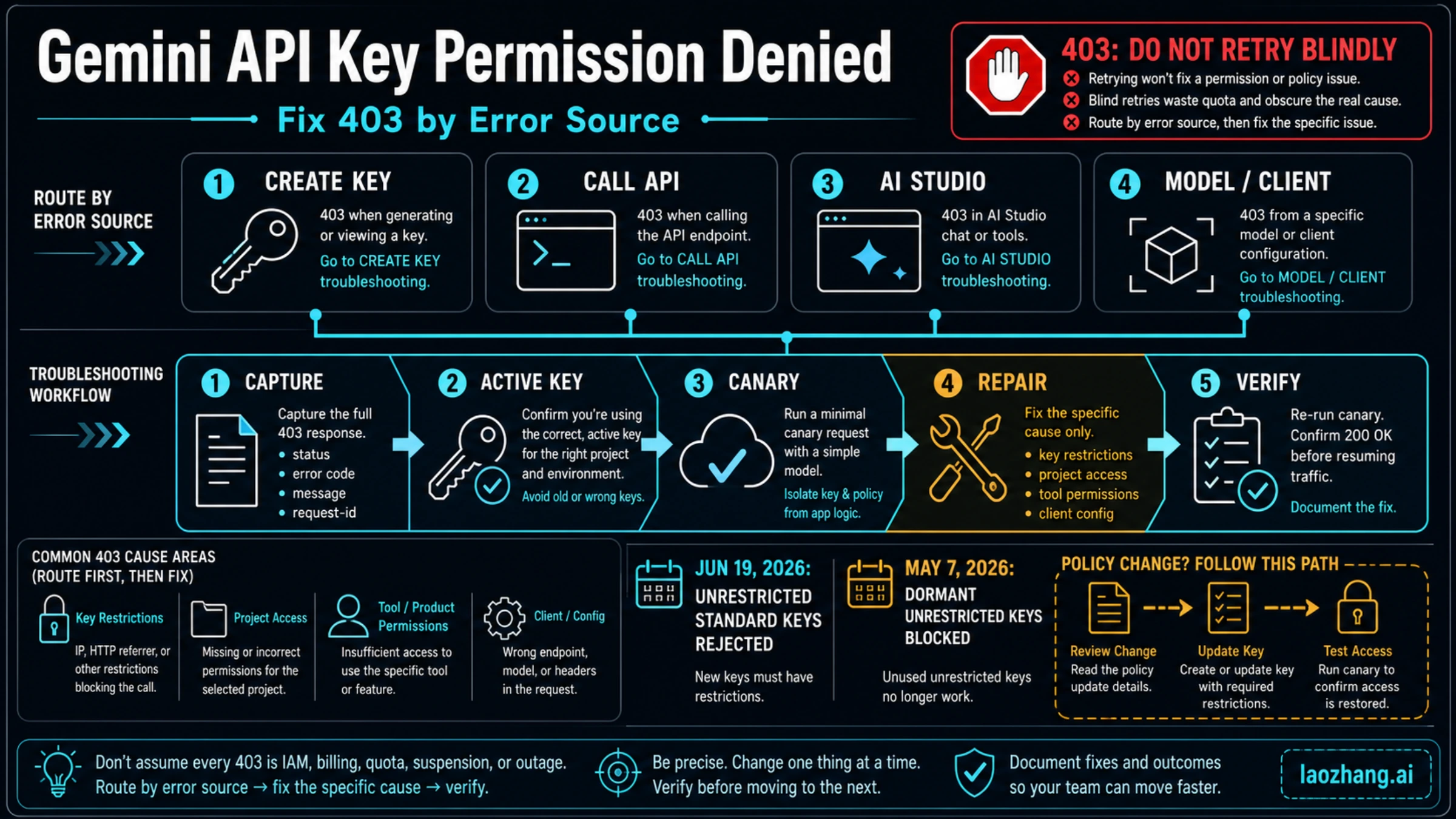
A Gemini API 403 PERMISSION_DENIED response is not a retry signal. First identify what failed: creating a key in Google AI Studio, calling the Gemini Developer API, generating inside AI Studio, or using a model or client path with a different authentication contract. Capture the HTTP status, exact message, endpoint hostname, selected project, model, timestamp, and request ID—but never the key itself.
| What failed? | First safe check | Do not do this |
|---|---|---|
| AI Studio cannot create a key | Confirm the project is imported and ask the project or organization administrator about resourcemanager.projects.get and iam.serviceAccountApiKeyBindings.create. | Do not grant broad Owner access. |
models.list or every API call returns 403 | Prove which environment key is active, which project owns it, and whether API or application restrictions block this request. | Do not rotate several keys at once. |
| Model listing works but generation returns 403 | Check the requested model, action, endpoint, tuned-model authentication, and account or project policy. | Do not treat model visibility as generation permission. |
| AI Studio itself says permission denied, blocked, or suspicious | Confirm the signed-in account and selected project; preserve the message and request evidence. | Do not infer suspension from a forum post. |
Check variable presence without printing either secret:
printf 'GOOGLE_API_KEY=%s\n' "${GOOGLE_API_KEY:+set}"
printf 'GEMINI_API_KEY=%s\n' "${GEMINI_API_KEY:+set}"
If both are set, Google's current client-library documentation says GOOGLE_API_KEY takes precedence. After confirming the endpoint and project, run the same two canaries: list models, then make one minimal generation request. If listing fails, stay with the key, project, or restriction branch. If listing succeeds but generation fails, inspect the model, action, or authentication contract. If both pass, compare local and deployed configuration.
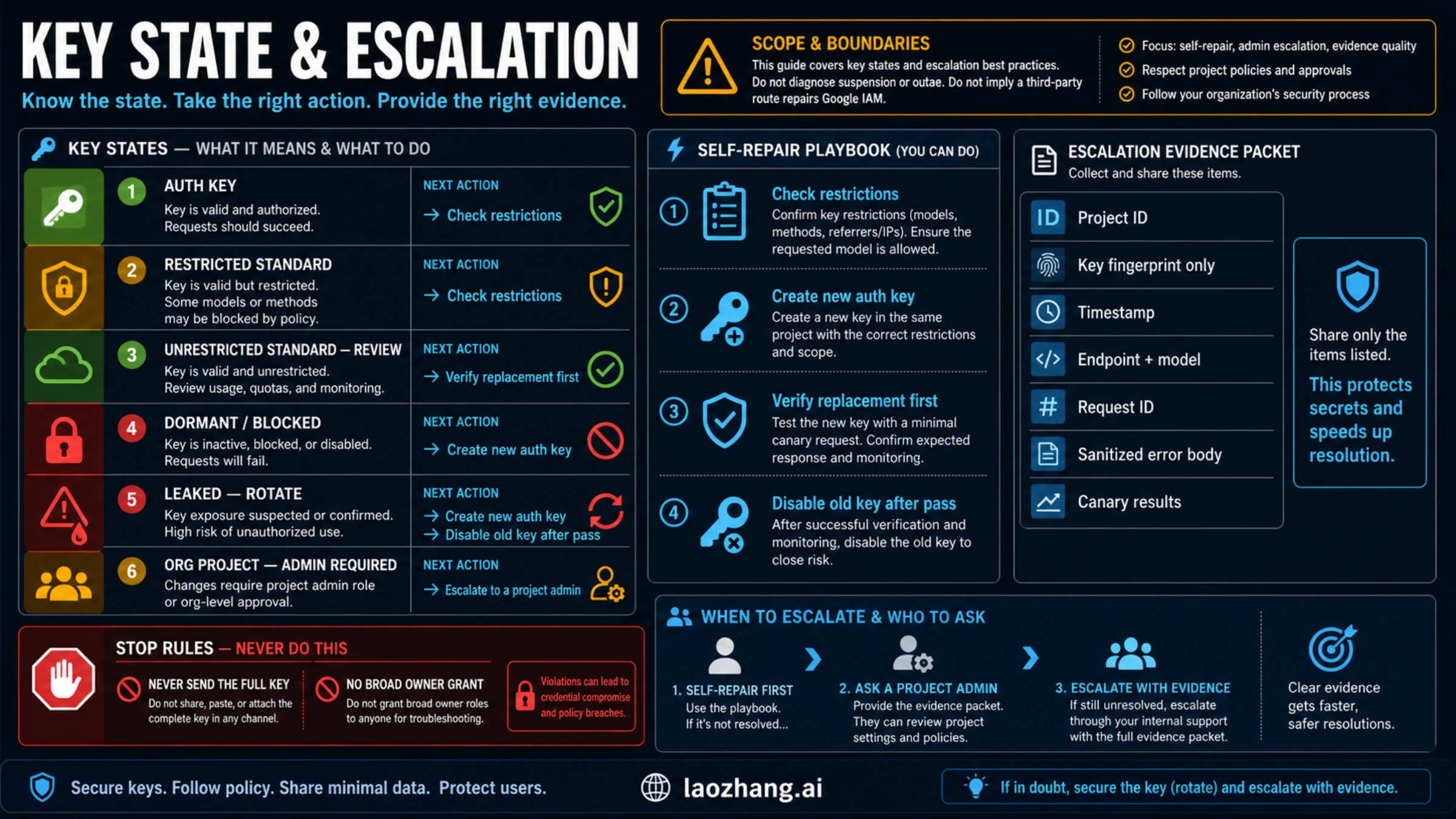
Stop changing keys or projects when the denial follows clean canaries or AI Studio reports blocked or suspicious activity across the account. Save a sanitized error body, project ID, key fingerprint only, endpoint, model, timestamp, request ID, and canary results for the project administrator or Google support.
Why a Gemini API key can be permission denied
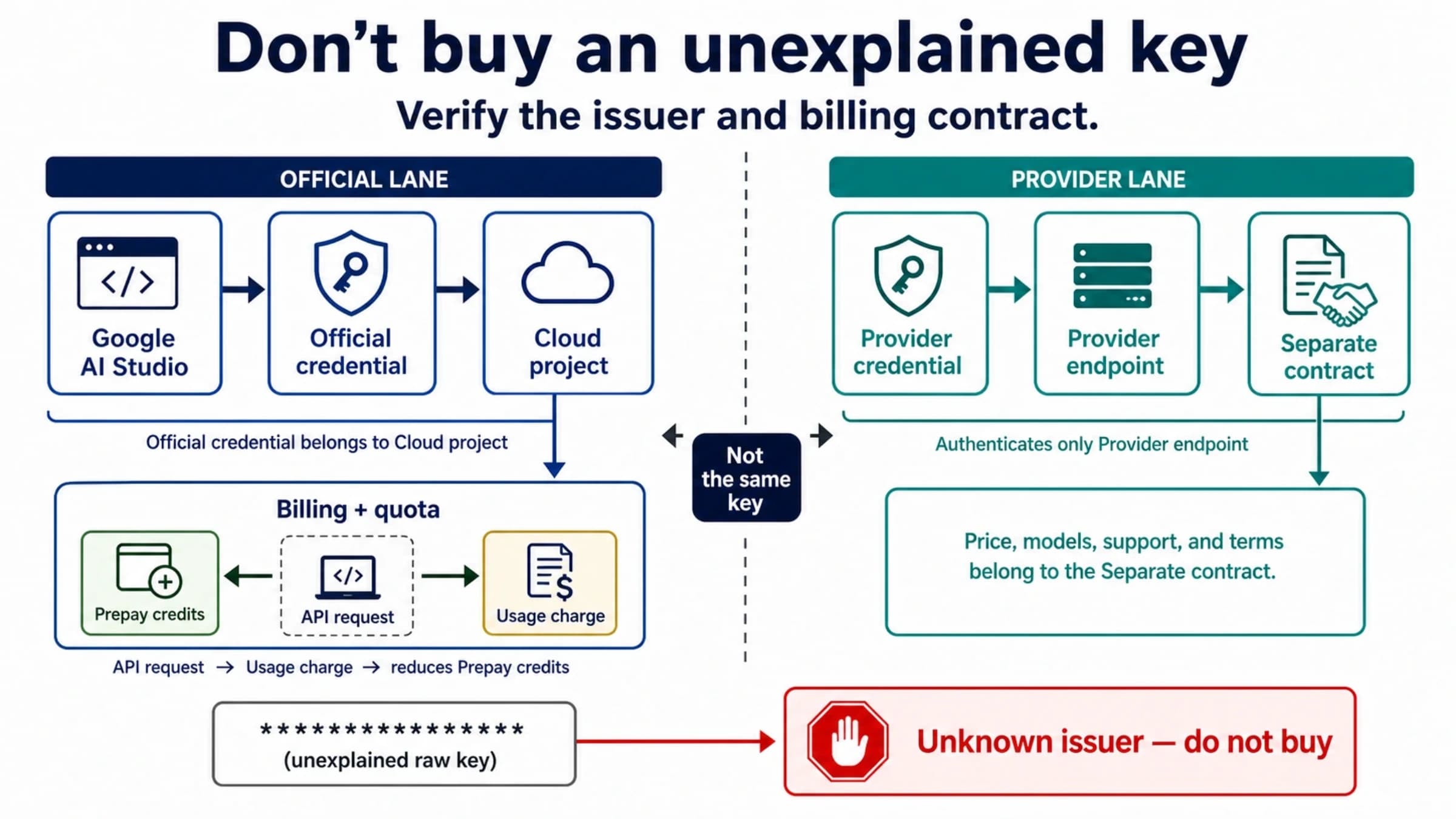
A key is a credential attached to a Google Cloud project. It is not the permission policy, billing account, quota bucket, selected model, endpoint, or signed-in AI Studio account by itself. That is why “the key looks valid” does not settle a 403.
Google's current Gemini API troubleshooting guide describes 403 PERMISSION_DENIED as a key without the required permissions. Its examples include using the wrong key and calling a tuned model without the required authentication. The same guide explicitly advises against retrying client errors such as 400 and 403. A retry changes time; this error usually requires you to change ownership, configuration, or authentication.
The useful question is therefore not “Which list of ten fixes should I try?” It is “Which action was denied, and which system owns that action?”
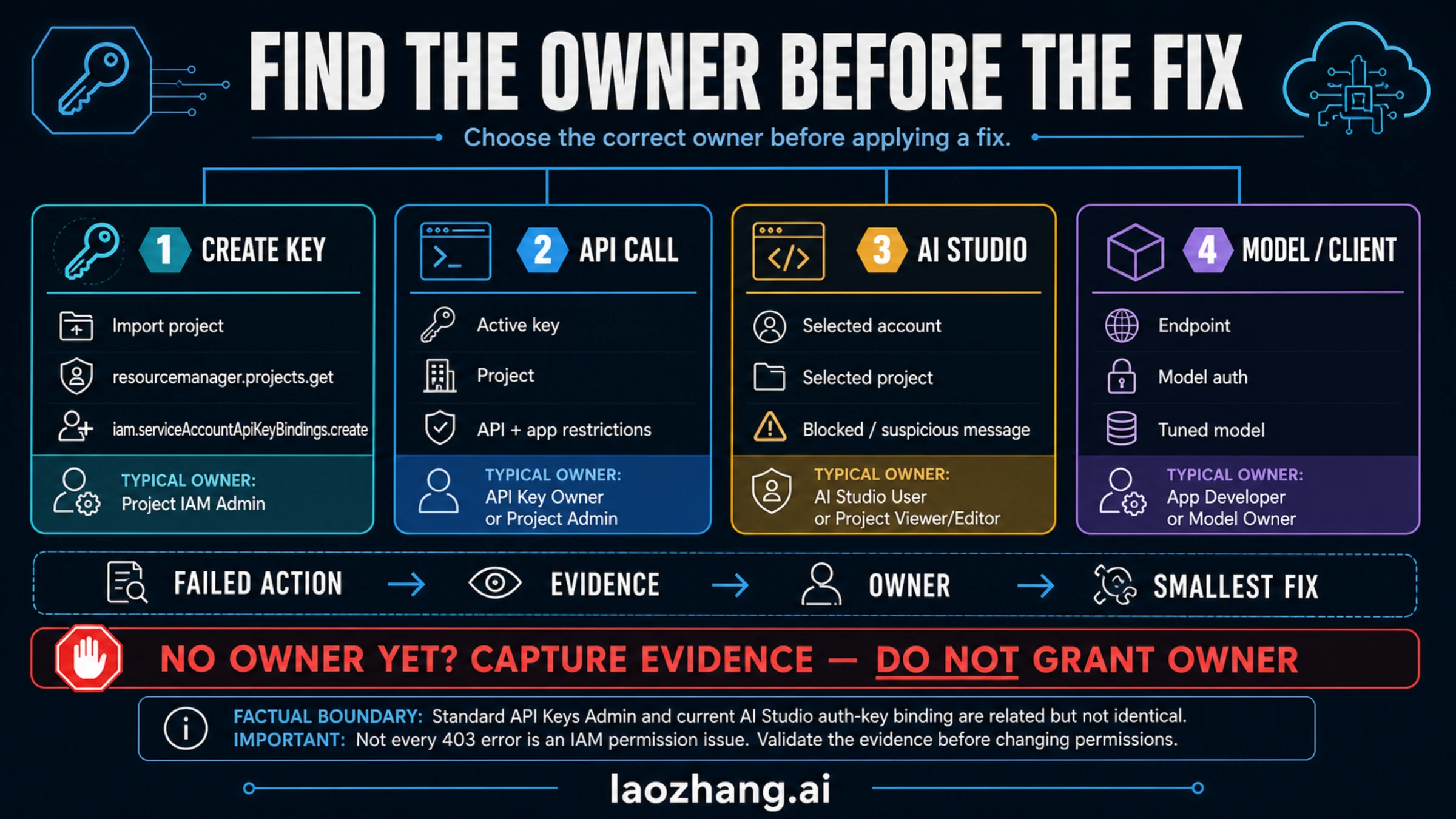
| Denied action | Likely owner | Evidence that narrows it | Smallest next move |
|---|---|---|---|
| Create a key in AI Studio | Project import, IAM, organization policy, service-account binding | Exact UI message, project ID, signed-in account, missing permission | Ask the project administrator for the narrow required permission or use a project you own. |
| List models | Active key, owning project, API restriction, application restriction, endpoint | Key source name, project, hostname, HTTP status, sanitized body | Correct one mismatch and repeat the list canary. |
| Generate content | Model/action authorization, tuned-model auth, account/project policy | List result, model path, generation status, request ID | Test one current model on the same route; preserve the action-level error. |
| Generate inside AI Studio | Signed-in account, selected project, AI Studio enforcement | UI message, project selection, timestamp, request evidence | Change no more projects or keys until account/project ownership is clear. |
| Local call works; deployment fails | Deployed secret, environment precedence, origin/IP restriction, stale revision | Local/deployed key fingerprint, deployment revision, source IP/origin | Update the one deployed secret or restriction, then test that exact deployment. |
This table is deliberately ordered by observation. IAM is only one branch. Billing and quota also have their own status codes in Google's current error table, so changing them first can waste time and erase useful evidence.
Preserve the error before changing anything
The first failed request is often your cleanest evidence. Capture the following before rotating a key, editing restrictions, switching projects, or rerunning a deployment:
- UTC timestamp and local timezone
- HTTP status and status name
- exact error message and sanitized response body
- endpoint hostname and API version
- model or resource path
- selected or configured project ID
- SDK and client version
- request ID, trace ID, or correlation ID when returned
- whether the failure occurred in AI Studio, local code, CI, or production
- whether
models.listand a minimal generation request behave differently
Do not include:
- the full API key
- a screenshot that exposes the key
- a complete environment dump
- cookies, OAuth tokens, service-account JSON, or unrelated secrets
- a production prompt or user payload that contains private data
A one-way fingerprint helps compare environments without revealing the credential:
if [ -n "${GOOGLE_API_KEY:-}" ]; then
  ACTIVE_KEY="$GOOGLE_API_KEY"
  KEY_SOURCE="GOOGLE_API_KEY"
elif [ -n "${GEMINI_API_KEY:-}" ]; then
  ACTIVE_KEY="$GEMINI_API_KEY"
  KEY_SOURCE="GEMINI_API_KEY"
else
  echo "No Gemini API key variable is set"
  exit 1
fi

printf 'source=%s length=%s sha256=' "$KEY_SOURCE" "${#ACTIVE_KEY}"
printf '%s' "$ACTIVE_KEY" | shasum -a 256 | cut -c1-12
The 12-character hash prefix is not the key. It lets you prove that local, CI, and production use the same or different secret. Keep even the fingerprint inside your own incident or support channel; it is evidence, not a public identifier.
Run a two-request canary ladder
The canary is useful only when you keep the endpoint, project, and credential constant. Change one thing, rerun the same canary, and record the new result.
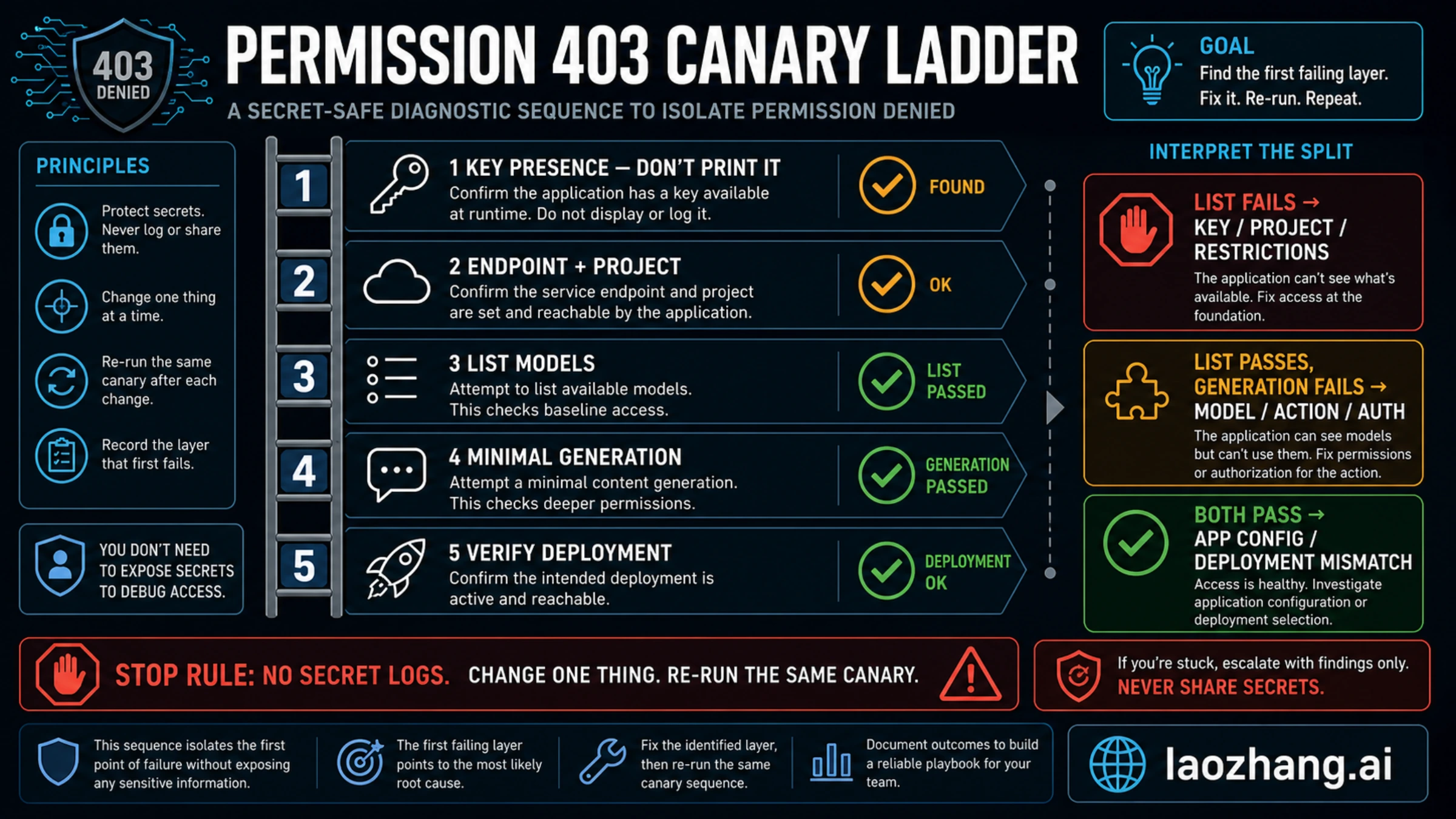
Canary 1: list models
The Gemini Developer API uses generativelanguage.googleapis.com. The following example keeps the secret out of the typed command line by passing the header through process substitution. It stores the response locally so you can inspect the status without pasting it into a chat.
LIST_HTTP=$(
  curl --silent --show-error \
    --output /tmp/gemini-models.json \
    --write-out '%{http_code}' \
    --header @<(printf 'x-goog-api-key: %s\n' "$ACTIVE_KEY") \
    'https://generativelanguage.googleapis.com/v1beta/models'
)
printf 'models.list HTTP %s\n' "$LIST_HTTP"
jq '{error, model_count: (.models | length?)}' /tmp/gemini-models.json
Interpret the result:
- 403 on model listing: stay with the active-key, project, restriction, blocked-key, or endpoint branch.
- 200 with a model list: baseline key and project access works, but it does not prove that every model or action is authorized.
- 404 or malformed response: verify the hostname, API version, proxy/base URL, and request construction before changing IAM.
- 429: move to quota and rate-limit ownership; this is not the 403 branch.
Canary 2: minimal generation
Choose a current model path from the list response that explicitly supports generateContent. Do not copy a model ID from an old article, and check the current pricing/eligibility contract before sending even a test request.
MODEL_PATH='models/<copy-a-current-generateContent-model-from-list>'

GEN_HTTP=$(
  curl --silent --show-error \
    --output /tmp/gemini-generate.json \
    --write-out '%{http_code}' \
    --request POST \
    --header @<(printf 'x-goog-api-key: %s\n' "$ACTIVE_KEY") \
    --header 'Content-Type: application/json' \
    --data '{"contents":[{"parts":[{"text":"Reply with OK."}]}]}' \
    "https://generativelanguage.googleapis.com/v1beta/${MODEL_PATH}:generateContent"
)
printf 'generateContent HTTP %s\n' "$GEN_HTTP"
jq '{error, candidates: (.candidates | length?)}' /tmp/gemini-generate.json
Now the split is useful:
| List models | Generate | Interpretation |
|---|---|---|
| 403 | Not attempted | The denial occurs before model action: active key, project, key state, restriction, or endpoint. |
| 200 | 403 | Baseline access exists; inspect model/action authorization, tuned-model auth, project/account policy, and the exact response. |
| 200 | 404 | The selected model path or API version is wrong or unavailable on this route. |
| 200 | 429 | Permission works; quota, tier, or traffic shape owns the next step. |
| 200 | 200 | The basic route works; compare application code, deployment secret, headers, proxy, region, and configuration. |
Delete temporary response files after you have recorded sanitized evidence:
rm -f /tmp/gemini-models.json /tmp/gemini-generate.json
unset ACTIVE_KEY
Fix “You do not have permission to create a key in this project”
This message occurs before your application has a usable key. Debugging generateContent, model names, or retry logic cannot fix it.
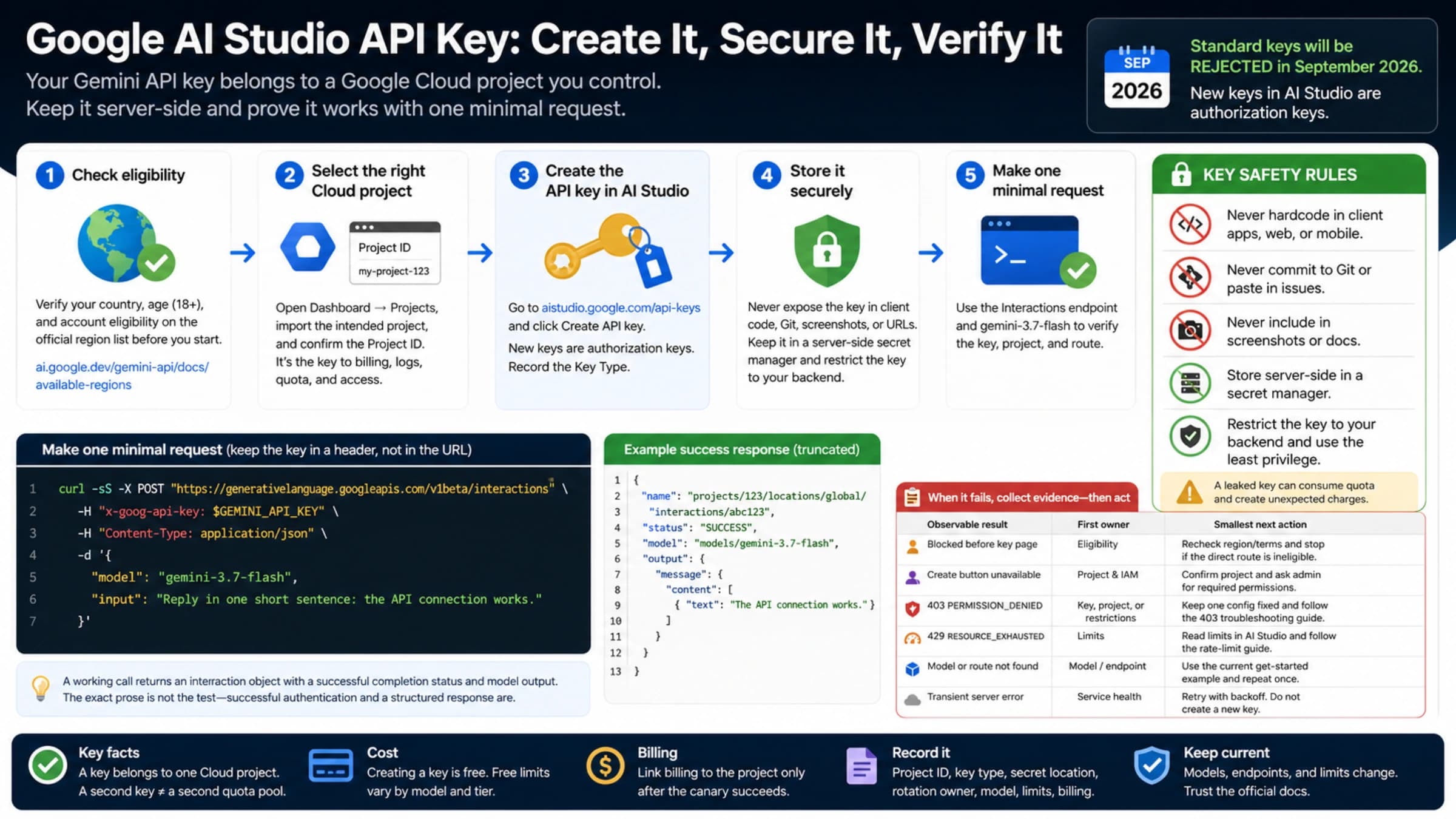
Google's current API key guide says every Gemini API key belongs to a Google Cloud project. AI Studio does not automatically show every existing project; import the intended project in the Projects view before creating a key in it.
For the current AI Studio authorization-key flow, Google's guide names these permissions:
resourcemanager.projects.get— lets AI Studio verify the projectiam.serviceAccountApiKeyBindings.create— lets the flow bind the service account to the key
Ask the project or organization administrator for a role containing the required permissions. Google gives Project Editor as an example, but Editor is broad. In a managed organization, the safer request is the narrowest approved custom or predefined role that satisfies the exact operation, plus any organization-policy approval your team requires.
Why older advice can be incomplete:
| Key operation | Permission or role often seen | What it actually covers |
|---|---|---|
| Create a standard Cloud API key | apikeys.keys.create, included in API Keys Admin (roles/serviceusage.apiKeysAdmin) | Standard API Keys service operations |
| Create a current AI Studio authorization key | resourcemanager.projects.get plus iam.serviceAccountApiKeyBindings.create | Project verification and service-account-to-key binding |
| Use a tuned model or protected action | Route/model-specific authentication | Calling the protected resource, not creating the key |
The Google Cloud IAM permission reference confirms that apikeys.keys.create belongs to API Keys Admin. That fact does not erase the current authorization-key binding step. Match the permission to the failed action instead of piling roles onto the user.
If administrative access is unavailable, Google's key guide suggests creating a new Cloud project outside the organization. Do that only when it is a legitimate ownership boundary—not to evade policy, quota, review, or billing controls.
Fix a key that worked before and now returns 403
A previously working key is not proof that the current request still uses the same credential or that the key still meets the current contract. Check these branches in order.
1. The application is using a different key
Google client libraries automatically detect GEMINI_API_KEY and GOOGLE_API_KEY. When both exist, GOOGLE_API_KEY takes precedence. Common failures include:
- a stale
GOOGLE_API_KEYshadowing a newly rotatedGEMINI_API_KEY - a local shell and deployment using different secret managers
- a CI variable overriding a project-level deployment secret
- a process that was never restarted after rotation
- a proxy or framework reading its own credential variable
Compare fingerprints across environments. Remove the obsolete duplicate only after the active owner is known.
2. An unrestricted standard key no longer meets the Gemini contract
Google's current key guide says that on June 19, 2026, Gemini API began rejecting requests from unrestricted standard keys. Standard keys with explicit restrictions can continue, while all new keys created in AI Studio are authorization keys.
Do not respond by adding arbitrary restrictions. Review:
- which APIs the key may call
- whether the key is intended only for Gemini
- whether an application restriction matches the current server IP, website origin, Android app, or iOS app
- whether a shared multi-API key should be split into separate credentials
- whether creating a new AI Studio authorization key is safer than preserving an old standard key
3. A dormant unrestricted key is blocked
The same guide says that from May 7, 2026, unrestricted API keys dormant for an extended period can be blocked and display a Blocked tag in AI Studio. Google does not give one universal inactivity duration in the public guide. Do not invent one.
Use a new authorization key or another existing restricted key. Verify the replacement in a low-risk environment before disabling the old credential.
4. The key was reported as leaked
Google's troubleshooting guide says known leaked keys may be proactively blocked. If AI Studio or the API reports leakage:
- create a replacement key;
- update local and deployed secrets;
- run the same canaries;
- inspect recent usage and billing logs for unauthorized calls;
- disable the old key after the replacement passes;
- remove the source of exposure from Git history, client bundles, logs, screenshots, or documentation.
Do not paste the compromised key into a forum or support form. A leaked secret is already evidence enough to rotate; the full value is never needed for diagnosis.
Check API and application restrictions
A restriction is a deliberate permission boundary. It becomes a 403 when the request no longer matches that boundary.
API restrictions
An API restriction controls which Google API the key can call. For Gemini Developer API requests, verify that the key's allowed API set matches the Generative Language API/Gemini route shown in the current console.
Do not use one production key for unrelated Google APIs when separate credentials would give clearer ownership. A restriction change should be narrow, reviewed, and followed by the same canary.
Application restrictions
Application restrictions bind use to an origin:
- server IP address
- website/HTTP referrer
- Android application
- iOS application
A local test may work while production fails because the deployed egress IP changed. The reverse can happen when a server-only key is used from a browser. Record the actual request origin rather than the origin you expect.
Client-side code is a separate security failure
Do not place a Gemini API key in production browser or mobile code. Google's key guide recommends a backend proxy because client-side bundles can be inspected. If a client-exposed key has leaked, moving it behind a backend without rotating it leaves the compromised credential alive.
Separate Developer API and Vertex AI authentication
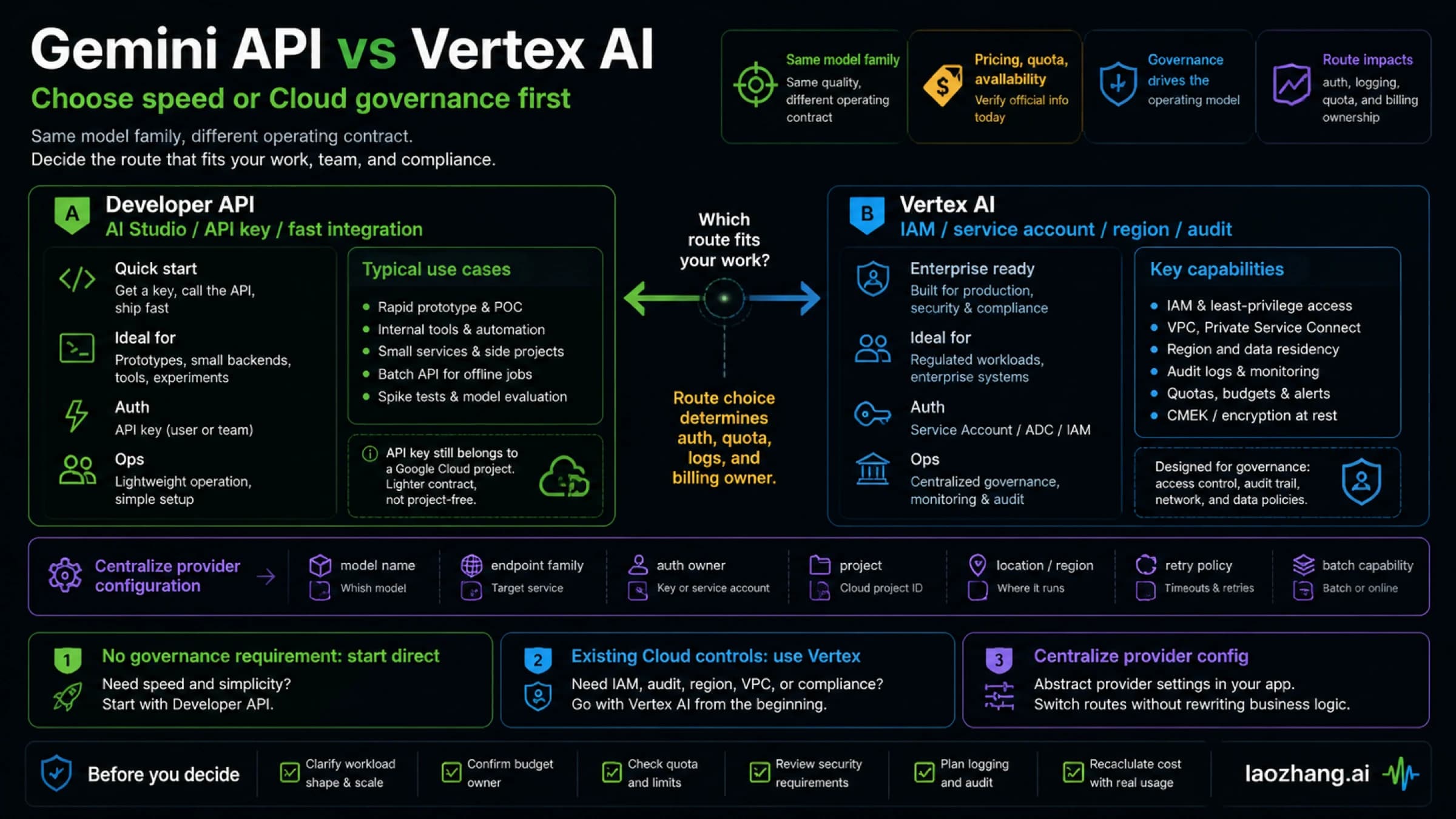
The Gemini Developer API and Vertex AI can expose related models, but they are not one interchangeable authentication route.
generativelanguage.googleapis.comidentifies the Gemini Developer API route used by the key canaries above.- Vertex AI uses Google Cloud project/location resources and a different endpoint and identity contract.
- A framework can silently switch routes through a base URL, provider flag, or environment variable.
If the error references aiplatform.googleapis.com, a location, a Vertex publisher model, OAuth, Application Default Credentials, or a service account, stop applying Developer API key instructions. Confirm the route owner first. Conversely, do not add Vertex roles to a direct Gemini Developer API request merely because both products have Gemini in the name.
This boundary is especially important when model listing works in one console but application generation uses another hostname.
Tuned models and action-level permission
Google's current 403 example specifically mentions a tuned model without the correct authentication. Treat tuned or protected resources as their own branch:
- identify who owns the tuned model;
- confirm the calling identity is authorized for that resource;
- verify the resource path and project;
- use the authentication method required by that route;
- compare a base-model canary with the tuned-model request.
If a base model works and only the tuned model fails, a new general API key is unlikely to be the smallest fix.
Do not use the wrong fix for a neighboring error
The exact status and status name matter. Google's current troubleshooting table separates these owners:
| HTTP status | Google status | Typical owner | First move |
|---|---|---|---|
| 400 | INVALID_ARGUMENT | Request body, field name, API version | Validate the request shape against the current reference. |
| 400 | FAILED_PRECONDITION | Free tier unavailable in the request region without billing | Check current regional availability and the selected project's billing route. |
| 403 | PERMISSION_DENIED | Key permission, wrong key, protected model/action authentication | Follow the owner and canary workflow above. |
| 404 | NOT_FOUND | Model, file, resource, or API-version mismatch | Confirm the resource path and current model list. |
| 429 | RESOURCE_EXHAUSTED | RPM, TPM, RPD, spend, or project limit | Read the active project/model limit; retry only according to quota evidence. |
| 500 | INTERNAL | Unexpected service-side failure or oversized context example | Check the status page and simplify the request before bounded retry. |
| 503 | UNAVAILABLE | Temporary service capacity or outage | Check status and use exponential backoff with jitter. |
| 504 | DEADLINE_EXCEEDED | Request could not finish before the deadline | Reduce work or adjust the client timeout where appropriate. |
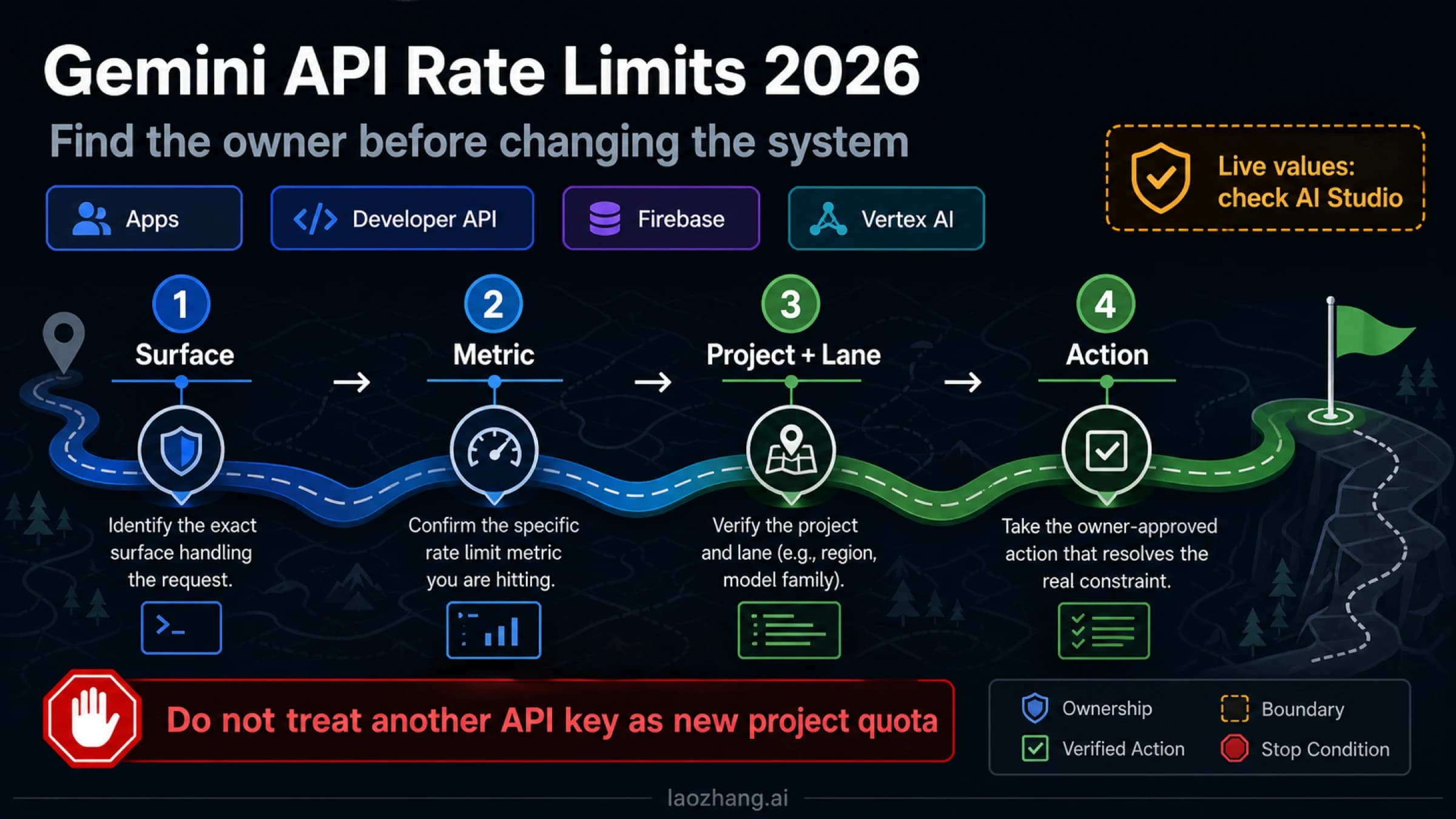
If your actual error is 429, use the Gemini API free-tier and live-quota guide instead of creating more keys. If permission recovery exposes a real usage-tier problem, the Gemini API Tier 3 guide covers the separate tier route. A key credential and a quota entitlement are not the same contract.
Verification and safe rollback
A repair is not complete when a new key exists. It is complete when the same controlled tests pass in the intended environment and the old state can be retired safely.
Use this closure checklist:
- Record the intended project, endpoint, API version, model path, and credential owner.
- Run
models.listwith the replacement or repaired restriction. - Run the same minimal generation request.
- Repeat the test from the deployed environment.
- Confirm monitoring, request IDs, and usage appear under the expected project.
- Update the secret manager and restart or redeploy the consuming process.
- Remove duplicate environment variables that could shadow the intended key.
- Disable the old key only after the replacement passes.
- Delete temporary response files and unset shell variables.
- Document the root cause and the exact change that fixed it.
Rollback means restoring the last known good restriction or deployment revision—not re-enabling a leaked key.
When to ask an administrator or Google for help
Ask the project or organization administrator when:
- you cannot import or inspect the project;
- you lack one of the current key-creation permissions;
- organization policy blocks key creation or use;
- application restrictions are centrally managed;
- the project, service account, tuned model, or billing owner belongs to another team.
Escalate through Google AI Studio feedback or the relevant Google Cloud support route when:
- the same sanitized 403 persists with a current key, correct project, correct endpoint, and valid restrictions;
- AI Studio reports blocked or suspicious activity across clean projects or keys;
- the denial follows the signed-in account while another authorized account behaves differently;
- the exact response names project denial or enforcement you cannot administer;
- you have a minimal reproduction and request ID but no self-service owner remains.
Include this packet:
| Evidence | Safe form |
|---|---|
| Project | Project ID; no billing data unless requested in a secure support route |
| Key | Source variable plus a short one-way fingerprint; never the full value |
| Request | Endpoint, API version, method, model, timestamp |
| Error | HTTP status, status name, sanitized body |
| Trace | Request ID or correlation ID |
| Canaries | Model-list and minimal-generation result |
| Environment | Local/CI/production, SDK/client version, deployment revision |
| Change history | Last success, first failure, rotation or restriction change |
Do not churn through new projects while account-level enforcement is unresolved. More objects create more evidence noise and may violate organization policy.
Prevention checklist
- Use one credential owner per environment.
- Keep
GOOGLE_API_KEYandGEMINI_API_KEYfrom silently competing. - Create keys through the current AI Studio path when appropriate.
- Restrict keys to the intended API and application origin.
- Put production calls behind a backend.
- Store keys in a secret manager, not source control.
- Use separate credentials for unrelated APIs and environments.
- Monitor usage and billing for unexpected calls.
- Rotate on exposure, not on every unrelated error.
- Keep a minimal model-list and generation canary in your runbook.
- Record project, endpoint, model, and restriction ownership before launch.
- Review dated Google key-policy changes during incident response.
FAQ
Why is my Gemini API key permission denied?
The key may be wrong, shadowed by another environment variable, attached to a different project, blocked or leaked, restricted against the current origin/API, or valid for baseline access but not for the requested model or action. Start with the failed action and the two canaries; do not assume IAM first.
Should I retry a Gemini API 403?
No. Google's current troubleshooting guidance treats 403 as a client-side permission or authentication error and says not to retry 400/403 errors. Change only the proven owner, then rerun the same canary.
Why can I use AI Studio but my API call fails?
AI Studio and your application may use different projects, accounts, credentials, endpoints, models, or restrictions. Compare the selected AI Studio project with the API key's owning project and the deployed secret fingerprint.
Why can I list models but not generate content?
Model listing proves baseline visibility, not authorization for every model or action. Inspect the requested model path, generateContent support, tuned-model ownership, endpoint, project policy, and exact 403 response.
Which variable wins: GOOGLE_API_KEY or GEMINI_API_KEY?
Google's current client-library guide says GOOGLE_API_KEY takes precedence when both are set. Remove or update stale duplicate variables only after you identify the active key.
Did Google block old unrestricted Gemini API keys?
Google's API-key guide says Gemini API began rejecting unrestricted standard keys on June 19, 2026. It also says long-dormant unrestricted keys can be blocked from May 7, 2026. Check the key status and restrictions in AI Studio instead of assuming every old key is blocked.
Do I need API Keys Admin to create a Gemini key in AI Studio?
Not always as the complete answer. roles/serviceusage.apiKeysAdmin covers standard API Keys service operations such as apikeys.keys.create. The current AI Studio authorization-key guide separately names resourcemanager.projects.get and iam.serviceAccountApiKeyBindings.create. Ask the administrator for the narrow permissions required by the failed action.
Can billing fix permission denied?
Not universally. Google's current table uses 400 FAILED_PRECONDITION for one unsupported-free-tier-region-without-billing case, while 403 belongs to permission/authentication. Use the exact status and message before changing billing.
Can I fix this by creating another project?
A project you legitimately own can solve a project-admin boundary, but it should not be used to evade organization policy, quota, review, or account enforcement. If clean projects reproduce the same account-level denial, stop creating more and escalate with evidence.
Final recovery rule
Treat a Gemini permission-denied error as an ownership problem, not a retry problem. Prove the failed action, active key, project, endpoint, key state, restrictions, and model authentication. Make one bounded change, repeat the same canaries, verify the deployment, and escalate only with sanitized evidence.
Sources3
External pages this guide links to, in the order they appear. Last updated Jul 12, 2026.
Sources3
External pages this guide links to, in the order they appear. Last updated Jul 12, 2026.