ChatGPT Usage Limits by Plan: Free, Go, Plus, Pro and Resets
As of October 8, 2026, everyday ChatGPT text chat is unlimited on every plan. Thinking, tools, Work and Codex have separate caps; few have published numbers.
On this page
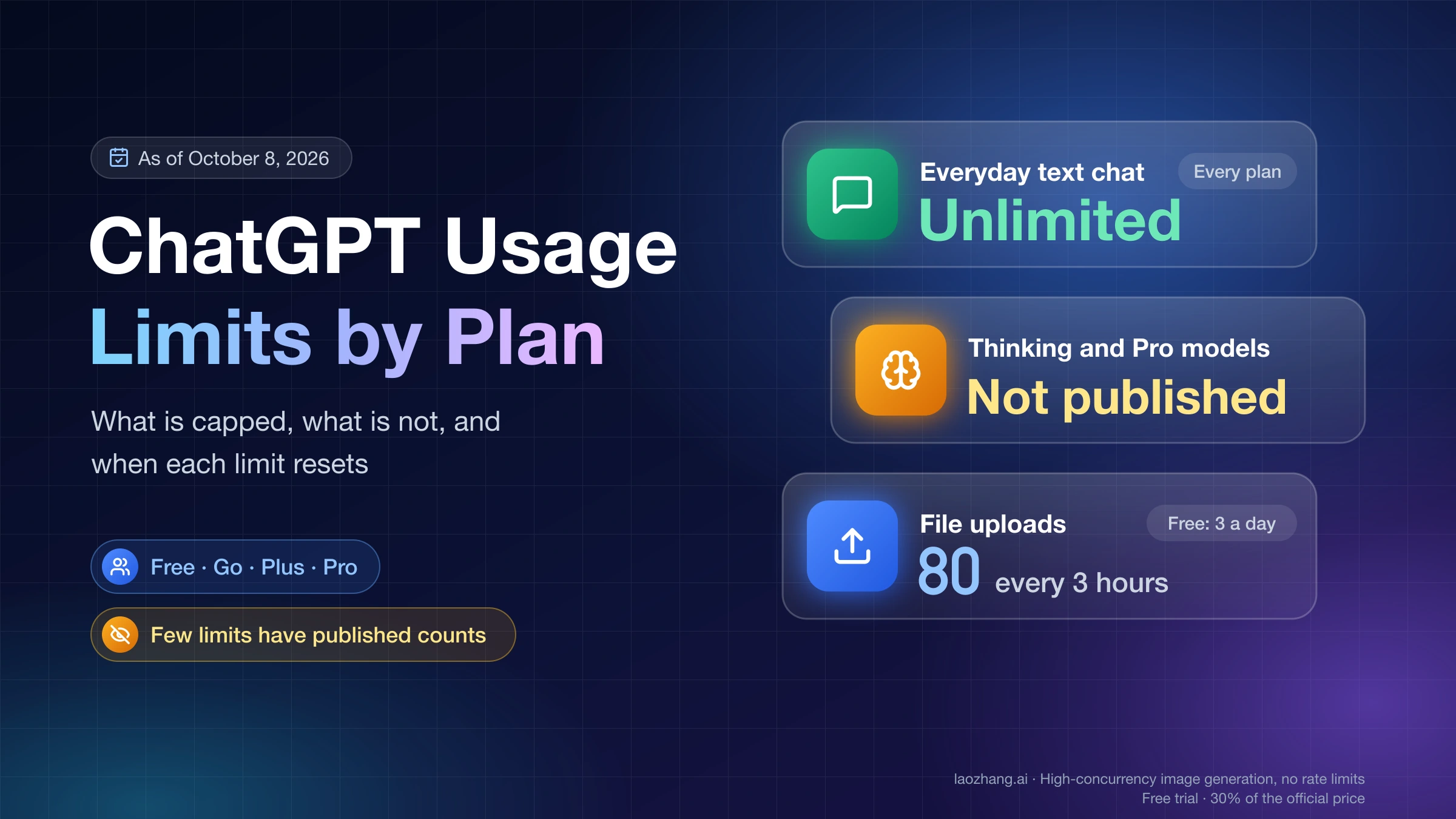
Every ChatGPT plan gives you unlimited everyday text chat, subject to OpenAI's abuse-prevention safeguards. Everything else has a separate limit: Thinking levels, Pro models, image generation, file uploads, voice, deep research, and the allowance that ChatGPT Work and Codex share. OpenAI publishes exact numbers for only a few of these. The table below shows each personal plan as of October 8, 2026, and says "not published" wherever OpenAI gives no count.
| Limit | Free ($0) | Go ($8/mo) | Plus ($20/mo) | Pro ($100, $200 or $500/mo) |
|---|---|---|---|---|
| Everyday text chat | Unlimited | Unlimited | Unlimited | Unlimited |
| Chat model | GPT-5.6 Luna, Instant and Think | GPT-5.6 Luna, Instant and Think | GPT-6 Sol (rolling out) | GPT-6 Sol, plus GPT-6 Pro on Pro 100 and Pro 200 |
| Thinking levels | None | None | Medium and High; count not published | Medium, High, Extra High and Pro; count not published |
| Pro models in Chat | Not included | Not included | Not included | Weekly GPT-6 Pro allowance; count not published |
| Image generation in Chat | Limited; count not published | Higher than Free; count not published | Limited; count not published | "Unlimited" on the plan card, abuse guardrails apply |
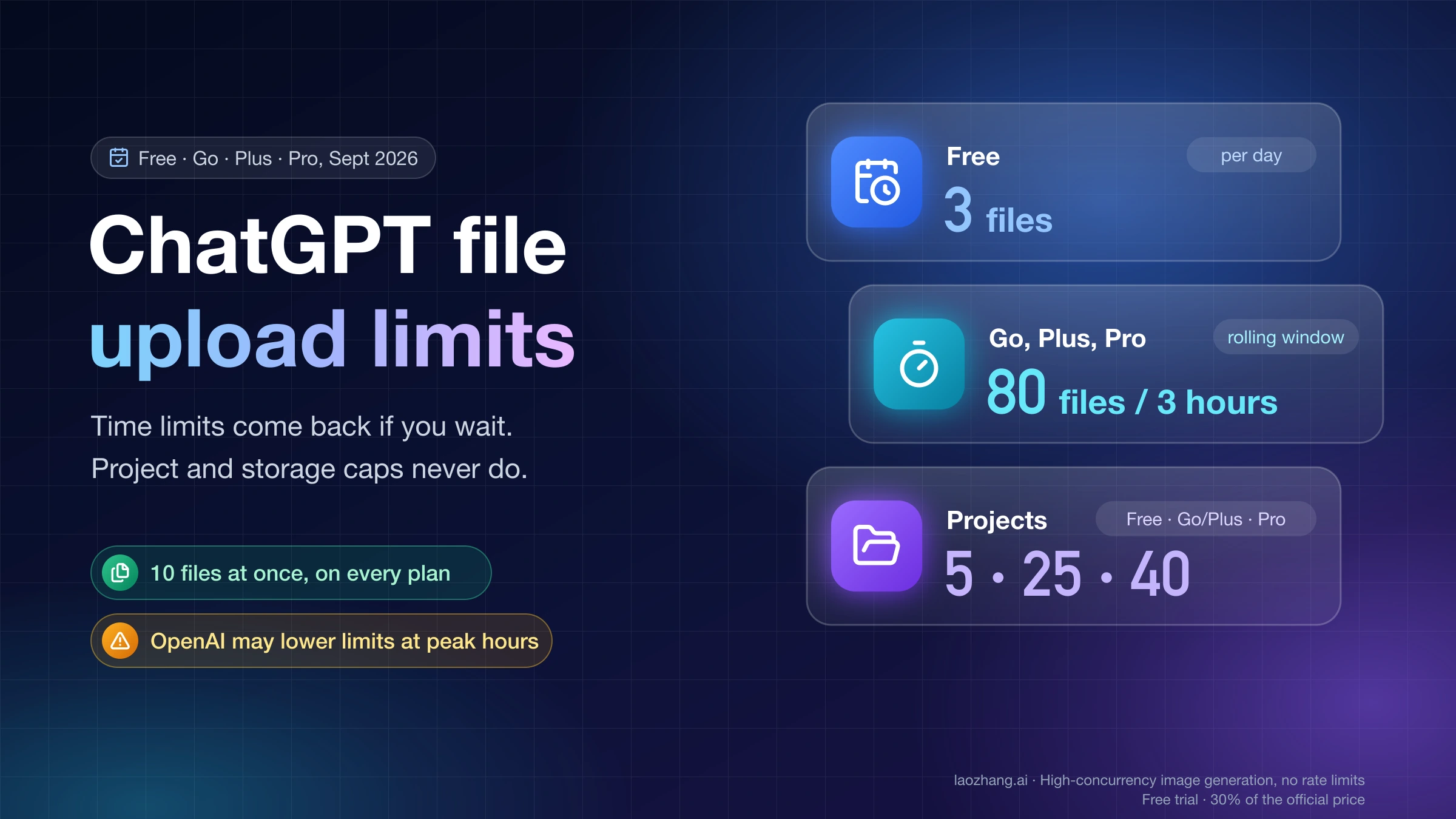
| File uploads | 3 per day | 80 every 3 hours | 80 every 3 hours | 80 every 3 hours |
| Files per project | 5 | 25 | 25 | 40 |
| Library storage | 500 MB | 4 GB | 20 GB | 100 GB |
| Voice | Limited; count not published | Count not published; OpenAI's pages conflict | Limited; count not published | Count not published |
| Deep research | Limited; count not published | Limited; count not published | Count not published | Count not published |
| Work and Codex, 5-hour window | Limited; GPT-6 Luna in the desktop app, rolling out | Same as Free | 5–45 (GPT-6 Astra) to 350–3,000 (GPT-6 Luna) local messages, estimated | No 5-hour limit |
| Work and Codex, weekly | Not published | Not published | May apply; not published | May apply; not published |
| Extra usage with credits | Not listed | Not listed | Yes, eligible Work and Codex usage | Yes; Ultrafast draws credits on Pro 500 only |
Prices are USD list prices; some countries are billed in local currency. "Unlimited" always means subject to abuse safeguards. Per-file caps are the same on every plan: 512 MB for documents and audio, 20 MB per image, and OpenAI may lower the upload rate during peak hours. The Pro column covers all three Pro tiers because OpenAI gives no per-tier counts; the differences it does publish are in the Pro section below.
Is ChatGPT unlimited? Only everyday text chat, on every plan
Everyday text chat is the only thing ChatGPT calls unlimited on Free, Go, Plus and Pro. OpenAI's GPT-6 and other models in ChatGPT help page says Free and Go users "have unlimited everyday text chats, subject to abuse-prevention safeguards," and adds that separate limits apply to file uploads, image generation, voice, data analysis and other tools. The Plus and Pro pricing cards use the same wording: "Unlimited text chats subject to abuse guardrails."
So "unlimited" on a plan card describes one row of the table. Once you pick a Thinking level, a Pro model, a tool, or start a task in Work or Codex, you are drawing from a separate allowance that can run out. The Pro card's "unlimited" image generation carries the same abuse-guardrail condition.
Thinking and GPT-6 Pro limits: capped, with no published counts
Thinking levels and Pro models have real limits, and OpenAI does not publish a message count for either on any personal plan. What it does publish is who gets which level and what happens at the limit.
- Free and Go have no Thinking levels. Both use GPT-5.6 Luna for everyday chat and for Think, and neither has GPT-5.6 Sol.
- Plus gets Medium and High. Extra High and Pro are not included. With GPT-6 selected, GPT-6 Sol powers both levels.
- Pro gets Medium, High, Extra High and Pro. The Pro level runs GPT-6 Pro, which is powered by GPT-6 Astra, or GPT-5.6 Sol Pro.
GPT-6 is still rolling out in Chat to eligible Plus and Pro accounts. If it is missing from your model menu, it may not be available for your account yet.
At a Thinking limit, "ChatGPT may continue with another available model." Pro models have their own cap: "A Pro subscription does not include unlimited use of the GPT-6 Pro model." On Pro 200, reaching the GPT-6 Pro weekly limit switches you to GPT-5.6 Thinking at Medium, and GPT-5.6 Sol Pro stays available only while its daily allowance and a combined daily allowance last. On Pro 100, GPT-6 Pro and GPT-5.6 Sol Pro draw from one weekly allowance, so switching between them does not add messages.
OpenAI's models page lists GPT-6 Pro in Chat for Pro $100 and Pro $200 and does not name Pro 500, while its Pro tiers page says every Pro plan includes Pro models. Whether Pro 500 gets GPT-6 Pro in Chat is not stated directly. Plus gets GPT-6 Astra only in Work and Codex, not in Chat.
What is the 5-hour limit? Plus Work and Codex estimates
The 5-hour limit is a rolling window on ChatGPT Work and Codex, which share one allowance that is separate from Chat. Plus has it. Pro does not: OpenAI's ChatGPT Learn pricing page for Work and Codex says "Pro plans currently have no five-hour limit." OpenAI adds that weekly limits may also apply.
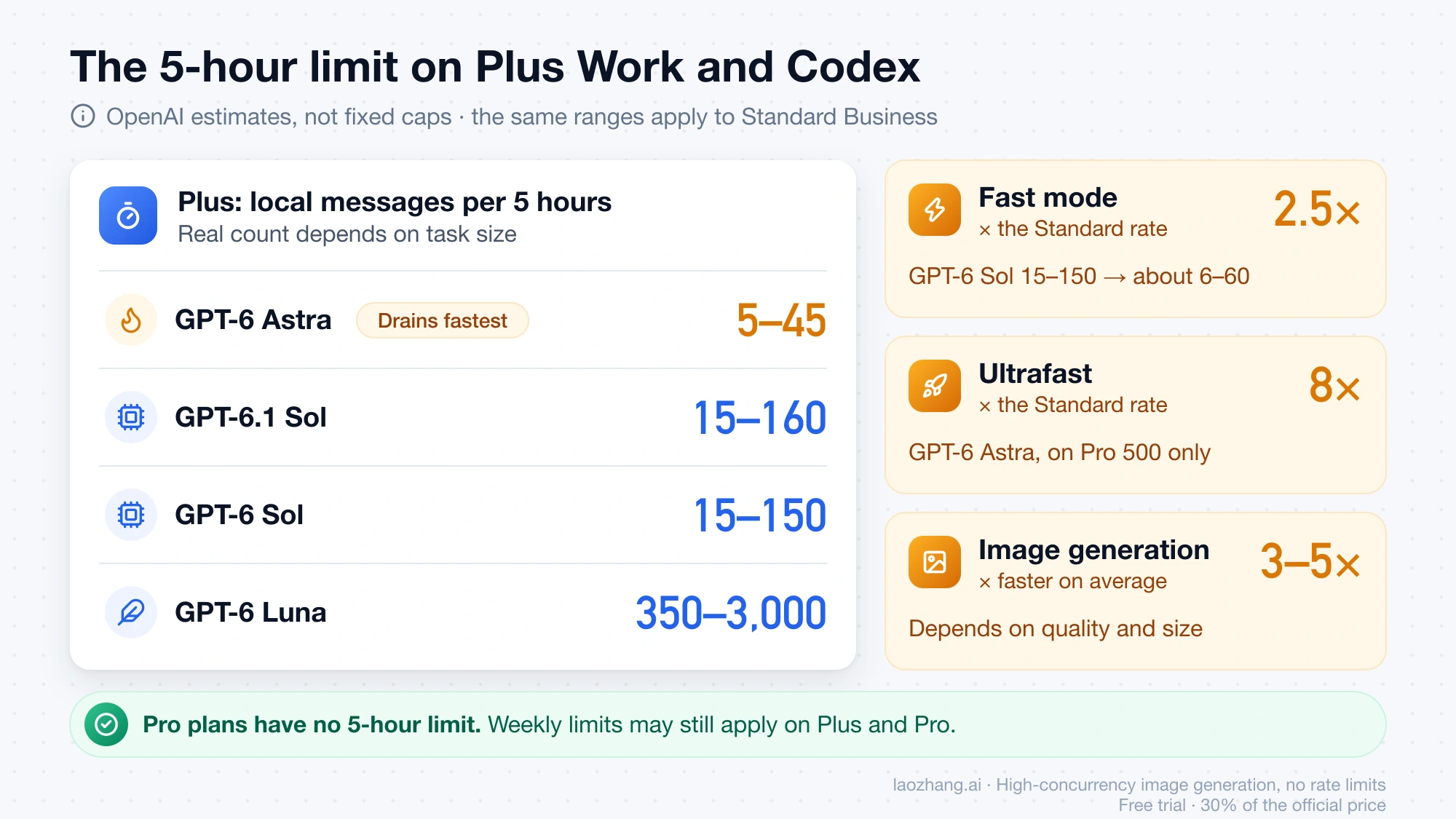
OpenAI gives these ranges for Plus as local messages per five-hour period. The same ranges apply to Standard Business.
| Model | Plus local messages per 5 hours |
|---|---|
| GPT-6 Astra | 5–45 |
| GPT-6.1 Sol | 15–160 |
| GPT-6 Sol | 15–150 |
| GPT-6 Luna | 350–3,000 |
These are estimates, not fixed caps. The real count depends on how large each task is, and cloud tasks can use more than local messages. Your usage dashboard shows the actual limit and reset time. Speed and media settings change the rate at which you use the allowance:
- Fast mode uses included usage at 2.5 times the Standard rate. A GPT-6 Sol range of 15–150 becomes roughly 6–60 messages in Fast mode (15 ÷ 2.5 and 150 ÷ 2.5).
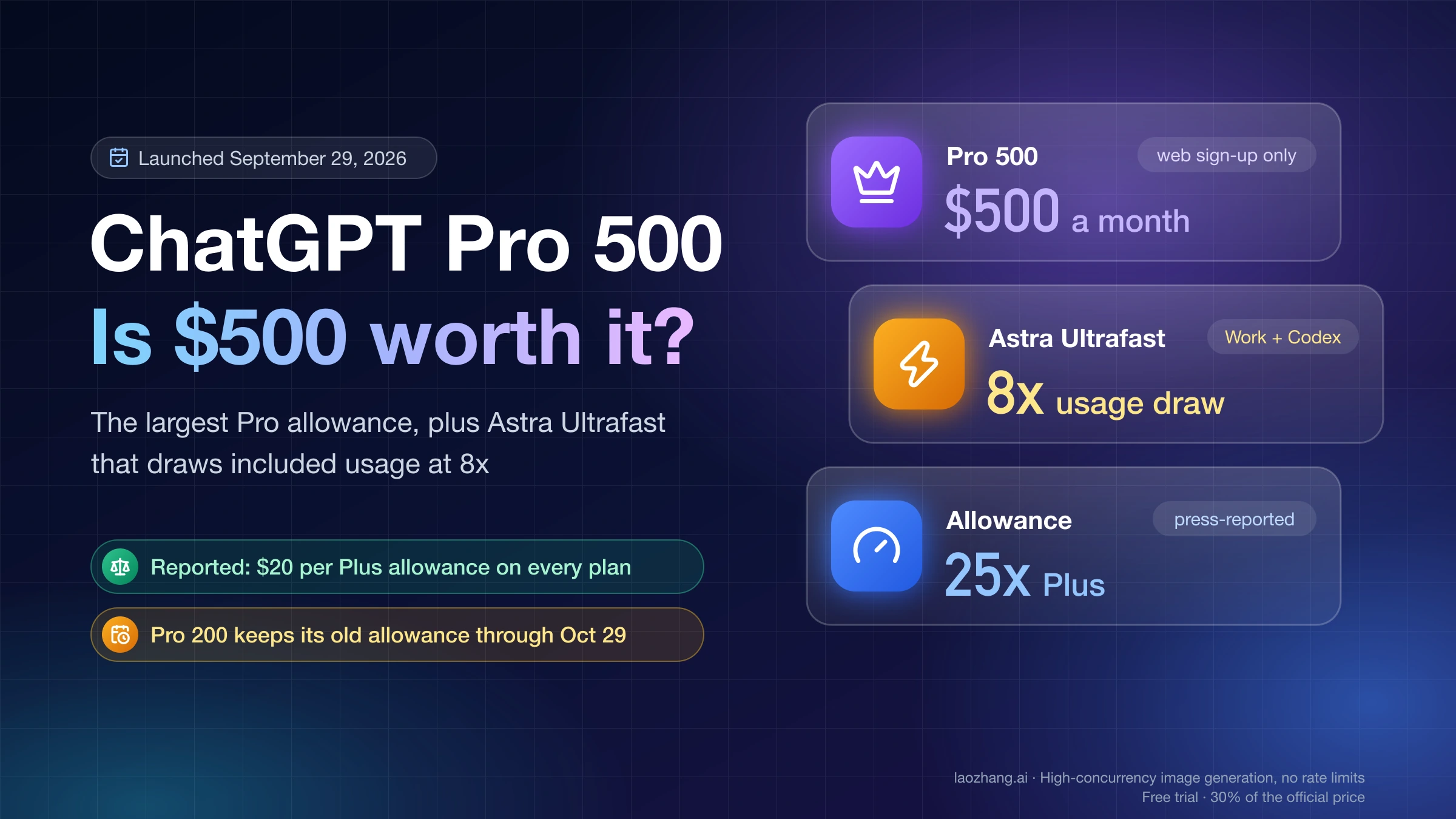
- GPT-6 Astra Ultrafast uses it at 8 times the rate and exists only on Pro 500 among personal plans.
- Image generation in Work and Codex uses included limits about 3–5 times faster on average, depending on quality and size. It is not available on Free.
- Voice in the desktop app draws on the Codex budget at $0.05 per minute.
Astra is the model that drains an allowance fastest. One X user reported having 8% of a weekly allowance left after about 30 minutes with GPT-6 Astra. That is a single report, but it matches the 5–45 range above.
The five-hour window on Plus is a recent return. Press reports, including Digital Trends and 9to5Mac, said OpenAI restored five-hour Work and Codex limits for Plus around August 25–26, 2026, after about six weeks of weekly-only limits. If you hit the limit during an active turn, the agent can finish that turn, subject to fair use. For finding your weekly reset time, see Codex Weekly Limit Reset: Find Your Time or Reset Now. For reading the meters inside Codex, see How to Check Codex Token Usage: /status, /usage, Context, and API Spend.
How many credits do you get with ChatGPT Plus? Credits are extra
Plus comes with included usage, not a credit balance. Credits are something Plus and Pro users buy when they reach a limit, and they extend only eligible usage: Codex, ChatGPT Work, and ChatGPT for Word, Excel and PowerPoint. OpenAI's About ChatGPT Pro tiers help page says credits "do not provide additional usage for every ChatGPT model or feature." Image generation in Chat is not credit-eligible, and ChatGPT credits are not OpenAI API credits.
Credits are charged per million tokens:
| Model | Input | Cached input | Output |
|---|---|---|---|
| GPT-6 Astra | 250 | 25 | 1,250 |
| GPT-6.1 Sol | 50 | 2.5 | 250 |
| GPT-6 Sol | 50 | 5 | 250 |
| GPT-6 Luna | 2.5 | 0.25 | 12.5 |
A task that reads 200,000 input tokens and writes 20,000 output tokens on GPT-6 Sol costs 0.2 × 50 + 0.02 × 250 = 15 credits. The same task on GPT-6 Astra costs 0.2 × 250 + 0.02 × 1,250 = 75 credits. Fast mode draws credits at 2 times and Ultrafast at 6 times the Standard rate.
The dollar price of a credit is not on these pages; OpenAI says purchase prices "depend on your plan or agreement." You can see your balance and buy credits in Settings → Usage in ChatGPT, or Usage & Billing in Codex. Any plan can also run extra local Codex chats with an API key, billed at standard API rates.
Images, uploads, voice and deep research limits by plan
Tool limits sit outside the text-chat allowance on every plan. Only uploads have published numbers.
Image generation: no published count on any plan
OpenAI's Images in ChatGPT help page says ChatGPT Images is available on all tiers and that images with thinking are on Plus, Pro and Business. It gives no count, window or reset rule. The plan cards only rank the plans: limited on Free, higher on Go, "limits apply" on Plus, and unlimited with abuse guardrails on Pro. Per-day figures circulating for Plus are user reports, not OpenAI numbers. For reported counts and what to do at the image limit, see ChatGPT Plus and Go Image Generation Limits: How Many per Day?.
File uploads: 80 every 3 hours, 3 a day on Free
OpenAI's help page on uploading files and audio to ChatGPT sets the rate at 80 files every 3 hours and 3 files a day on Free, and warns that OpenAI may lower these limits during peak hours. ChatGPT does not show how much of the rolling upload quota you have used. Projects hold 5 files on Free, 25 on Go and Plus, and 40 on Pro. Storage has two separate caps in OpenAI's documentation: 25 GB of shared upload storage per user, and Library storage of 500 MB on Free, 4 GB on Go, 20 GB on Plus and 100 GB on Pro. For sizes, project caps and storage, see How Many Files Can You Upload to ChatGPT? Free, Go, Plus, Pro. For image uploads specifically, see ChatGPT Plus Image Upload Limit: How Many Images Per Day?.
Voice: limited on every plan, minutes not published
Voice chats are limited and OpenAI publishes no minutes or session counts. For Go, OpenAI's own pages disagree. The What is ChatGPT Go help page says voice mode has "the same usage limits as the Free tier," while the Go plan card lists more voice chats than Free. Treat Go's voice allowance as unpublished, not as higher or equal.
Deep research: a task counter that resets every 30 days
Deep research has a per-plan task allowance with no published counts. The in-product counter shows how many tasks you have left. According to OpenAI's deep research in ChatGPT help page, plans with a fixed monthly allowance reset "every 30 days from the date of your first use," not on the first of the month. The plan cards describe Free as limited, Plus as enhanced and Pro as the highest level.
How to check how close you are to a ChatGPT limit
Chat does not show a running count for Thinking or Pro models. You see a reset time when you reach the limit, if ChatGPT has one to show. Other limits have their own meter or none at all.
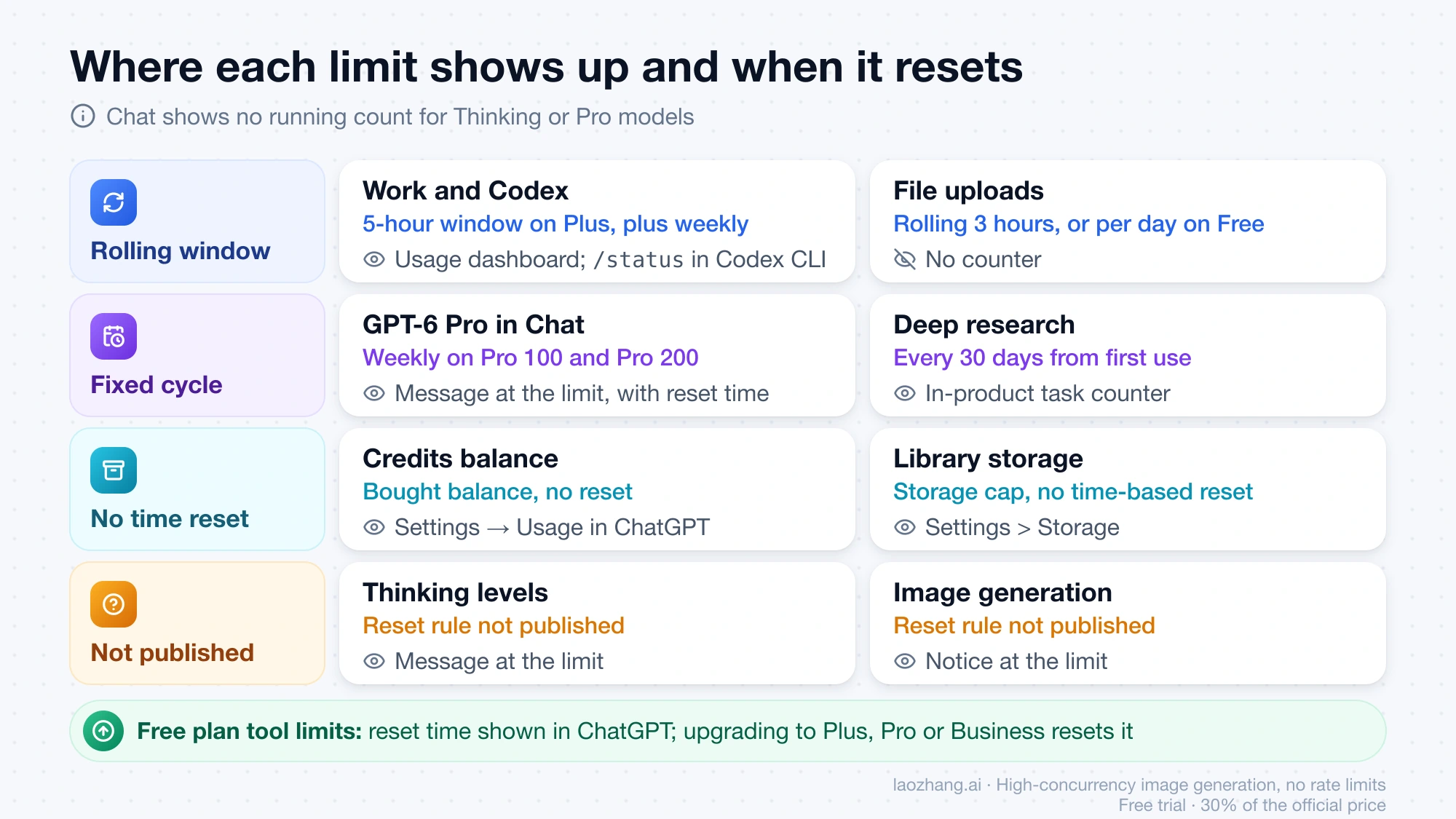
| Limit | Where you see it | When it resets |
|---|---|---|
| Thinking and Pro models in Chat | Message at the limit, with the reset time when available | GPT-6 Pro weekly on Pro 100 and Pro 200; GPT-5.6 Sol Pro daily on Pro 200; Thinking not published |
| Free plan tool limits | Notice in ChatGPT when you reach one | Time shown in the product; upgrading resets it |
| Work and Codex | Usage dashboard; /status in an active Codex CLI session | 5-hour window on Plus, plus weekly limits where they apply |
| Credits balance | Settings → Usage in ChatGPT; Usage & Billing in Codex | Bought balance, no reset |
| Deep research | In-product task counter | Every 30 days from first use |
| File uploads | No counter | Rolling 3 hours, or per day on Free |
| Library storage | Settings > Storage | Storage cap, no time-based reset |
| Image generation | Notice at the limit | Not published |
On Plus specifically, the reset time and what to do while you wait are covered in ChatGPT Plus Message Limit: Check the Reset and Keep Working.
What brings ChatGPT usage back after a limit
Waiting, switching models, upgrading from Free and buying credits for eligible features are the only ways back. There is no workaround: OpenAI says "you cannot bypass a limit or increase it through a setting."
- Wait for the reset time ChatGPT shows. For voice, deep research and Chat image generation, it is the only route.
- Use another available model. ChatGPT may continue on another model at a Thinking limit, and Pro 200 moves you to GPT-5.6 Thinking at Medium automatically.
- Upgrade from Free. The ChatGPT Free tier FAQ says a Free rate limit resets when you upgrade to Plus, Pro or Business. Go is not named in that sentence.
- Buy credits on Plus or Pro, which extend Work, Codex and the Office add-ins only, or run local Codex chats with an API key at API rates.
OpenAI Support does not reset ChatGPT or Codex usage limits. Contact Support only if usage looks counted wrong or access did not return after the stated reset time. Reaching a limit also does not mean your account is restricted. A misuse safeguard can cause a temporary restriction, and ChatGPT tells you when that happens.
Pro 100, Pro 200 and Pro 500: same features, different allowances
The three Pro tiers cost $100, $200 and $500 a month, billed monthly only. OpenAI says Pro 200 includes more usage than Pro 100 and Pro 500 has the highest of the three, but it publishes no counts or multiples. Press coverage of the September 29, 2026 launch put the allowances at about 5 times Plus for Pro 100, 10 times for Pro 200 (down from 20 times) and 25 times for Pro 500. Those multiples are reported, not OpenAI figures.
Two published differences matter for limits. Ultrafast is available only on Pro 500, and buying credits on Pro 100 or Pro 200 does not unlock it. And Pro 200 subscribers who had an active subscription at any point from September 22, 2026 through 10 a.m. Pacific Time on September 29, 2026 keep the previous, larger allowance through October 29, 2026. After that date the subscription moves to the lower allowance at the same $200 price. New Pro 200 subscriptions get the lower allowance from the start. For whether the top tier is worth it, see ChatGPT Pro 500: $500 Plan Limits and Ultrafast's 8x Usage Cost.
October 2026 dates that change ChatGPT limits
Three changes in progress as of October 8, 2026 can move the numbers in the table:
- October 14, 2026: GPT-5.5 retires from ChatGPT, ChatGPT Work and Codex on all plans. The OpenAI API is not affected.
- After October 29, 2026: grandfathered Pro 200 subscriptions drop to the lower included allowance.
- Ongoing: GPT-6 in Chat is still rolling out to eligible Plus and Pro accounts, so your model menu may lag the table.
To compare the GPT-6 models behind these limits, see GPT-6 Sol vs Terra vs Luna vs Astra: Which Model Should You Use?.
Why "160 messages every 3 hours" no longer describes ChatGPT Plus
Fixed counts such as 10 messages every 5 hours on Free, 160 messages every 3 hours on Plus, 50 DALL-E 3 images every 3 hours, or 10 deep research tasks a month on Plus come from the GPT-5, GPT-5.5 and DALL-E 3 era of 2025 and early 2026. None of them appears on OpenAI's current help or pricing pages as of October 8, 2026. Today Chat text is unlimited, Thinking and Pro-model counts are unpublished, and the only message ranges OpenAI gives are the Plus Work and Codex estimates above.
More questions about ChatGPT plan limits
Does ChatGPT Go have higher limits than Free?
Yes, for some features. OpenAI says Go has higher limits for image generation, file uploads and data analysis, though it gives no image or analysis counts. Uploads go from 3 a day to 80 every 3 hours, project files from 5 to 25, and Library storage from 500 MB to 4 GB. Text chat is unlimited on both, and neither plan has Thinking levels. Voice is the exception: OpenAI's Go help page says Go has the same voice limits as Free, while the plan card says more.
Is ChatGPT Pro $200 worth it after the October 2026 change?
It depends on which limit you keep hitting. Compared with Plus, Pro 200 removes the Plus five-hour window in Work and Codex and adds Extra High and GPT-6 Pro in Chat. From October 30, 2026, its allowance is the lower one for everyone, reported at about half of what it was. If you mostly hit Chat Thinking limits, Pro 100 also includes every Thinking level. If Pro 200 still runs out, Pro 500 is the only tier with more usage.
Does reaching a ChatGPT limit mean my account is restricted?
No. A usage limit pauses one model, tool or allowance until it resets, and it does not change your subscription. A separate safeguard against misuse can impose a temporary restriction, and ChatGPT notifies you if that happens.
Sources7
External pages this guide links to, in the order they appear. Last updated Oct 8, 2026.
Sources7
External pages this guide links to, in the order they appear. Last updated Oct 8, 2026.
- 1.GPT-6 and other models in ChatGPT help pagehelp.openai.com/en/articles/20001354-gpt-6-and-other-models-in-chatgpt
- 2.ChatGPT Learn pricing page for Work and Codexlearn.chatgpt.com/docs/pricing
- 3.About ChatGPT Pro tiers help pagehelp.openai.com/en/articles/9793128-about-chatgpt-pro-tiers
- 4.Images in ChatGPT help pagehelp.openai.com/en/articles/11084440-images-in-chatgpt
- 5.What is ChatGPT Go help pagehelp.openai.com/en/articles/11989085-what-is-chatgpt-go
- 6.deep research in ChatGPT help pagehelp.openai.com/en/articles/10500283-deep-research-in-chatgpt
- 7.ChatGPT Free tier FAQhelp.openai.com/en/articles/9275245-chatgpt-free-tier-faq