ChatGPT Plus Usage Limits 2026: Complete Guide to Message Caps, Model Quotas & Workarounds

A
12 min readAI Tools

ChatGPT Plus costs $20/month but comes with specific usage limits. This guide explains all message caps (150 GPT-4o/3hr, 100 o3/week, 300 o4-mini/day), how the rolling window works, what happens when you hit limits, and practical strategies to maximize your subscription value.

ChatGPT Plus Usage Limits 2026: Complete Guide to Message Caps, Model Quotas & Workarounds

ChatGPT Plus subscribers get significantly more capabilities than free users, but many don't fully understand how the usage limits work. The $20/month subscription provides 150 GPT-4o messages per rolling 3-hour window, 100 o3 messages per week, and 300 o4-mini messages daily—but these aren't simple daily resets. Understanding the rolling window mechanism and strategic quota management can mean the difference between hitting frustrating limits and having smooth, uninterrupted AI assistance throughout your workday.

TL;DR - Quick Reference Card

Here's what you need to know about ChatGPT Plus limits at a glance:

GPT-4o (Primary Model)

  • 150 messages per rolling 3-hour window
  • No fixed reset time—slots "expire" individually
  • Unlimited when downgraded to GPT-4.1 mini

Reasoning Models

  • o3: 100 messages per week (resets Sunday midnight UTC)
  • o4-mini: 300 messages per day (resets midnight UTC)
  • o4-mini-high: 100 messages per day

Image Generation (DALL-E 3)

  • 50 images per 3-hour rolling window
  • Same rolling mechanism as messages

When You Hit the Limit

  • Auto-downgrade to GPT-4.1 mini (unlimited)
  • Keep working with reduced capability
  • Full access restores as old messages "expire"

For detailed image upload limits for Plus subscribers, check our dedicated guide on file upload quotas.

Complete ChatGPT Plus Limits Reference (February 2026)

Complete ChatGPT usage limits comparison table showing Free, Plus, Team and Pro subscription tiers

Understanding the complete picture of ChatGPT limits requires looking across all subscription tiers and models. The complexity comes from different limits applying to different models, with various reset mechanisms.

Message Limits by Model

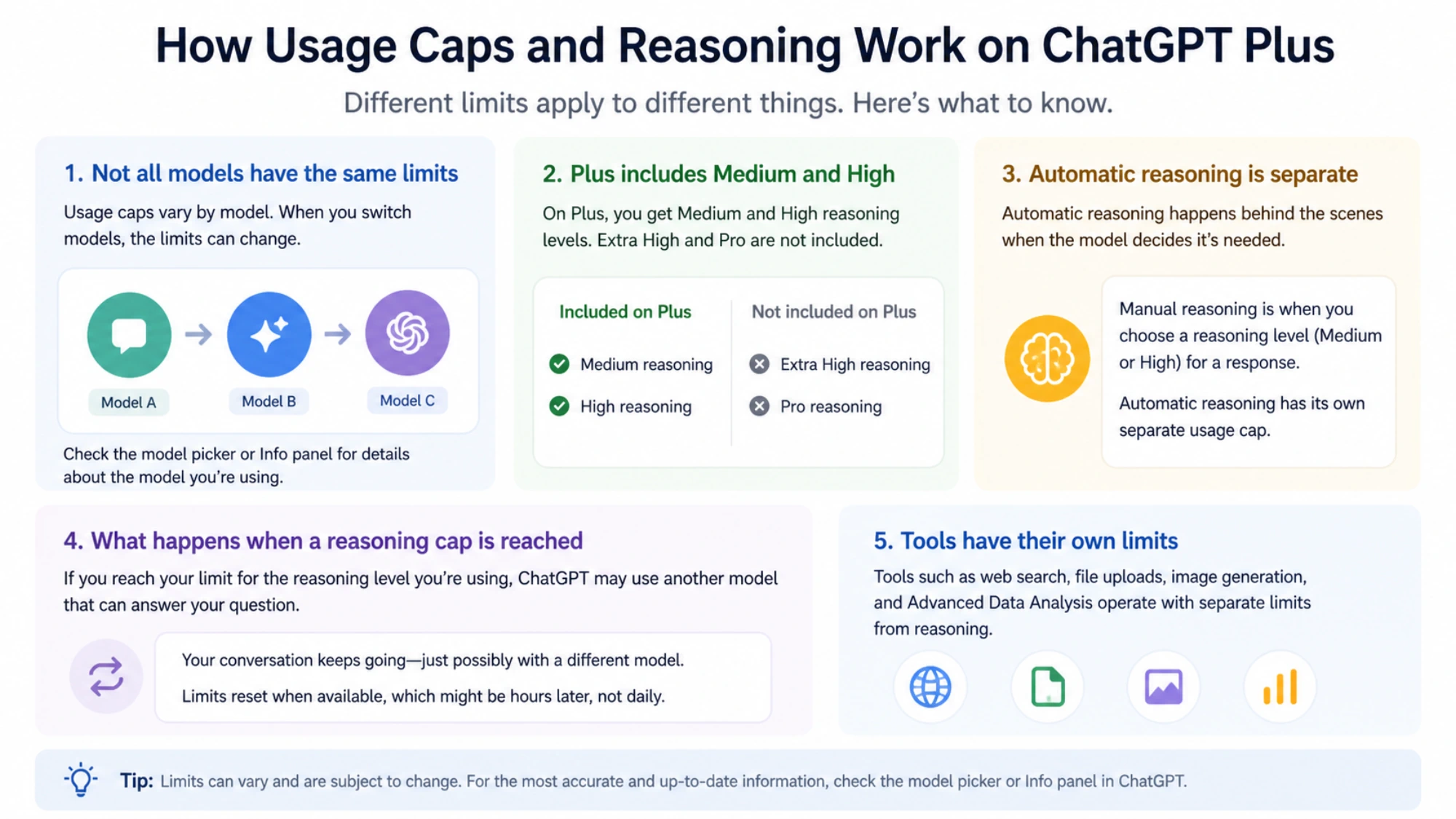
The most frequently asked question is "how many messages do I get?" The answer depends entirely on which model you're using. ChatGPT Plus provides access to multiple models, each with independent quotas. This means using up your GPT-4o limit doesn't affect your o4-mini availability, giving you strategic flexibility in how you allocate your usage.

GPT-4o serves as the primary model for most users, offering the best balance of capability and speed. With 150 messages per rolling 3-hour window, a steady user can send roughly 50 messages per hour indefinitely without ever hitting the cap. The key is understanding that this isn't a hard limit that resets—it's a continuous sliding window.

The reasoning models (o3 and o4-mini) operate on different schedules. The o3 model, designed for complex reasoning tasks, has a weekly limit of 100 messages that resets every Sunday at midnight UTC. Meanwhile, o4-mini offers a generous 300 messages per day with midnight UTC resets. These models excel at different tasks: o3 for deep analysis and complex problem-solving, o4-mini for quick iterations and simpler queries.

Subscription Tier Comparison

The value proposition changes dramatically as you move up the subscription ladder. Free users receive only 10 GPT-4o messages per 5 hours before being downgraded to GPT-4o mini for unlimited basic access. This represents a 15x message increase when upgrading to Plus, making the $20/month fee extremely cost-effective for regular users.

Team subscriptions at $25 per user per month double most Plus limits. GPT-4o increases to 300 messages per 3 hours, o3 doubles to 200 per week, and o4-mini reaches 600 per day. For organizations with consistent AI usage needs, the extra $5 per user provides substantial additional headroom.

The Pro tier at $200/month removes all message caps entirely. However, this premium pricing only makes financial sense for users who consistently need more than 1,000 messages per month across all models. For most professionals, Plus or Team provides adequate capacity.

Context Window Limits

Beyond message counts, context windows determine how much information ChatGPT can process in a single conversation. Plus users receive 128K tokens of context—roughly equivalent to a 300-page book. This allows for extensive document analysis, long conversations with full history retention, and complex multi-step tasks.

Pro users gain access to 196K tokens, a 50% increase that becomes valuable when working with very large documents or maintaining extremely long conversation threads. Free users are limited to 8K tokens, which can become restrictive during extended interactions.

Understanding the Rolling Window System

Visual timeline explaining how ChatGPT rolling window reset mechanism works

The rolling window mechanism is perhaps the most misunderstood aspect of ChatGPT Plus limits. Unlike traditional subscription services where usage resets at midnight, ChatGPT uses a continuous sliding window that tracks individual message timestamps.

How Individual Messages "Expire"

Think of your message quota as 150 tickets, each with a 3-hour lifespan. When you send a message at 9:00 AM, that "ticket" expires at 12:00 PM. If you send another at 9:30 AM, it expires at 12:30 PM. This individual tracking means your available quota constantly fluctuates based on when each message was sent.

Consider a practical scenario: you start working at 9:00 AM and send 50 messages by 10:00 AM. You continue with 50 more between 10:00 and 11:00 AM, and another 50 between 11:00 AM and noon. At this point, you've used your full 150-message quota. However, at 12:01 PM, those first 50 messages from 9:00 AM begin expiring, immediately freeing up quota. You don't need to wait until a specific time—slots become available continuously as old messages age out.

This continuous expiration means that users who spread their usage throughout the day rarely encounter hard limits. The system punishes burst usage but accommodates steady workflows. Understanding this distinction transforms how you should think about quota management.

Common Misconceptions Debunked

Many users believe limits reset at midnight, leading them to either rush usage before "reset" or wait unnecessarily for a new day. Neither approach is necessary with rolling windows. Your quota constantly refreshes as long as you're not sending messages faster than they expire.

Another misconception involves waiting the full 3 hours after hitting a limit. In reality, partial quota becomes available immediately as your oldest messages expire. If you hit the limit at 11:15 AM, you don't wait until 2:15 PM for full reset—messages start expiring at 12:00 PM (3 hours after your first messages from the current window).

The independent quota myth trips up many users. Using GPT-4o extensively does not reduce your o4-mini or o3 availability. These quotas track separately, allowing strategic model switching to extend your effective usage capacity.

Dynamic Limits and Peak Hours

OpenAI employs what they call a "smart throttle" system that can temporarily adjust limits based on system load. During peak usage periods—typically weekday business hours in North American and European time zones—you might encounter slightly stricter enforcement. Conversely, during off-peak hours like late night or early morning UTC, some users report being able to exceed stated limits modestly before hitting the cap.

This dynamic nature means published limits represent typical availability rather than absolute guarantees. Planning important AI-assisted work during off-peak hours can provide buffer capacity when needed.

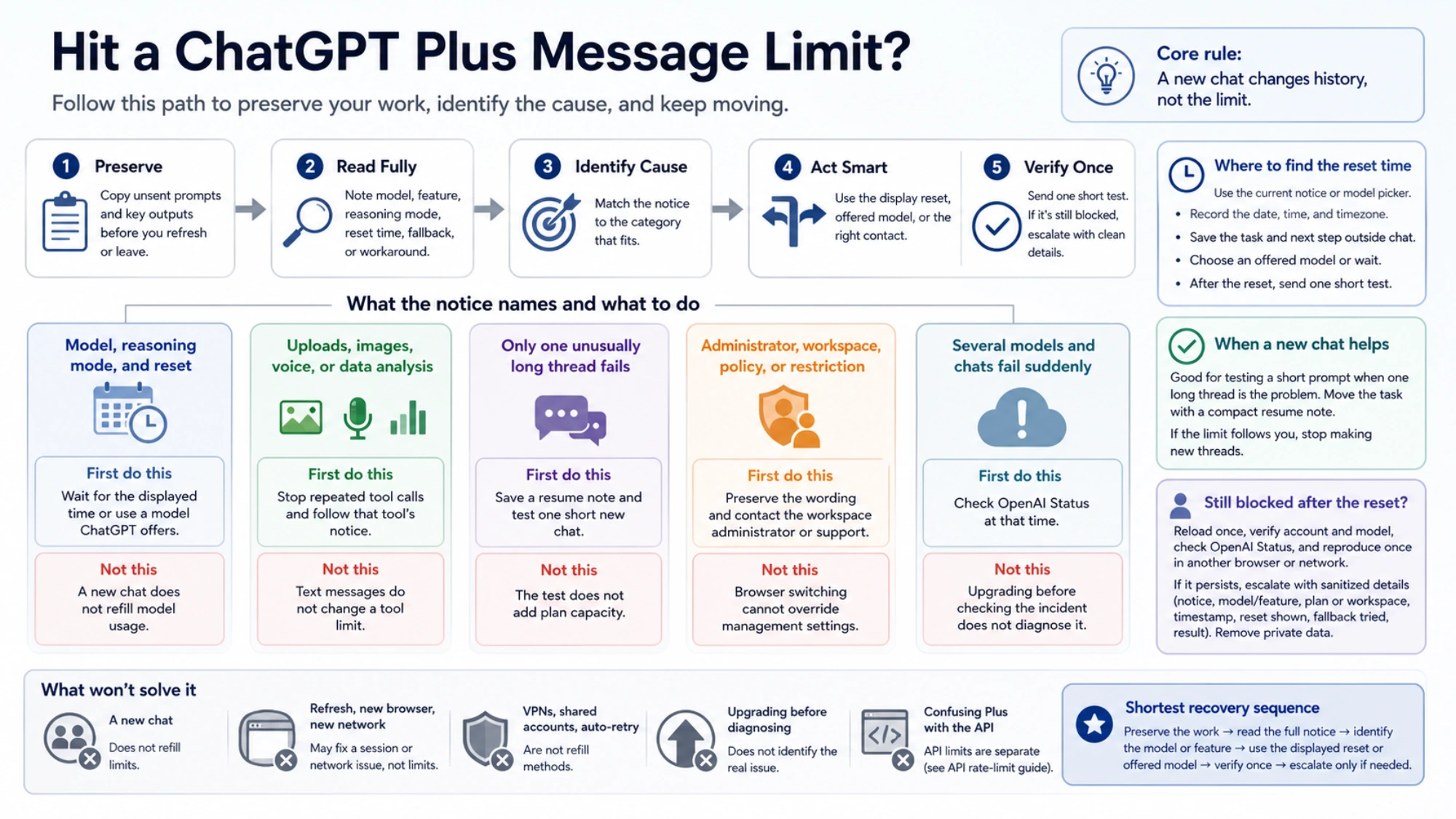
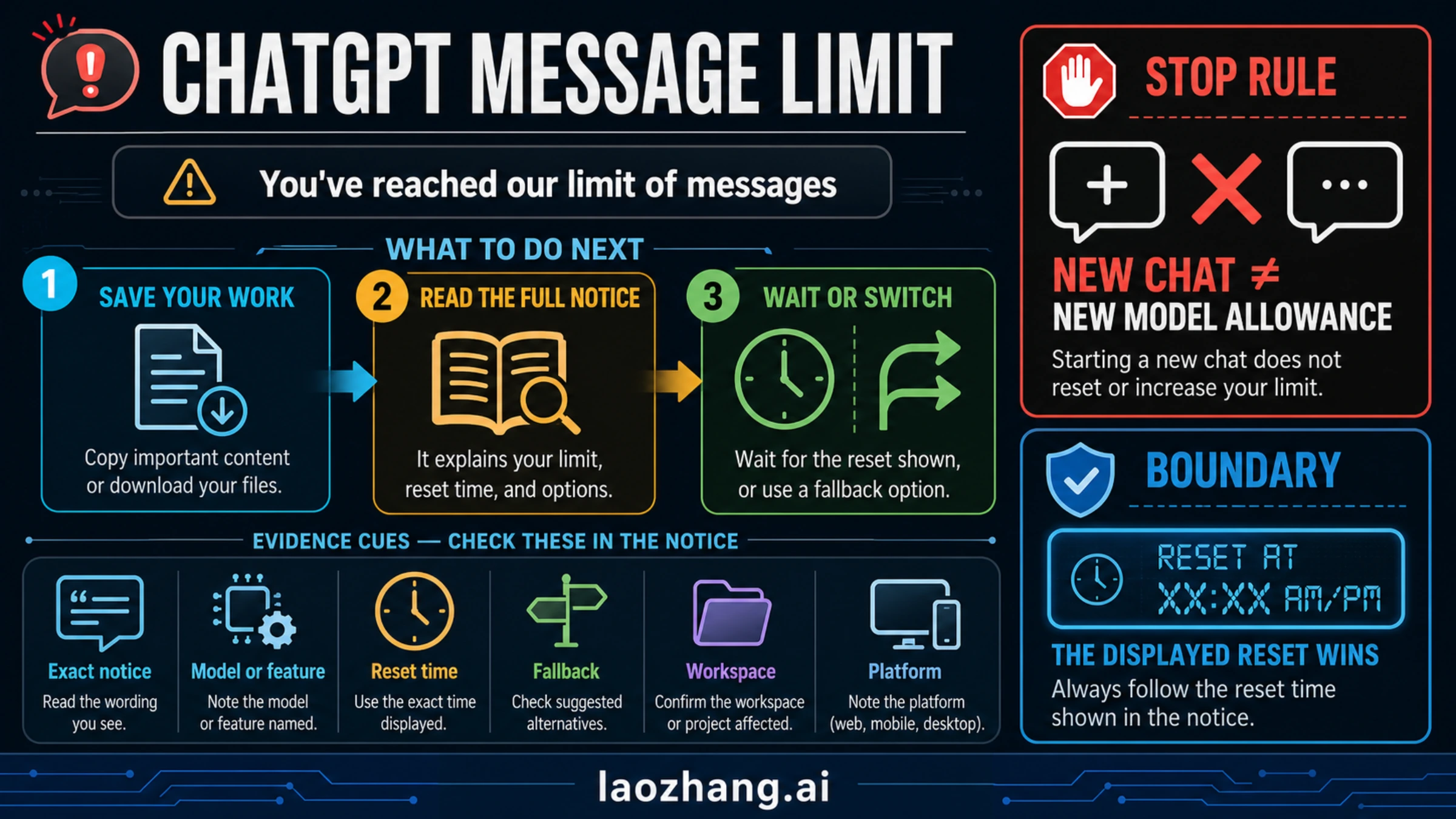
What Happens When You Hit the Limit

Reaching your message limit doesn't mean losing ChatGPT access entirely. OpenAI implements a graceful degradation system that keeps you productive while protecting their infrastructure from overload.

Automatic Downgrade Behavior

When you exhaust your GPT-4o quota, ChatGPT automatically switches to GPT-4.1 mini, a lighter model with unlimited usage. This transition happens seamlessly within your existing conversation—you don't need to start a new chat or manually select a different model.

GPT-4.1 mini provides competent responses for many tasks: basic writing assistance, simple coding questions, factual lookups, and general conversation. However, it lacks the nuanced understanding, creative capability, and complex reasoning that make GPT-4o valuable. You'll notice shorter, less detailed responses and occasional struggles with multi-step tasks.

The downgrade affects your current session and persists until quota frees up. As your oldest messages expire from the 3-hour window, full GPT-4o access gradually restores. This creates a natural recovery period where capability rebuilds over time.

Preserving Your Work

Conversation history remains intact through the downgrade process. All previous context, uploaded files, and established conversation threads continue functioning. The only change is response quality, not data access.

For time-sensitive work, this means you can continue iterating—albeit with reduced capability—rather than losing momentum entirely. Many users find that roughing out ideas with GPT-4.1 mini and then refining with GPT-4o once quota restores provides a reasonable workflow.

Recovery Timeline

Understanding recovery timing helps you plan around limits. If you hit the 150-message cap at 11:00 AM after a morning burst, here's what recovery looks like:

Your earliest messages from around 8:00 AM start expiring at 11:00 AM, immediately freeing small amounts of quota. By 11:30 AM, perhaps 30-40 slots have recovered. By noon, you're likely back to 50-60 available messages. Full quota restoration completes when your last burst message from 11:00 AM expires at 2:00 PM.

This gradual recovery means you don't face extended periods of pure GPT-4.1 mini usage unless you consistently overwhelm the system with burst traffic.

Free vs Plus vs Pro vs Team: Choosing the Right Plan

Selecting the appropriate ChatGPT subscription requires honest assessment of your usage patterns and workflow requirements. Each tier targets distinct user profiles with corresponding value propositions.

Evaluating Your Usage Needs

Start by tracking your current ChatGPT usage for a typical week. Count messages, note which models you use, and identify peak usage periods. Most users overestimate their needs—the fear of hitting limits looms larger than actual limit encounters.

Casual users sending fewer than 50 messages daily find Free tier adequate for basic tasks, with occasional limits being minor inconveniences. These users typically use ChatGPT for sporadic questions, light writing assistance, or occasional research.

Regular users sending 100-300 messages daily represent the Plus sweet spot. Writers, developers, researchers, and professionals who integrate ChatGPT into daily workflows receive excellent value at $20/month. The cost per message at high usage (approximately $0.004 per message at 5,000 monthly messages) represents remarkable value compared to human assistance costs.

Power users exceeding 500 messages daily should seriously consider Team or Pro tiers. The productivity cost of frequent limit encounters often exceeds the subscription cost difference.

Cost-Per-Message Analysis

Breaking down subscription costs by message volume reveals the true value equation:

Plus ($20/month)

  • Light usage (1,000 msgs): $0.020 per message
  • Regular usage (3,000 msgs): $0.007 per message
  • Heavy usage (5,000 msgs): $0.004 per message

Team ($25/user/month)

  • At 6,000 messages: $0.004 per message
  • At 10,000 messages: $0.0025 per message

Pro ($200/month)

  • Only cost-effective above 10,000 messages monthly
  • Primarily for users needing guaranteed uninterrupted access

For most professionals, Plus provides exceptional value. The subscription essentially costs less than a nice coffee per workday while providing AI assistance that can save hours of work.

When to Upgrade

Consider upgrading from Plus to Team when you consistently hit GPT-4o limits more than twice weekly and the interruptions affect productivity. The extra $5/user buys double the capacity, often worth the investment for reliable access.

Pro tier makes sense in specific scenarios: real-time customer support using AI, continuous research workflows, or situations where any usage interruption creates significant business cost. For most users, Pro represents overpaying for headroom they'll never use.

Tracking Your ChatGPT Usage

One frustrating aspect of ChatGPT Plus is the lack of official usage tracking. OpenAI doesn't provide a dashboard showing messages sent or remaining quota. This opacity requires users to implement their own tracking methods.

Manual Tracking Methods

The simplest approach involves keeping a running tally during work sessions. A basic notepad or notes app can track messages per hour, helping you stay aware of approaching limits before encountering them.

For more systematic tracking, consider time-based logging. Note when you start and stop ChatGPT sessions, roughly how many messages each session involved, and any limit encounters. Reviewing this log weekly reveals usage patterns and optimal work scheduling.

Spreadsheet enthusiasts can create simple trackers that log date, session times, estimated messages, and model used. Over time, this data reveals your actual usage profile, enabling informed subscription decisions.

Third-Party Tools

Several browser extensions and tools claim to track ChatGPT usage, though their accuracy varies. These tools typically monitor message sends in the browser and maintain local counts. While not officially supported by OpenAI, they can provide useful approximations.

Be cautious about tools requiring extensive permissions or account access. Simple message counters pose minimal risk, but anything requesting API keys or login credentials warrants skepticism.

Recognizing Limit Approach

Without explicit counters, recognizing approaching limits requires attention to behavioral signals. Slightly slower response times during peak usage can indicate system strain. More significantly, if you've been working intensively for 2+ hours sending frequent messages, you're likely approaching the 150-message window.

Develop intuition for your personal usage rate. If you typically send 20 messages per hour during focused work, three hours puts you near the limit. Adjusting this mental model to your workflow helps anticipate rather than encounter limits.

7 Strategies to Maximize Your Quota

Seven practical strategies to maximize your ChatGPT Plus subscription value

Beyond understanding limits, active optimization strategies can dramatically extend your effective quota. These techniques, refined by heavy users, represent practical approaches to getting more value from your subscription.

Strategy 1: Batch Related Questions

Instead of asking single questions in multiple messages, combine related queries into comprehensive prompts. A message like "I need help with three things: [A], [B], and [C]. Please address each separately" counts as one message regardless of internal complexity.

This batching approach can reduce message consumption by 60-80% for users who previously sent rapid-fire individual questions. The quality of responses often improves too, as ChatGPT can identify connections between batched items.

Strategy 2: Strategic Model Switching

Leverage the independent quota system by using appropriate models for different tasks. Reserve GPT-4o for complex reasoning, creative work, and nuanced analysis. Switch to o4-mini for simple queries, factual lookups, and basic formatting tasks.

This switching effectively doubles or triples your daily capacity. O4-mini's 300 daily messages handle most routine tasks competently, preserving GPT-4o quota for work that genuinely requires advanced capability.

Strategy 3: Spread Usage Temporally

Rather than intensive burst sessions, distribute AI usage throughout your workday. Instead of a 2-hour morning session with 100 messages, consider four 30-minute sessions spread across the day with 25-30 messages each.

This spreading ensures old messages continuously expire while you work, maintaining available quota. Users who adopt this pattern often report never hitting limits despite heavy overall usage.

Strategy 4: Optimize Initial Prompts

Investment in detailed initial prompts reduces follow-up messages dramatically. Include relevant context, specify output format requirements, mention constraints, and anticipate follow-up questions in your first message.

A well-crafted prompt might require 3 minutes to write but eliminates 5-10 clarifying exchanges. This optimization both conserves quota and produces better results through clearer communication.

Strategy 5: Consider API for Heavy Workflows

For usage substantially exceeding Plus limits, the OpenAI API offers an alternative without message caps. API pricing at approximately $0.0025-$0.01 per typical interaction can be more economical for very heavy users while providing unlimited access.

Services like laozhang.ai offer API access with additional benefits including multi-model support and competitive pricing. This approach suits developers and power users comfortable with API integration.

Strategy 6: Maintain Awareness Through Estimation

Without official tracking, develop rough mental estimates of your usage. After an intensive hour of ChatGPT work, pause to approximate messages sent. This awareness helps you pace usage rather than unknowingly approaching limits.

Consider logging significant sessions in a simple format: "9-11 AM: ~80 messages, research project." This log provides data for understanding your patterns and optimizing subscription choices.

Strategy 7: Evaluate Plan Fit Regularly

Review your usage patterns quarterly. If you consistently hit limits, upgrade. If you rarely approach them, consider whether you're getting full value from your current tier.

Usage needs evolve with projects, job changes, and AI capability improvements. The right subscription today may not match your needs in six months.

API vs Web: Different Limits for Developers

Developers working with ChatGPT face a choice between web interface and API access. These represent fundamentally different limit structures with distinct advantages.

Web Interface Limits

The web interface (chat.openai.com) applies the message-based limits discussed throughout this guide. These limits exist regardless of whether you interact manually or through browser automation. The web interface provides convenience, conversation history, file uploads, and integrated features like image generation.

Web limits apply per-account, not per-session. Opening multiple browser tabs doesn't multiply your quota. The system tracks your account's total message volume regardless of access method.

API Limits

The OpenAI API uses token-based rather than message-based limits. Instead of 150 messages, you receive rate limits on tokens per minute (TPM) and requests per minute (RPM). These limits scale with your usage tier, starting at 60,000 TPM for new accounts and increasing with spend history.

API pricing follows pay-per-use models—you pay for tokens consumed rather than subscribing to message allocations. For GPT-4o, current pricing runs approximately $2.50 per million input tokens and $10 per million output tokens. A typical conversation message might consume 500-2000 tokens total.

Choosing Your Access Method

Web interface suits users who value convenience, integrated features, and predictable monthly costs. The subscription model works well for moderate, consistent usage.

API access benefits developers building applications, power users with irregular intense needs, and those requiring programmatic access. The usage-based pricing can be more economical for very heavy users or more expensive for light users—evaluate based on your specific patterns.

Comparing to alternatives like Gemini's free tier API limits can help contextualize OpenAI's offerings in the broader AI API landscape.

Frequently Asked Questions

Do limits reset at midnight?

No. ChatGPT Plus uses rolling windows, not fixed daily resets. Your GPT-4o quota recovers continuously as messages from 3+ hours ago expire. Only o4-mini (daily at midnight UTC) and o3 (weekly on Sunday midnight UTC) use fixed resets.

Can I check my remaining messages?

Unfortunately, OpenAI doesn't provide an official usage dashboard. You must track usage manually or use third-party browser extensions that approximate message counts.

What happens when I hit the limit mid-conversation?

ChatGPT automatically switches to GPT-4.1 mini and continues the conversation with reduced capability. Your conversation history and context remain intact.

Do all models share the same quota?

No. GPT-4o, o3, o4-mini, and image generation each have independent quotas. Using one doesn't reduce availability of others.

Is Pro worth $200/month?

Only for users needing 10,000+ messages monthly or those who cannot tolerate any usage interruptions. Most professionals find Plus adequate.

Do Custom GPTs count against my quota?

Yes. Interactions with Custom GPTs consume your message allocation, sometimes at higher rates for complex tools with multiple internal calls.

Can I get more messages without upgrading?

Yes. Using the API instead of web interface removes message caps (replacing them with token-based limits). Model switching between GPT-4o and o4-mini also effectively extends capacity.

Why did OpenAI implement these limits?

Running large language models requires massive computational resources. Limits ensure fair access across millions of users, prevent abuse, and maintain service reliability during peak demand.

Understanding ChatGPT Plus usage limits transforms frustration into strategic advantage. By recognizing how rolling windows work, leveraging model switching, and optimizing your usage patterns, you can extract maximum value from your subscription while rarely encountering hard limits. The $20/month investment provides remarkable capability—knowing how to fully utilize it makes the difference between a good tool and an indispensable productivity multiplier.