Codex Weekly Limit Reset: Find Your Time or Reset Now
There is no universal Codex reset day. Use your account’s Usage page to find the actual time, then decide whether to wait, buy an eligible instant reset, use a banked reset, spend credits, or switch to separately billed API usage.
On this page

There is no universal weekday or hour when every Codex account resets. If Codex says you have reached a weekly limit, open the signed-in account’s Settings → Usage page and read the reset time shown there. Another user’s screenshot, your subscription renewal date, or an announcement about a global reset cannot identify your normal reset time.
Work and Codex share your plan’s usage allowance, including local messages and cloud chats. Both a five-hour window and a weekly limit may apply. Included usage is available only while you have allowance left in every applicable window; eligible accounts may continue with usage credits after reaching those limits. OpenAI’s Work and Codex pricing documentation explains these shared limits and points to the Usage dashboard for current balances and reset times.
Check your actual Codex reset time
Use the account and workspace that produced the warning:
- Open Codex on the web or desktop app and go to Settings → Usage.
- Confirm that you are viewing the intended account and workspace.
- Look for both the five-hour and weekly windows, including their remaining allowance and reset times.
- In an active CLI session, run
/statusto check remaining limits. Use the Usage page for reset times and purchase options. - After any reset, refresh Usage and verify both windows before starting another large task.
Read the time and timezone when the interface provides them. If Usage shows only a date, it does not establish the exact hour; check again near the displayed reset. A full banked reset or a purchased instant reset can move the weekly date, so an older screenshot or third-party countdown may no longer be accurate.
Do not calculate a weekly message quota by multiplying a published five-hour estimate. Usage varies with the model, task complexity, conversation length, and tools used. Those estimates cannot tell you how many tasks your weekly allowance will cover.
Five-hour and weekly windows are separate
These windows govern included plan usage. Credits, where supported, can let you continue after that allowance runs out.
| What you see | What it means | What happens next |
|---|---|---|
| Five-hour window exhausted, weekly allowance remains | The shorter window has no included usage left | Wait for that window to reset; a weekly-limit banner may not appear |
| Weekly allowance exhausted | No weekly included usage remains | Wait for the timestamp in Usage or review an eligible reset or credit option |
| Both windows exhausted | Both must refresh before included usage can resume | Confirm that any reset you use refreshes both windows |
| Token or context percentage is high | The current session is large | It does not by itself reveal remaining five-hour or weekly allowance |
| An API request is rate-limited | A separately billed API organization, project, or model limit was reached | Diagnose the API error; a Codex subscription reset will not fix it |
What a paid instant weekly reset does
OpenAI now documents an instant paid weekly reset for Work and Codex. It may be offered to eligible ChatGPT Plus and Pro personal accounts on the web or in the desktop app. Availability depends on the account and billing country; the page does not publish one price that applies to everyone.
An eligible account may see the purchase in two places:
- In desktop Settings → Usage after some allowance has been used.
- In an offer shown after the weekly allowance is exhausted.
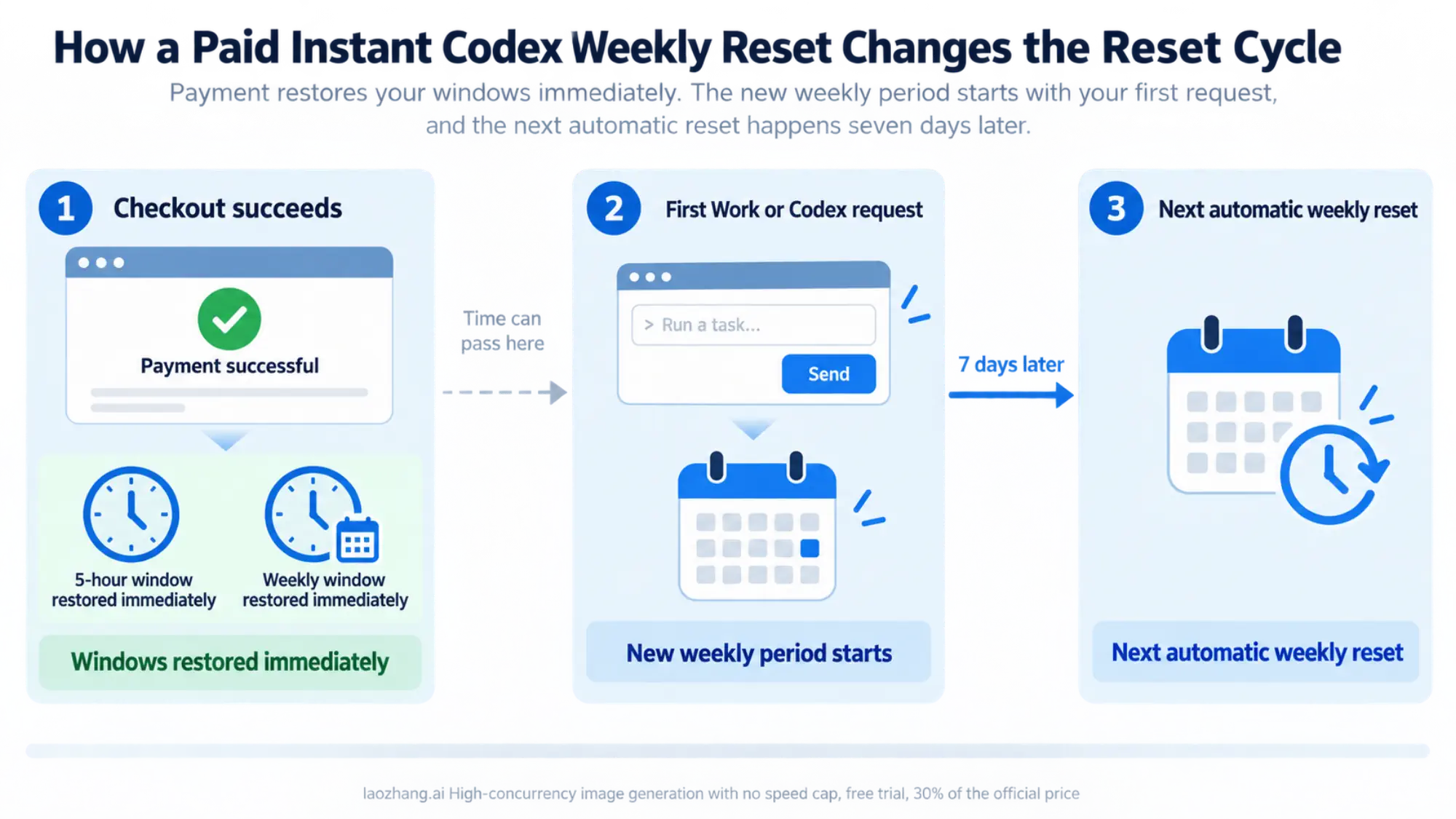
Successful checkout immediately restores the applicable five-hour and weekly usage windows. Before confirming, understand four consequences:
- The reset applies immediately, even if some included allowance remains.
- It cannot be saved for later or scheduled.
- It pulls the normal weekly allowance forward; it does not create a second weekly allowance on top of the current one.
- The new weekly period begins with the first Work or Codex request after the reset is applied. The next automatic weekly reset is seven days after that request, not necessarily seven days after payment.
For example, suppose checkout succeeds Monday afternoon but you do not send another Work or Codex request until Tuesday morning. Under the documented rule, Tuesday’s first request starts the new weekly period. The next automatic reset is seven days after that request. This example explains the timing rule; your Usage page remains the source for the actual timestamp.
If only the five-hour window is exhausted and the task can wait, check its reset time before paying. OpenAI says weekly reset purchases are generally nonrefundable, subject to the terms and rights that apply to the account and jurisdiction.
The documented paid option is not available to Free, Go, Business, Enterprise, or Edu accounts. Even on Plus or Pro, the absence of a purchase option does not prove that the interface is broken; the offer can vary by account and billing country.
Instant resets, banked resets, and credits are different
The labels can sound similar, but each option changes a different part of the account.
| Option | What it gives you | Does it change the weekly reset? | Can you save it? |
|---|---|---|---|
| Paid instant reset | Immediate restoration of the applicable five-hour and weekly windows | Yes; a new weekly period starts with the first request after application | No |
| Full banked reset | A promotional one-time refresh of eligible five-hour and weekly windows | Yes; the weekly reset date changes | Yes, until use or expiration |
| Usage credits | Pay-as-you-go supported usage after included limits | No; credits do not restart the weekly allowance | They remain a balance under the applicable credit terms |
| Automatic or global reset | A reset OpenAI applies directly | It can refresh the affected window | No stored reset is created |
Use a banked reset only after checking its scope
A banked Codex reset is a promotional benefit stored in an eligible account until it is used or expires. It is not the same as buying an instant reset. Review the offer in Settings → Usage, including its expiration date and the windows it affects, before confirming it.
A full banked reset can refresh both the five-hour and weekly periods and change the weekly reset date. It is consumed only when at least one eligible period is actually refreshed. Eligibility, delivery, expiration, and affected limits can vary by offer, plan, workspace, and region. A past launch promotion is not evidence that another reset will arrive later.
A banked reset is not cash, API credit, a transferable balance, or a permanent increase to the plan. Automatic or global resets are separate events: they can be applied directly without adding anything to the banked-reset balance.
Credits extend usage but do not restart the clock
Where the account supports them, usage credits let eligible Work or Codex activity continue after included usage is exhausted. They do not reset the weekly allowance or move its reset date. Check the account’s purchase screen for the actual price, supported usage, and terms.
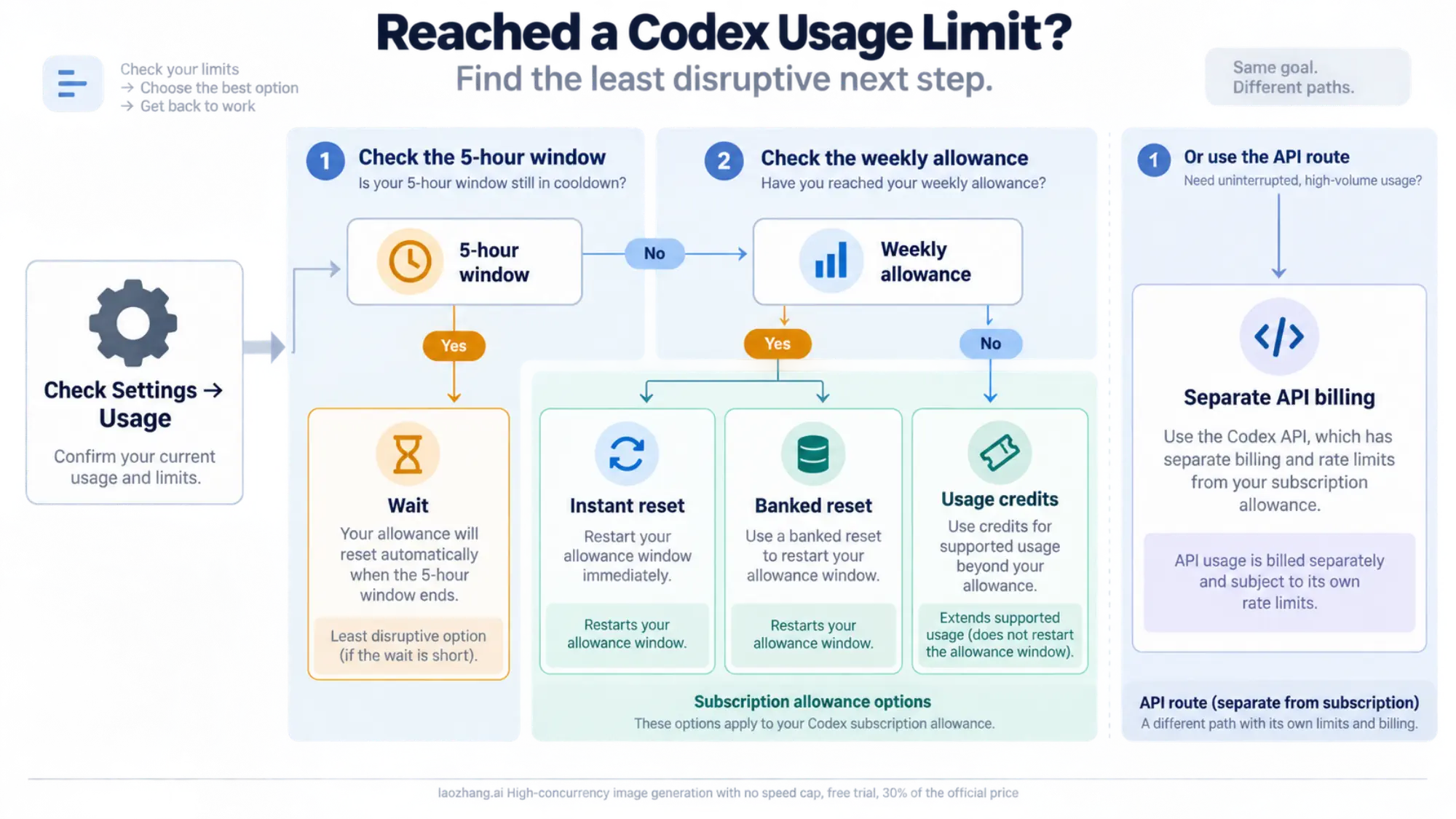
Choose the least disruptive way to resume work
| Your situation | Best next check |
|---|---|
| The task can wait | Note the blocking window’s reset time in Usage and resume afterward |
| A five-hour window is the only blocker | Wait for that window unless an immediate reset is worth its account-specific price |
| An eligible paid instant reset is offered | Review the immediate application, new weekly-cycle timing, and checkout terms before buying |
| A banked reset is available | Check its expiration and affected windows, then use it only when the refresh is valuable |
| Credits are available | Confirm the supported activity and price; remember that the weekly clock does not restart |
| A local task supports API-key sign-in | Check separate API charges, limits, and supported features before switching |
When usage remains, you can often make the allowance last longer by narrowing the task, starting a fresh session when the old conversation is no longer useful, or choosing a lighter model for a simple job. These choices reduce future consumption; they do not restore an exhausted allowance.
API-key usage is a separate billing route
Local Codex supports API-key sign-in, with separate OpenAI Platform billing and rate limits. It does not use or replenish your subscription allowance, banked resets, or Work/Codex credits. API rate limits can still stop a request even when the API account has funds.
Codex cloud requires ChatGPT sign-in, so an API key cannot replace a subscription for every task. Check the API key versus subscription guide for supported features and billing differences before switching.
If an API request fails, check its error message rather than buying a Codex subscription reset. The API rate-limit troubleshooting guide explains when to retry, reduce request volume, or check billing.
If a reset was applied but Codex still looks blocked
First, refresh or reopen Usage and verify the account and workspace. Then compare the five-hour and weekly windows individually. A reset of one window may leave the other exhausted, and an old page can continue displaying stale data.
For a purchased instant reset, confirm that checkout actually succeeded. For a banked reset, confirm that the offer covered the window you expected and that at least one eligible period was refreshed. After a reset, rely on the newly displayed times rather than calculating them from the previous schedule.
If the discrepancy persists, contact OpenAI Support with the account and workspace, the type of reset, the purchase or application time and timezone, the client used, and screenshots of Usage before and after. Do not post receipts, full account identifiers, or API keys in a public forum.
Frequently asked questions
Did Codex reset today?
Check whether the remaining weekly allowance and timestamp changed in Usage. A news post, community screenshot, or automatic reset affecting other accounts is not proof that your account reset. Also check the five-hour window, because it can remain the active constraint.
Why do I not see the paid reset after hitting the five-hour limit?
Exhausting only the five-hour window does not trigger the weekly-limit offer. An eligible desktop account may still show an option in Settings → Usage after some allowance has been used, but availability varies. If no option appears, wait for the displayed window or use another option that the account actually provides.
Sources4
External pages this guide links to, in the order they appear. Last updated Sep 20, 2026.
Sources4
External pages this guide links to, in the order they appear. Last updated Sep 20, 2026.
- 1.Work and Codex pricing documentationlearn.chatgpt.com/docs/pricing
- 2.Usage dashboardchatgpt.com/codex/settings/usage
- 3.instant paid weekly reset for Work and Codexhelp.openai.com/en/articles/20001507-paid-weekly-work-and-codex-rate-limit-resets
- 4.banked Codex resethelp.openai.com/en/articles/20001498-how-banked-codex-resets-work