How to Check Codex Token Usage: /status, /usage, Context, and API Spend
Use /status for the current session and context, /usage for account token activity, /statusline for ongoing display, Platform Usage for API spend, and local logs only as estimates.
On this page
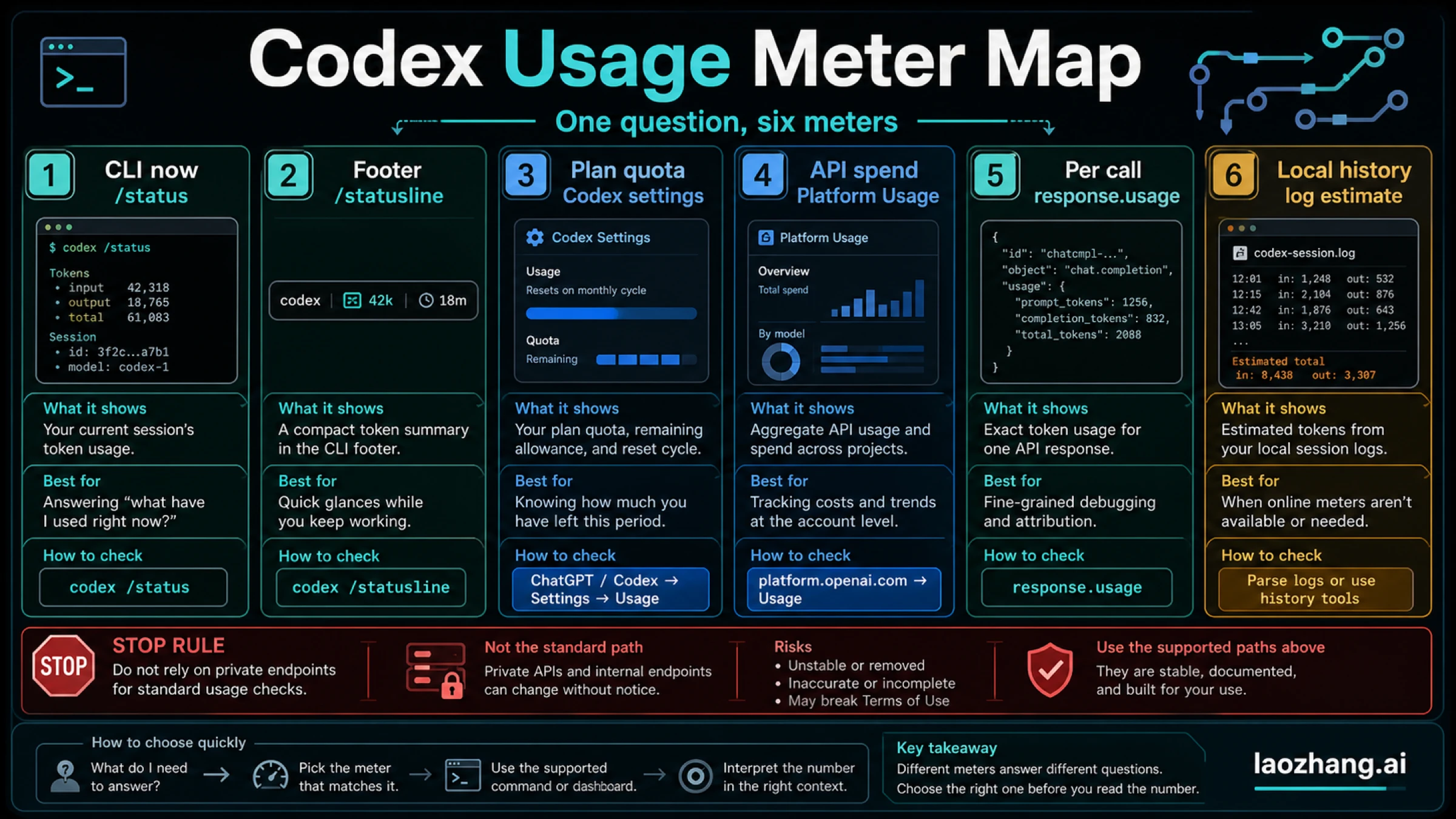
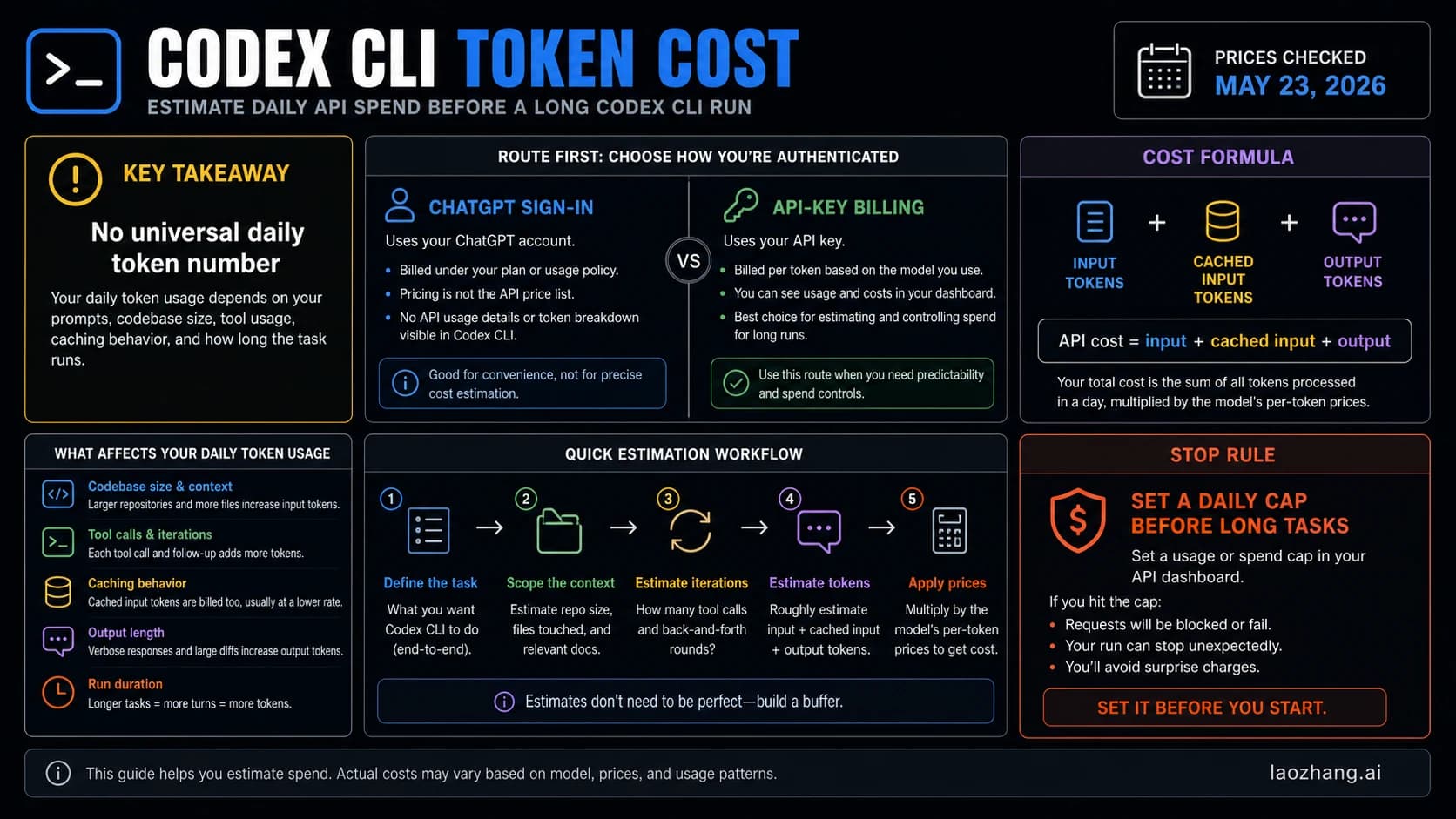
There is no single Codex token usage or context number. If you are inside Codex CLI, run /status to check the current session; use /statusline when you want context stats and token counters visible while you work. For account quota or money, change surfaces: Codex or ChatGPT usage settings show plan quota or credits, OpenAI Platform Usage shows API organization usage, and a completed API response's usage object shows per-call tokens.
Choose the meter by the question:
- Current CLI session:
/status - Persistent CLI context and token footer:
/statusline - ChatGPT/Codex plan quota or credits: Codex or ChatGPT usage settings
- API-key spend: OpenAI Platform Usage
- One API request: the completed response
usageobject - Historical local activity: local Codex logs, as an estimate only
Do not start with private endpoint scripts or local JSONL totals. They can be useful for personal estimates, but they are not official account-wide billing records and they can expose prompt or file context from the machine where Codex ran.
Fast Answer: Choose the Right Usage Meter
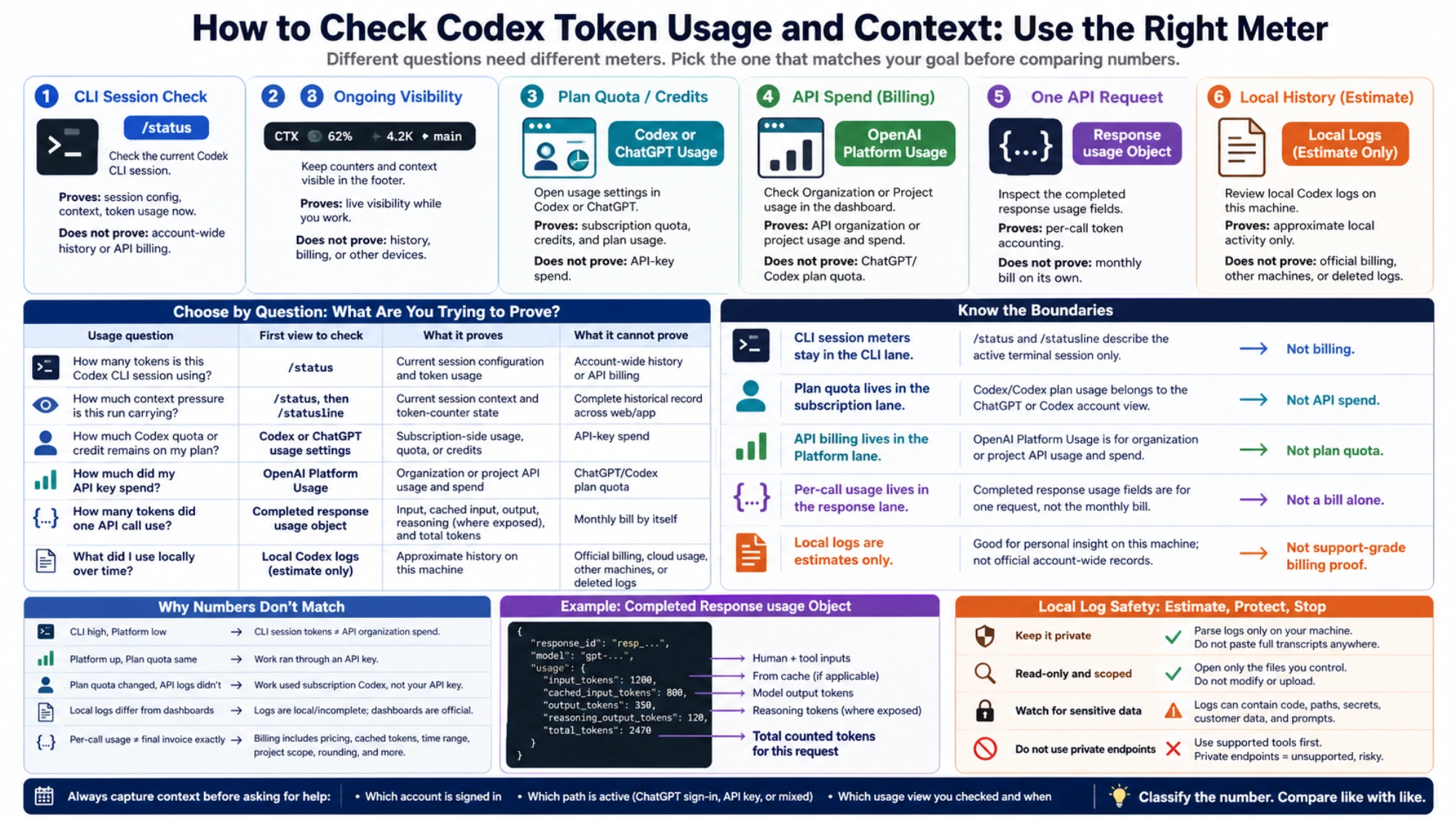
The fastest answer is to ask what kind of usage you need to prove. A current CLI session, a ChatGPT plan quota, API billing, and one API response are different records. Comparing them as if they were one record creates false alarms.
| Usage question | First view to check | What it proves | What it cannot prove |
|---|---|---|---|
| "How many tokens is this Codex CLI session using?" | /status inside Codex CLI | Current session configuration and token usage | Account-wide history or API billing |
| "How much context pressure is this run carrying?" | /status, then /statusline for ongoing visibility | Current session context and token-counter state | A complete per-conversation or per-task record across Codex web/app |
| "How much Codex quota or credit remains on my plan?" | Codex or ChatGPT usage settings | Subscription-side usage, quota, or credits | API-key spend |
| "How much did my API key spend?" | OpenAI Platform Usage | Organization or project API usage | ChatGPT/Codex plan quota |
| "How many tokens did one API call use?" | The completed response usage object | Input, cached input, output, reasoning, and total token accounting where exposed | A monthly bill by itself |
| "What did I use locally over time?" | Local Codex logs, if available | Approximate history on this machine | Official billing, cloud usage, other machines, or deleted logs |
As of May 24, 2026, volatile Codex plan limits, credit rules, dashboard labels, and UI paths still need a current OpenAI account check. The command names, the status-line concept, and the API response usage object are more stable than the exact subscription dashboard wording.
Account Token Activity: Use /usage
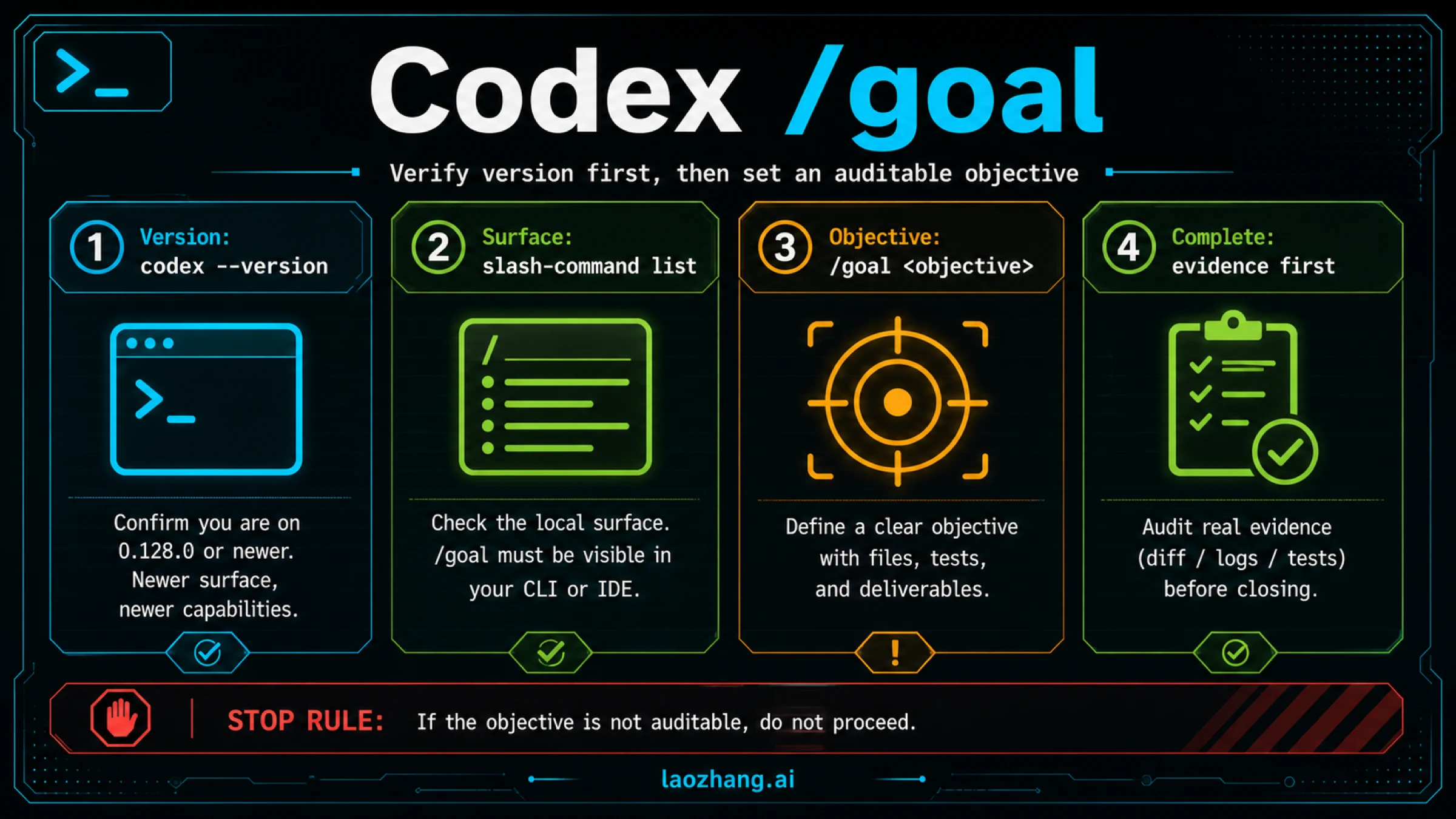
/usage opens account token activity and available reset actions. /usage daily, /usage weekly, and /usage cumulative open those periods directly. It is not remaining thread context or API-key spend. Keep remaining quota, resets, and credits in the Codex Usage guide.
Codex CLI: Use /status First
The fastest check inside Codex CLI is /status, but it is not an account-wide history report. OpenAI's Codex slash-command docs describe /status as the command that displays session configuration and token usage. That makes it the right first move when the question starts inside the terminal.
Run it in the active Codex session:
/statusRead the output as session details. It can help you understand the model, active configuration, context pressure, and token use for the current work view. It does not prove how much your ChatGPT plan has left for the week, how much an API key spent yesterday, or how many tokens another computer used.
Use this boundary:
If /status shows it | Treat it as | Do not treat it as |
|---|---|---|
| Model or session configuration | Current CLI context | Permanent account policy |
| Context or token usage | Session-level working state | Monthly usage bill |
| Limit or usage hints | Active Codex view signal | Cross-product quota proof |
The practical workflow is simple. Run /status, capture the output if you need support details, then decide whether the next question belongs to the CLI, the subscription dashboard, or API billing.
Keep Counters Visible with /statusline
Use /statusline when you do not want to interrupt work just to check the session state. OpenAI's Codex slash-command docs describe /statusline as the command for configuring what appears in the footer, including model, context, limits, token counters, git, session, current directory, and Codex version.
That distinction matters. /status is a check you call. /statusline is a display view you configure for ongoing visibility.
In Codex config terms, the status line belongs to the TUI configuration. OpenAI's Codex config reference points to the user config at ~/.codex/config.toml and documents tui.status_line as the ordered list of footer status-line items. Use that as a configuration pointer, not as a place to invent unsupported account-wide counters.
Good uses for /statusline:
- keep context pressure visible during long edits
- notice when a session is getting expensive before starting another large task
- keep model and session identity visible while switching projects
- reduce repeated
/statuschecks during focused work
Bad uses for /statusline:
- proving historical spend
- reconciling ChatGPT plan quota with API billing
- replacing the OpenAI Platform Usage dashboard
- estimating another machine's Codex activity
If your question is "what is happening in this terminal right now?", stay in CLI commands. If your question is "what did my account or API key spend?", leave the CLI view.
Context Meter: Treat Context as Session Pressure
Many searches for a Codex "context meter" are really asking whether Codex can show token usage for one conversation, task, or run. The reader-safe answer is narrower: Codex CLI can show current session state and can keep context stats or token counters visible, but those signals are not a complete historical record for Codex web/app, cloud tasks, billing, or every device.
Use this split:
| Context question | Best current move | Boundary |
|---|---|---|
| "How close is this CLI session to context pressure?" | Run /status and check the active session state | Current session only |
| "Can I watch context while editing?" | Configure /statusline and include context or token-counter items | Visibility while the TUI is open |
| "How many tokens did this task consume historically?" | Use official usage surfaces first; use local logs only as a private estimate | Not support-grade billing details |
| "Can I compare context used with API cost?" | Do not compare directly; API cost belongs to Platform Usage and response usage | Context pressure is not an invoice |
This distinction prevents the common mistake of treating "remaining context capacity" as "remaining account quota." A long session can have high context pressure without proving high API spend, and an API project can spend money without changing a ChatGPT/Codex subscription quota view. Keep the context meter in the CLI lane unless the details clearly moves to API billing or subscription usage.
ChatGPT and Codex Quota: Check the Subscription view
Subscription-side usage is the easiest place to mix up vocabulary. A Codex plan quota, a credit balance, a local CLI session, and an API organization bill are not the same thing.
For plan quota or credits, start from the Codex or ChatGPT usage settings available to the signed-in account. OpenAI's Codex pricing and limits docs are the right current source for plan and credit rules, while the exact account UI labels can move. The stable rule is the responsible system: ChatGPT/Codex plan usage belongs to the ChatGPT or Codex account view, not to OpenAI Platform API billing.
Use the subscription view when the question looks like this:
- "How much Codex included usage do I have left?"
- "Did I hit a plan or credit limit?"
- "Do credits apply to this Codex path?"
- "Is this a ChatGPT sign-in session or an API-key session?"
Keep plan-limit detail out of the usage-check step. If you need current windows, credits, post-limit choices, and plan caveats, use the separate OpenAI Codex usage limits guide. That page owns the quota contract. The job here is narrower: choose the right meter before trusting the number.
The support-grade habit is to capture three facts together:
- Which account is signed in.
- Which Codex path is active: ChatGPT sign-in, API key, or mixed setup.
- Which usage view you checked and when.
That details is much stronger than a copied number with no path context.
API Billing and Per-Call Tokens Are a Different Lane
OpenAI Platform Usage is the API billing lane, not the ChatGPT subscription quota lane. Use it when an API key, project, organization, service account, SDK, or backend integration is involved.
There are two API checks that answer different questions:
| API question | view | Best details |
|---|---|---|
| "How much has this organization or project used?" | OpenAI Platform Usage | Dashboard range, project or organization scope, billing period |
| "How many tokens did this one request use?" | Completed response usage object | Stored response payload or logged usage fields |
| "Why does my API cost differ from Codex CLI?" | path comparison | API key billing is separate from ChatGPT/Codex plan usage |
The completed response usage object is the per-call token source. In the Responses API reference, completed responses expose token accounting fields such as input tokens, cached input tokens, output tokens, reasoning output tokens where applicable, and totals. If you stream responses, do not assume usage is final until you have the completed response data that includes usage.
A minimal logging shape looks like this:
{
  "response_id": "resp_...",
  "model": "gpt-...",
  "usage": {
    "input_tokens": 1200,
    "cached_input_tokens": 800,
    "output_tokens": 350,
    "total_tokens": 1550
  }
}
Those numbers are useful for request-level accounting, debugging, and cost attribution. They still do not tell you how much ChatGPT subscription Codex quota remains. If your workflow moved from ChatGPT sign-in to an API key, you also moved the meter.
For the path decision itself, use the Codex API key vs subscription guide. It separates ChatGPT sign-in, API-key billing, and credits before you start comparing usage.
Local History Estimates: Useful, but Not Official
Local logs can help with estimates only after you know what official meter you are trying to compare. They are most useful when you need a personal sense of local Codex activity on one machine, such as "which project created the longest sessions?" or "did this terminal run a large task yesterday?"
They are weak details for billing or quota disputes.
Use this safety boundary before parsing anything local:
| Local-history question | Safe interpretation | Risk |
|---|---|---|
| Sessions on this machine | Approximate local activity | Other devices and cloud surfaces are missing |
| Token-like counters in session files | Personal estimate | Field meaning can change across versions |
| Prompt or transcript text | Debug context | May expose private code, file paths, secrets, or customer data |
| Private backend endpoints | Do not use as the normal path | Unsupported, fragile, and account-risky |
If you run a local parser, keep it private, read-only, and scoped to the files you control. Do not paste full transcripts into public tools. Do not treat local JSONL totals as official account-wide usage. Do not build a workflow around private endpoints just because a community post discovered one.
The honest sentence is: local history can estimate what this machine recorded; official surfaces decide billing, quota, and account state.
Why the Numbers Do Not Match
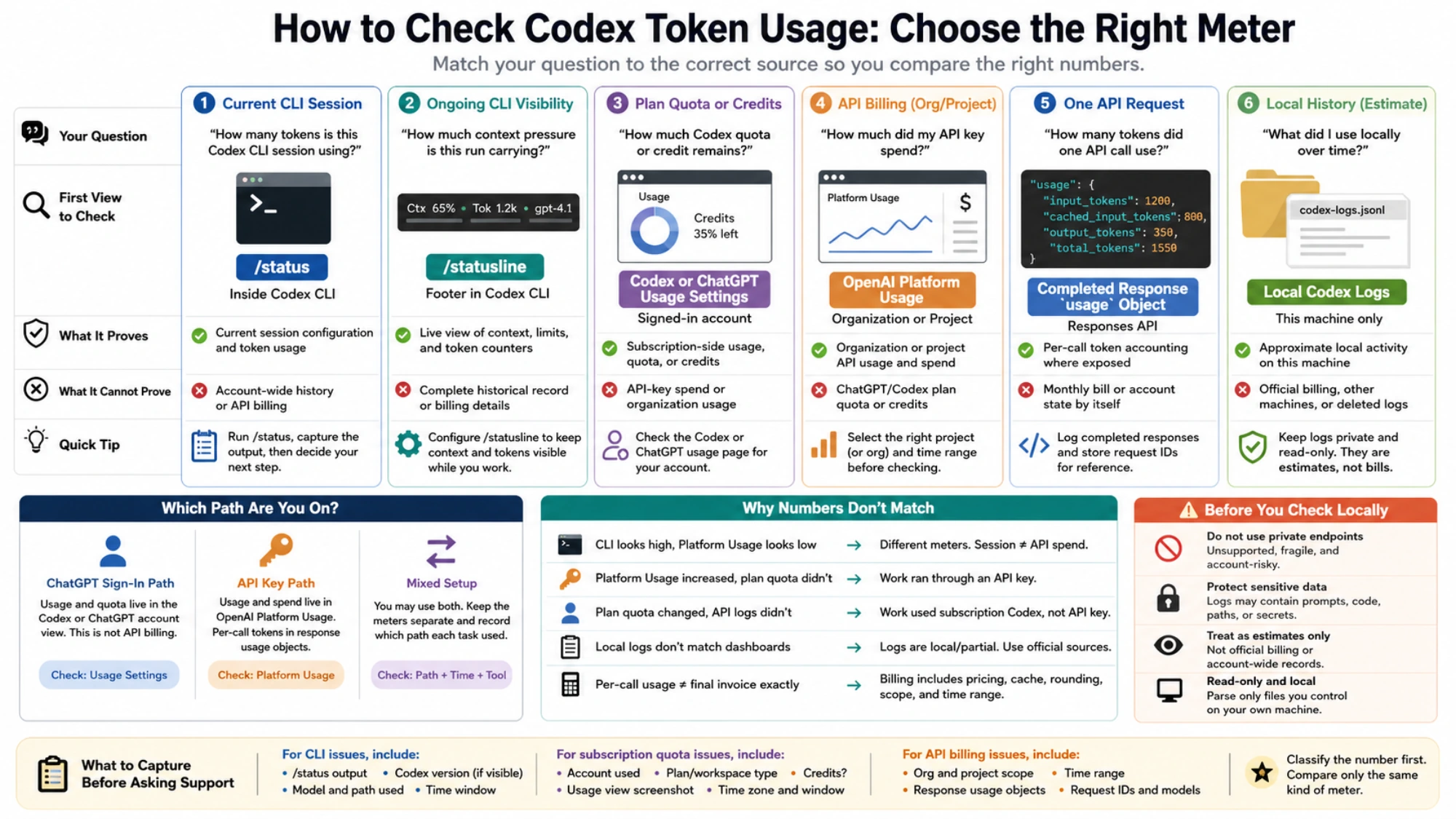
Different Codex and OpenAI usage numbers often disagree because they are answering different questions.
| Mismatch | Likely reason | Correct next move |
|---|---|---|
/status looks high but Platform Usage looks low | CLI session tokens are not the same as API organization spend | Keep session and API meters separate |
| Platform Usage increased but Codex plan quota did not | Work ran through an API key | Check project key scope and billing responsible system |
| ChatGPT/Codex quota changed but API logs did not | Work used subscription Codex, not your API key | Check the signed-in ChatGPT/Codex account |
| Local logs do not match dashboard usage | Logs are incomplete or local-only | Use official dashboard for account details |
Per-call usage does not equal final invoice exactly | Billing can include model pricing, cached tokens, time range, project scope, and rounding | Compare within the same API billing view |
Do not force a reconciliation across surfaces. First classify the number, then compare it only with the same kind of number.
What to Capture Before Asking Support
If the number still looks wrong, collect details that keeps the meter boundaries intact.
For a CLI issue:
/statusoutput from the active session- the Codex version if visible in the TUI or status line
- the model and path you expected
- whether the session used ChatGPT sign-in or an API key
- the approximate time window
For a subscription quota issue:
- screenshot or account-visible copy of the Codex or ChatGPT usage view
- plan or workspace type
- whether credits were involved
- time zone and time window
- a note about whether cloud tasks, local messages, or code reviews were involved
For an API billing issue:
- organization and project scope
- API key or service-account responsible system, without exposing the key
- Platform Usage time range
- representative completed response
usageobjects - model names and request IDs where available
That details lets support or an admin answer the right question. "Codex token usage is wrong" is too broad. "The /status session counter, ChatGPT quota dashboard, and Platform Usage dashboard are being compared across different routes" is diagnosable.
FAQ
How do I check Codex token usage in CLI?
Run /status inside the active Codex CLI session. Use it for current session configuration and token usage, not for account-wide history.
What does /statusline do?
/statusline configures footer visibility in the Codex TUI. It can keep counters and context visible while you work, but it is still a session-facing display, not a billing dashboard.
Where do I check Codex plan quota or credits?
Use the Codex or ChatGPT usage settings for the signed-in account. Treat exact labels and plan rules as volatile, especially around credits, model availability, and workspace migration.
Where do I check OpenAI API token usage?
Use OpenAI Platform Usage for organization or project usage. For one request, inspect the completed response usage object.
Why does Codex CLI usage not match OpenAI Platform Usage?
Because they are different meters. CLI usage describes the active Codex session. Platform Usage describes API organization or project usage.
Can local Codex logs show historical token usage?
They can estimate local activity on the machine where the logs were written. They cannot prove official account-wide usage, and they can contain sensitive prompt, path, or file context.
Should I use private endpoint scripts to check usage?
No. Use supported CLI commands, account usage settings, Platform Usage, and completed API response usage first. Private endpoints are not a normal reader-safe checking path.
Sources5
External pages this guide links to, in the order they appear. Last updated Sep 2, 2026.
Sources5
External pages this guide links to, in the order they appear. Last updated Sep 2, 2026.
- 1.OpenAI Platform Usageplatform.openai.com/settings/organization/usage
- 2.Codex slash-command docsdevelopers.openai.com/codex/cli/slash-commands
- 3.Codex config referencedevelopers.openai.com/codex/config-reference
- 4.Codex pricing and limits docsdevelopers.openai.com/codex/pricing
- 5.Responses API referenceplatform.openai.com/docs/api-reference/responses