Nano Banana in Claude Code: Skill or MCP Setup That Still Works
Use a Claude Code skill or MCP server that calls gemini-3.1-flash-image. Preview IDs shut down June 25, 2026; billing is required, about $0.067 per 1K image.
On this page
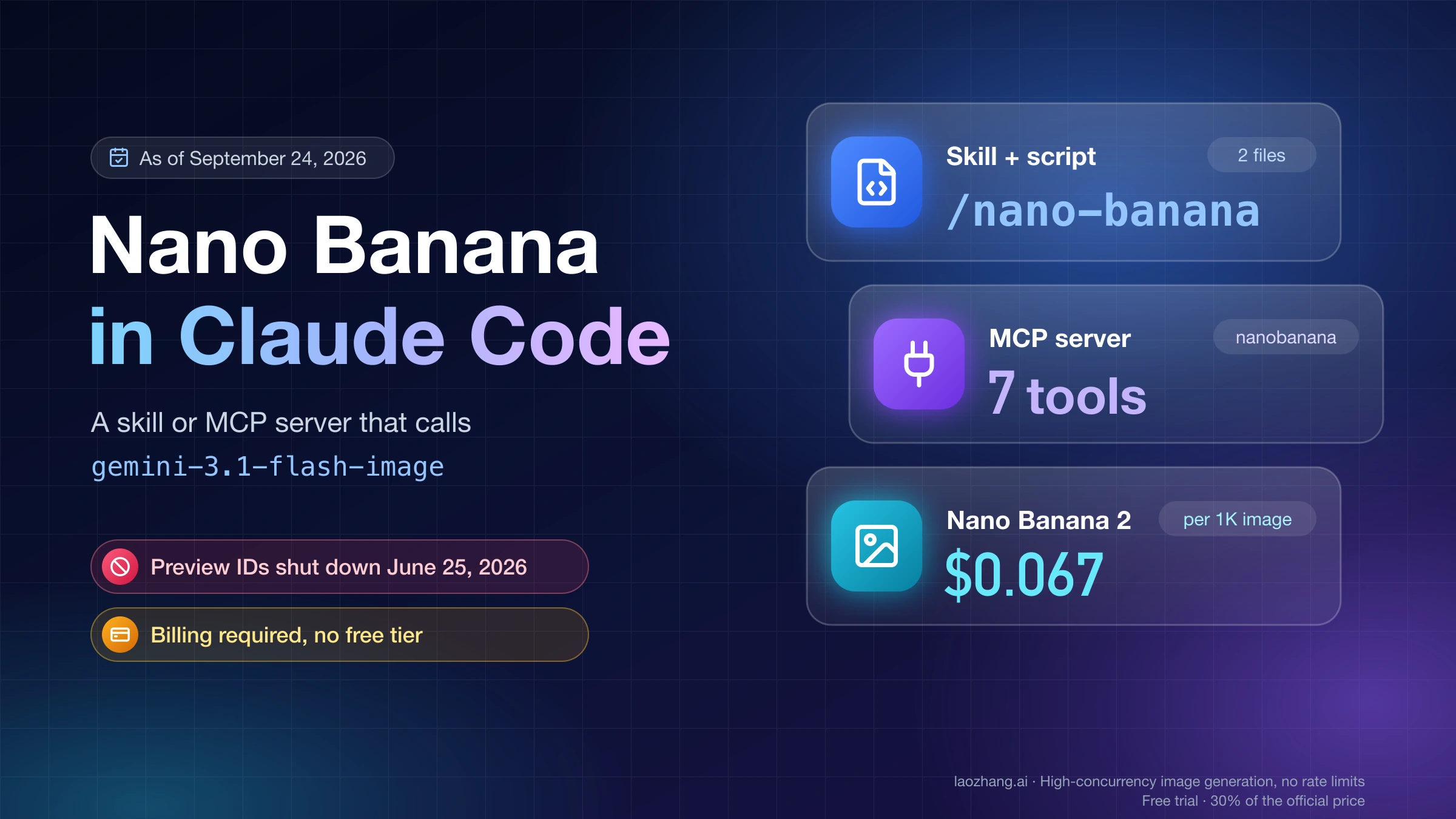
Claude doesn't render raster images itself. To get Nano Banana images inside Claude Code, you give Claude a tool that sends your prompt to Google's Gemini API and writes the returned image into your project. There are two clean ways to do that: a skill, which is a SKILL.md file plus a small script Claude runs, or an MCP server, which exposes image tools Claude can call. Both need a Gemini API key on a billed project, because the free tier doesn't cover Nano Banana image models. Expect to pay about $0.067 for a 1K image from Nano Banana 2.
Model IDs matter more than the choice between skill and MCP. As of September 24, 2026, the IDs that work on the Gemini API are gemini-3.1-flash-image (Nano Banana 2), gemini-3-pro-image (Nano Banana Pro) and gemini-3.1-flash-lite-image (Nano Banana 2 Lite). The preview IDs that most setups from early 2026 were written for, gemini-3.1-flash-image-preview and gemini-3-pro-image-preview, shut down on June 25, 2026. The original gemini-2.5-flash-image shuts down on October 2, 2026. If your Nano Banana setup in Claude Code worked in spring and fails now, change the model ID first. For most setups, that one change is the whole fix.
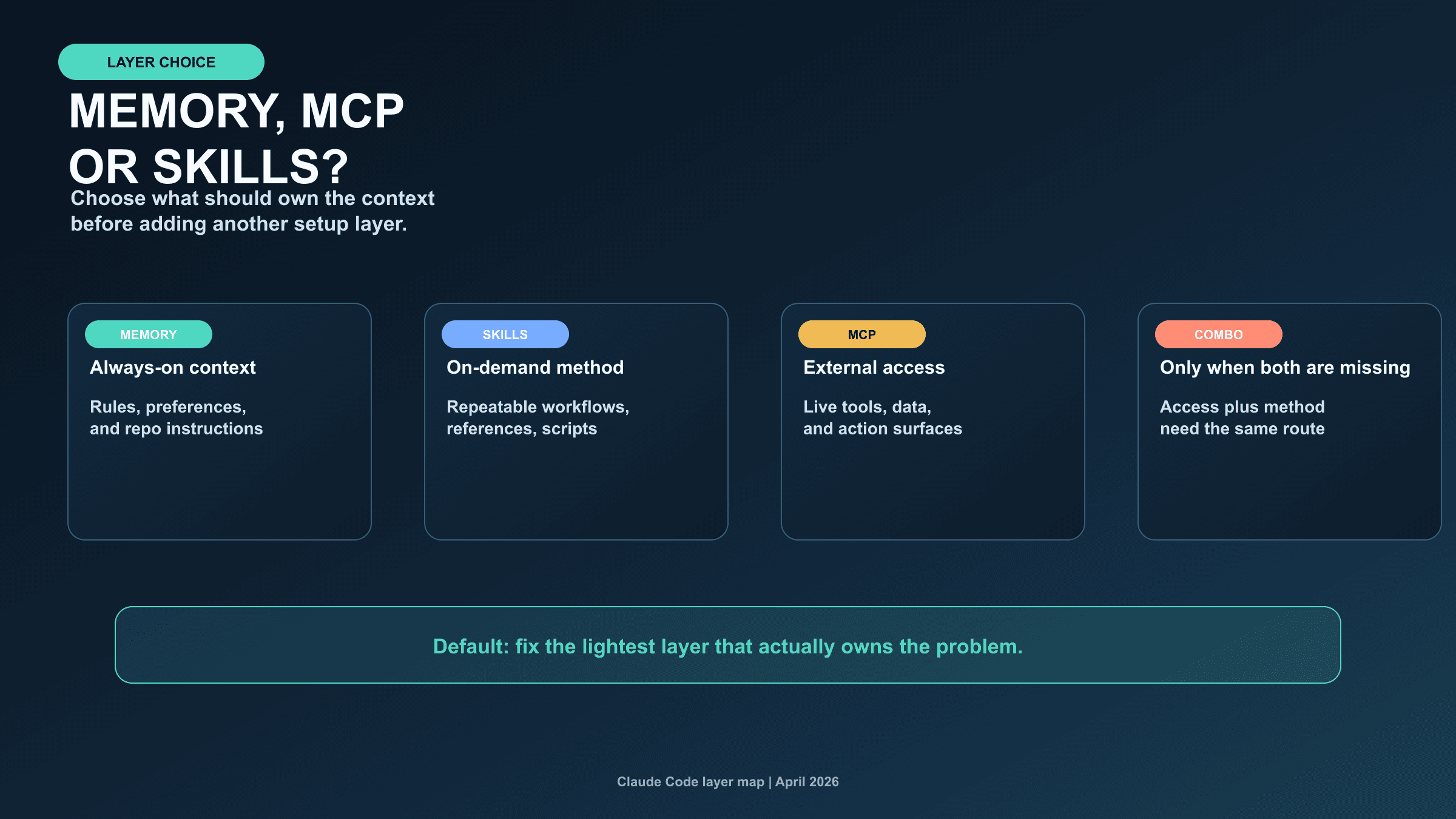
Skill or MCP server: pick by where Claude runs
A skill and an MCP server end in the same place: an image file on disk that Claude can move, rename or reference in your code. They differ in what you install and in which Claude surfaces pick them up.
| Setup | What you install | Where it works | Good fit when |
|---|---|---|---|
| Skill + Python script | A folder with SKILL.md and scripts/generate.py, plus google-genai | Claude Code in the terminal, IDE, or Desktop app on your machine; cloud sessions if the skill is committed to the repo | You want the fewest moving parts and full control of model, size and file path |
MCP server (Google's nanobanana extension) | Node.js, a clone of the extension, one claude mcp add command | Any local Claude Code session that loads your MCP config | You want ready-made tools for icons, patterns, diagrams and multi-image variations |
| Pasting a key into the chat | Nothing | Anywhere Claude Code runs | Not recommended: the key ends up in the session transcript and in whatever file Claude writes it to |
Two limits decide the rest:
- Personal skills don't travel. A skill in
~/.claude/skills/loads in every project on your machine, but not in Cowork sessions or cloud sessions. Cowork loads skills enabled for your claude.ai account, and cloud sessions can also load skills committed to the repository's.claude/skills/. A skill file doesn't carry your API key, so the session that runs it still needsGEMINI_API_KEYset in its own environment. - Claude.ai chat has no shell for your script. The setups below need Claude Code with permission to run commands and write files. Third-party hosted Nano Banana MCP servers and marketplace skills can connect to Claude without a local shell, but they see your prompts and input images and usually hold an API key. Treat installing one as a trust decision about that operator.
If you just want Claude to draw diagrams or icons as SVG or code, you don't need Nano Banana at all. Can Claude Generate Images? covers what Claude can produce natively.
Before either setup: a key with billing
- Create an API key in Google AI Studio.
- Link the key's project to a billing account. Google's pricing page lists the free tier for all three Nano Banana image models as "Not available," so an unbilled key won't generate images.
- Keep the key out of the conversation. Put it in your shell environment and start Claude Code from that shell:
# ~/.zshrc or ~/.bashrc
export GEMINI_API_KEY="your-key-here"
Open a new terminal (or source the file), then run claude. The skill script reads GEMINI_API_KEY from the environment, and Google's MCP server falls back to the same variable. If you already pasted a key into a Claude chat, rotate it in AI Studio. That transcript is saved on disk.
Setup 1: a Nano Banana skill with a small script
This is the lighter route. You add two files, and Claude runs the script whenever you ask for an image.
Folder layout
Put the skill in your project so teammates get it through git, or in your home directory so it's available in every project:
.claude/skills/nano-banana/          # project skill (commit it)
# or ~/.claude/skills/nano-banana/   # personal skill (this machine only)
├── SKILL.md
└── scripts/
    └── generate.py
The folder name becomes the command, so you can type /nano-banana as well as asking in plain English. Install the Google Gen AI SDK for the Python that will run the script:
python3 -m pip install google-genaiSKILL.md
---
name: nano-banana
description: Generate or edit raster images (blog headers, thumbnails, icons, UI mockups, product shots) with Google's Nano Banana models through the Gemini API and save them into this project. Use when the user wants an image file, not SVG or code-drawn graphics.
allowed-tools: Bash(python3 ${CLAUDE_SKILL_DIR}/scripts/generate.py *)
---

Generate images by running:

python3 ${CLAUDE_SKILL_DIR}/scripts/generate.py "<prompt>" --out <path> [--model <id>] [--aspect <ratio>] [--size 1K|2K|4K] [--input <file> ...]

Rules:
- Default model: gemini-3.1-flash-image (Nano Banana 2).
- Use gemini-3.1-flash-lite-image only for quick single-prompt drafts, always at --size 1K and without --input.
- Use gemini-3-pro-image when the user asks for the highest quality or the image carries dense text.
- Save into the folder this project already uses for images. If there is none, ask. Never overwrite an existing file without asking.
- Write a complete visual prompt: subject, composition, style, lighting, exact on-image text in quotes, and space to keep empty.
- For edits or style matching, pass each reference image with --input.
- Never ask for, print or store the API key. The script reads GEMINI_API_KEY.
- If the script exits with an error, show its message. If it prints "No image returned", report blockReason and finishReason and propose a reworded prompt.
- After saving, report the path, model, aspect ratio and size.
${CLAUDE_SKILL_DIR} expands to the folder that holds SKILL.md, so the same file works as a project skill or a personal one. The allowed-tools line pre-approves only this exact script, so Claude can run it without a permission prompt in any turn that invokes the skill. If you installed google-genai in a virtual environment, replace python3 with that environment's interpreter path in both places.
scripts/generate.py
#!/usr/bin/env python3
"""Generate or edit one image with Nano Banana through the Gemini API.

Usage:
  python3 generate.py "prompt" --out images/hero.png [--model gemini-3.1-flash-image]
                      [--aspect 16:9] [--size 2K] [--input ref.png ...]
Reads the key from GEMINI_API_KEY (never from the command line).
"""
import argparse
import os
import pathlib
import sys

from google import genai
from google.genai import types

MODELS = {
    "gemini-3.1-flash-lite-image",  # Nano Banana 2 Lite, 1K only
    "gemini-3.1-flash-image",       # Nano Banana 2, 512/1K/2K/4K
    "gemini-3-pro-image",           # Nano Banana Pro, 1K/2K/4K
}

def main() -> int:
    p = argparse.ArgumentParser()
    p.add_argument("prompt")
    p.add_argument("--out", required=True)
    p.add_argument("--model", default="gemini-3.1-flash-image")
    p.add_argument("--aspect", default="1:1")
    p.add_argument("--size", default="1K")
    p.add_argument("--input", action="append", default=[])
    a = p.parse_args()

    if a.model not in MODELS:
        print(f"Unknown or retired model id: {a.model}. Use one of {sorted(MODELS)}", file=sys.stderr)
        return 2
    if not os.environ.get("GEMINI_API_KEY"):
        print("GEMINI_API_KEY is not set", file=sys.stderr)
        return 2

    contents = [a.prompt]
    for path in a.input:
        data = pathlib.Path(path).read_bytes()
        mime = "image/png" if path.lower().endswith(".png") else "image/jpeg"
        contents.append(types.Part.from_bytes(data=data, mime_type=mime))

    # Optional: a Gemini-compatible endpoint, e.g. GEMINI_BASE_URL=https://api.laozhang.ai
    base_url = os.environ.get("GEMINI_BASE_URL")
    client = genai.Client(http_options=types.HttpOptions(base_url=base_url)) if base_url else genai.Client()
    resp = client.models.generate_content(
        model=a.model,
        contents=contents,
        config=types.GenerateContentConfig(
            response_modalities=["IMAGE"],
            image_config=types.ImageConfig(aspect_ratio=a.aspect, image_size=a.size),
        ),
    )

    for cand in resp.candidates or []:
        for part in (cand.content.parts if cand.content else []) or []:
            if part.inline_data and part.inline_data.data:
                out = pathlib.Path(a.out)
                out.parent.mkdir(parents=True, exist_ok=True)
                out.write_bytes(part.inline_data.data)
                print(f"saved {out} ({len(part.inline_data.data)} bytes)")
                return 0

    fb = getattr(resp, "prompt_feedback", None)
    reason = resp.candidates[0].finish_reason if resp.candidates else None
    print(f"No image returned. blockReason={getattr(fb, 'block_reason', None)} finishReason={reason}", file=sys.stderr)
    return 1

if __name__ == "__main__":
    sys.exit(main())
A few choices in the script are deliberate:
- The allowlist holds only the three current IDs. A stale
-previewID fails immediately with a clear message instead of reaching Google and failing there. - The key never appears in a command. Claude only sees the prompt, the file path and the result line, so the key stays out of the transcript.
- The image goes straight to disk. Only one short line returns to Claude, so a 4K image doesn't use up context.
- Unsupported input types are sent as JPEG. Anything that isn't
.pnggoes out asimage/jpeg, so convert WebP or HEIC references to PNG or JPEG first.
The script was checked offline with google-genai 2.25.0 on Python 3.12: a missing key and a retired ID both stop it with exit code 2, and a request with a fake key reached Google's server and came back 400 INVALID_ARGUMENT with reason API_KEY_INVALID. That confirms the request shape and the endpoint, not image output. Your first real prompt is the end-to-end test, so start with one cheap 1K image.
First run
Start a new Claude Code session so the skill is picked up, then ask in plain terms:
Make a 16:9 blog header for the post in
content/launch.mdx: a clean desk with a laptop showing a dashboard, soft morning light, no text. Save it topublic/images/launch-hero.pngat 2K.
For an edit, point at the source file:
Use
assets/logo.pngas the reference and make a 1:1 app icon version on a dark gradient background. Save it next to the original aslogo-icon.png.
A successful run prints a line like saved images/hero.png (N bytes), with your own path and the file size in place of N. If the call returns HTTP 200 but no image, the script prints the block and finish reasons. Nano Banana API Returns No Image? explains how to read them. For stronger prompts than the one-liners above, see How to Prompt Nano Banana.
Setup 2: Google's nanobanana MCP server
Google's gemini-cli-extensions/nanobanana is packaged as a Gemini CLI extension, but under the hood it's a standard stdio MCP server. Claude Code can launch it directly, without the Gemini CLI. It adds generate_image, edit_image, restore_image, generate_icon, generate_pattern, generate_story and generate_diagram tools. It saves files to a nanobanana-output/ folder in the server's working directory, and each tool reply lists the full paths.
Build it once (the README asks for Node.js 20 or later):
git clone https://github.com/gemini-cli-extensions/nanobanana ~/mcp/nanobanana
cd ~/mcp/nanobanana/mcp-server
npm install
npm run build
Then register it with Claude Code. Set NANOBANANA_MODEL explicitly, because the extension's built-in default is a model that no longer exists:
claude mcp add \
  --env NANOBANANA_API_KEY="$GEMINI_API_KEY" \
  --env NANOBANANA_MODEL=gemini-3.1-flash-image \
  --scope user --transport stdio nanobanana \
  -- node "$HOME/mcp/nanobanana/mcp-server/dist/index.js"
The order matters. Claude Code reads anything right after --env as another KEY=value pair, so at least one other option has to sit between the last --env and the server name. Everything after -- is the command that starts the server. --scope user makes the server available in all your projects. The default local scope limits it to the current project.
This command copies the key's value into your Claude Code config file on disk. That keeps it out of chats, but it's still a plaintext copy. For a shared repository, put the server in the project's .mcp.json and let Claude Code expand variables from each person's environment, so nobody commits a key:
{
  "mcpServers": {
    "nanobanana": {
      "command": "node",
      "args": ["${HOME}/mcp/nanobanana/mcp-server/dist/index.js"],
      "env": {
        "NANOBANANA_API_KEY": "${GEMINI_API_KEY}",
        "NANOBANANA_MODEL": "gemini-3.1-flash-image"
      }
    }
  }
}
Check the connection with claude mcp list (look for ✔ Connected) or /mcp inside a session. Project-scoped servers from .mcp.json show as pending until you approve them in an interactive claude session. After that, ask for images in plain English and Claude picks the matching tool.
Claude Code warns when a single MCP tool result passes 10,000 tokens and caps it at 25,000 by default (MAX_MCP_OUTPUT_TOKENS). Google's server returns file paths, not image data, so that cap doesn't affect it. An MCP server that returns images inline as base64 can run into it.
Why a Nano Banana setup in Claude Code stops working
Most broken setups still call a model ID Google has shut down. The table covers the setups you're most likely to have copied, which model each one actually calls, and the smallest fix.
| Setup | Model it calls | Status on the Gemini API | Minimum fix |
|---|---|---|---|
Google's nanobanana extension (v1.0.11 or later) with no NANOBANANA_MODEL set | gemini-3.1-flash-image-preview | Shut down June 25, 2026 | Set NANOBANANA_MODEL=gemini-3.1-flash-image |
Same extension with NANOBANANA_MODEL=gemini-3-pro-image-preview (the README's Pro example) | gemini-3-pro-image-preview | Shut down June 25, 2026 | Change it to gemini-3-pro-image |
Same extension with NANOBANANA_MODEL=gemini-2.5-flash-image | gemini-2.5-flash-image | Works until October 2, 2026 | Move to gemini-3.1-flash-lite-image (Google's docs recommend Lite as the successor) or gemini-3.1-flash-image |
Community skill kkoppenhaver/cc-nano-banana | Whatever the extension resolves: its README says gemini-2.5-flash-image, but the current extension defaults to the shut-down preview ID | Fails unless NANOBANANA_MODEL is set to a current ID | export NANOBANANA_MODEL=gemini-3.1-flash-image in the shell that starts Claude Code. Ignore the README's gemini-3-pro-image-preview tip |
OpenRouter key pasted into the chat, model google/gemini-3.1-flash-image | Nano Banana 2 through OpenRouter | Matches the current GA model | Move the key into an environment variable and rotate the pasted one |
| Your own script or skill with a hard-coded preview ID | That preview ID | Shut down June 25, 2026 | Replace the string with a current ID |
The extension reads process.env.NANOBANANA_MODEL and falls back to gemini-3.1-flash-image-preview. It accepts any string without checking it, so a stale ID only fails once Google receives the request. A default install should therefore fail on every call. That conclusion comes from the extension's source code and Google's shutdown table, not from a captured error, so the exact error text may differ between versions.
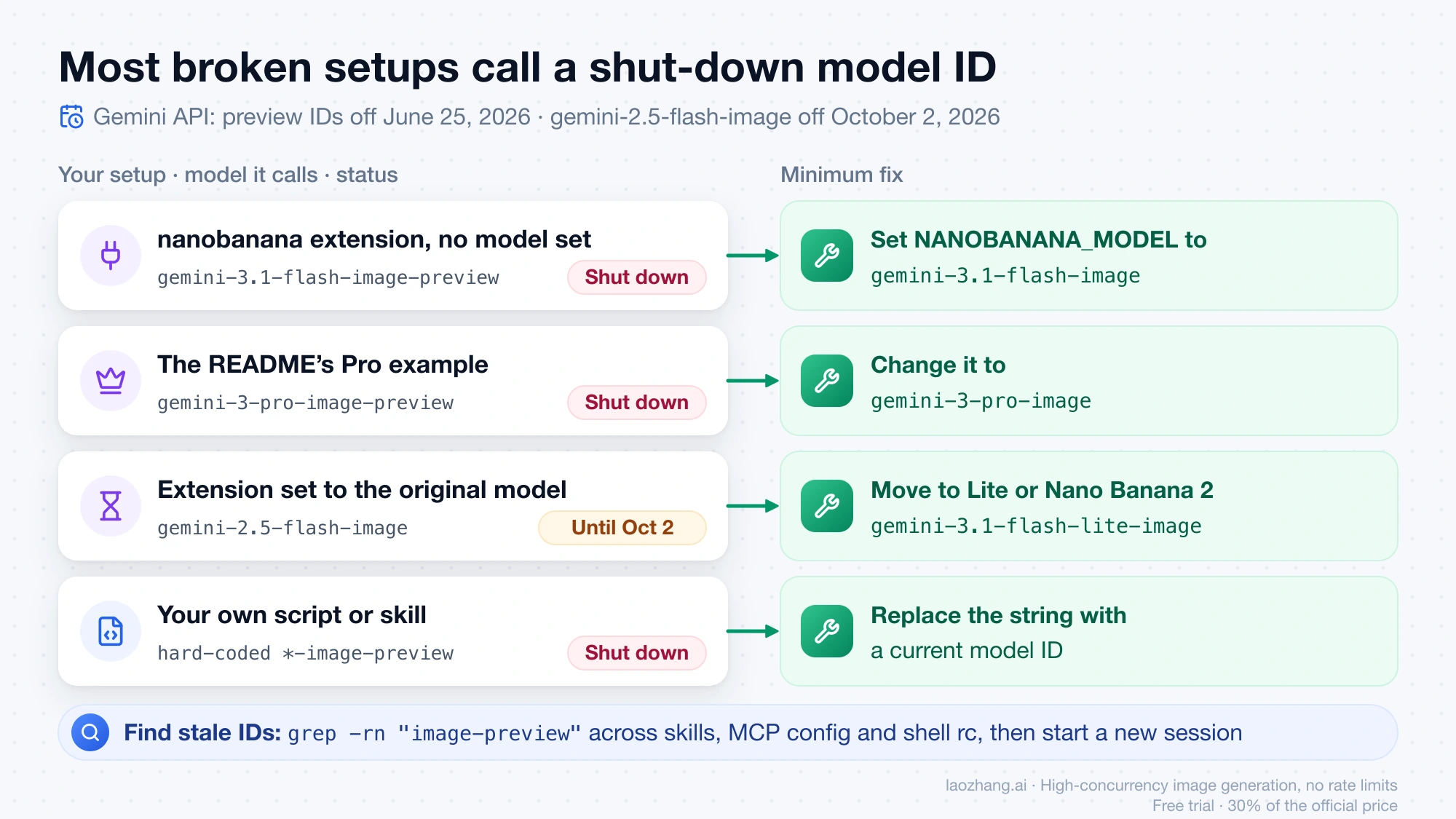
To find stale IDs on your machine, search the places a model name usually hides:
grep -rn "image-preview" ~/.claude/skills ~/.claude/settings.json ~/.claude.json .claude .mcp.json ~/.zshrc ~/.bashrc 2>/dev/null
echo "$NANOBANANA_MODEL"
Any match is a line to update. After changing an MCP server's environment, start a new Claude Code session so the server restarts with the new value.
These dates apply to the Gemini API with an AI Studio key. Vertex AI (now Gemini Enterprise Agent Platform) runs its own schedule. If you call Nano Banana through Google Cloud, check Vertex AI Nano Banana API: Model IDs, Setup, and Cost per Image.
What each image costs
Gemini API list prices on the paid Standard tier, as of September 24, 2026, per generated image:
| Model | ID | 512 px | 1K | 2K | 4K |
|---|---|---|---|---|---|
| Nano Banana 2 Lite | gemini-3.1-flash-lite-image | – | $0.0336 | – | – |
| Nano Banana 2 | gemini-3.1-flash-image | $0.045 | $0.067 | $0.101 | $0.151 |
| Nano Banana Pro | gemini-3-pro-image | – | $0.134 | $0.134 | $0.24 |
The table counts output images only. Each reference image you pass in adds roughly $0.0011, and prompt text costs very little on top. The Batch API halves the output price (for example $0.034 per 1K Nano Banana 2 image), but batch jobs don't return results right away, so they don't suit an interactive Claude Code session.
To estimate a job, multiply the image count by the per-image price. A set of 30 blog headers from Nano Banana 2 at 2K costs 30 × $0.101 = $3.03. Twenty rough 1K drafts on Lite cost 20 × $0.0336 ≈ $0.67. When Claude regenerates an image to fix a detail, the new image is billed like any other.
The model choice follows the job. Lite is the cheapest and fastest, but it only outputs 1K, doesn't use Google Search grounding, and isn't built for multiple references or step-by-step edits. Nano Banana 2 accepts up to 14 reference images and goes up to 4K. Pro costs twice as much as Nano Banana 2 at 1K and is meant for the most complex compositions and brand-exact work. Nano Banana 2 Lite vs 2 vs Pro: Pick the Right Route compares them in detail, and Nano Banana API Cost has the full price breakdown and free-access limits.
Paid-tier Gemini API data isn't used to improve Google's products, according to the pricing page. All generated images carry Google's invisible SynthID watermark.
If you can't enable Gemini API billing
The script's GEMINI_BASE_URL variable points the same Google SDK at a Gemini-compatible endpoint. One option is laozhang.ai, a third-party API service that serves the same three model IDs at flat per-call prices as of September 24, 2026: $0.025 for gemini-3.1-flash-lite-image, $0.055 for gemini-3.1-flash-image and $0.09 for gemini-3-pro-image. The price doesn't change with resolution. To use it, set GEMINI_BASE_URL=https://api.laozhang.ai and put that service's key in GEMINI_API_KEY. The skill and prompts stay the same.
It's not Google, so Google's API terms, data commitments and SLA don't apply, and it doesn't change which countries Google itself serves. The offline check above only confirmed that the script's request reaches that endpoint and is rejected with a fake key. Make your first call there a single cheap test image too.
Common questions
What is the URL for the Nano Banana skill for Claude Code?
Neither Anthropic nor Google publishes an official one. The community skill github.com/kkoppenhaver/cc-nano-banana wraps Google's Gemini CLI extension, so it needs the Gemini CLI plus that extension installed, and a current NANOBANANA_MODEL. Google's own code is github.com/gemini-cli-extensions/nanobanana, which Claude Code can run as an MCP server (Setup 2). The skill in Setup 1 needs neither and fits in two files.
Does this work in the Claude Desktop app or Cowork?
The Desktop app's Code tab runs local Claude Code sessions, which read the same skills and MCP config as the terminal. Cowork and cloud sessions don't read ~/.claude/skills/. Enable the skill for your claude.ai account (Customize in the Desktop sidebar) for Cowork, or commit it to the repository's .claude/skills/ for cloud sessions. The key still has to exist in that session's environment.
Is a free AI Studio key enough?
No. Google lists the free tier as "Not available" for Nano Banana 2 Lite, Nano Banana 2 and Nano Banana Pro on the API, so image calls need a billed project. Image generation in the Gemini app is a separate product from the API and doesn't give Claude Code access.
Which Claude Code setup should I use for Nano Banana: a skill or an MCP server?
Pick the skill if you mostly want single images saved to specific paths and the fewest dependencies. Pick Google's MCP server if you want its ready-made icon, pattern, story and diagram tools, and you don't mind running Node.js. In both cases, set a current model ID yourself instead of trusting a default.
Where do the generated images go?
With the skill, they go wherever Claude passes --out, which the SKILL.md rules tie to your project's image folder. With Google's MCP server, they land in nanobanana-output/ under the server's working directory. Ask Claude to move them into place, since each tool reply lists the exact paths.