Claude Code Context, Memory, MCP, and Context7: Fix the Right Layer First
Diagnose Claude Code context-window pressure and Context7 MCP install failures before adding another memory server.
On this page
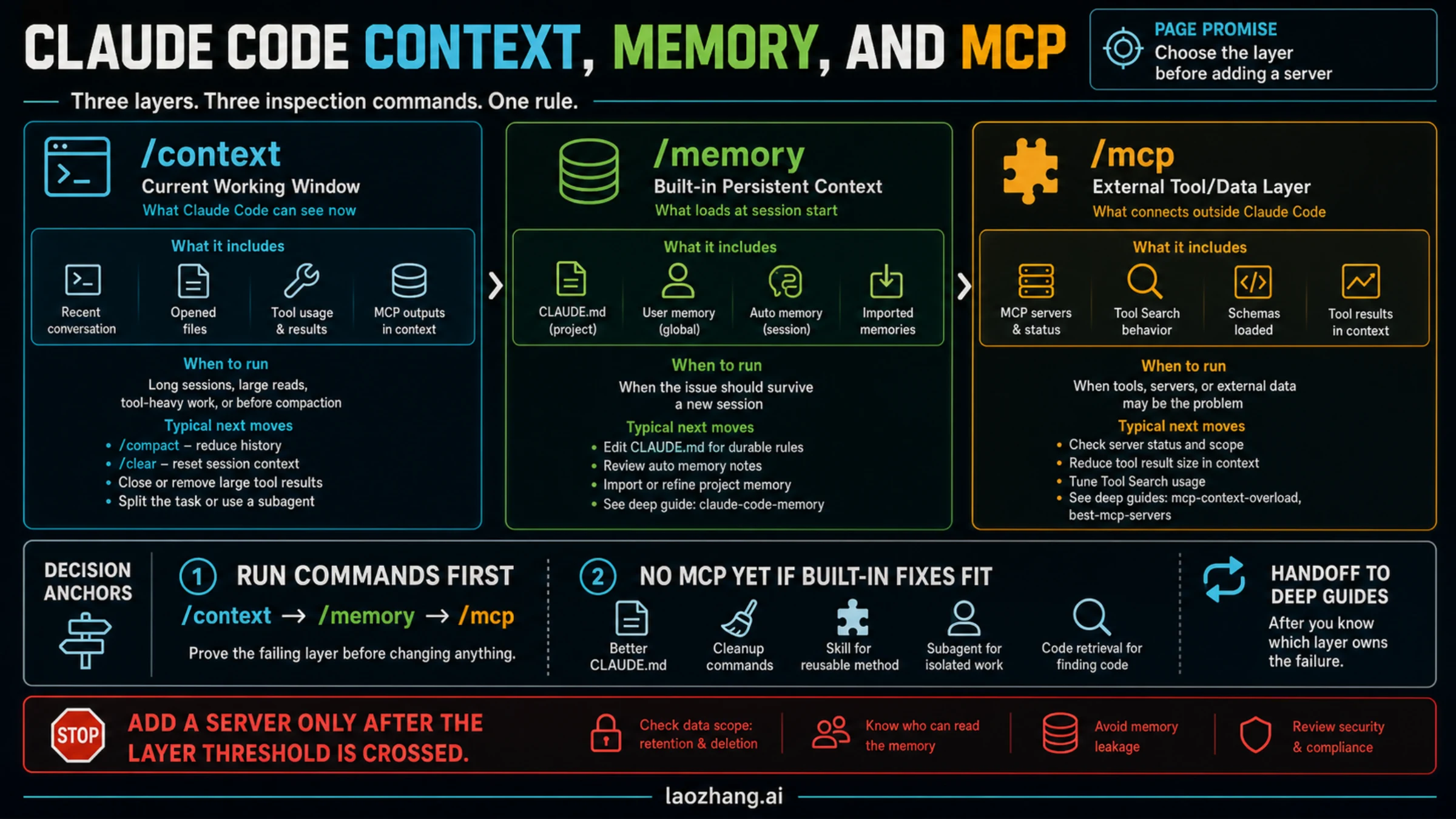
Claude Code context, memory, and MCP solve different continuity problems. Start by proving whether the failure is in the current working window, the built-in memory loaded at session start, or an external tool layer before you add a memory server.
If you only need the fast route, use this order:
| If the symptom is... | Run first | What it proves | Smaller fix before MCP |
|---|---|---|---|
| Claude gets confused inside a long session | /context | Current window pressure from conversation, files, tools, or MCP results | Compact at a boundary, clear residue, split the task, or reduce tool output |
| Claude forgets a project rule in new sessions | /memory | Which CLAUDE.md, imported memory, or auto memory is loaded | Edit the durable memory file or move the rule to the right scope |
| External tools, servers, or context cost look suspicious | /mcp | Which MCP servers are connected and what external layer is active | Disable noisy servers, narrow tool scope, or fix the server before adding memory |
| Context7 fails to install, reconnect, or count API-key usage | claude mcp list, /mcp, claude mcp logs context7 | Whether this is MCP config, transport, shell, auth, proxy, or service reachability | Fix the Context7 MCP path before changing memory or context strategy |
| The problem is a repeatable workflow habit | /skills or a subagent | Whether the method or isolated task needs its own context | Use a skill for reusable procedure or a subagent for large side reads |
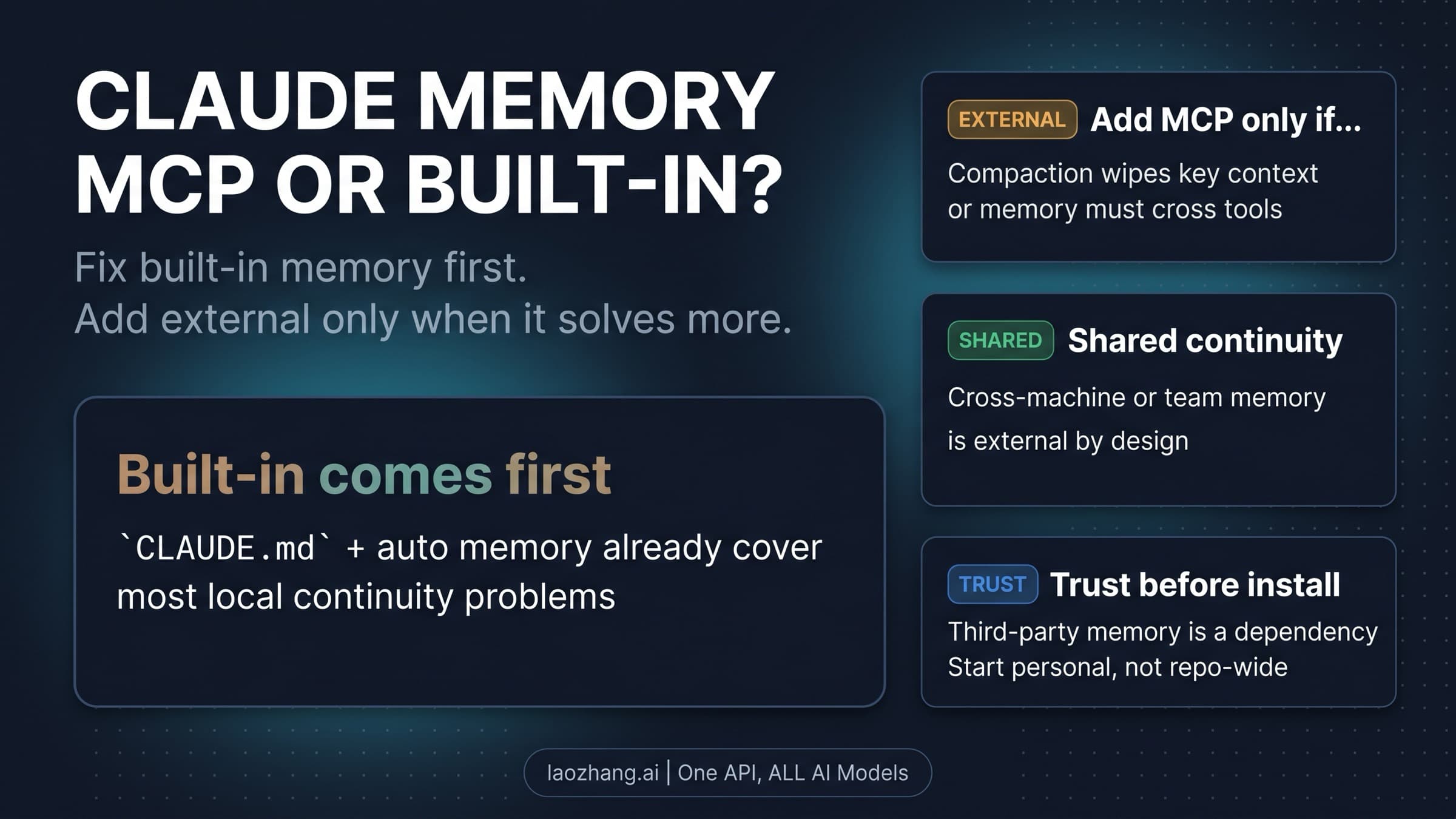
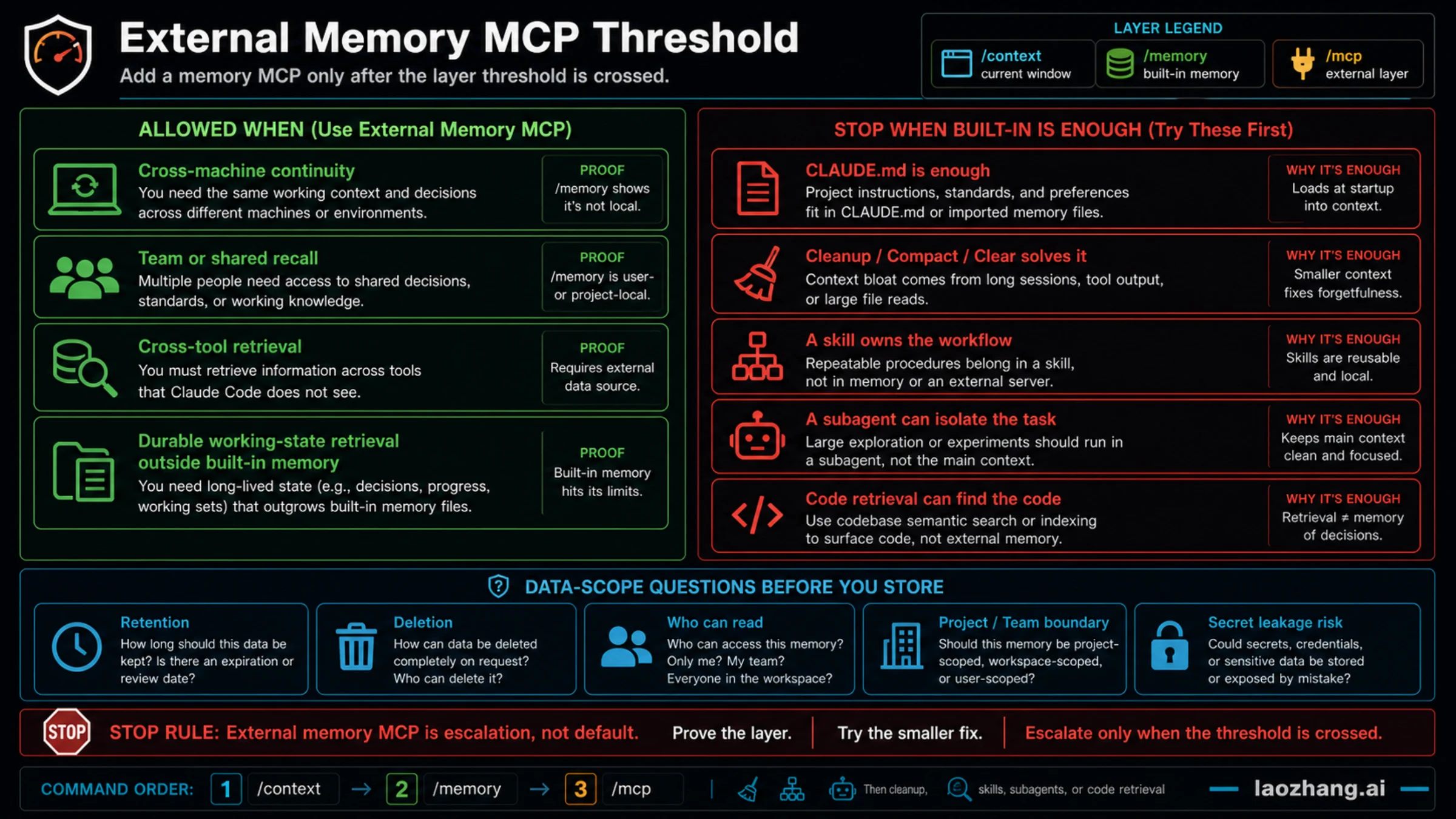
The stop rule is simple: no external memory MCP yet if a cleaner CLAUDE.md, /compact, /clear, a skill, a subagent, or code retrieval solves the failure. Add a memory MCP only when you need cross-machine continuity, team/shared recall, cross-tool retrieval, or durable working-state retrieval outside built-in memory, and only after you have checked retention, deletion, and who can read the stored data.
Fast Answer: Which Layer Failed?
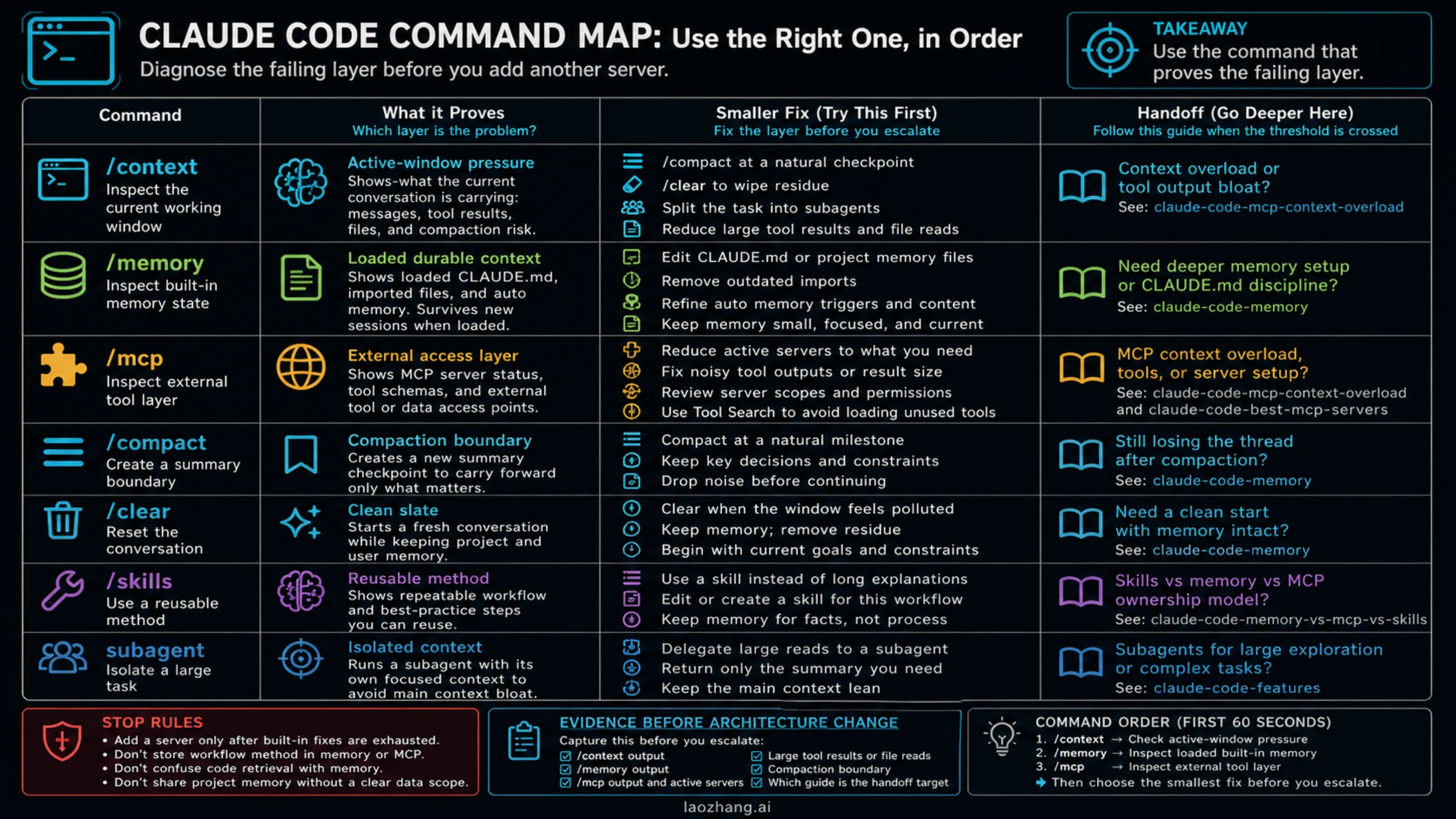
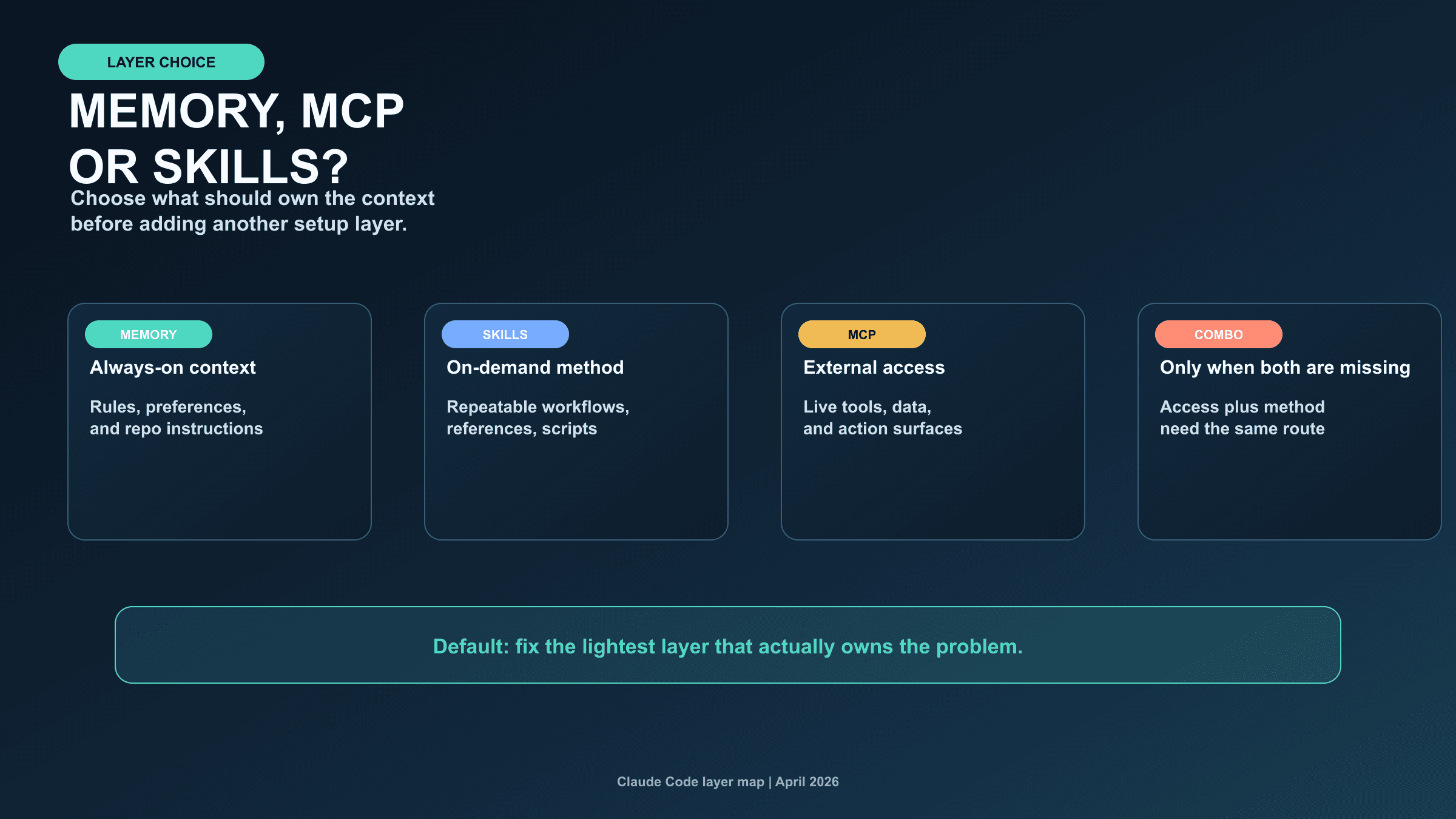
Think of Claude Code continuity as a set of layers, not as one memory switch. The active conversation is the layer Claude can currently see. Built-in memory is project or user context that loads at the start of a session. MCP is the external tool and data access layer. Skills carry reusable method. Subagents isolate work that should not keep filling the main context.
That split matters because the same complaint can point to different owners. "Claude forgot" may mean the current context is crowded, a durable rule is missing from CLAUDE.md, an MCP tool returned too much, or the procedure belongs in a skill. If you skip the owner check, you can make the system worse by adding another server to a context that was already too noisy.
Use this quick diagnosis:
| Failure pattern | Likely owner | Proof surface | Best next move |
|---|---|---|---|
| The current session drifts after large reads or tool output | Current context window | /context | Compact, clear, split, or reduce result size |
| A stable project preference is not present in new sessions | Built-in memory | /memory | Edit CLAUDE.md, imported memory, or auto memory scope |
| Tools are missing, duplicated, noisy, or suspicious | MCP | /mcp | Fix server scope or disable the noisy server |
| Context7 install failed, reconnects forever, or returns no useful docs | MCP setup, not memory | claude mcp list, claude mcp get context7, claude mcp logs context7, curl https://mcp.context7.com/ping | Repair config/auth/proxy/shell first; do not install a memory MCP for a Context7 setup error |
| A repeated process keeps being re-explained | Skill | /skills | Move the method into a skill or checklist |
| A side investigation is too large for the main thread | Subagent | Task delegation | Put the side read in isolated context |
| You need memory across machines, tools, or team members | External memory MCP | Server docs plus data review | Escalate only after built-in layers do not fit |
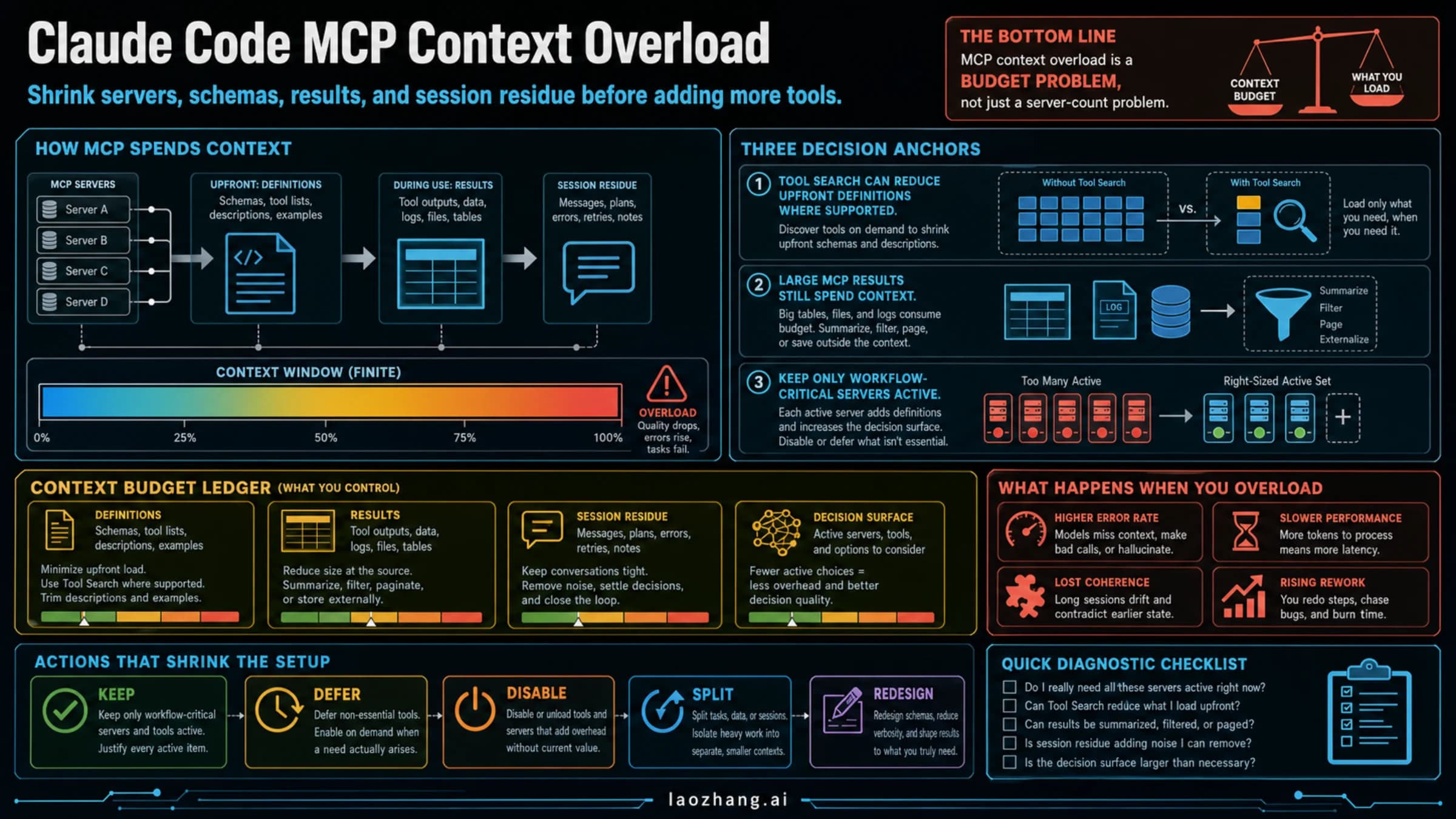
The route decision is therefore not a "best memory MCP" list. If the route decision proves you really need a server, use the deeper Claude memory MCP guide. If the pain is too many MCP servers or large tool results, use Claude Code MCP context overload instead.
What /context Proves
Claude Code's context window is the working set for the current conversation. The official context-window docs describe startup context as including project instructions, memory, selected tool names, and other loaded material, then show /context as the way to inspect the current breakdown and optimization suggestions. That makes /context the right first move when the symptom feels like drift inside a long session.
The important boundary is that context is not durable memory. It can contain memory, tool results, file snippets, conversation residue, and compaction summaries, but it is still the working window. If the current window is full of old exploration, a memory MCP will not fix the immediate pressure. It may add more tool definitions, more server decisions, or more retrieval results.
Use /context when:
- Claude keeps referring to old branches of the task.
- A large file read, generated log, or MCP result changed the quality of later answers.
- A session after compaction feels too compressed or too broad.
- You have many active tools and cannot tell what is taking space.
The smaller fixes are boring but effective. Compact at a natural checkpoint. Clear when you need a fresh conversation that still loads project memory. Split a large investigation into a subagent. Ask MCP servers for smaller summaries, handles, filters, or pagination. If this is the branch you are in, the external-memory question can wait.
What Built-In Memory Owns
Built-in memory owns durable instructions and project/user context that should be available when a Claude Code session starts. The official memory docs describe two persistent mechanisms: CLAUDE.md files and auto memory. They load into context rather than acting as a separate database or enforcement engine.
That means memory is a good home for facts like:
- Repository-specific conventions that should be visible every session.
- Naming rules, test commands, release boundaries, and recurring project instructions.
- User preferences that should survive a fresh session.
- Imports that let a project-level memory point to smaller files.
Memory is a poor home for bulky transcripts, every decision ever made, or long run logs. Put large evidence in files and link to them. Put reusable procedure into a skill. Put external records in a system that has a clear retention and deletion policy.
Use /memory when Claude is missing something that should have survived a new session. The command tells you what memory is loaded and helps separate "this was never saved" from "the current context is too crowded." For full built-in setup depth, use Claude Code memory.
What MCP Owns
MCP owns external access. It connects Claude Code to tools, services, data stores, and actions. It is not automatically the right place for every memory-like need. The official MCP docs also describe Tool Search, which can defer tool definitions until needed, but that does not make tool results free. Used tools and returned data still become part of the work Claude has to reason over.
That gives MCP a narrower but important job:
- Reach systems Claude Code cannot see by default.
- Query or update external data with explicit tools.
- Provide codebase retrieval, database access, issue trackers, docs, or internal services.
- Expose memory-like storage only when built-in memory is not the right scope.
Run /mcp when the external layer itself is suspicious: servers are disconnected, too many tools are active, a server exposes broad noisy tools, or a memory server is being considered. The question is not "Can MCP store this?" The question is "Should this be external access rather than built-in project context or reusable method?"
For MCP cleanup, the best sibling is Claude Code MCP context overload. For server selection after the need is proven, use Claude Code best MCP servers.
When Context7 MCP Install Fails
Context7 belongs in the MCP lane. It helps Claude Code fetch current library documentation, but it does not prove that your memory layer is broken. If Context7 fails to install, reconnect, or return docs, diagnose it as a server/config problem before you change CLAUDE.md, add a memory MCP, or blame the context window.
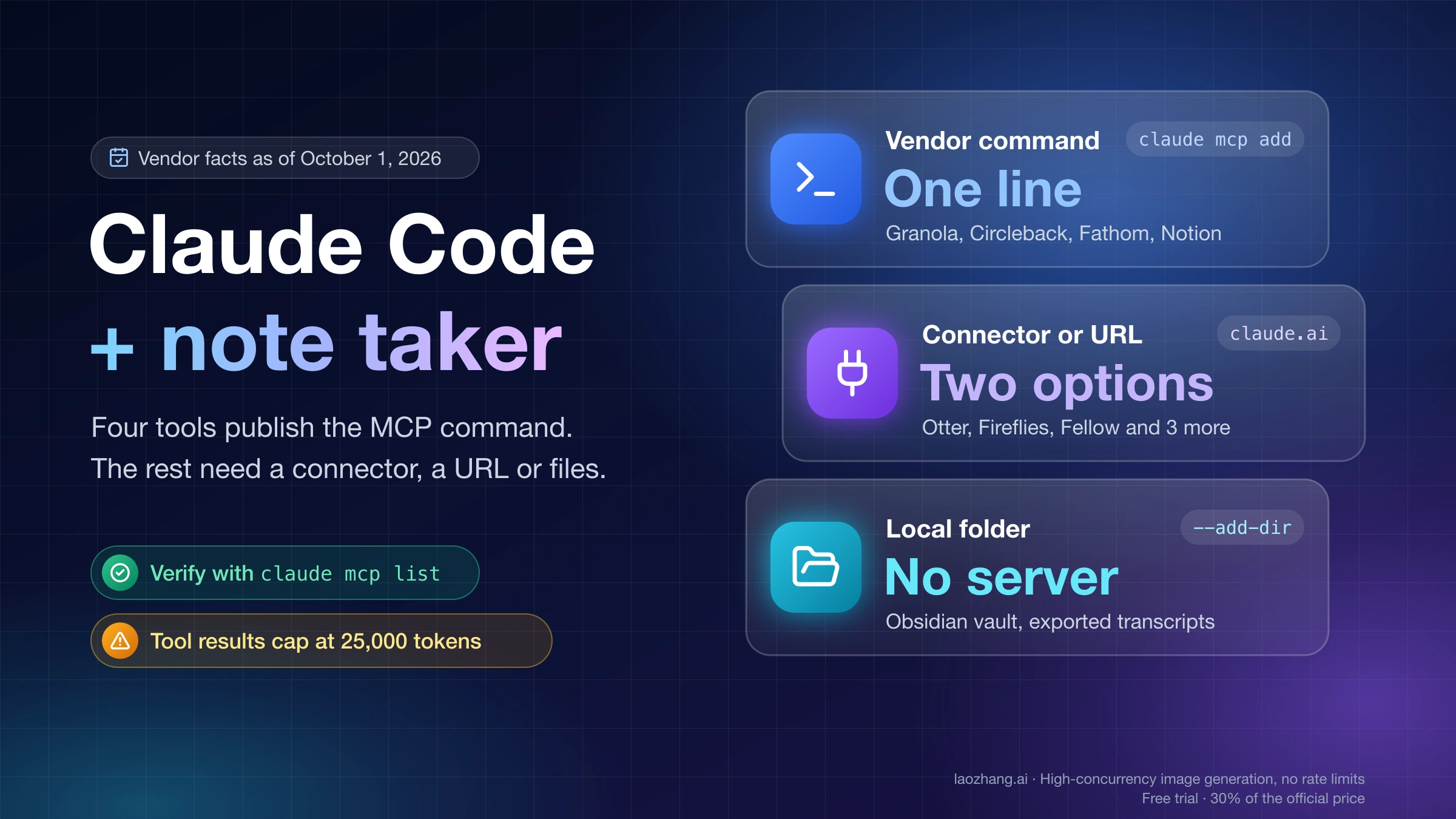
The same boundary applies to the visuals: Context7 sits in the MCP/external-access lane, while the command details stay in text so the diagrams do not imply that docs retrieval is durable memory.
Use this failure route:
| Failure signal | Check first | Likely owner | Smallest fix |
|---|---|---|---|
| Context7 is not listed | claude mcp list and /mcp | The server was not added to the active scope | Run the current Context7 setup path again, or add the plugin from the Context7 marketplace |
| Context7 is listed but disconnected | claude mcp get context7 and claude mcp logs context7 | MCP transport, authentication, proxy, or startup failure | Remove/re-add the server, restart Claude Code, verify API key and proxy variables |
Native Windows fails to spawn an npx stdio server | Inspect the generated MCP config | Windows shell execution | Use a cmd /c wrapper or WSL2; if the CLI rewrites /c into C:/, manually fix the JSON args |
| Plugin works anonymously but your plan usage is not counted | Check the Context7 dashboard after a fresh Claude Code restart | API-key environment or plugin path | Export CONTEXT7_API_KEY before launching Claude Code, then verify with logs/dashboard |
| Docs come back for the wrong package | Run the resolver with the exact library/version/topic | Retrieval query, not memory | Provide the Context7 library ID and ask for a narrower doc topic |
The practical command packet is:
claude mcp list
claude mcp get context7
claude mcp logs context7
curl https://mcp.context7.com/ping
On Windows, do not copy a macOS/Linux npx stdio command blindly. A failing spawn npx, connection closed, or wrapper warning usually belongs to the shell layer. A typical manual config shape is command: "cmd" with args like "/c", "npx", "-y", "@upstash/context7-mcp@latest". That is not a memory fix; it is a process-launch fix.
This also keeps Tool Search in perspective. Tool Search can reduce the upfront context cost of MCP tool definitions, but used tools and returned docs still enter the working session. If Context7 returns too much, ask for a narrower library ID, topic, version, or summary instead of adding another memory system.
Smaller Fixes Before External Memory
A lot of continuity pain is not actually memory. It is workflow shape.
If the same procedure keeps being re-explained, use a skill. Skills are better than memory for reusable methods because they can carry instructions and reference material without forcing every session to load all details all the time. Memory should remind Claude what matters; a skill should teach Claude how to execute a repeatable job.
If the task requires reading a huge code area, comparing many files, or exploring a branch that may not matter, use a subagent or isolated handoff. Keeping that work out of the main context protects the main session from residue and lets the final answer carry only the useful summary.
If the problem is code location, use code retrieval. A codebase search or semantic index helps find files and symbols. It does not replace project memory about why a decision was made or how your team wants recurring work done.
This is the ownership rule I use:
| Need | Better owner |
|---|---|
| Stable instruction that should load at session start | Built-in memory |
| Repeatable procedure or workflow | Skill |
| External system, action, data, or retrieval | MCP |
| Large side investigation | Subagent |
| Code location or symbol lookup | Code retrieval |
| Cross-machine/team/cross-tool recall outside built-in memory | External memory MCP |
For the broader layer split, keep Claude Code memory vs MCP vs skills nearby.
When External Memory MCP Is Justified
An external memory MCP can be useful, but it should cross a real threshold. The strongest thresholds are:
- You need continuity across machines or environments where local built-in memory is not enough.
- A team needs shared recall with a reviewed data scope.
- Claude Code must retrieve working state across tools, not only within one project folder.
- You need durable working-state retrieval that is too dynamic or too large for CLAUDE.md.
Before storing anything, answer the data questions. Where is the memory hosted? Who can read it? How is it deleted? Can secrets or client data enter it? Does it store raw transcripts, summaries, embeddings, or user-written facts? Does the server have a retention policy your team accepts?
If those answers are vague, do not promote the server into your default workflow. Keep memory in local project files, use a smaller MCP scope, or write a skill that avoids external persistence. Third-party memory MCP pages are useful examples of demand; they are not proof that every Claude Code project should install one.
Fix Matrix and Evidence Packet
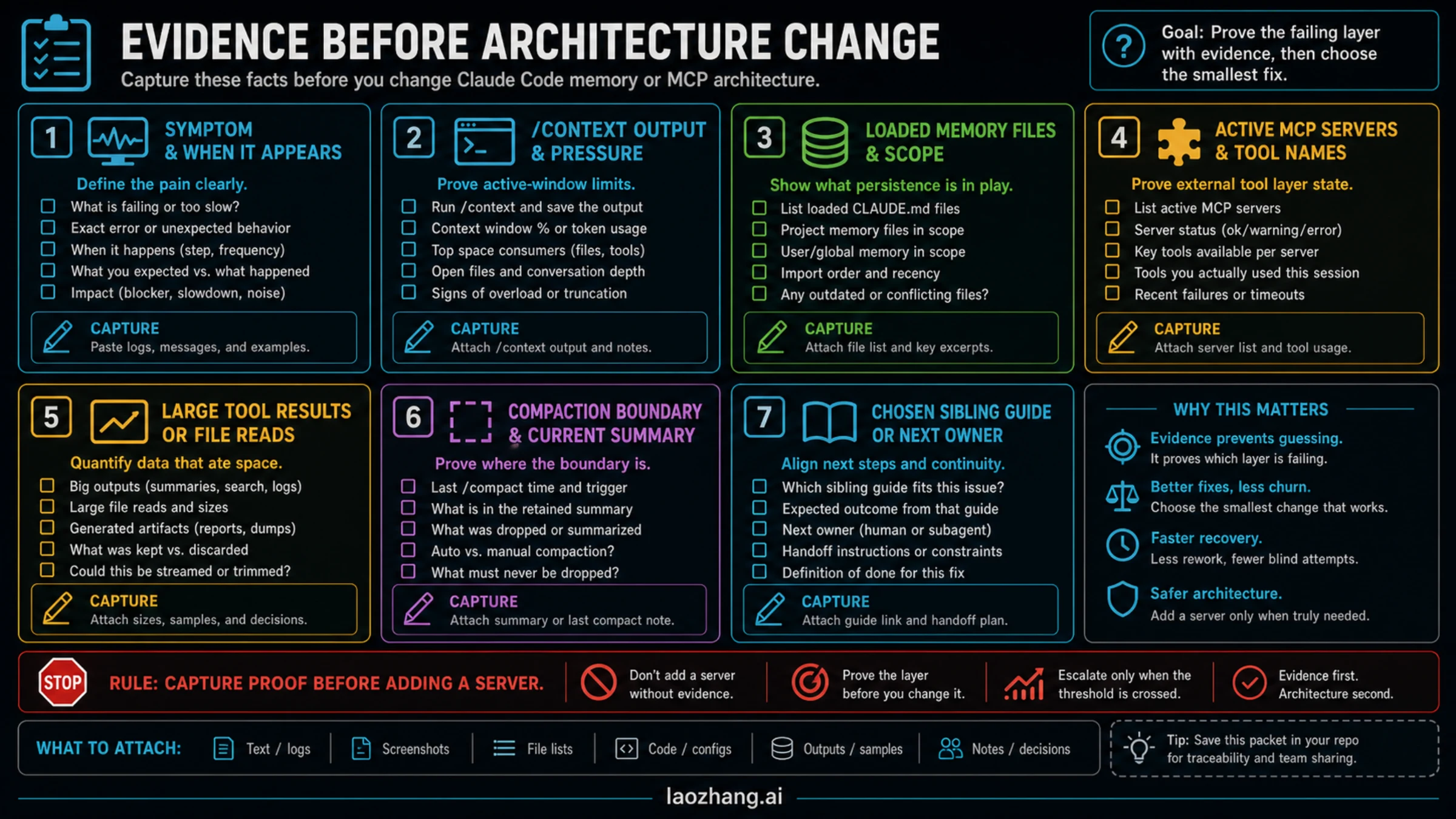
Before changing architecture, capture enough evidence that the next move is not guesswork:
| Capture | Why it matters |
|---|---|
| Symptom and timing | Separates new-session failure from long-session drift |
/context output | Shows active-window pressure and loaded categories |
/memory output | Shows which built-in memory files are actually loaded |
/mcp status | Shows active servers and the external layer |
| Large tool results or file reads | Identifies context bloat caused by outputs, not memory |
| Compaction boundary | Explains what survived and what became too compressed |
| Chosen sibling guide | Prevents the diagnosis from becoming every setup path |
Then apply the smallest fix. If the evidence points to memory, edit the right CLAUDE.md or memory scope. If it points to context bloat, reduce active material. If it points to MCP, narrow the server. If it points to procedure, write a skill. If it points to external recall, review data scope and then consider a memory MCP.
FAQ
Is Claude Code context the same as memory?
No. Context is the current working window. Built-in memory is durable project or user context that loads into that window when the session starts. Memory can become part of context, but context itself is not durable storage.
Should I install a Claude Code memory MCP?
Not first. Run /context, /memory, and /mcp, then use the smaller fix if it fits. A memory MCP is justified when you need cross-machine continuity, team/shared recall, cross-tool retrieval, or durable working-state retrieval outside built-in memory.
What if Context7 MCP install failed in Claude Code?
Treat it as an MCP setup problem first. Check claude mcp list, /mcp, claude mcp get context7, and claude mcp logs context7. On Windows, verify whether npx needs a cmd /c wrapper. For plugin/API-key issues, restart Claude Code after exporting CONTEXT7_API_KEY and confirm usage in Context7 logs or dashboard.
Does Tool Search remove MCP context cost?
No. Tool Search can reduce upfront tool-definition pressure by deferring tool definitions until needed, but tool use and tool results can still add context. You still need compact tool descriptions, bounded outputs, filters, summaries, and handles.
Should project rules live in CLAUDE.md or an MCP server?
Most stable project rules belong in CLAUDE.md or imported built-in memory. Use MCP when Claude needs external access, not when you only need a persistent instruction.
When should I use a skill instead of memory?
Use a skill when the problem is a repeatable method: review flow, release checklist, data-cleaning procedure, article workflow, or domain playbook. Use memory for facts and preferences that should be visible at session start.
Is code retrieval the same as memory?
No. Code retrieval helps Claude find code. Memory helps Claude remember project rules, preferences, decisions, and durable context. A code search tool can solve "where is this?" but not "what convention should we keep following?"
What should I do after compaction feels wrong?
Run /context, check whether the summary carried the right state, and compare it with the evidence packet. If the compaction lost a rule that should be durable, move that rule into memory. If it compressed a large exploration too aggressively, split or summarize the work before the next compact.