Can Claude Generate Images? No, But Here's What It Can Do (2026)
No. Claude outputs text and code, not pixels, on every model and plan. It draws SVG diagrams and charts itself; photos need a connector or an image API.
On this page
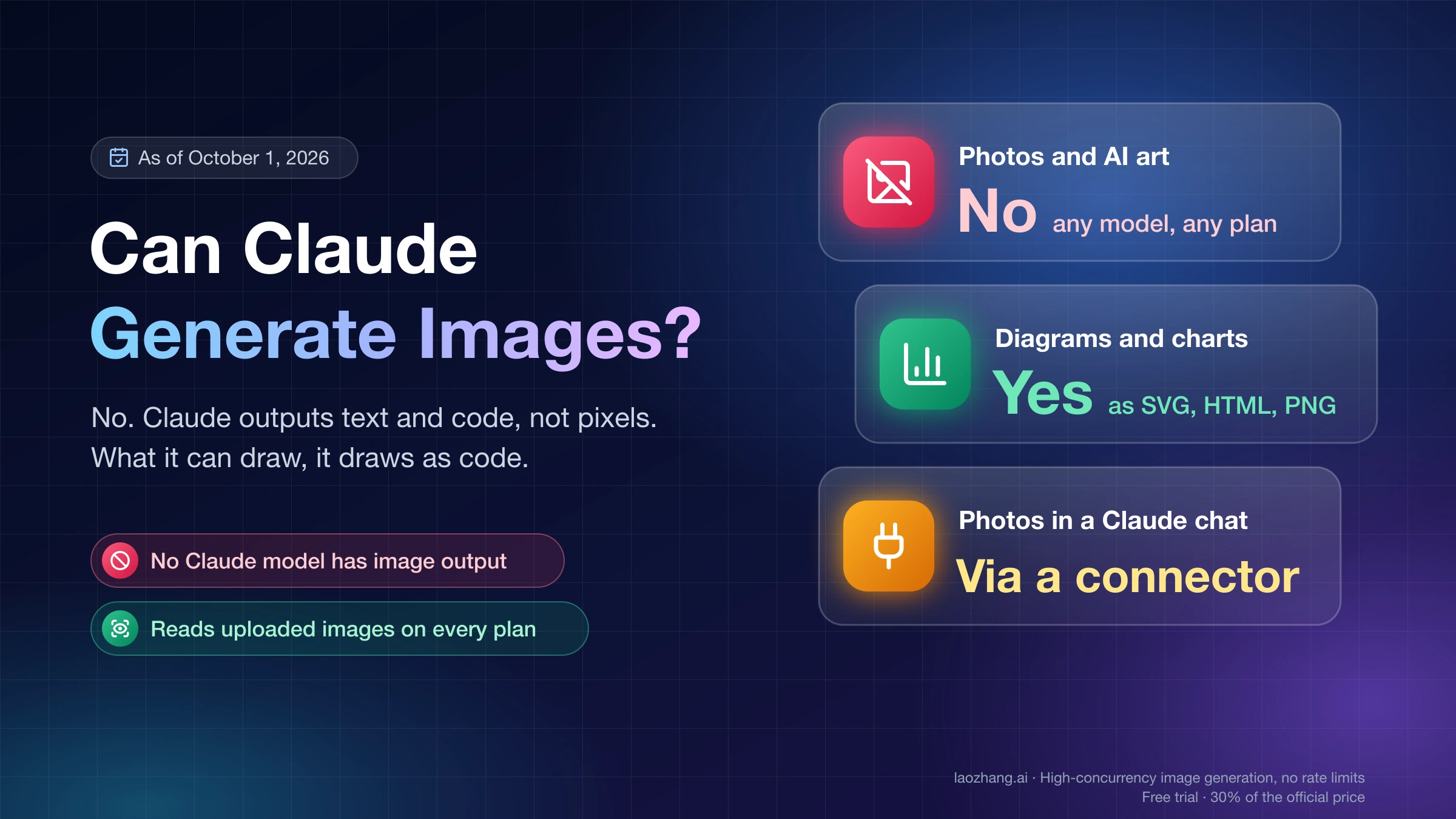
No. As of October 1, 2026, Claude does not generate photos, illustrations or AI art, and that holds for every Claude model and every plan. Anthropic's help center says Claude "doesn't generate photos or illustrations the way image-generation tools do." What Claude does produce is text and code, and code can be drawn: diagrams and charts as SVG and HTML in the chat, artifacts you can keep, chart files saved as PNG, and layouts in Claude Design. A real photo or illustration appears in a Claude conversation only when a connected tool with its own image model makes it.
The Direct Answer — What Claude Can and Cannot Do with Images
Claude cannot create a picture out of pixels, and it can do almost everything that stops short of that. "Natively" has a plain meaning here: the model returns text and code. Any image you end up with was drawn by something else, either a renderer that turns Claude's SVG or HTML into shapes, or a separate image model that Claude calls as a tool.
Anthropic states the limit at the model level in its vision documentation: "Claude is an image understanding model only. It can interpret and analyze images, but it cannot generate, produce, edit, manipulate, or create images." The same help page that says no to photos also says Claude "can, however, build diagrams, charts, and interactive visuals directly in your conversation," generated "using HTML and SVG."
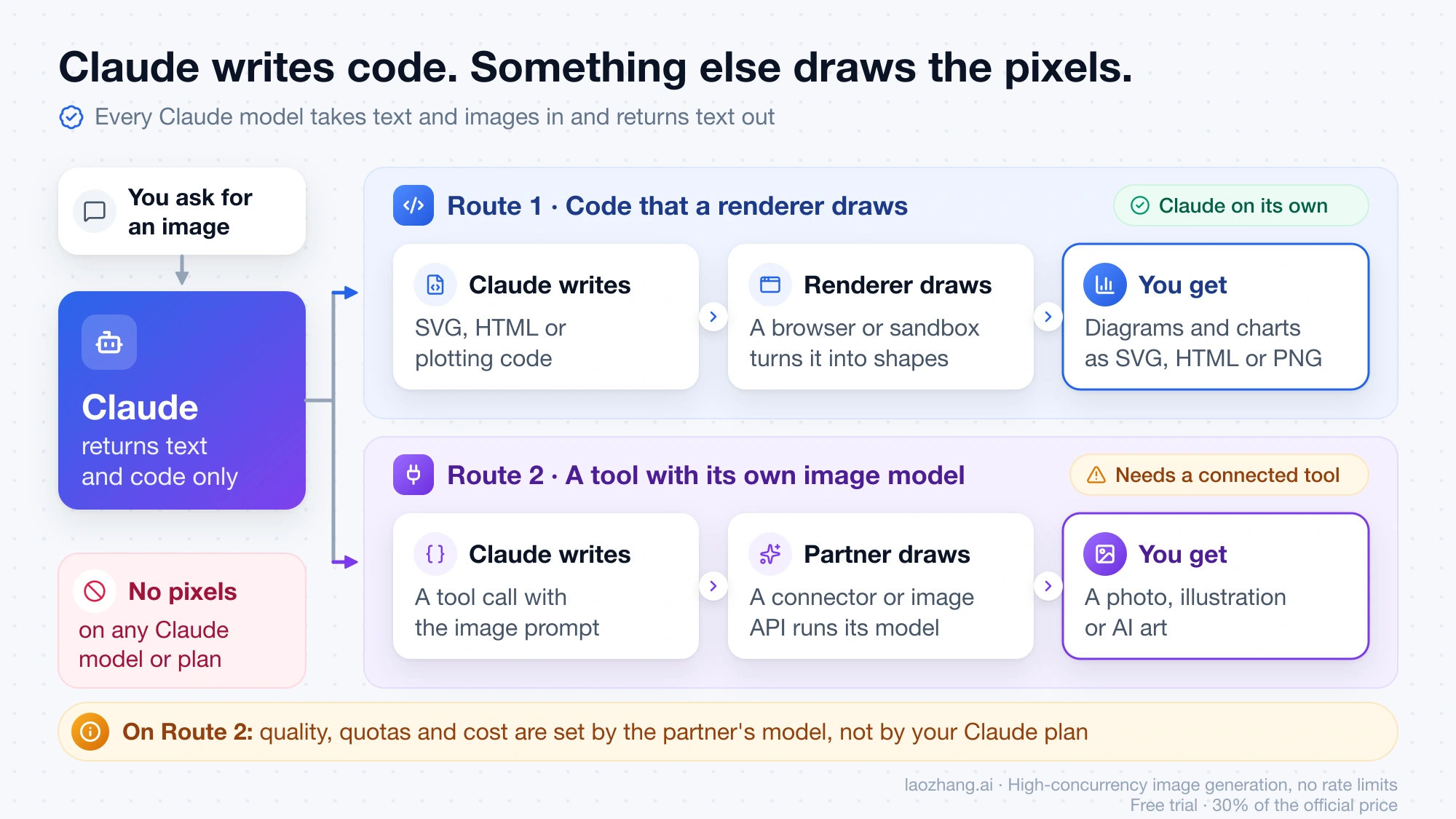
So the useful question is which kind of image you want. The table below maps each kind to the route that produces it, where that route works and what file you walk away with, as of October 1, 2026, with the Claude Design row updated on October 10, 2026.
| What you want | Route | Where it works | Plan | What you get |
|---|---|---|---|---|
| A new photo, illustration or AI art | Nothing in Claude itself. A connector whose service has an image model, or Claude Code calling an image API | Connectors: Claude web, desktop, mobile, Claude Code, and the API through the MCP connector | Directory connectors are open to all users; the partner's own account and limits apply | Whatever the partner tool returns |
| A diagram, flowchart or chart inside a reply | Custom visuals (beta) | Web and desktop, in chat and Cowork. Not iOS or Android | All users, Free included | An inline HTML/SVG visual; copy it as an image or download .svg or .html |
| A visual you keep, share and iterate on | Artifacts | Claude apps and Claude Code | Free, Pro, Max, Team, Enterprise | SVG, an HTML or React app, a Mermaid diagram |
| A chart as an image file | Code execution and file creation | Web, desktop and mobile | Free, Pro, Max, Team, Enterprise | A PNG |
| Slides, a prototype, a one-pager | Claude Design | Any chat, Claude Code, the Artifacts tab; claude.ai/design until December 14, 2026. Mobile apps can request, view and edit a design | Free, Pro, Max, Team, Enterprise (out of beta since October 8, 2026) | .zip, PDF, PPTX, standalone HTML; decks can also go to Google Slides |
| A crop, resize, format change or grayscale of an existing image | Code that Claude writes and runs | Claude Code with local tools (tested below); the Adobe connector, according to Adobe's listing | Any plan that includes Claude Code | JPEG, PNG or WebP |
| An object removed, a scene or pose changed | An image model, through a connector or in another app | Same as the first row | Same as the first row | Whatever the partner tool returns |
| An uploaded image read, described or transcribed | Vision | Claude apps and the API | All plans | Text |
Two rows are about pixels that did not exist before, and both need an image model. Every other row is Claude writing code or reading an image, which it does on its own.
What Claude CAN Create Visually (More Than You Think)
Claude can create any visual that can be described in code: flowcharts, charts, comparison layouts, icons, dashboards, slides. None of these are photos, and Anthropic's pages are consistent about that. They differ in where they appear, how long they last and what you can export.
SVG Graphics and Diagrams in Chat: Custom Visuals on Web and Desktop
Ask "draw this as a diagram" or "chart this data" and Claude can build the visual inline in its reply. According to Anthropic's custom visuals page, the feature is in beta and "available to all Claude users on web and desktop, in both chat and Cowork," with no setting to turn on. The same page is blunt about what they are: "Custom visuals aren't photos or illustrations. Claude builds them using HTML."
Three conditions matter in practice:
- They do not render on Claude for iOS or Android.
- They are ephemeral. To keep one, use "Copy as image," download it as an .svg or .html file, or save it as an artifact.
- Claude "may not always choose to generate a visual when you expect one," so ask for a diagram or chart explicitly.
Interactive Visualizations Through Artifacts: On Every Plan
Artifacts are the persistent version. Per Anthropic's artifacts page, they are available on Free, Pro, Max, Team and Enterprise plans, and in Claude Code on every plan that includes Claude Code. They need "Cloud code execution and file creation" turned on in Settings > Capabilities. An artifact can be an HTML or React app, a Markdown document, a Mermaid diagram or an SVG.
Choose an artifact over a custom visual when the result has to survive the conversation: an interactive chart someone else will open, an icon set you will edit again, a calculator you want to publish.
PNG Charts from File Creation: Claude Runs Code and Saves the File
When you need an actual image file of your data, Claude can write plotting code, run it in a sandbox and hand back the result. Anthropic's file creation page says Claude "can create data visualizations in image files like PNG," and that the feature is available to Free, Pro, Max, Team and Enterprise users on web, desktop and mobile. It is on by default for Free, Pro and Max.
This is the one route where Claude's chat gives you a raster file without any outside service. It is still rendering, not generating: the chart is exactly what the code and your data describe. The page also notes that "creating files will use more of your limit compared to normal chats." If you are close to your cap, Claude Free vs Pro Usage Limits: Decide With Work, Not Counts explains what that cap means in practice.
Can Claude Design Generate Images? It Builds HTML Layouts, Not Photos
No. Claude Design makes layouts, not pictures. Anthropic's Claude Design page describes it as a way to "create designs, interactive prototypes, one-pagers, and other visual work by chatting with Claude," and as one of the templates an artifact can start from. Nowhere does the page say it generates photos or illustrations. You can upload screenshots, images and existing assets as context, and the design is built around them in code.
Since October 8, 2026, Claude Design is out of beta and available on Free, Pro, Max, Team and Enterprise plans, and it is on by default. On Enterprise it turns on by default on October 15, 2026, and owners can enable it earlier. The standalone site at claude.ai/design closes on December 14, 2026. Exports are a .zip, PDF, PPTX and standalone HTML, and decks can go straight to Google Slides. Designs can also be sent to Adobe for Creativity, Canva, Gamma or Miro, or handed to Claude Code. Usage counts toward the same limits as the rest of Claude. On the mobile apps you can request, view and edit a design; sharing settings still need web or desktop.
The same launch added two beta templates that are also built from code. Claude Dashboards turns questions about connected company data into charts, each showing its SQL query, on Pro, Max, Team and Enterprise. Claude Motion animates your text, charts and images and exports an MP4, on Team and Enterprise only, and Anthropic says it uses no video generation model, so it makes no footage and no people. How to Use Claude Dashboards and Motion: Pro and Max Lack Motion covers which plan gets which and how to start.
Which Claude Model Can Generate Images? None, on Free or Pro
No Claude model generates images, so there is no model to switch to and no plan to upgrade to. Anthropic's models overview says all current models "support text and image input, text output." Opus, Sonnet and Haiku differ in how well they reason and write code. None of them has an image output.
If the question is which model draws the best code-built visuals, Anthropic gives one hint on its custom visuals page: "Opus performs the best at visualization tasks," so a more capable model is worth choosing for a complex visual. That is advice about diagrams and charts, not about photos.
Plans change what surrounds the model:
| Free | Pro and Max | |
|---|---|---|
| Photos, illustrations, AI art from Claude itself | No | No |
| Custom visuals in chat (web and desktop) | Yes | Yes |
| Artifacts | Yes | Yes |
| PNG charts through file creation | Yes | Yes |
| Uploading images for analysis | Yes | Yes |
| Directory connectors | Yes | Yes |
| Custom connectors (remote MCP) | One | Yes |
| Claude Docs, Slides and Design templates | Yes | Yes |
| Claude Dashboards template (beta) | No | Yes |
| Claude Motion template (beta) | No | No (Team and Enterprise only) |
Claude Pro buys more usage, the Dashboards template and more custom connectors. Claude Design has been on the Free plan too since October 8, 2026. None of this buys image generation.
Can Claude Edit Images or Photos? Crops Yes, Object Removal No
"Edit" covers three different jobs, and Claude handles them differently.
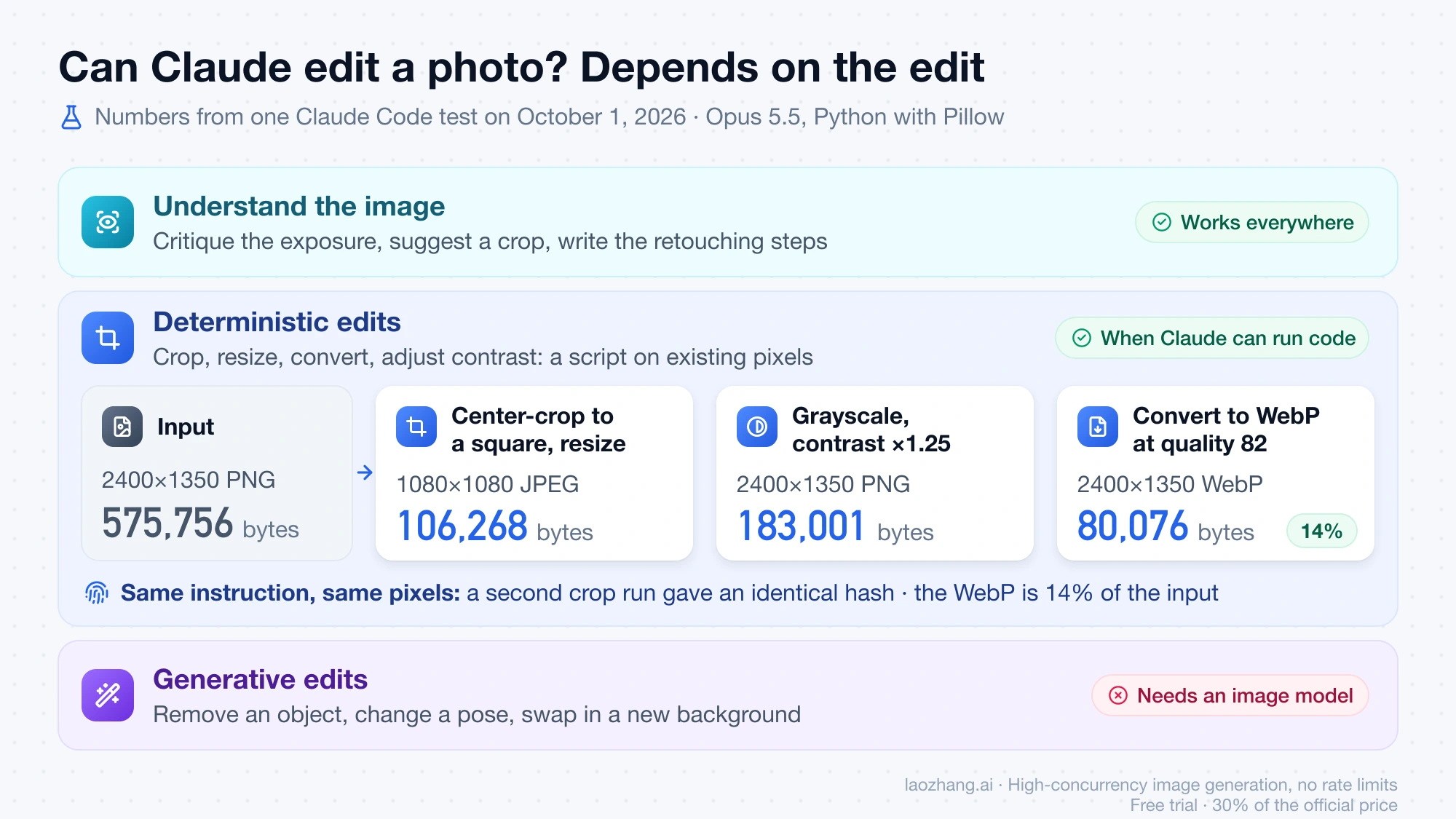
Understanding the image works everywhere. Upload a photo and Claude can tell you what is wrong with the exposure, suggest a crop, or write the retouching steps for you to carry out.
Deterministic edits are possible when Claude can run code. Cropping, resizing, converting formats and adjusting contrast are arithmetic on existing pixels, so a script does them. In a Claude Code session with Opus 5.5 on October 1, 2026 (macOS on an Apple M4, Python 3.12.1 with Pillow 12.0.0, no image model involved), Claude wrote and ran a short script against a 2400×1350 PNG:
| Edit | Output | Size |
|---|---|---|
| Input | 2400×1350 PNG | 575,756 bytes |
| Center-crop to a square, resize | 1080×1080 JPEG | 106,268 bytes |
| Grayscale, contrast ×1.25 | 2400×1350 PNG | 183,001 bytes |
| Convert to WebP at quality 82 | 2400×1350 WebP | 80,076 bytes (14% of the input) |
The crop is four lines of Pillow:
w, h = im.size
side = min(w, h)
box = ((w - side) // 2, (h - side) // 2, (w + side) // 2, (h + side) // 2)
im.crop(box).resize((1080, 1080), Image.LANCZOS).save("square.jpg", quality=88)
Running the crop a second time produced a file with an identical hash. That is the character of this route: the same instruction gives the same pixels every time. The figures come from one machine and one input, so your file sizes will differ. The test ran in Claude Code with local tools. The sandbox behind file creation in the Claude apps also executes code, but Anthropic's page promises charts as PNG and does not mention photo editing.
Generative edits are out of reach for code. Removing an object and filling the gap, changing a pose, swapping the background for a new scene: each one invents pixels, which takes an image model. Inside Claude that means a connector. Adobe's listing in the Connectors directory says its connector can "edit photos individually or in bulk: adjust color and lighting, blur or remove backgrounds, straighten images, and expand or crop photos." That is Adobe's description of its own tool, and it requires signing in to Adobe.
How to Generate Images Through Claude Using MCP
To get a real photo or illustration inside a Claude conversation, connect Claude to a service that has an image model. MCP (Model Context Protocol) is the plumbing. Anthropic's pages call these integrations connectors in the Claude apps and MCP servers in Claude Code.
How MCP Image Generation Works
Claude does not draw the image. It writes the request, and the connected service generates it.
- You describe the image in plain language.
- Claude decides a connected tool fits and writes the tool call, including the prompt for the image model.
- The partner's service runs its own model and returns the result.
- Claude shows or links what came back and can refine the prompt for another round.
Everything about the picture itself (quality, style, resolution, quotas, cost) is decided by the partner's model and your account with that partner, not by your Claude plan.
Setting Up MCP for Image Generation
In the Claude apps there is no config file to edit. Anthropic's connectors page gives the steps:
- In a chat, click the "+" button (or type "/"), hover over "Connectors" and choose "Manage connectors." Or go to Customize > Connectors.
- Click the "+" next to Connectors and pick a connector from the directory.
- Click "Connect" and sign in to the partner service.
- Back in the chat, toggle the connector on and ask for the image.
Web connectors are available to all users on Claude web, Cowork, desktop and mobile. Three directory listings carry the "Anthropic verified" label and involve image tools, according to their own pages:
| Connector | What its listing says | Sign-in |
|---|---|---|
| Hugging Face | "Access the Hugging Face Hub and thousands of Gradio Apps." The tool list includes gr1_flux1_schnell_infer, which by its name runs a FLUX.1 schnell Space | Hugging Face account |
| Adobe | Tools across Photoshop, Lightroom, Illustrator, Firefly, Adobe Express and others, including photo editing in bulk | Adobe account |
| Canva | "Browse, summarize, autofill, and even generate new Canva designs" | Canva account |
These rows are directory descriptions, not test results. What each connector returns, how many images it allows and whether it needs a paid partner plan depends on the partner. Every listing carries Anthropic's warning: "Only use connectors from developers you trust. Anthropic does not control which tools developers make available and cannot verify that they will work as intended or that they won't change."
If the service you want is not in the directory, add it as a custom connector with its remote MCP URL. Hugging Face lists its own as https://huggingface.co/mcp?login&gradio=none. Custom connectors are available on Free, Pro, Max, Team and Enterprise, with Free limited to one. Claude reaches them from Anthropic's cloud, so the server has to be reachable from the public internet.
Can Claude Code Generate Images? Yes, by Calling an Image API
Claude Code on its own writes SVG and runs scripts. It produces a photo only when one of those scripts, a skill or an MCP server calls an image model's API with your key.
The code-only half looks like this. In the same October 1 session, Claude hand-wrote a 911-byte SVG flow diagram, and rsvg-convert rendered it to a 1600×600 PNG of 26,381 bytes in 135 ms:
<svg xmlns="http://www.w3.org/2000/svg" viewBox="0 0 800 300" font-family="Helvetica, Arial, sans-serif">
  <rect width="800" height="300" fill="#f7f5f0"/>
  <g font-size="18" text-anchor="middle">
    <rect x="40" y="110" width="180" height="80" rx="12" fill="#ffffff" stroke="#c96442" stroke-width="2"/>
    <text x="130" y="156" fill="#1f1e1d">Prompt</text>
    <rect x="310" y="110" width="180" height="80" rx="12" fill="#ffffff" stroke="#c96442" stroke-width="2"/>
    <text x="400" y="156" fill="#1f1e1d">Claude writes SVG</text>
    <rect x="580" y="110" width="180" height="80" rx="12" fill="#c96442"/>
    <text x="670" y="156" fill="#ffffff">Renderer draws it</text>
  </g>
</svg>
Boxes, labels and arrows are a good fit for this. A product shot or a watercolor is not, because nobody can write a photo as coordinates. For that half, Nano Banana in Claude Code: Skill or MCP Setup That Still Works walks through wiring a Gemini image model into Claude Code, with current model IDs. The same split between code and renderer applies to moving pictures, covered in Claude Opus 5.5 Video Generation: Code In, Rendered MP4 Out. On Team and Enterprise plans, Claude Motion now does that rendering inside Claude and exports an MP4; see How to Use Claude Dashboards and Motion: Pro and Max Lack Motion.
Claude's Image Understanding — Powerful Vision Capabilities
Reading images is the half of the job Claude does itself, on every plan. The help center says Claude "can also view and analyze images you upload": screenshots, photographed documents, charts, handwriting, UI mockups. You get text back, such as a description, extracted data, a critique or code that recreates a chart.
The limits in Anthropic's documentation, as of October 1, 2026:
| Limit | Value |
|---|---|
| Formats | JPEG, PNG, GIF, WebP |
| Images per message on claude.ai | 20 |
| Images per API request | 100 for models with a 200k-token context window, 600 for all other models |
| Maximum dimensions in chat | 8000×8000 px |
| Suggested minimum | 1000×1000 px or larger |
| Animated files | Only the first frame is used |
The same vision documentation lists what not to rely on. Claude "cannot determine whether an image is AI-generated." Object counts are approximate, spatial reasoning is limited, and it is "not designed to interpret complex diagnostic scans such as CTs or MRIs." For upload caps across chats, Projects and PDFs, see Does Claude Have Unlimited File Uploads? The Limits That Actually Apply.
Understanding and drawing combine well. Upload a photo of a whiteboard or a chart from a PDF, and ask Claude to rebuild it as an SVG or an interactive artifact. Claude reads the pixels, then writes the code. No image model is involved at either step.
Claude vs ChatGPT vs Gemini — Image Generation Compared
ChatGPT and Gemini have built-in image generation. Claude does not. If you came from either one expecting to type "make me a picture of…" and get a picture, that is the difference you ran into, and no setting in Claude changes it.
The choice follows from what the image is made of:
- A photo, illustration, character or painted style. Use a tool with an image model. That can be ChatGPT or Gemini directly, or a connector inside Claude if you want to stay in one conversation and already have the partner account. Gemini's image model, Nano Banana, has a no-cost tier in the Gemini app and in AI Mode; Can You Use Nano Banana for Free? Google's No-Cost Options lists the limits.
- A diagram, chart, flowchart, icon or UI mockup. Claude is a good fit, because these are code. You get an editable SVG or HTML file with exact labels and numbers instead of a flat picture of a chart.
- Slides or a one-pager. Claude Design, on any plan including Free, with placeholders for photos you supply.
- An existing photo that needs retouching. Claude for exact crops and conversions when it can run code; an image model or an editor for anything that invents pixels.
Mixing tools is normal here. A common split is to generate the hero photo elsewhere, then bring it into Claude for the layout, the chart next to it and the alt text.
Frequently Asked Questions About Claude and Images
Can Claude generate photos like ChatGPT, Gemini or Midjourney?
No. Claude has no image model, so it cannot produce a photo, an illustration or AI art by itself on any plan. A photo can appear in a Claude chat only when a connector such as Hugging Face or Adobe generates it with its own model, or when Claude Code calls an image API.
Why can't Claude generate images?
Because every Claude model outputs text only. Anthropic's documentation calls Claude "an image understanding model only" and does not give a reason for the product decision. Diagrams and charts work because they can be written as SVG or HTML and drawn by a renderer.
What kind of visuals CAN Claude create without any integrations?
Diagrams, flowcharts and charts as custom visuals in chat on web and desktop; SVG, HTML or React apps and Mermaid diagrams as artifacts; data charts saved as PNG through file creation; and layouts and slides in Claude Design, which every plan has had since October 8, 2026. All of them are built from code.
Does Claude generate images for free?
Not photos, on any plan. The Free plan does include custom visuals, artifacts, PNG charts through file creation, image analysis, directory connectors and one custom connector. Image tools reached through a connector follow the partner's own pricing and limits.
Can Claude analyze and understand images I upload?
Yes, on every plan. Claude reads JPEG, PNG, GIF and WebP files, up to 20 images per message on claude.ai, and answers in text. It can describe a photo, transcribe a document, explain a chart or debug from a screenshot. It cannot tell whether an image is AI-generated.
Is Claude's image understanding better than ChatGPT's?
Anthropic publishes no ranking of Claude's vision against ChatGPT's, so the honest test is your own images. Run the same screenshot or document through both. Anthropic's stated limits are approximate counting, limited spatial reasoning and no medical diagnostics.
Will Claude add native image generation in the future?
Anthropic has not announced native image generation for Claude as of October 1, 2026. Its help center and API documentation still describe Claude as a model that understands images and outputs text. Until that changes, connectors and image APIs are the only way to get generated photos in a Claude workflow.
Sources7
External pages this guide links to, in the order they appear. Last updated Oct 21, 2026.
Sources7
External pages this guide links to, in the order they appear. Last updated Oct 21, 2026.
- 1."doesn't generate photos or illustrations the way image-generation tools do."support.claude.com/en/articles/9002504-can-claude-produce-images
- 2.vision documentationplatform.claude.com/docs/en/build-with-claude/vision
- 3.custom visuals pagesupport.claude.com/en/articles/13979539-custom-visuals-in-chat
- 4.artifacts pagesupport.claude.com/en/articles/17153992-what-are-artifacts-and-how-do-i-use-them
- 5.file creation pagesupport.claude.com/en/articles/12111783-create-and-edit-files-with-claude
- 6.Claude Design pagesupport.claude.com/en/articles/14604416-get-started-with-claude-design
- 7.connectors pagesupport.claude.com/en/articles/11176164-use-connectors-to-extend-claude-s-capabilities