Claude Cloud Session Credit vs Usage Credits vs Limit Reset
The cloud credit is Anthropic's one-time $100/$250 trial for cloud sessions, usage credits bill your card at API rates, and a reset refills one limit for free.
On this page
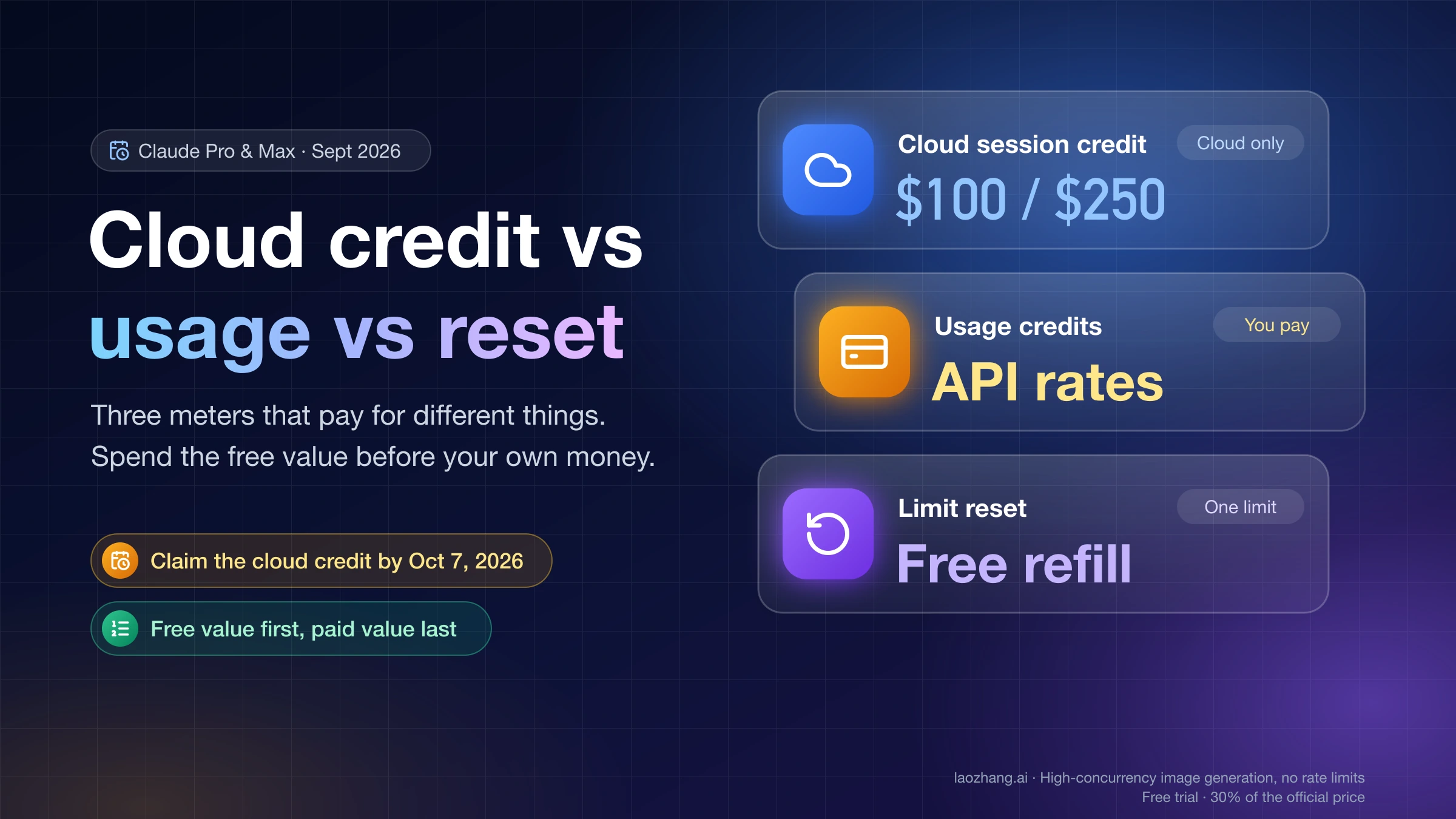
The three things Claude just offered you pay for different things. The cloud session credit is a one-time promotional balance from Anthropic ($100 on Pro, $250 on Max) that only works inside Claude Code cloud sessions and must be claimed by October 7, 2026. Usage credits are your own money: prepaid funds, billed at standard API rates, that keep Claude and Claude Code running after your plan's included usage runs out. A limit reset costs nothing and refills either your five-hour session limit or your weekly limit once, account-wide.
If you're blocked by a limit, spend the free value first. Claim the cloud credit, check whether you hold an unused reset in Settings > Usage, and only then turn on usage credits with a monthly cap. A reset doesn't refund usage credits you've already been billed for, so using it after paying is money you can't get back.
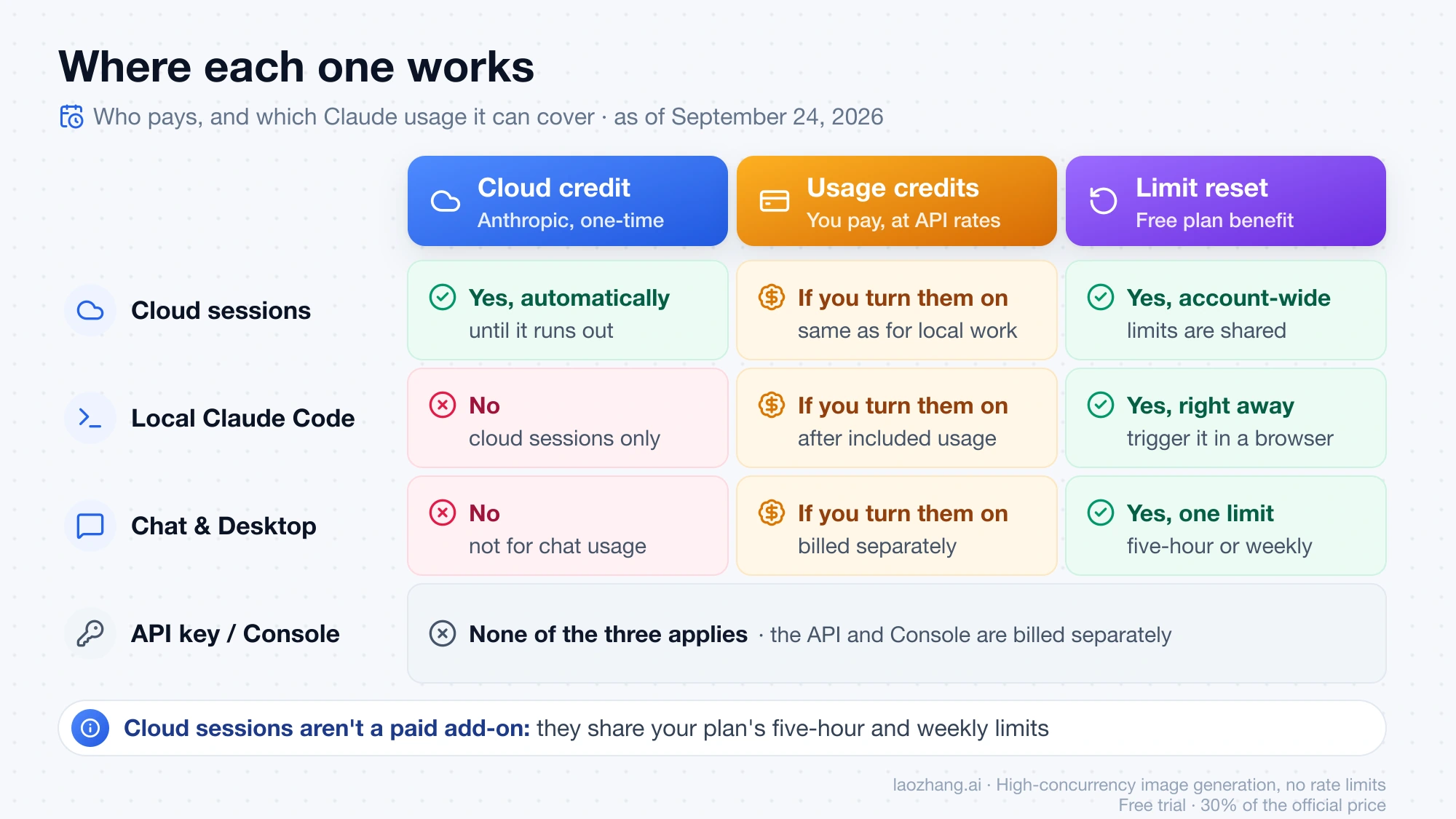
The three side by side
| Cloud session credit | Usage credits | Limit reset | |
|---|---|---|---|
| Who pays | Anthropic (one-time promo) | You, separately from your subscription | Nobody; it's a free plan benefit |
| What it covers | Claude Code work that runs in a cloud session, until the balance runs out | Usage beyond your plan's included limits, at standard API rates | Sets one limit back to full: either the five-hour session limit or the weekly limit, depending on the card |
| Where it works | Cloud sessions started from claude.ai/code, the Claude app, Claude Desktop, or claude --cloud | Claude chats and Claude Code on your subscription login | Your whole Claude account, including Claude Code and mobile |
| How you get it | Claim link or /claim-credit in the CLI; GitHub must be connected to start a session | Settings > Usage > Usage credits > Enable, then "Add funds" | Given occasionally to eligible plans; shown under Resets in Settings > Usage |
| Amount | $100 on Pro, $250 on Max, one per account | Whatever you prepay; $2,000 daily redemption limit | One refill of one limit |
| Deadline or expiry | Claim by October 7, 2026; expiry after claiming isn't published | In most places no expiry; in Japan, six months after purchase for credits bought from September 10, 2026 | Expires on the date shown on the offer; lost if you downgrade or cancel first |
| What it can't do | Pay for local Claude Code or chat usage | Speed up the five-hour or weekly reset | Refund usage credits already billed or add to your credit balance |
Sources: ClaudeDevs announcement, Manage usage credits for paid Claude plans, What is a limit reset?, as of September 24, 2026.
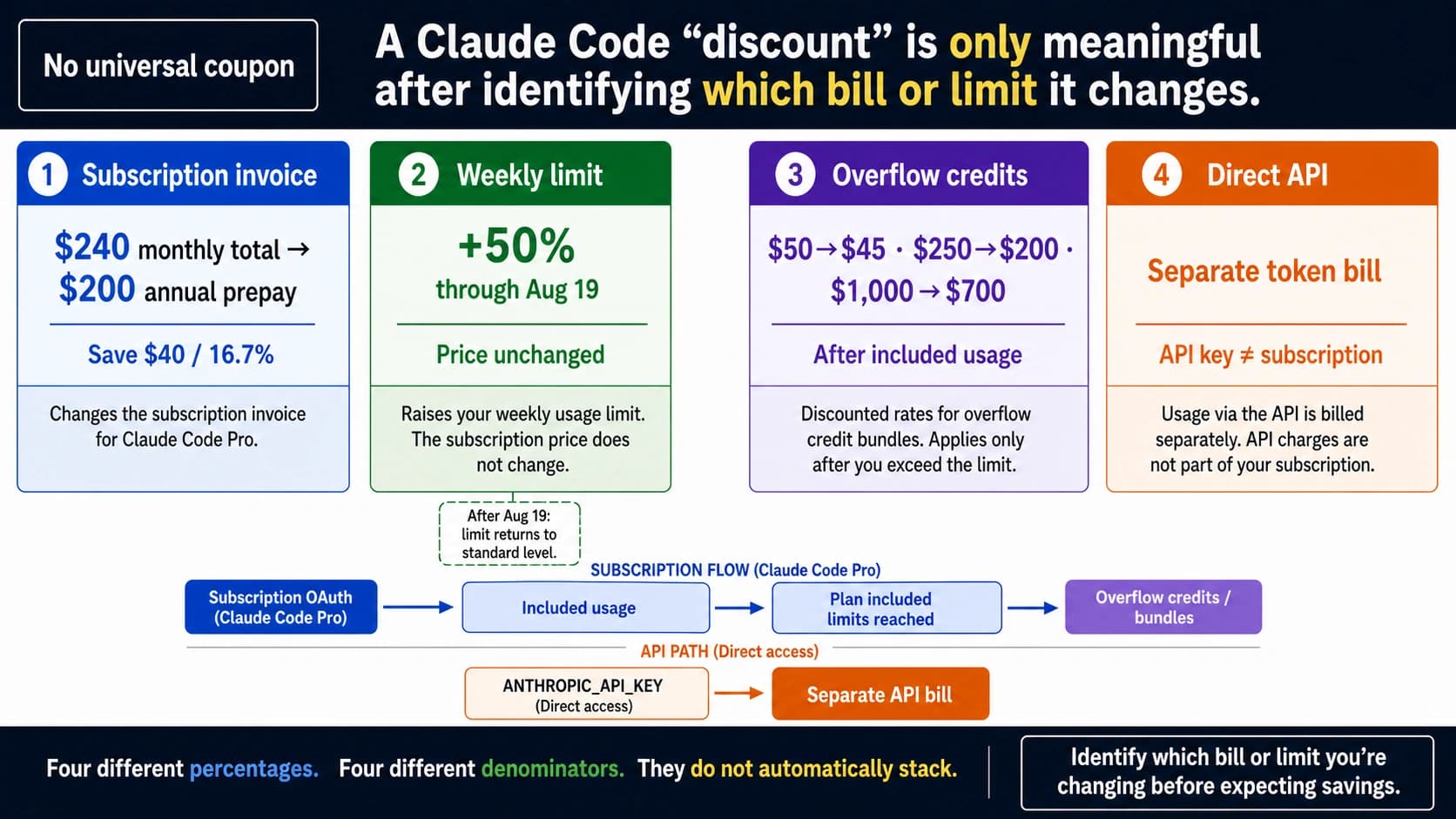
None of the three touches the Claude Console or API. A subscription and the API are billed separately, and cloud sessions need a claude.ai sign-in, not an API key.
The cloud session credit: trial money for cloud runs
Cloud sessions are Claude Code sessions that run on Anthropic-managed machines, so they keep working after you close your laptop. They left research preview on September 23, 2026, and are available on Pro, Max, and Team, and to Enterprise users with premium or Chat + Claude Code seats (Claude Code on the web docs).
To mark the launch, Anthropic's developer account announced a credit for existing subscribers: "$100 on Pro, $250 on Max." The thread spells out the rules (post 2, post 3):
- "The credit is separate from your usage limits, and it applies automatically once you start a cloud session."
- "If you hit a limit locally, keep going in the cloud until your credit runs out."
- "One credit per account, for cloud sessions only."
- Claim it through the link in the post or with
/claim-creditin the CLI. You need GitHub connected to start a session. "Claim by Oct 7. Terms apply."
The post gives no time of day or time zone for the deadline, so don't leave it to October 7. If your Claude Code build doesn't recognize /claim-credit, use the claim link in the announcement. As of September 24, 2026, the command isn't listed in the Claude Code commands reference.
Cloud sessions didn't become a paid feature
The credit announcement can read as if cloud sessions now cost extra. They don't. The docs say cloud sessions "share rate limits with all other Claude and Claude Code usage within your account" and "there is no separate compute charge for the cloud VM." So a cloud task draws on the same five-hour and weekly limits as a local one. Several tasks in parallel drain those limits proportionally faster. The credit is extra value on top of your plan, not a new price for something you had.
What the announcement leaves open
The public posts leave four things open, and the full terms are only linked from the claim page:
- Team and Enterprise eligibility. The posts name only Pro and Max.
- Expiry after you claim. Only the claim deadline is published.
- New subscribers. The wording is "existing subscribers."
- Draw order while you still have plan allowance. It's not stated whether a cloud session spends your included usage or the credit first.
The last one matters only when you aren't blocked. Once a local limit stops you, your included usage is used up, and the credit is what keeps the cloud session going. To see what happens with allowance left, note your session and weekly bars in Settings > Usage, run a short cloud task, and check whether the bars moved.
Cloud sessions also have entry requirements. They don't work when Claude Code signs in with an API key or runs through Amazon Bedrock, Google Cloud, or Microsoft Foundry, and organizations with Zero Data Retention can't use them. Cloning and pull requests need GitHub. A GitLab or Bitbucket repo can be sent as a local bundle (CCR_FORCE_BUNDLE=1), but the session can't push results back to it.
Usage credits: your own money at API rates
Usage credits are for individual Pro, Max 5x, and Max 20x plans. With them turned on, hitting a limit no longer stops you. After a notice and a confirmation, the rest of your work is billed at standard API rates and shows up as a separate charge from your subscription.
Setup lives in Settings > Usage on the web. If you subscribed through the iOS or Android app, you still have to enable them on the web:
- Click Enable in the Usage credits section and add a payment method.
- Set a monthly cap with Adjust limit. "Set to unlimited" removes it.
- Prepay with Add funds. Auto-reload can top up your balance when it drops below a threshold you choose.
A daily redemption limit of $2,000 applies. You can switch usage credits off at any time, which puts you back on your plan's included usage only. They don't change when your limits reset: the session limit still resets every five hours.
In Claude Code on a subscription login, /usage-credits opens those settings and shows your balance, monthly spend, and cap. /usage adds a usage-credits row while they're on. When a limit blocks you, /rate-limit-options lists your choices: wait and continue automatically after the reset (Claude Code v2.1.234 or later), add usage credits, or upgrade (Claude Code costs docs). None of these commands work with API key authentication.
One cost detail is easy to miss. Claude Code keeps its prompt cache for an hour on a subscription, but the cache lifetime "drops to five minutes once you're drawing on usage credits." After a coffee break, your next message reprocesses the full context, and you pay API rates for that. For the math on when credits cost more than moving up a plan, see Claude Extra Usage Cost: When Credits Get Expensive and When Max Is Cheaper.
On expiry, the help article says usage credits don't expire "in most cases." The named exception is Japan, where credits bought from September 10, 2026 expire six months after purchase, with an email seven days before.
Limit reset: one free refill of one limit
A limit reset is a benefit Anthropic hands out "occasionally" to eligible plans. The most recent one came with the Opus 5.5 launch, described as a reset "which you can now save and use whenever you choose" (Anthropic).
Each reset card targets one limit. Depending on the card, either your five-hour session limit or your weekly limit goes back to full immediately. Your weekly limit still resets on its usual day and time afterward. You don't need to be blocked to use it, but it can't be undone.
To use it, go to Settings > Usage on the web or in Claude Desktop, click Reset for free in the Resets section, and confirm. The same button appears on the message you see when you hit a limit. It isn't available on Claude Mobile or inside Claude Code in the terminal or an IDE. Because limits are shared across your account, a reset you trigger in the browser refills Claude Code too. Claude Code has no command for it.
Two rules decide timing. First, a reset "doesn't refund extra usage you've already been billed for or change your usage credit balance." Second, an unused reset disappears if you downgrade or cancel. Claude Opus 5.5 Pricing and Limit Reset: What Each One Changes covers what the Opus 5.5 reset restores in more detail.
Which one to use first
The rule behind every row below: free value first, paid value last, and the reset before any paid usage it could have replaced.
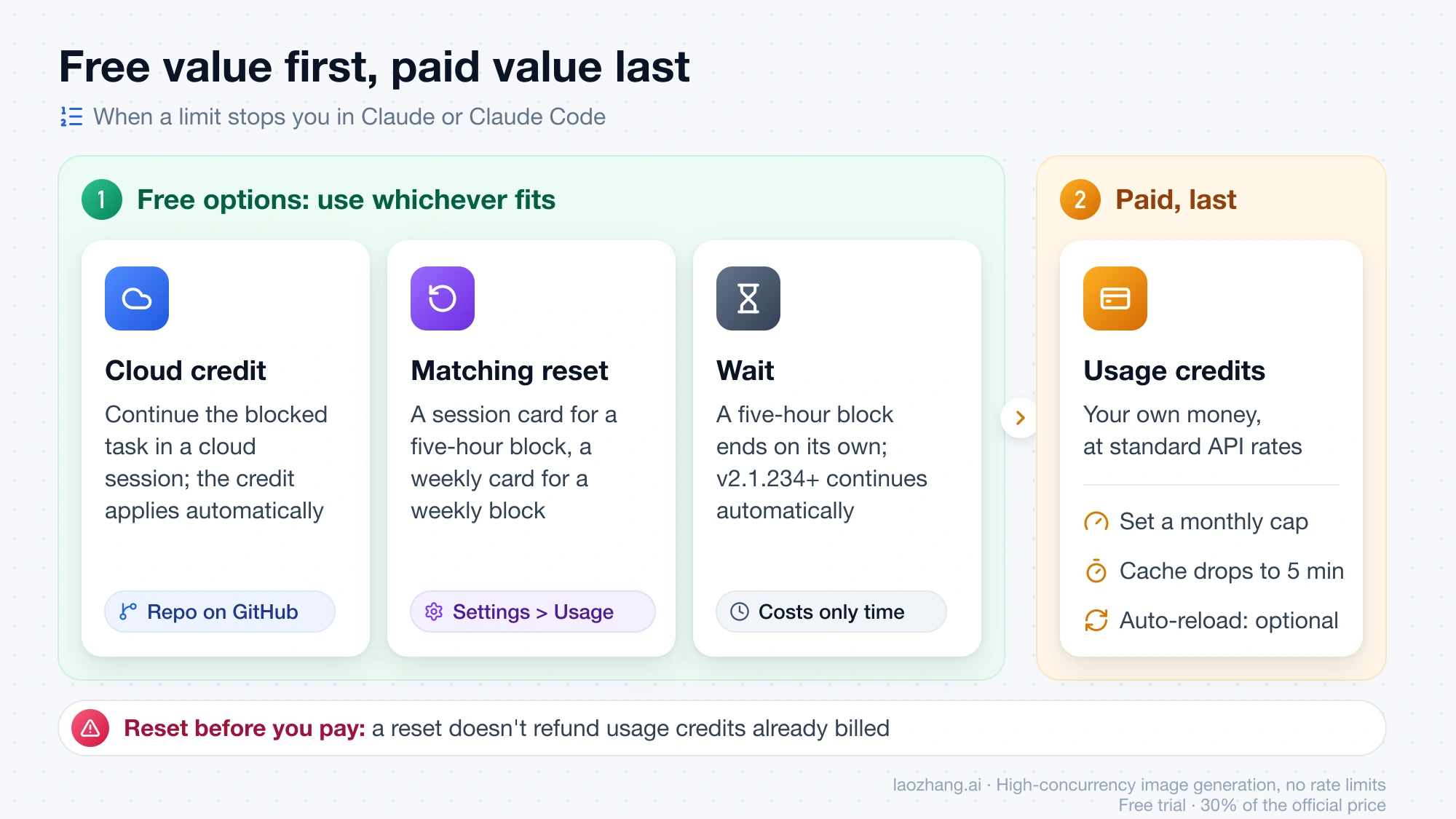
| Your situation | Use first | Then | Leave alone |
|---|---|---|---|
| Local Claude Code hit the five-hour limit, and the task lives in a GitHub repo | Cloud credit: continue the task in a cloud session | A session-type reset if the wait is too long | Usage credits, unless both free options are gone |
| Local Claude Code hit the five-hour limit, no GitHub repo | Wait: the reset time is in the message, and v2.1.234+ can continue automatically | A session-type reset if you can't wait | Usage credits for a gap of a few hours |
| You hit the weekly limit | A weekly-type reset, if your card is one | Cloud credit for repo work; usage credits with a monthly cap for the rest | A session-type reset, which doesn't refill the weekly bar |
| You want a long unattended run or several parallel tasks | A cloud session; the credit applies automatically | After the first run, check whether your plan bars in Settings > Usage moved | Usage credits as a safety net, off or capped |
| Chat or Desktop work, not code | A reset matching the limit you hit | Usage credits with a cap | The cloud credit, which only covers cloud sessions |
| Team plan | Check Settings > Usage for a Resets card | Usage credits through your admin | Assuming the cloud credit applies; the posts name only Pro and Max |
| Claude Code on an API key or Bedrock/Google Cloud/Foundry | Your API or cloud provider billing | Nothing here: none of the three applies | Cloud sessions, which need a claude.ai sign-in |
Two cases deserve a second look. A five-hour block ends on its own within hours, so a session-type reset spent on it is worth it only if the wait costs you more than the reset does. A weekly block can last days, and that's where a weekly reset saves the most usage-credit spend. And the announcement says "if you hit a limit locally, keep going in the cloud" without naming which limit, so it isn't specific to the five-hour one.
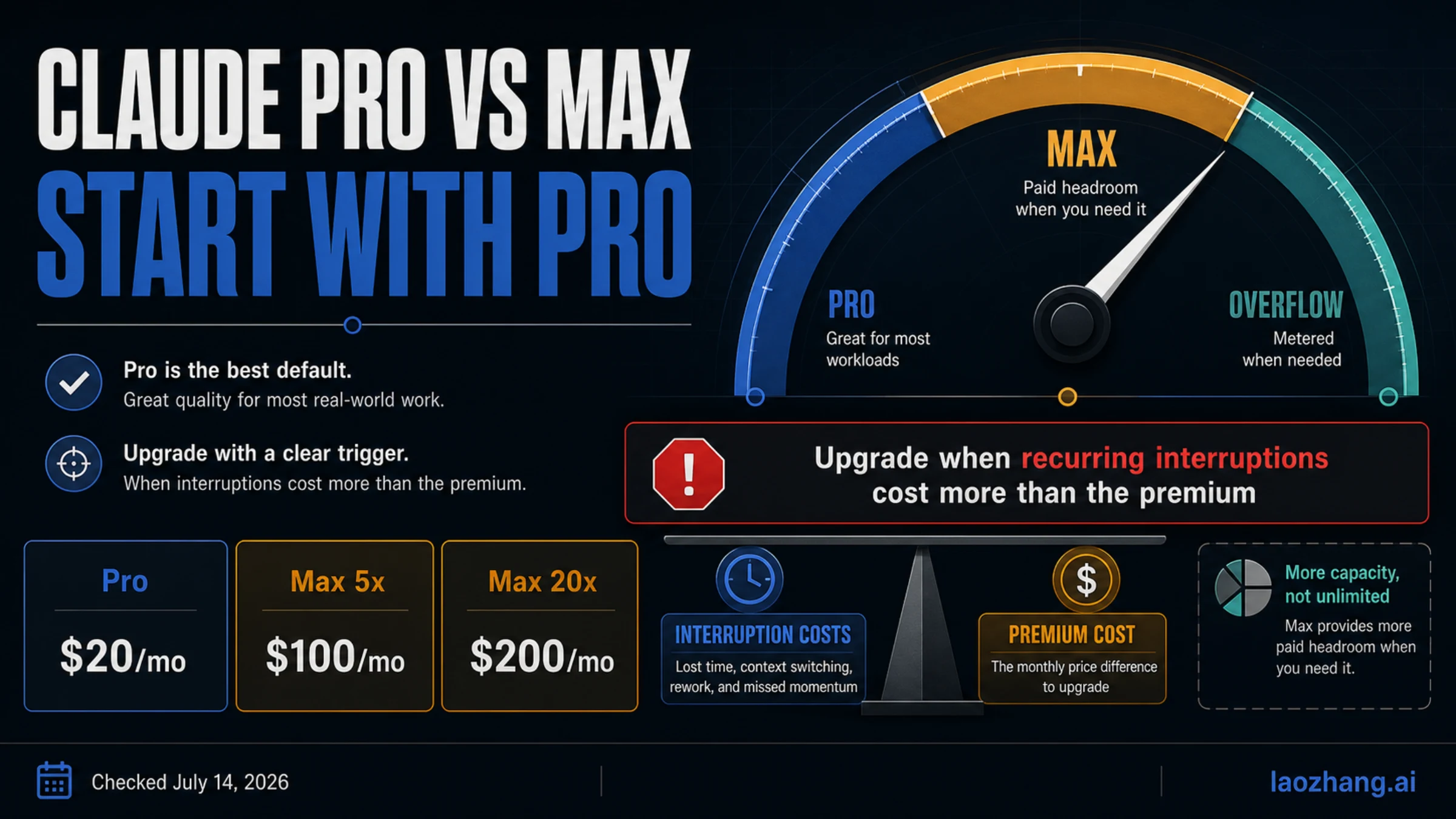
If you're weighing the whole plan rather than one week, Claude Pro vs Max in 2026: Pricing, Claude Code Limits, and When Max Is Worth It compares the included limits.
Before you turn on usage credits
Run through this in Settings > Usage before adding funds:
- Resets section. Is there an unused reset? Note whether it's a session or weekly reset and when it expires.
- Cloud credit. Have you claimed it before October 7, 2026? Is the blocked work in a GitHub repo you could open in a cloud session?
- Reset time. When does the limit that stopped you come back? If it's hours away, waiting may be enough.
- Monthly cap. Set one with Adjust limit instead of "Set to unlimited," and decide whether auto-reload should be on at all.
- Model and breaks. Anthropic suggests Sonnet or Haiku for most tasks, since they cost less per token than Opus. Remember the five-minute cache while you're on credits.
- Dashboard split. The usage dashboard shows included usage and usage-credit spend separately. If credit spend appears while your plan bars still show room, screenshot it before contacting support.
If you're on Team or use an API key
Team and seat-based Enterprise. Cloud sessions are available to you and share your account's limits. The cloud credit posts name only Pro and Max, so treat your eligibility as unknown until you see a claim option. Usage credits on these plans are managed by your admin under a separate help article, and /usage-credits may send your admin a request instead of opening settings. If your seat got a reset, it appears under Resets in Settings > Usage.
API key, Bedrock, Google Cloud, or Foundry. None of the three applies to you. Cloud sessions and /usage-credits need a claude.ai sign-in, and a subscription reset doesn't add API credits or reset API rate limits. To check which billing route your Claude Code actually uses, see Claude Code API Billing vs Subscription: API Key, Credits, or Pro/Max?
FAQ
Do cloud sessions use my usage credits now?
Not by default. Cloud sessions share your plan's included limits and have no separate compute charge. The cloud credit applies automatically when you start one. Usage credits only come into play after your included usage runs out and only if you've turned them on, the same as for local work.
Does the cloud session credit expire?
You must claim it by October 7, 2026. What happens to an unused balance after you claim it isn't in the public announcement; the terms linked from the claim page are the place to check.
Can I use a limit reset from Claude Code?
Not from the terminal or IDE. Use Settings > Usage in a browser or Claude Desktop. The refill is account-wide, so Claude Code picks it up right away.
How often do usage credits reset?
They don't. Usage credits are a prepaid balance that you top up, not an allowance that refills. What resets is your plan's included usage: the session limit every five hours and the weekly limit on its usual schedule.