Nano Banana Pro Errors & Troubleshooting Hub: Fix Every Error Code (2026)
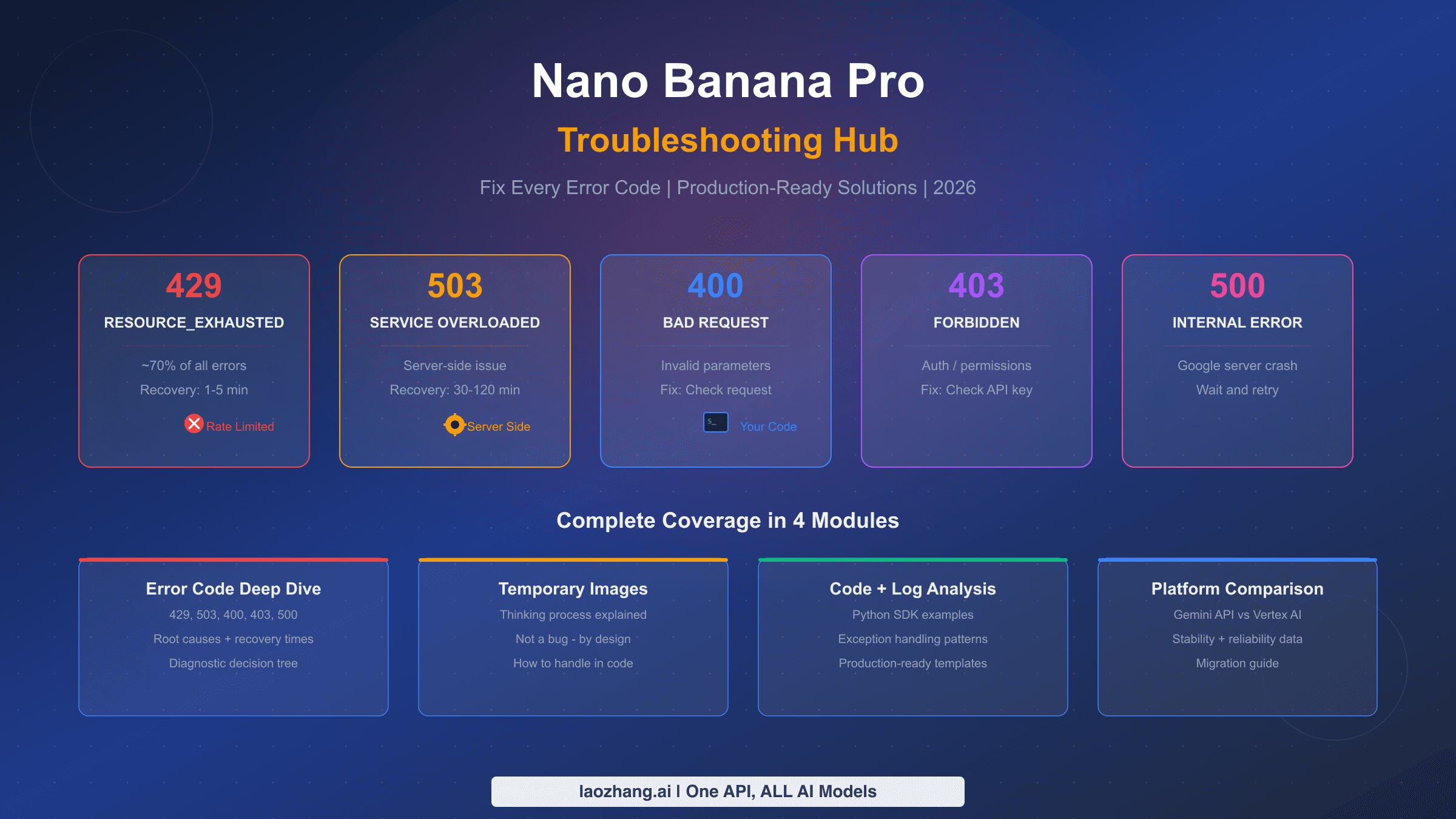
Every Nano Banana Pro error has a fix. This hub covers the common error codes from 429 RESOURCE_EXHAUSTED to IMAGE_SAFETY and blockReason OTHER, with a 30-second diagnosis, production-ready retry code, and tier-by-tier rate limit comparisons.
On this page
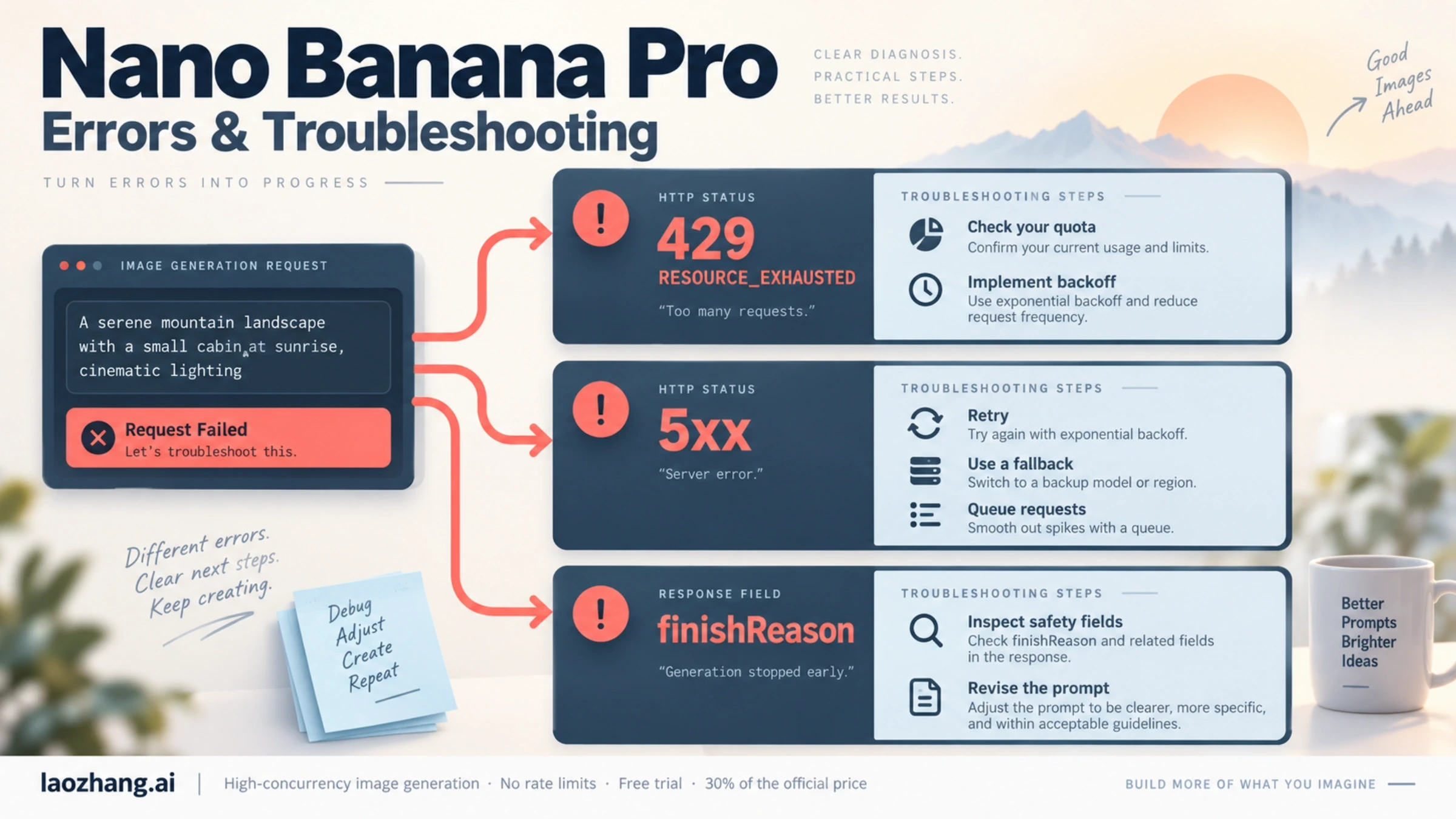
Every Nano Banana Pro error has a fix or a clear next step. Rate limit errors (429 RESOURCE_EXHAUSTED) are the ones you can solve yourself with exponential backoff, a higher quota or request queuing. Server errors (5xx, such as 503 overloaded) are on Google's side, so retry with backoff and fall back to another model. Safety blocks come back as finishReason: SAFETY or IMAGE_SAFETY, or as promptFeedback.blockReason, and Google documents which of them you can tune through safetySettings. This guide covers the common error codes, what Google actually documents about safety blocks, and production-ready code for handling failures automatically. Last updated October 2026.
TL;DR
- 429 RESOURCE_EXHAUSTED means you hit a rate limit or quota — wait for the per-minute window to reset and implement exponential backoff, or raise your quota
- 503 Service Overloaded means Google's servers are at capacity — retry with backoff and fall back to a lighter image model; Google publishes no fixed recovery time
- SAFETY blocks come with
safetyRatings; the four adjustable categories (harassment, hate speech, sexually explicit, dangerous content) are controlled throughsafetySettingsthresholds - IMAGE_SAFETY means the generated image was blocked on safety grounds — Google does not say which rule fired, so rewrite the prompt
- blockReason: OTHER is defined by Google only as "unknown reasons", and built-in protections against core harms such as child safety are always blocked — see our blockReason OTHER guide
- Check
finishReasonandpromptFeedback.blockReasonin API responses first to identify what kind of block you hit
Quick Diagnosis: Identify Your Error in 30 Seconds
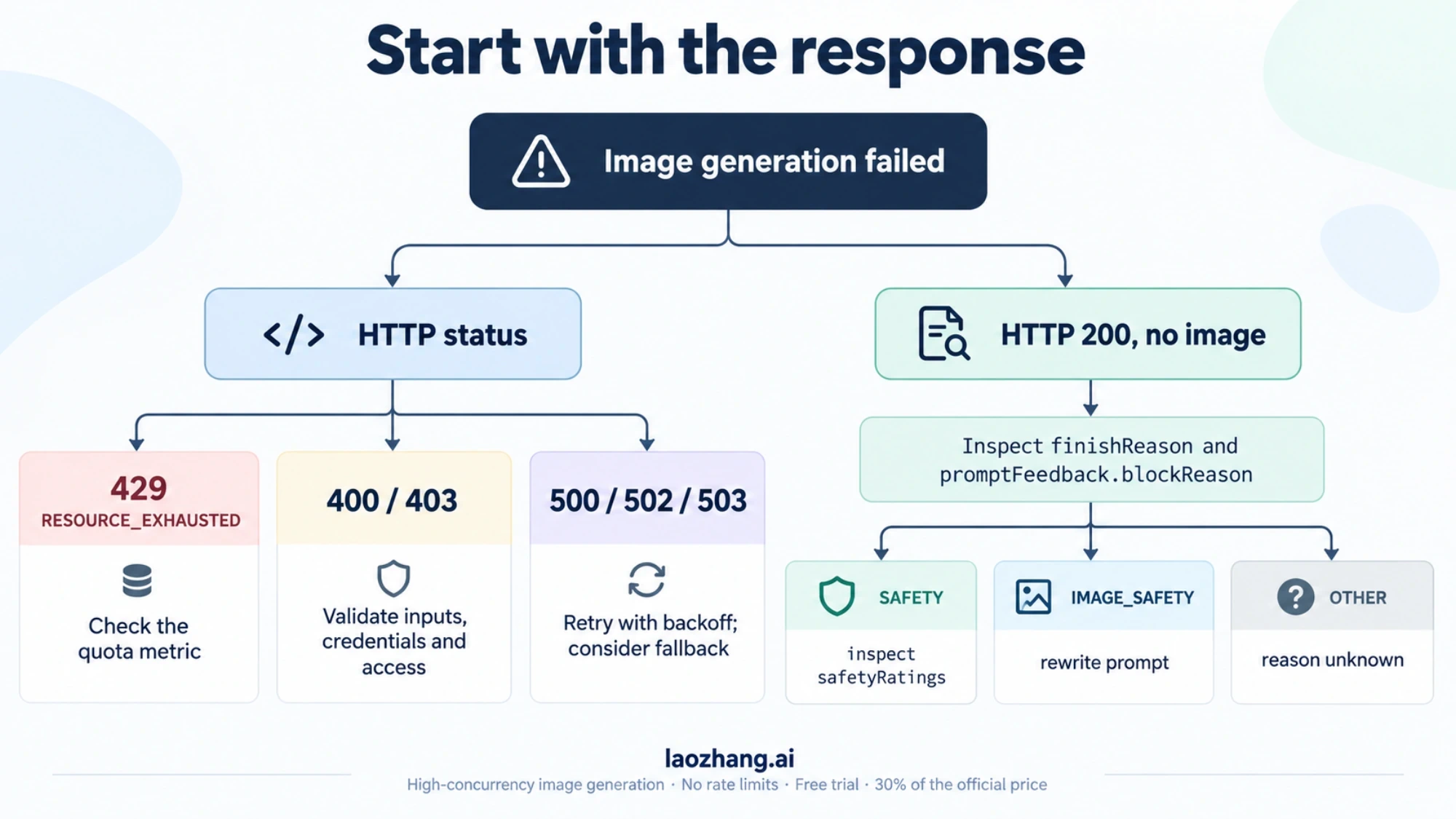
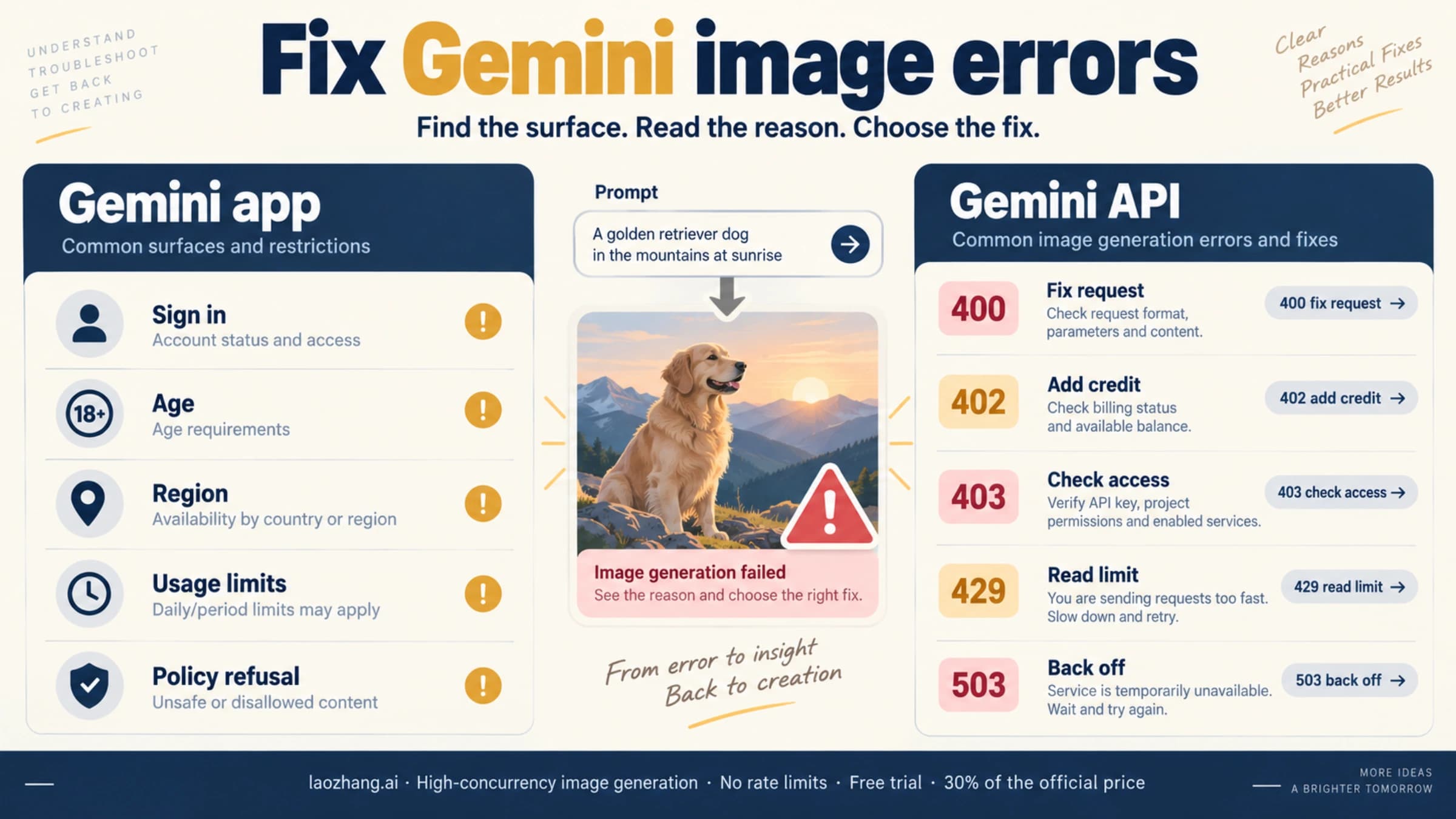
When your Nano Banana Pro image generation fails, the first thing to check is the HTTP status code or the finishReason field in the API response. This single piece of information tells you exactly what went wrong and which category of fix you need to apply. The rule is straightforward: 5xx errors mean Google's infrastructure is the problem and you need to wait, 4xx errors mean something in your request needs fixing, and IMAGE_SAFETY blocks mean the content itself triggered a filter. For a deeper walkthrough, see our step-by-step debugging workflow.
The following diagnostic table maps every common error message to its root cause and immediate fix. Bookmark this table — you will come back to it repeatedly during development.
| What You See | Error Code | What It Means | Quick Fix | Recovery Time |
|---|---|---|---|---|
RESOURCE_EXHAUSTED | 429 | You hit your rate limit or quota | Wait for the per-minute window to reset, then retry | About a minute for per-minute limits |
The model is overloaded | 503 | Google servers at capacity | Retry with backoff, fall back to another model | Varies, no fixed time published |
Internal error encountered | 500 | Transient Google backend failure | Retry with backoff | Transient, retry |
Bad Gateway | 502 | Upstream service failure | Retry with backoff | Transient, retry |
finishReason: SAFETY | 200 | Blocked by a safety category (see safetyRatings) | Adjust safety_settings thresholds | Immediate |
finishReason: IMAGE_SAFETY | 200 | Generated image blocked on safety grounds; rule not published | Rewrite prompt | Immediate |
generated images may contain unsafe content | 200 | Image-level safety block, same family as IMAGE_SAFETY | Rewrite prompt with a generic subject and explicit style | Immediate |
PERMISSION_DENIED | 403 | Invalid API key or region block | Check credentials and region | Immediate |
INVALID_ARGUMENT | 400 | Malformed request parameters | Validate input format | Immediate |
API key not valid | 403 | Expired or revoked key | Generate new key in AI Studio | Immediate |
Quota exceeded for quota metric | 429 | Daily or per-minute quota hit | Upgrade tier or wait for reset | 1 min to 24 hours |
Request payload size exceeds the limit | 400 | Image or prompt too large | Reduce input size | Immediate |
The core diagnostic rule is simple. If your error code starts with 5, it is Google's problem and your only option is patience. If it starts with 4, something about your request is wrong and you can fix it right now. And if you receive a 200 response with a finishReason other than STOP, a safety filter caught something in your content that needs to be rephrased or reconfigured.
Server-Side Errors (5xx): When Google Is the Problem
Server-side errors are the most frustrating category because there is genuinely nothing you can change about your code to fix them immediately. When Nano Banana Pro returns a 5xx status code, the issue lives inside Google's infrastructure — overloaded GPU clusters, backend service failures, or network partitions between internal services. Your job in these situations is to implement graceful degradation, set appropriate retry strategies, and manage user expectations around recovery times. For a complete error code reference, including rare server errors not covered here, see our dedicated error codes article.
503 Service Overloaded is the most common server-side error during busy periods. It indicates that the image generation pipeline of the model you called has reached capacity. Google does not publish a failure rate or a fixed recovery time for 503 errors, so treat any percentages or minute ranges you see quoted elsewhere as anecdotal. Overload is also model-specific: a lighter model such as Gemini 3.1 Flash Image (Nano Banana 2) may keep responding while Pro is busy, though that is not guaranteed. The critical strategy here is to detect 503 errors, retry with exponential backoff, and fall back to the lighter model if immediate image generation is required — accepting a different quality profile for higher availability.
500 Internal Server Error represents a transient backend failure that differs from 503 in an important way: 500 errors are typically caused by individual request processing failures rather than system-wide capacity issues. This means that the exact same request may succeed on the next attempt. Implement an exponential backoff retry strategy starting at 2 seconds and doubling up to a maximum of 64 seconds. Because the failure is usually transient, a retry often succeeds, but cap the number of attempts. If you encounter persistent 500 errors, check the Google AI Status Dashboard for service incidents — this may be a broader outage rather than an issue with your specific request. Be aware that 500 errors can also signal an issue with temporary image URL expiration if you are trying to access generated images after the URLs have expired.
502 Bad Gateway errors are the rarest of the server-side trio, typically appearing during service deployments or when Google's load balancers lose connectivity with backend Gemini servers. Unlike 503 errors which indicate capacity issues, 502 errors suggest an infrastructure routing problem. These errors are usually temporary and need no action on your part. If you see a cluster of 502 errors appear suddenly, it is likely a deployment rollout in progress. The best response is to implement a 30-second wait before retrying and to log the timestamps so you can identify deployment patterns over time.
One practical pattern for handling all 5xx errors in production is the "progressive fallback" approach. Start by retrying the original request against Gemini 3 Pro with exponential backoff. After two failed retries, automatically switch to Gemini 3.1 Flash Image (Nano Banana 2, model ID gemini-3.1-flash-image), a lighter model that often stays available when Pro is at capacity (not guaranteed; the earlier gemini-2.5-flash-image fallback was shut down by Google on October 2, 2026). If Flash also fails after two attempts, queue the request for delayed processing and return a user-friendly "generation in progress" message. This three-tier approach — retry, fallback, queue — handles most transient server-side errors without manual intervention and keeps your application responsive even during Google infrastructure events. The code implementation for this pattern is provided in the Production-Grade Error Handling section below.
Client-Side Errors (4xx): Fix Your Request
Client-side errors are actually good news in disguise: they mean the problem is on your side, which means you have the power to fix it without waiting for Google. The most important thing to understand is that 429 is the error most applications meet first as volume grows, and it is fully within your control. If you solve the rate limiting problem properly with backoff, quotas and request queuing, you remove one of the most common failure sources. For an exhaustive deep-dive into the most common client error, see our dedicated RESOURCE_EXHAUSTED troubleshooting guide.
429 RESOURCE_EXHAUSTED is the error you will encounter most frequently when working with Nano Banana Pro, and it has several subtypes that require different handling strategies. The per-minute rate limit triggers when you exceed your tier's requests-per-minute (RPM) allowance — 15 RPM for free tier, 60 RPM for Google AI Pro ($19.99/month, Google AI subscriptions, February 2026), and 300 RPM for Google AI Ultra ($249.99/month). The daily quota limit triggers when you exhaust your total daily image generation allowance. And the token-per-minute limit triggers when your combined input and output tokens across all requests exceed the tier ceiling. The fix for per-minute limits is straightforward: implement exponential backoff starting at 1 second and wait up to 60 seconds between retries. For daily quota exhaustion, you either need to upgrade your tier, distribute requests across multiple API keys, or queue requests for the next day. A common mistake developers make is retrying 429 errors too aggressively — each retry counts against your rate limit, creating a death spiral that actually extends the lockout period.
400 Bad Request errors indicate a structural problem with your API request. The most common causes include sending an image larger than the maximum input size (approximately 20MB per request), using an unsupported image format, providing a prompt that exceeds the token limit (65,536 input tokens for Gemini 3 Pro Image as listed on ai.google.dev/docs/models in February 2026; check the current model page), or passing invalid parameter combinations. To diagnose 400 errors, examine the error message carefully — Google's API returns specific details about which field or parameter is invalid. Common fixes include compressing input images to under 4MB, validating that aspect ratios fall within supported ranges, and ensuring prompt length stays within bounds. A particularly subtle cause of 400 errors occurs when using multi-turn conversations for image editing: if the conversation history exceeds the token limit, the entire request fails even though your current prompt is short.
403 PERMISSION_DENIED errors fall into two distinct categories. The first is authentication failure: your API key is invalid, expired, or does not have the Gemini API enabled in your Google Cloud project. The fix is to generate a new API key at Google AI Studio, ensure the Generative Language API is enabled, and verify that billing is set up if you are on a paid tier. The second category is geographic restriction: certain countries are blocked from accessing Gemini API services. If you are in a restricted region, you will need to route requests through a supported region or use an API proxy service. Always verify that your API key works with a simple text-only Gemini request before debugging more complex image generation issues — this isolates authentication problems from image-specific errors.
What Google Documents About Safety Blocks: SAFETY, IMAGE_SAFETY and OTHER
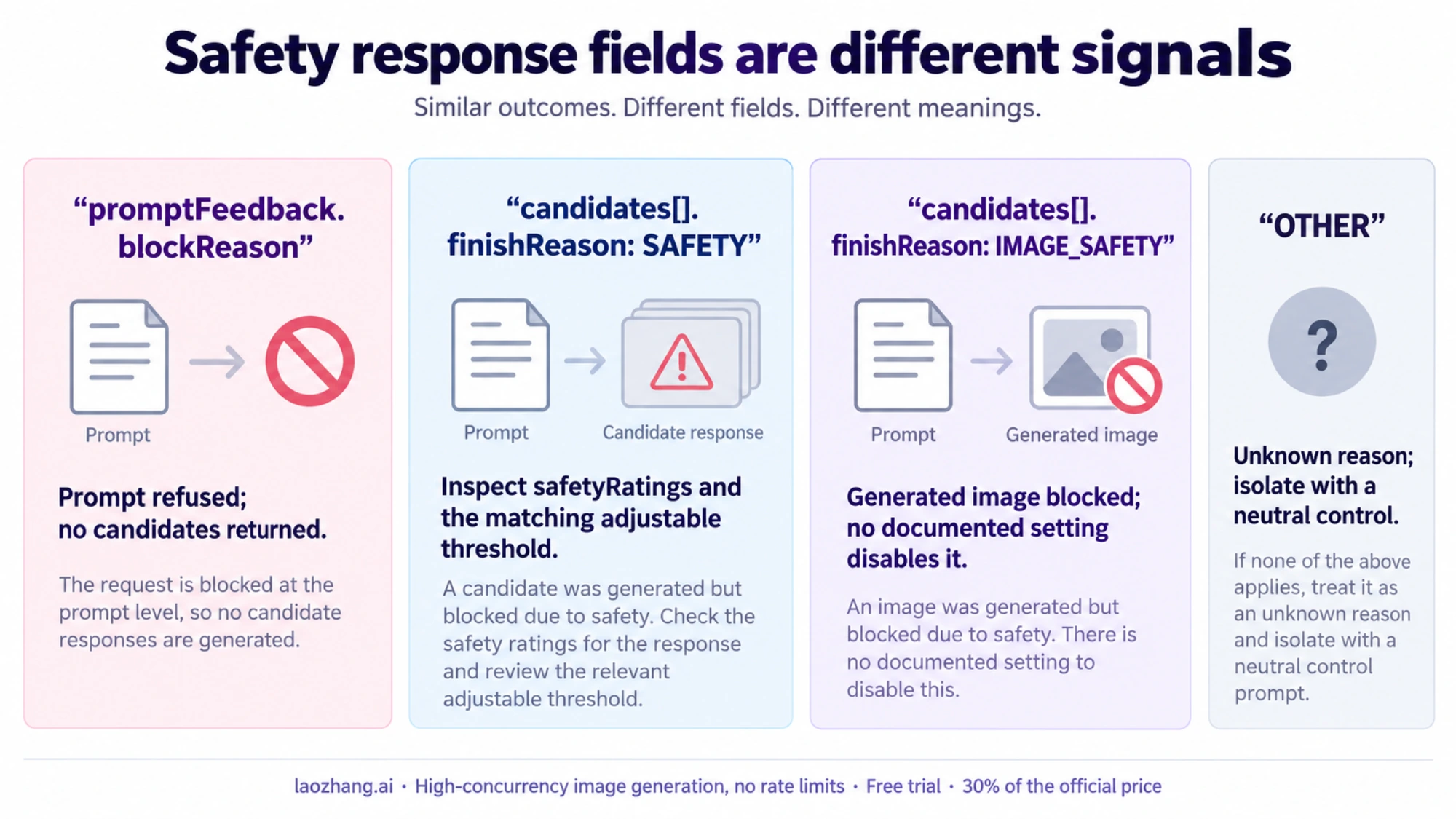
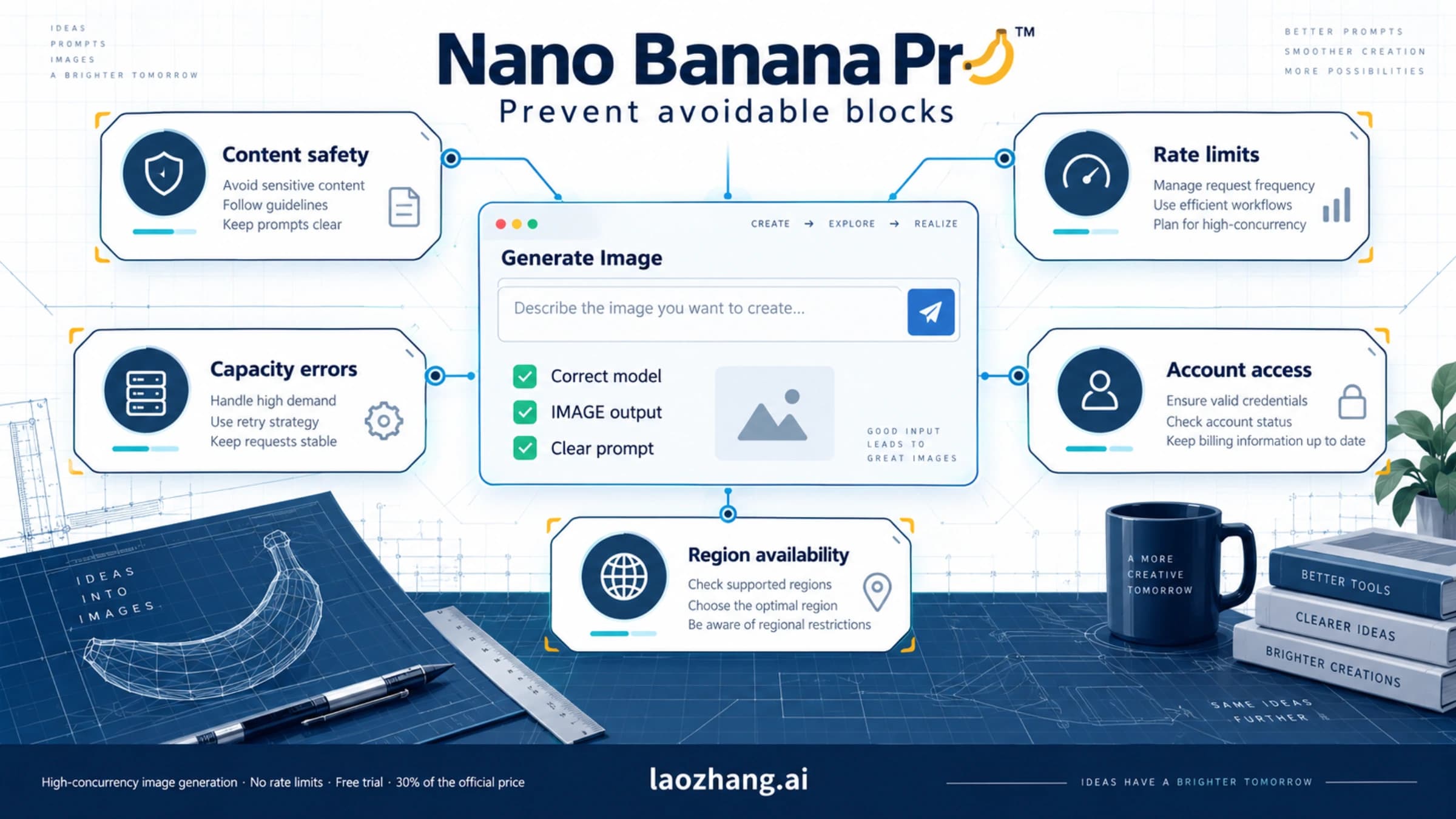
Safety blocks are the most confusing errors in Nano Banana Pro because the response rarely tells you why. It helps to separate what Google documents from what developers guess. Google does not publish a "layer" architecture or a list of internal moderation stages; what it publishes are the field names and enum values the API returns, plus the safety settings you can change. Build your error handling around those. For how Google separates content blocks, rate limits and account enforcement, and what to do about each, see Nano Banana Pro Risk Control: Blocks, Rate Limits and Suspension.
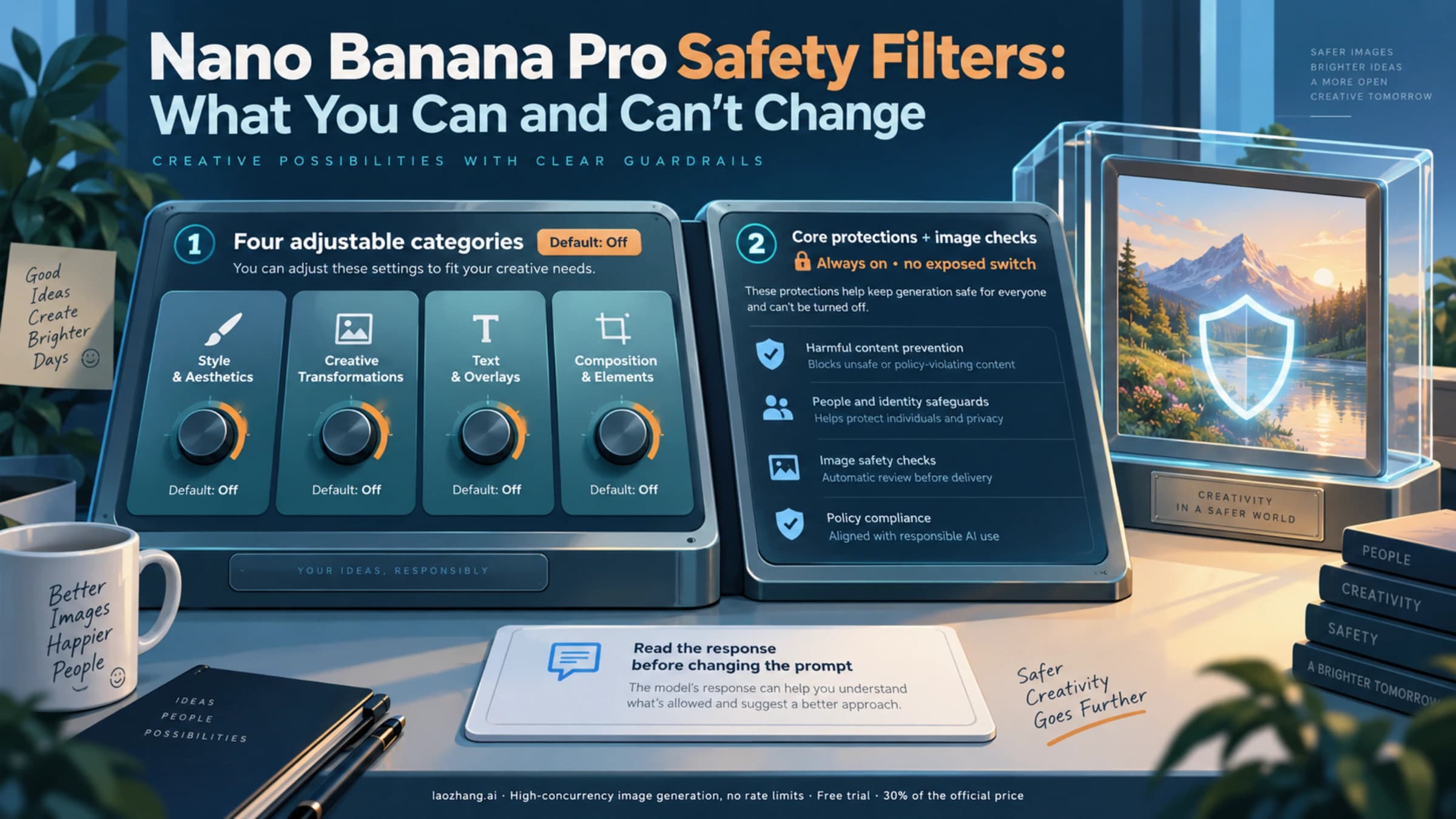
Here is what is documented. The Gemini API has adjustable safety categories — harassment, hate speech, sexually explicit and dangerous content — whose thresholds you set through safetySettings; for current models the default threshold is Off. Separately, built-in protections against core harms such as child safety are always blocked and cannot be adjusted. The response tells you which kind of block you hit: a candidate's finishReason can be SAFETY (inspect safetyRatings), IMAGE_SAFETY, IMAGE_PROHIBITED_CONTENT, IMAGE_OTHER, NO_IMAGE or OTHER, and promptFeedback.blockReason can be SAFETY, BLOCKLIST, PROHIBITED_CONTENT, IMAGE_SAFETY or OTHER. Google does not publish the internal stages behind these results.
The practical difference is what you can change. When finishReason is SAFETY, the safetyRatings tell you which category was triggered, and you can adjust the threshold for that category through safetySettings. Setting a category to BLOCK_NONE loosens that category only; it cannot be expected to clear OTHER or the always-blocked protections (our inference, matching what developers report). When you see finishReason: "IMAGE_SAFETY" or the message "generated images may contain unsafe content", the image was blocked on safety grounds. Google does not say which rule fired and documents no setting that turns it off, so the practical response is to rewrite the prompt.
What about blockReason: OTHER? Google's API reference defines it in one line: the prompt was blocked due to unknown reasons. Google does not say which rule or system blocked it, so there is no field to inspect and no documented setting to clear it. Do not expect BLOCK_NONE to fix it. For what to check and how to isolate the trigger, see our guide to blockReason OTHER.
For developers, the strategy depends on the field you received. If finishReason is SAFETY, inspect safetyRatings and adjust the matching category threshold. If it is IMAGE_SAFETY, rewrite the prompt. These practitioner tactics sometimes help, but they are not documented by Google and carry no guaranteed success rate: first, replace any character names or IP references with generic descriptions (e.g., "a princess in a blue dress" instead of naming a specific character); second, add an explicit art style declaration like "digital illustration in watercolor style"; and third, avoid combining human subjects with clothing or pose descriptors that could be read as depicting a minor. Because a safety block is decided by the model's own protections, a gateway that serves the same Google model should not be expected to change the outcome; change the prompt instead.
Impact varies by use case, and Google publishes no block rates per category, so measure your own. E-commerce prompts with human models wearing clothing, and fan-art or parody prompts based on recognizable characters, are the kinds of requests worth testing first; landscapes, objects and abstract art are less likely to run into trouble. The key diagnostic question is always the same: check finishReason and promptFeedback.blockReason in the API response. If it says SAFETY, look at safetyRatings and your thresholds. If it says IMAGE_SAFETY, the generated image was blocked and you need to modify the prompt. If it says OTHER, Google gives no reason.
Rate Limits and Quotas: Free vs Pro vs API
Understanding exactly where your rate limit ceiling sits is essential for capacity planning and for diagnosing whether a 429 error is a per-minute rate issue or a daily quota issue. Nano Banana Pro's pricing structure has five distinct tiers, each with dramatically different limits that determine how many images you can generate and how fast. For an in-depth comparison with pricing analysis, see our detailed comparison of free and Pro tier limits.
| Tier | Monthly Cost | Daily Images | RPM | Per-Image Cost | Best For |
|---|---|---|---|---|---|
| Free (Gemini App) | $0 | ~2/day | N/A | $0 | Casual testing |
| Free (API) | $0 | Limited | 15 | $0 | Development/prototyping |
| Google AI Pro | $19.99/mo | ~100/day | 60 | ~$0.20 | Individual creators |
| Google AI Ultra | $249.99/mo | ~1,000/day | 300 | ~$0.25 | Professional teams |
| Pay-as-you-go (API) | Usage-based | No daily cap | Tier-based | $0.045-$0.24 | Production applications |
API prices are from ai.google.dev/gemini-api/docs/pricing, as of October 4, 2026; subscription and Gemini App figures are from gemini.google/subscriptions, verified February 2026. Note: the free tier allocation differs between the Gemini App (approximately 2 images per day through the web interface) and the API (limited free quota which Google marks as "Not available" on the official pricing page for image generation — this likely reflects API-specific restrictions while the Gemini App maintains a small free allowance).
The pay-as-you-go API tier deserves special attention because it is the most flexible option for production use. As of October 4, 2026, Google's Standard price for Gemini 3 Pro Image (gemini-3-pro-image) is $0.134 per image at 1K or 2K and $0.24 at 4K, and Gemini 3.1 Flash Image (Nano Banana 2) costs $0.045 at 0.5K, $0.067 at 1K, $0.101 at 2K and $0.151 at 4K (ai.google.dev/gemini-api/docs/pricing). At $0.134 per Pro image, the API matches the $19.99 Google AI Pro fee at about 150 images a month ($19.99 / $0.134 ≈ 149), so lighter usage is cheaper on the API. The trade-off is that API access requires more technical setup and you manage your own rate limiting. For production applications the API path is the usual choice for flexibility: it has no daily cap and quotas can be raised on request. If you are currently on the Pro subscription and regularly hitting the ~100/day limit, switching to pay-as-you-go API access removes the daily cap entirely — you pay only for what you generate. For cost optimization beyond Google's native pricing, the LaoZhang API gateway (laozhang.ai) lists gemini-3-pro-image at $0.09 per call whether you request 1K, 2K or 4K (as of October 4, 2026). Against Google's Standard prices that is about 32.8% cheaper at 1K/2K ($0.134) and 62.5% cheaper at 4K ($0.24). Google's Batch tier is cheaper than $0.09 at 1K/2K ($0.067 per image), while at 4K Batch ($0.12) the gateway is 25% cheaper. For the Batch-versus-per-call decision see our Batch API cost guide, and for plan versus API versus gateway see our Nano Banana Pro pricing guide.
Understanding which quota you have exhausted is critical for choosing the right recovery strategy. When you receive a 429 error, the error message typically includes a hint about which specific quota was exceeded. If you see Quota exceeded for quota metric 'generate_content' and limit 'GenerateContent request limit per minute', the fix is simply to wait 60 seconds and your per-minute allowance resets. If the message references a daily limit, you are locked out until midnight Pacific Time. And if it mentions a token-per-minute limit, you need to reduce either the frequency or the size of your requests — this is particularly relevant for multi-turn image editing conversations that accumulate large token histories. Logging these distinctions in your error handling code is the difference between a 60-second recovery and a 24-hour outage.
Production-Grade Error Handling Code
Moving from understanding errors to handling them automatically in production requires a robust retry system with fallback logic. The following Python implementation demonstrates how to combine exponential backoff, explicit safety thresholds, model fallback for 503 errors, and proper logging into a single reusable function. This code is designed to be copied directly into your application.
import google.generativeai as genai
import time
import random
import logging

logging.basicConfig(level=logging.INFO)
logger = logging.getLogger("nano_banana_pro")

# Explicit safety thresholds (for current models the default is Off; shown so the behavior is visible in code)
SAFETY_SETTINGS = [
    {"category": "HARM_CATEGORY_SEXUALLY_EXPLICIT", "threshold": "BLOCK_NONE"},
    {"category": "HARM_CATEGORY_DANGEROUS_CONTENT", "threshold": "BLOCK_NONE"},
    {"category": "HARM_CATEGORY_HATE_SPEECH", "threshold": "BLOCK_NONE"},
    {"category": "HARM_CATEGORY_HARASSMENT", "threshold": "BLOCK_NONE"},
]

def generate_image_with_retry(
    prompt: str,
    api_key: str,
    max_retries: int = 5,
    primary_model: str = "gemini-3-pro-image",
    fallback_model: str = "gemini-3.1-flash-image",
) -> dict:
    """Generate image with exponential backoff, safety config, and model fallback."""
    genai.configure(api_key=api_key)
    current_model = primary_model

    for attempt in range(max_retries):
        try:
            model = genai.GenerativeModel(current_model)
            response = model.generate_content(
                prompt,
                safety_settings=SAFETY_SETTINGS,
                generation_config={"response_modalities": ["TEXT", "IMAGE"]},
            )

            # Check finishReason for safety blocks
            if response.candidates:
                finish_reason = response.candidates[0].finish_reason.name
                if finish_reason == "SAFETY":
                    logger.warning("SAFETY block — check safetyRatings and safety_settings")
                    return {"status": "blocked_safety", "reason": finish_reason}
                elif finish_reason == "IMAGE_SAFETY":
                    logger.warning("IMAGE_SAFETY block — rewrite prompt")
                    return {"status": "blocked_image_safety", "reason": finish_reason}
                elif finish_reason == "STOP":
                    return {"status": "success", "response": response}

            return {"status": "success", "response": response}

        except Exception as e:
            error_str = str(e)

            # 429: Rate limit — exponential backoff
            if "429" in error_str or "RESOURCE_EXHAUSTED" in error_str:
                wait = min(2 ** attempt + random.uniform(0, 1), 60)
                logger.info(f"429 rate limit, waiting {wait:.1f}s (attempt {attempt+1})")
                time.sleep(wait)
                continue

            # 503: Overloaded — switch to fallback model
            if "503" in error_str or "overloaded" in error_str.lower():
                if current_model != fallback_model:
                    logger.info(f"503 overloaded, switching to {fallback_model}")
                    current_model = fallback_model
                    continue
                wait = min(2 ** attempt * 5, 120)
                logger.info(f"503 on fallback too, waiting {wait:.1f}s")
                time.sleep(wait)
                continue

            # 500/502: Transient — simple retry
            if "500" in error_str or "502" in error_str:
                wait = min(2 ** attempt + random.uniform(0, 1), 30)
                logger.info(f"Server error, retrying in {wait:.1f}s")
                time.sleep(wait)
                continue

            # Unknown error — do not retry
            logger.error(f"Unhandled error: {error_str}")
            return {"status": "error", "message": error_str}

    return {"status": "max_retries_exceeded", "model": current_model}
This code handles the four most critical scenarios automatically. For 429 rate limit errors, it implements exponential backoff with jitter to avoid thundering herd problems when multiple requests hit the limit simultaneously. For 503 overloaded errors, it first switches to the lighter Gemini 3.1 Flash Image model as a fallback before resorting to longer waits — this trade-off between image quality and availability is usually acceptable in production. For transient 500/502 errors, it retries with moderate backoff since these typically resolve within a few attempts. And for SAFETY and IMAGE_SAFETY blocks, it returns immediately with a status naming the finishReason that blocked the request, because retrying the same prompt against the same safety filter is pointless.
The fallback model strategy deserves particular emphasis. When Gemini 3 Pro returns 503 errors during peak load, Gemini 3.1 Flash Image is often still available because it is a lighter model, though Google does not guarantee that. The cost difference also works in your favor — as of October 4, 2026, Google's Standard price is $0.067 (1K) or $0.101 (2K) per image for Gemini 3.1 Flash Image versus $0.134 for Gemini 3 Pro Image at 1K/2K (ai.google.dev/gemini-api/docs/pricing) — so you save money during degraded periods. The earlier gemini-2.5-flash-image fallback ($0.039 per image, a first-generation Nano Banana price rather than a Pro price) was shut down by Google on October 2, 2026. For a detailed step-by-step debugging workflow that extends beyond automated retries, see our debugging guide.
Beyond the core retry logic, there are three production patterns worth implementing. First, add request queuing with a dead-letter queue for requests that fail all retries — this prevents user-visible errors and allows you to process failed requests during off-peak hours when Nano Banana Pro has more capacity. Second, implement circuit breaker logic that stops sending requests to a specific model after detecting a pattern of 503 errors (e.g., 5 failures in 60 seconds), automatically routing all traffic to the fallback model until a health check succeeds. Third, add monitoring and alerting that tracks your error rates by category in real time. When your 429 rate exceeds 10% of requests, you are approaching your tier's limits and should consider upgrading or distributing load across additional API keys. When 503 errors spike above 25%, a capacity event is likely in progress and your circuit breaker should activate the fallback model automatically. These patterns transform error handling from reactive debugging into proactive reliability engineering.
When to Consider Alternative Providers
Not every Nano Banana Pro error has a quick fix. If you are experiencing persistent 503 errors during peak hours, repeated IMAGE_SAFETY blocks that resist prompt engineering, or daily quota limits that constrain your production application, it may be time to evaluate multi-model strategies. This is not about abandoning Nano Banana Pro — it remains one of the most capable image generation models available — but about building resilience into your application architecture. For a head-to-head quality and reliability comparison, see our comparison with alternative image models like Flux2.
The most practical approach is to implement a primary/fallback pattern where Nano Banana Pro handles the majority of requests and an alternative route catches failures. Gateways such as LaoZhang API are designed for this use case: they provide a unified API endpoint for the Nano Banana models with per-call pricing. As of October 4, 2026, that is $0.09 per call for gemini-3-pro-image at any size, $0.055 for gemini-3.1-flash-image and $0.025 for gemini-3.1-flash-lite-image (1K only). When your primary Nano Banana Pro call fails with a 503, your error handling code routes the request to the alternative endpoint without prompt changes. Two cautions: a gateway call that returns HTTP 200 without an image is still charged as one call, so do not retry blindly, and size and aspect ratio can only be set on the Gemini-native route (the OpenAI-compatible route returns 1:1 at 1K). The economic benefit is clear — you pay only for the fallback requests that actually occur, and you avoid the user-facing failures that damage trust in your application.
Evaluate switching to an alternative provider or multi-model strategy if three or more of these conditions apply: your 503 error rate during peak hours exceeds 20%, IMAGE_SAFETY blocks affect more than 10% of your legitimate prompts, your daily generation volume consistently exceeds your tier's quota, and you require 99.9%+ uptime SLAs that a single model or provider cannot guarantee. The preview model ID gemini-3-pro-image-preview was shut down on June 25, 2026; the generally available ID is gemini-3-pro-image, so check Google's current terms for the SLA that applies to your plan before relying on any single model. Building multi-provider resilience now is an investment in stability.
The implementation cost of adding a fallback provider is minimal if your error handling is already structured well. In the production code shown above, add a secondary API call in the max_retries_exceeded return path that routes to your fallback endpoint. The key architectural principle is that your application logic should never depend on a single image generation provider — abstract the generation call behind an interface that accepts a prompt and returns an image, and swap the underlying implementation based on availability. This pattern is common in mature production systems handling image generation at scale, and it transforms Nano Banana Pro errors from application failures into graceful quality trade-offs that are invisible to your end users.
FAQ
How long does a 429 RESOURCE_EXHAUSTED error last?
A 429 caused by a per-minute limit clears once the minute window resets, so waiting about a minute is usually enough. If you have exhausted your daily quota, the limit resets at midnight Pacific Time. The key mistake to avoid is aggressive retrying — each retry attempt during the cooldown period counts against your rate limit, potentially extending the lockout. Implement exponential backoff starting at 1-2 seconds and cap your maximum wait at 60 seconds for per-minute limits.
Can you bypass the IMAGE_SAFETY filter on Nano Banana Pro?
Google documents no setting that turns off IMAGE_SAFETY. The safetySettings thresholds apply to the four adjustable categories (harassment, hate speech, sexually explicit, dangerous content), and built-in protections against core harms are always blocked. For finishReason: SAFETY you can inspect safetyRatings and adjust the matching threshold. For IMAGE_SAFETY blocks, the practical approach is prompt engineering: replace character names with generic descriptions, state the subject and an art style explicitly, and avoid combining human subjects with descriptors that could suggest a minor. These are practitioner tactics, not documented guarantees, and Google publishes no success rate for them.
Why does Nano Banana Pro keep saying "generated images may contain unsafe content"?
This message indicates an image-level safety block, the same family as finishReason: IMAGE_SAFETY. Google does not publish which classifier or rule fired, so the message does not tell you whether the cause is a character, a real person or the composition. Rewrite the prompt with a generic description and an explicit style such as "watercolor illustration" or "flat vector art", and if the same prompt keeps failing, simplify it step by step to find the trigger. If you instead see promptFeedback.blockReason: OTHER, Google defines it only as "unknown reasons"; see our blockReason OTHER guide.
What is the difference between finishReason SAFETY and IMAGE_SAFETY?
finishReason: SAFETY means a candidate was stopped for a safety reason; safetyRatings shows the category, and for the adjustable categories you can change the threshold through safety_settings. finishReason: IMAGE_SAFETY means the generated image was blocked on safety grounds; Google does not say which rule fired and documents no setting that changes it, so the practical fix is rewriting the prompt. Neither is the same as promptFeedback.blockReason: OTHER, which Google defines only as "unknown reasons".
Is Nano Banana Pro free to use?
Nano Banana Pro has a limited free tier through the Gemini App (approximately 2 images per day). For API access, the free tier is highly restricted — Google's official pricing page marks free image generation as "Not available" for the API (ai.google.dev/gemini-api/docs/pricing, as of October 4, 2026). Paid options start at $19.99/month for Google AI Pro (approximately 100 images/day) or pay-as-you-go API pricing at $0.045-$0.24 per image depending on the model and resolution (Google Standard prices, as of October 4, 2026). For the most complete breakdown, see our detailed comparison of free and Pro tier limits.
How do I check if Nano Banana Pro is down?
Check the Google AI Status Dashboard first for any ongoing incidents. If the status page shows no issues but you are still getting 503 errors, the problem is likely regional capacity constraints rather than a global outage. Try generating a simple test image with a basic prompt to confirm whether the issue is with Nano Banana Pro specifically or with your request parameters. Community forums on discuss.ai.google.dev also provide real-time reports from other developers experiencing the same issues.
Sources3
External pages this guide links to, in the order they appear. Last updated Oct 5, 2026.
Sources3
External pages this guide links to, in the order they appear. Last updated Oct 5, 2026.