Google's Gemini platform has quietly become one of the most powerful and cost-effective AI image generation ecosystems available in 2026. With seven distinct models spanning two product families — the conversational Gemini Native series (codenamed "Nano Banana") and the dedicated Imagen 4 family — plus three completely different access paths ranging from free consumer apps to production APIs, the landscape is rich but genuinely confusing for newcomers. This guide cuts through that confusion with current data verified against Google's official documentation as of March 2026, covering every model, every pricing tier, and every access method in one place.
TL;DR
Here is the essential information about Gemini image generation distilled into the key facts you need:
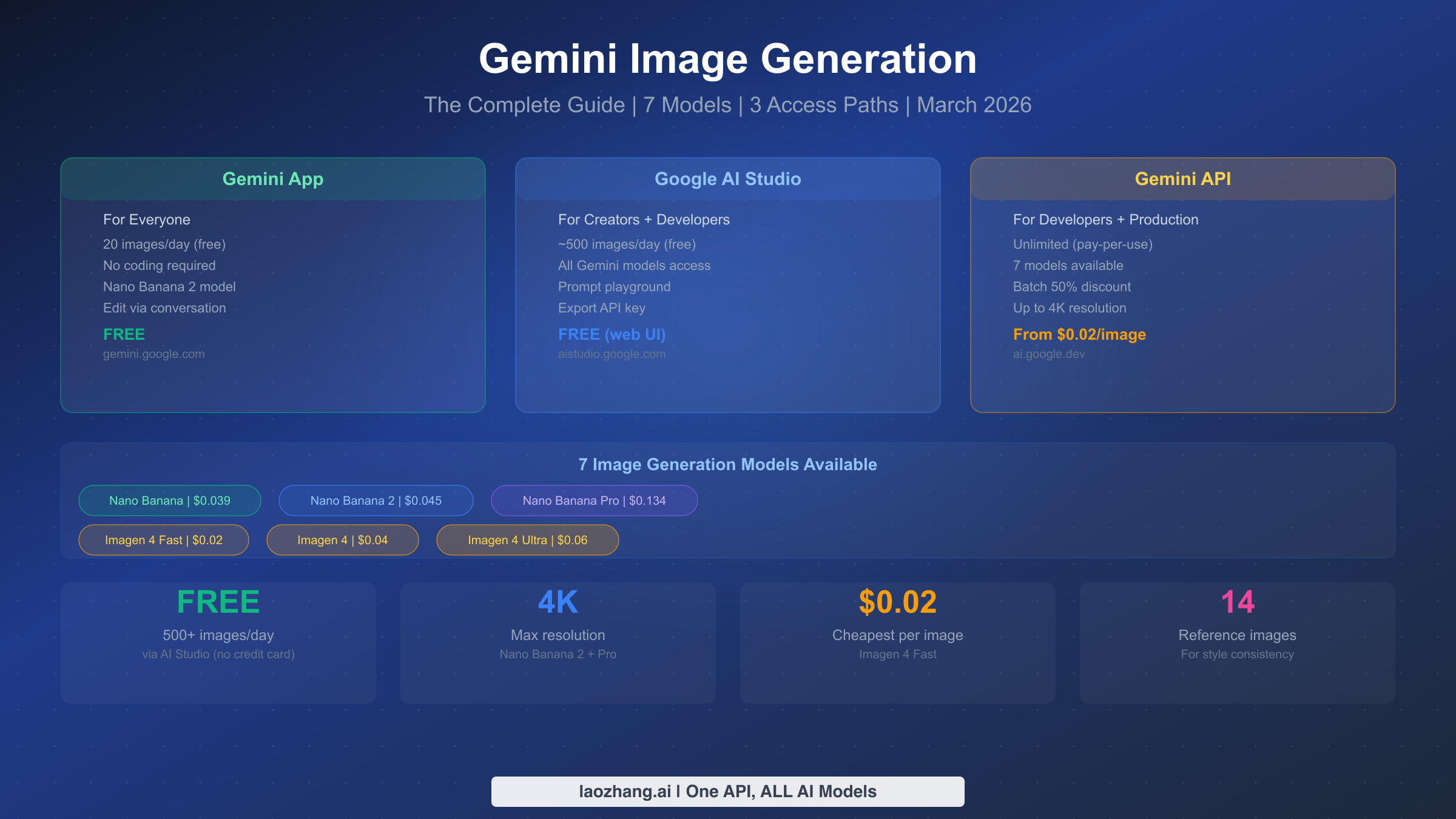
- 7 models available: Nano Banana ($0.039), Nano Banana 2 ($0.045-0.151), Nano Banana Pro ($0.134+), Imagen 4 Fast ($0.02), Imagen 4 ($0.04), Imagen 4 Ultra ($0.06) — plus the consumer Gemini app model
- Free access exists: Gemini app (20 images/day) and Google AI Studio web UI (~500 images/day) are both free with no credit card required
- API has NO free tier for image generation — every API call is billed from the first image
- Key distinction: Nano Banana models support conversational editing and reference images. Imagen 4 models are text-to-image only but cheaper
- Maximum resolution: 4K (Nano Banana 2 and Pro only) — the highest native resolution available from any major AI image generator
- Best starting point: Nano Banana 2 (
gemini-3.1-flash-image-preview) for the best balance of quality, features, and cost
What Is Gemini Image Generation — All 7 Models Explained
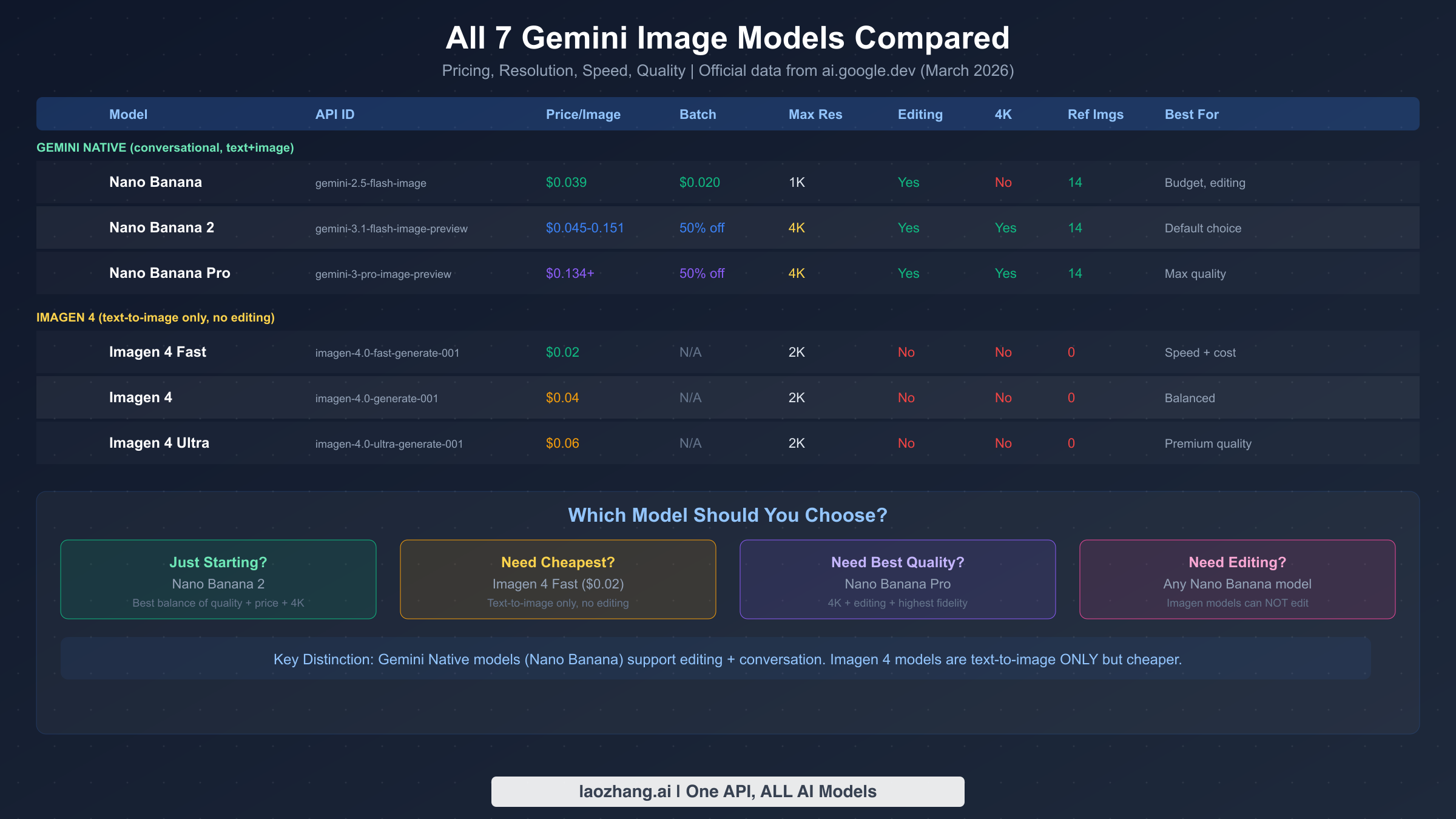
Google offers AI image generation through two fundamentally different product families, and understanding this distinction is the single most important concept for making the right model choice. The Gemini Native family (branded "Nano Banana") generates images as part of a conversational AI interaction — you can describe what you want, get an image, then tell the model to modify specific elements through natural language. The Imagen 4 family is a dedicated text-to-image system that takes a prompt and returns an image, with no conversational editing capability. Both families are accessible through the same Gemini API, but they serve different use cases and have different pricing structures.
The Gemini Native family includes three models that have evolved rapidly since their introduction. The original Nano Banana (gemini-2.5-flash-image) was the first to bring native image generation to the Gemini platform, offering solid 1K resolution output at $0.039 per image with full conversational editing support. Nano Banana 2 (gemini-3.1-flash-image-preview), launched on February 26, 2026, represents a significant step forward with 4K resolution support, improved text rendering accuracy, and support for up to 14 reference images for style consistency (ai.google.dev, March 2026). This model is currently the recommended default for most developers starting new projects. Nano Banana Pro (gemini-3-pro-image-preview) sits at the premium end, delivering the highest quality output in the Gemini Native family at approximately $0.134 per image at 1K resolution, with the same 4K capability and reference image support as Nano Banana 2 but with noticeably better visual fidelity and more precise prompt adherence. For a deeper dive into how these models compare on specific metrics, see our detailed Gemini image model comparison.
The Imagen 4 family represents Google's dedicated image generation technology, now generally available in three tiers. Imagen 4 Fast (imagen-4.0-fast-generate-001) is the speed and cost champion at just $0.02 per image — the cheapest option in the entire Gemini ecosystem. The standard Imagen 4 (imagen-4.0-generate-001) at $0.04 per image offers improved quality with better text rendering and more detailed compositions. Imagen 4 Ultra (imagen-4.0-ultra-generate-001) at $0.06 per image delivers the highest quality in the Imagen family with support for 2K resolution output. All Imagen 4 models include SynthID watermarking for responsible AI compliance and support improved typography that makes them viable for creating posters, invitations, and other text-heavy visual content (Google Developers Blog, March 2026). The critical limitation to understand is that Imagen 4 models cannot edit existing images — they only generate from text prompts. If you need to modify, refine, or iteratively improve images through conversation, you must use a Nano Banana model.
| Model | API ID | Price/Image | Max Res | Editing | Ref Images | Best For |
|---|---|---|---|---|---|---|
| Nano Banana | gemini-2.5-flash-image | $0.039 | 1K | Yes | 14 | Budget editing |
| Nano Banana 2 | gemini-3.1-flash-image-preview | $0.045-0.151 | 4K | Yes | 14 | Default choice |
| Nano Banana Pro | gemini-3-pro-image-preview | $0.134+ | 4K | Yes | 14 | Max quality |
| Imagen 4 Fast | imagen-4.0-fast-generate-001 | $0.02 | 2K | No | 0 | Speed + cost |
| Imagen 4 | imagen-4.0-generate-001 | $0.04 | 2K | No | 0 | Balanced |
| Imagen 4 Ultra | imagen-4.0-ultra-generate-001 | $0.06 | 2K | No | 0 | Premium quality |
3 Ways to Generate Images — Gemini App vs AI Studio vs API
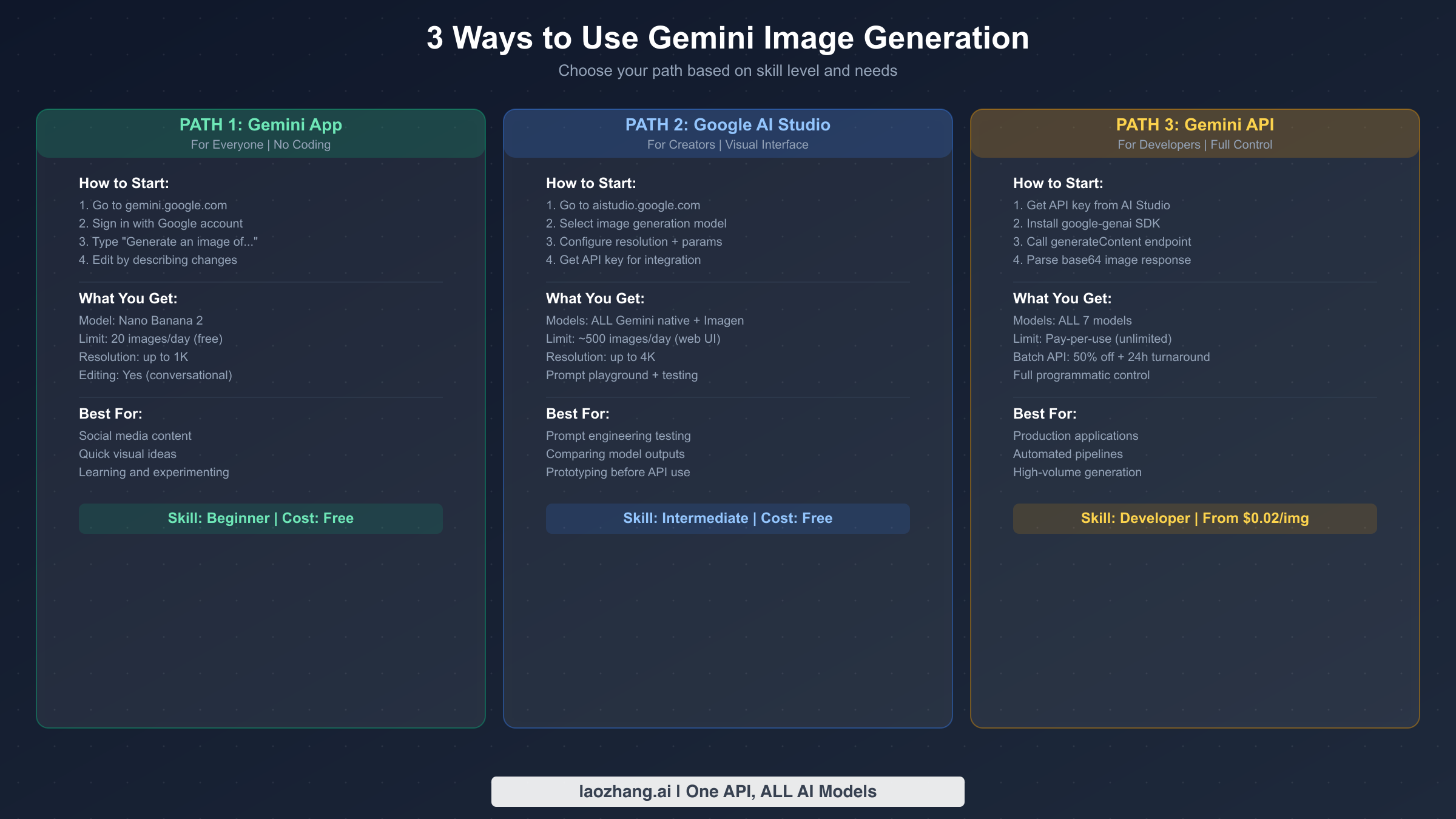
One of the most common sources of confusion around Gemini image generation is that there are three completely different ways to access it, each with different capabilities, limits, and pricing. Understanding which path is right for your needs saves significant time and prevents frustration from hitting unexpected limitations.
The Gemini App at gemini.google.com is the simplest entry point and requires nothing more than a Google account. When you open the app, you can select the image generation tool and simply describe what you want in natural language. The app uses Nano Banana 2 as its underlying model, providing access to Google's latest conversational image generation without any technical setup. The free tier allows approximately 20 images per day at 1K resolution, which is sufficient for personal creative projects, social media content, and casual experimentation. The conversational editing capability means you can generate an image and then tell Gemini to change specific elements — "make the sky more dramatic," "remove the person on the left," "change the style to watercolor" — through natural follow-up messages. This makes it an incredibly accessible creative tool for anyone, regardless of technical background.
Google AI Studio at aistudio.google.com serves as both a powerful testing playground and the bridge to API access. Through the AI Studio web interface, you can access all Gemini Native models (not just Nano Banana 2), configure resolution settings, test different prompts side by side, and importantly, generate an API key when you are ready to integrate image generation into your own applications. The free tier through the web UI allows approximately 500 image generations per day — significantly more generous than the Gemini app — and includes access to all resolution options up to 4K. No credit card is required for the web UI usage. The key distinction is that this free access applies only to the interactive web interface; the moment you use the API key programmatically, billing begins from the first image. For a comprehensive guide to maximizing free access, see our Gemini image free tier guide and the complete free limits breakdown.
The Gemini API provides full programmatic access to all seven image generation models and is the path for production applications, automated pipelines, and high-volume generation. The API follows standard REST conventions through generativelanguage.googleapis.com and is available through official SDKs for Python, JavaScript, Go, and Java. There is no free tier for API image generation — every call is billed at the model's per-image rate. The Batch API offers a 50% discount on all models in exchange for a 24-hour processing window, which is excellent for non-time-sensitive workloads. Rate limits vary by model and account tier, with production access supporting higher throughput than preview models. For the complete API integration guide with code examples and best practices, see our detailed Gemini Image API guide.
Complete Pricing Guide — From Free to Enterprise
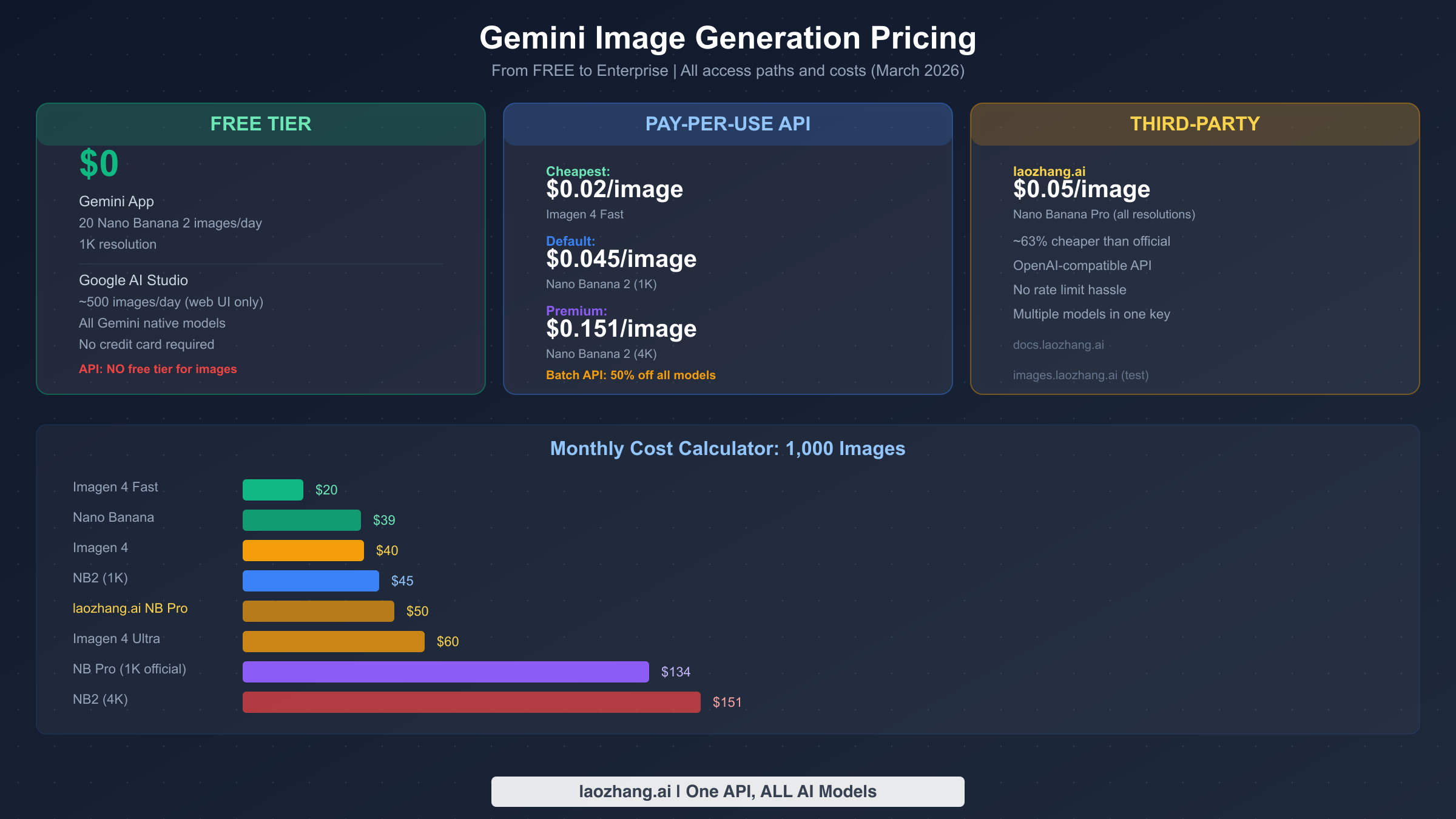
Gemini image generation pricing spans a remarkably wide range — from completely free to enterprise-scale API billing — and the right choice depends entirely on your volume, quality requirements, and whether you need editing capabilities. All pricing data below is verified against ai.google.dev's official pricing page, which was last updated on March 25, 2026.
The free paths provide genuine value for non-production use. The Gemini app's 20 images per day at no cost is enough for individual creative exploration, and Google AI Studio's approximately 500 daily web-UI generations provide a substantial testing environment for developers evaluating models before committing to API spending. The critical detail that catches many developers off guard is that the API itself has no free image generation tier. Unlike Gemini's text generation API, which offers generous free quotas, every API image generation call is billed from the first request. This means your prototyping and prompt engineering should happen in AI Studio's free web UI before you start making API calls.
For production API usage, the cost calculations are straightforward but vary significantly by model choice. At the low end, Imagen 4 Fast at $0.02 per image means 1,000 images cost just $20 per month — remarkably affordable for production workloads. The default recommendation of Nano Banana 2 at 1K resolution costs $0.045 per image, making 1,000 images $45 per month. Scaling up to 4K resolution with Nano Banana 2 increases the cost to $0.151 per image, or $151 for 1,000 images. The premium Nano Banana Pro at 1K starts at approximately $0.134 per image, reaching $134 for 1,000 images. The Batch API halves these costs across all models if you can tolerate the 24-hour processing window — making Imagen 4 Fast just $0.01 per image in batch mode, which is among the cheapest AI image generation available anywhere.
Third-party API providers offer an alternative pricing structure that can be more cost-effective for certain use cases. Through platforms like laozhang.ai, Nano Banana Pro access is available at approximately $0.05 per image across all resolutions — roughly 63% cheaper than the official 1K pricing and dramatically cheaper than official 4K pricing. These platforms aggregate access through OpenAI-compatible endpoints, meaning the integration code is familiar to developers who have worked with any major AI API. For a detailed breakdown of all pricing options including third-party providers, see our Nano Banana 2 pricing guide.
Getting Started — Your First Image in 5 Minutes
The fastest path from zero to generated image depends on whether you are comfortable with code. For non-technical users, the Gemini app provides the lowest-friction experience available. Navigate to gemini.google.com, sign in with any Google account, and type a description of the image you want. Be specific — instead of "a dog," try "a golden retriever puppy sitting in a field of sunflowers during golden hour, with soft bokeh background." The more detail you provide about subject, setting, lighting, style, and composition, the better the result will be. Once the image appears, you can refine it through follow-up messages, asking Gemini to adjust colors, add or remove elements, change perspectives, or apply different artistic styles. This iterative process is one of the key advantages of the Gemini Native approach over standalone text-to-image systems.
For developers who want programmatic access, the path starts at Google AI Studio. Create or select a project, navigate to the API keys section, and generate a key. Install the Google GenAI SDK for your preferred language — pip install google-genai for Python — and you can generate your first image with a handful of lines. The response structure differs from text generation in an important way: instead of response.text, image results are embedded as base64-encoded data within response.candidates[0].content.parts, identified by their MIME type. Your code needs to decode this base64 data and write it to a file. The resolution is controlled through an image_size parameter that accepts string values: "512", "1K", "2K", or "4K" (note the uppercase K — lowercase is rejected). The default model for new projects should be gemini-3.1-flash-image-preview (Nano Banana 2), which provides the best balance of quality, features, and cost for the majority of use cases.
Prompt Engineering — Tips That Actually Improve Results
Effective prompting for Gemini image generation follows principles that are specific to how the Nano Banana models process instructions, and understanding these nuances can dramatically improve output quality without spending more per image.
Specificity is the single most impactful factor. Vague prompts produce generic results. Instead of describing what you want at a high level, describe the specific visual attributes you care about. This includes the subject (what), the setting (where), the lighting (how illuminated), the composition (camera angle, framing), and the style (photographic, illustrated, painterly). A prompt like "a cat" might return anything; "a tabby cat sleeping on a vintage leather armchair in a sunlit library, warm afternoon light streaming through tall windows, shot at eye level with shallow depth of field, in the style of fine art photography" gives the model the constraints it needs to produce something specific and compelling. According to Google's own prompt engineering guide (developers.googleblog.com, March 2026), using photographic and cinematic language — terms like wide-angle shot, macro shot, low-angle perspective, 85mm portrait lens, and Dutch angle — provides the model with composition cues that translate directly into visual structure.
The thinking feature unlocks complex compositions. Both Nano Banana 2 and Nano Banana Pro support controllable thinking levels ("minimal" or "high") that determine how much reasoning the model applies before generating the image. For straightforward subjects, minimal thinking produces faster results. For complex scenes with multiple interacting elements, spatial relationships, or text rendering requirements, setting thinking to high allows the model to plan the composition more carefully before committing pixels. This is particularly valuable for images that include text — a historically weak area for AI image generators where Gemini's thinking capability provides a meaningful advantage.
Reference images change the game for consistency. Nano Banana models accept up to 14 reference images in a single request, which enables style transfer, character consistency, and compositional guidance that pure text prompts cannot achieve. If you need a series of images in a consistent style — for a blog, social media campaign, or product line — uploading reference images that establish the desired aesthetic dramatically reduces the prompt engineering needed for each subsequent generation. This multi-image input capability is unique to the Gemini Native models and does not exist in the Imagen 4 family.
API Integration — Code Examples and Best Practices
For developers integrating Gemini image generation into production applications, the API provides reliable, scalable access through well-documented endpoints. The following code patterns represent the most common integration scenarios, using the official Google GenAI SDK.
The basic text-to-image generation requires initializing the client with your API key, specifying the model and generation configuration, and handling the base64-encoded image response. The key architectural decision is whether to use the Gemini Native endpoint (which supports conversational editing and reference images) or the Imagen endpoint (which is simpler and cheaper but limited to one-shot generation). For most production applications, starting with Nano Banana 2 through the Gemini endpoint provides the most flexibility, with the option to route specific requests to Imagen 4 Fast when cost optimization matters more than editing capability.
pythonfrom google import genai
from google.genai import types

client = genai.Client(api_key="YOUR_API_KEY")

# Basic text-to-image with Nano Banana 2
response = client.models.generate_content(
    model="gemini-3.1-flash-image-preview",
    contents="A serene mountain lake at dawn with mist rising, photorealistic",
    config=types.GenerateContentConfig(
        response_modalities=["TEXT", "IMAGE"],
        image_size="2K"  # "512", "1K", "2K", or "4K"
    )
)

# Parse response — images are in parts with inline_data
for part in response.candidates[0].content.parts:
    if part.inline_data:
        with open("output.png", "wb") as f:
            f.write(part.inline_data.data)
For production deployments, implementing a model routing layer that directs requests to the most cost-effective model based on requirements is a best practice that can reduce costs by 50% or more without sacrificing quality where it matters. Simple generation requests can be routed to Imagen 4 Fast at $0.02, while editing workflows and reference-image-dependent requests go to Nano Banana 2 or Pro. Third-party aggregator platforms like laozhang.ai simplify this by providing unified access to multiple Gemini image models through a single API key and OpenAI-compatible endpoints, with documentation available at docs.laozhang.ai.
The Batch API is worth implementing for any workload that does not require real-time results. By accepting a 24-hour processing window, you automatically receive a 50% discount on any model's per-image price. For background tasks like generating product images, creating social media content calendars, or processing batch creative requests, this halves your image generation costs with no quality trade-off.
FAQ — Common Questions About Gemini Image Generation
Is Gemini image generation free?
Partially. The Gemini app (gemini.google.com) offers approximately 20 free images per day, and Google AI Studio's web interface provides roughly 500 free generations per day — both without requiring a credit card. However, the Gemini API has no free tier for image generation. Every programmatic API call is billed from the first image, starting at $0.02 for Imagen 4 Fast.
Which model should I start with?
Nano Banana 2 (gemini-3.1-flash-image-preview) is the recommended starting point for most users. It offers the best balance of quality, features (including 4K output, editing, and reference images), and cost at $0.045 per 1K image. If you need the absolute cheapest option and do not need editing, Imagen 4 Fast at $0.02 per image is the budget choice.
Can Gemini generate images of people?
Gemini image generation has restrictions on generating photorealistic images of identifiable real people. The models include safety filters that may block requests perceived as attempting to generate deepfakes or images of specific public figures. For fictional characters and generic people in illustrative styles, generation typically works without issues. For details on these restrictions, see our complete guide to Gemini people restrictions.
What is the difference between Nano Banana and Imagen 4?
The fundamental difference is capability scope. Nano Banana models (Gemini Native) support conversational editing, reference images, multi-turn refinement, and text+image mixed generation. Imagen 4 models are text-to-image only — they cannot edit existing images or use reference images. Imagen 4 is cheaper ($0.02-0.06 vs $0.039-0.151+) and offers excellent text rendering, making it ideal for one-shot generation where editing is not needed.
Does Gemini support 4K image generation?
Yes, but only through Nano Banana 2 and Nano Banana Pro models. Set image_size="4K" in the API configuration. The original Nano Banana model maxes out at 1K, and Imagen 4 models support up to 2K. The 4K option costs more per image ($0.151 for Nano Banana 2) but produces significantly more detailed output suitable for print and large-format display.
How does Gemini image generation compare to DALL-E and Midjourney?
Gemini's key advantages are cost (starting at $0.02 vs DALL-E's $0.04+), maximum resolution (native 4K vs DALL-E's 1024x1024), conversational editing capability, and the generous free tier through AI Studio. DALL-E 3 offers stronger prompt adherence for complex compositions, while Midjourney remains the aesthetic benchmark for artistic and photographic styles. Gemini's 14-reference-image capability for style consistency is unique among the three platforms.