Gemini 3.8 Flash TTS API: Model Choice, Cost, and Migration
Both Gemini 3.8 TTS models are GA with a free tier. Flash-Lite replaces 3.1 preview at about $0.54 per audio hour; Flash is $0.81 for studio-grade acting.
On this page
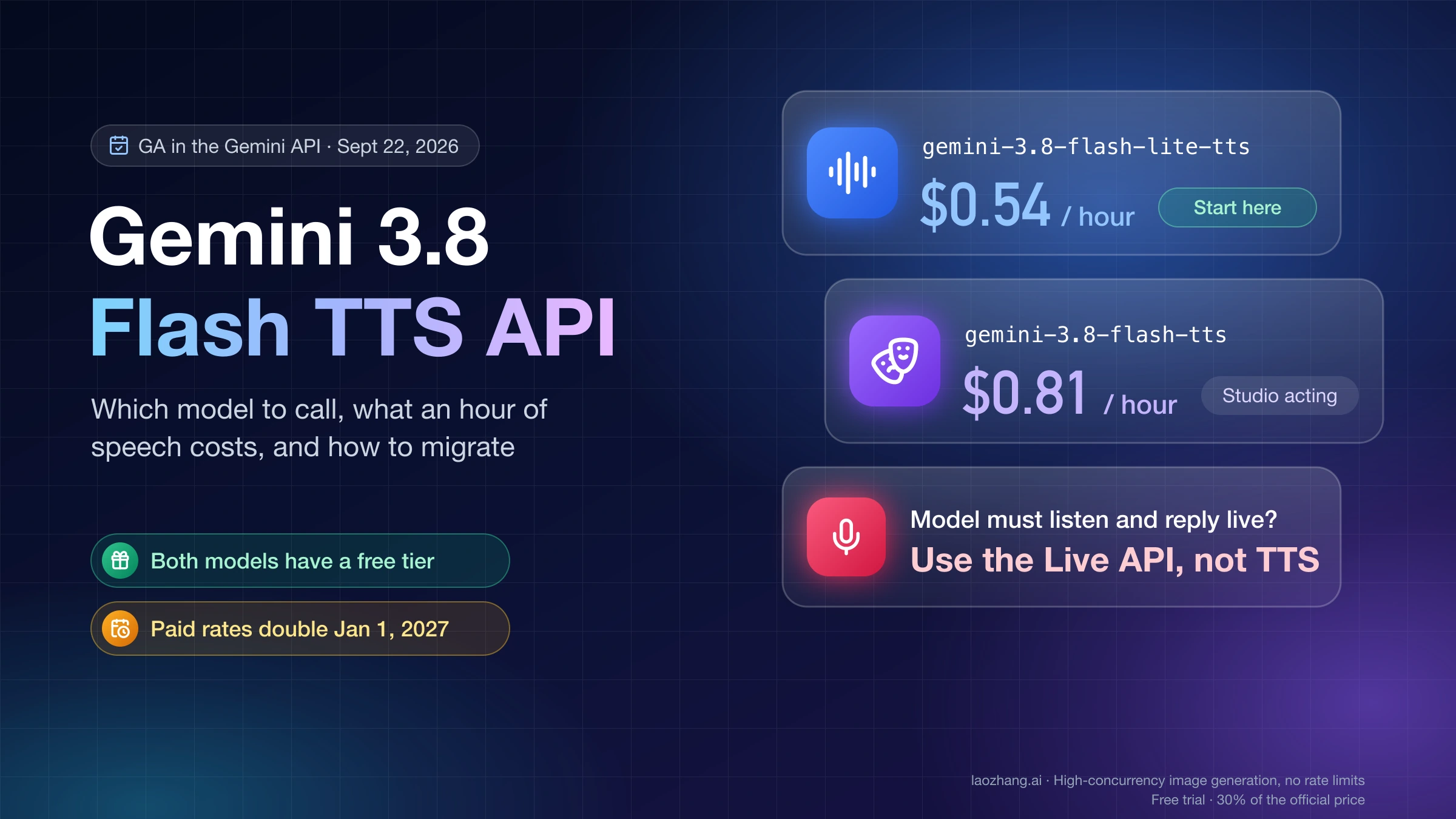
Google made gemini-3.8-flash-tts and gemini-3.8-flash-lite-tts generally available in the Gemini API on September 22, 2026, according to the API changelog (the announcement post is dated September 23). Both take text in and return audio out through the Interactions API, both are on the free tier, and both share one request schema, so the model ID is the only thing you change to switch between them. Flash-Lite TTS is Google's stated replacement for gemini-3.1-flash-tts-preview; at $6.00 per million audio tokens on the Standard lane it works out to about $0.54 per hour of generated speech through December 31, 2026. Flash TTS is the creative tier at $9.00 per million, about $0.81 per hour, and is the one to pick for audiobooks, two-speaker scenes with backchannels, and dialect work. Both rates double on January 1, 2027.
If your product needs the model to listen and reply in real time, neither of these is the right endpoint. The TTS models accept text only, and their model pages list the Live API as not supported. Everything below assumes you already have a script, or a text model producing one, and need it spoken.
The request shapes below are taken from Google's speech-generation guide (last updated September 24, 2026) rather than from a recorded run, so no latency or quality numbers are attached to them. Field names can shift between SDK releases; the Voices endpoint needs google-genai 2.25.0 or @google/genai 2.24.0 or newer.
Which model to call: Flash, Flash-Lite, or the Live API
Start from the workload, not the benchmark. Google's model pages describe the split in terms of what each model is built for, and the prompting guide adds one concrete capability difference.
| Workload | Call | Why |
|---|---|---|
| Audiobook chapters, studio narration, heavy vocal-burst acting, hard pronunciations, regional dialects | gemini-3.8-flash-tts | Listed as its best use cases; long-form voice and room-tone stability is the stated strength; 130 languages |
| Two-speaker podcast with backchannels and overlapping lines | gemini-3.8-flash-tts | Pipe-based overlap "works best" with Flash TTS per the prompting guide |
| Voice agent speaking LLM output turn by turn | gemini-3.8-flash-lite-tts | Listed use: real-time voice agent cascades; one third cheaper per audio token |
| Read-aloud features, bulk dubbing, everyday single-speaker speech, voice replication at volume | gemini-3.8-flash-lite-tts | High-throughput workhorse; the documented drop-in for 3.1 preview; 101 languages |
| User talks, model listens and answers in audio | A Live API model, not TTS | TTS is text-in only; Google positions the Live API for "dynamic conversational contexts" |
| Audio in, text out | A transcription model | Opposite direction; see Gemini 3.5 Transcribe API: Recorded Audio, Live Captions, and a Safe First Build |
A practical rule: build on Flash-Lite first. Because the two models share the schema, switching is a one-string change, so move a specific scene to Flash TTS only when it fails on Lite: a narration drifts over a long chapter, an overlapping reaction does not land, or a dialect comes out flat. Google's own comparison figures point the same way. On the Hume AI Overall Quality Index the company reports Flash TTS first and Flash-Lite second, and on Hume's Voice Design Benchmark Flash TTS scores 71.4; those are Google-reported numbers from the September 23 announcement, not independent tests.
For the "listen and answer" case, the bidirectional route is covered for the 3.1 generation in Gemini 3.1 Flash Live API: Model ID, Pricing, and Quickstart Guide (March 2026). The announcement also names a 3.8 Live model; it belongs to the Live API documentation, not the text-to-speech pages. If you still need to write the script, the text model is described in Gemini 3.8 Flash: Pricing, Model ID, and a Safe 3.7 Migration.
Your first request and what comes back
You need a key from Google AI Studio in the GEMINI_API_KEY environment variable, which the SDK reads automatically; creation and verification steps are in Google AI Studio API Key: Create It, Secure It, and Verify Your First Call. The single-speaker request has three parts: the verbatim transcript, a speech_metadata annotation carrying the turn-level style, and a speech_config naming the voice.
import base64
from google import genai

client = genai.Client()

interaction = client.interactions.create(
    model="gemini-3.8-flash-lite-tts",
    input=[{
        "type": "user_input",
        "content": [{
            "type": "text",
            "text": "Have a wonderful day!",
            "annotations": [{
                "type": "speech_metadata",
                "style": "cheerful and friendly",
            }],
        }],
    }],
    response_format={"type": "audio"},
    generation_config={
        "speech_config": [
            {"voice": "Kore"},
        ]
    },
)

with open("out.wav", "wb") as f:
    f.write(base64.b64decode(interaction.output_audio.data))
What comes back matters more than the call. For a non-streaming request the model returns a complete WAV file: audio/wav, 24 kHz, mono, 16-bit signed little-endian PCM, with the standard 44-byte RIFF header already in place. interaction.output_audio.data is that file base64-encoded, so decoding and writing the bytes is the whole job. Do not wrap them in another header; that was the 3.1-preview habit and it now produces a file with two headers that many players refuse.
The same request over REST, with the audio pulled out of steps[].content[].data:
curl -X POST "https://generativelanguage.googleapis.com/v1beta/interactions" \
  -H "x-goog-api-key: $GEMINI_API_KEY" \
  -H "Content-Type: application/json" \
  -d '{
    "model": "gemini-3.8-flash-lite-tts",
    "input": [{
      "type": "user_input",
      "content": [{
        "type": "text",
        "text": "Have a wonderful day!",
        "annotations": [{ "type": "speech_metadata", "style": "cheerful and friendly" }]
      }]
    }],
    "response_format": { "type": "audio" },
    "generation_config": { "speech_config": [ { "voice": "Kore" } ] }
  }' | jq -r '[.steps[] | select(.type=="model_output") | .content[] | select(.type=="audio")] | last | .data' | base64 --decode > out.wav
Kore is one of 30 prebuilt studio voices (Zephyr, Puck, Charon, Fenrir, Leda, Orus, Aoede, Algenib, and others). The voice field also accepts an Extended Voice Library ID from client.voices.list(), a designed voice_... ID, a replicated voice_... ID, or a stateless voicekey_....
Two speakers in one call
Dialogue uses "mode": "conversational" and a speakers list. Each turn is its own text item, and each one must carry a speaker that matches a configured name; the migration guide makes this mandatory on every turn rather than optional as in older prompts.
interaction = client.interactions.create(
    model="gemini-3.8-flash-tts",
    input=[{
        "type": "user_input",
        "content": [
            {
                "type": "text",
                "text": "How's it going today Jane?",
                "annotations": [{
                    "type": "speech_metadata",
                    "speaker": "Joe",
                    "style": "cheerful and friendly",
                }],
            },
            {
                "type": "text",
                "text": "Not too bad, how about you? Ready to test these new voices?",
                "annotations": [{
                    "type": "speech_metadata",
                    "speaker": "Jane",
                    "style": "calm and relaxed",
                }],
            },
        ],
    }],
    response_format={"type": "audio"},
    generation_config={
        "speech_config": {
            "mode": "conversational",
            "speakers": [
                {"speaker": "Joe", "voice": "Puck"},
                {"speaker": "Jane", "voice": "Kore"},
            ],
        }
    },
)
Two hard limits apply here. A single request supports at most two speakers, and those two must be prebuilt voices. A three-host podcast, or any dialogue where one character uses a designed or replicated voice, has to be synthesized one turn at a time and concatenated. Because each unary response is a full WAV, request audio/l16 for those turns (or strip the 44-byte header from each) before joining the 24 kHz PCM frames, otherwise you splice headers into the middle of the audio.
Streaming for voice agents
Set stream=True and the response arrives as step.delta events. Streaming changes the default encoding: chunks are headerless raw PCM (audio/l16, 24 kHz, mono, 16-bit signed little-endian) so they can be appended or played continuously without a container header on every piece.
stream = client.interactions.create(
    model="gemini-3.8-flash-lite-tts",
    input=[{
        "type": "user_input",
        "content": [{
            "type": "text",
            "text": "Have a wonderful day!",
            "annotations": [{"type": "speech_metadata", "style": ""}],
        }],
    }],
    response_format={"type": "audio"},
    generation_config={"speech_config": [{"voice": "Kore"}]},
    stream=True,
)

with open("out.pcm", "ab") as f:
    for event in stream:
        if event.event_type == "step.delta" and event.delta.type == "audio":
            f.write(base64.b64decode(event.delta.data))
To hear the result, feed a player that accepts raw signed 16-bit PCM at 24 kHz mono (for ffplay that is -f s16le -ar 24000 -ac 1), or prepend a WAV header once at the end of the session. For an agent, Google's guidance is one TTS call per LLM text chunk as it arrives, an empty or one short constant style for the whole conversation, and the configured voice carrying the identity; never resend a persona paragraph on every turn.
Choosing the output encoding
response_format takes an optional mime_type and sample_rate, which is how telephony pipelines get 8 kHz G.711 directly instead of transcoding.
mime_type | What you get | Default for |
|---|---|---|
audio/wav | WAV with RIFF header, 16-bit PCM, mono, 24 kHz unless sample_rate says otherwise | Unary requests |
audio/l16 | Headerless 16-bit signed little-endian PCM, mono, 24 kHz | Streaming requests |
audio/mulaw | 8-bit G.711 mu-law, used by North American and Japanese telephony and IVR | Set explicitly, typically with "sample_rate": 8000 |
audio/alaw | 8-bit G.711 A-law, used by European telephony | Set explicitly |
Direct the delivery without it being read aloud
The single biggest behavior change in 3.8 is that the text field is a verbatim transcript. Anything in it is spoken, including "Say cheerfully:" or "Speaker 1:" prefixes carried over from older prompts. Direction lives in exactly two other places, and the split is by scope:
- Sustained across a turn goes in
speech_metadata.style: emotion, pace, volume, and delivery mode such as "whispered urgently", "out of breath", "speaking slowly", "sarcastic". If the emotion changes mid-line, split the line into consecutive parts for the same speaker, each with its own style. - At one point in time goes inline in the transcript as an angle-bracket tag. The documented list covers human vocalizations only:
laugh,chuckle,giggle,sigh,breath,heavy breath,gasp,cough,throat-clearing,sneeze,sob,cry,groan,yawn,scream,shout,tsk,argh, and the two pause tagsshort pauseandlong pause. Sound effects like applause or thuds are explicitly discouraged.
Wait... <short pause> did you hear that? <sigh>
It was a VERY long day <sigh> ... nobody listens anymore.
Let me introduce you to my colleagues /niːv/ and /ʃɪˈvɔːn/.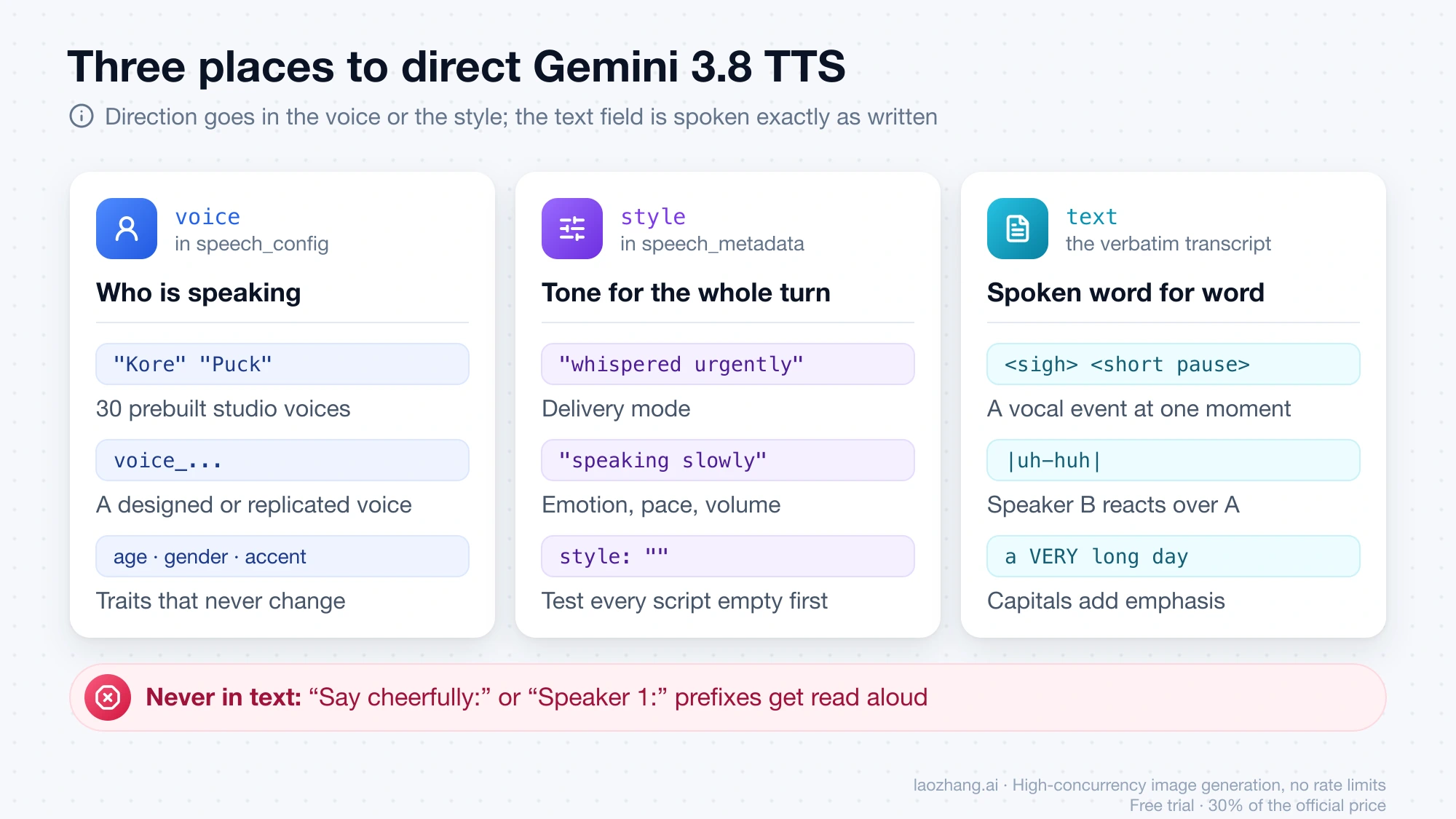
Three details from the prompting guide save the most debugging time:
- Disfluencies and filler words are not a switch. There is no parameter that turns "um" and "uh" on. Google's recommended workflow is to write the transcript the way a person actually spoke, including hesitations ("Oh uh yeah I think... hm, so that's interesting"), and let the model read it. Punctuation, dashes, and ellipses drive natural hesitation; capitals drive emphasis; IPA inside slashes fixes a name.
- Backchannels use pipes, not extra turns. In a two-speaker request, wrapping one to three words in pipes inside speaker A's line makes speaker B voice that reaction over the top of it. Multiple pipe segments in one line produce interleaved or simultaneous speech, and this works best with Flash TTS.
- Tags stay in English. For a Spanish, Japanese, or Hindi transcript the inline tags remain English words in angle brackets.
Turn 1 (Maya): So the guards check the gallery at midnight |uh-huh| and the painting is still on the wall.
Turn 2 (Liam): Wait, so the alarm never went off? |not once| Then how did they get it out?
Two things to leave out of style: immutable traits (age, gender, a permanent accent), which belong in voice selection or Voice design, and meta-instructions like "keep the voice steady" or "do not change speaker", which Google says increase drift rather than reduce it. Test every script with an empty style first; the guide's position is that most requests need no direction at all.
What a minute or an hour of audio costs
Audio output is billed at 25 tokens per second, which is the footnote on Google's pricing page. That gives the whole calculation:
1 minute = 60 s × 25 = 1,500 output tokens
1 hour   = 90,000 output tokens
cost per hour = 90,000 / 1,000,000 × (output price per 1M tokens)
Flash TTS, Standard, 2026:      0.09 × $9.00 = $0.81 per hour
Flash-Lite TTS, Standard, 2026: 0.09 × $6.00 = $0.54 per hour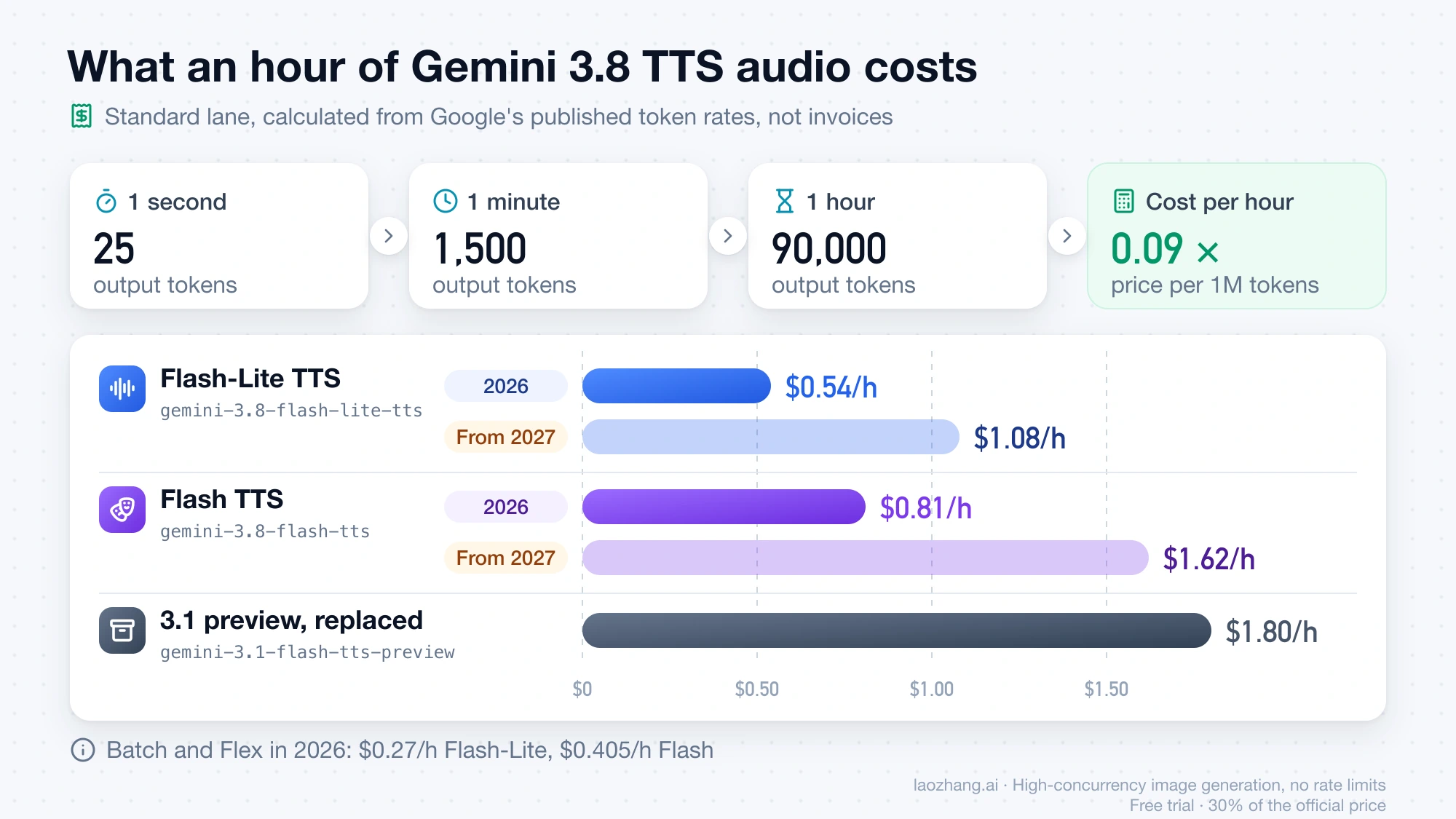
The per-hour figures below apply that formula to each lane; they are calculations from the published token rates, not invoices, and actual duration depends on how fast the model paces your script. Prices are USD per million audio output tokens, before tax and card fees.
| Lane | Flash TTS through Dec 31, 2026 | Flash TTS from Jan 1, 2027 | Flash-Lite TTS through Dec 31, 2026 | Flash-Lite TTS from Jan 1, 2027 |
|---|---|---|---|---|
| Standard | $9.00 (about $0.81/h, $0.0135/min) | $18.00 ($1.62/h) | $6.00 (about $0.54/h, $0.009/min) | $12.00 ($1.08/h) |
| Batch | $4.50 ($0.405/h) | $9.00 ($0.81/h) | $3.00 ($0.27/h) | $6.00 ($0.54/h) |
| Flex | $4.50 ($0.405/h) | $9.00 ($0.81/h) | $3.00 ($0.27/h) | $6.00 ($0.54/h) |
| Priority | $16.20 ($1.458/h) | $32.40 ($2.916/h) | $10.80 ($0.972/h) | $21.60 ($1.944/h) |
Text input is $0.50 per million tokens on Standard in 2026 ($0.25 Batch and Flex, $0.90 Priority), and it barely registers: if a script runs around 200 tokens per spoken minute, an hour of input costs on the order of half a cent. Add it for exact accounting; ignore it for planning. Context caching and cached-token storage have their own rows on the pricing page and only matter if you deliberately cache repeated prefixes.
Two examples with the formula applied:
- A 10-hour audiobook on Flash TTS costs about $8.10 on Standard in 2026, about $4.05 through Batch (the job is offline anyway), and about $16.20 on Standard after January 1, 2027. On Flash-Lite the Standard figure is about $5.40.
- A support agent that speaks three minutes per call across 1,000 calls a day generates 50 hours of audio, about $27 per day on Flash-Lite Standard in 2026 and about $54 in 2027. Priority for the same volume is about $48.60 per day in 2026.
Against the models being replaced, this is a price cut. gemini-3.1-flash-tts-preview is listed at $20.00 per million audio tokens (about $1.80 per hour), gemini-2.5-flash-preview-tts at $10.00 ($0.90 per hour), and gemini-2.5-pro-preview-tts at $20.00. Flash-Lite at $0.54 is 70% below 3.1 preview; even Flash TTS at $0.81 is 55% below it, and the 2027 doubling brings Flash-Lite back to roughly 2.5 Flash TTS territory rather than above it.
What the free tier actually covers
The pricing page marks input and output as "free of charge" on both the Standard and Priority lanes for both models, so you can test without a card; Batch and Flex are "not available" on the free tier. Free-tier data is used to improve Google's products, paid-tier data is not, which is a reason to switch to a billed project before sending anything confidential. A per-model requests-per-minute or requests-per-day figure for the 3.8 TTS models is not published anywhere on the rate-limits page; the page points to AI Studio, which shows the active limits for your project, so open your active limits there before you promise anyone a throughput number. The general mechanics are in Gemini API Free Tier 2026: Limits, Free Models, and API Keys, and overall pricing including the prepay step is in Gemini API Pricing 2026: Token Rates, Free Tier, and Key Cost.
Once billing is linked, spend caps apply on a rolling 10-minute window: $10 at Tier 1, $50 at Tier 2 (after $100 paid and three days), $200 at Tier 3 (after $1,000 and 30 days). At $0.81 per hour, a $10 cap is roughly 12 hours of Flash TTS audio per 10 minutes on Standard, which is more than most single pipelines generate; a bulk dubbing job that fans out wide will hit a 429 RESOURCE_EXHAUSTED from the cap before it hits anything else.
Migrating from 3.1 preview or 2.5 TTS
The model index now labels gemini-3.1-flash-tts-preview a legacy preview and recommends moving to either 3.8 model. Google's migration notes list five changes; three of them break silently (the audio is wrong rather than the request failing), so check each one rather than swapping the model string and listening to a single sample.
1. Stage directions move out of the text. Old requests put the direction and the words in one string. Under 3.8 that string is read aloud.
// Before (3.1 preview): direction embedded in the transcript
{ "input": "Say cheerfully: Have a wonderful day!" }

// After (3.8): direction in speech_metadata, text is only what is spoken
{
  "input": [{ "type": "user_input", "content": [{
    "type": "text",
    "text": "Have a wonderful day!",
    "annotations": [{ "type": "speech_metadata", "style": "cheerful" }]
  }] }]
}
If you call the GenerateContent API instead of Interactions, the same object attaches to each part as "speech_metadata": {"speaker": "...", "style": "..."}.
2. Inline tags narrow to point-in-time vocal events. Angle brackets remain for a laugh, a sigh, a cough, a breath, or a pause. Delivery modes that older prompts put inline ("whispering", "shouting") move into style; sound-effect tags are dropped.
3. Every multi-speaker turn names its speaker. The old pattern was a single transcript with "Joe:" and "Jane:" prefixes plus a speakers config. Now each turn is a separate text item with speaker in its annotation, and the prefixes are removed from the text or they get spoken.
// Before: one string with name prefixes
{ "input": "TTS the following conversation between Joe and Jane:\nJoe: How's it going?\nJane: Not too bad." }

// After: one item per turn, speaker in metadata, conversational mode
{
  "input": [{ "type": "user_input", "content": [
    { "type": "text", "text": "How's it going?",
      "annotations": [{ "type": "speech_metadata", "speaker": "Joe" }] },
    { "type": "text", "text": "Not too bad.",
      "annotations": [{ "type": "speech_metadata", "speaker": "Jane" }] }
  ] }],
  "generation_config": { "speech_config": {
    "mode": "conversational",
    "speakers": [ { "speaker": "Joe", "voice": "Puck" }, { "speaker": "Jane", "voice": "Kore" } ]
  } }
}
4. Persona blocks become a designed voice. Multi-paragraph "Audio Profile" or "Director's Notes" text is, in Google's words, the most common cause of voice drift on 3.8. Create the character once with Voice design, keep the returned voice_... ID, and send an empty or one-line style.
5. Unary output is WAV now. 3.1 preview and 2.5 returned headerless PCM by default, so most wrappers added a RIFF header. Keep that code and you double-wrap.
# Before: wrap raw PCM in a header
import wave
with wave.open("out.wav", "wb") as wf:
    wf.setnchannels(1); wf.setsampwidth(2); wf.setframerate(24000)
    wf.writeframes(pcm_bytes)

# After: the bytes already are a WAV file
with open("out.wav", "wb") as f:
    f.write(audio_bytes)

# Or keep the old pipeline unchanged by asking for raw PCM explicitly
response_format={"type": "audio", "mime_type": "audio/l16"}| Symptom after switching the model ID | Cause | Fix |
|---|---|---|
| Voice reads "say cheerfully" or "Speaker 1" out loud | Direction still in text | Item 1 and 3 |
| Whispered line is spoken normally, or a tag is read as a word | Delivery mode inline instead of in style; unsupported tag | Item 2 |
| Dialogue turn goes to the wrong voice or the request is rejected | A turn without speaker, or a name not in speakers | Item 3 |
| Character slowly changes timbre across a chapter | Long persona text resent per request | Item 4 |
| File will not play, or starts with a click | Two RIFF headers | Item 5 |
Readers still on 2.5 TTS have an extra reason to move: since September 18, 2026, Google limits 2.5-model access to users who have actively used them before. The models are not deprecated, but a new project cannot count on them.
Custom voices: library, design, and replication
Three paths beyond the 30 prebuilt voices all use the new Voices endpoint (/v1beta/voices) and work with both 3.8 models.
The Extended Voice Library is queried with client.voices.list() and filtered by language_code, region_code, accent, gender, pitch, persona, contexts, type, or free-text search, up to 1,000 per page. The announcement talks about 2,000 or more voices while the changelog says 150 or more are queryable; the safe statement is "30 prebuilt plus a filterable extended library", and the list call tells you what your project actually sees. Check the library before designing a voice from scratch.
Voice design turns a one- or two-sentence description of who the speaker is into a persistent voice_... ID plus a sample_audio WAV preview:
created = client.voices.create(
    store=True,
    voice={
        "model": "gemini-3.8-flash-tts",
        "type": "prompted",
        "display_name": "Warm British Astronomer",
        "gender": "male",
        "language_code": "en-GB",
        "prompted": {"input": "A warm, thoughtful astronomer in his late 60s "
                              "with a gentle British accent, speaking with quiet wonder."},
    },
)
print(created.id)  # pass this as "voice" in speech_config
Describe age, timbre, pitch, accent, and baseline cadence; leave temporary emotion for style.
Voice replication is the API feature most people call voice cloning. It needs two recordings from the same adult speaker, ideally 24 kHz mono 16-bit WAV from the same microphone: a 10–30 second source_audio of clean speech and a consent_audio of that speaker reciting the exact consent statement in one of the supported locales (in US English: "I am the owner of this voice and I consent to Google using this voice to create a synthetic voice model."). Consent is verified before the voice is created, and all Gemini audio output carries a SynthID watermark. The announcement's footnote says voice replication through AI Studio is not available in Illinois, Texas, the EEA, the UK, Switzerland, and India; the API docs state no regional restriction, so whether the API path is limited in those places is not documented either way.
Quotas apply across both custom types: stored voices (store=True, designed or replicated) are capped at 200 per project with a one-year time-to-live, and stateless voicekey_... keys (store=False, replication only, nothing stored server-side) expire after seven days. The announcement lists voice remixing (adjusting timbre, pitch, pace, and accent of a library voice) as coming soon; it is not in the API docs as of September 30, 2026.
Limits and failure boundaries
| Boundary | Value | What it means in practice |
|---|---|---|
| Input tokens per request | 8,192 | Split long scripts by chapter or scene; for ordinary prose the output cap below is reached first |
| Output tokens per request | 16,384 (Gemini API serving limit) | At 25 tokens per second that is about 655 seconds, roughly 10.9 minutes of audio, so any segment longer than that must be split regardless of text length (derived; the docs give tokens, not minutes) |
| Speakers per request | 2, prebuilt voices only | More speakers or any custom voice in dialogue means per-turn synthesis and concatenation |
| Stored custom voices | 200 per project, 1-year TTL | Delete unused designed or replicated voices with client.voices.delete() |
| Stateless voice keys | 7-day TTL | Re-create from the source and consent clips on expiry |
| Model capabilities | Text in, audio out only | No function calling, structured output, thinking, grounding, or Live API on the TTS models |
| Free tier lanes | Standard and Priority only | Batch and Flex need a billed project |
| Paid spend caps | $10, $50, $200 per 10 minutes by tier | Manifests as 429 RESOURCE_EXHAUSTED under bulk fan-out |
| Vertex AI and Cloud Text-to-Speech | No 3.8 entry on the Cloud TTS Gemini-TTS page as of September 30, 2026 | Enterprise access is "coming soon via Gemini Enterprise"; today the models are Gemini API and AI Studio only |
| Account location | Gemini API and AI Studio available in listed countries and territories; 18+ | The list includes the United States, Japan, South Korea, and Spain; mainland China, Hong Kong, and Russia are absent. Details in Google AI Studio Free Access: What's Still Free and What Isn't |
One more practical boundary: the official Go snippets on the speech-generation page still target gemini-3.1-flash-tts-preview, embed "Say cheerfully:" in the transcript, and hand-build a WAV header. As of September 24, 2026 they demonstrate exactly the patterns the migration guide tells you to remove. If you write Go, build the request from the REST shape above and treat the page's Go tab as lagging.
Questions developers hit in the first week
Is the Gemini 3.8 TTS API free? Both models have a free tier on the Standard and Priority lanes, with input and output marked free of charge, so a first test needs no card. The limits are not unlimited and the per-model request quotas are only visible in AI Studio for your project; paid Standard is $6.00 (Flash-Lite) or $9.00 (Flash) per million audio tokens in 2026, doubling in 2027.
Can I run it on Vertex AI? Not as of September 30, 2026. The Cloud Text-to-Speech Gemini-TTS page lists 3.1 preview and 2.5 models only, and Google describes enterprise access as coming soon through Gemini Enterprise.
Does Flash-Lite sound worse than Flash? Google positions Flash-Lite as the replacement for 3.1 preview and its own benchmark places it second only to Flash TTS on Hume AI's Overall Quality Index. The documented differences are language count (101 versus 130), dialect and acting depth, and pipe-based overlap working best on Flash. Test your own script on both; the request is identical.
Can I still call 2.5 Flash TTS? Only if your project has used 2.5 models before; since September 18, 2026 Google restricts them to previously active users. New work should start on 3.8 Flash-Lite TTS, which is cheaper per hour than 2.5 Flash TTS was.