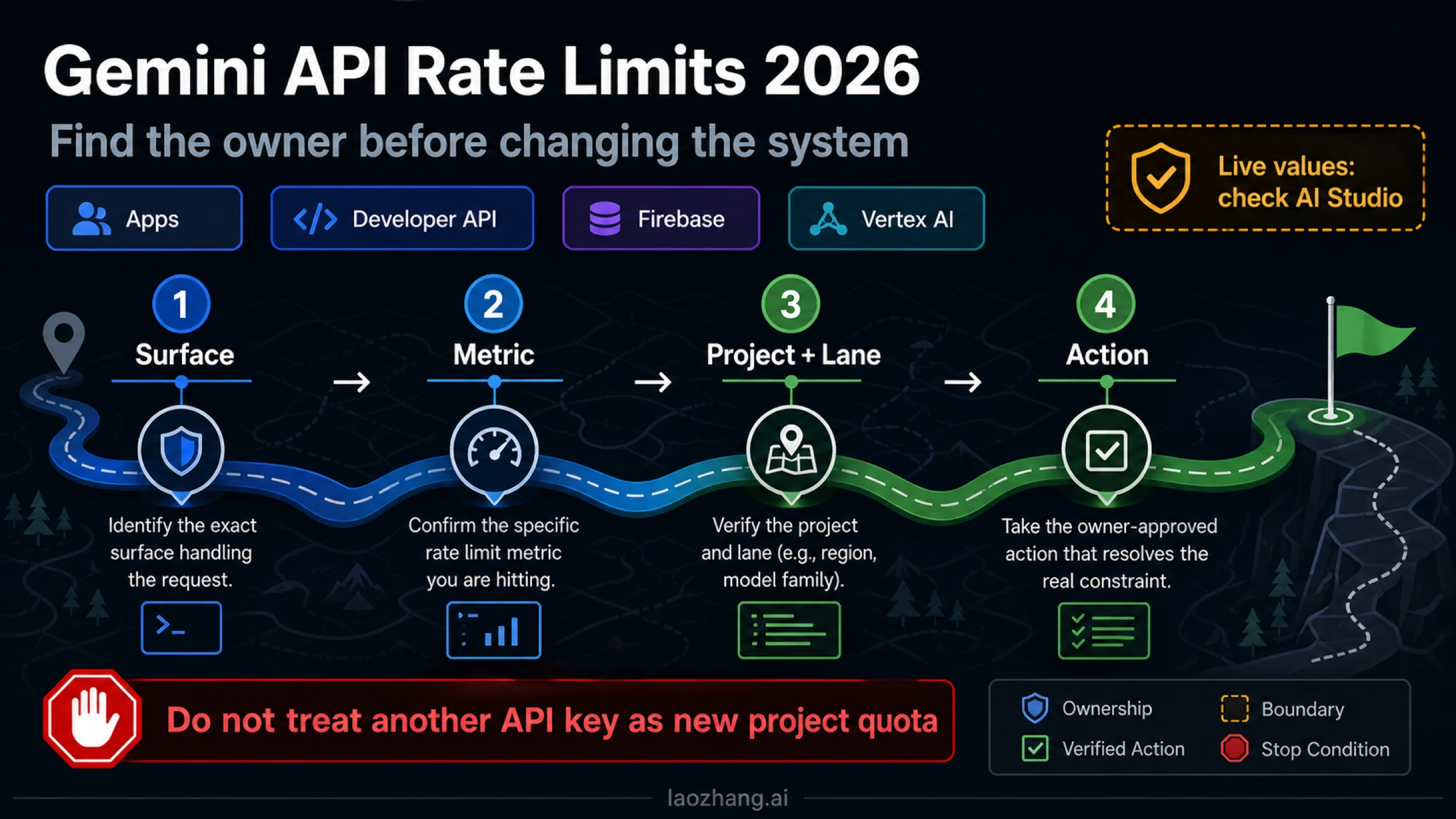
There is no single universal Gemini API rate limit. For the Gemini Developer API, the active contract depends on the project, model, usage tier, metric, and serving lane. Google directs developers to AI Studio for the active values, and says published limits are not guaranteed capacity.
If a request fails, preserve the HTTP status and error body before changing code or billing. A 429 RESOURCE_EXHAUSTED is the documented limit branch; a 503 UNAVAILABLE is the temporary capacity branch. Blind retries are unsafe when the blocked owner is a daily limit, spend control, depleted balance, or explicit quota boundary.
Start with the Google surface that received the request
The word “Gemini” covers several products that do not share one quota contract. Identify the surface from the endpoint and SDK—not from the model name alone.
| Surface | What owns the limit | First verification | Stop rule |
|---|---|---|---|
| Gemini Apps | Consumer account, plan, model, and feature | Gemini Apps limits and the signed-in app | Do not infer API capacity from an app subscription. |
| Gemini Developer API | Project, model, usage tier, metric, and serving lane | The exact project and model in AI Studio | A second key in the same project does not create a new quota pool. |
| Firebase AI Logic | Provider quota plus Firebase's per-user gateway layer | Firebase quota and App Check configuration, then provider status | Do not treat a Firebase gateway limit as a Developer API project limit. |
| Vertex AI | Google Cloud project, location, endpoint, and capacity contract | Cloud quotas plus pay-as-you-go or Provisioned Throughput status | Do not apply AI Studio values to Vertex traffic. |
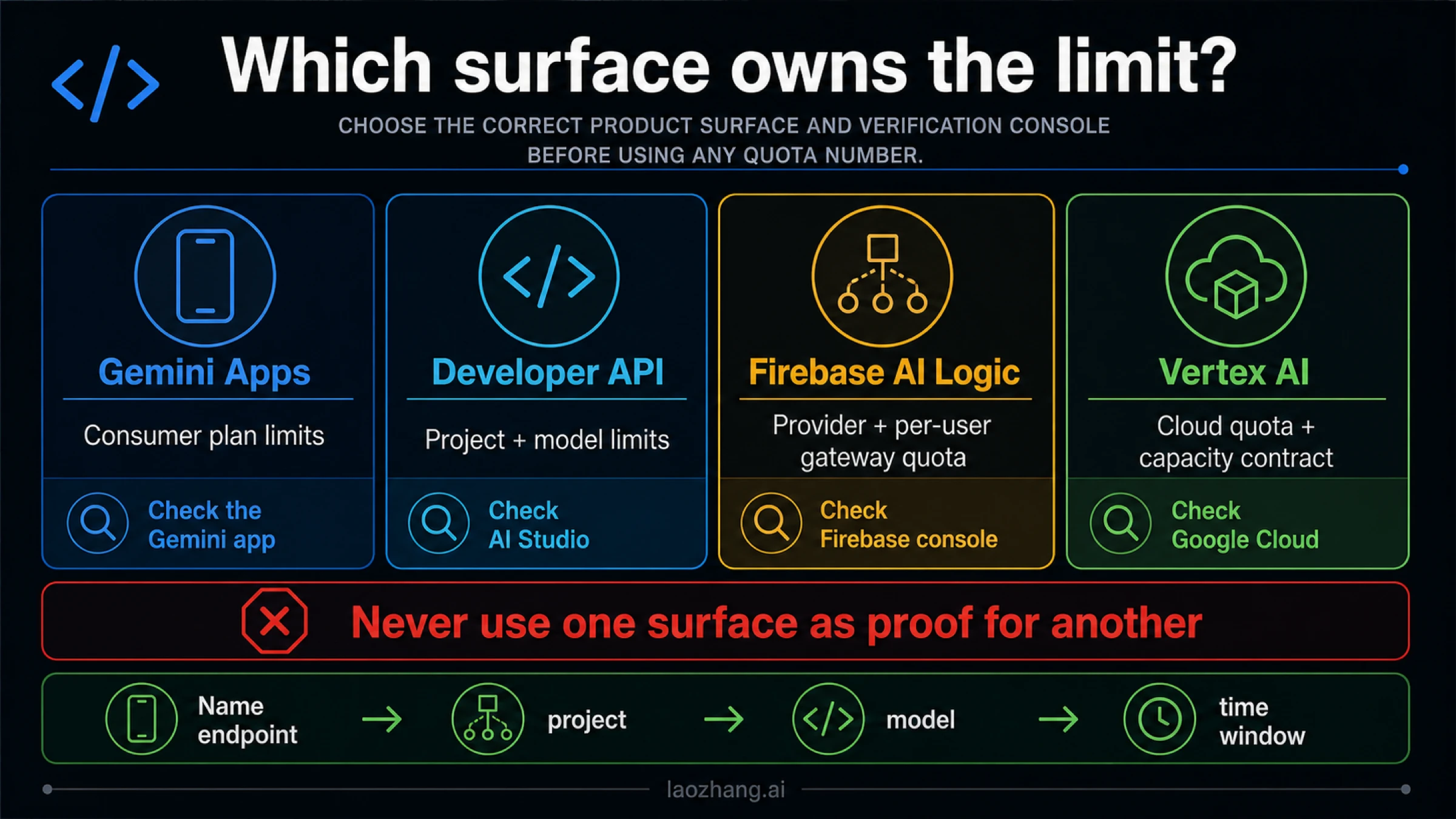
This split resolves a common contradiction. A Gemini Apps user may hit a compute-based consumer allowance while a Developer API project still has capacity. A Firebase client can pass the model provider's quota but hit its gateway's per-user limit. A Vertex AI request can return a 429 governed by Google Cloud capacity even though the same model family also appears in AI Studio.
“Developer API” means API-key traffic using the Gemini API contract documented at ai.google.dev. Firebase and Vertex AI retain their platform-owned quota layers.
The Developer API contract is metric × project × model × tier
For the Gemini Developer API, a request can cross any enforced dimension. Google's rate-limits documentation defines three core metrics and says limits apply per project, not per API key. Limits also vary by model and usage tier.
| Metric | What it measures | Typical pressure signal | Reset or window | What to change |
|---|---|---|---|---|
| RPM | Requests per minute | Many short calls or synchronized workers | Minute-scale window | Smooth arrivals, cap concurrency, cache duplicates |
| Input TPM | Input tokens per minute | Long prompts, large histories, retrieval payloads | Minute-scale window | Trim context, chunk work, reduce parallel long prompts |
| RPD | Requests per day | Sustained daily volume | Resets at midnight Pacific under the documented contract | Wait for reset, reduce daily demand, or obtain eligible capacity |
Crossing any enforced dimension can produce a 429. A service running below its RPM can still exhaust input TPM; a low-token workload can still exhaust RPD. “We only sent a few requests” is not evidence until prompt size, project-wide traffic, and the exact time window are known.
Some models and modalities expose additional dimensions such as tokens per day (TPD) or images per minute (IPM). Treat those as model- and route-owned values rather than universal metrics: read the active limit in AI Studio, and use the dedicated Gemini image 429 guide when IPM or image-generation capacity is the incident owner.
Two rules matter more than a copied model table:
- The aggregation boundary is the project. Rotating keys inside one project changes credentials, not capacity. Staging, production, cron jobs, notebooks, and teammates may all draw from the same pool.
- AI Studio owns the live value. Google explicitly says specified limits are not guaranteed and points developers to the active limits view. Public documentation explains the contract; your console decides the number that applies to the project and model now.
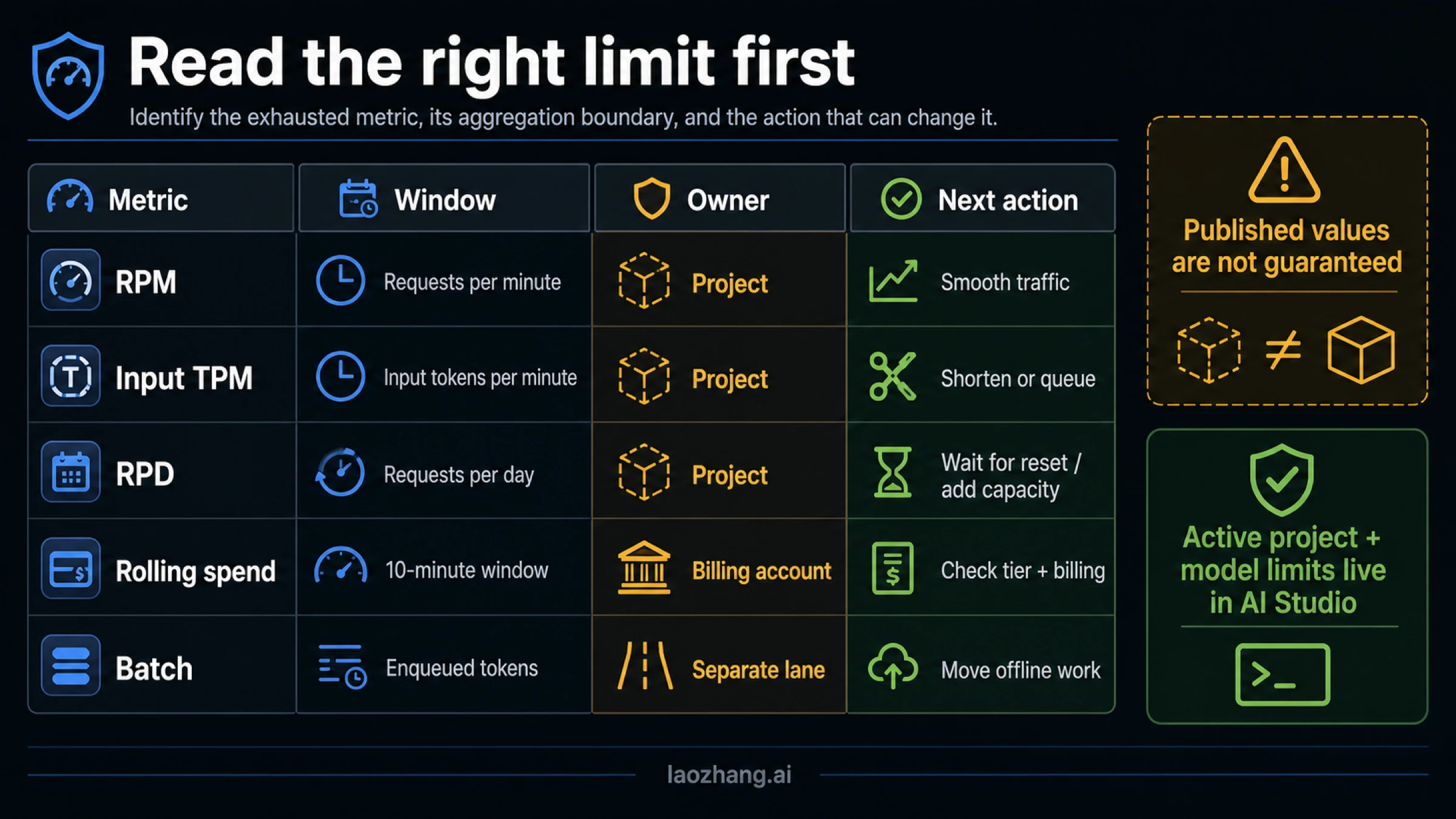
Preview and experimental models can have tighter limits. Model availability and free-versus-paid eligibility also change independently from the quota mechanics; use the dedicated Gemini API free-tier guide when that is the unresolved question.
Diagnose the limit owner in sixty seconds
Start with evidence that survives handoffs. Record these fields for the failed call:
- product surface and endpoint;
- project ID and API-key owner without logging the secret;
- exact model and serving mode;
- HTTP status, error status, and complete message;
- request timestamp with timezone;
- input size, concurrency, and recent retry count;
- AI Studio or Cloud usage view for the same interval.
Then follow this order:
- Surface: Was the request sent by Gemini Apps, Developer API, Firebase AI Logic, or Vertex AI?
- Status: Is this a 429 limit event or a 503 capacity event?
- Metric: For Developer API traffic, is RPM, input TPM, RPD, rolling spend, billing state, Priority, or Batch the plausible owner?
- Aggregation: Which project or billing account owns that control? What other workloads share it?
- Lane: Is the call Standard interactive, Priority, Batch, Firebase gateway traffic, or Vertex capacity?
- Console: Does the owner-specific console agree with the error at the same time?
- Action: Change the smallest thing that can affect the proven owner.
- Verification: Confirm that the same metric, error rate, and workload recover.
This owner-first order prevents fixes that look active but cannot work:
| Observation | Likely owner | Smallest useful action | Verification | Stop rule |
|---|---|---|---|---|
| Spikes fail; the same volume succeeds when spread out | RPM or temporary pressure | Queue and smooth arrivals; cap concurrency | Minute error rate falls without lost work | Stop increasing retries if they recreate the spike |
| Long prompts fail while short prompts pass | Input TPM | Reduce context, chunk input, schedule long jobs | Input tokens per minute fall and the same job completes | A new key in the same project changes nothing |
| All calls fail after sustained daily use | RPD | Wait for Pacific reset or change eligible capacity | Calls recover after reset or approved capacity change | Backoff cannot create daily requests |
| Failures correlate with spend, credit, or billing warnings | Spend or billing control | Inspect tier, rolling spend, balance, project cap, and account cap separately | Billing state clears and serving resumes | “Billing enabled” alone is not proof |
| Offline jobs create interactive pressure | Serving-lane choice | Move eligible work to Batch | Interactive utilization drops; Batch job completes | Do not poll Batch as if it were synchronous |
| Usage view and error disagree | Unknown or provider-side mismatch | Preserve the evidence pack and escalate on the same path | Support can match project, model, endpoint, and time | Do not hide the mismatch with a fallback before capturing it |
Tier, rolling spend, balance, and caps are different controls
Money-related 429s are easy to misdiagnose because several controls sit near each other. As checked on July 14, 2026, Google's official rate-limit and billing pages distinguish at least four owners:
| Control | Current documented behavior | What it does not prove |
|---|---|---|
| Usage tier | Tier 1 requires an active billing account; Tier 2 requires at least $100 paid plus 3 days from the first successful payment; Tier 3 requires at least $1,000 paid plus 30 days | Meeting the spend threshold does not guarantee immediate or unlimited serving |
| Rolling spend limit | The documented rolling 10-minute limit is N/A for Free, $10 for Tier 1, and $200 for Tier 2 and Tier 3 | This is not the same as RPM, RPD, a project cap, or an account cap |
| Prepay balance | Paid serving can depend on a positive balance for accounts assigned to Prepay | Prior billing activation does not prove the balance can serve now |
| Spend caps | Project-level and billing-account caps have distinct semantics and reporting delay | A higher cap does not bypass project/model rate limits |
The billing documentation says rate-limit tier is determined at the billing-account level, while request quotas still aggregate per project under the Developer API contract. That means two linked projects may qualify for the same tier but do not become one request pool. Conversely, raising a project's spend cap does not make a hard model quota disappear.
Treat these July values as dated thresholds, not evergreen promises. Before changing production traffic, re-open the official usage-tier and spend-limit section and the project's active limits. Account standing, payment history, eligibility, and reporting delay can affect the outcome.
A worked example makes the separation clearer. Suppose a Tier 2 project receives 429s even though RPM appears low. If recent paid usage crosses the rolling spend control, more concurrency and more keys only produce more failures. If the rolling spend view is healthy but the Prepay balance is depleted, waiting one minute also does nothing. If both are healthy and RPD is exhausted, a payment action is still the wrong fix. Name the owner before touching the lever.
Choose Standard, Priority, or Batch before adding capacity
Serving lane is part of the limit contract. It is not a label added after the request fails.
| Lane | Best fit | Capacity contract | Operational rule |
|---|---|---|---|
| Standard interactive | User-facing calls that need an immediate response | Project/model/tier interactive limits | Smooth bursts, cap concurrency, and keep latency budgets explicit |
| Priority | Work that needs priority processing under an eligible paid contract | Has a documented Priority limit; the default is currently 0.3× the corresponding Standard limit, and Priority traffic also counts toward interactive usage | Verify both Priority and interactive headroom before moving traffic |
| Batch | Offline evaluation, enrichment, indexing, and large asynchronous jobs | Separate concurrent-job, file, storage, and model/tier enqueued-token limits | Design for asynchronous completion and split large jobs when intermediate results matter |
The precise Priority multiplier and Batch constraints are volatile; the values above were checked July 14, 2026. Google's Batch API guide describes asynchronous turnaround of up to 24 hours and warns that job creation is not idempotent. Give each job a durable client-side ID, persist the returned job name, and never treat a timed-out create call as permission to submit duplicates blindly.
Batch is not “extra retries somewhere else.” It is a different scheduling contract. It helps when the workload can wait and interactive traffic should stay responsive. It does not help an end user waiting on the current request, and it has its own queue and storage boundaries.
Retry only when time or traffic shape can change the result
Google's troubleshooting guide separates 429 RESOURCE_EXHAUSTED from 503 UNAVAILABLE. That distinction should happen before code enters a retry loop.
| Status | Meaning | Retry decision |
|---|---|---|
429 RESOURCE_EXHAUSTED | A rate, token, daily, spend, or related limit blocked the request | Retry only when waiting or smoothing can plausibly free the same boundary; stop on hard daily, spend, balance, or explicit quota exhaustion |
503 UNAVAILABLE | The service is temporarily unavailable or lacks capacity | Use bounded exponential backoff with jitter; consider a lighter model or different eligible route if it persists |
| Other 4xx | Authentication, permission, input, billing precondition, or unsupported request problems | Fix the request or account state; do not retry unchanged |
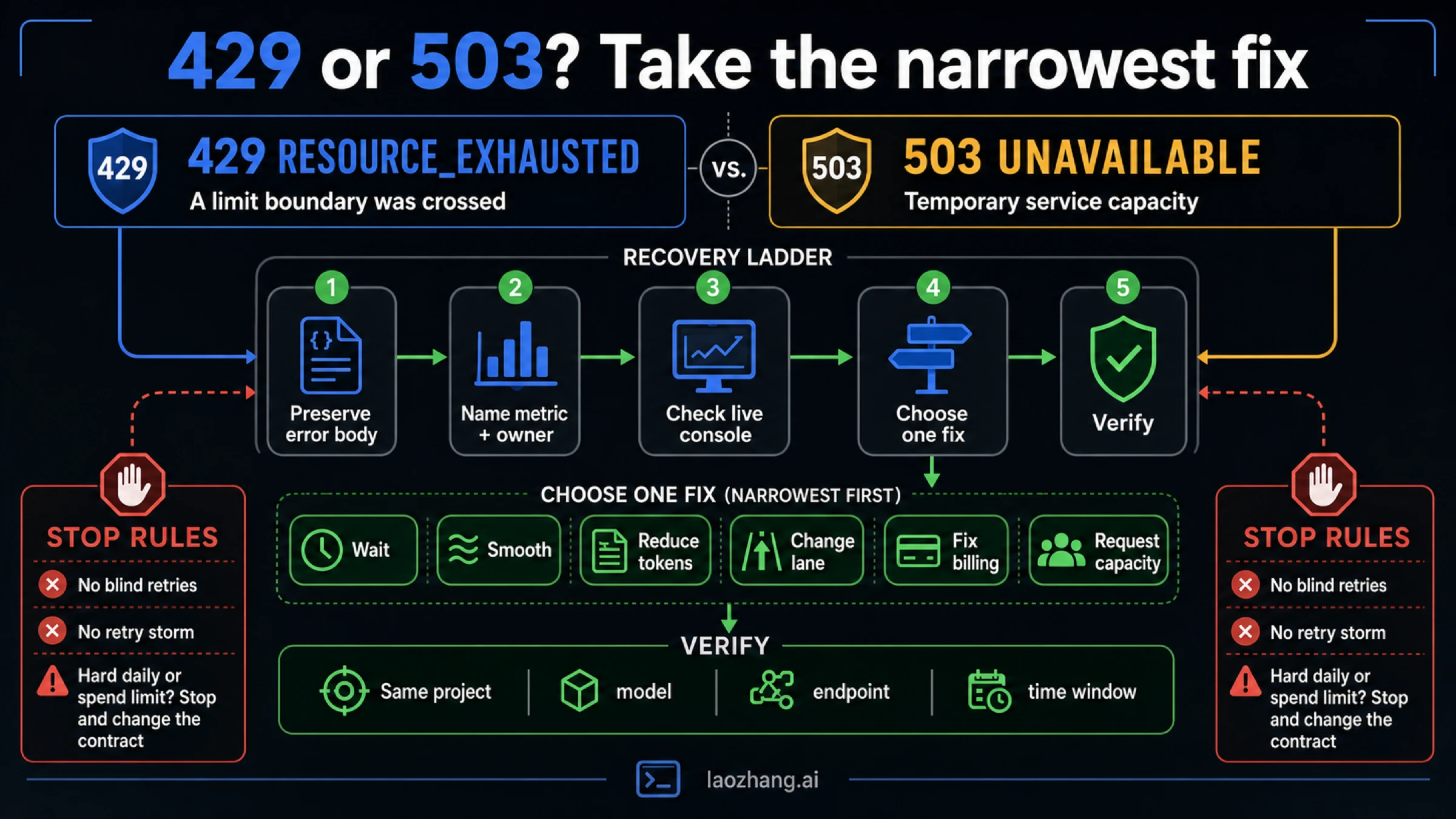
The retry helper below requires the caller to classify whether a 429 is transient. That deliberate friction prevents a generic wrapper from hammering a hard boundary.
javascriptconst sleep = (ms) => new Promise((resolve) => setTimeout(resolve, ms));

export async function withGeminiRetry(run, {
  maxAttempts = 5,
  baseDelayMs = 750,
  maxDelayMs = 20_000,
  isTransient429 = () => false,
  onRetry = () => {},
} = {}) {
  let lastError;

  for (let attempt = 1; attempt <= maxAttempts; attempt += 1) {
    try {
      return await run();
    } catch (error) {
      lastError = error;
      const status = Number(error?.status ?? error?.code ?? 0);
      const retryable =
        status === 503 ||
        status === 500 ||
        status === 504 ||
        (status === 429 && isTransient429(error));

      if (!retryable || attempt === maxAttempts) throw error;

      const exponential = Math.min(
        maxDelayMs,
        baseDelayMs * 2 ** (attempt - 1),
      );
      const delayMs = Math.floor(Math.random() * exponential); // full jitter

      onRetry({ attempt, status, delayMs, message: error?.message });
      await sleep(delayMs);
    }
  }

  throw lastError;
}
Put a concurrency limiter outside the helper. Otherwise ten workers can wake together and turn recovery into the next burst. Make requests idempotent where the operation permits it, cache duplicate user work, and bound total retry time to the user-visible latency budget.
For a 429, isTransient429 should return true only when your evidence says waiting can change the owner—for example, a short RPM burst below a known hard daily boundary. It should return false for exhausted RPD, a depleted balance, a spend cap, a rejected quota increase, or any owner that needs a configuration or capacity change.
Firebase AI Logic adds a gateway quota layer
Firebase AI Logic does not replace the provider's quota. Its quota documentation says provider limits still apply and take precedence, while the Firebase gateway adds a configurable per-user rate limit. As checked July 14, 2026, the documented default is 100 RPM per user.
That creates two valid failure branches:
- many users can exhaust the provider's project or model quota even when each user stays below the Firebase gateway limit;
- one abusive or buggy client can hit the Firebase per-user limit while provider capacity remains available.
Check the Firebase layer, App Check identity, and provider usage for the same request. Raising the per-user gateway value cannot expand provider capacity. Raising provider capacity cannot make a deliberately low per-user safety limit disappear. Change only the layer that produced the evidence.
Vertex AI owns a different 429 capacity contract
Vertex AI requests use Google Cloud endpoints, projects, locations, and capacity controls. Google's Vertex AI 429 guidance distinguishes pay-as-you-go from Provisioned Throughput and gives them different messages and remedies.
For pay-as-you-go traffic, relevant actions can include using a global endpoint where supported, smoothing traffic, using bounded retry, requesting quota for quota-based models, or changing the capacity plan. For Provisioned Throughput, determine whether traffic is within purchased throughput and whether overage uses pay-as-you-go behavior. Preserve the exact message because Google Cloud uses it to identify the branch.
Do not diagnose Vertex traffic from AI Studio alone. Start with the Cloud project, endpoint, location, quota view, and Provisioned Throughput status. Use the broader Gemini API versus Vertex AI guide when the unresolved decision is platform choice rather than limit recovery.
A capacity ladder that changes the proven owner
Once the owner is known, choose the smallest durable action:
- Remove waste: cache duplicate work, trim repeated context, prevent recursive retries, and cancel abandoned requests.
- Shape demand: queue bursts, cap concurrency by project and model, and reserve headroom for interactive traffic.
- Change the eligible lane: move offline work to Batch; use Priority only when its contract and headroom fit.
- Change workload shape: use a lighter suitable model, split long inputs, or reduce unnecessary output work.
- Fix the financial owner: restore eligible billing balance, adjust the correct cap, or wait for tier qualification to take effect.
- Obtain capacity: request a limit increase or adopt the appropriate Vertex AI capacity route when Google Cloud controls are required.
- Diversify only after diagnosis: if provider concentration—not a local quota mistake—is the proven reliability risk, evaluate a multi-model fallback architecture.
A gateway such as laozhang.ai can be evaluated for that last, developer-facing architecture job. It does not enlarge a Google project quota. Test model equivalence, timeout and failover policy, idempotency, data handling, observability, and cost before sending production traffic through any alternate route.
Every capacity change needs a verification signal. Watch the same metric that failed, on the same project and model, during a representative workload. “The deploy succeeded” is not a quota verification. A falling 429 rate with stable latency, no duplicate work, and expected token/request utilization is.
FAQ
Where can I see my current Gemini API rate limits?
Open AI Studio and select the exact project and model. Google's public docs explain RPM, input TPM, RPD, tiers, and serving lanes, but they say specified limits are not guaranteed. Your active console view is the operational source for the current project.
Are Gemini API limits per API key or per project?
For the Gemini Developer API, limits apply per project, not per API key. Multiple keys in one project share the pool. Create separate projects only for legitimate workload, ownership, billing, or governance boundaries—not as key rotation disguised as capacity planning.
When does Gemini API RPD reset?
The documented Developer API RPD counter resets at midnight Pacific. Confirm that RPD is the exhausted metric before waiting; RPM, input TPM, spend, billing balance, Firebase, and Vertex controls use different windows or contracts.
Why did enabling billing not fix my 429?
Billing is only one owner. The project may still have exhausted RPM, input TPM, RPD, rolling spend, a project cap, a billing-account cap, Priority quota, or a model-specific limit. A Prepay account may also lack a positive balance. Check each control separately.
Does Priority give me more Gemini API capacity?
Priority is a separate eligible serving contract with its own documented limit, and Priority calls also count toward interactive usage. It is not an automatic multiplier for every project. Check the live Priority and Standard headroom before switching traffic.
Does Batch avoid interactive rate limits?
Batch has separate limits and is useful for asynchronous work, but it is not unlimited. It has concurrent-job, file, storage, and enqueued-token boundaries, and jobs can take up to 24 hours. Use it when the workload can wait and can tolerate asynchronous semantics.
Should every Gemini 429 be retried?
No. Retry only when time or traffic shape can change the exhausted owner. Bounded backoff helps a short burst; it cannot create RPD, replenish a balance, raise a cap, or grant capacity. Image-specific IPM issues belong to the image-generation capacity branch identified earlier.
What should I send to support when usage and the error disagree?
Send the complete response body, request timestamp and timezone, project ID, model, endpoint, serving lane, request size, recent concurrency, and a usage view for the same interval. Remove API keys and user data. The general Gemini API error guide covers other status-code branches.
The practical rule
Name the product surface, metric, aggregation boundary, serving lane, and corrective action before changing code, billing, or architecture. Check the live owner, make one change that can affect it, and verify the same workload. If a hard boundary remains exhausted, stop retrying: wait for the correct reset, reduce demand, choose an eligible lane, or obtain capacity.