Gemini API Pricing 2026: Token Rates, Free Tier, and Key Cost
A Gemini API key is free, but usage is free only within per-project limits. Gemini 3.8 Flash costs $0.75/$3.75 per 1M tokens, doubling on January 1, 2027.
On this page
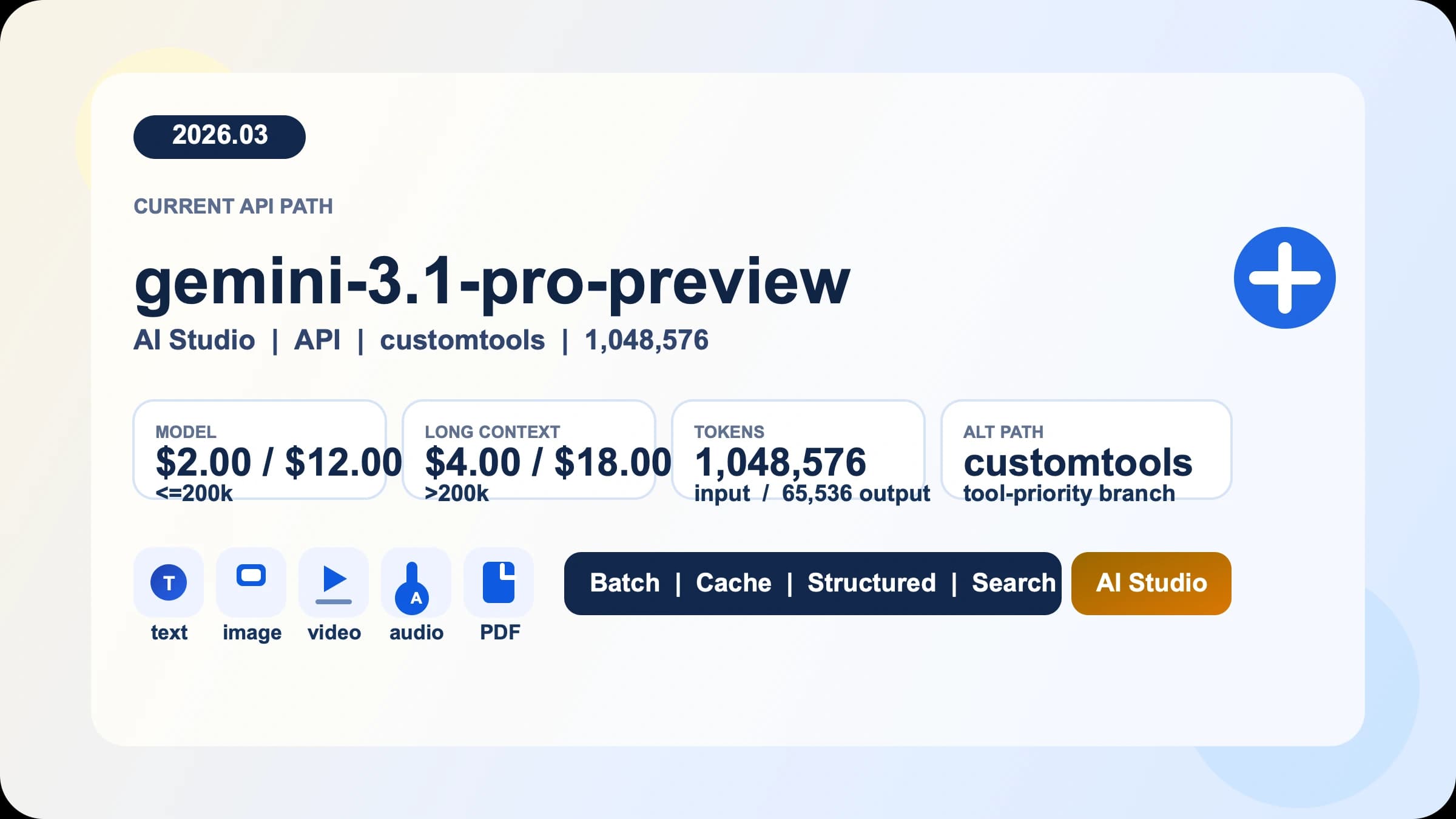
A Gemini API key costs nothing, and there is no fee for creating one. What you pay for is tokens. As of October 10, 2026, Google's Gemini API pricing page lists Gemini 3.8 Flash and Gemini 3.6 Flash at $0.75 per 1M input tokens and $3.75 per 1M output tokens through December 31, 2026. From January 1, 2027, both rise to $1.50 and $7.50. Gemini 3.1 Pro Preview costs $2.00/$12.00 for prompts up to 200k tokens and has no free tier.
The free tier is real but limited. Eligible models, including 3.8 Flash and 3.6 Flash, cost nothing within the request limits your project shows in Google AI Studio, and Google uses free-tier content to improve its products. There is no free Gemini API key with unlimited usage from Google. When you outgrow the free limits, new accounts pay through Prepay: you buy at least $5 of credits, and usage is deducted from that balance.
Is the Gemini API key free? Free key vs free usage
Yes, the key is free; the usage is free only inside the free tier. Those are two different things, and most surprise bills or sudden 429 errors come from treating them as one.
| Question | Answer as of October 10, 2026 |
|---|---|
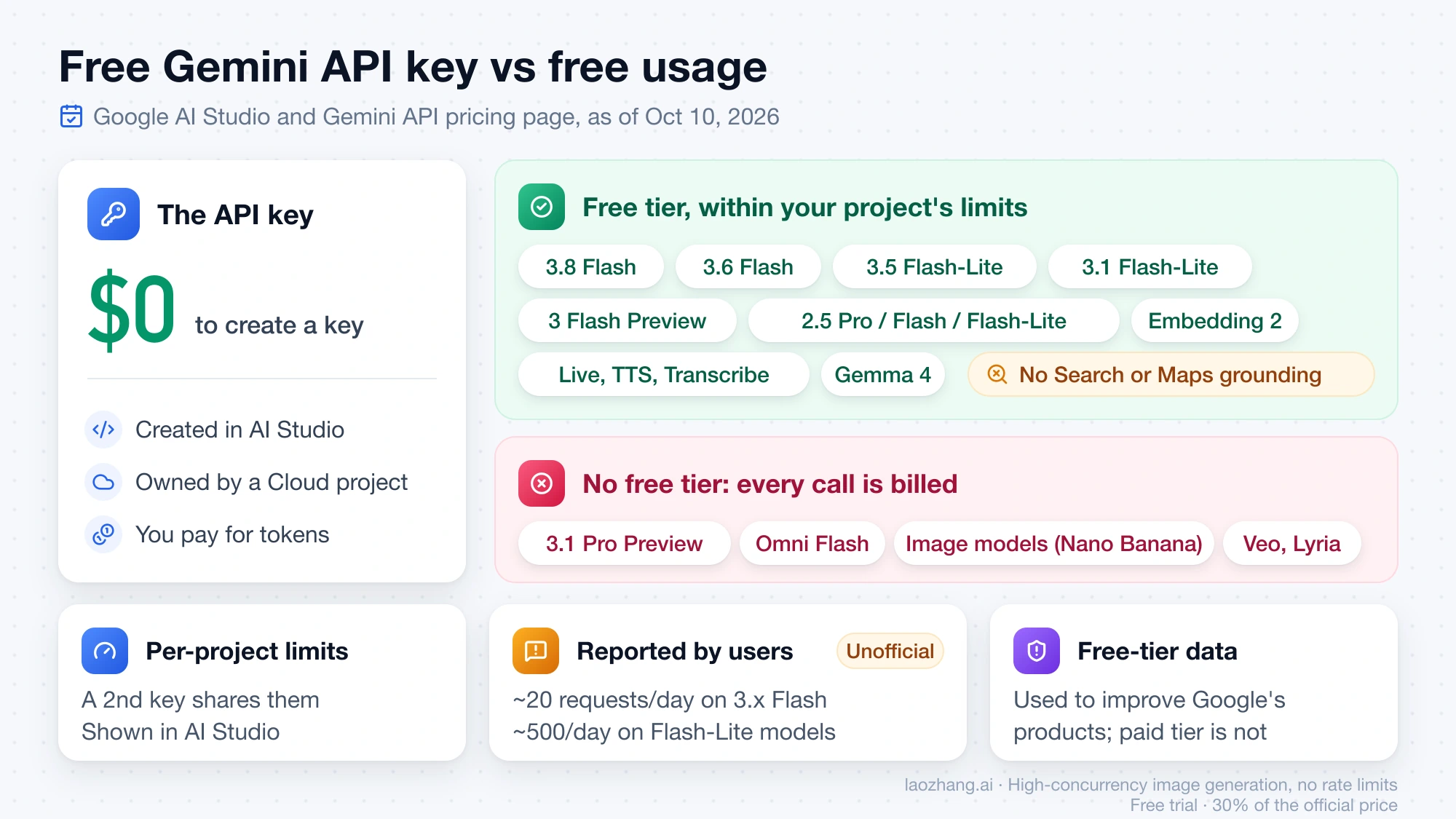
| Does creating a key cost money? | No. Keys are created in Google AI Studio and belong to a Google Cloud project. |
| Which models have a free tier? | Gemini 3.8 Flash, 3.6 Flash, 3.5 Flash-Lite, 3.1 Flash-Lite, 3 Flash Preview, the 2.5 Pro/Flash/Flash-Lite models, Live, TTS and Transcribe models, Embedding 2 and Gemma 4. |
| Which models have no free tier? | Gemini 3.1 Pro Preview, Omni Flash, all image models (the Nano Banana family), Veo and Lyria. |
| How many free requests do I get? | Google publishes no fixed table. Limits apply per project and show on the AI Studio rate-limit page. |
| What do users report? | A Google AI Developers Forum thread calls the Gemini 3.8 Flash free tier "20 RPD"; September 2026 third-party guides report about 20 requests per day for 3.x Flash models and about 500 for Flash-Lite models. These are reports, not Google figures. |
| Is my free-tier data private? | No. Free-tier content is used to improve Google's products; paid-tier content is not. |
| Can free-tier calls use Google Search grounding? | No. Grounding with Search and Maps is not available on the free tier. |
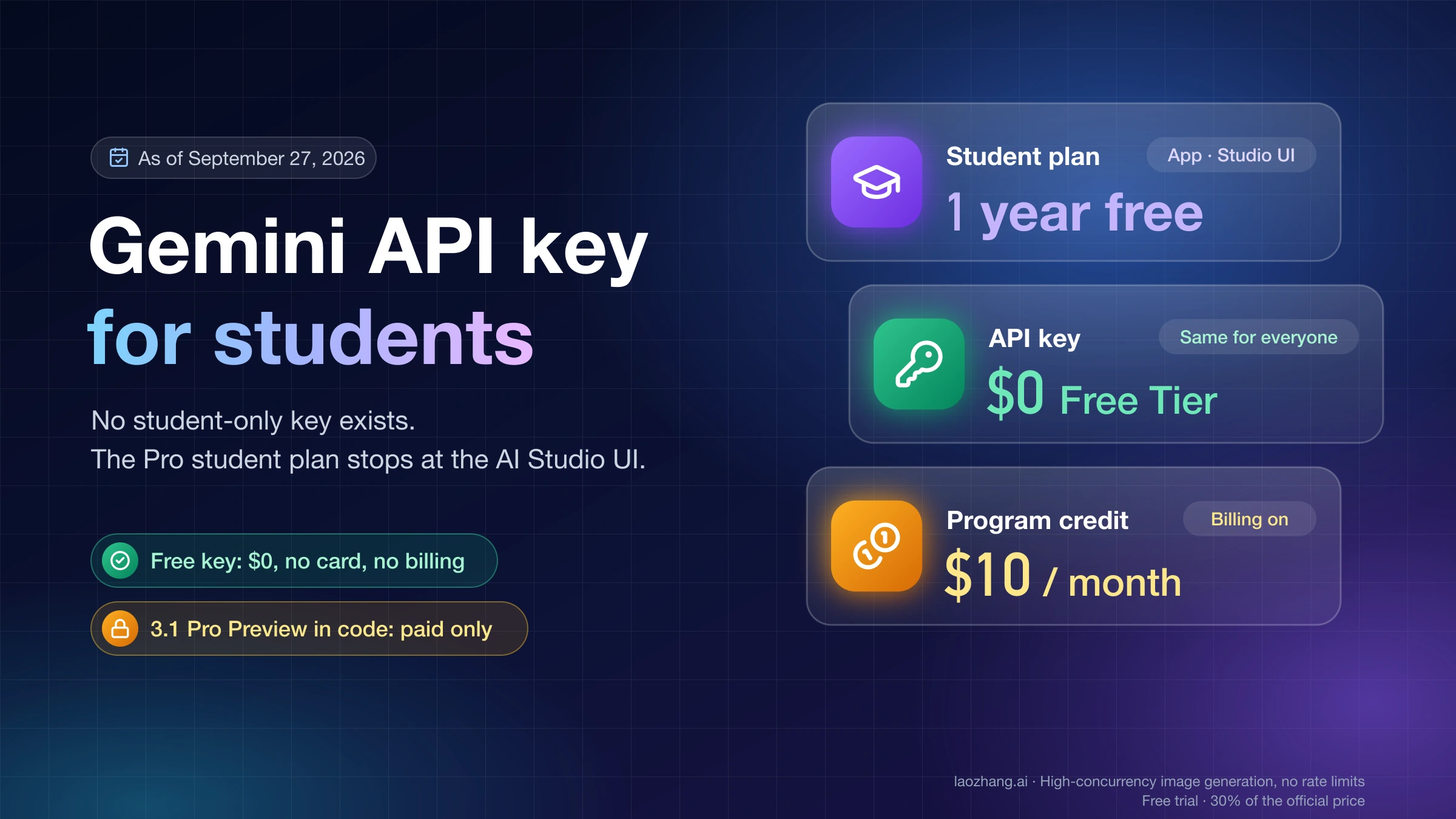
A second key in the same project does not add a second free allowance, because rate limits apply per project, not per key. The Gemini API Free Tier 2026: Limits, Free Models, and Free API Keys guide covers the limits in more depth, and the Free Gemini API Key for Students: What Is Free and What Isn't guide covers the student case.
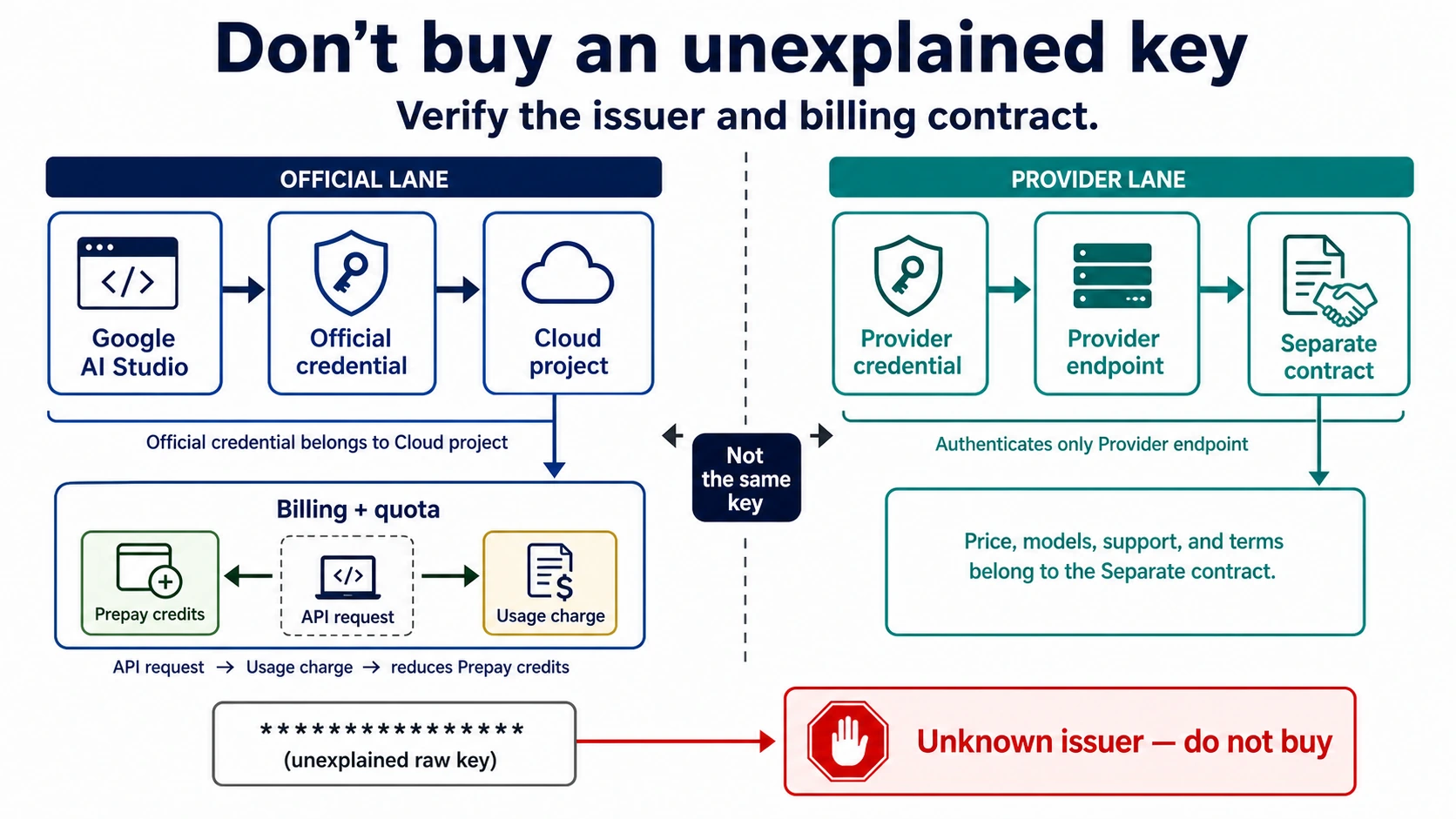
Offers labeled "free, unlimited Gemini API" are not Google's free tier. Puter's version is a user-pays model: your app's users cover the cost through their own Puter accounts. Open-source proxies that reuse a personal OAuth login run on someone else's quota and terms. A "key" sold on a marketplace is someone else's project and billing account. None of these turns Google's per-project limits into unlimited free usage.
Gemini API prices per 1M tokens: 2026 rates and the January 1, 2027 change
Gemini API prices are per 1 million tokens, and output tokens include the model's thinking tokens. The table shows Standard paid rates from Google's pricing page as of October 10, 2026. For a single figure: one million tokens on Gemini 3.8 Flash costs $0.75 as input or $3.75 as output this year, and $1.50 or $7.50 from January 1, 2027.
| Model | Input / output per 1M tokens, through Dec 31, 2026 | From Jan 1, 2027 | Free tier |
|---|---|---|---|
| Gemini 3.8 Flash | $0.75 / $3.75 (cache $0.075) | $1.50 / $7.50 (cache $0.15) | Yes |
| Gemini 3.6 Flash | $0.75 / $3.75 (cache $0.075) | $1.50 / $7.50 (cache $0.15) | Yes |
| Gemini 3.5 Flash-Lite | $0.30 / $2.50 | No change listed | Yes |
| Gemini 3.1 Flash-Lite | $0.25 text, image, video ($0.50 audio) / $1.50 | No change listed | Yes |
| Gemini 3 Flash Preview | $0.50 / $3.00 | No change listed | Yes |
| Gemini 3.1 Pro Preview | $2.00 / $12.00 up to 200k; $4.00 / $18.00 above | No change listed | No |
| Gemini 2.5 Pro | $1.25 / $10.00 up to 200k | No change listed | Yes |
| Gemini 2.5 Flash | $0.30 / $2.50 | No change listed | Yes |
| Gemini 2.5 Flash-Lite | $0.10 / $0.40 | No change listed | Yes |
A few labels change what you actually pay:
- Batch and Flex halve the 3.8 Flash and 3.6 Flash rates: $0.375/$1.875 now, $0.75/$3.75 from January 1, 2027.
- Cache storage for 3.8 Flash and 3.6 Flash is $0.50 per hour now and $1.00 per hour from January 1, 2027.
- Google Search grounding on Gemini 3 and later models includes 5,000 free requests per month as a shared allowance, then costs $14 per 1,000 requests.
- Gemini 2.5 models have been limited to previous users since September 18, 2026, so a new project may not be able to choose them.
- Image models are priced per image, not in this table, and none is on the free tier. The Nano Banana API cost guide covers them.
Older model names still appear in code and guides. According to Google's Gemini API changelog, gemini-3.7-flash and gemini-3.5-flash were deprecated on October 8, 2026, and requests to them are now routed to gemini-3.8-flash and gemini-3.6-flash. The old Gemini 3.5 Flash rate of $1.50/$9.00 is history. If your code still names 3.5 Flash, check which model your usage page bills. Gemini 3.8 Flash has been generally available since September 2, 2026; 3.6 Flash and 3.5 Flash-Lite since July 21, 2026. Text-to-speech has its own rows, covered in Gemini 3.8 Flash TTS API: Model Choice, Cost, and Migration.
Price the workload before you turn on Paid
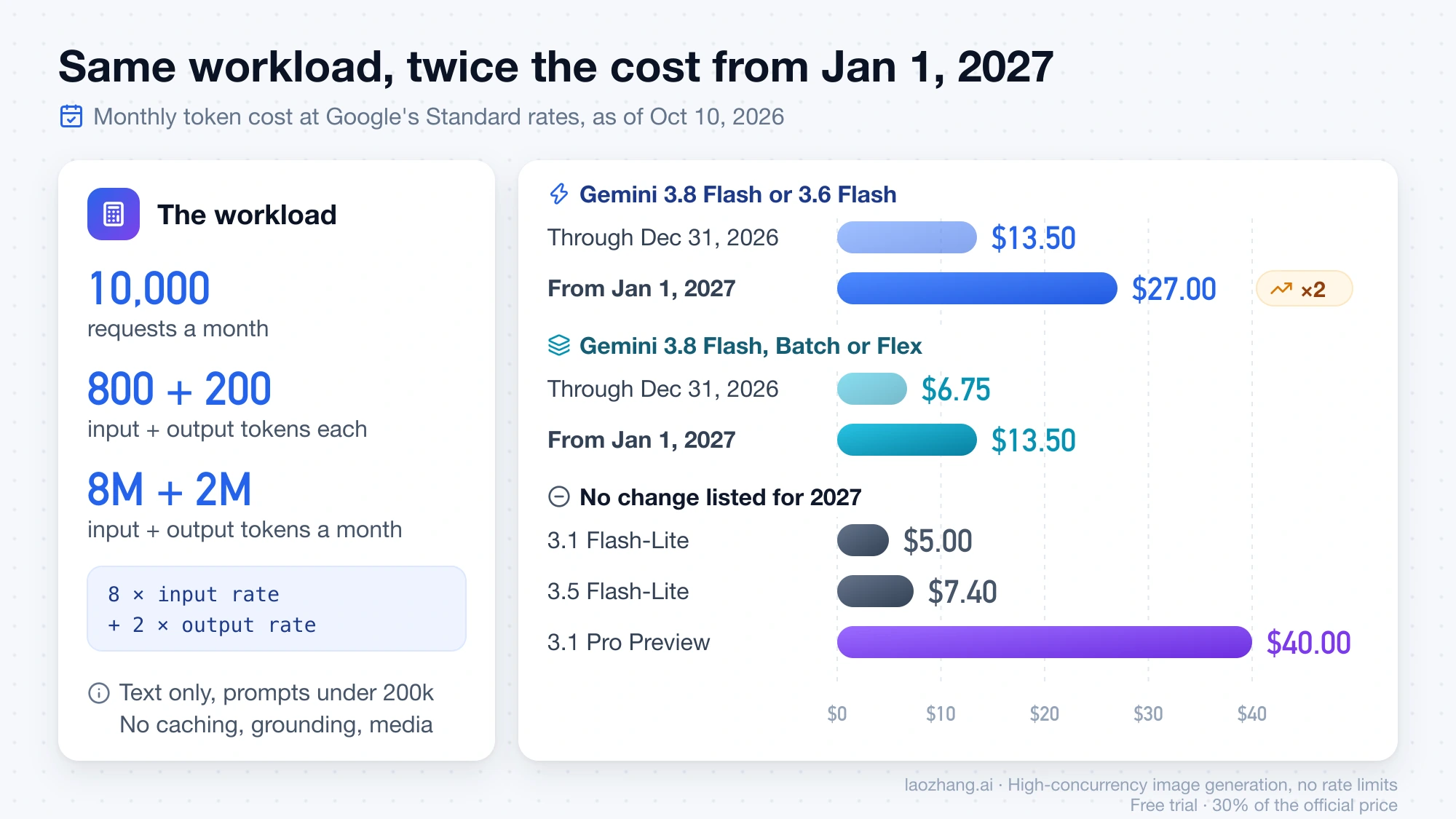
A useful estimate is a request shape multiplied by traffic, not "one million tokens." Take a small SaaS feature with 10,000 requests a month, averaging 800 input tokens and 200 output tokens per request. That is 8 million input tokens and 2 million output tokens. Assume Standard text pricing, prompts under 200k, and no caching, grounding, media or tools.
monthly token cost = 8 × input rate + 2 × output rate
| Model and period | Calculation | Monthly cost |
|---|---|---|
| Gemini 3.1 Flash-Lite | 8 × $0.25 + 2 × $1.50 | $5.00 |
| Gemini 3.5 Flash-Lite | 8 × $0.30 + 2 × $2.50 | $7.40 |
| Gemini 3.8 Flash or 3.6 Flash, through Dec 31, 2026 | 8 × $0.75 + 2 × $3.75 | $13.50 |
| Gemini 3.8 Flash or 3.6 Flash, from Jan 1, 2027 | 8 × $1.50 + 2 × $7.50 | $27.00 |
| Gemini 3.8 Flash, Batch or Flex, through Dec 31, 2026 | 8 × $0.375 + 2 × $1.875 | $6.75 |
| Gemini 3.8 Flash, Batch or Flex, from Jan 1, 2027 | 8 × $0.75 + 2 × $3.75 | $13.50 |
| Gemini 3.1 Pro Preview, prompts up to 200k | 8 × $2.00 + 2 × $12.00 | $40.00 |
The same workload on 3.8 Flash costs exactly twice as much on January 1, 2027, so a budget written now should use the 2027 column for anything that runs past December.
Two inputs move the result more than the model choice. First, output includes thinking tokens: if thinking doubles the output to 4 million tokens, 3.8 Flash in 2026 costs 8 × $0.75 + 4 × $3.75 = $21.00. Read the token counts in the response usage metadata rather than guessing. Second, grounding is billed per request: if all 10,000 requests use Google Search and the 5,000 free requests are still unused, the other 5,000 cost 5 × $14 = $70, more than the tokens themselves.
The calculation leaves out taxes, retries, cache storage, audio, images, video and Priority. Treat it as a planning case you can rerun with your own numbers, not as a bill.
The official US setup: six checks in order
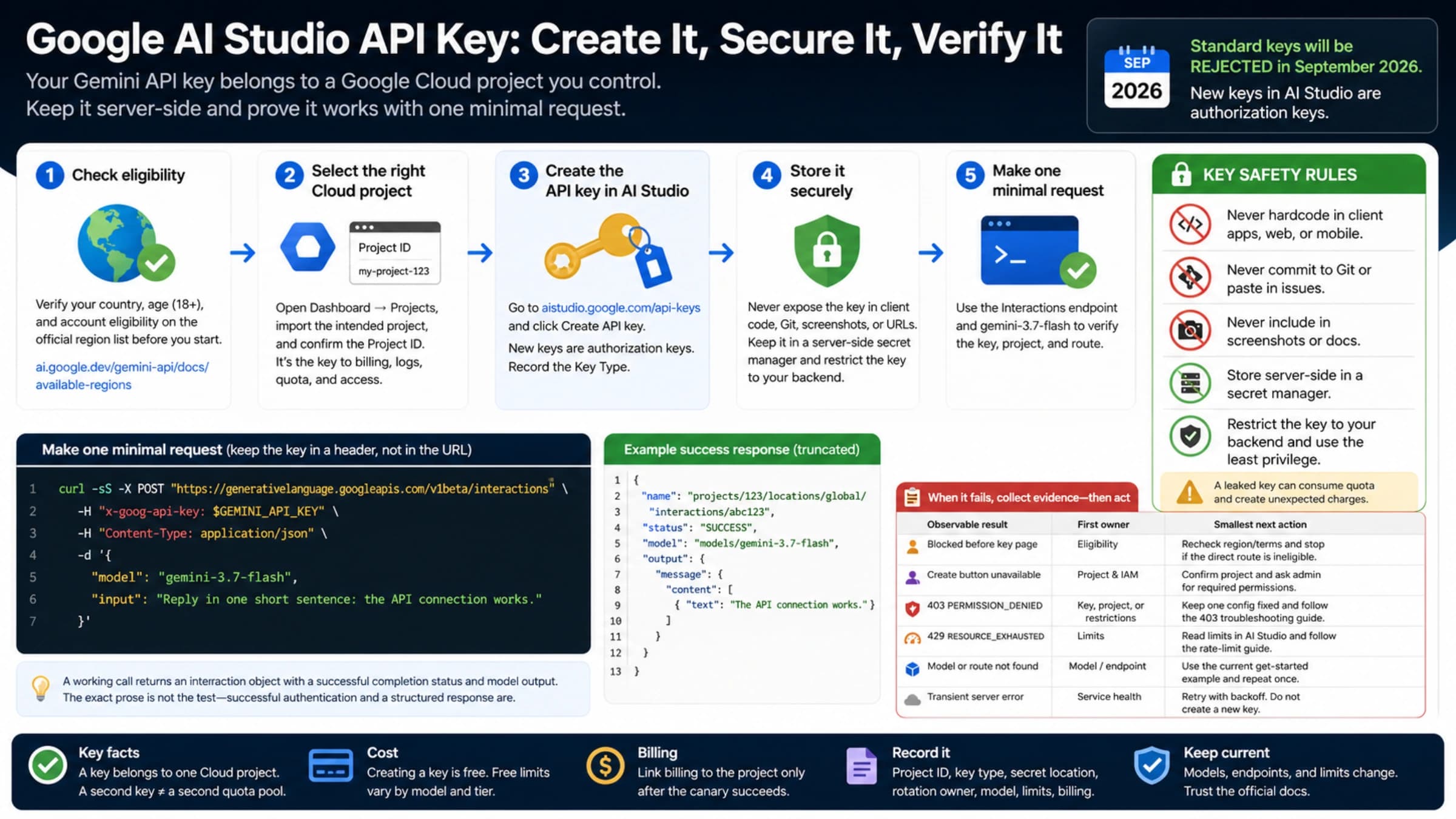
- Open AI Studio and choose the project. Create or import a Google Cloud project owned by your organization, not by a contractor or marketplace seller. Confirm your country is on Google's Gemini API available regions list; the United States is on it.
- Create the current key type. Since May 28, 2026, new AI Studio keys are auth keys, bound to a service account and restricted to the Gemini API, according to Google's Gemini API key documentation. Record the project ID, not the secret.
- Keep the first call server-side. Store the key in a secret manager or a server-only environment variable. Send a short request with a fixed model name and a low output limit.
- Decide whether the free tier is enough. Open the rate-limit page in AI Studio for that project and compare the limits with your expected daily traffic.
- Link billing only to the intended project. If you need Paid, check the billing account, plan, tier and balance in the Billing page.
- Reconcile before scaling. Match one request's time, model, input and output tokens against the charge in the same project. Then confirm you know how to restrict, rotate or delete the key.
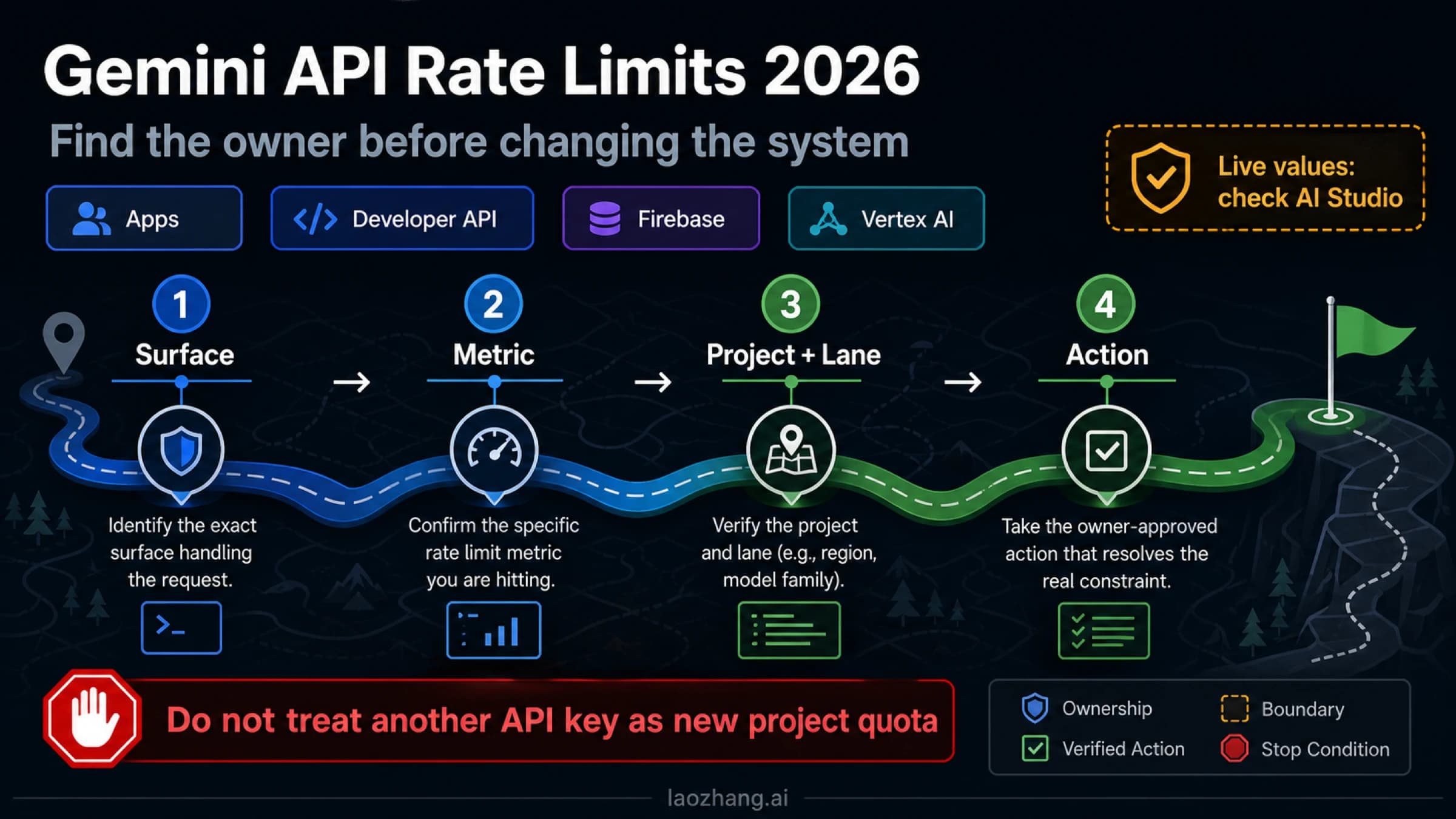
The key authenticates, the project owns usage and rate limits, and the billing account owns payment and the usage tier. Keeping those three apart prevents the most expensive mistake: creating the key in one project while funding or monitoring another. The Google AI Studio API Key: Is It Free? Create, Secure, Verify guide walks through creating the key.
What the first $5 does—and does not buy
The first payment buys API credits, not the key and not a subscription. Google's Gemini API billing documentation says new users default to the Prepay plan, with a minimum purchase of $5 and a maximum prepaid balance of $5,000. Older guides and some translated pages still say $10; the current English page says $5.
How Prepay credits behave:
- Usage is deducted from the balance in near real time.
- Credits expire after 12 months and are not refundable.
- At a $0 balance, every API key in every project linked to that billing account stops working, and requests return
402 Payment Requireduntil you add credits. The project does not fall back to the free tier. - If usage overshoots the balance, service pauses and the negative balance is deducted from your next purchase.
- The $300 Google Cloud Free Trial has not covered Gemini API usage since March 2026, and Google Cloud welcome credits cannot pay for AI Studio usage.
Existing Postpay accounts are being moved to Prepay for Gemini API usage. Google's billing page says to switch and add credits before the cutover date in your account notice; Impress Watch reported that date as October 12, 2026, so check your own notice. Accounts that use only free-tier features need no action. Switching from Prepay back to Postpay is not supported.
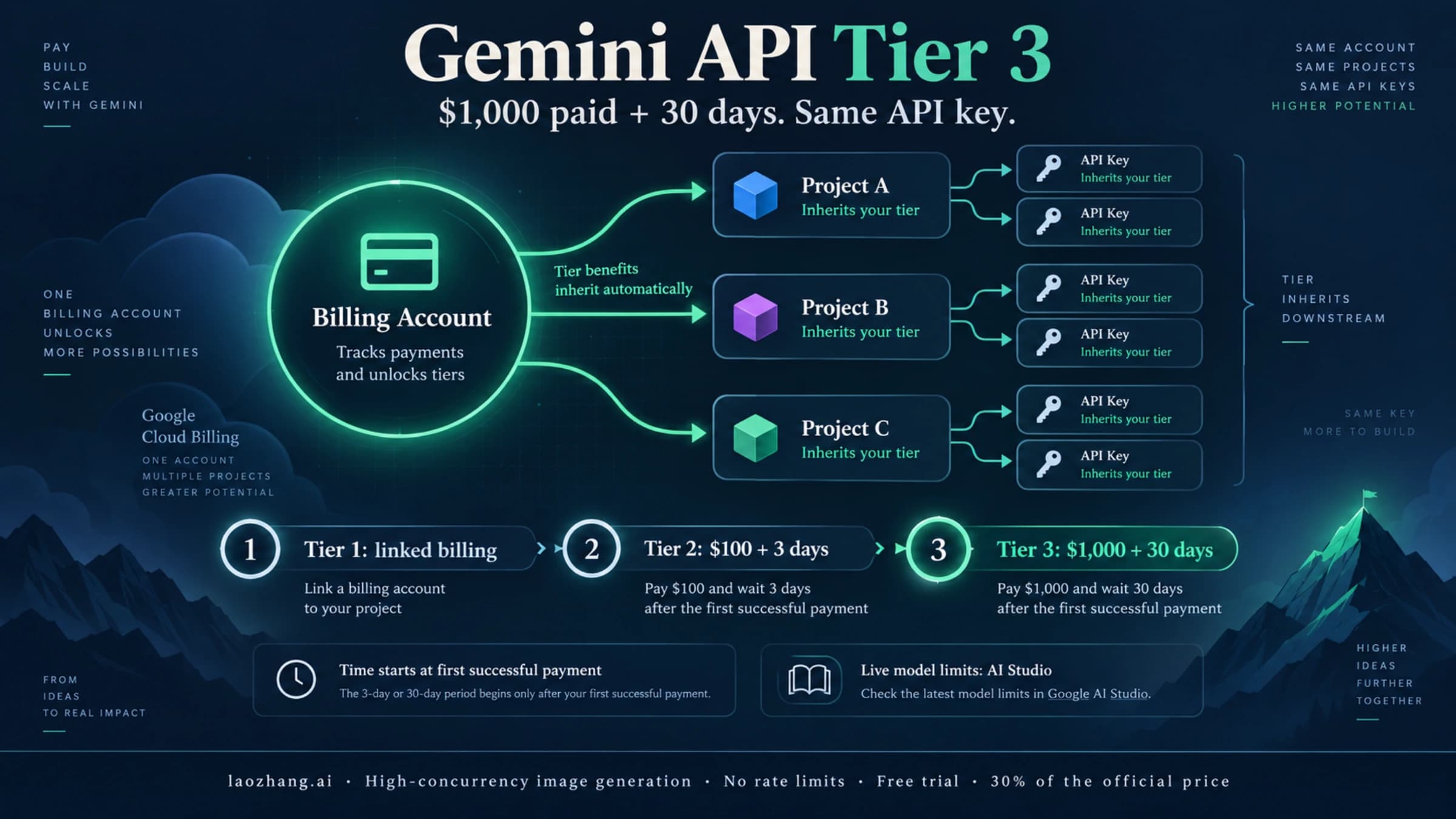
Usage tiers set your monthly spending cap, not a better price. Tier 1 starts when you link an active billing account and has a $250 monthly cap. Tier 2 needs $100 paid plus 3 days from the first successful payment and has a $2,000 cap. Tier 3 needs $1,000 paid plus 30 days and has a cap of $20,000 to $100,000 or more. Upgrades happen automatically and usually show within 10 minutes. Plan switching, caps and "no credits" errors are covered in Gemini API Billing Tiers: Prepay vs Postpay, Upgrade Rules, and No Credits Fixes. For limits, see the Gemini API rate limits guide and the Gemini API Tier 3 upgrade guide.
Stay Free, enable Paid, or move to a governed Cloud route?
| Decision signal | Next step | What to confirm before production |
|---|---|---|
| Prototype traffic fits your project's free limits and the data can be used to improve Google products | Stay on the free tier and measure real tokens | Project ID, model, the limits AI Studio shows, a usage record |
| You need a model with no free tier (such as 3.1 Pro Preview), higher limits, Search grounding, or paid data terms | Link a Prepay billing account to the intended project | Plan, tier, balance, the first reconciled charge, how to stop traffic |
| Your organization needs IAM, regional controls, procurement or audit | Evaluate Vertex AI or an enterprise agreement | Product, authentication method, region, quota, pricing, data and support terms |
The trade-offs between the two Google surfaces are in Gemini API vs Vertex AI API: Which Google Gemini Route Should You Use?.
A consumer Gemini plan is a separate purchase. Google AI Pro and Ultra are app subscriptions and do not add Gemini API credits to a project. The Google Developer Program is another separate program with its own terms; read its plans page before counting on any credit.
Mainland China, Hong Kong and Russia are not on the Gemini API available regions list. Do not falsify your location, identity or billing details to get a key.
An independent provider is a different purchase
A third-party API provider can make sense when one OpenAI-compatible client, one multi-model account, or separate invoicing solves a real operational problem. It should issue its own key for its own endpoint. Model mapping, balance, quota, logs, data use, invoices, refunds and support then follow that provider's terms, not Google's.
For example, LaoZhang AI's getting-started documentation lists the OpenAI-compatible base URL https://api.laozhang.ai/v1, with its own key and balance. As of October 10, 2026, its pricing lists gemini-3.8-flash at $0.75/$3.75, gemini-3.6-flash at $1.50/$7.50 and gemini-3.1-pro-preview at $2.00/$12.00 per 1M input/output tokens. The 3.8 Flash and 3.1 Pro Preview prices equal Google's current rates; the 3.6 Flash price is above Google's 2026 rate. Its key is not a Google Gemini API key, and it does not change which regions Google serves.
Disclosure: laozhang.ai is our own service. Its prices are platform pricing, not an independent comparison.
Before putting more than test money into any provider, get written answers to these:
- Who issues, restricts, rotates and revokes the key?
- Which base URL and protocol accept it, and can a model name be pointed at a different upstream?
- How are errors, timeouts, interrupted streams and retries billed?
- What are the live model list, concurrency limits, log retention, data use and deletion controls?
- Who handles invoices, refunds, incidents and your migration out?
If any answer is missing, stop. A marketplace seller handing over a raw Google key is not a provider, even if the key works today.
Failure modes that another key will not fix
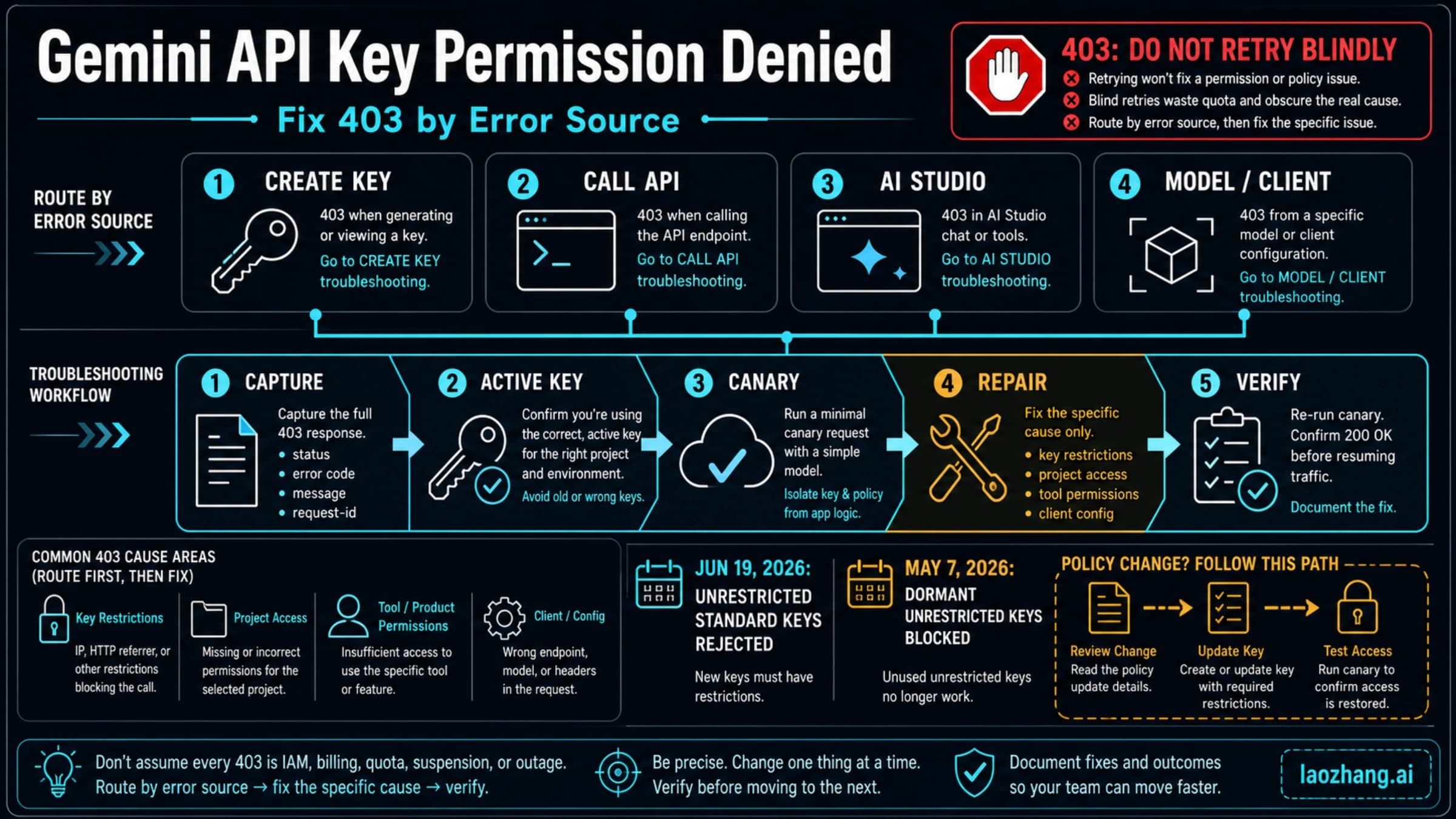
- 401/403: check the key type, its restriction, the project and permissions. Google rejects requests from unrestricted standard keys, and dormant unrestricted keys have been blocked since May 7, 2026, with a "Blocked" tag in AI Studio. The Gemini API Key Permission Denied: Fix 403 by Error Source (2026) guide sorts these out; buying credits does not fix permissions.
- 402 Payment Required: the Prepay balance is $0. Add credits only if you intend to keep running.
- 429 on the free tier: you hit the project's request limit. Another key in the same project shares the same limit.
- 429
RESOURCE_EXHAUSTEDon Paid: besides rate limits, a rolling 10-minute spend limit applies: $10 on Tier 1, $50 on Tier 2, $200 on Tier 3. Hitting the monthly tier cap pauses every project on that billing account until the next billing cycle. - Unexpected charge: stop retries, keep request IDs and usage metadata, and match the model, project and billing account before resuming. Check whether thinking tokens or grounding requests account for the difference.
- Possible leak: revoke or rotate the key in the project that issued it, review usage and billing, then remove the secret from code, logs, screenshots and client bundles.
Data terms are part of the cost decision
On the free tier, Google uses your content to improve its products. On the paid tier, it does not. That difference is often the real reason to pay: customer records, private code and confidential documents belong on a billed project even when the free limits would cover the traffic. The full conditions are in the Gemini API Additional Terms. This is not legal advice, so read the terms that apply to your organization and data.
A Gemini API setup is fully priced when you can name the key, the project, the billing account, the model, its rate through and after December 31, 2026, and how you would stop traffic. For a US developer going direct to Google, that starts with a free key and ends with one reconciled charge, not with buying a key.
Gemini API key and pricing questions
How much is 1 million tokens in Gemini?
It depends on the model and on whether the tokens are input or output. On Gemini 3.8 Flash, 1 million input tokens cost $0.75 and 1 million output tokens cost $3.75 through December 31, 2026. From January 1, 2027, those become $1.50 and $7.50. On Gemini 3.1 Pro Preview, the rates are $2.00 and $12.00 for prompts up to 200k tokens.
Is the Gemini Pro API key free?
The key is free, but Gemini 3.1 Pro Preview has no free tier, so every call costs $2.00/$12.00 per 1M tokens or more. Gemini 2.5 Pro is still listed on the free tier, but Gemini 2.5 models have been limited to previous users since September 18, 2026.
Is the Gemini Live API free?
Google's pricing page lists the Live, TTS and Transcribe models among the free-tier models as of October 10, 2026, within your project's limits. Check the limits on your AI Studio rate-limit page. A Google AI Developers Forum report on 3.8 Flash TTS describes a dashboard showing 10K requests per day while calls failed with 429 at about 100 a day.
Is there a free Gemini API key for students?
Students create the key the same way as anyone else and use the same per-project free tier on eligible models. Student status does not remove the limits or add Pro models to the free tier.
Does Google AI Pro include Gemini API access?
No. Google AI Pro and Ultra are subscriptions for the Gemini app. API usage is billed separately through the Google Cloud project behind your key.
Sources7
External pages this guide links to, in the order they appear. Last updated Oct 10, 2026.
Sources7
External pages this guide links to, in the order they appear. Last updated Oct 10, 2026.
- 1.Gemini API pricing pageai.google.dev/gemini-api/docs/pricing
- 2.Google AI Studioaistudio.google.com/app/api-keys
- 3.Gemini API changelogai.google.dev/gemini-api/docs/changelog
- 4.Gemini API available regions listai.google.dev/gemini-api/docs/available-regions
- 5.Gemini API key documentationai.google.dev/gemini-api/docs/api-key
- 6.Gemini API billing documentationai.google.dev/gemini-api/docs/billing
- 7.Gemini API Additional Termsai.google.dev/gemini-api/terms