Gemini 3.5 Transcribe API: Recorded Audio, Live Captions, and a Safe First Build
Use Files and Interactions for recordings, or the Live API for raw PCM captions. Vocabulary biasing and recorded speaker or word annotations require separate configurations.
On this page
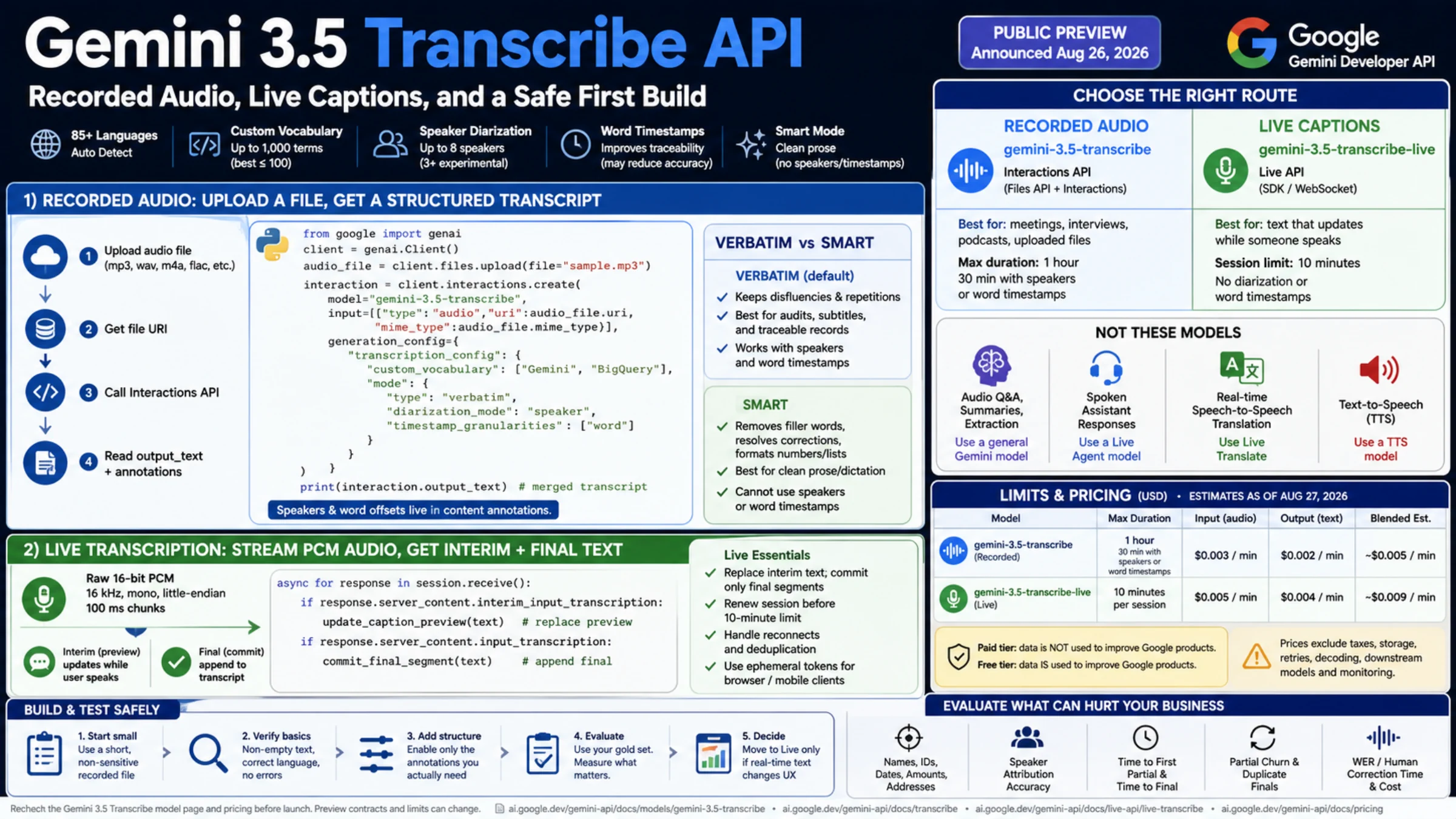
Use gemini-3.5-transcribe with the Files API and Interactions API for a recording such as an MP3. Use gemini-3.5-transcribe-live with the Live API when captions must update as speech arrives. The recorded route can return speaker labels and word offsets; the live route returns interim and finalized text without those annotations. These are the dedicated model IDs in the current model documentation.
The first implementation decision is what your application must retain. A readable transcript, a transcript linked to playback, and a changing caption preview need different configurations and storage. In particular, recorded custom vocabulary cannot be combined with speaker diarization or word timestamps. The examples below keep those requests separate.
The API examples follow the current documentation. We checked Python syntax and the application helpers offline, including synthetic PCM and transcription events; we did not execute SDK clients, upload audio, call the models, or measure recognition quality. A service response and a reviewed audio sample remain necessary before production.
Start with the output, then choose the route
| Product requirement | Recorded transcription | Live captions |
|---|---|---|
| Model ID | gemini-3.5-transcribe | gemini-3.5-transcribe-live |
| Input path | Upload a file, then pass its URI to Interactions | Send raw audio over a persistent Live connection |
| Maximum duration | 1 hour; 30 minutes with diarization or word timestamps | 10-minute session |
| Speaker labels and word offsets | Available in a compatible verbatim configuration | Not available |
| Application text state | Save the response and extract the required annotations | Replace the interim preview; append finalized segments |
These limits come from the dedicated model page. Split longer recordings before submitting them, retaining each chunk's original start time if playback needs a common timeline. A ten-minute Live limit requires an application plan for the next session; a longer-lived credential does not extend it.
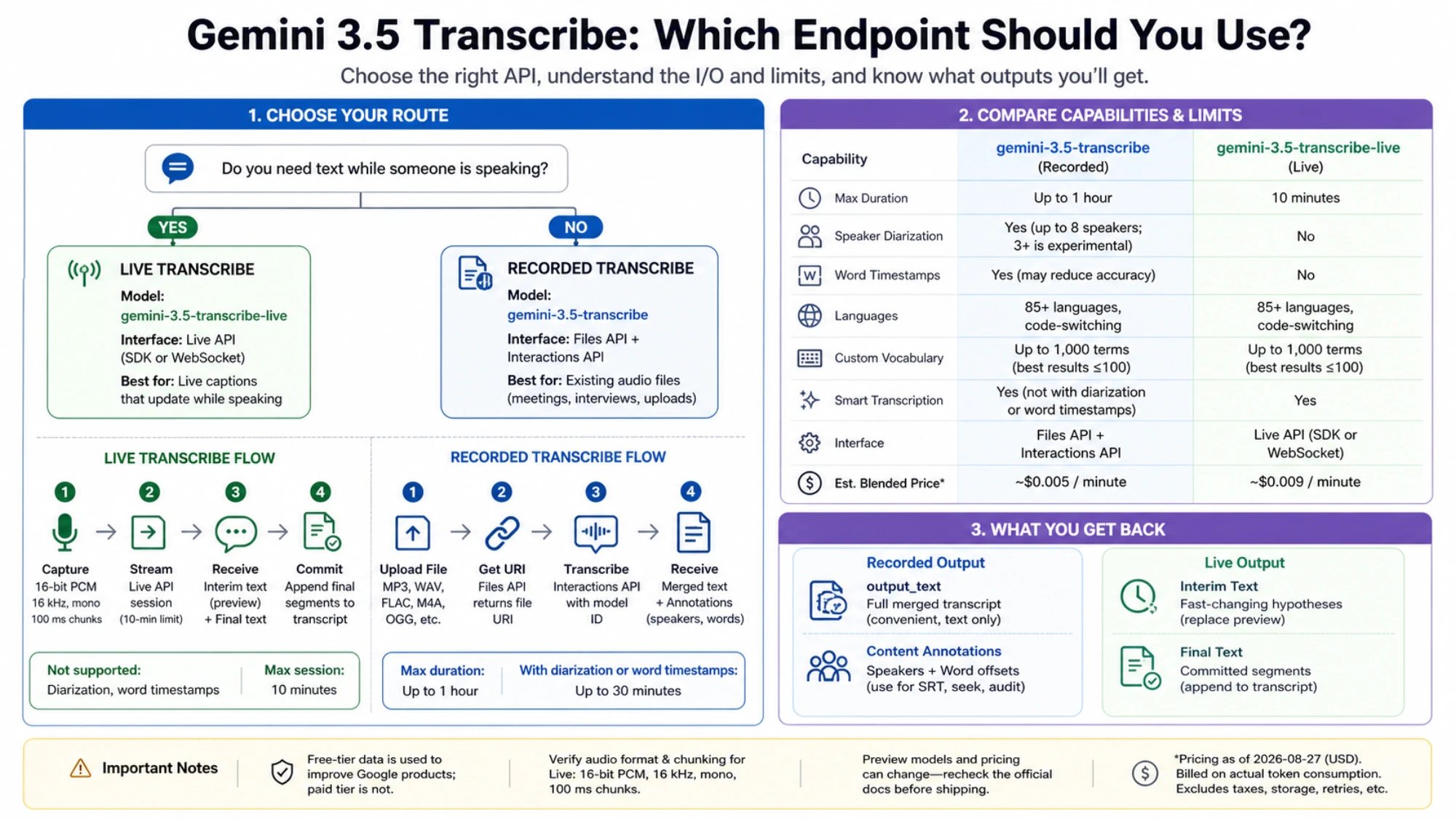
Choose recorded transcription first for interviews, podcasts, meeting archives, or uploaded voice notes. Live is useful when seeing words immediately matters, such as captions during a call. A finished meeting summary still needs a separate processing step. These dedicated STT models do not provide native function calling, answer arbitrary audio questions, or speak back as a Live Agent would.
Google's release labels are inconsistent as checked on October 6: the August 26 changelog calls both models generally available, while the launch announcement still describes public preview. Use the documented identifiers and verify access in your project; neither label establishes availability for every account.
Verify one recorded file before adding features
The recorded transcription guide uses an audio item directly in input, with the uploaded file's URI and MIME type. This is an Interactions request, not a normal generateContent prompt.
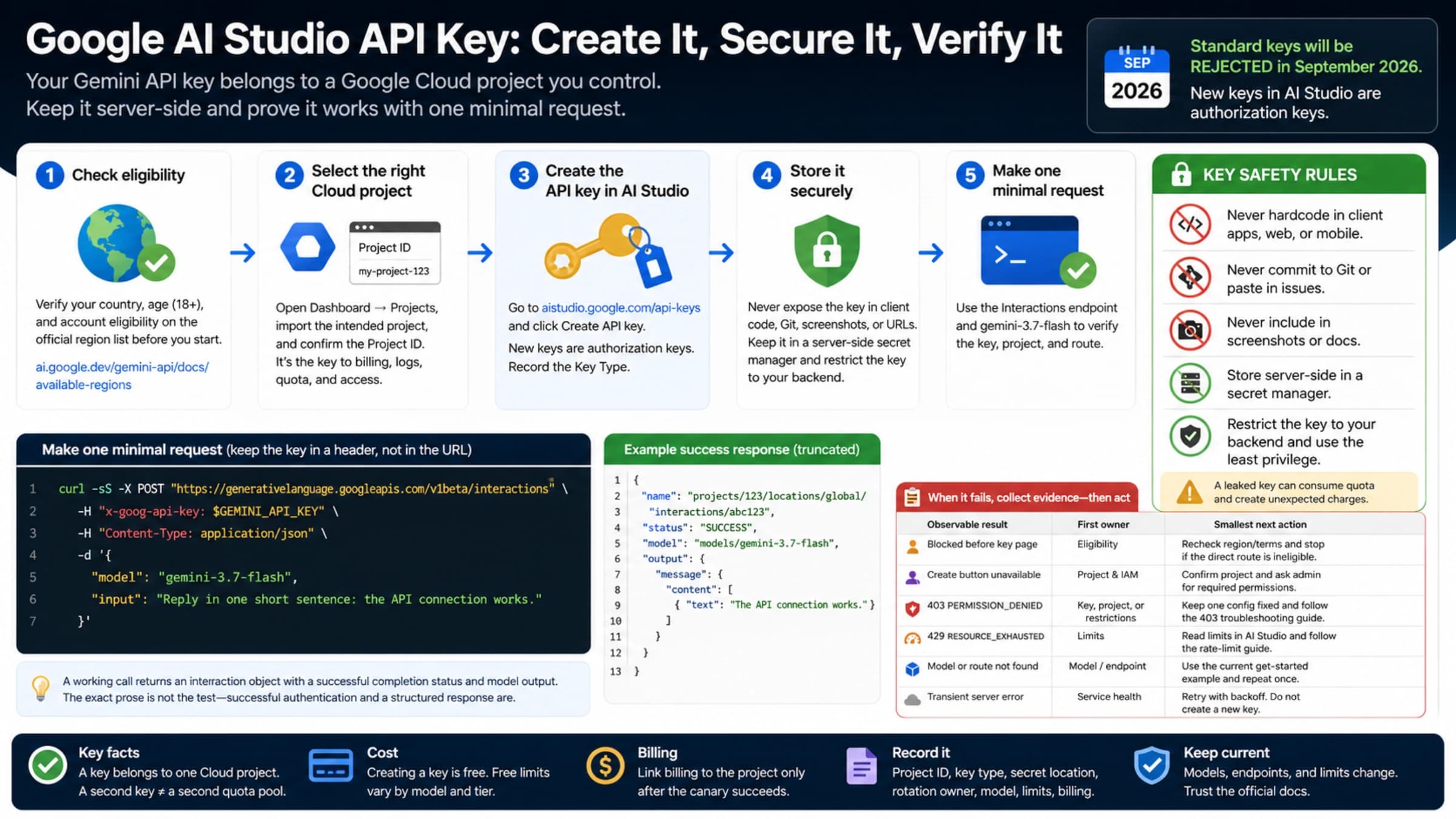
For the reader-facing examples, use Python with the Google Gen AI SDK installed and an API key already configured on a trusted machine. Google's key guide explains creating and configuring a key in AI Studio. This complete recorded example takes a local MP3 filename, prints the merged text, and saves the full response:
import json
import sys
from pathlib import Path
from google import genai

client = genai.Client()
uploaded = client.files.upload(file=sys.argv[1])
interaction = client.interactions.create(
    model="gemini-3.5-transcribe",
    input=[{
        "type": "audio",
        "uri": uploaded.uri,
        "mime_type": uploaded.mime_type,
    }],
)
payload = interaction.model_dump(mode="json", exclude_none=True)
Path("recorded-response.json").write_text(
    json.dumps(payload, ensure_ascii=False, indent=2), encoding="utf-8"
)
print(interaction.output_text)
Save it as recorded.py; its invocation is python recorded.py sample.mp3. Upload only audio you are entitled to process under the account's applicable data terms. Other supported recorded formats include WAV, FLAC, OGG, and WebM; take the MIME type from the actual upload rather than guessing from a renamed extension.
For REST clients, the corresponding method is POST https://generativelanguage.googleapis.com/v1beta/interactions, authenticated with the x-goog-api-key header. After uploading through Files, send the same model and flat audio input fields shown above. The returned file URI is the input reference, not a public download link.
A useful first success check is a completed interaction, nonempty output_text, and words that correspond to the supplied recording. Retain the raw response, model, input duration, MIME type, request status, and available usage information. Nonempty text alone does not establish accuracy or prove that speakers and timestamps were produced.
Clean prose and traceable transcripts require different modes
Recorded transcription defaults to verbatim. Use that mode when false starts, repeated words, and self-corrections matter. For cleaned dictation, recorded smart mode is the string "smart"; its configuration is {"mode": "smart"}. It is not {"mode": {"type": "smart"}}, and it cannot provide speaker diarization or word timestamps. The configuration belongs under generation_config.transcription_config in the recorded guide.
Choose vocabulary biasing or structured annotations
For names and technical terms, use a vocabulary configuration without the annotation options:
vocabulary_config = {
    "language_codes": ["en-US"],
    "custom_vocabulary": ["BigQuery", "Kubernetes", "Acme Q7"],
}
For playback, subtitles, or speaker attribution, use a verbatim object, with no custom vocabulary:
annotated_config = {
    "mode": {
        "type": "verbatim",
        "diarization_mode": "speaker",
        "timestamp_granularities": ["word"],
    },
}
Both dictionaries are alternatives for this replacement call in recorded.py, after uploaded has been created:
chosen_config = annotated_config  # Or vocabulary_config; never merge them.
interaction = client.interactions.create(
    model="gemini-3.5-transcribe",
    input=[{
        "type": "audio",
        "uri": uploaded.uri,
        "mime_type": uploaded.mime_type,
    }],
    generation_config={"transcription_config": chosen_config},
)
If language is unknown or the recording switches languages, omit language_codes or use an empty list for automatic detection. Vocabulary lists allow up to 1,000 entries, with Google recommending up to 100 for typical best results. That is a recognition hint, not a guarantee that every listed name will be correct. Diarization is documented for up to eight speakers, but attribution with three or more is experimental; word timestamps can reduce transcription accuracy. Those qualifications and the vocabulary incompatibility are on the model page.
When you need annotations and polished prose, preserve the annotated verbatim response first, then create a separate cleaned view downstream. Do not overwrite the words associated with offsets and imply they still align exactly to the audio. Two separate model calls also produce separate results; vocabulary-biased text cannot simply inherit another call's timing.
Preserve WordInfo before generating subtitles
output_text is convenient for display, but the documented structured path is steps[].content[].annotations[]. Filter annotations with type == "word_info"; their fields include text, speaker, start_offset, and end_offset. Offsets are duration strings such as "0.100s", not already numeric seconds. Saving the complete response protects information your first renderer may not use. See the structured output examples.
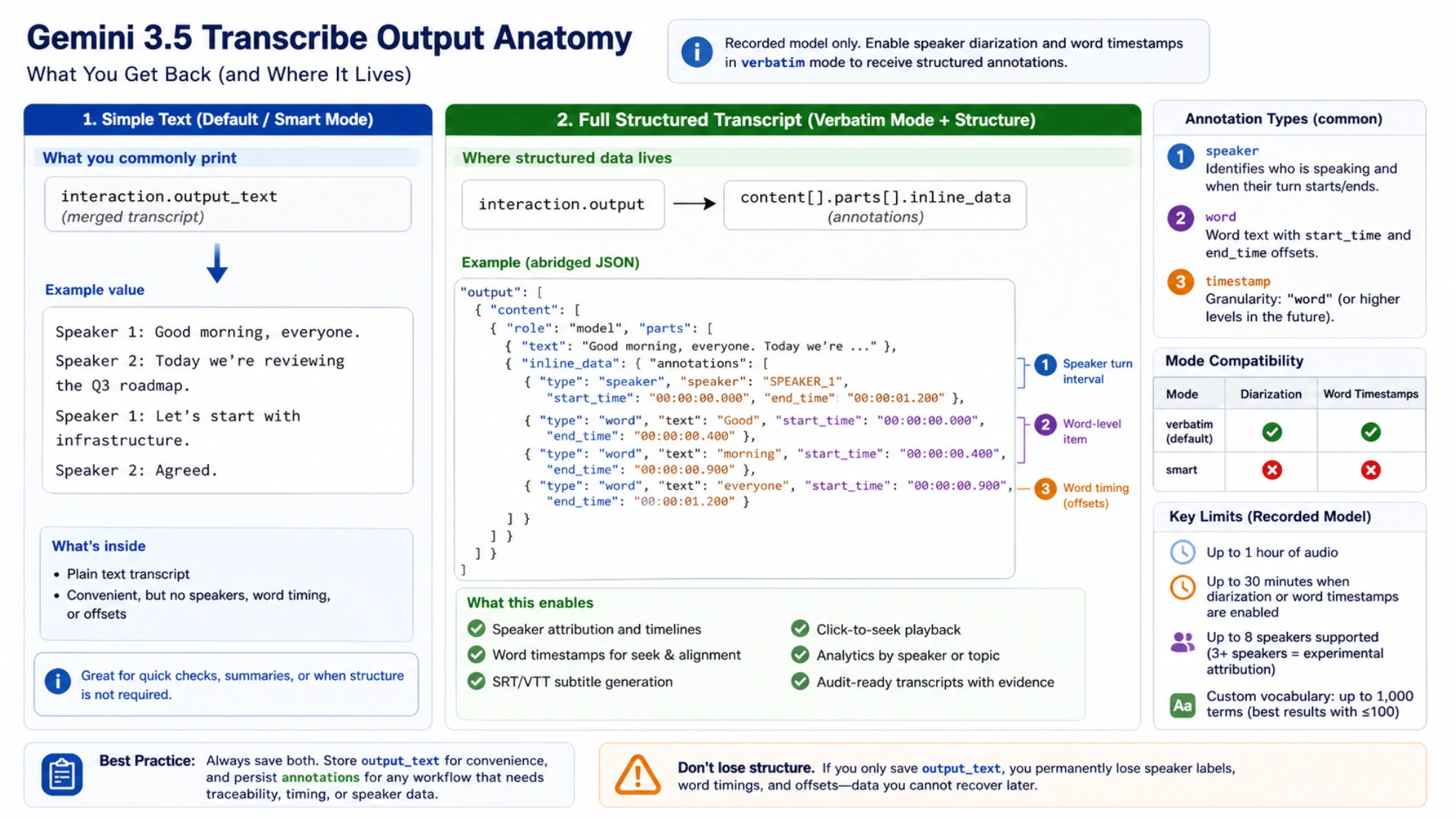
This standalone parser reads the JSON saved by the recorded example. It preserves each original word annotation and adds numeric offsets for application use:
import json
import re
import sys
from decimal import Decimal
from pathlib import Path

def seconds(value):
    if value is None:
        return None
    if not isinstance(value, str) or not re.fullmatch(r"\d+(?:\.\d{1,9})?s", value):
        raise ValueError(f"Invalid nonnegative duration: {value!r}")
    return Decimal(value[:-1])

def extract_words(payload):
    words = []
    for step in payload.get("steps", []):
        for content in step.get("content", []):
            for annotation in content.get("annotations", []):
                if annotation.get("type") != "word_info":
                    continue
                start = seconds(annotation.get("start_offset"))
                end = seconds(annotation.get("end_offset"))
                if start is not None and end is not None and end < start:
                    raise ValueError("Word ends before it starts")
                words.append({
                    "annotation": dict(annotation),
                    "start_seconds": start,
                    "end_seconds": end,
                })
    return words

if __name__ == "__main__":
    payload = json.loads(Path(sys.argv[1]).read_text(encoding="utf-8"))
    print(json.dumps(extract_words(payload), ensure_ascii=False, default=str))
An offset of zero is valid. Missing offsets remain None, and missing speaker labels stay missing; the parser does not invent them. An empty word list means no matching annotations were found, so inspect the request and response before building subtitles. To create SRT or VTT, group the actual timed words into readable cues and convert their seconds into that format's time notation. Add the original chunk start only when the offsets belong to a split recording; account for overlapping speakers rather than forcing all words onto one sequential speaker track.
Live transcription is a media state machine
Live expects raw signed 16-bit PCM, 16 kHz, mono, little-endian. At this rate, 100 ms is 1,600 samples or 3,200 bytes. The Live transcription guide recommends 100 ms chunks and audio/pcm;rate=16000. An MP3, a WAV header, or WebM/Opus microphone output cannot become PCM by changing its MIME label: decode it and, when needed, resample and downmix before sending.
Keep two text states. Each interim_input_transcription replaces the current preview. Each input_transcription appends a finalized segment and clears that preview. Process both fields if an event contains both, and ignore events without server_content. Do not globally deduplicate equal final text: a speaker may legitimately say the same phrase twice.
The following SDK example streams a local, already compatible WAV at its natural pace. It removes the container by reading frames, implements caption storage, and bounds the connection, sends, and EOF drain. It uses default automatic VAD. The eight-second drain is an application deadline, not a documented service completion promise. The JSON output preserves received text and keeps complete=False: a deadline, an error, or the end of a receive iterator does not prove that the whole input was finalized.
import asyncio
import contextlib
import json
import sys
import wave
from dataclasses import asdict, dataclass, field
from pathlib import Path
from google import genai
from google.genai import types

@dataclass
class Captions:
    preview: str = ""
    finals: list[str] = field(default_factory=list)

    def apply(self, content):
        if content is None:
            return
        interim = getattr(content, "interim_input_transcription", None)
        final = getattr(content, "input_transcription", None)
        if interim is not None and interim.text is not None:
            self.preview = interim.text
        if final is not None and final.text is not None:
            self.finals.append(final.text)
            self.preview = ""

def validate_wav(audio):
    if (audio.getnchannels(), audio.getsampwidth(), audio.getframerate(),
        audio.getcomptype()) != (1, 2, 16000, "NONE"):
        raise ValueError("Use uncompressed mono 16-bit 16 kHz WAV")
    duration = audio.getnframes() / 16000
    if not 0 < duration <= 540:
        raise ValueError("This example accepts up to nine minutes of audio")
    return duration

async def receive(session, captions):
    async for response in session.receive():
        captions.apply(getattr(response, "server_content", None))
    return "receive_iterator_ended"

async def stream_file(client, config, audio, captions):
    async with client.aio.live.connect(
        model="gemini-3.5-transcribe-live", config=config
    ) as session:
        receiver = asyncio.create_task(receive(session, captions))
        try:
            while chunk := audio.readframes(1600):
                if receiver.done():
                    await receiver  # Surface receive errors immediately.
                    raise RuntimeError("Receive stream ended before audio EOF")
                if len(chunk) % 2:
                    raise ValueError("Incomplete 16-bit PCM sample")
                await asyncio.wait_for(session.send_realtime_input(
                    audio=types.Blob(data=chunk, mime_type="audio/pcm;rate=16000")
                ), timeout=5)
                await asyncio.sleep(len(chunk) / 32000)
            await asyncio.wait_for(
                session.send_realtime_input(audio_stream_end=True), timeout=5
            )
            try:
                return await asyncio.wait_for(asyncio.shield(receiver), timeout=8)
            except asyncio.TimeoutError:
                return "eof_drain_deadline"
        finally:
            receiver.cancel()
            with contextlib.suppress(asyncio.CancelledError):
                await receiver

async def main(filename):
    captions = Captions()
    result = {"status": "not_started", "complete": False}
    try:
        with wave.open(filename, "rb") as audio:
            duration = validate_wav(audio)
            client = genai.Client()
            config = types.LiveConnectConfig(
                response_modalities=["TEXT"],
                input_audio_transcription=types.AudioTranscriptionConfig(
                    language_codes=[], mode="VERBATIM"
                ),
            )
            result["status"] = await asyncio.wait_for(
                stream_file(client, config, audio, captions), timeout=duration + 30
            )
    except Exception as error:
        result.update(status="error", error_type=type(error).__name__)
    finally:
        result.update(asdict(captions))
        Path("live-captions.json").write_text(
            json.dumps(result, ensure_ascii=False, indent=2), encoding="utf-8"
        )
        print(result["status"], "final segments:", len(captions.finals))

if __name__ == "__main__":
    asyncio.run(main(sys.argv[1]))
Save this as live_file.py; the invocation is python live_file.py sample-16k-mono.wav. The nine-minute input cap leaves headroom inside the model's ten-minute limit. This intentionally finite example is a starting point for evaluating a stream, not a microphone capture or a reconnection implementation. Inspect finals, preview, and status separately. A final segment means the model finalized that segment, not that the whole recording has been human-verified or that every last sample was finalized before the deadline.
Live modes use uppercase enums, "VERBATIM" and "SMART", inside input_audio_transcription. Do not copy the lowercase recorded mode or its verbatim object into this configuration. For push-to-talk, the documented manual VAD path disables automatic activity detection and sends activity_start and activity_end; implement that alternative deliberately instead of mixing activity signals into the default path above.
For production, assign your own session and segment sequence numbers, retain the source audio position, and decide how users see a disconnect or incomplete ending. Those are application identifiers. Equal text across a reconnect cannot prove whether an event is a duplicate, and this example offers no cross-session exactly-once guarantee.
Keep browser credentials separate from session limits
A browser or mobile client connecting directly should obtain a constrained ephemeral token from an authenticated backend, rather than carry a permanent API key. The current ephemeral-token guide limits this mechanism to the Live API on v1beta. Its defaults allow one use, one minute to start a new session, and 30 minutes for connection messaging. Those credential clocks do not override the Transcribe Live model's ten-minute session limit. Bind the token to the exact transcription model and text configuration, and handle renewal at your application's authenticated backend.
Limits and price are architecture inputs
The Gemini Developer API pricing page, checked October 6, lists these paid rates:
| Dedicated route | Audio input per 1 million tokens | Text output per 1 million tokens | Google's rounded combined estimate |
|---|---|---|---|
| Recorded Transcribe | $2.00 | $12.00 | About $0.005/minute |
| Transcribe Live | $3.50 | $21.00 | About $0.009/minute |
The estimate assumes 25 audio tokens per second and 175 output text tokens per minute, not a generic audio-model token rate. Under those assumptions, one recorded minute costs 1,500 × $2 / 1,000,000 + 175 × $12 / 1,000,000 = $0.0051; one live minute costs $0.008925. Thus 100 hours, or 6,000 minutes, is $30.60 recorded or $53.55 live before other costs. Using Google's rounded minute estimates instead gives roughly $30 and $54. These are calculations, not invoices or a fixed per-minute tariff.
For actual budgeting, calculate audio input tokens times the input rate plus output text tokens times the output rate, divided by one million. Include retries, media decoding, storage, streaming infrastructure, downstream summaries, and human correction. The model page does not offer a Batch API path for these dedicated models, so do not assume a generic batch discount.
Free pricing and file expiry do not settle data handling
The pricing table includes free-of-charge input and output rows. Quotas, project access, and applicable service terms still matter. The Gemini API terms say general unpaid-service content can be used for product improvement and human review, and warn against submitting sensitive or confidential information. Paid Services have different data-use rules, including the active Cloud Billing project condition, while limited security, abuse, and legal processing can still occur. The terms also apply Paid Services data-use treatment in the EEA, Switzerland, and the UK, and require Paid Services for API clients serving users there. Language choice does not establish a user's region or eligibility.
The Files API guide documents automatic file deletion after 48 hours, a 2 GB per-file limit, and 20 GB per project. Keep your own original audio when needed: Files does not let you download the uploaded content back. File expiry is the lifecycle of that file resource, not a promise that interaction outputs or all provider logs share the same retention period.
Evaluate the fields that can hurt the business
Before release, compare real output against a reviewed transcript from your actual workload. Include accents, background noise, fast speech, overlapping speakers, code-switching, and your production codecs. Check names, order IDs, amounts, dates, and domain terms separately: a low overall word error rate can still hide a costly entity mistake.
For annotated recordings, inspect speaker attribution and whether clicking a word seeks to the right audio. For Live, measure time to the first partial, preview revisions, final latency, incomplete endings, and reconnect behavior. A parser passing synthetic fixtures confirms how your code treats fields; it does not show that the model recognizes the right words or produces accurate offsets.
Google's August 26 launch report cites Artificial Analysis WER figures of 4.0% for streaming and 2.6% for recorded transcription. Treat these reported benchmarks as context for your evaluation, not a result for your microphones, speakers, vocabulary, or deployment.
Diagnose the contract before changing prompts
| Symptom | First check | Next action |
|---|---|---|
| Vocabulary plus speakers or timestamps is rejected | Recorded configuration combines incompatible options | Choose the vocabulary-only or annotated-verbatim branch |
| Text exists but speakers or word offsets are missing | You saved only output_text, used smart mode, or called Live | Use recorded annotated verbatim and inspect word_info annotations |
| Recorded smart mode fails schema validation | mode was sent as a smart object | Send the lowercase string "smart" |
| Live text repeats during speech | Every interim update was appended | Replace the preview; append final segments without global text deduplication |
| Live audio fails or produces implausible text | Bytes are a compressed container or the wrong PCM format | Decode and check channel count, rate, sample width, byte order, and chunking |
| End-of-file hangs or loses the last text | No bounded receive policy after audio_stream_end | Drain with a deadline, save partial state, and report incomplete output |
| A transcript cannot summarize or call tools | Dedicated STT is being used as an agent | Pass the transcript to a separate suitable processing step |
Start with one eligible, non-sensitive recorded sample. Add the compatible features your product needs, preserve the full response, then implement Live separately if immediate captions justify it. Promote the workflow only after real audio, failure handling, cost, and data-use checks meet your application's acceptance criteria.
Frequently asked questions
Can Gemini 3.5 Transcribe read MP3 files?
Yes, the recorded route supports MP3: upload the file through Files and pass its URI and MIME type to the Interactions API. Live takes raw PCM rather than MP3 bytes, so decode the audio first if you are using that route. See the recorded input formats and Live audio format.
Can I get live captions with speaker names and word timestamps?
The current dedicated Live model does not return diarization or word timestamps. Use recorded gemini-3.5-transcribe with annotated verbatim mode for those fields, within its 30-minute structured-input limit. Diarized labels also do not automatically identify a person's real name. The model page documents these feature boundaries.
Is Gemini 3.5 Transcribe free?
The Developer API pricing page lists free input and output rows, alongside paid token rates; that does not promise unlimited use or universal project access. For a paid estimate, Google's rounded combined figures are about $0.005 per recorded minute and $0.009 per live minute under its published token assumptions. Check current pricing and the applicable data-use terms before sending audio.
Should I use a model name ending in -preview?
Use the exact Developer API identifiers documented for this integration: gemini-3.5-transcribe and gemini-3.5-transcribe-live. A similarly named model in another platform or a search result is not evidence of a Developer API alias. Confirm your model and route against the current model documentation.
Sources10
External pages this guide links to, in the order they appear. Last updated Oct 7, 2026.
Sources10
External pages this guide links to, in the order they appear. Last updated Oct 7, 2026.
- 1.model documentationai.google.dev/gemini-api/docs/models/gemini-3.5-transcribe
- 2.August 26 changelogai.google.dev/gemini-api/docs/changelog
- 3.launch announcementblog.google/innovation-and-ai/models-and-research/gemini-models/gemini-3-5-transcribe
- 4.recorded transcription guideai.google.dev/gemini-api/docs/transcribe
- 5.Google's key guideai.google.dev/gemini-api/docs/api-key
- 6.Live transcription guideai.google.dev/gemini-api/docs/live-api/live-transcribe
- 7.ephemeral-token guideai.google.dev/gemini-api/docs/live-api/ephemeral-tokens
- 8.Gemini Developer API pricing pageai.google.dev/gemini-api/docs/pricing
- 9.Gemini API termsai.google.dev/gemini-api/terms
- 10.Files API guideai.google.dev/gemini-api/docs/files