Claude Code Video Editing: It Reads Transcripts, Not Your Video
Claude Code can't watch an .mp4. It cuts footage from a word-level transcript and ffmpeg, which suits talking heads and tutorials, not multicam or B-roll.
On this page
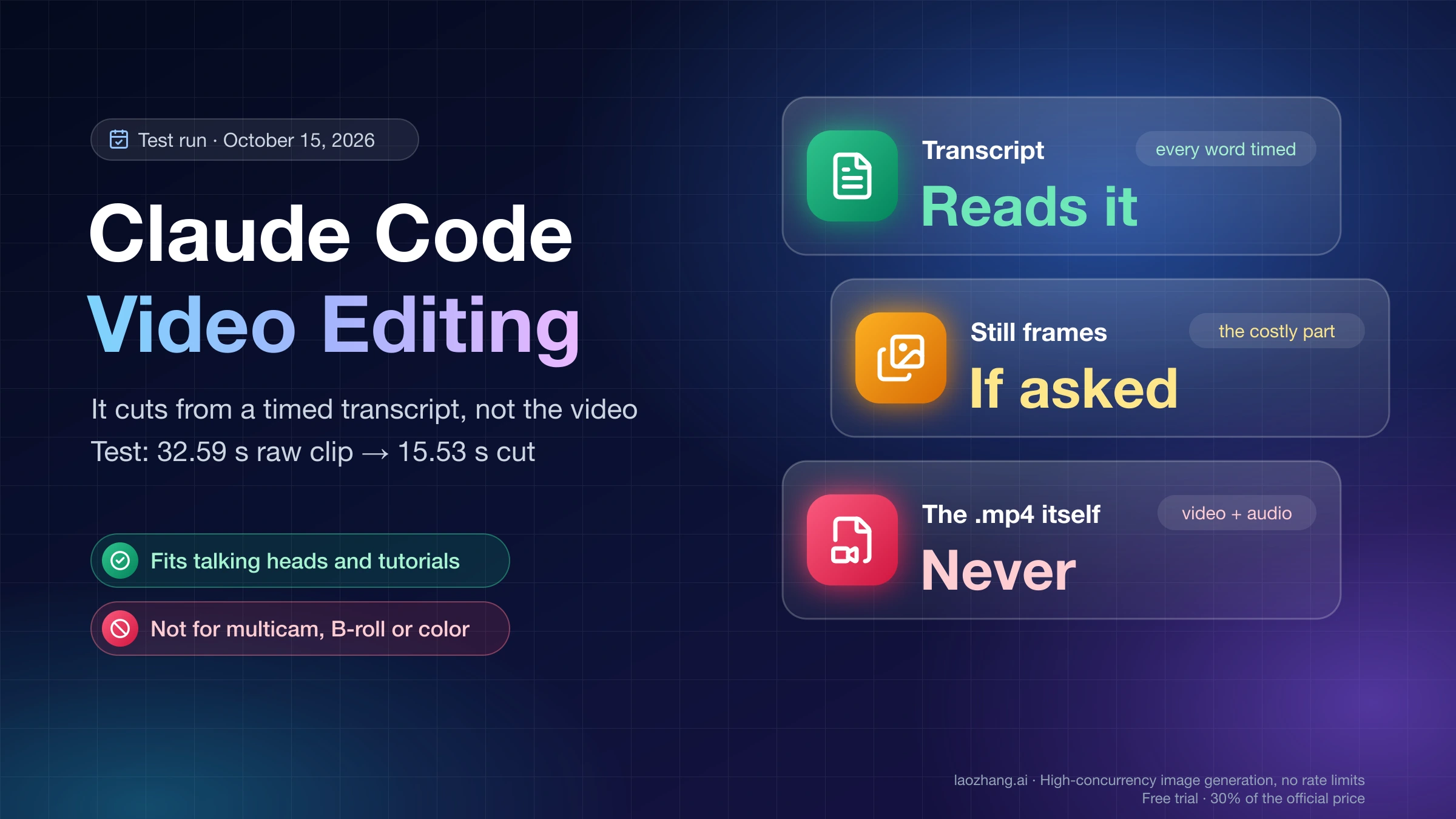
Claude Code can edit video, but it never watches the file. It reads a transcript with a timestamp on every word, decides which stretches to keep, and runs ffmpeg to cut them. If you ask, it can also look at a few still frames. That is enough when speech drives the edit: a talking head full of pauses and retakes, a narrated screen recording, a podcast. It is not enough when the decision depends on the picture, such as switching multicam angles, grading color, or choosing B-roll by how it looks. Either way, what comes back is a rough cut that you still review.
The limit comes from what Claude accepts. As of October 15, 2026, Claude takes JPEG, PNG, GIF (first frame only) and WebP images, according to Anthropic's Claude vision documentation. The file tool described in the Claude Code tools reference handles images, PDFs and notebooks. Video and audio appear in neither. So every "fully automated" Claude Code editing setup is a pipeline: a speech-to-text tool writes the transcript, Claude writes the cut list, and ffmpeg renders the result.
A test run on October 15, 2026 shows the whole loop. A Claude Code session running Opus 5.5 on one Apple M4 Mac took a 32.59-second clip containing a flubbed take and returned a 15.53-second cut with subtitles and a vertical version, using only free local tools. The clip was synthetic: macOS text-to-speech over an ffmpeg test pattern, one voice, English only. It shows the mechanics and where things break. It says nothing about how well transcription copes with your microphone, room, accent or language.
Cutting footage you already shot is a different job from making new animated video out of code, which Claude Opus 5.5 Video Generation: Code In, Rendered MP4 Out covers. Claude Motion in claude.ai animates text and charts and does not edit uploaded footage either; see How to Use Claude Dashboards and Motion: Pro and Max Lack Motion.
Can you show Claude Code a video? Only as a transcript and frames
No, not as a video file. What you can give it is a transcript of the audio and still images extracted from the video, and that is how every Claude Code editing tool works under the hood. The transcript tells Claude what was said and when, down to the word. The frames tell it what one moment looked like. Neither lets it hear the audio, so tools that care about sound, such as the video-use skill, measure loudness with code instead of listening.
Frames are the expensive part. Anthropic's vision docs price an image at ⌈width ÷ 28⌉ × ⌈height ÷ 28⌉ visual tokens. Claude 4.7 and later models, Opus 5.5 included, use a high-resolution tier in which a 1920×1080 frame is not resized and costs 69 × 39 = 2,691 tokens. Older models downsize the same frame to 1456×819, or 1,560 tokens. One frame per second for ten minutes is 600 frames, about 1.61 million input tokens at 1080p, while a transcript of the same ten minutes is roughly 7,500 to 21,000 tokens. The cost section below shows the arithmetic.
That trade-off shapes what Claude is good at. A flubbed take that repeats a sentence is obvious in text, because the same words appear twice and only the second run is complete. An out-of-focus shot, a blink at the wrong moment or a cluttered background is invisible in text, and Claude only notices it if a frame from that exact moment is checked.
Which footage fits Claude Code editing, and which doesn't
Footage where the words decide the edit fits. Footage where the picture decides it does not.
| Footage | Fit for transcript-based editing | What to watch |
|---|---|---|
| One person talking to camera, with pauses and retakes | Good: retakes show up as repeated sentences | Clipped first or last words at cut points |
| Narrated screen recording or tutorial | Good for removing pauses and retakes | The transcript does not show the screen, so a cut can skip an on-screen step that happened during a pause |
| Podcast or interview | Workable for trimming and subtitles | Several speakers need speaker labels in the transcript; the October 15 test had one speaker |
| Multicam, B-roll picked by look, color-critical work, sports or action | Poor: the decision is visual | Keep it in Premiere Pro, DaVinci Resolve or Final Cut Pro and let Claude handle transcripts, subtitles and exports |
People who use these setups describe the output the same way. The Japanese site Fyve wrote on June 29, 2026 that Claude Code has no editing function of its own and acts as a conductor for ffmpeg and Whisper, and that you should treat the result as a draft that is roughly 70% automated and 30% handwork. A Habr review of video-use from May 7, 2026 found it handles talking heads only, with no B-roll out of the box, and that its self-check catches technical faults such as pops or hidden subtitles but not a wrong take being kept. The samuelgursky/davinci-resolve-mcp server for DaVinci Resolve lists "judging a cut" as a non-goal and calls its output "a first-pass assembly".
Six ways to edit footage with Claude Code, compared
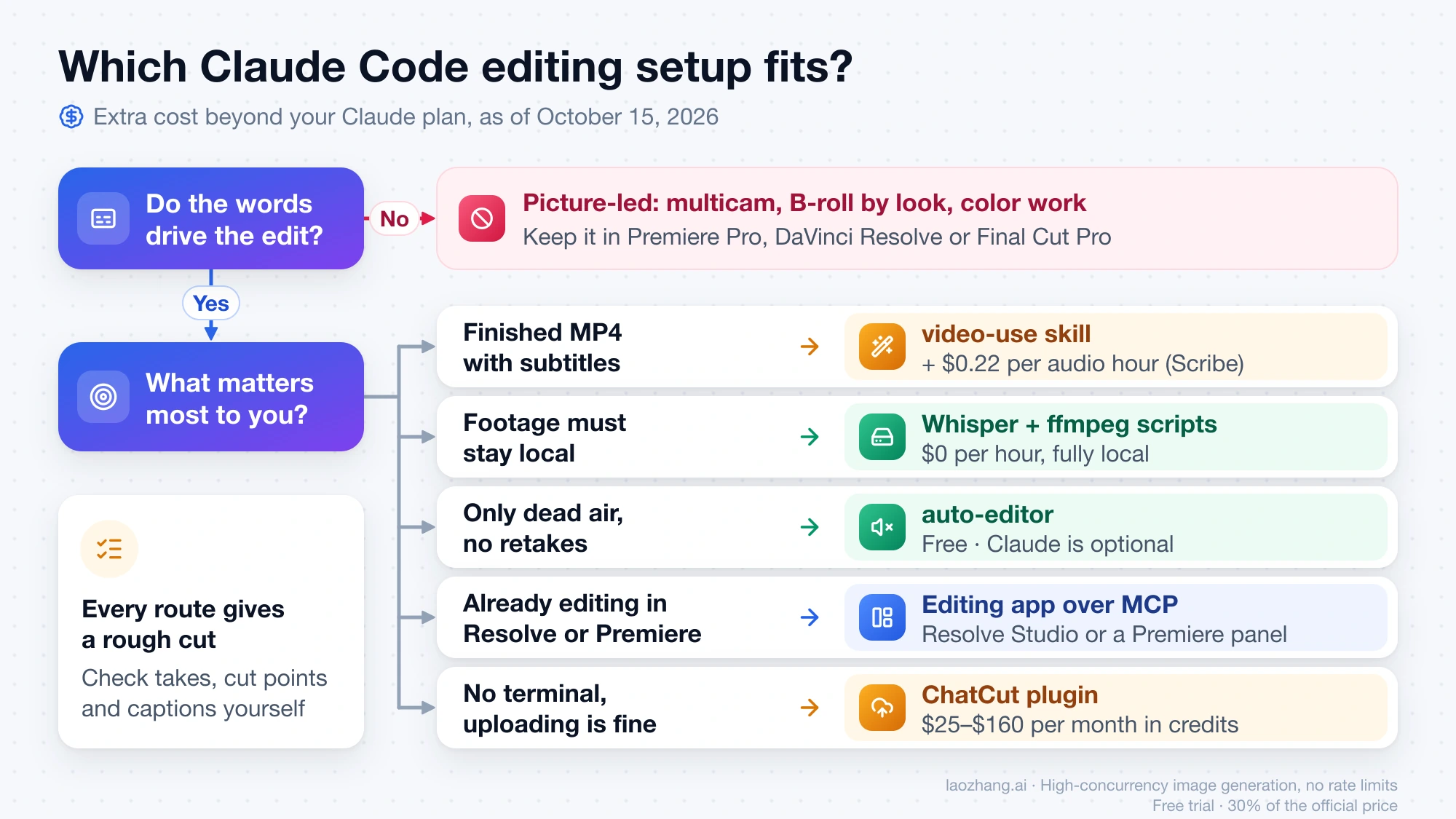
The six setups below differ in where transcription runs, what you pay beyond Claude, and how far they take the edit. Only the local script and auto-editor were run in the October 15 test. The other rows come from each project's README or pricing page as of October 15, 2026.
| Setup | What it does to raw footage | Paid pieces beyond Claude | Runs on | Where it stops |
|---|---|---|---|---|
| video-use skill (MIT) | Cuts fillers, false starts and dead space from the transcript, adds 30 ms audio fades, grades color per segment, burns subtitles, adds overlays through HyperFrames, Remotion, Manim or PIL; waits for your approval before cutting | ElevenLabs Scribe at $0.22 per hour of audio; the free ElevenLabs tier includes about 4.5 hours | Your machine, with transcription on ElevenLabs | No merged local Whisper option; talking heads only, no B-roll out of the box (Habr review) |
| Your own Whisper + ffmpeg scripts | Whatever Claude writes: transcript-based cuts, subtitles, vertical crops | Nothing per hour | Fully local | You debug installs and timestamp drift yourself |
| auto-editor (Unlicense) | Removes silence, or stretches without motion, with a margin; exports timelines for Premiere, Resolve, Final Cut Pro, Shotcut and Kdenlive | Nothing | Fully local | Cannot tell a retake from a good take |
| ButterCut | Local WhisperX transcription plus visual analysis; Claude builds a select or rough cut and exports XML for Final Cut Pro, Premiere or Resolve | Free under PolyForm Noncommercial 1.0.0, with commercial output allowed; ButterCut Pro at $49 per year adds multi-track B-roll | Apple Silicon Macs; needs Ruby, Python, full FFmpeg and WhisperX | You finish the edit in your editing app |
| Editing app driven over MCP (DaVinci Resolve, Premiere Pro, Palmier Pro) | Claude operates a real timeline: assembly, markers, renders | Resolve Studio for reliable scripting; Premiere Pro with a CEP panel; Palmier Pro needs macOS 26 on Apple Silicon | Your editing app | Community projects, none from Blackmagic or Adobe; first-pass assembly, not judgment |
| ChatCut Claude Code plugin | You upload footage; it trims, removes noise, adds captions, motion graphics, generated B-roll and voiceover in a browser timeline | $25, $45, $88 or $160 per month for 100–800 credits | ChatCut's servers | Footage leaves your machine; the plugin page shows no free plan |
A few details matter when you pick one:
- video-use is the most-starred project in the table, at about 29,000 GitHub stars as of October 15, 2026. Its SKILL.md calls local Whisper on CPU an anti-pattern, and as of October 15, 2026 every pull request that adds local or Groq Whisper is either closed without merging or still open. If you have no ElevenLabs key, you need a fork or your own scripts.
- The Resolve MCP server (samuelgursky/davinci-resolve-mcp) controls Resolve Studio through the official scripting API. Its README says the free edition only works through a bridge script and that Resolve 21.1 moved Python scripting to Studio. The leading Premiere Pro MCP server (hetpatel-11/Adobe_Premiere_Pro_MCP) is validated on macOS and warns that its scripting often cannot read existing caption text and that Premiere 26 has no scripting API for removing effects. Palmier Pro runs a local MCP server while the app is open; builds after v0.7.6 are proprietary.
- ChatCut bills twice. The plugin page says "Claude Code's reasoning uses your Claude subscription or API allowance," and ChatCut credits pay for the media work.
- digitalsamba/claude-code-video-toolkit mostly makes new videos (Remotion templates, voiceover, avatars, generated clips). On existing footage it can trim, concatenate, crop to 1080×1920, redub and add music, but it has no silence cutting, transcript-based cuts or subtitles.
- Overlays are a separate layer. HyperFrames (Apache-2.0) and Remotion render titles, lower thirds and charts over a cut but do not cut footage. Remotion is free for individuals and companies with up to three employees; larger companies need a company license at $25 per seat per month or $0.01 per render with a $100 monthly minimum.
To choose quickly:
- One speaker, retakes, and you want a finished MP4 with subtitles: video-use, if hosted transcription and $0.22 per audio hour are acceptable.
- Footage must stay on your machine, or you want no per-hour fee: your own Whisper + ffmpeg scripts, as in the walkthrough below. If you finish in an editing app anyway and use an Apple Silicon Mac, ButterCut gives you an XML rough cut.
- Only dead air to remove, no retakes: auto-editor. Claude is optional here.
- You already edit in Resolve Studio or Premiere Pro: an MCP server for assembly, with the creative pass still yours.
- You don't want a terminal setup and are fine uploading footage: ChatCut.
If you are still choosing skills and servers in general, Best Claude Code Skills to Use First: Picks by Workflow and Best Claude Code MCP Servers to Install First (2026): Starter Picks by Workflow cover installation.
Run a first edit locally with faster-whisper and ffmpeg
The October 15 test used the second setup: a free local transcript, a cut list written by Claude, and ffmpeg. The raw clip was 32.59 seconds of 1080p at 30 fps with a 3-second lead-in, gaps of 2.5 and 1.2 seconds, and a 2.5-second tail. The spoken script was five lines, and the second line was flubbed on purpose:
- "Hi, this is a quick test of editing a video with Claude Code."
- Flubbed take: "First, we cut out the long pauses. Um, wait, let me say that again."
- Clean retake: "First, we cut out the long pauses between sentences."
- "Then we add subtitles, so viewers can follow along without sound."
- "Finally, we export a vertical version for short video platforms."
You need Claude Code installed (How to Install Claude Code: Complete Setup Guide for Every Platform (2026)), Python 3 and ffmpeg. Homebrew's standard ffmpeg is enough for cutting. Burned-in subtitles need a different build, covered in step 4.
Step 1: Get a transcript with a timestamp on every word
Install faster-whisper in a virtual environment and pin PyAV below version 19. Without the pin, the transcription crashes as of October 15, 2026 (details in the errors section).
python3 -m venv venv
./venv/bin/pip install faster-whisper "av<19"
Save this as transcribe.py. It runs Whisper on the CPU and writes every word with its start and end time to words.json:
"""Step 1: word-level transcript of the raw clip (local, no API key)."""
import json
import sys
import time

from faster_whisper import WhisperModel

src = sys.argv[1]
model_name = sys.argv[2] if len(sys.argv) > 2 else "base.en"

t0 = time.time()
model = WhisperModel(model_name, device="cpu", compute_type="int8")
segments, info = model.transcribe(src, word_timestamps=True, vad_filter=False)
words = []
for seg in segments:
    for w in seg.words:
        words.append({"start": round(w.start, 2), "end": round(w.end, 2), "word": w.word.strip()})
json.dump(words, open("words.json", "w"), indent=1)
print(f"model={model_name} words={len(words)} audio={info.duration:.1f}s elapsed={time.time()-t0:.1f}s")./venv/bin/python transcribe.py talk.mp4 base.enOn the M4, base.en with int8 on the CPU returned 57 words for the 32.6 seconds of audio in 3.0 seconds, model loading included. The first run also downloads the model, about 141 MB. The larger small.en model heard "Claude Code" as "clog code" on the same audio while base.en got it right. With a single synthetic sample, that does not mean the smaller model is better. It means product names and proper nouns need checking whichever model you use.
Step 2: Have Claude Code pick the takes and write edl.json
This is the only step where the model makes an editing decision. In the test, Claude read words.json, saw that the second line was spoken twice and that the first attempt broke off with "Um, wait, let me say that again," and wrote an edit decision list with four keep ranges. It dropped the 3-second lead-in, the whole flubbed take, and most of the long gaps.
A starting instruction you can adapt:
Read words.json. This is a single-speaker talking-head clip.
Write edl.json as a list of {"start": s, "end": e} keep ranges on the source timeline.
Drop the lead-in and any pause longer than about half a second.
When a sentence is repeated, keep the last complete take and drop the earlier one.
Then run ffmpeg silencedetect on the source and move each range edge to the
nearest silence boundary. Show me the kept text before rendering anything.
The final edl.json from the test, after snapping the edges to silences:
[{"start": 2.92, "end": 6.51}, {"start": 14.83, "end": 18.31}, {"start": 20.66, "end": 24.83}, {"start": 25.89, "end": 30.14}]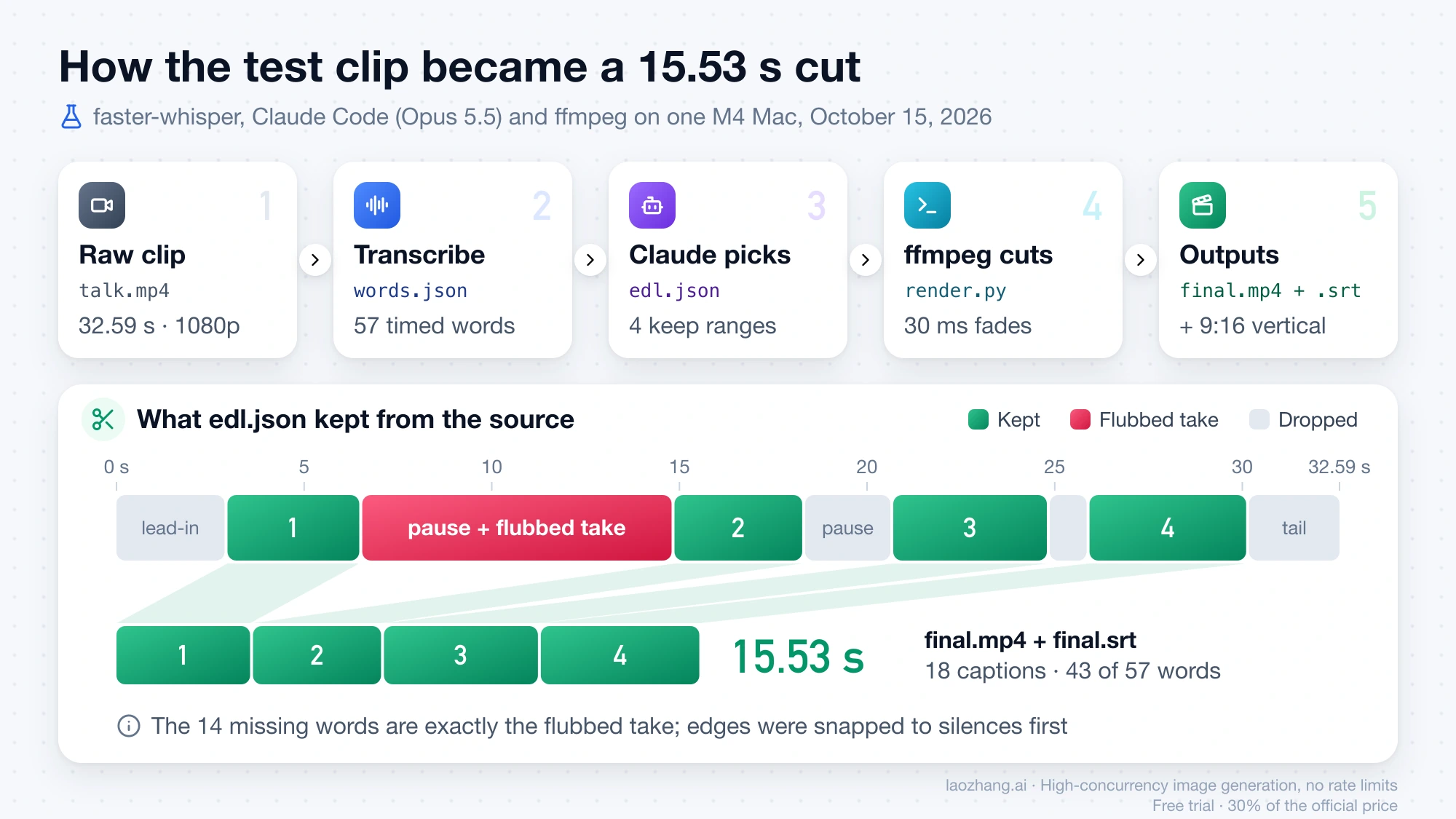
Asking Claude to show the kept text before rendering is cheap insurance. Reading four lines of text takes seconds, while finding a wrong take in a render means watching it. If you edit this kind of footage every week, put these rules into a skill so every session starts from them; Claude Code Hooks vs Skills vs Slash Commands: What to Use and How to Start explains when a skill is the right container.
Step 3: Render the cut and the subtitles with render.py
render.py turns the edit list into one ffmpeg filter graph: each range is trimmed, gets a 30 ms audio fade in and out so the cuts don't click, and the pieces are concatenated. It then shifts each word's timestamps onto the new timeline and writes captions of up to three words each to final.srt.
"""Step 3: turn an edit decision list (keep ranges) into final.mp4 + subtitles.

edl.json: [{"start": s, "end": e}, ...] on the source timeline.
Writes final.mp4 (concat with 30 ms audio fades), final.srt (remapped word timings).
"""
import json
import subprocess
import sys

src = sys.argv[1]
edl = json.load(open("edl.json"))
words = json.load(open("words.json"))
FADE = 0.03

# 1) cut + concat in one ffmpeg filter graph
parts, labels = [], []
for i, k in enumerate(edl):
    d = k["end"] - k["start"]
    parts.append(f"[0:v]trim={k['start']}:{k['end']},setpts=PTS-STARTPTS[v{i}]")
    parts.append(
        f"[0:a]atrim={k['start']}:{k['end']},asetpts=PTS-STARTPTS,"
        f"afade=t=in:d={FADE},afade=t=out:st={d - FADE:.3f}:d={FADE}[a{i}]"
    )
    labels.append(f"[v{i}][a{i}]")
graph = ";".join(parts) + ";" + "".join(labels) + f"concat=n={len(edl)}:v=1:a=1[v][a]"
subprocess.run(
    ["ffmpeg", "-v", "error", "-y", "-i", src, "-filter_complex", graph, "-map", "[v]", "-map", "[a]",
     "-c:v", "libx264", "-crf", "20", "-preset", "veryfast", "-c:a", "aac", "-b:a", "160k", "final.mp4"],
    check=True,
)

# 2) remap word times to the new timeline and group up to 3 words per caption (fewer at punctuation)
# a word is kept if it overlaps a keep range; its times are clamped into that range
# (Whisper word boundaries drift by a few hundred ms, so exact containment drops words)
kept = []
for w in words:
    offset = 0.0
    for k in edl:
        overlap = min(w["end"], k["end"]) - max(w["start"], k["start"])
        if overlap > 0:
            s = max(w["start"], k["start"]) - k["start"] + offset
            e = min(w["end"], k["end"]) - k["start"] + offset
            kept.append({"start": s, "end": e, "word": w["word"]})
            break
        offset += k["end"] - k["start"]

def ts(t):
    h, rem = divmod(t, 3600)
    m, s = divmod(rem, 60)
    return f"{int(h):02d}:{int(m):02d}:{int(s):02d},{int(round((s % 1) * 1000)):03d}"

cues, chunk = [], []
for w in kept:
    chunk.append(w)
    if len(chunk) == 3 or w["word"].endswith((".", ",", "?", "!")):
        cues.append(chunk)
        chunk = []
if chunk:
    cues.append(chunk)
with open("final.srt", "w") as f:
    for n, c in enumerate(cues, 1):
        text = " ".join(x["word"] for x in c)
        f.write(f"{n}\n{ts(c[0]['start'])} --> {ts(c[-1]['end'])}\n{text}\n\n")
print(f"segments={len(edl)} kept_words={len(kept)}/{len(words)} cues={len(cues)}")./venv/bin/python render.py talk.mp4The render took 1.46 to 1.74 seconds across runs for the 15.53-second 1080p output. The subtitle file had 18 captions covering 43 of the 57 words; the 14 missing words were exactly the flubbed take. Running the transcription again on final.mp4 returned the full clean script.
The script shown is the second version. The first kept a word only if both its start and end fell inside a keep range, and after the edges were snapped to silences that rule dropped words such as "Hi," (40 of 57 kept). Keeping any word that overlaps a range and clamping its times fixed it.
Step 4: Add soft or burned-in subtitles and a 9:16 version
Soft subtitles, a track the viewer can switch on and off, work with the standard Homebrew ffmpeg:
ffmpeg -i final.mp4 -i final.srt -map 0 -map 1 -c copy -c:s mov_text -metadata:s:s:0 language=eng final_softsubs.mp4Many social platforms ignore embedded subtitle tracks, so upload final.srt alongside the video there.
Burned-in captions need ffmpeg's subtitles filter, which the standard Homebrew build does not include. With ffmpeg-full installed (the errors section below explains why), this burned the captions in 1.67 seconds:
/opt/homebrew/opt/ffmpeg-full/bin/ffmpeg -i final.mp4 -vf "subtitles=final.srt:force_style='FontName=Helvetica,FontSize=22,Outline=2'" -c:v libx264 -crf 20 -preset veryfast -c:a copy final_burned.mp4For a vertical 1080×1920 version, crop the center of the frame before adding the captions. This filter chain rendered in 1.39 seconds:
/opt/homebrew/opt/ffmpeg-full/bin/ffmpeg -i final.mp4 -vf "crop=ih*9/16:ih,scale=1080:1920,subtitles=final.srt:force_style='FontName=Helvetica,FontSize=14,MarginV=60,Outline=2'" -c:v libx264 -crf 20 -preset veryfast -c:a copy final_vertical.mp4A frame pulled from 1.2 seconds into the cut showed the source timecode 00:00:03.800 from the test pattern and the caption "this is a", which confirms that both the cut mapping and the burn-in lined up. Two limits apply. Helvetica is a macOS font, so set another FontName on Windows or Linux. And a center crop only works when the subject stays centered; a speaker who moves needs face tracking, which the test did not cover.
Three errors from the test run and how they were fixed
Each of these either stopped the edit or damaged it without an error message. None comes from Claude itself; they come from the tools, so any session that installs the same versions can hit them.
faster-whisper crash: unexpected keyword argument 'metadata_errors'
pip install faster-whisper on its own installed faster-whisper 1.2.1, the latest release on PyPI as of October 15, 2026, together with PyAV 19.0.1. The first call to model.transcribe() then failed with:
TypeError: open() got an unexpected keyword argument 'metadata_errors'The traceback points into PyAV's container code, and PyAV 19.0.0 came out on September 29, 2026, so the likely cause is a change in PyAV 19 that faster-whisper 1.2.1 does not handle yet. Installing with "av<19" pulled PyAV 18.1.0, and transcription worked. A later faster-whisper release may remove the need for the pin.
Whisper timestamps clipped the last word by about half a second
The first edit list used Whisper's word times plus a small pad. Whisper placed the end of "platforms." at 29.50 seconds, but ffmpeg's silence detector showed the speech actually ran until 30.04 seconds. The cut chopped the word, and transcribing the result heard "platform." The start of "Hi," was off in the other direction: Whisper said 2.74 seconds, while the audio started at 3.02.
The fix was to detect real silences in the source and move every cut edge to the nearest silence boundary, within about 0.1 seconds:
ffmpeg -i talk.mp4 -af silencedetect=noise=-40dB:d=0.3 -f null -The output lists silence_start and silence_end times. After snapping, the edit list ran 15.53 seconds instead of 15.83, and every word survived. Others report the same problem. Alejandro de Blas, founder of the Spanish company Aducti, wrote on September 1, 2026 that Whisper folds preceding silence into the first word of a segment, roughly 0.5 seconds, and fixes it by cross-checking with silencedetect. video-use's SKILL.md says ElevenLabs Scribe timestamps drift 50–100 ms, recommends 30–200 ms of padding, and prefers cutting inside silences of at least 400 ms.
No such filter: 'subtitles' in Homebrew ffmpeg
Burning captions failed on Homebrew's ffmpeg, both the installed 8.0.1_2 and the current 9.0.2:
ffmpeg -vf subtitles=final.srt            -> No option name near 'final.srt' ... Error parsing filterchain
ffmpeg -vf subtitles=filename=final.srt   -> No such filter: 'subtitles'
ffmpeg -filters lists no subtitles, ass or drawtext filter in that build, because the formula is built without libass and freetype. Homebrew's ffmpeg-full formula includes them, along with fontconfig, harfbuzz, whisper.cpp and tesseract. brew install ffmpeg-full took 2 minutes 5 seconds on the M4. It is keg-only, so the binary sits at /opt/homebrew/opt/ffmpeg-full/bin/ffmpeg and is not on your PATH. Ask Claude to call it by full path.
Installing it had a side effect. ffmpeg-full upgraded the shared libvpx library from 1.15.2 to 1.17.0, and the older ffmpeg 8.0.1_2 that was already installed stopped launching:
dyld: Library not loaded: /opt/homebrew/opt/libvpx/lib/libvpx.11.dylibbrew upgrade ffmpeg moved it to 9.0.2_1 in 8 seconds and fixed it, and brew linkage --test afterwards found no missing libraries. If your standard ffmpeg is out of date, upgrade it before installing ffmpeg-full. Other platforms differ: many Linux distribution and Windows "full" builds include libass, but the test only covered macOS.
Silence-only cutting: auto-editor removed the gaps but kept the retake
auto-editor is the quickest free way to remove dead air, and it needs no transcript. Run on the same raw clip, version 31.7.2 from Homebrew produced a 21.31-second file in 3.9 seconds:
brew install auto-editor
auto-editor talk.mp4 --margin 0.2s -o out.mp4 --no-open
It removed the silences and kept the flubbed take. An exported timeline showed a 152-frame clip starting at 8.8 seconds, which is exactly the "Um, wait, let me say that again" attempt. auto-editor decides by loudness or motion, and a mistake spoken at normal volume looks like any other speech. Spotting a retake requires reading the words, which is the step Claude adds.
auto-editor is still useful next to Claude. It exports timelines with --export premiere, --export resolve, --export final-cut-pro, --export shotcut or --export kdenlive, so you can finish in your editing app. The Resolve export wrote an FCPXML 1.11 timeline pointing at the original media. Install it from Homebrew or the GitHub releases page. The README says the CLI is "no longer being published on pip," and PyPI still serves version 29.3.1 from November 2025.
Transcribing without Python: auto-editor whisper and ffmpeg's whisper filter
Two transcription options avoid Python entirely, and both ran in the test with the 148 MB ggml-base.en.bin model from the whisper.cpp repository on Hugging Face:
auto-editor whisper talk.mp4 ggml-base.en.bin -f srt --prompt "Claude Code" -o out.srt
/opt/homebrew/opt/ffmpeg-full/bin/ffmpeg -i talk.mp4 -vn -af "whisper=model=ggml-base.en.bin:language=en:destination=ff_whisper.srt:format=srt" -f null -
auto-editor's command finished in 12.2 seconds and, with --prompt, spelled "Claude Code" correctly, but every caption ended exactly 4–5 seconds after it started, so those end times are useless as cut points. ffmpeg's filter took 12.95 seconds; without a prompt it split "Claude." and "code." into separate captions, and its SRT numbering starts at 0 rather than 1, so renumber the file if an uploader rejects it. For cutting, faster-whisper in step 1 was faster (3.0 seconds) and gives a time for every word.
Can Claude Code edit videos for free? Costs per 10 minutes of footage
The editing tools can be free; Claude Code is not. faster-whisper, ffmpeg and auto-editor cost nothing per hour of footage. Claude Code itself needs a paid Claude plan or API usage, which Claude Code Pricing Guide 2026: Pro, Max, Team, API, and Extra Usage breaks down. video-use adds ElevenLabs Scribe at $0.22 per hour of audio once the free tier's roughly 4.5 hours are used, so 8 hours of raw footage comes to about $1.76 at list price. ChatCut adds a $25–$160 monthly plan.
What Claude reads per minute of footage decides how much of your plan or API budget an edit uses. For ten minutes of talking head, the numbers work out like this at the Opus 5.5 API list price of $4 per million input tokens:
| What Claude reads for 10 minutes of footage | Size | Input tokens | Opus 5.5 input cost |
|---|---|---|---|
| Compact transcript, one "start end word" line per word | about 30 KB | about 7.5K | about $0.03 |
Per-word JSON transcript like words.json | about 86 KB | about 21K | about $0.08 |
| 1 frame per second at 640×360 (23 × 13 = 299 tokens each) | 600 frames | about 179K | about $0.72 |
| 1 frame per second at 1920×1080 (69 × 39 = 2,691 tokens each) | 600 frames | about 1.61M | about $6.46 |
The inputs: 150 spoken words per minute gives 1,500 words. The test's words.json measured about 57 bytes per word, and a compact line format about 20 bytes. Tokens assume roughly 4 characters per token for English, a rule of thumb rather than a count. Frame tokens follow the formula from Anthropic's vision docs. The edit list Claude writes back is small; 2,000 output tokens at Opus 5.5's $20 per million is about $0.04. Sonnet 5.5, at $2 input and $10 output per million tokens, halves the cost column.
These are calculations, not bills. A real Claude Code session also sends the system prompt, tool definitions and the conversation so far on every turn, so it costs more than the transcript alone. On Pro or Max you pay with usage limits instead of dollars, and the same ratio holds: a session that looks at frames burns through a limit far faster than one that reads text. The video-use README makes the same point with its own numbers, contrasting 30,000 frames at 1,500 tokens each (45 million tokens) with a packed transcript of about 12 KB plus a few images. Heimdex warned in a Korean-language guide on August 5, 2026 that longer footage means more tokens and can exhaust usage limits. If long editing sessions drain your plan faster than expected, Claude Code Max Quota Consumption Abnormal? Complete Diagnosis and Fix Guide (2026) walks through finding the cause.
Checklist before you publish a Claude Code cut
Claude's cut is a draft. Before it goes out, check the things a transcript cannot show:
- Kept text against your script. Read the transcript of the cut, not just the edit list. The wrong take being kept is the failure that automated self-checks miss.
- Every cut point, with sound, at normal speed. Listen for clipped first and last words. If you hear one, snap the edges to silencedetect boundaries and render again.
- Proper nouns in the subtitles. Product names, people and places are where Whisper slips ("clog code"). Pass a prompt or hotwords, or correct the SRT by hand.
- Subtitle timing near the end. Fyve reports drift on long videos. Spot-check the last few minutes, not just the opening.
- The vertical frame. A center crop cuts off anyone who leans or walks out of the middle.
- Captions on top of everything else. If you add overlays, burn subtitles last; video-use's docs warn that overlays otherwise cover captions and that fonts can fail without an error.
- Fonts and players on the target platform. Set a
FontNamethat exists on the rendering machine. Aducti notes that iPhones refuse HEVC files taggedhev1and needhvc1. - The originals and
edl.json. Keep both so you can change one range and render again in seconds instead of starting over.
Other questions about Claude Code video editing
Is there a GitHub project for Claude Code video editing?
Yes, several. browser-use/video-use is the largest, at about 29,000 stars as of October 15, 2026; it is MIT-licensed and needs an ElevenLabs key. barefootford/buttercut builds rough cuts locally and exports them to Final Cut Pro, Premiere or Resolve. WyattBlue/auto-editor removes silence without any AI. samuelgursky/davinci-resolve-mcp lets Claude drive Resolve Studio. digitalsamba/claude-code-video-toolkit is mainly for making new videos rather than cutting footage.
Is AI like Claude Code replacing video editors?
Not for anything that depends on how the footage looks. The people who build and review these tools describe the output as a starting point: Fyve calls it a draft that is about 70% automated, the Resolve MCP server calls its output "a first-pass assembly," and the Habr reviewer of video-use found that its self-check misses semantic mistakes such as keeping the wrong take, concluding that for an occasional edit, cutting by hand in DaVinci Resolve can be simpler. Where it saves real time is the repetitive part of speech-heavy footage: dead air, retakes, subtitles and vertical exports.
Can Claude Code edit a long video, like a one-hour podcast?
It can, but cost and accuracy both scale with length. One hour of speech is roughly six times the ten-minute transcript above, about 45K to 130K input tokens before any frames, plus $0.22 if you use ElevenLabs Scribe. Usage limits on Pro or Max run out faster in a long session, and subtitle drift is more likely toward the end of a long file. Splitting the recording into chapters and editing each in its own session keeps both under control.
Sources7
External pages this guide links to, in the order they appear. Last updated Oct 15, 2026.
Sources7
External pages this guide links to, in the order they appear. Last updated Oct 15, 2026.
- 1.Claude vision documentationplatform.claude.com/docs/en/build-with-claude/vision
- 2.Claude Code tools referencecode.claude.com/docs/en/tools-reference
- 3.video-usegithub.com/browser-use/video-use
- 4.auto-editorgithub.com/WyattBlue/auto-editor
- 5.ButterCutgithub.com/barefootford/buttercut
- 6.ChatCut Claude Code pluginchatcut.io/claude-code-plugin
- 7.samuelgursky/davinci-resolve-mcpgithub.com/samuelgursky/davinci-resolve-mcp