Best Claude Code Skills to Install First (2026): Official Starter Picks by Workflow
The best Claude Code skills strategy is not a leaderboard. Start with bundled skills, add one official skill only when it closes a real workflow, and build a repo-local custom skill once repeated pain justifies it.
On this page
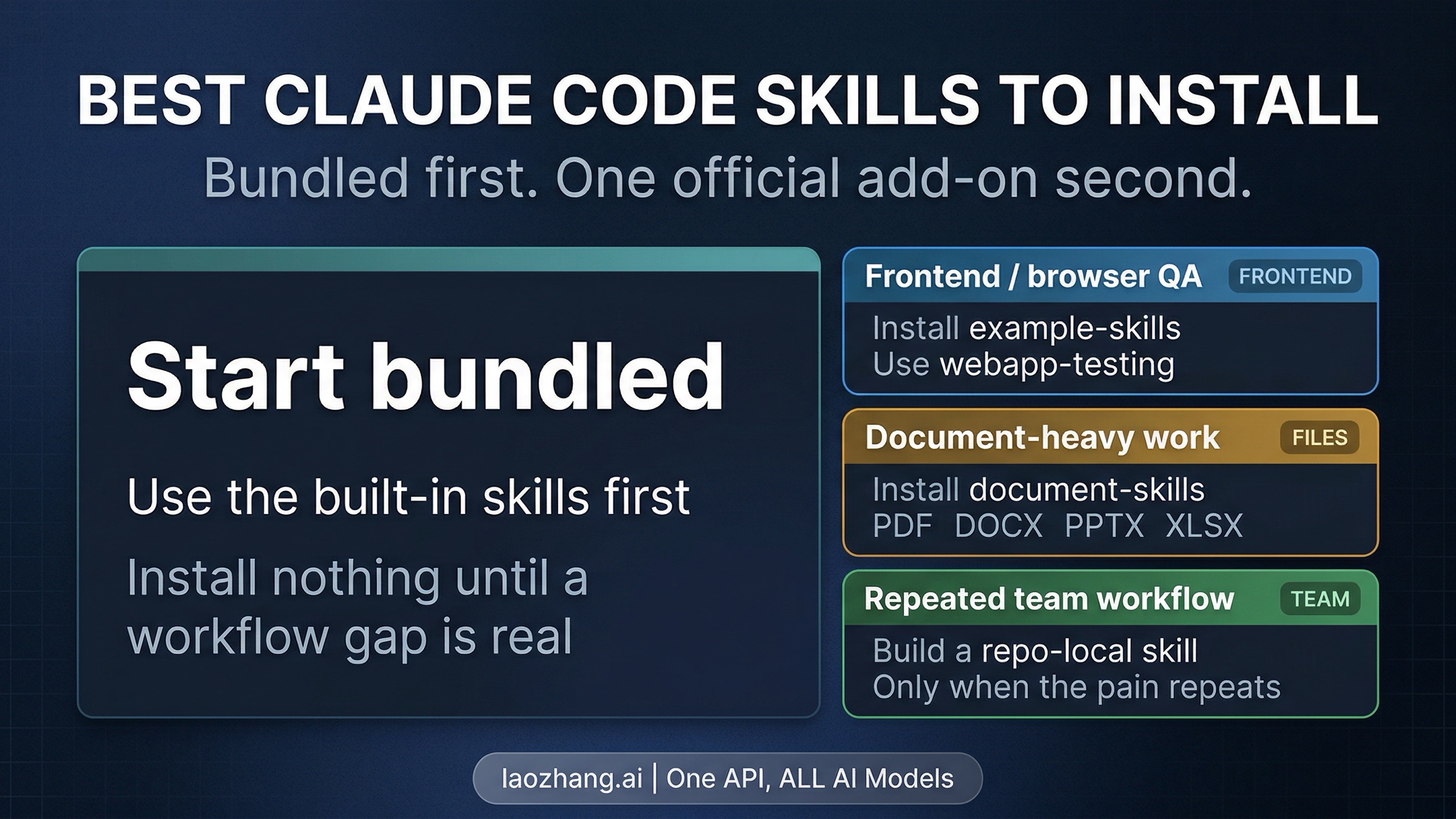
If you want one default answer, do not start by browsing random Claude Code skill marketplaces. Start with the bundled skills you already have, then add exactly one official skill when it closes a real workflow. Today that usually means webapp-testing for frontend and browser QA, document-skills when PDFs or decks are the job, and a repo-local custom skill when the same team workflow keeps repeating. If what you really need is always-on project context, deterministic enforcement, or tool access, CLAUDE.md, hooks, or MCP are usually the better answer.
As of April 8, 2026, Anthropic's current Claude Code docs list five bundled skills: /batch, /claude-api, /debug, /loop, and /simplify. Anthropic's official anthropics/skills marketplace currently exposes document-skills, example-skills, and claude-api. That means the ecosystem is real, but the practical conclusion is narrower than most "best skills" roundups imply. Most developers do not need more skills on day one. They need the right first path.
Evidence note: this guide reflects Anthropic's current slash commands and bundled skills docs, best-practices docs, subagents docs, plugin marketplace docs, the official
anthropics/skillsREADME, and Anthropic's current skills marketplace manifest, checked on April 8, 2026.
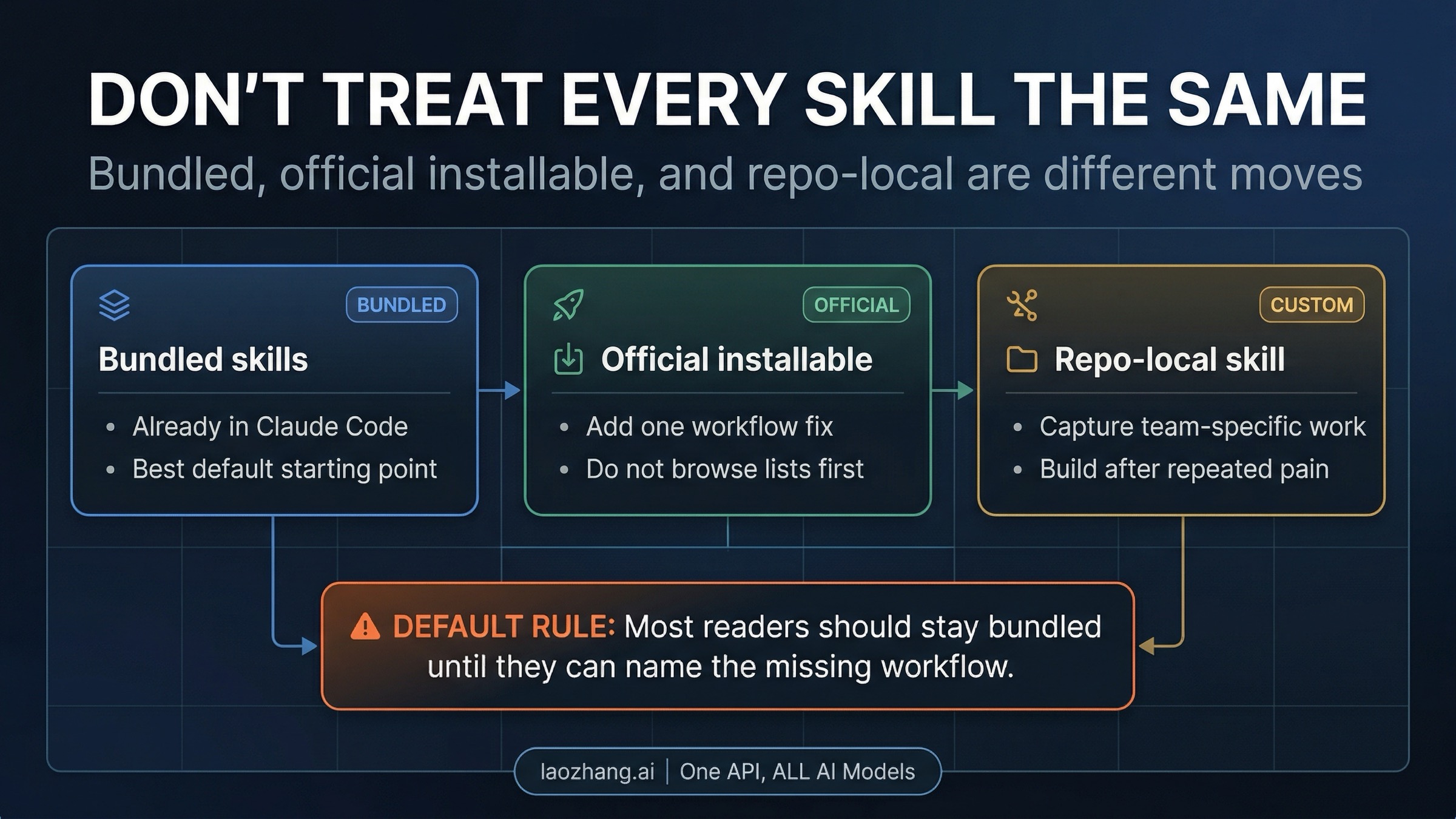
The first decision is not which skill. It is which layer.
If you only remember one rule, it is this: do not start with a marketplace spree. Claude Code skills only become useful once you know which layer you are actually choosing. In practice, that means separating bundled skills, official installable skills, and repo-local custom skills before you recommend any named package at all.
Bundled skills are the real starting point because they already sit inside Claude Code. Anthropic's current docs describe them less like hard-coded commands and more like reusable playbooks that load when the task calls for them. That matters because a built-in like /debug or /simplify is not just a menu item. It is already a packaged way to steer Claude through a familiar kind of work without making your setup wider, noisier, or harder to reason about. For many developers, that is enough leverage for the first week.
If you want a practical way to start bundled, match the built-in to the pain in front of you. Reach for /debug when you are tracking down a bug, /simplify when a plan or code path has become harder to reason about than it should be, /loop when you need a repeated fix-test-adjust cycle, /batch when the work can be broken into parallel independent chunks, and /claude-api when the job is Anthropic API or SDK work rather than repo customization. That is a better first week than installing a pile of external skills and hoping one of them turns out to matter.
Official installable skills solve a different problem. They are not there to make Claude Code feel bigger. They are there to close a bounded workflow gap that the bundled set does not cover well enough on its own. Anthropic's current official marketplace packages are small and legible enough that you can usually name the reason for installing one before you run the command. That is the standard you want. If you cannot explain the missing workflow in one sentence, you probably do not need another skill yet.
Repo-local custom skills are different again. They are the right move when the same team-specific task keeps reappearing and you are tired of re-explaining it every time. Anthropic's current docs and skills blog frame skills as reusable procedural knowledge, and that is exactly the right mental model for the custom path. If your team keeps running the same release checklist, migration review, incident triage, or codebase-specific audit, packaging that into a repo-local skill can pay back quickly. If the task is still vague, it is too early.
There is one more correction worth making once and then moving on. If you remember the older custom-commands framing in Claude Code, Anthropic now documents skills as the surface that can create the same slash-command behavior. In other words, the platform has gotten simpler, not more fragmented. You do not need to learn an old commands model and a new skills model separately. You need to pick the right skill layer for the job in front of you.
The official starter paths that are actually worth installing
The best starter path depends less on popularity and more on what keeps breaking your workflow today. That is why a workflow-first guide is more useful than a top-20 list. Most of the official example skills are worth understanding, but only a few deserve day-one attention for most developers.
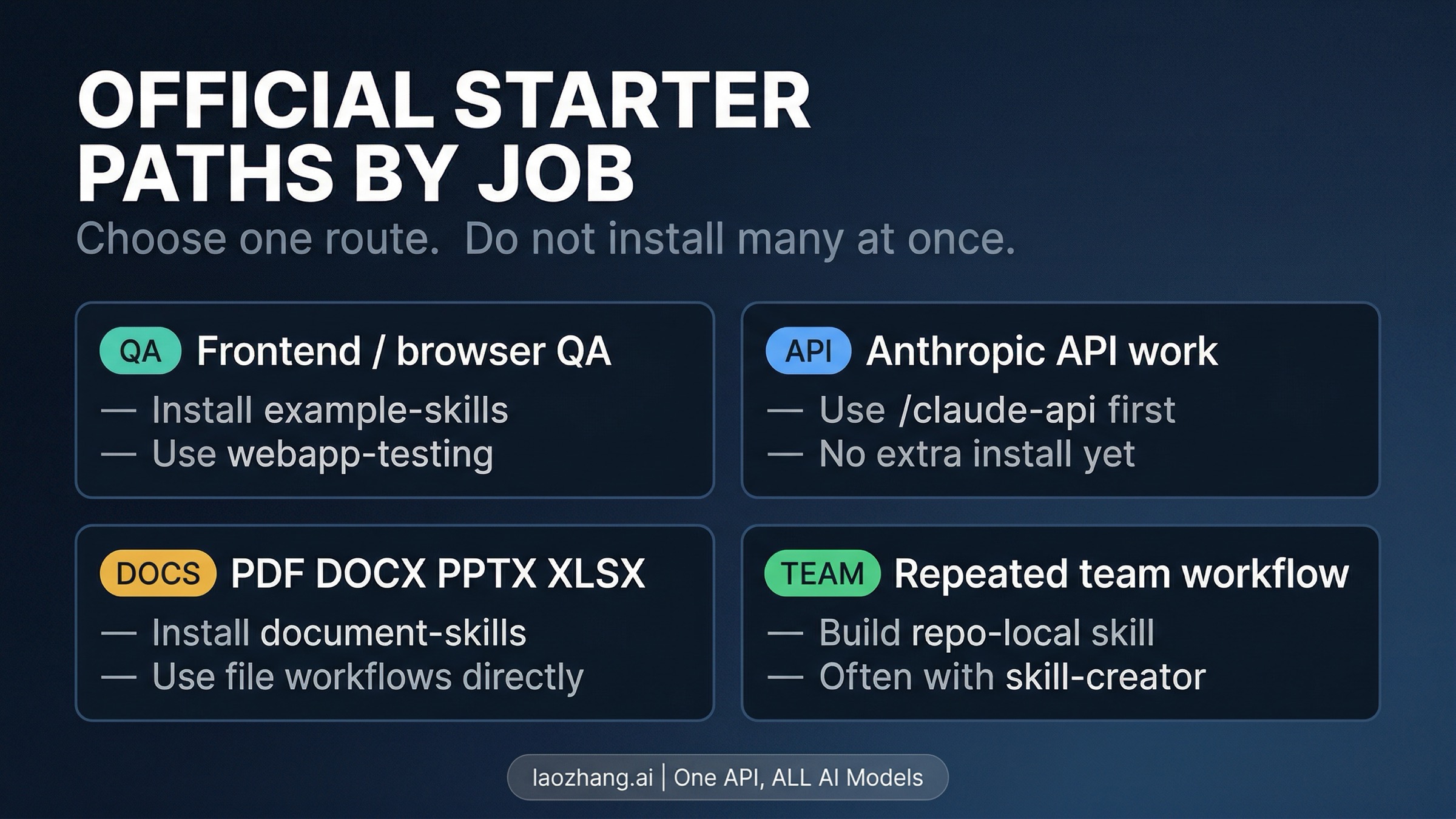
Frontend and browser QA is the clearest case for installing something early. Anthropic's current official example skill set includes webapp-testing, and this is the one official starter path that often earns its place immediately. If your pain point is validating a localhost app, stepping through UI flows, or checking that a frontend change behaves correctly in the browser, installing example-skills and using webapp-testing is a clean upgrade. It gives Claude a more explicit browser-testing playbook instead of asking you to improvise the same prompts every session. If your workflow later needs your own UI rules, design language, or internal QA conventions, that is the moment to add a repo-local skill on top.
Anthropic API and SDK work is the one important workflow where the best first move is often not another install at all. Claude Code already ships with the bundled /claude-api skill, and for many API questions that is the right starting surface. If you are implementing a request, debugging an auth problem, or trying to understand an Anthropic SDK pattern, start there before you widen your setup. Anthropic's official marketplace does currently expose a claude-api package too, but that does not mean you should treat day one as a package-collection exercise. The bundled skill already covers the most common need: getting useful help on Anthropic API work without another dependency.
PDF, DOCX, PPTX, and XLSX work is the second strong reason to install an official package quickly. Anthropic's current marketplace exposes document-skills, and the value here is concrete rather than abstract. If the real job is reading, transforming, summarizing, or producing office-style files, the file-handling route deserves its own skill path. That is very different from installing a document package just because it sounds broadly useful. If your work is still mainly code, adding document skills early only makes Claude Code feel larger than it needs to be.
Repeated team workflows are where custom skills beat official packages. Anthropic's current official example set includes skill-creator, which is a useful signpost for the pattern even if you do not use that exact example as-is. The main judgment is simple: build your own skill after the pain repeats, not before. A repo-local skill becomes high leverage when it captures something your team already does over and over again, such as a release audit, a migration review, or a codebase-specific checklist. If you are still guessing what the workflow might become, keep it in notes or prompts a little longer.
The wrong way to read this section is "install all four." The right way is to pick the one path that matches today's bottleneck and stop there. That restraint is not minimalism for its own sake. It is how you keep Claude Code useful without turning it into a noisy stack of overlapping helpers.
Some of the smartest Claude Code upgrades are not skills
This is the part most "best skills" articles bury, even though it is often the most useful judgment on the page. Skills are for on-demand workflow knowledge. They are not the default answer to memory, policy, delegation, or tool access.
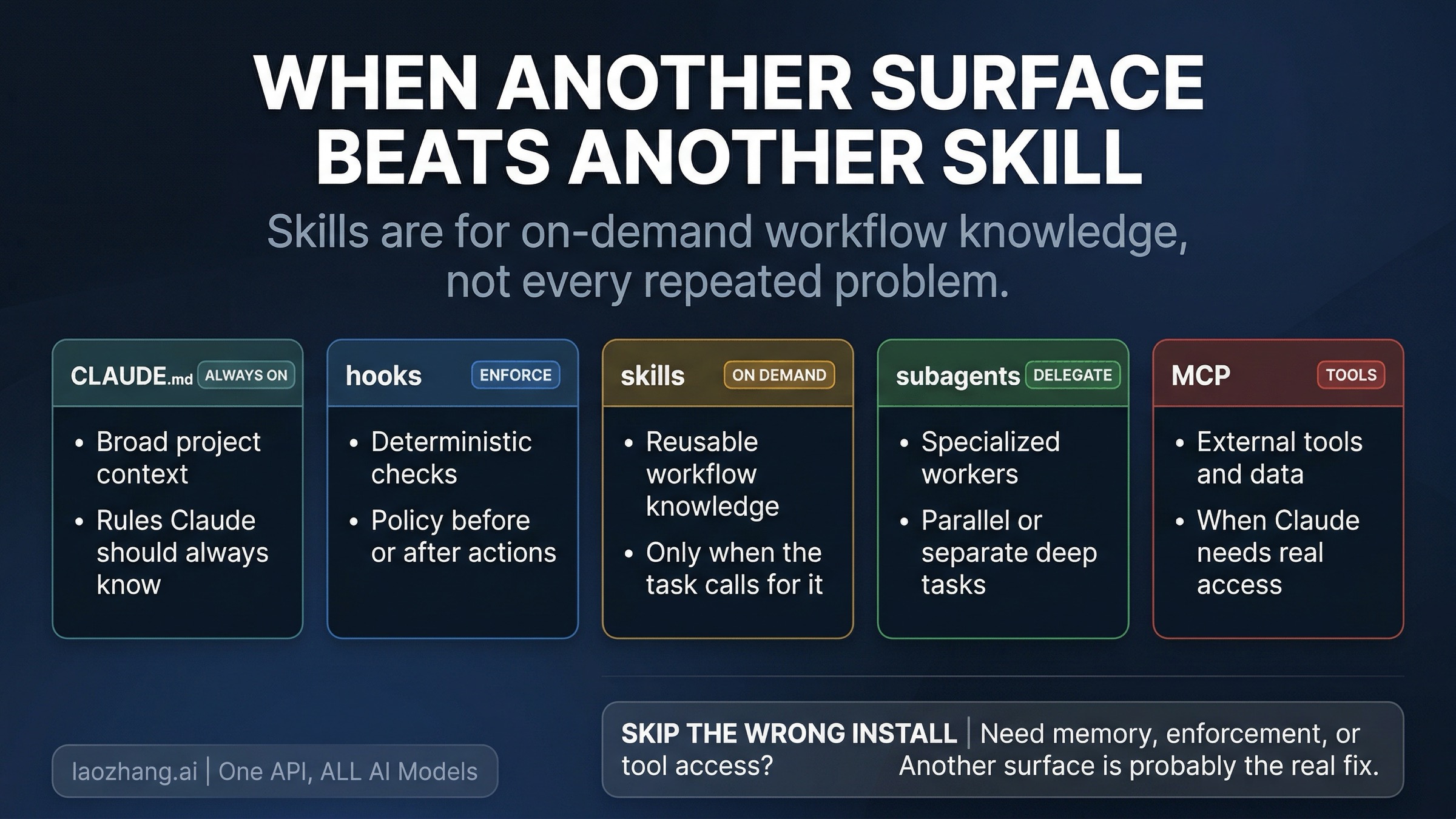
Use CLAUDE.md for broad, always-on project context. Anthropic's best-practices docs are explicit here: keep the concise project-wide rules in CLAUDE.md, and move narrower workflow knowledge into skills so it only loads when relevant. If your real complaint is that Claude keeps forgetting architecture, conventions, or project assumptions, another skill is not the cleanest fix. A tighter CLAUDE.md usually is.
Use hooks when advice is not enough. Hooks are the deterministic layer. They are for the moments when you do not just want Claude to remember a preference, but want a rule enforced before or after an action. If the workflow problem is "make sure this check always runs" or "never allow this class of change without a guardrail," that is a hooks problem, not a skills problem.
Use subagents when the real need is specialized delegation. Anthropic's current subagents docs define them as separate assistants with their own context windows, permissions, and restrictions, and Anthropic's skills blog makes clear that subagents can use skills. That is the important relationship: these are complementary surfaces, not rivals. If you need a deeper specialist or parallel worker, adding another top-level skill will not solve the structural problem.
Use MCP when Claude needs real tool or data access. Skills can teach a workflow. They cannot substitute for an external system connection that Claude does not already have. If the blocker is database access, a private API, a ticketing system, or another external tool, the clean fix is usually MCP or another direct integration path. Trying to paper over missing access with more skill text only makes the setup more confusing.
There is one adjacent mistake worth calling out because it is easy to miss. If your real frustration is not missing workflow knowledge but approval fatigue during long repo work, you may not need another skill either. You may need a different permission mode. In that case, our Claude Code Auto mode guide is the better next read than another install.
Add official Anthropic skills without turning your setup into a mess
Once you know which workflow you are solving, the official install path is straightforward. Anthropic's current anthropics/skills README tells Claude Code users to add the marketplace first and then install the package that matches the job:
/plugin marketplace add anthropics/skills
/plugin install example-skills@anthropic-agent-skills
If the real need is document work instead, swap the second line:
/plugin install document-skills@anthropic-agent-skillsAs of April 8, 2026, Anthropic's current official marketplace manifest exposes three packages: document-skills, example-skills, and claude-api. Treat that list as freshness-sensitive rather than timeless. The practical advice does not change, though: add one package, test one real workflow, and stop. If the workflow gets better, keep it. If it does not, remove noise rather than doubling down on more installs.
If you want to build the custom path instead, keep it just as bounded. Anthropic's current Agent Skills overview says Claude Code supports filesystem-based custom skills, so the right mental model is a repo-local asset, not a mysterious cloud feature. That makes the custom route powerful, but it also means the same discipline applies. Write a repo-local skill when you can point to repeated work, repeated language, and repeated failure modes. Do not build one because "custom" sounds advanced.
If your Claude Code environment itself still needs setup or update work before any of this makes sense, start with the broader Claude Code install guide. This page should stay narrower than the install guide. The goal here is choosing the right first skill path, not rebuilding all of Claude Code from scratch.
FAQ
Do I need marketplace skills if Claude Code already has bundled skills?
No. For many developers, bundled skills are the right starting point. Marketplace skills become useful when there is a specific workflow gap the bundled set does not close cleanly enough on its own.
Which official Anthropic skill should I install first?
For most technical teams, webapp-testing inside example-skills is the strongest first official install when frontend or browser QA is the actual bottleneck. If files are the real job, document-skills is the better first package. If Anthropic API work is the main job, start with the bundled /claude-api skill before installing anything else.
When should I build my own skill?
Build a repo-local custom skill after the same workflow, checklist, or repo-specific explanation keeps repeating. That is when the custom path turns into leverage instead of premature abstraction.
Are skills better than CLAUDE.md or subagents?
They solve different problems. CLAUDE.md is for broad always-on context, skills are for on-demand workflow knowledge, subagents are for specialized delegated work, and MCP is for real external tool access. The mistake is not choosing the wrong product. It is using a skill to solve a problem that belongs to another Claude Code surface.
Should I install a bunch of skills at once?
Usually no. The fastest way to make Claude Code feel cluttered is to install multiple overlapping helpers before you know what actually improved the workflow. Pick one path, test it against a real task, and let the next gap reveal itself naturally.
The best Claude Code skills strategy is smaller than the query suggests. Start with what Anthropic already ships. Install one official skill only when a real workflow needs it. Build a repo-local custom skill once repeated team pain justifies the effort. Everything else is mostly noise.
Sources5
External pages this guide links to, in the order they appear. Last updated Apr 8, 2026.
Sources5
External pages this guide links to, in the order they appear. Last updated Apr 8, 2026.
- 1.slash commands and bundled skills docscode.claude.com/docs/en/slash-commands
- 2.best-practices docscode.claude.com/docs/en/best-practices
- 3.subagents docscode.claude.com/docs/en/sub-agents
- 4.plugin marketplace docscode.claude.com/docs/en/plugin-marketplaces
- 5.anthropics/skills READMEgithub.com/anthropics/skills