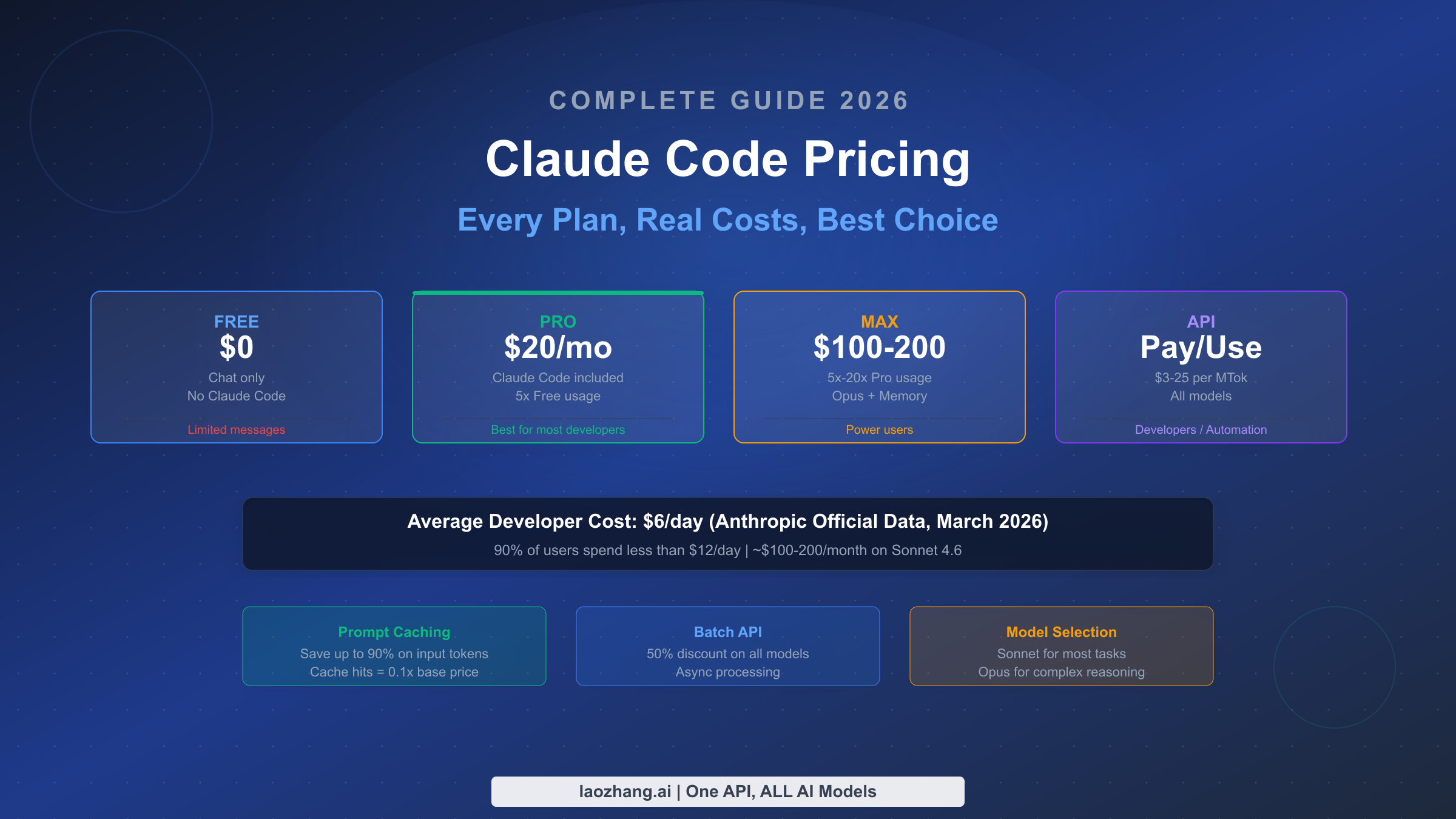
Claude Code has become the go-to AI coding assistant for thousands of developers, but its pricing structure can be genuinely confusing. Between subscription tiers, API token pricing, team plans, and various discount mechanisms, figuring out what you should actually pay requires more effort than it should. According to Anthropic's own data (March 2026), the average developer spends approximately $6 per day on Claude Code, with 90% of users staying below $12 per day. This guide breaks down every pricing option, reveals what developers actually spend, and gives you a clear framework to choose the right plan.
TL;DR
Claude Code pricing works through two separate paths: subscription plans (Pro at $20/month, Max at $100-200/month) give you unlimited usage within rate limits, while API pay-as-you-go charges per token starting at $3 per million input tokens for Sonnet 4.6. Most individual developers should start with the Pro plan at $20/month. If you consistently hit rate limits, upgrade to Max. Teams of 5 or more should consider the Team plan with Premium seats at $100-150/month per user. API billing only makes sense for automation, CI/CD pipelines, or if you need fine-grained cost control.
Two Ways to Pay for Claude Code
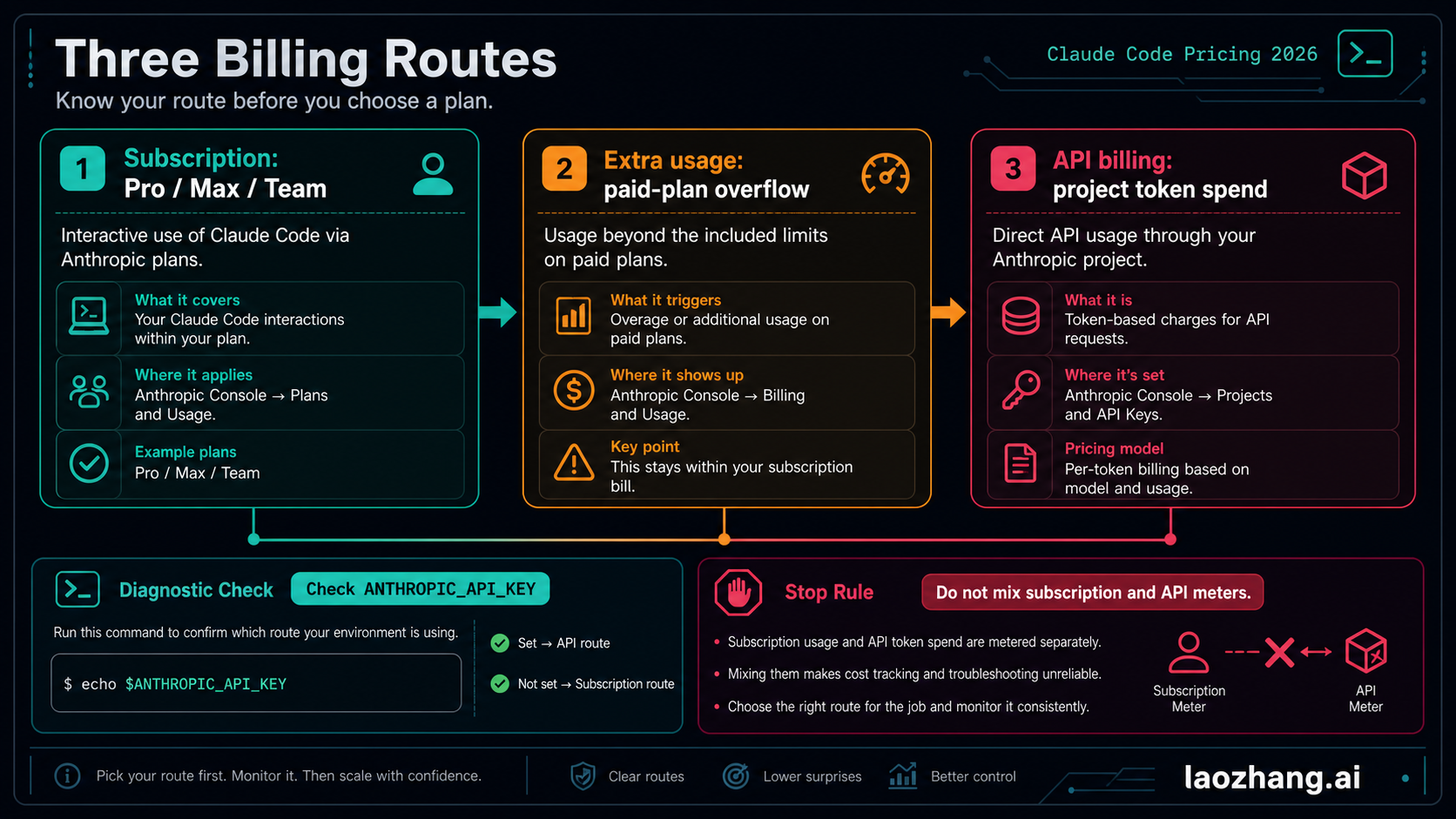
Before diving into specific plans and prices, you need to understand a fundamental distinction that trips up many new users: Claude Code has two completely separate billing systems. Getting this wrong means you could end up paying twice for the same capability, or worse, choosing a plan that does not match how you actually work.
Subscription plans (Free, Pro, Max, Team, Enterprise) give you access to Claude Code through a monthly fee. You get unlimited usage within your plan's rate limits, and the cost is predictable. Your bill is the same whether you use Claude Code for ten minutes or ten hours on any given day. This is the path most individual developers and small teams should take, because it removes the mental overhead of tracking every token. The Pro plan at $20 per month includes Claude Code access and handles the workload of most developers without hitting rate limits.
API pay-as-you-go charges you per token consumed. Every input token, output token, and cached token has a specific price that varies by model. There is no monthly fee beyond what you actually use, but there is also no ceiling. A heavy coding session could cost $5 or $50 depending on the model, context length, and complexity of your requests. This path exists primarily for developers building applications on top of Claude's API, running automated coding workflows, or integrating Claude Code into CI/CD pipelines. It is important to note that a paid Claude subscription (Pro or Max) does not include API access, and vice versa. These are separate products with separate billing, as Anthropic's support documentation explicitly confirms.
The distinction matters because many developers sign up for a Pro subscription expecting it to cover API calls from their applications, only to discover that subscriptions and API access are billed separately. Conversely, some developers set up API billing for interactive Claude Code sessions when a $20 Pro subscription would have saved them hundreds of dollars per month. Understanding which path fits your workflow before you start is the single most important pricing decision you will make.
If you have already installed Claude Code and want the simplest path forward, start with the Pro subscription. You can always switch to API billing later if your needs change. For developers who need both interactive coding and programmatic API access, you will need both a subscription and an API account, but the good news is that most developers only need one or the other.
Every Claude Code Plan Compared (2026)

Understanding what each plan actually includes requires looking beyond the headline price. The differences between plans are not just about usage limits. They affect which models you can access, what features are available, and whether you get priority access during peak demand periods. Here is a comprehensive comparison based on the official pricing from claude.com/pricing as of March 2026.
The Free plan costs nothing but does not include Claude Code at all. You get basic chat access to Claude with severely limited daily messages that fluctuate based on demand. This plan exists for people who want to try Claude's conversational AI, not for developers who need coding assistance. If you are reading this guide, the Free plan is almost certainly not what you need.
The Pro plan at $20 per month (or $17 per month with annual billing) is where Claude Code access begins. You get terminal-based Claude Code with Sonnet as the default model, approximately five times the usage limits of the Free plan, extended thinking capabilities, and the ability to create unlimited projects. For most developers who use Claude Code a few hours per day, Pro provides enough headroom to work without constantly hitting rate limits. This is the plan Anthropic designed for working developers who treat Claude Code as a daily tool rather than an occasional experiment.
The Max plan comes in two tiers. The $100 per month tier gives you five times the Pro usage limits, while the $200 per month tier provides twenty times Pro limits. Both Max tiers unlock Opus model access, persistent memory across conversations, higher task output limits, early access to new features, and priority access during peak traffic. The key question is whether you actually need this level of usage. If you run multiple concurrent Claude Code sessions, work with very large codebases, or use Claude Code as your primary development environment for eight or more hours daily, Max becomes worthwhile. For everyone else, Pro is sufficient.
| Plan | Monthly Price | Annual Price | Claude Code | Usage Level | Key Extras |
|---|---|---|---|---|---|
| Free | $0 | - | No | Base | Chat only |
| Pro | $20/mo | $17/mo | Yes | 5x Free | Extended thinking, projects |
| Max 5x | $100/mo | - | Yes | 5x Pro | Opus, memory, priority |
| Max 20x | $200/mo | - | Yes | 20x Pro | Opus, memory, priority |
| Team Standard | $30/mo | $25/mo | No | Team base | Admin, SSO |
| Team Premium | $150/mo | $100/mo | Yes | Team + Code | Admin, SSO, Claude Code |
| Enterprise | Custom | Custom | Yes | Custom | 1M context, SCIM, audit |
One detail that frequently confuses developers is the difference between Pro and Team Standard seats. The Team Standard seat at $25-30 per month does not include Claude Code. Only Team Premium seats at $100-150 per month include the Claude Code developer environment. If you are a team lead evaluating plans, make sure you are pricing out Premium seats for developers who need Claude Code access.
What Claude Code Actually Costs (Real Numbers)

Pricing tables tell you what things cost in theory. What matters is what developers actually spend in practice. Anthropic publishes usage statistics in their official cost management documentation, and these numbers paint a much more practical picture than the plan comparison table above.
The official data from Anthropic states that the average Claude Code developer spends approximately $6 per day in API-equivalent token consumption. This figure represents what the tokens would cost at published API rates, not what subscription users actually pay. For Pro subscribers paying $20 per month, this means they are getting roughly $180 per month worth of API-equivalent usage for a flat $20 fee. That is a significant discount, and it explains why Anthropic has structured subscriptions as the primary pricing path for individual developers.
The 90th percentile sits at around $12 per day, meaning only 10% of developers use more than that. For monthly equivalents, Anthropic reports that Claude Code typically costs approximately $100 to $200 per developer per month when using Sonnet 4.6, though there is large variance depending on how many instances users run and whether they use it in automation contexts.
To make this more concrete, here is what different usage patterns look like in practice. A casual developer who uses Claude Code for an hour or two on weekdays might generate 20-50 million tokens per month. At API rates with Sonnet 4.6 ($3 per million input tokens, $15 per million output tokens), that translates to roughly $60-150 per month in token costs. The Pro plan at $20 per month covers this easily. A daily power user running Claude Code for four to eight hours daily across multiple projects might generate 200 million to 1 billion tokens monthly. The API equivalent cost would be $400 to $2,000 or more. At this level, even the Max plan at $100-200 per month represents enormous savings over API billing.
One insight that rarely appears in pricing guides is the role of prompt caching. According to analysis from actual usage data, over 90% of tokens consumed by heavy Claude Code users are cache reads, not fresh input processing. Cache hits cost only 10% of the standard input price ($0.30 per million tokens for Sonnet 4.6 instead of $3). This means the effective per-token cost for sustained coding sessions is dramatically lower than the headline API prices suggest. If you are on the API billing path, understanding and optimizing cache behavior can reduce your costs by an order of magnitude.
The /cost command within Claude Code shows your current session's token usage in real time. For API users, this directly reflects your bill. For Pro and Max subscribers, the command still shows token consumption, but it does not affect your billing since your usage is covered by the flat subscription fee. Use /stats instead to monitor your usage patterns against your plan's rate limits.
Team and Enterprise Plans Decoded
For organizations considering Claude Code for their development teams, the pricing calculus changes significantly. The choice is not just between individual plans but involves trade-offs around administrative control, security features, and per-seat economics that affect the total cost of ownership.
Team plans require a minimum of five members and come in two seat types. Standard seats cost $25 per user per month with annual billing ($30 monthly), but crucially do not include Claude Code access. These seats are designed for team members who only need Claude's chat interface for writing, research, or general assistance. Premium seats cost $100 per user per month with annual billing ($150 monthly) and include full Claude Code access. The common mistake teams make is assuming all seats include Claude Code. If you have a team of ten developers who all need Claude Code, you are looking at $1,000 per month with annual commitment ($1,500 monthly billing), not $250.
The team plan offers features that individual subscriptions lack: centralized billing, usage dashboards, domain-based member capture (automatically adding people with your company email), workspace organization, and admin controls over what team members can access. For organizations that need to track spending across developers, the workspace spend limits feature lets administrators cap total Claude Code usage for the workspace.
For rate limit planning, Anthropic's official documentation provides token-per-minute (TPM) recommendations by team size. A team of 5 to 20 users should plan for 100,000 to 150,000 TPM per user, while larger teams of 50 to 100 users need only 25,000 to 35,000 TPM per user because concurrent usage drops as team size grows. These limits apply at the organization level, meaning individual developers can temporarily burst above their share when others are not active.
Enterprise plans offer custom pricing, extended context windows up to 1 million tokens, SCIM provisioning, audit logging, enhanced security controls, and dedicated support. If your organization has more than 50 developers who need Claude Code, or if you have specific compliance requirements (HIPAA, SOC 2), the enterprise tier is worth exploring. Contact sales@anthropic.com for custom quotes.
Should your team use Team Premium seats or give everyone individual Max plans? For teams of five or more, Team Premium is almost always the better choice. At $100 per user per month (annual), it matches the Max 5x price while adding administrative controls, centralized billing, and usage monitoring. Individual Max plans give each developer independent billing and no centralized oversight, which creates headaches for accounting and makes it impossible to track total team spending.
To illustrate the economics at different scales, consider these scenarios. A 5-developer startup paying annual rates would spend $500 per month on 5 Premium seats, getting Claude Code for everyone plus centralized admin. The same team on individual Pro plans would pay only $100 per month total, but would lose administrative oversight and have lower usage limits. If the team members regularly hit Pro limits, the Premium path saves money compared to 5 individual Max subscriptions ($500 versus $500 for Max 5x), while adding team management features.
A 20-developer mid-size team faces a more nuanced calculation. Not all developers may need Claude Code access equally. A common pattern is to provision 10 Premium seats for active Claude Code users and 10 Standard seats for team members who only need chat access, bringing the monthly cost to $1,250 per month at annual rates ($1,000 for Premium plus $250 for Standard). This mixed-seat approach can save 40% compared to giving everyone Premium seats.
For large teams using the API path instead of subscriptions, Anthropic recommends budgeting token-per-minute (TPM) allocations by team size. Teams of 20 to 50 users should plan for 50,000 to 75,000 TPM per user, while teams of 100 to 500 users need only 15,000 to 20,000 TPM per user. The per-user allocation decreases with scale because fewer users tend to be active concurrently. These limits apply at the organization level, so individual developers can temporarily consume more than their calculated share when colleagues are not actively using the service.
API Pricing Deep Dive
For developers who need programmatic access to Claude's models, whether for building applications, running automated coding workflows, or integrating Claude Code into CI/CD pipelines, the API pricing structure determines your costs directly. Every API call is billed by token consumption, with prices varying by model, caching behavior, and processing mode.
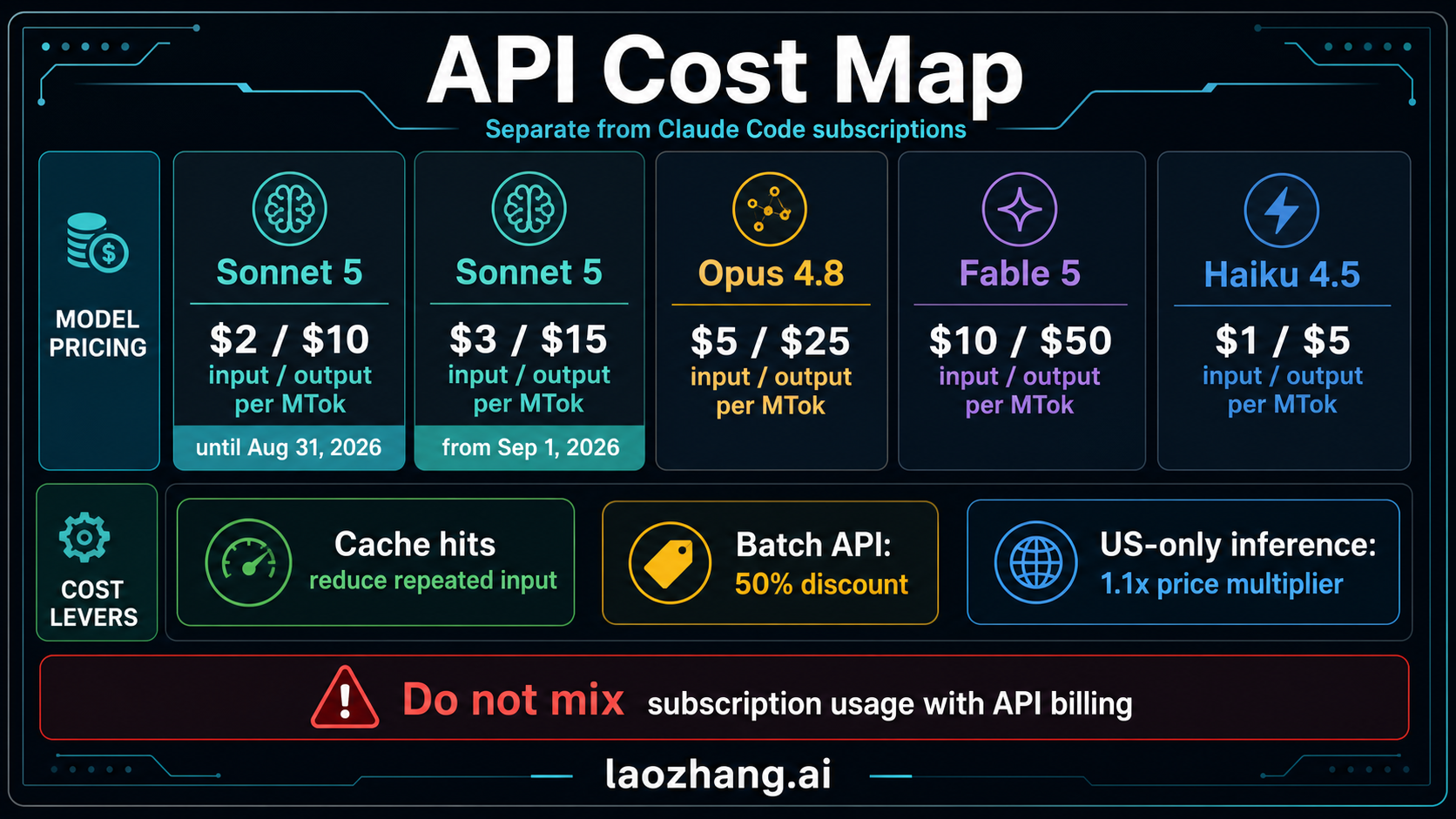
The current API pricing from Anthropic's official documentation as of March 2026 breaks down as follows. Claude Opus 4.6, the most capable model, costs $5 per million input tokens and $25 per million output tokens. Claude Sonnet 4.6, which handles most coding tasks well at lower cost, runs $3 per million input tokens and $15 per million output tokens. Claude Haiku 4.5, designed for fast and simple tasks, costs $1 per million input tokens and $5 per million output tokens. These are the same models available through subscription plans, but with API billing you pay exactly for what you consume.
| Model | Input | Output | Cache Hits | Batch Input | Batch Output |
|---|---|---|---|---|---|
| Opus 4.6 | $5/MTok | $25/MTok | $0.50/MTok | $2.50/MTok | $12.50/MTok |
| Sonnet 4.6 | $3/MTok | $15/MTok | $0.30/MTok | $1.50/MTok | $7.50/MTok |
| Haiku 4.5 | $1/MTok | $5/MTok | $0.10/MTok | $0.50/MTok | $2.50/MTok |
Several discount mechanisms can substantially reduce API costs. Prompt caching is the most impactful: cached content is read at just 10% of the standard input price. For Claude Code sessions where the system prompt, CLAUDE.md files, and project context remain constant across messages, caching can reduce effective input costs by 80-90%. A 5-minute cache write costs 1.25x the base input price, while a 1-hour cache write costs 2x, but the savings from subsequent cache reads typically pay for the write cost after just one or two hits.
Batch processing offers a flat 50% discount on both input and output tokens for asynchronous requests. If your workflow can tolerate some processing delay (results returned within hours rather than seconds), batch pricing cuts Sonnet 4.6 costs to $1.50 per million input tokens and $7.50 per million output tokens. This is particularly useful for large-scale code review, documentation generation, or test generation tasks where real-time response is not critical.
For developers building applications that call Claude's API at scale, platforms like laozhang.ai offer competitive pricing for API access across multiple AI models including Claude, with the advantage of a unified API interface and potentially lower per-token costs. This can be particularly valuable if your application also uses other models like GPT-4o or Gemini, as it consolidates billing and simplifies integration. You can check the documentation for current pricing and available models.
It is also worth noting that Claude Code's API pricing applies the same prompt caching mechanics regardless of whether you access it directly through Anthropic or through a third-party provider like AWS Bedrock or Google Vertex AI. However, third-party platforms may add their own pricing structures. For instance, AWS Bedrock and Google Vertex AI offer both global and regional endpoints for Claude 4.5 and later models, with regional endpoints carrying a 10% premium. If data residency matters to your organization, factor this surcharge into your cost calculations. Anthropic's own API is global by default with no regional pricing premium.
An important distinction for developers considering the API path: Opus 4.6 and Sonnet 4.6 now include the full 1 million token context window at standard pricing. For Sonnet 4.5 and Sonnet 4, requests exceeding 200,000 input tokens incur premium long context pricing at 2x the standard rate ($6 per million input tokens, $22.50 per million output tokens). If you are working with very large codebases, the model version you choose affects both capability and cost. For a detailed breakdown of Opus 4.6 pricing specifically, see our Claude Opus 4.6 pricing breakdown.
How to Cut Your Claude Code Costs
Whether you are on a subscription plan trying to stay within rate limits or on API billing watching every token, these strategies can significantly reduce what you spend on Claude Code. Many of these come directly from Anthropic's official cost management documentation, supplemented with practical insights from the developer community.
Start fresh between tasks. The single most impactful habit is using /clear when switching to unrelated work. Every message you send includes your entire conversation history as context, which means stale conversations waste tokens on every subsequent request. Name your session with /rename before clearing so you can resume it later with /resume if needed. This one habit can reduce your per-message token cost by 30-50% in long sessions.
Choose the right model for the job. Sonnet 4.6 handles the vast majority of coding tasks well and costs 40% less than Opus 4.6 in both input and output tokens. Reserve Opus for complex architectural decisions, multi-file refactoring that requires deep reasoning, or situations where Sonnet consistently produces subpar results. Use /model to switch mid-session, and consider setting Sonnet as your default in /config. For simple subagent tasks like file searches or test runs, specifying model: haiku in your subagent configuration drops costs to $1/$5 per million tokens, a fraction of the other models.
Reduce MCP server overhead. Each MCP (Model Context Protocol) server you have configured adds tool definitions to your context, consuming tokens even when the server is idle. Run /context to see what is consuming space in your context window. Prefer CLI tools like gh, aws, and gcloud when available, as they do not add persistent tool definitions. Disable unused MCP servers with /mcp. When your tool definitions exceed 10% of context, Claude Code automatically defers them and loads on demand, but you can lower this threshold with ENABLE_TOOL_SEARCH=auto:5.
Manage extended thinking costs. Extended thinking is enabled by default with a budget of 31,999 tokens, and thinking tokens are billed as output tokens. For Opus 4.6, that means thinking alone could cost up to $0.80 per request at $25 per million output tokens. For simpler tasks that do not require deep reasoning, reduce the thinking budget with /effort or disable it entirely in /config. Setting MAX_THINKING_TOKENS=8000 is a good compromise for most development tasks.
Be aware of agent team costs. If you use Claude Code agent teams, be aware that they consume approximately 7x more tokens than standard sessions because each teammate runs its own context window. Keep teams small, use Sonnet for teammates, and clean up teams when work is done since active teammates continue consuming tokens even when idle. If you are running into rate limits with Claude Code, agent teams are often the culprit.
Write specific prompts. A vague request like "improve this codebase" forces Claude to scan broadly, reading many files and generating extensive analysis. A specific request like "add input validation to the login function in auth.ts" lets Claude work efficiently with minimal file reads. The more precisely you describe what you want, the fewer tokens Claude needs to understand and complete the task.
Use plan mode for complex tasks. Press Shift+Tab to enter plan mode before starting large implementation tasks. Claude will explore the codebase and propose an approach for your approval before writing any code. This prevents expensive re-work when the initial direction is wrong, saving both tokens and time.
For API users specifically, combining prompt caching with batch processing can yield dramatic savings. A workflow that uses 1-hour cache writes ($6 per million tokens for Sonnet 4.6) combined with batch discounts (50% off) can reduce effective costs to under $1 per million tokens for cached content, which is 3x cheaper than Haiku's standard pricing for comparable work.
Delegate verbose operations to subagents. Running tests, fetching documentation, or processing log files can consume significant context in your main conversation. Delegate these tasks to subagents so the verbose output stays in the subagent's context while only a summary returns to your main session. This keeps your primary context lean and reduces per-message costs. You can also specify cheaper models for subagent tasks. A test runner subagent using Haiku at $1/$5 per million tokens costs a fraction of running the same operation in your main Opus session.
Keep your CLAUDE.md lean. Your CLAUDE.md file loads into context at the start of every session. If it contains detailed instructions for specific workflows like PR reviews or database migrations, those tokens are present even when you are doing unrelated work. Move specialized instructions into skills that load on demand only when invoked. Aim to keep CLAUDE.md under 500 lines by including only essentials. Every 1,000 tokens of unnecessary CLAUDE.md content costs roughly $0.003 per message on Sonnet 4.6, which adds up over hundreds of daily messages.
Monitor background token usage. Claude Code uses a small amount of tokens for background functionality even when you are not actively coding. Conversation summarization for the claude --resume feature and certain command processing generate background API calls. While typically under $0.04 per session, this can add up if you leave many sessions open. Close sessions you are not actively using and use /clear before starting new tasks to minimize this overhead.
Which Plan Should You Choose?

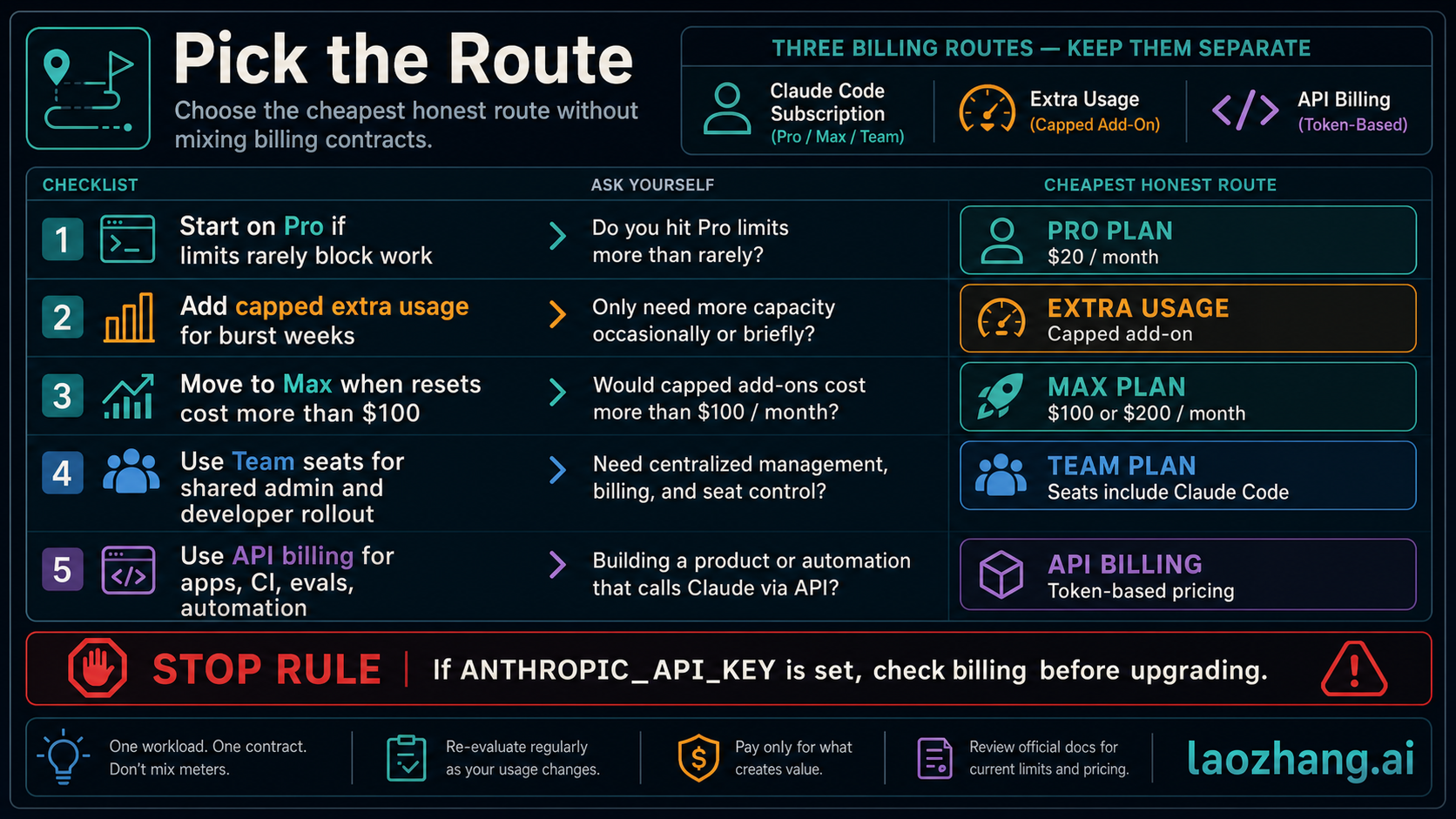
After reviewing all the pricing data, usage statistics, and optimization strategies, here is a straightforward decision framework. The right plan depends on three factors: how often you use Claude Code, whether you work alone or with a team, and whether you need programmatic API access.
Choose Pro ($20/month) if you are an individual developer who uses Claude Code regularly but not all day every day. This covers the vast majority of developers. Pro includes Claude Code access, extended thinking, and enough usage headroom for several hours of daily coding. At $20 per month versus the $180 per month average API-equivalent cost, it is the highest-value option available. If you are unsure which plan to start with, start here.
Choose Max 5x ($100/month) if you consistently hit Pro rate limits. Signs you need Max include frequently seeing "rate limit reached" messages, running multiple concurrent Claude Code sessions, working with very large codebases that require extensive context, or using Claude Code as your primary development environment for 6 or more hours daily. The 5x tier is usually sufficient. Only upgrade to the 20x tier ($200/month) if the 5x limits still constrain your workflow.
Choose Team Premium ($100-150/seat/month) if you are managing a team of 5 or more developers who need Claude Code. The administrative features (centralized billing, usage monitoring, spend limits, SSO) justify the cost over giving everyone individual subscriptions. Remember that Standard seats do not include Claude Code, so budget for Premium seats for all developers.
Choose API pay-as-you-go if you are building applications on top of Claude, running automated coding workflows in CI/CD pipelines, or need fine-grained control over exactly which model handles each request. Subscription plans explicitly prohibit scripted and automated usage, so API billing is the only compliant option for these use cases. Budget $100-200 per developer per month as a starting estimate, and use prompt caching aggressively to reduce costs.
Choose Enterprise if your organization has 50+ developers, needs HIPAA compliance or other regulatory requirements, wants dedicated support, or requires custom rate limits. Contact Anthropic's sales team for pricing.
The breakeven between Pro and API billing is straightforward to calculate. At $20 per month, Pro pays for itself if your monthly API-equivalent consumption exceeds $20, which translates to approximately 6.7 million Sonnet 4.6 input tokens or 1.3 million output tokens. To put that in perspective, a single medium-complexity coding session where Claude reads several files, generates a plan, and implements changes can easily consume 500,000 to 2 million tokens. Most developers exceed the $20 API-equivalent threshold within their first two to three days of active use, making Pro the clear winner for interactive coding work.
For the Max breakeven, the math is similar but at a higher threshold. If your monthly API-equivalent consumption regularly exceeds $100, the Max 5x plan saves money while also giving you access to Opus and higher rate limits. Based on Anthropic's published statistics showing that 10% of developers spend more than $12 per day (roughly $360 per month), the Max plan serves the top decile of power users well. The remaining 90% of developers are better served by Pro.
One final consideration that is often overlooked: the cost of context switching. If you are constantly hitting Pro rate limits and waiting for them to reset, the lost productivity may cost more than the $80 per month difference between Pro and Max. Your hourly rate as a developer is likely far higher than the per-hour cost difference between plans. Choose based on whether rate limits actually interrupt your workflow, not on the sticker price alone.
Frequently Asked Questions
Is Claude Code free to use?
Claude Code is not available on the Free plan. The cheapest way to access Claude Code is through the Pro subscription at $20 per month ($17 per month with annual billing). There is no free trial for Claude Code specifically, though new API users receive a small amount of free credits to test the API.
Can I use my Pro subscription for automated scripts?
No. Anthropic's terms of service explicitly prohibit using subscription plans for scripted, automated, or CI/CD usage. If you need to run Claude Code in automation, you must use API billing with pay-as-you-go pricing. Violating this policy can result in account suspension.
Does upgrading from Pro to Max transfer my usage data?
Your conversation history and project data are preserved when upgrading. The change takes effect immediately with your next billing cycle. You can downgrade back to Pro at any time, though you will lose access to Max-exclusive features like Opus model access and persistent memory.
How does Claude Code pricing compare to GitHub Copilot or Cursor?
GitHub Copilot costs $10-19 per month for individuals, while Cursor Pro costs $20 per month. Claude Code Pro at $20 per month is price-competitive with Cursor and slightly more expensive than Copilot's base tier. The key difference is that Claude Code operates as a terminal-based agent that can make multi-file changes, run commands, and manage complex workflows, while Copilot primarily focuses on inline code completion. The tools serve different workflows, so direct price comparison only tells part of the story.
What happens if I exceed my rate limits?
You will see a "rate limit reached" message and need to wait before sending more requests. Claude Code does not charge overage fees on subscription plans. You simply cannot use the service until your rate limit window resets. If rate limits consistently block your work, upgrading to a higher tier or switching to API billing (which has separate, typically higher rate limits) resolves the issue. See our complete rate limit troubleshooting guide for detailed solutions.
Are there student or academic discounts?
Anthropic does not currently advertise student or academic discounts for Claude Code subscriptions. However, the API offers new users a small amount of free credits, and academic institutions can contact sales@anthropic.com to discuss potential research pricing arrangements.