Claude Code API Billing vs Subscription: Key, Credits, or Pro/Max
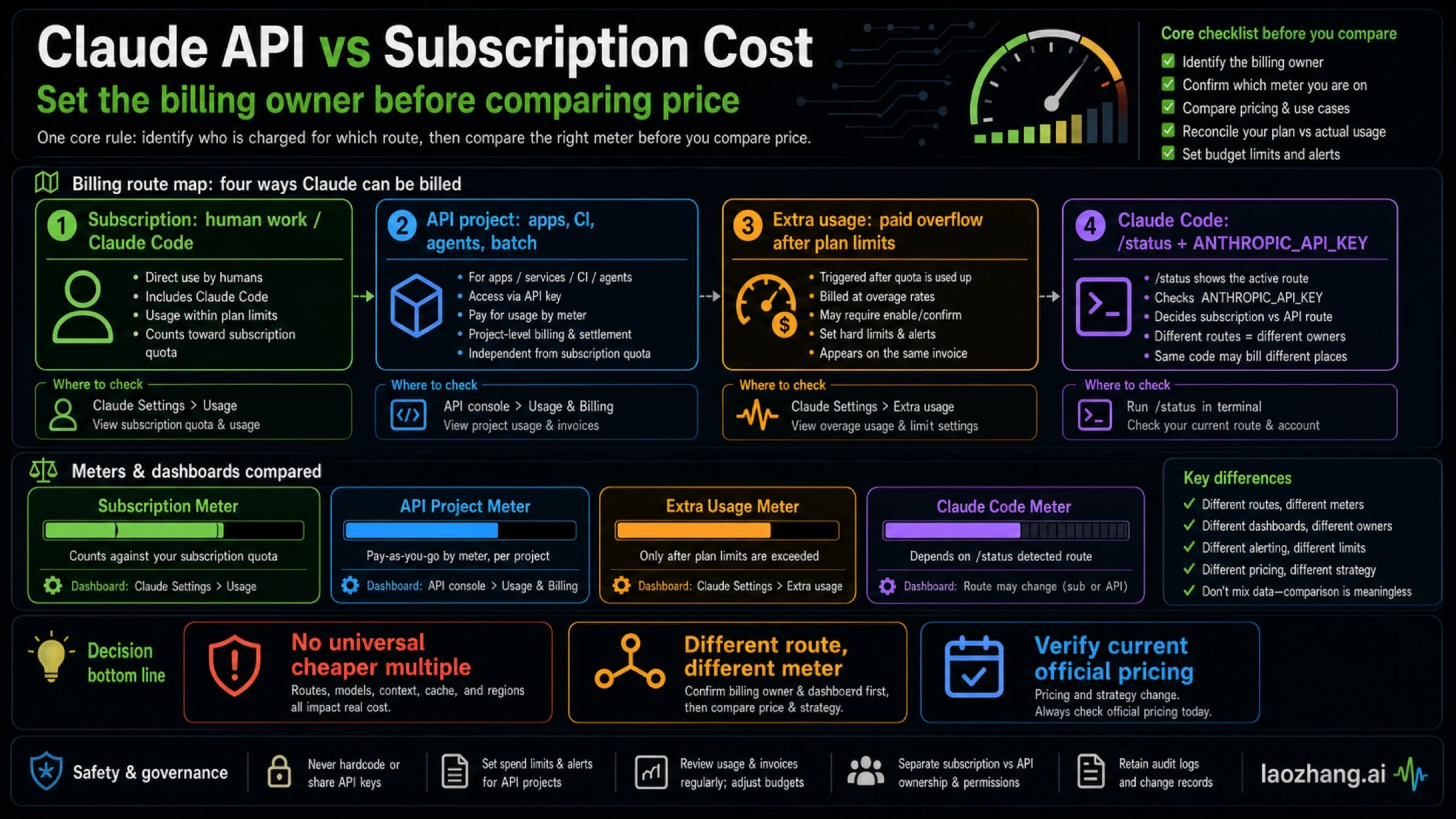
Once you approve ANTHROPIC_API_KEY, Claude Code bills that key instead of your Pro or Max plan, and claude -p always uses it. /status shows which one pays.
On this page
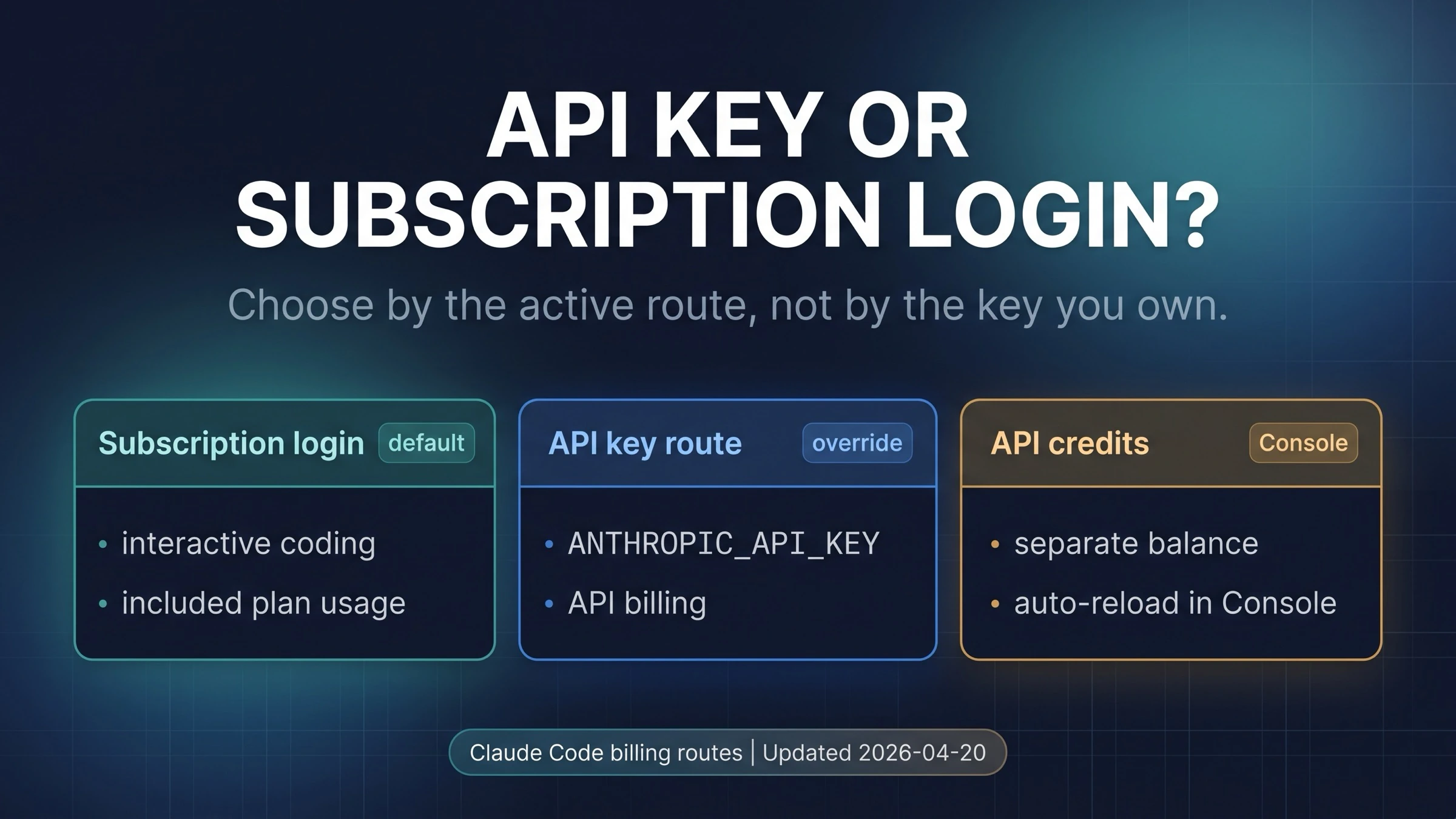
As of October 10, 2026, Claude Code bills whichever credential comes first in its documented order, not the plan you think you're on. If ANTHROPIC_API_KEY is set and you approved it at the one-time prompt, interactive sessions charge that key's Claude Console organization at API rates. Non-interactive runs (claude -p) use the key whenever it's present, with no prompt at all. With no key or token in the environment, Claude Code uses your Pro, Max, Team, or Enterprise login and counts against your plan limits. Run /status to see which one is active.
A Claude subscription doesn't come with an API key. The Claude API is billed separately, through prepaid credits in Claude Console. The one overlap is new: since October 7, 2026, Max and Team plans include monthly API credits. They pay for API calls, the Agent SDK, and claude -p run with a key from the linked Console organization. They don't pay for interactive Claude Code.
| What's set where you launch Claude Code | Who pays | How to get back to your plan |
|---|---|---|
Nothing but a /login with Pro, Max, Team, or Enterprise | Your plan limits, then usage credits only if you turned them on | Nothing to change |
ANTHROPIC_API_KEY, approved at the prompt | The Console organization that owns the key, at API rates | unset ANTHROPIC_API_KEY, or turn off "Use custom API key" in /config |
ANTHROPIC_API_KEY plus claude -p | The key, every time, no prompt | Unset the key in that environment; use CLAUDE_CODE_OAUTH_TOKEN for plan-billed scripts |
ANTHROPIC_AUTH_TOKEN | Whoever runs the gateway or proxy the token is for | Unset it |
CLAUDE_CODE_USE_BEDROCK, _VERTEX, or _FOUNDRY | Your cloud provider account | Unset the flag |
CLAUDE_CODE_OAUTH_TOKEN from claude setup-token | Your subscription | Already on the plan, unless a key above it is also set |
| A Claude Code cloud session | Always your subscription; keys in the cloud environment are ignored | Nothing to change |
Start With The Active Route
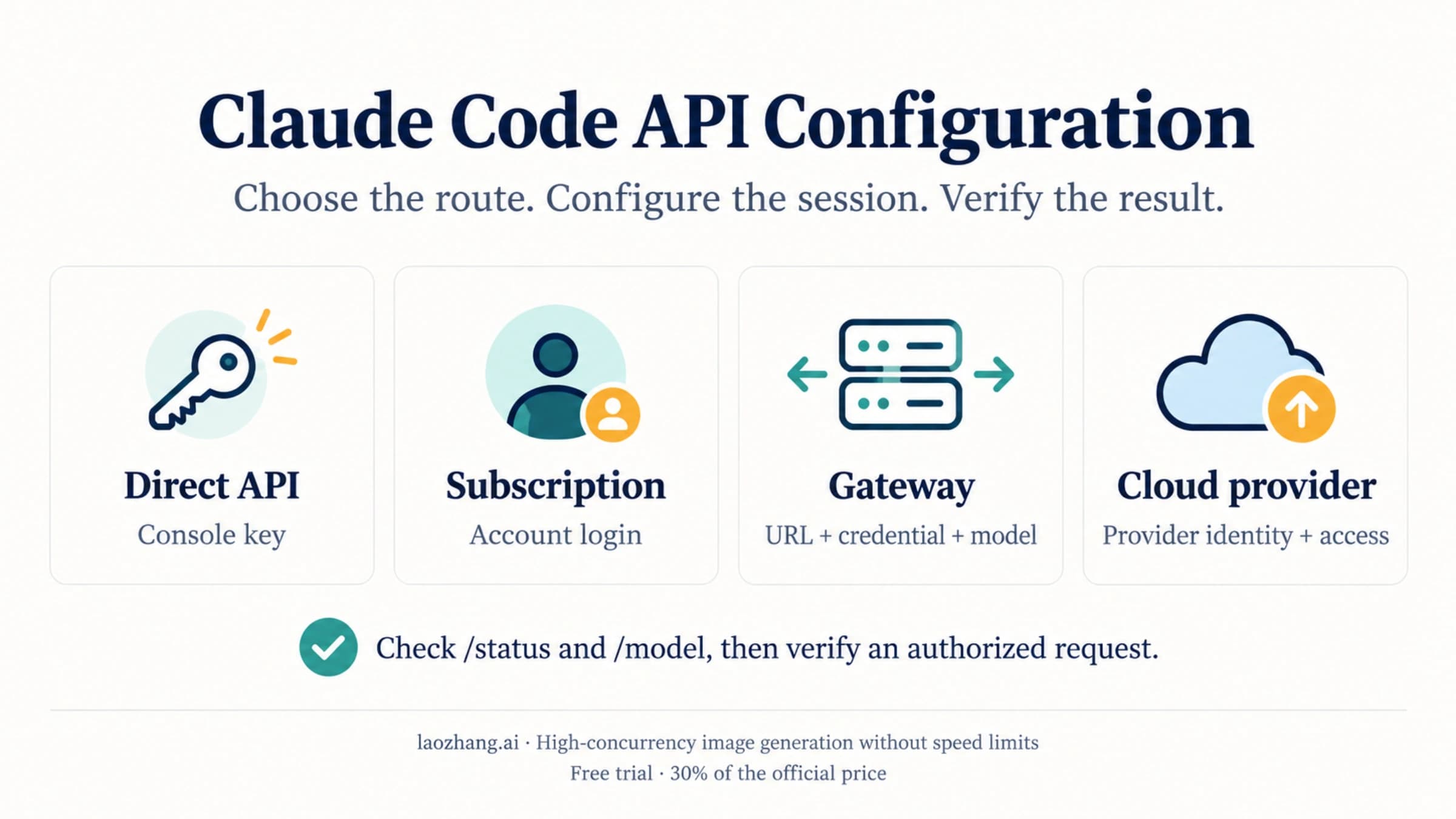
Claude Code doesn't combine credentials. When several are present, it picks one in this order, according to the Claude Code authentication docs:
- Cloud provider credentials, when
CLAUDE_CODE_USE_BEDROCK,CLAUDE_CODE_USE_VERTEX, orCLAUDE_CODE_USE_FOUNDRYis set. Usage goes to your AWS, Google Cloud, or Microsoft Foundry account. ANTHROPIC_AUTH_TOKEN, sent as a bearer token, usually to an LLM gateway or proxy. Whoever operates that gateway pays Anthropic.ANTHROPIC_API_KEY. In interactive mode you're asked once to approve or decline the key, and Claude Code remembers your answer. In non-interactive mode (-p), the key is always used when present.apiKeyHelper, a script in your settings that prints a key. The key's Console organization pays.CLAUDE_CODE_OAUTH_TOKEN, a one-year token fromclaude setup-tokenthat bills your subscription.- Anthropic profile and federation credentials.
- Subscription login from
/login. This is the default for Pro, Max, Team, and Enterprise users.
Your plan login sits at the bottom. Anything above it that's present and accepted takes over, and the docs spell out the most common case: "If you have an active Claude subscription but also have ANTHROPIC_API_KEY set in your environment, Claude Code uses the API key once you approve it."
The same variables reach more places than the terminal. apiKeyHelper, ANTHROPIC_API_KEY, and ANTHROPIC_AUTH_TOKEN apply to the CLI and everything that wraps it, including the VS Code extension, the Agent SDK, and GitHub Actions. Claude Desktop and cloud sessions don't read them, and cloud sessions always use your subscription even if you put a key in the cloud environment.
The billing side is all that matters here. For where to put these variables, how to pick models, and how to point Claude Code at a gateway, see Claude Code API Configuration: Keys, Settings, Models, and Gateways.
Check The Route Before You Read Any Meter
Start inside Claude Code with /status. It shows which sign-in method is active, and when both a login and an API key are configured, it marks the one that isn't in use. That answer decides which bill to look at: plan limits in Settings > Usage, or the API ledger in Claude Console.
Then check whether a key is sitting in the environment. This prints only whether the variable is set, never its value:
if [ -n "${ANTHROPIC_API_KEY:-}" ]; then printf '%s\n' 'ANTHROPIC_API_KEY is set'; else printf '%s\n' 'ANTHROPIC_API_KEY is unset'; fiRun the same check for ANTHROPIC_AUTH_TOKEN and the CLAUDE_CODE_USE_* flags if you use a gateway or a cloud provider at work. These variables are easy to forget because they can come from .zshrc, .bashrc, a project .env, a terminal profile, a devcontainer, a CI secret, or a launcher script. Don't paste the value into tickets, chats, or screenshots.
The one-time prompt explains most "silent" switches. You approve the key once, perhaps for a quick API test, and from then on every interactive session started from that shell bills the key without asking again. To change the answer later, open /config and use the "Use custom API key" toggle. The toggle only appears while ANTHROPIC_API_KEY is set. Approving the key also skips the login prompt, which is why a machine that has never run /login can still look "signed in."
A leftover key can also break things instead of billing them. The docs warn that it "can cause authentication failures if the key belongs to a disabled or expired organization." If Claude Code refuses to authenticate even though your plan is active, check for an old key before anything else.
Why API Billing Appears On A Subscribed Account
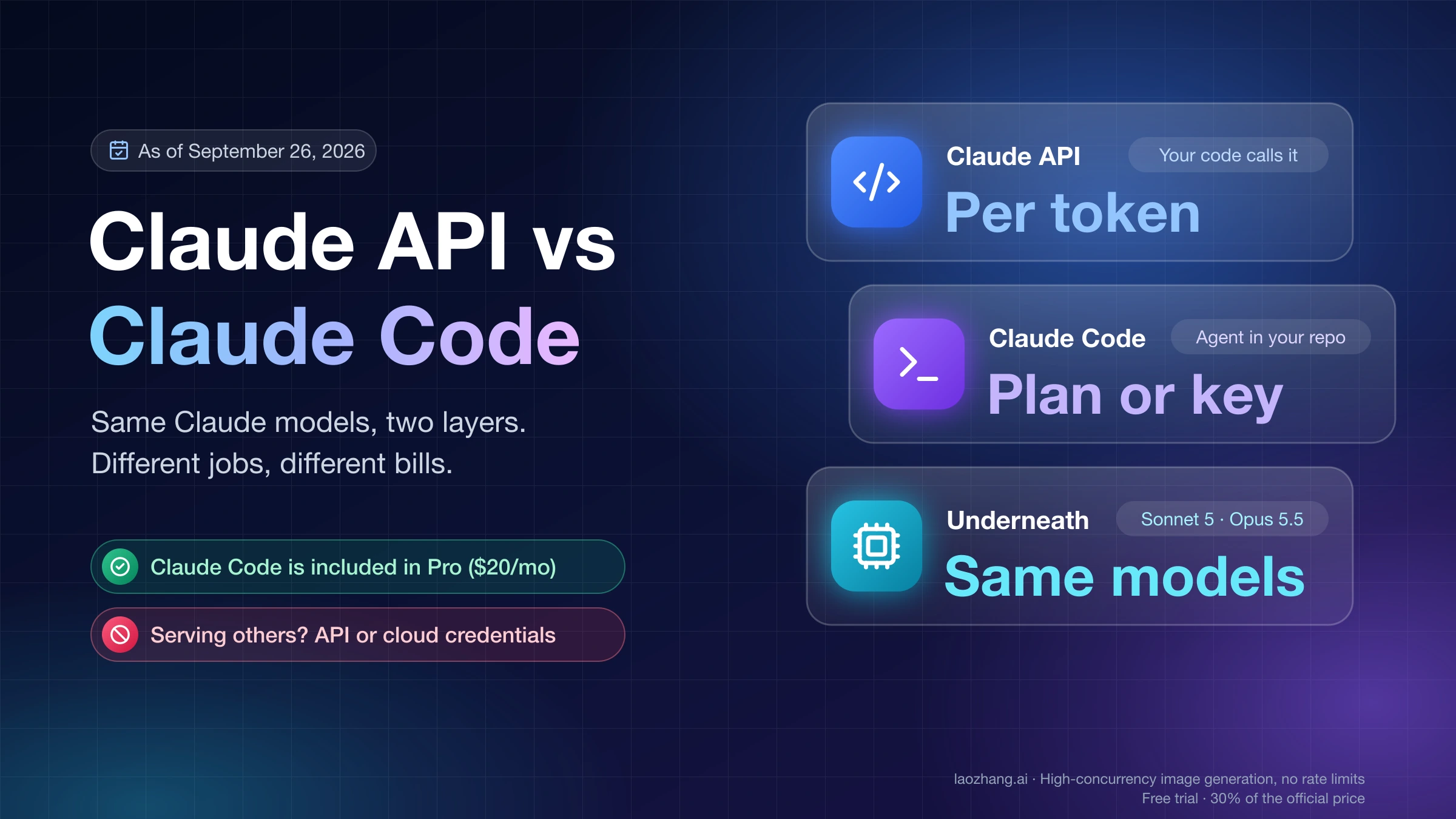
A Claude subscription and the Claude API are separate purchases. Pro or Max lets Claude Code run on your Claude login, but the plan doesn't include general API calls, and the API doesn't draw from your plan. When both are configured on one machine, the credential in effect decides the bill.
| Cause | What happened | What to do |
|---|---|---|
You approved ANTHROPIC_API_KEY at some point | Interactive sessions from that shell bill the key | unset ANTHROPIC_API_KEY or switch the /config toggle off, then check /status |
A script or cron job runs claude -p with a key in its environment | -p always uses the key, with no prompt | Remove the key from that environment, or use CLAUDE_CODE_OAUTH_TOKEN if the job should run on your plan |
| VS Code or another wrapper inherited the key | The extension reads the same variables as the CLI | Remove the key from the shell or profile VS Code starts from |
ANTHROPIC_AUTH_TOKEN or a cloud provider flag is set | A gateway, AWS, Google Cloud, or Microsoft Foundry pays, not your plan | Unset it if you meant to use your plan |
| You turned on usage credits | Work past your plan limits continues at standard API rates | Set a monthly cap in Settings > Usage |
| You picked a Fable model on Pro or a standard Team seat | Fable isn't included in those plans' limits, so usage credits pay from the first request | Switch models, or cap usage credits |
| Your plan limits still run out | That's a capacity question, not a billing one | Compare plans instead of adding a key |
The main mistake is trying to fix every surprise charge by upgrading Pro to Max, or every limit message by buying credits. They're different controls. If /status shows your account login, look at plan limits and Settings > Usage. If it shows an API key, look at the environment and Console usage.
For limit behavior itself, see checking and reducing Claude Code usage limits and what Pro and Max limits actually multiply. Keep that separate from the credential check so you don't change the wrong thing.
Which Meter Should You Trust?
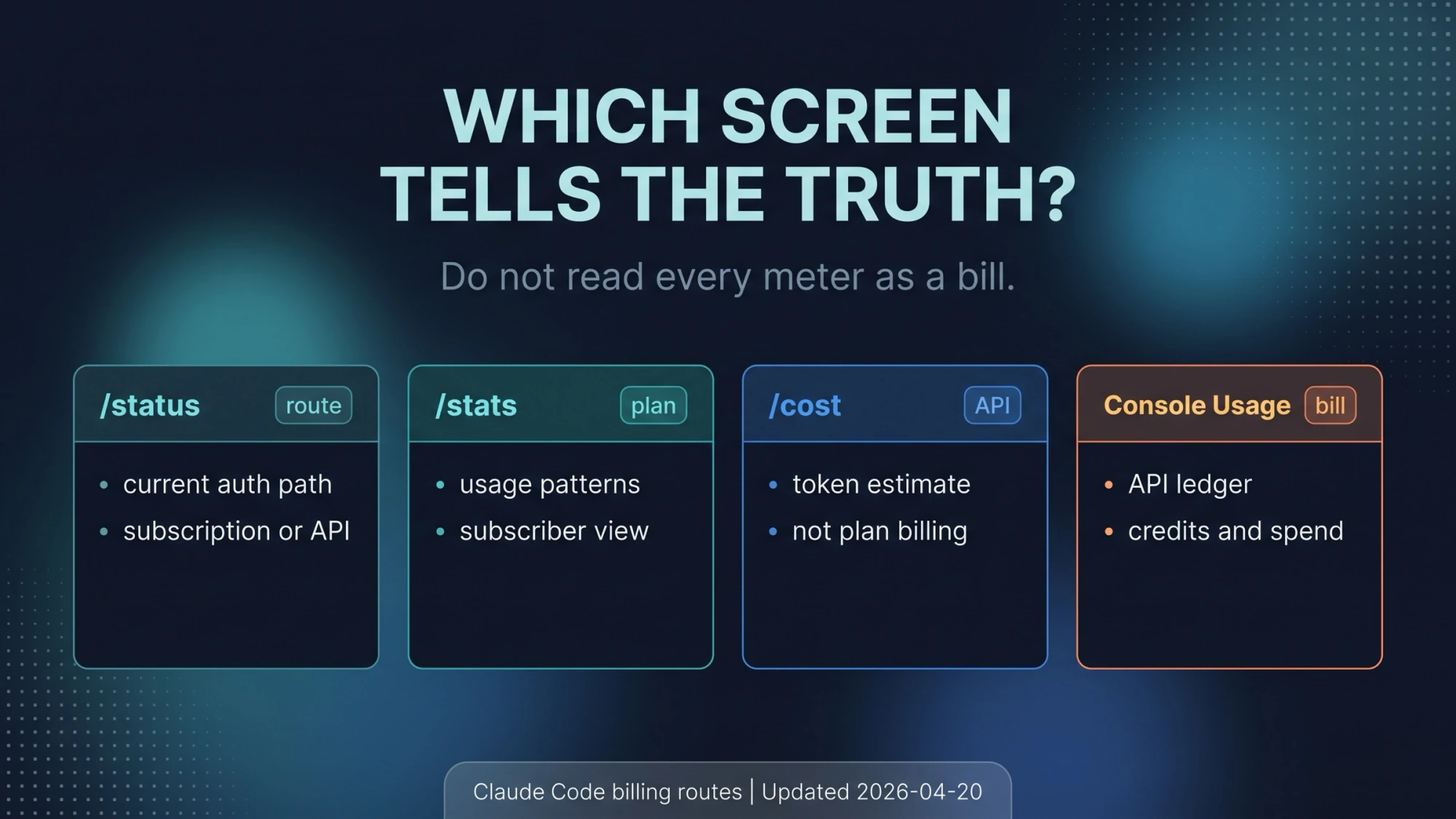
Claude Code has several meters, and they answer different questions.
/status answers "who pays right now." Check it first, because every other number is easier to misread without it.
/usage shows plan usage for subscribers: how much of the session and weekly limits you've used and when they reset, the same numbers as Settings > Usage on claude.ai. If your installed version or your team still refers to /stats, treat it as a view of usage patterns, not an invoice.
/cost, or a dollar figure in usage output, is an estimate built from token counts at API rates. Claude Code's cost-tracking docs describe local dollar figures as estimates and point to Console usage as the record for API billing. On a Pro or Max login, that estimate isn't what you're charged.
Settings > Usage on claude.ai is where subscribers see included plan usage, usage-credit spending, monthly caps, and auto-reload. Claude Console's billing and usage pages are the record for API-key spend, project ownership, and API credits. If a team asks which project paid for a run, the answer comes from Console, not from a screenshot of a local session.
For a team runbook, record two things: what /status showed and the matching Settings or Console entry. Together they show which credential ran and who paid.
When An API Key Is The Right Route
An API key is the right choice when the work is API work: code you ship to other people, server-side agents, shared or production automation, evaluation harnesses, and anything that needs a Console project with its own spend limit and usage record. A personal plan login is a poor fit for jobs that need auditable, per-project billing.
| What you're doing | Credential that fits | Why |
|---|---|---|
| Interactive coding in the terminal or the VS Code extension | Plan login (/login) | Covered by your plan limits; no per-token charges unless you turn on usage credits |
Your own scripts with claude -p | CLAUDE_CODE_OAUTH_TOKEN, or an API key if you want them billed separately | The token bills your plan; a key bills Console |
| Shared CI, team automation, or production jobs | API key from a Console project | Project-level spend limits and an audit trail |
| An app or service built on the Agent SDK for other users | API key | Anthropic's terms require it for products |
| Running work in Claude Code cloud sessions | Nothing to set | Always billed to your subscription |
| A third-party coding tool that offers "Claude login" | Check the tool's own docs | Coverage is disputed; see below |
Don't reach for an API key just to get past a limit message without knowing what changes. It works, but you move from a flat plan to per-token billing. If you only want fewer interruptions in interactive Claude Code, compare plans first with Claude Pro vs Max in 2026.
If the real question is whether a job belongs in your own code calling the API or in Claude Code at all, Claude API vs Claude Code: Which One to Use and How You Pay covers that choice.
Scripts on your plan: claude setup-token
claude setup-token prints a one-year OAuth token. It doesn't save it anywhere, so you copy it into your secret store and set it as CLAUDE_CODE_OAUTH_TOKEN in the environment that runs your script. According to the docs, the token "authenticates with your Claude subscription and requires a Pro, Max, Team, or Enterprise plan," and it can only make model requests. Bare mode doesn't read it.
Mind the order from the first section. ANTHROPIC_API_KEY ranks above CLAUDE_CODE_OAUTH_TOKEN, so if both are present in a -p run, the key wins and the run bills Console. Keep the key out of any environment where you want the token to apply.
If you use more than one Claude account, the docs suggest giving each its own configuration directory with CLAUDE_CONFIG_DIR. Your login itself lives in the macOS Keychain, or in ~/.claude/.credentials.json on Linux and Windows. /logout clears it.
Products and third-party tools: the terms line
Anthropic's Claude Code legal and compliance page draws the boundary. OAuth login "is intended exclusively for purchasers of Claude Free, Pro, Max, Team, and Enterprise subscription plans and is designed to support ordinary use of Claude Code and other native Anthropic applications." Developers building products or services, "including those using the Agent SDK, should use API key authentication." Third-party developers may not offer Claude.ai login in their own apps or "route requests through Free, Pro, or Max plan credentials on behalf of their users." The same page says advertised Pro and Max limits "assume ordinary, individual usage of Claude Code and the Agent SDK."
For third-party coding tools, the public record conflicts. The Claude Help Center article on Agent SDK and claude -p usage with your plan says, as of its October 7, 2026 update, that "You can still use the Claude Agent SDK, claude -p, and third-party apps with your subscription limits." It also says the Agent SDK changes announced for June 15 were paused and "nothing has changed." Press coverage from April 4, 2026, reported that plan limits stopped covering OpenClaw-style harnesses, which moved to pay-as-you-go billing, bundles, or API keys. Later reports described a partial reversal. No single rule covers every tool, so check the tool's own documentation for how it signs in. Never use a plan login to serve other people's requests.
How Usage Credits And Prices Fit In
Prices below are as of October 10, 2026, from Claude's pricing page. They don't include tax, which some regions add at checkout.
| Plan | Price | Claude Code |
|---|---|---|
| Pro | $20 per month, or $200 per year (about $17 a month) | Included, within plan limits |
| Max 5x | $100 per month (monthly only) | Included, higher limits, $100 monthly API credit |
| Max 20x | $200 per month (monthly only) | Included, higher limits, $200 monthly API credit |
| Team Standard | $20 per seat per month billed annually, $25 monthly | Included; $20 API credit per seat |
| Team Premium | $100 per seat per month billed annually, $125 monthly | Included; $100 API credit per seat |
API keys and usage credits both bill at the same standard API rates, per million tokens:
| Model | Input | Output | Cache read |
|---|---|---|---|
| Fable 5.1 | $10 | $50 | $0.25 |
| Opus 5.5 | $4 | $20 | $0.20 |
| Sonnet 5.5 | $2 | $10 | $0.10 |
| Haiku 5.5 (prompts up to 100K tokens) | $0.10 | $0.50 | $0.01 |
Usage credits (Anthropic also calls this extra usage) let Pro, Max 5x, and Max 20x keep working after the plan limit, billed at those API rates. You turn them on in Settings > Usage with a payment method, a monthly spend limit, alerts, and optional auto-reload. The Claude Help Center article on managing usage credits says they cover both Claude conversations and Claude Code in the terminal, and that Max and Team monthly API credits don't apply to them.
Usage bundles are prepaid usage credits at a discount: $45 buys $50, $200 buys $250, and $700 buys $1,000, according to the Claude Help Center article on usage bundles. Individuals can buy up to $2,000 of discounted bundles a month. The balance only kicks in after plan limits run out, and usage credits must be turned on.
What a Claude Code turn costs depends on context size, so here's one worked example. Assume a turn reads 200K input tokens and writes 20K output tokens, with no caching:
- Opus 5.5: 0.2 × $4 + 0.02 × $20 = $0.80 + $0.40 = $1.20
- Sonnet 5.5: 0.2 × $2 + 0.02 × $10 = $0.40 + $0.20 = $0.60
- Fable 5.1: 0.2 × $10 + 0.02 × $50 = $2.00 + $1.00 = $3.00
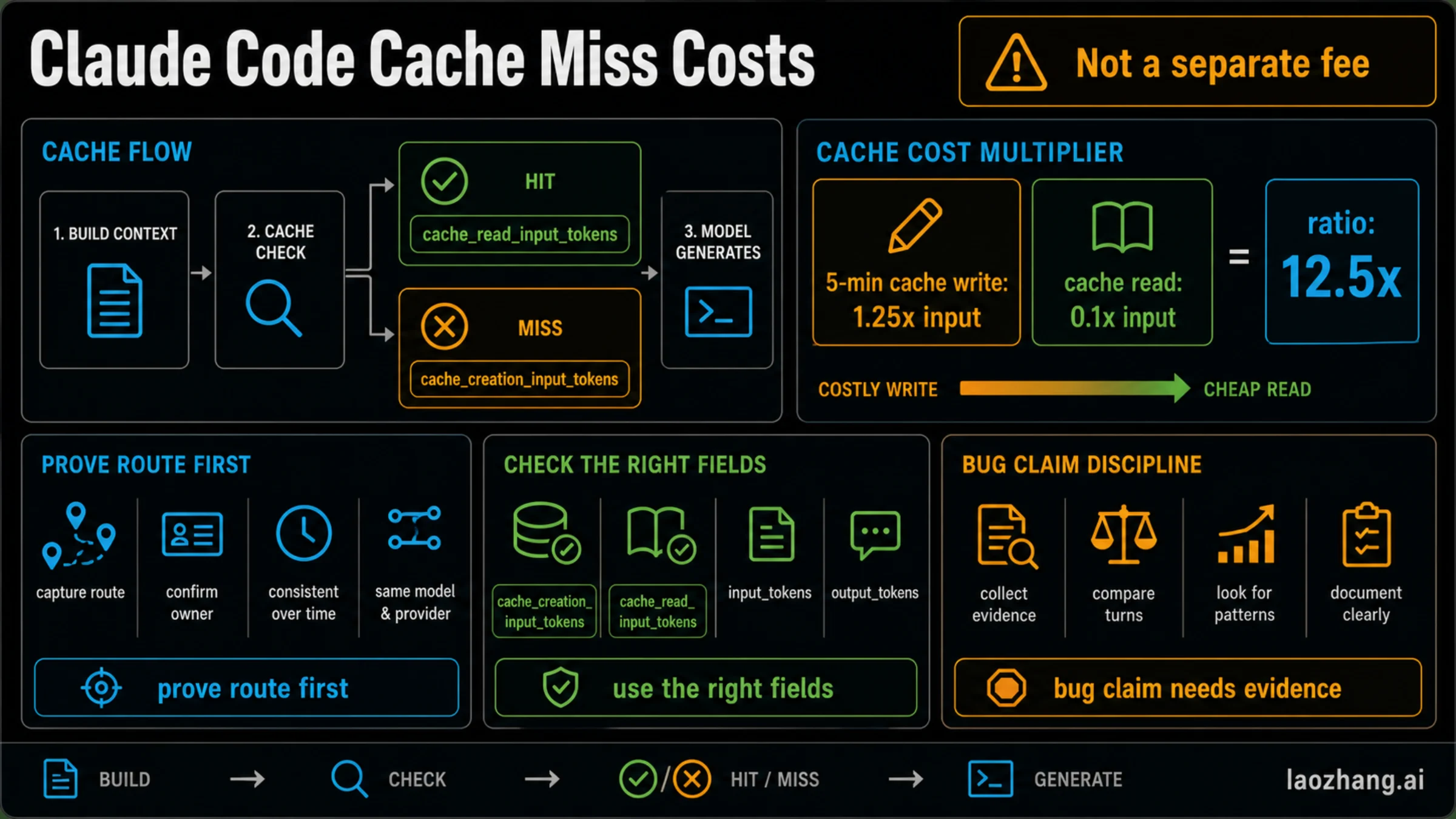
If 180K of that input is served from the prompt cache, the Opus 5.5 turn drops to 0.18 × $0.20 + 0.02 × $4 + 0.02 × $20 = $0.036 + $0.08 + $0.40 = $0.516. At these sizes, $20 of credits covers about 16 uncached Opus 5.5 turns or about 6 Fable 5.1 turns. With the largest bundle, each credit dollar costs $0.70, so the uncached Opus turn costs $0.84. Real turns vary widely, so treat these as a way to read your own Console numbers, not a forecast.
There's no single "API is N times cheaper" answer, because what matters is the kind of work:
| Workload | Better default | Why |
|---|---|---|
| One developer working interactively for a few hours a day | Plan login | Flat price, no per-token surprises |
| Heavy interactive use that keeps hitting limits | Compare Pro and Max first | Usually a capacity problem, not a key problem |
| Occasional overflow past the plan limit | Usage credits with a monthly cap | Same rates as the API, inside your Claude account |
| CI that must run without a human login | API key from a Console project | Project ownership and an audit trail |
| Backend app or SDK integration | API key | It's API work, not personal use of Claude Code |
| Finding out whether the API has free credits | A separate question | See how to get a Claude API key and whether it's free |
For overflow math in more detail, see Claude Extra Usage Cost: Credit Math and When Max Is Cheaper. For every plan and price in one place, use the Claude Code pricing guide, and for current ways to pay less, Claude Code discounts in 2026.
Max And Team Monthly API Credits Since October 7, 2026
Since October 7, 2026, Max and Team plans include a monthly Claude API credit: $100 on Max 5x, $200 on Max 20x, and $20 per Standard seat or $100 per Premium seat on Team, pooled and capped at $500 a month. Free, Pro, and Enterprise aren't eligible. After seven days on the plan, you claim it by linking one Claude Console organization from your billing settings, as described in the Claude Help Center article on monthly API credits for Max and Team plans.
The credit pays for the Claude API, Claude Managed Agents, the Agent SDK, and the Console playground. It refreshes each billing cycle and doesn't roll over. It doesn't pay for interactive Claude Code, and it doesn't pay for usage credits once you pass your plan limits.
The Claude Code overlap is narrow. claude -p and the Agent SDK draw on the credit only when they run with an API key from the linked Console organization. Signed in with your plan, they still use plan limits. So a Max subscriber can now keep scripts on a key from the linked organization and interactive work on the plan login, and the first $100 or $200 of that key's spend each month is covered.
This is a different credit from the cloud session credit that Pro and Max accounts could claim until October 7. Claude Cloud Session Credit vs Usage Credits vs Limit Reset compares all of them.
How To Switch Back To Subscription Use
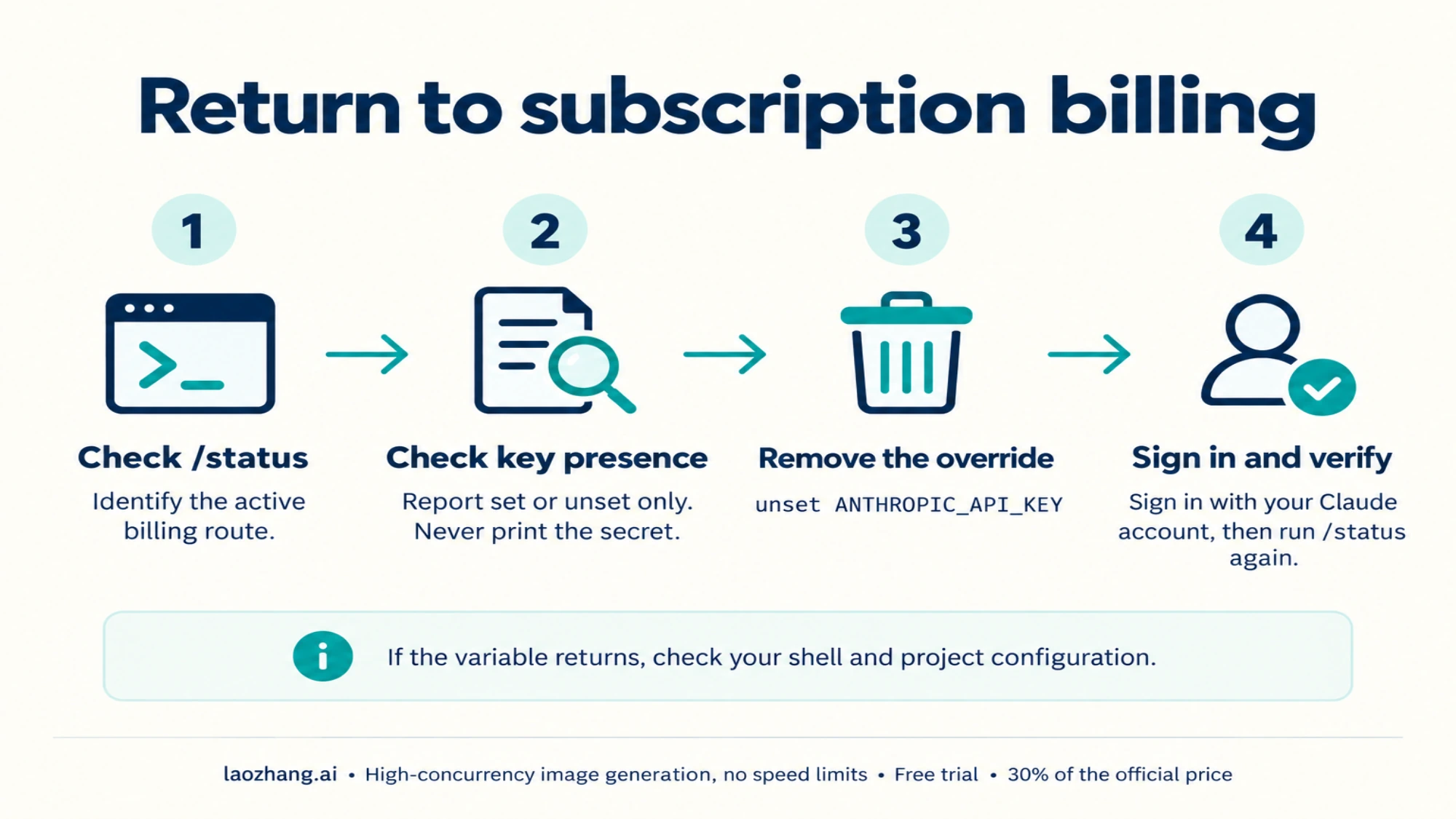
If you expected plan billing but see API charges, don't start by deleting keys in Console. First find out whether the local environment is sending Claude Code to the key.
- Run
/statusinside Claude Code and note whether the API key or your account login is active. - In the same terminal, run the presence-only check above for
ANTHROPIC_API_KEY. - If the key is set and you want your plan, run
unset ANTHROPIC_API_KEY, the fallback the docs give. To keep the key in the environment for other tools, turn off "Use custom API key" in/configinstead. - If
/statusstill doesn't show your plan account, run/logout, then/loginwith the Claude account that has Pro, Max, Team, or Enterprise. - Run
/statusagain before starting real work. - If the key comes back in a new terminal, remove it from shell startup files, project env files, launch agents, CI secrets, or container configuration.
unset only affects the current shell. It doesn't delete the key from Console, and it doesn't change scripts that set their own environment.
This prevents a common way of paying twice: you keep a subscription for interactive work, set an API key for one test, forget the variable, and assume Claude Code is still on your plan.
If your team wants both on purpose, write it down: plan login for local interactive coding, API key or CLAUDE_CODE_OAUTH_TOKEN for automation, and Console usage for API spend review.
What Not To Mix Up
Don't say "Claude Code is free" just because a paid plan covers it. The plan has limits, and API usage is billed separately.
Don't say "Pro includes API calls." Pro covers Claude Code on your Claude login. API access is a separate Console purchase. Max and Team now include a monthly API credit, but it's a fixed amount, separate from your plan limits.
Don't treat the monthly API credit, usage credits, usage bundles, and the cloud session credit as one balance. Each pays for something different.
Don't read /cost or a local dollar estimate as your subscription bill. /status, /usage, Settings > Usage, and Console usage each answer a different question.
Don't paste a real API key into tickets, chat, screenshots, or troubleshooting prompts. Show whether the variable exists and what /status reports, not the secret.
Don't take billing rules from forums. Forums show which confusions are common, but the current rules come from Claude's help center and Claude Code docs.
Sources And Verification Path
The billing facts above are as of October 10, 2026, and come from these pages:
- Claude Code authentication docs: credential order, the one-time key prompt, the
/configtoggle,/status,claude setup-token, and cloud sessions. - Claude Code legal and compliance page: who may use OAuth login and when products need an API key.
- Claude Help Center article on Agent SDK and claude -p usage with your plan: third-party apps and the paused June 15 change.
- Claude Help Center article on monthly API credits for Max and Team plans.
- Claude Help Center article on managing usage credits and the article on usage bundles.
- Claude Help Center article on Fable models in paid plans.
- Claude pricing page for plan and API prices.
For your own account, use the same order: /status first, the environment second, Settings > Usage or Console usage third. That tells you who pays before you change plans or buy anything.
FAQ
Do I need an API key to use Claude Code?
No, not for interactive use on Pro, Max, Team, or Enterprise. Run /login and Claude Code bills your plan. You need an API key when the work should be billed to a Console project, such as SDK apps, shared CI, or production automation. For your own scripts, claude setup-token gives you a plan-billed token instead.
Does a Claude Code subscription give you an API key?
No. Pro and Max cover Claude Code through your Claude login, and the Claude API is billed separately with prepaid credits you buy in Claude Console. Since October 7, 2026, Max and Team plans also include a monthly API credit ($100 on Max 5x, $200 on Max 20x) that you claim by linking a Console organization. You still create the API key in Console.
Why is Claude Code billing my API account when I have Pro or Max?
Most likely ANTHROPIC_API_KEY is set and you approved it once, or a script runs claude -p, which always uses the key. Run /status, check whether the variable is set in the shell or tool that launched Claude Code, and unset it or turn off "Use custom API key" in /config.
Is it better to use Claude Code with a subscription or an API key?
For a person coding interactively, a subscription is usually the better fit: a flat price and no per-token charges. An API key fits shared automation, products built on the Agent SDK, and work that needs per-project billing. If you keep hitting limits, compare Pro and Max, or turn on capped usage credits, before switching everything to a key.
How much cheaper is a Claude subscription vs the API?
It depends on how much you use. At API rates, one Claude Code turn that reads 200K tokens and writes 20K costs $1.20 on Opus 5.5 and $0.60 on Sonnet 5.5 without caching. So the $20 Pro price equals about 16 such Opus turns. Plan limits aren't published as token counts, so any fixed "N times cheaper" figure is someone's estimate from their own usage.
Do I need a subscription to use Claude Code in VS Code?
No. The VS Code extension uses the same credentials as the CLI. Sign in with a Pro, Max, Team, or Enterprise plan, or use an API key. If VS Code inherited ANTHROPIC_API_KEY from your shell, the extension bills that key, so check /status there too.
Are Claude usage credits the same as subscription usage?
No. Usage credits let Pro and Max keep working after the plan limit, charged separately at standard API rates. Plan usage stays within your plan's included limits and reset schedule. Monthly API credits on Max and Team don't pay for usage credits.
Is /cost or /usage showing my Pro or Max bill?
No. A local dollar figure is an estimate at API rates. Use /status to see who pays, /usage and Settings > Usage for plan usage and usage-credit spending, and Console usage for API billing.
How do I stop Claude Code from using my API key?
Run unset ANTHROPIC_API_KEY or turn off "Use custom API key" in /config. Then run /status; if your plan account still isn't active, run /logout and /login. If the key returns in a new terminal, remove it from shell startup files, project env files, CI secrets, or container configuration.
What does "Claude Max or Pro is required to connect to Claude Code" mean?
The account you signed in with doesn't have a plan that includes Claude Code. The message names the two ways forward: subscribe to Pro or Max, or use an API key, which bills Console at API rates. If you already pay for a plan, check that you signed in with that account. People with several accounts can keep them apart with CLAUDE_CONFIG_DIR.
What is the $100 or $250 bonus credit for cloud sessions?
It was a one-off credit for Claude Code cloud sessions, $100 on Pro and $250 on Max, on top of plan limits. Claims closed on October 7, 2026. It isn't the same as the monthly API credit that Max and Team gained that day. Claude Cloud Session Credit vs Usage Credits vs Limit Reset explains what a claimed balance still covers.
Can I use my Pro or Max plan in third-party tools like OpenClaw or Cline?
There's no single answer. Claude's help center says third-party apps can still use your plan limits. Press reports since April 2026 say OpenClaw-style harnesses moved to separate billing. Anthropic's terms forbid tools from routing other people's requests through a plan login. Check how the tool signs in. If it asks for an API key, you're on API billing.
Is there a Claude Pro trial for Claude Code?
The documented option is a guest pass. Eligible Pro and Max subscribers have a limited number of guest passes that give someone new to paid Claude seven days of Pro, including Claude Code, with payment details required. It turns into paid Pro unless canceled. Claude Pro Free Trial: What's Real and Who Qualifies covers who qualifies.