How to Use Seedance Image to Video: Modes, Crops, and Cost
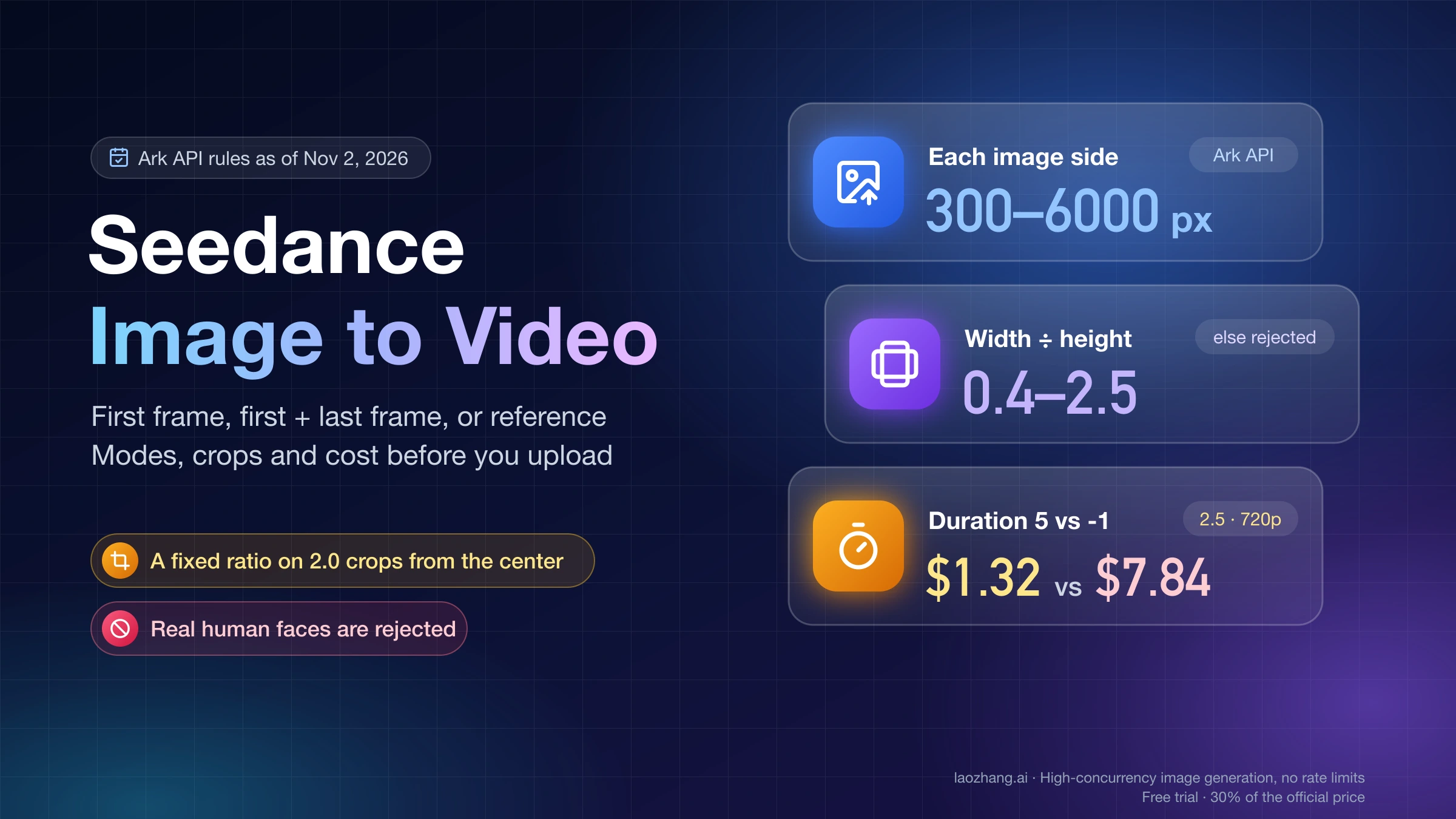
Use your picture as a first frame, first + last frame, or reference. Keep sides 300–6000 px and ratio 0.4–2.5, and set duration so 2.5 doesn't pick 30 s.
On this page
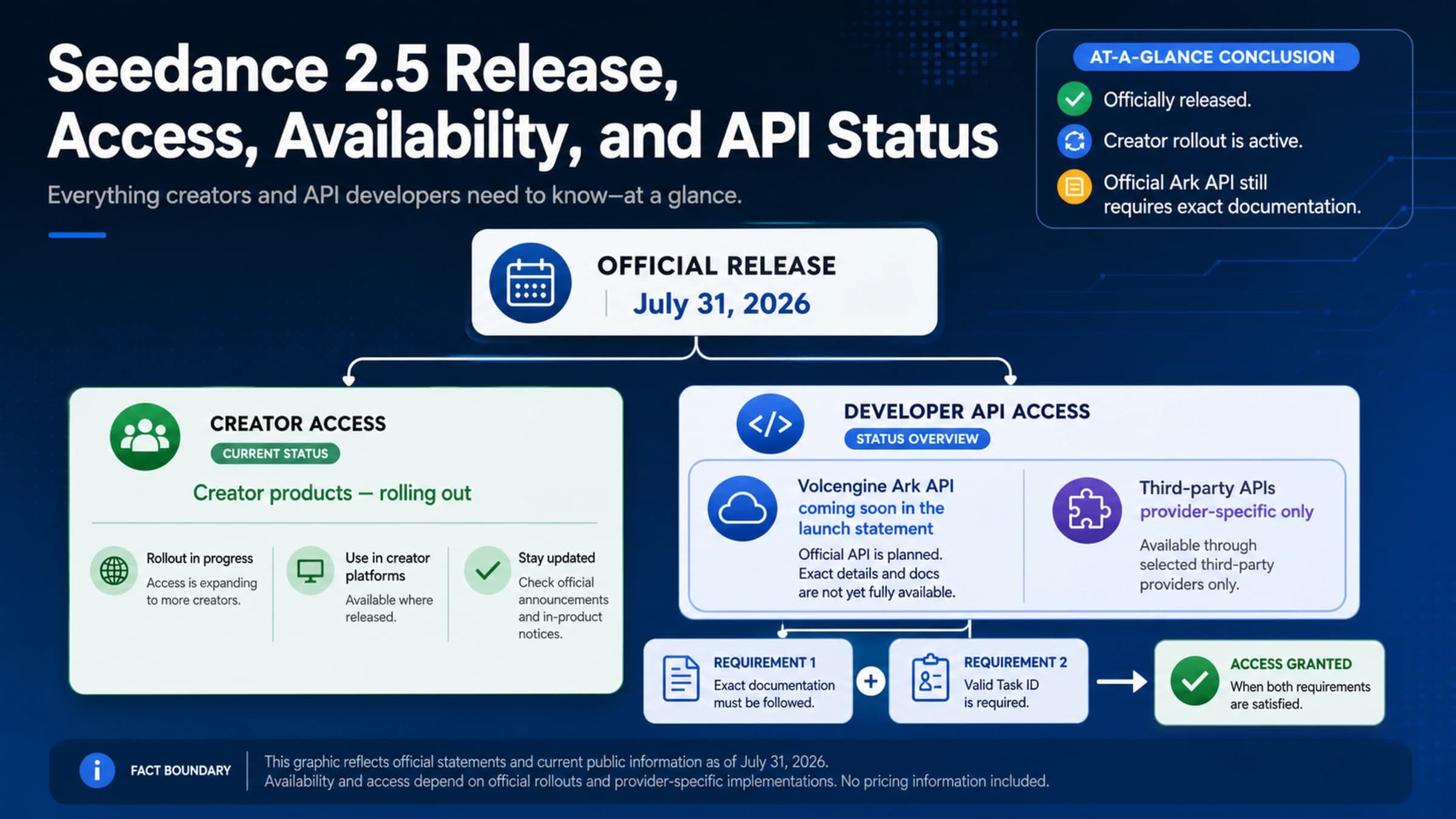
Yes, Seedance turns a still image into a short video. Seedance 2.5 and the 2.0 series (2.0, 2.0 fast and 2.0 mini) can use your picture in three ways: as the opening frame, as the opening and closing frames, or as a reference the model borrows a product, character or style from. If you simply want your picture to start moving, use it as the first frame. In Dreamina you upload the image and describe the motion. Through the API you put the image in the content array with role: "first_frame", pick a model such as doubao-seedance-2-5-260628, and describe the motion in a short text prompt.
Two settings decide whether the clip matches your picture and what it costs. On Seedance 2.5, leave ratio at adaptive, because that is the only value a first-frame task accepts, and set duration to a number such as 5 instead of the default -1, which lets the model choose any length up to 30 seconds. Before you upload, make sure each side of the image is 300–6000 px, width divided by height is between 0.4 and 2.5, and the file is under 30 MB. Those are the Volcengine Ark API rules as of November 2, 2026.
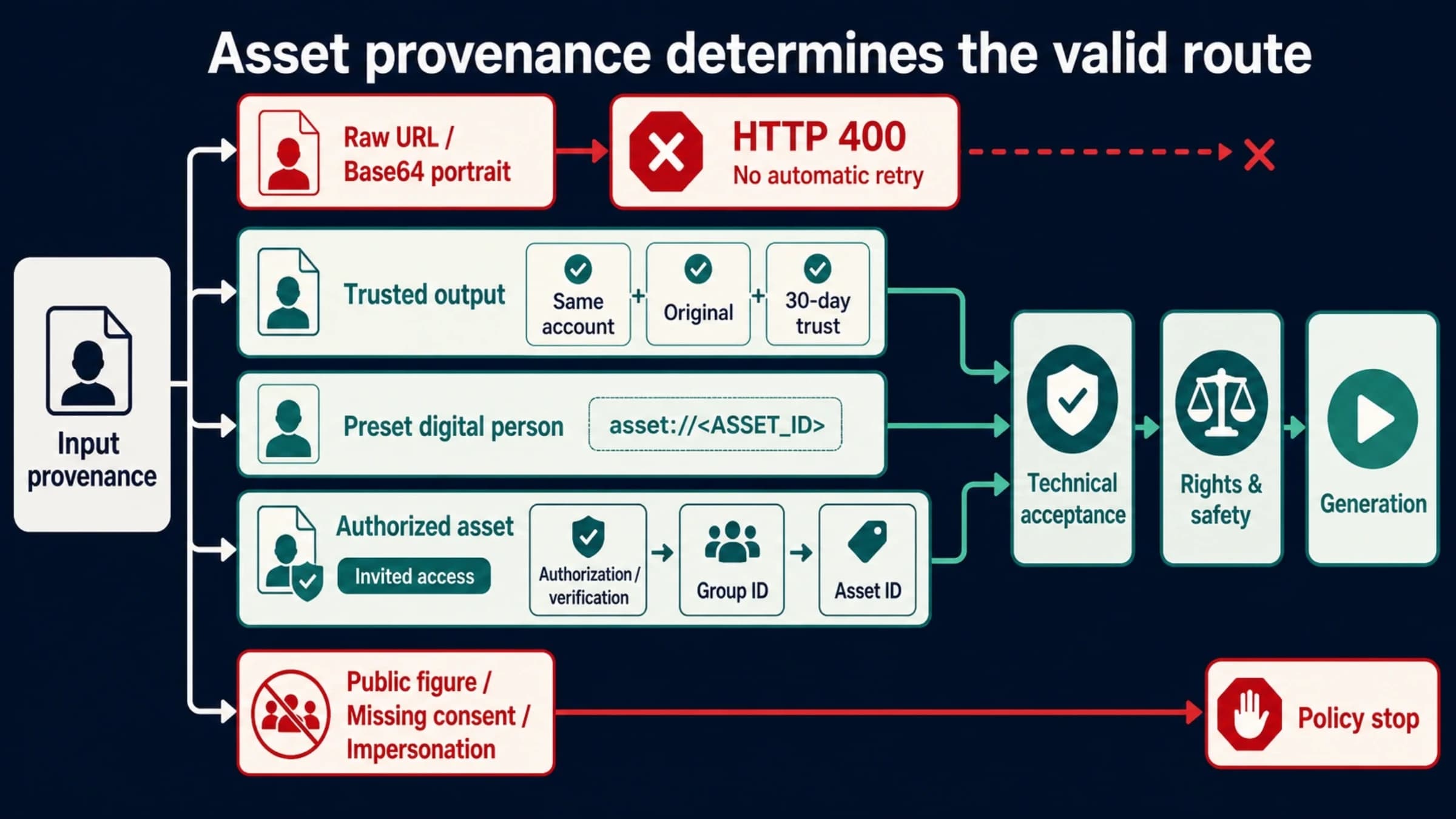
The main exception is a photo of a real person. Seedance 2.5 and 2.0 reject real human faces uploaded directly, and the legitimate workarounds are in Seedance Input Image May Contain a Real Person: Legitimate Fixes.
Which mode: first frame, first and last frame, or reference images
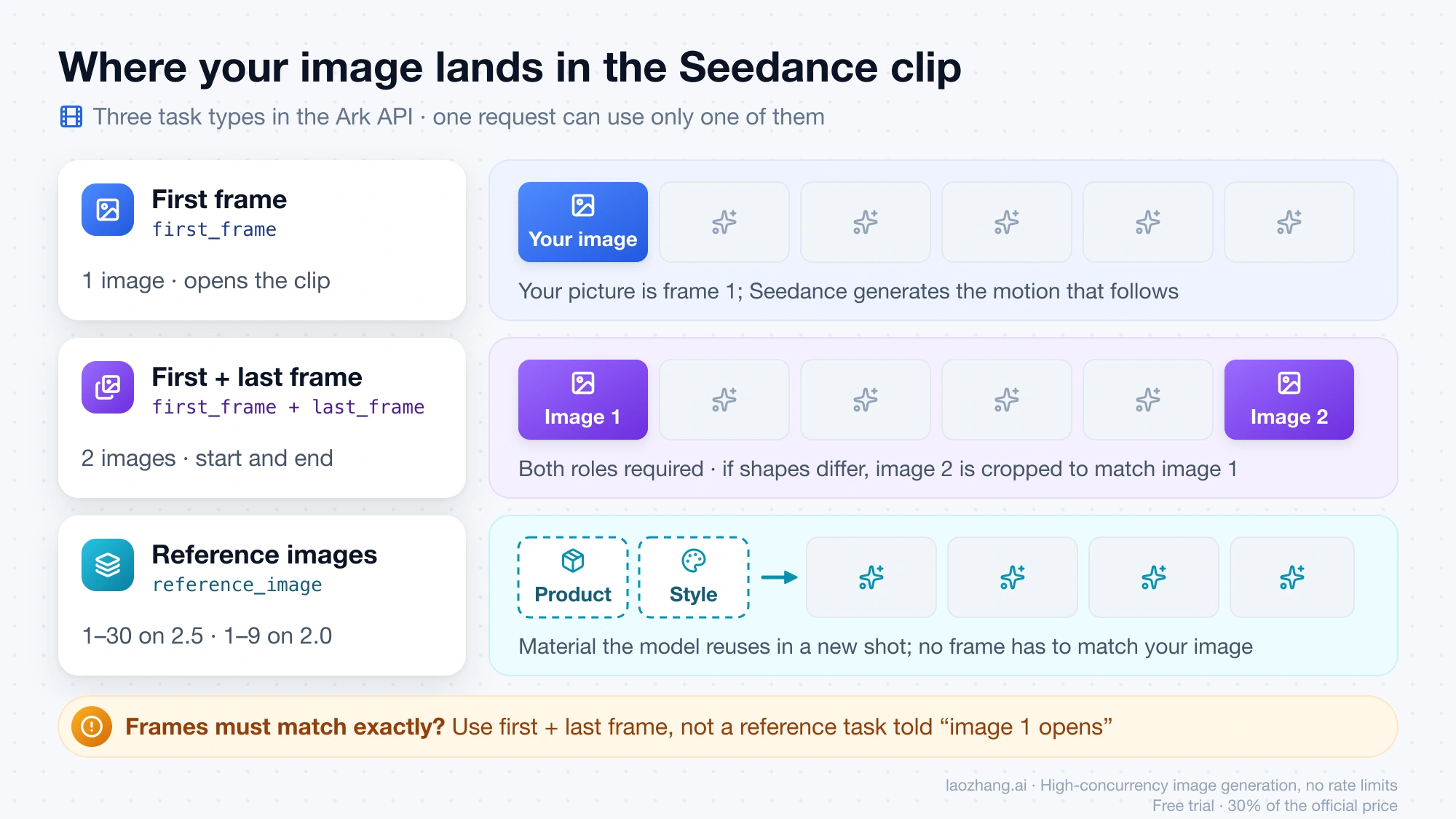
Choose the mode by what the picture has to be in the finished clip. If the video must open on exactly your image, use first frame. If it must also end on a specific second image, use first and last frame. If your images only supply a product, a character or a look that can appear anywhere in a new shot, use reference images. The Volcengine Ark create-video-task API reference (updated October 28, 2026) treats these as three task types that cannot be mixed in one request.
| Mode | Use it when | Images and role | Models | Output ratio |
|---|---|---|---|---|
| First frame | The clip must open on your exact picture | 1 image, first_frame or no role | 2.5, 2.0 series, 1.0 pro, 1.0 pro fast | 2.5 follows the image (adaptive only); 2.0 series takes adaptive or a listed ratio |
| First and last frame | The clip must start on one picture and land on another | 2 images, first_frame and last_frame, both required | 2.5, 2.0 series, 1.0 pro | Same as first frame; the first frame sets the shape |
| Reference images | Your images supply a product, character or style for a new shot | reference_image on each: 1–30 on 2.5, 1–9 on the 2.0 series | 2.5, 2.0 series | adaptive (chosen from the prompt) or any listed ratio |
Reference mode is the one people confuse with first frame. A reference image is material the model can reuse, not a frame it must reproduce, so the opening shot may look nothing like it. You can tell a reference task in the prompt to use image 1 as the opening frame, but Ark's documentation says to prefer first and last frame mode when the frames must match your images strictly. Reference mode also accepts video and audio alongside the images: up to 10 videos and 10 audio clips on 2.5, and up to 3 of each on the 2.0 series, where audio cannot be the only input.
Seedance image to video in Dreamina: upload, describe, generate
The consumer route needs no code. Dreamina, CapCut's creative app, has a Dreamina Seedance image-to-video page that describes three steps:
- Open the image-to-video generator and start a new project.
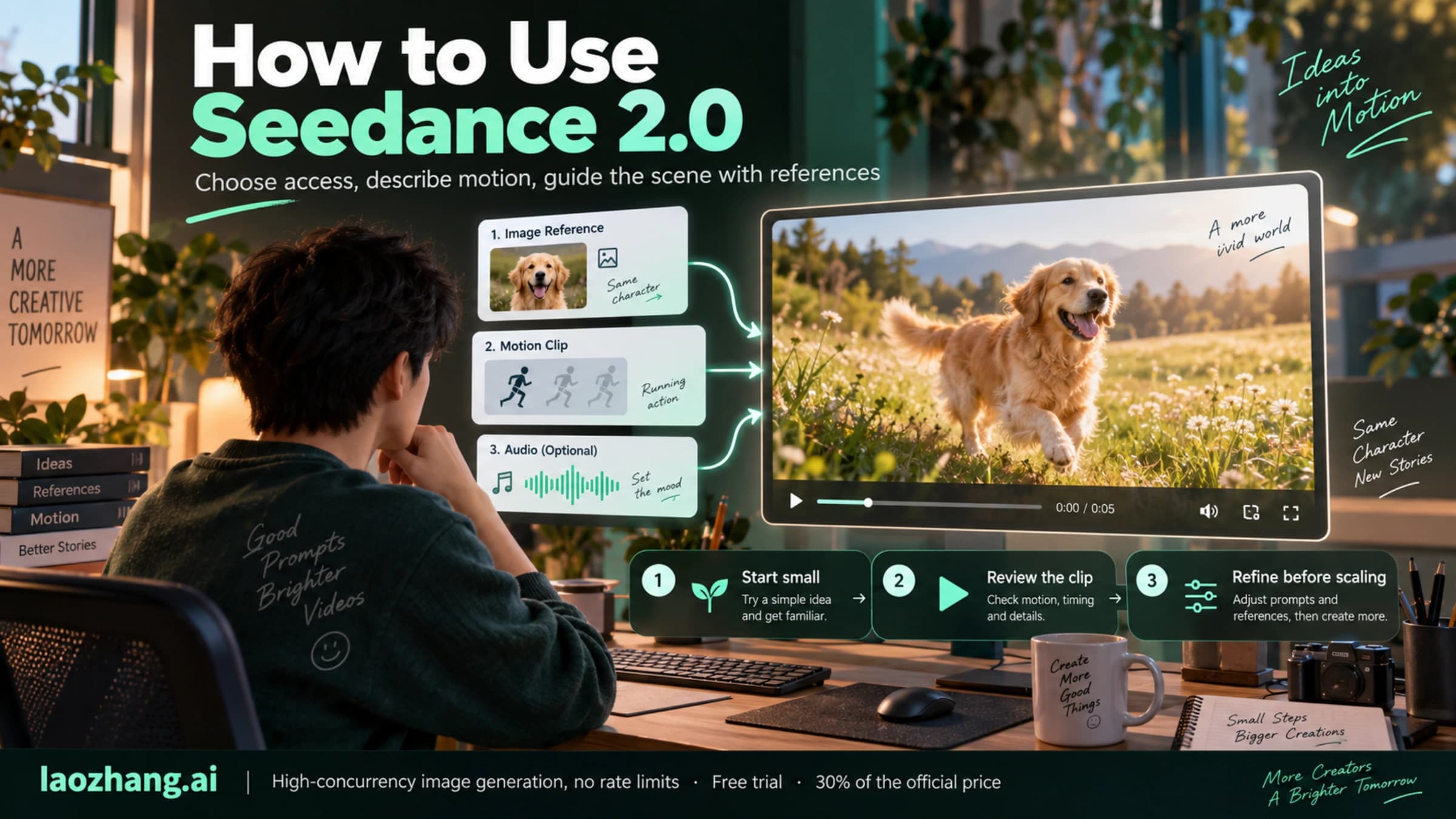
- Upload your image and describe how it should move or feel. The page suggests simple prompts about camera motion, action or style.
- Generate, preview the result, and download the video.
As of November 2, 2026, the generator on that page runs Seedance 2.0 mini and links to Seedance 2.5. Its FAQ says Seedance 2.0 "offers free trial credits" and that you can steer the result with prompts or references, but the page doesn't list the credit cost per video, an image size limit or first and last frame controls. The image rules in the next section are the API's, so treat them as a guide rather than Dreamina's own limits. Dreamina's help center adds one upload rule worth keeping: only upload material you have the rights to use. Sites that carry Seedance in their domain name are third-party services built on the model, not ByteDance's own pages, and they set their own limits and prices. If Dreamina isn't available where you are, How to Use Seedance 2.0 Online: Official Website, US Access, and Region Checks (2026) covers which official entry to use.
Will Seedance accept your image? The 300–6000 px and 0.4–2.5 rules
Through the API, an image is accepted only if it passes all six checks below, taken from the Ark API reference as of November 2, 2026. The last column shows which files failed each check when the rules were run locally on November 2, 2026 against nine synthetic test images, none showing people, with a Python preflight script (Python 3.12.1, Pillow 12.0.0).
| Check | Accepted | Test files that failed it |
|---|---|---|
| Format | jpeg, png, webp, bmp, tiff or gif; heic and heif only on the 2.0 series and later | None of the nine |
| Size | Each side between 300 and 6000 px | 256×256 avatar; 8000×2000 panorama |
| Shape | Width divided by height between 0.4 and 2.5, roughly a 2:5 portrait to a 5:2 landscape | 8000×2000 panorama (4.00); 3000×1000 banner (3.00) |
| File size | Each image under 30 MB; the whole request body at most 64 MB | 6000×4000 BMP at 68.7 MB |
| Count | 1 image for first frame, 2 for first and last frame, 1–30 references on 2.5 or 1–9 on the 2.0 series | A first and last frame task given one image |
| People | No real human face on Seedance 2.5 or the 2.0 series | Not part of the run |
The script checks the published limits and estimates crop and cost, but it doesn't call the model, so it shows which files break the written rules, not how the server words its error. A 4032×3024 phone photo (0.42 MB), a 1179×2556 phone screenshot, a 2048×2048 product shot and a 1536×2048 illustration all passed. The 3000×1000 banner is the easy one to miss, because both of its sides are legal and only its shape fails.
Each failure has a direct fix. Upscale a small avatar to at least 300 px per side, crop a panorama or banner to 2.5:1 or narrower yourself so you choose which part survives, and convert BMP or TIFF scans to JPEG, PNG or WebP, which shrinks them far below 30 MB. To check your own files before you pay for a task, this short script applies the same limits:
import os, sys
from PIL import Image

RATIOS = {"16:9": 16/9, "4:3": 4/3, "1:1": 1, "3:4": 3/4, "9:16": 9/16, "21:9": 21/9}

def check(path, ratio="adaptive"):
    problems = []
    with Image.open(path) as im:
        w, h = im.size
        fmt = im.format
    if fmt not in {"JPEG", "PNG", "WEBP", "BMP", "TIFF", "GIF"}:
        problems.append(f"format {fmt} not accepted")
    if min(w, h) < 300 or max(w, h) > 6000:
        problems.append(f"{w}x{h}: each side must be 300-6000 px")
    if not 0.4 <= w / h <= 2.5:
        problems.append(f"width/height {w / h:.2f} is outside 0.4-2.5")
    if os.path.getsize(path) >= 30 * 1024 * 1024:
        problems.append("file must be under 30 MB")
    print(path, "REJECT: " + "; ".join(problems) if problems else "OK")
    if ratio in RATIOS:  # a fixed ratio on a 2.0-series first-frame task
        img, out = w / h, RATIOS[ratio]
        side = "width" if img > out else "height"
        kept = min(img, out) / max(img, out)
        print(f"  ratio {ratio}: center crop keeps {kept:.0%} of the {side}")

if __name__ == "__main__":
    check(sys.argv[1], sys.argv[2] if len(sys.argv) > 2 else "adaptive")
Run it as python3 check_image.py photo.jpg 16:9. Pillow can't open heic or heif files without the pillow-heif plugin, so convert those to JPEG first if you want the check.
Why Seedance crops your picture, and which ratio to choose
Seedance crops your image when the output ratio you request differs from the image's own shape, and it always cuts from the center. How that plays out depends on the model. Seedance 2.5 keeps the output ratio equal to the first frame for first-frame and first-and-last-frame tasks and accepts only ratio: "adaptive" there, so a 2.5 request with "16:9" breaks the rule; the November 2 preflight run flags it before anything is sent. The 2.0 series lets you either pass adaptive, which lets the model choose a listed ratio based on your first frame, or force one of 16:9, 4:3, 1:1, 3:4, 9:16 or 21:9.
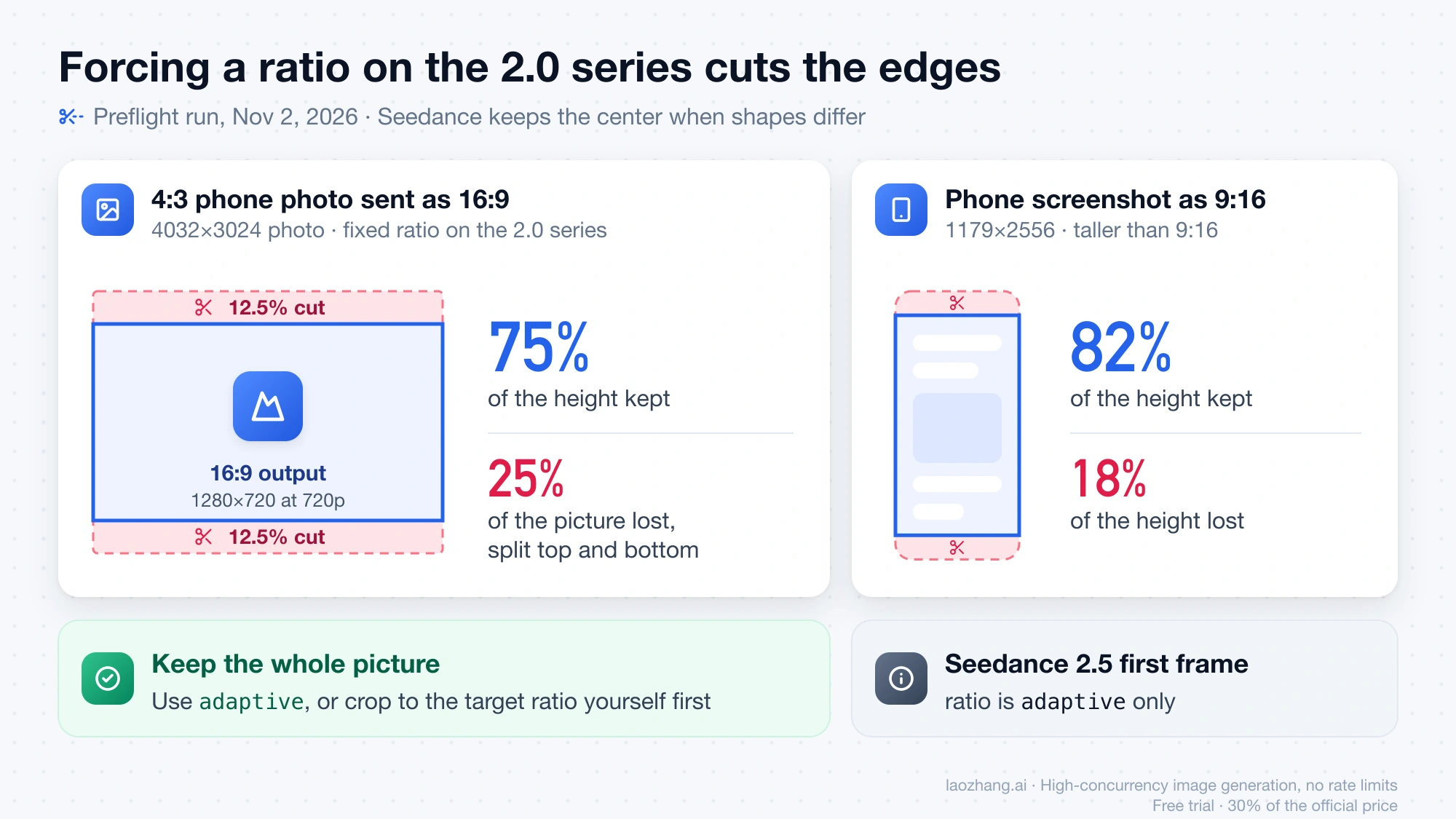
Forcing a ratio on the 2.0 series is where pictures lose content. In the same preflight run, a 4:3 phone photo (4032×3024) sent as 16:9 kept only 75% of its height, so a quarter of the picture, split between the top and bottom edges, never reaches the video. A 1179×2556 phone screenshot sent as 9:16 kept 82% of its height and lost 18%. If the subject sits near an edge, either use adaptive or crop the picture to the target ratio yourself before uploading, which lets you decide what stays.
First and last frame tasks add one more rule: when the two images have different shapes, the first frame wins and the last frame is cropped to match it. Pair a 2048×2048 product shot with a 1920×1080 end frame, for example, and the end frame is cropped to the square shape of the product shot, losing its sides. Export both frames at the same ratio before you send them.
At 720p, the listed ratios map to these output sizes on both 2.5 and 2.0: 1280×720 for 16:9, 1112×834 for 4:3, 960×960 for 1:1, 834×1112 for 3:4, 720×1280 for 9:16 and 1470×630 for 21:9. The Ark reference doesn't publish an exact pixel size for a 2.5 adaptive clip made from an image with some other ratio.
What one Seedance clip costs, and why duration -1 can cost 6x more
A 5-second, 720p, 16:9 clip with no input video costs about $1.31 on Seedance 2.5 and about $0.86 on Seedance 2.0, using the laozhang.ai SeeDance2 list prices as of November 2, 2026. The laozhang.ai Seedance 2 video API documentation sets those prices at the Volcengine yuan list price times 0.1714, and gives these 5-second examples:
Disclosure: laozhang.ai is our own service. Its prices are platform pricing, not an independent comparison.
| Model | Highest resolution | Price per 1M tokens, 480p and 720p | Price per 1M tokens, 1080p | 5 s at 720p | 5 s at 1080p |
|---|---|---|---|---|---|
| Seedance 2.5 | 1080p | $12.00 | $13.20 | about $1.31 | about $3.23 |
| Seedance 2.0 | 4k | $7.88 | $8.74 | about $0.86 | about $2.14 |
| Seedance 2.0 fast | 720p | $6.34 | not offered | about $0.69 | not offered |
| Seedance 2.0 mini | 720p | $3.94 | not offered | about $0.43 | not offered |
You can recompute any of these. Tokens are roughly (input video seconds + output seconds) × width × height × frames per second ÷ 1024, and a 5-second clip at 24 fps has 121 frames. At 720p 16:9 that is 1280 × 720 × 121 ÷ 1024 = 108,900 tokens, and 108,900 tokens at $12.00 per million is $1.31 on 2.5. Your input images add nothing to this formula; only an input video does. Each task shows up as two log entries on laozhang.ai, a pre-charge and a settlement, and the task's cost is their sum. Prices on other platforms differ, and Seedance 2.5 API Pricing: Cost per Second at 480p, 720p, 1080p compares them per second.
Duration is the setting that moves the bill most. On Seedance 2.5, duration defaults to -1, which lets the model pick any length from 4 to 30 seconds, and Ark's reference warns that duration is tied to billing. In the November 2 preflight run, a 1536×2048 illustration (3:4) on 2.5 at 720p was estimated at about $1.32 with duration: 5. Left at -1, the worst case is a 30-second clip of 721 frames at 834×1112, about 652,989 tokens, or roughly $7.84, close to six times as much. The 2.0 series also accepts -1 but caps it at 15 seconds: 361 frames at 1280×720 (16:9) come to 324,900 tokens, about $2.56 on 2.0. Pass an explicit number in the allowed range, 4–30 seconds on 2.5 and 4–15 on the 2.0 series; the preflight run flagged a 20-second request on 2.0 as out of range.
Resolution is the other lever. Seedance 2.5 offers 480p, 720p and 1080p, the 2.0 model adds 4k, and 2.0 fast and 2.0 mini stop at 720p, so a mini request at 1080p breaks the rules (the preflight run flagged it too). All of them default to 720p. The 1080p output of 2.5 and the 4k output of 2.0 are 10-bit H.265/HEVC files that some players can't open. For a cheap motion test, 2.0 mini at 480p with a square image comes to about 48,400 tokens for 5 seconds, roughly $0.19, and Seedance 2.5 has a draft option that renders a 480p preview task.
Ark API image upload: public URL, Base64, or asset ID
The image_url.url field takes one of three things: a public image URL, a Base64 data URL, or an asset ID in the form asset://<ASSET_ID>. A public URL is the safest choice for large files, because Ark's reference says not to Base64-encode big files and caps the whole request body at 64 MB. Base64 grows a file by about a third, so the 68.7 MB BMP from the preflight run would have produced a body of roughly 91.6 MB. Asset IDs are how you pass preset virtual portraits or authorized real-person material on the 2.x models.
A Base64 image must use the data URL format with a lowercase format name, for example data:image/png;base64,iVBORw0KGgo… or data:image/jpeg;base64,/9j/4AAQ…. Pasting a multi-megabyte string into a shell command can hit the argument length limit, so build the request body as a file instead:
base64 < photo.jpg | tr -d '\n' > photo.b64

jq -n --rawfile b64 photo.b64 '{
  model: "doubao-seedance-2-5-260628",
  content: [
    {type: "text", text: "The camera slowly pushes in on the cup while steam rises"},
    {type: "image_url",
     image_url: {url: ("data:image/jpeg;base64," + $b64)},
     role: "first_frame"}
  ],
  ratio: "adaptive", resolution: "720p", duration: 5
}' > body.json
Then send it with curl --data @body.json in place of the inline JSON shown in the next section. A 0.42 MB phone photo turns into a body of about 0.6 MB this way, far below the limit.
Seedance API request body for each image mode
All three modes use the same create-task call and differ only in the content array and a few parameters. On Volcengine Ark in China the call is POST https://ark.cn-beijing.volces.com/api/v3/contents/generations/tasks; Ark only enables Seedance 2.5 and the 2.0 series once your account has a balance above ¥200, a savings plan of ¥200 or more, or a Seedance resource pack with credit left. On the laozhang.ai relay the same body goes to https://api.laozhang.ai/seedance/api/v3/contents/generations/tasks, and the /seedance part of that path is required.
Disclosure: laozhang.ai is our own service. Its prices are platform pricing, not an independent comparison.
The examples below are adapted from the request examples in the laozhang.ai documentation and use the model IDs listed there. The create call returns a task id; poll GET …/contents/generations/tasks/{id} until the status is succeeded (the relay may also report completed), then download the file from content.video_url. On the relay, that link is a temporary signed URL that usually expires within 24 hours. The model IDs each platform expects, including BytePlus ModelArk, plus full polling code in Python and Node.js, are in Seedance 2.5 API Guide: Model IDs, Python, and Node.js.
First frame on Seedance 2.5
export SEEDANCE_KEY="your-api-key"
BASE="https://api.laozhang.ai/seedance/api/v3"  # Ark China: https://ark.cn-beijing.volces.com/api/v3

curl -s -X POST "$BASE/contents/generations/tasks" \
  -H "Content-Type: application/json" \
  -H "Authorization: Bearer $SEEDANCE_KEY" \
  --data-raw '{
    "model": "doubao-seedance-2-5-260628",
    "content": [
      {"type": "text", "text": "The camera slowly pushes in on the ceramic cup while steam rises, soft morning light"},
      {"type": "image_url", "image_url": {"url": "https://example.com/cup.jpg"}, "role": "first_frame"}
    ],
    "ratio": "adaptive",
    "duration": 5,
    "resolution": "720p",
    "generate_audio": false
  }'
generate_audio defaults to true on the 2.x models, which produces a stereo soundtrack; set it to false for a silent clip. watermark defaults to false, and true adds an "AI 生成" mark in the bottom-right corner.
First and last frame on Seedance 2.0
curl -s -X POST "$BASE/contents/generations/tasks" \
  -H "Content-Type: application/json" \
  -H "Authorization: Bearer $SEEDANCE_KEY" \
  --data-raw '{
    "model": "doubao-seedance-2-0-260128",
    "content": [
      {"type": "text", "text": "Image 1 is the first frame and image 2 is the last frame. A smooth product transition from a red apple close-up to a finished glass of apple tea. Keep the product consistent, no people."},
      {"type": "image_url", "image_url": {"url": "https://example.com/apple.jpg"}, "role": "first_frame"},
      {"type": "image_url", "image_url": {"url": "https://example.com/apple-tea.jpg"}, "role": "last_frame"}
    ],
    "ratio": "adaptive",
    "duration": 4,
    "resolution": "720p",
    "generate_audio": false
  }'
Both role values are required in this mode, and one request can't mix first_frame or last_frame with reference_image.
Reference images on Seedance 2.0 fast
curl -s -X POST "$BASE/contents/generations/tasks" \
  -H "Content-Type: application/json" \
  -H "Authorization: Bearer $SEEDANCE_KEY" \
  --data-raw '{
    "model": "doubao-seedance-2-0-fast-260128",
    "content": [
      {"type": "text", "text": "Use image 1 for the bottle design and label, and image 2 for the color palette. The bottle turns slowly on a wet stone surface, close-up, studio light."},
      {"type": "image_url", "image_url": {"url": "https://example.com/bottle.png"}, "role": "reference_image"},
      {"type": "image_url", "image_url": {"url": "https://example.com/palette.jpg"}, "role": "reference_image"}
    ],
    "ratio": "9:16",
    "duration": 5,
    "resolution": "720p"
  }'
In reference mode the ratio is your choice: set any listed value, or adaptive to let the model pick one from the prompt, because none of the images has to appear as a whole frame. Name each image by its job in the prompt so the model knows what to take from it.
laozhang.ai "no available channels" error: use a SeeDance2 token
If the relay answers with HTTP 503 and "Current group default has no available channels for model doubao-seedance-…", your API key is in the wrong token group, and your image is not the problem. On November 2, 2026, a first-frame request with a 100×100 PNG sent as Base64, using laozhang.ai keys in the default group, came back with exactly this for both doubao-seedance-2-0-260128 and doubao-seedance-2-5-260628: Current group default has no available channels for model doubao-seedance-2-0-260128 under billing mode [pay-per-request]. A usage-billed key showed [pay-as-you-go, pay-per-request] at the end instead.
Disclosure: laozhang.ai is our own service. Its prices are platform pricing, not an independent comparison.
The request was rejected before it reached the model and nothing was charged. It also shows the order of the checks: the 100 px image, which breaks the 300 px minimum, was never looked at, so on this route an image problem can only surface after the token group is right. The fix is to create a separate token in the SeeDance2 group in laozhang.ai's token settings, with usage-first billing as the documentation recommends, and send the same request again.
Chain clips with return_last_frame as the next first frame
To make shot 2 begin exactly where shot 1 ended, set return_last_frame: true on the first task and use the returned image as the next task's first frame. Ark returns that last frame as a JPEG at the same size as the video and without a watermark, and on the laozhang.ai relay you read its link from content.last_frame_url when the task succeeds. Download it before the link expires, then pass it with role: "first_frame" in the next request. On Seedance 2.5 the follow-up clip keeps that frame's shape automatically, because first-frame tasks there only accept adaptive.
Disclosure: laozhang.ai is our own service. Its prices are platform pricing, not an independent comparison.
Chaining is for scene changes and for runs longer than one task allows. If you only need one continuous shot of up to 30 seconds, Seedance 2.5 can produce it in a single task, which avoids a visible seam between clips.
Seedance image to video: other questions
Is Seedance image to video free? In Dreamina, the Seedance image-to-video page says Seedance 2.0 comes with free trial credits, but as of November 2, 2026 it doesn't say how many or what one video costs. API calls are paid, and on Ark and the laozhang.ai relay they are billed by output tokens; Seedance 2.5 API Pricing: Cost per Second at 480p, 720p, 1080p covers paid and free options by platform.
Disclosure: laozhang.ai is our own service. Its prices are platform pricing, not an independent comparison.
How should I write the motion prompt for my image? Describe the camera move, the action and what must stay unchanged, in English up to about 1,000 words or in one of the other languages the model supports. Shot structure, reference labels such as image 1 and image 2, and targeted repairs are covered in Seedance 2 Prompt Guide: Shots, References, and Targeted Repairs.
Can I set ratio and duration inside the prompt? Yes. Ark also reads flags appended to the prompt, such as --rs 720p --rt 16:9 --dur 5, but it validates them loosely, so a wrong value may simply be ignored. The same settings in the request body are strictly validated and return an error when they are wrong, which makes the body the safer place for them.
My Seedance task is stuck in queued or has failed. What now? Start from the task ID and its status rather than resending the image. Seedance 2.5 Error, Queue, or Timeout? Diagnose the Accepted Task First walks through queued, failed and expired tasks.
Sources2
External pages this guide links to, in the order they appear. Last updated Nov 3, 2026.
Sources2
External pages this guide links to, in the order they appear. Last updated Nov 3, 2026.