Seedance 2 Prompt Guide: Shot-by-Shot Prompts, Reference Assets, and Repair Workflow
A practical Seedance 2 prompt workbook with prompt cards, reference rules, shot planning, annotated examples, and a repair matrix for common video-generation failures.
On this page
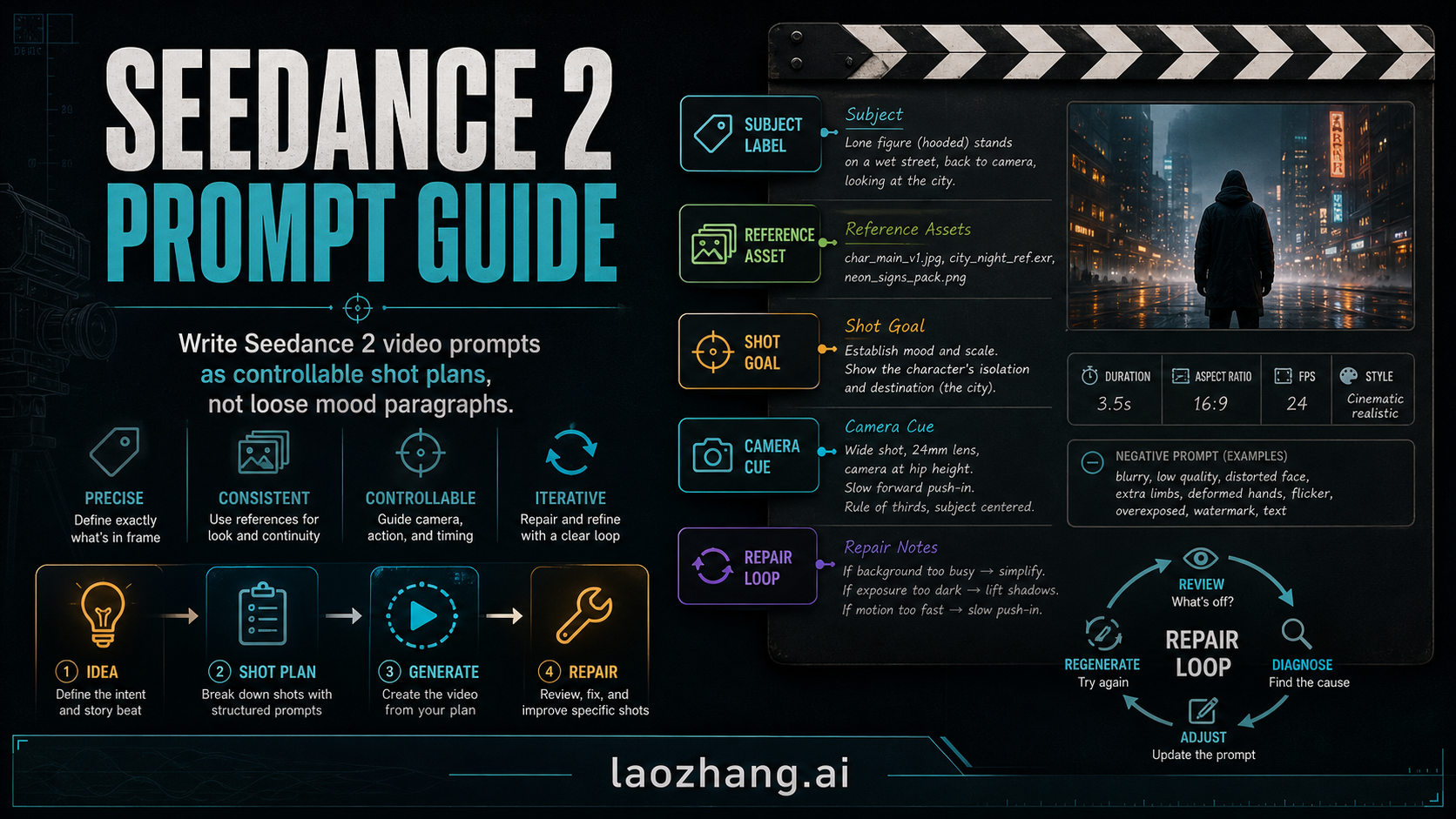
Good Seedance 2 prompts work like shot plans, not loose mood paragraphs. Use a prompt card: subject label, reference asset, shot goal, action, camera movement, style or audio cue, constraint, and repair note. Keep prompt control separate from route decisions: free access, API setup, pricing, provider choice, and model comparison need their own checks before they change the prompt. Start by labeling the subject, choosing only the references that matter, splitting the idea into shots, generating once, and repairing one observed failure at a time.
The Seedance 2 Prompt Card
Use this prompt card before you write a long cinematic paragraph.
| Field | What to write | Why it matters |
|---|---|---|
| Subject label | A stable name for the person, object, location, or prop | Keeps later shots and references from drifting |
| Reference asset | The image, video, or audio file that should guide identity, motion, mood, or sound | Tells the model which asset deserves priority |
| Shot goal | What this shot must accomplish in the sequence | Prevents one prompt from trying to do the whole film |
| Action | The visible motion or event | Makes the scene produce movement, not only mood |
| Camera cue | Framing and motion such as wide shot, close-up, push-in, lateral track, or fixed shot | Gives the video a planned visual language |
| Style or audio cue | Lighting, color, realism, genre, or sound direction | Shapes the output without burying the subject |
| Constraint | What must stay stable or must not appear | Protects identity, continuity, text, and layout |
| Repair note | The first likely failure and how to fix it | Turns a bad generation into a targeted next prompt |
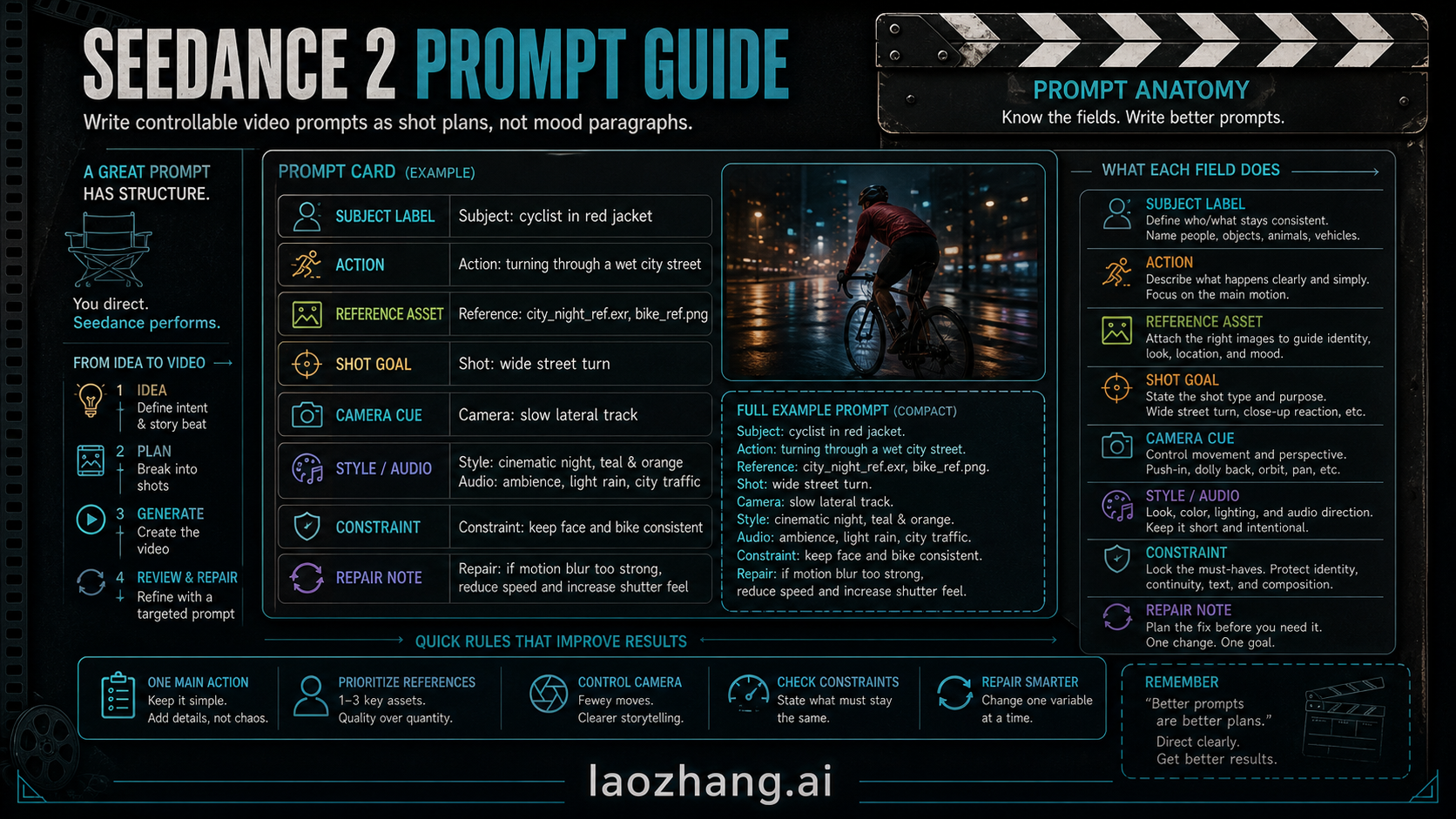
A compact first prompt can look like this:
Subject label: Lena, a young woman in a black leather jacket and short hair from reference image 1.
Reference asset: use image 1 for Lena's identity and image 2 for the rainy neon street.
Shot goal: establish Lena crossing the street toward a closed theater entrance.
Action: Lena walks quickly, turns her head once, and slows near the door.
Camera cue: wide shot, slow forward push-in, stable horizon.
Style/audio: cinematic night, wet pavement, teal and amber neon, low city hum.
Constraint: keep Lena's face, jacket, and hairstyle consistent; no extra characters.
Repair note: if the camera shakes, switch to a fixed wide shot and keep the same subject label.
The important part is not the exact wording. It is the division of labor. The subject label protects identity. The reference line tells the model what to respect. The shot goal gives the video a purpose. The repair note keeps you from rewriting the whole prompt after one miss.
Label Subjects Before You Ask for Action
The official BytePlus ModelArk prompt guide for the Dreamina Seedance 2.0 series puts subject definition early for a reason: reference assets can contain several people, props, or scenes, and the model needs to know which part of the asset you mean. A weak prompt says "use the woman from the image." A stronger prompt gives the woman a label and stable traits.
Use labels like this:
| Reference problem | Weak wording | Stronger Seedance 2 wording |
|---|---|---|
| Multiple people in one image | "the man walks away" | "char_main_male, the man in a tan coat and round glasses, walks away" |
| Prop needs to persist | "she holds the phone" | "prop_phone_black stays in her right hand for all shots" |
| Scene must stay recognizable | "same street" | "loc_neon_alley, the narrow wet alley with red signs and blue haze" |
| Two subjects interact | "they look at each other" | "char_lena looks at char_driver; keep both labels consistent across shots" |
Keep labels short, stable, and descriptive. If the label itself becomes too clever, you will forget it or change it between shots. The prompt should make identity boring and reliable so the creative work can happen in action, camera, and rhythm.
Plan References Before You Plan Shots
Seedance 2 can use multimodal reference material, but more references do not automatically mean more control. The official guidance favors a focused set: usually one or two character images, one scene image, an optional motion or camera reference, and an optional audio cue. That pattern is useful because it forces a priority order.
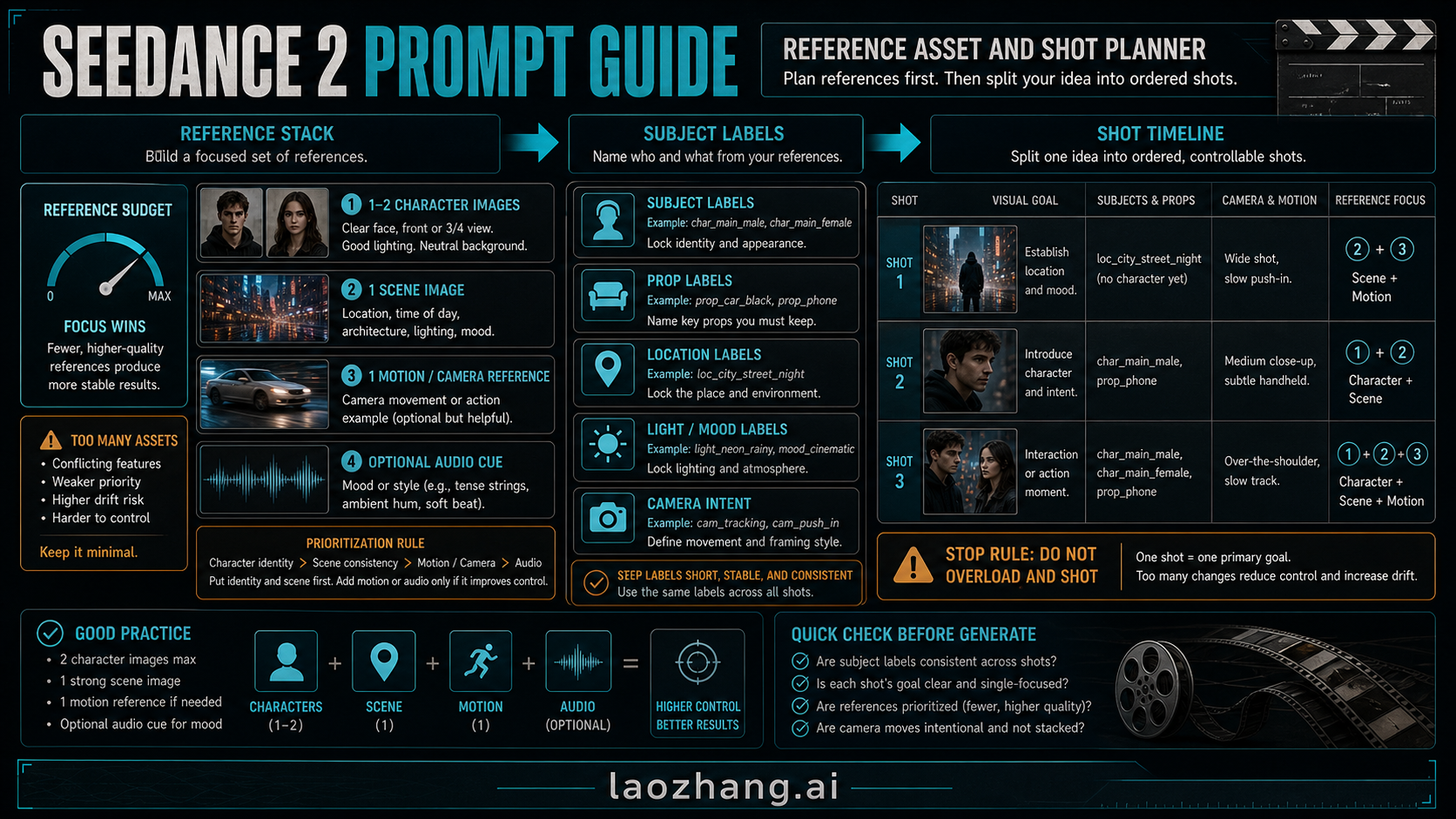
Use this reference budget:
| Asset type | Use it when | Stop rule |
|---|---|---|
| Character image | Identity, outfit, face, posture, or repeated subject consistency matters | Do not use several conflicting looks for the same subject |
| Scene image | Location, lighting, architecture, or atmosphere must stay stable | Do not ask the scene image to also define action |
| Motion or camera video | You need a walk cycle, vehicle movement, camera move, or physical rhythm | Do not stack multiple camera moves in one shot |
| Audio cue | Sound mood, ambience, or pacing matters | Keep it as mood direction unless the workflow explicitly supports audio reference |
If two references disagree, the prompt should say which one wins. For example: "Use image 1 for Lena's face and jacket. Use image 2 only for the street lighting and wet pavement." That sentence is more useful than adding a third image and hoping the model guesses.
Split the Video Into Shots
One of the easiest ways to weaken a Seedance 2 prompt is to ask for a complete scene in one dense paragraph: a person runs, the camera orbits, rain intensifies, the location changes, the lighting shifts, and another character appears. That is not a shot plan. It is a pile of instructions competing for the same few seconds.
Use a shot timeline instead:
| Shot | Purpose | Prompt focus |
|---|---|---|
| Shot 1 | Establish place and mood | location label, subject entrance, wide framing |
| Shot 2 | Show intent or action | subject movement, prop, medium framing |
| Shot 3 | Resolve the beat | reaction, handoff, close-up, or exit |
Here is the same idea written two ways.
Weak prompt
A cinematic woman walks through a rainy neon city at night and looks nervous while the camera moves around her and then shows a theater.Stronger shot plan
Shot 1: In `loc_neon_alley`, `char_lena` enters from frame left under blue neon rain. Wide shot, fixed camera, wet pavement reflections.
Shot 2: `char_lena` slows and checks `prop_ticket` in her right hand. Medium close-up, slight handheld motion, keep face and jacket consistent.
Shot 3: The camera cuts to the closed theater door ahead. Slow push-in from behind `char_lena`; no extra people; keep the red theater sign readable as a shape, not text.
The stronger version does less per shot and more for the video. It gives the model sequence, subject continuity, camera intent, and a clear ending beat.
Use Camera and Style Cues Without Overloading the Shot
Camera language helps Seedance 2 when it narrows the visual job. It hurts when it becomes a shopping list. A prompt that says "wide shot, close-up, pan, push-in, orbit, handheld, drone view" is not giving control. It is asking the model to choose which instruction to ignore.
Use one primary camera cue per shot:
| Cue | Best use | Common failure |
|---|---|---|
| Wide shot | Establish location, scale, or choreography | Subject becomes too small |
| Medium close-up | Show intent, face, prop, or hand action | Background context disappears |
| Slow push-in | Add focus or tension | Camera feels too fast or unstable |
| Lateral tracking | Follow walking, cycling, or vehicle movement | Background smears if action is too busy |
| Fixed shot | Preserve composition and reduce chaos | Motion may feel less dynamic |
Style should work the same way. Use a style cue to support the shot, not to bury it. "Cinematic night, wet pavement, teal and amber neon" is specific enough. Adding ten more style tags may make the image prettier in one frame but less stable across the sequence.
Seedance 2 Prompt Examples You Can Adapt
These examples are prompt cards, not guaranteed outputs. Use the structure, replace the variables, and keep the repair note attached.
Cinematic Character Entrance
Subject label: `char_mara`, woman in a cream trench coat from image 1.
Reference asset: image 1 for face and coat; image 2 for the train platform.
Shot goal: introduce Mara arriving alone before the train doors open.
Action: Mara steps into the platform light and pauses near the yellow line.
Camera cue: wide shot, fixed camera, slight rain haze.
Style/audio: restrained thriller mood, cool station lighting, distant train rumble.
Constraint: no crowd, no outfit change, keep her coat color consistent.
Repair note: if identity drifts, shorten the prompt and repeat only the face, coat, and platform labels.
Why it works: the prompt separates identity, location, and action. The camera is quiet because the entrance is already doing the work.
Product Demo Motion
Subject label: `prop_silver_headphones`.
Reference asset: image 1 for product shape; image 2 only for studio lighting.
Shot goal: show the headphones rotating slowly on a black pedestal.
Action: the product turns 90 degrees while soft light moves across the metal hinge.
Camera cue: locked medium shot, no zoom.
Style/audio: premium product demo, clean reflections, dark background.
Constraint: preserve the exact earcup shape and logo area; no hands, no extra text.
Repair note: if shape warps, remove the lighting reference and prioritize the product image.
Why it works: the object has one motion and one hard preservation rule. The repair note protects the product before changing style.
Action Beat
Subject label: `char_runner`, athlete in orange jacket from image 1.
Reference asset: image 1 for outfit; short motion clip for running rhythm if available.
Shot goal: show a single jump across a puddle.
Action: runner accelerates, jumps over the puddle, lands forward.
Camera cue: lateral tracking, medium-wide framing.
Style/audio: early morning street, realistic motion, light splash sound.
Constraint: one jump only; no slow-motion explosion; keep jacket orange.
Repair note: if motion feels weak, make the action verb stronger before changing camera.
Why it works: action is explicit, but the shot is not overstuffed. It does not ask for a chase, a jump, a close-up, and a drone view at the same time.
Reference-Heavy Dialogue-Free Scene
Subject label: `char_old_man`, elderly man with gray beard from image 1.
Reference asset: image 1 for identity; image 2 for kitchen interior; optional audio cue for quiet room tone.
Shot goal: show the man deciding whether to open a letter.
Action: he places the letter on the table, rests his hand beside it, and looks toward the window.
Camera cue: slow push-in from medium shot to tighter framing.
Style/audio: warm afternoon light, quiet domestic drama, no spoken dialogue.
Constraint: keep the kitchen layout and beard consistent; do not add subtitles or text overlays.
Repair note: if the model adds extra characters, add "only one person in frame" and remove secondary props.
Why it works: the emotion is carried by action and camera, not by abstract words like "deep sadness" repeated five times.
Repair Matrix: Fix One Failure at a Time
When a generation fails, do not immediately replace the whole prompt. Diagnose the visible failure and change the smallest useful part.
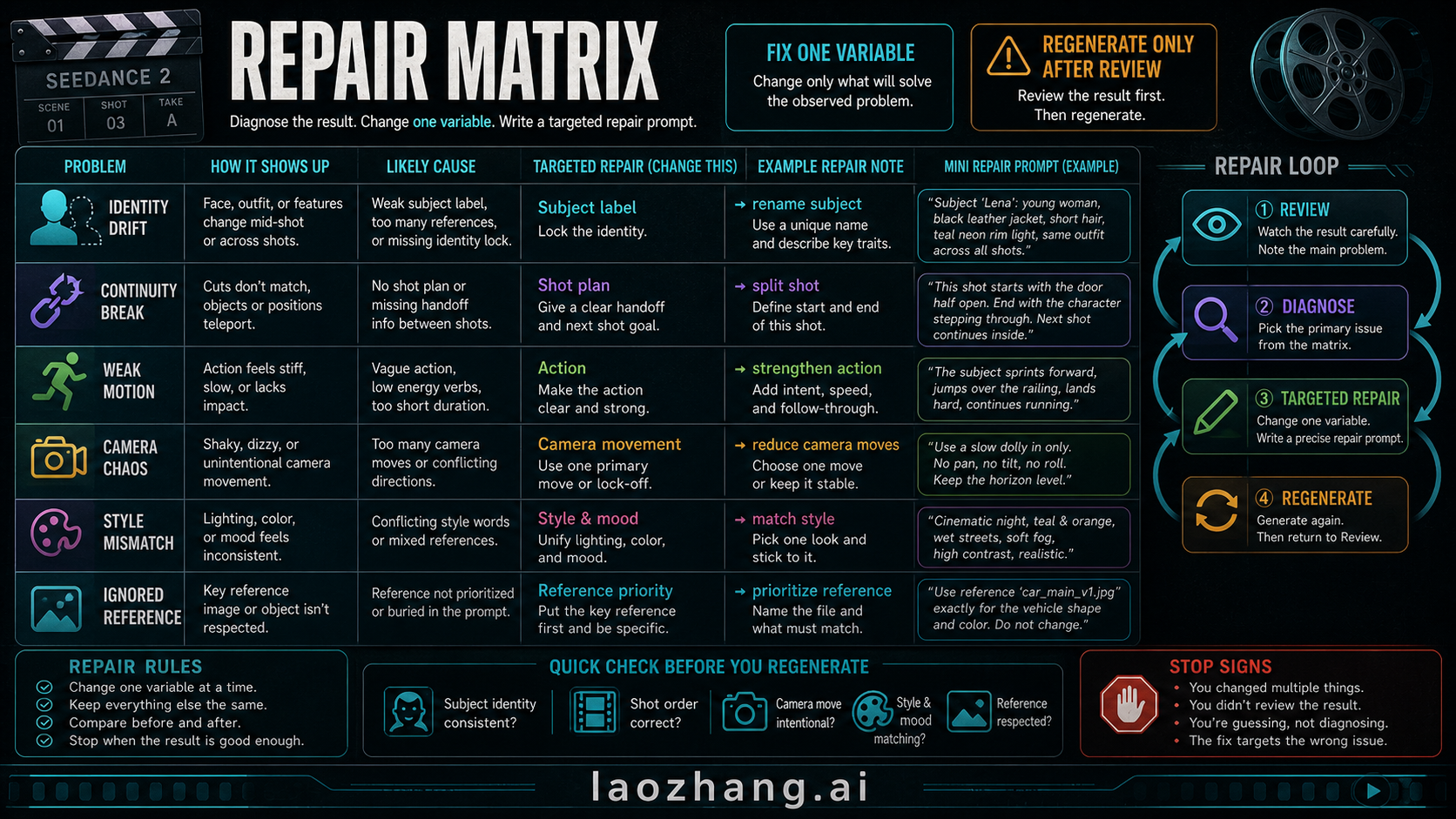
| Failure | Likely cause | Targeted repair |
|---|---|---|
| Identity drift | Subject label is weak, references conflict, or too many people appear | Rename the subject and describe two or three stable traits |
| Continuity break | The shot handoff is unclear | Add a shot timeline and define what carries from one shot to the next |
| Weak motion | Action verb is vague or duration is too short | Strengthen the action and remove competing instructions |
| Camera chaos | Too many camera moves are stacked | Choose one primary camera move or use a fixed shot |
| Style mismatch | Lighting, color, and genre cues conflict | Pick one style family and remove the rest |
| Ignored reference | Reference priority is buried | State which file controls identity, which controls scene, and which is optional |
Use this repair prompt pattern:
Keep the same subject labels, reference priority, and shot order.
Fix only [observed failure].
Change [one variable].
Do not change [locked details].
Regenerate after this repair and review the same failure again.
For example:
Keep `char_lena`, `loc_neon_alley`, and the three-shot order.
Fix only the camera chaos in Shot 2.
Use one medium close-up with a fixed camera.
Do not change Lena's face, black jacket, or the rainy neon street.
The best repair prompt is narrow enough that you can tell whether it worked. If you change identity, camera, style, action, and references together, you may get a better-looking clip and still learn nothing.
Route Boundaries: When This Is Not a Prompt Problem
Some Seedance 2 problems look like prompt problems but are really route problems.
| If your real question is... | Prompt workflow value | Better next step |
|---|---|---|
| "Where can I use Seedance 2?" | prompt structure after access is solved | Seedance 2 how-to-use guide |
| "Can I call it by API?" | prompt payload and repair logic | Seedance 2 API guide |
| "Which API provider should I choose?" | prompt consistency requirements | Seedance 2 API providers comparison |
| "Is it free or paid?" | avoiding pricing claims inside prompts | Seedance 2 pricing guide |
| "Is Seedance better than Veo or Sora?" | prompt controls that matter for Seedance | Seedance 2 vs Veo 3 vs Sora 2 |
Keep that separation because prompts should describe the video job. Access, price, provider, and model-choice facts can change. They need current verification, not a hidden line inside a prompt template.
Frequently Asked Questions
What is the best Seedance 2 prompt structure?
Use a prompt card with subject label, reference asset, shot goal, action, camera cue, style or audio cue, constraint, and repair note. That structure gives the model identity, sequence, control, and a targeted recovery path.
How do I use reference images in Seedance 2 prompts?
Name each important subject, prop, or location from the reference image and say what the image controls. For example, use one image for a character's face and outfit, another for the location, and a motion reference only when movement or camera rhythm matters.
Should I write one long prompt or several shots?
Use shots for any scene with changing action, location, camera, or emotional beat. A single paragraph can work for a simple clip, but a timeline is safer when you need continuity.
What camera terms work well in Seedance 2 prompts?
Start with common film terms: wide shot, medium close-up, close-up, fixed shot, slow push-in, lateral tracking, or handheld. Use one primary camera cue per shot before combining moves.
How do I fix identity drift?
Strengthen the subject label, repeat two or three stable traits, reduce conflicting references, and keep the same label across shots. Do not change style and camera at the same time if identity is the observed failure.
How many reference assets should I use?
Use the fewest references that define the job: often one or two character images, one scene image, and one optional motion or audio reference. Too many references can weaken priority and make the output less stable.
Is this also a Seedance 2 API guide?
No. The prompt workflow helps you structure the video request, but API route, provider, pricing, and access questions need dedicated Seedance guides so those volatile details can be checked separately.