Seedance 2.5 Error, Queue, or Timeout? Diagnose the Accepted Task First
When Seedance 2.5 fails, queues, or times out, do not resubmit first. Check consumer history or the API task ID; retrieve queued or running work, and act on exact failed or expired evidence.
On this page
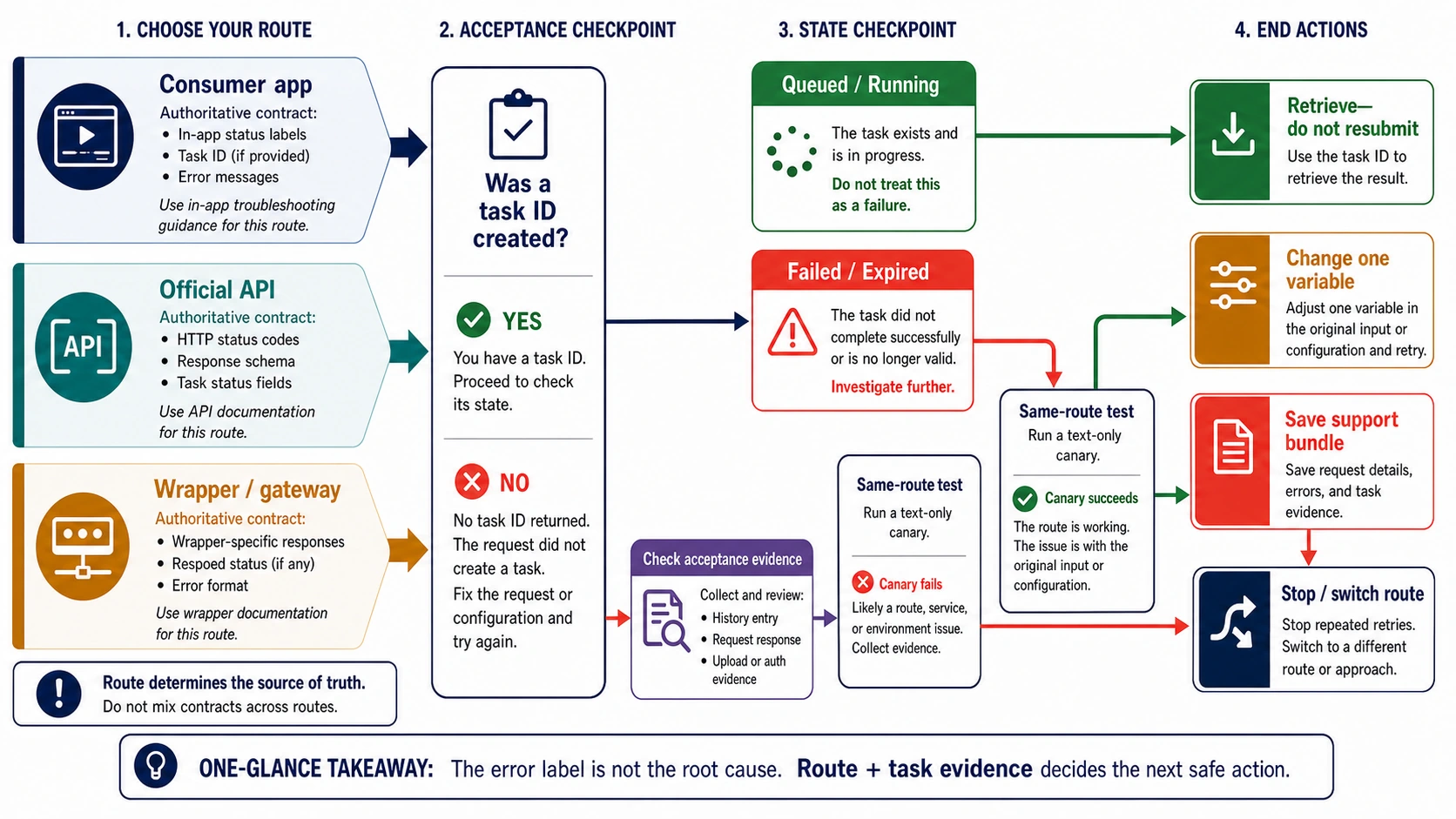
When Seedance 2.5 fails, queues, or appears to time out, do not start by clearing everything or repeatedly clicking Generate. First identify where you ran it, then determine whether that route accepted a task. Consumer apps may prove acceptance through history; APIs use a task ID. If an accepted task is queued or running, retrieve it instead of submitting a duplicate.
| What you can observe | What it establishes | Next safe action |
|---|---|---|
| No task ID, no history entry, and a browser or fetch error | The request may not have reached the generation service | Test login, route reachability, asset upload, and one alternate network without changing the prompt |
Task ID with queued or running | The official API accepted a nonterminal task | Retrieve the existing task; do not resubmit just because the UI looks frozen |
Task ID with failed and an exact code | The task ended, and the route has supplied diagnostic evidence | Act on that exact code; preserve the Request ID and change only the implicated variable |
| A text-only canary succeeds on the same route and account | The route can generate; the original input or configuration is the narrower suspect | Rebuild the original request one variable at a time |
| Canary fails only through one wrapper | The wrapper, its account mapping, or a downstream dependency may own the failure | Check that provider's logs/status and compare a separately authorized route |
This guide does not infer a global Seedance outage from one route. Its purpose is to identify the owner of your failure without creating duplicate jobs or unnecessary billing exposure.
Separate Dreamina Seedance 2.5 from the documented 2.0 API
Dreamina's official Seedance 2.5 page currently presents 2.5 as selectable in its AI Video workflow. The current BytePlus/ModelArk create-task reference, however, explicitly documents Seedance 2.0 series API capabilities. That difference is operational: a Dreamina 2.5 history record does not automatically expose the raw states of the 2.0 API, and a wrapper's “2.5 API” label does not prove the same model mapping, queue, or error contract.
Record the exact model label, route URL, account, and input mode before changing anything. In a consumer UI, reopen generation history to confirm acceptance. In an API, preserve the task ID and retrieve that task. This is how you separate a browser timeout from an actual task expiration.
If no generation record exists, use CapCut's AI-access checks to separate region availability, credits, membership, app version, and browser compatibility. If the UI remains at Thinking, CapCut's troubleshooting page lists load, input complexity, connection, usage, and session conditions as distinct branches. It is general product guidance, not a Seedance 2.5 queue SLA.
Start with the route, not the error label
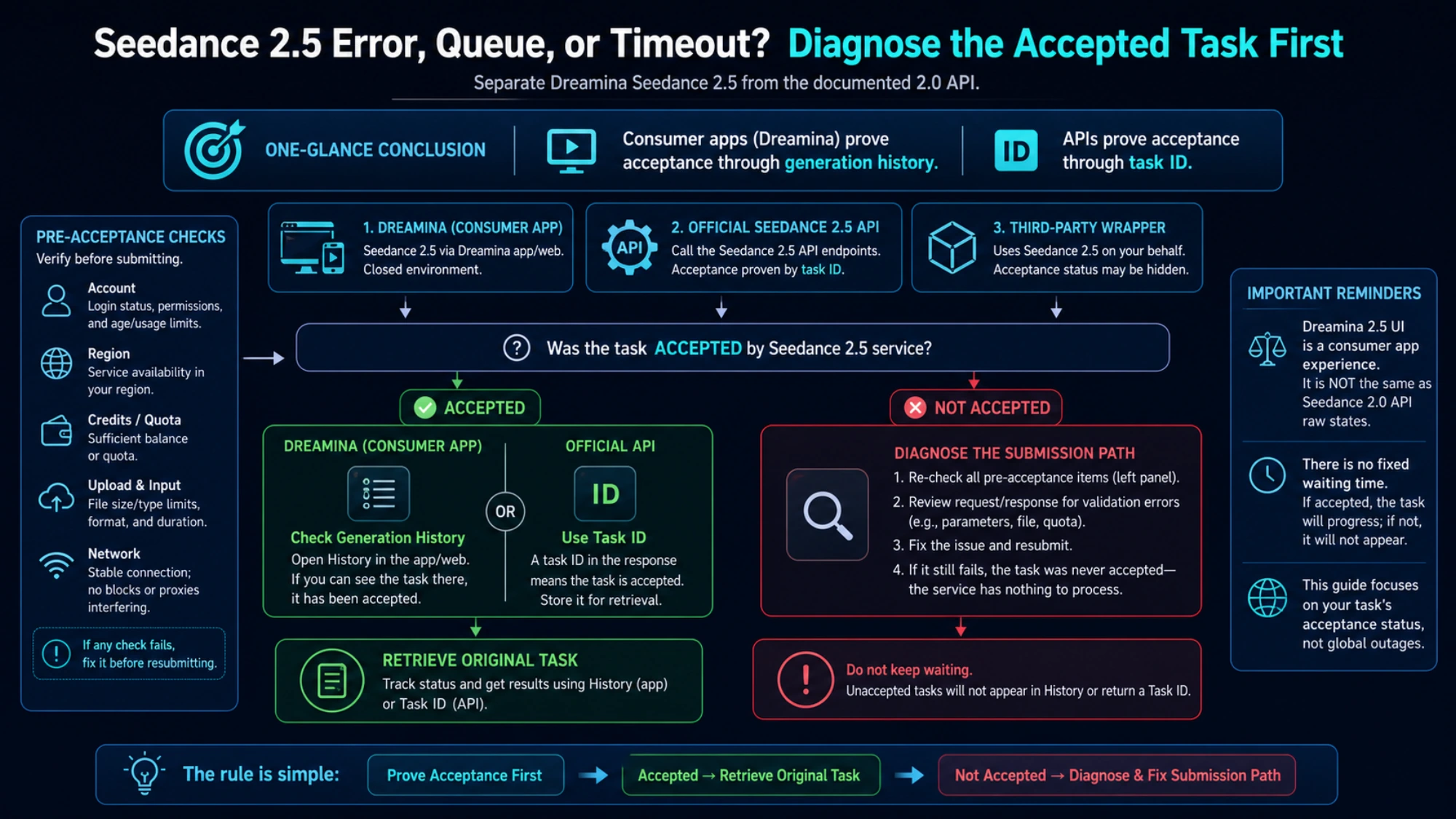
ByteDance's official launch material identifies Seedance 2.0 as one model available through multiple official surfaces and capable of accepting text, images, video, and audio. That model identity does not make every access surface the same product. A consumer app, the Volcengine Ark API, and a third-party gateway can expose different authentication, payloads, queues, moderation layers, billing, and error messages.
Write down the exact route before changing anything:
- Consumer app: Jimeng, Doubao, Dreamina, or another creator-facing interface. It may show a project-history entry rather than a raw task ID.
- Official API: Volcengine Ark or the corresponding ModelArk route. It exposes an asynchronous task contract and machine-readable errors.
- Wrapper or gateway: a creative suite, API aggregator, plugin, or website that calls Seedance on your behalf. Its visible error may originate in the wrapper, one of its dependencies, or the upstream model.
This distinction prevents a common diagnostic mistake. “Model unavailable” inside one creative suite does not establish that the official API is unavailable. A browser “network error” does not establish that a generation failed. A 429 response does not, by itself, tell you whether the route hit a request-rate limit, account quota, or queued-task ceiling.
A task ID divides the investigation in two
The most valuable piece of evidence is acceptance. Did the service create a task?
On the official Volcengine route, video generation is asynchronous. The current create-task documentation describes a POST /api/v3/contents/generations/tasks request that returns a task ID. The retrieve-task documentation then exposes states including queued, running, succeeded, failed, and expired, with an error object on failure.
That produces a clean decision boundary:
If a task ID exists
Save it before refreshing the page, closing the tab, or changing the request. Query the original route for the current state.
queuedmeans the task is accepted and waiting. It is not proof of failure.runningmeans the task remains nonterminal. A disconnected UI can still be out of date while the backend task continues.succeededmeans retrieve the result from that task rather than creating a replacement.failedmeans inspect the route's exact code, message, and Request ID.expiredmeans the official task passed its configured execution deadline. That deadline is an API setting, not a universal consumer-app wait time.
Do not convert elapsed time into a state when the route can report the state directly. Queue order, capacity, account limits, and wrapper timeouts change. “It has been a while” is weaker evidence than an actual task record.
If no task ID or history record exists
The failure may have happened before generation began. Keep the prompt unchanged and test the path that submits it:
- Confirm you are still authenticated to the same route and account.
- Check whether the page can load project history or whether the API can answer a harmless authenticated request.
- If the request includes remote assets, confirm the route can download them without a login page, expiring browser session, or blocked host.
- Compare one alternate network or a private browser session. Change only the environment, not the prompt and inputs at the same time.
- Record the browser console/network failure or HTTP response before retrying.
If the first request may have reached the service but the response was lost, check history and list/retrieve APIs before creating another task. Otherwise, a “network retry” can become a duplicate generation.
What “network error” can—and cannot—mean
“Network error” is a label, not a root cause. It can describe at least four different boundaries:
| Boundary | Evidence to look for | What to test |
|---|---|---|
| Browser to app | DNS/TLS/fetch failure, login redirect, upload interruption, no task record | Same request on one alternate network or clean session |
| App UI to its backend | A history entry exists but the page no longer updates | Reopen history; retrieve the existing task rather than resubmitting |
| Wrapper to upstream | Wrapper request ID exists; its logs show provider/auth/model mapping failure | Check the wrapper's status and exact provider error |
| Upstream generation | Official task ID exists and ends in failed or expired | Read the task error and Request ID; use the official error owner |
Clearing cache is reasonable only when evidence points to stale local state—for example, the same account and task work in a clean session but not the original browser profile. It is not a first-line fix for a failed API task, moderation decision, invalid parameter, quota branch, or provider incident.
Likewise, disabling a VPN is a controlled test, not a general recommendation. Compare one network path, note the result, and restore the safer configuration if it does not change the outcome. Do not bypass regional, account, identity, or content controls.
Use the exact failed code, not the HTTP number alone
The official Ark error catalog separates input validation, authentication/access, policy/privacy, rate/quota, overload, burst protection, and internal-service failures. Several different branches can share the same HTTP status.
Two examples show why the full code matters:
InputImageSensitiveContentDetected.PrivacyInformationpoints to a privacy-sensitive input-image boundary on the official Ark route. Retrying the same image, buying more quota, or clearing a browser cache does not address that code. Use an allowed input and follow the route's authorization rules; do not attempt to evade the control.ServerOverloadedidentifies a server-capacity class on that route. Preserve the Request ID and timestamp, follow any provider retry guidance, and avoid turning one response into a claim that every Seedance surface is down.
For a 429, save the complete code and message. The official catalog contains multiple limit branches, so “wait and retry” may be incomplete: the correct next action may be to let existing queued tasks finish, reduce submission rate, correct an account quota issue, or contact the route owner. For a 400, do not assume moderation; it can also be a missing or invalid parameter.
The minimal failure record for an API task is:
UTC timestamp:
route and endpoint:
model or endpoint ID:
task ID:
Request ID:
HTTP status:
exact error code and message:
last known task state:
redacted payload shape:
Remove keys, tokens, signed URLs, personal media, and full prompts that contain confidential material before sharing the record.
Run a same-route minimal canary
A canary answers a narrow question: can this route and account create a basic Seedance task now? It does not benchmark quality, prove global uptime, or guarantee that your original request is valid.
Use this method:
- Stay on the same route, account, region, and approximate time window as the failure.
- Record the visible model/model ID, app or SDK version, and account tier without exposing credentials.
- Submit a short, text-only single-scene request using that route's current defaults or shortest documented supported duration. Do not add reference images, video, audio, a real-person likeness, brand names, or copyrighted characters.
- Save the response, task/request ID, state sequence, elapsed time, and any credit or billing event shown by that route.
- If the canary succeeds, rebuild the original job by adding one variable at a time.
A neutral canary prompt could be:
A paper boat glides across a still blue pond. Fixed camera, soft daylight, one continuous shot.
The wording is intentionally simple. If it succeeds, add the original input mode first, then one reference asset, then audio, then route-specific duration, resolution, or other options. Stop at the first addition that reproduces the failure. You now have a compact difference the route owner can investigate.
If the canary fails, do not immediately move it to another provider and declare the model down. First preserve the same-route evidence. A second route is useful only as an explicit comparison with separate authorization, model mapping, and task records.
Consumer apps need history-first troubleshooting
Creator interfaces may hide raw API details, so use the project history as the acceptance record.
- Screenshot the exact label and note the local time and route name.
- Open history in a fresh navigation rather than repeatedly reloading the generation screen.
- If the job exists, do not submit it again while the app still labels it queued or processing. Use the app's supported cancel or support path.
- If the job does not exist, run the text-only canary without references.
- If the canary works, add one original asset at a time. A failure that appears only after one asset is a better support case than “everything fails.”
Do not import API status names into an app that does not expose them. “Processing” may be the app's own label; “queued” may be hidden. Report exactly what the app shows and whether history survives a new session.
If you are still trying to locate a legitimate route or learn the creation workflow, use the separate Seedance 2.0 setup and usage guide. Access problems and generation failures are related, but they are not the same reader job.
Wrappers and gateways add another failure owner
A wrapper can fail even when the upstream model is available. It may add its own model alias, balance check, asset proxy, moderation service, callback database, or status translation. Diagnose that layer explicitly:
- save both the wrapper request ID and any upstream task ID it exposes
- verify that the selected model alias still maps to Seedance 2.0 for your account
- check whether the wrapper can fetch your asset URL from its servers
- compare text-to-video with the failing input mode on the same wrapper
- inspect the wrapper's status/support channel before changing the prompt
- ask whether a failed wrapper request created an upstream task and how billing is handled; do not assume
An error that mentions balance can still be a provider defect; an error that says “model unavailable” can come from a downstream classification or routing dependency. The wording alone is insufficient. The route's logs and task identifiers decide ownership.
Stop retrying when the next attempt adds no evidence
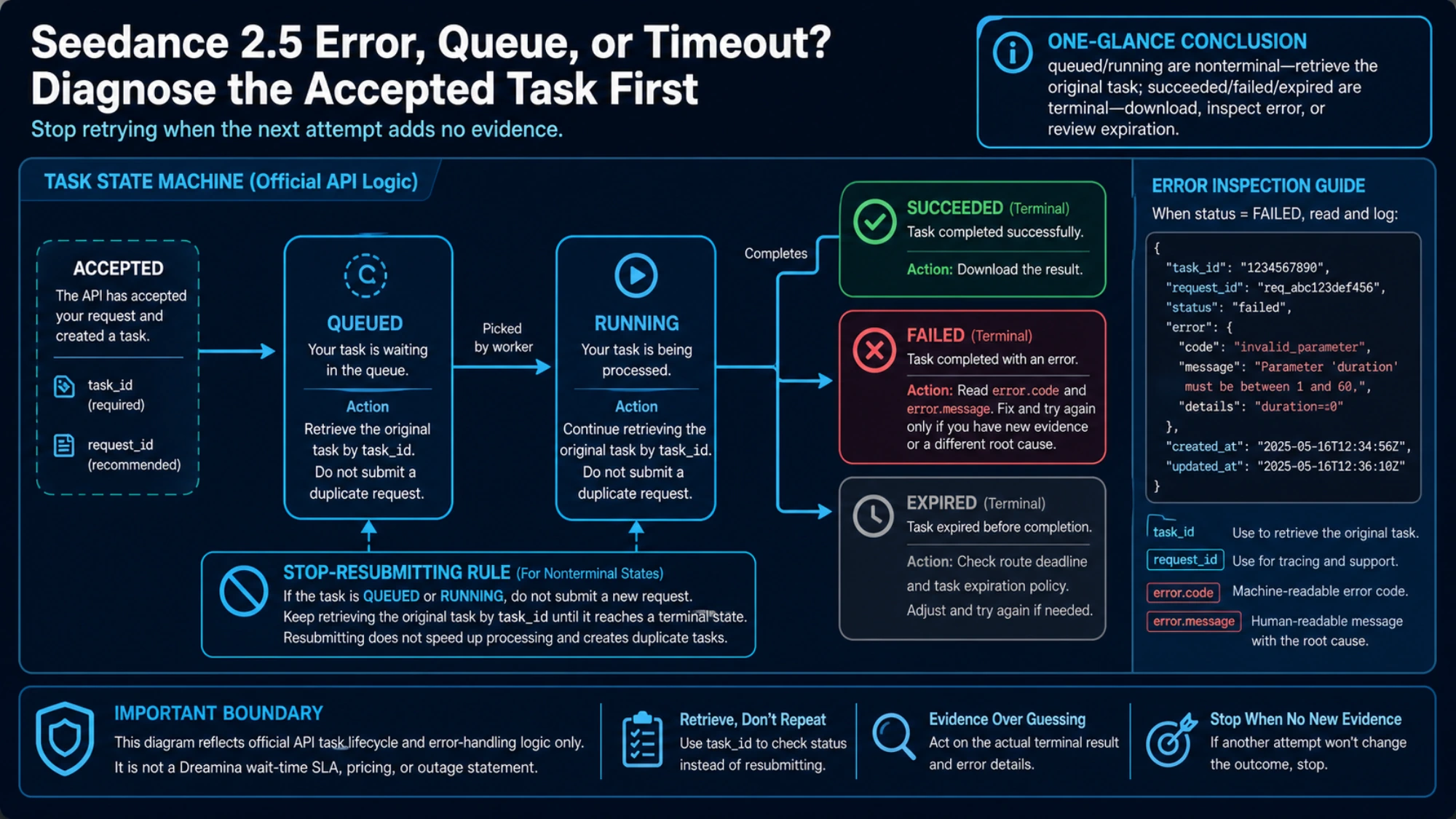
Repeated identical submissions are not a diagnostic method. Use these stop rules:
- Task accepted and nonterminal: retrieve or cancel it according to that route's contract before submitting again.
- Terminal parameter or policy code: change the named variable once. Do not replay the identical payload.
- Transport failure before acceptance: one unchanged retry is reasonable after preserving the failure, but check history first.
- Canary plus one evidence-changing retry both fail: stop blind retries. Escalate with the evidence bundle, wait for a verified route incident to resolve, or deliberately test another authorized route.
- Only one wrapper fails: stop editing creative content until the wrapper owner has ruled out model mapping, balance, dependency, or upstream-task problems.
- Multiple independent routes fail: this is stronger evidence, but a current provider notice or support confirmation is still needed before calling it a global outage.
Your escalation bundle should contain the UTC timestamp, exact route, account tier, visible model/model ID, app/SDK version, task and Request IDs, state sequence, exact code/message, redacted payload shape, input types and approximate sizes, network comparison result, and any billing event. Never include an API key or reusable signed URL.
When a developer should switch routes
Switching routes is a production decision, not a fix for an existing consumer-app task. Official direct access remains the clearer choice when you need first-party task semantics, support ownership, and current model controls. A gateway becomes useful when your developer workflow needs a common API or deliberate model fallback and you accept an additional routing layer.
For that narrow case, laozhang.ai's current Seedance 2.0 documentation describes an asynchronous provider contract with submitted, queued, in-progress, completed, and failed states. Access is not enabled for every account, and those provider states do not replace Volcengine's official contract. Verify access and the current documentation before building against it; stop and use official direct access or another route if you need a control or support boundary the gateway does not expose.
Do not switch providers merely to escape an input-policy error, and do not expect a new route to recover an existing Jimeng, Doubao, Dreamina, or Ark task. If your actual question is cost, credits, or plan fit after the failure is understood, continue with the separate Seedance 2.0 free-versus-paid route guide.
The practical rule is simple: route first, task ID second, exact state or code third, canary fourth. That order turns “Seedance 2.0 not working” from a vague label into a supportable diagnosis—and tells you when the safest fix is to stop clicking Generate.
Sources8
External pages this guide links to, in the order they appear. Last updated Aug 4, 2026.
Sources8
External pages this guide links to, in the order they appear. Last updated Aug 4, 2026.
- 1.Dreamina's official Seedance 2.5 pagedreamina.capcut.com/seedance/seedance-2-5
- 2.BytePlus/ModelArk create-task referencedocs.byteplus.com/en/docs/modelark/1520757
- 3.CapCut's AI-access checkscapcut.com/help/ai-function-not-working-after-login
- 4.CapCut's troubleshooting pagecapcut.com/help/stuck-at-the-thinking-phase
- 5.ByteDance's official launch materialseed.bytedance.com/en/blog/seedance-2-0-official-launch
- 6.create-task documentationdocs.volcengine.com/docs/82379/1520757
- 7.retrieve-task documentationdocs.volcengine.com/docs/82379/1521309
- 8.error catalogdocs.volcengine.com/docs/82379/1299023