Gemini Image to 3D Model: No GLB Export, 3 Tested Routes
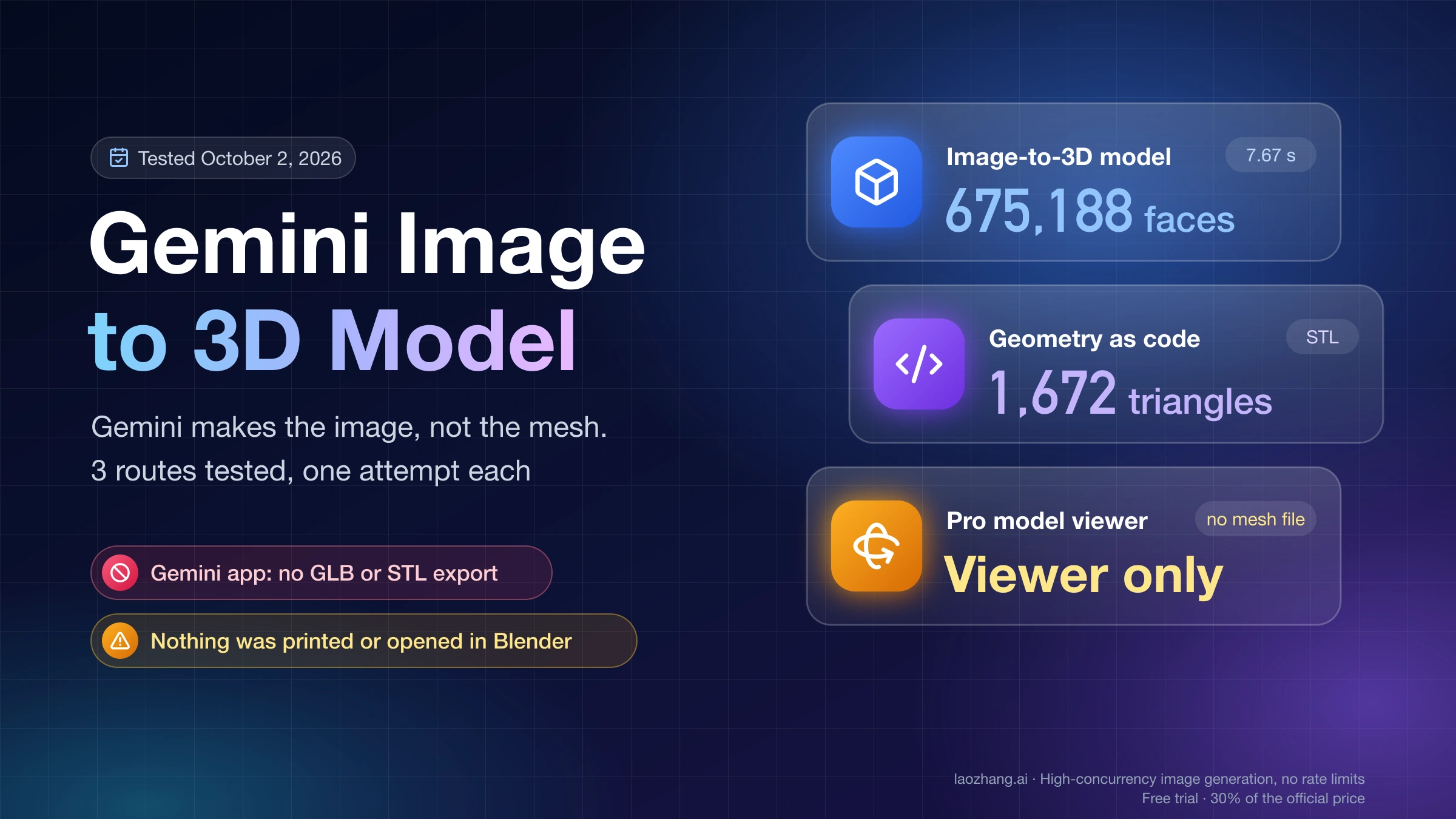
Gemini makes the image, not the mesh. Asked for a GLB or STL on October 2, 2026, it declined. A converter, a code-written STL and a 3D viewer each got partway.
On this page
Gemini's image model gives you a picture, and a picture is as far as it goes. Asked in the Gemini app on October 2, 2026 to turn its own image into a downloadable GLB or STL, Gemini 3.6 Flash answered: "I cannot directly generate or export 3D geometry files like .glb or .stl." To get an actual 3D file you pair Gemini with something else. Which something depends on what you mean by 3D.
Three routes were run that day on a personal Google account with no Google AI plan, using one object (a toy robot shaped like a coffee mug) and one attempt each:
| Route | What came out | What was not done |
|---|---|---|
| Hand the Gemini image to an open image-to-3D model (Hunyuan3D-2 public demo, no sign-in) | A mesh of 675,188 faces in 7.67 seconds | The mesh was not downloaded, viewed, textured, or opened in Blender |
| Ask Gemini to write the geometry as a Python script | A 1,672-triangle STL, after two broken replies and manual assembly | The STL was measured by a script only. It was not opened in a slicer or Blender, and nothing was printed |
| Ask the Pro model for an interactive 3D model | An inline viewer with rotate and zoom controls | The viewer failed to start in the test browser, so the model was never seen moving. Its Download button was not clicked |
A fourth route, Gemini 3 Deep Think's sketch-to-print feature, requires Google AI Ultra and was not run. No paid converter was run either. Treat every result below as a single observation, not a benchmark.
Picture, viewer, asset file, or printable part: which 3D you need
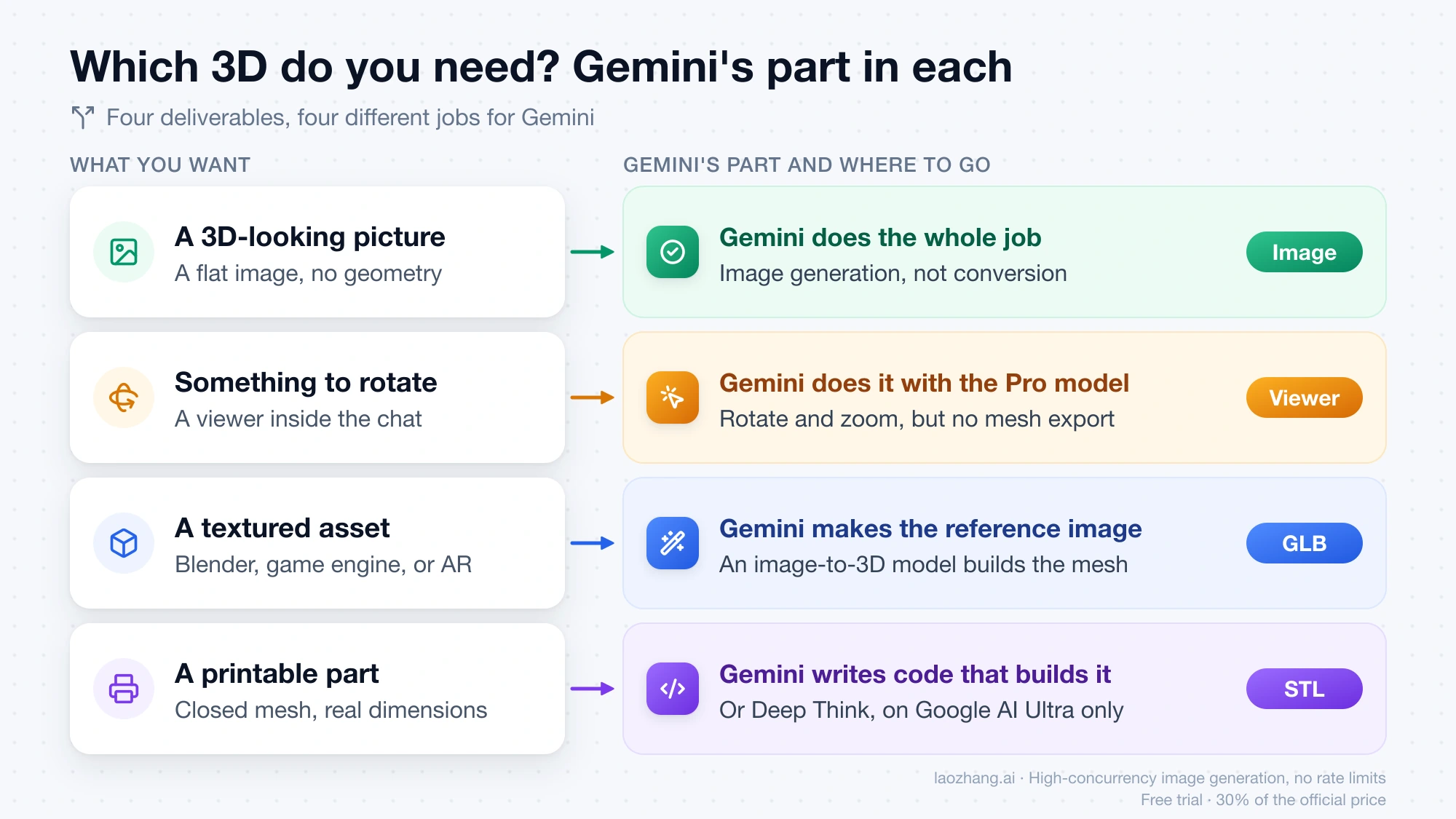
"3D" covers four different deliverables, and Gemini plays a different part in each.
| What you want | What it really is | Gemini's part | Where to go |
|---|---|---|---|
| A picture that looks like a 3D figurine or render | A flat image | Does the whole job | Image generation, not conversion |
| Something to rotate in the browser to understand a shape | An interactive visualization inside the chat | Does the whole job with the Pro model, but there is no mesh export | The interactive viewer section below |
| A textured asset for Blender, a game engine, or AR | A mesh file, usually GLB | Makes the clean reference image | An image-to-3D model |
| A part with real dimensions for a 3D printer | A closed mesh, usually STL | Writes code that builds the geometry, or Deep Think on Ultra | The code route below |
The first row trips up the most people. The viral "3D figurine" results are 3D-looking images, with no geometry behind them. If that look is all you need, there is nothing to convert, and the Nano Banana figurine prompt guide has the prompt and its fixes. Everything from here on is about getting an actual 3D file or a rotatable object.
A few constraints settle the choice quickly:
- No account and no GPU: a hosted demo of an open image-to-3D model. The Hunyuan3D-2 demo ran without sign-in on October 2, 2026, which is not a promise that it will be up when you try.
- You need color and texture: an image-to-3D model with a texture stage, exported as GLB. STL cannot carry color at all.
- You need exact millimeters: geometry written as code, where every dimension is a number you can read and change.
- You have Google AI Ultra: Deep Think is the one Gemini mode Google says generates a file for printing.
Can Gemini create a 3D file from a picture? The reply to a GLB request
In the Gemini app with 3.6 Flash, no. The image came from this prompt:
Generate an image: a single small toy robot shaped like a coffee mug with two short arms and a round antenna, matte orange plastic, three-quarter front view, plain white background, soft even studio lighting, whole object in frame, no text.The follow-up in the same chat was:
Convert this image into a 3D model file (GLB or STL) that I can download and open in Blender.Gemini declined in its first sentence, quoted above, and produced no file and no download link. It then suggested two workflows. The first was to upload the image to an AI image-to-3D converter, naming Tripo3D, Meshy, Rodin, CRM, and CSM, and to bring the result into Blender through File, Import, glTF 2.0. The second was to model the object by hand in Blender with the image as a reference. Those names are Gemini's suggestions. None of the five was run in these tests.
The Gemini API gives the same answer from the other side. The image models, Nano Banana 2 (gemini-3.1-flash-image), Nano Banana 2 Lite (gemini-3.1-flash-lite-image), and Nano Banana Pro (gemini-3-pro-image), return images and text. The image generation documentation describes no mesh, GLB, or STL output.
That reply is one run with one wording on one model. A different model changes the answer in two specific ways covered below: the Pro model can build a rotatable viewer, and Deep Think on Ultra is described by Google as producing a printable file.
One naming trap: websites called "Gemini 3D" or "Gemini image to 3D" are not Google products. They are independent converters that take a Gemini image as input, and gemini3d.net says so about itself.
Convert a Gemini image to a GLB with an image-to-3D model
For a textured asset, Gemini's job is to produce a clean reference image, and a separate image-to-3D model builds the mesh from it.
The run: one Gemini image into Hunyuan3D-2, 675,188 faces in 7.67 s
Hunyuan3D-2 is Tencent's open image-to-3D model. Its official demo on Hugging Face needed no sign-in for the run on October 2, 2026. The input was the robot image from the previous section, as a 934×720 crop of the preview and not the full-size download. With the default settings (30 steps, octree resolution 256, background removal on), pressing Gen Shape returned these Mesh Stats:
- 675,188 faces and 184,456 vertices
- 7.67 seconds in total: 1.01 seconds for background removal, 6.56 seconds for shape generation
The Export tab offers a file-type dropdown that defaults to glb, a Simplify Mesh checkbox, and a Target Face Number slider that defaults to 10,000.
That is where the run stopped. The mesh was not downloaded, the in-page viewer did not render in the test browser, and Gen Textured Shape was not pressed. So the run shows that a single Gemini image goes in and a mesh comes out in under eight seconds without an account. It shows nothing about how closely the shape matches the picture, and nothing about texture quality.
Public demos also come and go. Microsoft's TRELLIS demo returned HTTP 503 at the same hour.
Make a reference image a converter can use
A converter sees only what the image shows, so the image should describe one object unambiguously. The robot prompt above already contains the parts that matter:
- A single object, with nothing overlapping it
- A plain white background, so background removal has an easy edge
- A three-quarter view, which shows the front and one side at once
- Soft, even lighting, so hard shadows are not read as shape
- The whole object in frame, with no cropped feet or antenna
Image3D.io, one of the converter vendors, lists nearly the same advice: white background, studio lighting, three-quarter view, a single object.
If your image already exists and has a busy scene behind it, clean it first. Gemini Image Background Change covers removing and replacing backgrounds. Download the full-size image as well. The Gemini app saves at 1K without a Google AI plan and 2K with one, and either is larger than a screenshot of the preview. For writing the image prompt itself, see How to Prompt Nano Banana.
Open models, hosted demos, and paid converters
The options differ mainly in where they run and what they let you download.
| Option | Formats stated by the maker | What it needs | Status here |
|---|---|---|---|
| Hunyuan3D-2, Tencent | "glb/obj (or other format)" | Demo: a browser. Locally: 6 GB VRAM for shape, 16 GB for shape plus texture | Shape stage run on the demo |
| TRELLIS, Microsoft | GLB (textured mesh), PLY (3D Gaussians) | Locally: an NVIDIA GPU with at least 16 GB of memory | Not run; demo returned 503 |
| Meshy, commercial | .fbx, .obj, .usdz, .glb, .stl, .blend | An account. Free plan: 100 credits a month, assets under CC BY 4.0 | Not run |
A few notes on reading that table. Meshy's free plan resets on the first day of each month and has lower queue priority, and CC BY 4.0 means commercial use requires attribution. How many credits one image-to-3D job costs is not shown on the pricing page. TRELLIS models and most of its code are under the MIT License, with exceptions for some submodules. Check the Hunyuan3D-2 license yourself before commercial use.
Paid converters commonly let you preview for free and charge for the file. Image3D.io states this directly: a free browser preview after sign-in, while "downloads require Maker or another paid plan." Find out where the download sits before you spend time tuning an image for a particular service.
Ask Gemini for geometry as code: a 1,672-triangle STL and its defects
Gemini cannot export a mesh, but it can write a program that writes one. This is the route to a part with real dimensions, and it produced a real STL in the test, with more friction and more defects than the idea suggests.
The request, in the same chat on 3.6 Flash:
Then write the geometry as code instead. Give me one Python 3 script that uses only the standard library and writes robot_mug.stl (binary STL, millimetres, about 60 mm tall) approximating the robot in the image: mug-shaped cylindrical body, a handle, two short arms, two feet, and an antenna with a ball on top. The mesh must be made of closed solids so it can be 3D printed. Output only the script in one code block.The first reply did not run as delivered. It was a single 13,885-character code block that held an unfinished first draft, then a second script inside the same block, and a garbled file-writing function. Reloading the page showed the same text.
The second reply did not run either. Asked for the complete final script again, Gemini sent 4,741 characters. The file-writing function was now intact, but the script stopped in the middle of the handle function, and the reply ended with a paragraph saying it had no context for the script.
A working script had to be assembled by hand. It combined the intact file-writing function from the second reply with the intact geometry functions and main function from the first. No line inside Gemini's functions was edited. On Python 3.12.1 with only the standard library, it wrote robot_mug.stl: 83,684 bytes and 1,672 triangles.
A separate checking script then parsed the file, grouped triangles into connected shells, counted edges not shared by exactly two triangles, and computed a signed volume for each shell. It found:
| Check | Result |
|---|---|
| Size | 54 × 40 × 70 mm. The request said about 60 mm tall |
| Shells | 5 separate shells that overlap. Nothing was merged into one solid |
| Handle and antenna ball | Closed, with faces pointing outward |
| Body, feet, and antenna rod | One connected shell with 2 edges not shared by exactly two triangles |
| Both arms | Closed, but with negative signed volume: the faces point inward |
| Feet | Three, not the two requested |
| Body | A solid cylinder, not a hollow mug |
| Likeness | No eyes, mouth, or any surface detail from the image |
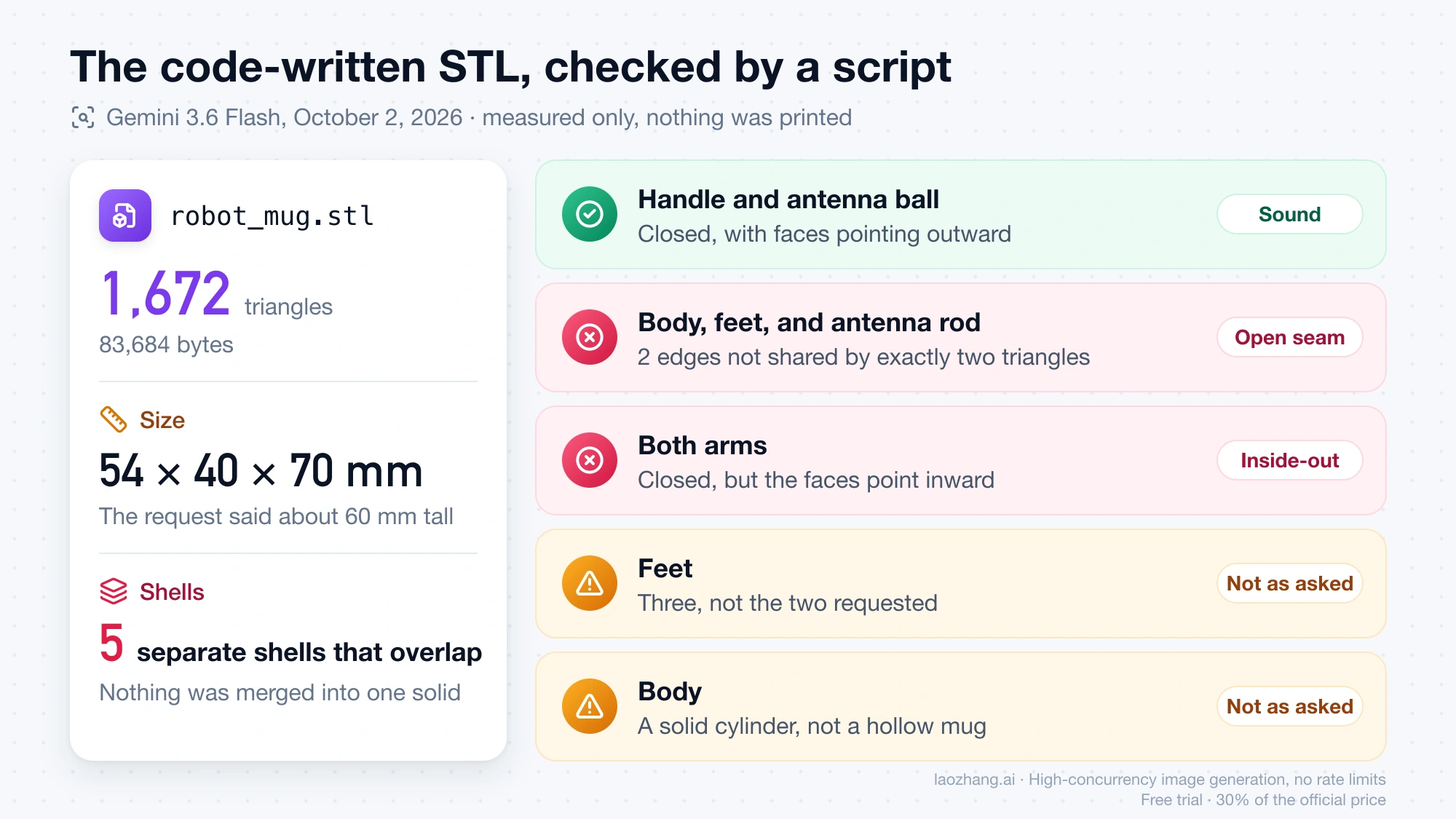
So the code route gave a parseable STL using nothing but Python, and the result is a block-out of the idea of the robot, not a reconstruction of the picture. The prompt asked for closed solids and got two inside-out arms and an open seam anyway. A request for printable geometry does not make the output printable. Two broken replies describe this one chat, not Gemini's coding ability in general, but they are a reason to expect a retry.
This route fits objects you can describe as dimensions: a bracket, a spacer, a box with a lid, a stand. It is a poor fit for characters and organic shapes, where the look comes from surface detail that a few cylinders and boxes cannot carry.
The Pro model's interactive 3D model rotates but exports a picture
If your goal is to spin an object around and understand it, Gemini can do that alone, and you get a viewer, not a file.
Google introduced interactive visualizations in the Gemini app on April 9, 2026, describing them as "functional simulations that can help you better understand the topic you're asking Gemini about." The instructions are to select the Pro model in the prompt bar and ask Gemini to "show me" or "help me visualize" something. Google says the feature is rolling out globally to all Gemini app users and is "not yet available for Education and Workspace accounts." On the no-plan test account, 3.1 Pro was selectable and Gemini generated the widget.
The prompt, in a new chat on 3.1 Pro:
Show me an interactive 3D model of a small toy robot shaped like a coffee mug, with two short arms, two feet and an antenna with a ball on top. I want to rotate it.Gemini returned an inline widget titled "MugBot 3D" with a viewport, five color swatches, three animation buttons, and a steam toggle. Its text read: "You can click and drag anywhere in the viewer to rotate it 360 degrees, and scroll to zoom in and out."
Two limits showed up:
- The viewer needs working WebGL. In the test browser the viewport displayed "3D Viewport Unavailable — Unable to initialize WebGL rendering context." That tab had WebGL 1 but not WebGL 2, so the robot was never seen rotating. This is a property of that browser, and it is the first thing to check if your viewport is blank.
- Copy gives you a picture. The menu under the widget had two actions, Copy and Download. Copy put a 1416×1366 PNG of the widget on the clipboard. No GLB, STL, or OBJ export was visible anywhere in the reply. Download was not clicked, so what it saves is unknown.
The widget was built from a text description. Whether Gemini will base one on a photo you upload was not tested, and Google's announcement does not mention converting an uploaded image or exporting a 3D file. Treat it as a way to look at a shape, not a way to obtain one.
Deep Think turns a sketch into a printable file, on Google AI Ultra only
Deep Think is the single case where Google itself says a Gemini mode produces a 3D file. The Gemini 3 Deep Think update of February 12, 2026 states: "With the updated Deep Think, you can turn a sketch into a 3D-printable reality." It continues: "Deep Think analyzes the drawing, models the complex shape and generates a file to create the physical object with 3D printing."
It is available to Google AI Ultra subscribers in the Gemini app. Google's sentences do not name the file format. The test account had no Ultra plan, so this was not run and nothing here speaks to its quality.
The trade publication CGWORLD reported on February 24, 2026 that Deep Think does not draw a mesh directly. By that account it writes code that defines the shape mathematically, in languages such as OpenSCAD or Python, and runs it to output the solid. That is the same idea as the code route above, with the difference that Deep Think runs the code for you. The STL defects above came from 3.6 Flash and say nothing about Deep Think's output.
GLB, STL, or OBJ: which file format your target needs
Pick the format by where the file is going.
- GLB is the single-file binary form of glTF 2.0. It carries geometry together with materials and textures, which makes it the usual choice for Blender, game engines, web viewers, and AR.
- STL stores triangles and nothing else: no color, no texture, and no unit field. It is the usual hand-off to a slicer. Because the file has no units, a model written as 70 units tall is 70 mm only if the slicer assumes millimeters.
- OBJ stores geometry and keeps materials and textures in companion files, so it travels as a small set of files.
A textured character from an image-to-3D model belongs in GLB. A dimensioned part from code belongs in STL. Converting a textured GLB to STL for printing throws the color away.
What to check before you trust a generated mesh
Neither route hands you a finished model, so check the result against your target before you build on it.
For printing. A printable mesh is closed, meaning every edge is shared by exactly two faces, and its faces point outward. The code-written STL above failed both in places even though the prompt asked for closed solids. Run the file through your slicer's or modeling tool's mesh analysis, and look specifically for open edges, flipped faces, and separate overlapping shells that should be one solid. Then confirm the size, since STL has no units.
For a game engine or AR. Look at the face count. The default Hunyuan3D-2 shape had 675,188 faces, which is heavy for one small prop. The demo's Simplify Mesh option with a face target exists for that reason. Check that a texture is actually present, because a shape-only run produces geometry without color.
For likeness. Rotate the model and compare it with the source image from the side and the back, not only from the original camera angle. A single image contains no information about the hidden side, so the model has to make that part up.
For rights. The license of the tool governs what you can do with the file. Meshy's free plan, for example, puts assets under CC BY 4.0.
Questions about turning Gemini images into 3D
Is there a free way to convert a Gemini image to 3D?
Yes, with conditions. Image generation in the Gemini app works without a paid plan within usage limits that are not a fixed number; Gemini Free Image Limit explains them. The Hunyuan3D-2 demo produced a mesh without an account on October 2, 2026, but public demos have queues and outages. Meshy lists a free plan with 100 credits a month. Running an open model yourself costs no fee and needs a GPU: 6 GB of VRAM for Hunyuan3D-2 shape generation, 16 GB with texture.
Why does my converted 3D model look wrong from behind?
Because the converter saw one side. A single three-quarter image shows the front and one flank, and the back is invented by the model. Giving it more views is the direct fix: Hunyuan3D-2 has a multiview variant that takes several images, and TRELLIS added multi-image conditioning in December 2024. Multi-view input was not part of the October 2 tests, so how much it helps with Gemini-made views is unmeasured.
Can I 3D print the figurine picture Gemini made?
Not directly. The figurine picture is an image with no geometry. To print it you need a mesh from an image-to-3D model, exported or converted to STL, and then the closed-mesh and scale checks described above. No print was made in these tests, so whether a converted figurine survives slicing at a given scale is open.
Can I download the interactive 3D model from Gemini as a GLB or STL?
No such option appeared in the test. The widget's menu had Copy and Download. Copy produced a PNG picture of the widget, and no mesh export was offered. What Download saves was not checked.
Where do I start if I haven't made the Gemini image yet?
Start with the image, and write it for conversion: one object, plain background, three-quarter view, whole object in frame. The Gemini Image Generation Guide covers where to generate images in Gemini and which model to pick.