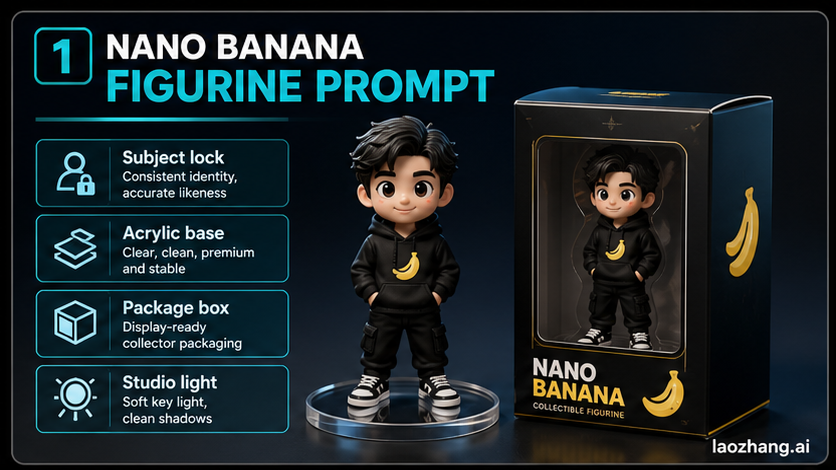
Use a Nano Banana figurine prompt when you want a reference photo to become a collectible 3D figure scene with a recognizable subject, sculpted toy material, an acrylic base, and a simple product-photo setup.
The useful version is not one magic paragraph. It is a small prompt system: lock the subject, define the figure material, place the figure on a base, add packaging only when it helps, control the lighting, and include repair notes before the next generation.
Copy This Starter Prompt
Paste this after uploading an image you are allowed to use. Replace the bracketed slots before generating.
textCreate a high-quality product photo of a collectible 3D figurine based on the uploaded reference image.

Preserve the authorized subject's key identity cues: [face / hairstyle / outfit / color markings / product shape]. Do not add a celebrity likeness, brand logo, or copyrighted character unless I provide explicit rights.

Make the subject look like a sculpted PVC or resin figurine, about [scale or size impression], standing on a transparent acrylic circular base. Keep the pose [standing / seated / action pose] and make the proportions cute but still recognizable.

Place the figurine on a clean desk with a simple studio product-photo setup. Add a matching non-branded toy package box behind it with the generic label "[safe short label]". Optional: show a side monitor with a clean 3D sculpt preview, not readable code.

Use softbox lighting, realistic plastic texture, crisp edges, shallow depth of field, and a premium collectible photography look. Avoid extra fingers, distorted hands, melted face details, messy text, real brand marks, unsafe symbols, and clutter.

If the face or identity drifts, prioritize the uploaded reference over style. If the packaging text becomes unreadable, simplify the box and keep only one short label.
That prompt is deliberately modular. If the first result already looks good, only change one module at a time. If it fails, do not rewrite the whole prompt; repair the weak module.
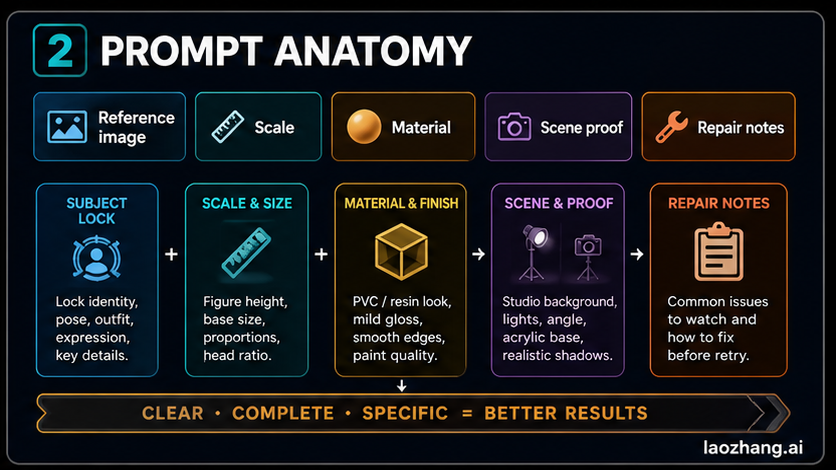
The Prompt Anatomy That Matters
The starter prompt works because it separates the visual job into controllable parts. Most weak figurine prompts fail because they ask for "a 3D figure" without saying what must stay recognizable, what material the figure should resemble, or what visual proof makes it look like a product photo.
| Module | What it controls | What to write |
|---|---|---|
| Subject lock | Identity, markings, outfit, silhouette | "Preserve the uploaded subject's face shape, hairstyle, jacket, and color palette" |
| Figure type | Toy material and scale | "sculpted PVC collectible figurine on a 1/7 style display base" |
| Pose | Body shape and energy | "standing with one hand raised, stable feet, no extreme twist" |
| Base | The figure's physical proof | "transparent acrylic circular base with a tiny generic nameplate" |
| Packaging | Collector context | "non-branded package box behind the figure with one short safe label" |
| Scene | Product-photo believability | "clean desk, softbox light, shallow depth of field" |
| Repair notes | Second-attempt control | "if face drifts, prioritize reference; if box text fails, simplify" |
The key is to give Nano Banana a scene it can reason about. A figurine on a base with a box behind it is easier to keep coherent than a vague "turn this into a toy" request. The base proves the scale, the box proves the collectible context, and the repair notes tell the model what matters more when style competes with identity.
Which Route Should You Use First?
For the broad Nano Banana family, the current route details can shift, so keep the route decision practical. For family-level routing, use the Nano Banana AI image generator overview. For the Pro-specific access story, use the Nano Banana Pro workflow guide. For this figurine job, choose the route by how much control you need.
| Route | Use it when | Watch out for |
|---|---|---|
| Gemini app | You want the easiest official image upload and edit loop | Consumer UI behavior and quotas can change |
| AI Studio or Gemini API | You need model control, repeatable tests, or developer workflow | Treat pricing, limits, and model IDs as freshness-sensitive |
| YingTu image playground | You want a browser-based prompt testing and creation route before deeper setup | It is a testing route, not proof of official Google availability |
| Existing prompt pages | You only need quick inspiration | Many examples skip consent, repair, and model boundaries |
For most readers, start with the simplest official upload workflow you have access to. Move to AI Studio or API only when you need repeatability, parameter control, or a workflow you can document. Use an image playground only when it saves iteration time; do not treat any playground's price, speed, or availability as an official Google fact unless you recheck it in that moment.
Prepare the Reference Image
The uploaded image matters as much as the text. A good reference gives the model a stable identity to preserve and a simple subject to sculpt. A weak reference forces the prompt to invent too much.
Use a reference image that has:
- one clear subject
- visible face, silhouette, markings, or product shape
- minimal blur
- no crowded background
- no private person unless you have permission
- no public figure, logo, or copyrighted character unless you have rights
For a person, choose a clean portrait or full-body image with the outfit you want to preserve. For a pet, pick a photo where the face shape, ears, coat pattern, and tail are visible. For a product, use a clean product image and describe which parts should become toy-like and which parts should stay accurate. For a character-style image, use your own original character sheet or authorized art and avoid asking for protected IP.
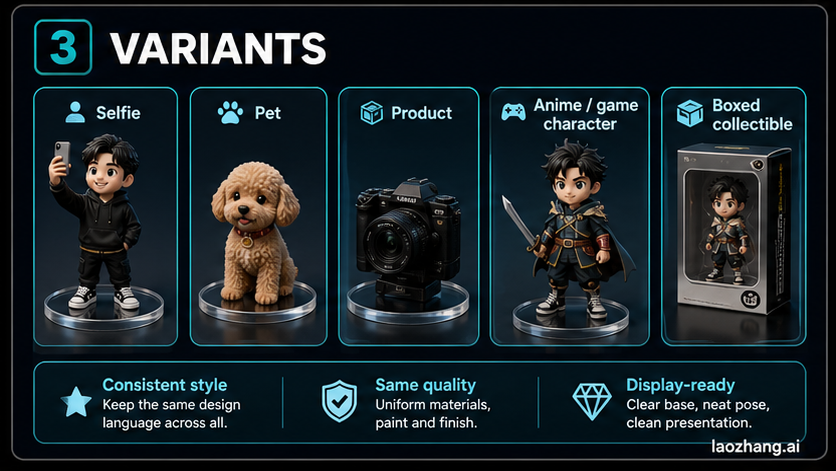
Variants You Can Copy
Use these as prompt deltas. Keep the starter prompt, then swap the subject and scene details.
| Variant | Add this prompt detail | Remove or soften |
|---|---|---|
| Selfie figurine | "preserve the person's hairstyle, glasses, jacket, and friendly expression; cute collectible proportions, not a realistic statue" | Remove brand logos from clothes and avoid celebrity resemblance |
| Pet figurine | "preserve coat markings, ear shape, eye color, and tail; make the base look like a small display stand" | Remove human packaging poses and avoid exaggerated teeth |
| Product mascot | "turn the product shape into a small display model with clean material, safe generic packaging, and no real brand marks" | Remove official logo text unless you own it |
| Original character | "keep the original color palette, costume silhouette, and weapon or prop shape; make it look like a licensed-style collectible without using real IP" | Avoid naming copyrighted franchises |
| Boxed collectible | "place a sealed display box behind the figurine with one short generic label and simple graphic blocks" | Avoid long text and tiny legal copy |
Do not combine every variant at once. A pet figurine with a boxed collectible scene is fine. A pet plus product mascot plus complex packaging plus text labels plus action pose is asking for drift.
Fix Common Failures
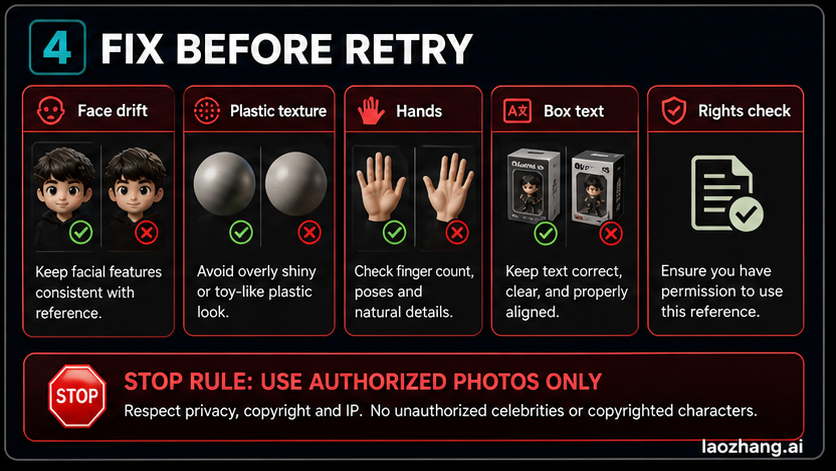
The best second attempt is usually a smaller prompt edit, not a longer prompt. Use the symptom you see, then patch the responsible module.
| Failure | Likely cause | Prompt repair |
|---|---|---|
| Face or identity drifts | Style overpowered the reference | "prioritize the uploaded reference for face shape, hairline, glasses, and expression; keep the figurine style secondary" |
| Figure looks like a flat sticker | Material is underspecified | "sculpted PVC/resin figure with rounded edges, subtle seams, molded hair, and soft plastic reflections" |
| Hands or fingers break | Pose is too complex | "use a simple stable pose, hands relaxed, no crossed fingers, no complex gesture" |
| Package text is unreadable | Too much text | "use one short generic label only; no tiny paragraphs, no fake brand copy" |
| Box uses real logos | Prompt invited brand context | "non-branded package design, abstract graphic blocks, no trademarked logos" |
| Base disappears | Scale proof is weak | "transparent acrylic circular base under both feet, visible edge, small blank nameplate" |
| Scene becomes cluttered | Too many props | "clean desk, one package box, one soft background, no extra toys" |
| Output looks like a real product listing | Commercial proof is too strong | "concept image only, no purchase badge, no barcode, no official manufacturer claim" |
If you need stronger face consistency, use the deeper workflow in the Nano Banana Pro face consistency guide. If your reference is a portrait and lighting is the main issue, the lighting section in the Nano Banana Pro beauty headshots guide is a better companion than adding more toy words.
Safety and Rights Stop Rules
Figurine prompts are fun because they feel like product mockups. That is also why the boundaries matter.
Use your own image, a client-provided image, or an image you have permission to transform. If the subject is a private person, get consent. If the subject is a public figure, do not use the workflow to imply endorsement, create misleading merchandise, or produce a fake collectible product. If the subject is a copyrighted character, brand mascot, game asset, or anime design, do not publish or sell the output unless you have the relevant rights.
Keep the packaging generic unless you own the brand. "A clean toy package box with a short safe label" is enough for the visual effect. You do not need fake barcodes, manufacturer marks, official seals, or retail claims. Google also documents that generated images include SynthID watermarking, so avoid any prompt or workflow that tries to hide provenance.
The clean stop rule is simple: if the image would confuse someone into thinking an official product exists, simplify it.
Production Checklist
Before you save the result, check the image like a product art director:
- The subject is still recognizable.
- The figure reads as sculpted PVC, resin, or toy material.
- The base is visible and stable.
- The packaging is generic and not pretending to be official.
- Text is short enough to be readable.
- Hands, eyes, and facial details do not look broken.
- You have rights or consent for the reference image.
- You can explain which prompt module you changed on the last attempt.
This checklist is what turns a viral prompt into a reusable workflow. The first image is exploration. The second image should be a controlled repair.
FAQ
What is the best Nano Banana figurine prompt?
The best prompt locks the authorized subject, specifies sculpted toy material, adds an acrylic base, places the figure in a simple product-photo scene, and includes repair notes for identity drift and packaging text. The starter prompt above is the safest baseline.
Should I use Nano Banana 2 or Nano Banana Pro for figurines?
Use the easiest route you can access for quick iterations. Test Pro only when you need higher-fidelity final assets, stronger layout handling, or more complex packaging and text. The route details can change, so use the family and Pro guides linked above for current context.
Can I make a figurine from someone else's photo?
Only when you have permission. A private person's face, a client photo, a celebrity image, or a copyrighted character all need rights-aware handling. If you do not have permission, use your own photo, a pet photo you own, a product you control, or an original character.
Why does the face stop matching the reference?
The prompt probably made style more important than identity. Add a repair line that says the uploaded reference should control face shape, hair, glasses, markings, and expression, while the figurine style should stay secondary.
Why is the packaging text messy?
The prompt is asking for too much text. Use one short generic label and remove small copy, fake legal lines, barcodes, and brand slogans. For this use case, the box only needs to signal collectible context.