Codex GPT-5.5 Model Not Found: Retired Oct 14, What to Use Now
GPT-5.5 retired from Codex with ChatGPT sign-in on October 14, 2026. Switch to gpt-6-sol (Plus and up) or gpt-6-luna (Free, Go); only API-key Codex keeps it.
On this page
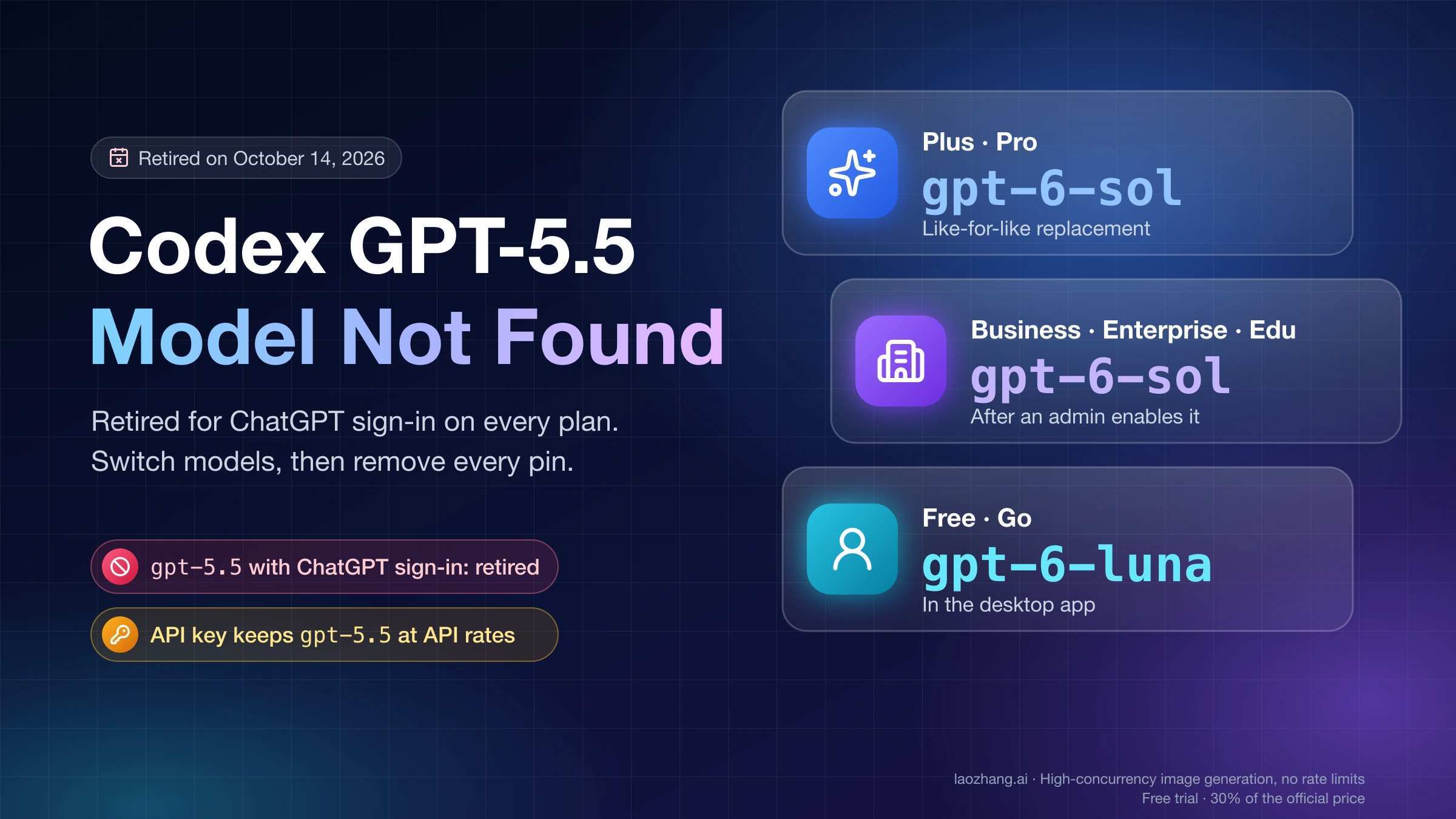
If Codex started rejecting gpt-5.5 on or after October 14, 2026, the model was retired, not broken. On that date OpenAI retired GPT-5.5 from ChatGPT, ChatGPT Work, and Codex with ChatGPT sign-in on every plan, including Business, Enterprise, and Edu. The OpenAI API keeps it (OpenAI's GPT-5.5 retirement notice).
The fix is to pick a replacement and then remove every place that still selects gpt-5.5:
- Plus, Pro, Business, Enterprise, Edu: switch to
gpt-6-sol. On Business, Enterprise, and Edu, an administrator has to enable it first. - Free and Go: switch to
gpt-6-lunain the desktop app. - You need GPT-5.5 itself: sign Codex in with an OpenAI API key and pay API rates.
If your error is dated before October 14, the cause was different. GPT-5.5 was still supported then, and the same 404 came from backend incidents in June and September, reported on GitHub, that cleared without any local change.
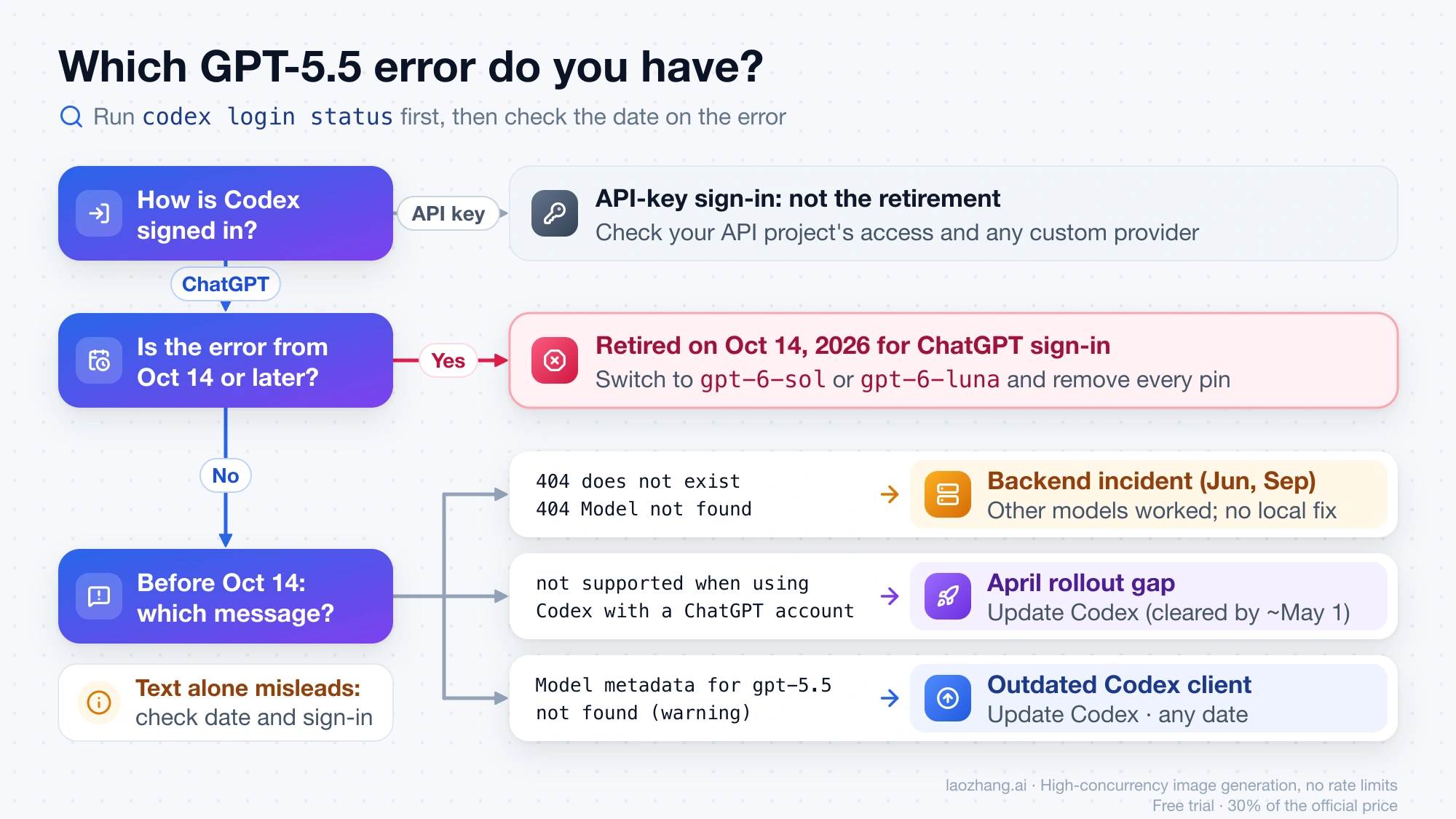
Which GPT-5.5 error you have: check the date and the sign-in method
The error text alone does not tell you the cause. These are the strings Codex users have reported for gpt-5.5 since April 2026:
unexpected status 404 Not Found: The model `gpt-5.5` does not exist or you do not have access to it., url: https://chatgpt.com/backend-api/codex/responses

unexpected status 404 Not Found: Model not found gpt-5.5

The 'gpt-5.5' model is not supported when using Codex with a ChatGPT account.

Model metadata for `gpt-5.5` not found. Defaulting to fallback metadata; this can degrade performance and cause issues.
The 404 appeared in June and September while GPT-5.5 was fully supported. The "not supported when using Codex with a ChatGPT account" wording showed up in April, before GPT-5.5 had reached some accounts. So decide by the date and by how Codex is signed in. Run codex login status to see the active method; a ChatGPT login prints Logged in using ChatGPT.
| What you see | When | Most likely cause | What to do |
|---|---|---|---|
Any gpt-5.5 failure, or GPT-5.5 missing from the model picker, with ChatGPT sign-in | October 14, 2026 or later | Retirement | Switch models and remove every gpt-5.5 pin |
| 404 "does not exist or you do not have access to it" | About September 6 to early October 2026 | Reported backend incident, cause unconfirmed; other models worked on the same account | Use another model; no local fix was confirmed |
| 404 "Model not found gpt-5.5" | June 2026 | Reported backend incident, cause unconfirmed | Same as above |
| "not supported when using Codex with a ChatGPT account" | Late April 2026 | Rollout had not reached the account | Update Codex; reports stopped by about May 1 |
"Model metadata for gpt-5.5 not found" warning | Any date | Codex client older than the model | Update Codex |
Any gpt-5.5 failure with API-key sign-in | Any date | Not the retirement, which excludes the API | Check your API project's access and any custom provider |
OpenAI does not document the exact message Codex returns once GPT-5.5 is refused. After GPT-5.4 retired on August 31, 2026, a Plus user on Codex Desktop reported The `gpt-5.4` model is not supported when using Codex with a ChatGPT account. in GitHub issue #43415 on openai/codex. The GPT-5.5 equivalent will probably read the same way, but that wording had not appeared in the October 14 test below.
October 14 test: picker hid gpt-5.5 while -m gpt-5.5 still answered
A LaoZhang AI Team test on October 14, 2026 used Codex CLI 0.162.0-alpha.17.2, the build bundled with the ChatGPT app for macOS, on one account signed in with ChatGPT. The account's plan was not recorded. The command:
codex exec --skip-git-repo-check --ephemeral -m gpt-5.5 -c model_reasoning_effort=low "Reply with exactly OK."What happened:
- At 10:13 UTC and again at 10:19 UTC,
gpt-5.5repliedOKand the command exited with code 0. A control run with-m gpt-6-lunaalso repliedOK. - The model list Codex had fetched at 10:10 UTC, stored in
~/.codex/models_cache.json, already markedgpt-5.5as"visibility": "hide". In the same file,gpt-6-luna,gpt-5.6-terra, andgpt-5.6-lunawere marked"list". - A refused
gpt-5.5request was not observed, so the post-retirement error text is not known from this test. OpenAI's notice gives a date, not a time of day.
In practice, GPT-5.5 can vanish from the picker while scripts that pass -m gpt-5.5 keep working for a while. A script that succeeds on retirement day is not evidence that it will keep working, so change it now.
Which model replaces GPT-5.5 on your plan
OpenAI's retirement notice and its workspace model availability page name one replacement per plan:
| Plan (Codex with ChatGPT sign-in) | Replacement | Condition |
|---|---|---|
| Plus, Pro | GPT-6 Sol (gpt-6-sol) | When available to your account |
| Business, Enterprise, Edu | GPT-6 Sol (gpt-6-sol) | An administrator must enable it for the affected users |
| Free, Go | GPT-6 Luna (gpt-6-luna) | In the desktop app, when available |
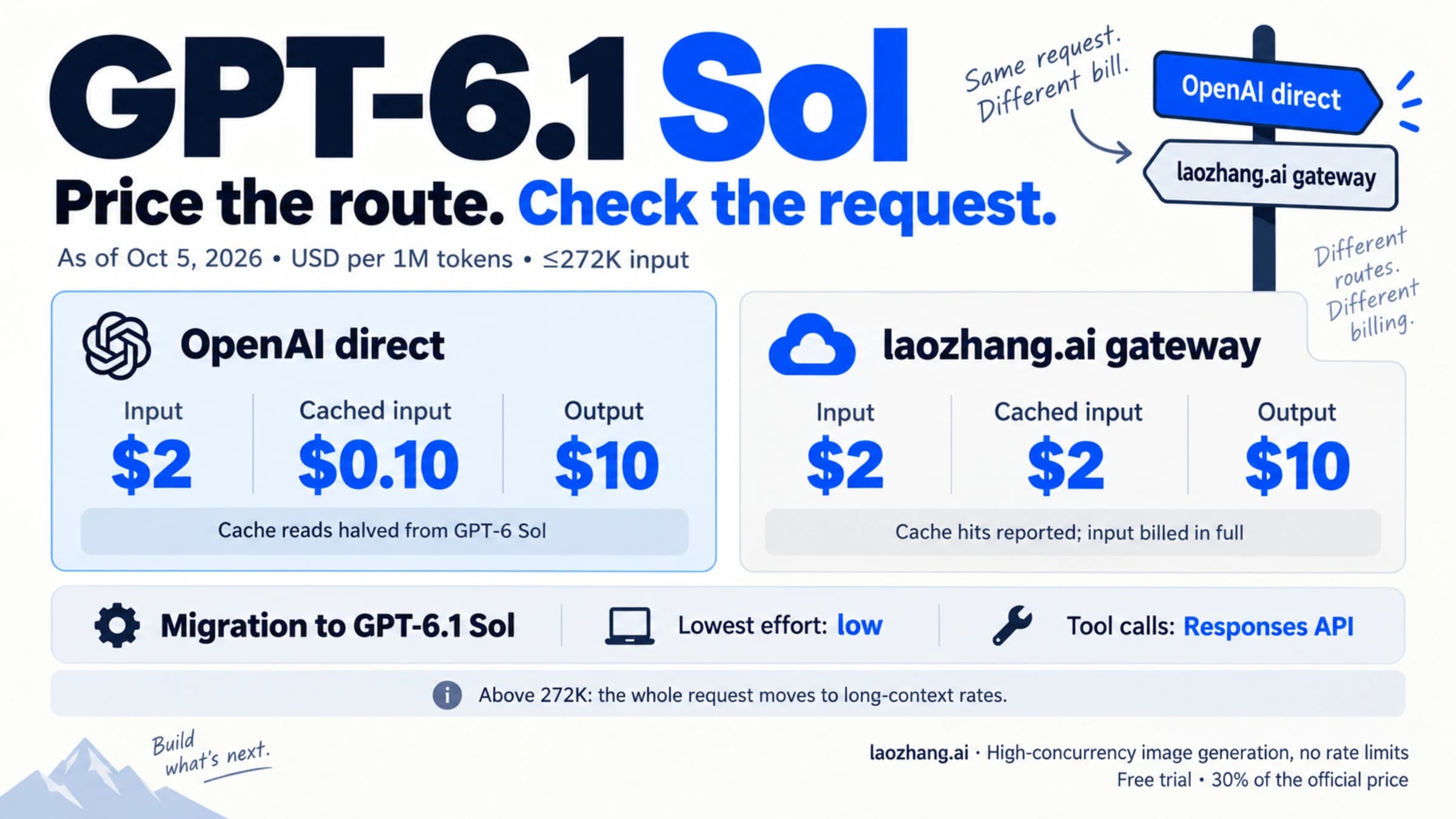
GPT-6 Sol is the like-for-like swap. For complex coding and agentic work, OpenAI's current recommendation on the same models page is GPT-6.1 Sol (gpt-6.1-sol), when it is available to your account and client. It is rolling out to Plus, Pro, Business, Enterprise, and Edu in the desktop app and CLI. It is off by default on Enterprise and Edu until an admin turns it on, and Free and Go are not included at launch. For who gets it and what changes when you move to it, see GPT-6.1 Sol: Pricing, Access, and What Breaks When You Switch.
Three details matter when you switch:
gpt-6-solandgpt-6.1-solare different model IDs. Copy the exact one your account offers.- Do not fall back to
gpt-5.4orgpt-5.4-mini. Both retired from Codex with ChatGPT sign-in on August 31, 2026.gpt-5.6-sol,gpt-5.6-terra, andgpt-5.6-lunaremain available while GPT-6.1 Sol rolls out. - Saved reasoning effort may not carry over. OpenAI says effort levels "don't map exactly between model generations," and GPT-6 Luna goes up to Max but not Ultra.
On Business, Enterprise, and Edu, editing a default is not enough. OpenAI's admin guidance says "Changing a default doesn't grant model access," so confirm the replacement is enabled for the people who use it on each client.
Where gpt-5.5 is still pinned: config layers, agents, automations, scripts
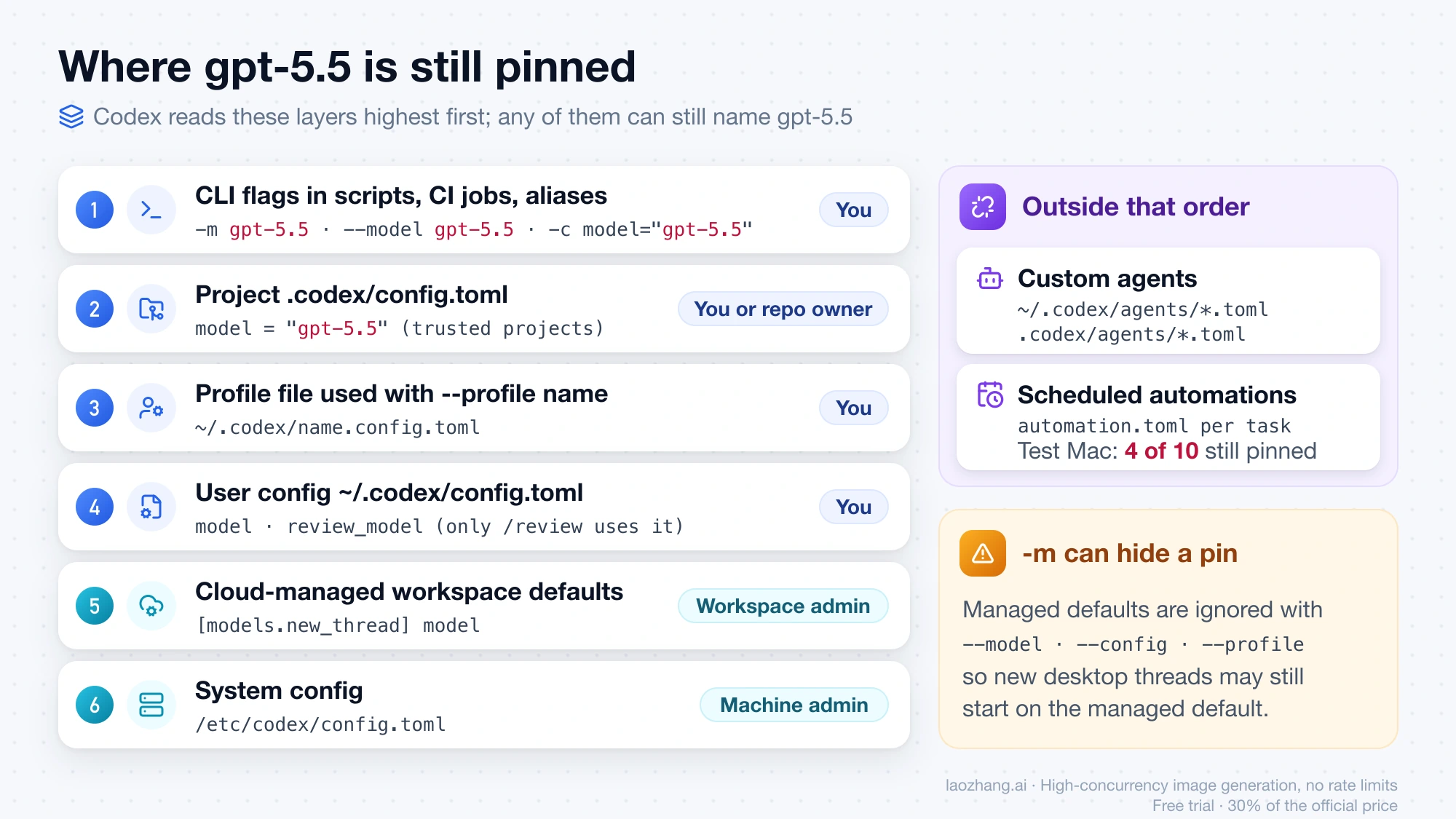
Scripts and files that name a model keep doing so after you change the picker. A reporter in GitHub issue #43344 on the gpt-5.5 404 checked the global config.toml, found nothing, and still saw gpt-5.5 requests. Codex resolves settings in this order, highest first (Codex configuration precedence), and any of these layers can hold gpt-5.5:
| Place | What to look for | Who changes it |
|---|---|---|
| CLI flags in scripts, CI jobs, aliases | -m gpt-5.5, --model gpt-5.5, -c model="gpt-5.5" | You |
Project .codex/config.toml, from the repo root down to the working directory (trusted projects only) | model = "gpt-5.5" | You or the repo owner |
Profile files used with --profile name | ~/.codex/name.config.toml | You |
| User config | model and review_model in ~/.codex/config.toml | You |
| Cloud-managed defaults for your workspace | [models.new_thread] model | Workspace admin |
| System config | /etc/codex/config.toml | Machine admin |
| Custom agents | model = in ~/.codex/agents/*.toml or .codex/agents/*.toml | You or the repo owner |
| Scheduled automations | model = "gpt-5.5" in each task's automation.toml | You |
review_model is easy to miss because only /review uses it. Profiles are separate files now, with top-level keys, not [profiles.name] tables inside config.toml. Managed [models.new_thread] defaults are ignored when you pass --model, --config, or --profile, so a CLI test with -m can pass while new desktop threads still start on the managed default.
Two plain grep runs find most pins. Run the second one from the repository root:
# Config files, profiles, custom agents, and automations
grep -rn --include='*.toml' 'gpt-5\.5' ~/.codex .codex /etc/codex 2>/dev/null

# Scripts, CI files, and shell aliases
grep -rn 'gpt-5\.5' . ~/.zshrc ~/.bashrc --exclude-dir=.git --exclude-dir=node_modules 2>/dev/null
Two notes on the results. A line such as "gpt-5.5" = 4 under [tui.model_availability_nux] is interface state, not a model setting, so you can leave it. Scheduled automations are easy to overlook: on the Mac used for the test, 4 of 10 automations (one automation.toml per task under ~/.codex/automations/) still had model = "gpt-5.5". That file layout is not documented, so change the model wherever you created the task, then run the grep again.
Confirm the switch with a one-line codex exec test
After editing, check the sign-in method and then make one cheap request with the new model:
codex login status
codex exec --skip-git-repo-check --ephemeral -m gpt-6-sol "Reply with exactly OK."
Use gpt-6-luna or gpt-6.1-sol instead if that is the model your plan offers. An OK reply proves the model works for your account. Because -m overrides every config layer, it does not prove your configuration is clean. For that, run the same request without -m from inside each project, and once with --profile name for every profile you use, replacing name with the profile name:
codex exec --ephemeral "Reply with exactly OK."
codex exec --ephemeral --profile name "Reply with exactly OK."
If one of these still fails with a gpt-5.5 error, the layer that applies to that directory or profile still names it. For automations, let each task run once after the change and read its result.
Keeping GPT-5.5 after October 14: sign Codex in with an API key
The retirement covers Codex with ChatGPT sign-in. OpenAI's models page says GPT-5.5 "remains available on the OpenAI API," and the API deprecations page had no gpt-5.5 entry as of October 14, 2026. OpenAI wrote an explicit "Codex authenticated with your own API key aren't affected" sentence for the GPT-5.4 retirement. For GPT-5.5, the same conclusion follows from how the retirement is scoped rather than from a separate sentence.
To switch Codex to an API key (Codex authentication docs):
- CLI:
printenv OPENAI_API_KEY | codex login --with-api-key - Desktop app: sign out, choose Sign in another way, and enter the key.
- IDE extension: on the signed-out screen, choose Use API Key.
On a server without a browser, the sign-in options are covered in Codex Headless Login: Device Code, SSH Tunnel, or auth.json.
You then pay standard API rates instead of using plan credits. The GPT-5.5 API model page lists $5 per million input tokens, $0.50 per million cached input tokens, and $30 per million output tokens, as of October 14, 2026. Any prompt over 272K input tokens is billed at 2x input and 1.5x output for the whole session. For scale, if every prompt stays under 272K, 2 million uncached input tokens plus 100,000 output tokens cost 2 × $5 + 0.1 × $30 = $13. The default snapshot is gpt-5.5-2026-04-23.
The API-key route also loses features. OpenAI's plan comparison describes the API-key route as Codex in the CLI, SDK, or IDE extension with no cloud features, and features that depend on ChatGPT workspace access are limited or unavailable. If the bill is your main concern, Codex API Key vs Subscription: Which Costs Less, What You Lose works through the trade-off. GPT-5.5 vs Claude Opus 4.7: API Costs and Which to Test First compares GPT-5.5's per-task cost.
A third-party gateway works only if it exposes a Responses API endpoint. Current Codex releases do not support wire_api = "chat" or Chat Completions-only endpoints. Setup is in Codex Custom Provider Setup: API Key, Base URL, and Auth. One example is LaoZhang API (laozhang.ai): its price list includes gpt-5.5, and its Codex guide configures a custom provider with wire_api = "responses". Running gpt-5.5 through it inside Codex was not tested, so make one test call before moving work there.
Disclosure: laozhang.ai is our own service. Its prices are platform pricing, not an independent comparison.
GPT-5.5 404 errors before October 14: the June and September incidents
If your logs predate the retirement, the reports point to a problem on OpenAI's side, and nothing local was confirmed to fix it.
- September 2026. From about 11:10 p.m. EDT on September 6, Plus, Pro, and Business users on Windows, macOS, and Linux, in Codex Desktop and CLI 0.153.4, got the "does not exist or you do not have access" 404. On the same accounts
gpt-6-astraand the GPT-5.6 models worked, the ChatGPT app could still use GPT-5.5, and a freshly fetched model list still showedgpt-5.5. One reporter's setup recovered on September 11 with no local change. New reports kept arriving through October 3, and the threads contain no OpenAI staff reply or root cause. The OpenAI Community thread "GPT-5.5 unavailable in Codex with a Plus subscription" collects the same reports. - June 2026. From June 7,
Model not found gpt-5.5hit Codex users whilegpt-5.4worked (GitHub issue #26892 on the June gpt-5.5 404, closed June 11). It recurred on June 23 after a desktop app update, with internal model names in the error. Switching togpt-5.4-mini, sending a message, and switching back helped two people and not others. That model has since retired, so the trick no longer applies. - April 2026. In launch week, some Plus and Pro accounts got the "not supported when using Codex with a ChatGPT account" error. It cleared by about May 1. OpenAI's changelog advised updating the CLI, IDE extension, or app if GPT-5.5 did not appear. The "Model metadata … not found" warning also meant an outdated client; Install and Configure Codex CLI on Windows, macOS, or Linux covers updating.
From October 14 on, these incidents only explain old logs. On ChatGPT sign-in, every gpt-5.5 failure now leads to the same fix: switch models. The image model has its own version of this error, covered in The Model gpt-image-2 Does Not Exist: Codex Error, Status Check, and Fixes.
FAQ
Is GPT-5.5 removed from Plus in Codex?
Yes. Since October 14, 2026, GPT-5.5 is retired from Codex with ChatGPT sign-in on every plan, Plus included. Plus users should switch to gpt-6-sol, or gpt-6.1-sol where it appears. Only Codex signed in with an OpenAI API key can still call gpt-5.5, billed at API rates.
Why does Codex say gpt-5.5 does not exist when the docs list it?
Local files and documentation do not decide access; OpenAI's server does. OpenAI's models page still lists GPT-5.5 because the API keeps serving it. In September, the server refused it while Codex's own model list still showed it. Once the retirement takes effect for your account, ChatGPT-signed-in requests for it are refused no matter what your config.toml says.
My config.toml doesn't mention gpt-5.5. Why does Codex still use it?
A higher-priority layer selects it: a -m flag in a script, a project .codex/config.toml, a profile file, review_model, a custom agent, a scheduled automation, or a workspace default set by an admin. Run the two grep commands above to find it.
Will scheduled automations and CI scripts that use gpt-5.5 break?
Yes, if they run with ChatGPT sign-in. On retirement day, explicit -m gpt-5.5 calls kept answering for a while after the picker had hidden the model, so a passing run today proves nothing. CI jobs that sign in with an API key are not affected by the retirement.
Sources9
External pages this guide links to, in the order they appear. Last updated Oct 14, 2026.
Sources9
External pages this guide links to, in the order they appear. Last updated Oct 14, 2026.
- 1.OpenAI's GPT-5.5 retirement noticelearn.chatgpt.com/docs/models
- 2.GitHub issue #43415 on openai/codexgithub.com/openai/codex/issues/43415
- 3.workspace model availability pagelearn.chatgpt.com/docs/enterprise/workspace-model-availability
- 4.GitHub issue #43344 on the gpt-5.5 404github.com/openai/codex/issues/43344
- 5.Codex configuration precedencelearn.chatgpt.com/docs/config-file/config-basic
- 6.Codex authentication docslearn.chatgpt.com/docs/auth
- 7.GPT-5.5 API model pagedevelopers.openai.com/api/docs/models/gpt-5.5
- 8.OpenAI Community thread "GPT-5.5 unavailable in Codex with a Plus subscription"community.openai.com/t/gpt-5-5-unavailable-in-codex-with-a-plus-subscription/1395515
- 9.GitHub issue #26892 on the June gpt-5.5 404github.com/openai/codex/issues/26892