Codex Game Studio Plugin: Install, Use, and Pick the Right One
OpenAI's Game Studio plugin steers Codex toward 2D Phaser or 3D Three.js browser games. Unity, Godot, and Chromatic projects need a different plugin.
On this page
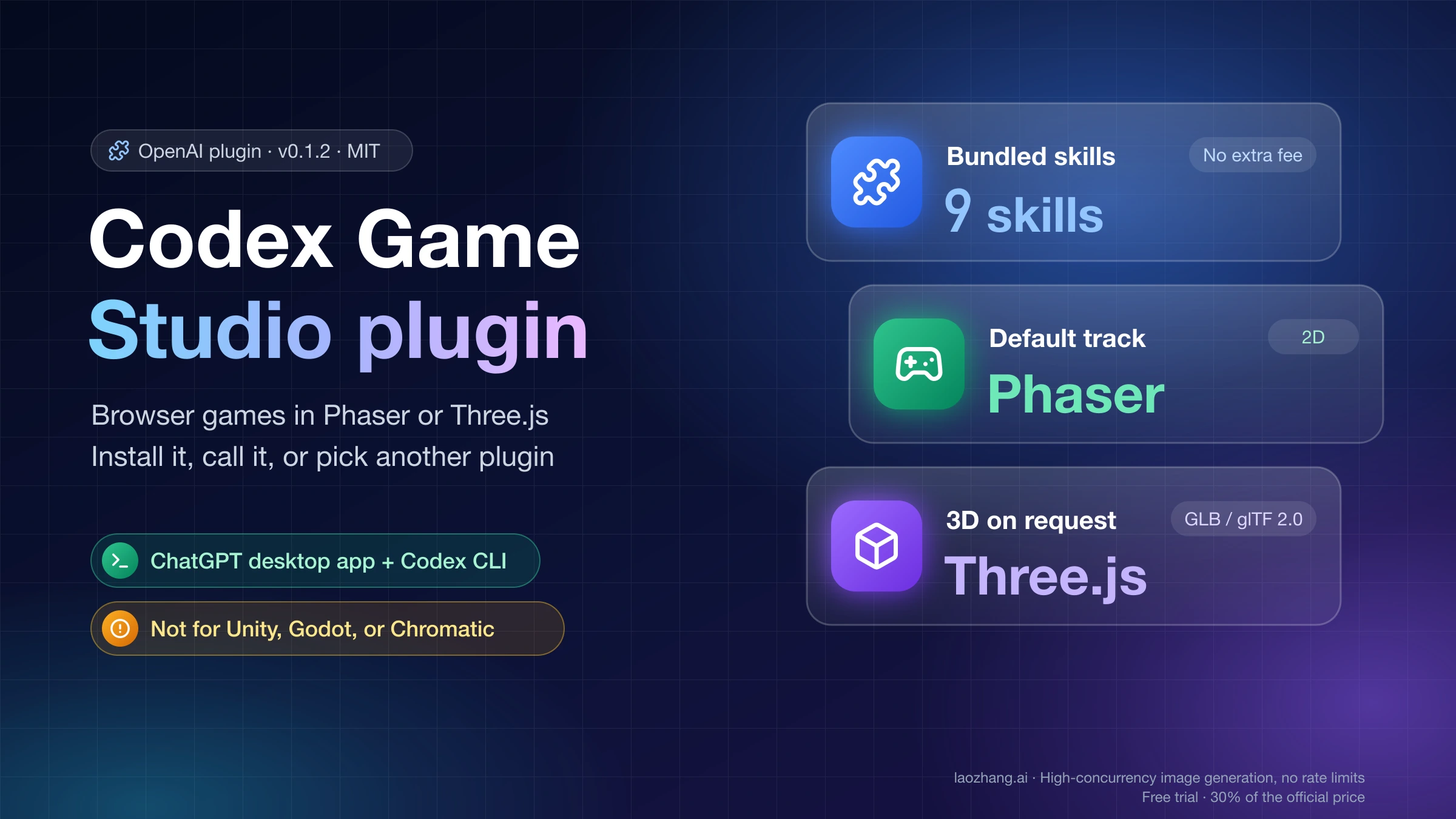
Game Studio is a Codex plugin published by OpenAI (plugin ID game-studio, version 0.1.2, MIT license). It gives Codex a guided workflow for browser games: choose a stack, plan the core loop, put the HUD and menus in DOM over the game canvas, run a sprite or 3D asset pipeline, and finish with a playtest. Unless you ask for 3D, it builds a 2D game with Phaser, TypeScript, and Vite.
To install it, open the Plugins tab in Codex in the ChatGPT desktop app and search for Game Studio, or type /plugins in Codex CLI. The command-line selector is game-studio@openai-curated. "Codex Game Studio" is shorthand people use for it; OpenAI's listing just says "Game Studio." If what caught your eye was the Game Boy–style handheld from DevDay 2026, that is a different plugin called ModRetro Chromatic, and Unity projects have their own official plugin.
Which "Codex Game Studio" do you mean? Four things share the name
Before installing anything, match what you saw to the right product. Only the first row is OpenAI's Game Studio.
| What you saw | Publisher | What it builds | Where to get it | Pick it when |
|---|---|---|---|---|
Game Studio (game-studio) | OpenAI | 2D and 3D browser games with Phaser, Three.js, or React Three Fiber | Codex Plugins tab, or game-studio@openai-curated in the CLI | The game should run in a browser tab |
ModRetro Chromatic (modretro-chromatic) | ModRetro | Game Boy Color–compatible games as GB Studio projects | Codex Plugins tab, search "ModRetro Chromatic" | You want Game Boy Color homebrew or own a Chromatic |
The Official Unity Plugin for Codex (unity) | Unity | Work inside Unity 6+ projects: Editors, projects, packages | OpenAI plugin directory, or Unity's terminal install | The project already lives in Unity |
| Codex-Game-Studio, Codex-Code-Game-Studios, and similar repos | Independent GitHub authors (unofficial) | Studio-style roles and skills for Godot, Unity, and Unreal | Each repo's README | You use Godot or Unreal and accept untested community code |
The confusion has a traceable cause. Some DevDay 2026 coverage, including a September 30 post on The Shortcut, described the ModRetro handheld demo as "Codex Game Studio," and the Baidu Baike entry for "Game Studio" says OpenAI's plugin connects Codex to a Chromatic. That doesn't match the first-party material. OpenAI's Game Studio files say nothing about Game Boy, emulators, or hardware. ModRetro's own quickstart calls its plugin ModRetro Chromatic, and OpenAI's ModRetro showcase page never uses the name Game Studio. A likely trigger for the mix-up is that the Chromatic plugin builds projects in a tool called GB Studio.
So if you came here asking about the "Codex Game Studio device," the device is the ModRetro Chromatic, and the plugin you want is ModRetro Chromatic, covered further down.
What's inside Game Studio 0.1.2: nine skills, 2D Phaser first
Game Studio is a plugin, not a game engine or an app. It bundles nine skills, three Python scripts for sprite work, and 16 reference documents (engine selection, Phaser architecture, Three.js and React Three Fiber starters, glTF loading, Rapier physics, a playtest checklist, WebGL debugging, and more). The source sits in the Game Studio folder of OpenAI's openai/plugins repository on GitHub.
| Skill | What it tells Codex to handle |
|---|---|
game-studio | The entry point: classify the request, pick a track, keep one plan across the other skills |
web-game-foundations | Architecture before code: engine choice, simulation vs. render boundaries, input, save, debug, performance |
phaser-2d-game | The default 2D path: Phaser, TypeScript, Vite, thin scenes, game rules kept outside Phaser |
three-webgl-game | 3D with vanilla Three.js in a plain TypeScript or Vite app |
react-three-fiber-game | 3D scenes inside an app that already uses React |
game-ui-frontend | HUDs, menus, and overlays that don't cover the playfield |
sprite-pipeline | 2D animation strips generated from one approved frame, then normalized and previewed |
web-3d-asset-pipeline | Shipping 3D assets as GLB or glTF 2.0: cleanup, compression, LOD, collision proxies |
game-playtest | Browser QA: boot the game, exercise the main actions, take screenshots, report findings by severity |
The routing rule is written plainly in the entry skill: "Default to a 2D Phaser path unless the user explicitly asks for 3D, Three.js, React Three Fiber, shader-heavy rendering, or another WebGL-first direction." The same file says "2D is the strongest execution path in v1." For 3D, the defaults are vanilla Three.js for plain TypeScript or Vite apps and React Three Fiber for React apps. Raw WebGL is chosen only when you explicitly want a custom renderer. Babylon.js and PlayCanvas get an honest comparison if you ask, but Three.js stays the code-generation default unless you pick another engine yourself.
The default workflow runs in a fixed order: lock the game fantasy and player verbs, define the core loop, failure states, progression, and session length, choose the track, define the UI layer early, decide the asset workflow, and close with a playtest loop "before calling the work production-ready."
Game Studio is not a DevDay launch. OpenAI added it to openai/plugins on March 13, 2026. The commits since then tune descriptions, icons, validation, and version numbers; none adds or rewrites a skill.
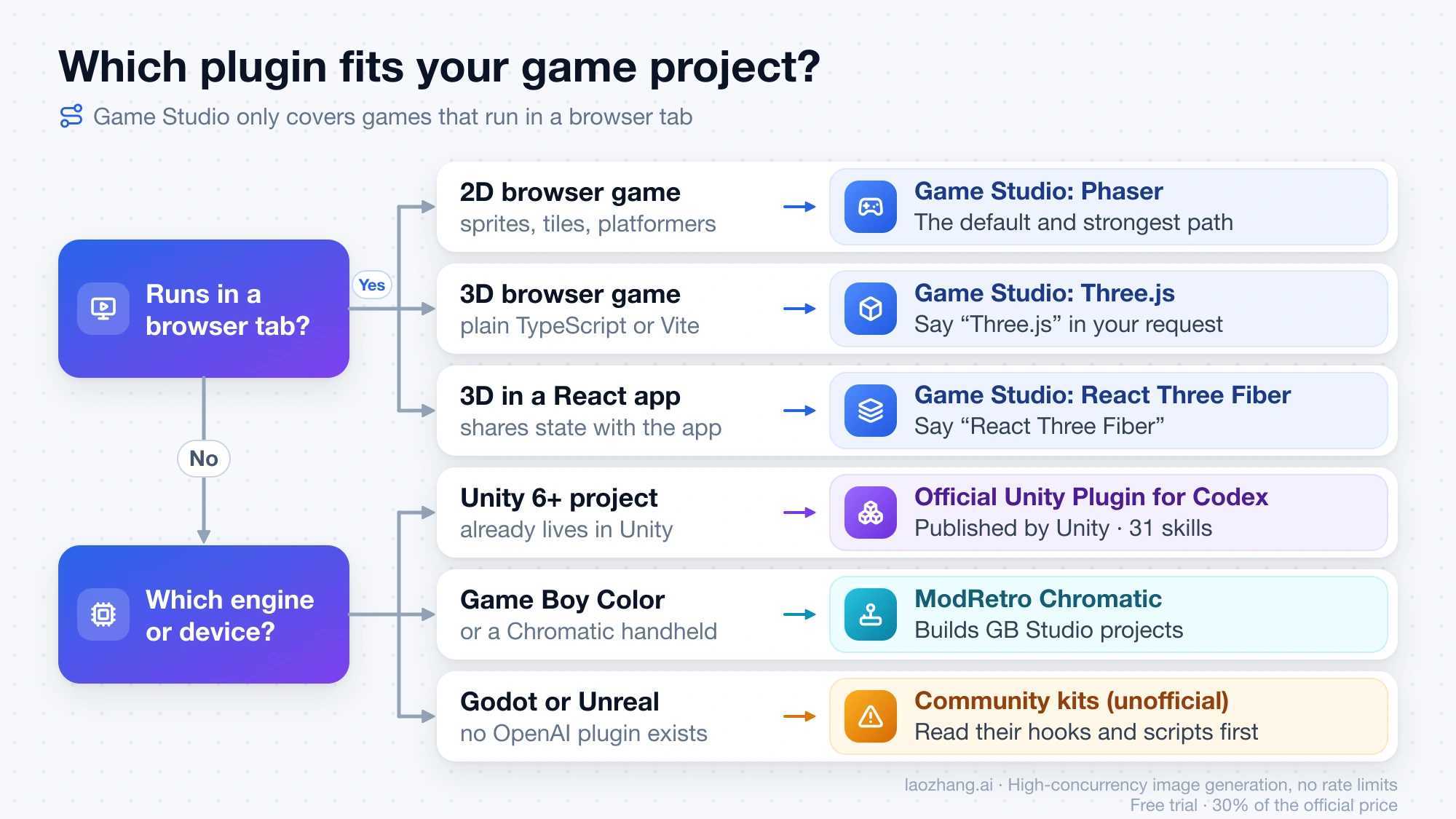
Is Game Studio right for your game? Match the project to a track
The plugin's engine-selection guide gives a clear rule for each kind of project. Use it to decide before you install.
- Sprite or tile-based, top-down, side-view platformer, grid tactics, deck battles: Phaser track. This is the plugin's strongest path, and the guide warns against the opposite mistake: "Do not choose a 3D stack for a normal 2D tactics or platformer game."
- Genuinely 3D, with camera movement and depth central to play, in a plain TypeScript or Vite app: say "Three.js" in your request so it leaves the Phaser default.
- A 3D scene inside an existing React product, such as a configurator that shares state with the rest of the app: say "React Three Fiber."
- Babylon.js or PlayCanvas: expect a comparison, then name the engine explicitly if you still want it, because the generated code otherwise lands on Three.js.
- Unity, Godot, Unreal, native mobile, console, or Game Boy: outside Game Studio's scope. Its skills and references cover browser runtimes only. The alternatives are in the section on Unity, Godot, Unreal, and Chromatic below.
How to install Game Studio in the ChatGPT desktop app or Codex CLI
Plugins work in Codex in the ChatGPT desktop app and in Codex CLI. According to OpenAI's plugins documentation, "The IDE extension doesn't support plugins," so if you normally run Codex inside VS Code or Cursor, install and use Game Studio from the desktop app or the CLI.
Codex in the ChatGPT desktop app
- Open Codex in the ChatGPT desktop app and go to the Plugins tab.
- Search for Game Studio and open its details. Check that the developer is OpenAI and the description reads "Design, prototype, and ship browser games."
- Select the plus button to install it.
- Start a new chat. Bundled skills become available in a new session after installation.
Codex CLI: /plugins or codex plugin add
Sign in first. On a fresh, signed-out Codex setup, codex plugin list returns "No marketplace plugins found.", so the OpenAI catalog only appears once you're logged in. Then either type /plugins inside a session to browse and install, or run this from your shell:
codex plugin add game-studio@openai-curatedcodex plugin add accepts either PLUGIN@MARKETPLACE or PLUGIN with --marketplace MARKETPLACE. On a signed-in account, codex plugin list showed Game Studio under two marketplace names, game-studio@openai-curated and game-studio@openai-curated-remote (version 0.1.2), both "not installed." Run codex plugin list on your own build to see which name it offers. After installing, start a new CLI session before calling the skills.
These CLI details come from a read-only check on October 10, 2026, of codex-cli 0.162.0-alpha.17.2, the build bundled with the ChatGPT app for macOS: help text plus codex plugin list. The add command was not executed in that check, and everything said about what Game Studio produces comes from its skill files, not from a test build. Command names and marketplace labels can change between CLI releases.
If you don't have the CLI yet, follow Install and Configure Codex CLI on Windows, macOS, or Linux first. In a ChatGPT Business or Enterprise workspace, an administrator may control which plugins you can install. For deciding which other plugins deserve a slot next to Game Studio, see Which Codex Plugins Should You Install First?.
How to call Game Studio and phrase your first request
Type @ in the Codex composer and pick Game Studio, or pick one of its skills directly (for example Sprite Pipeline) when you already know which part of the work you're on. The plugin's own starter request is "Design a browser game and plan the core loop," which is a good way to begin before any code exists.
The entry skill decides the track from your wording, so give it the things it asks for in its workflow:
- Fantasy and player verbs: who the player is and what they do (move on a grid, jump, aim, build).
- Loop and limits: what one round looks like, how you lose, how progress carries over, how long a session lasts.
- Track: nothing extra for 2D Phaser; "Three.js" or "React Three Fiber" for 3D.
- UI: which information sits in the HUD and which goes in menus.
- Plan first: ask for the plan before code, so you can correct the stack while changes are cheap.
A first request for a 2D game might read:
Plan a 2D browser roguelite. The player is a lighthouse keeper who moves on a
grid and turns the lamp to keep ships off the rocks. A run lasts about 10
minutes and ends when three ships sink. Use Phaser, TypeScript, and Vite, with
the HUD and menus in DOM. Give me the core loop, file structure, asset list,
and test plan before writing any code.
For a 3D version, replace the stack line with something like "make it a third-person Three.js scene in a plain Vite app." For planning requests, the entry skill tells Codex to return a game-specific plan covering stack choice, gameplay loop, UI surface, asset workflow, and test approach. If the reply proposes Phaser for something you meant as 3D, your request didn't name a 3D track clearly enough.
What Game Studio doesn't bring: Playwright, image generation, 3D models
The plugin contains instructions and three scripts. Several things it relies on have to come from your project or your ChatGPT plan.
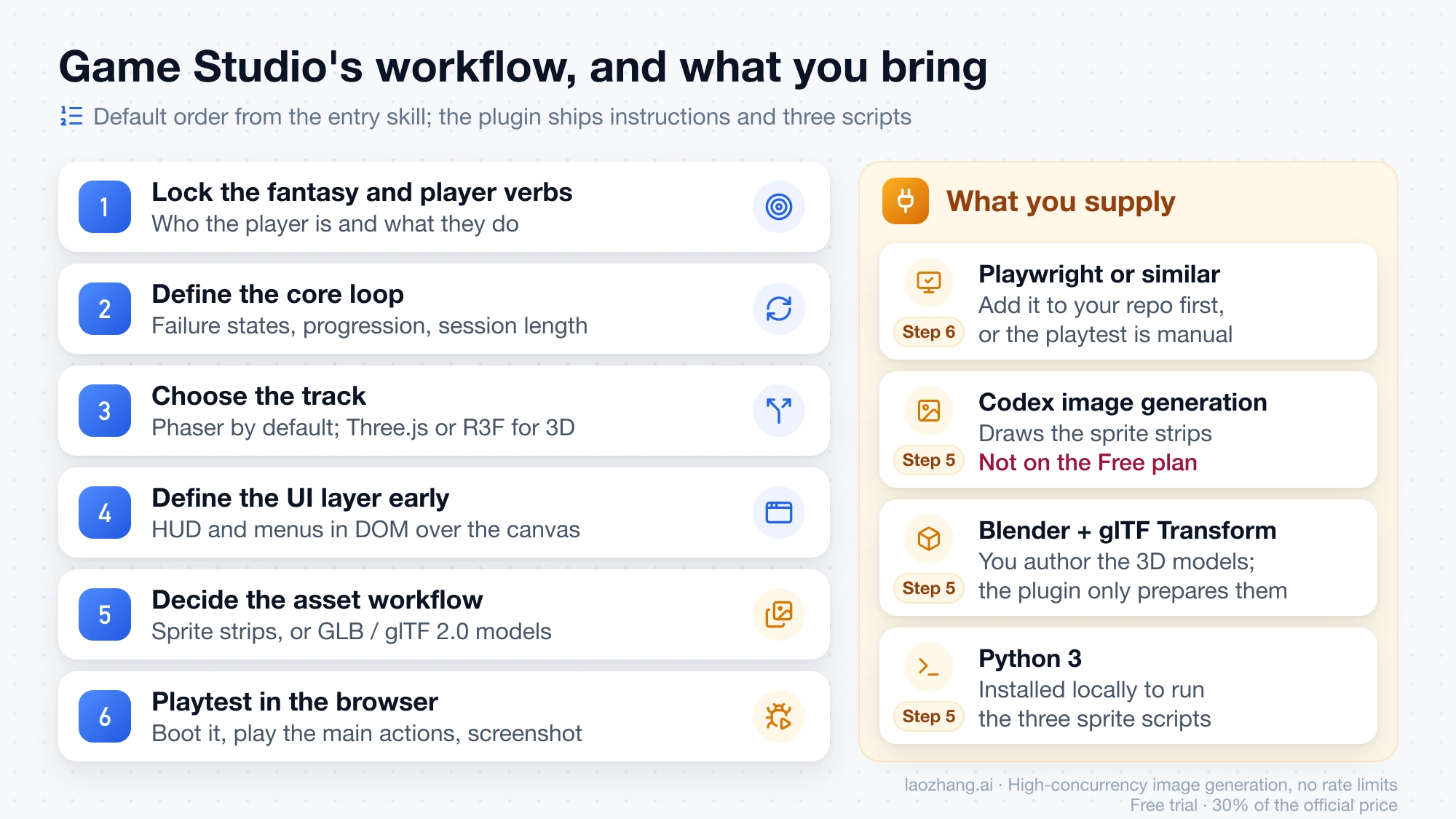
Browser automation for playtests. The game-playtest skill says to "Prefer Playwright or equivalent browser automation already available in the repo." The plugin doesn't ship Playwright. For canvas and WebGL games, the skill makes screenshots mandatory, since DOM checks alone miss visual bugs. Add Playwright or a similar tool to the project before you ask for a playtest; without it, the skill falls back to a structured manual pass.
Image generation for sprites. The sprite-pipeline skill hands the actual drawing to Codex's imagegen skill: "use the installed imagegen skill in this workspace." Its method is to start from one approved frame and generate the whole animation strip in a single edit, because frame-by-frame generation "drifts too easily," then normalize every frame with one shared scale and a bottom-center anchor. Image generation in Codex isn't available on the Free plan, and on paid plans image generations use included limits about 3–5 times faster on average. On Free, plan on supplying your own art. The scripts run with python3, so Python 3 needs to be installed locally.
3D models. The web-3d-asset-pipeline skill assumes you author and clean models in a tool such as Blender, export GLB or glTF 2.0, and optimize with glTF Transform. It prepares assets for the browser; it doesn't model characters for you.
Cost. Game Studio has no price of its own (it's MIT-licensed). Every request still runs on your normal Codex usage. Which ChatGPT plans include Codex and how image generation counts against limits are covered in ChatGPT Plus Codex Usage Limits and Credits. If you hit a cap halfway through a build, Codex Weekly Limit Reset explains how to find your reset time.
Unity, Godot, Unreal, or Chromatic: which plugin to use instead
Game Studio stops at the browser. For other targets, these are the options.
Unity 6 projects: the Official Unity Plugin for Codex
Unity published The Official Unity Plugin for Codex on September 16, 2026. It starts with 31 skills, and its unity-cli skill can install Editors, create projects, and manage packages. It targets Unity 6 and later. Unity describes two install routes: two commands from a terminal, or one click in the OpenAI plugin directory. In the Codex catalog it appears as unity, version 0.1.6-beta.
Game Boy Color homebrew and the Chromatic: ModRetro Chromatic
The ModRetro Chromatic DevDay Edition quickstart guide tells you to search for "ModRetro Chromatic" in the Codex Plugins tab and call it as "@ModRetro Chromatic Plugin." It builds Game Boy Color–compatible games as GB Studio projects, ships with an example game called Wrecklight, and gives you a built-in emulator with a playable browser preview. With a Chromatic connected, it can stream the game to the device and flash a cartridge. Flashing requires Chromatic Developer Mode, unlocked by an activation code included with the DevDay Edition. ModRetro limits it to original, user-created ROMs, with no piracy or emulation of commercial games. To see what it produces, OpenAI's ModRetro page hosts 13 Game Boy Color games built with Codex, playable in a browser or downloadable as ROMs.
Godot and Unreal: no OpenAI plugin, community kits only
OpenAI has no plugin for Godot or Unreal. Codex can still work on a Godot project directly; a reply in an r/codex thread on game development sums it up as "Create project in godot, open codex in that folder and start working," since Godot project files are plain text.
If you want a studio-style structure, several unofficial kits borrow the "Game Studio" name:
- BoyinGlasses/Codex-Game-Studio on GitHub calls itself "An unofficial Codex adaptation of Claude Code Game Studios by Donchitos," with 74 skills and 49 roles for Godot 4, Unity, and Unreal Engine 5. Its README installs it with
codex plugin marketplace add BoyinGlasses/Codex-Game-Studiofollowed bycodex plugin add codex-game-studio@codex-game-studio. - Euraika-Labs/Codex-Code-Game-Studios on GitHub is a "Codex-native port of the game studio workflow framework" for Godot, Unity, and Unreal. It installs by cloning the repo and running
./bootstrap.sh, which adds anAGENTS.md, hooks, and skills to your project. - frabcd/codex-ai-game-studio on GitHub is a third-party marketplace covering Unity, Godot, Unreal, and Blender, added with
codex plugin marketplace add frabcd/codex-ai-game-studio --ref v1.1.1.
None of the three comes from OpenAI or a game-engine vendor. Because they add hooks and scripts that run in your repository, read the files before installing, and remove what they added if you drop the kit.
As of October 10, 2026, the Codex remote catalog also lists other game-related plugins, including game-development-studio, build-3d-game-rooms, and unity-workbench. Open each one's details page and check who publishes it before installing.
If your goal is to change an existing game rather than build a new one, Universal Modder for Claude Code covers AI-assisted modding, including use from Codex.
How to turn Game Studio off or uninstall it
In Codex CLI, open /plugins, move to Game Studio, and press Space to turn it off or back on. To remove it, choose the uninstall action on its entry in the plugin browser; the CLI also has a codex plugin remove subcommand, and codex plugin remove --help shows the selector format your build expects.
In the ChatGPT desktop app, open Game Studio from the plugin browser and select Uninstall plugin when that action is available. If your workspace installed the plugin for everyone, the uninstall action may be missing, and your workspace administrator controls it instead.
Uninstalling removes the plugin from Codex, not the code it helped write. Your game's source, assets, and any test setup you added stay in the repository.
Codex Game Studio FAQ
Is Codex Game Studio an official OpenAI plugin?
Yes. The plugin listed as Game Studio, with the ID game-studio, is published by OpenAI under the MIT license and lives in OpenAI's openai/plugins repository, where it was added on March 13, 2026. GitHub repos named Codex-Game-Studio or Codex-Code-Game-Studios are community projects, not OpenAI's.
Does the Codex Game Studio plugin cost extra?
No. It has no separate price. Each request uses your normal Codex allowance on your ChatGPT plan, and sprite generation goes through Codex image generation, which isn't available on the Free plan.
Can Codex Game Studio make 3D games?
Yes, for the browser. Ask for Three.js in a plain TypeScript or Vite app, or React Three Fiber inside a React app; 3D assets default to GLB or glTF 2.0. Its own instructions call 2D Phaser the strongest path in this version.
Can I use Codex Game Studio for Unity or Godot?
No. Its skills only cover browser runtimes. Unity 6+ projects should use Unity's official Codex plugin. For Godot, open Codex directly in the project folder or try an unofficial community kit after reading its files.
What is the "Codex Game Studio device"?
There is no Game Studio device. The handheld shown at DevDay 2026 is ModRetro's Chromatic, and the plugin that builds Game Boy Color games for it is ModRetro Chromatic, a separate plugin from OpenAI's Game Studio.
Does Game Studio work in the Codex VS Code extension?
No. OpenAI's documentation says the IDE extension doesn't support plugins. Use Codex in the ChatGPT desktop app or Codex CLI, then open the same project folder there.
Sources8
External pages this guide links to, in the order they appear. Last updated Oct 10, 2026.
Sources8
External pages this guide links to, in the order they appear. Last updated Oct 10, 2026.
- 1.OpenAI's ModRetro showcase pagedevelopers.openai.com/modretro
- 2.Game Studio folder of OpenAI's openai/plugins repository on GitHubgithub.com/openai/plugins/tree/main/plugins/game-studio
- 3.OpenAI's plugins documentationlearn.chatgpt.com/docs/plugins
- 4.The Official Unity Plugin for Codexunity.com/blog/unity-plugin-codex
- 5.ModRetro Chromatic DevDay Edition quickstart guidesupport.modretro.com/en_us/chromatic-devday-edition-quickstart-guid-By1iOlcMg
- 6.BoyinGlasses/Codex-Game-Studio on GitHubgithub.com/BoyinGlasses/Codex-Game-Studio
- 7.Euraika-Labs/Codex-Code-Game-Studios on GitHubgithub.com/Euraika-Labs/Codex-Code-Game-Studios
- 8.frabcd/codex-ai-game-studio on GitHubgithub.com/frabcd/codex-ai-game-studio