Codex Token Exchange Failed 403: Diagnose and Recover Sign-In
A Codex token-exchange 403 is a refused authentication request. The full error tells you whether to repair callback access, check the client’s network, renew stored credentials, or stop for an access restriction.
On this page
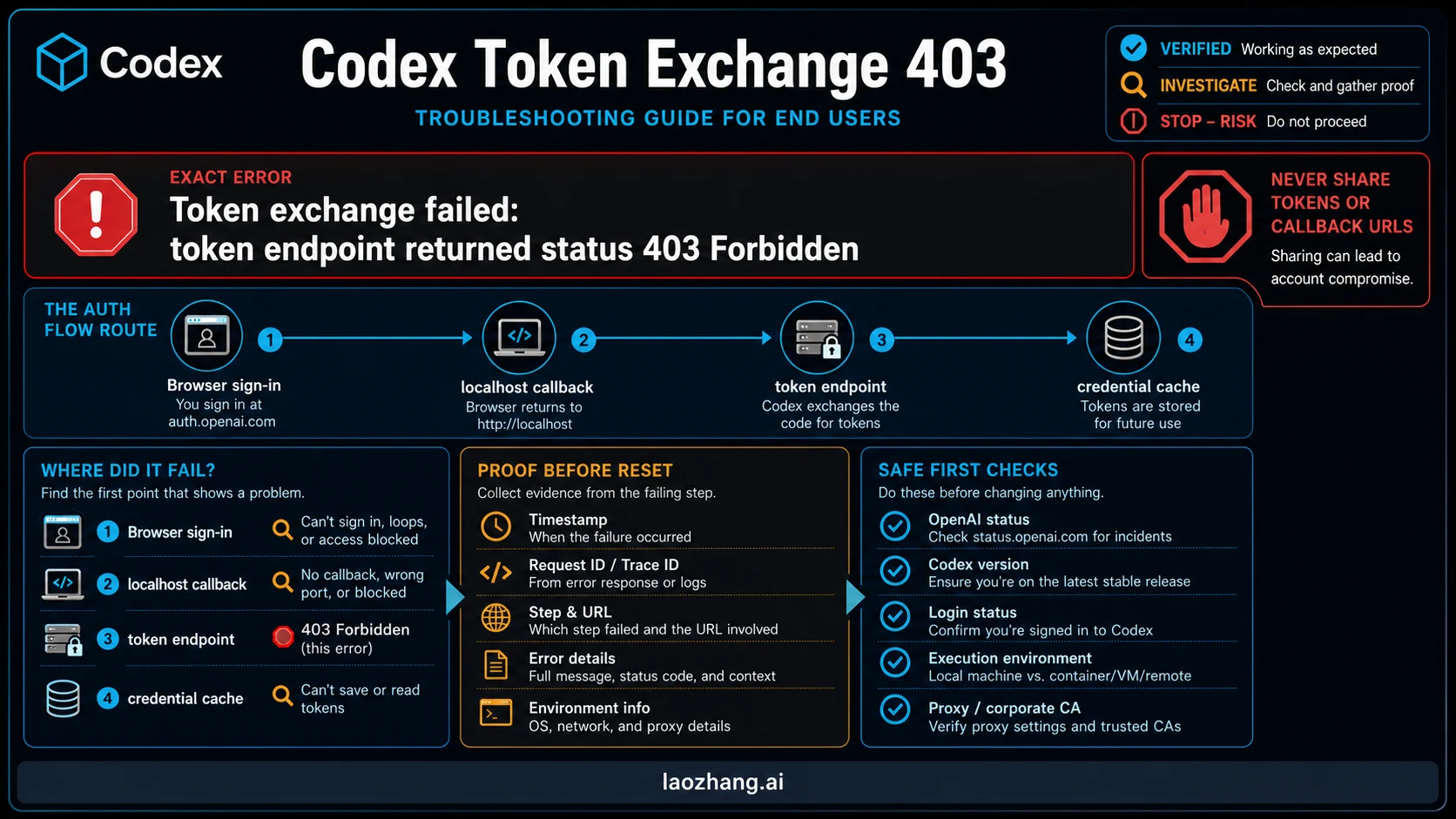
Token exchange failed: token endpoint returned status 403 Forbidden means the code-for-token request received a refusal. Read the text after 403 before changing anything. An explicit country, account, or workspace restriction needs an eligibility or administrator check. A request-sending error needs a network check in the environment running Codex. A browser that finishes while the terminal keeps waiting needs a callback check. These lead to different recovery steps.
Run codex --version and codex login status in the shell or host that failed, keep the redacted error, then use the matching branch below. A successful status command only confirms that credentials are present; it does not prove they work remotely. The CLI reference makes that distinction.
Match the full error to the next action
| Error or symptom | What it establishes | Next action |
|---|---|---|
token endpoint returned status 403 Forbidden, with no further explanation | The exchange request received a refusal; the cause remains unknown | Preserve the response details, then check the actual Codex process’s network and login configuration |
unsupported_country_region_territory or an explicit country/region denial | The response identifies an access restriction | Check the current official eligibility information; contact support if it appears wrong. Stop proxy and cache experiments |
error sending request for url followed by the token endpoint | The client could not complete that request; the nested error matters | Check the failing host’s outbound route, proxy and certificate trust. Do not treat it as identical to an HTTP 403 response |
| Browser approval completes, but Codex keeps waiting for the callback | The browser result has not reached the waiting process | Use an enabled device-code flow; otherwise arrange callback access with the remote-host owner |
| Device-code request returns 403 | That device-code request was refused | Read its body and confirm device login is enabled and permitted; switching flows does not override a country or policy denial |
| Login finishes, then a task fails with 401, 403, or a refresh/workspace message | The failure is after the initial exchange | Check the active method, workspace and provider route; preserve the new error as a separate failure |
The HTTP definition of 403 allows refusal for reasons unrelated to credentials. It also advises against automatically repeating the same request with the same credentials. The number alone does not establish that OpenAI’s origin handled the request: a proxy or another intermediary can return a refusal too.
If the response names a country or region, stop here
For a ChatGPT sign-in rejection, open the current ChatGPT supported-country information and compare it with your actual situation. This guide does not certify any particular country or account as currently eligible. If you believe the refusal is mistaken, use OpenAI Support with the exact redacted error, timestamp and request ID, if one was returned.
A paid subscription, a new browser session, device-code login or a different credential store does not resolve an explicit eligibility refusal. Do not use another person’s account or a network workaround to evade it.
Start in the same environment that failed
For CLI sign-in, record these before a retry:
codex --version
codex login status
Write down whether that process runs on your computer, in WSL, in a container, on an SSH host, or inside an IDE’s remote environment. Browser access on your laptop does not demonstrate outbound access from a remote host. Likewise, variables exported in a new terminal do not establish what an already-running IDE inherited.
Keep the exact error text, timestamp with time zone, client version, authentication method and a short redacted response body. Direct codex login runs write codex-login.log under the configured log directory, according to the authentication guide. Inspect it privately for the first relevant failure, rather than publishing the entire file.
Remove authorization codes, device codes, tokens, cookies, full callback URLs, API keys, proxy passwords and unrelated private paths from anything you share. If the body is an HTML block page with a company or proxy identifier, preserve that identifier without the secrets.
You can also check the live OpenAI status page. An incident may change when to retry; the absence of a listed incident does not determine the cause of your individual refusal.
Browser approved, but token exchange failed
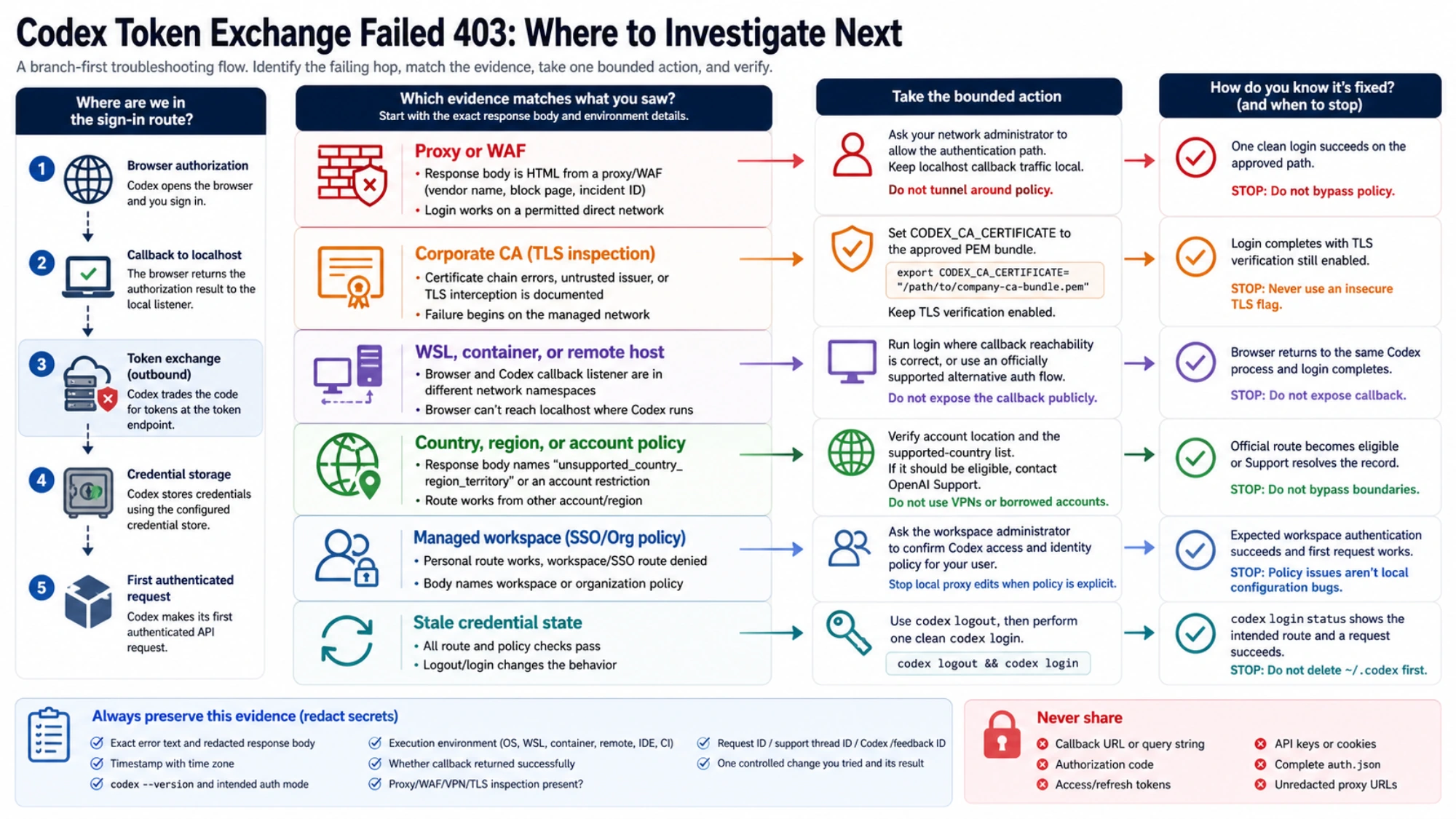
Browser approval, callback delivery, token exchange, credential storage and a working task are separate milestones. A browser success message confirms only its part of the flow. The exact token-endpoint 403 points to the subsequent exchange attempt, so forwarding a callback port alone may leave it unchanged.
First check the network used by the Codex process. If your organization requires an outbound proxy, use its approved address and protocol. If its block page names a denied authentication destination, give the network owner that hostname and the redacted block identifier. Changing the model API Base URL is a different operation and does not establish a repair to the sign-in endpoint.
Do not rely on the blanket advice that Codex always ignores system proxies. The current official changelog records system-proxy fallback for login and startup requests. That entry does not promise that fallback will repair every 403 or describe all platform and retry conditions. Check your installed client and actual launcher instead of assuming another user’s setup applies.
Check proxy presence without printing proxy credentials
For a POSIX shell, the following reports only whether each variable is set. It deliberately does not print values; “set” can include an empty value.
for name in HTTPS_PROXY HTTP_PROXY ALL_PROXY NO_PROXY https_proxy http_proxy all_proxy no_proxy; do
  if printenv "$name" >/dev/null 2>&1; then
    printf '%s: set\n' "$name"
  else
    printf '%s: unset\n' "$name"
  fi
done
Run it in the shell from which you will launch Codex. It checks that shell, not a separate GUI process, system proxy settings or whether any proxy works. On Windows without a POSIX shell, inspect the approved environment settings for the launcher privately; do not paste an environment dump into a ticket.
If the launcher has missing or incorrect proxy settings, correct it to use the approved proxy’s actual address and protocol. Check those values privately with the network owner; there is no universal proxy port or scheme to copy. In a container or remote host, the proxy must be reachable from that environment, not merely from your laptop.
Keep the callback’s local traffic separate from outbound authentication traffic. Preserve any required NO_PROXY exclusions; do not add all OpenAI domains to that variable, because your network may require those requests to use its proxy. If the affected application needs to inherit changed settings, restart it through its approved launcher. Then retry from the same environment:
codex loginCompare the new error with the saved one. If the same proxy block remains, send its identifier and the token endpoint hostname to the network owner. If the reply now explicitly names country or workspace policy, stop network edits and use that branch instead.
The presence-only snippet above received offline syntax and fixture checks. These commands are documentation-based recovery examples; no live sign-in or proxy recovery was tested for this article.
Use a corporate CA only for a certificate-trust failure
If the nested error identifies an untrusted certificate chain and your company uses TLS inspection, obtain its approved PEM bundle. In the same POSIX shell:
export CODEX_CA_CERTIFICATE="/path/to/approved-company-ca.pem"
codex login
The custom CA documentation says Codex uses CODEX_CA_CERTIFICATE, falling back to SSL_CERT_FILE when it is unset. This applies to login, HTTPS and secure WebSocket connections. Keep certificate verification enabled. An ordinary HTTP 403 response is not evidence that a new CA bundle is needed.
Remote login: repair callback reachability
If the browser completes authorization and the remote terminal still waits, the callback may be going to your laptop while its listener is on the remote host. OpenAI documents device-code login and SSH forwarding for this situation in headless authentication.
Device-code login is the preferred documented option, currently labeled beta. Enable it in your personal ChatGPT security settings, or have the workspace administrator permit it. Then run on the machine where Codex will work:
codex login --device-authOpen the link the command prints on your own browser, sign in and enter the one-time code from that terminal. Do not share the code or enter one supplied by someone else. If the device request itself returns 403, return to its response details; this route removes the need for the browser to reach Codex’s callback listener. It still needs outbound connectivity and an eligible account.
If device login is unavailable, the remote-host owner can arrange permitted callback reachability for the normal browser flow. OpenAI documents SSH forwarding as one option in the headless guide above. That addresses a terminal still waiting for a browser callback; it does not repair an exchange request that already returned 403. Do not expose the callback listener to the public internet.
OpenAI also documents transferring your own file-based login cache to a trusted headless machine. That fallback applies only when a successful login produced an actual auth.json file, both machines are under your control, and the transfer is permitted. A keyring-only or ephemeral session has no such file to copy. With custom CODEX_HOME, use its real location rather than assuming ~/.codex. Follow the official transfer instructions linked above; do not copy another person’s credentials or treat a copied cache as permission to access a forbidden workspace.
Renew stored credentials only when that is the problem
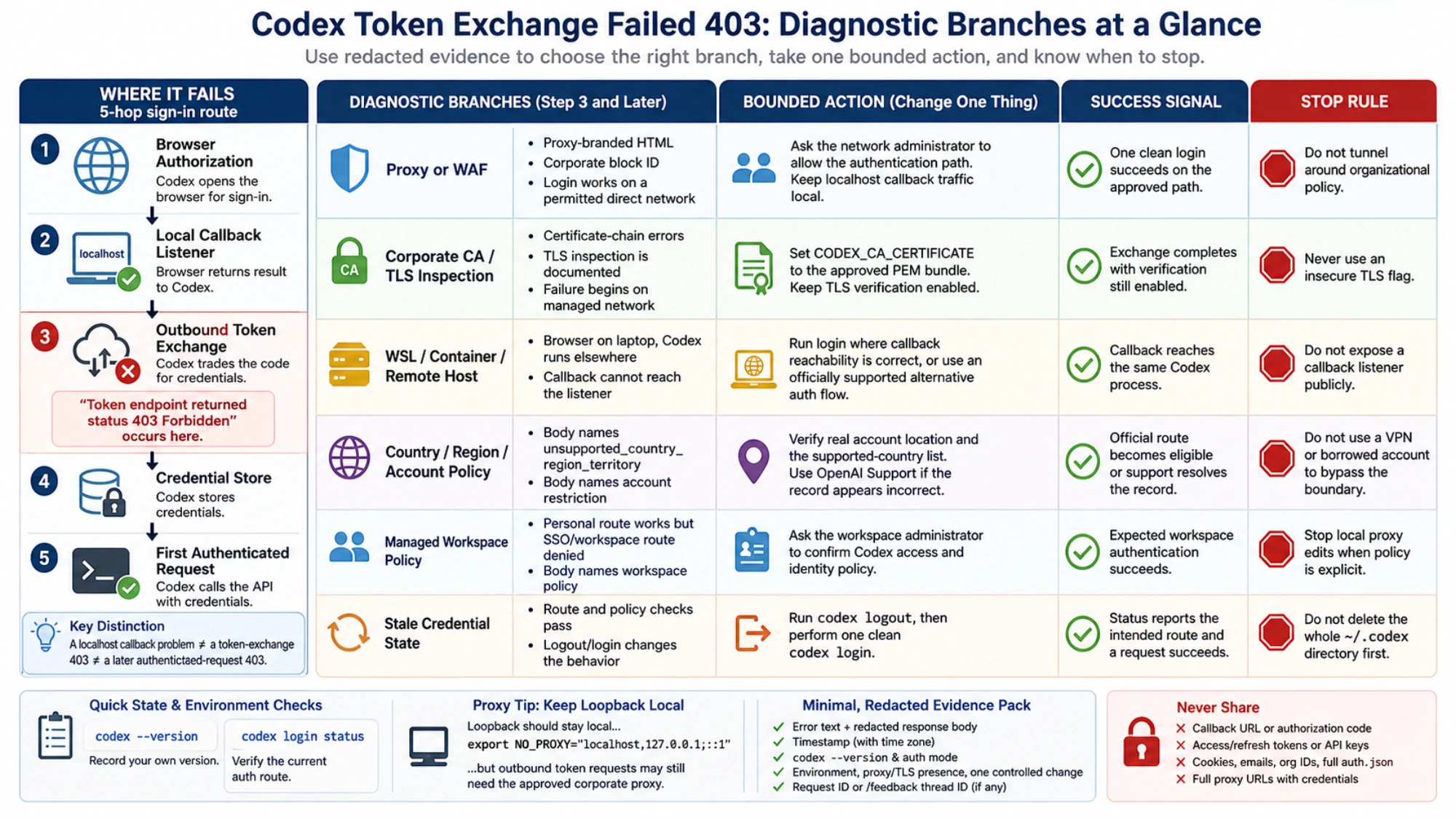
A credential reset is useful when the intended route is allowed but the saved account is wrong, or a later refresh error asks you to sign in again. It is not the first response to an unexplained exchange 403.
For ordinary stored authentication, the documented reset is:
codex logout
codex login
codex login status
Be prepared to sign in again in the IDE too: the CLI and IDE extension share cached login details. If the process selects workload identity from its environment, Codex rejects login and logout; have the owner of that identity configuration check it instead. These behaviors are described in the authentication guide.
Do not delete the entire ~/.codex directory. Credential storage is configurable, and that directory can hold configuration, logs and other state. The documented storage modes are:
| Mode | Where credentials live | Why deleting the default file may miss the problem |
|---|---|---|
file | auth.json under CODEX_HOME, normally ~/.codex | A custom home changes the path |
keyring | OS credential store | The file is not the active store |
auto | OS store when available, otherwise file | The active store depends on availability |
ephemeral | Current process memory | There is no persistent login file |
Automatic refresh normally handles ChatGPT session renewal during use. When it fails, preserve the exact refresh error before replacing credentials; a refresh failure after login is a different stage from the initial code exchange.
Managed workspace rejection needs an administrator check
If the error names a workspace restriction, ask the administrator to confirm your membership, permitted login methods and allowed workspace. Current local authentication requirements can enforce allowed_login_methods, allowed_chatgpt_workspaces, cli_auth_credentials_store and chatgpt_base_url before credentials load.
A user’s forced_login_method and forced_chatgpt_workspace_id must comply with those requirements. No matching workspace makes ChatGPT login unavailable; API authentication remains an option only if permitted. A cached session or user configuration override cannot remove the administrator’s restriction. Stop changing local proxy or credential settings once an explicit policy denial identifies the controlling boundary.
Would API-key login solve your task?
For an allowed local workflow, an API key can provide a different authentication route. With a key already supplied securely through OPENAI_API_KEY, the official command is:
printenv OPENAI_API_KEY | codex login --with-api-key
codex login status
Do not put the key itself in the command line or print it separately. API usage is billed through OpenAI Platform at API rates, rather than included ChatGPT plan usage. Some workspace or cloud features are limited or unavailable, and Codex cloud requires ChatGPT sign-in. Those boundaries come from OpenAI’s authentication documentation; the API key versus subscription guide explains the billing decision.
A permitted enterprise automation flow may instead use a Codex access token. If the environment already supplies it securely, the documented command is:
printenv CODEX_ACCESS_TOKEN | codex login --with-access-tokenThis requires the enterprise access-token permission described in the official guide. It is not an ordinary Platform API key.
Switching routes can let you complete an appropriate task, but it does not prove the original ChatGPT exchange works. For a custom model provider, check whether its configuration intentionally uses OpenAI authentication or its own env_key; custom-provider setup covers that separate configuration task. Neither a model gateway nor a Base URL change is a universal login-403 fix.
Verify the recovery on the original host and route
After the corrective action, check three results in order:
- The login flow finishes without the original exchange error, or the previously saved session remains available without needing a new login.
codex login statusreports the intended authentication method in the same host, container or remote environment. Exit code 0 means credentials are present, as the CLI reference states.- When you are ready to authorize normal usage, start Codex in that same environment and ask for a tiny non-sensitive reply, such as
Reply with ROUTE_OK only. Do not read files or run commands.A returned answer demonstrates a working request on that route; it may consume plan usage or incur API charges.
If the small task fails with a different error, retain that new error and investigate its stage. A task working on your laptop does not validate a remote host. API-key success does not validate ChatGPT sign-in. A text reply does not establish every tool, streaming feature or workspace capability your real job needs.
If the same refusal persists after one change supported by the evidence, escalate with the exact redacted error, timestamp, client version, execution environment, intended method, callback result and request ID. Route an explicit network block to the network owner, a workspace policy denial to the administrator, and an unexplained or mistaken account refusal to OpenAI Support. Avoid repeated identical attempts that add no diagnostic information.
Questions about the token-exchange 403
Why does the browser say sign-in succeeded while Codex fails?
The browser authorization and Codex’s token request are separate steps. If Codex prints the token-endpoint 403, inspect that request’s response. If the terminal is simply still waiting, check callback reachability instead. Neither browser result proves a working Codex session.
Does codex login status prove the 403 is fixed?
No. Exit code 0 means credentials are present, according to the CLI reference. Confirm the intended method and, when you authorize usage, a small task on the same host and route. Old cached credentials can make status succeed while a new login fails.
Can device-code login fix a 403 Forbidden?
It can help when the browser cannot reach Codex’s callback listener. It must first be enabled for the account or workspace, and it still needs a working outbound route. It does not override an explicit country, account or policy refusal. See the documented headless login conditions.
Should I clear auth.json or change my proxy first?
Choose from the error details. A saved-session or refresh problem can justify the documented logout/login reset. A request-sending or proxy block error calls for checking the failing process’s route. An explicit access restriction calls for official eligibility or administrator support. Deleting a file may do nothing when credentials are in a keyring, memory or a custom CODEX_HOME.
Sources8
External pages this guide links to, in the order they appear. Last updated Oct 6, 2026.
Sources8
External pages this guide links to, in the order they appear. Last updated Oct 6, 2026.
- 1.CLI referencelearn.chatgpt.com/docs/developer-commands
- 2.HTTP definition of 403rfc-editor.org/rfc/rfc9110.html
- 3.ChatGPT supported-country informationhelp.openai.com/en/articles/7947663-chatgpt-supported-countries
- 4.OpenAI Supporthelp.openai.com
- 5.authentication guidelearn.chatgpt.com/docs/auth
- 6.live OpenAI status pagestatus.openai.com
- 7.changeloglearn.chatgpt.com/docs/changelog
- 8.local authentication requirementslearn.chatgpt.com/docs/enterprise/managed-configuration