Codex Custom Provider Setup: API Key, Base URL, and Auth
Choose the credential and endpoint owner before editing TOML. The right route may be API-key sign-in, openai_base_url, or a separate provider—and each failure has a different owner.
On this page
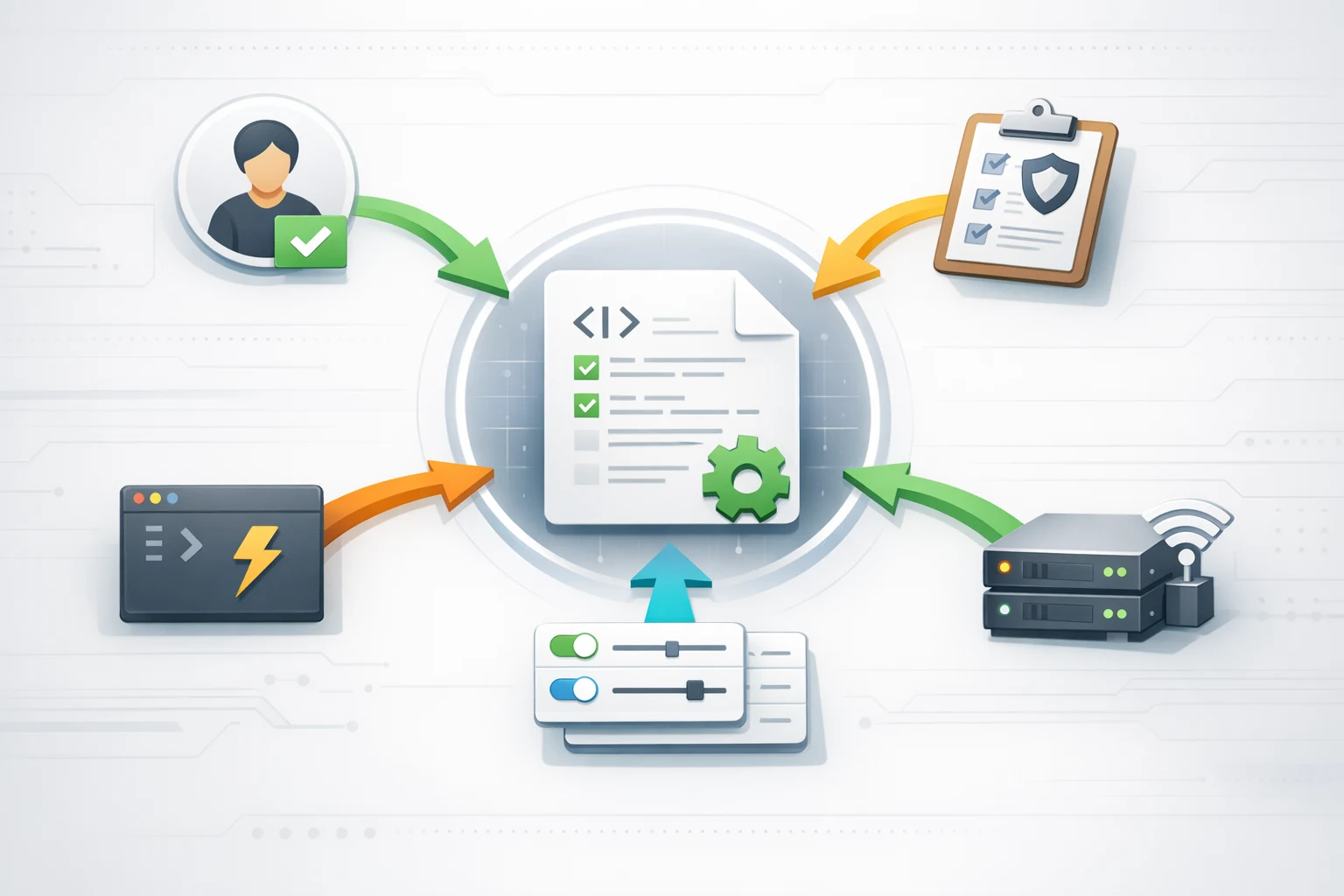
A Codex API key, a Base URL, and a custom provider are not three fields in one universal setup. They describe different contracts. If you combine them before deciding who owns authentication and who receives the request, a valid-looking config.toml can send work through the wrong account or fail with an error that points at the wrong system.
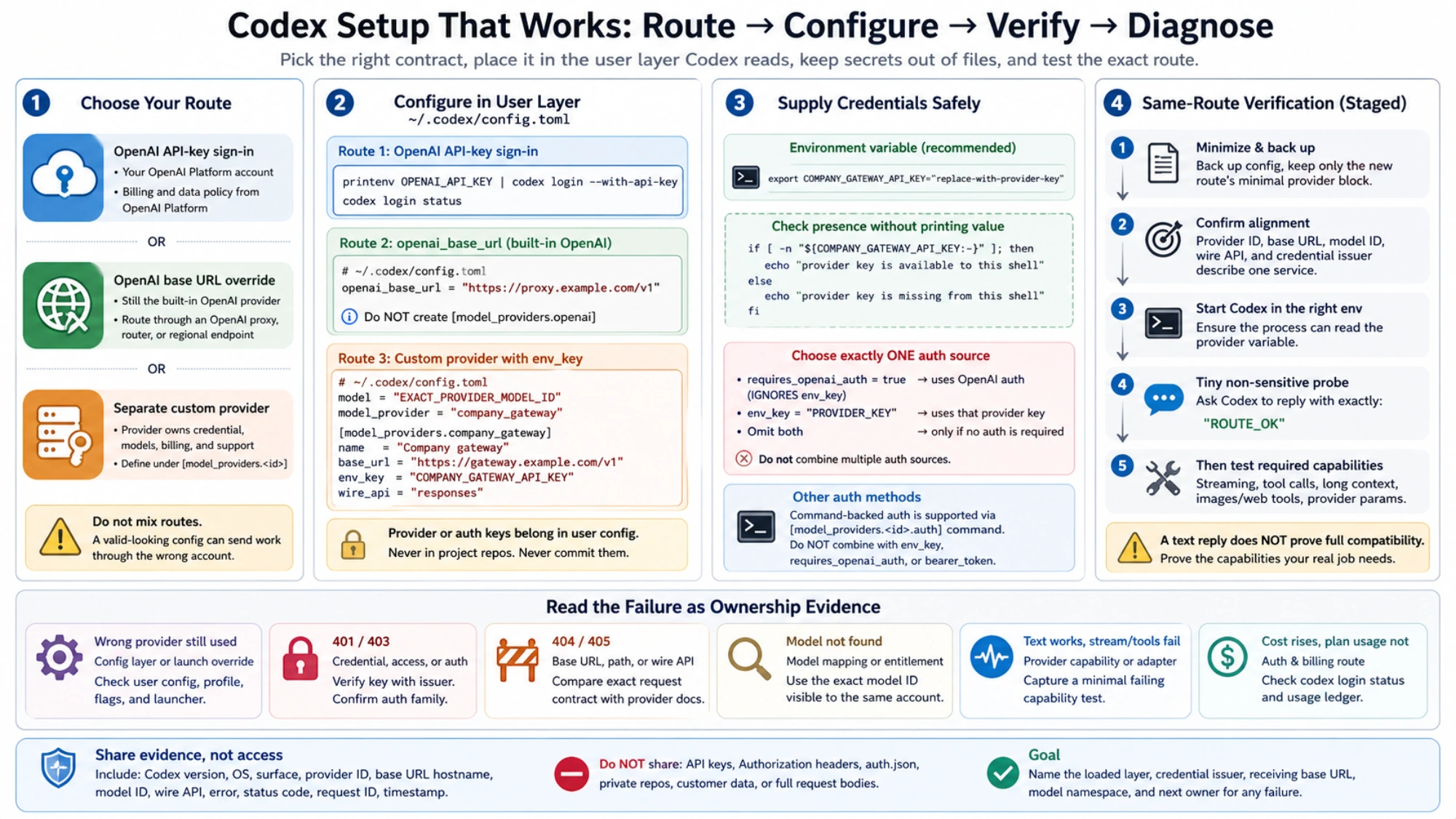
Use this routing rule first:
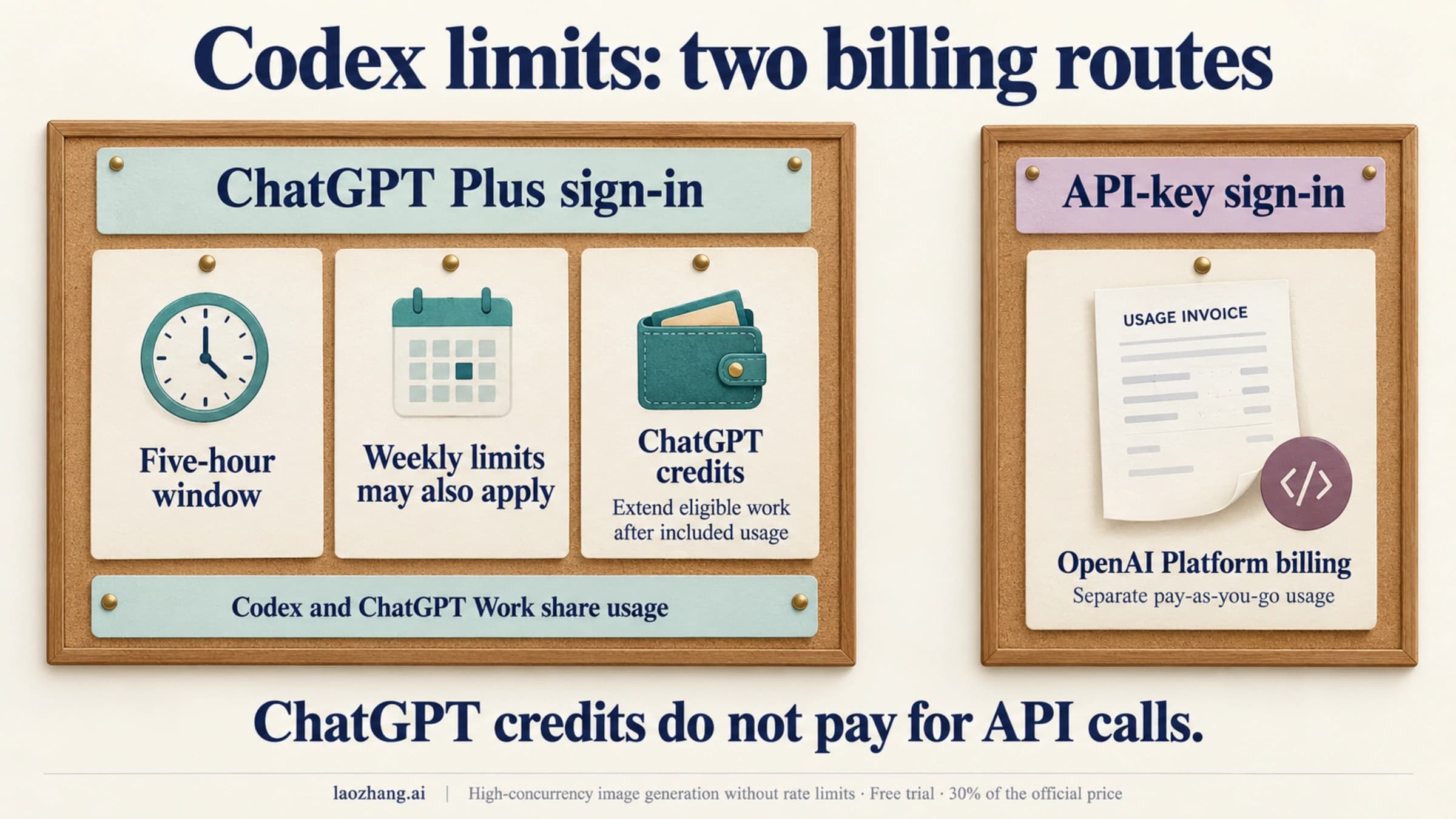
- Sign in with an OpenAI API key when local Codex work should use your OpenAI Platform account and API billing.
- Set
openai_base_urlwhen Codex should keep using the built-in OpenAI provider through an OpenAI proxy, router, or eligible regional endpoint. - Define
[model_providers.<id>]when another service owns the credential, model namespace, billing, endpoint, or support contract.
The configuration facts on this page were checked against OpenAI's Advanced Configuration and Authentication documentation on September 1, 2026. Codex configuration changes over time, so recheck the current docs before adopting an older provider recipe.
Record a route fingerprint before you edit anything
Write down five values for the session you intend to run:
| Decision | Example placeholder | What it establishes |
|---|---|---|
| Credential issuer | OpenAI Platform or company_gateway | Which account can authorize and bill the request |
| Provider ID | built-in openai or your own ID | Which Codex provider block should be active |
| Base URL | https://gateway.example.com/v1 | Which service actually receives the request |
| Model ID | EXACT_PROVIDER_MODEL_ID | Which provider namespace must resolve the model |
| Wire API and needed features | Responses, streaming, tools | What compatibility must be proven |
If those values describe two different vendors, stop. A key from one provider does not become valid because the other provider accepts an OpenAI-shaped request. Likewise, a model alias listed by a gateway is not automatically an OpenAI model ID.
Route 1: sign in to local Codex with an OpenAI API key
OpenAI documents ChatGPT sign-in and API-key sign-in as separate authentication methods for local work in the desktop app, CLI, and IDE. For the CLI, pass the key through standard input instead of putting it in a command argument:
printenv OPENAI_API_KEY | codex login --with-api-key
codex login status
This route belongs to your OpenAI Platform account. Usage follows Platform billing and API organization settings rather than included ChatGPT plan usage. Codex cloud still requires ChatGPT sign-in, so an API key is not a feature-for-feature substitute for the ChatGPT route.
The CLI can cache credentials in ~/.codex/auth.json or an OS credential store, depending on cli_auth_credentials_store. Treat the file like a password if file storage is active. Do not commit it, paste it into an issue, or send it with a support bundle. Use codex login status to identify the active method without exposing the credential.
If your unresolved question is really which meter should pay for the work, use the Codex API key versus subscription guide before changing providers.
Route 2: keep the built-in OpenAI provider and change its Base URL
OpenAI's current guidance provides a dedicated setting for routing the built-in openai provider through another eligible endpoint:
# ~/.codex/config.toml
openai_base_url = "https://proxy.example.com/v1"
This is the smaller choice when the route still uses OpenAI authentication and semantics. Do not create [model_providers.openai]; openai, ollama, and lmstudio are reserved built-in provider IDs and cannot be replaced by a custom provider with the same name.
The setting does not certify an arbitrary gateway. The proxy still has to preserve the API behavior your Codex workflow needs. If the gateway issues its own key, maintains its own model aliases, charges its own balance, or owns support, model it as a separate provider instead of blending its contract into your OpenAI login.
Route 3: define a provider with its own credential
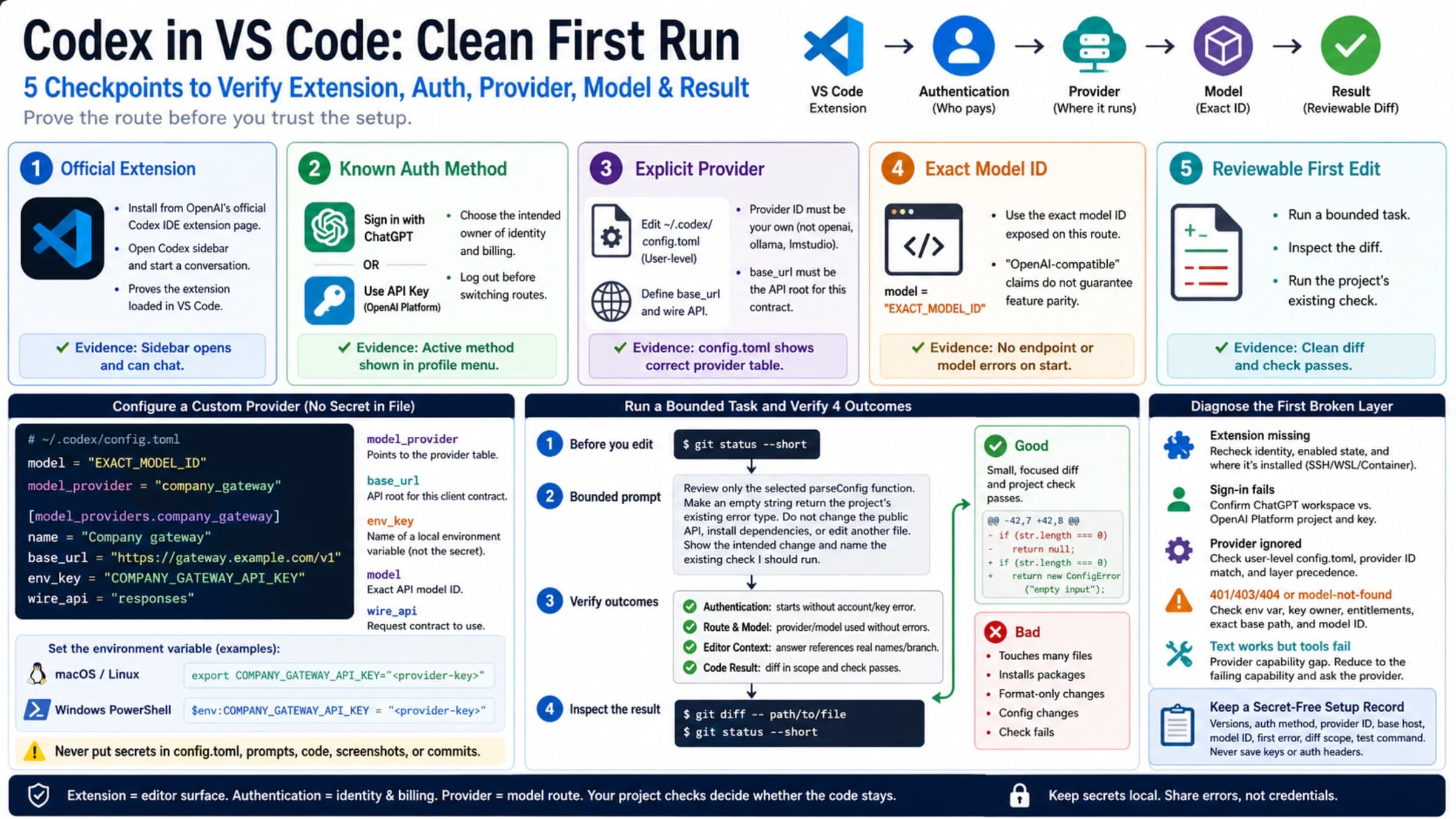
Put machine-local provider routing in the user configuration. A minimal provider-specific environment-key setup looks like this:
# ~/.codex/config.toml
model = "EXACT_PROVIDER_MODEL_ID"
model_provider = "company_gateway"

[model_providers.company_gateway]
name = "Company gateway"
base_url = "https://gateway.example.com/v1"
env_key = "COMPANY_GATEWAY_API_KEY"
wire_api = "responses"
Set the credential in the environment from which Codex actually starts:
export COMPANY_GATEWAY_API_KEY="replace-with-provider-key"env_key is the name of the environment variable, not the secret. A common failure is exporting the variable in one terminal, then launching the IDE or desktop app from an environment that never inherited it. Check presence without printing the value:
if [ -n "${COMPANY_GATEWAY_API_KEY:-}" ]; then
  echo "provider key is available to this shell"
else
  echo "provider key is missing from this shell"
fi
Do not apply a universal “always add /v1” rule. The provider's current documentation must tell you the Base URL root and model ID. Keep them paired with the same account and protocol.
Choose exactly one authentication source for an alternative provider
The alternative-provider authentication section distinguishes these cases:
requires_openai_auth = trueuses OpenAI authentication and ignoresenv_key. This can fit an LLM proxy that explicitly accepts OpenAI authentication.env_key = "PROVIDER_VARIABLE"reads that provider's API key from a named environment variable.- Omitting both tells Codex the endpoint needs no authentication, which is appropriate only for a controlled local service that truly has no auth requirement.
Advanced Configuration also supports command-backed authentication for gateways that fetch short-lived bearer tokens. A [model_providers.<id>.auth] command must not be combined with env_key, requires_openai_auth, or the experimental bearer-token field.
Multiple credential sources do not make the setup resilient. They make a 401 ambiguous. Pick the issuer that owns the route and make every other auth source absent from that provider block.
Why provider settings do not work in project config
A trusted repository may load .codex/config.toml, but it is not allowed to redirect machine credentials and provider traffic. OpenAI's project config documentation says Codex ignores provider/auth keys there, including:
openai_base_urlmodel_providermodel_providers
Move those values to ~/.codex/config.toml. This is a security boundary, not a TOML parse failure: a repository should not silently redirect your code context and credentials to an endpoint chosen by the repo.
If the same user-level key still appears ineffective, inspect the exact launch command, CLI --config overrides, and selected profile. Precedence can decide which permitted value wins; it cannot make a restricted project key valid.
Prove the route, then prove the capabilities you need
A provider block that parses is not an end-to-end test. A successful /v1/models request is not one either. It may prove that a list endpoint is reachable while the actual Responses route, authentication, streaming, or tool calls still fail.
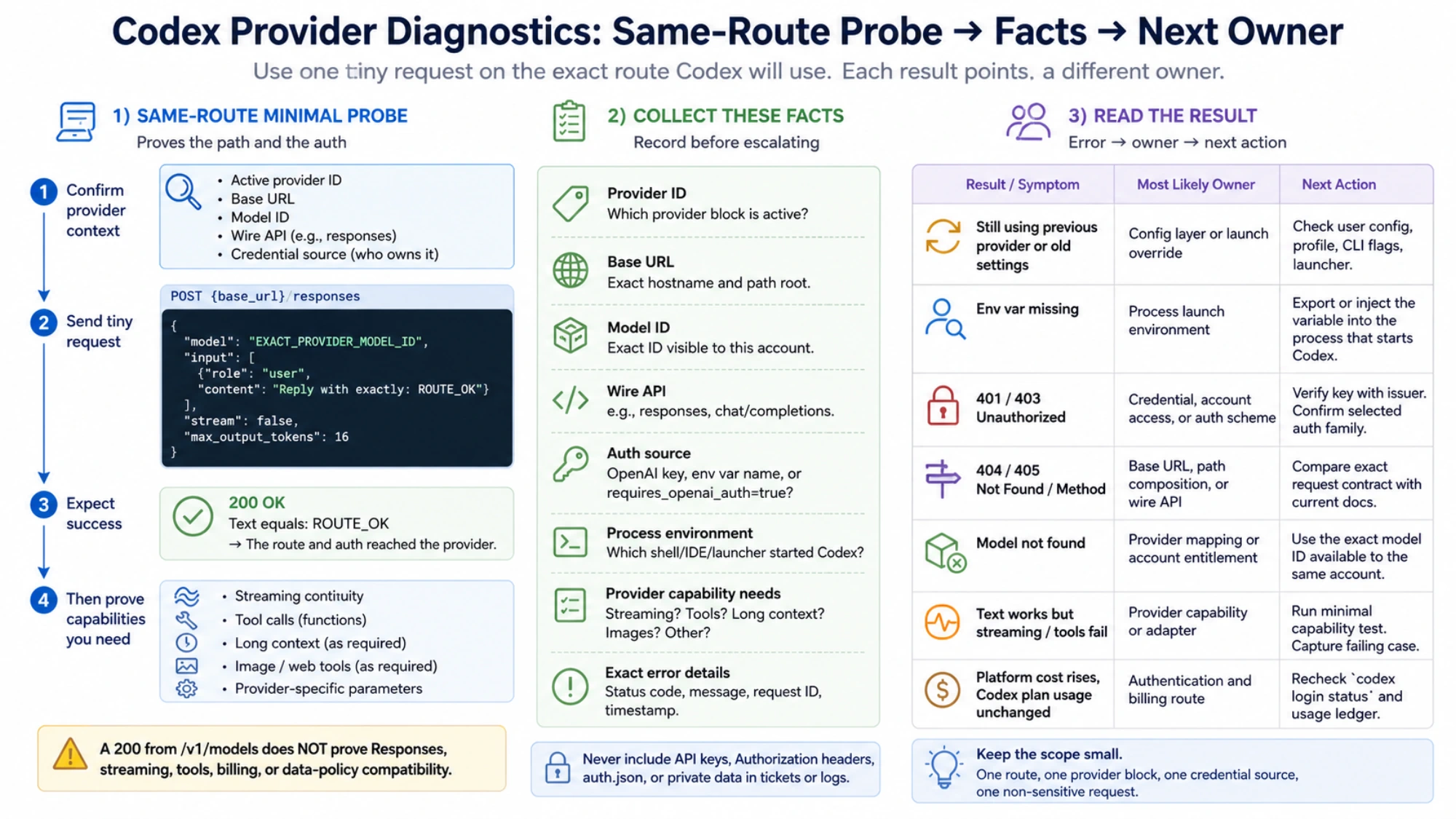
Use a staged verification:
- Back up the user configuration and reduce the new route to its smallest provider block.
- Confirm that provider ID, Base URL, model ID, wire API, and credential issuer describe one service.
- Start Codex from the environment that contains the provider variable.
- Send a tiny non-sensitive task, such as asking for the exact text
ROUTE_OK. - Only after the text response works, test the capabilities the real job uses: streaming continuity, tool calls, long context, image or web tools, and any provider-specific parameters.
This sequence prevents a plain text response from being advertised as “full Codex compatibility.” If the real job needs tools, a provider that only returns text has not passed the job.
Read the failure as ownership evidence
| Result | Most likely owner | Useful next action |
|---|---|---|
| Codex still uses the previous provider | Config layer or launch override | Check user config, profile, flags, and actual launcher |
| Environment variable is missing | Process launch environment | Supply it to the process that starts Codex; do not print the secret |
401 or 403 | Credential, account access, or auth scheme | Verify the key with its issuer and confirm the selected auth family |
404 or 405 | Base URL, path composition, or wire API | Compare the exact request contract with current provider docs |
| Model not found | Provider mapping or account entitlement | Use the exact model ID visible to the same provider account |
| Text works but stream or tool calls fail | Provider capability or adapter | Save a minimal failing capability test and stop claiming full compatibility |
| Platform cost rises while Codex plan usage does not | Authentication and billing route | Recheck codex login status and the Codex usage ledger |
Once a request clearly reaches the intended provider, repeatedly changing configuration precedence is usually wasted effort. The next owner is the credential issuer, provider endpoint, account, model mapping, adapter, or network path.
Share evidence without sharing access
A useful support packet contains the Codex version, operating system, surface (CLI, IDE, or desktop), provider ID, Base URL hostname, model ID, wire API, exact error text, status code, request ID, and timestamp. It does not contain the API key, Authorization header, auth.json, private repository content, or customer data.
The setup is complete when you can name the loaded configuration layer, credential issuer, receiving Base URL, model namespace, and next owner for a failure. If any of those answers are still unclear, remove optional fields and return to one route, one provider block, one credential source, and one non-sensitive request. That smaller proof is more useful than another “complete” config.toml copied from a different provider and Codex version.
Sources2
External pages this guide links to, in the order they appear. Last updated Sep 1, 2026.
Sources2
External pages this guide links to, in the order they appear. Last updated Sep 1, 2026.