GPT-6.1 Sol: Pricing, Access, and What Breaks When You Switch
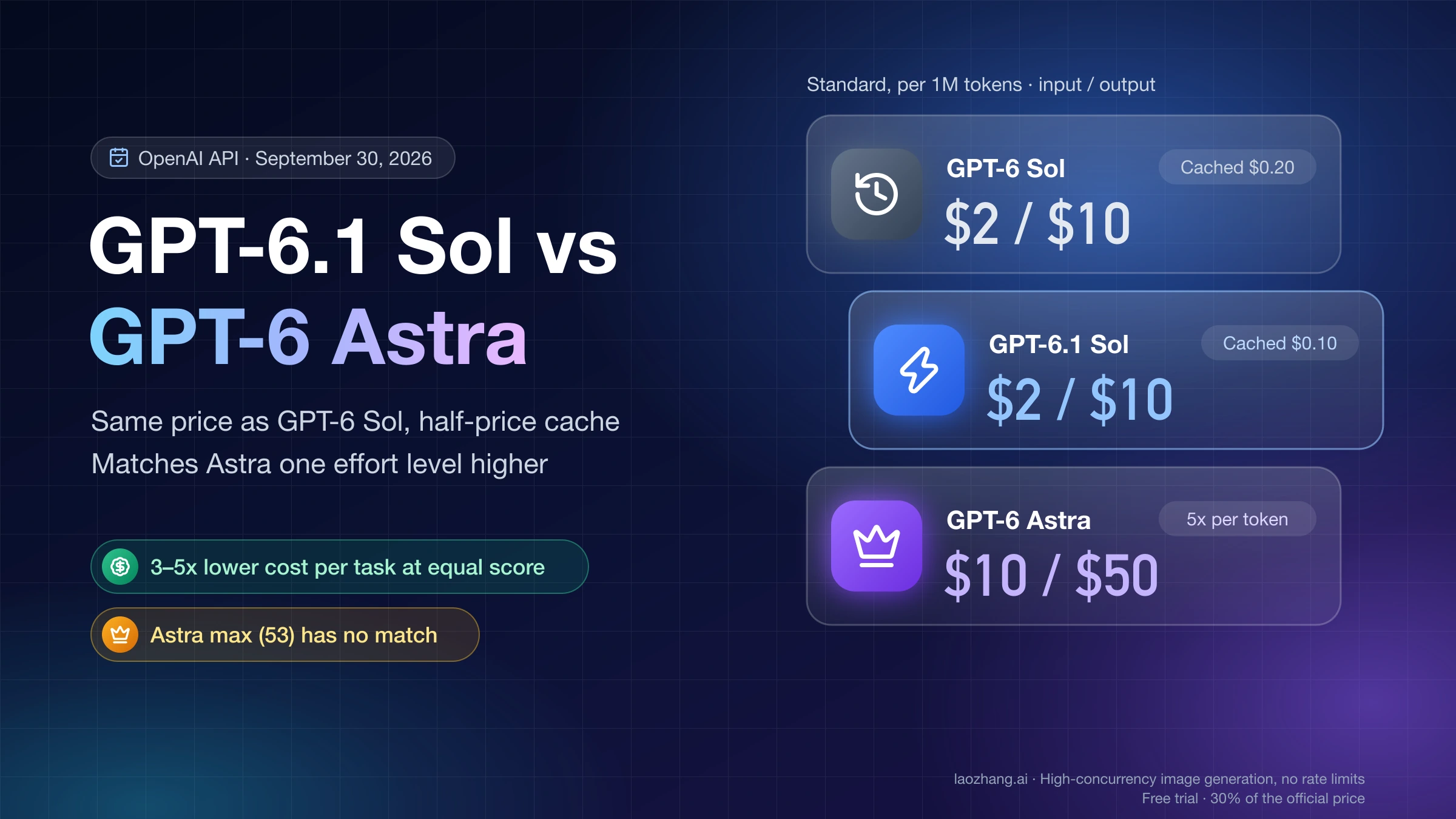
GPT-6.1 Sol keeps GPT-6 Sol's $2/$10 rates but halves cached input to $0.10. Requests using none effort or Chat Completions tools must change.
On this page
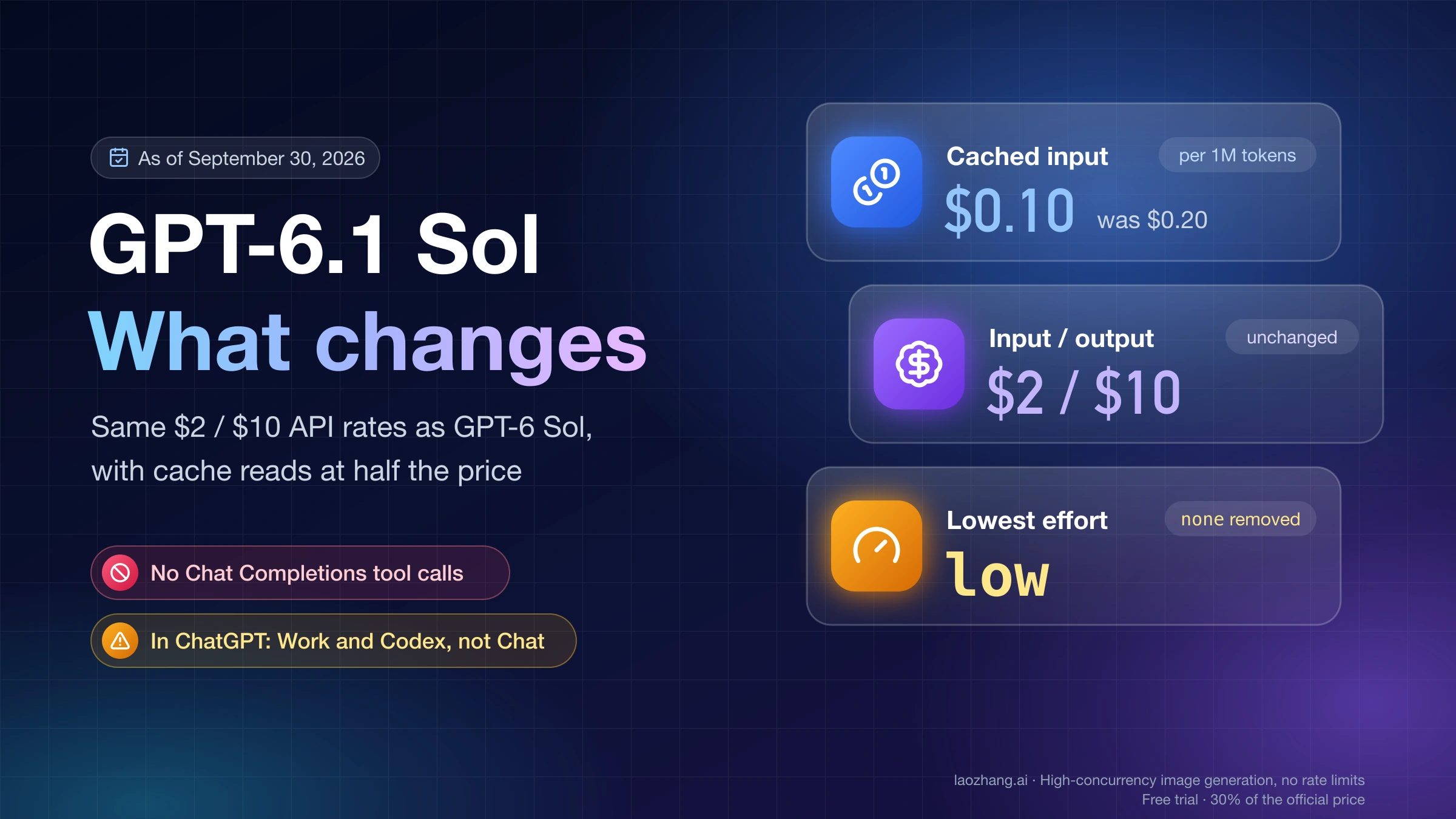
GPT-6.1 Sol (gpt-6.1-sol) is the upgrade to GPT-6 Sol that OpenAI released on September 29, 2026, one week after GPT-6 Sol itself. As of September 30, 2026, its API list price matches GPT-6 Sol at $2 per million input tokens and $10 per million output tokens. The one price change is cached input, which drops from $0.20 to $0.10 per million. Your bill falls only as far as your workload leans on cache reads, and any request above 272K input tokens is still repriced in full.
Changing the model ID is not always enough. GPT-6.1 Sol does not support the none or minimal reasoning efforts, and it calls tools only through the Responses API. If your gpt-6-sol code runs function calls in Chat Completions at reasoning_effort: "none", that code needs rewriting before you switch. In ChatGPT, the model runs in ChatGPT Work and Codex (not Chat) on Plus, Pro, Business, Enterprise, and Edu plans.
What GPT-6.1 Sol is
OpenAI's GPT-6 lineup now has three tiers. GPT-6 Astra is labeled "Highest intelligence," GPT-6.1 Sol "Balanced speed, cost, and intelligence," and GPT-6 Luna "Fastest and most cost-effective." OpenAI pitches 6.1 Sol for agentic coding, computer use, and professional work, and describes its performance as "near-Astra." That phrase is OpenAI's own, and the company still calls Astra its most capable frontier model.
The model page lists these specs:
- 1,050,000-token context window and up to 128,000 output tokens
- Knowledge cutoff of April 30, 2026 (GPT-6 Sol's is April 20, 2026)
- Text and image input, text output; no audio or video
- Streaming, function calling, and Structured Outputs supported; fine-tuning not supported
- Responses API tools: web search, file search, image generation, code interpreter, hosted shell, apply patch, skills, computer use, MCP, and tool search, plus multi-agent delegation in beta
- One model ID,
gpt-6.1-sol, with no dated snapshot listed
In its launch post, OpenAI reports these results from its own evaluations:
- DeepSWE v1.1: comparable to GPT-6 Astra at about one-fifth of the cost, and 6.4 points above GPT-6 Sol's best score.
- OSWorld 2.0 at max effort: 7 points above GPT-6 Sol at under half the cost, and within 2.1 points of Astra at about one-seventh of the cost per task.
- Terminal-Bench Science 0.1: Astra still ranks first at 68.1%. OpenAI's advice for the hardest research tasks is to keep using Astra.
OpenAI ran these evals in its research environment or through its API, so results in ChatGPT can differ. Treat them as a reason to test, not as a verdict on your workload.
GPT-6 Sol is not going away yet. As of September 30, 2026, it has no entry on OpenAI's deprecations page, and its model page still exists with a pointer to "GPT-6.1 Sol for the newer Sol model." It has, however, been dropped from the pricing table. For how the pre-6.1 lineup compared, see GPT-6 Sol vs Terra vs Luna vs Astra.
What you pay: only cache reads got cheaper
Here are Standard processing rates per 1 million tokens. The GPT-6 Sol figures are the ones OpenAI's pricing page listed on September 25, 2026, before that model left the table. The GPT-6.1 Sol figures come from the pricing page as of September 30, 2026.
| Token type | gpt-6-sol, ≤272K input | gpt-6.1-sol, ≤272K input | gpt-6-sol, >272K input | gpt-6.1-sol, >272K input |
|---|---|---|---|---|
| Input | $2.00 | $2.00 | $4.00 | $4.00 |
| Cached input | $0.20 | $0.10 | $0.40 | $0.20 |
| Cache writes | $2.50 | $2.50 | $5.00 | $5.00 |
| Output (includes reasoning) | $10.00 | $10.00 | $15.00 | $15.00 |
Cached input on GPT-6.1 Sol costs 5% of the uncached input rate, compared with 10% on GPT-6 Sol. Cache writes cost 1.25 times the input rate on both models. Reasoning tokens bill as output. Built-in tools such as web search can add per-call fees on top of token costs.
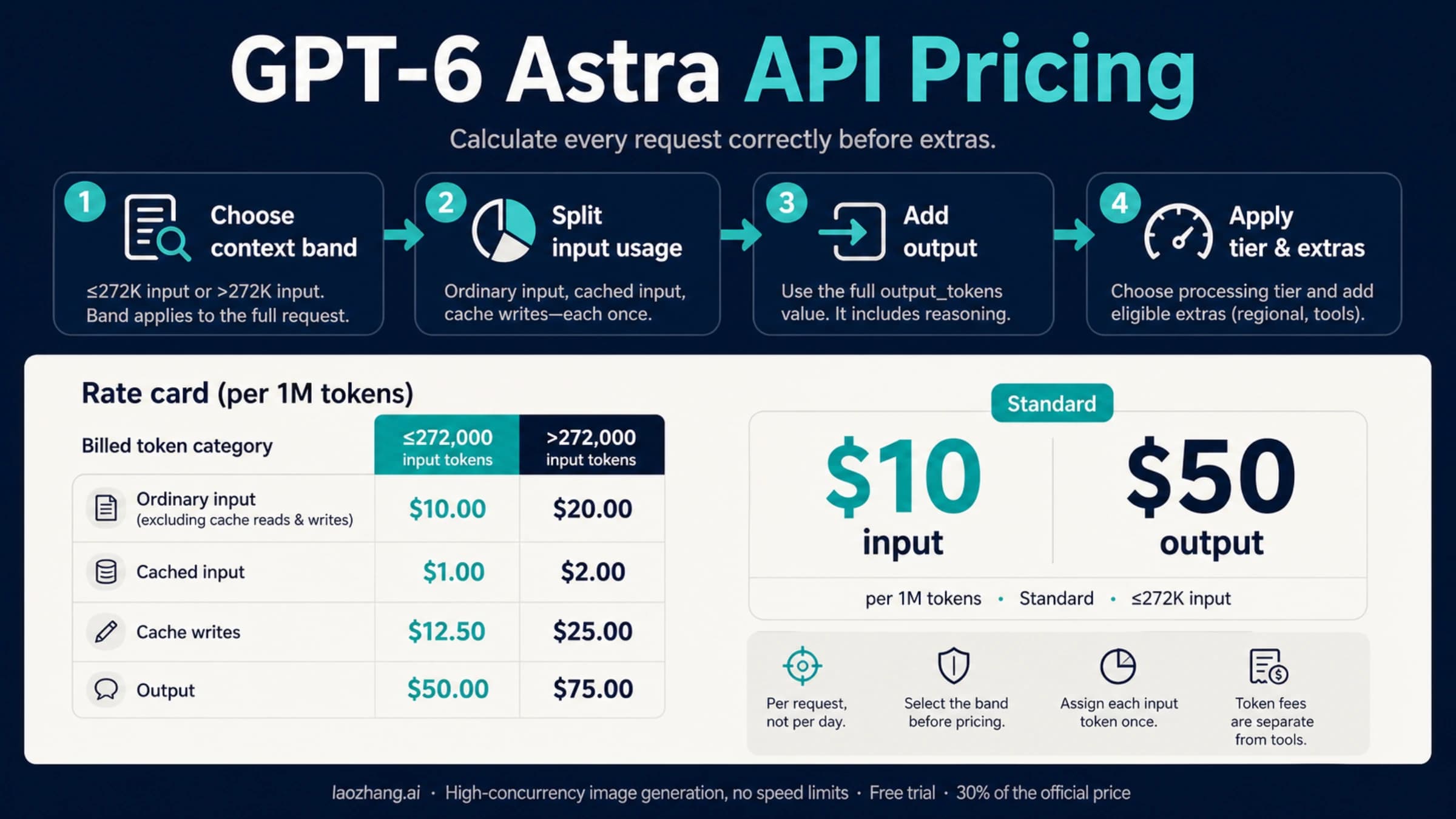
GPT-6 Astra lists at $10 input, $1.00 cached input, $12.50 cache writes, and $50 output under 272K. That is 5 times GPT-6.1 Sol on input and output and 10 times on cached input. GPT-6 Astra API Pricing walks through Astra's rates and long-context math if you are weighing whether it is worth the premium.
Three worked examples
Every example below uses one formula:
cost = Σ (tokens × rate per 1M) / 1,000,000The token counts are illustrative, and each example assumes both models use the same number of tokens. In practice they won't, because reasoning length and retries differ between models.
1. A cache-heavy agent turn under 272K. Take one request with 150,000 input tokens (140,000 read from cache and 10,000 uncached) plus 3,000 output tokens. Cache writes are left out because both models charge $2.50 for them, so they can't change the difference.
| Component | gpt-6-sol | gpt-6.1-sol |
|---|---|---|
| Uncached input: 10,000 × $2 | $0.020 | $0.020 |
| Cached input: 140,000 × $0.20 or $0.10 | $0.028 | $0.014 |
| Output: 3,000 × $10 | $0.030 | $0.030 |
| Total | $0.078 | $0.064 |
The turn costs about 18% less. Across 50 such turns, the total goes from $3.90 to $3.20.
2. No cache reads. With zero cached input, the two models have identical list prices in both context bands. Any cost difference then comes only from how many tokens each model uses on the task.
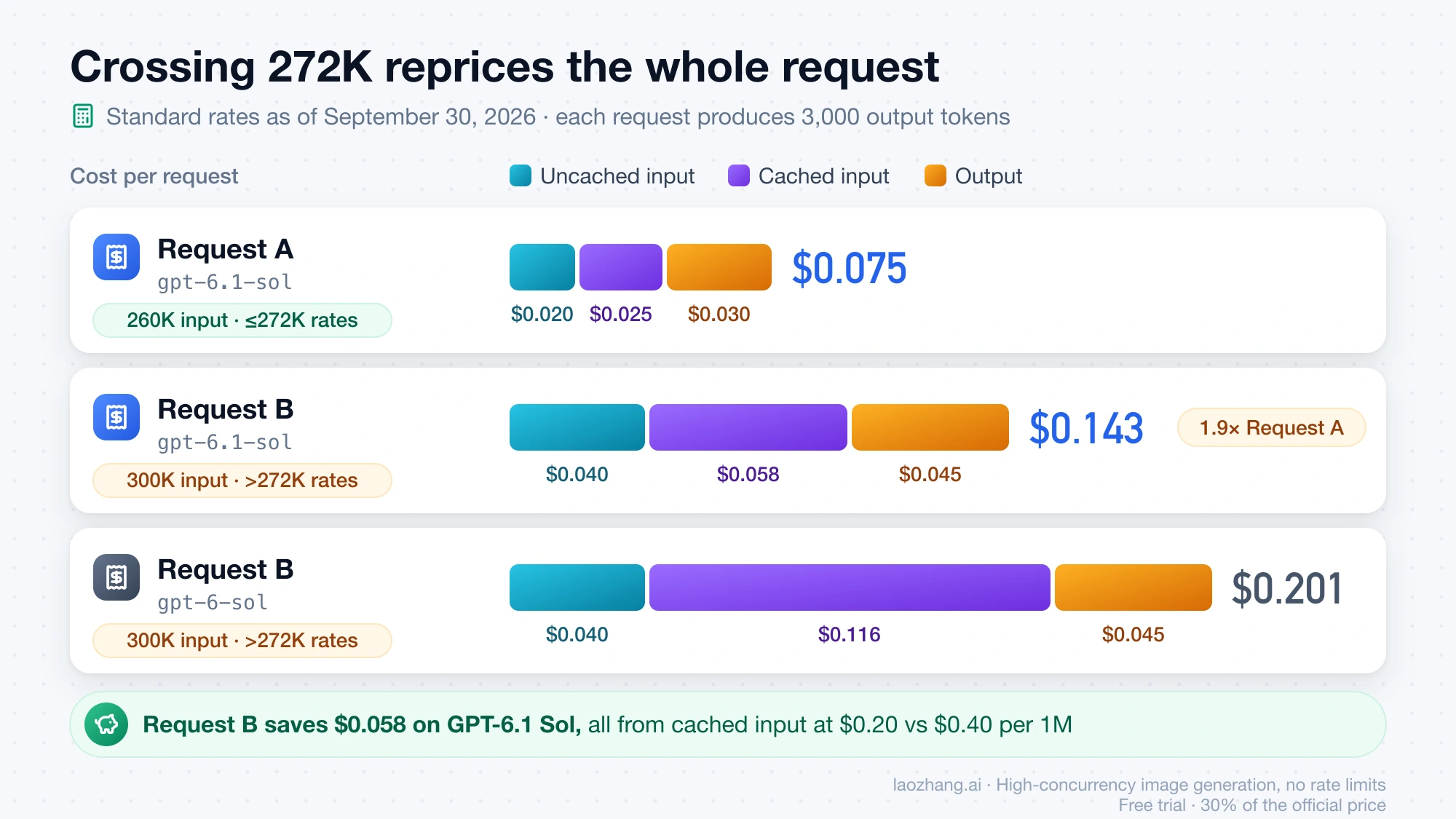
3. Crossing 272K. On GPT-6.1 Sol, compare two requests that each produce 3,000 output tokens:
- Request A has 260,000 input tokens (250,000 cached and 10,000 uncached): $0.020 + $0.025 + $0.030 = $0.075.
- Request B has 300,000 input tokens (290,000 cached and 10,000 uncached). Because it exceeds 272K, the whole request moves to long-context rates: 10,000 × $4 = $0.040, 290,000 × $0.20 = $0.058, and 3,000 × $15 = $0.045, for $0.143.
About 15% more input nearly doubles the price (1.9 times), because the surcharge covers the full request and not just the tokens past the line. The same Request B on GPT-6 Sol costs $0.040 + $0.116 + $0.045 = $0.201, a saving of $0.058 on that one request, against $0.014 in the first example. The longer and more cache-heavy the request, the more the new cache rate saves in dollars.
Fast, Batch, Flex, and Ultrafast
Per 1 million tokens, in the order input / cached input / cache writes / output:
Processing tier for gpt-6.1-sol | ≤272K input | >272K input |
|---|---|---|
| Standard | $2 / $0.10 / $2.50 / $10 | $4 / $0.20 / $5 / $15 |
| Fast (2× Standard) | $4 / $0.20 / $5 / $20 | $8 / $0.40 / $10 / $30 |
| Batch and Flex (50% off Standard) | $1 / $0.05 / $1.25 / $5 | $2 / $0.10 / $2.50 / $7.50 |
| Ultrafast | Not available as of September 30, 2026 | Not available |
Flex rates follow the model page's statement that Batch and Flex prices are 50% lower than Standard. Fast mode was called Priority processing until July 30, 2026. Regional processing (data residency) adds 10% for models released on or after March 5, 2026, and FedRAMP endpoints add another 10%. Fast mode is not available with EU data residency.
Ultrafast needs a note of its own because OpenAI's pages disagree. The launch post says OpenAI "also launched" GPT-6.1 Sol Ultrafast via the API and on the new $500-a-month Pro plan. However, the DevDay 2026 recap calls 6.1 Sol Ultrafast "coming soon," and ChatGPT's model documentation says "Ultrafast support for GPT-6.1 Sol is coming later." The API changelog and pricing page add service_tier: "ultrafast" only for gpt-6-astra, at $60 input and $300 output per million under 272K. Until a GPT-6.1 Sol row appears in the Ultrafast pricing tab, budget with Standard, Fast, Batch, or Flex. OpenAI's Ultrafast speed figures, up to 8 times faster generation in Codex and 6 times in the API, currently apply only to Astra.
What breaks when you change the model ID
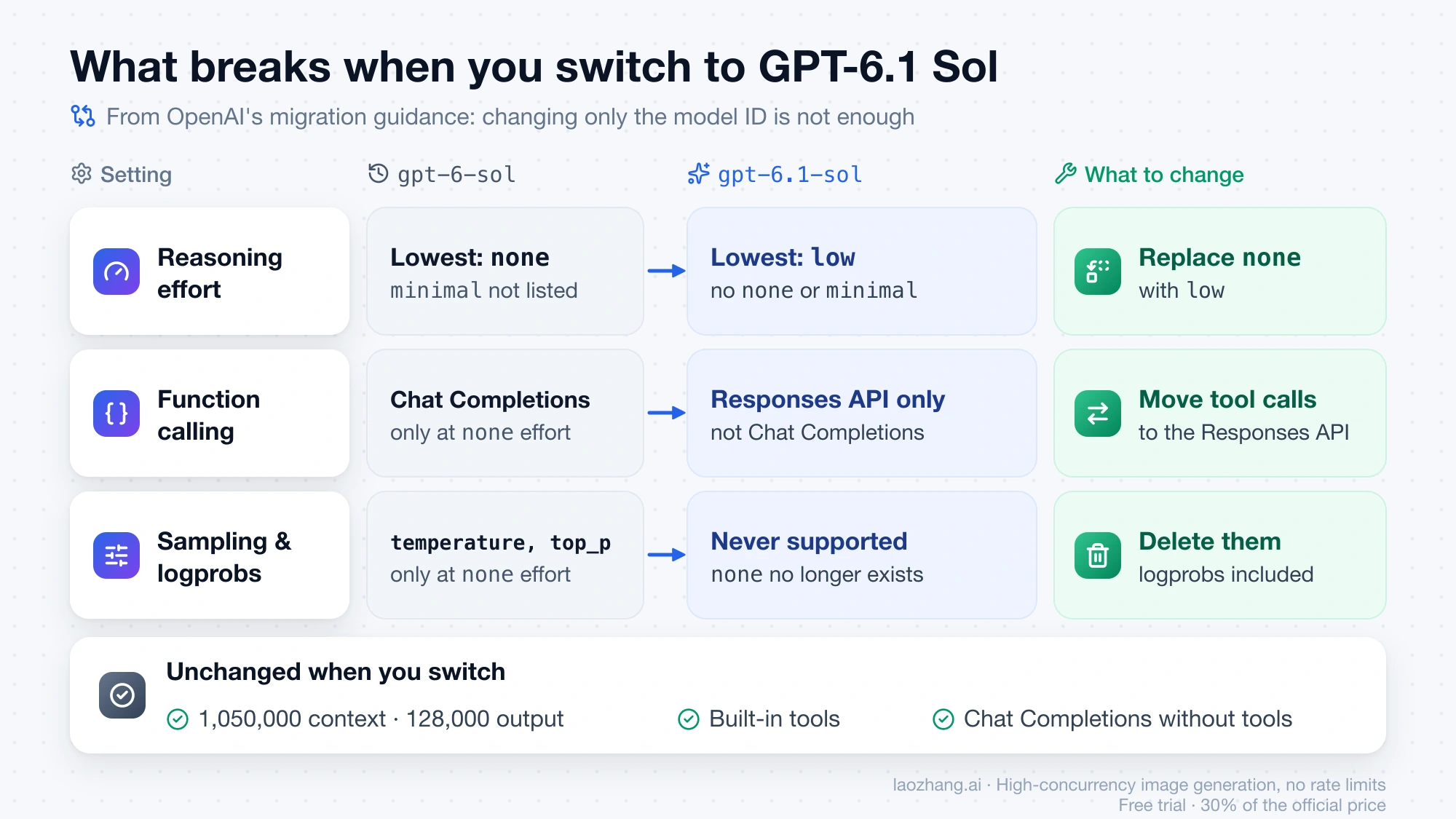
OpenAI's migration guidance boils down to the differences below. The two that stop existing requests from working are the missing none effort and tool calling in Chat Completions.
| Request setting | gpt-6-sol | gpt-6.1-sol | What to change |
|---|---|---|---|
| Reasoning effort values | none, low, medium (default), high, xhigh, max | low, medium (default), high, xhigh, max | Replace none with low |
minimal effort | Not listed | Not supported | Start with low and compare results |
| Function calling in Chat Completions | Only with reasoning_effort: "none" | Not supported | Move tool calls to the Responses API |
| Built-in tools (web search, computer use, MCP, and others) | Responses API | Responses API | Nothing |
| Chat Completions without tools | Supported | Supported | Nothing |
temperature, top_p, top_logprobs | Only at none effort | Never, since none doesn't exist | Delete them |
logprobs (Chat Completions) or message.output_text.logprobs in include (Responses) | Only at none effort | Never | Delete them |
| Context window and max output | 1,050,000 and 128,000 | 1,050,000 and 128,000 | Nothing |
| Fast mode with EU data residency | Not available | Not available | Nothing |
Two effects of the effort change are easy to miss. A request that ran at none on GPT-6 Sol now runs at low or higher, which can add reasoning tokens, and those bill at the output rate. Also, OpenAI notes that effort levels "don't map exactly between model generations," so compare quality at low before you assume you need medium.
Two more items from the same guide apply to specific setups:
- Changing effort mid-conversation. Send a
configuration_updateinput item and keep the request-levelreasoning.effortunchanged. OpenAI says this preserves the prompt prefix for caching, and cache reads are where GPT-6.1 Sol saves money. - Coming from GPT-5.5 or earlier. Replace
prompt_cache_retentionwithprompt_cache_options.ttlset to"30m".
In Codex, you can ask OpenAI's docs skill to do the migration for you: $openai-docs migrate this project to the GPT-6 model family. Check its diff against the table above.
Tool calls: move to the Responses API
A request like this one worked on GPT-6 Sol but is not supported on GPT-6.1 Sol, because it combines Chat Completions tools, none effort, and a sampling parameter:
# Worked on gpt-6-sol. Not supported on gpt-6.1-sol.
client.chat.completions.create(
    model="gpt-6-sol",
    reasoning_effort="none",
    temperature=0.2,
    tools=[...],
    messages=[...],
)
The Responses API version below sets the effort to low, drops temperature, and returns the function result with the original call_id:
import json
from openai import OpenAI

client = OpenAI()

tools = [{
    "type": "function",
    "name": "get_order_status",
    "description": "Look up the shipping status of an order by its ID.",
    "parameters": {
        "type": "object",
        "properties": {"order_id": {"type": "string"}},
        "required": ["order_id"],
        "additionalProperties": False,
    },
}]

response = client.responses.create(
    model="gpt-6.1-sol",
    reasoning={"effort": "low"},  # "none" and "minimal" are not supported
    tools=tools,
    input="Where is order A-1042?",
)

for item in response.output:
    if item.type == "function_call":
        args = json.loads(item.arguments)
        result = {"order_id": args["order_id"], "status": "shipped"}  # your lookup here
        follow_up = client.responses.create(
            model="gpt-6.1-sol",
            reasoning={"effort": "low"},
            tools=tools,
            previous_response_id=response.id,
            input=[{
                "type": "function_call_output",
                "call_id": item.call_id,
                "output": json.dumps(result),
            }],
        )
        print(follow_up.output_text)
Chat Completions without tools
If a request uses no tools, you can stay on Chat Completions. Change the model, set an effort of low or higher, and remove the sampling and logprob parameters:
completion = client.chat.completions.create(
    model="gpt-6.1-sol",
    reasoning_effort="low",
    messages=[{"role": "user", "content": "Summarize this diff in three bullets: ..."}],
)
print(completion.choices[0].message.content)
Where you can select GPT-6.1 Sol
| Where | Who has it | How to select it |
|---|---|---|
| OpenAI API | Organizations on usage Tier 1 and above; the Free tier is not supported | model="gpt-6.1-sol" in Responses, Chat Completions, or Batch |
| Codex CLI | Plus, Pro, Business, Enterprise, and Edu | codex -m gpt-6.1-sol, or /model inside a session |
| Codex desktop app and IDE extension | Same plans | Model picker, or model = "gpt-6.1-sol" in config.toml |
| ChatGPT Work (web, mobile, and desktop) | Same plans | Open Advanced to choose the model, reasoning effort, and speed |
| ChatGPT Chat | Not available | — |
| ChatGPT Free and Go | Not included at launch | — |
OpenAI API
API rate limits for gpt-6.1-sol depend on your organization's usage tier, which rises automatically with spend:
| Usage tier | Requests per minute | Tokens per minute |
|---|---|---|
| Tier 1 | 500 | 500,000 |
| Tier 2 | 5,000 | 1,000,000 |
| Tier 3 | 5,000 | 2,000,000 |
| Tier 4 | 10,000 | 4,000,000 |
| Tier 5 | 15,000 | 40,000,000 |
The model supports US and EU data residency, and direct API access follows OpenAI's supported countries and territories list. If your project still can't see a GPT-6 model, the checks in GPT-6 Astra API Access apply to gpt-6.1-sol as well: exact model ID, the key's project, and that project's model permissions.
Microsoft Foundry, Amazon Bedrock, and OpenRouter also list GPT-6.1 Sol. Each platform sets its own prices, regions, and limits, so the OpenAI figures above don't carry over.
Codex and ChatGPT Work
OpenAI's ChatGPT model documentation describes the rollout as covering Codex in the desktop app and CLI and ChatGPT Work on the web and mobile. Availability depends on the rollout, your sign-in method, and your client, so the model can appear in one place before another.
To start the CLI on the new model, or to run a one-off task with it:
codex --model gpt-6.1-sol
codex exec -m gpt-6.1-sol "Review the current changes"
To make it the default everywhere, set it in config.toml, which the ChatGPT desktop app, Codex CLI, and IDE extension all share:
model = "gpt-6.1-sol"Effort labels differ by client. Light in the desktop app, ChatGPT Work, and the IDE extension is the same as Low in the CLI, followed by Medium, High, and Extra High. Max and Ultra depend on your settings, and in the CLI they sit under /model → More reasoning…. OpenAI says most tasks don't need either. In the desktop app and ChatGPT Work on the web, the default Power setting is the starting point. Move toward Smarter for deeper reasoning or Faster for quicker, lower-cost work.
A few conditions trip people up:
- Enterprise and Edu: GPT-6.1 Sol is off by default until an administrator enables it. Picking the model in the client doesn't grant access or change workspace permissions.
- GPT-5.5 retirement: GPT-5.5 leaves ChatGPT, ChatGPT Work, and Codex on October 14, 2026, though it stays in the API. OpenAI's retirement note still names
gpt-6-solas the replacement, while its current recommendation for complex coding is GPT-6.1 Sol when your account has it. - Chat Completions in Codex: Codex's support for the Chat Completions API is deprecated and will be removed in a future release. A setup that reaches models through Chat Completions has a second migration coming regardless of which model you choose.
Run a before/after check on your own tasks
OpenAI's own advice on the model page is to compare 6.1 Sol with Astra on your tasks. The same approach answers whether to leave GPT-6 Sol:
- Pick a set of real tasks from your logs, including long, cache-heavy runs if you have them.
- Run each task on
gpt-6-solat its current effort and ongpt-6.1-solat the same effort, or atlowwhere the old request usednone. - Record the usage object from every request. Cache reads and cache writes are subsets of
input_tokens, andoutput_tokensalready includes reasoning. - Price each request separately, because the 272K band is decided per request and not per day.
- Compare accepted results, latency, and total cost per accepted task, and keep requests above 272K in a separate group.
This helper prices one request at Standard rates as of September 30, 2026:
# USD per 1M tokens: (input, cached input, cache writes, output)
RATES = {
    "gpt-6-sol":   {"short": (2.00, 0.20, 2.50, 10.00), "long": (4.00, 0.40, 5.00, 15.00)},
    "gpt-6.1-sol": {"short": (2.00, 0.10, 2.50, 10.00), "long": (4.00, 0.20, 5.00, 15.00)},
}

def request_cost(model: str, usage) -> float:
    details = usage.input_tokens_details
    cached = getattr(details, "cached_tokens", 0) or 0
    written = getattr(details, "cache_write_tokens", 0) or 0
    uncached = usage.input_tokens - cached - written
    # OpenAI: "more than 272K input tokens" reprices the full request
    band = "long" if usage.input_tokens > 272_000 else "short"
    r_in, r_cached, r_write, r_out = RATES[model][band]
    return (uncached * r_in + cached * r_cached + written * r_write
            + usage.output_tokens * r_out) / 1_000_000
For a Fast run, double the result. For Batch or Flex, halve it. Add 10% for regional processing. GPT-6 Astra API Pricing explains the usage fields in more detail, and the same subtraction applies here.
If you compared GPT-6 Sol against another vendor's model, recheck any cache-read reasoning. Claude Opus 5.5 vs GPT-6 Sol treats both models as charging $0.20 per million cached tokens, which holds for GPT-6 Sol but not for GPT-6.1 Sol at $0.10.
FAQ
Is GPT-6.1 Sol better than GPT-6 Astra?
Not according to OpenAI. It calls 6.1 Sol "near-Astra" and still ranks Astra first, for example at 68.1% on Terminal-Bench Science 0.1. Where 6.1 Sol wins is price. Astra lists at 5 times its input and output rates and 10 times its cached-input rate, so for repeated, long-running work the question is whether Astra's extra quality on your tasks justifies that gap. For the benchmark and cost-per-task comparison behind that decision, see GPT-6.1 Sol vs GPT-6 Astra vs GPT-6 Sol: When Astra Is Worth It.
Is GPT-6 Sol being shut down?
No shutdown date has been announced as of September 30, 2026. The model page is still live and points to GPT-6.1 Sol as the newer Sol model, but gpt-6-sol no longer appears in the pricing table. Watch the deprecations page if you plan to stay on it.
Can I use GPT-6.1 Sol for free?
No. The API's Free tier doesn't support it, and ChatGPT Free and Go aren't included at launch. You need a paid API usage tier, or a Plus, Pro, Business, Enterprise, or Edu plan. On Enterprise and Edu, an administrator has to switch it on first.
Why can't I find GPT-6.1 Sol in ChatGPT?
It runs only in ChatGPT Work and Codex, not in Chat. If you're in the right place on an eligible plan and still don't see it, the rollout may not have reached your account or client yet. On Enterprise and Edu, the admin setting may still be off.