Codex /goal: What It Does, How to Use It, and Why It May Be Missing
Codex /goal keeps one objective attached to a chat so work can continue across turns. Set a clear finish line, use the documented lifecycle controls, and accept completion only when the requested evidence is present.
On this page
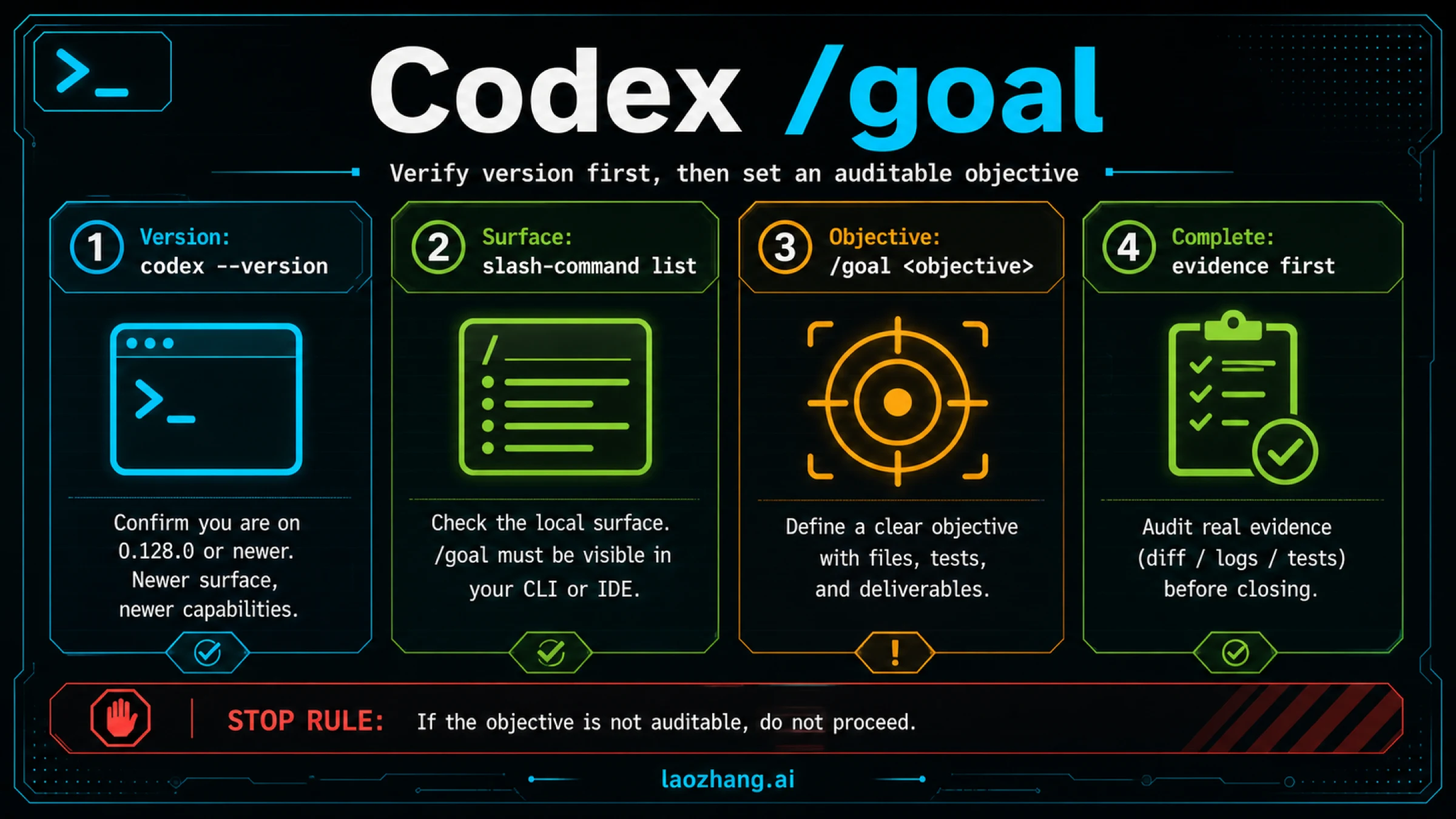
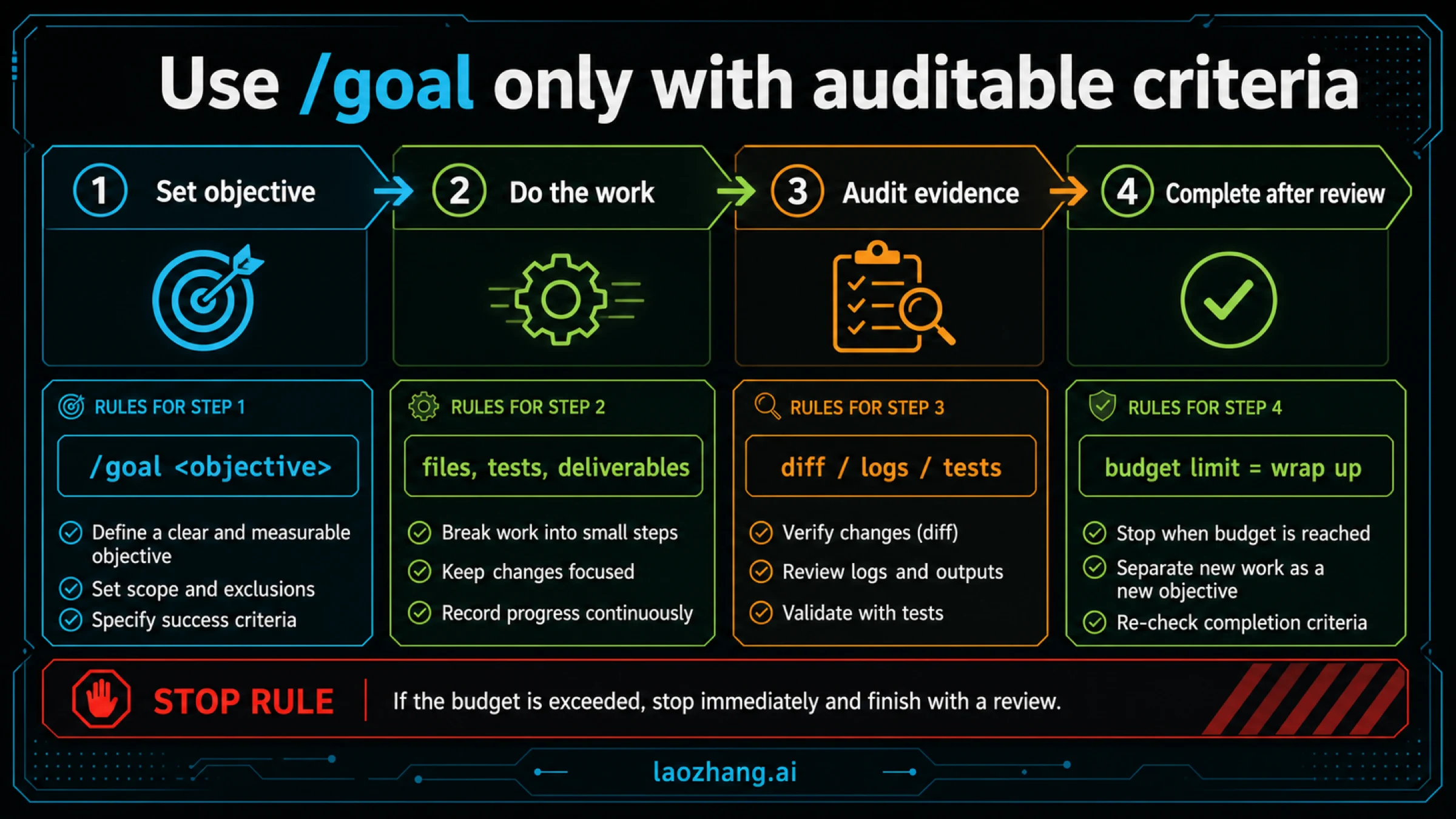
Codex /goal attaches a persistent objective to the current chat and lets Codex keep working toward it across turns. Enter /goal followed by the result you want in Codex's message input. If the command is missing, check that your client supports Goals and enable features.goals. Give the objective a testable finish line so you can distinguish completion from a pause or a budget stop.
OpenAI now documents the feature directly. Its Goals guide places its introduction at Codex 0.128.0, and the current developer-command guide documents setting, viewing, editing, pausing, resuming, and clearing a goal. Version 0.128.0 is the introduction point, not a claim about the latest release.
Start a Goal in Codex's Message Input
Use the interactive Codex input where you would normally send a task. /goal is a slash command inside that conversation; it is not a shell command to append to codex.
- Open the project and chat in which you want the work done.
- Type
/and check that/goalappears in the command list. - Enter
/goalfollowed by a concrete objective, including how to verify it. - Use
/goalon its own to inspect the attached objective.
For example, a short objective could be:
/goal Fix the contact CSV importer so quoted names and Unicode survive import, and rows with missing email addresses are rejected. Verify the behavior with regression tests and the existing test suite.The expected result is a goal attached to the active chat. From there, Codex can inspect the relevant files, change the importer, run tests, and continue if the requested behavior is still missing. The full example below adds boundaries and specific cases before you entrust it with the task.
The command guide requires a nonempty objective of at most 4,000 characters. Put longer specifications in a project file and point the goal to that file. Keep the finish line in the objective itself so the task remains recognizable when you inspect it. Source: /goal command documentation.
Why /goal May Be Missing
Start with the version and feature setting, then check the client you are actually using. A missing slash command and an error while setting a goal call for different checks.
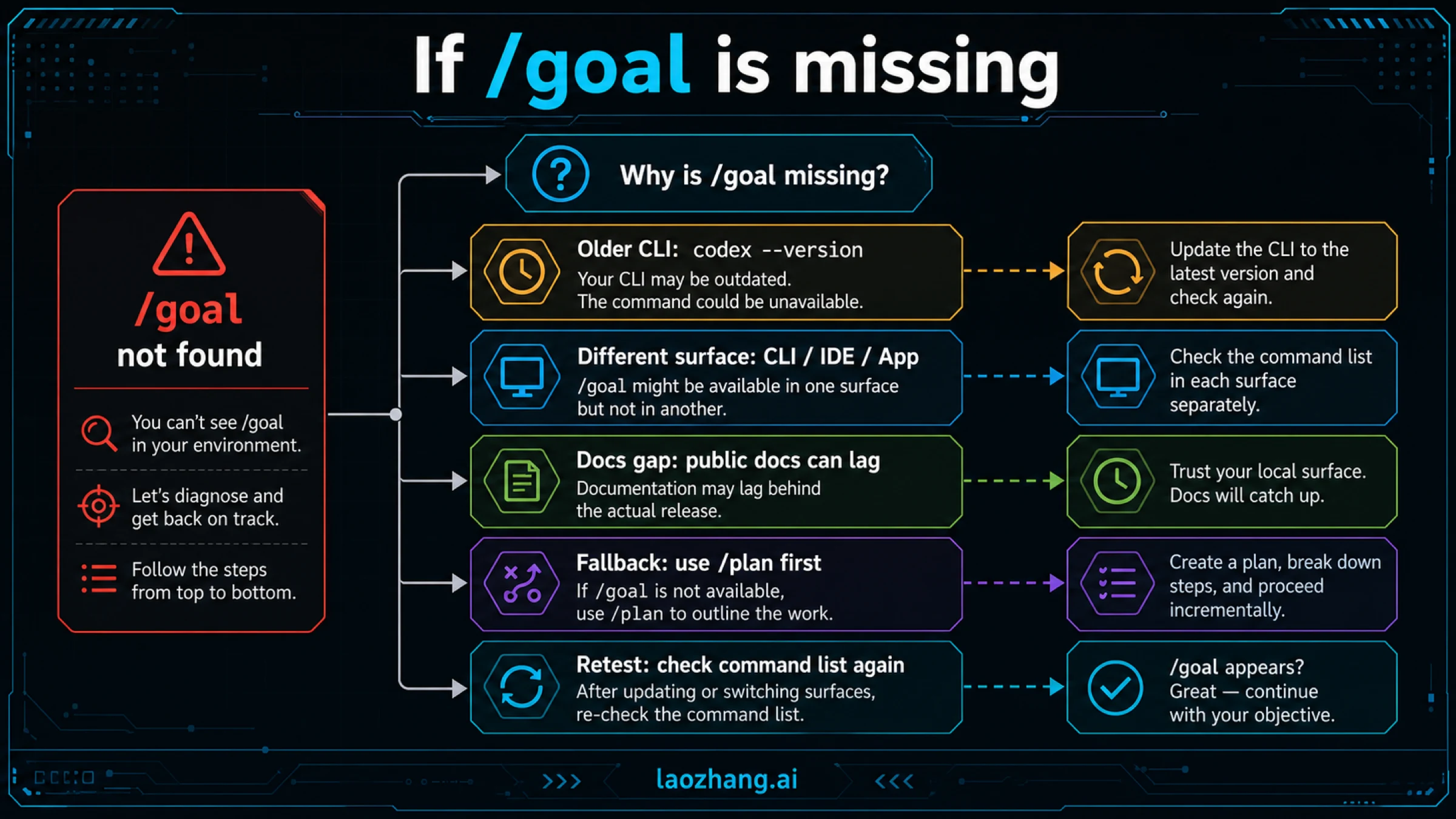
For the CLI, check the installed version in your terminal:
codex --versionIf it predates 0.128.0, update through your existing installation method. OpenAI's Goals quickstart gives these alternatives:
| Installed through | Update command |
|---|---|
| npm | npm install -g @openai/codex@latest |
| Homebrew cask | brew update, then brew upgrade --cask codex |
Use the route you already installed; switching package managers adds another variable. Check the version again after updating.
For a supported client where /goal still does not appear, OpenAI's Follow a goal guide says to enable the feature in config.toml:
[features]
goals = true
If the file already has a [features] section, add or update goals there. The documented CLI alternative is:
codex features enable goalsThen return to the client and check its slash-command list. These are documented enablement steps, not a requirement to enable multi-agent features or create a config.yaml file.
The current developer-command guide also lists /goal for the desktop composer and IDE integration. However, the version printed by your terminal identifies the CLI; it does not establish the version or feature state of a separate desktop or IDE client. If the CLI exposes the command while another client does not, record the affected client and its version rather than repeatedly changing the CLI setting. Source: developer commands.
If You Get “Failed to Set” or “Failed to Read” a Goal
First check whether /goal can display the current objective. If it can, retain that objective and decide whether you need to edit or resume it. If it cannot, record the exact error, the affected client, its version, and whether the failure occurs when viewing an existing goal or setting a new one.
A thread/goal/set or thread/goal/get failure identifies an operation that failed; the words alone do not establish why it failed. The feature toggle is a documented remedy for a missing command, not a diagnosis for every goal-state error. Avoid clearing a useful goal as the first troubleshooting step. Include relevant logs with secrets removed when reporting a reproducible client issue.
Give the Goal a Result You Can Actually Check
The following is an illustrative task for an existing Python contact-import project, not a run we performed. Assume the project already has import_contacts.py, a tests directory, and a standard-library unittest suite. Substitute your actual paths and test command before using the objective.
The problem is specific: valid names are corrupted during CSV parsing, while contacts without email addresses slip through validation. The task is to repair that behavior without changing the importer's public interface.
/goal Repair contact import in import_contacts.py. Valid CSV rows must retain the exact name and email; rows with an empty email field must be rejected by the existing validation path. Keep the public function signature and returned record shape unchanged. Work only on the importer and its regression tests, use local fixtures, and add no dependencies. Test quoted commas, Unicode names, and empty emails, then run python -m unittest discover -s tests -v. After each attempted fix, report the failing case or the evidence that it now passes. Stop for clarification if preserving the existing interface conflicts with the required behavior. Finish with the changed paths, test command and result, and any unresolved case.Before activation, confirm that the named paths, public interface, and command fit your project. The useful detail is the relationship between the requested behavior and the checks, not the particular filenames.
For this example, each fixture has a name,email header and one data row:
| CSV data row | Required result |
|---|---|
"Nguyen, Linh",linh@example.test | One valid record; name is exactly Nguyen, Linh |
Zoë Martin,zoe@example.test | One valid record; name retains ë and the email is unchanged |
Missing Email, | Validation rejects the row; no valid contact is created |
The regression tests should assert those results through the importer's public interface. A test that only checks that parsing returns something would not prove the requested behavior. Existing tests then check that the repair has not broken other supported cases.
Suppose Codex reports that the quoted-comma and Unicode tests pass but the empty-email test fails. The goal is still incomplete, even if the file has been edited and most checks are green. If all three regression cases pass but the existing suite has a new failure, investigate that failure before accepting the result. If the suite cannot run, ask for the exact blocker and remaining checks; a plausible patch is useful progress, but it is weaker evidence than the requested passing tests.
That distinction is what makes a goal useful: Codex can choose the next debugging step, while the acceptance conditions remain stable. OpenAI's Goals guide recommends verifiable outcomes, constraints, permitted resources, and a clear response to blockers.
View, Edit, Pause, Resume, or Clear the Goal
Use these controls in the same chat's message input:
| Command | What it does | When to use it |
|---|---|---|
/goal | Views the current goal | Check the objective before interpreting progress |
/goal edit | Revises the objective | Correct a requirement or make the finish line clearer |
/goal pause | Pauses goal-driven work | Review a diff, resolve a blocker, or reconsider the scope |
/goal resume | Resumes a paused goal | Continue after the reason for pausing is resolved |
/goal clear | Removes the attached goal | End that objective or move to a different task |
These forms are documented in developer commands. The guide does not document /goal complete, /goal status, or /goal budget as CLI subcommands.
Editing should change what you actually want, rather than redefine an unsuccessful attempt as success. In the importer example, deciding that empty-email handling belongs to a separate task is a scope decision you should make explicitly. Codex should not quietly drop that requirement because its first patch did not solve it.
Pausing and clearing control the objective. They do not restore files or undo requests already sent. Review and revert unwanted edits through the project's normal tools. Keep work in one chat when you want the same persistent objective: the Goals guide describes goal state as belonging to that thread, rather than global memory or project-wide AGENTS.md instructions.
When Codex Stops Before the Work Is Finished
Inspect the objective and latest evidence before sending another “keep going.” The next action should address why the work stopped.
| Current situation | Useful next action |
|---|---|
| Goal is paused | Resolve the pause reason, then use /goal resume |
| A necessary file or requirement is missing | Supply the missing input and clarify the objective if needed |
| Budget has been reached | Read the progress summary and decide whether more work is justified |
| Tests show remaining failures | Ask for the next targeted investigation and preserve the acceptance conditions |
| Requested tests and deliverables are present | Review them, accept completion, and clear the goal when appropriate |
| Status repeats itself without new evidence | Ask which file, command, or artifact will resolve the next uncertainty |
OpenAI describes continuation as an idle-boundary decision: the goal must be active, within budget, and free of another active turn, queued user input, or pending work. Its Cookbook also says plan-only work does not trigger continuation, interruptions pause the objective, and a continuation with no tool call suppresses another automatic continuation. These rules explain why an active objective is not a promise of an endless loop. Source: Goals architecture.
A useful checkpoint names what changed, which check ran, its result, and the next unresolved question. In the importer example, “two fixtures pass; blank emails still enter the returned records” tells you what remains. “Making good progress” does not.
Token Budgets and Spending Limits Are Different
A supported goal budget limits further goal work; reaching it means wrapping up with progress, blockers, and remaining steps. It does not make an unfinished task complete. Source: Goals budget handling.
For developers integrating Codex, the app-server documentation shows tokenBudget alongside threadId, objective, and status, with tokensUsed and timeUsedSeconds in the result. Its thread/goal/set, thread/goal/get, and thread/goal/clear methods manage persisted goal state. Those are integration methods, not commands end users need to run to enable /goal.
The same documentation says a new objective replaces the goal and resets usage accounting. Updating the current nonterminal objective, or omitting the objective when changing status or budget, preserves usage history. Developers should distinguish revising an ongoing run from creating a new accounting period.
A sentence such as “stop after three unsuccessful fixes” is an instruction for how to work. It is not a documented CLI budget parameter or an independently enforced dollar ceiling. Goal token accounting also does not supply a fixed conversion to API spending or subscription capacity. For API-billed work, use the Codex daily token-cost estimator to plan the remaining work and a spending checkpoint separately.
/goal Versus /plan: Choose by What You Need Next
Use /plan when you need to decide the approach before implementation: which behavior should change, what must remain compatible, or which test could prove the result. Once that decision is settled, /goal can keep the agreed objective active while Codex investigates and implements it.
For the contact importer, planning might decide whether invalid rows raise an exception or enter an existing rejection report. The goal should preserve that chosen behavior during the repair. A broad objective such as “improve all importing” leaves both the scope and completion uncertain.
A normal prompt is sufficient for a single explanation, a small edit, or a review with a clear endpoint. Goals earn their place when one coherent outcome requires linked rounds of inspection, changes, and verification. OpenAI's guidance on when not to use Goals makes the same distinction.
FAQ
Is Codex /goal an Official Feature?
Yes. OpenAI now documents Goals and the /goal lifecycle directly. The Cookbook says support started in Codex 0.128.0; check your installed client and feature setting if the command is missing. Sources: Goals quickstart, feature enablement.
Can I Change a Goal Without Starting Over?
Use /goal edit to revise the objective in the current chat. Make any changed acceptance conditions explicit so you can still judge the result. The objective must remain nonempty and within the documented 4,000-character limit. Source: /goal controls.
Does Clearing a Goal Delete Its Work?
Clearing removes the current goal. Treat file changes separately: inspect the diff and use your normal revision controls to retain or revert them. Removing an objective is not a rollback operation. Source: goal lifecycle.
Can Codex Follow a Goal Overnight?
Goals support work across multiple turns, and OpenAI describes runs lasting multiple hours. That is a capability description, not a guarantee for your task, client, or available budget. Set a finish line, define blockers, and require reviewable results before leaving a run unattended. The documentation does not establish that your local run will continue with the computer switched off. Sources: Follow a goal, continuation conditions.
Is a Budget-Limited Goal Finished?
Only if the requested outcome has also been achieved and verified. A budget stop by itself means Codex should summarize the progress and remaining work. Decide whether to continue from that evidence, rather than treating the stop as a successful result. Source: Goals budget handling.
Sources5
External pages this guide links to, in the order they appear. Last updated Oct 7, 2026.
Sources5
External pages this guide links to, in the order they appear. Last updated Oct 7, 2026.
- 1.Goals guidedevelopers.openai.com/cookbook/examples/codex/using_goals_in_codex
- 2.developer-command guidelearn.chatgpt.com/docs/developer-commands
- 3.Follow a goal guidelearn.chatgpt.com/use-cases/follow-goals
- 4.Source: developer commandslearn.chatgpt.com/docs/developer-commands
- 5.app-server documentationlearn.chatgpt.com/docs/app-server