Qwen Image 2.1 Turbo API: Python Code and $0.014–$0.016 Pricing
Turbo is live on Alibaba Cloud Model Studio at $0.016 per image in Singapore or $0.014133 in the Global regions, 120 RPM per account. Python code included.
On this page
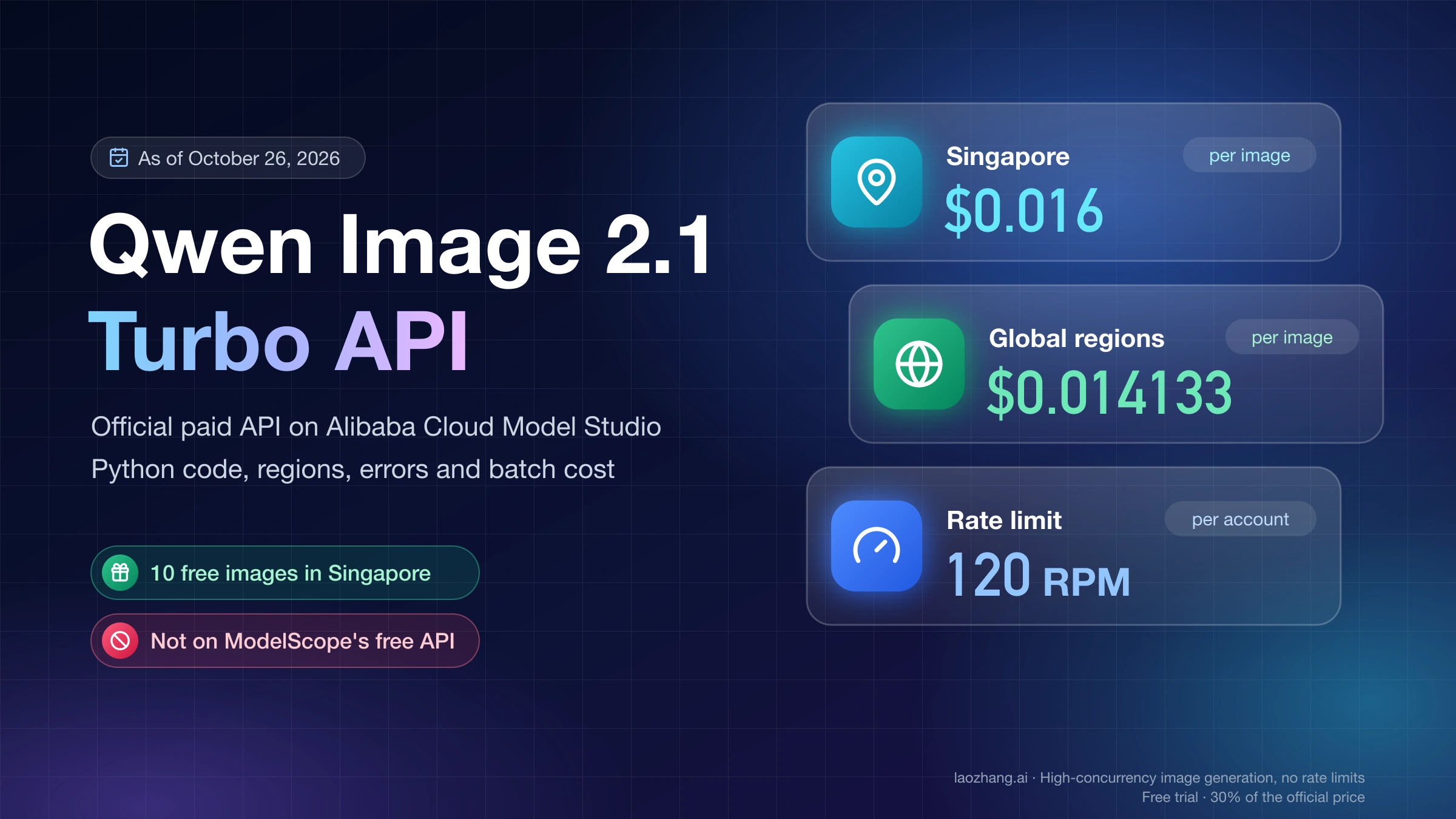
Yes, there is an official Qwen Image 2.1 Turbo API. Alibaba made qwen-image-2.1-turbo a paid model on Alibaba Cloud Model Studio on October 9, 2026, the same day the Turbo weights were released. As of October 26, 2026, it costs $0.016 per image in the Singapore region and $0.014133 per image in the US (Virginia), Germany (Frankfurt), Japan (Tokyo) and Hong Kong regions, and it allows 120 requests per minute across your whole Alibaba Cloud account. To call it, create a Model Studio API key in the region you plan to use, store it in DASHSCOPE_API_KEY, send a POST to that same region's endpoint, and download the image URL in the response within 24 hours, because the link expires.
Turbo is the cheaper of the two 2.1 APIs. qwen-image-2.1-pro costs 2.5 times as much per image and allows only 20 requests per minute. Two situations point away from the hosted API entirely. If you need image generation for free, Turbo is not available on ModelScope's free inference API, only the base Qwen-Image-2.1 is. If you want to run it offline, the Turbo weights are downloadable, but their license covers research and evaluation only.
Four checks were actually run on October 26, 2026: requests without a valid key to the Singapore and Beijing endpoints with the model set to qwen-image-2.1-turbo (both answered HTTP 401 InvalidApiKey), a read of OpenRouter's public model list, a read of ModelScope's model API, and a recalculation of the cost figures below. No image was generated. There was no Model Studio or OpenRouter key available, so the Python code here follows Alibaba's API reference and has not been run end to end.
Qwen Image 2.1 Turbo or Pro: 2.5× the price, a sixth of the rate limit
Start with Turbo unless you have a specific reason to pay for Pro. Both models run on Model Studio, both do text-to-image and image editing with up to 10 reference images, and both can return a PNG with a transparent background when the prompt asks for one. Pro costs 2.5 times as much per image and gets 20 requests per minute against Turbo's 120. Alibaba's model pages, as of October 26, 2026, describe Turbo as "the most balanced and cost-effective open-source image generation model" in the Qwen-Image series, and Pro as the tier that improves typography, portrait lighting and fine detail.
qwen-image-2.1-turbo | qwen-image-2.1-pro | |
|---|---|---|
| Price per image, Singapore (International scope) | $0.016 | $0.04 |
| Price per image, US, Frankfurt, Tokyo, Hong Kong (Global scope) | $0.014133 | $0.035333 |
| Rate limit | 120 requests per minute | 20 requests per minute |
| Downloadable weights | Yes, Qwen/Qwen-Image-2.1-Turbo, research license | No |
| What Alibaba says it is for | Best balance of quality and cost | Better typography, portrait lighting and fine detail |
Prices come from the Model Studio pricing page and the qwen-image-2.1-turbo model page, and they exclude promotions that appear only in the console. Alibaba publishes no side-by-side quality benchmark of the two hosted models, and no images were generated for this comparison. The practical test is to send the same set of prompts to both, weighted toward the cases Alibaba says Pro handles better: long text inside the image and close-up portraits. If Turbo's results are acceptable there, Pro's extra cost buys you little.
Turbo is not a speed setting on the same model. According to the Qwen-Image-2.1 GitHub README, it is a separately released checkpoint of the same 7B Qwen-Image-2.1 model that generates in 8 denoising steps instead of the base model's 40. On the hosted API you never see that detail, because there is no steps or guidance parameter to set. Don't confuse it with qwen-turbo, a text model billed per token, or with z-image-turbo, a different Alibaba image model.
Match the region: Model Studio API key, endpoint and price
Choose the region before you create the API key. Alibaba's Qwen-Image generation and editing API reference says the model, the endpoint URL and the API key must all belong to the same region, and cross-region calls fail. On an international account, Singapore is the only region with free images, and the four Global-scope regions are the cheaper ones per image, so the choice is usually Singapore for testing and a Global-scope region close to your servers for production.
| Region | Region code | Endpoint domain | Free images for new users |
|---|---|---|---|
| Singapore | ap-southeast-1 | dashscope-intl.aliyuncs.com, or your workspace domain | 10 Turbo and 10 Pro (international site) |
| US (Virginia) | us-east-1 | Workspace domain | None |
| Germany (Frankfurt) | eu-central-1 | Workspace domain | None |
| Japan (Tokyo) | ap-northeast-1 | Workspace domain | None |
| China (Hong Kong) | cn-hongkong | Workspace domain | None |
| China (Beijing) | cn-beijing | dashscope.aliyuncs.com, or your workspace domain | 10 Turbo and 10 Pro (Chinese site, aliyun.com) |
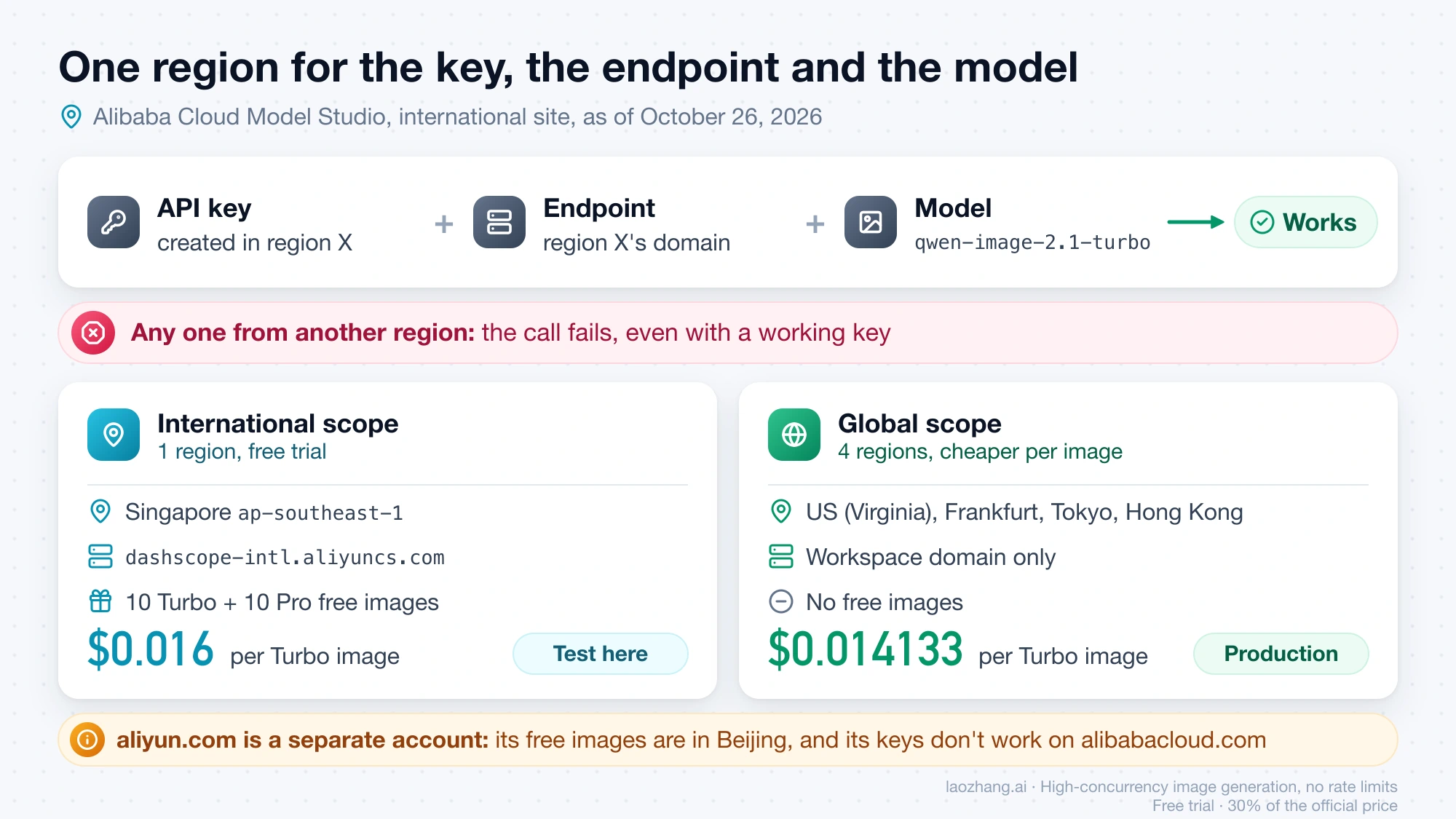
Alibaba now recommends workspace-specific domains in the form https://WORKSPACE_ID.REGION_CODE.maas.aliyuncs.com, where the workspace ID is shown on the Workspace Details page in the Model Studio console. The older dashscope-intl.aliyuncs.com and dashscope.aliyuncs.com domains still answer: on October 26, 2026, both returned a normal 401 error for a qwen-image-2.1-turbo request without a valid key. For the US, Frankfurt, Tokyo and Hong Kong regions, the API reference lists only workspace domains.
The Chinese site (aliyun.com) and the international site (alibabacloud.com) are separate account systems. A key created on one is not a key for the other, and each site's free images sit in a different region.
Call qwen-image-2.1-turbo from Python with requests
The DashScope synchronous endpoint is the simplest first call: one POST, and the response contains the image URL. Alibaba's code samples in the API reference use qwen-image-3.0-pro; the version below sets the model to qwen-image-2.1-turbo, leaves out the 3.0-only negative_prompt, and saves the PNG as soon as it arrives. It is written from the API reference and has not been run with a valid key.
-
In the Model Studio console for your region, create an API key and export it:
export DASHSCOPE_API_KEY="sk-your-key" # Only if you are not using Singapore's default domain: export DASHSCOPE_BASE_URL="https://YOUR_WORKSPACE_ID.us-east-1.maas.aliyuncs.com/api/v1" -
Install the HTTP library with
pip install requests. -
Save the script below as
turbo.pyand runpython turbo.py.
import os
import requests

API_KEY = os.environ["DASHSCOPE_API_KEY"]
# Singapore by default; set DASHSCOPE_BASE_URL for another region's workspace domain.
BASE_URL = os.environ.get("DASHSCOPE_BASE_URL", "https://dashscope-intl.aliyuncs.com/api/v1")
MODEL = "qwen-image-2.1-turbo"


def build_body(prompt, images=None, size="1024*1024", n=1, seed=None):
    content = [{"image": img} for img in (images or [])]  # 0-10 reference images
    content.append({"text": prompt})                       # exactly one text item
    parameters = {"size": size, "n": n, "prompt_extend": True, "watermark": False}
    if seed is not None:
        parameters["seed"] = seed
    return {
        "model": MODEL,
        "input": {"messages": [{"role": "user", "content": content}]},
        "parameters": parameters,
    }


def image_urls(output):
    return [
        item["image"]
        for choice in output["choices"]
        for item in choice["message"]["content"]
        if "image" in item
    ]


def generate(prompt, **kwargs):
    resp = requests.post(
        f"{BASE_URL}/services/aigc/multimodal-generation/generation",
        headers={"Authorization": f"Bearer {API_KEY}", "Content-Type": "application/json"},
        json=build_body(prompt, **kwargs),
        timeout=600,  # generation can be slow, especially with thinking on
    )
    data = resp.json()
    if resp.status_code != 200 or "output" not in data:
        raise RuntimeError(
            f"HTTP {resp.status_code} {data.get('code')}: {data.get('message')} "
            f"(request_id {data.get('request_id')})"
        )
    print("usage:", data.get("usage"))  # image_count, width, height
    return image_urls(data["output"])


def save(urls, prefix="turbo"):
    # Result URLs expire after 24 hours, so download immediately.
    for i, url in enumerate(urls):
        img = requests.get(url, timeout=120)
        img.raise_for_status()
        with open(f"{prefix}-{i}.png", "wb") as f:
            f.write(img.content)
        print("saved", f"{prefix}-{i}.png")


if __name__ == "__main__":
    urls = generate(
        "A ceramic coffee mug on a walnut desk, morning window light, "
        "the word 'MONDAY' printed on the mug in bold serif letters",
        size="1024*1024",
    )
    save(urls)
For a 2.1 model, a successful response puts the first image URL at output.choices[0].message.content[0].image, and the usage object reports image_count, width and height. The URL points to a PNG on Alibaba's object storage and stops working after 24 hours, so the script writes the file to disk before doing anything else. The image_urls helper collects every image in the response, which covers requests with n above 1.
Qwen-Image-2.1 parameters that differ from what you might expect
Most surprises come from parameters that exist for other models or for the local weights but not for the hosted 2.1 API. The table lists what the API reference says as of October 26, 2026.
| Parameter | How it works on qwen-image-2.1-turbo |
|---|---|
size | "1024*1024" with an asterisk in the DashScope protocol. Total pixels from 512×512 to 2048×2048, aspect ratio 1:8 to 8:1. If omitted, the model picks a size from the prompt. |
n | 1 to 6 images per request, default 1. Each image is billed. |
prompt_extend | On by default. Rewrites short prompts before generation; set it to false if you need your exact wording. |
prompt_extend_mode | direct (default) or agent. agent works for text-to-image only and returns a 400 error when you send reference images. |
enable_thinking | On by default and requires prompt_extend. Alibaba says it can improve quality but makes generation slower. |
negative_prompt | Supported only by the qwen-image-3.0 series, not 2.1. Describe what you want instead. |
seed | 0 to 2147483647. Fix it to reproduce a result. |
watermark | Off by default. |
| Steps, guidance scale | Not exposed. The 8-step schedule only matters when you run the weights yourself. |
Edit an image with reference pictures
Editing uses the same endpoint and the same body. Put 1 to 10 image items before the single text item, each as a public HTTP or HTTPS URL or as a data:image/png;base64,... string. Input images can be JPG, PNG, BMP, TIFF, WEBP or GIF, up to 10 MB each, with width and height between 1 and 8,000 pixels. With the script above, that is one extra argument:
urls = generate(
    "Put the product from image 1 on the table in image 2, keep the lighting of image 2",
    images=["https://example.com/product.png", "https://example.com/table.jpg"],
)
save(urls, prefix="edit")
Use the async endpoint for batches
The asynchronous API takes the same body but a different URL, plus the header X-DashScope-Async: enable. It returns a task_id at once, and you poll for the result. That suits batch jobs and servers that should not hold a connection open for each image. The task_id, like the image URL, can be queried for 24 hours, and the poll has to use the same region, workspace and key as the submit.
import time


def generate_async(prompt, poll_every=3, **kwargs):
    headers = {
        "Authorization": f"Bearer {API_KEY}",
        "Content-Type": "application/json",
        "X-DashScope-Async": "enable",
    }
    submit = requests.post(
        f"{BASE_URL}/services/aigc/image-generation/generation",
        headers=headers, json=build_body(prompt, **kwargs), timeout=60,
    ).json()
    task_id = submit["output"]["task_id"]

    while True:
        task = requests.get(
            f"{BASE_URL}/tasks/{task_id}",
            headers={"Authorization": f"Bearer {API_KEY}"}, timeout=60,
        ).json()["output"]
        status = task["task_status"]  # PENDING -> RUNNING -> SUCCEEDED / FAILED
        if status == "SUCCEEDED":
            return image_urls(task)
        if status in ("FAILED", "CANCELED", "UNKNOWN"):
            raise RuntimeError(f"{status}: {task.get('code')} {task.get('message')}")
        time.sleep(poll_every)
Why a Qwen Image 2.1 Turbo request fails: 401, 403, 400 and expired URLs
Most first-call failures are a key problem, a region mismatch or a parameter that 2.1 does not accept. On October 26, 2026, a POST to https://dashscope-intl.aliyuncs.com/api/v1/services/aigc/multimodal-generation/generation with the model set to qwen-image-2.1-turbo and no key came back in 1.35 seconds with HTTP 401 and this body; the same request with a made-up key, and the Beijing domain with a made-up key, returned "Invalid API-key provided." instead:
{"code":"InvalidApiKey","message":"No API-key provided.","request_id":"a6b1277a-de91-9f87-85b2-3d81301fc8d7"}Model Studio errors carry code, message and request_id. Keep the request_id when you contact Alibaba support, and match the code against the table.
| What you see | Likely cause | What to do |
|---|---|---|
401 InvalidApiKey, "No API-key provided." | The Authorization header is missing or DASHSCOPE_API_KEY is empty in that shell | Export the key in the same shell or process that runs the script, and send Authorization: Bearer followed by the key |
401 InvalidApiKey, "Invalid API-key provided." | Mistyped or deleted key, or a key from the other site (aliyun.com vs alibabacloud.com) | Copy the key again from the console of the site and region you are calling |
| Request fails although the key works elsewhere | Key, endpoint and model are not in the same region, which Alibaba says always fails | Use the endpoint of the region where the key was created, or create a key in the target region |
403 AllocationQuota.FreeTierOnly | Free Quota Only is on and the 10 free images are used up | Turn the switch off to pay per image (it can take about 30 minutes to apply), or stop |
| 400 when sending reference images | prompt_extend_mode set to agent, which is text-to-image only | Use direct, the default |
| "current user api does not support synchronous calls" | The async endpoint was called without X-DashScope-Async: enable | Add the header, or use the synchronous endpoint |
| Requests rejected during a batch | More than 120 requests per minute across all keys and sub-accounts of the main account | Throttle below 120 per minute; Alibaba says it usually recovers within a minute |
Task status UNKNOWN | task_id older than 24 hours, or polled from another region or workspace | Poll from the same region, workspace and key, within 24 hours |
| Image link stops working | The result URL expired after 24 hours | Download at generation time; the image cannot be fetched again |
A negative_prompt does nothing useful on 2.1, because only the 3.0 series supports it. The API reference does not say whether 2.1 rejects the field or ignores it, so remove it rather than find out in production.
What 1,000 or 10,000 Turbo images cost, and how long 120 RPM takes
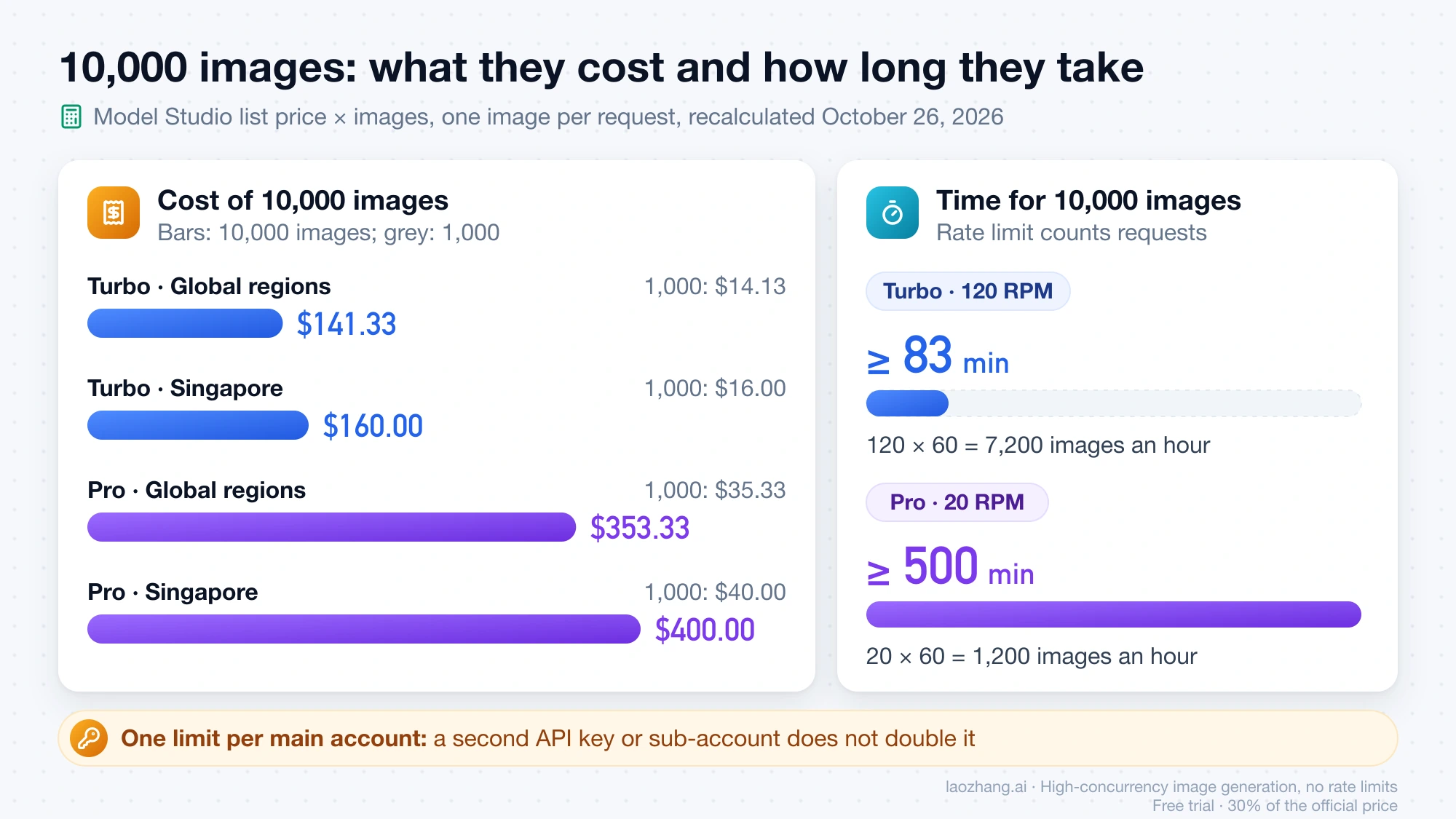
At Model Studio list prices, 1,000 Turbo images cost $14.13 in the Global-scope regions or $16.00 in Singapore, and at one image per request the 120 RPM limit means 10,000 images take at least 83 minutes. The figures below were recalculated on October 26, 2026 as price per image × number of images, using the list prices above. They exclude console-only promotions and the 10 free images, and they assume every request succeeds.
| Model and route | Billing unit | 1,000 images | 10,000 images |
|---|---|---|---|
| Turbo, Model Studio Global regions | Per image | $14.13 | $141.33 |
| Turbo, Model Studio Singapore | Per image | $16.00 | $160.00 |
| Pro, Model Studio Global regions | Per image | $35.33 | $353.33 |
| Pro, Model Studio Singapore | Per image | $40.00 | $400.00 |
| Turbo, Runware | $0.0141 per image | $14.10 | $141.00 |
| Turbo, OpenRouter, 1K output | $0.0184 per image | $18.40 | $184.00 |
Time is the other constraint. Rate limits count requests, so at n=1 Turbo tops out at 120 × 60 = 7,200 images an hour, and 10,000 single-image requests need at least 10,000 ÷ 120 ≈ 83 minutes. Pro's 20 requests per minute gives 1,200 an hour and at least 500 minutes for the same 10,000. The limit applies to the main account, meaning all RAM sub-accounts, workspaces and API keys combined, so a second key does not double it. Because the limit counts requests rather than images, asking for up to 6 images per request should raise how many images you get per minute while the per-image cost stays the same; Alibaba's pages don't spell this out, so treat it as an inference until your own logs confirm it.
OpenRouter is the most expensive way to call Turbo. As of October 26, 2026, its Qwen Image 2.1 Turbo model page priced qwen/qwen-image-2.1-turbo at $0.0184 per image at 1K resolution, served by a single provider, Alibaba Cloud Int., with a median end-to-end time of 27.08 seconds over the previous week. That is 15% above Alibaba's Singapore price (0.0184 ÷ 0.016 = 1.15) and about 30% above the Global-scope price (0.0184 ÷ 0.014133 ≈ 1.30). The page gives no per-image price for 2K output. OpenRouter's public models API on October 26, 2026 expressed the same model's price per image output token instead, at $0.0000044072, which on its own does not tell you what an image costs, so budget from the per-image figure on the model page. To see where Turbo's per-image price sits against other vendors' image models, see AI Image Generation API Comparison 2026: Pricing, Quality, Value.
Model Studio, OpenRouter or Runware: which route to call
Call Model Studio directly if you can open an Alibaba Cloud international account. It is Alibaba's own service, it is where the free images are, it accepts up to 10 reference images, and its rate limit and terms are published. OpenRouter makes sense when you already send other models through one OpenRouter key and invoice and accept paying 15–30% more per 1K image than Alibaba's list price. Runware's $0.0141 per image is within a fraction of a cent of Alibaba's Global price, so neither third party saves you money over calling Alibaba directly.
| Model Studio | OpenRouter | Runware | |
|---|---|---|---|
| Model ID | qwen-image-2.1-turbo | qwen/qwen-image-2.1-turbo | alibaba:qwen-image@2.1-turbo |
| Billing | Per image, by region | Per image; 1K price listed, 2K not | Per image |
| Reference images | 1–10 | Up to 4 | Up to 10 |
| Output size control | size as width*height, 512×512 to 2048×2048 total pixels | resolution 1K or 2K plus 13 aspect ratios | Width and height 192–4,096 px, 0.26–4.19 MP |
| Prompt rewriting and thinking | prompt_extend, prompt_extend_mode, enable_thinking | Not among the listed request fields | promptExtend, promptExtendMode, thinking |
The OpenRouter fields and its reference-image cap come from the same OpenRouter model page, and Runware's from its Qwen-Image-2.1-Turbo API docs, both as of October 26, 2026. If your workflow edits with five or more reference images, OpenRouter's cap of 4 rules it out.
For a commercial product, a paid API is the route to use. The downloadable Turbo weights on Hugging Face are under the Qwen Research License, which allows research and evaluation only and requires a separate license from Qwen for commercial use. Model Studio is a paid cloud service under Alibaba Cloud's own terms, so check those terms for output rights. Third-party hosts resell the same model, and their pages don't say whether they hold a separate commercial license. If you only want to run Turbo on your own machine for testing, see Run Qwen-Image-2.1 Locally: Which Weights Fit Your GPU or Mac.
Is the Qwen Image 2.1 Turbo API free? 10 images in Singapore, then billing
No, beyond a small trial. On the international site, a new Model Studio account gets 10 free qwen-image-2.1-turbo images and 10 free qwen-image-2.1-pro images, in the Singapore region only. Alibaba's Model Studio free quota page says the quota lasts 90 days from Model Studio activation, the model's release or application approval, whichever is later, and since September 15 you have to complete your account information before activation. On the Chinese site, the equivalent 10 images are in the Beijing region instead.
Once the free images are used up, Model Studio bills each further image automatically. To stop at zero instead, turn on Free Quota Only for the model in the console before you start. It is off by default on the international site, and once the quota is exhausted it makes requests fail with 403 AllocationQuota.FreeTierOnly rather than charge you. Alibaba advises against leaving it on in production, because the service stops when the quota runs out.
ModelScope is not a free way to call Turbo. On October 26, 2026, ModelScope's model API returned SupportApiInference: false for Qwen/Qwen-Image-2.1-Turbo, so its free API-Inference service does not serve Turbo. It does serve the base model, with a daily cap and for non-commercial use; that route is covered in Qwen Image 2.1 Free API: ModelScope Token, Daily Cap, and Code. For recurring free image quotas from other providers, see Free AI Image Generation API in 2026: Daily Image Limits Compared.
Qwen Image 2.1 Turbo API: other questions
Can I call Qwen Image 2.1 Turbo with the OpenAI Python SDK? Yes. Model Studio has an OpenAI-compatible mode at /compatible-mode/v1/images/generations on the same regional domains, as of October 26, 2026. Set base_url to your region's .../compatible-mode/v1 and the model to qwen-image-2.1-turbo. Write the size as "1024x1024" with a letter x, and pass Model Studio extras such as image or prompt_extend through extra_body. That mode is synchronous only, has no /images/edits or masks, and ignores response_format="b64_json", so you still get URLs that expire after 24 hours.
Am I charged for a request that fails or is blocked? Model Studio prices qwen-image-2.1-turbo per output image, and the usage block on a successful response reports image_count. The pricing and API reference pages, as of October 26, 2026, do not say whether a request blocked by content moderation is billed, so check the billing details in the console after your first rejected prompt.
Sources7
External pages this guide links to, in the order they appear. Last updated Oct 26, 2026.
Sources7
External pages this guide links to, in the order they appear. Last updated Oct 26, 2026.
- 1.Model Studio pricing pagealibabacloud.com/help/en/model-studio/model-pricing
- 2.qwen-image-2.1-turbo model pagealibabacloud.com/help/en/model-studio/qwen-image-2-1-turbo
- 3.Qwen-Image-2.1 GitHub READMEgithub.com/QwenLM/Qwen-Image-2.1
- 4.Qwen-Image generation and editing API referencealibabacloud.com/help/en/model-studio/qwen-image-generation-and-editing-api-reference
- 5.Qwen Image 2.1 Turbo model pageopenrouter.ai/qwen/qwen-image-2.1-turbo
- 6.Qwen-Image-2.1-Turbo API docsrunware.ai/docs/models/alibaba-qwen-image-2-1-turbo
- 7.Model Studio free quota pagealibabacloud.com/help/en/model-studio/new-free-quota