OpenAI API Error 429: Diagnose Rate Limits, Quota, and Spend Caps
An OpenAI API 429 can mean temporary throttling, depleted credits, or an enforced account limit. Read the error code before deciding whether to wait, change billing, or reduce traffic.
On this page
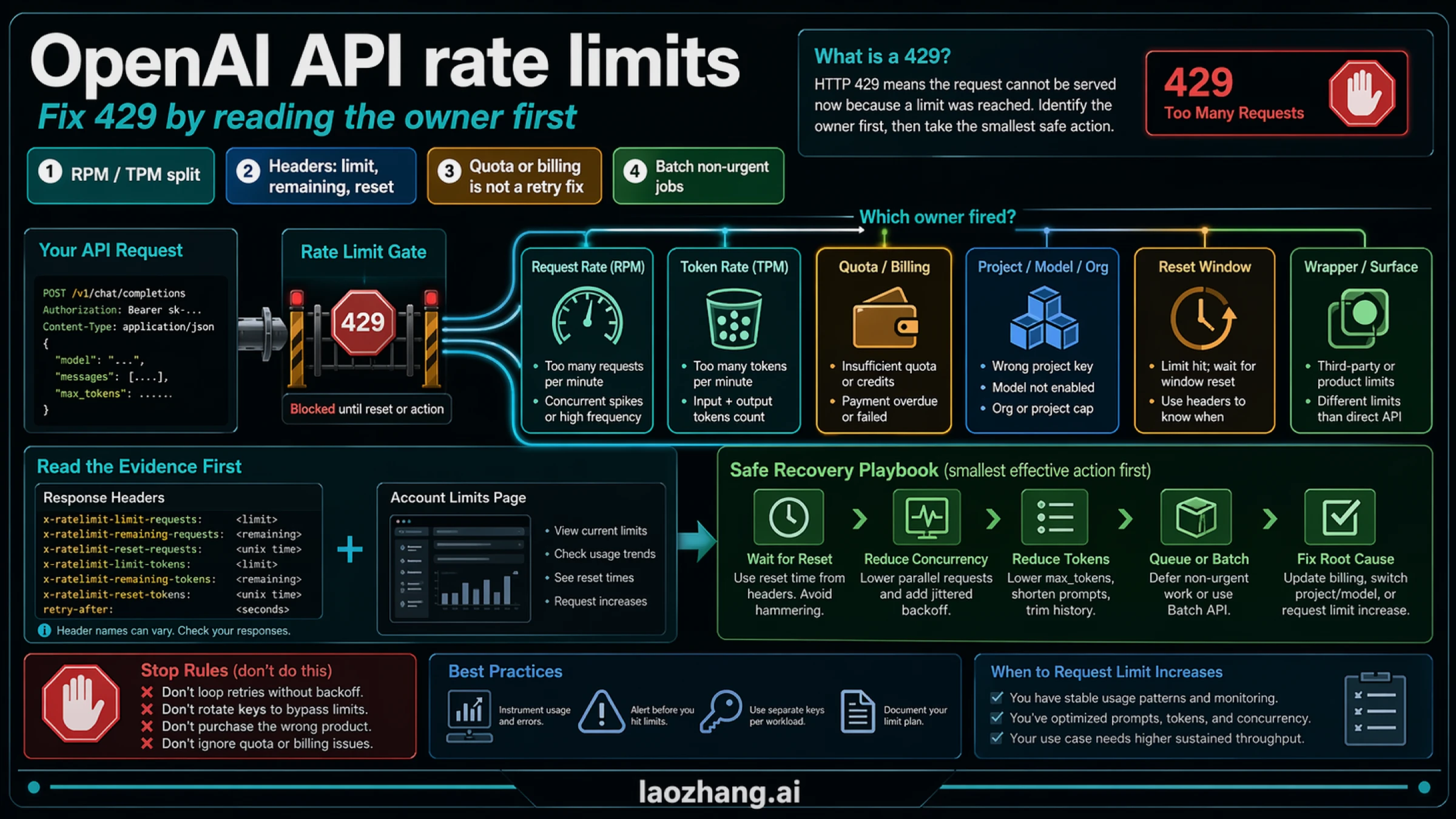
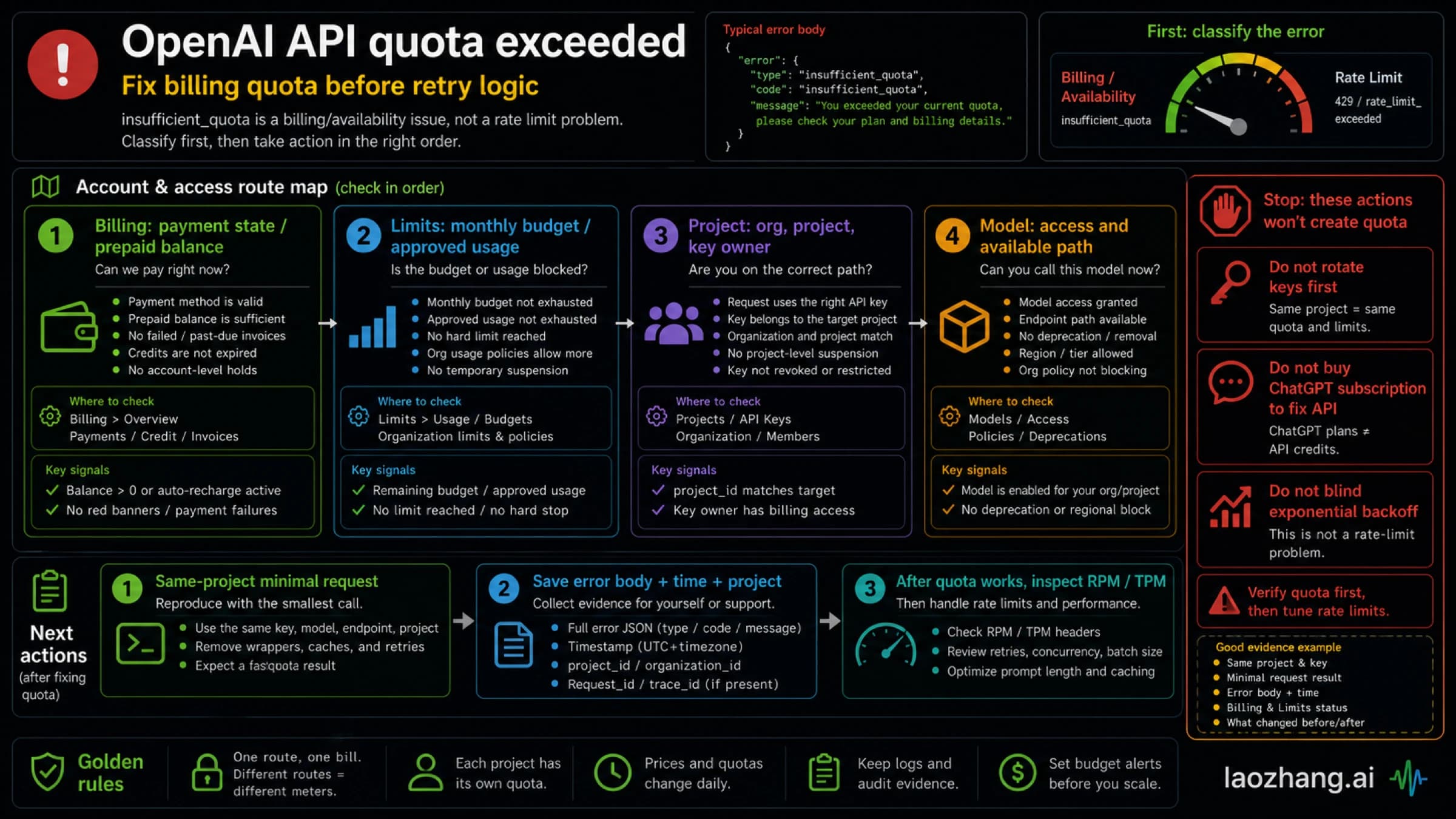
An OpenAI API 429 does not always mean you sent too many requests. Start with the response body's error.code, error.type, and error.message. Temporary request or token limits call for paced retries; depleted credits and account limits call for a billing or settings change. Retrying the wrong branch wastes time and can add more load.
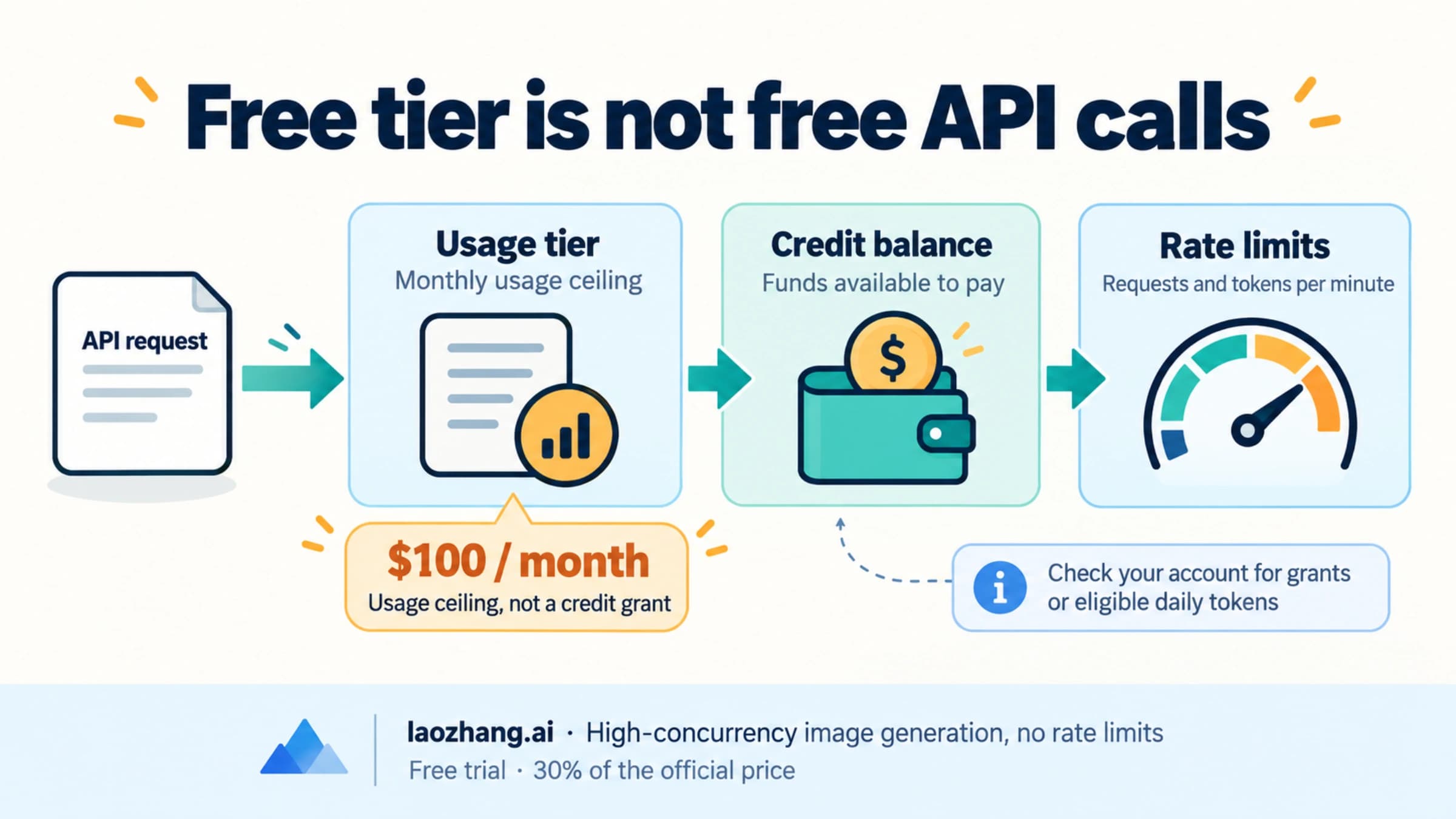
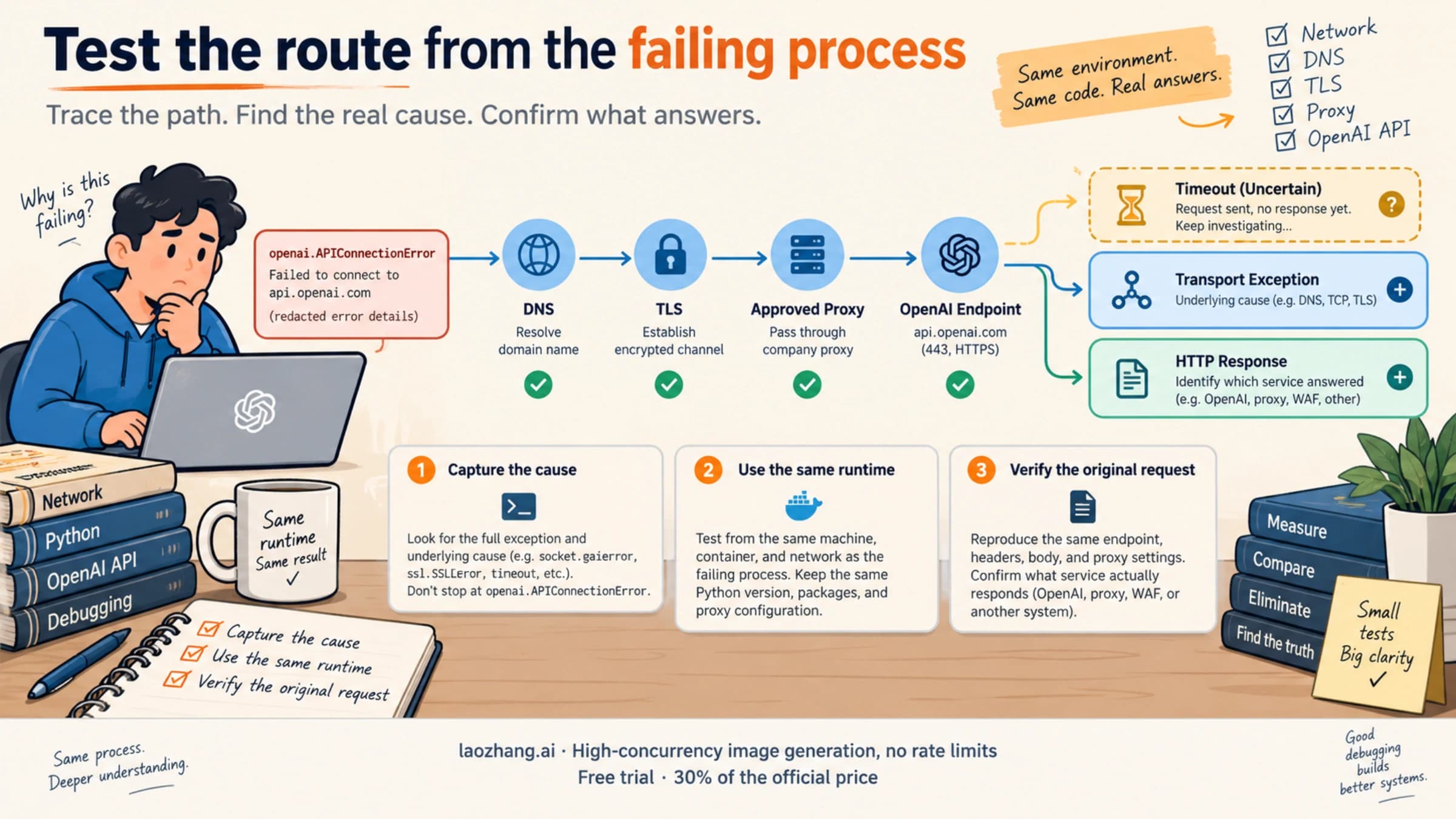
This guide covers calls to OpenAI's direct Platform API, with official documentation checked on September 8, 2026. If your request goes through Azure or a third-party gateway, identify which service returned the error first. A ChatGPT subscription is also a separate billing path; it does not establish the credits or limits available to an API project.
Find the cause before sending another request
Pause the failing worker loop long enough to capture one complete failure. Keep the timestamp, endpoint, model, HTTP status, error body, request ID, and returned Retry-After and x-ratelimit-* headers. Record the intended organization and project without copying the API key or Authorization header into logs or support messages.
Then match the response to the next action. The distinctions below follow OpenAI's error-code reference and 429 troubleshooting guide.
| Response detail | What is blocking the call | Next action |
|---|---|---|
| Message identifies a request or token rate limit | RPM, TPM, or a shorter burst window | Wait as instructed, then lower admission rate or token demand |
slow_down with type rate_limit_error | Traffic increased too abruptly | Reduce traffic and resume gradually, even if minute counters show headroom |
credit_balance_exhausted | Organization prepaid balance is depleted | Add credits to the organization used by the request |
organization_spend_limit_exceeded | Enforced organization spend cap | Have an administrator review the organization cap |
project_spend_limit_exceeded | Enforced project spend cap | Review the cap on the specific project |
organization_usage_limit_exceeded | OpenAI-assigned organization usage allowance | Request a higher approved usage limit or contact support |
insufficient_quota without a more specific code | A broader account/quota restriction | Inspect balance, account limits, and project selection; do not infer an empty balance automatically |
| Unknown or missing code with an inconclusive message | Cause is unclassified | Preserve the response and investigate; do not automatically retry every 429 |
A nearby failure, 503 server_is_overloaded with type service_unavailable_error, describes temporary model overload. It belongs in a bounded retry policy but is a different status from 429. If it persists, consult the OpenAI status page and queue work that can wait.
A Python exception named RateLimitError is not sufficient classification. The official Python SDK reference maps HTTP 429 to that exception class, including responses whose body identifies a billing problem. Read the body before assigning a recovery policy.
Why a funded account—or the first request—can still fail
Check the account used by the application before changing settings. A balance displayed for one organization does not explain traffic sent through another project's key. Confirm the effective API base URL, key assignment, organization/project selection, and exact model ID. If an old environment value is still loaded in a running process, changing a dashboard or local configuration may not change the request being sent.
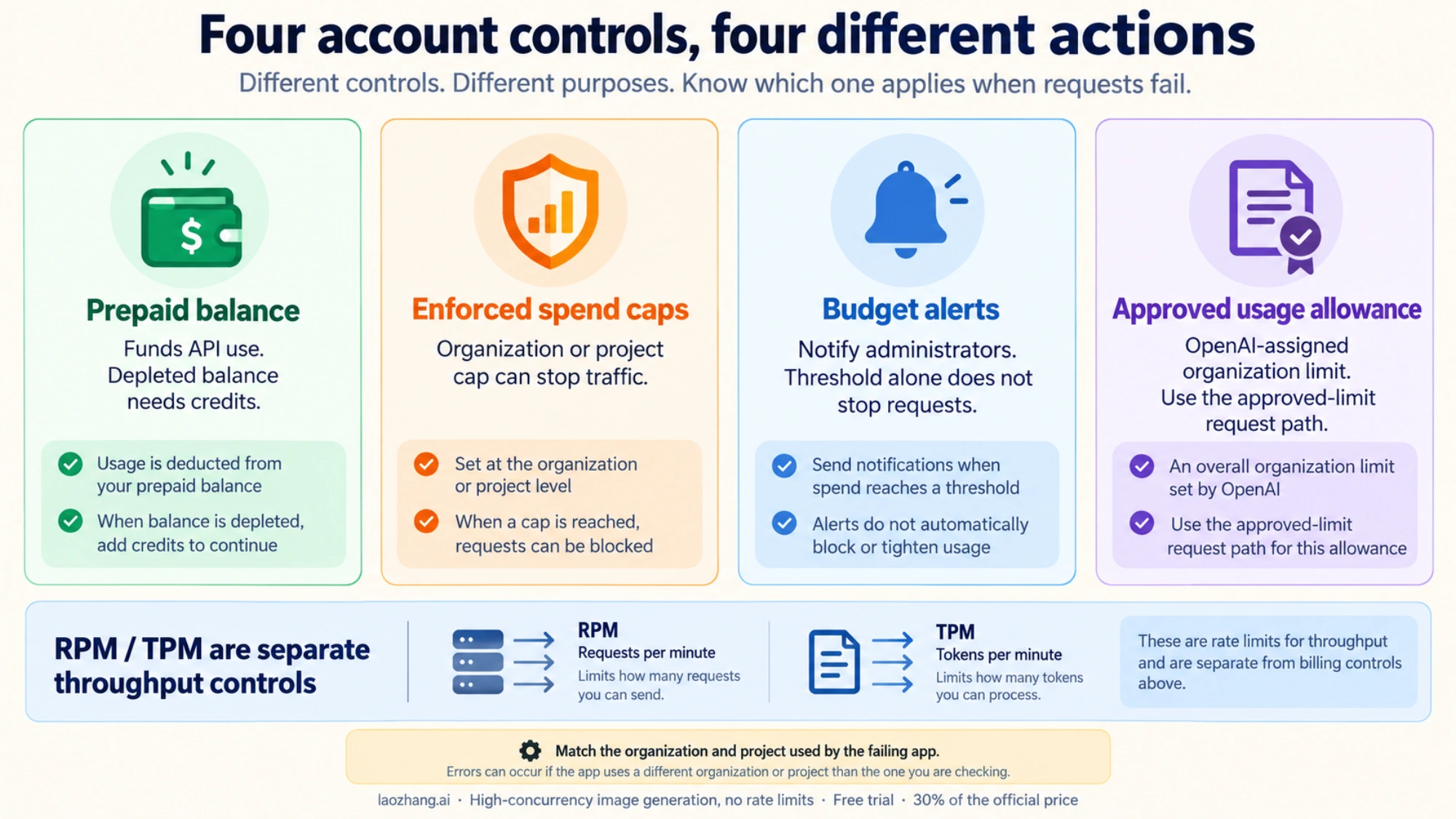
Next, separate four controls that are often described loosely as “quota”:
- Prepaid balance funds API use. A depleted balance requires a credit action.
- Enforced spend limits stop traffic when an organization or project reaches its configured monthly cap.
- Budget alerts notify administrators; an alert threshold by itself does not stop requests.
- Approved usage limits are assigned by OpenAI and are distinct from the spend caps you configure.
The spend-limit documentation distinguishes alerts from enforced caps. An organization cap affects traffic across its projects; a project cap affects that project. Raising a project cap will not remove an organization cap above it. Adding credits also does not remove an exhausted spend cap or automatically increase RPM and TPM.
For a spend-limit error, an administrator can review whether to increase or remove the relevant cap; a monthly reset may also restore access after an exhausted monthly cap. Allow settings changes to propagate instead of assuming instant recovery. For organization_usage_limit_exceeded, use the approved-limit request path rather than repeatedly editing the project's budget alert.
The first request from your script can therefore fail without your script having generated a burst. Account restrictions can already be active, and other applications may share the organization or model limits. “My first call” is useful context, but it does not identify the cause. Likewise, recreating a key inside the same constrained account does not create fresh capacity.
If the response remains a broad insufficient_quota, use the more detailed OpenAI API quota troubleshooting guide. After correcting the identified account issue, send one small request using the same key, project, and model as the failing workload. This is a recovery check, not proof that full production concurrency is safe.
If the prepaid balance ran out despite enabled automatic recharge, follow the OpenAI API auto-recharge failure guide. It covers restoring access, checking the automatic payment and monthly recharge cap, and verifying automatic funding separately from a successful manual top-up.
For temporary limits, find the exhausted dimension
OpenAI exposes request and token limits separately. The rate-limit guide describes organization/project scope, model-specific and shared limits, and response headers. Read the Platform Limits page for the account involved; a public model table is a planning reference rather than a measurement of your key's current capacity.
| Header group | What to inspect | Useful response |
|---|---|---|
x-ratelimit-limit-requests, x-ratelimit-remaining-requests, x-ratelimit-reset-requests | Request allowance, headroom, and reset timing | Pace calls and reduce simultaneous admissions |
x-ratelimit-limit-tokens, x-ratelimit-remaining-tokens, x-ratelimit-reset-tokens | Token allowance, headroom, and reset timing | Admit fewer tokens and size requests realistically |
Additional project-token x-ratelimit-* fields | Project-specific constraints when returned | Check the project's limit alongside the organization/model limit |
Retry-After | Minimum wait requested by the server | Wait at least that long or defer the job |
Missing headers are unavailable information, not zero remaining capacity and not unlimited capacity. Log all returned x-ratelimit-* fields rather than assuming the common six are exhaustive.
If RPM is tight, inspect worker fan-out, scheduled jobs starting together, and retry loops. A minute average below the allowance can still conceal a short burst. Queueing requests before the API call smooths that burst more predictably than letting every worker fail and retry.
If TPM is tight, examine prompt size, retrieved context, expected output, and the model's rate-limit accounting. Set an appropriate output budget: max_output_tokens for Responses or max_completion_tokens for Chat Completions. These controls include reasoning and visible output where applicable, so an unrealistically small value can truncate useful work. Reducing unused context and oversized output reservations is more useful than blindly lowering every request to the same token count. See the official troubleshooting guidance.
For slow_down, reduce the rate at which new work arrives even if RPM and TPM still show space. This response concerns how quickly traffic grew. After the indicated wait, start with a small flow and increase gradually while observing failures and remaining capacity.
Use one retry policy with a deadline
The Python SDK retries eligible errors twice by default. If an application permits three total attempts while each attempt can trigger two SDK retries, one logical operation can reach nine HTTP attempts. Queue redelivery or gateway retries can multiply it again. When your application classifies errors and owns retry scheduling, configure OpenAI(max_retries=0) and review retries in the other components as well. The SDK documentation also exposes APIStatusError.response and APIStatusError.request_id for inspecting failures.
For confirmed temporary failures, honor a valid Retry-After before considering a local backoff schedule. Without a usable header, use exponential backoff with jitter. Bound both total attempts and elapsed time. A valid 90-second server delay cannot be shortened to 30 seconds simply because your application has a 30-second budget; defer or stop instead.
The following standard-library helper calculates a retry delay. It makes no API calls. reason is an application classification made from the response, not the HTTP status or exception class. Only set rpm or tpm after the error identifies that limit; a missing or unfamiliar error must remain unclassified.
import math
import random
from email.utils import parsedate_to_datetime


def retry_after_seconds(value, now_epoch):
    if value is None or not value.strip():
        return None
    text = value.strip()
    if text.isascii() and text.isdigit():
        try:
            return float(int(text))
        except (OverflowError, ValueError):
            return math.inf  # Too large: defer, never retry early.
    try:
        when = parsedate_to_datetime(text)
        if when.tzinfo is None:
            return None
        return max(0.0, when.timestamp() - now_epoch)
    except (ValueError, TypeError, OverflowError):
        return None


def next_retry_delay(reason, attempts, elapsed, header, now_epoch,
                     budget=30.0, request_reserve=5.0, rng=random.random):
    # attempts counts completed attempts, including the initial request.
    if reason not in {"rpm", "tpm", "slow_down", "overload"}:
        return None
    if attempts < 1 or attempts >= 3:
        return None
    remaining = budget - elapsed - request_reserve
    if remaining <= 0:
        return None
    delay = retry_after_seconds(header, now_epoch)
    if delay is None:
        ceiling = min(8.0, 2.0 ** (attempts - 1))
        delay = ceiling * (0.5 + 0.5 * rng())
    return delay if delay < remaining else None
None means do not schedule another attempt in this operation. A returned delay is in seconds. Measure elapsed with a monotonic clock from before the initial attempt; use wall-clock epoch time only to parse an HTTP date. After waiting, recheck the deadline before dispatch. Reserve time for the request itself, use a per-attempt timeout, and enforce the overall deadline in the caller. The helper does not cancel in-flight work or deduplicate an operation that already succeeded.
For billing codes and broader insufficient_quota, assign a non-retryable reason. For unknown responses, preserve the error for diagnosis. Do not catch every exception and convert it to rpm. A fallback model also needs its own application decision: it can change cost and behavior and may share the same rate-limit pool. Our retry versus model fallback guide covers that choice.
Plan capacity so the 429 does not return
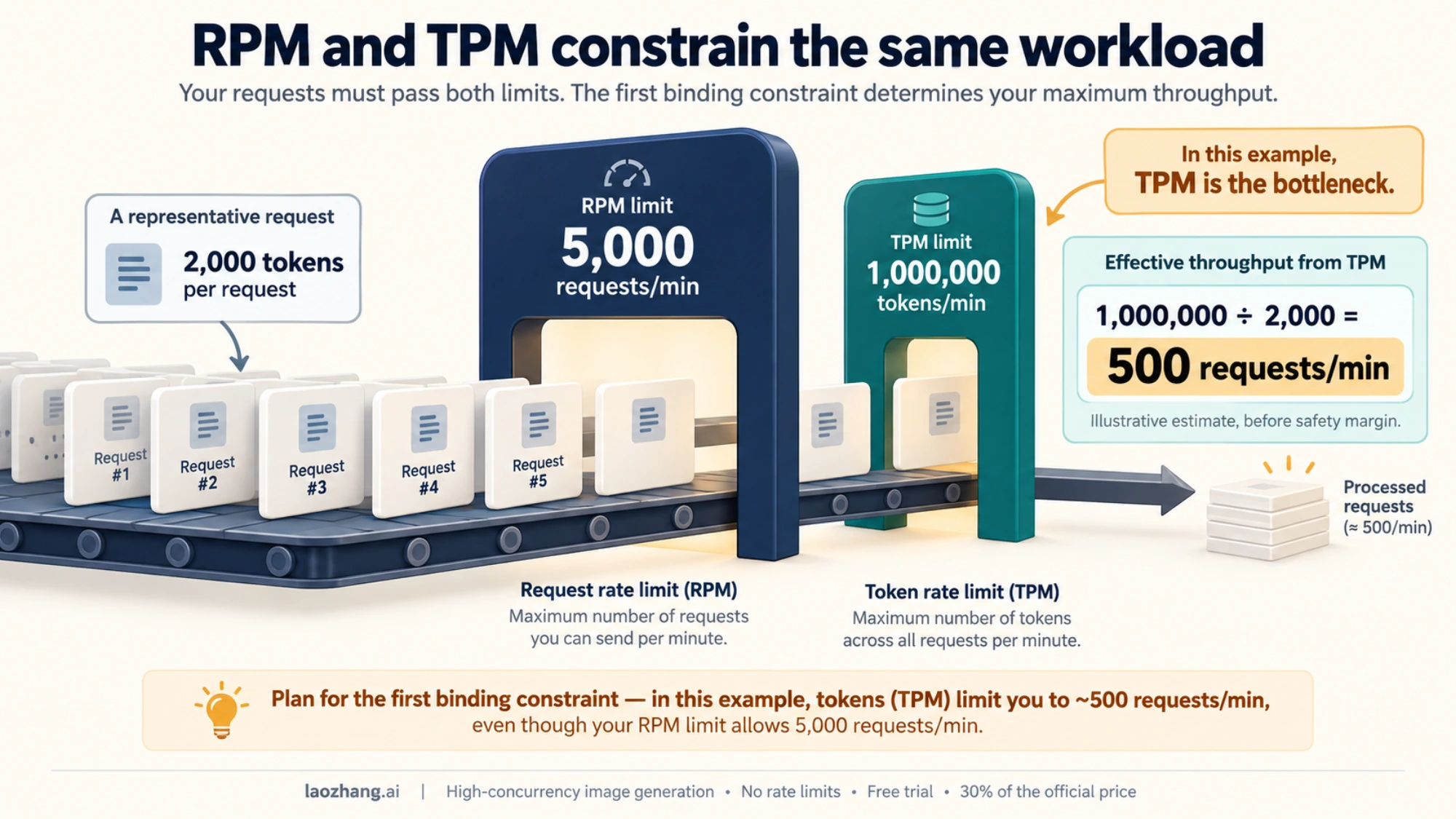
RPM and TPM constrain the same stream in different ways. Use this estimate with the effective limits for your project and model:
Token-bound requests/minute = effective TPM / limit-counted tokens per request
Planned requests/minute <= min(effective RPM, token-bound requests/minute)
Leave room for token variation, bursts, and retries. Failed requests can also count toward rate limits, so retries must fit inside the same capacity plan. Raising concurrency without considering token demand can make successful throughput worse.
As an illustration, 1,000,000 TPM divided by 2,000 limit-counted tokens per request yields about 500 requests per minute before any safety margin. A 5,000 RPM allowance would not make that workload capable of 5,000 requests per minute. This is arithmetic for planning, not a benchmark or guaranteed service rate.
GPT-6 Astra's published tier table
The GPT-6 Astra model page publishes the following limits, checked September 8, 2026. Verify access to gpt-6-astra and your effective account limits before using them to size production.
| Usage tier | RPM | TPM | Pending Batch input tokens |
|---|---|---|---|
| Free | Not supported | Not supported | Not supported |
| Tier 1 | 500 | 500,000 | 1,500,000 |
| Tier 2 | 5,000 | 1,000,000 | 3,000,000 |
| Tier 3 | 5,000 | 2,000,000 | 100,000,000 |
| Tier 4 | 10,000 | 4,000,000 | 200,000,000 |
| Tier 5 | 15,000 | 40,000,000 | 15,000,000,000 |
The Batch queue limit counts pending input tokens, not jobs or daily tokens. For example, a 1,500,000-token allowance accommodates roughly 30 pending jobs of 50,000 input tokens each. Completing a job releases its contribution; splitting the same input across more jobs does not create more space. Batch can be useful for asynchronous work, but its queue still needs admission control.
Astra's input threshold above 272K tokens is a long-context pricing boundary, not a 429 threshold. Large requests can consume TPM quickly, but the pricing threshold does not define their rate limit. Consult the model's account limits and the Astra API pricing guide rather than treating context length as throughput capacity.
Fast mode is not a separate pool of requests or tokens: OpenAI's Fast mode guide says Fast and Standard processing for the same model share a rate limit. Switching modes is therefore not a way to bypass an exhausted RPM or TPM allowance.
Do not derive concurrent-request allowances from RPM or infer that a new key gets the public tier's full capacity. Model access, account limits, shared traffic, token demand, and the shape of arrivals all matter to the workload you can actually run.
Confirm recovery on the original request path
After a billing or settings correction, retry a single small request through the original project and model. After a temporary limit, wait as instructed and start with reduced traffic. In either case, collect the new response code and headers rather than assuming the previous failure disappeared.
If the small request succeeds but the batch of workers fails, inspect admission rate and token demand before changing billing again. If the same billing code remains, verify the setting's scope and propagation. If a different error appears, classify that new response rather than extending the old retry loop.
For escalation, provide a redacted request ID, timestamp with time zone, model and endpoint, organization/project context, the exact error type/code/message, relevant headers, and the corrective action already taken. This makes a persistent problem easier to trace without exposing credentials.
If the failing endpoint is Azure, continue with the Azure OpenAI TPM guide. If the visible failure is a Codex “exceeded retry limit” message, use the Codex 429 diagnostic guide to establish its authentication and provider path before applying Platform API billing advice.
Sources9
External pages this guide links to, in the order they appear. Last updated Oct 5, 2026.
Sources9
External pages this guide links to, in the order they appear. Last updated Oct 5, 2026.
- 1.error-code referencedevelopers.openai.com/api/docs/guides/error-codes
- 2.429 troubleshooting guidehelp.openai.com/en/articles/5955604-troubleshooting-api-rate-limits-and-429-errors
- 3.OpenAI status pagestatus.openai.com
- 4.official Python SDK referencedevelopers.openai.com/api/reference/python
- 5.spend-limit documentationdevelopers.openai.com/api/docs/guides/spend-limits
- 6.rate-limit guidedevelopers.openai.com/api/docs/guides/rate-limits
- 7.Platform Limits pageplatform.openai.com/settings/organization/limits
- 8.GPT-6 Astra model pagedevelopers.openai.com/api/docs/models/gpt-6-astra
- 9.Fast mode guidedevelopers.openai.com/api/docs/guides/fast-mode