Azure OpenAI TPM Rate Limits: Diagnose 429s Below Quota
Azure OpenAI can return 429 while billed token usage looks low. Compare the receiving deployment’s allocation with response headers, account for estimated tokens and request bursts, and verify recovery without hiding failures behind retries.
On this page
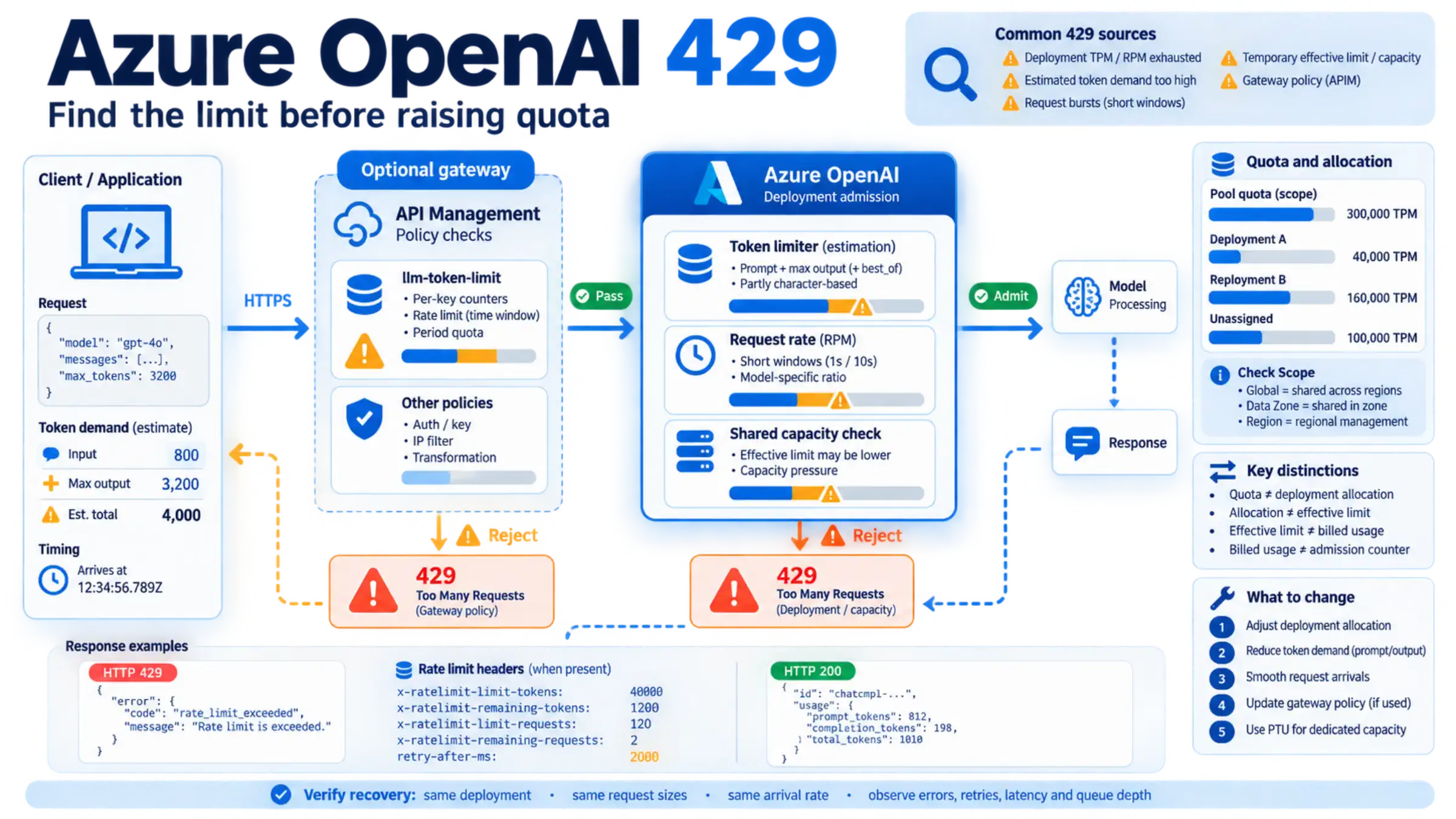
An Azure OpenAI tokens-per-minute (TPM) rate limit controls admission based on estimated token demand. It is different from the token usage you see after completed requests. A deployment can therefore return HTTP 429 even when its Azure Monitor token chart looks comfortably below quota. The other common mismatch is comparing traffic to the subscription’s available quota instead of the allocation of the deployment actually receiving that traffic. Microsoft’s quota guide documents both distinctions.
To choose a fix, capture one failing request’s deployment, error body, and rate limit headers. Compare those with the deployment’s assigned TPM and requests-per-minute (RPM) limit. Then check arrival timing and the request’s output allowance. Requesting more quota is useful only after you establish which budget is constraining the workload.
The procedure below applies primarily to Standard deployments. API Management and provisioned deployments have additional controls, covered separately. Portal navigation and quota scope reflect Microsoft’s documentation as of September 5, 2026; the values assigned to your subscription must come from your own quota page.
Start with the deployment and the rejected response
Record the subscription, resource, deployment name, model version, deployment type, and UTC timestamp. In applications that select among deployments, log the actual destination for each attempt. A configured default does not establish where a failing request went.
Keep the HTTP status, complete error code and message, service request identifier when present, retry number, and these headers. Capture successful responses in the same time interval too; the comparison often explains what changed. Microsoft documents these rate limit headers.
| Response field | What it helps establish |
|---|---|
x-ratelimit-limit-tokens | The token limit reported for the responding deployment at that time |
x-ratelimit-limit-requests | Its reported request limit; do not calculate this from a universal TPM ratio |
x-ratelimit-remaining-tokens | Whether token headroom is running out |
x-ratelimit-remaining-requests | Whether request headroom is running out despite small payloads |
x-ratelimit-reset-tokens and x-ratelimit-reset-requests | Reset information to retain in the diagnostic record; confirm the returned format before parsing it |
retry-after-ms | The requested delay before retrying a 429, in milliseconds |
A missing header means you do not have that measurement. Check whether your SDK exposes raw response headers and whether a gateway changes or removes them. Do not replace a missing effective limit with the largest number in a public quota table.
If API Management is in the request path, inspect its trace and configured policies to determine whether the request reached Azure OpenAI. Its llm-token-limit policy maintains a separate counter for the configured key. Exceeding the token rate returns 429; exceeding its longer-period token quota returns 403. A 403 alone does not establish that this policy caused it. Raising an Azure deployment’s TPM will not change an API Management policy limit. API Management policy reference.
Reconcile quota, allocation, effective limit, and billed usage
These four numbers answer different questions:
| Number | Question it answers | Frequent misreading |
|---|---|---|
| Quota pool | How much can be assigned within this model’s applicable scope? | All of it is immediately usable by one deployment |
| Deployment allocation | How much TPM did you assign to the deployment receiving traffic? | Unassigned quota automatically raises this limit |
| Effective rate limit | What limit is the service reporting now? | It must always equal the configured allocation |
| Billed token usage | How many tokens were accounted for after successful processing? | It reproduces the admission counter |
For example, suppose a quota pool allows 300,000 TPM, deployment A has 40,000 TPM, deployment B has 160,000 TPM, and 100,000 TPM remains unassigned. A request to A does not get a 300,000 TPM allowance. If A is the bottleneck, an authorized operator can allocate some of the available quota to A. Moving quota away from B requires checking B’s demand first. These are illustrative allocations, not a default Azure entitlement.
Also compare A’s configured allocation with x-ratelimit-limit-tokens over the failing interval. Microsoft identifies a lower reported token limit as a possible temporary rate limit adjustment under shared-capacity pressure. Capacity-related errors can require backoff even when the configured quota is adequate. A quota increase is not a general remedy for every 429. Microsoft’s 429 diagnosis guidance.
Check Scope before adding another region
The older rule that every region provides a separate pool is no longer safe to apply universally. Microsoft began rolling out subscription-level quota management after May 7, 2026. For onboarded models, Global Standard deployments of the same model and version share a pool across regions in the subscription; Data Zone Standard deployments share within the data zone. Check the Scope column on the Foundry Quota page: Global or Data Zone identifies the new management system, while a region name identifies regional management for that subscription and model. Microsoft’s scope instructions.
A second region may still be relevant to deployment availability or resilience. Do not include an assumed extra pool in a throughput plan until you have checked Scope, the model version, deployment type, and available capacity.
Read management API results in their native units
For automated inventory, the Azure Resource Manager Usages API exposes quota entries with name, currentValue, and limit. Here, currentValue describes quota consumed by deployments, not inference tokens used during the last minute. Keep the quota identifier and its human-readable unit alongside the numbers: an entry described in thousands of TPM must not be read as individual tokens. The Model Capacities API answers a different question—where deployment capacity is available. Neither response replaces request-level telemetry. Quota and capacity API guidance.
Why small responses can exhaust the token budget
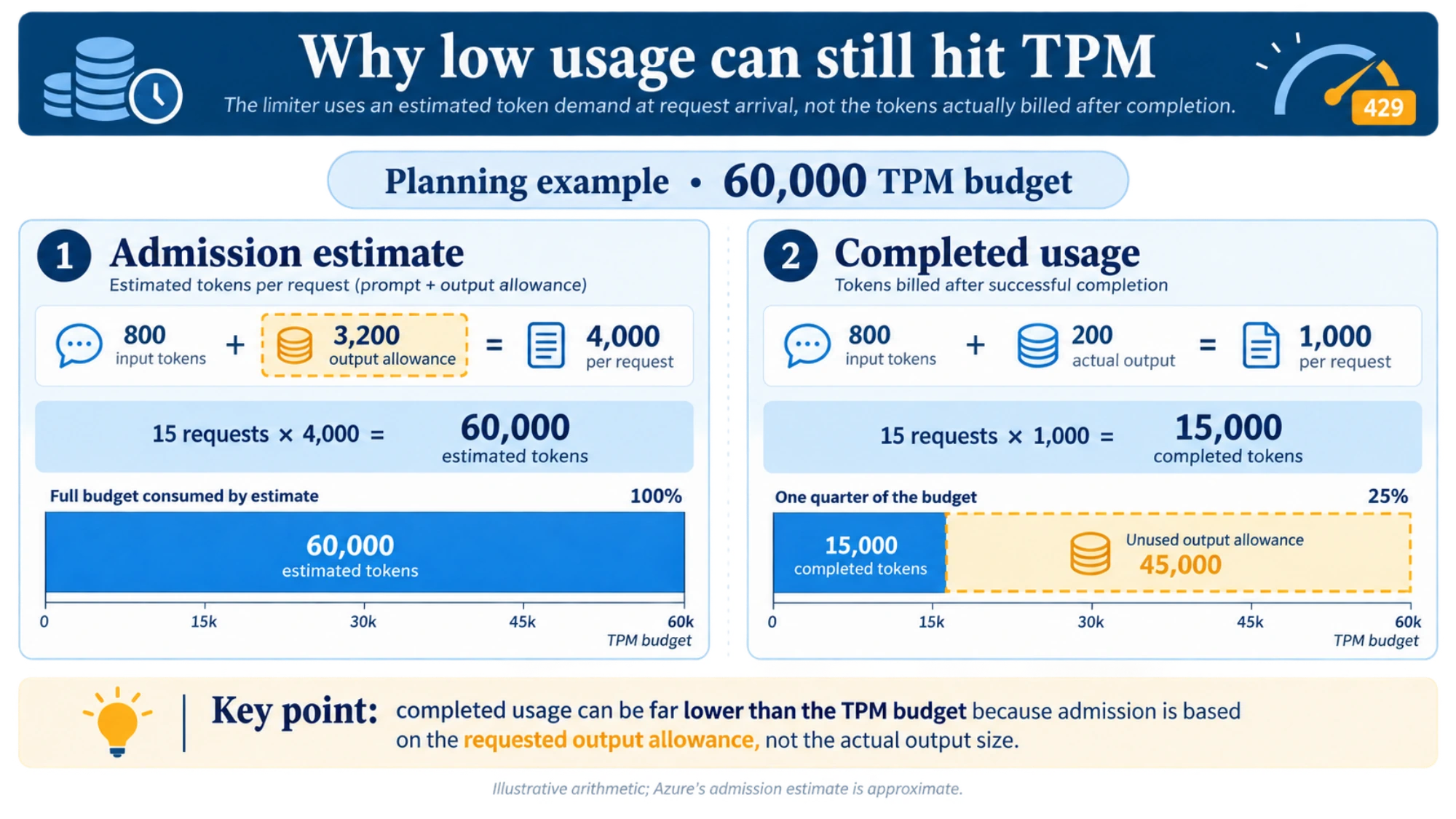
Azure estimates token demand when a request arrives. Its documented calculation considers the prompt and the requested maximum output, plus best_of where the API supports it. The estimate is partly character-based and is not the exact tokenizer count later used for billing. Consequently, a generous output allowance can constrain admission even if most answers finish early. Failed requests can also affect the limiter, including some requests that later return HTTP 400. How Azure estimates rate limit usage.
Consider a planning example with a 60,000 TPM budget. Assume each request has roughly 800 input tokens, allows up to 3,200 output tokens, and usually returns 200 output tokens. A simple local planning estimate would be:
Estimated demand per request: 800 + 3,200 = 4,000 tokens
Token-based planning ceiling: 60,000 / 4,000 = 15 requests/minute
Completed usage at that rate: 15 × (800 + 200) = 15,000 tokens/minute
That completed-usage figure is only a quarter of the nominal TPM budget, yet the planning estimate has already consumed the entire budget. The arithmetic illustrates the mismatch; it is not Azure’s exact admission formula or a measured throughput result.
If the task can reliably finish within an 800-token output allowance, the same local estimate becomes 1,600 tokens per request and a ceiling of 37.5 requests per minute. In operation you would stay below that estimate and respect RPM as well. Test completion quality and truncation before lowering the allowance: a shorter failed answer followed by another request can undo the saving.
Use the output-limit parameter supported by your specific API and model. Do not copy max_tokens or best_of into a request solely because it appears in a general quota example. Reducing unnecessary conversation history and retrieved passages can also help, provided the answer still has the information it needs.
Smooth both request arrivals and token demand
RPM is a separate constraint. Azure can evaluate arrivals over short intervals, typically one or ten seconds, so a minute-level average can hide a burst. The TPM-to-RPM ratio also varies by model. Read the actual request limit instead of assuming six requests per 1,000 TPM. Rate limit timing and model ratios.
For an illustrative 120 RPM limit, two requests per second is the average pacing implied by that limit. Launching 20 requests together and then waiting ten seconds has the same average but a very different arrival pattern. Two requests per second is still not a guaranteed safe rate: token demand, the actual evaluation window, other clients, and effective capacity all matter.
A practical admission controller should delay new work when either the request budget or estimated token budget lacks room. Put retries through the same controller as first attempts. If several workers share one deployment, coordinate their budget instead of allowing each worker to spend the deployment’s full allowance.
Concurrency alone is insufficient. A limit of five in-flight calls generates a different arrival rate when responses take 200 milliseconds than when they take ten seconds. Control when calls start, while using a separate concurrency cap to protect connections, memory, and downstream work. Give the queue a maximum waiting time so overload becomes an explicit deferred or failed job instead of unbounded latency.
For capacity planning, a useful approximation is:
Planned requests/minute < min(
  effective TPM / conservative estimated tokens per request,
  effective RPM
)
This is a starting point for pacing, not a service guarantee. Variable request sizes and short-window enforcement mean a single average cannot describe every workload. Check the large-prompt and long-output cases as well as typical requests.
Change the control that is actually limiting the workload
If the deployment allocation is too small and its pool has headroom, use New Foundry → Manage → Quota → Token per minute, open the deployment details, and inspect Affiliated deployments using shared quota. An operator with edit permission can use the pencil action to change the allocation. If the pool is fully allocated, rebalance only after checking the affected deployments, or use Request quota. Microsoft advises allowing up to 15 minutes for allocation changes to propagate and refreshing the quota page to confirm them; that is not a promise that a quota increase request will be approved within 15 minutes. Current portal instructions.
If estimated demand is the problem, adjust prompt size or the supported output allowance and test answer completeness. If bursts are the problem, change admission timing. If a gateway policy is rejecting the traffic, work with its administrator on the policy and counter used by the affected application.
For Standard capacity pressure or a temporary effective-limit reduction, honor the server’s retry delay and reduce offered load. Keep a diagnostic sample for Azure support if the problem persists. There is no guaranteed recovery time you can derive from a 429 alone.
For a workload that needs dedicated processing capacity, assess provisioned throughput using the model and actual input/output mix. PTUs are capacity units, not a universal fixed conversion to TPM. A provisioned deployment can still return 429 when its capacity is exhausted, and approved PTU quota does not ensure capacity is available for a new deployment. Provisioned throughput concepts.
Retry without multiplying the incident
Choose one place to manage retries: the SDK or your application’s retry policy. If you wrap the SDK with custom retries, disable its built-in retries for those calls. Otherwise, three outer attempts with an initial SDK attempt plus two SDK retries can produce nine HTTP attempts for one job. Microsoft’s retry guidance.
Use a valid retry-after-ms as a minimum delay; for example, 2000 means two seconds. If the response instead provides an applicable Retry-After, handle its defined format. Without server timing, use bounded exponential backoff with random jitter. Stop when the job’s deadline or attempt budget is exhausted, and return or persist an explicit failure. Do not turn authentication or invalid-input errors into a 429 retry loop.
Backoff handles temporary contention. It cannot make a permanently overloaded workload fit. Log first attempts and retries separately, and retain a stable job identifier so a later successful attempt does not hide the cost or latency of previous failures. If you need to choose between waiting and switching to another model, that decision also involves output compatibility and available capacity; see retry versus model fallback.
Verify recovery with the same workload that failed
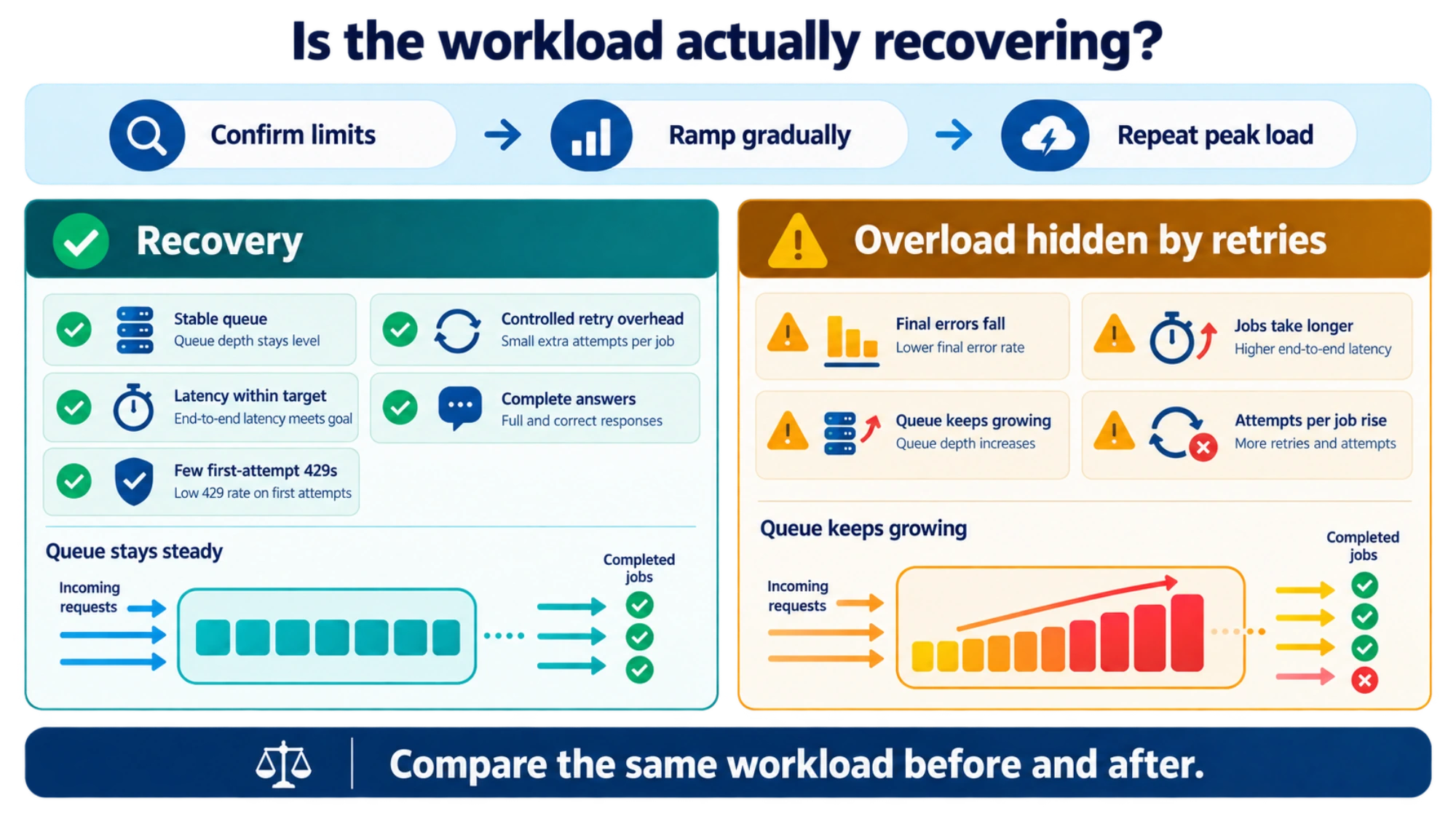
Treat one successful request as a connectivity check. To establish recovery, compare before and after using the same deployment, request-size distribution, arrival rate, and observation duration. If you also reduce load, record that as part of the change rather than attributing all improvement to a quota adjustment.
- Confirm the control change. After propagation, refresh the deployment allocation and sample the reported token and request limits. Record any difference between configured and effective limits.
- Start below the intended rate. Send representative work through the normal application and required gateway. Include the longest legitimate requests, not only a tiny test prompt.
- Increase arrivals gradually. At each step, observe several limiter windows and inspect second-level arrival counts. Stop increasing load when queue growth, errors, or latency breaches the application’s target.
- Measure jobs and attempts separately. Track first-attempt 429s divided by first attempts, all HTTP attempts per completed job, end-to-end latency including queue time, failed jobs, and queue depth. Check answer completeness if output settings changed.
- Repeat the peak pattern. Recovery means the intended workload meets its error and latency targets with a stable queue, including its realistic busy periods. A lower final error rate accompanied by more retries and an ever-growing queue is unresolved overload.
For escalation, include UTC failure intervals, deployment/model/version/type, the quota Scope and allocation, reported limits and remaining values, error text, request identifiers, approximate request sizes, arrival counts, and retry behavior. Redact credentials and sensitive prompt content. This gives support enough context to distinguish configuration, client demand, and service capacity.
Common questions
Does S0 define the TPM limit?
The S0 label by itself does not tell you the deployment’s usable TPM or RPM. Limits depend on the model and deployment configuration; consult the live allocation and the current Azure OpenAI quota reference. Direct OpenAI Platform limits are managed separately; use the OpenAI API rate limit guide for that service.
Does more TPM allow longer prompts?
Increasing TPM does not increase a model’s per-request context limit. If a request exceeds the supported input or context size, reduce or split the request, or choose a suitable model. Quota changes address rate, not how much content one request can hold. Microsoft’s model-specific quota note.
Sources5
External pages this guide links to, in the order they appear. Last updated Sep 5, 2026.
Sources5
External pages this guide links to, in the order they appear. Last updated Sep 5, 2026.
- 1.Microsoft’s quota guidelearn.microsoft.com/en-us/azure/foundry/openai/how-to/quota
- 2.API Management policy referencelearn.microsoft.com/en-us/azure/api-management/llm-token-limit-policy
- 3.Microsoft’s scope instructionslearn.microsoft.com/en-us/azure/foundry/foundry-models/quotas-limits
- 4.Provisioned throughput conceptslearn.microsoft.com/en-us/azure/foundry/openai/concepts/provisioned-throughput
- 5.current Azure OpenAI quota referencelearn.microsoft.com/en-us/azure/foundry/openai/quotas-limits