Run Qwen-Image-2.1 Locally: Which Weights Fit Your GPU or Mac
Qwen-Image-2.1 runs on 16–24 GB NVIDIA cards with official int8 files, on 8–12 GB with GGUF and the W4A8 encoder, and on Macs via mflux, for research use only.
On this page
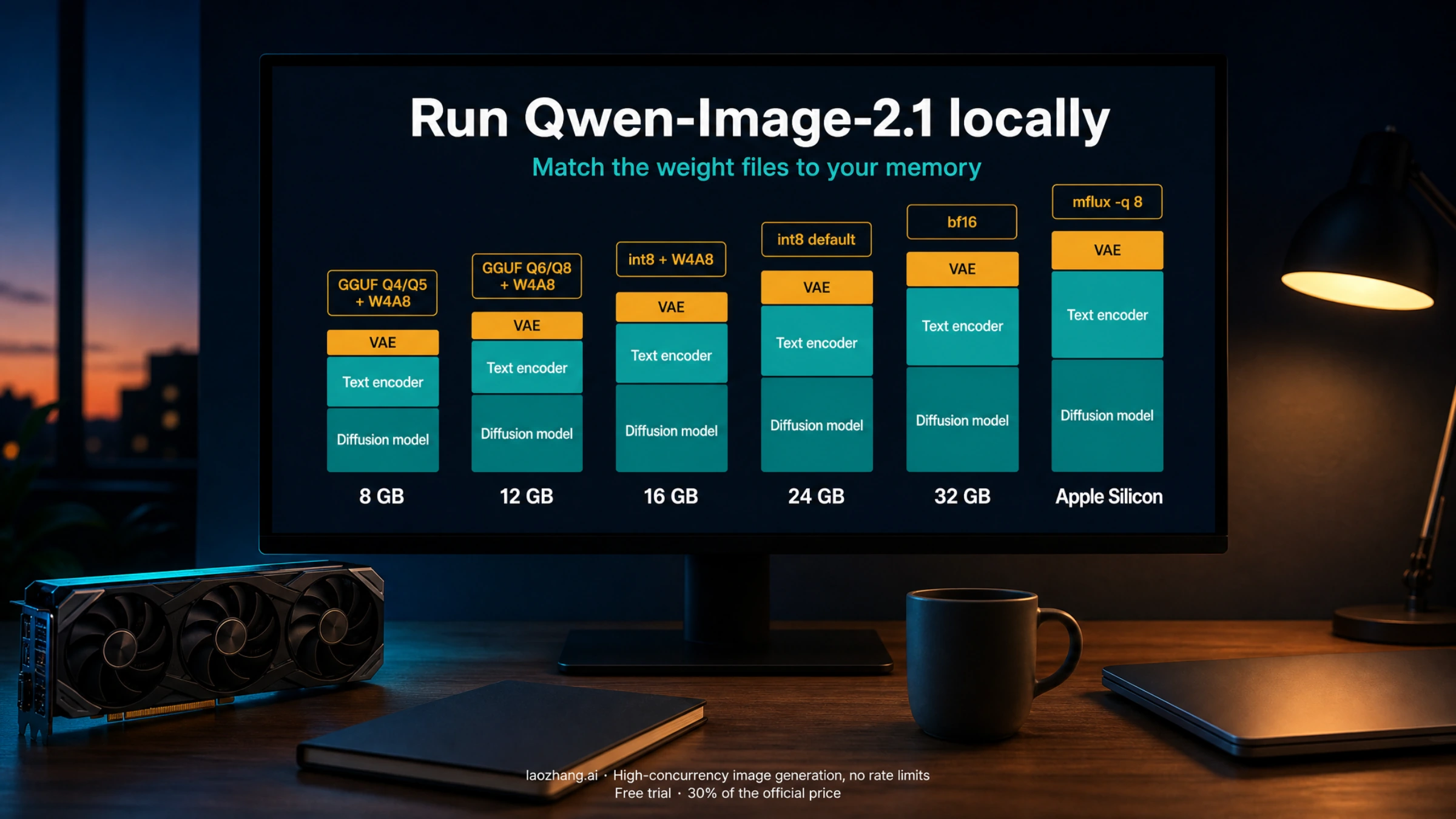
Qwen-Image-2.1 runs locally on a 16 GB or 24 GB NVIDIA card with the official ComfyUI int8 files, on 8–12 GB cards with a community GGUF diffusion model plus the 6.3 GB W4A8 text encoder, and on Apple Silicon through mflux, where the M5 Max peaks around 31–46 GB of unified memory at 1024×1024. Qwen publishes no minimum VRAM, so the useful question is which weight set matches your memory; every number below comes from a third-party test, with the conditions it was measured under. All of it is non-commercial: the weights ship under the Qwen Research License, which is a change from the Apache-2.0 predecessor.
Qwen-Image-2.1 was released with open weights on September 20, 2026 as one model for text-to-image and image editing. Its 7B visual generator, a Qwen3-VL 8B text encoder and a four-channel VAE give it native transparent (RGBA) output, up to ten reference images per edit, and region edits from a circled area, a painted area, or an image-plus-mask pair. Qwen-Image-2.1 repository
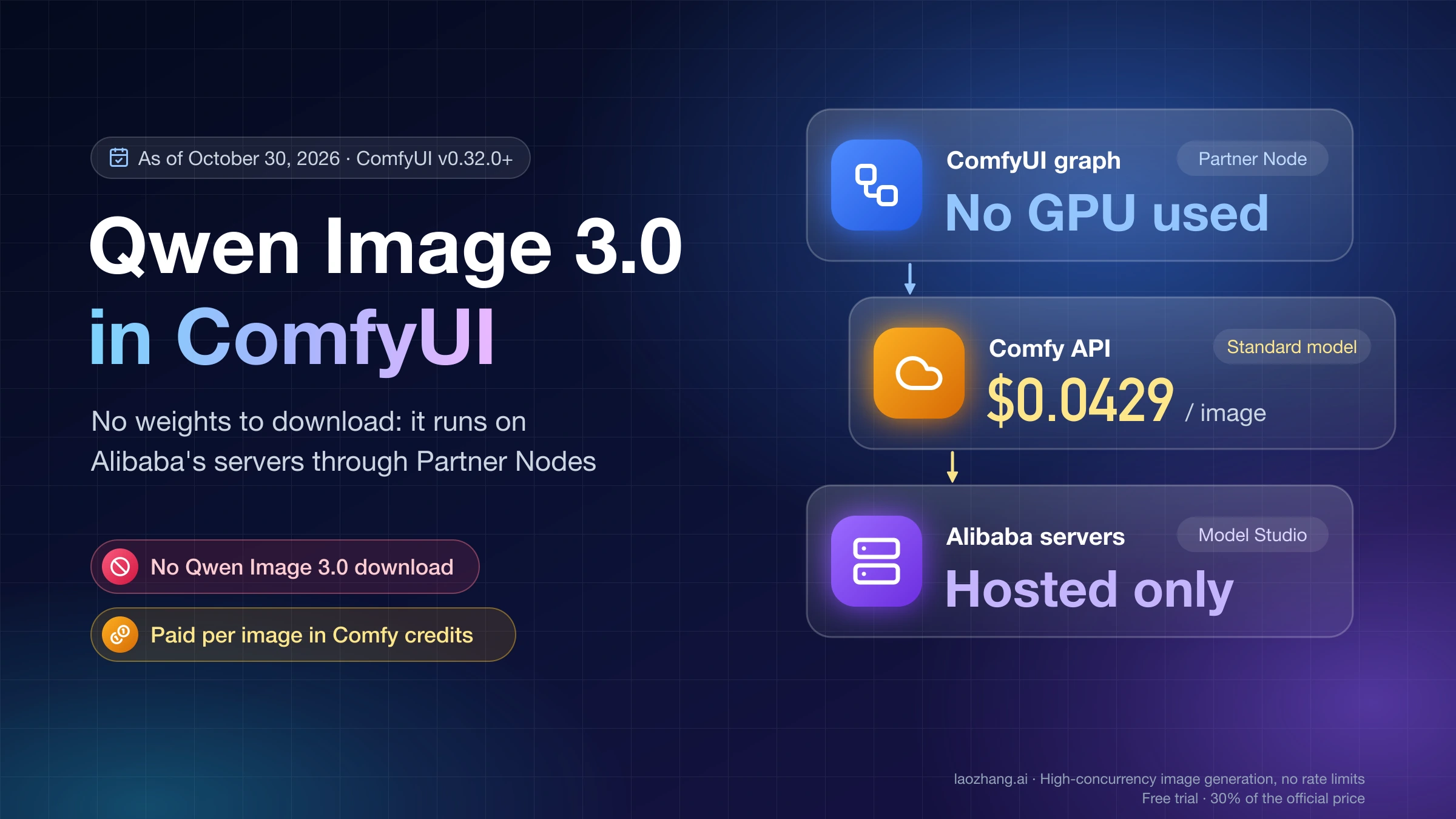
Looking for Qwen Image 3.0 instead? That model, announced in July 2026, has no downloadable weights; it runs only as a paid hosted model, which in ComfyUI means a Partner Node. See Qwen Image 3.0 in ComfyUI: No Download, Setup, and Cost per Image.
Pick your weight set by memory
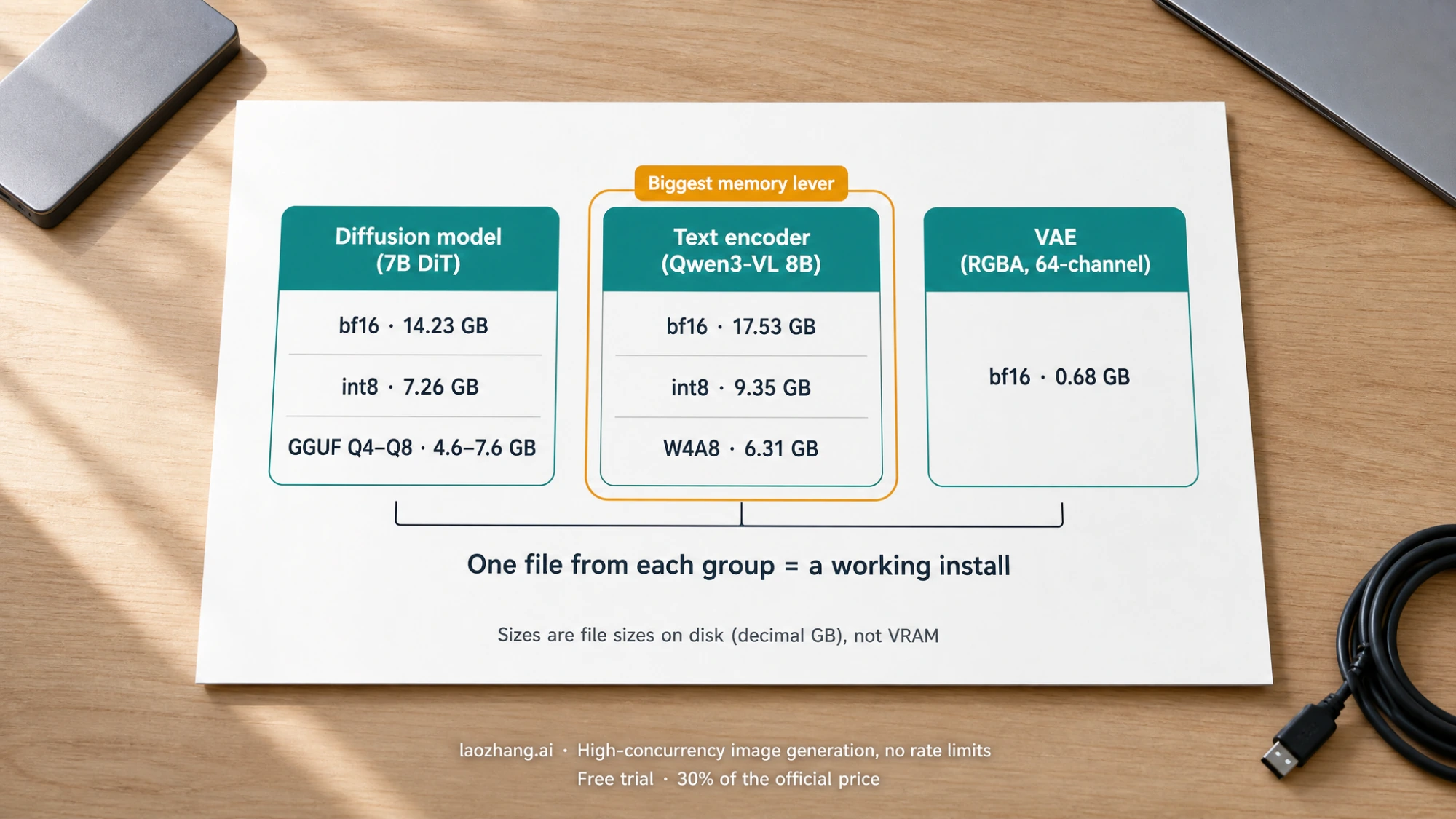
Three files make up a working install whichever way you run it: a diffusion model (the 7B DiT), a text encoder (Qwen3-VL 8B), and the VAE. The sizes below are what the files occupy on disk according to the Hugging Face API, in decimal GB. Quantized weights occupy roughly the same memory when loaded, so file sizes are a fair first estimate of what has to fit, before activations. Comfy-Org/Qwen-Image-2.1 file list
| Your memory | Diffusion model | Text encoder | Set on disk | What has been reported |
|---|---|---|---|---|
| 8 GB | GGUF Q4_K_M (4.6 GB) or Q5_K_M (4.9–5.2 GB) | qwen3vl_8b_w4a8 (6.31 GB) | ≈11.6–12.2 GB | Mixed: uploaders list Q5_K_M as the 8 GB pick; one tester's Q4_K_M crashed once a reference image was added |
| 12 GB | GGUF Q6_K (5.8–5.9 GB) or Q8_0 (7.6 GB) | qwen3vl_8b_w4a8 (6.31 GB) | ≈12.8–14.6 GB | Uploader suggestions only; no published peak measurement |
| 16 GB | qwen_image_2.1_int8_convrot (7.26 GB) | W4A8 (6.31 GB) or int8 (9.35 GB) | ≈14.3–17.3 GB | RTX 5070 Ti 16 GB: ≈13.9 GB peak, ≈25 s for 1024×1024 at 20 steps |
| 24 GB | int8 DiT (default) or qwen_image_2.1_bf16 (14.23 GB) | int8 (9.35 GB) | ≈17.3–24.3 GB | Official int8 default set; full bf16 on a 4090 reportedly spilled to ≈30 GB combined memory |
| 32 GB | bf16 DiT (14.23 GB) | int8 or bf16 (17.53 GB) | ≈24.3–32.4 GB | RTX 5090 in SGLang: 14.1 s for 1024 px at 40 steps with encoder offload |
| Apple Silicon | mflux -q 8 or -q 4 (encoder stays bf16) | bundled | bf16 ≈33 GB | M5 Max: ≈78 s per 1024×1024 image, 46 GB peak bf16, 30.7 GB with -q 8 |
The VAE (qwen_image_2.1_vae_bf16, 0.68 GB) is the same for every row. Readers with an RTX 4060 Ti, 4070 Ti Super, 5070 Ti or 5080 sit in the 16 GB row; RTX 3090 and 4090 owners are in the 24 GB row; the 5090 is the 32 GB row. If you are choosing a card for this and other local models, the trade-offs in our 16 GB GPU guide still apply.
Two things explain why a 17 GB file set works on a 16 GB card. First, the text encoder and the diffusion model are not needed at the same moment: ComfyUI encodes the prompt, then runs the sampler, and its model manager can move the encoder out of VRAM before the DiT loads, using system RAM as the parking lot. Second, the encoder is the bigger memory lever. In vLLM-Omni's own measurements at 1024×1024 and 40 steps, quantizing the text encoder to FP8 saved about 6 GB of peak memory, while quantizing the DiT saved about 2 GB. That is why the W4A8 encoder is the file to reach for first when memory is short, before dropping the diffusion model to a lower GGUF quant. vLLM-Omni recipe
The 8 GB question, with the conditions that decide it
The reports disagree, and the conditions explain why. The AlperKTS GGUF card suggests Q5_K_M for 8 GB, Q6_K for 8–12 GB and Q8_0 for 12 GB and up. A Google Colab tester who quantized both the transformer and the text encoder to 4-bit NF4 with bitsandbytes in Diffusers measured a peak of about 7 GB. A Japanese hardware guide, testing on its own machines, wrote that Q4_K_M "theoretically" fits 8 GB but crashed for the author as soon as an input image was added, and it recommends 16 GB as the practical floor. AlperKTS GGUF card · Colab notes by kun432 · negi-lab GPU guide
Put together: text-to-image at 1024×1024 with a 4-bit diffusion model and a 4-bit encoder is the configuration that has been shown to fit in about 7 GB. Editing is where 8 GB broke in that test, because each reference image is encoded through the same Qwen3-VL encoder and the condition tokens stay resident for the whole denoising run. If you have 8 GB, start with text-to-image at 1024×1024, keep the W4A8 encoder, and treat the 2048×2048 default resolution and multi-image edits as things to test one at a time rather than assume.
ComfyUI: the official setup, 25 steps and cfg 1
ComfyUI had templates on release day, and its default file picks are the int8 diffusion model and int8 text encoder. You need a nightly build, because the templates depend on core nodes newer than the last stable release; the official tutorial says so explicitly and notes that ComfyUI Cloud users have to wait for the stable release. ComfyUI Qwen-Image-2.1 tutorial
Download one file from each group and place it as shown:
| File | Size | Folder |
|---|---|---|
qwen_image_2.1_int8_convrot.safetensors (default) or qwen_image_2.1_bf16.safetensors | 7.26 GB / 14.23 GB | ComfyUI/models/diffusion_models/ |
qwen3vl_8b_int8_convrot.safetensors (default), qwen3vl_8b_w4a8.safetensors, or qwen3vl_8b_bf16.safetensors | 9.35 / 6.31 / 17.53 GB | ComfyUI/models/text_encoders/ |
qwen_image_2.1_vae_bf16.safetensors | 0.68 GB | ComfyUI/models/vae/ |
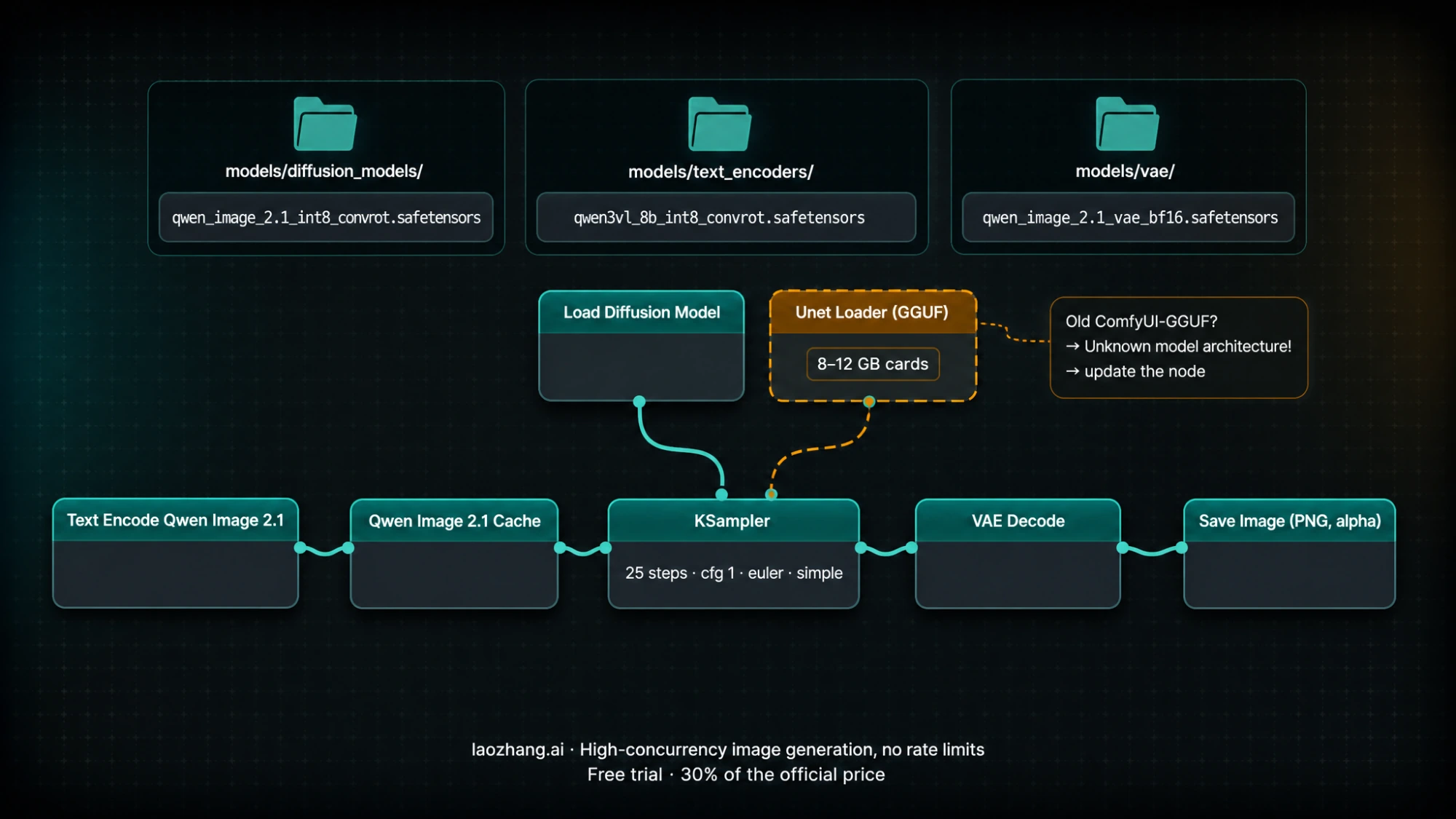
Do not clone the whole Comfy-Org repository; it also contains the two 9.47 GB prompt-enhancement encoders and totals about 74 GB. Then open the Template Library and load Qwen-Image-2.1 Text to Image. The three official templates share the same sampler settings: 25 steps, cfg 1, sampler euler, scheduler simple. The text-to-image template uses a resolution selector that targets about 4.0 megapixels for a 2048×2048 output; for a first image on a 16 GB card, lower that target to around 1 megapixel and confirm the workflow completes before going larger. Prompts go through the Text Encode Qwen Image 2.1 node, and a Qwen Image 2.1 Cache node keeps the encoded text and reference prefix in memory across steps, which is the model's prefix KV cache feature exposed as a node.
The Qwen Image 2.1 Image Edit template takes reference images by slot; you address them in the prompt by index, as <image1>, <image2> and so on, up to ten. The template scales reference images to a 1024 px target by default; set it to 0 to keep the original size, and expect memory use to rise with it. For mask-based edits, connect the original and a separate mask as two inputs; the model was also trained on circled and painted regions, so a rough circle drawn on the source image works as a targeting method without any mask node.
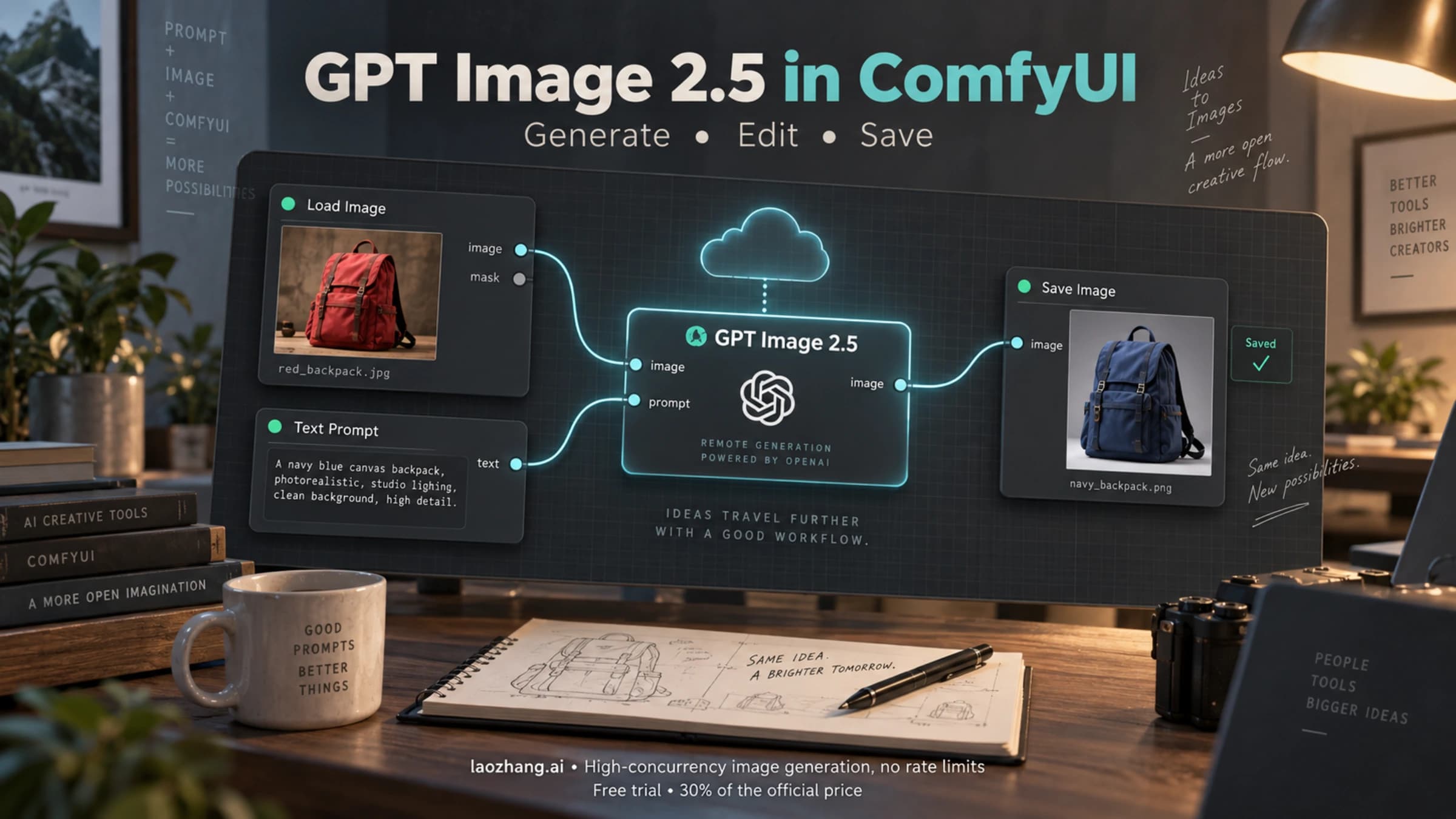
Remove Background: Qwen Image 2.1 is the third template. It is the edit subgraph with the prompt "Remove the background, and output a PNG image" and no matting nodes at all: the RGBA VAE decodes the alpha channel directly, so the saved PNG already has real transparency. If you already use hosted models inside ComfyUI, the setup differs from a local checkpoint in the ways described in our GPT Image 2.5 ComfyUI guide; the Qwen setup is entirely local and needs no account or credits.
GGUF in ComfyUI for 8–12 GB cards
Community GGUF repacks cover only the diffusion model. You still need a safetensors text encoder and the VAE from the table above; the W4A8 encoder is the natural pairing. Two uploads exist with a quantized:Qwen/Qwen-Image-2.1 base-model tag: AlperKTS (Q5_K_M 4.89 GB, Q6_K 5.84 GB, Q8_0 7.62 GB) and JohnsonHsu (Q4_0 4.05 GB, Q4_K_M 4.60 GB, Q5_K_M 5.22 GB, Q6_K 5.88 GB, Q8_0 7.59 GB). Uploaders note visible quality loss at Q4. JohnsonHsu GGUF files
Setup is three steps. Install ComfyUI-GGUF by cloning it into ComfyUI/custom_nodes/ (or through ComfyUI Manager) and run pip install --upgrade gguf in ComfyUI's Python environment; if you already have the node, update it rather than installing a second copy. Put the .gguf file in ComfyUI/models/diffusion_models/. Load the official text-to-image template and replace the diffusion-model loader with Unet Loader (GGUF), leaving the text encoder, VAE, cache and sampler nodes untouched. ComfyUI-GGUF
The error people hit is Unknown model architecture! when the GGUF loads. It means the installed ComfyUI-GGUF predates Qwen-Image-2.1 support. Update the node from within ComfyUI Manager or with git pull in its folder, restart, and reload; one early guide notes that if the mainline node still fails on your build, newer forks that added the architecture are the workaround. A second common failure is a plain file-not-found on the encoder or VAE, which is almost always a file placed in checkpoints/ instead of text_encoders/ or vae/. Local Model Watch GGUF notes
Diffusers on CUDA: offload, 4-bit, and the tiling trap
The official Python setup needs torch>=2.4.0, transformers>=5.17, Diffusers from the main branch (support landed in PR #14804), accelerate and pillow. The full bf16 checkpoint is about 33 GB on disk: 17.5 GB of text encoder, 14.2 GB of transformer, 1.35 GB of VAE. Qwen/Qwen-Image-2.1 model card
pip install "torch>=2.4.0" "transformers>=5.17" accelerate pillow
pip install git+https://github.com/huggingface/diffusersimport torch
from diffusers import QwenImage21Pipeline
pipe = QwenImage21Pipeline.from_pretrained(
"Qwen/Qwen-Image-2.1", torch_dtype=torch.bfloat16
)
pipe.enable_model_cpu_offload() # instead of .to("cuda") on cards below ~32 GB
image = pipe(
prompt='A neon shop sign that reads "QWEN IMAGE 2.1" above a rainy street',
width=1024, height=1024,
num_inference_steps=40,
generator=torch.Generator("cuda").manual_seed(42),
).images[0]
image.save("first.png")Two defaults matter. The README's default is 40 steps and 2048×2048; ComfyUI's templates use 25 steps because they are a different sampler setup, not because one is wrong. And the README calls .to("cuda") directly, which loads everything resident: the Colab tester saw about 31 GB peak that way, about 17 GB with enable_model_cpu_offload(), and about 7 GB with 4-bit NF4 on both the transformer and text encoder. Those are one session's peaks on an A100 and are not guarantees for your card, but they are the only measured tiers published for this setup. kun432's measurements
For the 4-bit configuration, Diffusers' pipeline-level quantization config is the least fragile way to express it, because it does not require importing the model classes:
import torch
from diffusers import QwenImage21Pipeline
from diffusers.quantizers import PipelineQuantizationConfig

quant = PipelineQuantizationConfig(
    quant_backend="bitsandbytes_4bit",
    quant_kwargs={"load_in_4bit": True, "bnb_4bit_quant_type": "nf4",
                  "bnb_4bit_compute_dtype": torch.bfloat16},
    components_to_quantize=["transformer", "text_encoder"],
)
pipe = QwenImage21Pipeline.from_pretrained(
    "Qwen/Qwen-Image-2.1", torch_dtype=torch.bfloat16, quantization_config=quant
).to("cuda")
The component names transformer and text_encoder match the folders in the Hugging Face repository; if your Diffusers build rejects the config, check its quantization docs for the current keyword names.
The same tester found that an L4 (24 GB) went out of memory at 2048×2048 even with offload until VAE tiling was enabled, and that pipe.vae.enable_tiling() then produced vertical-line artifacts in the 2048×2048 output. If you need the full 4-megapixel default on a 24 GB card, inspect tiled outputs for those artifacts before relying on the setting.
Editing uses the same pipeline with image= set to one PIL image or a list of up to ten. Transparent output needs the exact template from the README, wrapped around your description: This is an RGBA image with transparency. <description>. The image has alpha channel and the background is transparent. Save the result as PNG, since JPEG discards the alpha channel. For a broader look at where local editing fits against hosted editors, see our image-to-image editing overview.
Qwen also ships two prompt-rewrite models, Qwen/Qwen-Image-2.1-PE-T2I and Qwen/Qwen-Image-2.1-PE-I2I, that expand a short prompt into the detailed form the generator was trained on. They are optional and large (the I2I model is 18.8 GB in bf16 on Hugging Face; the Comfy-Org repo carries int8 versions at 9.47 GB each), and they run as a separate language model through vLLM or the prompt_rewrite/ scripts. The Colab tester reported a noticeable quality gain from them, including with non-English prompts. On a memory-limited card, run the rewrite first, free it, then generate.
Apple Silicon through mflux
mflux merged Qwen-Image-2.1 support on September 21, 2026 as mflux-generate-qwen-2.1, covering text-to-image and image-to-image. The -q 8 and -q 4 flags quantize the diffusion model; the Qwen3-VL text encoder is deliberately kept in bf16 to preserve conditioning quality, which caps how low the total can go. mflux PR #736
mflux-generate-qwen-2.1 --prompt "A ceramic mug on a wooden desk, morning light" \
  --width 1024 --height 1024 --steps 40 -q 8 --seed 42
The PR author's numbers on an M5 Max at 1024×1024 and 40 steps: about 1.54 s per step, about 78 s end to end in bf16 (slightly faster than the 85 s Diffusers-on-MPS reference), with peak memory around 46 GB in bf16 and about 30.7 GB with -q 8. A reviewer on an M3 Ultra measured about 2.95 s per step, roughly two minutes per image. That puts a 32 GB Mac on the edge even at -q 8; the negi-lab guide reaches the same conclusion from its own testing and recommends 64 GB of unified memory as the comfortable configuration. Reference-image editing, LoRA and the prefix KV cache were deferred from that first PR; a follow-up PR (#741) is titled as adding reference editing, RGBA and prefix caching, so check the mflux release notes for whether it has been merged before relying on editing on a Mac.
Pre-quantized MLX packs also exist, such as toxicdog/Qwen-Image-2.1-MLX at about 10.7 GB total (4 GB DiT, 6 GB encoder, 0.68 GB VAE). They are useful as a storage estimate for a fully 4-bit Mac setup, but which app loads them is not documented on the card, and Draw Things has not documented support for 2.1 specifically.
Speed you can expect, with the setup behind each number
| Hardware | Setup | Resolution / steps | Time | Who measured |
|---|---|---|---|---|
| RTX 5070 Ti 16 GB | quantization unspecified, ≈13.9 GB peak | 1024×1024 / 20 | ≈25 s | Reported by @BenjaminDEKR, collected by AIReiter |
| RTX 4090 24 GB | bf16, ≈30.2 GB total memory | 1024×1024, 1536×1536 / unspecified | ≈21 s, ≈56 s | Collected by AIReiter |
| RTX 5090 32 GB | SGLang-Diffusion, encoder layerwise offload | 1024 px / 40 | 14.1 s | SGLang cookbook |
| A100 80 GB (cloud, no optimization) | Diffusers bf16 | 2048×2048 / 40 | just over 1 min | kun432 |
| M5 Max | mflux bf16 | 1024×1024 / 40 | ≈78 s | mflux PR author |
| M3 Ultra | mflux bf16 | 1024×1024 / 40 | ≈2 min | mflux reviewer |
The full write-ups are the AIReiter review and the SGLang Qwen-Image-2.1 cookbook. The 4090 bf16 row is the expensive way to run a 24 GB card: 30 GB of weights cannot be fully resident in 24 GB, so part of the model is being swapped through system RAM on every step. The int8 ComfyUI default set fits resident on 24 GB and should be your baseline there; only move to bf16 if you can see a quality difference in your own outputs.
If you want a server rather than a UI, SGLang-Diffusion documents flags per card: for the RTX 4090, --performance-mode manual --dit-layerwise-offload true --text-encoder-cpu-offload true; for the RTX 5090, --performance-mode manual --component-residency text_encoder=layerwise-offload. Its generate CLI uses --num-inference-steps 40 --guidance-scale 1, and it exposes transparent output as "background": "transparent" and edits through /v1/images/edits with a PNG upload. vLLM-Omni (NVIDIA-only) and LightX2V are the other day-0 servers.
What the Qwen Research License lets you do
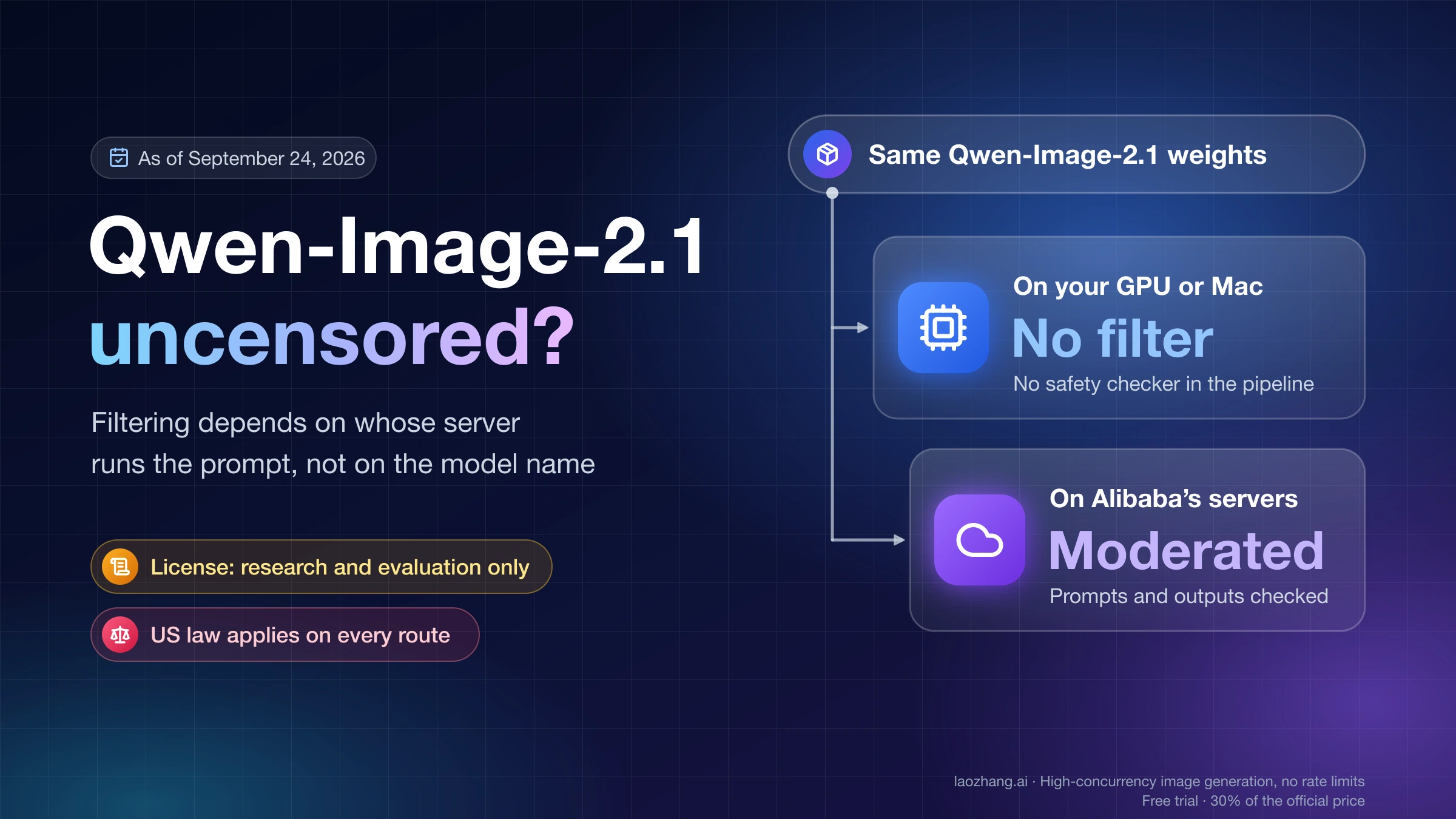
The weights are under the Qwen Research License Agreement, which grants use, reproduction, distribution and modification "FOR NON-COMMERCIAL PURPOSES ONLY", defined as research or evaluation. Commercial use of the model needs a separate license; the file names model-business@notice.qwencloud.com as the contact. Redistributed or fine-tuned derivatives must include the agreement, mark modified files, keep the notice and carry "Built with Qwen" or "Improved using Qwen"; "Qwen" cannot be the primary name of a derivative. GGUF and MLX repacks inherit this and carry license: other on Hugging Face. That is a summary of the license text as of September 22, 2026, not legal advice. LICENSE file
Two points are worth stating precisely. The license text says nothing explicit about generated images. On September 21, the Qwen team posted on X that outputs are not part of the licensed Materials and that users keep the rights to images they generate; that post is relayed in the model's discussion thread, where commenters point out that a social post does not amend the LICENSE file. Treat it as the team's stated intent, not as a term you can cite. The second point is the one that trips people up: even if your images are yours, running the model as part of a paid service, a client deliverable pipeline or a product is use of the Materials for a commercial purpose, which the license reserves. Hobbyists have also asked in the discussion thread whether personal use counts as "evaluation"; there is no official answer yet. Discussion #6
The predecessor, Qwen-Image-2512, is tagged Apache-2.0, so workflows and habits carried over from it need a license re-check. If you only want to see what the model does before downloading 15–30 GB, the official Hugging Face Space runs it without any install. If your work is commercial and you do not want to negotiate a license, a hosted model with commercial terms is the practical choice; laozhang.ai does not host a Qwen image model, but its catalog lists gemini-3.1-flash-image at $0.055 per call and flux-2-pro at $0.03 per call as of September 22, 2026, with prices subject to change on the model list.
Disclosure: laozhang.ai is our own service. Its prices are platform pricing, not an independent comparison.
Questions people ask before downloading
Can I run Qwen-Image-2.1 on an 8 GB GPU? Text-to-image at 1024×1024 has been measured at about 7 GB with 4-bit weights for both the transformer and the text encoder, so yes, with a GGUF Q4/Q5 diffusion model and the W4A8 encoder. Editing with reference images is where one tester's 8 GB setup crashed, and no published test shows editing working on 8 GB. Expect quality loss at Q4 and slower steps from offloading.
ComfyUI or Diffusers: which should I start with? ComfyUI, unless you need to script it. It has official templates, int8 files sized for consumer cards, working transparent output out of the box, and a model manager that shuffles the encoder and DiT between RAM and VRAM without you writing offload code. Diffusers is the choice for batch jobs, custom pipelines and the 4-bit bitsandbytes configuration.
Is Qwen-Image-2.1 free? The weights are free to download and use for research and evaluation. Commercial use of the model requires a separate license from Qwen. The team has said generated images belong to the user, but that statement is not in the license file.
How do I get a transparent PNG? In ComfyUI, use the Remove Background template or add the RGBA phrasing to any prompt; in Diffusers or SGLang, use the RGBA prompt template or "background": "transparent". In all cases save as PNG. The VAE produces the alpha channel itself, so no background-removal model is involved.
Can I train a LoRA? Qwen points to DiffSynth-Studio on ModelScope for LoRA training. No other trainer has been confirmed to support it yet, and mflux's first PR explicitly deferred LoRA. Any LoRA you train is a derivative under the research license.
Do I need the PE prompt-rewrite models? No. They improve results according to the one published hands-on, but they add 9.5–18.8 GB of downloads and a second model to run. Try the base model first; add PE-T2I when short prompts give you generic results.
Sources17
External pages this guide links to, in the order they appear. Last updated Sep 22, 2026.
Sources17
External pages this guide links to, in the order they appear. Last updated Sep 22, 2026.
- 1.Qwen-Image-2.1 repositorygithub.com/QwenLM/Qwen-Image-2.1
- 2.Comfy-Org/Qwen-Image-2.1 file listhuggingface.co/Comfy-Org/Qwen-Image-2.1
- 3.vLLM-Omni reciperecipes.vllm.ai/Qwen/Qwen-Image-2.1
- 4.AlperKTS GGUF cardhuggingface.co/AlperKTS/Qwen-Image-2.1-GGUF
- 5.Colab notes by kun432zenn.dev/kun432/scraps/8479a0b4ae0c8f
- 6.negi-lab GPU guideai.negi-lab.com/posts/qwen-image-2-1-local-llm-gpu-guide
- 7.ComfyUI Qwen-Image-2.1 tutorialdocs.comfy.org/tutorials/image/qwen/qwen-image-2-1
- 8.JohnsonHsu GGUF fileshuggingface.co/JohnsonHsu/Qwen-Image-2.1-GGUF
- 9.ComfyUI-GGUFgithub.com/city96/ComfyUI-GGUF
- 10.Local Model Watch GGUF noteslocalmodelwatch.tsuchitsuchi.com/en/2026/09/21/uncensored-qwen-image-2-1-gguf-released
- 11.Qwen/Qwen-Image-2.1 model cardhuggingface.co/Qwen/Qwen-Image-2.1
- 12.mflux PR #736github.com/mflux-community/mflux/pull/736
- 13.AIReiter reviewaireiter.com/blog/qwen-image-2-1-review-tested-local-vram-license
- 14.SGLang Qwen-Image-2.1 cookbookdocs.sglang.io/cookbook/diffusion/Qwen-Image/Qwen-Image-2.1
- 15.LICENSE filehuggingface.co/Qwen/Qwen-Image-2.1/blob/main/LICENSE
- 16.Discussion #6huggingface.co/Qwen/Qwen-Image-2.1/discussions/6
- 17.Hugging Face Spacehuggingface.co/spaces/Qwen/Qwen-Image-2.1