Best 16GB GPU for Local LLM Coding: Compare Memory, Latency, and Power
The RTX 5070 Ti is our first 16GB candidate to test, but the right purchase is the least expensive card that fits your real context and completes accepted repository work fast enough.
On this page
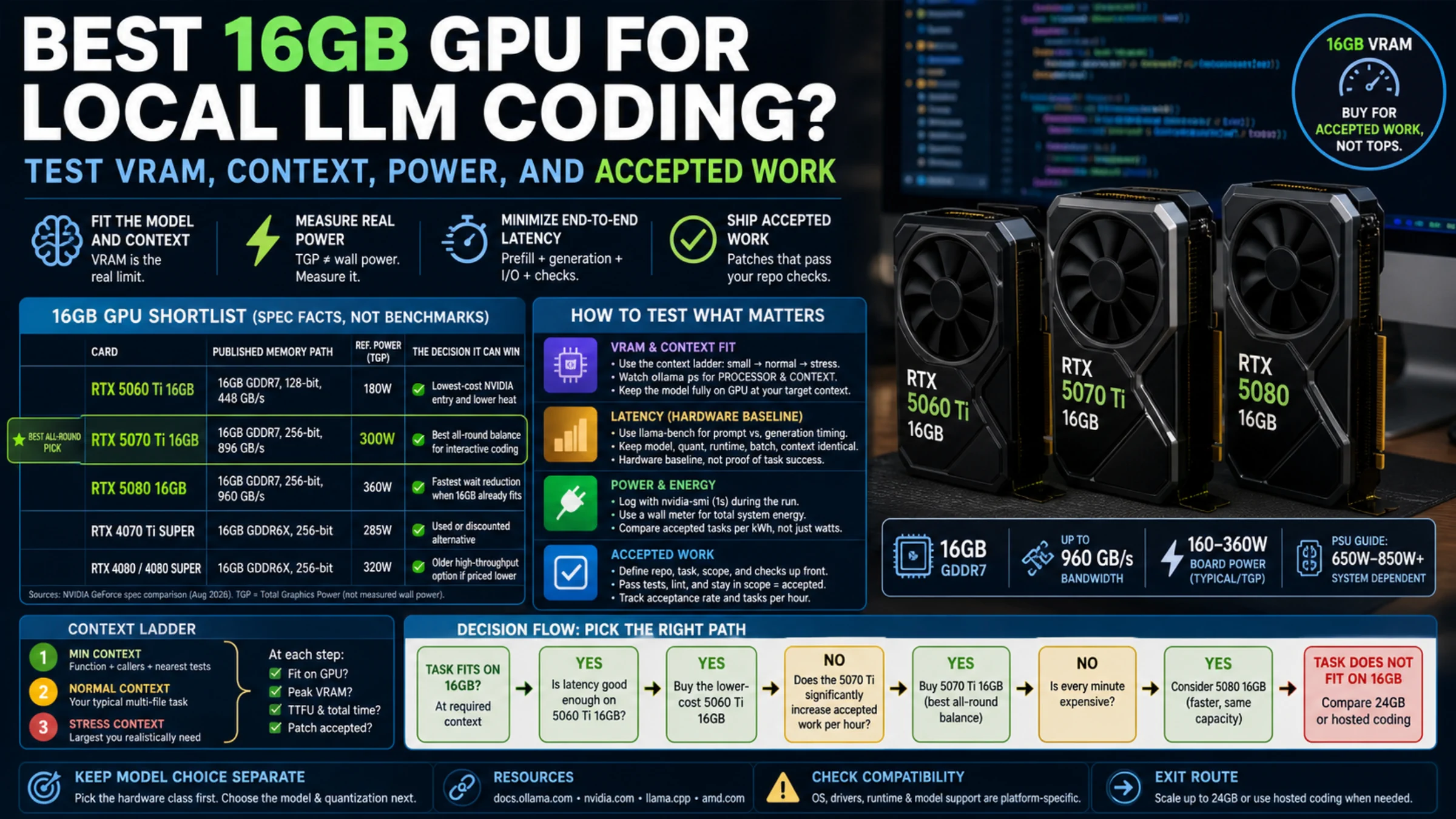
If you require exactly 16GB of VRAM, the GeForce RTX 5070 Ti is the best all-round starting point for daily local LLM coding. It combines a 256-bit memory interface and 896 GB/s of published memory bandwidth with a 300W reference TGP. The RTX 5080 has higher published bandwidth, but still has 16GB. Test whether it reduces waiting on your workload; it does not add capacity for larger models or longer contexts. The RTX 5060 Ti 16GB is the better budget and power choice when its latency already meets your workday.
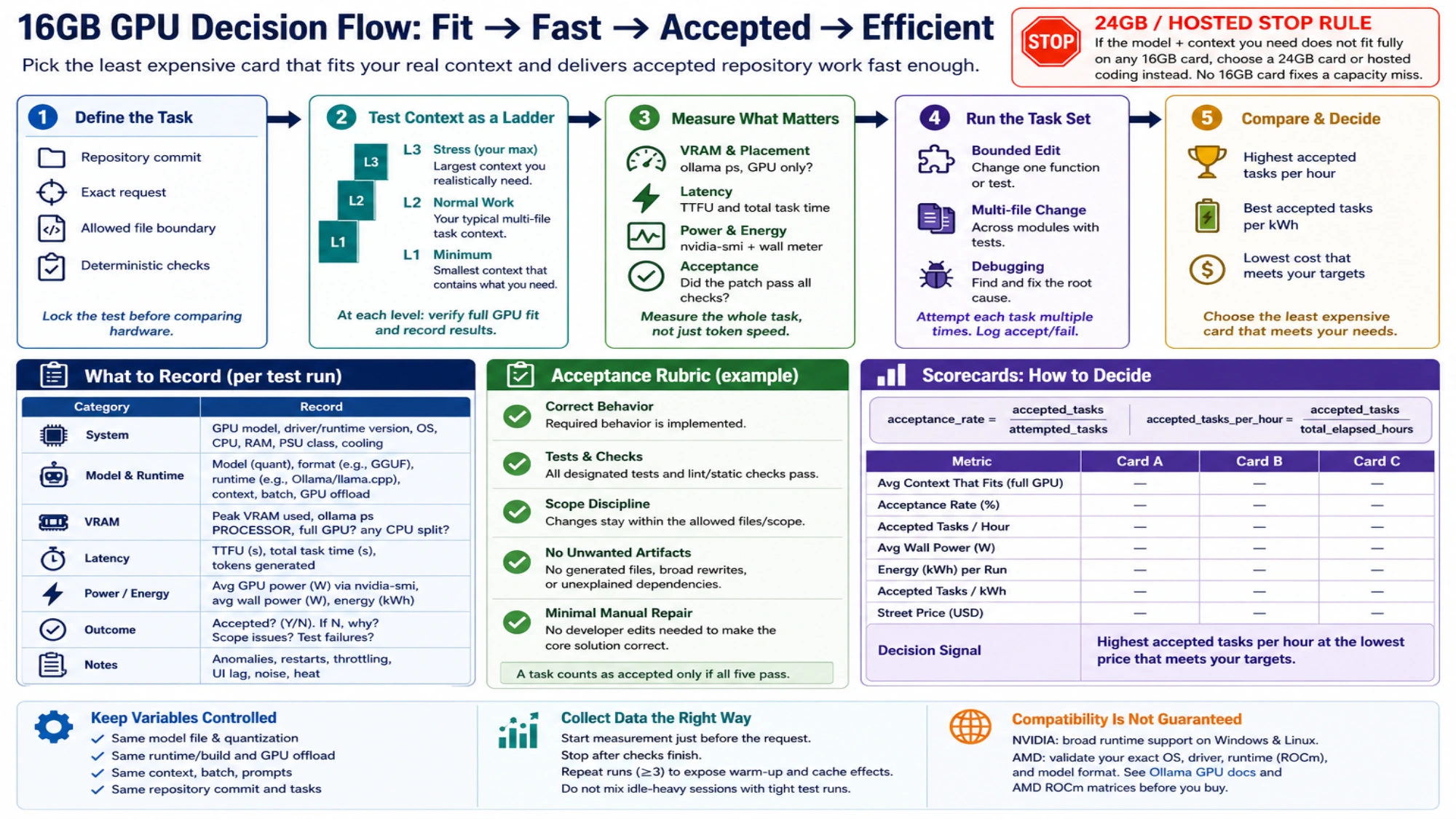
That recommendation is only a shortlist. A GPU earns the purchase when the same model, runtime and context produce patches that your repository accepts. If model weights, KV cache and runtime buffers do not fit at the context you actually need, no faster 16GB card fixes the capacity problem. Compare a 24GB card or a hosted model instead.
Compare the 16GB candidates by workload
NVIDIA's current GeForce comparison table separates the new 16GB cards clearly:
| Card | Memory specifications | Reference power | The decision it can win |
|---|---|---|---|
| RTX 5060 Ti 16GB | 16GB GDDR7, 128-bit, 448 GB/s | 180W TGP | Lowest-cost NVIDIA entry and lower heat |
| RTX 5070 Ti 16GB | 16GB GDDR7, 256-bit, 896 GB/s | 300W TGP | Best all-round balance for interactive coding |
| RTX 5080 16GB | 16GB GDDR7, 256-bit, 960 GB/s | 360W TGP | Higher-bandwidth candidate when 16GB already fits |
| RTX 4070 Ti SUPER | 16GB GDDR6X, 256-bit | 285W TGP | Used or discounted alternative after a local price check |
| RTX 4080 / 4080 SUPER | 16GB GDDR6X, 256-bit | 320W TGP | Older high-throughput option if priced below the newer tier |
These are specification facts, not end-to-end coding results. They still reveal the most important boundary: the 5070 Ti and 5080 share the same capacity. Paying more for the 5080 can improve prompt processing and generation time, but it cannot create VRAM headroom for a model that is already at the edge.
The 5060 Ti is not simply a slower 5070 Ti. Its 180W TGP, narrower memory bus and lower system-power requirement place it in a different power and cooling range. It is often the sensible default for one developer, one request at a time and a model that fits comfortably. The 5070 Ti becomes worth considering when waiting for repository reads, prompt prefill and repeated patch attempts interrupts real work.
VRAM fit is a runtime measurement, not the number on the box
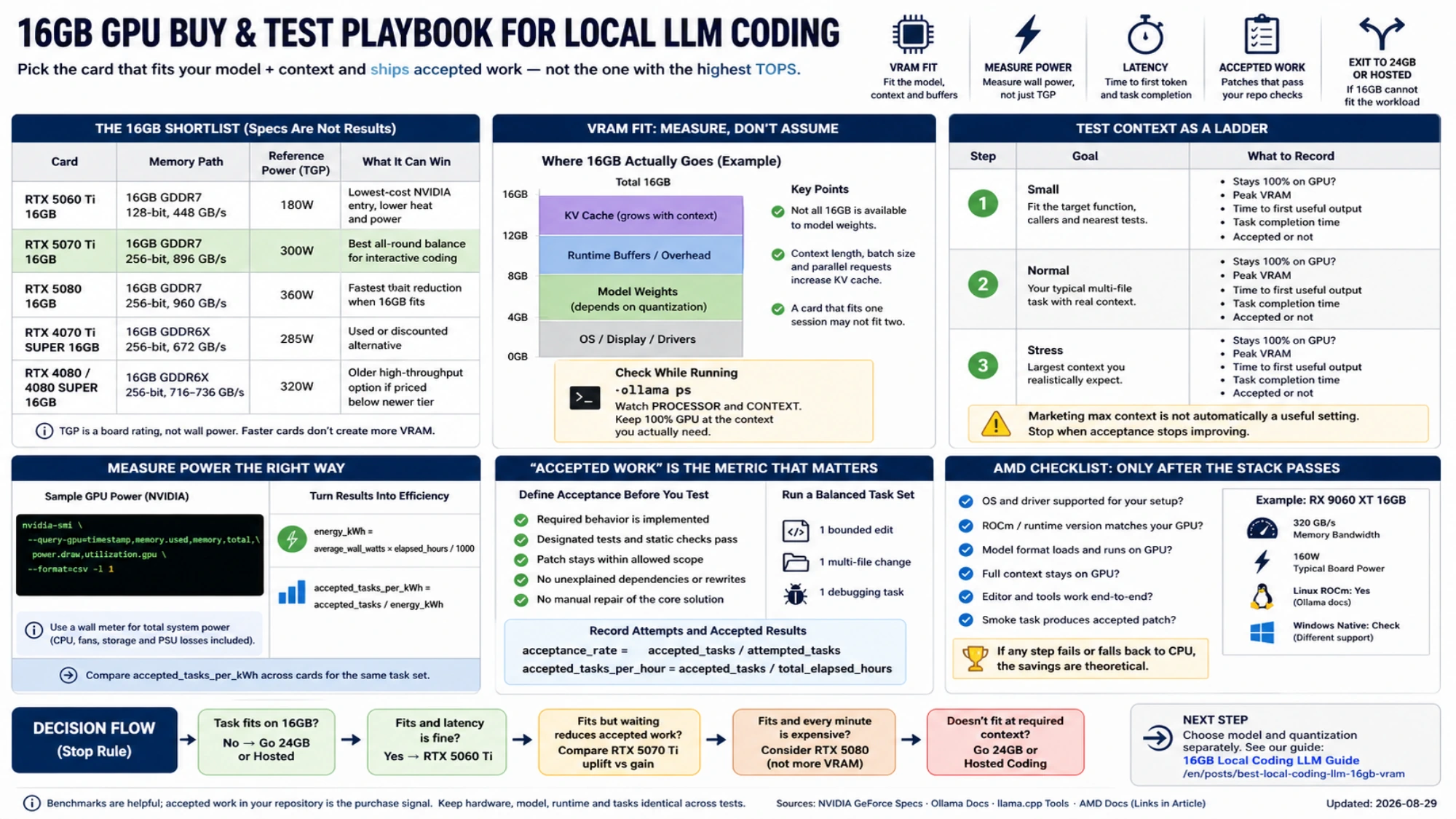
A 16GB label does not give the model all 16GB. Loaded weights share the device with the KV cache, compute buffers, runtime overhead and sometimes a desktop display. Quantization changes the weight footprint. Model architecture changes KV-cache cost. Batch size and parallel requests change the allocation again.
Ollama's current context-length documentation defaults systems below 24 GiB of VRAM to 4K context. It also says that a larger context requires more memory and exposes the actual processor split and allocated context through:
ollama psRead the PROCESSOR and CONTEXT columns while your coding session is active. 100% GPU at a small smoke-test context does not prove that your repository-sized context will remain on the GPU. Raise the context to the workload you intend to use, repeat the task, and watch for partial CPU placement, out-of-memory errors or a large latency jump.
The Ollama FAQ also notes that parallel requests multiply context allocation. A card that fits one 16K session may not fit two concurrent sessions. Test the concurrency you will actually run; do not use a service benchmark with eight clients to choose a card for a single editor, or a single-user result to size a shared server.
Test context as a ladder, not a marketing maximum
The model's advertised maximum context is not automatically a useful setting. Local coding needs enough active material for the task: instructions, relevant files, tool output, diffs and generated tokens. More context can reduce forgotten dependencies, but it also consumes memory and increases prompt-processing time.
Use a three-step ladder:
- Start with the smallest context that contains the target function, its callers and the nearest tests.
- Repeat at the context required for your normal multi-file task.
- Run one stress case at the largest context you realistically expect, not the largest number the model card allows.
At each step record whether the model remained fully on GPU, peak VRAM, time to first useful output, total task time and whether the final patch passed. If acceptance stops improving above 16K but prompt time and memory keep rising, the larger context is not free capability. If the model loses a required file at 16K and succeeds at 32K, that extra memory has a visible job.
For a synthetic baseline, llama-bench can separate prompt processing from token generation and repeat measurements:
llama-bench -m model.gguf -p 2048 -n 256 -r 5 -o jsonKeep the exact model file, quantization, llama.cpp build, GPU offload, batch settings and context depth identical across cards. The tool's own documentation warns that its timing excludes tokenization and sampling. Treat it as a hardware baseline, not proof that a coding task succeeded.
Measure power where it changes the purchase
TGP is useful for PSU, cooling and relative board-class planning. It is not the energy drawn by the complete computer during your coding loop. CPU offload can lower reported GPU utilization while increasing elapsed time and total system energy. A fast card can use more watts but finish early; a slower card can draw less and occupy the machine longer.
On NVIDIA, sample device memory and GPU power while the controlled task runs:
nvidia-smi \
  --query-gpu=timestamp,memory.used,memory.total,power.draw,utilization.gpu \
  --format=csv -l 1
Use a wall meter when electricity, PSU sizing or room heat materially affects the decision. The wall measurement includes CPU, fans, storage and power-supply losses; nvidia-smi does not. For AMD, use the monitoring command supplied by the installed AMD SMI/ROCm version and the same wall-meter method.
Convert the completed run into two simple quantities:
energy_kWh = average_wall_watts × elapsed_hours / 1000
accepted_tasks_per_kWh = accepted_tasks / energy_kWh
Do not compare idle-heavy sessions with tightly scripted runs. Start measurement immediately before the request and stop after tests finish. Repeat enough times to expose warm-up and cache effects.
“Accepted work” is the metric tokens per second misses
Define acceptance before the model sees the task. A useful coding trial includes a frozen repository commit, an allowed file boundary, an exact request and a deterministic check. For example: fix one failing parser case, change only src/parser.* and its test, then run the named unit test and lint command.
A result counts as accepted only when all of these are true:
- the required behavior is implemented;
- the designated tests and static checks exit successfully;
- the patch stays inside the allowed scope;
- no unexplained dependency, generated file or broad rewrite appears;
- the developer does not have to repair the core solution manually.
Record failed attempts too. A card that generates at a high rate but repeatedly loses context, emits a patch that cannot be applied or waits on CPU offload may produce less accepted work per hour.
Use at least one bounded edit, one multi-file change and one debugging task from your normal repository. Keep the task set identical across hardware. Then calculate:
acceptance_rate = accepted_tasks / attempted_tasks
accepted_tasks_per_hour = accepted_tasks / total_elapsed_hours
The second value combines model quality, context fit and hardware latency. It is not a universal benchmark: it is a purchasing signal for your stack.
AMD can win on price and power only after the stack passes
AMD lists the Radeon RX 9060 XT 16GB at 320 GB/s memory bandwidth and 160W typical board power. That makes it an attractive capacity-per-watt candidate. The hardware specification does not prove that your coding runtime, model and OS work with the same friction as CUDA.
Ollama's current hardware support page includes RX 9060 XT in its Linux ROCm list, while its native Windows list and driver requirements are different. AMD's own Radeon ROCm matrices also distinguish Linux and WSL by version. Choose AMD only after the exact OS, driver, runtime build, model format, context and editor integration complete a smoke task. A theoretical saving disappears quickly if your daily workflow falls back to CPU or needs an unsupported kernel.
When 24GB is cheaper than the wrong 16GB
The RTX 3090 has 24GB according to NVIDIA's reference table. It also has a 350W graphics-card power rating, and used examples introduce condition, thermal, warranty and PSU risk. It is not automatically a better purchase.
It becomes the relevant comparison when a desired model plus working context repeatedly offloads or fails on every 16GB candidate. In that case, capacity is the blocker. A premium 16GB card may finish a fitting task faster, but a 24GB card can run models and contexts that need more memory.
Use this stop rule before ordering:
- If the task fits fully on 16GB and the 5060 Ti meets your latency target, buy the lower-cost card.
- If the task fits but waiting reduces accepted work, compare the 5070 Ti's price uplift with its measured accepted-work gain.
- If the task fits and every minute is expensive, consider the 5080—but do not call it a capacity upgrade.
- If the task does not fit at the required context, compare 24GB or hosted coding instead.
After the hardware class is settled, choose the model and quantization separately. The adjacent 16GB local coding LLM guide covers that next decision. Keeping these two choices separate prevents a fast card from masking a poor model fit—and prevents a model leaderboard from selling you the wrong memory class.
Sources7
External pages this guide links to, in the order they appear. Last updated Aug 29, 2026.
Sources7
External pages this guide links to, in the order they appear. Last updated Aug 29, 2026.
- 1.GeForce comparison tablenvidia.com/en-us/geforce/graphics-cards/compare
- 2.context-length documentationdocs.ollama.com/context-length
- 3.Ollama FAQdocs.ollama.com/faq
- 4.llama-benchgithub.com/ggml-org/llama.cpp/blob/master/tools/llama-bench/README.md
- 5.Radeon RX 9060 XT 16GBamd.com/en/products/graphics/desktops/radeon/9000-series/amd-radeon-rx-9060xt.html
- 6.hardware support pagedocs.ollama.com/gpu
- 7.Radeon ROCm matricesrocm.docs.amd.com/_/downloads/radeon/en/latest/pdf