OpenAI API Credits Expire After One Year: Check Each Purchase
OpenAI API credits expire a year after each purchase and can't be extended. Expired credits return only for billing errors, unauthorized use, or OpenAI faults.
On this page
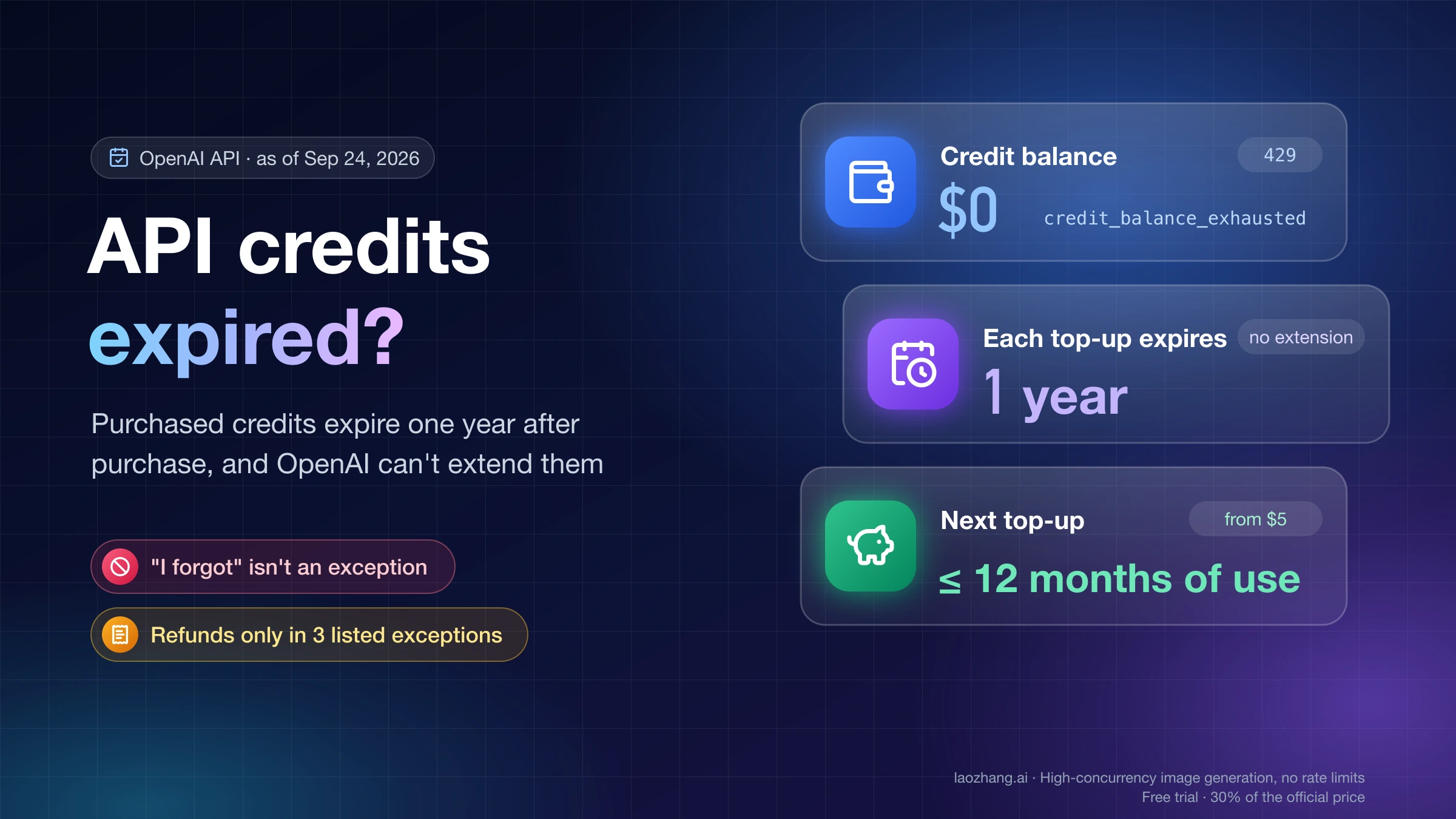
Yes. Purchased OpenAI API credits expire one year after the date you bought them, and OpenAI can't extend that date. As of October 22, 2026, OpenAI's help page on prepaid API billing still states the rule, and OpenAI Support repeated it on the developer forum on October 7, 2026. The clock runs per purchase, so every top-up has its own expiry date.
To see what expires when, open the Credit Grants tab in your OpenAI Platform billing settings, which reportedly lists each credit with its expiry date. If a payment is missing there, use the payment dates in Billing history and add one year. If your balance already hit $0 with credit_balance_exhausted, check whether expiry caused it, file a support review only if one of OpenAI's three refund exceptions fits, and buy a small amount of credits to get API calls working again.
What OpenAI's expiry rule covers
Two official documents set the rule, and they agree.
- The help page: "Purchased credits expire after 1 year. OpenAI cannot extend the expiration date of purchased credits or credit grants."
- The OpenAI Service Credit Terms (updated January 1, 2026): unused prepaid and promotional credits expire "one year after the date of purchase or issuance," unless something else was stated at the time of purchase. Credits are non-transferable, and selling, gifting, or trading them is prohibited. Doing so can get the credits revoked or the account suspended.
Because the clock starts at each purchase, each top-up carries its own expiry date. The rest of your balance does not reset when you buy more. A developer who reported $1,060 expiring on the OpenAI Developer Community had funded it through five separate purchases of $10, $50, $200, $51, and $750 over a year. Each one lapsed on its own one-year mark.
The most recent public case is the same rule at a larger scale. In an OpenAI Developer Community thread about $1,600 in expired credits, a startup in Spain said in October 2026 that it bought $1,600 of API credits between April and June 2025 for a product still in development. The usage dashboard showed $0.28 spent between April 2025 and September 2026, and the balance was gone when the team came to use it. On October 7, 2026, OpenAI Support answered there that purchased credits expire after one year and the date can't be extended. The reporter said support also declined replacement credits.
On consumption order, OpenAI documents one thing: if your account holds both free and purchased credits, the free ones are spent first. Neither the help page nor the terms say which of your purchases is drawn down first. That gap matters when you try to work out how much expires on a given date (next section).
Don't count on a warning. In the $1,060 thread, the developer quoted OpenAI Support as saying "OpenAI does not guarantee expiration reminder notifications." A community leader on the forum replied to the earlier thread that a note about expiry has sat on the purchase page for more than two years. Both can be true: the rule is disclosed at checkout, and no reminder is guaranteed after that.
Find when each purchase expires and how much is at risk
Think of each separate purchase as a lot: one amount with one purchase date and one expiry date a year later. Checking your lots takes three lists.
- Credit Grants: one user's walkthrough from March 2026 describes a separate "Credit Grants" tab in the billing settings that lists each credit, paid ones included, with its expiry date. A poster in October 2026 described it as showing credits used against the total. If it shows a remaining amount per credit, that figure is the answer, and you can skip the arithmetic below.
- Billing history: the list of payment dates and amounts. Two users reported in February and September 2026 that card payments listed there did not appear under Credit Grants. OpenAI only told them to email support, and the cause is unknown. If your lots don't all appear in Credit Grants, treat Billing history as the complete list and add one year to each payment date.
- Usage: what you spent each month since the oldest unexpired purchase.
There is no API endpoint for your credit balance or remaining credits. The usage and costs endpoints report consumption only, so these checks happen in the dashboard.
Where expiry dates show up
OpenAI Support has told customers they are "responsible for monitoring their credit balance and expiration information through their account billing or usage dashboard." In practice, the $1,060 reporter said in March 2026 that Billing Overview, Billing History, and Usage showed no expiry dates, and neither did the purchase email, receipt, or invoice. The Spain-based reporter said the same about invoices. On the invoice, the purchase shows up as a line called "OpenAI API usage credit," which is also the line to book in your accounts. Labels in the platform can move, so treat the tab names here as reported, not guaranteed.
Same balance, $0 or $14.23 expiring: the order matters near the lot sizes
When Credit Grants shows only dates, you can bracket the amount at risk yourself. List the lots, then subtract your monthly usage from them twice: once taking usage from the oldest lot first, once from the newest lot first. Take any free grant's usage off before either pass. The true figure for each expiry date falls between the two results.
On October 22, 2026, a small Python script ran that method on three illustrative purchase histories. They are not real account data. The assumptions:
- Free grants are used first. Each purchase expires on the same calendar date one year later.
- Usage is spread evenly across each day of the month.
- Case A has invented purchases of $50 on November 3, 2025, $200 on January 15, 2026, and $20 on June 10, 2026, with $15 a month of usage through October 22, 2026, or $174.65 in total.
- Case B has the shape of the Spain-based forum case: $1,600 in three purchases between April and June 2025, and $0.28 of total usage. The split into $600, $500, and $500 is invented, because the reporter gave only the total.
| Case, as of October 22, 2026 | Balance left | Oldest purchase drawn first | Newest purchase drawn first |
|---|---|---|---|
| A: $270 in three purchases, $15/month | $95.35 | November 3, 2025 lot fully used, $0 expires on November 3, 2026. Next date: January 15, 2027, with $75.35 left in that lot | $14.23 of the November 3, 2025 lot is unused and expires on November 3, 2026 |
| B: $1,600 in three purchases, $0.28 used | $0 | $1,599.72 already expired | $1,599.72 already expired |
Case A shows when the order matters. The balance is the same either way, but the amount expiring on November 3, 2026 is $0 under one order and $14.23 under the other. If newer purchases are drawn first, extra spending before that date doesn't save the old lot. Case B shows when the order doesn't matter: with almost no usage, everything expires under either order. A third run added a $25 promotional grant valid from March 1 to June 1, 2026 to case A. The grant absorbed $25 of usage first, so the paid balance rose to $120.35 and the paid lots carried more toward their expiry dates.
To use this on your own account, replace the case A purchases with your Billing history dates and amounts, and the $15 with your monthly figures from the Usage page. If the two orders give very different answers for the next expiry date, the only exact source is OpenAI. Ask support with your organization ID, each payment date and amount, and the Credit Grants figures. If both orders say a large amount will expire, stop adding to the balance until it is gone.
Confirm that expiry actually emptied your balance
A balance at $0 and a 429 error can have several causes, and only one of them is expiry. OpenAI has no error code for "your credits expired." Once the last lot lapses, you simply see the same error as an account that spent everything.
Start with the error body, not the HTTP status. OpenAI's API error-code guide says that for billing errors you should inspect error.code, because the broader error.type can still read insufficient_quota. In the Python SDK, a 429 raises RateLimitError, and the exception carries the same fields as e.code and e.type. The guide also says retrying billing, spend, or quota errors won't restore access, so switch off retry loops while you diagnose.
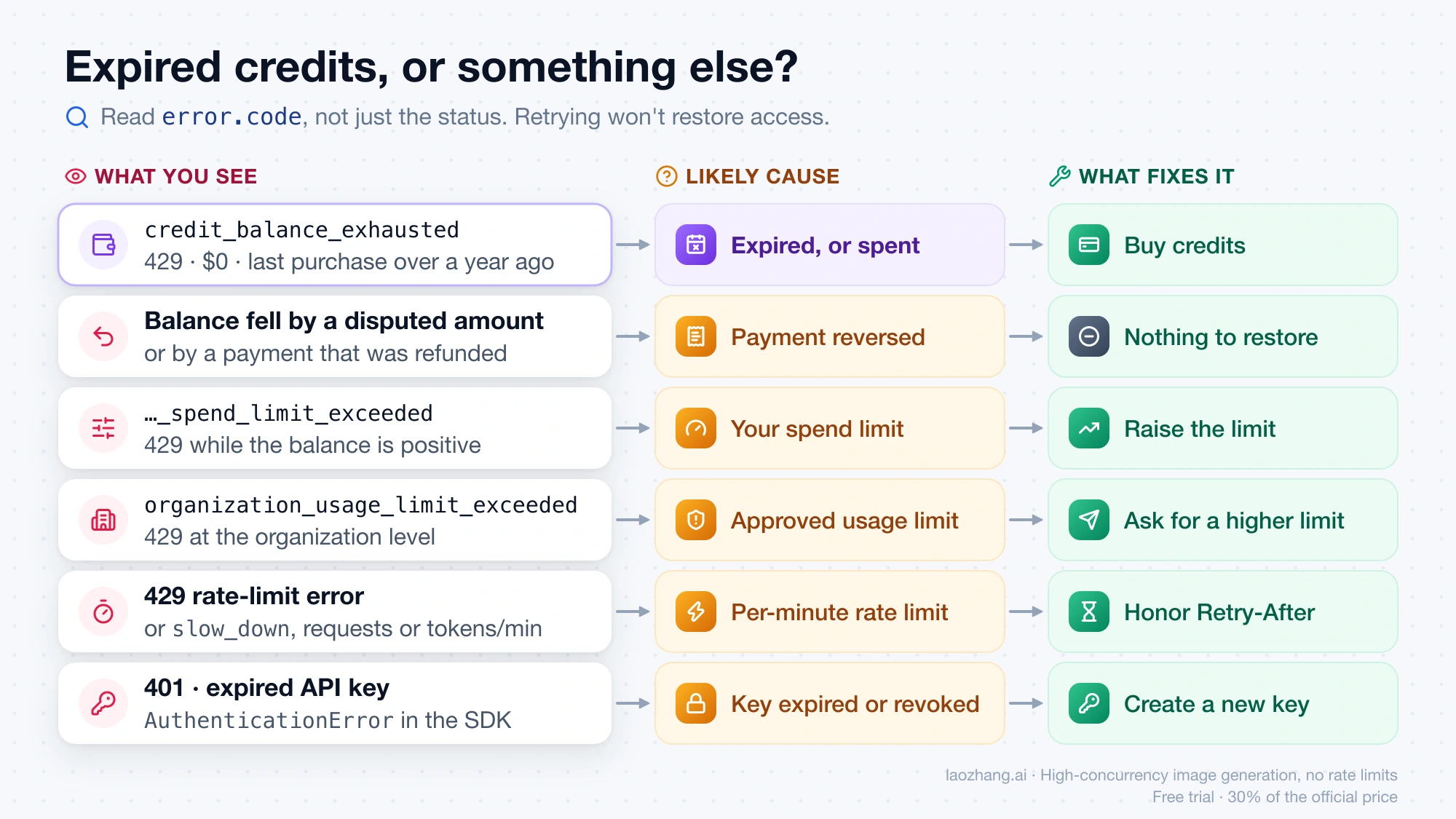
| What you see | Most likely cause | What to check | What fixes it |
|---|---|---|---|
429 with credit_balance_exhausted, balance $0, last purchase over a year ago | Credits expired, or you spent them | Credit Grants for expired lots; Usage page: does your spend since that purchase add up to what you paid? The gap is what expired | Buy credits (see below) |
| Balance fell by exactly the amount of a payment you disputed or that was refunded | Credits removed after the dispute or refund | Billing history and your card statement | Nothing to restore; the payment itself was reversed |
429 with organization_spend_limit_exceeded or project_spend_limit_exceeded while the balance is positive | A spend limit you or a teammate set | Organization limits, then the project's settings | Raise or remove that spend limit; buying credits won't help |
429 with organization_usage_limit_exceeded | OpenAI's approved monthly usage limit for your organization | Limits page | Request a higher approved limit or contact support |
429 rate-limit error or slow_down | Requests or tokens per minute | Response headers and your request rate | Pace requests and honor Retry-After |
| Balance is negative, or a new purchase shows up smaller than you paid | Usage processed after the balance hit zero | Billing overview | Nothing to fix; the deficit comes out of your next purchase |
401, or AuthenticationError mentioning an expired key | The API key is invalid, expired, or revoked | API keys page | Create a new key; credits aren't involved |
| A grant you never paid for is gone | A promotional grant reached its own expiry date | The grant's listed expiry | Nothing; grants aren't refundable purchases |
If the first row fits, run the arithmetic before you contact anyone. Add up your usage since the purchase date on the Usage page and subtract it from what you paid. Whatever remains is roughly the amount that expired. If usage explains most of the drop, the problem is spending, not expiry. The rest of the 429 family is covered in OpenAI API Error 429: Diagnose Rate Limits, Quota, and Spend Caps, and a positive balance that still fails is covered in OpenAI API Quota Exceeded Error: Fix insufficient_quota Without Chasing the Wrong Limit.
When a refund or reinstatement request is worth filing
A review makes sense when your situation matches one of the exceptions on the help page. Credits are non-refundable unless the law or a contract requires otherwise, or one of these applies. Each one needs evidence that support can check.
| Exception OpenAI lists | Covers unused credits | Covers credits already used | Evidence to gather |
|---|---|---|---|
| Verified billing error | Yes | Yes, as a billing correction | Invoice numbers, your card or bank statement, and the amount charged next to the amount credited |
| Confirmed unauthorized activity | Yes | Yes | Usage by API key and project showing spend you don't recognize, when each key was created and revoked, and your organization's member list |
| Confirmed OpenAI service failure or incorrect account restriction | Yes | Not listed | Dates your organization was blocked or restricted, error responses with timestamps, and earlier support ticket IDs |
"I forgot," "I wasn't reminded," and "my project got delayed" don't match any row. Forum reports show how narrow the door is. In December 2024, one user whose paid credits had expired later got a new grant with a fresh 12-month expiry. They wrote that they couldn't say why support made the exception. Others in the same thread were refused. By 2026, support was telling a customer that "Support teams are not able to grant exceptions to the 12-month expiration policy." One user was also denied a refund because more than 30 days had passed since the payment. In the October 2026 case, nearly $1,600 of unused credits was not replaced after escalation. A request costs little to send, but plan your budget as if the expired amount is gone.
If an exception does fit, contact support through OpenAI's help center contact page and put the facts in the first message:
- Your organization ID and the email address that owns billing.
- Each affected purchase: date, amount, and invoice number.
- The exception you are claiming, stated in the help page's words.
- The evidence from the table above, attached or summarized with dates.
- The outcome you want: a refund of the unused amount or a replacement grant.
The terms say credits are non-refundable "except as required by law." Whether consumer law where you live changes that is a question for a local consumer agency or a lawyer. A card chargeback has a known cost: under the help page, a disputed payment removes credits equal to the disputed amount. One forum user also claimed that a dispute is "pretty much an instant ban." That is an unverified anecdote, but weigh it if the same organization runs anything you rely on.
Get API calls working again
When the diagnosis points to an empty balance, the help page gives these steps:
- Open the organization's OpenAI API billing overview. You need billing permission for that organization.
- Select Buy credits or Add to credit balance, whichever one appears.
- Complete the purchase. The minimum purchase is $5.
- Wait a few minutes for the balance to update, then send one small test request before restarting your jobs.
Two details can make the result look wrong. If usage kept running after the balance hit zero, the negative amount comes out of this purchase, so a $5 top-up can land as less than $5. And if the request still fails with a positive balance, read error.code again, since a spend limit or usage limit is a separate gate.
Don't wait for auto-reload to fix an expired balance. In October 2026, two forum users reported that auto-recharge didn't fire while their balance sat a few cents below zero, and a manual purchase restored service. A community regular claimed that accounts whose credits all expired don't trigger an automatic recharge. OpenAI hasn't confirmed either point. If the balance stays at $0 after expiry, buy manually.
Look at the auto-reload setting before you confirm. In the setup flow, Use auto-reload is on by default. If you leave it on, you set a threshold, a balance to restore to, and an optional monthly reload limit. The next section shows how to pick numbers that don't recreate the problem.
Size your next top-up so nothing expires
What expires is simple to compute:
Amount that expires = what you bought in a purchase − what you used from it before its one-year date
So the safe rule is to keep your balance at or below what you will realistically spend in the next 12 months. Base that estimate on your Usage page, not on plans. The examples below use a flat monthly spend for illustration. Substitute your own average from the last three months.
| Your average monthly spend | 12-month need | A one-off $200 top-up | At risk of expiring |
|---|---|---|---|
| $6 | $72 | Lasts about 33 months | About $128 |
| $15 | $180 | Lasts about 13 months | About $20 |
| $40 | $480 | Lasts 5 months | $0 |
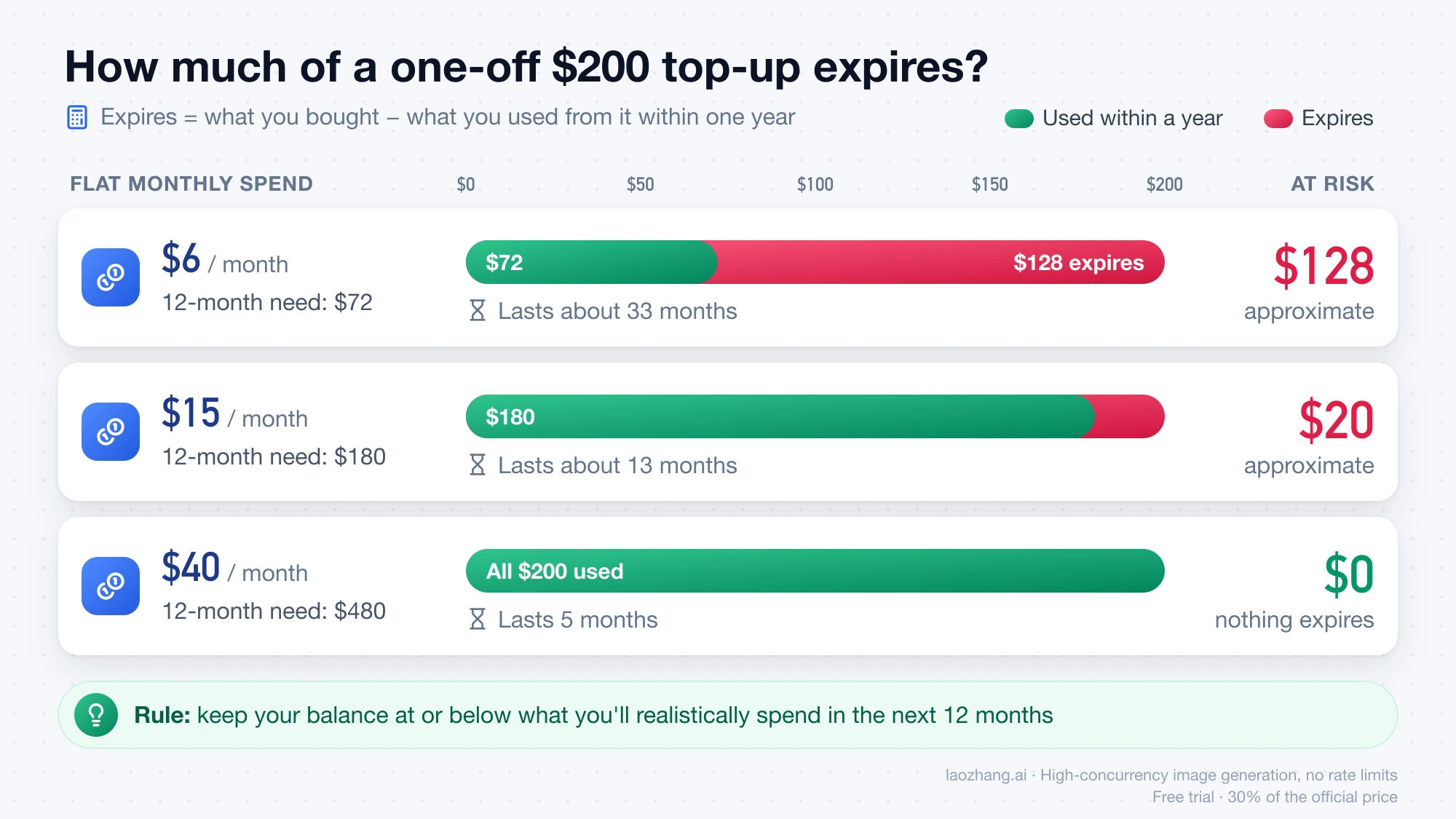
The table assumes the $200 is your only purchase. With several purchases on the books, the order question from the case A run applies, and a smaller new top-up is still the safer choice.
Irregular usage makes a large prepayment riskier still. A project that pauses for six months uses up half of a purchase's one-year window without spending anything from it.
For low or uneven usage, the small-and-frequent pattern fits better:
- Buy the $5 minimum up front instead of the $10 default or a larger round number.
- Keep auto-reload, but make it small. For someone spending about $6 a month, a threshold of $2, a restore-to balance of $10, and a monthly reload limit of $15 is one reasonable setup. It never holds more than roughly two months of spend. These are example values, not OpenAI guidance.
- Pair auto-reload with a spend limit. The help page is explicit that "a recharge limit is not an API usage limit." It caps automatic purchases, not how fast existing credits get used. If a key leaks, a project or organization spend limit is what stops the bleeding. The balance itself is not an instant cutoff either, because of the processing delay.
- Set your own reminder. After any purchase larger than a month or two of spend, add a calendar entry for about 11 months later. Nothing guarantees OpenAI will remind you.
Your trust tier, which is based on usage and payment history, caps the maximum balance your account can hold and the maximum automatic recharge. The help page doesn't list the dollar amounts for each tier.
Related credits and questions
Do Claude API credits expire too?
Yes. As of October 22, 2026, Anthropic's help article on paying for Claude API usage says Claude API credits expire one year from the purchase date, the date can't be extended, and the credits are non-refundable. Expired credits show up in the Console's invoice history. The same sizing rule applies.
Are ChatGPT or Codex credits the same balance?
No. Credits bought inside ChatGPT for flexible usage in ChatGPT, Sora, or Codex are a separate product from API credits on platform.openai.com. An OpenAI help article quoted in the developer forum says those credits are also "valid for 12 months from purchase." How they interact with plan limits is covered in ChatGPT Plus Codex Usage Limits and Credits: Is Codex Included?.
Can I sell or transfer my unused OpenAI credits?
No. The Service Credit Terms make credits non-transferable and prohibit selling, gifting, or trading them. Violations can lead to revoked credits or a suspended account without a refund. Credits can only be used for the service they were issued for.
Why did free credits I never paid for disappear?
Promotional grants run on their own dates. The terms count a year from "issuance" unless the offer said otherwise. Older signup grants of $5 or $18 were reported to expire after about three months, but that is historical and unofficial. Current OpenAI docs don't promise new accounts any free credits. What is free today is covered in OpenAI API Free Tier: What's Actually Free and What Still Bills.
Sources7
External pages this guide links to, in the order they appear. Last updated Oct 22, 2026.
Sources7
External pages this guide links to, in the order they appear. Last updated Oct 22, 2026.
- 1.prepaid API billinghelp.openai.com/en/articles/8264644-setting-up-and-managing-prepaid-api-billing
- 2.OpenAI Service Credit Termsopenai.com/policies/service-credit-terms
- 3.OpenAI Developer Community thread about $1,600 in expired creditscommunity.openai.com/t/1403086
- 4.API error-code guidedevelopers.openai.com/api/docs/guides/error-codes
- 5.OpenAI's help center contact pagehelp.openai.com/en/articles/6614161-how-can-i-contact-support
- 6.OpenAI API billing overviewplatform.openai.com/settings/organization/billing
- 7.Anthropic's help article on paying for Claude API usagesupport.claude.com/en/articles/8977456-how-do-i-pay-for-my-claude-api-usage