GPT-5.4 Free API: Every Way to Access It and What Each Costs
As of October 10, 2026, GPT-5.4 has no free API tier. Paid orgs that share data with OpenAI can get up to 1M free tokens a day; otherwise it's $2.50/$15 per 1M.
On this page
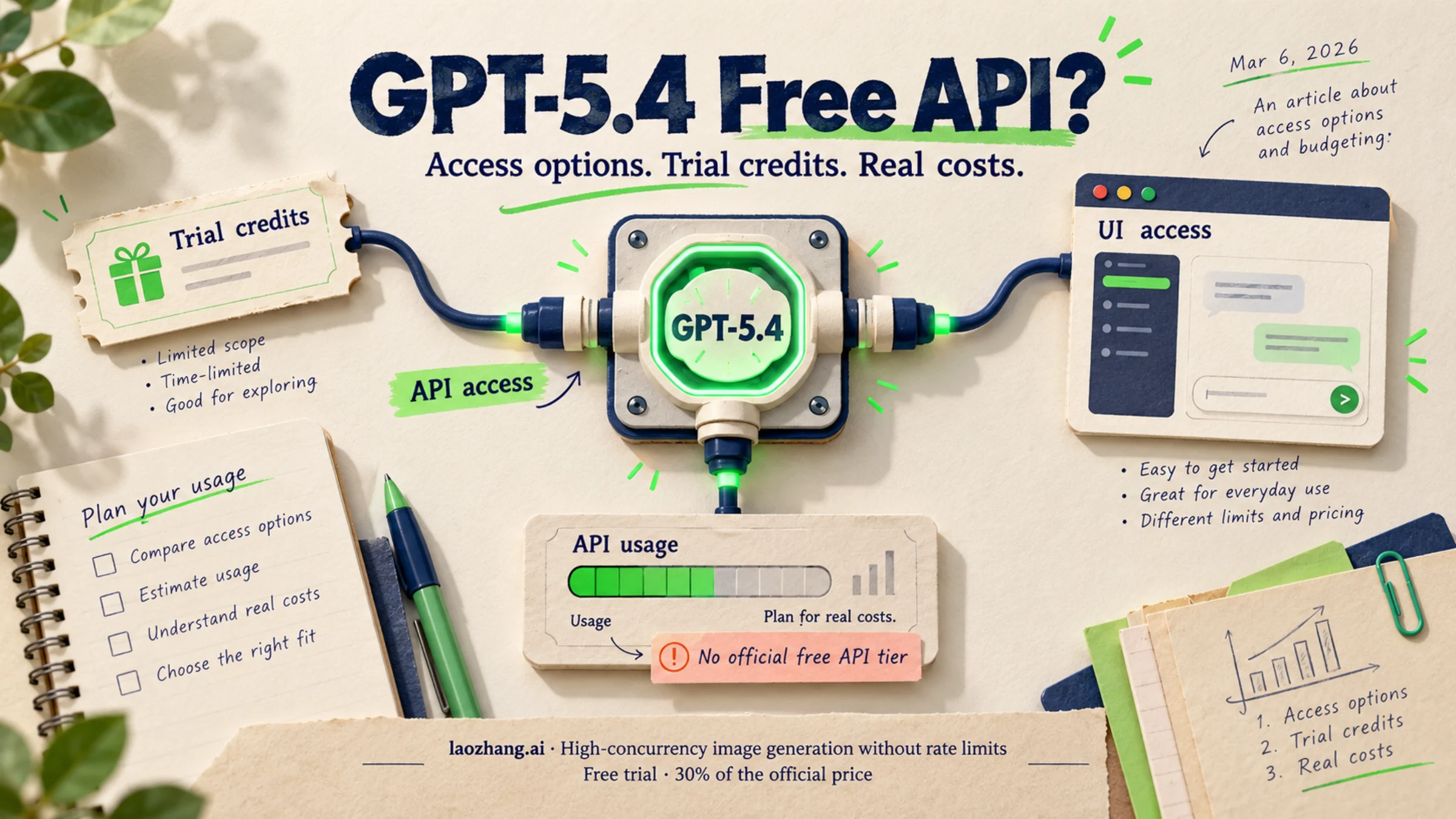
As of October 10, 2026, GPT-5.4 is still a live OpenAI API model, and it still has no free tier. The GPT-5.4 model page lists rate limits only for the paid Build, Launch and Grow tiers, and the OpenAI API pricing page charges $2.50 per million input tokens, $0.25 per million cached input tokens and $15 per million output tokens. The one official way to pay nothing for GPT-5.4 tokens is OpenAI's complimentary daily tokens for organizations that share their API traffic with OpenAI: up to 1 million GPT-5.4 tokens a day on Launch and Grow, and 250,000 on Build. That route still needs a paid balance, and the prompts and outputs you share may be used to train OpenAI's models. Everything else is pay-as-you-go, made cheaper with Batch, prompt caching or a smaller model.
TL;DR
- Price:
gpt-5.4costs $2.50 input, $0.25 cached input and $15 output per 1M tokens for prompts up to 272K tokens. Batch and Flex cut that in half. The price hasn't changed since the March 5, 2026 launch. - Free tokens: organizations on Build, Launch or Grow that qualify for OpenAI's data-sharing program get daily complimentary tokens. GPT-5.4 sits in the 1M-token group (250K on Build), which works out to roughly 400 typical requests a day (100 on Build).
- No free key: the OpenAI Free tier doesn't support GPT-5.4, and a ChatGPT subscription doesn't include API usage. "Free API keys" posted online are leaked keys or someone else's bill.
- Cheaper siblings:
gpt-6-lunacosts $0.10 / $0.50 per 1M, less thangpt-5.4-nano, which leaves the API on April 1, 2027.gpt-6-solcosts $2 / $10, less thangpt-5.4. - Codex: since August 31, 2026, GPT-5.4 is gone from Codex when you sign in with ChatGPT. It still works in Codex with an API key, billed at API rates.
Does GPT-5.4 Have an Official Free API? The Honest Answer
No, there is no free GPT-5.4 API tier, but there is one official way to get GPT-5.4 tokens for free. The distinction matters because the free route has an entry price and a privacy cost.
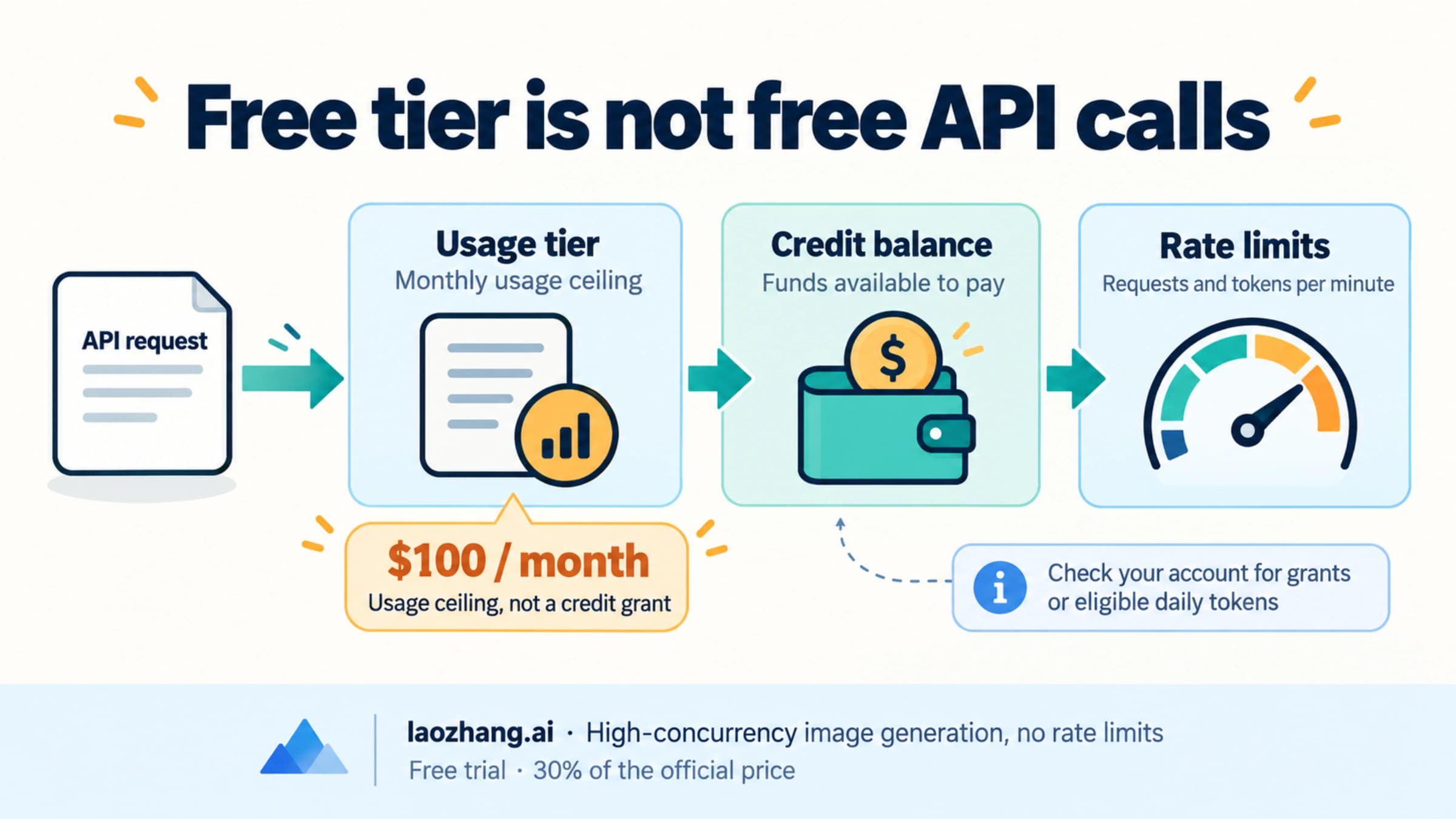
OpenAI's API has a Free usage tier, but its "$100 per month" is a usage ceiling, not money in your account, and GPT-5.4 isn't available on it. GPT-5.4 starts at Build, which an organization reaches after $5 in total credit purchases. OpenAI doesn't describe an automatic sign-up credit for new accounts; if your organization has a promotional credit grant, it shows up on your Billing page. For the full breakdown of what the Free tier does and doesn't cover, see OpenAI API Free Tier: What's Actually Free and What Still Bills.
The free route is the data-sharing complimentary token program. OpenAI's help page says "some organizations may qualify for daily complimentary tokens on traffic shared with OpenAI." Its terms decide whether it's worth it for you:
- Who qualifies: organizations on Build, Launch or Grow. If yours qualifies, the Org Owner sees "You're eligible for free daily usage on traffic shared with OpenAI" on the data-sharing settings page. Enterprise and Zero Data Retention organizations are excluded.
- How much GPT-5.4:
gpt-5.4-2026-03-05is in the first group: up to 1 million tokens a day on Launch and Grow, 250,000 on Build.gpt-5.4-miniandgpt-5.4-nanoare in the second group: 10 million on Launch and Grow, 2.5 million on Build. Each group has its own daily limit. - The rules: you need a positive credit balance, only projects that share traffic count, the allowance resets at 00:00 UTC, and anything above it bills at normal rates. Fine-tuned models, fine-tuning, evals and tool use aren't covered.
- The cost: shared prompts and outputs may be used to train OpenAI's models. Don't turn sharing on for a project that handles customer data you aren't allowed to hand over.
So the honest summary is: no free tier, but an eligible paying organization can run a meaningful slice of GPT-5.4 traffic at $0 each day.
5 Ways to Access GPT-5.4 API at Low or Zero Cost
These are the five routes that give you real API access to GPT-5.4, ordered from the cheapest to the most flexible. Two kinds of offers are left out on purpose: ChatGPT subscriptions, which don't include API usage (covered further down), and "free key" lists, which aren't legitimate access.
| Route | What you pay for GPT-5.4 (per 1M tokens) | Your key | Main catch |
|---|---|---|---|
| Complimentary daily tokens | $0 up to 250K tokens/day (Build) or 1M/day (Launch, Grow) | OpenAI | Needs a paid balance; shared data may train OpenAI models; tool use excluded |
| OpenAI API, Batch or Flex | $1.25 input / $0.13 cached / $7.50 output | OpenAI | Batch jobs return results asynchronously |
| OpenAI API, Standard | $2.50 / $0.25 / $15 | OpenAI | Billed from the first token; smallest top-up $5 |
| OpenRouter or Vercel AI Gateway | OpenRouter: $2.50 / $15 (:batch $1.25 / $7.50) | Gateway's own | No free variant of any GPT-5.4 model on OpenRouter |
| laozhang.ai | $2.50 / $0.25 / $15 (listed price) | Platform's own | Same per-token price as OpenAI's list |
Disclosure: laozhang.ai is our own service. Its prices are platform pricing, not an independent comparison.
Prices are for prompts up to 272K tokens. Longer prompts on gpt-5.4 cost $5 input, $0.50 cached and $22.50 output per 1M.
1. Complimentary daily tokens. This is the only route where GPT-5.4 tokens cost nothing, with the conditions in the section above. In practice: buy $5 of credit to reach Build, check the data-sharing page as the Org Owner, turn sharing on for one project, and send your GPT-5.4 traffic through that project. With a typical request of 2,000 input and 500 output tokens, Build's 250,000 tokens cover about 100 requests a day and Launch or Grow's 1 million cover about 400.
2. Batch or Flex on the OpenAI API. Both bill at half the Standard rate: $1.25 input and $7.50 output per 1M. Batch fits work that doesn't need an answer in the same second, such as classifying a backlog, summarizing documents overnight or running evaluations. For the same output, it halves the bill.
3. Standard OpenAI API with prompt caching. If you need real-time answers, pay the Standard rate but keep your long instructions at the start of every prompt so repeated prefixes bill at $0.25 instead of $2.50 per 1M. The prompt caching section below works through the math. Creating a key and adding billing are covered in How to Get a ChatGPT API Key in 2026—and Prove It Actually Works. OpenAI's API serves only its listed supported countries, and requests from elsewhere get a 403 "Country, region, or territory not supported" error.
4. OpenRouter or Vercel AI Gateway. As of October 10, 2026, OpenRouter's GPT-5.4 listing charges the same $2.50 / $15 as OpenAI, with a :batch variant at $1.25 / $7.50, and offers no :free variant for gpt-5.4, gpt-5.4-mini, gpt-5.4-nano or gpt-5.4-pro. The Vercel AI Gateway pricing page describes a monthly free credit whose amount it doesn't state, says the free tier "includes a subset of models, not the full catalog," and ends that free credit once you buy credits. GPT-5.4 appears in Vercel's model list without a free-tier label, so don't count on the free credit covering it. Gateways help when you want one key for several vendors' models; they don't make GPT-5.4 cheaper than OpenAI's list price.
5. laozhang.ai. laozhang.ai lists gpt-5.4 at $2.50 input, $0.25 cached input and $15 output per 1M tokens for prompts up to 272K tokens, the same per-token figures as OpenAI's list. It uses an OpenAI-compatible endpoint, with setup steps in the laozhang.ai API documentation.
If you just need any capable model for free rather than GPT-5.4 specifically, other providers run real free tiers; Best Free AI API Provider: Pick by Limits, Data Use, and Region compares them.
GPT-5.4 vs GPT-6 Sol vs GPT-6 Luna: Which Should You Call?
On price alone, GPT-5.4 is no longer the cheap option it was in March. gpt-6-sol costs less per token for both input and output, and gpt-6-luna costs less than gpt-5.4-nano. The table compares them on a typical request of 2,000 input and 500 output tokens at Standard prices with no cache hits, using prices from OpenAI's API pricing page as of October 10, 2026.
| Model | Input / cached / output per 1M | Cost of 1,000 typical requests | Complimentary group | Free typical requests per day (Build / Launch, Grow) | Status |
|---|---|---|---|---|---|
gpt-5.4 | $2.50 / $0.25 / $15 | $12.50 | 1M group | 100 / 400 | No deprecation announced |
gpt-5.4-mini | $0.75 / $0.075 / $4.50 | $3.75 | 10M group | 1,000 / 4,000 | No deprecation announced |
gpt-5.4-nano | $0.20 / $0.02 / $1.25 | $1.03 | 10M group | 1,000 / 4,000 | Leaves the API April 1, 2027; replacement gpt-6-luna |
gpt-5.4-pro | $30 / no cache price / $180 | $150 | Check OpenAI's help page | — | No deprecation announced |
gpt-6-sol | $2 / $0.20 / $10 | $9.00 | 1M group | 100 / 400 | Current |
gpt-6-luna | $0.10 / $0.01 / $0.50 | $0.45 | 1M group | 100 / 400 | Current |
How the numbers work: one gpt-5.4 request is 2,000 × $2.50 / 1M + 500 × $15 / 1M = $0.005 + $0.0075 = $0.0125, so 1,000 requests cost $12.50. The same formula gives $0.00375 for gpt-5.4-mini, $0.001025 for gpt-5.4-nano, $0.15 for gpt-5.4-pro, $0.009 for gpt-6-sol and $0.00045 for gpt-6-luna. Each request uses 2,500 tokens, so a 250,000-token allowance covers 100 of them and a 1 million allowance covers 400; the 10 million group covers 4,000. Batch halves every cost in the table. These are calculations, not billed results; your token counts will differ.
The deprecation facts come from OpenAI's deprecations page: gpt-5.4-nano was announced for removal on October 1, 2026 and leaves the API on April 1, 2027, with gpt-6-luna as the named replacement. There is no entry for gpt-5.4, gpt-5.4-mini or gpt-5.4-pro.
What this means for choosing:
- Stay on
gpt-5.4when you have a working prompt and evaluation set built around it, need its 1,050,000-token context window, or rely on the snapshotgpt-5.4-2026-03-05. Its daily complimentary allowance counts against the same 1M group as GPT-6 Sol and GPT-6 Luna. - Use
gpt-5.4-miniwhen you want the GPT-5.4 family at about 30% of the cost per request. It also sits in the larger 10M complimentary group, so an eligible organization gets ten times more free tokens for it. - Move off
gpt-5.4-nanobefore April 1, 2027.gpt-6-lunacosts less than half as much per request. - Test
gpt-6-solandgpt-6-lunabefore scaling a new project. Lower price doesn't settle quality; GPT-6 Sol vs Terra vs Luna vs Astra: Which Model Should You Use? covers which GPT-6 model fits which job.
Older names in launch-era guides map like this today. gpt-5.3-instant, often recommended as the cheap partner to GPT-5.4, isn't on OpenAI's current price list; gpt-5.3-chat-latest and gpt-5.2-chat-latest were removed from the API on August 10, 2026, with gpt-5.6-sol as the replacement. If GPT-5.4 is one of several vendors you're weighing, the older Gemini API vs OpenAI vs Claude: The Developer's Decision Guide and the Claude Opus 4.6 Pricing Guide cover the alternatives as they stood earlier in 2026.
Your First GPT-5.4 API Call: Complete Setup Guide
The model ID is gpt-5.4, and it works on the Chat Completions, Responses and Batch endpoints. The examples below call OpenAI directly with the Responses API. They follow OpenAI's documented request format but weren't executed for the October 2026 update, so confirm the first response and its usage numbers yourself.
Installing and Configuring the SDK
Install the OpenAI Python SDK:
pip install openaiThen set your API key as an environment variable. Create the key in the OpenAI Platform dashboard after adding billing:
export OPENAI_API_KEY="your-openai-api-key"Making Your First GPT-5.4 API Call
from openai import OpenAI

client = OpenAI()  # reads OPENAI_API_KEY from the environment

response = client.responses.create(
    model="gpt-5.4",
    input="Review this Python function for bugs: def divide(a, b): return a / b",
)

print(response.output_text)
print(response.usage)  # input, cached and output token counts for this call
The same request with curl:
curl https://api.openai.com/v1/responses \
  -H "Content-Type: application/json" \
  -H "Authorization: Bearer $OPENAI_API_KEY" \
  -d '{
    "model": "gpt-5.4",
    "input": "List three ways to reduce API costs for a chatbot."
  }'
If you're counting on complimentary tokens, you can use the snapshot ID gpt-5.4-2026-03-05 so the model name matches OpenAI's eligibility list exactly. It's the only GPT-5.4 snapshot on the model page. Send the call from a project that has data sharing turned on.
Two errors come up most often on a first call. insufficient_quota means the organization has no usable balance, which OpenAI API Quota Exceeded Error: Fix insufficient_quota Without Chasing the Wrong Limit walks through. A 429 can mean a rate limit, quota or spend cap, covered in OpenAI API Error 429: Diagnose Rate Limits, Quota, and Spend Caps.
GPT-5.4's context window is 1,050,000 tokens with up to 128,000 output tokens, according to the model page. Prompts above 272K tokens move to the long-context price of $5 input and $22.50 output per 1M, so a whole-codebase prompt costs double on input.
Slash Your GPT-5.4 Cached Input Costs by 90%: Prompt Caching Explained
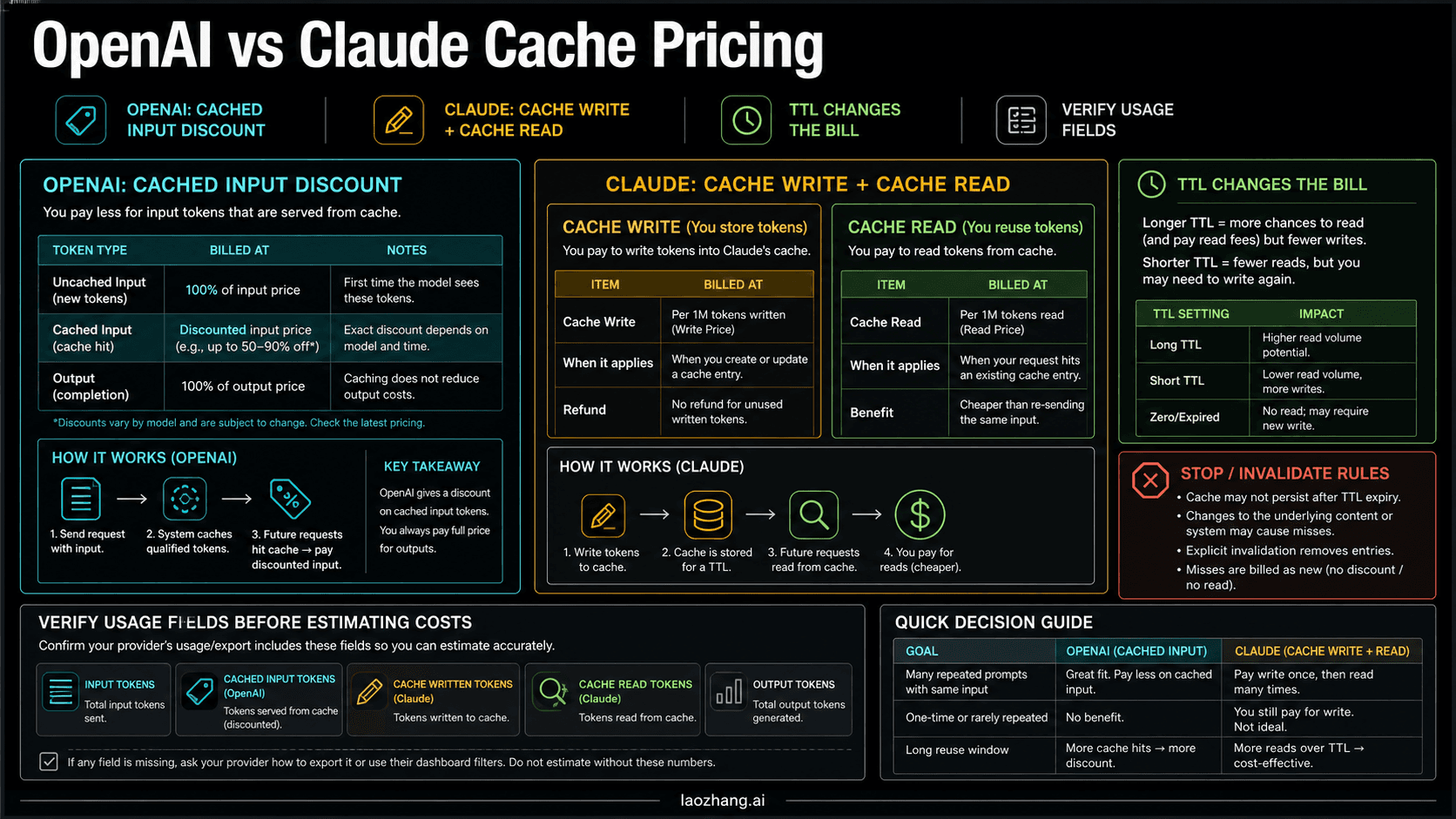
Prompt caching is the largest discount on GPT-5.4 that doesn't depend on any program: cached input tokens cost $0.25 per million instead of $2.50, a 90% reduction on the repeated part of your prompt. OpenAI applies it automatically to eligible repeated prompt prefixes. The minimum eligible length depends on request settings, so keep shared prefixes stable and confirm actual cached tokens rather than assuming every repeated prefix is a hit.
For a request with a 4,000-token system prompt followed by a user message, a matching eligible prefix can be billed at $0.25/M instead of $2.50/M. Uncached input stays at the full input rate, and output is billed separately at $15/M. A stable system prompt alone doesn't guarantee a full-prefix hit: request settings, cache boundaries, routing and retention all affect reuse. The calculations below assume full-prefix hits on the stated share of requests; check that assumption against your usage logs.
Calculating Your Actual Caching Benefit
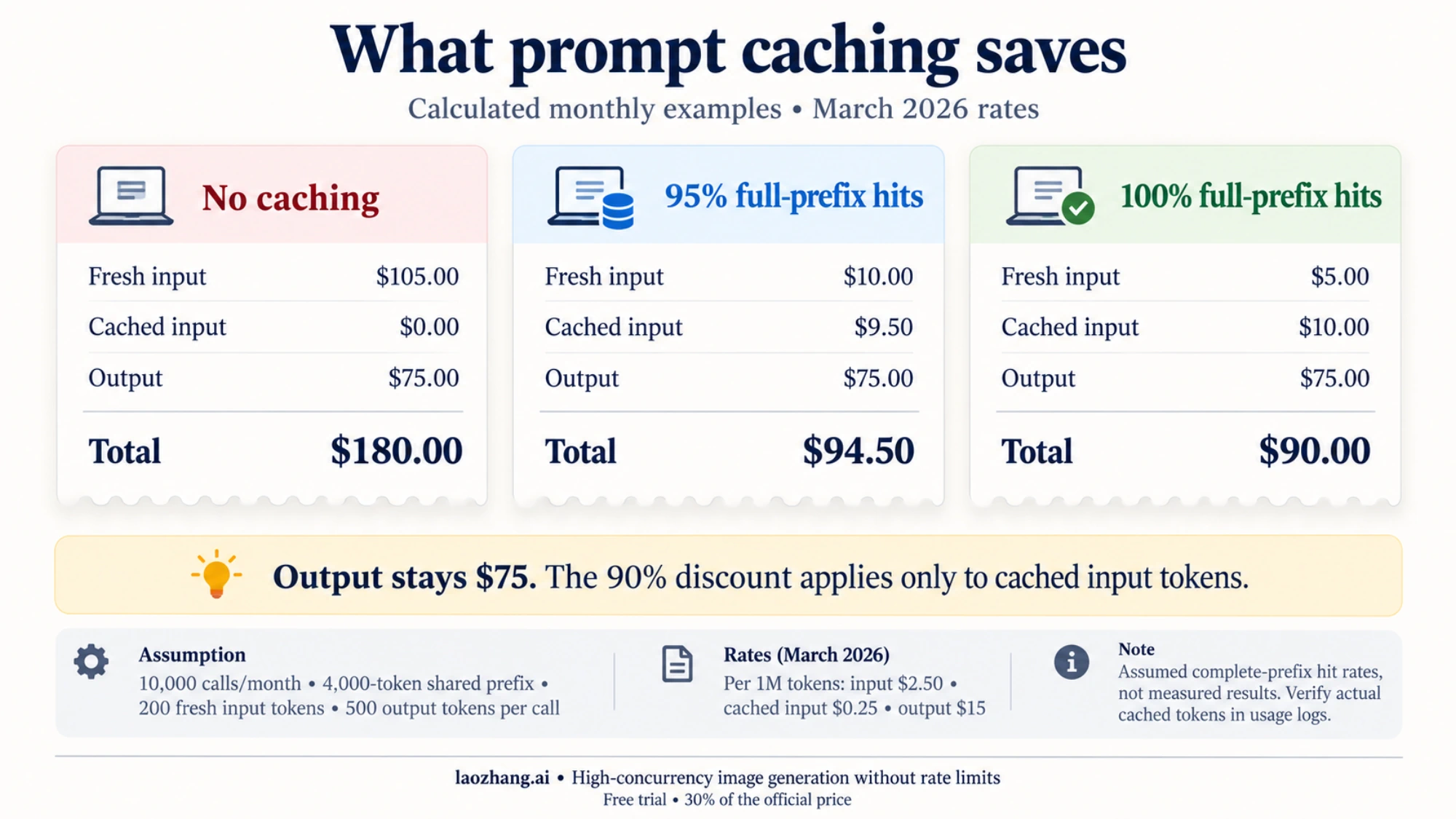
Take an application making 10,000 API calls a month with a 4,000-token system prompt, a 200-token user message and 500 output tokens per call.
Without caching, each call costs (4,200 input tokens × $2.50/M) + (500 output tokens × $15.00/M) = $0.0105 + $0.0075 = $0.0180, or $180 for 10,000 calls.
When all 4,000 system-prefix tokens come from cache, a call costs (4,000 cached tokens × $0.25/M) + (200 fresh input tokens × $2.50/M) + (500 output tokens × $15.00/M) = $0.0010 + $0.0005 + $0.0075 = $0.0090. If 95% of calls hit the full prefix and 5% are cold, the month comes to 10,000 × (0.95 × $0.0090 + 0.05 × $0.0180) = $94.50, a 47.5% reduction from $180. At a 100% hit rate it would be $90, a 50% reduction. The 90% discount applies only to cached input tokens; fresh input and output still bill in full. These are calculated estimates, not measured cache-hit results. The rates come from the official GPT-5.4 token prices, which are the same in October 2026 as at launch.
Enabling Explicit Caching in Your Code
OpenAI prompt caching is automatic for eligible repeated prefixes; the Responses API doesn't use an Anthropic-style cache_control block. Keep the shared prefix stable and read usage.input_tokens_details.cached_tokens to check actual cache use, as described in the official prompt-caching guide:
from openai import OpenAI

client = OpenAI()

# Long system prompt that will be cached
SYSTEM_PROMPT = """You are an expert financial analyst with deep knowledge of
public market valuations, DCF modeling, and comparative company analysis.
Your analysis should be data-driven, cite specific metrics, and flag
uncertainty when relevant data is unavailable.
[...additional context - total ~4000 tokens...]"""

response = client.responses.create(
    model="gpt-5.4",
    input=[
        {
            "role": "system",
            "content": [
                {
                    "type": "input_text",
                    "text": SYSTEM_PROMPT
                }
            ]
        },
        {
            "role": "user",
            "content": "Analyze the valuation of Nvidia given current market conditions."
        }
    ]
)

# Check how many tokens were served from cache
print(f"Cached tokens: {response.usage.input_tokens_details.cached_tokens}")
print(f"Fresh input tokens: {response.usage.input_tokens - response.usage.input_tokens_details.cached_tokens}")
The usage object in each response shows how many input tokens came from cache, so you can confirm caching is working and calculate your real savings per call.
What Does GPT-5.4 API Actually Cost? Real-World Scenarios
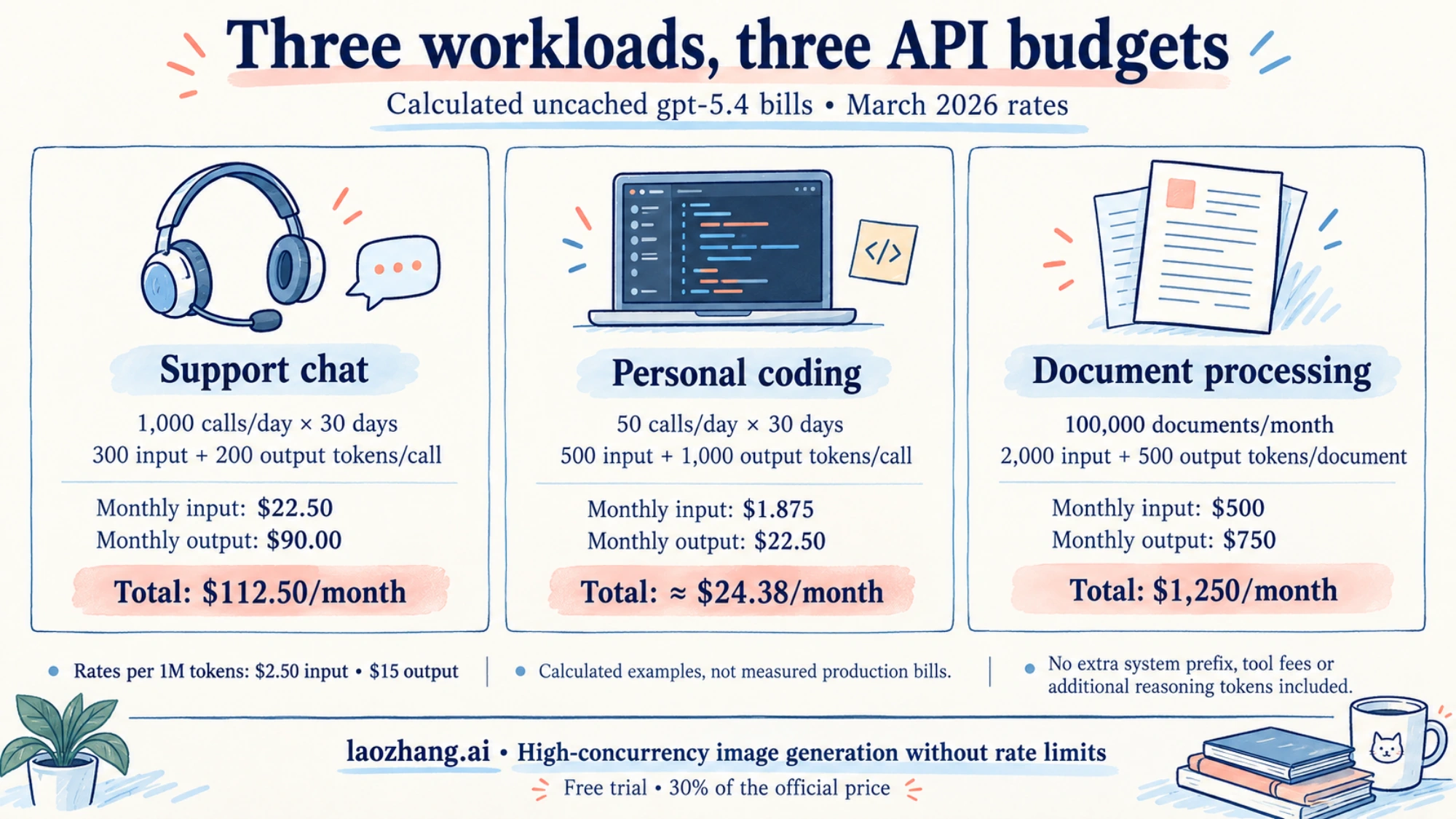
The three scenarios below use OpenAI's Standard prices for gpt-5.4 as of October 10, 2026, which are unchanged from March 2026: $2.50 per million input tokens and $15 per million output tokens, with no caching. For each one, the effect of the complimentary daily tokens assumes an eligible organization that sends this traffic from a data-sharing project and counts input and output tokens together.
Scenario 1: Startup customer support chatbot. 1,000 conversations a day with 300 input and 200 output tokens each cost $0.75 for input plus $3.00 for output, or $3.75 a day. Over 30 days that's $112.50. The workload uses 500,000 tokens a day. On Launch or Grow, the 1 million daily allowance is larger than that, so an eligible organization could pay $0 for it. On Build, the 250,000-token allowance covers half the daily tokens and the rest bills at normal rates. These 300 input tokens don't include a separate 4,000-token system prompt; adding one changes the math.
Scenario 2: Developer building a coding assistant. 50 calls a day with 500 input and 1,000 output tokens each cost $0.0625 for input plus $0.75 for output per day. Over 30 days, that's $1.875 for input plus $22.50 for output, or about $24.38. Output dominates because coding answers include whole functions and explanations, so caching can't bring this workload down much: output alone is $22.50. At 75,000 tokens a day, the workload fits inside even Build's 250,000-token allowance, which makes this the clearest case where an eligible solo developer could run GPT-5.4 for free.
Scenario 3: Document processing pipeline. 100,000 documents a month with 2,000 input and 500 output tokens each use 200M input and 50M output tokens. Uncached, that's $500 for input plus $750 for output, or $1,250. Batch halves it to $250 plus $375, or $625. If measured eligible repeated input cut the Standard input charge to $100, the Standard total would be $850, not $350; document content isn't cacheable just because the system prompt repeats. The complimentary allowance matters little at this volume: 1 million tokens a day for 30 days is 30M tokens, about 12% of the 250M the pipeline uses. At official GPT-5.4 Pro prices of $30/M input and $180/M output, the same uncached totals would cost $6,000 plus $9,000, or $15,000.
These are calculated examples, not measured production bills. Reasoning tokens, tool fees and long-context pricing above 272K tokens can raise actual spend. To compare any of these against a $20 ChatGPT subscription, see ChatGPT Plus vs API: Is the API Cheaper Than $20 a Month?
Free ChatGPT API Key Offers: Leaked Keys and Someone Else's Bill
There is no free ChatGPT API key and no legitimate key with unlimited free usage. Every OpenAI API call is billed to the organization that owns the key, so a key that costs you nothing is billing someone else, or isn't an OpenAI key at all. The offers you'll find fall into a few groups:
- GitHub repos and paste sites listing "free OpenAI API keys." These are leaked or fake keys. A working one spends another organization's balance, and it can stop working at any moment when the owner revokes it. Don't put one in your code.
- "Free, unlimited OpenAI API" developer libraries. Puter's tutorial dated September 30, 2026 advertises OpenAI access "for free, without needing an OpenAI API key," using
gpt-5.4-nano. Requests run through Puter's service and Puter accounts rather than an OpenAI key you control, so read Puter's own pricing and terms to see who pays before you build on it. It isn't the fullgpt-5.4model, andgpt-5.4-nanoleaves OpenAI's API on April 1, 2027. - Resellers advertising a "free GPT-5.4 API" or free trial credits. Read the actual price after the trial. Shared or resold account access breaks OpenAI's terms, and OpenAI warns that access from outside its supported countries can get an account blocked.
The free-key search is really a free-usage question, and the legitimate answers are the complimentary daily tokens above or another provider's free tier.
Can I Use GPT-5.4 in ChatGPT or Codex Instead?
Not through ChatGPT, and in Codex only with an API key.
ChatGPT. A ChatGPT plan never included API access: OpenAI's plan pages state that API usage "is separate and billed independently." GPT-5.4 is also no longer one of ChatGPT's chat models. As of October 2026, ChatGPT runs GPT-6 Sol for Plus, Pro, Business and Enterprise, and GPT-6 Luna for Free and Go, rolling out from October 8, 2026. Launch-era claims that "Plus includes GPT-5.4 Thinking" or that Free users get GPT-5.3 with 10 messages per 5 hours are out of date. For what's free in ChatGPT now, see Is GPT-6 Free in ChatGPT? Yes, as GPT-6 Luna, Not Sol or Astra.
Codex. OpenAI's Codex help article says: "On August 31, 2026, GPT-5.4 and GPT-5.4 mini will no longer be available in Codex when you sign in with your ChatGPT account. Replace GPT-5.4 with GPT-5.6 Terra." The same notice adds that the change "does not affect the OpenAI API or using Codex with your own API key." If you sign in to Codex with an API key, you can still pick GPT-5.4, billed through your OpenAI Platform account at standard API rates, and Codex's cloud features aren't available on that sign-in. Codex API Key vs Subscription: Which Route Should You Use? compares the two sign-in options.
GPT-5.4 Computer Use API: What Developers Should Know
GPT-5.4 supports computer use through the API: the model page lists computer use among its tools, alongside function calling, web search, file search, code interpreter and MCP. At launch on March 5, 2026, OpenAI introduced GPT-5.4 as its first general-purpose model with native computer-use capabilities. In a computer-use loop, the model looks at screenshots and proposes actions such as clicks and keystrokes, and your code carries them out, so it can work with software that has no API.
Two cost points matter for anyone trying to keep GPT-5.4 cheap. First, tool use isn't covered by the complimentary daily tokens, so computer-use workflows bill at normal rates even in an eligible organization. Second, each step adds a new screenshot to the input, so a long task uses far more input tokens than a chat reply. Start with low-stakes automations, log the token usage per completed task, and keep a person approving any action with real consequences. The current tool name and request format are in OpenAI's computer use guide on developers.openai.com; launch-era code samples may use older parameter names.
FAQ: GPT-5.4 API Access, Limits, and Common Questions
Does OpenAI offer a free trial for GPT-5.4? No. There's no trial and no free tier for GPT-5.4, and OpenAI doesn't describe an automatic sign-up credit for new API accounts. The closest thing is the data-sharing program: an eligible organization on Build, Launch or Grow gets up to 250,000 (Build) or 1 million (Launch, Grow) free GPT-5.4 tokens a day. If your organization has a promotional credit grant, it appears on the Billing page.
Is there a free ChatGPT API key or free OpenAI API key for testing? A key itself costs nothing to create, but GPT-5.4 calls need a paid tier and the Free tier doesn't support the model. The cheapest real test is the smallest $5 credit purchase: at the per-request math above, $5 covers about 400 typical gpt-5.4 requests or over 11,000 on gpt-6-luna. Keys offered for free online are leaked keys billed to someone else.
Is there a free GPT-6 Astra API key? No. gpt-6-astra is the most expensive GPT-6 API model at $10 input, $1 cached and $50 output per 1M tokens, and it has no free tier. It's in the same 1M-token complimentary group as GPT-5.4, so an eligible data-sharing organization gets up to 1 million Astra tokens a day on Launch or Grow and 250,000 on Build. Astra isn't free in ChatGPT either.
What is the rate limit for GPT-5.4 on a new account, and what happened to Tier 1? OpenAI replaced the old Tier 1–5 tables with Build, Launch and Grow. A new organization reaches Build after $5 in total purchases, which gives GPT-5.4 5,000 requests and 1 million tokens per minute. Launch ($100 in purchases) raises that to 10,000 RPM and 4 million TPM; Grow ($500) to 15,000 RPM and 40 million TPM.
Is GPT-5.4 being deprecated? Not as of October 10, 2026. OpenAI's deprecations page has no entry for gpt-5.4, gpt-5.4-mini or gpt-5.4-pro. gpt-5.4-nano leaves the API on April 1, 2027 (replacement gpt-6-luna), and gpt-5.4-cyber was removed on October 1, 2026.
Can I use the existing openai Python SDK with GPT-5.4, or do I need to update anything? You can use the same SDK and endpoints: GPT-5.4 runs on Chat Completions, Responses and Batch, so in most code you only change the model name. Supported parameters can differ between model families, so run one test call before switching production traffic.
Does Vercel AI Gateway's free credit cover GPT-5.4? Probably not. Vercel's pricing page says the free tier includes "a subset of models, not the full catalog," doesn't state the monthly credit amount, and shows GPT-5.4 without a free-tier label. Buying credits moves you to the paid tier, where the free credit no longer applies and GPT-5.4 costs OpenAI's list price.
Summary: Getting Started with GPT-5.4 Today
GPT-5.4 is still a supported OpenAI API model at its launch price of $2.50 input and $15 output per 1M tokens, with no free tier. The decision comes down to four rules:
- To pay $0: reach Build with a $5 purchase, check whether your organization qualifies for complimentary tokens, and run GPT-5.4 from a data-sharing project, as long as you're comfortable with that traffic being used for training.
- To pay less: use Batch or Flex for anything that can wait, and keep long instructions at the start of the prompt so caching can apply.
- If price matters more than staying on GPT-5.4: compare
gpt-5.4-mini,gpt-6-solandgpt-6-lunaon your own prompts. Move offgpt-5.4-nanobefore April 1, 2027. - Skip "free key" lists and anything that asks you to share or buy account access.
Start with one test call and read the usage object it returns. Those token counts, multiplied by the prices in this guide, give you a real monthly estimate before you commit to a model.
Sources9
External pages this guide links to, in the order they appear. Last updated Oct 10, 2026.
Sources9
External pages this guide links to, in the order they appear. Last updated Oct 10, 2026.
- 1.GPT-5.4 model pagedevelopers.openai.com/api/docs/models/gpt-5.4
- 2.OpenAI API pricing pagedevelopers.openai.com/api/docs/pricing
- 3.data-sharing complimentary token programhelp.openai.com/en/articles/10306912
- 4.OpenRouter's GPT-5.4 listingopenrouter.ai/openai/gpt-5.4
- 5.Vercel AI Gateway pricing pagevercel.com/docs/ai-gateway/pricing
- 6.OpenAI's deprecations pagedevelopers.openai.com/api/docs/deprecations
- 7.official prompt-caching guidedevelopers.openai.com/api/docs/guides/prompt-caching
- 8.official GPT-5.4 Pro pricesdevelopers.openai.com/api/docs/models/gpt-5.4-pro
- 9.Codex help articlehelp.openai.com/en/articles/11369540