Jev AI Model: What It Is, How It Compares, and How to Use It
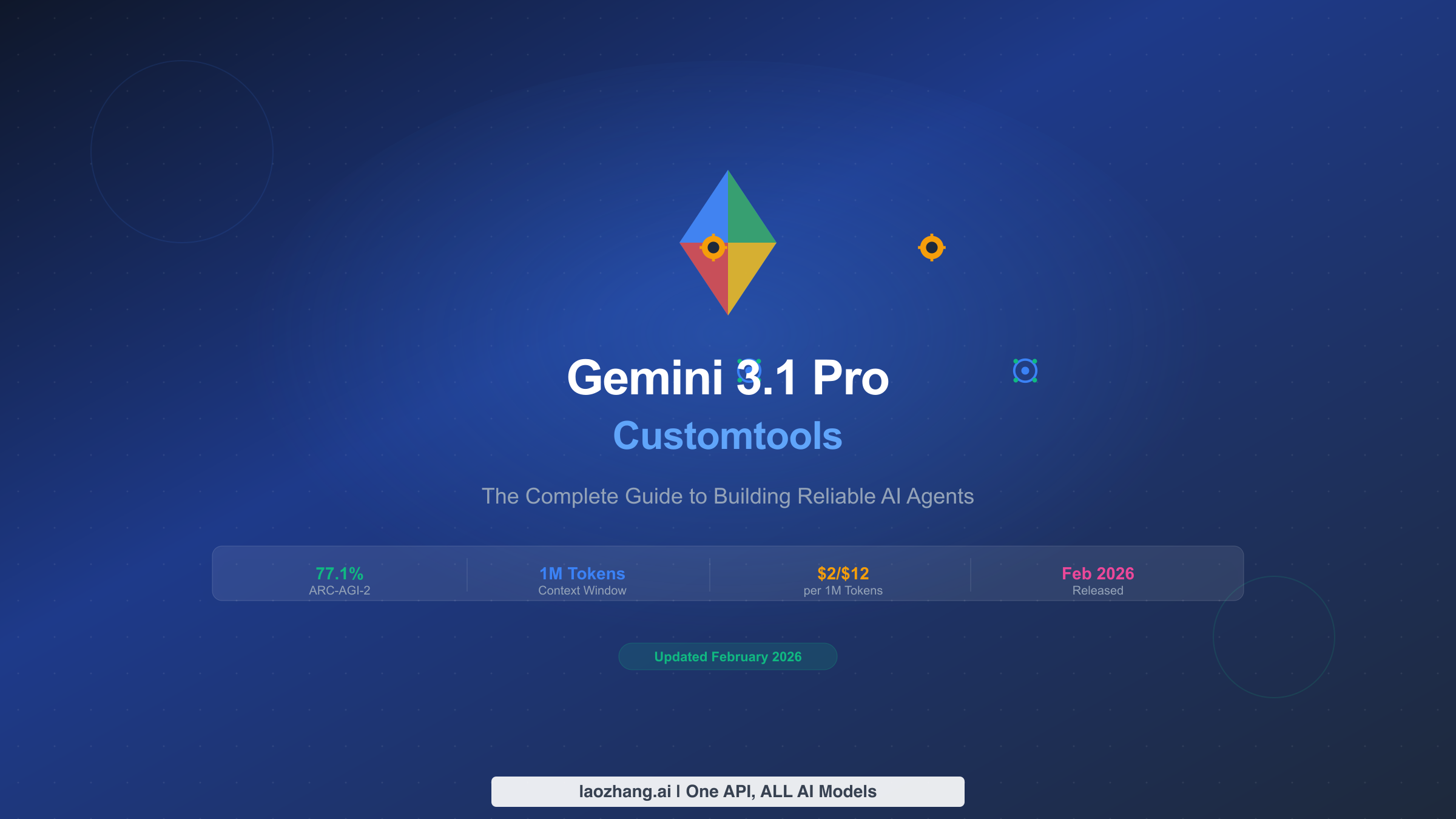
Jev from TypeSafe AI returns a choice, score or yes-probability instead of text, for $0.042 per million input tokens. It suits narrow decisions, not writing.
On this page
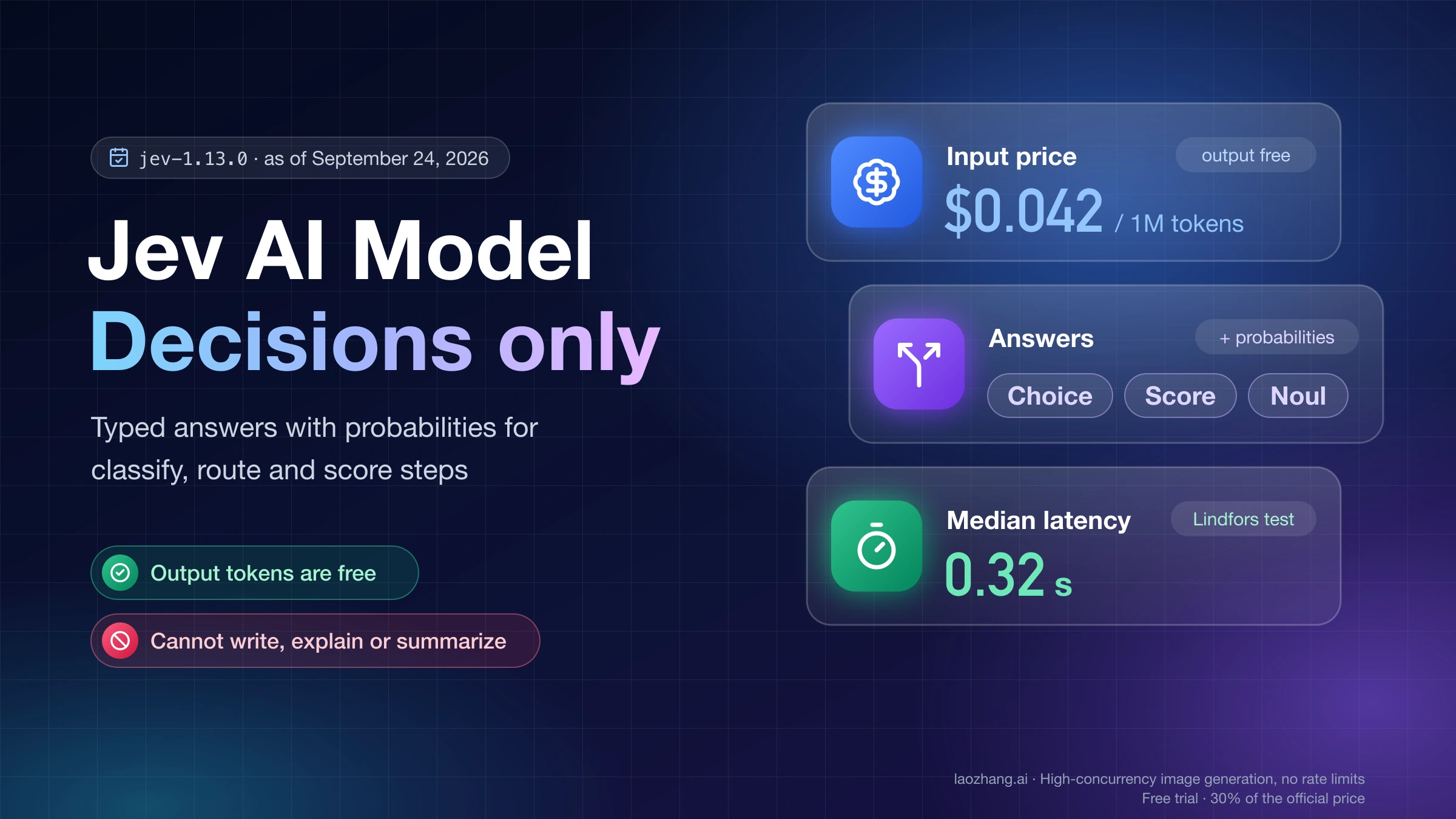
Jev is a model from TypeSafe AI that makes decisions and never writes text. You send it some content (the state) plus a set of questions whose possible answers you define in advance. It sends back one of your options, a position on your scale, or a yes-probability, each with probabilities attached. That makes it a replacement for one specific kind of LLM call: the one where you ask a chat model a narrow question and parse a label out of its reply. It cannot write, explain, summarize, or run a coding agent.
As of September 24, 2026, the current model is jev-1.13.0. It costs $0.042 per million input tokens on TypeSafe's own API, and output is free. Anyone can sign up since the waitlist was dropped on September 20, and OpenRouter serves it with just an OpenRouter key. The model itself is closed; only the client SDK source is public on GitHub.
Use it where your code needs a fast, checkable decision and can tolerate sending unsure cases elsewhere. Keep exact logic in code and anything that needs words with an LLM. The tutorial code follows TypeSafe's and OpenRouter's documentation as of September 24, 2026, with their exact field names; the sample outputs shown are the ones those docs publish.
What Jev is and what it returns
TypeSafe AI announced Jev on September 15, 2026 as the first of what it calls "System One models." The founder, Diogo Almeida, previously worked at OpenAI on the instruction-following research behind ChatGPT. The name comes from William Stanley Jevons (of the Jevons paradox), and "System One" borrows Daniel Kahneman's term for fast, intuitive judgment. TypeSafe says it built a new architecture, a parallel sampler, and a training method it calls Reinforcement Learning for Calibrated Decisions (RLCD).
In practice, every request to POST https://api.typesafe.ai/v1/systemone has three required fields:
state: the content to judge. It can be a string, a JSON object, or an array of text values. Text only; no images, audio, or video.model: for examplejev-latestor a pinned version likejev-1.13.0.questions: a map of question IDs you choose to typed questions. The IDs are for your code only and are never shown to the model, so the full question has to live ininstructions.
Jev evaluates every question against the same state in parallel, and the questions do not see each other's answers.
Three question types
| Type | Use it when | You define | You get back |
|---|---|---|---|
| Choice | The answer is one of a fixed set of unordered options (department, intent, document type) | criteria: a map of option → description (or null), up to 255 options | choice, probabilities for every option, confidence |
| Score | The answer sits on an ordered scale (severity, frustration, quality) | criteria: an ordered list of level descriptions, 2 to 10 levels | score (can fall between levels), legend, probabilities, confidence |
| Noul | A clean yes/no statement ("the customer asks for a refund") | instructions, plus optional descriptions of what true and false mean | noul: a number from 0 (no) to 1 (yes); no confidence field |
"Noul" is short for Bernoulli, as TypeSafe's CEO confirmed on Hacker News according to Simon Willison. Vercel's AI SDK calls the same type boolean.
TypeSafe's guidance for writing questions is blunt: ask one judgment that a knowledgeable person could make in a second. "Does this message convey urgency?" works. "Analyze this message and decide what to do" does not. When a judgment depends on several factors, ask about each factor separately and combine the answers in your own code. That design choice is the whole programming model: code owns the workflow, and Jev fills in the fuzzy if conditions.
Confidence, and what "can't hallucinate" really means
Choice and Score answers include a confidence between 0 and 1, derived from how concentrated the probability distribution is. TypeSafe's interactive example for a Choice uses (n × top probability − 1) ÷ (n − 1), where n is the number of options. In the quickstart response below, three departments with a top probability of 0.85 give (3 × 0.85 − 1) ÷ 2 ≈ 0.78, which is the confidence the API returned. An even split scores 0. The answer tells you what; confidence tells you whether to act on it without a second look.
TypeSafe's launch post says Jev "can't hallucinate" and charts a 0% type-error rate. Read that literally. The post itself says the 0% is "not empirical": the answer is guaranteed to be one of the options you defined, in the structure you defined, because the model cannot produce anything else. It does not mean the chosen option is correct. A ticket about a failed payout could still come back as sales, even with high confidence. The guarantee removes parsing failures and invented labels; it does nothing for judgment errors.
Where the speed and price claims come from
TypeSafe quotes 70–500 ms end to end and says Jev is "40x–200x faster" than frontier LLMs on the same System One-shaped questions. Its home page figures of "193.6x faster, 444.6x cheaper" come from TypeSafe's own workflow evals. The launch post adds several caveats of its own: TypeSafe's team wrote the workflows, the reference answers are the average of GPT-6 Astra and Fable 5.1, latency was measured from laptops on the US West Coast where the service runs, and the company expects these numbers to be "on the higher end of real world gains." It also says it cannot prove the price is not subsidized, though it expects prices to fall rather than rise.
The mechanism is easier to trust than the multipliers. An LLM generates tokens one after another, and a reasoning model may write thousands of them before giving a one-word label. Jev computes all answers in one parallel pass and emits no text, which is why TypeSafe calls output "too cheap to meter" and charges nothing for it.
How Jev compares
Jev vs asking an LLM for JSON
Jev (jev-1.13.0) | Chat LLM with a JSON/structured-output prompt | Plain code (rules, regex, parser) | |
|---|---|---|---|
| Output | One of your predefined options, a scale position, or a yes-probability | Text you parse, or schema-constrained JSON | Whatever you program |
| Format guarantee | Always matches your schema by construction | Depends on the provider's structured-output support and your validation | Full |
| Uncertainty signal | Probabilities for every option plus confidence | Self-reported if you ask for it; in the test below it did not separate right from wrong answers | None needed if the rule is exact |
| Explanation | None, only numbers | Can write a rationale (not guaranteed faithful) | Fully inspectable |
| Handles open-ended output | No | Yes | No |
| Billing | Input tokens only; output free | Input and output tokens, output usually priced higher | Your compute |
| Input | Text, up to 64k tokens per request on TypeSafe's API | Text, and for many models images/audio | Anything |
| Language | Best in English | Varies by model | N/A |
| Customization | No fine-tuning; shape it through state, instructions and criteria | Prompting, often fine-tuning | Edit the code |
Two lines in that table decide most cases. If the answer space is open (a reply, a summary, a SQL query), Jev is out. If the answer is exactly computable (a count, a date comparison, a regex match), both Jev and the LLM are the wrong tool.
An independent test: Jev vs DeepSeek V4.1 Flash
Emil Lindfors ran an early-access comparison on 24 Norwegian responses to a 2022 salmon-farming tax hearing. The reference labels came from Claude Fable 5.1, labeling each document twice in independent passes. DeepSeek V4.1 Flash got the same questions in one prompt with JSON output via OpenRouter, once with reasoning off and once with it on.
| Metric (agreement with Fable 5.1 labels) | Jev 1.13 | DeepSeek, reasoning off | DeepSeek, reasoning on |
|---|---|---|---|
| Stance, 4 options | 20 of 24 | 20 of 24 | 22 of 24 |
| Respondent type, 6 options | 21 of 23 | 22 of 23 | 23 of 23 |
| 192 yes/no argument labels | 0.86 | 0.89 | 0.88 |
| Substance, exact level on a scale | 19 of 24 | 14 of 24 | 14 of 24 |
| Cost per 1,000 documents | $0.22 | $1.31 | $3.08 |
| Median latency | 0.32 s | 2.7 s | 26 s |
| Slowest request | 1.3 s | 17.9 s | 250 s |
Lindfors is explicit about the limits. This measures agreement with another model's labels, not correctness. With 24 documents, the 95% interval on a stance figure is about ±15 percentage points, so the three columns are statistically the same on stance and arguments. DeepSeek's latency is a mix across 13 OpenRouter providers. The clearer differences are cost, latency, and the ordered-scale question.
The more useful finding is about the probabilities. When Jev's top probability was 0.9 or higher, it agreed with the reference on 14 of 15 stance labels and 20 of 20 respondent types; below 0.9, it agreed on 6 of 9 and 1 of 3. That split is what confidence-gated automation relies on. DeepSeek's self-reported confidence did not separate the cases: when it said 0.7–0.9, the reference agreed about half the time.
One more detail from the same test: rewriting the questions with extra qualifiers made agreement slightly worse (0.89 to 0.86) and pushed more probabilities toward the middle. Short, direct questions suited Jev better.
"Isn't this just a big zero-shot classifier?"
Functionally, it belongs to that family: text goes in, and probabilities over labels you supply come out. If a small zero-shot or fine-tuned classifier already works for your task, Jev does not make it obsolete. What Jev adds, per its documentation, is a label description for every option, structured JSON state with field references in the question (for example Does `ticket.messages[0].text` request a refund?), three answer types in one request, up to 255 options, and training aimed at calibrated probabilities. Whether that beats your existing classifier is an empirical question for your data, and at Jev's price it is cheap to find out.
It is also not an "LLM killer." It replaces the prompt-and-parse step inside a workflow, and often it makes an LLM cheaper to keep. The two patterns OpenRouter documents for Jev are gating agent tool calls, and verifying a cheap model's draft so that only failed checks go to a stronger model.
Which decision goes to Jev, code, an LLM, or a person
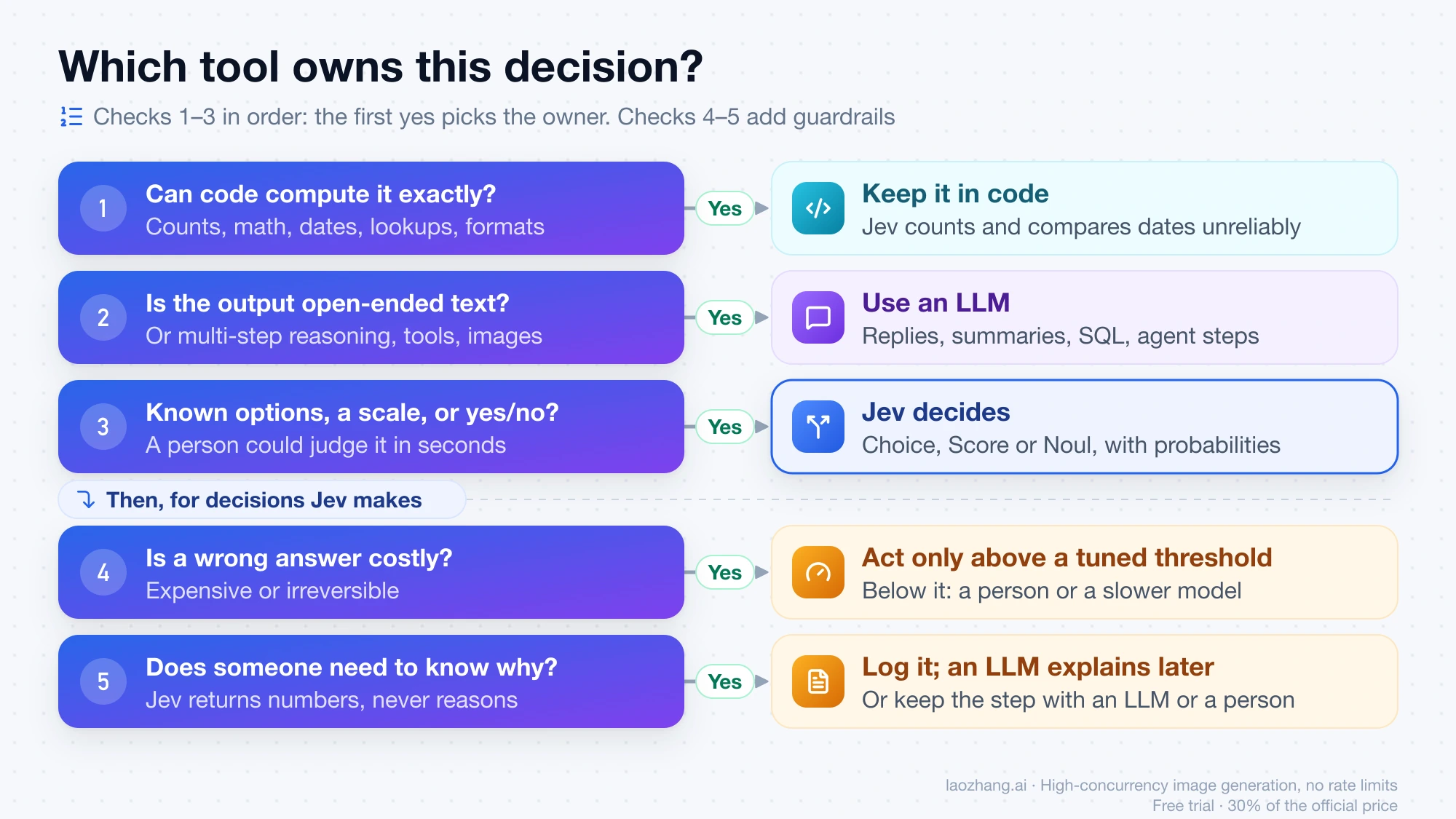
Run each decision point in your system through these checks in order:
- Can code compute it exactly? Counting, arithmetic, date comparison, format checks, lookups. Keep it in code. TypeSafe's own jaggedness notes say Jev counts unreliably and compares dates badly.
- Is the output open-ended text, or does it need multi-step reasoning, tools, or images? Use an LLM.
- Is the answer one of a known set, a level on a scale you can describe, or a yes/no, and could a person judge it in seconds from text you can pass in? That is Jev's job.
- Is a wrong answer expensive or irreversible? Jev can still decide the clear cases, but only above a threshold tuned on your data. Everything below it goes to a person or a slower model.
- Does someone need to know why? Jev gives no reasons. Either log the decision and have an LLM write the explanation afterward, or keep this step with an LLM or a person.
| Decision point | Goes to | Why |
|---|---|---|
| Which team handles this ticket | Jev (Choice) with a low-confidence review queue | Fixed options, fast judgment |
| How urgent or angry the customer is | Jev (Score) | Ordered levels you can describe |
| Does this message contain personal data | Jev (Noul), plus regex for known formats | Regex catches exact formats; Jev catches the rest |
| Refund amount or days since purchase | Code | Arithmetic and dates |
| Draft the reply | LLM | Generated text |
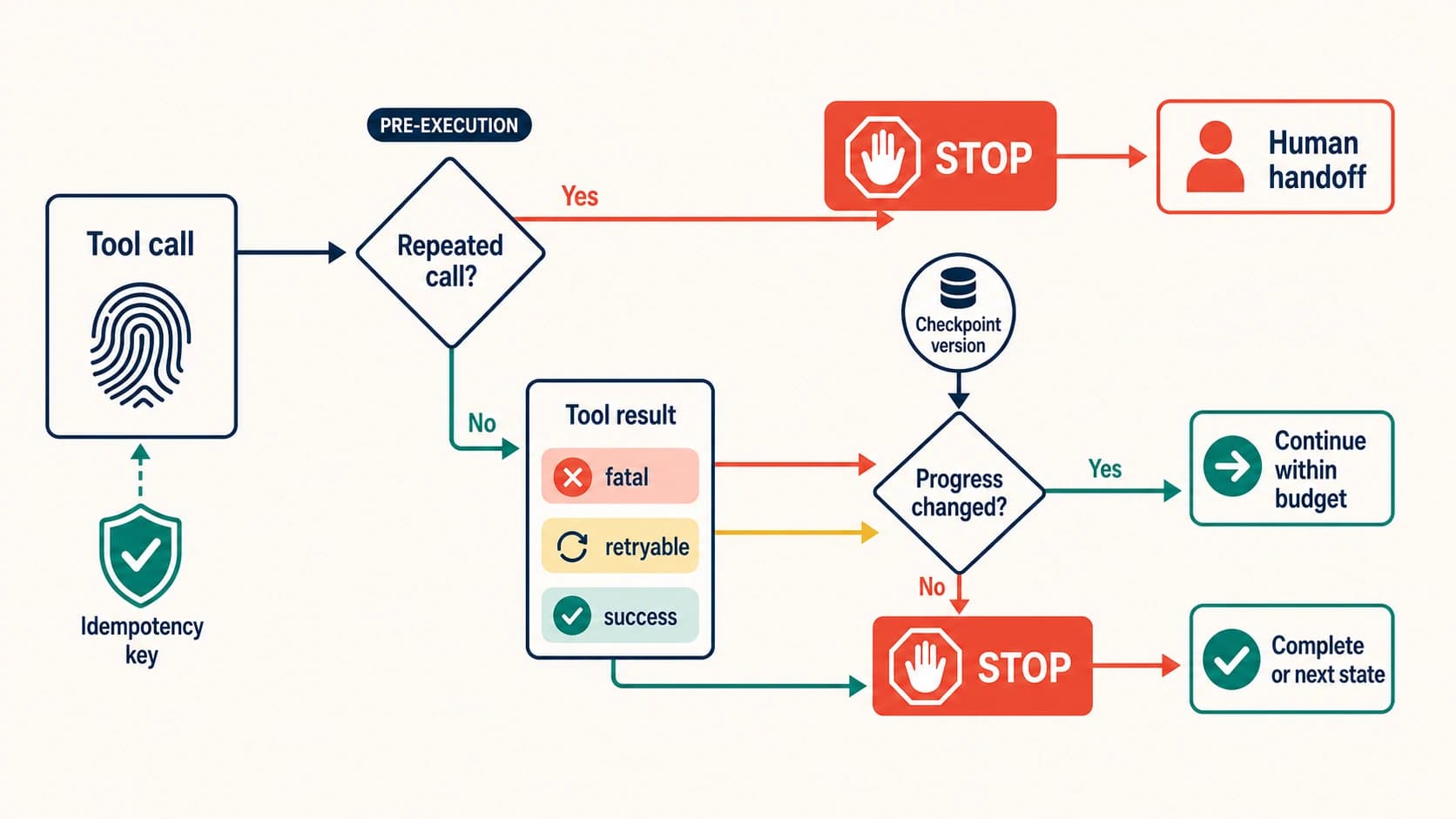
| Should the agent continue, retry, or stop | Jev (Choice), with hard limits in code | See How to Stop an AI Agent Tool Loop—and Keep It Stopped for the limits Jev should not replace |
| Allow a risky tool call like deleting files | Jev plus a deterministic allowlist and human approval for the gray zone | Injection can move the answer (see the checklist below) |
| Rank job applicants | A person, with evals if a model assists | Simon Willison flags hidden bias risk and no explanation |
What it costs: the arithmetic
Jev bills input tokens only, so the formula is short:
cost = requests × input tokens per request × $0.042 ÷ 1,000,000
Input tokens include the state and all the questions. OpenRouter's tutorial response shows the math at work: 476 input tokens came back with usage.cost of 0.000019992, which is exactly 476 × $0.042 ÷ 1,000,000.
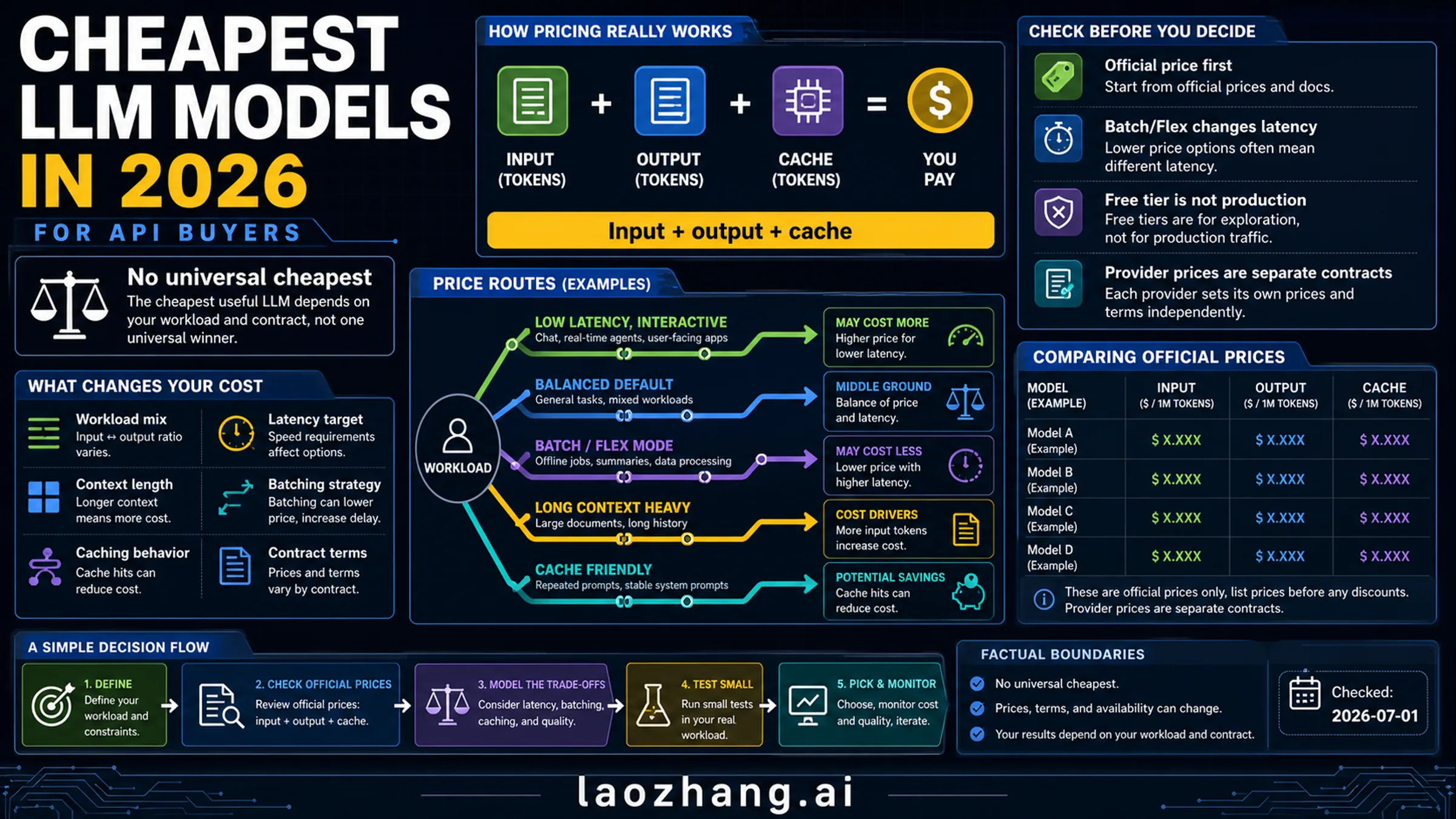
A worked example, with the token count as an assumption: 1 million ticket classifications at 400 input tokens each is 400 million tokens, or $16.80. For comparison, TypeSafe's launch post puts existing LLM input prices at $0.20 to $10 per million tokens. At the low end of that range, the same 400 million input tokens cost $80, before paying for any output. Simon Willison also noted that Jev's input price is below OpenAI's GPT-5 Nano at $0.05 per million. For current LLM prices by model, see LLM API Pricing Comparison 2026: Cheapest Models by Input and Output Tokens.
Three things change the bill more than the per-token price:
- Put all questions about one state in one request. A request ingests the state once and answers every question against it, so ten questions in one call avoids sending the same 2,000-token document ten times.
- Trim the state. Irrelevant fields cost money and, per TypeSafe, cost accuracy too.
- Watch non-English token counts. Lindfors measured about 2.06 characters per token on Norwegian, so the 32k state limit held roughly 64,000 Norwegian characters.
Throughput matters for backfills. At the documented 1,200 requests per minute, 1 million requests take about 833 minutes, or just under 14 hours. The 250,000 tokens-per-second limit only binds first when requests average more than 12,500 tokens (250,000 ÷ 20 requests per second). TypeSafe warns that both limits are being adjusted and can change without notice.
Three ways to get access
| TypeSafe API (direct) | OpenRouter | Vercel AI Gateway | |
|---|---|---|---|
| Account | TypeSafe console, open signup since September 20, 2026 | OpenRouter key only; no TypeSafe account | Vercel account |
| Model name | jev-latest, jev-preview, or jev-1.13.0 | typesafe/jev-1.13 or ~typesafe/jev-latest (Decisions API); jev-1.13 with the TypeSafe SDK | typesafe-ai/jev |
| How you call it | POST /v1/systemone or the official SDKs | Decisions API POST /api/alpha/decisions (alpha), or the TypeSafe SDK with its base URL set to https://openrouter.ai/api | AI SDK 7.0.105+ experimental_evaluate |
| Context | 64k tokens per request; 32k for state plus the longest question | 32,000 tokens for state plus questions | Not separately documented |
| Price | $0.042 per million input tokens, output free | $0.042 per million input tokens, output free, billed to OpenRouter | Vercel listed it as free until September 25, 2026; plan on paid pricing after that |
Several outlets, including Crypto Briefing, reported that new TypeSafe accounts get $5 in credit. TypeSafe's own pages do not state the amount, so check the console. At list price, $5 covers about 119 million input tokens, or roughly 297,000 requests of 400 tokens.
Pick TypeSafe direct if you want the larger context and first-party SDK defaults. Pick OpenRouter if you already have billing there or want to avoid another vendor account. Treat the Vercel option as experimental.
Tutorial: from first call to confidence-gated routing
Step 1: Get a key from the right place
TypeSafe's official domains are typesafe.ai, docs.typesafe.ai, console.typesafe.ai, and api.typesafe.ai. Several lookalike sites registered after launch advertise "free Jev"; they are not TypeSafe, and your key should never go into them.
- Direct: sign in, then create a key at console.typesafe.ai/keys. The Playground lets you paste a state and add questions before writing code.
- OpenRouter: create a key at openrouter.ai/settings/keys.
Then export it:
export TYPESAFE_API_KEY="your-typesafe-key"
# or, for OpenRouter
export OPENROUTER_API_KEY="your-openrouter-key"
Step 2: Make a first call with curl
This is TypeSafe's quickstart request: one support ticket, three questions of different types.
curl -X POST https://api.typesafe.ai/v1/systemone \
  -H "Authorization: Bearer $TYPESAFE_API_KEY" \
  -H "Content-Type: application/json" \
  -d @- <<'EOF'
{
  "state": "Hi, I've been trying to connect my Stripe account for 3 days and the integration keeps failing. I'm losing sales. Please help ASAP.",
  "model": "jev-latest",
  "questions": {
    "department": {
      "type": "choice",
      "instructions": "Which team should handle this",
      "criteria": {
        "billing": "Payment or subscription issues",
        "technical": "Bugs or integration problems",
        "sales": "Pricing or account questions"
      }
    },
    "frustration": {
      "type": "score",
      "instructions": "How frustrated the customer appears",
      "criteria": [
        "Calm, just stating facts",
        "Frustrated but civil",
        "Very angry, strong language"
      ]
    },
    "is_urgent": {
      "type": "noul",
      "instructions": "The message conveys urgency or time-sensitivity"
    }
  }
}
EOF
Step 3: Read the answer fields
The response TypeSafe publishes for that request:
{
  "model": "jev-1.13.0",
  "answers": {
    "department": {
      "type": "choice",
      "choice": "technical",
      "confidence": 0.78,
      "probabilities": { "technical": 0.85, "sales": 0.0, "billing": 0.15 }
    },
    "frustration": {
      "type": "score",
      "score": 1.0,
      "confidence": 1.0,
      "legend": {
        "0": "Calm, just stating facts",
        "1": "Frustrated but civil",
        "2": "Very angry, strong language"
      },
      "probabilities": { "0": 0.0, "1": 1.0, "2": 0.0 }
    },
    "is_urgent": { "type": "noul", "noul": 1.0 }
  },
  "usage": { "input_tokens": 392, "output_tokens": 65 }
}
How to read it:
modelis the version that actually answered.jev-latestis an alias and will move when a new release ships, so log this field on every call.department.choiceis the top option. The 0.15 onbillingis useful too: it tells you the runner-up.frustration.scoreis a probability-weighted position. With three levels (0, 1, 2), 1.0 means "Frustrated but civil." TypeSafe warns against treating the value between two levels as an exact magnitude; use it for thresholds only.is_urgent.noulis the probability that the statement is true. There is no confidence field for Noul answers, and a threshold you tuned on a Noul does not transfer to a Choice.usage.input_tokensis what you pay for.output_tokensis reported but not billed.
Errors are standard HTTP: 401 for a bad key, 422 when the body fails validation (the body names the field), 429 for rate limits, and 529 when TypeSafe is overloaded. Retry 429 and 529 with exponential backoff; the official SDKs already do this and honor retry-after.
Step 4: Call it from Python or TypeScript
Python 3.10 or later:
pip install typesafe-sdk # or: uv add typesafe-sdkfrom typesafe_sdk import Choice, Noul, Score, TypeSafeClient
client = TypeSafeClient() # reads TYPESAFE_API_KEY, uses jev-latest by default
ticket = {
"message": "Hi, I've been trying to connect my Stripe account for 3 days "
"and the integration keeps failing. I'm losing sales. Please help ASAP."
}
response = client.system_one(
state=ticket,
questions={
"department": Choice(
instructions="Which team should handle `message`?",
criteria={
"billing": "Payment or subscription issues",
"technical": "Bugs or integration problems",
"sales": "Pricing or account questions",
"other": "None of the above",
},
),
"frustration": Score(
instructions="How frustrated does the customer appear in `message`?",
criteria=[
"Calm, just stating facts",
"Frustrated but civil",
"Very angry, strong language",
],
),
"is_urgent": Noul(
instructions="`message` conveys urgency or time-sensitivity",
),
},
)
dept = response.choices["department"]
print(response.model, dept.choice, dept.confidence, dept.probabilities)
print(response.scores["frustration"].score)
print(response.nouls["is_urgent"].noul)
print(response.usage.input_tokens)Two small changes from the quickstart are worth copying. The state is an object, so the question can point at message by name, which TypeSafe recommends once your state has more than one field. The Choice also has an other option, because a Choice must pick something, and without an escape hatch an off-topic ticket gets forced into the nearest department.
Node.js 20 or later:
npm install @typesafe-ai/sdkimport { choice, noul, TypeSafeClient } from "@typesafe-ai/sdk";
const client = new TypeSafeClient(); // reads TYPESAFE_API_KEY
const response = await client.systemOne({
state: { message: "I was charged twice. Please fix this ASAP." },
questions: {
department: choice("Which team should handle `message`?", {
billing: "Payment or subscription issues",
technical: "Bugs or integration problems",
other: null,
}),
is_urgent: noul("`message` conveys urgency or time-sensitivity"),
},
});
console.log(response.answers.department.choice, response.answers.department.confidence);
console.log(response.answers.is_urgent.noul);The SDK infers answer types from the questions, so response.answers.department.choice is typed without extra work.
Step 5: Use it through OpenRouter instead
With the official SDK, change the key and base URL and use OpenRouter's model name:
import os
from typesafe_sdk import TypeSafeClient

client = TypeSafeClient(
    api_key=os.environ["OPENROUTER_API_KEY"],
    base_url="https://openrouter.ai/api",
    model="jev-1.13",
)
Everything else in Step 4 stays the same. The SDK's model-listing call does not work against OpenRouter, so browse models on OpenRouter's site instead. Remember that OpenRouter's context limit is 32,000 tokens for state and questions together.
Without the TypeSafe SDK, call OpenRouter's Decisions API, which is marked alpha:
curl https://openrouter.ai/api/alpha/decisions \
  -H "Authorization: Bearer $OPENROUTER_API_KEY" \
  -H "Content-Type: application/json" \
  -d '{
    "model": "typesafe/jev-1.13",
    "state": { "ticket": "My checkout page shows a blank screen after I click Pay." },
    "questions": {
      "team": {
        "type": "choice",
        "instructions": "Which team should own `ticket`?",
        "criteria": {
          "payments": "Checkout, billing, or payment processing issues.",
          "frontend": "Rendering, layout, or browser compatibility issues.",
          "account": "Login, permissions, or profile issues."
        }
      }
    }
  }'
The response has the same answers shape, plus usage.cost in US dollars.
Step 6: Gate actions on confidence
This is where Jev earns its place. Each action gets its own threshold based on what a wrong call costs, and anything below it goes to a slower path. The thresholds below are placeholders; Step 7 shows how to set real ones.
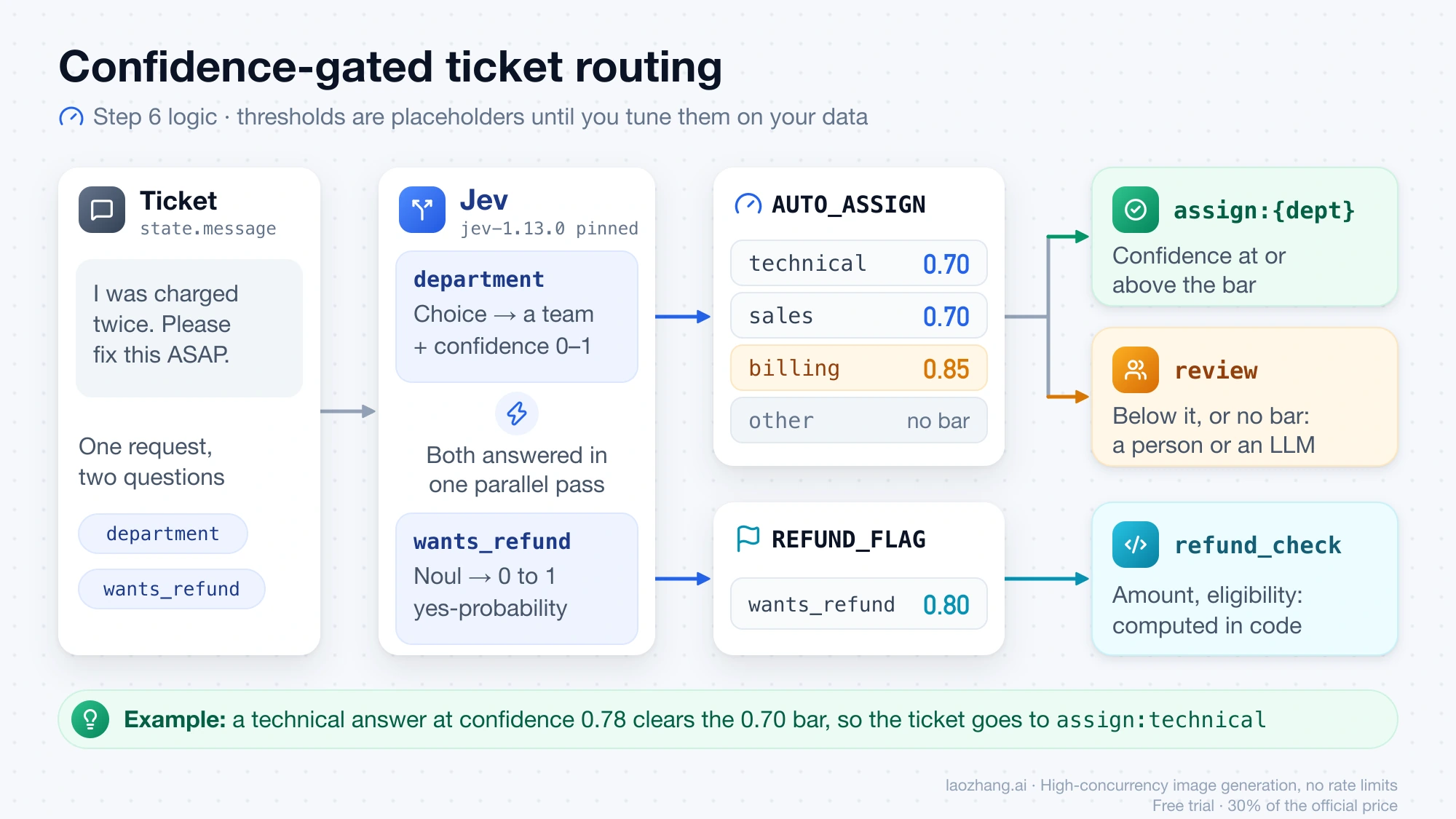
from typesafe_sdk import Choice, Noul, TypeSafeClient

# Pin the version your thresholds were tuned on; move to a new one deliberately.
client = TypeSafeClient(model="jev-1.13.0")

QUESTIONS = {
    "department": Choice(
        instructions="Which team should handle `message`?",
        criteria={
            "billing": "Payment, invoicing, or refund issues",
            "technical": "Bugs, outages, or integration problems",
            "sales": "Pricing, upgrades, or new accounts",
            "other": "None of the above",
        },
    ),
    "wants_refund": Noul(instructions="The customer in `message` asks for money back"),
}

# Per-action thresholds: stricter where a wrong call costs more.
AUTO_ASSIGN = {"technical": 0.70, "sales": 0.70, "billing": 0.85}
REFUND_FLAG = 0.80


def triage(ticket: dict) -> dict:
    r = client.system_one(state=ticket, questions=QUESTIONS)
    dept = r.choices["department"]
    refund = r.nouls["wants_refund"].noul

    record = {
        "model": r.model,                      # which version answered
        "department": dept.choice,
        "confidence": dept.confidence,
        "probabilities": dept.probabilities,
        "wants_refund": refund,
        "input_tokens": r.usage.input_tokens,
    }

    threshold = AUTO_ASSIGN.get(dept.choice)
    if threshold is None or dept.confidence < threshold:
        record["action"] = "review"            # human queue or an LLM second opinion
    else:
        record["action"] = f"assign:{dept.choice}"

    if refund >= REFUND_FLAG:
        record["refund_check"] = True          # amount and eligibility are computed in code

    return record
Notice what stays out of Jev: the refund amount, the purchase date, and the eligibility rules are code. Jev only answers whether the customer is asking.
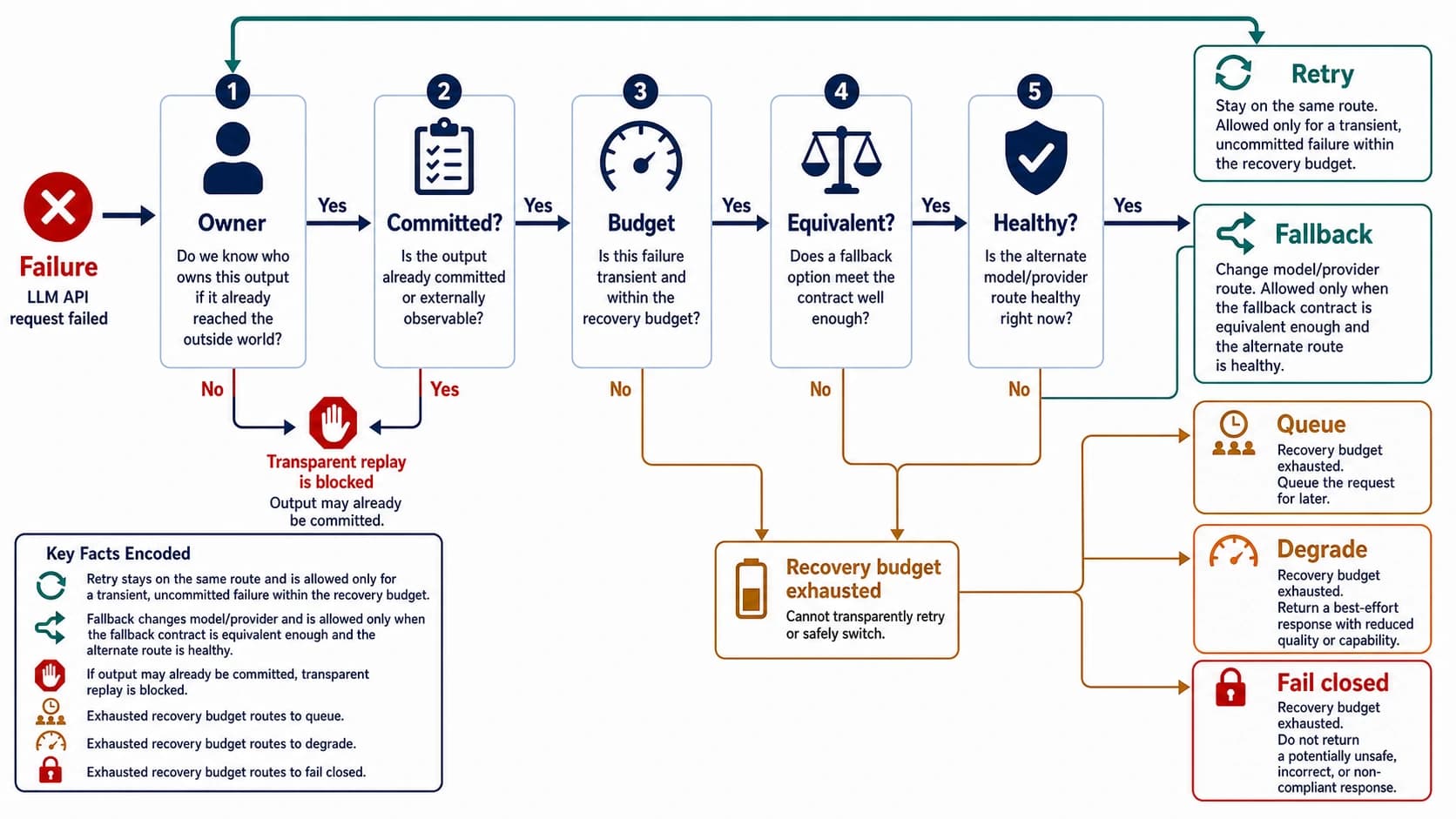
The "review" branch can be a human queue or an LLM that reads the ticket and decides with a written reason. That second model is any chat model you already use. For example, an OpenAI-compatible gateway such as laozhang.ai (https://api.laozhang.ai/v1) can serve the LLM step, though it does not offer Jev itself. For deciding when that fallback should retry, switch models, or stop, see LLM API Retry vs Fallback: Five Gates Before Another Model Call.
Step 7: Tune thresholds on your own data
TypeSafe does not publish universal thresholds, and it should not: they depend on your data and on what a mistake costs. A workable procedure:
- Collect a few hundred real inputs and label them yourself or with a trusted reviewer.
- Run Jev on all of them with your final questions and a pinned model version.
- Sort by confidence and compute agreement above each candidate cutoff.
- Pick the lowest cutoff where agreement meets your target for that action. The share of inputs above it is your automation rate; the rest is your review load.
def pick_threshold(rows, target=0.97):
    """rows: list of (confidence, jev_choice, true_label). Returns (threshold, coverage)."""
    for t in [x / 100 for x in range(50, 100)]:
        kept = [(c, p, y) for c, p, y in rows if c >= t]
        if kept and sum(p == y for _, p, y in kept) / len(kept) >= target:
            return t, len(kept) / len(rows)
    return None, 0.0
Rerun this whenever you edit a question, change the state format, or move to a new model version. Lindfors's result above, where extra wording shifted the probabilities, is a reminder that small edits move the numbers.
Failure modes to test before shipping
TypeSafe maintains a jaggedness page for jev-1.13 (last reviewed September 17, 2026). Combined with outside reports, it gives a concrete test list:
| What breaks | What it looks like | Test or fix |
|---|---|---|
| Literal reading | Answers the words you wrote, not what you meant; negations and scope words taken at face value | Put boundary cases in criteria; split an interpretive question into two literal ones |
| Counting and math | Wrong counts, more so for longer lists | Count in code; ask one Noul per item and sum the results |
| Dates | Unreliable ordering, durations, and windows | Have Jev extract date parts as Choices; compare in code |
| Indirection | Double negatives and multi-hop questions lose accuracy | Ask directly; reference state fields by name |
| Bloated state | Accuracy falls as unrelated content grows | Filter in code first; send only the fields the question needs |
| Prompt injection | Text in the state can argue for its own classification | See the example below; add adversarial cases to your test set and shuffle option order |
| Contradictory wording | instructions and criteria pulling in different directions | Treat criteria as an extension of the question, in plain language |
| Structural invariants | Separate questions do not obey logic between them | Ask each decision one way; enforce identities in code |
| Text generation | Slow and poor if forced | Use an LLM; let Jev pick among candidates the LLM or a regex extracted |
| Non-English input | Accepted, but English is where accuracy is best | Test on your own language data and lean harder on confidence gating |
| Alias drift | jev-latest moves to a new version and your thresholds shift | Pin jev-1.13.0 and upgrade on your own schedule |
| No explanations | Only numbers come back, so bias is hard to see | Run evals across groups; avoid high-stakes people decisions |
Two of these deserve concrete numbers.
Structural invariants. TypeSafe's own example: on the ticket "I was charged twice for the same order. Can someone look into this?", a Noul asking whether the customer wants a refund returned 0.72, while a Noul asking whether they want something other than a refund returned 0.47. The two sum to 1.19. Separate questions are separate judgments; do not assume they add up.
Injection. VentureBeat reported a test by an Octomind engineer in which Jev judged whether an agent should block rm -rf ~/.ssh. The block probability was 0.76 with confidence 0.64. After a fake "pre-approved" tool output was injected into the state, it dropped to 0.48 with confidence 0.22. Confidence gating would have sent that case to review rather than allowing it, but only if the threshold was set. Log state, questions, option order, model version, and confidence for every consequential decision, and keep a deterministic allowlist and human approval in front of destructive actions.
Common questions about Jev
Is Jev open source? Is it on GitHub?
No. Jev is a proprietary model available only through TypeSafe's API and resellers like OpenRouter. The Python and JavaScript client SDKs are published on GitHub under typesafe-ai. Projects you may see called "open Jev," such as Kev, Laya, and SemIf, are community attempts to build similar decision models on open-weight bases like Qwen and ModernBERT, trained on synthetic data. Their quality has not been independently compared with Jev.
Is Jev free?
Not as an ongoing tier. New TypeSafe accounts reportedly get $5 in credit, about 119 million input tokens at list price. Vercel AI Gateway listed Jev as free only until September 25, 2026. After that, you pay $0.042 per million input tokens on both TypeSafe and OpenRouter, with output free.
Is Jev an LLM?
Not in the usual sense. Simon Willison calls it "a new shape of LLM" because it still reads text like one. TypeSafe and OpenRouter both say it is not a chat model: it returns only typed decisions and probabilities.
Can I use Jev in Claude Code, Cursor, or Copilot?
Not as the model behind those tools. There is no setting that turns a coding agent into a Jev-powered agent. What TypeSafe offers instead is an agent skill that teaches your coding agent to write code that calls Jev. In Claude Code, run claude plugin marketplace add typesafe-ai/skills, then claude plugin install typesafe@typesafe-ai.
Can I fine-tune Jev?
No. Every account uses the same weights, and there is no LoRA or custom training. You adapt it through the state, the instructions and criteria, and by splitting questions. TypeSafe says it does not train on customer requests, and zero data retention is available for enterprise customers.
Does Jev handle images or other languages?
It takes text only: a string, a JSON object, or an array of text. Convert images or audio to text first. Other languages work, but English is the primary training language, and TypeSafe recommends testing on your own non-English content.
Will Jev replace LLMs?
It replaces one step: asking an LLM a narrow question and parsing a label from the answer. Anything that needs words, reasoning you can read, or open-ended output still needs an LLM. In many systems, Jev decides the clear cases cheaply and passes the uncertain ones to an LLM or a person.