Gemini 4 Argon Usage Limits: Pro vs Ultra, Resets, API Credits
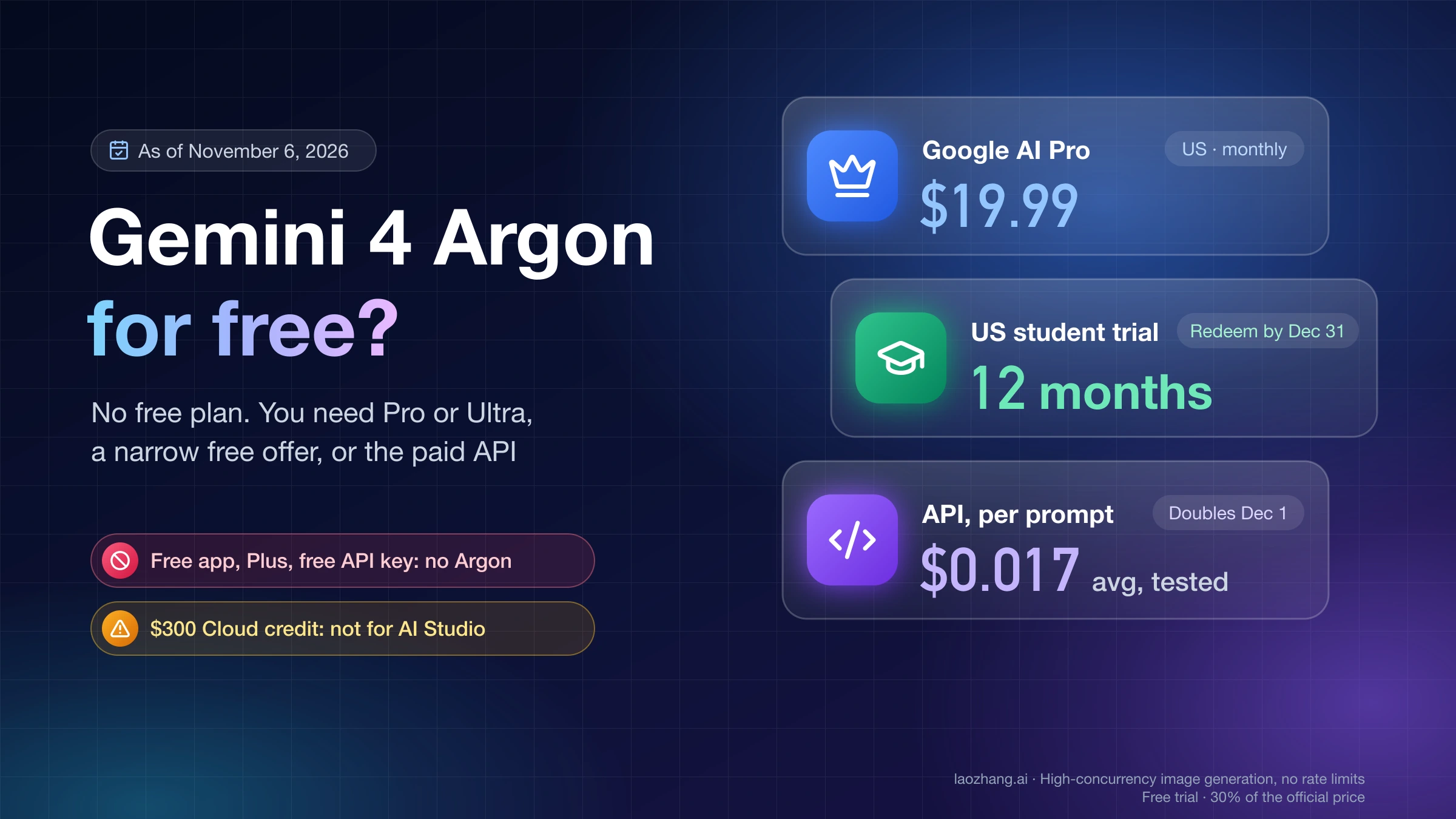
Google AI Pro and Ultra both include Gemini 4 Argon in AI Studio, with higher daily quota on Ultra. Gemini app limits use five-hour and weekly windows; API billing is separate.
On this page
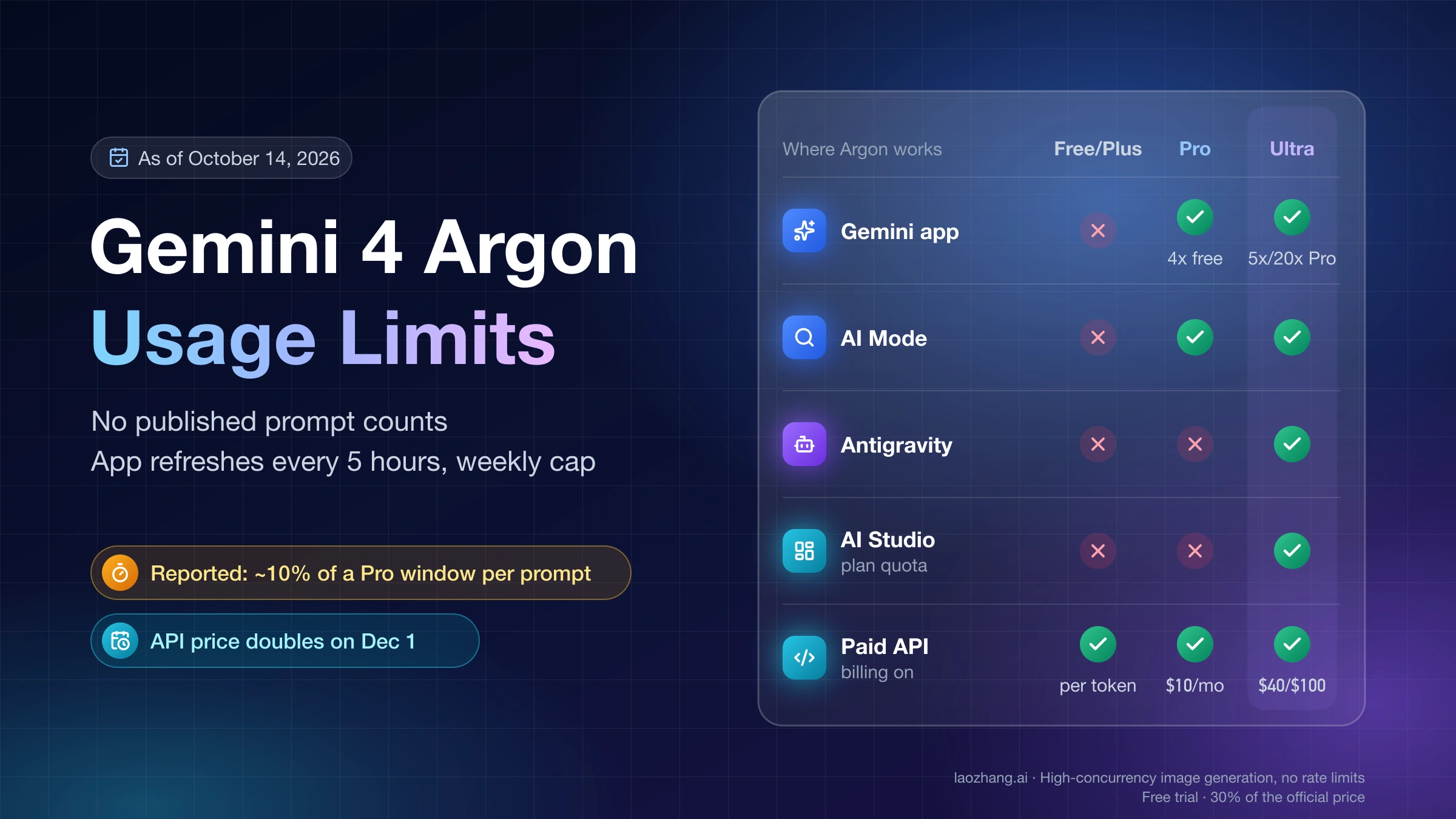
Google AI Pro and Ultra both include Gemini 4 Argon in the AI Studio web interface. Pro has a higher daily quota than Free; Ultra has the highest quota. You do not need Ultra just to access Argon there. Google's AI Studio subscription documentation, checked October 27, 2026, separates that included allowance from calls made with a paid API key.
The reset depends on where you use Argon. In the Gemini app, compute-based usage refreshes every five hours until you reach the weekly limit. AI Studio subscription quota resets daily. Antigravity has its own quota, while API limits belong to your Cloud project. Google does not publish a fixed Argon prompt count in the app limits or AI Studio subscription pages; a short-looking prompt can still use substantial quota because the model, thinking effort and conversation length affect consumption.
If your Gemini app allowance runs out, continue on Flash-Lite, wait for the displayed refresh, or try the AI Studio allowance already included with Pro or Ultra. After AI Studio's daily allowance runs out, a paid Gemini API key provides a separately billed option. The dated 12-call sample below illustrates API token costs; it does not measure consumer prompt quotas.
Where Pro and Ultra can use Gemini 4 Argon, surface by surface
Each product counts usage separately. The table uses the current US subscription plans, Gemini app limits, Antigravity model eligibility, AI Studio subscription rules and API pricing, checked October 27, 2026. Prices are US monthly list prices.
| Product | Free or AI Plus | AI Pro, $19.99 | AI Ultra, $99.99 or $199.99 | How Argon use is counted |
|---|---|---|---|---|
| Gemini app | No Argon | Yes; overall app limit is 4x Free | Yes; overall app limit is 5x or 20x Pro | Compute-based; five-hour refreshes subject to a weekly limit |
| AI Mode in Search | No Argon | Higher access | Highest access | The plans page gives no Argon request count |
| Antigravity | No Argon | Paid Pro, or a trial with an eligible premium device | Yes | Separate agent quota; consult the model's usage meter |
| AI Studio, subscription quota in the web UI | Free has no Argon; Plus is not listed as a qualifying plan | Yes, higher quota | Yes, highest quota | Included daily allowance; reset-based, not a rolling five-hour window |
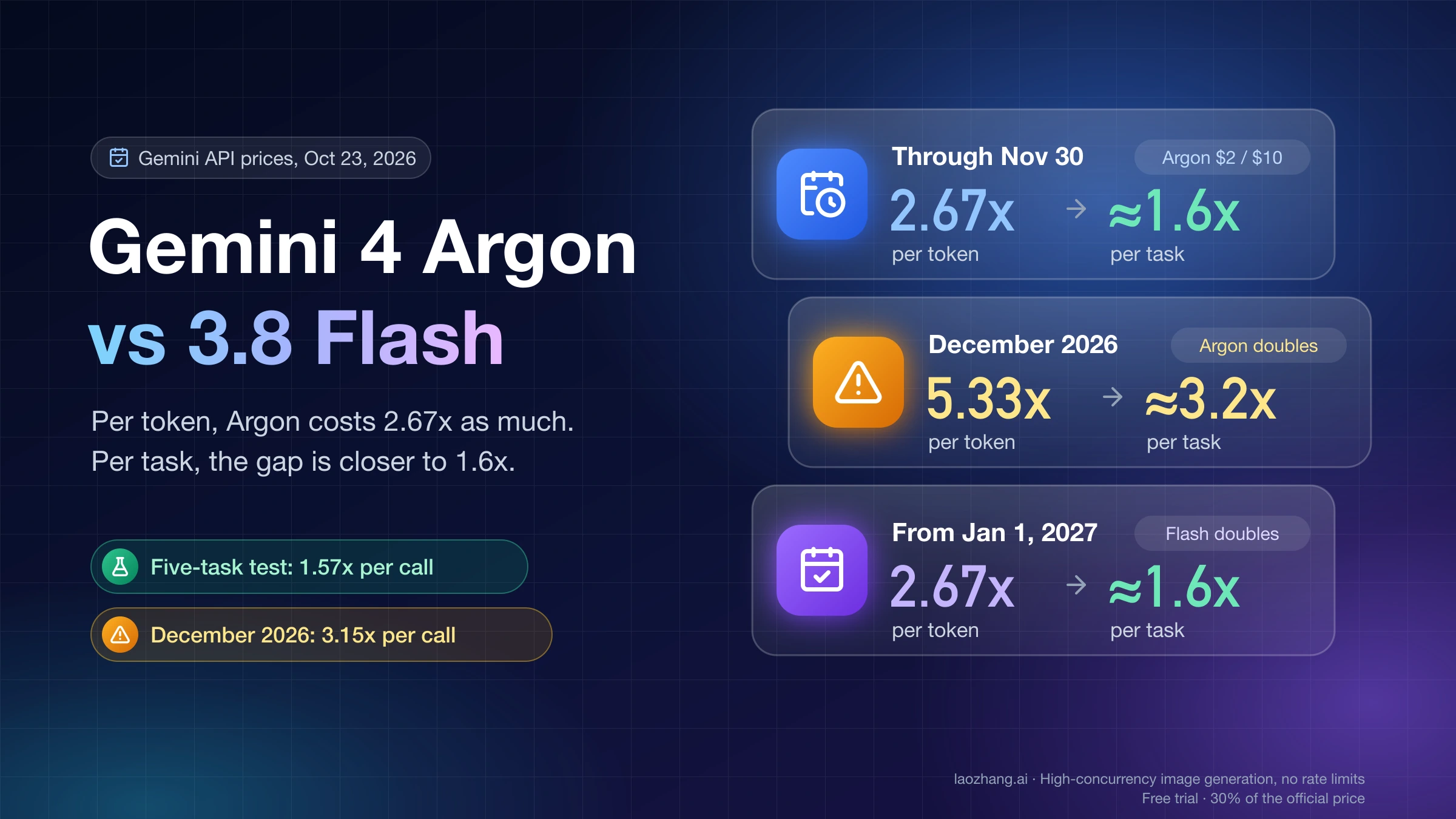
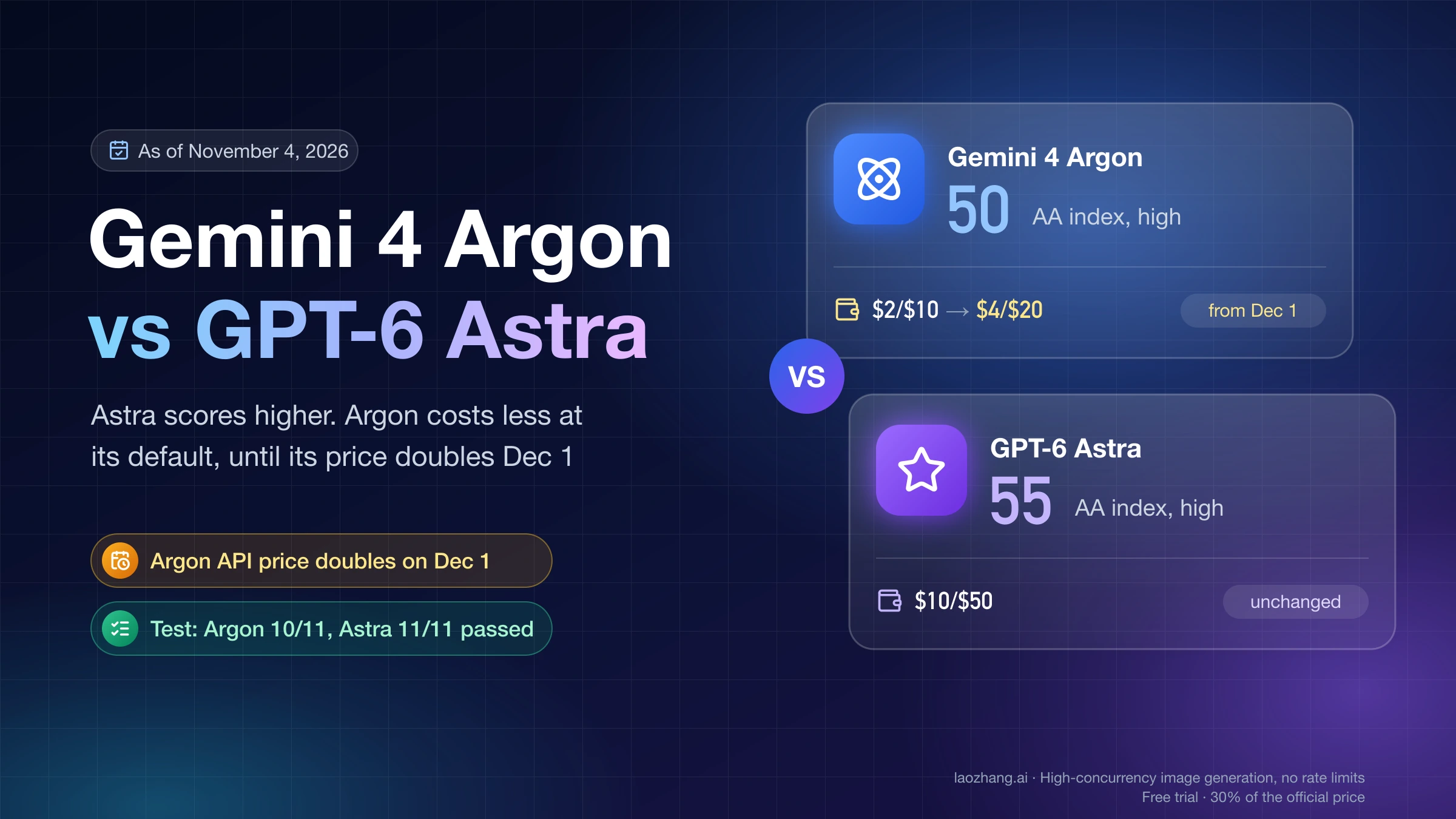
| Gemini API with Cloud Billing, including a paid key selected in AI Studio | Available without a subscription; pay per token | Billed separately; eligible $10 monthly Cloud credit | Billed separately; eligible $40 or $100 monthly Cloud credit | Standard: $2 input / $10 output per 1M tokens through Nov 30, then $4 / $20 from Dec 1 |
The API credit amounts come from the Google Developer Program, which identifies Ultra's credit tiers by storage: 20 TB and 30 TB. Claiming a credit and applying it to billing are separate from receiving AI Studio's included daily quota.
Three distinctions matter when choosing an option:
- AI Studio access is not an Ultra-only benefit. Ultra increases the included quota; Pro already includes Argon.
- An AI Studio subscription allowance does not cover direct API calls. API keys and external applications use separate billing and usage tiers. Agents within AI Studio, including Deep Research and Antigravity Preview, require a paid API key even if you subscribe.
- Google One AI credits and Google Cloud credits are different balances. The AI Studio subscription documentation says Google One AI credits are not supported there. Cloud credits may offset eligible API charges.
These are consumer-plan and developer-billing rules. A work account using Gemini Enterprise has its own eligibility and limits.
Is Argon only available on the Ultra plan? Pro includes AI Studio too
No. Pro includes Argon in the Gemini app, AI Mode and AI Studio. In Antigravity, Google's model list specifies paid Pro or a trial supplied with an eligible premium device, as well as Ultra. An ordinary Pro trial is not listed as qualifying for Antigravity's Argon access.
If AI Studio shows an Ultra-only message, check that you are signed in to the account holding Pro or Ultra and identify whether you are using subscription quota or a selected API key. The current subscription documentation includes Argon on Pro. A missing entitlement, exhausted daily allowance and an API billing problem call for different fixes; the message alone does not establish that you need an Ultra upgrade. For a paid key, inspect the selected project's billing status and limits.
If Argon is missing in Antigravity, compare your plan and trial status with its current model list, then check the model picker in the client you use. The documentation now covers the App, CLI and IDE and no longer carries the old blanket IDE exclusion. That does not establish availability on every account or client version, and this update did not test an IDE session.
How many Argon prompts does Pro get? There is no fixed published count
Google's Gemini Apps limits page, checked October 27, 2026, lists overall usage multipliers: standard limits without a plan, 2x for AI Plus, 4x for AI Pro, and 5x or 20x Pro's limits for Ultra. It does not give an Argon-specific prompt allowance. Neither does the AI Studio subscription page, which describes daily quota as higher on Pro and highest on Ultra.
The app limit is compute-based. Prompt complexity, the model and features you use, and chat length all affect consumption. Advanced models and higher thinking levels use more of the allowance. A message count therefore cannot tell you how much work remains: a long conversation or file analysis can use more than a fresh, simple prompt.
Reports of ten prompts or twenty requests per five hours are not plan entitlements. Nor can you multiply one person's count by Ultra's overall usage multiplier to obtain a reliable Argon allowance. Use your own usage meter and its reset time for the current session.
Google's relative-cost guidance puts simple chat at the low end, long conversations and large file analysis above it, and Deep Research and video generation among the more demanding activities. Start a new chat when you change topics, and use Flash for routine work when its answers meet your needs. Those choices reduce avoidable usage; they do not guarantee a specific number of additional Argon prompts.
How to see your Gemini usage limits and refresh time
In the Gemini app on the web, open Settings at the bottom left and choose Usage Limits. You can also go straight to gemini.google.com/usage. As of October 14, 2026, the page shows "Current usage" as a percentage with its reset time, and a separate "Weekly limit" with its own percentage and a reset date and time. It notes that advanced models and features can use more of the limit, but it doesn't break usage down by model. The app also warns you when you get close to the limit and again when you reach it, and tells you when it refreshes.
The other products keep their own counters:
- Antigravity: check baseline usage in Settings. Its models page illustrates five-hour and weekly meters, but those general meters do not establish a fixed Argon prompt allowance. An October 15 post by Google's Varun Mohan announced a separate weekly Argon quota for paid Pro; use the current meter in your account to see what remains.
- AI Studio subscription quota: the included allowance resets daily under the subscription rules. That daily reset is separate from the Gemini app's windows.
- Gemini API: active rate limits are shown by project and model. The API rate-limit documentation says daily request quotas reset at midnight Pacific time. Check the Cloud credit and prepaid balances on the billing page, not the Gemini app meter.
Gemini 4 Argon in Antigravity: eligibility and separate agent quota
The current Antigravity model list includes Argon for paid Pro, eligible premium-device trials and Ultra. It does not name which devices qualify. Check the plan attached to your signed-in account rather than treating every promotional Pro subscription as equivalent.
Antigravity's plans page describes five-hour and weekly baseline limits, with higher limits on Pro and the highest on Ultra. These depend on the work an agent does and available capacity, not a fixed prompt count. A task that reads files, edits code and reruns tests can consume far more than one short chat. The separate weekly Pro Argon quota announced in Google's October 15 post is a dated product statement; the current account meter is the practical place to check its remaining allowance.
When a model's baseline runs out, the AI Credit Overages setting controls whether Antigravity waits or spends purchased or promotional AI credits:
- Never: wait for the baseline to refresh.
- Always: use available AI credits, then return to baseline quota when it refreshes.
The plans page offers overages to Pro and Ultra at Gemini Enterprise consumption pricing. It does not support bringing your own API key for extra limits. Pro's Google Cloud API credit therefore is not an interchangeable balance for running Argon inside Antigravity.
When you hit the Argon limit: Flash-Lite, a refresh, or API credit
What you can do depends on which counter ran out:
| Where you ran out | What happens | Your options |
|---|---|---|
| Gemini app, five-hour window | The app shows when the window refreshes | Continue on Flash-Lite, wait, or use the separate AI Studio subscription allowance |
| Gemini app, weekly limit | Five-hour refreshes no longer restore access until the weekly reset | Flash-Lite, wait, use AI Studio, or consider a plan with higher app limits |
| Antigravity baseline | AI Credit Overages controls whether work continues | Use available AI credits with Always, or wait with Never |
| AI Studio subscription quota, Pro or Ultra | The included daily baseline is exhausted | Wait for the daily reset or use a paid API key with Cloud Billing |
| Gemini API | A project/model limit, spend cap or billing balance may block calls | Inspect the active limit and billing status; see the Gemini API rate limits guide for tiers and 429 errors |
The app options follow Google's usage-limit help; the other rows follow Antigravity's overage rules, AI Studio's subscription rules and API limits. A paid API key incurs separate charges, which eligible Cloud credits can offset.
Do not buy Google One AI credits assuming they add Argon prompts to every product. The AI Studio documentation explicitly excludes that balance. Antigravity documents its own overage setting; use the purchase terms and limit notice for the product where you intend to spend credits.
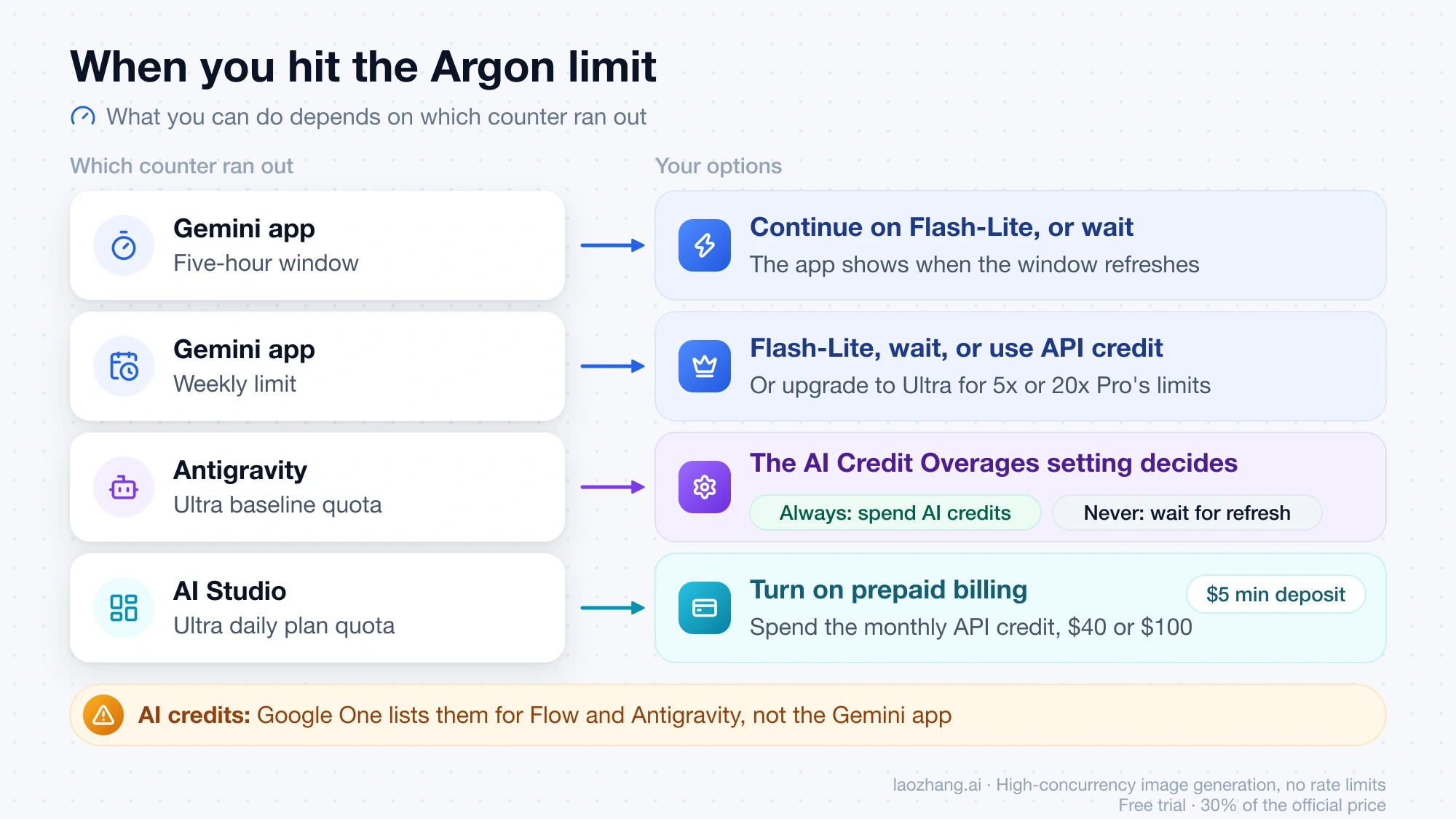
For occasional app limits, start with Flash-Lite or the AI Studio allowance you already have. For repeated coding-agent limits, compare your Antigravity usage with the higher tier or documented overage option. If you need extra single requests through an API, estimate their token cost before deciding how much to spend.
What $10 of API credit buys: a budget example from 12 dated requests
The figures below come from 12 requests sent to gemini-4-argon on October 14, 2026, through LaoZhang API's Gemini-native endpoint. Every response reported modelVersion as gemini-4-argon. Costs are calculated from the token counts in each response at Google's list price, not from a bill. Each prompt ran once, with no rerolls.
Disclosure: laozhang.ai is our own service. Its prices are platform pricing, not an independent comparison.
The prompts covered five everyday tasks: a one-line email subject, a pen-pack word problem, a Python function with 6 pytest tests, a three-turn travel chat turned into a table with a budget, and an 8-bullet summary of an article of about 6,700 words.
Thinking tokens showed up only when the request set thinkingLevel to high. Requests with no thinking setting, and the coding prompt at low and medium, reported no thinking tokens at all. Google's own endpoint wasn't part of the test, so its default may differ. The sample did not measure thinking settings in the Gemini app.
| Task | Input tokens | Thinking tokens at high | Output tokens at high | Cost at high | Cost with no thinking setting |
|---|---|---|---|---|---|
| Email subject line | 53 | 646 | 126 | $0.0078 | $0.0011 |
| Pen-pack word problem | 92 | 1,057 | 279 | $0.0135 | $0.0036 |
| Python function + 6 tests | 91 | 1,343 | 567 | $0.0193 | $0.0052 |
| 3-turn chat to table + budget | 267 | 808 | 766 | $0.0163 | $0.0079 |
| ~6,700-word article summary | 11,102 | 1,461 | 1,199 | $0.0488 | $0.0330 |
Using Google's Standard Argon token rates, the formula is input tokens × $2 per million plus thinking and output tokens × $10 per million, since thinking bills as output. These rates run through November 30, 2026; the published December 1 rates are $4 and $20. For the summary at high: 11,102 × $2/1M = $0.0222, plus (1,461 + 1,199) × $10/1M = $0.0266, for $0.0488 in total. From December 1 both rates double, so every cost doubles. The word problem came back correct ($41.50 for four 10-packs and three 6-packs). The code looked plausible but wasn't executed.
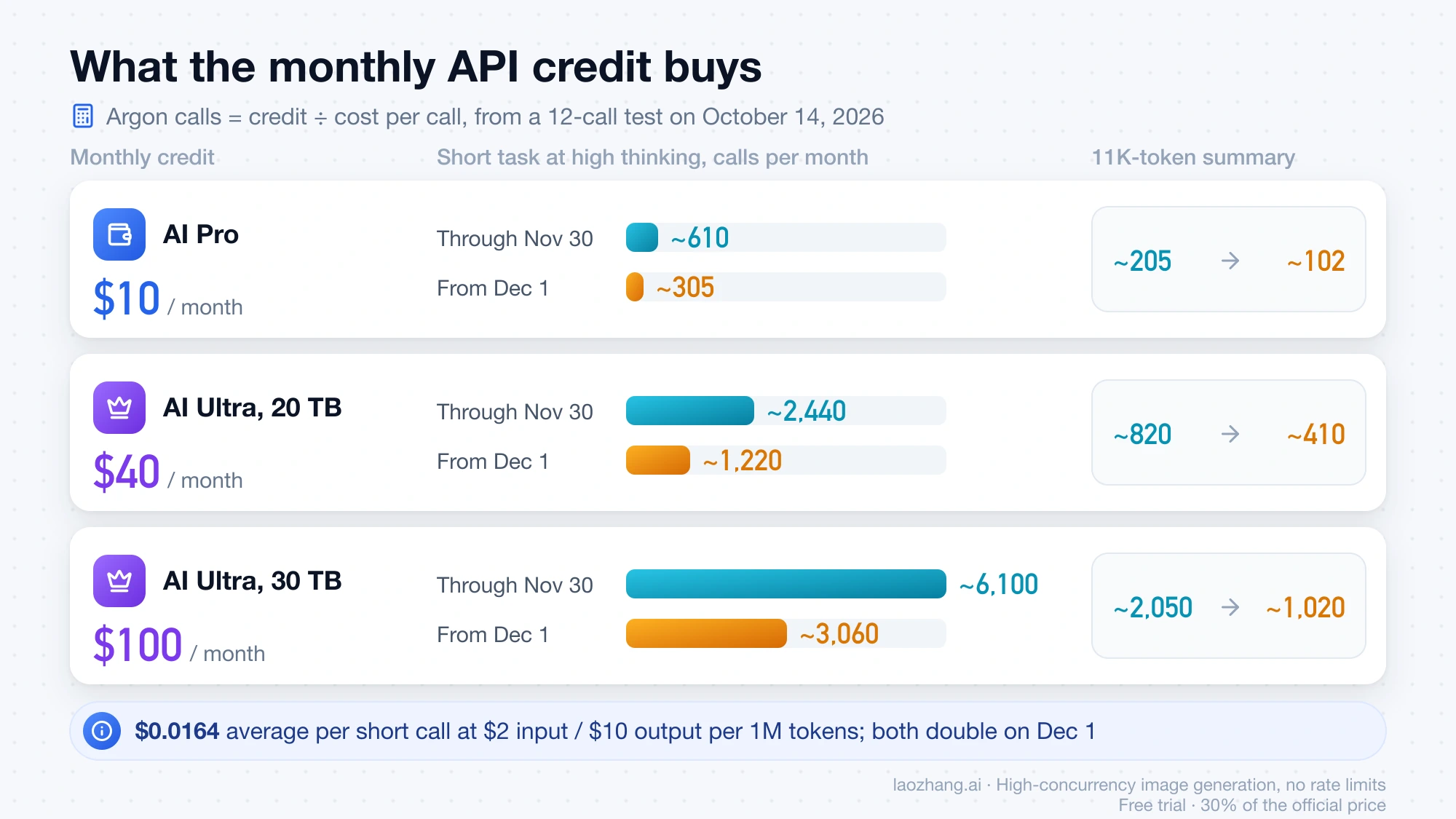
For a budget example, the word problem, coding and chat tasks averaged about $0.0164 per call at high. The Developer Program credit amounts are $10 a month with Pro and $40 or $100 with Ultra. If every request used the same token amounts and the entire credit went to these calls at Google's Standard rates, dividing credit by cost gives the following estimates. They exclude additional tool charges and are not guaranteed request quotas:
| Monthly credit | Estimated short calls, through Nov 30 | Estimated short calls, from Dec 1 | Estimated 11K-token summaries, through Nov 30 | Estimated summaries, from Dec 1 |
|---|---|---|---|---|
| $10, AI Pro | ~610 | ~305 | ~205 | ~102 |
| $40, AI Ultra (20 TB) | ~2,440 | ~1,220 | ~820 | ~410 |
| $100, AI Ultra (30 TB) | ~6,100 | ~3,060 | ~2,050 | ~1,020 |
Without reported thinking tokens, the same three short tasks averaged about $0.0056, which gives a different $10 budget estimate of roughly 1,800 calls. It is not an upper bound: longer outputs, different thinking behavior and retries change the result.
These figures describe the sampled single requests. An agent session can resend context and run many model calls for one task, so it can cost much more. The Gemini app and AI Studio subscription allowances are not dollar-denominated; neither can be converted into prompt counts using this table. The sample also does not establish the default thinking behavior or bill on Google's own endpoint.
How to use Pro or Ultra API credits for Argon in AI Studio
Google AI Pro includes $10 a month in eligible Cloud credits through the Google Developer Program, and Ultra includes $40 for the 20 TB tier or $100 for the 30 TB tier. Check your benefits page for the amount attached to your subscription.
You only need this billing route when using a paid API key or going beyond the included AI Studio subscription allowance. For an eligible account:
- Sign in to AI Studio with the Google account holding your Pro or Ultra plan.
- Open Projects, identify the project you intend to use and select Set up billing if needed. Follow the offered billing plan; Prepay requires an initial purchase of at least $5, while eligible accounts may be offered Postpay.
- Open your Developer Program benefits, redeem the available Cloud credit and apply it to the billing account linked to that project.
- Confirm the credit on AI Studio Billing, then use that project's paid key for
gemini-4-argon. Check usage against the same project after your first request.
Google's billing guide says a Prepay account must have a positive paid balance before promotional Cloud credits can be used; eligible promotional credits are consumed first. Check each credit's expiry in your account rather than assuming it rolls over indefinitely. If you want to call Argon from your own code, the Google AI Studio API key guide explains project selection and secure key handling.
Rate limits on this route are per project, not per API key. Google prints no requests-per-minute figures for Argon, only the per-model numbers inside AI Studio and a Batch queue limit of 5,000,000 enqueued tokens at Tier 1. A newly billed account starts at Tier 1, with the $250 billing-tier cap listed in Google's rate-limit documentation. Tier mechanics and 429 handling are covered in the Gemini API rate limits guide.
The prices behind the credit, per million tokens, are $2 input, $10 output including thinking, and $0.10 for cached input through November 30, 2026. From December 1 they become $4, $20 and $0.20. Batch and Flex cost half the Standard rate. These are Google's published API rates, separate from subscription quota.
Is Ultra worth it for Gemini 4 Argon? What the extra $80 buys
At the US list prices, Ultra at $99.99 costs $80 a month more than Pro. For Argon, compare three benefits:
- More included quota in AI Studio and Antigravity. Pro already includes Argon in AI Studio. Ultra raises the daily allowance; it does not unlock an otherwise unavailable model. Antigravity also gives Ultra higher limits, without a published Argon request count.
- Higher overall Gemini app limits. The $99.99 tier advertises 5x Pro's usage allowance and the $199.99 tier 20x. These are not fixed Argon prompt counts.
- A larger eligible monthly Cloud credit. The Developer Program lists $40 or $100 for Ultra's storage tiers, versus $10 for Pro.
For occasional extra answers, first try Pro's included AI Studio allowance. If you need separately billed calls, the historical $0.0164-per-call sample makes $80 equivalent to roughly 4,900 short high-thinking calls at the introductory token rates, or about 2,440 at the December rates. That is a budget comparison under the sample's token assumptions, not a calculation of Ultra's value or a guarantee that the API is cheaper for your workload.
Ultra is worth considering when interruptions in the Gemini app or Antigravity regularly block work and staying in those interfaces matters to you. Check the limits you actually exhaust before upgrading. The public quota descriptions are insufficient to calculate an Argon-only break-even point or promise that Ultra will remove those interruptions.
Argon's 1M token limit is a context limit, not a usage limit
The "1M token limit" in Google's Argon announcements is about how much a single request can hold, not how much you can use. The Gemini 4 Argon model page lists a context window of 1,048,576 tokens shared between input and output. Maximum output is 65,536 tokens for a default synchronous response and up to 1,048,576 with long decode. Coverage of Google's September 30 announcement described a 1M output limit, up from 64,000. The October 13 wording is a "1M unified input-output token limit via the Gemini API."
In the Gemini app, the help page gives Pro and Ultra a 1 million token context window, compared with 128k on AI Plus and 32k without a plan. That's the window for a conversation, separate from the five-hour and weekly allowances.
Gemini 4 Argon usage limits FAQ
Does the Gemini Pro subscription have a limit on Gemini 4 Argon?
Yes. In the Gemini app, Argon uses the compute-based allowance, which refreshes every five hours until the weekly limit is reached. In AI Studio, Pro includes a separate daily subscription quota. Neither page publishes a fixed Argon prompt count.
Is there a limit of 20 requests per 5 hours for Argon on Gemini Pro?
Google's app limits page does not specify twenty Argon requests, or any other fixed per-model count. Prompt complexity, thinking effort and conversation length affect consumption. Check Settings → Usage Limits for your remaining allowance and refresh time.
How do I avoid hitting Gemini limits when using Argon?
Start a new chat when you change topics and use Flash for routine follow-ups if it meets your needs. At the app limit, you can continue on Flash-Lite or try your Pro or Ultra AI Studio daily allowance. A paid API key provides additional, separately billed usage after that allowance is exhausted.
Can I use Gemini 4 Argon for free?
Argon is not included in the Gemini API Free tier or AI Studio's Free plan. Pro and Ultra include an AI Studio allowance within the subscription. Promotional access has its own conditions: for example, Antigravity lists Pro trials supplied with eligible premium devices. A monthly Cloud credit attached to a subscription is not an unrestricted free API tier.
Do I need a paid API key to use Argon in AI Studio on Pro?
Not for the included subscription allowance in the AI Studio web interface. A paid key is needed for direct API calls, continued API usage after the daily allowance runs out, and AI Studio agents such as Deep Research and Antigravity Preview. Google distinguishes these explicitly in its AI Studio subscription documentation.
Do AI credits give me more Argon prompts in the Gemini app?
Do not assume that an AI-credit purchase extends every Argon allowance. Antigravity documents AI Credit Overages for Pro and Ultra; AI Studio does not accept Google One AI credits. For the Gemini app, rely on the current in-app offer and its terms before buying credits for extra prompts. Google Cloud API credits pay for eligible API charges separately.
Sources15
External pages this guide links to, in the order they appear. Last updated Oct 27, 2026.
Sources15
External pages this guide links to, in the order they appear. Last updated Oct 27, 2026.
- 1.AI Studio subscription documentationai.google.dev/gemini-api/docs/google-ai-plans
- 2.compute-based usage refreshes every five hours until you reach the weekly limitsupport.google.com/gemini/answer/16275805
- 3.US subscription plansgemini.google/us/subscriptions
- 4.Antigravity model eligibilityantigravity.google/docs/models
- 5.API pricingai.google.dev/gemini-api/docs/pricing
- 6.Google Developer Programdevelopers.google.com/program/plans-and-pricing
- 7.post by Google's Varun Mohanx.com/_mohansolo/status/2110866446020710657
- 8.active rate limitsaistudio.google.com/rate-limit
- 9.API rate-limit documentationai.google.dev/gemini-api/docs/rate-limits
- 10.billing pageaistudio.google.com/billing
- 11.plans pageantigravity.google/docs/plans
- 12.Projectsaistudio.google.com/projects
- 13.Developer Program benefitsme.developers.google.com/benefits
- 14.billing guideai.google.dev/gemini-api/docs/billing
- 15.Gemini 4 Argon model pageai.google.dev/gemini-api/docs/models/gemini-4-argon